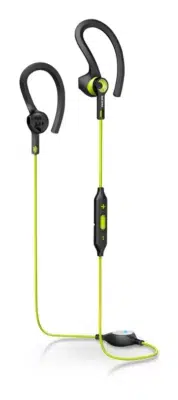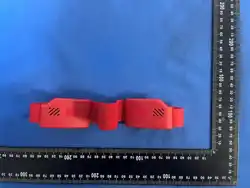

User Manual for Sports
Headband Bluetooth Earphones
Preface
Thank you for purchasing this sports headband Bluetooth earphones! This product
integrates a sports headband and Bluetooth earphones. Made of soft and skin-
friendly fabric, it fits the head firmly without slipping, featuring sweat absorption,
breathability, wireless music playback and calling functions. Specially designed for
running, fitness, yoga and other sports scenarios, it brings you a comfortable and
unrestricted sports audio-visual experience. Please read this manual carefully before
use to operate the product correctly and achieve better performance.
1. Product List
• Bluetooth earphones (left and right) × 2
• Silicone headband × 1
• Pull straps (three sizes) × 3
• Type-C dual-head charging cable × 1
• Product user manual × 1
2. Product Parameters
1. Bluetooth version: 6.0
2. Transmission distance: 10 meters (in an obstacle-free environment)
3. Battery life: About 8 hours for music playback, 5 hours for calls, 90 hours for
standby
4. Charging time: About 1.5-2 hours
5. Working voltage: 3.7V
6. Speaker impedance: 32Ω
7. Waterproof rating: IPX4 (sweat and light rain resistant, not immersible)
8. Product material: High-elastic breathable knitted fabric, eco-friendly silicone
3. Product Components
1. Multi-function button: Power on/off, play/pause, answer/end calls

2. Microphone: High-definition call pickup
3. Type-C charging port: Charging interface of the product
4. Earphone speaker unit: Built-in hidden speaker
5. Elastic headband main body: Absorbs sweat and fixes on the head
4. Usage Tutorial
(1) Power On and Bluetooth Pairing
1. Long press the multi-function button for 3 seconds to power on. The indicator
flashes red and blue alternately, entering Bluetooth pairing mode.
2. Turn on the Bluetooth settings of your mobile phone/tablet and other devices,
search for the device name "Easeburn", and click to complete pairing and connection.
3. After successful connection, the indicator flashes blue slowly and you can use it
normally.
(2) Power Off
Long press the multi-function button for 3 seconds. The indicator lights up red and
then goes off, and the product is powered off.
(3) Music Playback Control
• Play/Pause: Short press the multi-function button
(4) Call Control
• Answer an incoming call: Short press the multi-function button
• End an incoming call: Short press the multi-function button
• Reject an incoming call: Long press the multi-function button for 2 seconds
(5) Automatic Connection
After the product is turned off, it will automatically connect to the paired device when
powered on again without re-pairing.
5. Charging Method
1. When the product power is too low, the indicator flashes red to prompt charging.
2. Connect one end of the Type-C charging cable to the product charging port, and
the other end to a 5V/1A charger or USB interface.
3. When charging, the indicator stays red; when fully charged, the indicator turns
blue and stays on. Unplug the charging cable for use.

6. Wearing Method
1. Unfold the headband Bluetooth earphones, and insert the pull strap and silicone
strap into both sides of the earphone card slots respectively.
2. Put it on from the top of your head down, adjust the position of the headband to
make the speaker units fit your ears, and fix the headband firmly on your head.
3. During exercise, you can choose high-elastic pull straps of different sizes
according to your head circumference to ensure comfortable wearing and no slipping.
7. Notes
1. This product has an IPX4 waterproof rating, which can resist sports sweat and
light rain. Do not immerse the product in water or let water enter the charging port to
avoid damage.
2. Do not store or use the product in high-temperature, humid, dusty environments,
and keep it away from fire sources.
3. Use a compliant 5V/1A charger when charging to avoid damaging the battery
with a high-power charger.
4. Do not pull or bend the headband main body vigorously to avoid damaging the
internal circuits.
5. If the product is not used for a long time, charge it once a month to avoid battery
damage due to power loss.
6. Do not disassemble or modify the product by yourself, otherwise you will lose the
warranty qualification.
7. People with ear diseases or hearing impairments should lower the volume during
use to avoid hearing damage.
8. When using while cycling, driving, etc., do not turn the volume too high to avoid
affecting the perception of surrounding sounds and ensure safety.
8. Cleaning and Maintenance
1. Make sure the product is turned off and the charging port is completely dry
before cleaning.
2. Stains on the surface of the headband can be removed by disassembly and
washing.
3. After cleaning, place it in a cool and ventilated place to dry, avoiding direct
sunlight.
4. Do not squeeze or drop the product to prevent damage to internal components.
9. Common Problems and Solutions
1. Unable to power on/charge
Solution: Check if the charging cable is connected properly, recharge for 10 minutes
and try to power on again; make sure there is no dust or foreign matter blocking the
charging interface.
2. Bluetooth connection failed
Solution: Turn off the product Bluetooth and restart it, restart the device Bluetooth;
delete the paired records on the device and search for pairing again; ensure the
distance between the product and the device is within 10 meters without obstacles.
3. Music playback lags/no sound
Solution: Shorten the distance between the product and the Bluetooth device, stay
away from interference sources; check the product power and charge in time; restart
the product and the Bluetooth device.
4. The other party cannot hear you during a call
Solution: Make sure the microphone position is not blocked, adjust the wearing
position; check the device call volume and restart the call function.
10. Warm Tips
• Place product accessories and packaging out of reach of children to avoid
dangers such as ingestion or entanglement.
• When wearing for a long time, it is recommended to loosen the headband
properly to avoid discomfort from head pressure.
• The final interpretation right of this product manual belongs to the manufacturer.
The product is subject to upgrade without prior notice.
If you have any usage problems, please contact the after-sales customer service for
consultation. Thank you for your support!

FCC Warnning:
This equipment has been tested and found to comply with the limits for a Class B digital device,
pursuant to part 15 of the FCC Rules. These limits are designed to provide
reasonable
protection against harmful interference in a residential installation. This equipment generates,
uses and can radiate radio
frequency
energy
and,
if
not
installed
and
used
in
accordance
with
the
instructions,
may cause
harmful
interference
to
radio
communications.
However,
there
is
no
guarantee
that interference
will
not
occur
in
a
particular
installation.
If
this
equipment
does
cause
harmful interference to radio or television reception, which can be
determined by turning the equipment off
and
on,
the
user
is
encouraged
to
try
to
correct
the interference
by
one
or
more
of
the following measures:
•
Reorient or relocate the receiving antenna.
•
Increase the separation between the equipment and receiver.
•
Connect the equipment into an outlet on a circuit different from that to which the receiver is
connected.
• Consult the dealer or an experienced radio/TV technician for help.
Caution:
Any
changes
or
modifications
to
this
device
not
explicitly
approved
by
manufacturer
could void your authority to operate this equipment.
This
device
complies
with
part
15
of
the
FCC
Rules.
Operation
is
subject
to
the
following
two
conditions:
(1)This
device
may
not
cause
harmful
interference,
and
(2)
this
device
must
accept
any
interference received, including interference that may cause undesired operation.
This
equipment
complies
with
FCC
radiation
exposure
limits
set
forth
for
an
uncontrolled
environment.
This
equipment
should
be
installed
and
operated
with
minimum
distance
0cm
between the radiator and your body.