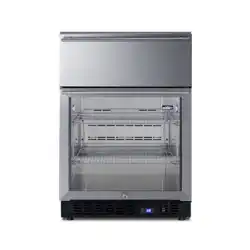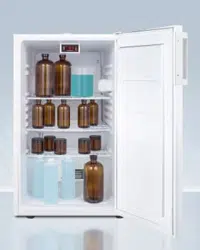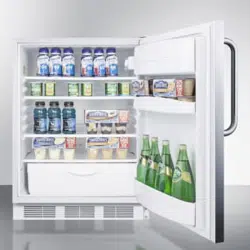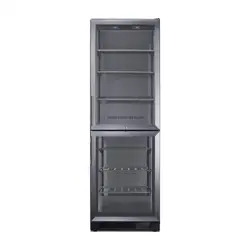
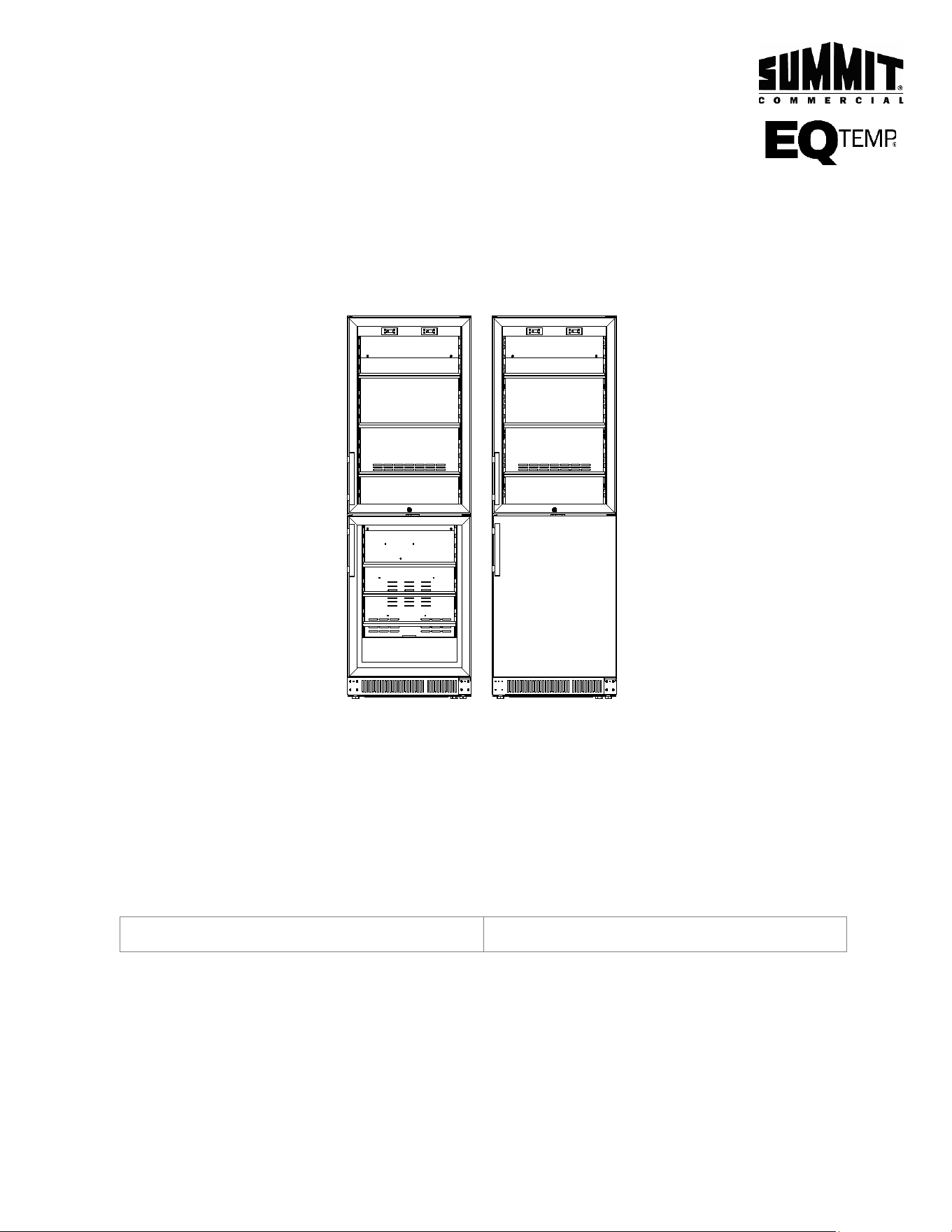
BOTTOM MOUNTED
COMMERCIAL REFRIGERATOR/FREEZER
User Manual
MODELS:
SCRF12 LCRF125 ACRF115 ACRF116GS
BEFORE USE, PLEASE READ AND FOLLOW ALL SAFETY RULES AND OPERATING INSTRUCTIONS.
Models:
Serial Number:
Felix Storch, Inc.
An ISO 9001:2015 registered company
770 Garrison Ave
Bronx, New York 10474
www.summitappliance.com

2
TABLE OF CONTENTS
Appliance Safety 3
Important Safeguards 3-5
Disposal 5
Electrical Connection 6
Location of Parts 7
Installation Instructions 8-11
Before Using Your Appliance 8
Installation of Your Appliance 8-9
Reversing the Door Swing of Your Appliance 10
Installing the Stainless Steel Handle 11
Operating Your Appliance 12-15
Control Panel 12-14
Sabbath Mode 14
Temperature Memory Function 14
Defrosting 14
Using the Freezer 15
Temperature Alarm / Door Alarm 15
Door Lock 15
Shelves 15
Care and Maintenance 16
Cleaning Your Appliance 16
Power Failure 16
Vacation 16
Moving Your Appliance 16
Energy-Saving Tips 16
Troubleshooting 17-18
Limited Warranty 19
3
APPLIANCE SAFETY
Your safety and the safety of others are very important.
We have provided many important safety messages in this manual and on your appliance. Always read
and obey all safety messages.
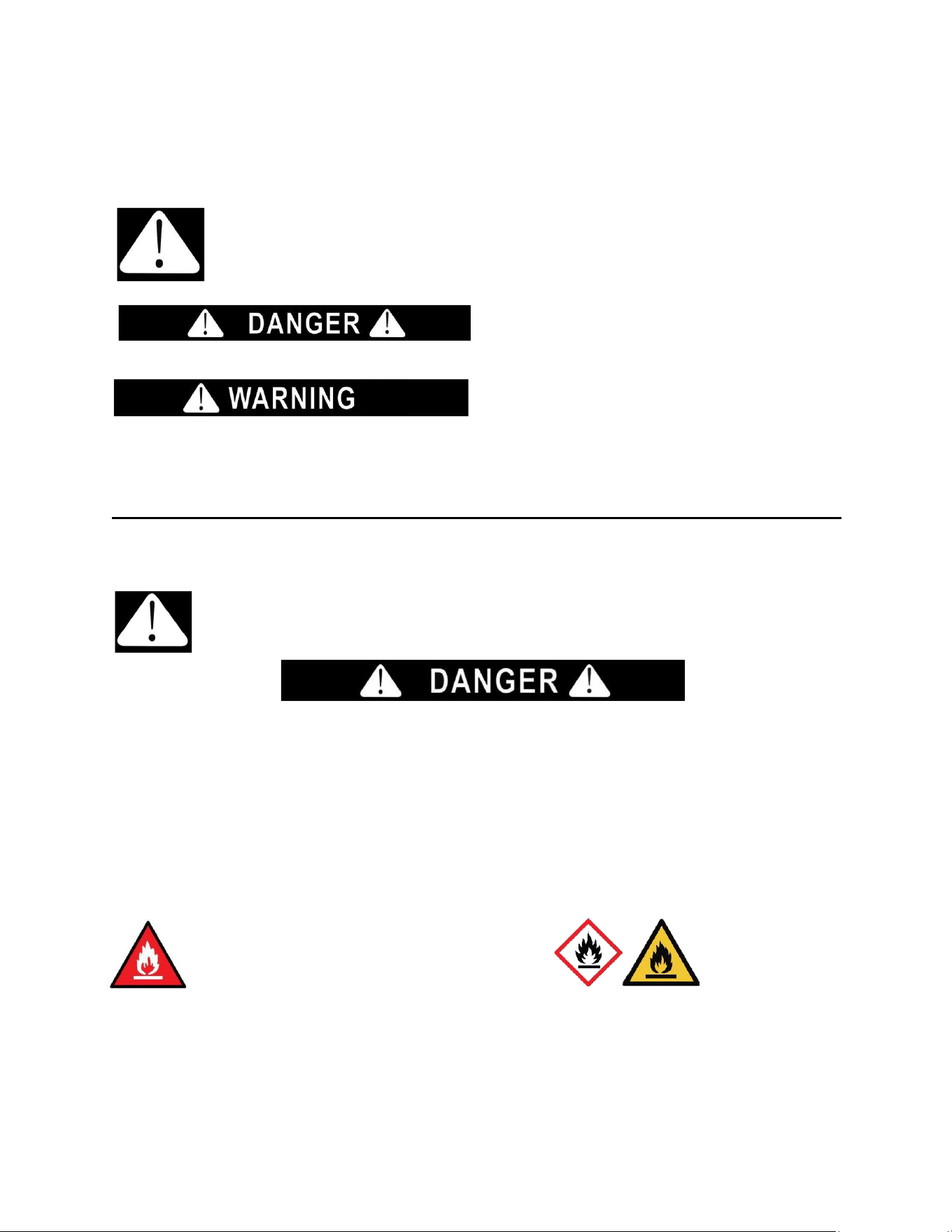
This is the Safety Alert Symbol. The symbol alerts you to potential hazards that can kill or injure you
and others. All safety messages will follow the Safety
Alert Symbol and either the word DANGER or WARNING.
DANGER means that failure to heed this
safety statement may result in severe personal
injury or death.
WARNING means that failure to heed this
safety statement may result in extensive
product damage, serious personal injury, or
death.
All safety messages will alert you about the potential hazard, tell you how to reduce the chance of injury,
and let you know what can happen if the instructions are not followed.
IMPORTANT SAFEGUARDS
Before the appliance is used, it must be properly positioned and installed as described in this
manual, so read the manual carefully. To reduce the risk of fire, electrical shock or injury when using
the appliance, follow basic precautions, including the following:
• Plug into a grounded 3-prong outlet, do not remove the grounding prong, do not use an adapter, and do not use an extension cord.
• Replace all panels before operating.
• It is recommended that a separate circuit serving only your appliance be provided. Use receptacles that cannot be turned off by a
switch or pull chain.
• WARNING: Never clean appliance parts with flammable fluids. These fumes can create a fire hazard or explosion. And do not store
or use gasoline or other flammable vapors and liquids or explosive substances such as aerosol cans with a flammable propellant in
this appliance or in the vicinity of this or any other appliance. The fumes can create a fire hazard or explosion.
• Do not connect or disconnect the electric plug when your hands are wet.
• Unplug the appliance or disconnect the power before cleaning or servicing. Failure to do so can result in electrical shock or death.
• Do not attempt to repair or replace any part of your appliance unless it is specifically recommended in this manual. All other servicing
should be referred to a qualified technician.
• If the power cord is damaged, it must be replaced by the manufacturer, its service agent or similar qualified person in order to avoid
a hazard.
A3 Warning: Risk of Fire / Flammable Materials. R600a
4
• This appliance is CFC- and HFC-free and contains small quantities of Isobutane (R600a) which is
environmentally friendly, but flammable. It does not damage the ozone layer, nor does it increase the
greenhouse effect. Care must be taken during transportation and setting up of the appliance so that no
parts of the cooling system are damaged. Leaking coolant can ignite and may damage the eyes.
• In the event of any damage:
o Avoid open flames and anything which creates a spark.
o Disconnect from the power supply,
o Air the room in which the appliance is located for several minutes and contact the Service
Department for advice.
• The more coolant there is in an appliance, the larger the room it should be installed in. In the event of
a leakage, if the appliance is in a small room, there is the danger of combustible gases building up. For
every ounce of coolant, at least 325 cubic feet of room space is required. The amount of coolant in the
appliance is stated on the data plate inside the appliance. It is hazardous for anyone other than an
Authorized Service Person to carry out servicing or repairs to this appliance.
• Take serious care when handling, moving, and using the appliance to avoid either damaging the
refrigerant tubing or increasing the risk of a leak.
• Replacing component parts and servicing shall be done by factory-authorized service personnel, so as
to minimize the risk of possible ignition due to incorrect parts or improper service.
• This appliance is not intended for use by persons (including children) with reduced physical, sensory or
mental capabilities, or lack of experience and knowledge, unless they have been given supervision or
instruction concerning use of the appliance by a person responsible for their safety.
• Children should be supervised to ensure that they do not play with the appliance.
FOLLOW THE WARNING CALLOUTS BELOW ONLY WHEN APPLICABLE TO YOUR MODEL
• Use two or more people to move and install the appliance. Failure to do so can result in back or other
injuries.
• WARNING: Keep ventilation openings, in the appliance enclosure or in the built-in structure, clear of
obstruction.
• WARNING: Do not use mechanical devices or other means to accelerate the defrosting process or to
clean, other than those recommended by the manufacturer.
• WARNING: The appliance shall be stored in a room without continuously operating ignition sources (for
example: open flames, an operating gas appliance or an operating electric heater.
• WARNING: Do not pierce or burn. Do not damage the refrigerant circuit.
• WARNING: Be aware that refrigerants may not contain an odor.
• WARNING: Do not use electrical appliances inside the food storage compartments of the
appliance, unless they are of the type recommended by the manufacturer.
• WARNING: To avoid a hazard due to instability of the appliance, it must be fixed in accordance with the
instructions.
• WARNING: When positioning the appliance, ensure the supply cord is not trapped or damaged.
• WARNING: Do not locate multiple portable socket-outlets or portable power supplies at the rear of the
appliance.
• WARNING: Danger of injury from LED lamp. If the cover is defective: do not look directly into the
illumination with optical lenses from close proximity. The eyes can be injured.
• CAUTION: Use this appliance only for its intended purpose. This equipment is intended for the
storage and display of packaged products only.
• To ensure proper ventilation for your appliance, the front of the unit must be completely unobstructed.
Choose a well-ventilated area with temperatures above 44°F (7°C) and below 90°F (32°C).
• The appliance should not be located next to ovens, grills, or other sources of high heat.
• The appliance must be installed with all electrical, water, and drain connections in accordance with state
and local codes. A standard electrical supply (115 V AC only, 60 Hz), properly grounded in accordance
with the National Electrical Code and local codes and ordinances, is required.
• Do not kink or pinch the power supply cord of the appliance. The size of the fuse (or circuit breaker)

5
should be 15 amperes.
• It is important that the appliance be leveled in order to work properly. You may need to make several
adjustments to level it.
• All installations must be in accordance with local plumbing code requirements.
• Make certain that the pipes are not pinched, kinked, or damaged during installation.
• Check for leaks after connection.
• Never allow children to operate, play with or crawl inside the appliance.
• Do not use solvent-based cleaning agents or abrasives on the interior. These cleaners may damage or
discolor the interior.
• Use this appliance only for its intended purpose as described in this Instruction Manual.
• Keep fingers out of the “pinch point” areas. Clearances between the door and cabinet are necessarily
small. Be careful closing the door when children are in the area.
• This appliance is intended to be used in household and similar applications such as:
o staff kitchen areas in shops, offices and other working environments
o farmhouses and by clients in hotels, motels, and other residential type of environments
o bed and breakfast type environments
o catering and similar non-retail applications
- SAVE THESE INSTRUCTIONS -
DISPOSAL
Dispose of your appliance packaging properly. Ensure that any plastic wrappings, bags, etc.,
are disposed of safely and kept out of the reach of babies and young children. Danger of
suffocation!
Refrigeration equipment must be properly disposed of in a professional and appropriate way,
in accordance with the current local regulations and laws which protect the environment. This
applies to your old appliance and to your new unit once it has reached the end of its service
life.
WARNING: Please ensure that old, worn appliances are rendered unusable before disposal
by removing the doors, removing the plug, cutting the network cable, and removing or
destroying any snap fastenings or bolts. Leave shelving in place. You will thus prevent children
from locking themselves in the appliance during play (risk of suffocation) or endangering their
lives in any other way. DO NOT dispose of the appliance in landfill as the insulation
(Cyclopentane) and refrigerant gas (R600a) contained in these appliances are flammable.
Disposal instructions:
• The appliance must not be disposed of in the dustbin or with normal household rubbish.
• The coolant circuit, particularly the heat exchanger at the back/bottom of the unit, must not be damaged.
• The appliance is not to be handled as normal household waste but is to be taken to a recycling collection
point for electrical and electronic goods. By correctly disposing of this product, you are contributing to
the protection of the environment and to the health of your fellow human beings. Improper disposal
endangers health and the environment. Further information about the recycling of the product may be
obtained from your town hall, refuse collection department or the store where you purchased the
product.
6
Risk of child entrapment!
Child entrapment and suffocation are not problems of the past. Junked or abandoned
appliances are still dangerous, even if they will “just sit for a few days.”
Before you throw away your old refrigerator or freezer:
•
Take off the doors
•
Leave the shelves in place so that children may not easily climb inside.
Electrical Connection
This appliance should be properly grounded for your safety. The power cord of this appliance is equipped
with a three-prong plug which mates with standard three-prong wall outlets to minimize the possibility of
electrical shock.
Do not under any circumstances cut or remove the third (grounded) prong from the power cord supplied.
For personal safety, this appliance must be properly grounded. Any questions concerning power and/or
grounding should be directed toward a certified electrician or an authorized service center.
This appliance requires a standard 115/120 Volt AC ~ 60Hz three-prong grounded electrical outlet. Have
the wall outlet and circuit checked by a qualified electrician to make sure the outlet is properly grounded.
When a standard 2-prong wall outlet is encountered, it is your responsibility and obligation to have it
replaced with a properly grounded 3-prong wall outlet.
To prevent accidental injury, the cord should be secured behind the appliance and not left exposed or
dangling.
The appliance should always be plugged into its own individual electrical outlet which has a voltage rating
that matches the rating label on the appliance. This provides the best performance and also prevents
overloading house wiring circuits that could cause a fire hazard from overheating. Never unplug the
appliance by pulling on the power cord. Always grip the plug firmly and pull it straight out from the
receptacle. Repair or replace immediately all power cords that have become frayed or otherwise damaged.
Do not use a cord that shows cracks or abrasion damage along its length or at either end. When moving
the appliance, be careful not to damage the power cord.
Extension Cord
Because of potential safety hazards under certain conditions, it is strongly recommended that you do not
use an extension cord with this appliance. However, if you must use an extension cord, it is absolutely
necessary that it be a UL/CUL-Listed, 3-wire grounding type appliance extension cord having a grounding
type plug and outlet and that the electrical rating of the cord is 115 volts and at least 10 amperes.
WARNING
Improper use of the grounded plug can result in the risk of electrical shock. If the power cord is
damaged, have it replaced by a qualified electrician or an authorized service center.
7
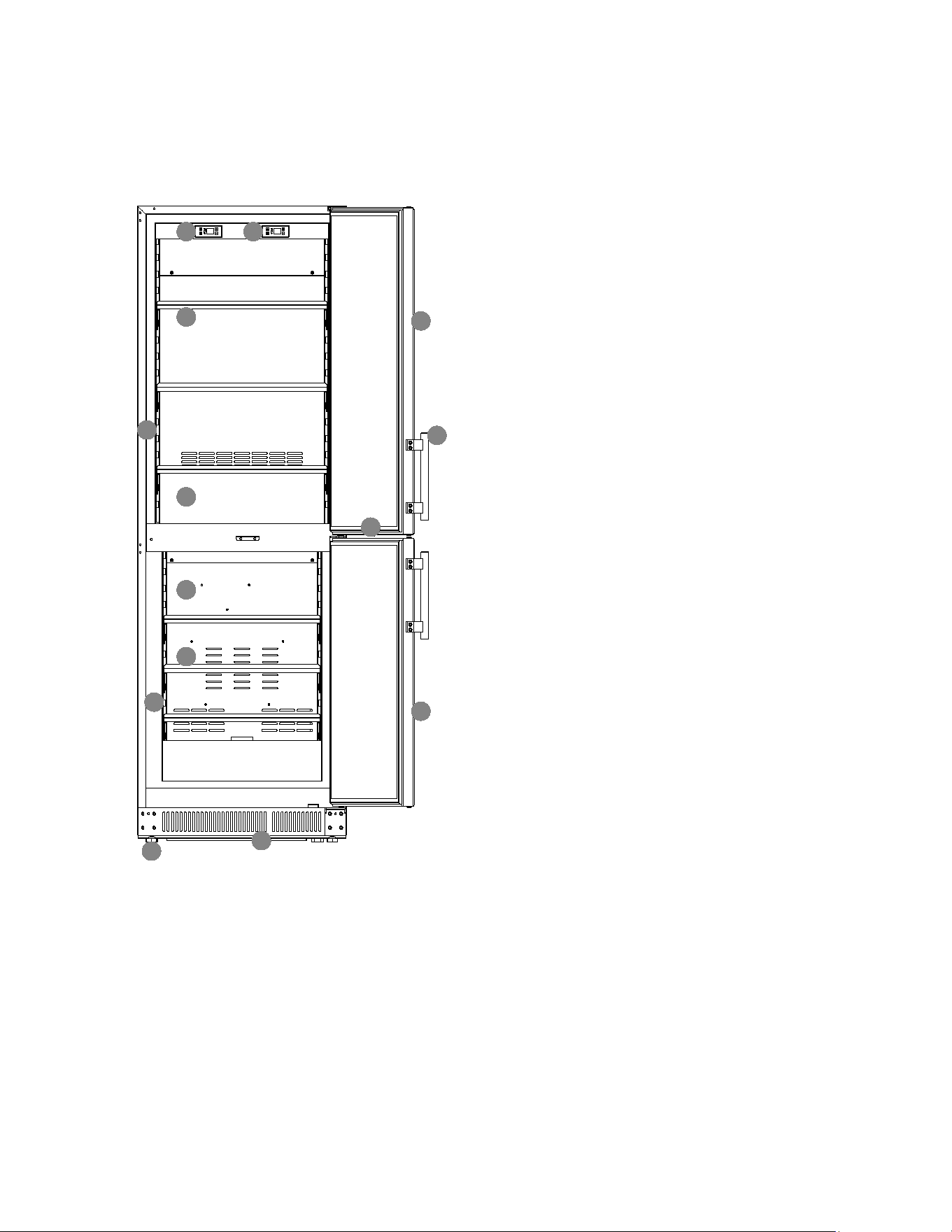
LOCATION OF PARTS
1
2
3
5
6
7
9
10
13
12
11
14
4
8
*Maximum load for shelf: 22 lbs. (10 kgs.)
1. Refrigerator Control Unit
2. Freezer Control Unit
3. Refrigerator Shelves (3)
4. LED Side Light
5. Refrigerator Compartment
6. Freezer Compartment
7. Freezer Shelves (3)
8. LED Side Light
9. Toe-kick
10. Leveling Legs
11. Refrigerator Door
12. Handle
13. Security Lock
14. Freezer Door
8
INSTALLATION INSTRUCTIONS
Before Using your Appliance
• Remove the exterior and interior packing.
• Clean the interior surface with lukewarm water using a soft cloth.
• Install the handle on the door. (See Installing the Stainless Steel Handle.)
Installation of your Appliance
• The appliance is designed for built-in, recessed, or free-standing installation for indoor or
outdoor use.
• Place your appliance on a floor that is strong enough to support it when it is fully loaded. To
level the unit, adjust the front leveling legs.
• For freestanding installation, leaving 5” (127mm) of space at the back and sides of the unit
and 4“(102mm) at the top is suggested, which allows the proper air circulation to cool the
compressor and condenser to save energy. For built-in installation, it is better to leave at least
¼" (5mm) of space on each side, 2" (50mm) at the back, and ⅛" (3mm) at the top to ensure
proper service access and ventilation. And the air vent at the front of the appliance must never
be covered or blocked in any way.
• Avoid locating the unit in moist areas.
• Plug the appliance into an exclusive, properly grounded wall outlet. Do not under any
circumstances cut or remove the third (ground) prong from the power cord. Any questions
concerning power and/or grounding should be directed toward a certified electrician or an
authorized service center.
WARNING:
• Flammable Refrigerant Used. Appliance should be installed in accordance with the Safety
Standard for Refrigeration Systems, ANSI/ASHRAE 15.
• This appliance must be installed in accordance with all local codes and ordinances.
CAUTION: After unpacking you MUST allow this appliance to stand upright for at least 2 hours to
allow the lubricant and refrigerant to drain back into the compressor and stabilize. Failure to do so
may adversely affect performance and the lifetime of this unit.
CAUTION: This appliance is designed for storing and cooling fresh food, beverages, and drinks.
Do not store perishable food, medicine, or other medical products.
CAUTION: Make sure that the socket and ON/OFF switch are easily accessible after the appliance
has been installed.
NOTE: Do not store or install the appliance outdoors for models with indoor use only.
9
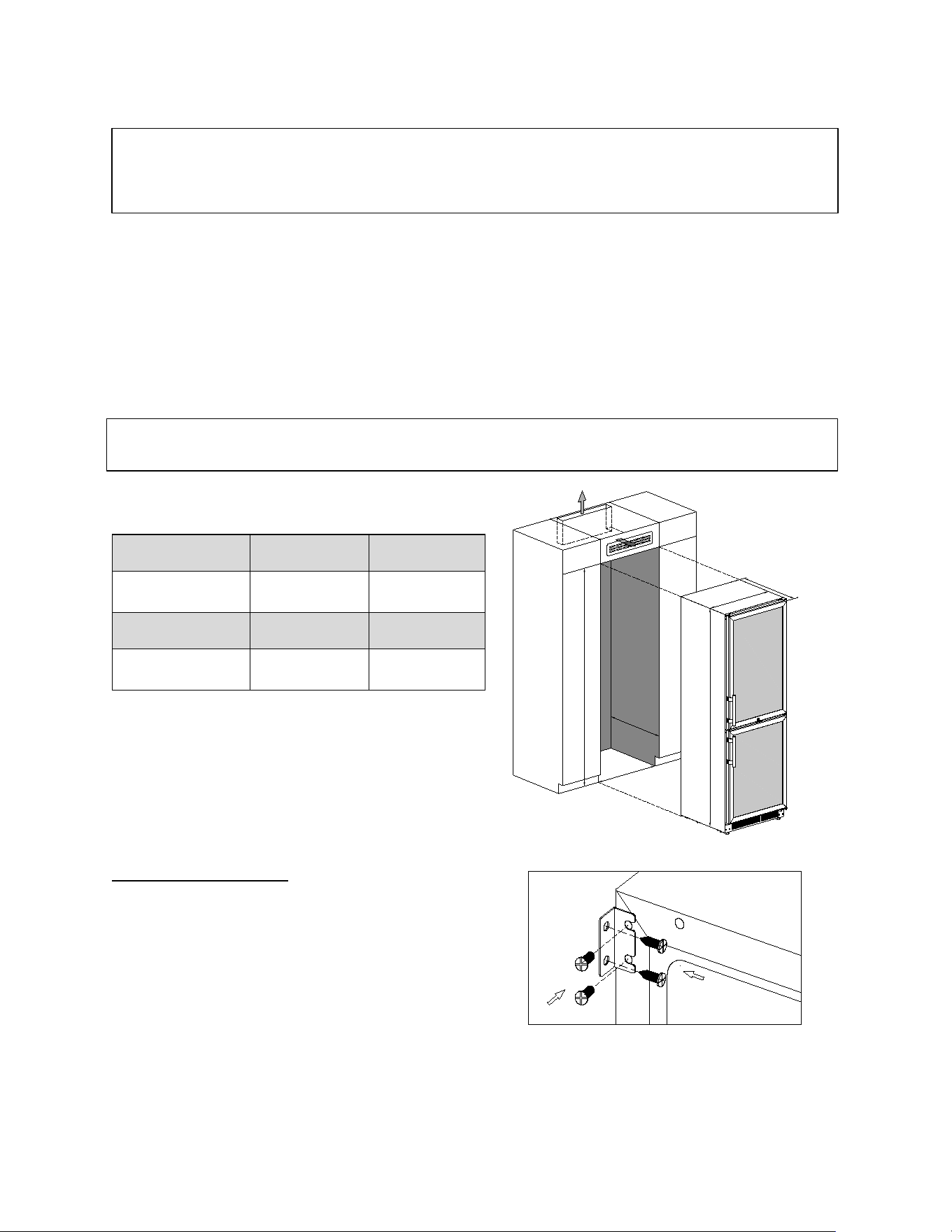
Built-in Instructions
For built-in or recessed installation, make sure your installation does not block the front/top
ventilation grilles. Air at the back of the unit gets warm. The appliance housing unit must therefore
be constructed to allow sufficient space for ventilation. The ventilation cross-sections in the plinth,
housing unit and above the appliance must each provide an unobstructed airflow of at least 200
cm² to ensure that air can circulate without hindrance. The ventilation gap at the top of the
appliance can be constructed above a top box or in a top box through a ventilation grille at the
front.
A
C
B
a
c
b
Securing the Appliance
Pop out the cover cap on the opposite side of
the hinge and secure the appliance in the niche
by tightening the screws through the
attachment bracket.
a.
(Inch/mm)
b.
(Inch/mm)
c.
(Inch/mm)
71 ¹¹⁄
₁₆
" /1820
22
⅝
" / 575
23 ½" / 595
A.
(Inch/mm)
B.
(Inch/mm)
C.
(Inch/mm)
71
⅞
" / 1825
24" / 610
23⅝" / 600
NOTE: It is recommended that you do not install the appliance near an oven, radiator, or other heating
sources. Direct sunlight may affect the acrylic coating and heat sources may increase electrical
consumption. Do not install in a location where the temperature will fall below 60°F (16°C). For best
performance, do not install the appliance behind a cabinet door or block the base grille.
NOTE: When pushing the appliance into the niche, make sure that the mains cable does not get
trapped. Confirm that the door can open and close properly in the selected location.
10
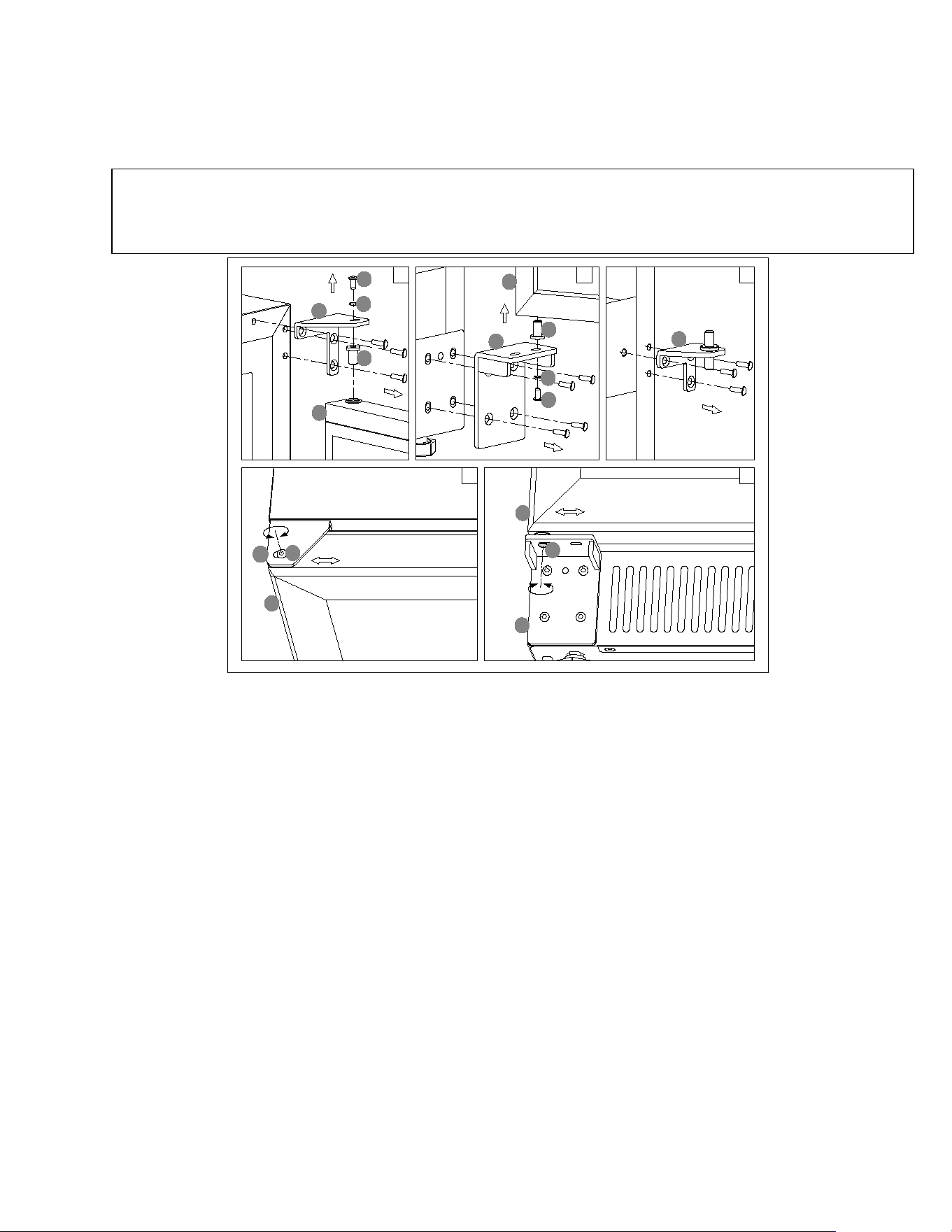
Reversing the Door Swing of your Appliance
This unit has the capability of the door opening from either the left or right side. The unit is delivered to you with the
door opening from the left side. Should you desire to reverse the opening direction, please follow the reversal
instructions shown below.
1. Unscrew the bolt (1) and lock washer (2) then gently lift
and slide the upper door (5) outward to release it. Be
careful to hold the door firmly after removing the bolt.
(Fig. 1)
2. Gently lift up to remove the upper door from the middle
hinge and place it on a padded surface to avoid the risk
of damage. Then remove the right top hinge (4). (Fig. 1)
3. Transfer the upper door pin (3) to the opposite left
position of door. (Fig. 1) At the same time Pop out the
cover caps on the left side of the cabinet and use them
to cover the screw holes on the right-hand side.
4. Screw the alternative left top hinge, included in the
fittings, on the left side of cabinet.
5. Unscrew the bolt (6) and lock washer (7) then gently lift
and slide the lower door (10) outward to release it. Be
careful to hold the door firmly after removing the bolt.
(Fig. 2)
6. Gently pull down to remove the lower door from the
middle hinge and place it on a padded surface to avoid
the risk of damage. Then unscrew and exchange the
right bottom hinge (9) and the four screws to the
opposite of cabinet. (Fig. 2)
7. Transfer the lower door pin (8) to the opposite left
position of door. (Fig. 2)
8. Unscrew the right middle hinge (11) and transfer the left
holes plugs to the opposite right side of cabinet. (Fig. 3)
9. Screw the alternative left middle hinge, included in the
fittings, on the left side of cabinet.
10. Relocate the upper door to the left designated position.
Lower and slide the door inward from the right, then
position the door pin (3) in line with the left top hinge
and screw in the bolt (1) and lock washer (2). (Fig. 4)
11. Recheck and adjust the door alignment by loosening
the bolt (1) and moving the door. Tighten the bolt (1)
after the door is levelled. (Fig. 4)
12. Relocate the lower door to the left designated position.
Lift and slide the door inward from the right, then
position the door pin (8) in line with the bottom hinge
and screw in the bolt (6) and lock washer (7). (Fig. 5)
13. Recheck and adjust the door alignment by loosening
the bolt (6) and moving the door. Tighten the bolt (6)
after the door is levelled. (Fig. 5)
14. Transfer the handle & plugs to the opposite position.
NOTE:
• All parts removed must be saved to allow the door swing to be reversed.
• Some variations of these items may only be reversible in Summit facilities before being shipped. Consult our
website for more information.
3
1
2
5
4
4
1
2
3
9
10
8
7
6
11
12
1
6
9
10
5
5
11
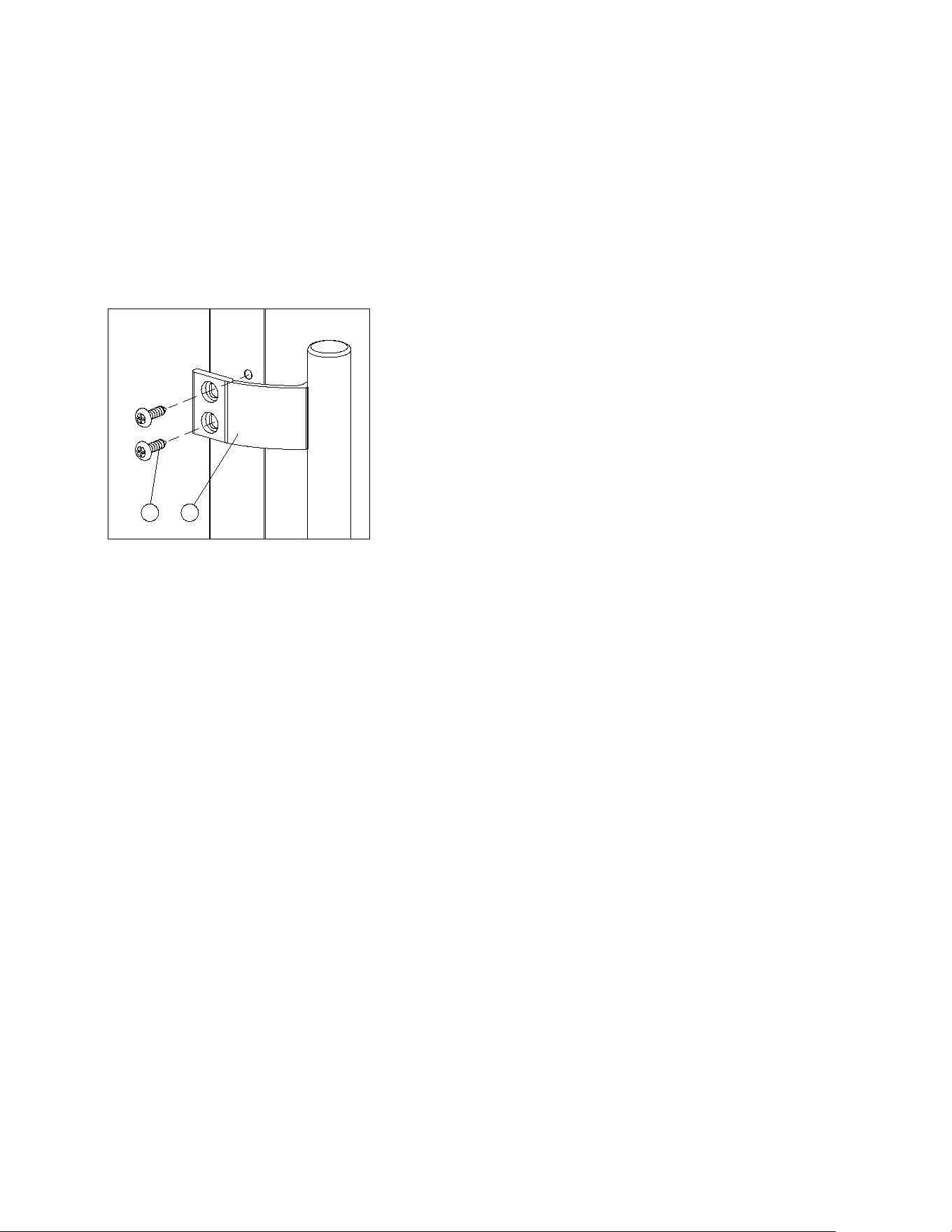
Installing the Stainless Steel Handle
This appliance includes a stainless steel handle that is not required to operate the unit. To install the handle, follow the
instructions below:
Use a screwdriver to remove the screws on the side of the door where the handle is to be installed.
Align the handle with the screws removed in above step.
Tighten the screws using a Phillips head screwdriver until the handle is both flush and secured tightly against the door
side. (DO NOT over-tighten as this will cause damage to the door surface).
1
2
12
OPERATING YOUR APPLIANCE
It is recommended you install the appliance in a place where the ambient temperature is between 44ºF and
90ºF (7ºC to 32ºC). If the ambient temperature is above or below the recommended temperatures, the
performance of the unit may be affected. For example, placing your unit in extremely cold or hot conditions
may cause interior temperatures to fluctuate. The optimal temperature range may not be reached.
The appliance has two control and operating units. The refrigerator control unit controls the upper
refrigerator compartment. The freezer control unit controls the lower freezer compartment.
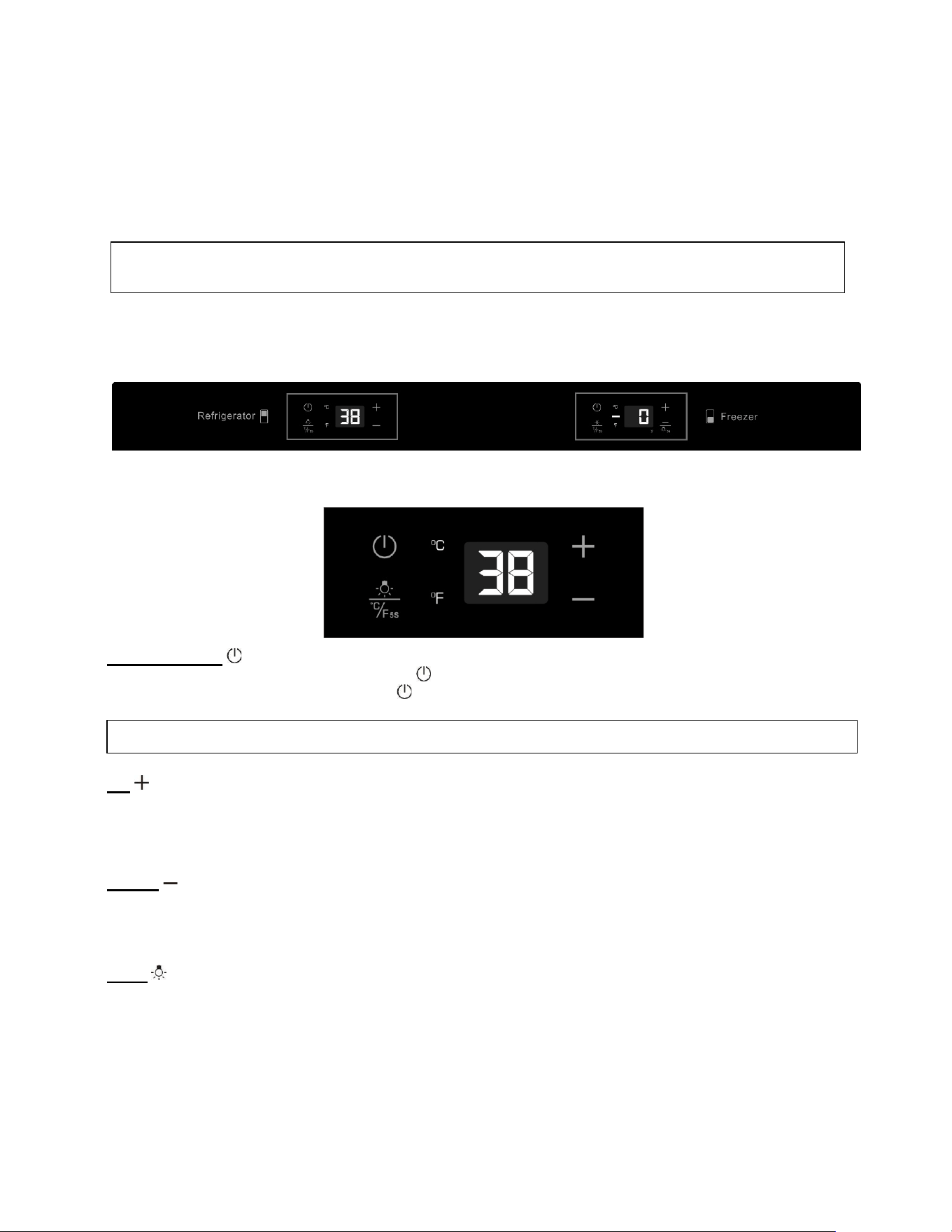
Control Panel
Control Unit for Refrigerator Compartment
ON/OFF Power
To turn the appliance off, press and hold the key for 5 seconds until the temperature display goes off. To
turn the appliance on, press and hold the key for 1 second until the temperature display lights up.
UP
Used to increase (warm) the set temperature by 1°F/1ºC.
To switch on the Silent mode, press and hold the UP key for 5 seconds. Three beeps will confirm the
selection.
DOWN
Used to decrease (cool) the set temperature by 1°F/1ºC.
To switch on the Dynamic Cooling mode, press and hold the DOWN key for about 5 seconds. Five
beeps will confirm the selection.
Light
The interior light makes it easy to view your items. Pressing the LIGHT symbol toggles between 2 modes
of operation for the internal lights: functional (default) mode and showcase mode. If you are in functional
(default) mode, the lights will turn on only when the door is open. If you are in showcase mode, the lights
will be on whether or not the door is open.
NOTE: Pressing the POWER key once can switch off the audible alarm when the alarm is on.
NOTE: Control panels may vary by model. Please compare the design of the control panel shown on
the following pages with your unit to find the corresponding instructions for your specific model.
13
ºF/ºC Selector
Select the temperature display in Fahrenheit or Celsius degrees. To change the temperature from
Fahrenheit to Celsius or from Celsius to Fahrenheit, press and hold the LIGHT key for 5 seconds.
Setting the Temperature Control
•
You can set the temperature by pressing the UP and DOWN symbols. When you press either of the two
buttons for the first time, the LED readout will show the original temperature set previously. (The
temperature preset at the factory is 38°F, or 3°C).
•
The temperature you are setting will increase by one degree each time you press the UP
symbol and will decrease by one degree each time you press the DOWN symbol.
•
The range of the temperature control is from 36°F to 43°F.
•
To view the set temperature at any time, press the UP or DOWN symbol. The set temperature will flash
in the display window for 5 seconds. After 5 seconds, the temperature inside the unit will reappear in the
display window.
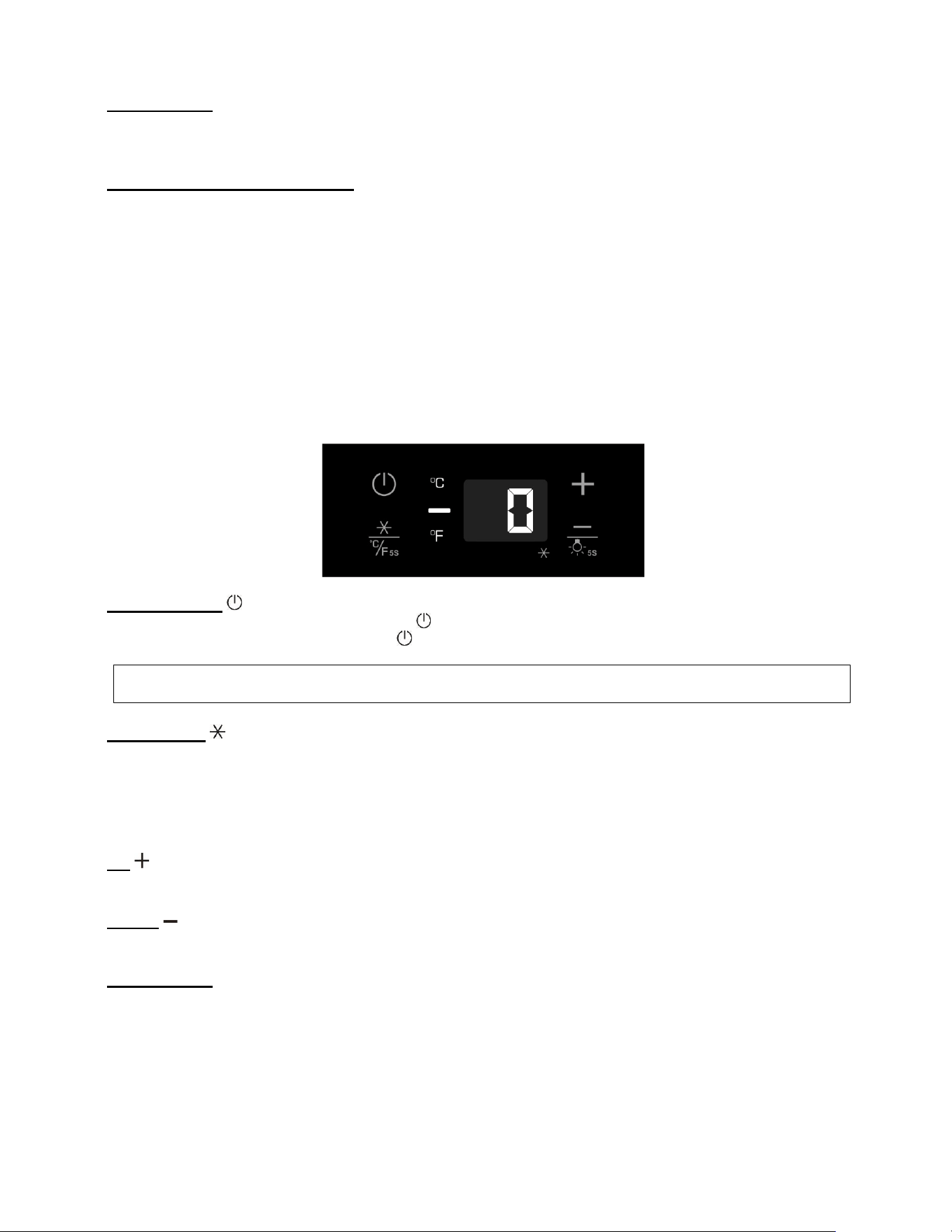
Control Unit for Freezer Compartment
ON/OFF Power
To turn the appliance off, press and hold the key for 5 seconds until the temperature display goes off. To
turn the appliance on, press and hold the key for 1 second until the temperature display lights up.
SuperFreeze
SuperFreeze is used to freeze fresh food quickly. The function overrides the thermostat control and will
make the compressor operate continuously. It is not necessary to adjust the thermostat setting when using
this function. When the function is selected, the SuperFreeze indicator (dot at the bottom right of the display)
will be ON. The function can be canceled by pressing the key again and the indicator will turn OFF.
SuperFreeze will turn off automatically after 8 hours.
UP
Used to increase (warm) the set temperature by 1°F/1ºC.
DOWN
Used to decrease (cool) the set temperature by 1°F/1ºC.
ºF/ºC Selector
Select the temperature display setting in Fahrenheit or Celsius degree. To change the temperature from
Fahrenheit to Celsius or from Celsius to Fahrenheit, press and hold the SUPERFREEZE key for 5
seconds.
NOTE: Pressing the POWER key once can switch off the audible alarm when the alarm is on.
14
Setting the Temperature Control
• You can set the temperature by pressing the UP and DOWN keys. When you press either of the two
keys for the first time, the LED readout will show the original temperature set previously. (The
temperature preset at the factory is 0°F / -18°C.)
• The temperature you are setting will increase by one degree each time you press the UP key and will
decrease by one degree each time you press the DOWN key.
•
The range of the temperature control is from -11°F to 11°F.
•
To view the set temperature at any time, press the UP or DOWN key. The set temperature will flash in
the display window for 5 seconds. After 5 seconds, the temperature inside the unit will reappear in the
display window.
Interior Light
The interior LED light makes it easy to see items stored inside. Press and hold the DOWN key for 5 seconds to toggle
between the two lighting modes, Functional (default) and Showcase.
• Functional Mode, the interior lights turn on only when the door is open and will automatically turn off
about 5 seconds after the door is closed.
• Showcase Mode, the lights remain on continuously, regardless of whether the door is open or closed.
The interior LED lights are designed for long life and are not user replaceable. For replacement assistance, please
contact our service department.
Sabbath Mode
Sabbath mode is available for the observance of certain religious holidays. This mode turns off the displays, interior
light, and audible alarms and prevents them from turning on again. Normal cooling operations will still take place.
To initiate Sabbath mode, press the POWER and LIGHT or SUPERFREEZE keys at the same time for at least 5
seconds. The temperature display will go out to confirm that the Sabbath mode is ON.
Sabbath mode can be canceled by repeating the above process. The Sabbath Mode will automatically turn off after 96
hours.
Temperature Memory Function
In the event of a power interruption (power surge, breaker switch, etc.), the unit can remember the previous
temperature settings, and when the power is recovered, the cabinet temperature will return to the same
setting temperature as before the power went off.
Defrosting
•
The unit defrosts automatically in normal operating conditions.
•
The evaporator behind the rear wall of the unit defrosts automatically. The condensate collects in the
drainage channel behind the rear wall of the unit and flows through the drainage hole into the drip tray
by/above the compressor where it evaporates.
•
However, frost may accumulate on the evaporator if the unit is repeatedly opened in a high heat or high
humidity location. If this frost pattern does not clear within 24 hours, your unit will require manual
defrosting.
NOTE: Only use the original LED light fittings provided by the manufacturer.
15
Using the Freezer
•
This freezer is suitable for long-term storage of frozen materials, including food products and certain
commercial or medical items such as select enzymes, reagents, samples, and other clinical materials.
•
Storage duration depends on the type of product being stored. Always follow the recommended shelf
life or stability guidelines provided by the product manufacturer or governing regulations.
•
Pre-packaged commercially frozen food should be stored in accordance with the frozen foods
manufacturer’s instructions for a three-star frozen food storage compartment or home freezer.
•
Transfer items into the freezer promptly after receiving them. When product packaging includes specific
handling or storage time instructions, ensure these are followed carefully.
Temperature Alarm / Door Alarm
•
An audible alarm sounds if the storage temperature is not cold enough. The temperature display
flashes at the same time.
•
The cause of the temperature being too high may be:
–
Warm fresh food was placed inside
–
Too much warm ambient air flowed in when rearranging and removing food
–
Power failure for some time
–
The appliance is faulty
•
The audible alarm is automatically silenced, and the temperature display stops flashing when the
temperature is sufficiently cold again.
•
If the door has been left open for more than 60 seconds, the alarm will sound. Pressing the
POWER key once can switch off the audible alarm.
Door Lock
Your unit is provided with a lock and key combination.
The keys are located inside the plastic bag that contains the Instruction Manual. Insert the key into the
lock and turn it counterclockwise to unlock the door. To lock the door, do the reverse operation, making
sure the metal pin is engaged completely. Remove the key and put it in a secure place for safekeeping.
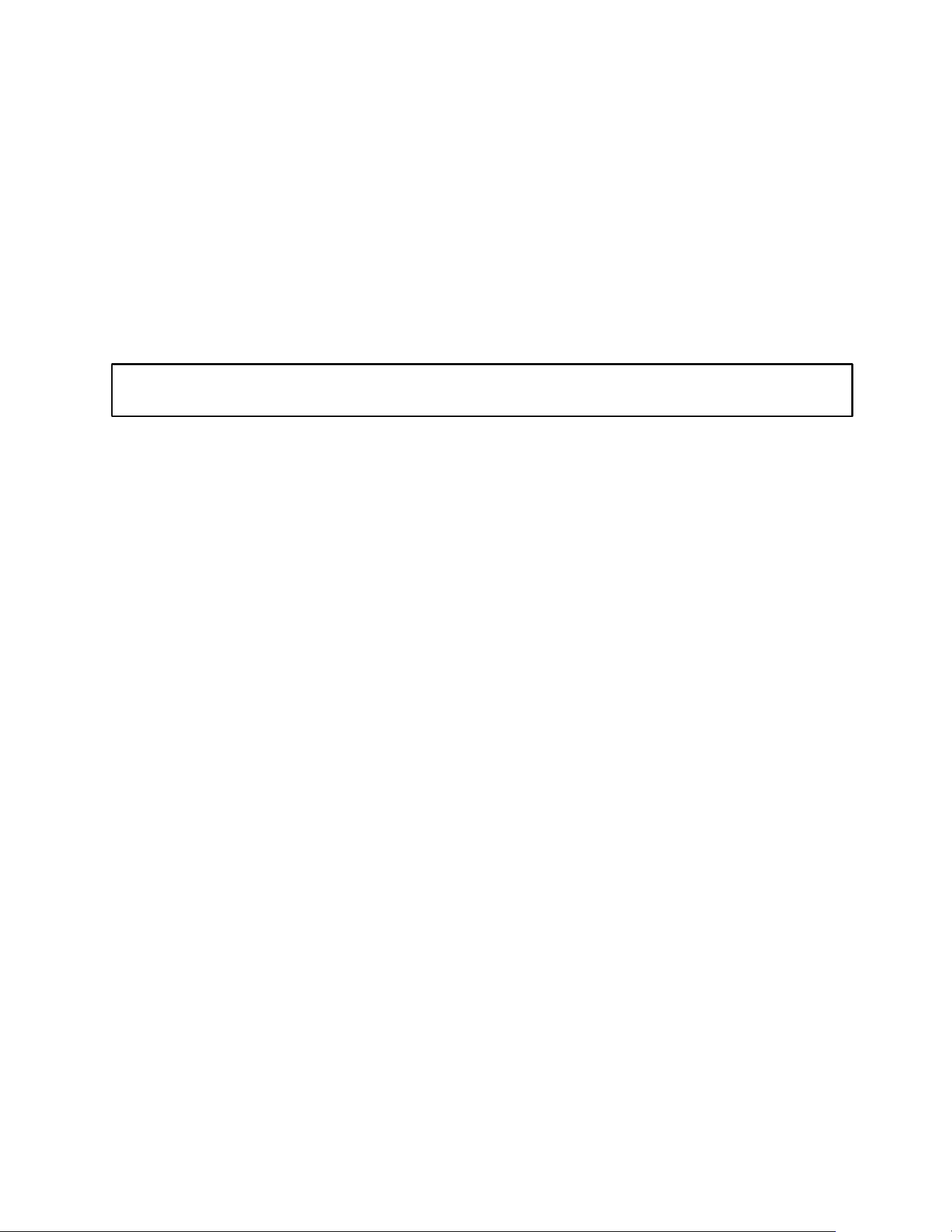
Shelves
Any of the shelves can be removed to store larger items.
•
When removing the shelf, make sure to have the door all
the way open and remove all items first. Hold the front of
the shelf, and then gently lift up and move out toward you.
•
In order to replace the shelf, hold the shelf at an angle so
the front is higher than the back, and then insert the top
hook into the notch of clip-in strip. Then, lower the shelf
and insert the bottom shelf hook into the notch of clip-in
strip.
CAUTION: When removing or replacing the shelf, use
caution not to scratch the sides of the unit.
16
CARE AND MAINTENANCE
Cleaning your Appliance
•
Turn off the power, unplug the appliance, and remove all items, including shelves.
•
Wash the inside surfaces with a solution of warm water and baking soda (about 2 tablespoons of baking
soda to a quart of water).
•
Wash the shelves with a mild detergent solution.
•
Wring excess water out of the sponge or cloth when cleaning the area where the controls are
located, or any electrical parts.
•
Wash the outside cabinet with warm water and mild liquid detergent. Rinse well and wipe dry with
a clean, soft cloth.
•
Use an approved stainless steel cleaner to clean the doors and handles. Do not use steel wool or a
steel brush on the stainless steel.
Power Failure
Most power failures are corrected within a few hours and should not affect the temperature of your
appliance if you minimize the number of times the doors are opened. If the power is going to be off for a
longer period of time, you need to take the proper steps to protect the contents.
Vacation
•
Short vacations: Leave the appliance operating during vacations of less than three weeks.
•
Long vacations: If the appliance will not be used for several months, remove all items and turn off
the appliance. Clean and dry the interior thoroughly. To prevent odor and mold growth, leave the doors
open slightly, blocking them open if necessary.
Moving your Appliance
1.
Remove all items.
2.
Securely tape down all loose items (shelves) inside the appliance.
3.
Turn the adjustable legs up to the base to avoid damage.
4.
Tape the doors shut.
5.
Be sure the appliance stays secure in the upright position during transportation. Also, protect the
outside of the appliance with a blanket or similar item.
Energy-Saving Tips
•
The appliance should be located in the coolest area of the room or outdoor location, away from heat-
producing appliances and out of direct sunlight.
•
Ensure that the unit is adequately ventilated. Never cover air vents.
•
Do not keep the doors open any longer than necessary.
•
Let hot foods cool to room temperature before placing in the unit. Overloading the unit forces the
compressor to run longer.
•
Be sure to wrap foods properly, and wipe containers dry before placing them in the unit. This cuts
down on frost build-up inside the unit.
•
Unit shelves and storage bins should not be lined with aluminum foil, wax paper, or paper
toweling. Liners interfere with cold air circulation, making the unit less efficient.
•
Organize and label food to reduce door openings and extended searches. Remove as many items as
needed at one time and close the door as soon as possible.
CAUTION: Failure to unplug the appliance during cleaning could result in electrical shock or other
personal injuries.
17
TROUBLESHOOTING
You can solve many common problems easily, saving you the cost of a possible service call. Try the suggestions
below to see if you can solve the problem before calling the technical service.
PROBLEM
POSSIBLE CAUSE
REMEDY
Appliance
does not
operate.
Appliance is not connected to a power
supply.
The appliance is turned off.
Tripped circuit breaker or blown fuse
Connect the appliance.
Switch on the appliance.
Switch on circuit breaker or replace
fuse.
Appliance is
not cold
enough.
The temperature is not set correctly.
The ambient temperature could require a
lower temperature setting.
Drawers were opened too often.
A drawer was not closed completely.
Drawer is not hermetically sealed.
The condenser is too dirty.
The ventilation opening is blocked or too
dusty.
Check the set temperature.
Set a lower temperature.
Do not open drawers more often than
necessary.
Close drawer properly.
Check the seal and clean or replace.
Clean the condenser when necessary.
Clear the obstructions and clean off the
dust.
Appliance
turns itself on
and off
frequently.
The room temperature is higher than
average.
A large amount of food has been added to
the unit.
Drawers are opened too often.
A drawer is not closed completely.
A drawer gasket does not seal properly.
Put the appliance in a cooler place.
Leave the appliance to work for a while
until the set temperature has been
reached.
Do not open the drawers more often
than necessary.
Close drawer properly.
Check the drawer seal and clean or
replace it.
The light does
not work.
Appliance is not connected to a power
supply.
Tripped circuit breaker or a blown fuse.
The light was switched off on the control
panel.
Connect the appliance.
Switch on circuit breaker or replace
fuse.
Switch on the light.
Vibrations
The appliance is not properly leveled.
Level the appliance with the adjustable
feet.
The appliance
seems to
make too
much noise.
The rattling noise may come from the flow of the refrigerant, which is normal. As each
cycle ends, you may hear gurgling sounds caused by the flow of refrigerant in your
appliance.
If temperature fluctuations occur, the contraction and expansion of the inner walls
may cause popping and crackling noises.
The appliance is not properly leveled.
Level the appliance with the adjustable
feet.
One or more of the following sounds is
heard:
-
Buzzing
-
Trickling water
-
Thud (clatter of ice)
The water valve is operating.
Water is entering the icemaker to fill
cup.
Ice is being dumped into the ice bin.
Drawers
will not close
properly.
The appliance is not properly leveled.
The gaskets are dirty.
The racks or bins are out of position.
Level the appliance with the adjustable
feet.
Clean the drawer gaskets.
Check the racks and bins and refit
correctly.
18
Display “E0”,
“E1”. “E2”,
“E3”, “E4”,
“E5” or “E7”.
“E0” indicates a communication error for 3
zone models.
“E1” or “E2” indicates that the air
temperature sensor has failed.
“E3” or “E4” indicates that the defrost
sensor in the evaporator has failed.
“E5” indicates defrost heater failure.
“E7” indicates door switch failure.
Call for service.
The alarm
sounds and
the
temperature
display
flashes.
Has a drawer been open for longer than
60 seconds? If not, then the temperature
has risen higher or fallen lower than the
temperature that has been set. This
could be due to:
The appliance drawers being opened too
often.
The ventilation opening being covered or
too dusty.
A lengthy interruption in the power supply.
A large amount of food has been added to
the unit.
If yes, close the drawer.
Do not open drawers more often than
necessary.
Clear the obstructions and clean off the
dust.
Leave the appliance to work for a while
until the set temperature has been
reached.
The icon “--” is
lit and flashing
in the
temperature
display.
The display temperature is out of range.
Only temperatures within the range
16~99°F/-9~37°C for refrigerators and
the range -99~99°F/-73~37°C
for freezers can be displayed. If the
temperature is not within this range,
the icon “--” will be displayed instead.
This is normal.
Ice tastes
stale.
The ice is old.
Make a new batch.
Water in
icemaker
overflows
Refrigerator or icemaker is not level.
If the icemaker still overflows after
leveling.
Level the appliance with the adjustable
feet. Water pressure must be 20-80 psi.
Turn off the icemaker’s water supply at
the shut-off valve and raise the
icemaker’s bail arm to the “off” position
(see previous page); then contact your
local service center.
Not enough
ice.
It will take 48 hours to fill the ice bucket.
The icemaker will make ice every 2 to 3
hours.
For more ice, adjust the freezer control
to a colder setting.
Ice making
has stopped.
Be sure that the bail arm is lowered to its
ON position. Make sure that the water
shut-off valve is open. The water shut-off
valve or the water valve screen is clogged.
Contact your local service center.
If you have checked the information above and you still need help with your appliance, call our Customer
Service facility at 800-932-4267 (Ext. 513) between 9:00 AM and 5:00 PM ET or visit our website
summitappliance.com/support at any time. We will do our best to answer your questions.
To order replacement parts, visit our website: summitapplianceparts.com
19
LIMITED WARRANTY
ONE-YEAR LIMITED WARRANTY
Warranty coverage is available within the 48 contiguous United States, along with select areas of Alaska, Hawaii, and Canada.
For locations not covered, consumers can either contact a local provider or coordinate with Felix Storch, Inc. to find nearby
service options, which may qualify for partial reimbursement.
The warranty for this appliance is valid for one year from the date of purchase, provided the appliance is operated and
maintained according to the instructions included with the product. The warrantor will cover the cost of factory-specified
parts and repair labor needed to correct defects in materials or workmanship. Service must be performed by a designated
service company.
All parts, except the compressor, are warranted for one year against manufacturing defects. Plastic parts, shelves, and
cabinets are produced to commercially acceptable standards but are not covered for damages incurred during handling or
for breakage.
5-YEAR COMPRESSOR WARRANTY
1. The compressor is covered for 5 years.
2. Replacement does not include labor.
ITEMS WARRANTOR WILL NOT PAY FOR:
1. Service calls to correct the installation of your appliance, to instruct you how to use your appliance, to replace or
repair fuses or to correct wiring or plumbing.
2. Service calls to repair or replace appliance light bulbs or broken shelves. Consumable parts (such as filters) are
excluded from warranty coverage.
3. Damage resulting from accident, alteration, misuse, abuse, fire, flood, acts of God, improper installation,
installation not in accordance with electrical or plumbing codes, or use of products not approved by warrantor.
4. Replacement parts or repair labor costs for units operated outside the 48 contiguous United States, along with
select areas of Alaska, Hawaii, and Canada.
5. Repairs to parts or systems resulting from unauthorized modifications made to the appliance.
6. Expenses for travel and transportation for product service in remote locations.
7. The removal and reinstallation of your appliance if it is installed in an inaccessible location or is not installed in
accordance with published installation instructions.
DISCLAIMER OF IMPLIED WARRANTIES; LIMITATION OF REMEDIES
CUSTOMER'S SOLE AND EXCLUSIVE REMEDY UNDER THIS LIMITED WARRANTY SHALL BE PRODUCT REPAIR AS PROVIDED
HEREIN. IMPLIED WARRANTIES, INCLUDING WARRANTIES OF MERCHANTABILITY OR FITNESS FOR A PARTICULAR
PURPOSE, ARE LIMITED TO ONE YEAR. WARRANTOR SHALL NOT BE LIABLE FOR INCIDENTAL OR CONSEQUENTIAL
DAMAGES. SOME STATES DO NOT ALLOW THE EXCLUSION OR LIMITATION OF INCIDENTAL OR CONSEQUENTIAL
DAMAGES, OR LIMITATIONS ON THE DURATION OF IMPLIED WARRANTIES OF MERCHANTABILITY OR FITNESS, SO THESE
EXCLUSIONS OR LIMITATIONS MAY NOT APPLY TO YOU. THIS WARRANTY GIVES YOU SPECIFIC LEGAL RIGHTS AND YOU
MAY ALSO HAVE OTHER RIGHTS, WHICH VARY FROM STATE TO STATE.
WARNING: This product can expose you to chemicals including Nickel
(Metallic) which is known to the State of California to cause cancer.
For
more information go to www.P65Warnings.ca.gov
Note: Nickel is a component in all stainless steel and some other metallic compositions.
CALIFORNIA CARB/SNAP DISCLOSURE
This product uses eco-friendly hydrocarbon refrigerant and fully complies with California CARB regulations.
However, we are required by California Law to provide the following disclosure statement in every product sold in
California.
"This equipment is prohibited from use in California with any refrigerants on the 'List of Prohibited Substances' for that
specific end-use, in accordance with California Code of Regulations, title 17, section 95374. This disclosure statement
has been reviewed and approved by Felix Storch, Inc. and Felix Storch, Inc. attests, under penalty of perjury, that these
statements are true and accurate."
20
Felix Storch, Inc.
An ISO 9001:2015 registered company
770 Garrison Ave
Bronx, New York 10474
www.summitappliance.com
Revised: 2026-08-02