Gramophone
Turntable
© 2025 Target. The Bullseye Design is a registered trademark of Target Brands, Inc. All rights reserved.
WARNING:
CHOKING HAZARD—Small parts.
Not for children under 3 years.
Only at Target.com
8.5 in w x 11 in h
11in
(279.4mm)
Front
8.5in
(215.9mm)
Back
TOP
BACK
INCLUDES
● Gramophone turntable
● Power adapter
● AUX Cable
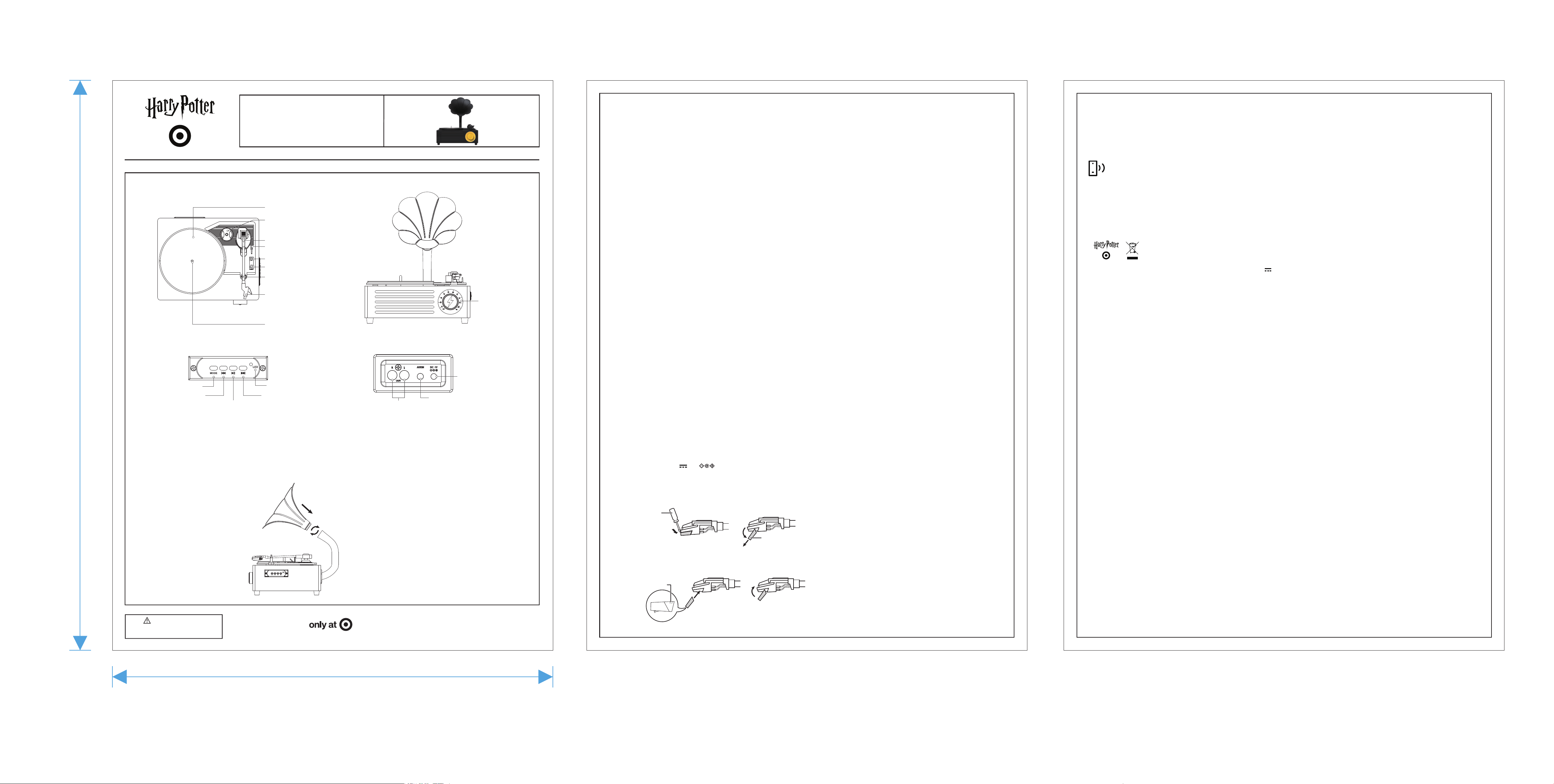
Turntable deck
Turntable shaft
45 RPM adapter
Tonearm
Lift lever
Auto-stop switch
Hold down clip and rest
Stylus protector
Speed selector
LED indicator
Play/Pause
(BT Mode)
Mode button
Next song (BT Mode)
Previous song
(BT Mode)
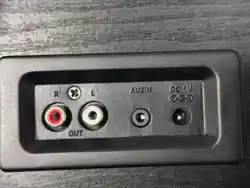
RCA output
ports
Power port
AUX in port
POWER ON/OFF
● When powered off, turn the Power knob clockwise to turn on; When powered on, turn the Power knob counterclockwise
to the end to turn off.
● In Bluetooth® mode, it will automatically shut down after approximately 10 minutes if there is no connection; If
re-pairing is required, first switch the power knob switch to the "OFF" position, then switch it to ON mode.
BLUETOOTH® MODE
● Press the mode button switch to Bluetooth® mode, the voice will be heard.
● Use Bluetooth® settings on your device to pair with "Hogwarts Record Player".
● The blue light flashes in Bluetooth® mode during pairing and turns solid blue when connected successfully, the tone
will be heard.
● Press the previous button to switch to the previous song.
● Press the next button to switch to the next song.
● Press the play/pause button to play/pause the muisc.
● To unpair, disconnect from the device or move out of range.
● This product is only capable of connecting to one device.
NOTE: Please keep the distance between the connected Bluetooth® devices less than 33 feet to ensure working properly.
● RCA to 3.5 mm audio cable
● 2 styluses (1 pre-installed)
● User Manual
● Felt mat (Do not remove felt mat when in use)
● 45 RPM Adapter
NEED SOME HELP?
Can't connect? Not accepting phone calls? Just have a question?
Call us at: 1-833-TGT-Tech
Target Corp. Minneapoils. MN, 55403
SAFETY
● Do not immerse this device in water
● Do not modify or repair this device
● Do not use in high temperatures or extreme weather
● Do not use chemical detergents to clean your device, use a soft dry cloth
TROUBLESHOOTING AND TIPS
● If there is no power, check the power adapter correctly, or power on again.
● If the device makes no sound, adjust the volume.
● If the device makes no sound or doesn't show as an available device, make sure it is not paired to another device.
If so, unpair another device and re-pair the desired device.
FCC ID: 2BAXW-TFB264 Model: MT-TFT01 Input: 6V Max
2A Made in China
CONNECTING TO RCA SPEAKERS
1. Connect an RCA cable from the turntable to your speakers. The red RCA plug connects to the R (right channel) port
and the white plug connects to the L (left channel) port.
2. Use the playback controls on the connected device, and the volume controls on either the turntable or connected
device.
AUXILIARY MODE
1. Press mode button switch to AUX mode, the voice will be heard and the amber light is solid.
2. Insert AUX cable, the turntable will play the input audio.
3. Press "Play/Pause" button to mute, press again to unmute.
4. Use the playback controls on the connected device, and the volume controls on either the turntable or connected
device.
PHONO MODE
1. Press the mode button to switch to phone mode, the voice will be heard and the green light is solid.
2. Adjust the speed selector to 33, 45, or 78 rpm, based on the label on your vinyl record.
Note: Set your turntable to 33 if the vinyl record indicates a speed of 33 rpm.
3. Place a vinyl record on the turntable. lf needed, place the 45 rpm adapter over the turntable shaft.
4. Unlock the hold down clip on the tonearm.
USING THE AUTO-STOP FUNCTION
Choose what the turntable does at the end of a vinyl record:
1. Slide the auto-stop switch to the OFF position. The turntable keeps spinning when the vinyl record reaches the end.
2.Slide the auto-stop switch to the ON position. The turntable stops spinning when the vinyl record reaches the end.
SPECIFICATIONS
● 3-speed Gramophone turntable (33; 45; 78 RPM)
● Bluetooth® version: 5.4
● Adapter input: 100-240V~, 50-60Hz 0.5A
● Adapter Output: 6V 2A
REPLACING THE STYLUS
1. Make sure that the tone arm is secured with the clip.
2. Push down on the front edge of the stylus with the tip of a small screwdriver, then remove.
3. With the front end of the stylus at a downward angle, align the guide pins with the cartridge and
gently lift the front of the stylus until it snaps into place.
Small
screwdriver
Stylus
Guide pins
Power on/off
Volume up
Volume down
●
●
●
PRODUCT ASSEMBLING
1. Attach the horn to the base
Screw the horn into the designated port.
Facing the horn, turn clockwise to install
and counterclockwise to remove.
This device complies
with part 15 of the FCC Rules. Operation is subject to the following two conditions:
(1) this device may not cause harmful interference, and (2) this device must accept any interference received, including
interference that may cause undesired operation.
Any changes or modifications not expressly approved by the party responsible for compliance could void the user's authority to
operate the equipment.
NOTE: This equipment has been tested and found to comply with the limits for a Class B digital device, pursuant to
Part 15 of the FCC Rules. These limits are designed to provide reasonable protection against harmful interference in a residential
installation. This equipment generates, uses and can radiate radio frequency energy and, if not installed and used in accordance
with the instructions, may cause harmful interference to radio communications. However, there is no guarantee that interference
will not occur in a particular installation.
If this equipment does cause harmful interference to radio or television reception,which can be determined by turning the
equipment off and on, the user is encouraged to try to correct the interference by one or more of the following measures:
-- Reorient or relocate the receiving antenna.
-- Increase the separation between the equipment and receiver.
-- Connect the equipment into an outlet on a circuit different
from that to which the receiver is connected.
-- Consult the dealer or an experienced radio/TV technician for help.
To maintain compliance with FCC’s RF Exposure guidelines, This equipment should be installed and operated with minimum
distance between 20cm the radiator your body: Use only the supplied antenna.