ENG 2 ENG 3 ENG 4 ENG 5
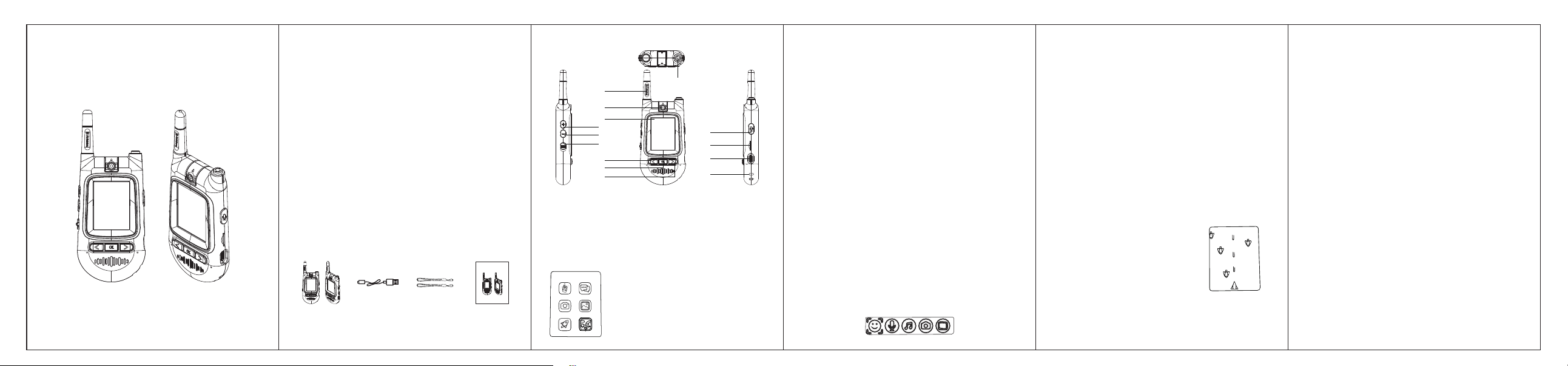
1. Appearance and Function Description
2. How to Use
- Insert a proper 4GB-32GB C10 microSD card inside each walkie-talkie.
- Push up the power switch simultaneously, the two walkie-talkies turn on.
- The two walkie-talkies will enter the main interface.
- Choose any of your desired mode with </> buttons, press OK button to enter.
2.1 Intercom Mode
- Move to the Intercom icon, press OK button on one of two walkie-talkies,
then press OK button on the other one to build video connection, until the
two parties appear in the LCD screen.
- Press and hold the Intercom button to speak
Note: The walkie-talkie transmits voice message through a one-way channel.
Only after the speaker has finished speaking and released the button, can
the other party start speaking and send voice message.
- To hear the voice message better, please adjust the volume through + / -
buttons on the left side.
- For more fun, press the < button to change your voice.
- Press the > button to switch the display screen.
- Press the Return button to quit Intercom Mode, backing to main interface.
2.2 WeChat Talking Mode
- Move to WeChat Talking icon, press OK button on both of the walkie-talkies
to enter the WeChat Talking mode.
- Press the < / > buttons to switch among the icons on the bottom, then press
OK button to choose and send the message from Emoji / Voice / Music, or
from taking a live Photo, or choosing a photo from Album.
- Press the + / - (Up / Down) buttons to browse the sent messages.
- Press the Return button to quite WeChat Talking, backing to main interface.
Safety information
Please read the safety instructions carefully before using the product for the
first time and keep the instructions for future reference.
01. This product is for children over age 8 only.
02. Warning: This product includes lithium polymer batteries.
03. Keep the product out of the reach of children below age 3 and pets to
avoid chewing and swallowing.
04. Product operating and storage temperature is from -10℃ ~ +40℃.
Under and over this temperature might affect the function.
05. Never open the product. Touching the inside electrics can cause electric
shock. Repairs or service should only be performed by qualified personnel.
06. Do not expose to heat, water, moisture, direct sunlight !
07. Please put aside the product in case of any leakage or excessive heat
from the product to avoid burns or rash.
08. 2.4G wireless technology operates within a range of about 100m-400m.
The maximum communication distance may vary depending on the
presence of obstacles (people, metal objects, walls, etc.) or the electro-
magnetic environment.
09. Microwaves emitting from a WiFi device may affect the operation of
electronic medical devices.
10. The unit is not waterproof. If water or foreign objects enter the unit, it may
result in fire or electric shock. If water or a foreign object enters the unit,
stop use immediately.
11. This product does not support harmonized charging.
12. Please notice - All products are subject to change without any notice.
We take reservations for errors and omissions in the manual.
Delivery Content:
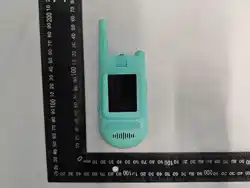
1. Two walkie-talkies 2. USB charging cable
3. Lanyards 4. Instruction manual
66 x 85 mm
1
432
04/2026
Video Walkie-Talkies
for Children
Instruction Manual
04/2026
Video Walkie-Talkie
for Children
Instruction Manual
2
3
4
6
7
8
9
11
12
13
1
5
10
14
1. Return (to Main Interface)
2. Antenna
3. Camera rotatable
4. LCD screen
5. Volume + (Up / Cam rotation)
6. Volume - (Down)
7. Power switch
8. Left arrow
9. OK
10. Right arrow
11. Intercom
12. MicroSD card slot
13. Type-C prot
14. Lanyard hole
A B
C D
E F
Main Interface
Mode A: Intercom
Mode C: Camera
Mode E: Game
Mode B: WeChat Talking
Mode D: Album
Mode F: Wallpaper
2.3 Camera Mode
- Move to Camera icon, press OK button to enter the Camera Mode.
- Press OK button to take photo, press the Intercom button to record video.
- Press the < / > button to use a lovely photo sticker.
- Rotate the camera manually, then take photo / video facing forward.
- Press the Return button to quite camera mode, backing to main interface.
Note: Everytime when rotating the camera, please always press and hold the
+ button to rotate the image relatively.
2.4 Album Mode
- Move to Album icon, press OK button to enter the Album.
- Press the < / > button to browser the photo / video files.
- Press OK button to pause the automatic video playback.
- Press and hold OK button, then choose One file or All files, press OK button
to delete.
- Press the Return button to quite Album, backing to main interface.
2.5 Game
- Move to Game icon, press OK button to enter the Game Mode.
- Press the < / > button to move the machine to fight.
- Press the Return button to quite Game Mode,
backing to main interface.
2.6 Wallpaper
- Move to Wallpaper icon, press OK button to enter Wallpaper Mode.
- Press the < / > button to choose your desired background wallpaper.
- Press the Return button to quite Wallpaper, backing to main interface.
3. How to Charge
- Connect one side of the USB connector with the walkie-talkie, and the other
side into a USB-A port of a power adapter (Not included).
- The battery indicator flashes on LCD screen when it’s charging, and stops
flashing when it’s fully charged.
- To avoid complete discharge of the battery, charge the video walkie-talkies at
least every 3 months.
4. Product Specifications
Screen size: 2.0 inch
Camera pixel: 0.3Mp
Battery capacity: 3.7V 400mAh
Power input: DC 5V/1A
Play time: 2 - 3 hours
Working distance: 100m - 400m
Maximum RF output power: 20dBm
Operating Frequency: 2402MHz - 2480MHz
ENG 6

FCC Warning
This device complies with part 15 of the FCC Rules. Operation is subject to the following two conditions:
(1) This device may not cause harmful interference, and (2) this device must accept any interference
received, including interference that may cause undesired operation.
Any Changes or modifications not expressly approved by the party responsible for compliance could
void the user's authority to operate the equipment.
Note: This equipment has been tested and found to comply with the limits for a Class B digital device,
pursuant to part 15 of the FCC Rules. These limits are designed to provide reasonable protection
against harmful interference in a residential installation. This equipment generates uses and can radiate
radio frequency energy and, if not installed and used in accordance with the instructions, may cause
harmful interference to radio communications. However, there is no guarantee that interference will not
occur in a particular installation. If this equipment does cause harmful interference to radio or television
reception, which can be determined by turning the equipment off and on, the user is encouraged to try to
correct the interference by one or more of the following measures:
-Reorient or relocate the receiving antenna.
-Increase the separation between the equipment and receiver.
-Connect the equipment into an outlet on a circuit different from that to which the receiver is
connected.
-Consult the dealer or an experienced radio/TV technician for help.
The device has been evaluated to meet general RF exposure requirement. The device can be used in
portable exposure condition without restriction.