INSTRUCTIONS FOR USE
GLASS CERAMIC COOKING
HOB

We thank you for your trust and the purchase of our appliance.
This detailed instruction manual is supplied to make the use of this product easier. The
instructions should allow you to learn about your new appliance as quickly as possible.
Make sure you have received an undamaged appliance. If you do find transport damage,
please contact the seller from which you purchased the appliance, or the regional
warehouse from which it was supplied. The telephone number can be found on the
invoice or on the delivery note.
Instructions for installation and connection are supplied on a separate sheet.
Instructions for use, installation and connection are also available at our website:
http://www.gorenje.com
The following symbols are used throughout the manual and they have the following meanings:
INFORMATION!
Information, advice, tip, or recommendation
WARNING!
Warning – general danger

Contents
4Safety precautions ..................................................................................................................
6Other important safety warnings ...........................................................................................
6Before connecting the appliance ..............................................................................................
7Appliance description .............................................................................................................
7Technical data ...........................................................................................................................
7Before first use ..........................................................................................................................
8Glass ceramic cooking surface .................................................................................................
8Tips regarding your cookware ..................................................................................................
8Energy saving tips .....................................................................................................................
9Operating the cooking hob ....................................................................................................
9Control unit ...............................................................................................................................
10Switching on the hob ................................................................................................................
10Switching on the cooking zones ...............................................................................................
11Automatic rapid heating ............................................................................................................
11Automatic rapid heating table ...................................................................................................
12Additional heating zone ............................................................................................................
12Power boost ..............................................................................................................................
13Child lock/lock ..........................................................................................................................
14Time functions ..........................................................................................................................
15Pausing the cooking process with Stop&Go ............................................................................
15Memory function .......................................................................................................................
15Automatic switch off .................................................................................................................
15Switching off the cooking zone .................................................................................................
15Residual heat indicator .............................................................................................................
16Maximum cooking time ............................................................................................................
16Switching off the entire cooking hob ........................................................................................
17User settings ...........................................................................................................................
18Cleaning and maintenance ....................................................................................................
19Troubleshooting table ............................................................................................................
20Installing a built-in hob ...........................................................................................................
20Installation procedure ...............................................................................................................
22Fitting the fixing clamp ..............................................................................................................
22Air vents in the lower kitchen cabinet .......................................................................................
23Flush-mount installation into the worktop ................................................................................
27Fitting the foam gasket .............................................................................................................
28Connecting the cooking hob to the power mains ...............................................................
28Connection diagram .................................................................................................................
31Disposal ...................................................................................................................................
3

Safety precautions
IMPORTANT SAFETY PRECAUTIONS – CAREFULLY READ
THE INSTRUCTIONS AND SAVE THEM FOR FUTURE
REFERENCE.
This appliance can be used by children aged from 8 years and
above and persons with reduced physical, sensory or mental
capabilities or lack of experience and knowledge if they have
been given supervision or instruction concerning use of the
appliance in a safe way and understand the hazards involved.
Children shall not play with the appliance. Cleaning and user
maintenance shall not be made by children without supervision.
WARNING: The appliance and its accessible parts become hot
during use. Care should be taken to avoid touching heating
elements.
Children less than 8 years of age shall be kept away unless
continuously supervised.
Do not use steam cleaners or high-pressure cleaners to clean
the appliance, as this may result in an electric shock.
The appliance is not intended to be controlled by external timers
or separate remote controll system.
Means for disconnection must be incorporated in the fixed
wiring in accordance with the wiring rules.
4

If the supply cord is damaged, it must be replaced by the
manufacturer, its service agent or. similarly qualified persons
in order to avoid a hazard (only for appliances supplied with
connection cord).
WARNING: If the surface is cracked, switch off the appliance
to avoid the possibility of electric shock. Switch off all cooking
zones using their respective controls and remove the fuse or
trip the main circuit breaker so that the appliance is fully isolated
from the power mains.
WARNING: Unattended cooking on a hob with fat or oil can be
dangerous and may result in fire. NEVER try to extinguish a fire
with water, but switch off the appliance and then cover flame
e.g. with a lid or a fire proof blanket.
WARNING: Danger of fire: do not store items on the cooking
surfaces.
CAUTION: The cooking process has to be supervised. A short
term cooking process has to be supervised continuously.
CAUTION: This appliance is for cooking purposes only. It must
not be used for other purposes, for example room heating.
WARNING: Use only hob guards designed by the manufacturer
of the cooking appliance or indicated by the manufacturer of
the appliance in the instructions for use as suitable or hob
guards incorporated in the appliance. The use of inappropriate
guards can cause accidents.
5
After use, switch off the hob element by its control and do not
rely on the pan detector.
Appliance must be connected to fixed wiring which has
incorporated means of disconnection. Fixed wiring must be
made in accordance with the wiring rules.
Other important safety warnings
The appliance is intended for household use. Do not use it for any other purpose, such as room heating,
drying of pets or other animals, paper, fabrics, herbs etc. As this may lead to injury or fire hazard.
Appliance must be connected to fixed wiring which has incorporated means of disconnection. Fixed
wiring must be made in accordance with the wiring rules.
If another electrical appliance is connected to an AC power socket near the appliance, make sure the
power cord does not come in to contact with hot cooking zones.
If the power cord is damaged, it should be replaced by the manufacturer or an authorised service
technician, in order to avoid hazard.
Using the glass ceramic hob as a storage area may result in scratches or other damage to it. Never
heat food in aluminium foil or in plastic containers on the cooking hob. Such foil or containers may
melt which can result in a fire or damage to the cooking hob.
Do not store temperature-sensitive items underneath the appliance, such as cleaners or detergents,
spray cans etc.
Eventual mismatches in colour shades between different appliances or components within a single
design line may occur due to various factors, such as different angles under which the appliances are
observed, different coloured backgrounds, materials, and room illumination.
Before connecting the appliance
WARNING!
Carefully read the instructions for use before connecting the appliance. Repair or any
warranty claim resulting from incorrect connection or use of the appliance shall not be
covered by the warranty.
6
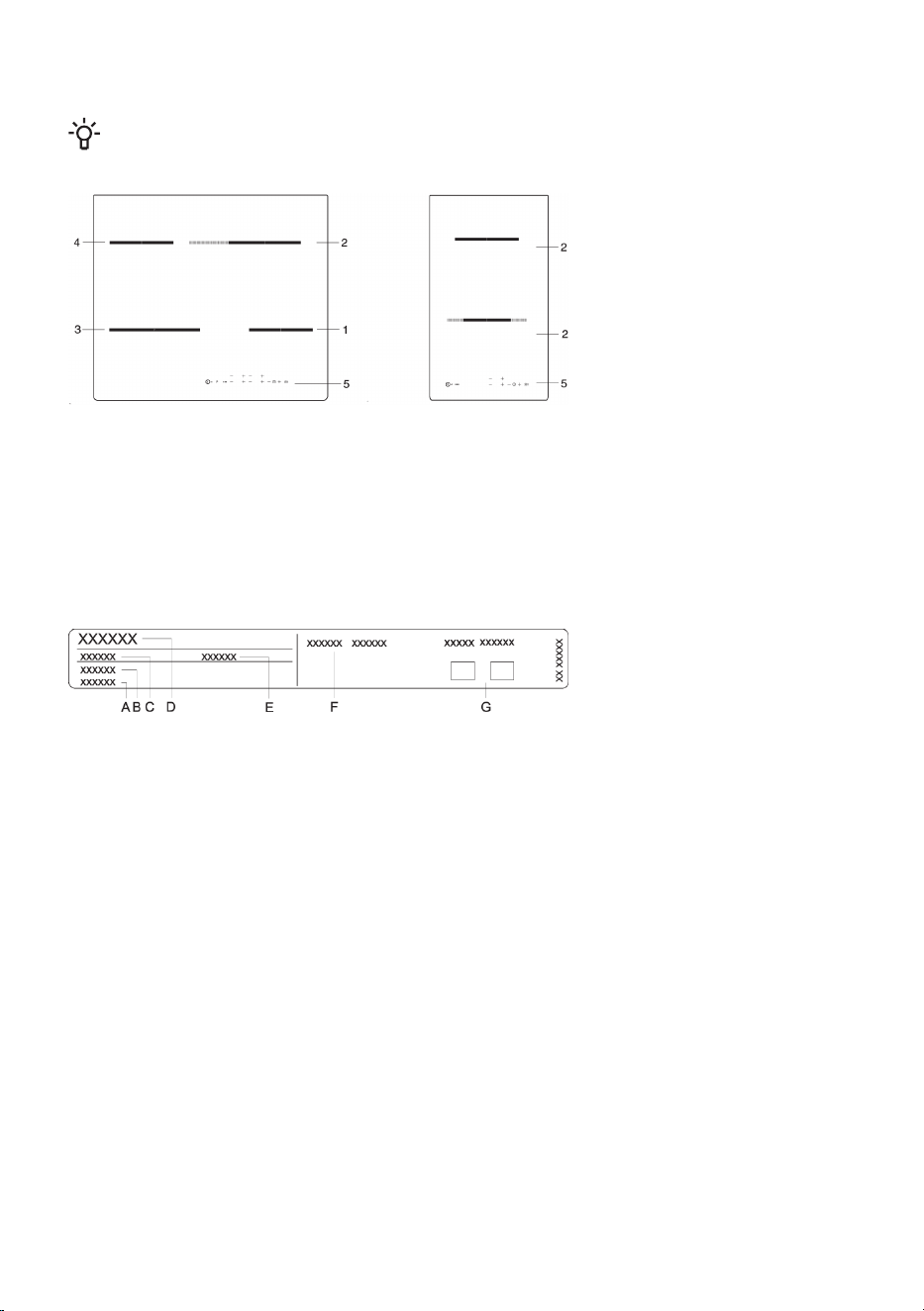
Appliance description
INFORMATION!
Appliance functions and equipment depend on the model.
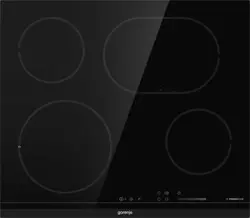
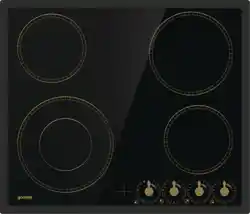
1. Cooking zone rear (left)
2. Cooking zone front (left)
3. Cooking zone rear right
4. Cooking zone front right
5. Operating the cooking hob
Technical data
(depending on the model)
A. Serial number
B. Code
C. Type
D. Trademark
E. Model
F. Technical data
G. Compliance indications / symbols
The rating plate with basic information on the appliance is located on the bottom side of the
cooking hob. Information on appliance type and model can be found on the warranty sheet.
Before first use
If your hob has a glass ceramic surface, clean it with a damp cloth and some washing-up liquid. Do
not use aggressive cleaners, such as abrasive cleaners that could cause scratches, abrasive
dishwashing sponges, or stain removers.
During initial use, characteristic "new appliance smell" may appear; it will gradually disappear.
7
Glass ceramic cooking surface
• The hob is resistant to temperature changes.
• Do not use the glass ceramic hob if it is cracked or broken. If a sharp object falls on the hob, the
hob may break. The consequences of such occurrence may be visible immediately or only after
a while.
• If any visible crack appears in the hob, immediately cut off the power supply to the appliance.
• Make sure the cooking zone and the cookware bottom is clean and dry. This will allow better
conduction of heat and prevent any damage to the heating surface.
• Do not place empty cookware on the cooking zone. The cooking zone may be damaged if you
place an empty pan onto it. Before placing a pan onto the cooking zone, wipe the pan bottom dry
to allow conduction of heat.
Tips regarding your cookware
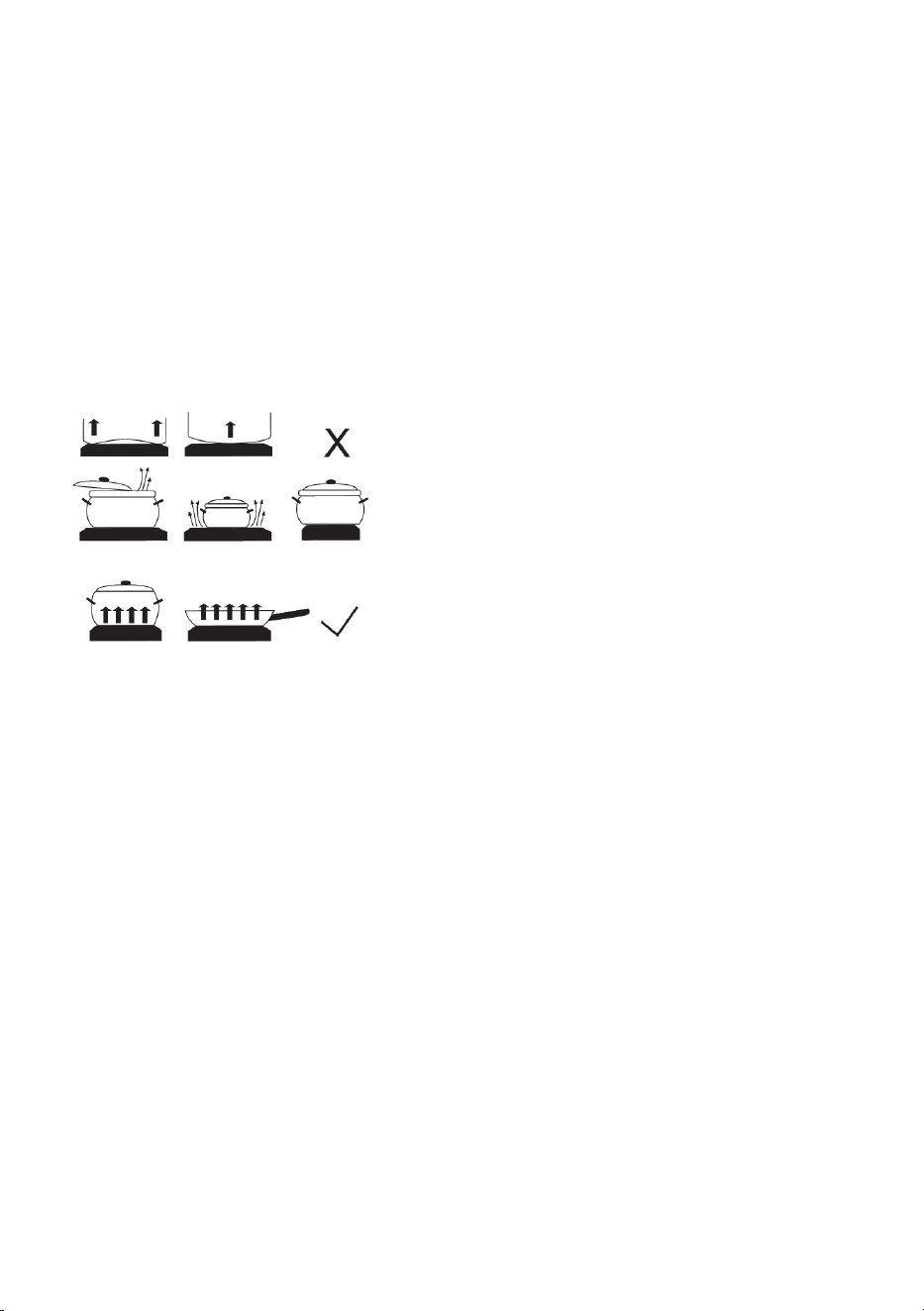
• Use quality cookware with flat and stable
bottom.
• Pan bottom and cooking zone diameters
should be the same.
• Tempered glass cookware with special
ground bottom may be used on the cooking
zones if its diameter fits that of the cooking
zones. Cookware with larger diameter may
crack due to thermal tension.
• Make sure the pot or pan is in the middle
of the cooking zone.
• When using a pressure cooker, keep an eye on it until the right pressure is reached. First, set the
cooking zone to maximum power; then, following the pressure cooker manufacturer's instructions,
use the relevant sensor to decrease the cooking power at the right time.
• Make sure there is enough liquid in the pressure cooker, or any other pot or pan. Due to overheating,
using an empty pot on the cooking zone may result in damage to both the pot and the cooking
zone.
• When using special cookware, observe the manufacturer's instructions.
Energy saving tips
• When purchasing cookware, note that the diameter indicated on the pan usually pertains to the
upper edge or the lid, which is normally larger than the diameter of the pan bottom.
• If a dish takes a long time to cook, use a pressure cooker. Make sure there is always sufficient
liquid in the pressure cooker. If an empty cooker is placed on the cooking hob, it may overheat
which in turn may lead to damage to both the pot and the cooking zone.
• Whenever possible, close the pot or pan with a suitably sized lid. Use cookware that fits the amount
of food you are cooking. Cooking in a large partly full pot will consume much more energy.
8
Operating the cooking hob
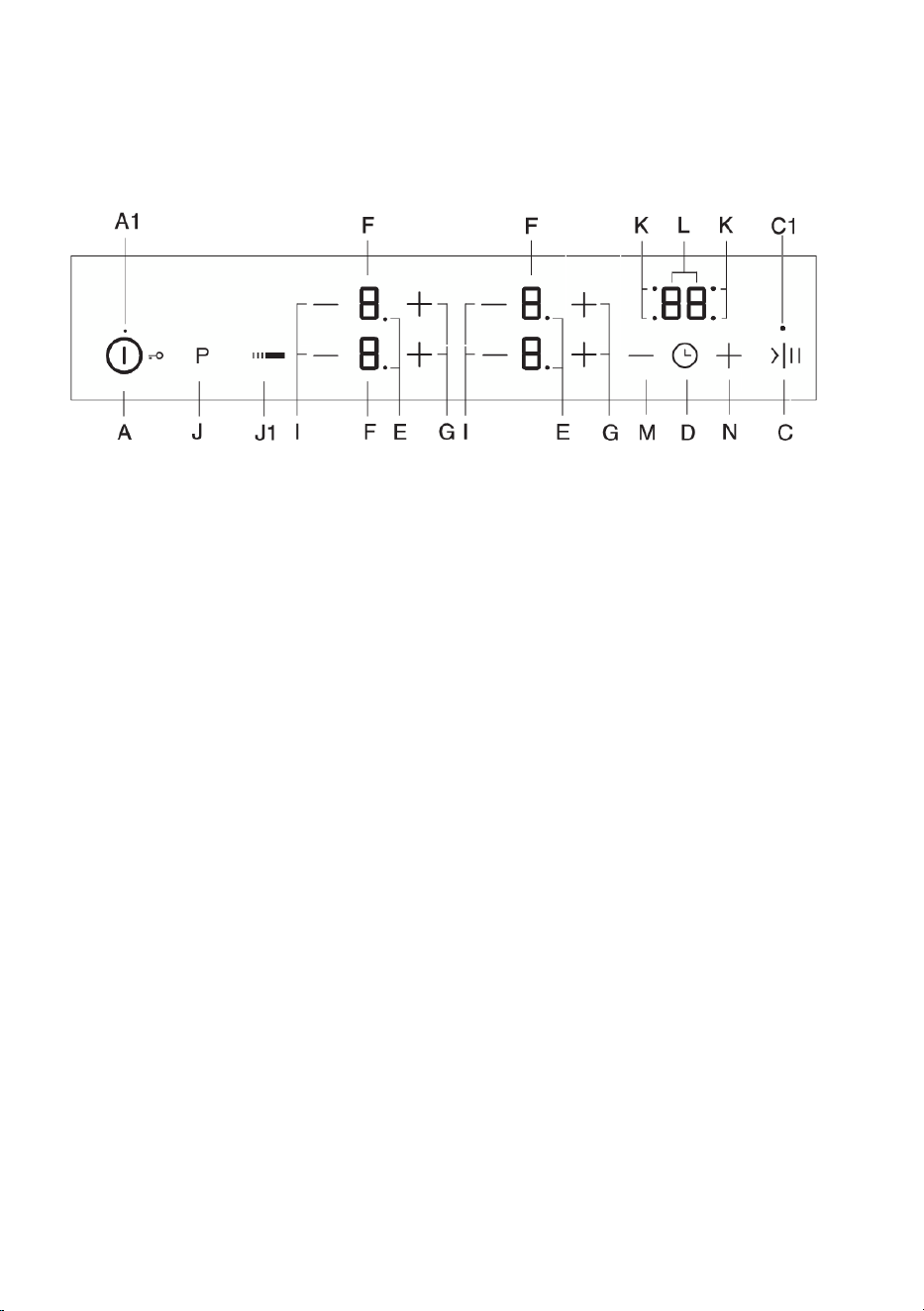
Control unit
(depending on the model)
A Hob on/off and lock key
A1 Appliance on indicator light
C Stop & Go (pause) key
C1 Stop & Go (pause) indicator light
D Minute minder of power off timer key
E Extended cooking zone indicator light
F Power level/residual heat displays
G Power increase key (+)
I Power decrease key (–)
J Left extended heating zone on/off key
J1 Right extended heating zone on/off key
K Timer-operated cooking zone indicator light
L Timer display
M Timer settings decrease key
N Timer settings increase key
9
Switching on the hob
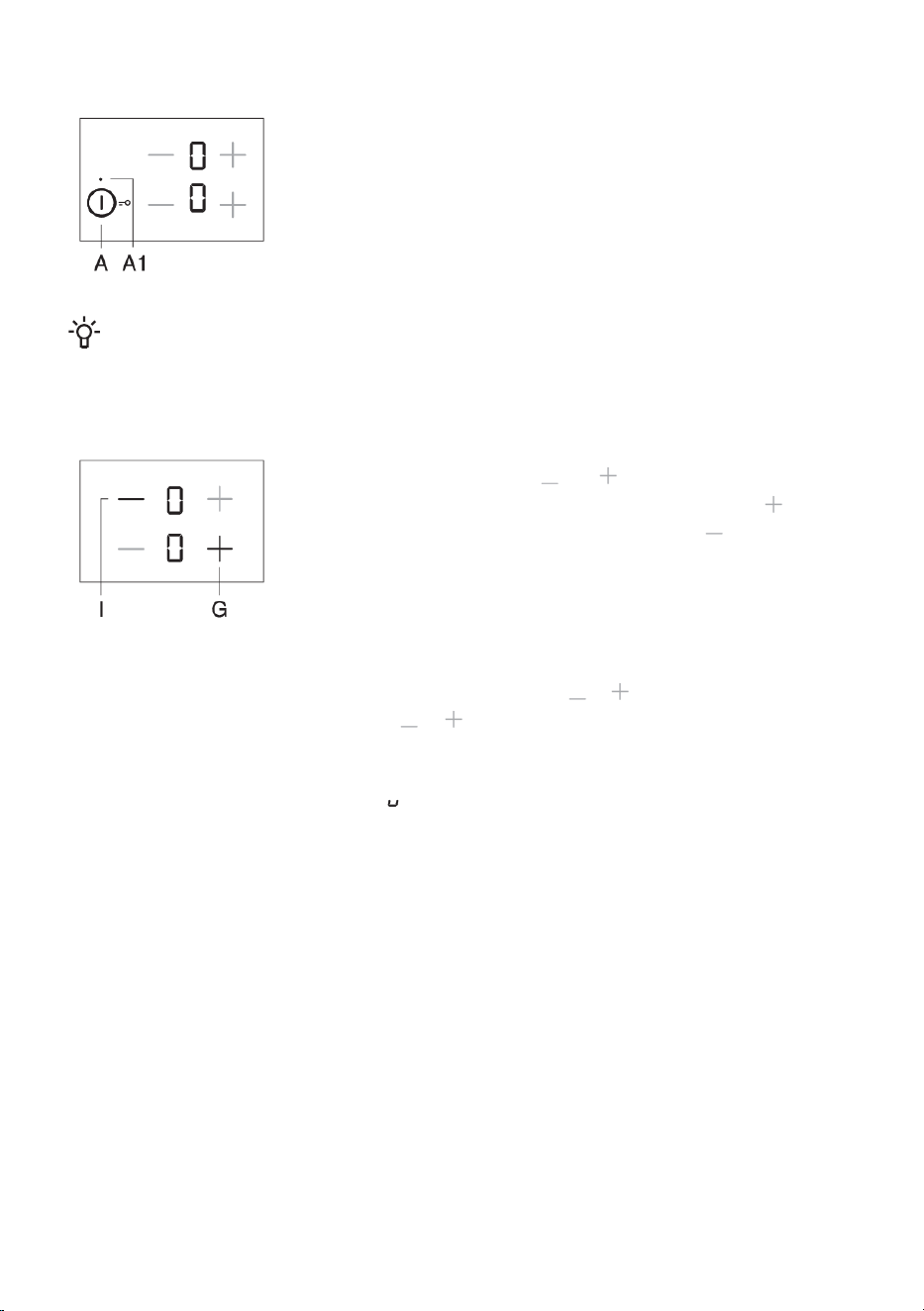
Touch the on/off key (A) and hold it for 1 second to switch on the hob.
"0" will appear on all power level indicators. A brief acoustic signal will
be emitted and an indicator light will light up above the "on" key.
INFORMATION!
If no cooking zone is switched on in 10 seconds, the cooking hob will power off.
Switching on the cooking zones
After the hob is switched on (in the next 10 seconds), switch on the
desired cooking zone. Use the and keys to select the desired
setting for the activated cooking zone. If you first touch the key, the
power level will be set to "9" . If you first touch the key, the power
level will be set to "4"
Change of cooking zone settings
Power level can be changed at any time by touching the relevant or key. To increase or decrease
the power level faster, touch and hold the or key.
Stay-warm/reheating function
The stay-warm/reheating zone is intended for keeping warm the food that is already cooked. To
activate the function, select the setting , between 0 and 1.
10
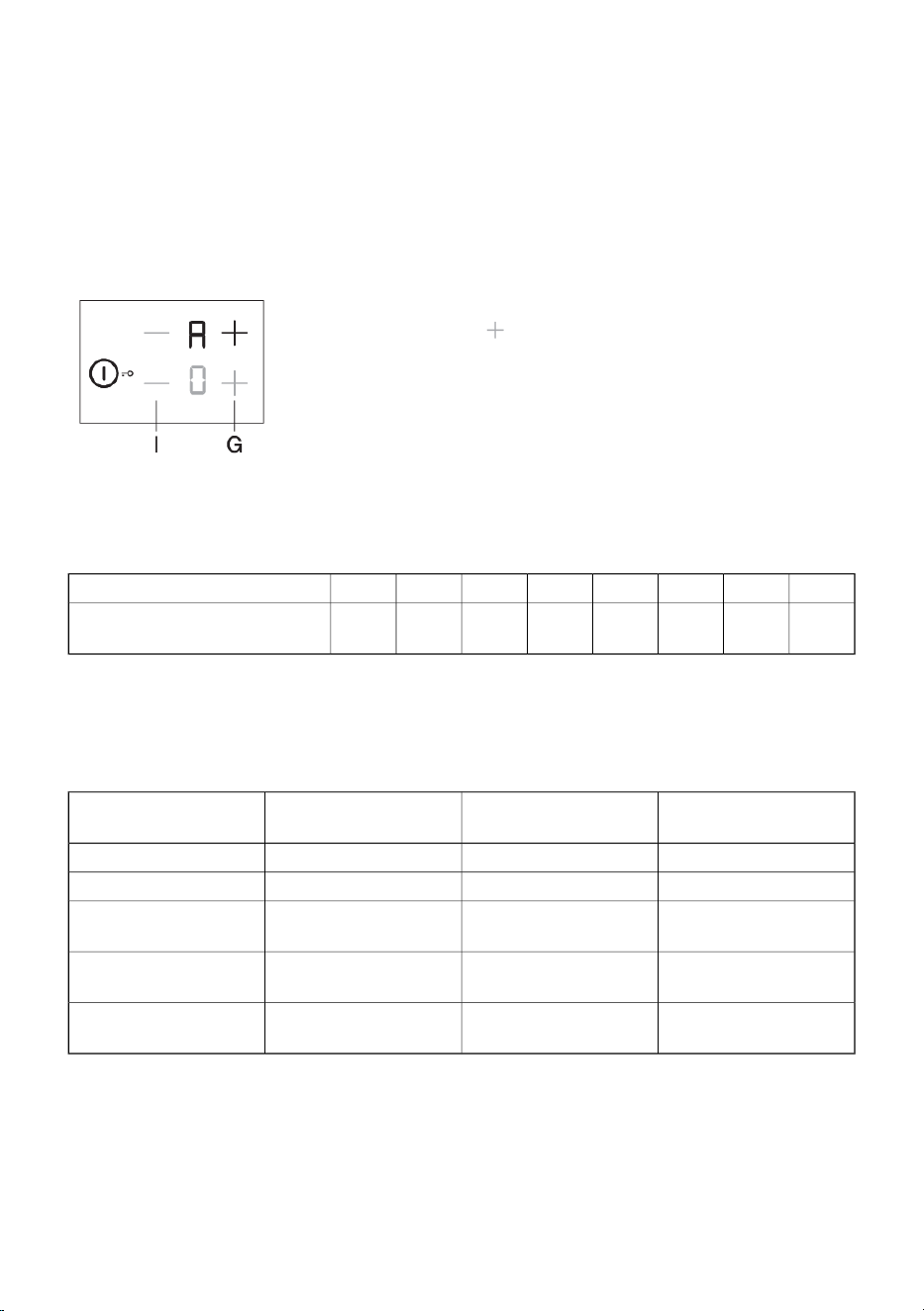
Automatic rapid heating
All cooking zones are fitted with a special mechanism that sets the cooking power to maximum at the
start of the cooking process, regardless of the actual power setting. After a while, the cooking zone
power switches back to the initially set level (1 to 8).
The auto rapid heating function is suitablefor dishes that have to be heated up at maximum power
first, and then cooked for a longer period of time.
The auto rapid heating function is not suitablefor braising, frying or sautéing, food that requires
frequent turning, basting, or mixing, or food that has to boil for a longer period of time in a pressure
cooker.
The cooking zone should be off ( "0" . should appear on the display
unit). Press the relevant key and hold it for 3 seconds until you hear
a short beep. "A" and "9" .will flash alternately on the display. Decrease
the power to the level you wish to cook with after the automatic rapid
heating. "A" and selected power level will alternate on the power level
display. When the automatic rapid heating time expires, the cooking zone
automatically switches to the selected level which will then be
continuously displayed.
Automatic rapid heating table
87654321Power level
4:303:302:308:306:304:502:001:00Automatic rapid heating time
(min)
If cooking power is decreased while the automatic rapid heating is activated, then automatic rapid
heating for this cooking zone will be switched off.
The auto rapid heating function can be deactivated by selecting the relevant cooking zone and
decreasing the power level to "0" . Then, set the new power level.
Cooking time (min)Power levelamountType of food/ cooking
method
4 - 7A 7 - 80,5 - 1 litreSoup/reheating
4 - 7A 1 - 20,2 - 0,4 litreMilk/reheating
20 - 25A 2 - 3125g - 250g approx.
300ml - 600ml of water
Rice/cooking
25 - 38A 5 - 6750g - 1,5kgBoiled potatoes/ whole,
unpeeled
18 - 25A 4 - 50,5 - 1 kg approx.
400ml - 600ml of water
Fresh vegetables,
chopped/cooking
• The table lists examples of some dishes that will particularly benefi t from the automatic rapid
heating function.
• The indicated values are approximate and may depend on other parameters of cooking (e.g. type
and quality of cookware, amount of water added etc.).
• Smaller amounts apply to smaller cooking zones; larger amounts apply to large cooking zones.
11
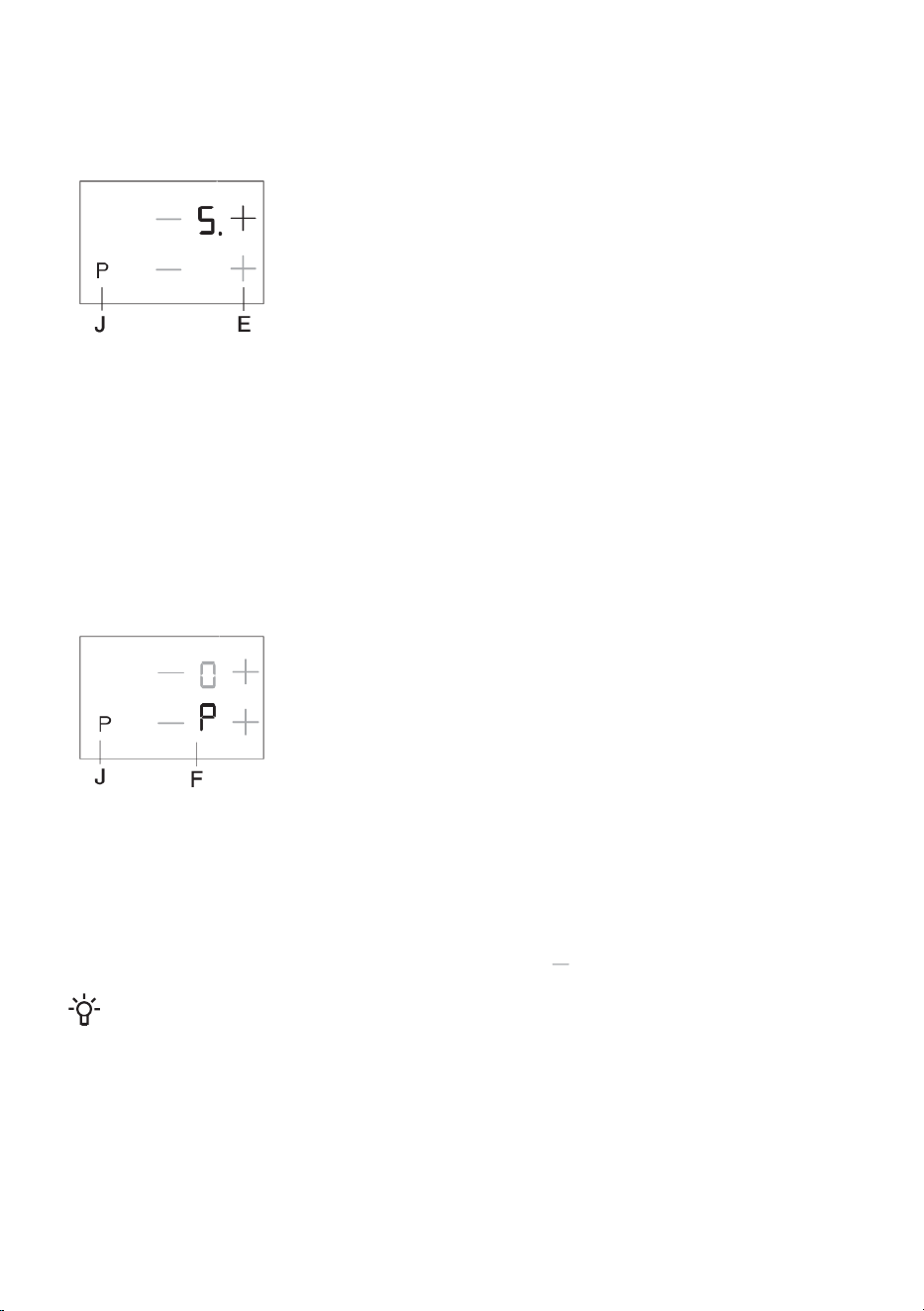
Additional heating zone
(depending on the model)
An additional heater ring can be activated for some cooking zones (depending on the model).
Activating the cooking zone extension / additional heater ring
• An additional ring can be activated to extend an already selected
cooking zone for which the power level has been set. To activate the
extension, press the (J/J1) key. Signal light (E) next to the display
will light up.
• The power level is selected for both rings.
• If a cooking zone has a third ring, activate it by pressing the (J/J1)
key again, so that two signal lights (E) are lit next to the power level
display.
Deactivating the cooking zone extension / additional heater ring
• To switch off the extension ring (or rings), press the (J/J1) key next to the selected cooking zone.
Power boost
(depending on the model)
In some models, a power boost can be activated on the front left cooking zone indicated
with "P" or "»" . This allows faster heating of both the cookware and the food.
Activating the power boost
• Select the front left cooking zone.
• Press the (J) key for an additional heater ring or for power boost.
Letter "P" will appear on the power display unit and extra heating
power will soon be engaged on the cooking zone which will glow
intensely.
Deactivating the power boost
Power boost can be deactivated in two ways:
• Press the (J) key. Power boost will be deactivated and operating power will return to the level set
before the power boost activation.
• Power can be decreased to desired level by pressing the key.
INFORMATION!
The cooking zone with activated power boost "P" draws a lot of heating power. Therefore, the
adjacent upper (rear) cooking zone cannot be simultaneously set to maximum power; rather, its
power will be limited to 7 for the duration of the power boost. If the power boost is activated on
the front left cooking zone at a time when the rear cooking zone is set to power level 8 or 9, or
when automatic rapid heating is engaged, the power level for the rear left cooking zone will be
automatically set to 7 and the automatic rapid heating function will be deactivated.
12
INFORMATION!
Each cooking zone has built-in overheating protection. If there is no cookware on the cooking
zone or if the heat transfer to the food is not sufficient, then heating will be automatically
deactivated for a few seconds. This is particularly important on the cooking zone with the power
boost option as it operates at much higher power and there is a greater probability of overheating.
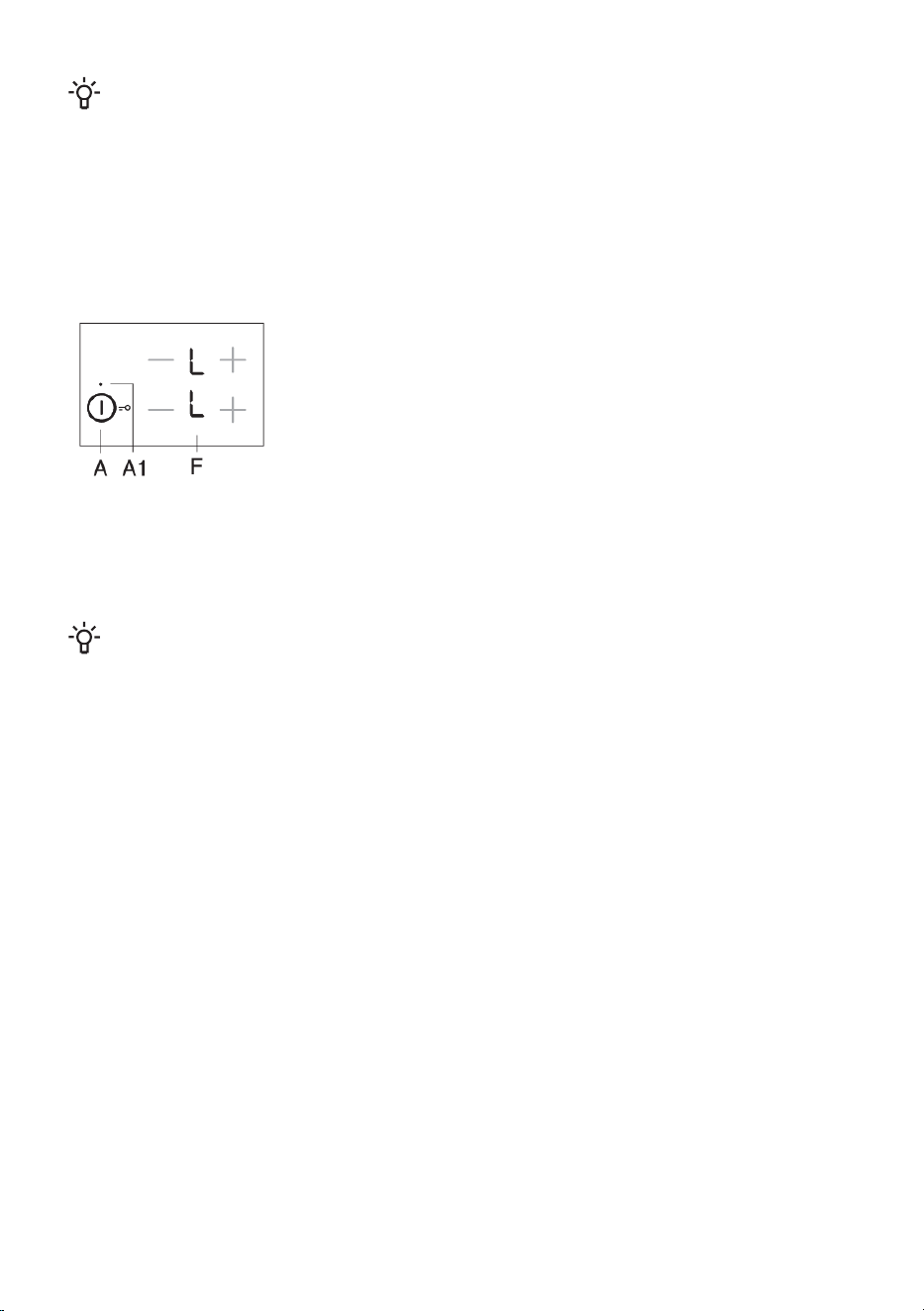
Child lock/lock
Child lock may be activated on the hob to prevent the appliance from being switched on easily and
quickly.
Locking the cooking hob controls
The hob must be switched off. Touch the on/off key and hold it for 3
seconds. "0" on the cooking zone power indicators will turn to
sign "L" . The cooking hob is now locked. After a few seconds, the
cooking hob will switch off automatically.
Unlocking the cooking hob controls
To unlock the cooking hob, proceed in the same way as for locking it. The hob must be switched off.
Touch the on/off key and hold it for 3 seconds. "L" on the cooking zone power indicators will turn
to "0" . The cooking hob is now unlocked and ready for use.
INFORMATION!
If the child lock function is activated in the user settings mode (see chapter "User Settings Mode",
then the hob will be automatically locked every time it is switched off.
13
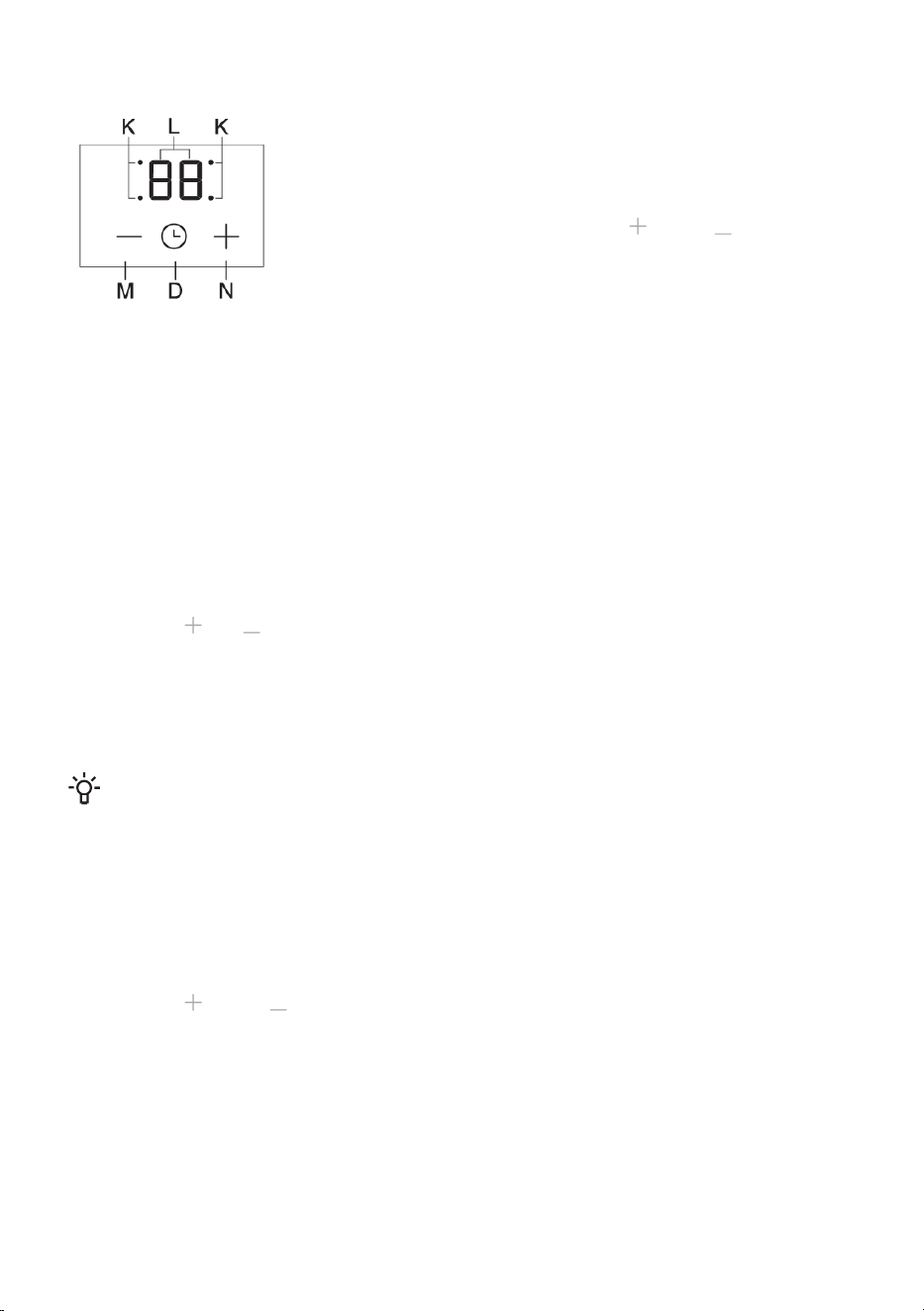
Time functions
Cooking time can be set from 1 to 99 minutes. This function allows two
operating modes:
1 Minute minder
Press the timer/minute minder key (D) to activate the timer. "0" will
appear on the timer display (L). Touch the (N) and (M) keys to set
the time in the range from 1 to 99 minutes.
• After the set time expires, alarm will be activated; however, the
cooking zone will not be switched off .
• Switch off the alarm by touching any key; alternatively, it will switch
off automatically after a certain period of time.
• The minute minder function will remain activated even when the
cooking hob is switched off using the (A) key.
• During the last minute of countdown, remaining time will be displayed
in seconds.
2 Off timer for the selected cooking zone
This function allows setting the cooking time for the selected cooking zone on which a power level
has already been set. When the time expires, the cooking zone is switched off automatically. Press
the timer/minute minder key (D) to activate the timer. "0" will appear on the timer display (L). Touch
the (D) sensor key again. The point (K) for the relevant cooking zone will start to flash.
•
Touch the and keys to set the time in the range from 1 to 99 minutes.
• When the desired value is set, the countdown begins. The point (K) indicating which cooking zone
the timer function is set for will continue to fl ash.
• After the set time has expired, acoustic signal will be activated and the cooking zone will be
switched off . "0" will fl ash on the clock display. Switch of the alarm by touching any key;
alternatively, it will switch off automatically after a certain period of time.
INFORMATION!
Cooking time can be set separately for each cooking zone. If several timer functions are activated,
the remaining times of respective cooking zones will alternate on the display unit in intervals
lasting a few seconds. A flashing indicator light will indicate the relevant cooking zone.
Changing the cooking time
• Remaining cooking time can be changed at any time during cooking.
• Touch the power-off timer key (D) to select the timer display for the desired cooking zone. The
relevant indicator light (K) will fl ash.
•
Touch the (N) and (M) keys to set the new cooking time.
Displaying the remaining cooking time
If several timer settings are activated, remaining cooking time can be displayed by touching the (D)
key.
Timer reset
• Select the desired timer display by pressing the (D) key (see section Changing the set cooking
time). The set timer will be displayed and the indicator light for the relevant cooking zone will light
up.
14

•
Touch the (M) key to set the value to "0" , or press the (N) and (M) key simultaneously
to immediately reset the value to "0" .
Pausing the cooking process with Stop&Go
The Stop&Go function allows you to pause (or suspend) the cooking process, but keep all your settings.
To pause the cooking process, touch the Stop&Go key (C). An indicator light (C1) will light up above
the key. Settings on the displays will start to flash. All settings are frozen, and the cooking zone are
not heated (the heaters are switched off).
All keys except on/off and Stop&Go are inactive. To deactivate the Stop&Go function, touch the
Stop&Go key again. Indicator light (C1) will switch off.
If the Stop&Go function is not switched off, the entire hob will automatically switch off after 10 minutes.
Memory function
The memory function allows restoring the most recently selected settings in 5 seconds after the hob
is switched off. This is convenient when, for example, you accidentally press the on/off key and switch
off the entire hob, or if the cooking hob is switched off automatically due to some spilt liquid.
After switching off with the on/off key, you have 5 seconds to switch the control panel back on, and
further 5 seconds to press the SStop&Go key to restore your settings. During these 5 seconds, the
indicator light above the settings restore key will flash. All settings active before the hob was switched
off will be restored.
Automatic switch off
If the keys are activated for too long during cooking (e.g. due to spilt liquid or an object placed over
the sensor keys), all cooking zones will be switched off after 10 seconds. The symbol will flash on
the display. The object should be removed, or the spilt liquid should be cleaned, from the sensor keys
within 2 minutes; otherwise, the cooking hob will switch off automatically. The most recent settings
can be restored with the memory function using the Stop&Go key
Switching off the cooking zone
To switch off a cooking zone, use the relevant key to set the value to "0" . To quickly switch off
the cooking zone, touch the relevant and keys simultaneously. You will hear a short beep, and
"0" .will be displayed on the display unit.
If the power of all cooking zones is set to "0" ., the cooking zone will switch off automatically after
a few seconds.
Residual heat indicator
As soon as a hot cooking zone or the entire cooking hob is switched off, the following will be displayed:
• "H" cooking zone is hot;
How long this will be displayed depends on the power level and on how long a cooking zone was
activated. When the "H" sign disappears, the cooking zone may still be hot in some cases (power
failure, a hot pan left on the cooking zone etc.). Be careful as there is danger of burns! In case of a
power failure while the cooking zones are still hot, the "H" sign will flash on the display. This indicates
that the cooking zone may or may not be hot, depending on the duration of the power failure.
15
INFORMATION!
The appliance was tested at the factory and the cooking zones were heated up. Therefore, "H"
may flash on the display for a while when the appliance is connected for the first time at your
home.
INFORMATION!
When the "H" sign disappears, the cooking zone may still be hot. Risk of burns!
Maximum cooking time
For safety, the cooking time for each cooking zone is restricted to a maximum duration. Maximum
cooking time depends on the most recently set power level. If the power level is not changed, the
cooking zone will be switched off automatically after the maximum cooking duration is reached.
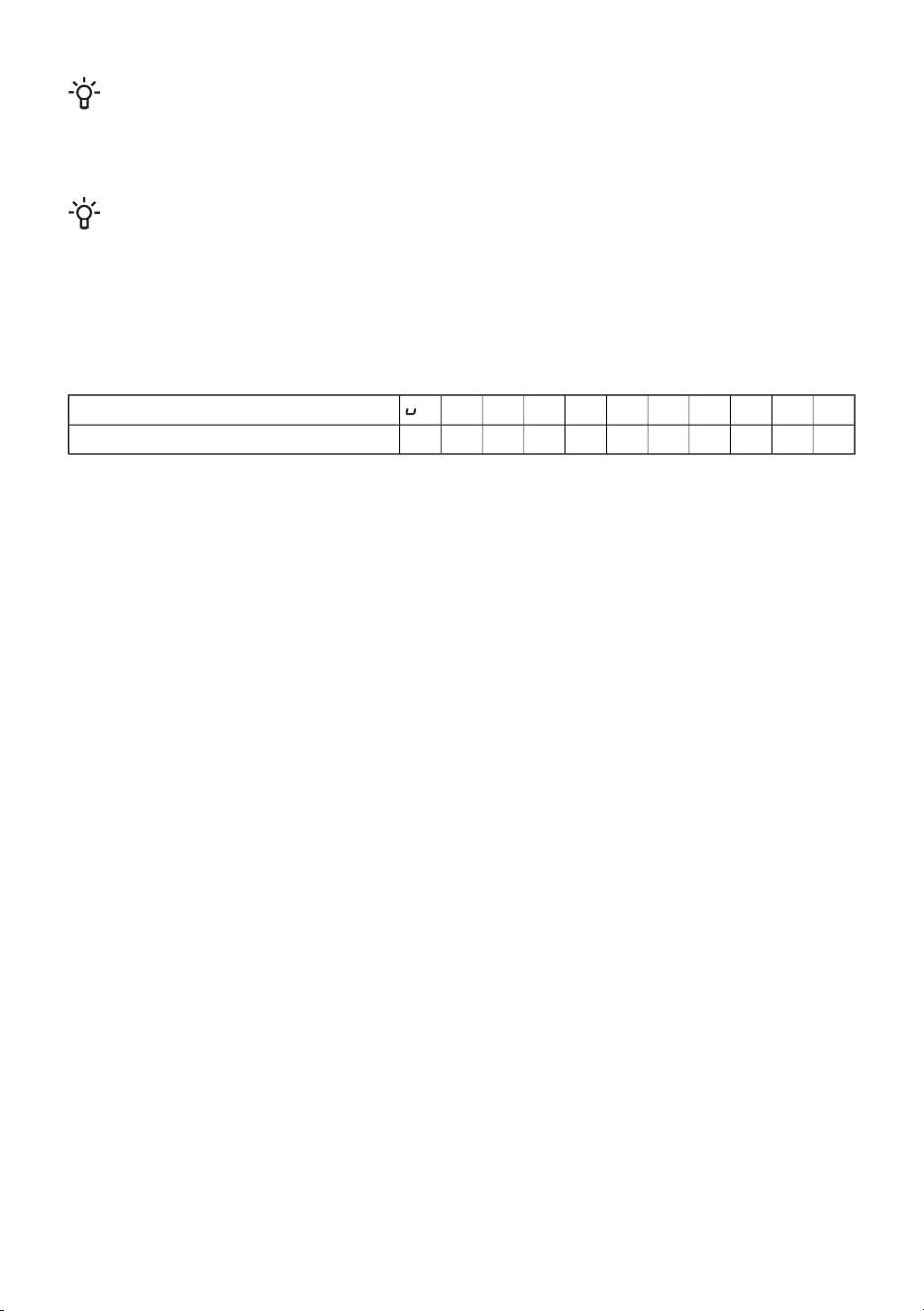
P987654321Level
11,51,524466888Maximum operating time (hours)
Switching off the entire cooking hob
Touch the on/off key (A) to switch off the entire hob. The hob will beep and all indicators will be
switched off, except for the indicators for the cooking zones that are still hot, for which the residual
heat indicator ‘’H’’ will remain lit.
16
User settings
You can adjust the volume of the acoustic signal, duration of acoustic alarm, and automatic lock
settings.
The parameter settings menu can be activated within two minutes after the appliance is connected
to the power mains, by touching and holding the pause (Stop&Go) key for around 3 seconds while
the appliance is switched off.
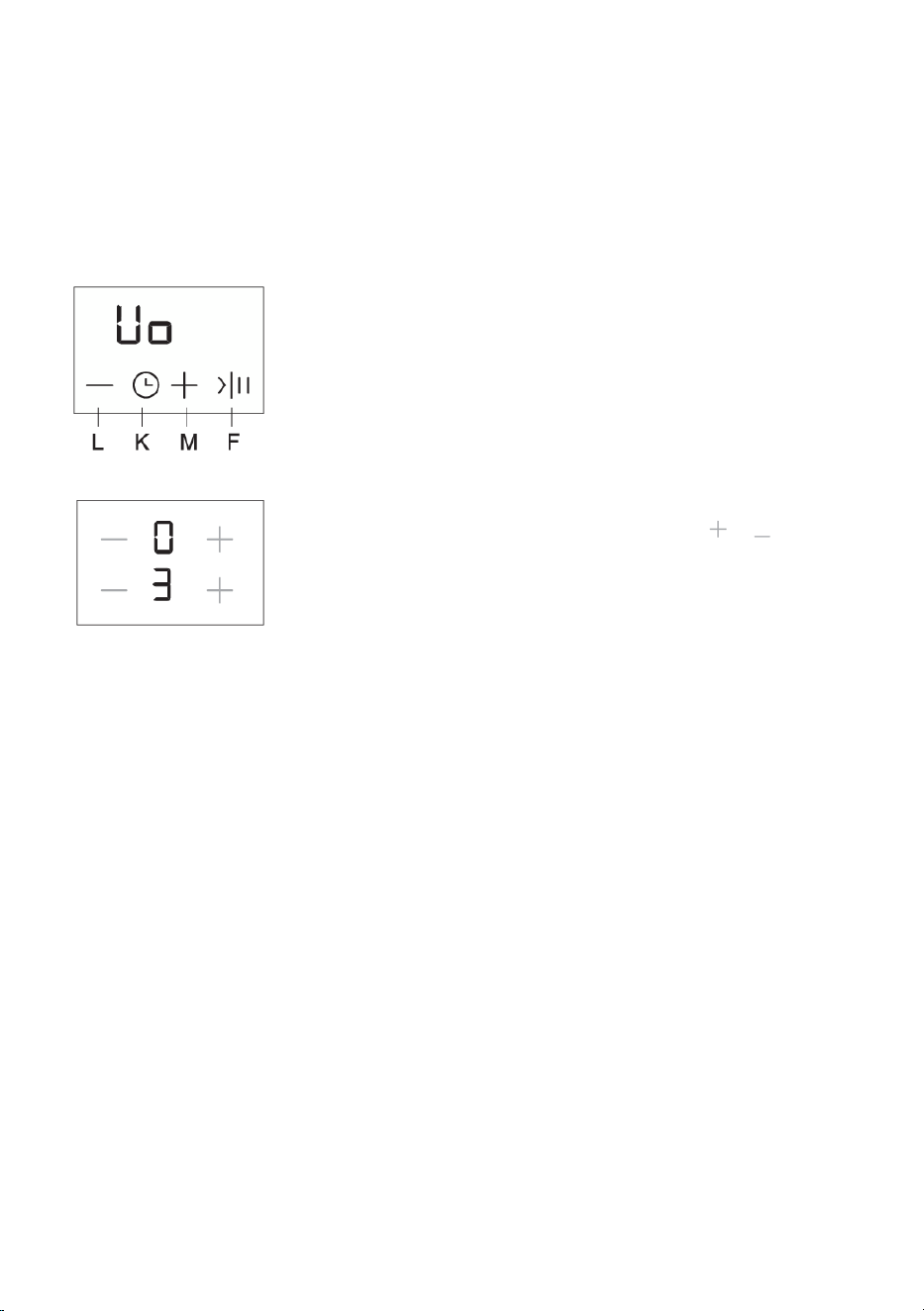
The first parameter "Uo" will appear on the timer display, indicating the volume (loudness) of acoustic
signals. Press the timer key (M,N) to select the type of parameter.
Uo – acoustic signal and alarm volume (loudness)
So – alarm duration
Lo – Automatic lock
The currently set value will appear on the right cooking zone power level
displays. The value can be adjusted by pressing the or keys for
the front right cooking zone. All parameters can be confirmed and stored
by pressing and holding the pause (Stop&Go) key for 2 seconds. Then,
a short beep will be heard. If you do not wish to store the new parameter
settings, close the user settings mode by pressing the on/off key.
Acoustic signal and alarm volume (loudness) "Uo"
The following values can be set:
00 on the display = off (does not apply to alarm and error acoustic signal)
01 on the display = minimum volume
02 on the display = medium volume
03 on the display = maximum volume (default)
A short acoustic signal will be sounded upon every change, with the newly set volume.
Acoustic alarm duration "So"
The following values can be set:
05 on the display = 5 seconds
1,0 on the display = 1 minute
2,0 on the display = 2 minutes (default)
Child safety lock "Lo"
If the automatic lock function is activated in the user settings mode, the cooking hob will be
automatically locked every time it is switched off.
00 on the display = off (default)
01 on the display = on
17
Cleaning and maintenance
After each use, wait for the glass ceramic surface to cool down and clean it. Otherwise, all remaining
impurities will burn onto the hot surface the next time you use the hob.
For regular maintenance of the glass ceramic hob, use special care products that create a protective
film on the surface to prevent the dirt from sticking onto it.
Before each use of the glass ceramic surface, wipe off the dust or any other impurities that could
scratch the surface, from both the hob and the pan bottom.
INFORMATION!
Steel wool, coarse cleaning sponges, and abrasive powders may scratch the surface. The surface
may also be damaged by aggressive spray cleaners and unsuitable liquid cleaners.
Signage may be worn when using aggressive or abrasive cleaners or cookware with coarse or damaged
bottom.
Use a damp soft cloth to remove minor impurities. Then, wipe the surface dry.
Remove water stains with a mild solution of vinegar. However, do not use this solution to wipe the
frame (only with some models) as it may lose its sheen. Do not use aggressive spray cleaners or
descaling agents.
Use special glass ceramic cleaners for stubborn dirt. Observe the manufacturer's instructions. Be
sure to thoroughly remove any cleaner residues after the cleaning process as they may damage the
glass ceramic surface when the cooking zones heat up.
Remove stubborn and burnt residues with a scraper. Be careful when handling the scraper to prevent
injury.
INFORMATION!
The scraper is not included in appliance equipment.
INFORMATION!
Only use the scraper when dirt cannot be removed with a wet cloth
or special cleaners for glass ceramic surfaces.
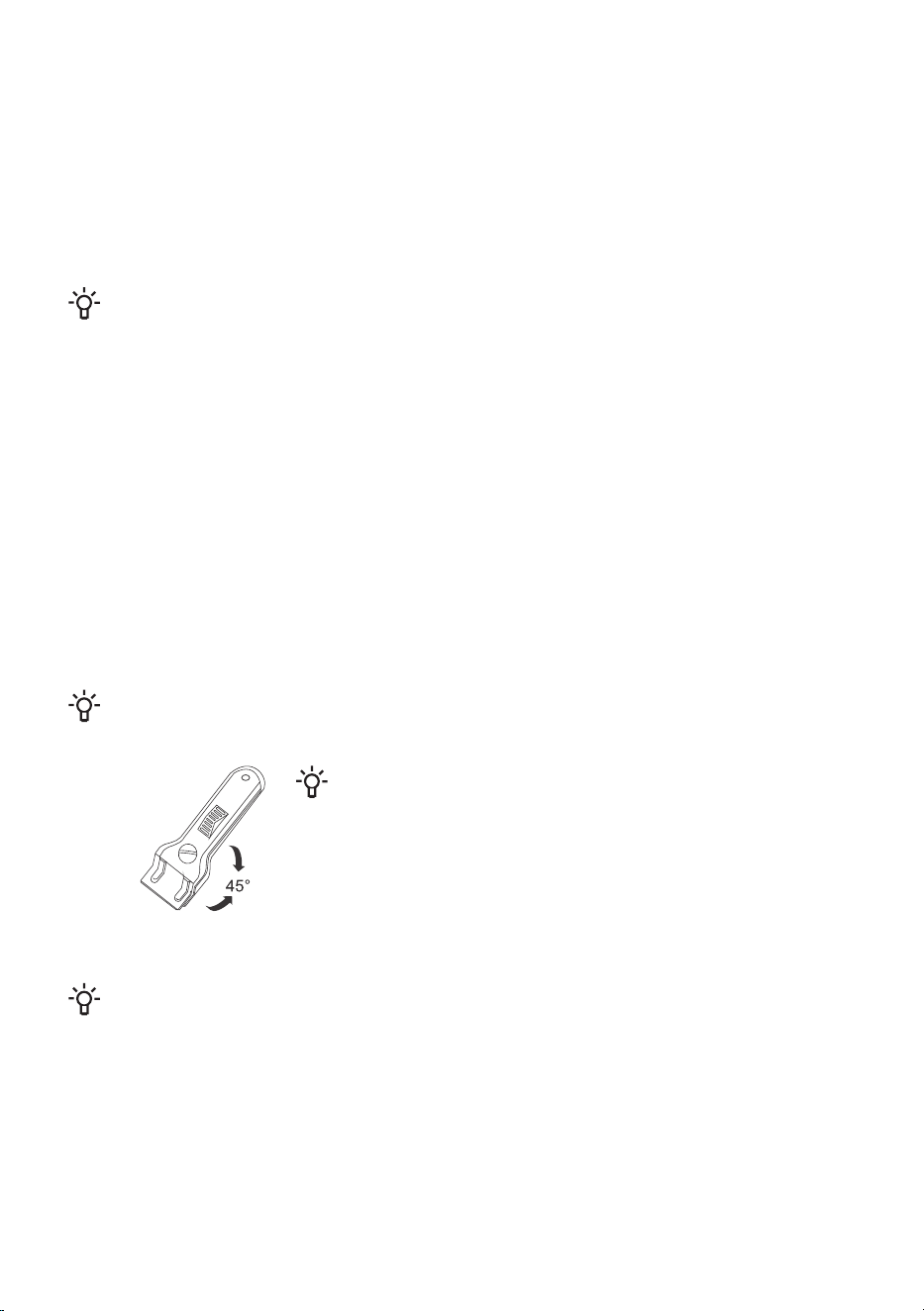
Hold the scraper at the correct angle (45° to 60°). Gently press the
scraper against the glass and slide it over the signage to remove
the dirt. Make sure the plastic handle of the scraper (in some
models) does not come into contact with a hot cooking zone.
INFORMATION!
Do not press the scraper perpendicularly against the glass and do not scratch the hob
surface with its tip or blade.
Immediately remove any sugar or sugar-laden food from the glass ceramic hob using a scraper, even
if the hob is still hot, as sugar may permanently damage the glass ceramic surface.
18
Troubleshooting table
During the warranty period, only a service center authorized by the manufacturer may carry out
any repairs.
Before making any repairs, make sure the appliance is disconnected from the power mains either by
removing the fuse or by disconnecting the power plug from the wall outlet.
Any unauthorized repairs of the appliance may result in electric shock and short circuit hazard; therefore,
do not perform them. Leave such work to an expert or a service technician.
In case of minor problems with appliance operation, check this manual to see if you can fix the problem
yourself.
If the appliance is not operating properly or at all due to inappropriate operation or handling, a visit
from a service technician shall not be free of charge, even during the warranty period.
Save the instructions for future reference and pass them on to any subsequent owners or users of the
appliance.
Following is some advice on rectifying some common problems.
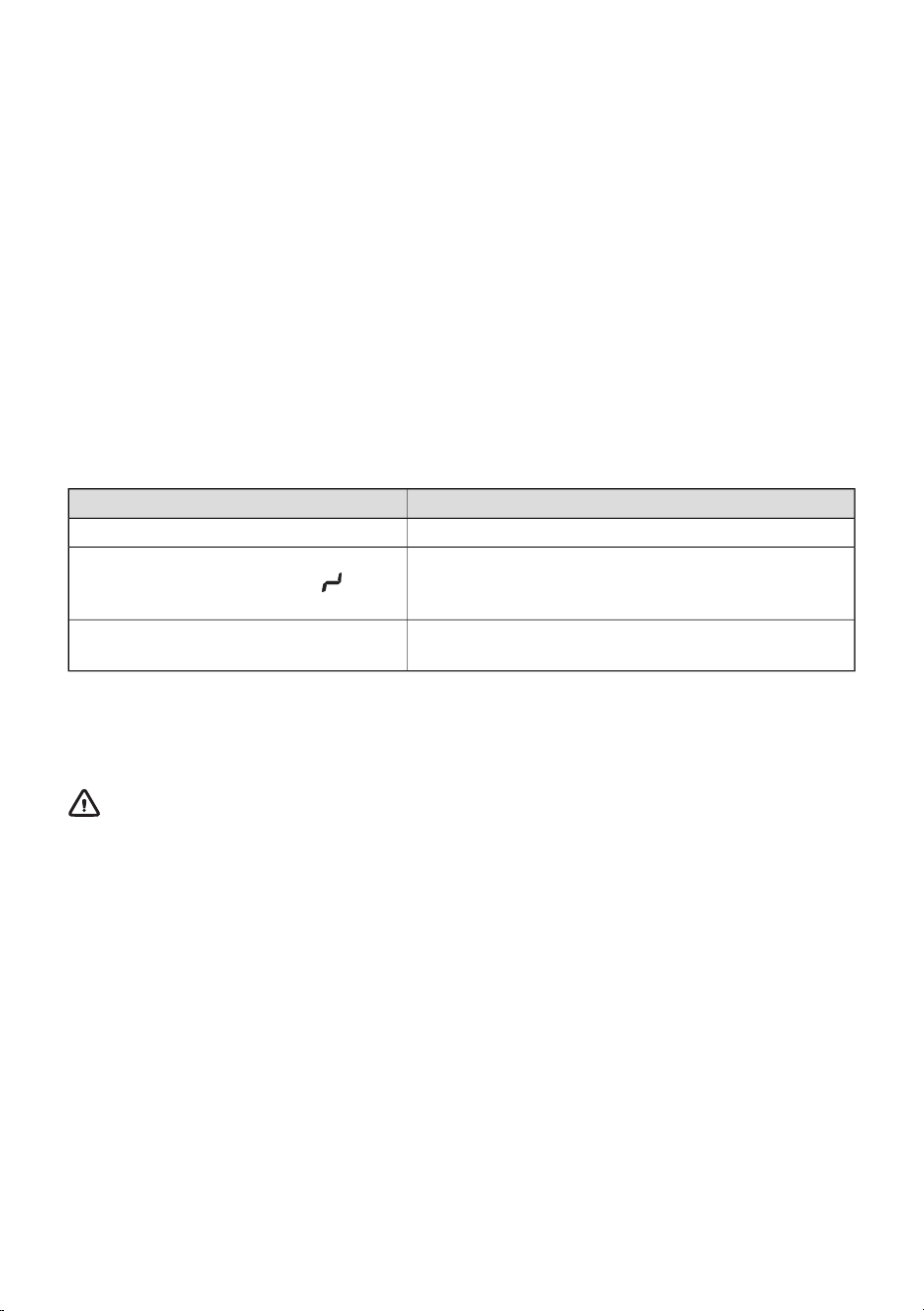
CauseProblem/error
Call a service technician.The main fuse in your home trips often.
Water spilt over the sensor surface, or an object placed
over the sensors.
Continuous beep and display
Wipe the sensor surface.
This indicates that there has been an error during
operation.
F on the display
If the problems persist despite observing the above advice, call an authorized service technician.
Repair or any warranty claim resulting from incorrect connection or use of the appliance shall not be
covered by the warranty. In this case, the user will cover the cost of repair.
WARNING!
Before the repair, disconnect the appliance from the power mains (by removing the fuse or by
removing the plug from the wall outlet).
19
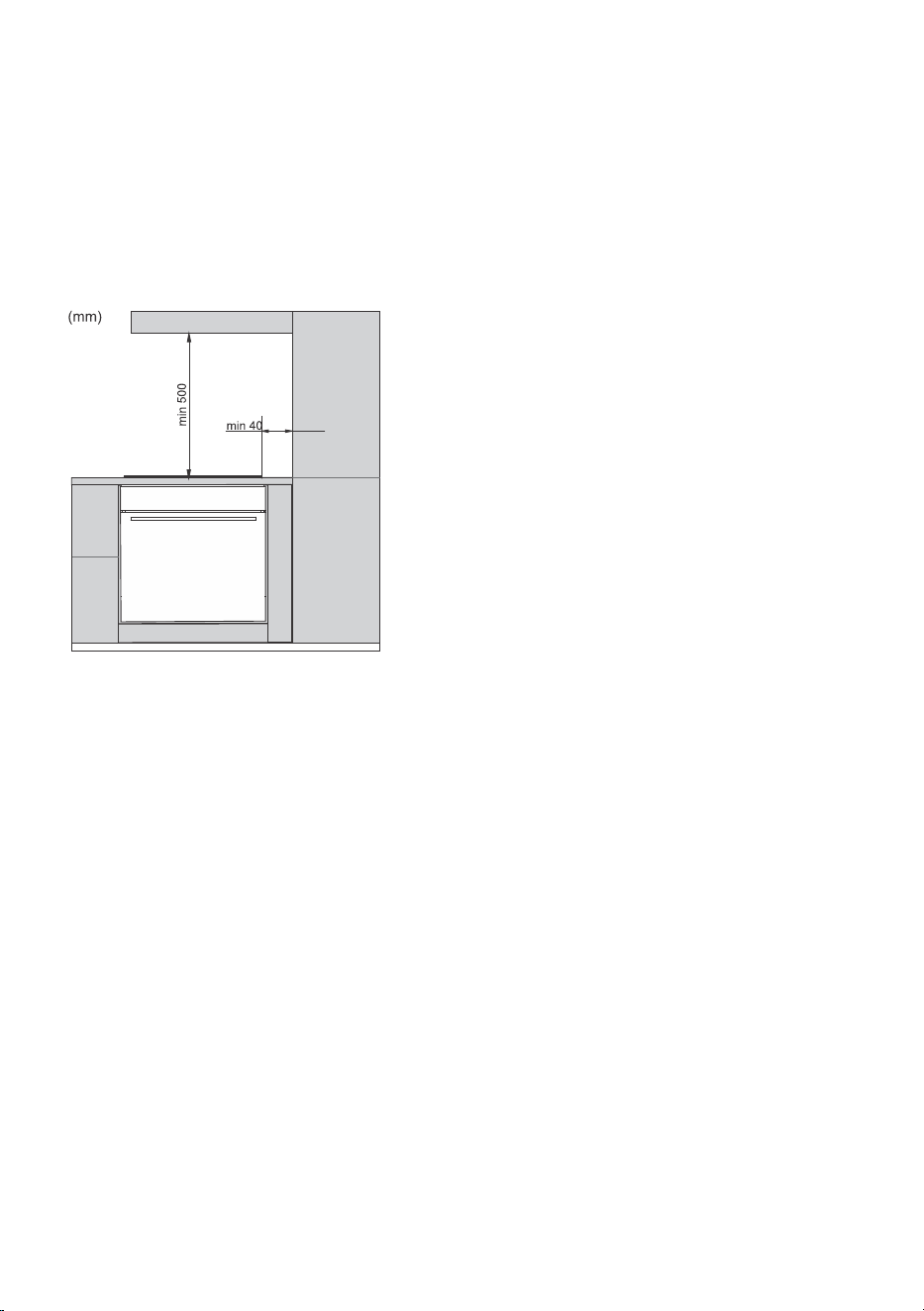
Installing a built-in hob
Installation procedure
• The worktop has to be completely level.
• Suitably protect the edges of the cut aperture.
• Connect the cooking hob to the mains power supply (see instructions for the connection of the
cooking hob to mains power supply).
• Insert the hob into the cut aperture.
• Installation of the appliance into a kitchen
worktop and its connection to the power
mains may only be performed by an
adequately qualifi ed technician.
• Veneer or other fi nish of the piece of
kitchen furniture into which the hob is to be
built in should be treated with heat resistant
glue (100°C); otherwise, the worktop fi nish
may be discolored or deformed.
• Use of solid wood corner trims on worktops
behind the cooking hob is only allowed if
the clearance between the trim and the
cooking hob is no smaller than indicated
on the installation plans.
• Cooking hob is dimensioned to be built into
the worktop over a piece of kitchen
furniture, with a width of 600 mm or more.
• Hanging, or wall-mounted kitchen elements should be installed high enough not to interfere with
the work process.
• The distance between the cooking hob and the kitchen hood should be no less than indicated in
the instructions for kitchen hood installation. The minimum distance is 500 mm.
• The distance between the appliance edge and the adjacent tall kitchen furniture element should
amount to no less than 40 mm.
• Use of solid wood corner trims on worktops behind the cooking hob is only allowed if the clearance
between the trim and the cooking hob is no smaller than indicated on the installation plans.
• Minimum distance between the built-in cooking hob and the rear wall is indicated on the installation
drawing.
20
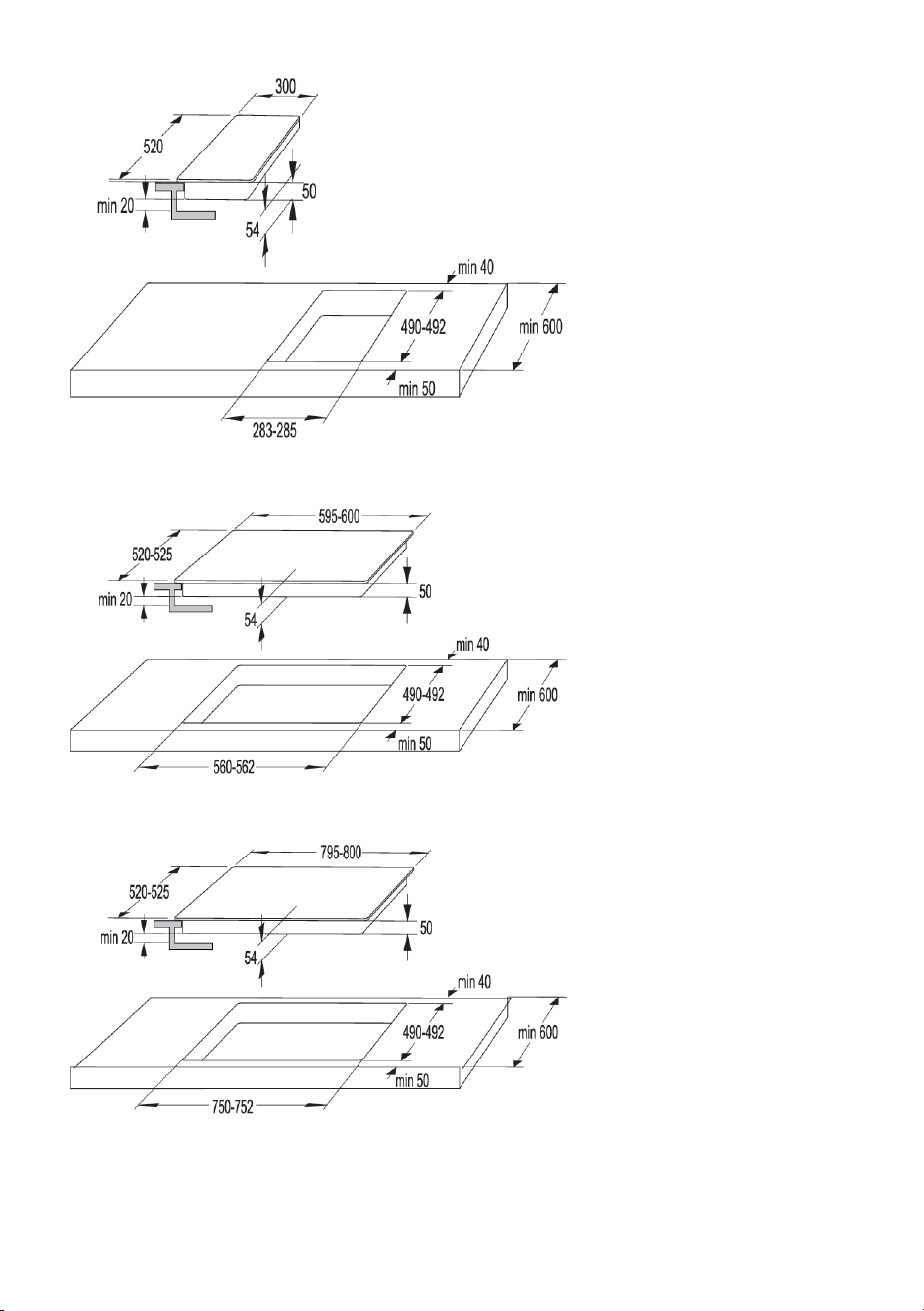
30 cm
60 cm
80 cm
21
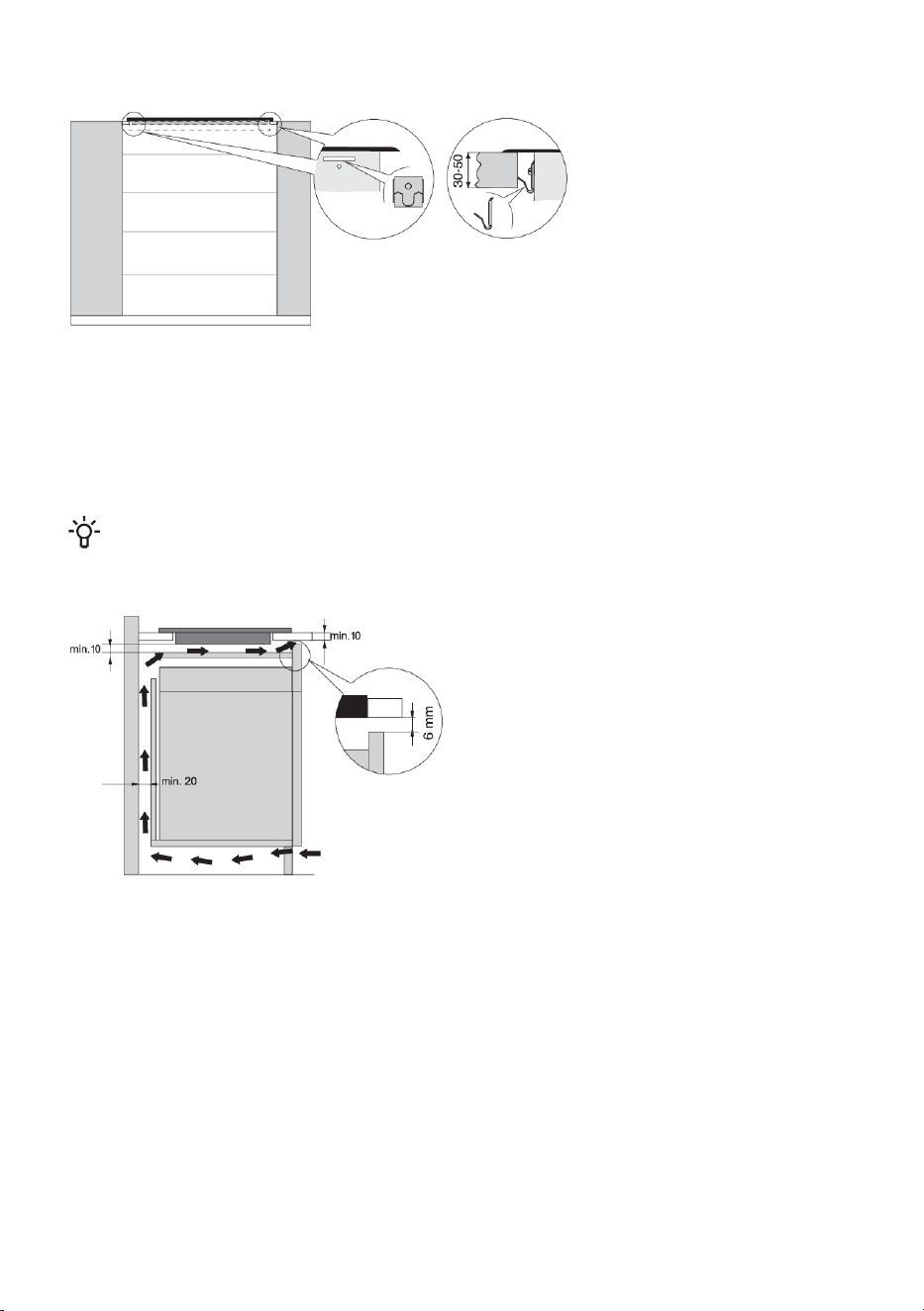
Fitting the fixing clamp
• The worktop has to be completely level. Protect the cut out surfaces.
• Use the four supplied screws (4x) to attach the fi xing elements (4x) to the hole and cutout in the
front and back wall of the cooking hob.
• Insert the cooking hob into the cut-out and press it strongly towards the worktop from above.
• Do not use screws longer than 6.5 mm to tighten the fixing clamp.
Air vents in the lower kitchen cabinet
INFORMATION!
Normal operation of the induction cooking hob electronic components requires sufficient air
circulation.
Lower cabinet with a drawer
• There must be an opening with a height of
no less than 140 mm along the entire width
of the cabinet in the cabinet rear wall. In
addition, there should be an opening of at
least 6 mm in the front side, along the entire
width of the cupboard.
• A horizontal partition panel should be
installed underneath the cooking hob along
its entire length. There should be at least
10 mm of clearance between the lower end
of the appliance and the partition panel.
Adequate ventilation should be allowed
from the rear side.
• The hob is fitted with a fan located in its lower part. If there is a drawer below the kitchen cabinet,
do not use it to store small objects or paper as these could, if sucked into the fan, damage the
fan and the cooling system. Moreover, do not use the drawer to store aluminium foil or flammable
substances or liquids (such as sprays). Keep such substances away from the cooking hob. Danger
of explosion!
• There should be at least 20 mm of clearance between the contents of the drawer and the fan inlet
vents.
22
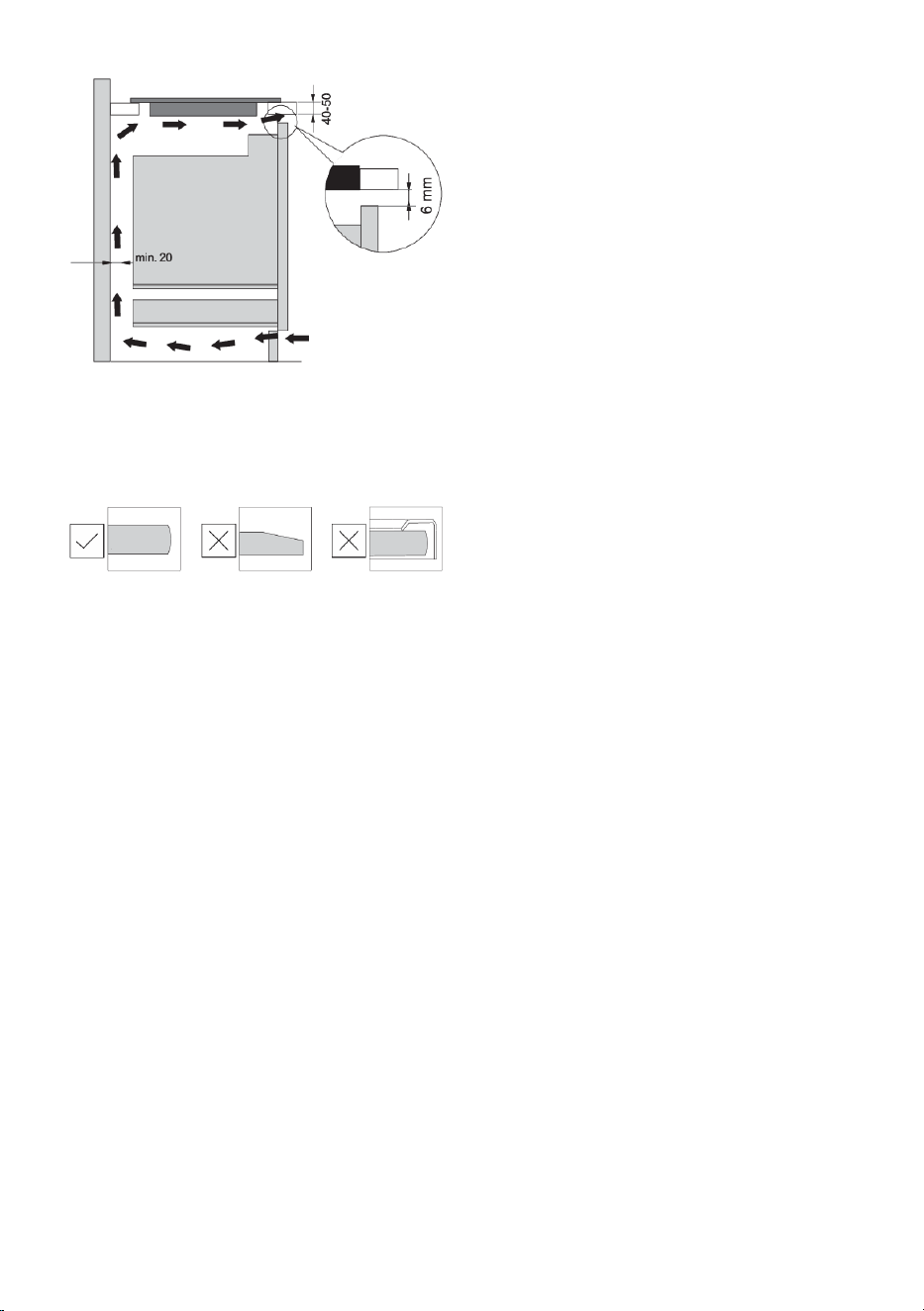
Lower cabinet with an oven
• Installing an oven under the induction hob
is possible for oven types with a cooling
fan.
• Before installing the oven, the kitchen
cabinet rear wall has to be removed in the
area of the opening for installation.
• In addition, there should be an opening of
at least 6 mm on the front side, along the
entire width of the cabinet.
• If other appliances are installed under the
induction cooking hob we cannot guarantee
their correct operation.
Flush-mount installation into the worktop
Appliances without faceted edges or decorative frames, are suitable for flush mounting.
23
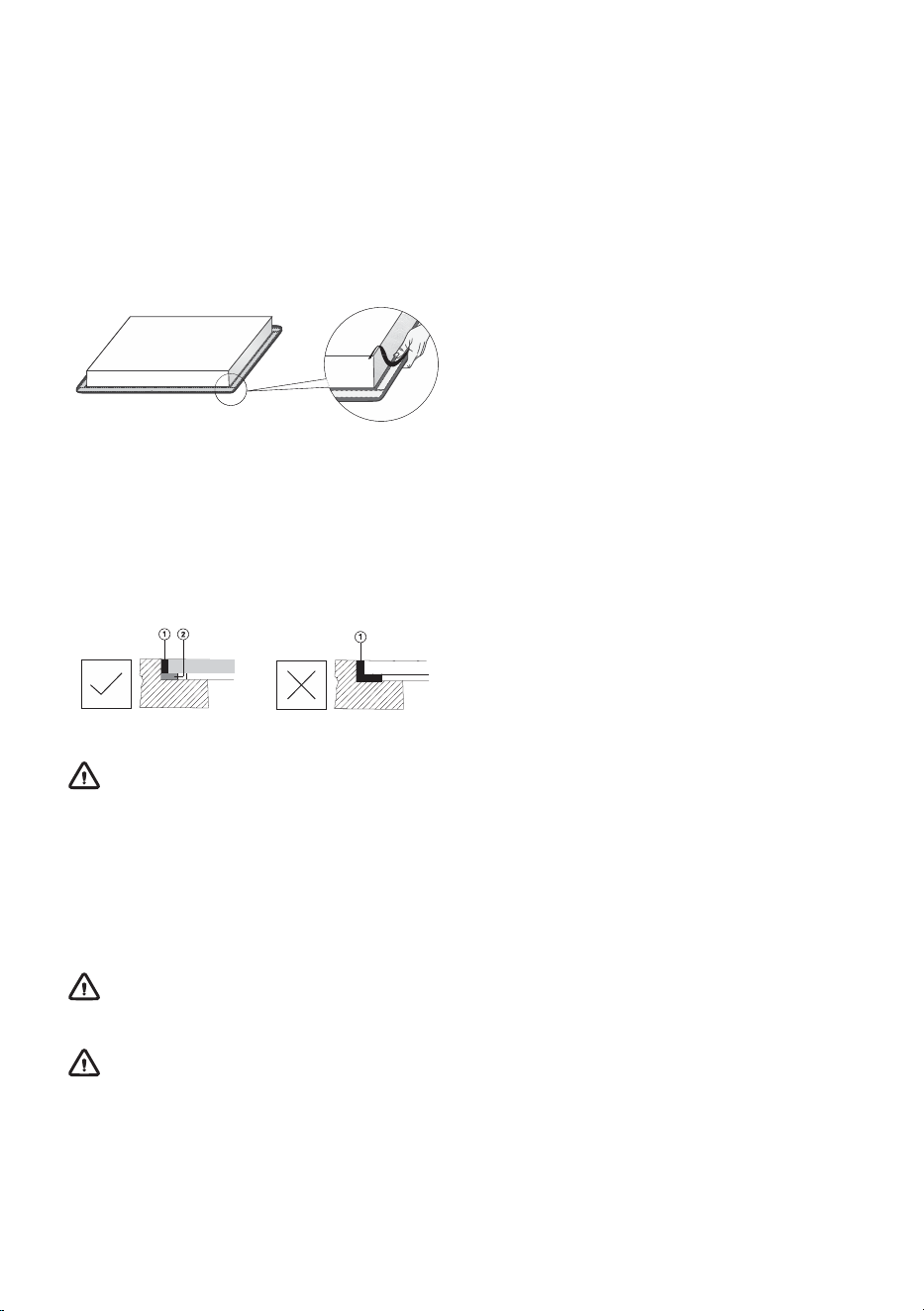
Installing the appliance
The appliance may only be installed into a temperature- and water-resistant countertop, such as a
countertop made of (natural) stone (marble, granite), or solid wood (the edges along the cut-out have
to be sealed). When installing into a countertop made of ceramics, wood, or glass, a wooden sub-frame
should be used. The frame is not supplied with the appliance. The appliance may only be installed
into a countertop made of other materials after you have consulted the countertop manufacturer and
obtained his express approval. Internal dimension of the basic unit should be at least equal to the
internal cutout for the appliance. This will allow simple removal of the appliance from the countertop.
Attach sealing tape along the perimeter of the bottom of the glass panel.
First, feed the power cord through the cutout. Place the appliance over the centre of the cutout.
Connect the appliance to the power mains (see instructions for connecting the appliance). Before
sealing the appliance, test its operation. Seal the slot between the appliance and the countertop using
a silicone sealant. The silicone sealant used to seal the appliance has to be temperature-resistant (to
at least 160 °C). Smooth out the silicone sealant using a suitable tool. Observe the instructions for
use of the selected silicone sealant. Do not switch on the appliance until the silicone sealant has dried
completely.
1. Silicone sealant
2. Sealing tape
WARNING!
Pay particular attention to built-in dimensions with (natural) stone countertops. When choosing
the silicone sealant, observe the countertop material and consult the countertop manufacturer.
Use of inappropriate silicone sealants can result in permanent discolouration of some parts.
Removing the built-in appliance
Disconnect the appliance from the powermains. Use a suitable tool to remove the silicone gasket from
the perimeter. Remove the appliance by pushing it upwards from the bottom side.
WARNING!
Do not attempt to remove the appliance from the upper side of countertop.
WARNING!
The service department shall only be responsible for repair and servicing of the cooking hob.
Consult your specialized kitchen equipment dealer regarding the re-installation (of the flush-mount)
cooking hob.
24
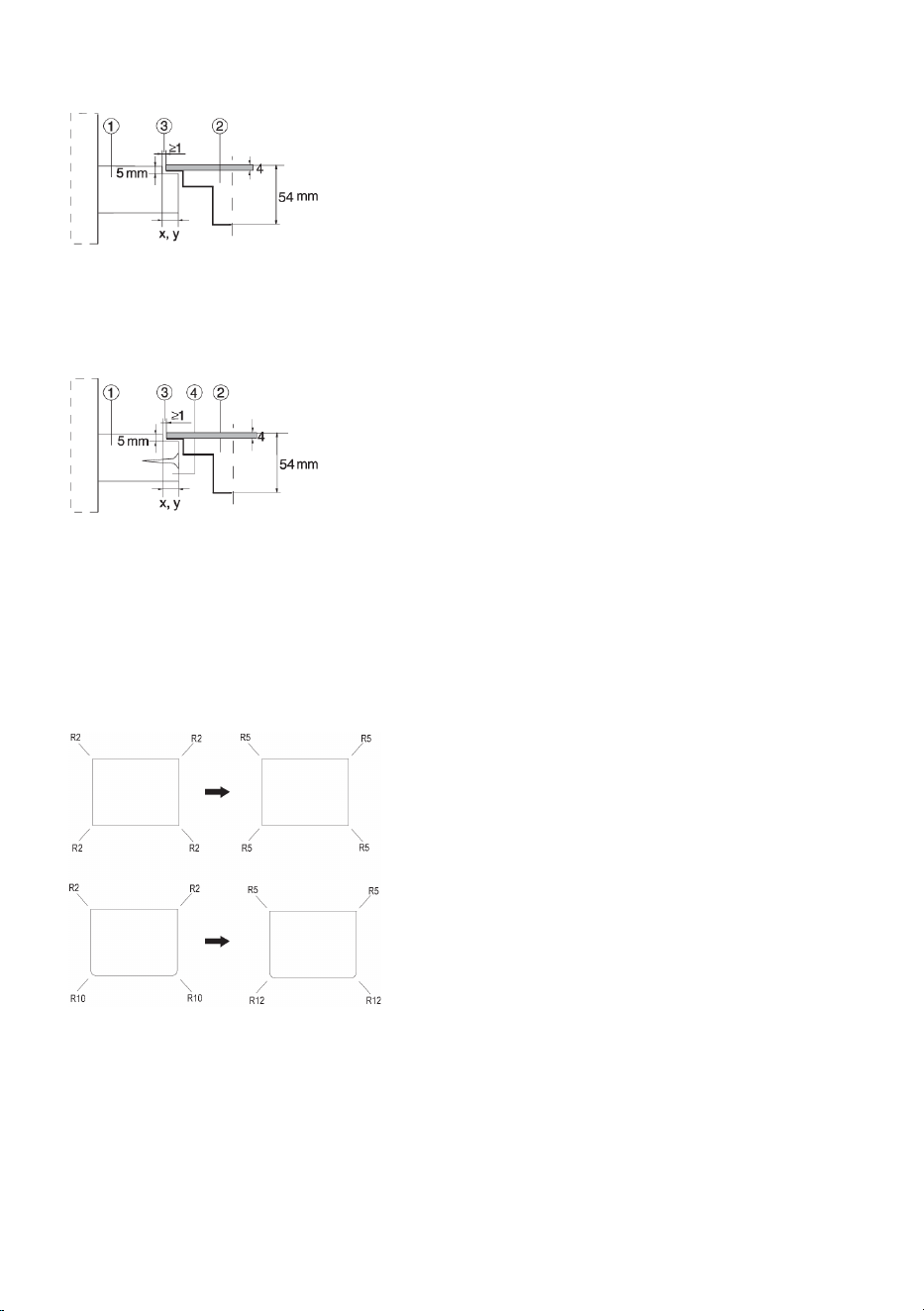
Stone countertop
1. Countertop
2. Appliance
3. Slot
Given the margin of error (tolerance) for the glass ceramic plate of the appliance, and the cutout in
the countertop, the slot is adjustable (min.2 mm).
Ceramic, wooden, or glass countertop
1. Countertop
2. Appliance
3. Slot
4. Wooden frame, thickness 16 mm
Given the margin of error (tolerance) for the glass ceramic plate of the appliance, and the cut-out in
the countertop, the slot is adjustable (min. 2mm). Install the wooden frame 5.5mm below the upper
edge of the countertop (see figure).
Observe the radii of glass edges (R10, R2) when making the cut-out.
CUT-OUTGLASS
25
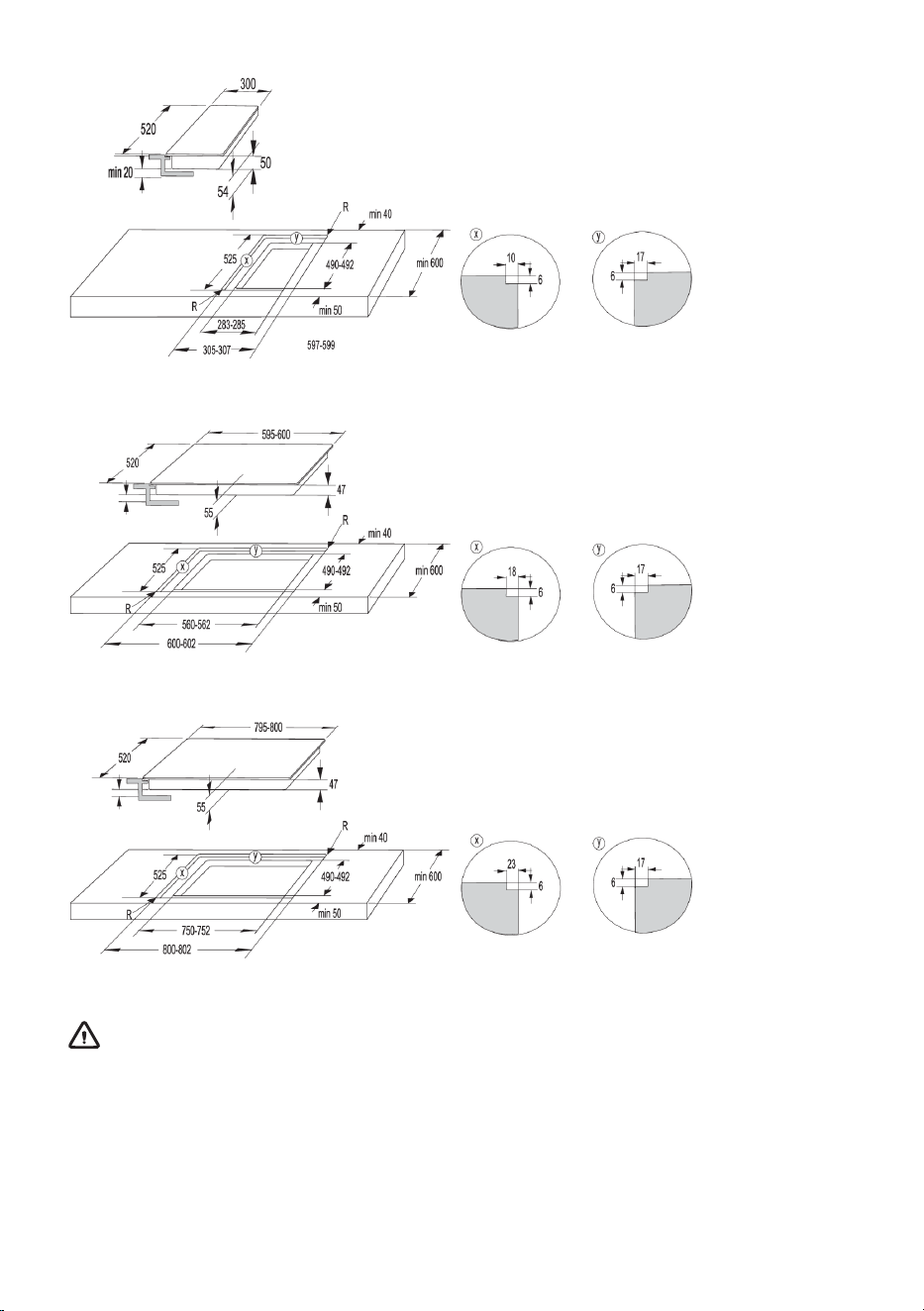
30 cm
60 cm
80 cm
WARNING!
If the oven is installed under a flush-mounted cooking hob, then the worktop thickness should
be at least 40 mm.
26
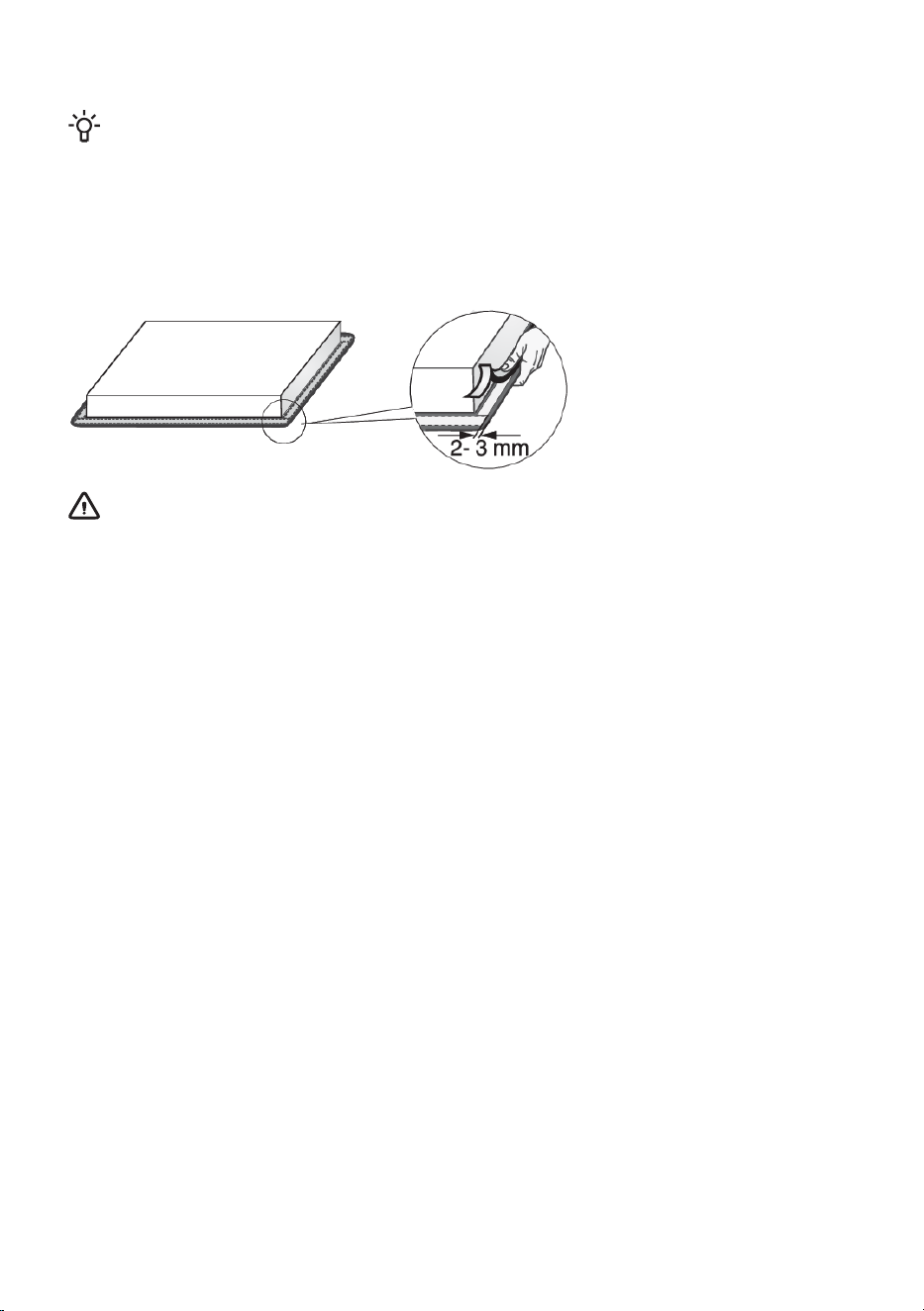
Fitting the foam gasket
INFORMATION!
Some appliances come with the gasket already fitted!
Before installing the appliance into a kitchen worktop, attach the foam gasket supplied with the
appliance to the bottom side of the glass ceramic hob. Remove the protective film from the gasket.
Attach the gasket to the bottom side of the glass (2–3 mm away from the edge). The gasket has to
be applied along the entire edge of the glass. The gasket may not overlap in the corners. When fitting
the gasket, make sure it is not damaged by or in contact with any sharp objects.
WARNING!
Do not install the appliance without the gasket!
27
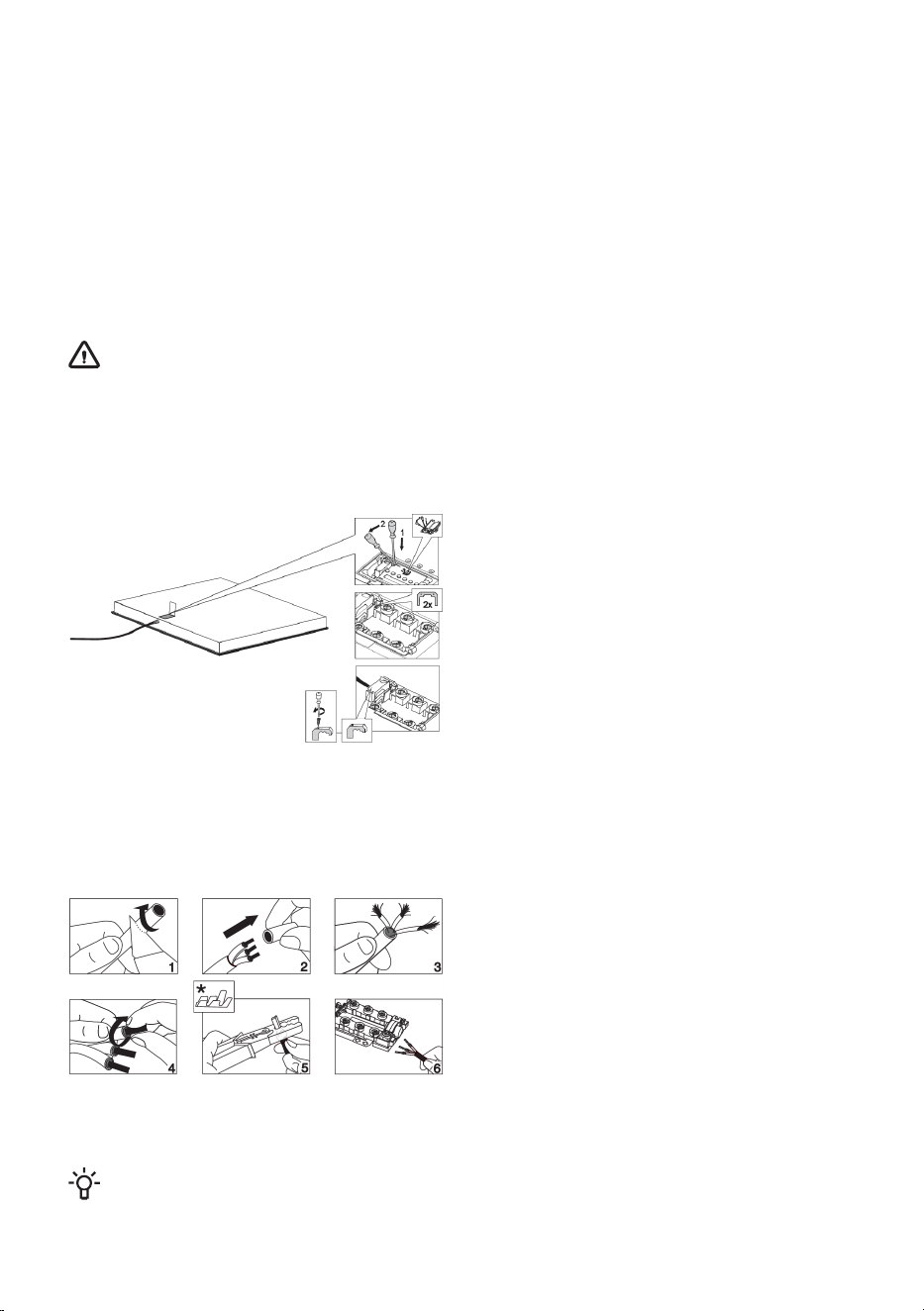
Connecting the cooking hob to the power mains
• Power mains protection must conform to the relevant regulations.
• Before connecting the appliance, make sure the voltage specified on the rating plate conforms to
the voltage of the power mains.
• There should be a switching device in the electrical installation that can disconnect all poles of
the appliance from the power mains, with a minimum clearance of 3 mm between the contacts
when open. Suitable devices include fuses, protective switches etc.
• The connection should be adjusted to the current and fuses.
• After installation, the parts carrying electrical current and insulated parts shall be protected against
contact.
WARNING!
The appliance may only be connected by an authorised expert. False connection can destroy
parts of the appliance. In such case, there is no right to warranty! Disconnect the appliance from
the power mains before any repair or maintenance operation.
Connection diagram
• Check the voltage. Before connecting the
appliance, make sure the voltage specified
on the rating plate conforms to the voltage
of your power mains. The voltage of your
power mains (220–240 V between L and N)
should be checked by an expert using an
appropriate measuring device.
• Open the cover of the connection terminal
box.
• Connect the wires according to your type
of appliance.
• The jumpers are provided on the
connection terminal.
Power cord
(appliance without a power cord)
• The following may be used for connection:
• PVC insulated connection cable type
H05V2V2-F with yellow-and-green
protective conductor, or other equivalent
or superior cables.
• Exterior cable diameter should be at least
8.00 mm.
• Run the power cord through a cord strain
relief (clamp) which
* Ferrules are not supplied.
INFORMATION!
We recommend using electric wire ferrules (end terminals).
28
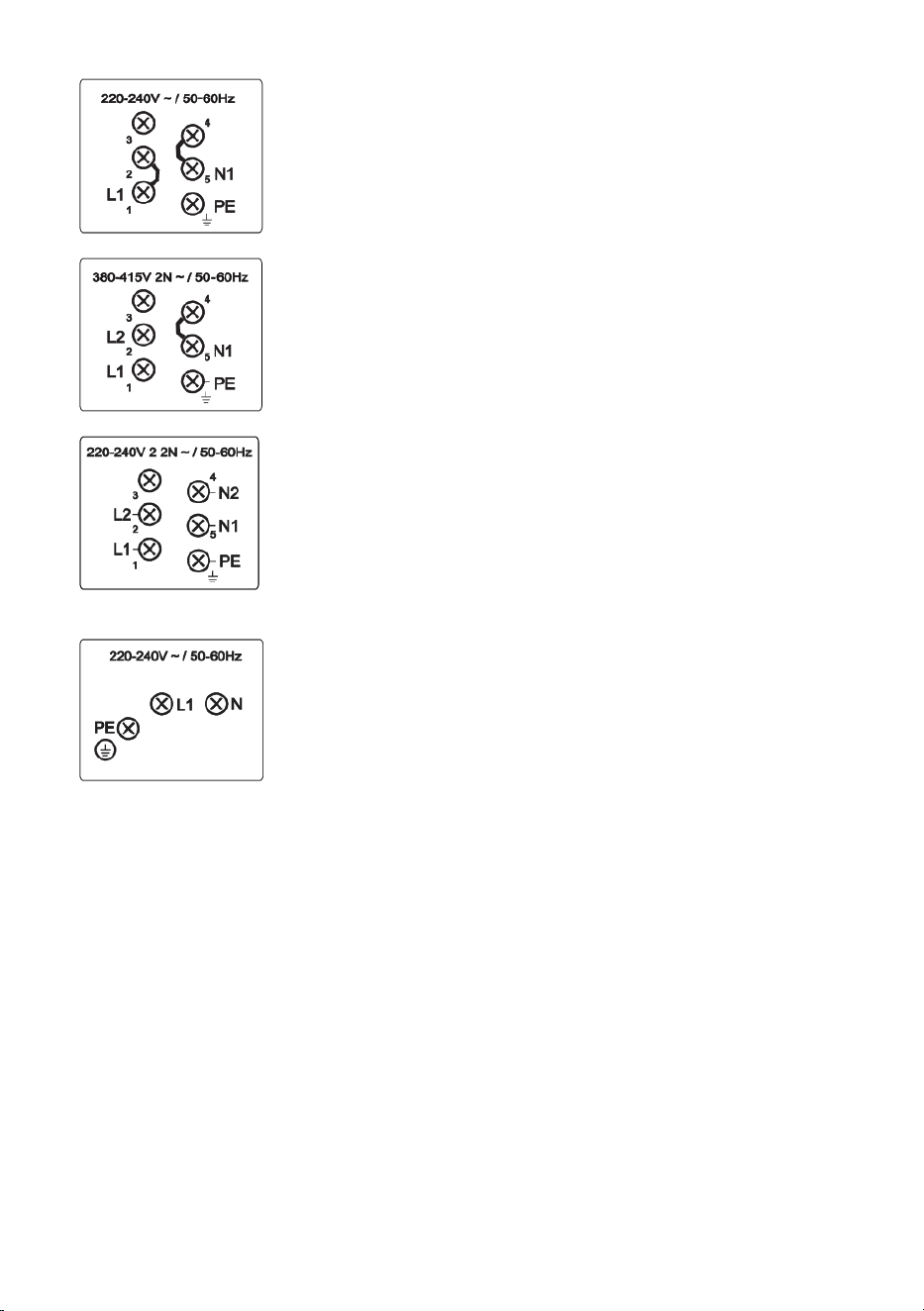
Single phase connection (32 A)
• Single-phase connection (1 1N, 220–240 V~ /50–60 Hz):
Voltage between line and neutral conductor is 220–240 V~. Install
a jumper between terminals 1 and 2, and between terminals 4
and 5.
-
- The circuit should be fitted with a fuse of at least 32 A. Power
cord core cross-sectional area should be at least 4 mm².
2-phase connection (16A)
• 2 phases, 1 neutral conductor (2 1N, 380–415 V~ /50–60 Hz):
- Voltage between the line and neutral conductor is 220–240 V~.;
voltage between lines is 380–415 V~. Install a jumper between
the terminals 4 and 5. The circuit should be fitted with at least
two fuses of at least 16 A each. Power cord core cross-sectional
area should be at least 1.5 mm².
• 2 phases, 2 neutral conductors (2 2N, 220–240 V 2 2N ~ /50–60Hz):
- Voltage between phases and neutral conductor is 220-240 V~.
- The circuit should be fitted with at least two fuses of at least 16 A
each. Power cord core cross-sectional area should be at least
1.5 mm².
Appliances with a width of 30 centimetres (two cooking zones) only allow
single-phase connection. The diameter of the power cord should be at
least 1.5 mm²!
29
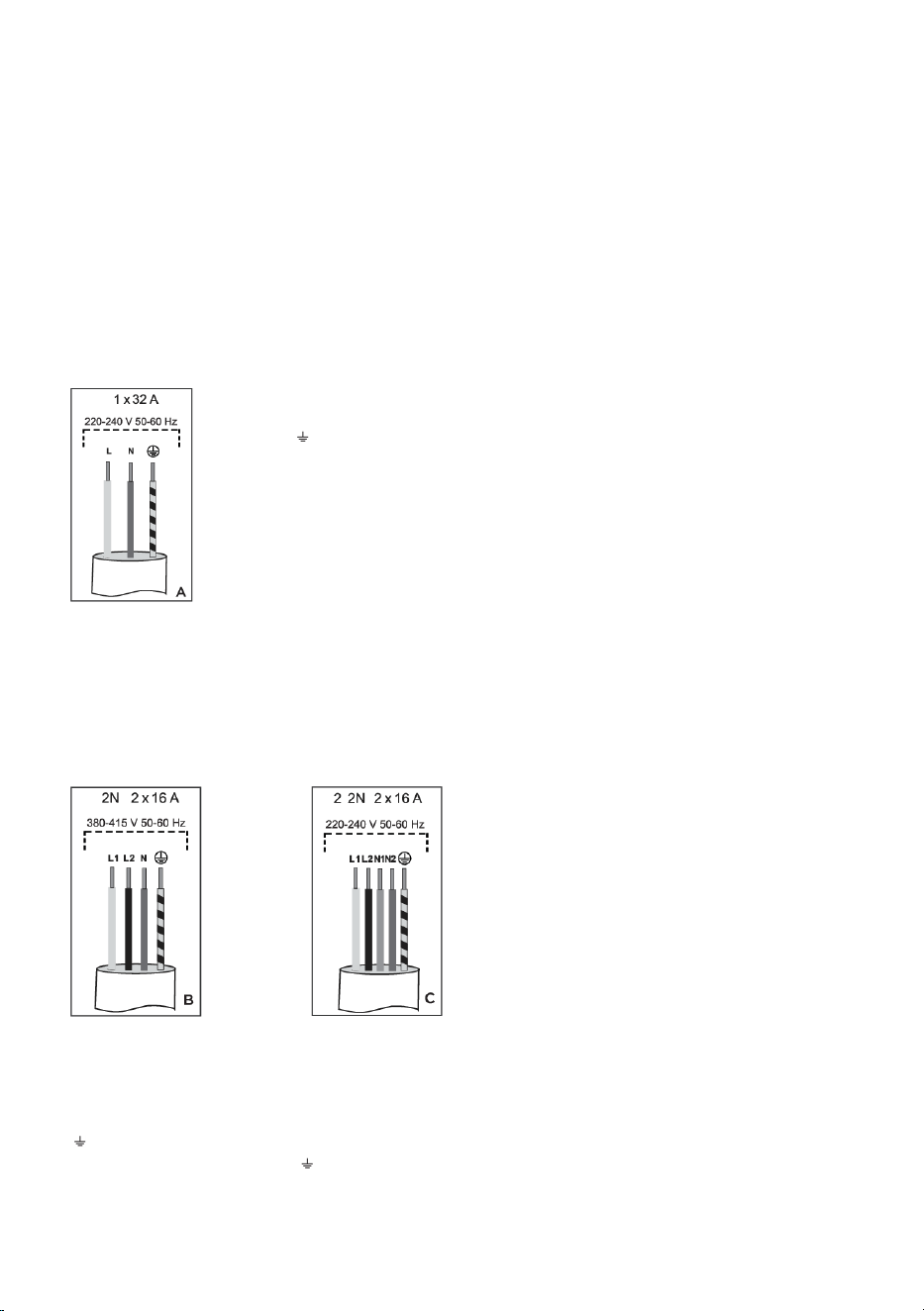
Connecting the power cord
(appliance with a power cord)
• The appliance has to be hard-wired directly to the power mains.
• Devices for disconnecting from the power mains have to comply with the relevant regulations.
• Do not extend the power cord and do not lead it over sharp edges.
• If the appliance is installed above an oven, make sure the power cord is never in contact with the
oven's hot parts.
Single-phase connection
Connect the appliance as shown in Diagram A. If your power mains do not allow a 32 A fuse, the
appliance power should be decreased or limited accordingly.
See chapter User Settings.
L = brown
N = blue
= yellow/green
Two-phase connection
• If your electric mains have 2 line conductors and 1 neutral conductor, connect the appliance as
shown in Diagram B.
• If your electric mains have 2 line conductors and 2 neutral conductors, connect the appliance as
shown in Diagram C.
L1 = brown
L2 = black
N1 = blue
N2 = grey
= yellow/green
L1 = brown
L2 = black
N = blue
= yellow/green
only for NL!
30

Disposal
Our product packaging is made of environmentally friendly materials that
can be recycled, disposed of, or destroyed without any hazard to the
environment. To this end, packaging materials are labelled appropriately.
The symbol on the product or its packaging indicates that the product
should not be treated as normal household waste. Take the product to
an authorized collection centre for waste electric and electronic
equipment processing.
Correct disposal of the product will help prevent any negative effects
on the environment and health of people, which could occur in case of
incorrect product removal. For detailed information on removal and
processing of the product, please contact the relevant municipal body
in charge of waste management, your waste disposal service, or the
store where you bought the product.
We reserve the right to any changes and errors in the instructions for use.
31
708858-a4