
1 /
25
User Manual
BERRY HSAT
PM50 series

File No.: BRJS20-PL-02
Version: V1.0
2 /
25
Shanghai Berry Electronic Tech Co., Ltd.
Instructions
This user manual provides instructions for the use of the BERRY HSAT. Before use, please read and understand
the contents of this manual carefully to ensure the correct usage of the product, maximize its performance, and
ensure the safety of both patients and operators.
Please keep this manual near the device for easy and timely access when needed.
Any changes to the content of this manual will not be notified in advance, as long as they do not affect the normal
use by users.
User Manual Release Date: 2026/XX/XX
Please refer to the label for the production date.
Statement
The manufacturer is only responsible for the safety, reliability, and performance of the product under the
following conditions:
◼ Assembly, expansion, readjustment, improvement, and repair are carried out by personnel
authorized by the manufacturer.
◼ Relevant electrical equipment complies with national standards.
◼ The product is used in accordance with the "User Manual".
The manufacturer may provide circuit diagrams, component lists, annotations, calibration guidelines,
or other information that is useful for qualified technicians authorized by the manufacturer to repair the
designated repairable components of the device.
Warranty
Free service coverage:
◼ Any product that meets the requirements specified in the manufacturer's warranty service regulations
is eligible for free service.
Paid service coverage:
◼ Any product that exceeds the scope defined in the manufacturer's warranty service regulations will be
subject to paid service.
◼ Even within the warranty period, the manufacturer will provide paid service in the following situations:
intentional damage, improper use, unavoidable natural disasters, use of unauthorized accessories not
approved by the manufacturer, or repairs performed by unauthorized personnel.
Returns
In the event that it becomes necessary to return a unit to the manufacturer, please obtain a return authorization
first. Please contact the manufacturer and provides the model number, serial number, and a brief description of
the reason for return. Return shipments will not be accepted if the serial number is not clearly visible. The
customer is responsible for freight charges when this product is shipped to the manufacturer for service
(including any relevant customs fees or other freight related charges).

3 /
25
Transportation
After the product is properly packaged, it can be transported using common means of transportation. However,
it is important to avoid exposure to rain, snow, and mechanical collisions during transportation.

4 /
25
Safety Information
This chapter outlines the basic safety Attention information that users should be aware of and follow when
operating the BERRY HSAT. Additional Attention information related to specific operation and use of the
BERRY HSAT will appear in various sections of this user manual. Users must strictly adhere to these safety
Attention instructions.
The following safety symbols, Attentions, and cautions are used in conjunction with text to alert users to potential
hazards during use.
Attention
⚫ Personnel using this device must receive sufficient training before use.
⚫ This device is a monitoring device, not a therapeutic device. It should be used in conjunction with specific
clinical symptoms.
⚫ Before using this device, users should check and ensure that the device and accessories are functioning
properly and safely. If you cannot access the measurement interface properly, please do not use this
device.
⚫ When using this device in conjunction with electro-surgical equipment, users should pay attention to and
ensure the safety of the monitored patients.
⚫ Do not use this device in places where flammable substances such as anesthetics are present to prevent
fires or explosions.
⚫ This device should not be used in Magnetic Resonance Imaging (MRI) and Computed Tomography (CT)
systems.
⚫ This device is calibrated to display functional oxygen saturation.
⚫ This device does not have an alarm function.
⚫ The measured area should be free from dirt or wounds.
⚫ Please use the accessories, sensors, and cables provided by the manufacturer or those authorized by the
manufacturer. Before use, please check the compatibility between the sensor and this device. Using
unspecified accessories, sensors, and cables may enhance electromagnetic radiation or reduce anti-
electromagnetic interference performance.
⚫ Before cleaning this device and its accessories, please ensure that the power is turned off.
⚫ This device is a typical sealed device. Users should ensure that its surface is dry and clean, and prevent
any liquids from entering the interior.
⚫ Users should place this device properly to prevent it from falling from high places, being subjected to
strong vibrations, or other mechanical forces that may cause damage. Care must be taken to prevent harm
to the product and the patient from external forces during use.
⚫ Do not modify this device or its accessories without authorization. Repairs should be carried out by
professional repair personnel recognized by the manufacturer. Do not modify this device without
manufacturer authorization.
⚫ If modifications are made to this device, appropriate inspections and tests must be conducted to ensure its
Caution
This message contains information that may cause minor harm to the
human body or damage to the product.
Attention
This is to emphasize important precautions, provide instructions, or
provide explanations.

5 /
25
continued safe use.
⚫ Unauthorized disassembly and replacement of the internal lithium battery are strictly prohibited. When the
battery is low, please recharge it in a timely manner. If the device has not been used for 6 months or
longer, the user should charge the battery.
⚫ To avoid contamination or infection of others, the environment, or other equipment, please dispose of this
device and its accessories according to the relevant national regulations or the hospital's disposal
regulations.
⚫ If the accessories used with this device are disposable, please dispose of them promptly according to the
relevant regulations. They should only be used for a single patient and must not be reused.
⚫ Static electricity should be avoided. Before using this device, ensure that direct or indirect electrostatic
charges on the operators and patients who come into contact with the device are minimized.
⚫ During use, try to keep this device away from radio receivers.
⚫ If this device is not used with the specified and EMC-tested system configuration, it may enhance
electromagnetic radiation or reduce anti-electromagnetic interference performance. Please use the
specified configuration only.
⚫ Portable and mobile RF communication devices may affect the normal use of this device.
⚫ This device should not be placed near or stacked with other devices. If it must be placed near or stacked
with other devices, observe and verify that it can operate properly in the configuration being used.
⚫ Except for the accessories and cables sold by the manufacturer as spare parts for the internal components
of this device, the use of non-prescribed accessories and cables may increase the emissions of the device
or reduce its immunity to interference.
⚫ The highest temperature for the contact between the blood oxygen saturation sensor and the human skin
should not exceed 41°C.
⚫ This device is not edible. Do not inhale or swallow any part of this device. If such a situation occurs, seek
medical attention immediately.
⚫ Contact with the human body may cause sensitization. The biological safety meets the standard
requirements, but individual users may have allergic reactions. Use should be discontinued for patients
with allergic reactions!
⚫ The optimal measurement site for blood oxygen saturation is the index finger. This is not a continuous
monitoring product, and the measurement at the same location should not exceed 10 hours. If long-term
monitoring is required, please change the measurement site in a timely manner.
⚫ This device should be placed out of reach of children, pets, and insects.
⚫ The performance degradation of this device may be caused by the aging of accessories such as the blood
oxygen saturation sensor, ECG lead cable, and electrode pads. In such cases, the accessories can be
replaced before use.
⚫ When the ambient temperature is 20°C, the time required for this device to reach the expected state of
readiness from the lowest storage temperature or the highest temperature after use does not exceed 3
minutes.
Caution
Before using this product, please read this user manual, all safety information, and technical specifications
carefully.
Patients may also be expected operators, and both the functionality and maintenance of this product can be
safely performed.

6 /
25
A functional tester can’t be used to assess accuracy. The accuracy of this device's SpO₂ measurements has been
verified through human oxygen saturation clinical studies.
Product Features
1. The product is easy to use, with one-key operation.
2. It has a small size and light weight, making it easy to carry.
3. The product has low power consumption and can sustain 10 hours of continuous use with the included 3.7V
lithium-ion battery.
4. When the battery voltage is too low to affect normal operation, the display screen will show a low voltage
reminder indicator and blink.
5. No daily maintenance or calibration is required.
6. Real-time clock.
7. Continuous data storage for over 10 hours.
8. Data can be synchronized with the application.
9. It is rechargeable.
Device Identification
Models:
PM50, PM50-B
Trade/Common name:
BERRY HSAT
Device Classification Name
Ventilatory Effort Recorder
Intend use
The BERRY HSAT device aid in the diagnosis of sleep disordered breathing for adult patients. The BERRY
HSAT records the following data: patient respiratory nasal airflow, snoring, SpO
2
, PR, HR, respiratory effort
and body position during sleep. The device uses these recordings to produce a report for the HCP that may aid
in the diagnosis of sleep disordered breathing or for further clinical investigation. The device is intended for
home and hospital use under the direction of a HCP.
Applicable People
The target audience includes individuals who need preliminary screening for sleep apnea and respiratory-
related disorders.
Intended operating environment
The device is intended for home and hospital use under the direction of a HCP.
Components
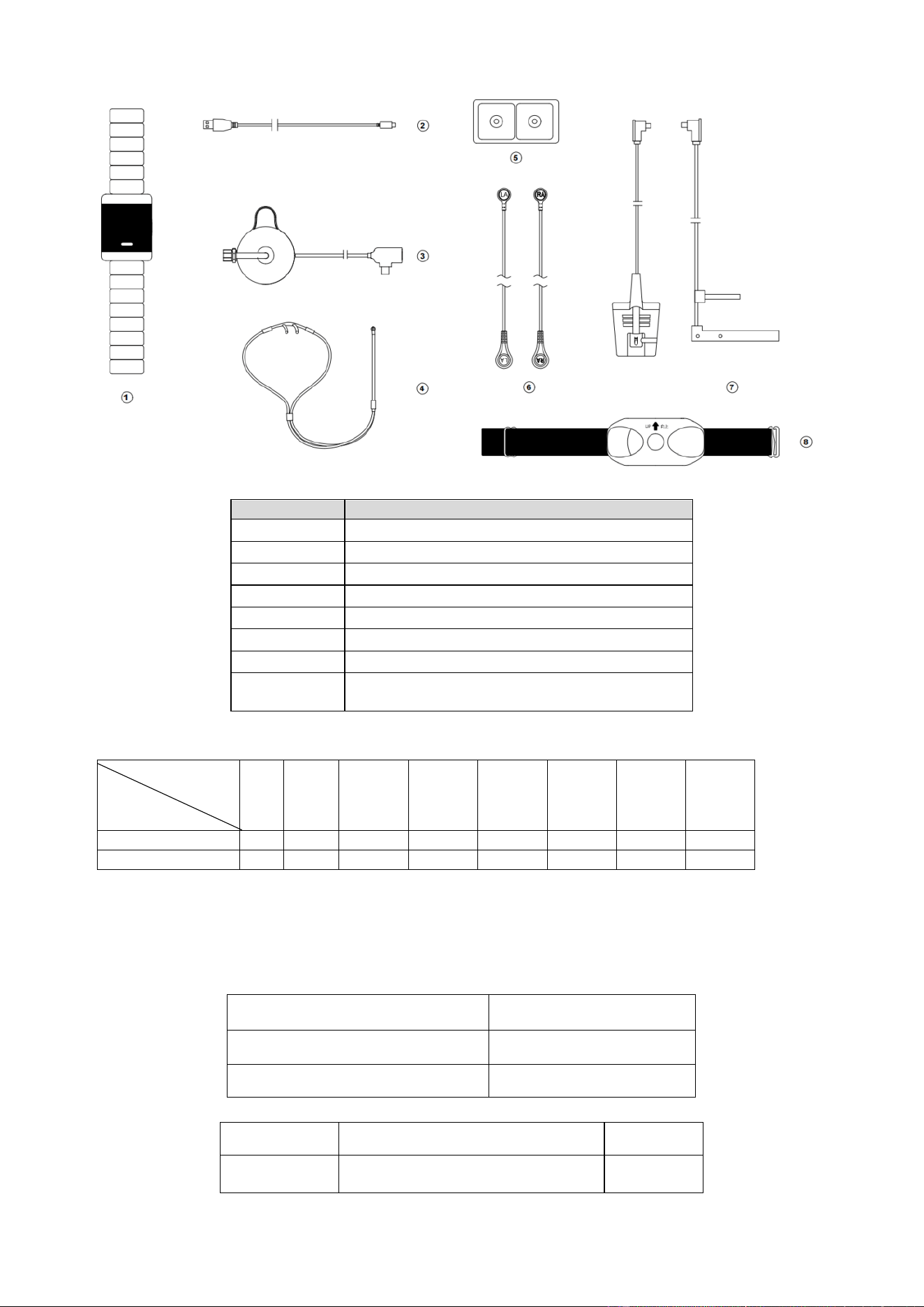
The BERRY HSAT consists of the main unit, Multi-Functional Sensor, ECG lead cable, ECG electrode patches,
SpO₂sensor, nasal cannula, thoracic-abdominal belt and multi-functional sensor fixing shell, and charging
cable.
Contraindications
The measurement site in contact with the blood oxygen saturation sensor should not have any skin tissue
damage. The skin where the electrocardiogram (ECG) electrodes are applied should be free from damage or
scars.

7 /
25
Measurement Principle
This product records and analyzes the changes in respiration, Pulse oxygen saturation, pulse rate, heart rate,
snoring, and body position during a single sleep session.
Reprocessing
1. Scope and classification
This section applies to the cleaning and disinfection processing of this product. This product is a non-critical
medical device (contact with intact skin only). Processing is performed by manual cleaning and intermediate-
level disinfection.
2. Processing location and personnel requirements
◆ Applicable environment: Medical institution consultation room, ward or home environment.
◆ Personnel requirements: The operator shall be trained in basic device cleaning and disinfection.
◆ Personal protective equipment (PPE): Disposable medical gloves shall be worn during processing; eye
protection is recommended if there is a risk of splashing of body fluids.
3. Initial treatment at the point of use
After each use, if visible contamination is present on the surfaces, perform immediate local wiping to remove it
and prevent the soil from drying.
4. Cleaning Procedure
4.1 Preparation before cleaning
◆ Disconnect the patient connection, switch off the device.
◆ Prepare cleaning tools and consumables (see table below).
Tool / Consumable
Specification Requirements
Lint-free cloth
Lint-free and chemical-resistant
Soft-bristle brush
Soft bristles that will not scratch device surfaces
4.2 Cleaning Agent
Parameter
Requirement
Type
Neutral or weakly alkaline medical detergent (pH 6.5-8.5), or enzyme-containing
detergent

8 /
25
Parameter
Requirement
Recommended
Product
[Brand / Model, if applicable]
Concentration
Follow the detergent manufacturer’s instructions (typically 0.5%-2%)
Water Temperature
30 °C-35 °C (shall not exceed 40 °C)
Water Quality
Potable water
4.3 Cleaning Steps
1) Moisten a soft cloth with detergent solution and wipe all external surfaces of the main unit housing from top
to bottom.
2) For the display screen area, gently wipe with dedicated screen-cleaning cloth; avoid applying excessive
pressure.
3) Use a soft-bristle brush to assist cleaning of crevices around buttons, knobs and ports.
4) For accessories:
❖ Wipe length-wise from one end to the other; avoid knotting.
❖ Focus cleaning on patient-contact surfaces.
❖ Cleaning duration: No less than 5 minutes (from start of wiping to completion).
❖ Wipe the device with a clean lint-free cloth dampened with purified water to remove detergent residues.
❖ Rinse step: Perform a secondary wipe using purified water wipes to eliminate residual detergent.
4.4 Prohibited Actions
◆ Do not immerse any part of the device in liquid.
◆ Do not use chlorine-containing disinfectants, toluene or abrasive materials (steel wool, sandpaper).
◆ Prevent liquid ingress into electrical ports, vents or internal components.
◆ Do not use high-pressure water jets or ultrasonic cleaning.
◆ Do not use ammonia- or acetone-containing cleaners to avoid probe damage.
5. Disinfection Procedure (Intermediate-Level Disinfection)
5.1 Recommended Disinfectants
Disinfectant
Effective Concentration
Contact Time
Remarks
Ethanol
75% (v/v)
≥ 1 minute
Preferred for routine disinfection
Isopropyl Alcohol (IPA)
70% (v/v)
≥ 1 minute
For routine disinfection

9 /
25
5.2 Disinfection Steps
◆ Confirm that cleaning has been completed and no visible soil remains on device surfaces.
◆ Take a new lint-free cloth and saturate thoroughly with disinfectant (moist but not dripping).
◆ Systematically wipe all external surfaces from clean areas to contaminated areas in a top-down sequence:
Main unit: Display screen → front panel → sides → rear → bottom Base: All surfaces Accessories:
Inner and outer cuff surfaces → full length of lead cables → patient-contact surfaces of each probe.
◆ Ensure all surfaces are fully wetted by disinfectant.
◆ Maintain required wet contact time on surfaces (see table above; minimum 1-3 minutes).
◆ If required by the disinfectant manufacturer’s instructions, wipe with purified-water dampened cloth after
contact time to remove residues.
◆ Use a new lint-free cloth for each device to prevent cross-contamination.
6. Drying Procedure
◆ Air-dry naturally: Place the device in a clean, well-ventilated area for natural air-drying.
◆ Assisted drying: Gently wipe surfaces dry with clean, dry lint-free cloth.
◆ Ensure complete drying of the following locations before power-on use: All electrical ports and connectors
Crevices surrounding buttons / touchscreen Vents
◆ Drying time: Typically no less than 15 minutes (adjust according to ambient temperature and humidity);
no visible residue shall remain after drying.
◆ Compressed-air blowing-dry is prohibited (may force contaminants into device interior).
7. Inspection and Maintenance
7.1 Visual Inspection
Perform the following inspections after each reprocessing cycle:
Inspection
Item
Acceptance Criteria
Action for Non-conformance
Main host
No cracks, damage or deformation
Discontinue use and contact
service
Display screen
No reading-impairing scratches; no liquid
ingress traces
Evaluate before continued use
Buttons / knobs
Proper function, no looseness
Contact service

10 /
25
Inspection
Item
Acceptance Criteria
Action for Non-conformance
accessories
No damage, fracture or exposed conductors
Replace immediately
Intact contact surfaces; no cracks
Labels /
markings
Clearly legible
Contact manufacturer for
replacement
7.2 Functional Check
◆ Apply power and confirm normal device startup.
◆ Run built-in self-test routines (if available).
◆ Verify normal display of all monitoring parameters.
7.3 Periodic Maintenance
◆ Perform routine maintenance per the manufacturer’s recommended maintenance schedule.
◆ Professional electrical safety inspection is recommended every 6 months.
8. Packaging Requirements
◆ Non-critical devices do not require sterile packaging after cleaning and disinfection.
◆ Cleaned and disinfected devices may be stored in a clean and dry environment.
◆ For transport to other clinical departments, cover with a clean dust cover or transport bag.
9. Storage and Shelf-Life
9.1 Storage Conditions
Parameter
Requirement
Temperature
−10 °C ~ +50 °C
Relative Humidity
10%-90% (non-condensing)
Atmospheric Pressure
700 hPa ~ 1060 hPa
Environment
Clean, dry, well-ventilated; protect from direct sunlight
9.2 Shelf-Life after Cleaning and Disinfection
11 /
25
◆ The storage duration between completion of cleaning-disinfection and subsequent reuse shall be
established by the healthcare facility via its own risk-assessment-based policy.
◆ Reference recommendation: When stored in a clean and dry environment, the shelf-life shall not exceed 7
days. If covered with a protective cover, the shelf-life may be extended to 30 days.
◆ If the post-reprocessing shelf-life is exceeded, the device shall be re-cleaned and re-disinfected prior to
use.
10. Maximum Reprocessing Cycles
Component
Maximum Reprocessing Cycles
Main Unit
Unlimited reprocessing cycles within the device’s design service
life
accessories
500 cycles
Basic Specifications
Display: OLED screen
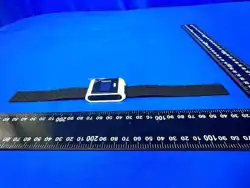
Product Dimensions: 46mm (L) × 34mm (W) × 13mm (H) (Main Unit)
Product Weight: Approximately 77g (Excluding accessories)
Electrical Specifications
Battery Type: 3.7V 250mAh lithium-ion battery.
Operating Voltage: DC 3.4V to DC 4.3V.
Operating Current: Less than 50mA.
Charging Time: 3 hours.
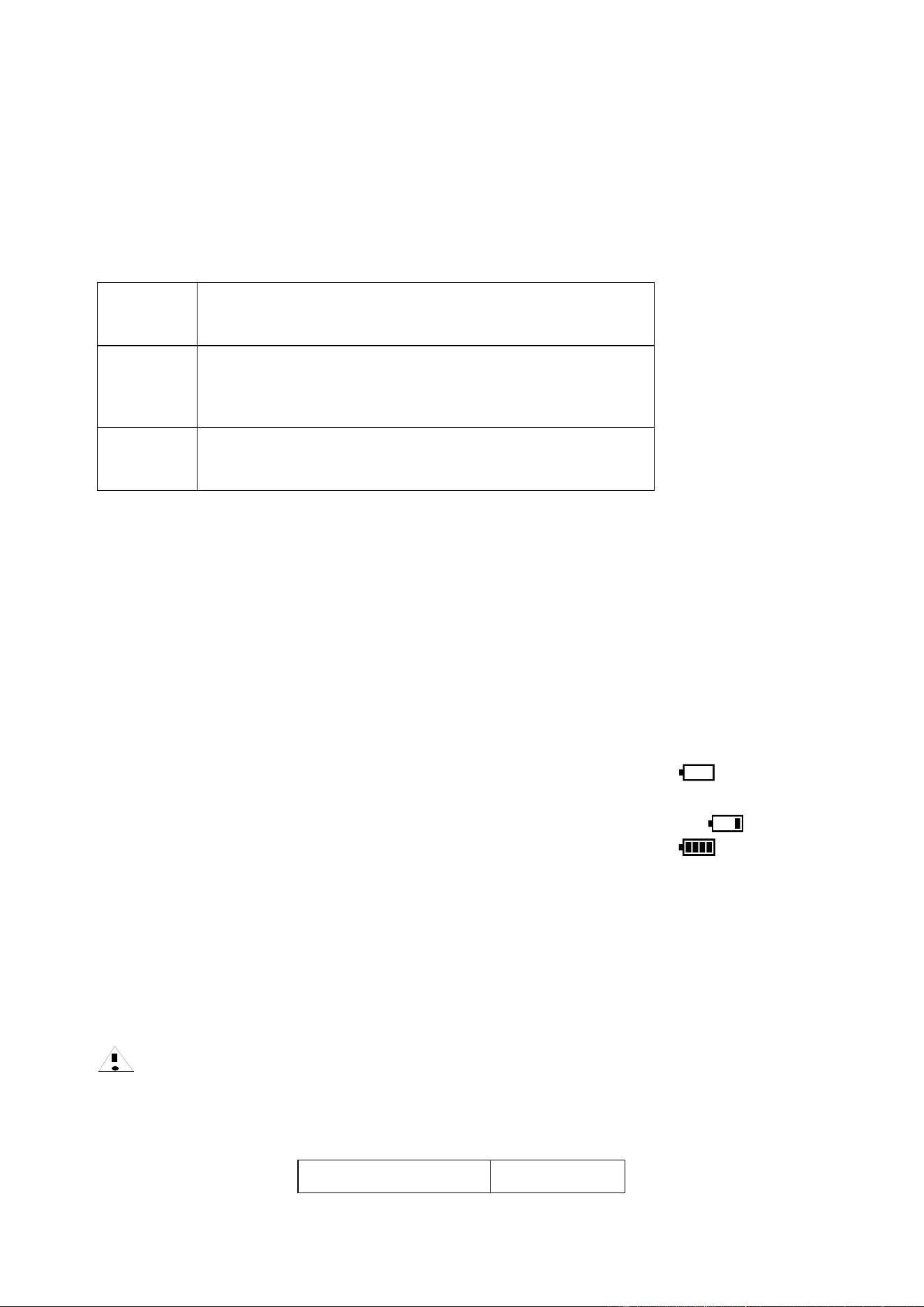
Charging Method: When the low voltage reminder indicator appears on the display screen , it indicates that
the battery level is low. Connect one end of the charging cable to the device and the other end to the power adapter.
When the charging indicator on the display screen shows continuous increase in battery level , it indicates
that the battery is charging. When the full charge indicator appears on the display screen , it indicates that
the battery is fully charged.
Parameter Specifications
SpO2
Measurement Range: 0%~100%
Measurement Accuracy: ±2% (80%~100%), ±3% (70%~79%), Not defined (<70%)
Measurement Resolution: 1%
Note
⚫ The accuracy of the pulse rate has been validated and compared with a blood oxygen saturation simulator.
⚫ The BERRY HSAT accuracy was tested in 24 healthy subjects, aged 22~47 with skin tones varying from
MONK 1-10.The following tables shows the bias and accuracy by skin pigmentation.
Pigmentation Group
MST Range

12 /
25
Light
1–4
Medium
5–7
Dark
8–10
Overall
1–10
Table 1:Pigmentation Group_light
Sao2 range (%)
70-100 (Overall)
70-80
80-90
90-100
# of data pairs
302
96
100
106
Bias
-0.4371
-1.9917
0.373
0.2066
Arms
2.366
3.5496
1.8382
1.1619
Table 2:Pigmentation Group_Medium
Sao2 range (%)
70-100 (Overall)
70-80
80-90
90-100
# of data pairs
116
41
36
39
Bias
0.3534
-0.341
1.0868
0.3333
Arms
1.6454
1.977
1.6974
1.156
Table 3:Pigmentation Group_Dark
Sao2 range (%)
70-100 (Overall)
70-80
80-90
90-100
# of data pairs
120
37
41
42
Bias
0.49
0.2946
0.7293
0.4286
Arms
2.4347
1.9161
3.4934
1.3372
Table 4:Pigmentation Group_Overall
Pulse Rate
Measurement Range: 25bpm~250bpm
Measurement Accuracy: ±2bpm (25 bpm to 150bpm); ±3 bpm (151bpm to 250bpm)
Measurement Resolution: 1bpm
Nasal Airflow
Measurement Range: 10rpm to 40 rpm
Measurement Resolution: 1rpm
Measurement Accuracy: ±2rpm
Respiratory Effort
Measurement Range: 0 rpm~60rpm
Measurement Resolution: 1rpm
Measurement Accuracy: ±2rpm (10rpm to 60rpm,)
Heart Rate
Measurement Range: 25bpm to 250bpm
Sao2 range (%)
70-100 (Overall)
70-80
80-90
90-100
# of data pairs
538
174
177
187
Bias
-0.0533
-1.05
0.6
0.2556
Arms
2.2276
2.9167
2.2913
1.1795

13 /
25
Measurement Resolution: 1bpm
Measurement Accuracy: ±3bpm
Body Position
The application can detect five sleep positions: supine (lying on the back), standing/sitting, left lateral (lying on
the left side), right lateral (lying on the right side), and prone (lying face down).
Snoring
Recording snoring signals and extracting snore characteristics.
Sensor Disconnection
The application can display the status of finger/probe detachment.
Configuration Table for Various Models
Feature
Models
SpO
2
Pulse
Rate
SpO
2
Waveform
Bluetooth
Respiratory
Effort
Heart
Rate
Body
Position
Nasal
Airflow
Snoring
PM50
●
●
●
●
●
●
●
●
●
PM50-B
●
●
●
●
—
—
—
—
—
Note: In the table, "●" indicates the presence of a particular feature, while "—" indicates the absence of that feature.
All patients can safely use the BERRY HSAT with the above-mentioned features.
The peak wavelengths of the emitted light from the blood oxygen saturation sensor are 660nm/905nm, with a
maximum optical output power of ≤10mW.
Note
⚫ Clinical operations involving devices with peak wavelengths (e.g., photodynamic therapy devices) may
affect the accuracy of the measurements taken by the BERRY HSAT.
Wireless Bluetooth Parameters
Bluetooth Protocol Version: 5.0 and above
Wireless Frequency: 2400-2483.5MHz
Transmit Power: ≤20 dBm
Frequency Range: 2400-2480MHz
Channel Spacing: ≤3MHz
Modulation Type: GFSK
Maximum Output Power: <100mW
Note:
⚫ This device complies with part 15 of the FCC Rules. Operation is subject to the following two conditions:
(1) This device may not cause harmful interference, and
(2) this device must accept any interference received, including interference that may cause undesired operation.

14 /
25
⚫ Any Changes or modifications not expressly approved by the party responsible for compliance could void
the user's authority to operate the equipment.
This equipment has been tested and found to comply with the limits for a Class B digital device, pursuant to part
15 of the FCC Rules. These limits are designed to provide reasonable protection against harmful interference in
a residential installation. This equipment generates uses and can radiate radio frequency energy and, if not
installed and used in accordance with the instructions, may cause harmful interference to radio communications.
However, there is no guarantee that interference will not occur in a particular installation. If this equipment does
cause harmful interference to radio or television reception, which can be determined by turning the equipment
off and on, the user is encouraged to try to correct the interference by one or more of the following measures:
-Reorient or relocate the receiving antenna.
-Increase the separation between the equipment and receiver.
-Connect the equipment into an outlet on a circuit different from that to which the receiver is connected.
-Consult the dealer or an experienced radio/TV technician for help.
Environmental Requirement
Temperature Range
Operation: +5°C~+40°C
Transportation and Storage: -20°C~+55°C
Relative Humidity Range
Operation: ≤80% (non-condensing)
Transportation and Storage: ≤95% (non-condensing)
Atmospheric Pressure Range
Operation: 70kPa to 106kPa
Transportation and Storage: 70kPa to 106kPa
The environmental conditions for transportation and storage between two uses after removing the protective
packaging should be within the aforementioned ranges.
Product and Accessories List
1. Product Component Diagram
15 /
25
Number
Component Name
①
the main unit
②
Charging cable
③
Multi-functional Sensor
④
Nasal cannula
⑤
ECG electrode patches
⑥
ECG Lead Cable
⑦
SpO
2
Sensor
⑧
Thoracic-abdominal belt and
multi-functional sensor fixing shell
2. Composition of Various Models
Accessories
Model
①
②
③
④
⑤
⑥
⑦
⑧
PM50
√
√
√
√
√
√
√
√
PM50-B
√
√
-
-
-
-
√
-
Among them, the SpO
2
sensor is available in various models and specifications, and users can select and
configure it according to their needs. The optional SpO
2
sensor provided by this product are shown in Table 2.
Table 2 Specifications of SpO
2
sensor Models
Model
Usage Times
BST-50-1
Reusable
BSA-50-1
Disposable
3. Accessories List
Name
Quantity
BERRY HSAT(the main unit)
1

16 /
25
Main Unit and
Accessories
SpO
2
Sensor
1
ECG Lead Cable
1
ECG electrode patches
2
Multi-functional Sensor
1
Thoracic-abdominal belt and
multi-functional sensor fixing shell
1
Charging Cable
1
Others
User Manual
1
Expected service life of the device is 5 years.

File No.: BRJS20-PL-02
Version: V1.0
17 /
25
Operating Instructions
Attention
⚫ Before measurement, check if the multi-lead respiratory monitor is functioning properly. Do not use if it is
damaged.
⚫ Handle the cables with care, similar to other medical devices, to avoid possible entanglement or
strangulation of the patient. The cables of the electro-surgical equipment should not be tangled with the
cables of the multi-lead respiratory monitor.
⚫ Do not place the multi-lead respiratory monitor on limbs with arterial catheters or venous injection tubes.
⚫ Do not place the pulse oximetry sensor and blood pressure measurement on the same limb, as occlusion
during blood pressure measurement can affect the accuracy of the oxygen saturation readings.
⚫ This multi-lead respiratory monitor cannot monitor patients with a pulse rate below 25bpm, as it may
result in inaccurate PR (pulse rate) readings.
⚫ Strong light can cause inaccurate measurements. If the lighting is too intense, use non-transparent material
to cover the sensor.
⚫ Ensure that the measurement site is free from dirt or scars, as they may result in weak signals and
inaccurate measurements.
⚫ When using the multi-lead respiratory monitor on different patients, there is a risk of cross-infection.
Users should take precautions and control measures. It is recommended to clean or disinfect the multi-lead
respiratory monitor before use on different patients.
⚫ The site for measuring oxygen saturation should be well-perfused and fully covered by the sensor's
detection window. Clean the measurement site before placing the oxygen saturation sensor and ensure it is
dry.
⚫ Minimize movement of the oxygen saturation sensor's measurement site. Keep the patient as still as
possible, particularly at the measurement site.
⚫ Improper placement of the oxygen saturation sensor can affect measurement accuracy. The best
measurement results are obtained when the sensor is at the same level as the heart.
⚫ Select the appropriate oxygen saturation sensor based on the patient and measurement site. If the sensor is
too tight, it may cause venous pulsation, obstruct blood circulation, leave pressure marks, result in
pressure necrosis, introduce artifacts, and cause inaccurate measurements. If the sensor is too loose, it may
compromise optical alignment or even detach. If the sensor is oversized due to improper placement or
swelling at the placement site, excessive pressure can cause venous congestion at the distal end, leading to
interstitial edema and tissue ischemia.
⚫ The thoracic and abdominal belt and multi-functional sensor fixing shell must not be worn directly on the
skin.
Factors Affecting Measurement Accuracy
⚫ The measurement values depend on the absorption of oxyhemoglobin and deoxyhemoglobin at specific
wavelengths of light. The presence of non-functional hemoglobin species such as carboxyhemoglobin
(COHb) and methemoglobin (MetHB) can affect the accuracy of the measurements.
⚫ Conditions such as shock, anemia, hypothermia, and the use of vasoconstrictor drugs can reduce arterial
blood flow to a level that cannot be measured.
⚫ Dyes within blood vessels or external use of colored substances (such as nail polish, fuels, or colored
18 /
25
skincare products) can lead to unreliable measurement values.
Measurement Steps and Wear Instructions
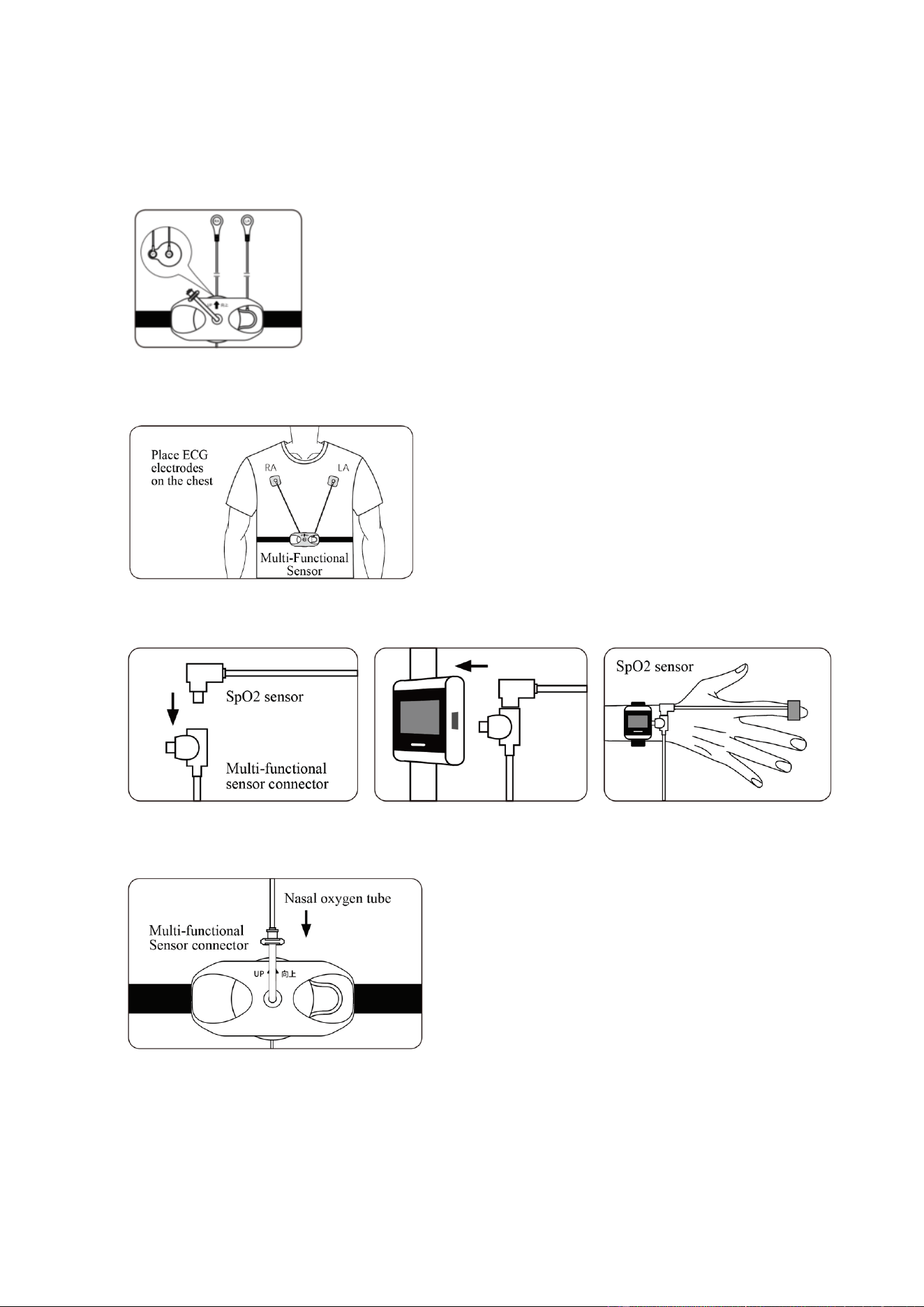
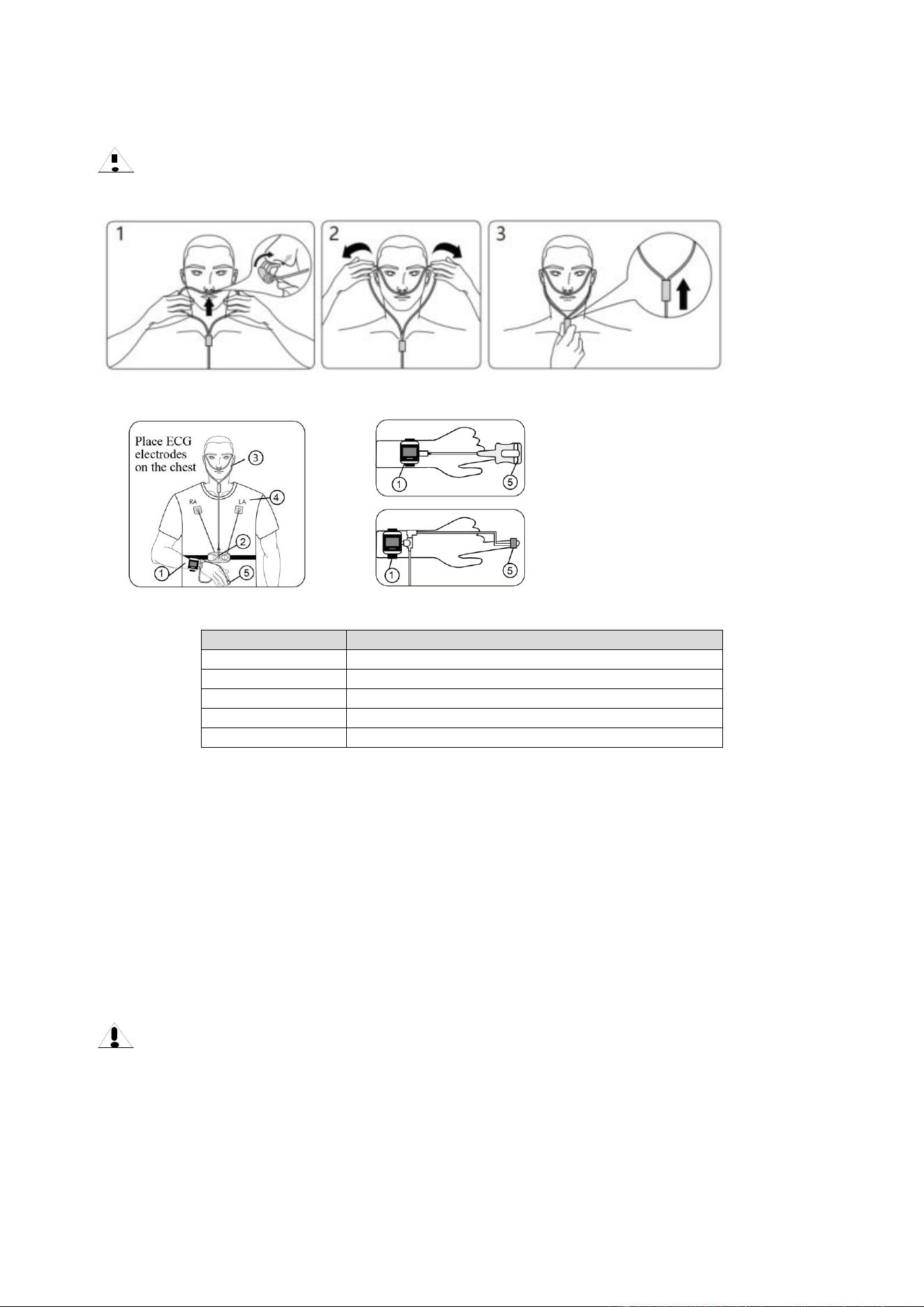
1. Connect the ECG lead cable and Ruhr connector to the multi-functional sensor.
2.Tear off the protective film of the electrode pads and wear the thoracic and abdominal belt as shown in the
diagram.
3. First, connect the oxygen saturation sensor to the multi-function sensor, then connect it to the main unit. Then,
wear the SpO2 sensor to your finger.
4. Connect the nasal oxygen tube to the multi-functional sensor.
5. Wear the nasal oxygen tube:
a. Insert the nasal oxygen tube's vent into the nostril.
b. Route the tubing around and hang it over the ear.
c. Secure the slider to the chin, adjusting it to a comfortable and secure position.
6.The Berry Smart Health Application is a proprietary mobile-application. It may be downloaded from the web
page: https://web.berry-med.com/#/app. For details regarding the use of this Application, please see the Berry
19 /
25
Smart Health Manual.
Note
Do not bend the nasal oxygen tube to avoid obstructing airflow.
6.Wearing the BERRY HSAT
PM50 PM50-B
Number
Component Name
Main Unit
Multi-Functional Sensor
Nasal cannula
ECG electrode patches
SpO
2
Sensor
7. Automatic Recording of Measurement Data
a. Wear the BERRY HSAT before going to bed and start the measurement.
b. When the SpO2 and PR icons change to timestamps, automatic recording begins.
c. If the measurement time exceeds fifteen minutes, the recorded data for this session is considered valid.
8. Uploading Records
a. After completing the measurement, restart the device and enter the upload interface.
b. The device establishes a Bluetooth connection with the phone and begins transferring data.
c. Once the transfer is complete, the device automatically shuts down.
Caution
⚫ The placement of the blood oxygen saturation sensor on the finger has a specific orientation. The light
emitter of the sensor should be on the side of the back of the hand, and the light receiver should be on the
side of the palm. The depth of inserting the finger should ensure that the nail completely covers the light
from the blood oxygen saturation sensor.
⚫ To obtain accurate readings, please wait until the monitor is properly stabilized before recording the data.
20 /
25
⚫ The accuracy of the readings may be affected when using the monitor or when the patient is in a state of
motion.
⚫ Applying nail polish, wearing artificial nails, or having excessively long nails can lead to incorrect
readings.
⚫ Failure to use the control or adjustment devices as specified, or to perform each step of the operation, may
result in harmful radiation exposure.
Operation Button Instructions
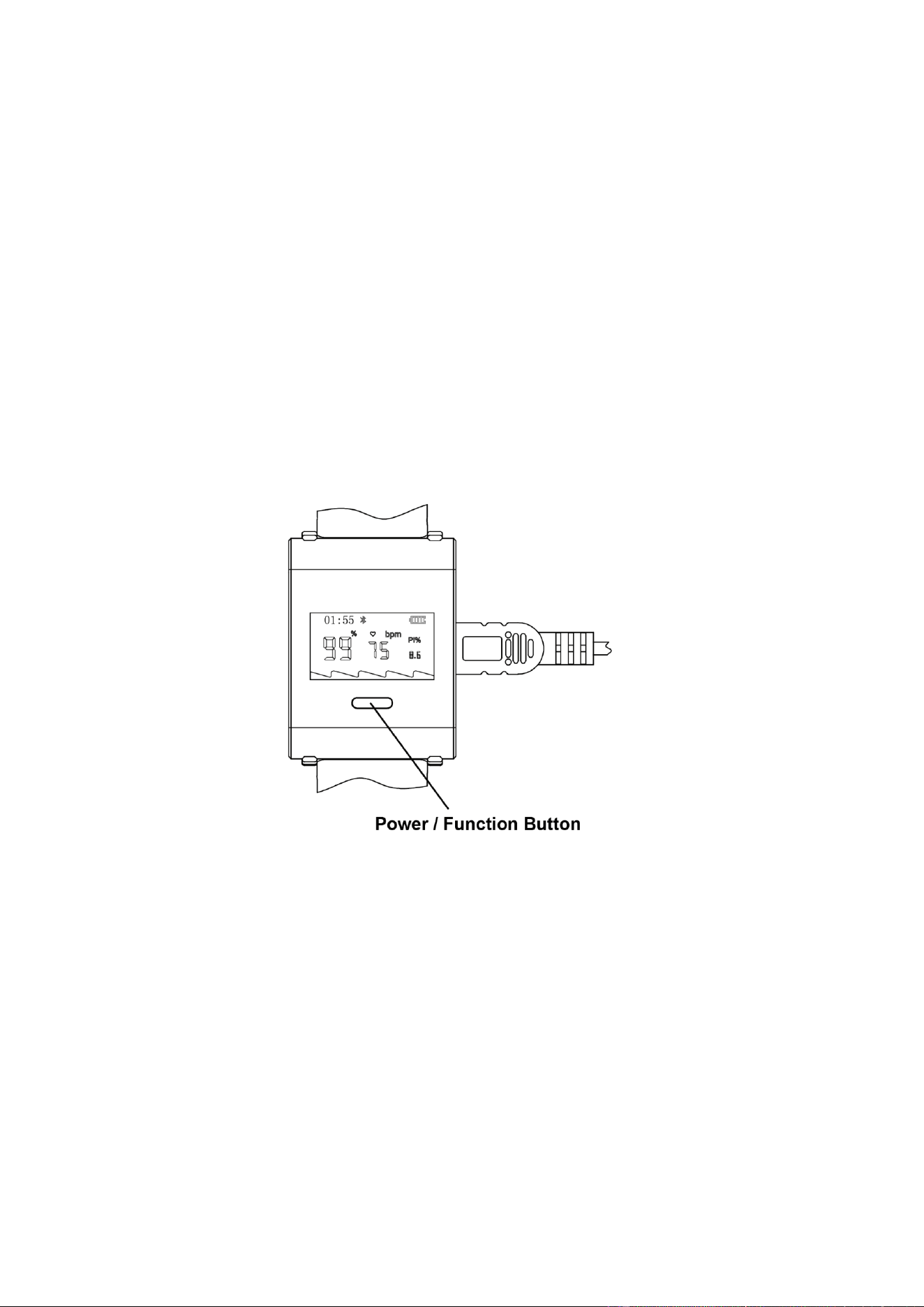
1. Power On: Press the power/function button briefly. The screen will light up, and you will enter the measurement
interface.
2. Power Off: If there is no button operation for 10 minutes during the measurement, or if you long-press the
power/function button, the screen will display "Shutting Down."
3. Screen Wake-up: In the powered-on state, if there is no button operation for 30 seconds, the screen will
automatically turn off to save power. Press the power/function button briefly to activate the display.
4. Interface Switching: When the sensor is connected, press the power/function button briefly to switch between
parameter display interfaces.

21 /
25
Application Program Data Upload
Step 1: Application Installation
1. Search for and download the “Berry Smart Health” application from your mobile device’s app store.
2. Complete application installation and initial permission configuration (Bluetooth, storage, etc.).
Step 2: User Registration and Log-in
1. Launch the “Berry Smart Health” APP.
2. Enter your account (email or phone number) and password, then tap the Log In button.
3. If you do not have an account, tap Sign Up. Enter required information following on-screen prompts. You
will be automatically redirected to the login page upon successful registration.
4. If you forget your password, tap Forgot Password? on the login page. Enter your email address and tap send.
Access your email inbox and click the link to reset your password.
Step 3: Data Upload
1. Perform overnight sleep monitoring with the Berry sleep device.
2. Ensure normal Bluetooth connection before upload.
3. Select Sleep Monitor inside the APP to enter the data-upload page.
4. Tap the device-search button and wait patiently for data upload to the server.
5. A prompt will indicate successful upload once completed.
Note: Data shall be uploaded upon completion of each recording. The next measurement can only be performed
after upload finishes. Uploading data during measurement will terminate the ongoing recording.
Step 4: Data Review and Report Generation
1. Tap the username to view and edit user profile information.
2. View uploaded monitoring records on the APP Historical Data page.
3. Select monitoring records for a specific date to inspect detailed numerical statistics.
4. Share reports as needed.
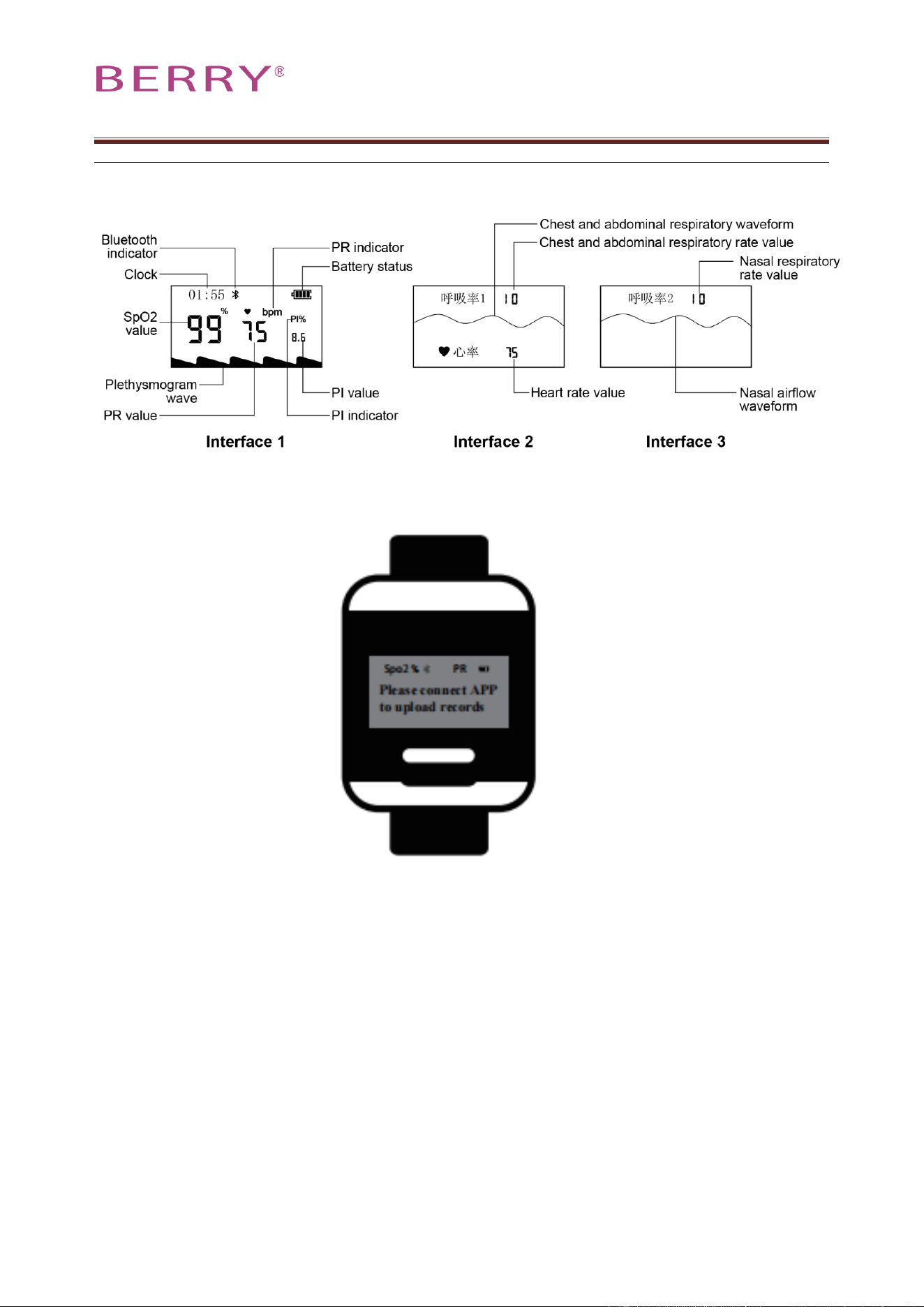
Interface Display Information Explanation
Note: Under various physiological and environmental conditions, the accuracy of SpO₂ measurement may
decrease due to reduced signal integrity. This product indicates signal integrity through the following methods:
1. Pulse Volume Graph (Non-normalized): The pulse volume graph is displayed with scaling, where
waveform amplitude reflects the strength of the patient's pulse signal;
2. Perfusion Index (PI): This index reflects the strength of the blood oxygen signal.
3. Symbol “------”: When signal noise is excessive, the signal quality deteriorates, or the signal disappears,
numerical values are not displayed, and “------” is shown.
In practice, numerous factors can compromise signal integrity and reduce measurement accuracy. These factors
may include, but are not limited to: ambient light (including photodynamic therapy), body movement (patient
and externally imposed), diagnostic procedures, poor perfusion, electromagnetic interference, high-frequency
surgical equipment, abnormal hemoglobin, certain dyes, improper placement of pulse oximetry probes, signal
strength, noise frequency and amplitude, and noise sources.
File No.: BRJS20-PL-02
Version: V1.0
22 /
25
Record Interface
Upload Interface

23 /
25
Troubleshooting
Malfunction
Causes of Malfunction
Solution
Abnormal display or
disappearance of blood
oxygen saturation or
pulse readings
1. The finger is not properly placed in the
appropriate position of the blood oxygen
saturation sensor.
2. The patient's blood oxygen saturation
level is extremely low and cannot be
measured.
3. The plug of the blood oxygen
saturation sensor is loose or detached.
4. The Bluetooth signal is interrupted.
1.Please correctly place your finger in the
appropriate position of the blood oxygen
saturation sensor and try again.
2.Try a few more times. If you confirm
that the product has no quality issues,
please seek medical attention promptly.
3.Please tighten the connection of the
blood oxygen saturation sensor.
4.Check the Bluetooth connection and
reconnect if necessary.
Unstable display of
blood oxygen
saturation or pulse
readings.
1.The finger may not be inserted deeply
enough.
2.The finger is trembling or the patient is
in a state of motion.
1. Please correctly place your finger in the
appropriate position of the blood oxygen
saturation sensor and try again.
2. Avoid moving during use and maintain
a quiet state.
Unstable display of
nasal airflow or
respiratory rate.
1, Connection issue.
2, Issue with the way it is being worn.
3, The patient is in a state of motion.
1, Ensure proper connection.
2, Use the correct wearing method.
3, Try to maintain a stable state.
Unable to power on
1. The battery may be low or completely
drained.
2. The product may be damaged.
1. Please charge the device.
2. Please contact your local customer
service center.
The display screen
suddenly went blank.
1. The device is set to automatically shut
down after 10 minutes of no signal
detection.
2. If there is no operation for more than
30 seconds during operation, the screen
will enter the sleep mode.
3. Battery power may be low.
1. This is a normal function.
2. Press the "Power/Function" button
briefly.
3. Charge the device.
24 /
25
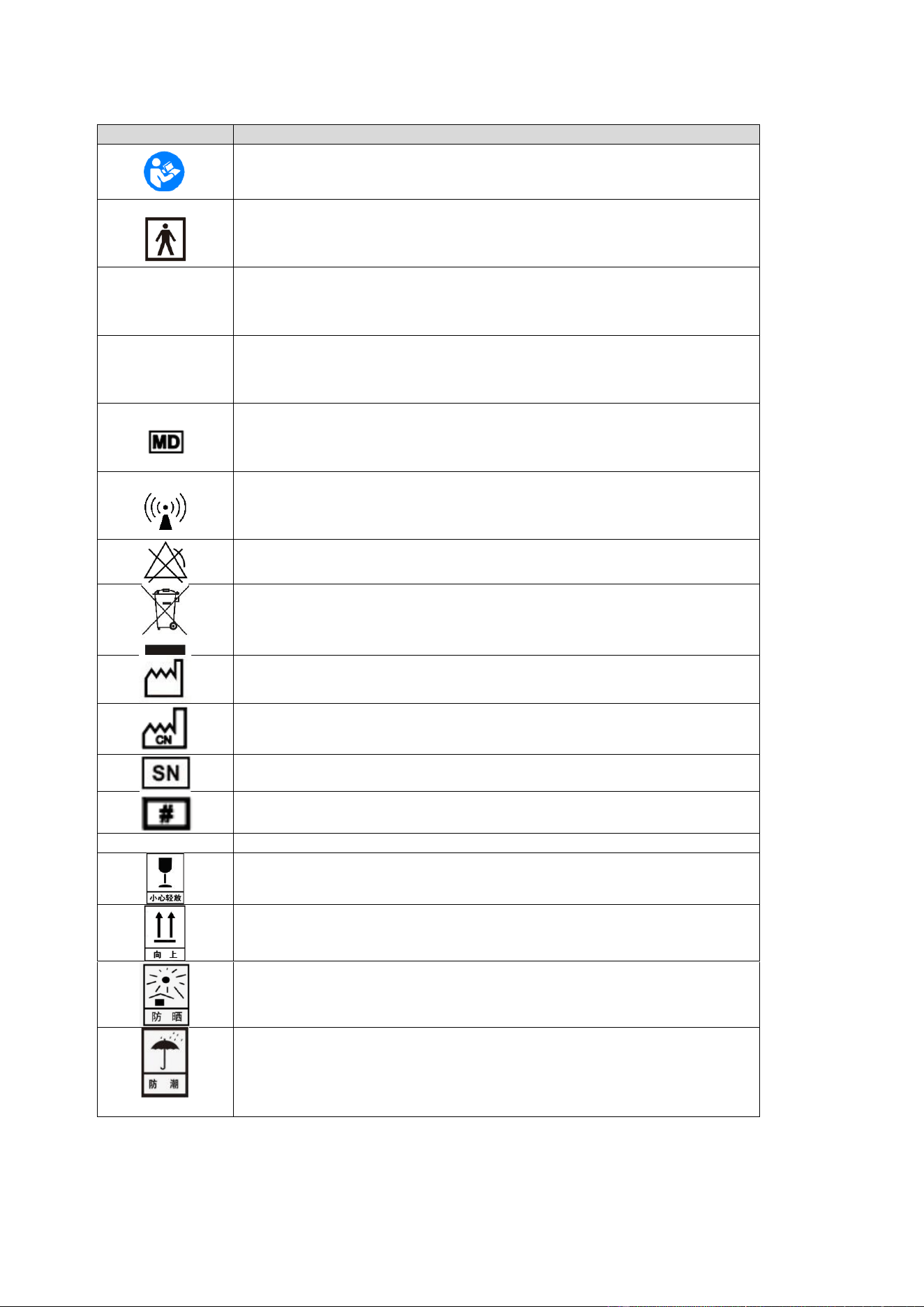
Symbolic significance
Symbol
Significance
According to the user manual
(Background: Blue; Symbol: White)
BF type device
Rx Only
Federal law restricts this device be sold by the order of a licensed healthcare
practitioner only.
FCC ID
Federal Communications Commission-ID
Medical device
Non-ionizing electromagnetic radiation
This device does not have an alarm function
The waste generated from the use of the device, accessories, and packaging
materials should be properly handled according to local disposal regulations
or rules
Manufacturing date
Made in china
Serial number
Product model
IP22
Protection level of the casing
Handle with care
Keep upright
Avoid direct sunlight
Avoid rain

File No.: BRJS20-PL-02
Version: V1.0
25 /
25
Shanghai Berry Electronic Tech Co., Ltd.
Unit 104, 1
st
Floor, 7
th
Building, No.1188 Lianhang Road, Minhang District,
Shanghai, China 201112
TEL: +86-21-5853 1958 FAX: +86-21-5853 0420
WEB: www.shberrymed.com
If you need additional information, please contact with the manufacturer.