
User Manual
T10
UTV/ATV SoundBar
2
Excitement on Every Mil
1
INDEX
Information totheUser
..........................................................................................................................
1
BeforeYou Start
.......................................................................................................................................
2
GettingtoKnowYourSoundBar
...........................................................................................................
3
Specifications
...........................................................................................................................................
4
MountingKitContains
.........................................................................................................................
7/7-1
Installation
................................................................................................................................................
8
Power ON/OFF
.......................................................................................................................................
10
Bluetooth Operation
..............................................................................................................................
10
Auracast Operation
...............................................................................................................................
12
AUXInput
................................................................................................................................................
13
RemoteControlOperation
....................................................................................................................
14
Troubleshooting
....................................................................................................................................
17
Dimensions
............................................................................................................................................
18
Thank you for purchasing ATV/UTV Sound Bar.
Pleasereadthroughtheseinstructionscarefullysoyouwillknowhowtooperateyour
modelproperly.
After you have finished reading the instructions, keep this document in a safe place for
future reference.
THIS PACKAGE CONTAINS:
(1) SOUND BAR All-Terrain Speaker System ..........................................................
(2) Mounting Kit .....................................................................................................................
(3)User Manual ......................................................................................................................................................

2
BEFORE YOU START
CAUTION: Using other mounting methods may void this warranty.
IMPORTANT SAFETY PRECAUTIONS
•
Donotoperatemobileequipmentwhiledrivingamotorizedvehicle.Safedrivingandsafety
considerationofothersshouldalwaysbeyourhighestpriority.
•
Intheeventyoushouldnoticesmoke,strangenoisesorodorfromthisproduct,oranyother
abnormalsigns,immediatelyturnoffthepower.Usingthisproductinthisconditionmayresult
inpermanentdamagetothesystem.
•
Setyourvolumecontrolata lowsetting,thenslowlyincreasethesounduntilyoucanhearit
comfortably without distortion or ear discomfort.
BE SURE TO OBSERVE THE FOLLOWING GUIDELINES:
•
Donotturnupthevolumetooloudthatyoucan'thearwhat'saroundyou.
•
Usecautionortemporarilydiscontinueuseinpotentiallyhazardoussituations.
INSTALLATION PRECAUTIONS
•
Servicingofthisproductbypersonswithoutprofessionaltrainingandexperienceinelectronic
equipmentandmotorizedvehicleaccessoriesmaybedangerousandcouldexposeyoutothe
riskof electricshock,injuryorotherhazards.
•
Contactcustomerserviceforanyinstallation,servicequestionsorrequests.
•
TheSOUNDBARhasaweatherresistantdesign.Itshouldnotbesubmergedinorunder
waterunderanycircumstances.
•
Useonlytheinstallationpartsprovidedwiththe
SOUNDBAR
.
•
Washwithamildsoapordetergentandlukewarmwaterusingacleanspongeora softcloth.
Rinsewellwithclean water.
VERY IMPORTANT
•
DON'Tcleaninhotsun oronveryhotdays.don'tbeindamporwet conditions.
•
DON'Tuseabrasiveorhighlyalkalinecleanerson themainbody.
•
DON'Tscrapethemainbodywithrazorblades,orothersharpinstruments.
•
DON'Teveruse,gasoline,acetoneorcarbontetrachloride.
3
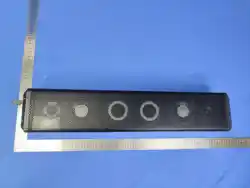
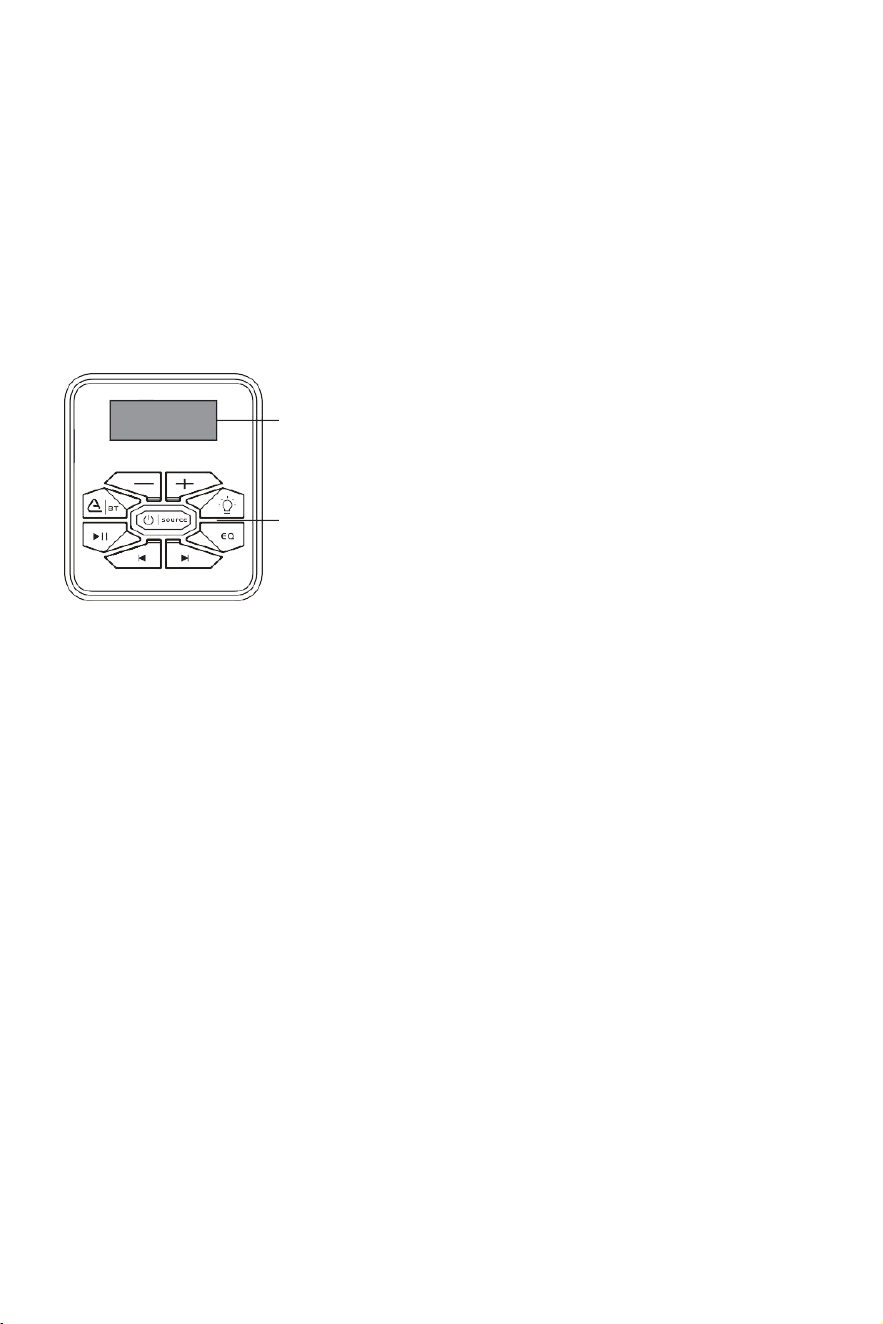
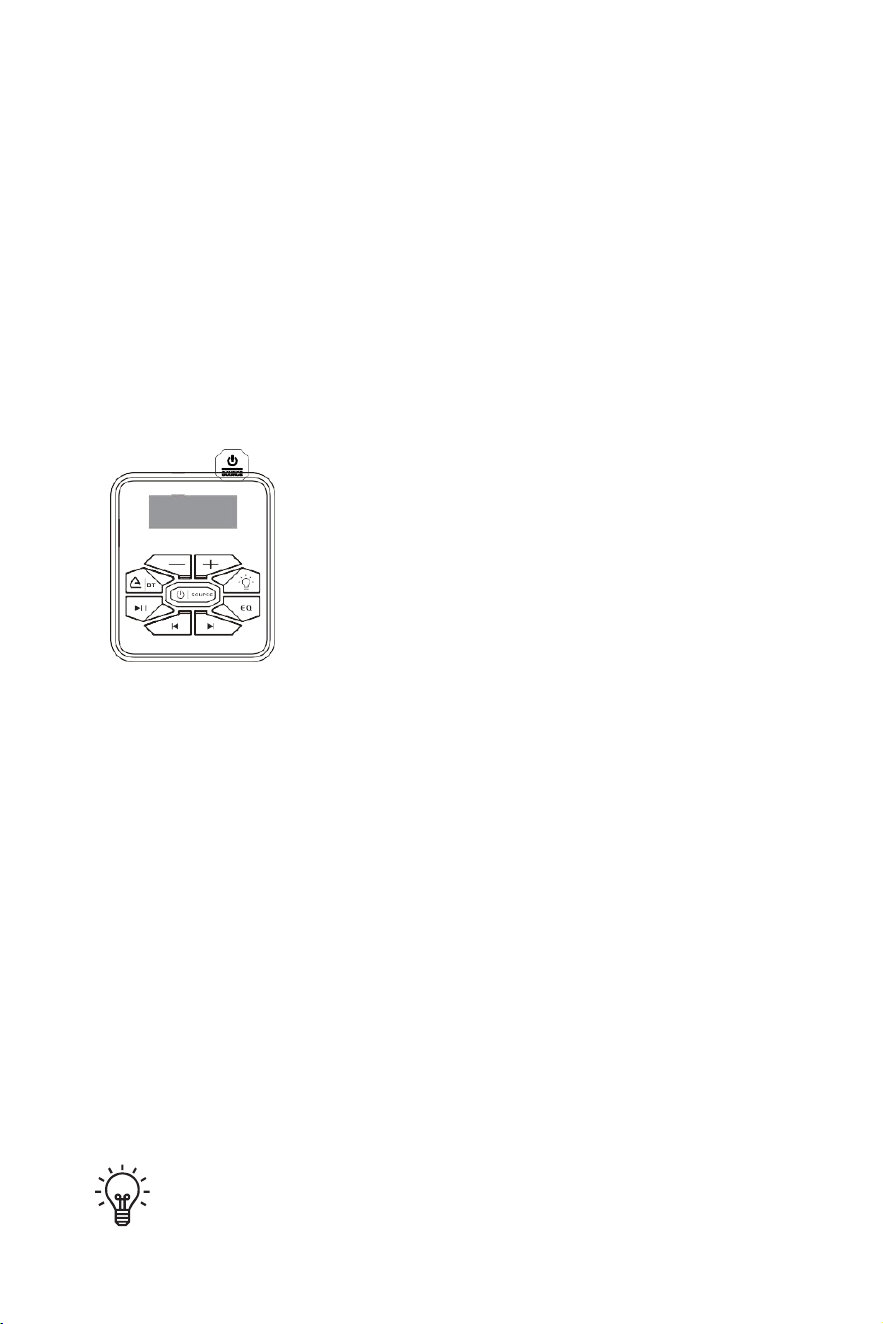
GETTING TO KNOW YOUR ATV/UTV SOUND BAR
1 Segment LED display
1
2ControlPanel
2

4
SPECIFICATIONS
Model
T102
Bluetooth Protocol
V5.4
Bluetooth Range
≥10m
Frequency Response
20HZ-20KHZ
Operating Voltage
12V
Maximum Operating Current
≤ 10A
Tweeters
2" (x2)
Woofer
3.5" (x4)
Wireless Remote Distance
≥ 33ft / 10m
Operating Temperature
-20°C to 50°C
Dust / Waterproof Rating
IP66

6
SPECIFICATIONS
LIST SPARE
T102
Wrench x1
Bracket x2
Remote Control x1
Spring washers x7
Ring x7
Short Bolt x2
Middle Bolt x4
Long Bolt x4
Rubber Pad x4
3.5mm AUX x1
Short Bolt x1
Middle Bolt x1
Long Bolt x1
Fuse x1
Ribbon x1
3.5mmtoRCAaudiocable x1
PowerCable(157inch) x1
7
INSTALLATION
•
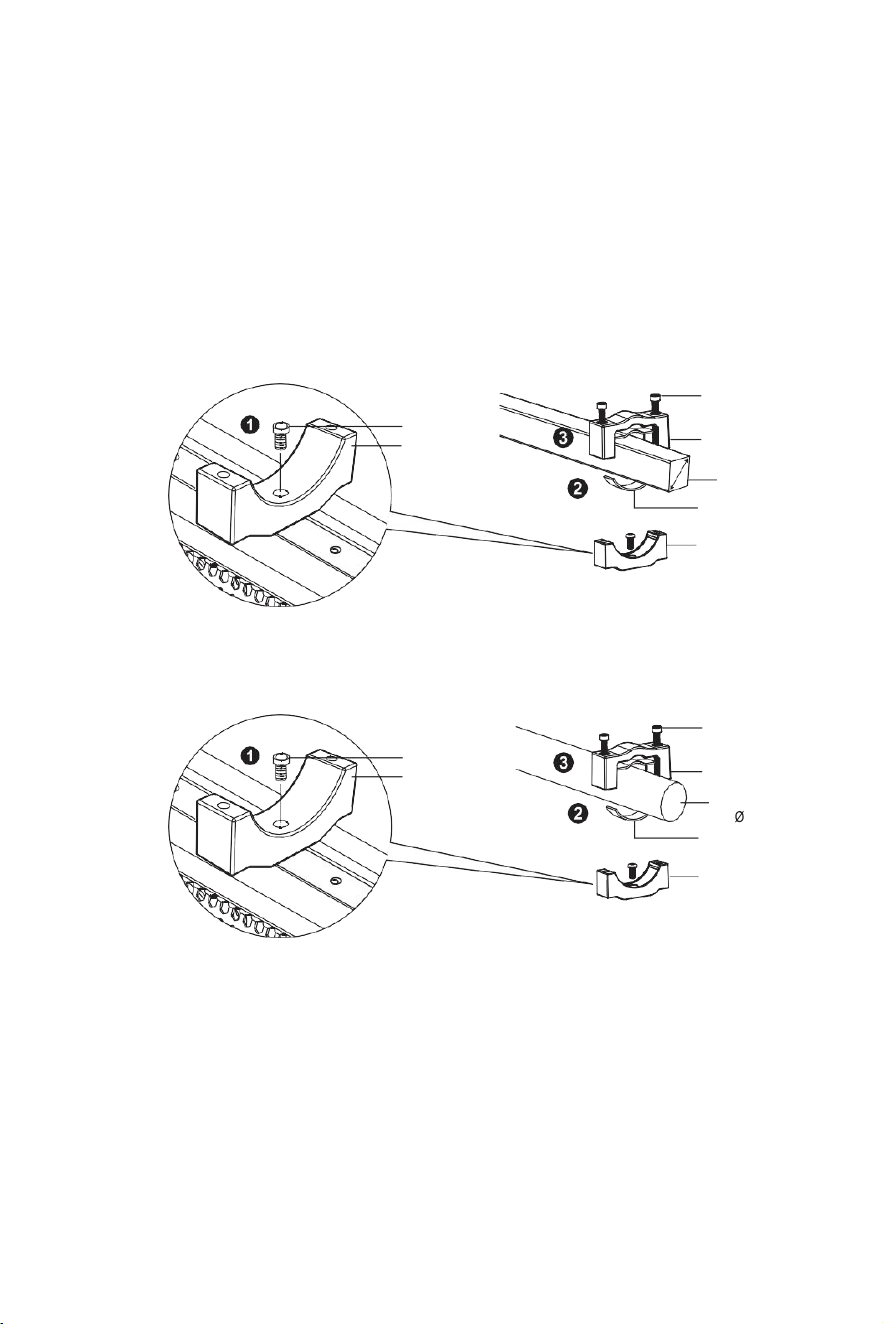
USE THE SUPPLIED ADJUSTABLE BRACKET TO SECURE TO RAILS.
•
ALWAYS RECHECK BRACKET BEFORE EVERY RIDE.
1
Adjusttheinstallationbrackettotheslotabovethehostandtightenitwithahexscrew.
2
Attachthesuppliedrubberpadsforsecureclampingandabrasionprevention.
3
Tightentheupperclamptothelowerclampwithahexwrench.Makesurethesuppliedspring
washersareusedtoprovidemorestablebolttighteningagainstvibration.
4
Repeatthestepsabovetosecurethesoundbarwiththeotherclamp.
a.Square Tube
Ring
Lower clamp
Ring
Upper clamp
Mounting bar
( 1”-2” )
Rubber strip
Lower clamp
b.Round Roll Bar
Ring
Lower clamp
Ring
Upper clamp
Mounting bar
( 1”-2” )
Rubber strip
Lower clamp
8
POWER ON/OFF
Bluetooth
Devices connected
EHAHO T101 /
EHAHOT102/
EHAHOT103
Availabledevices
SOUNDBAR2
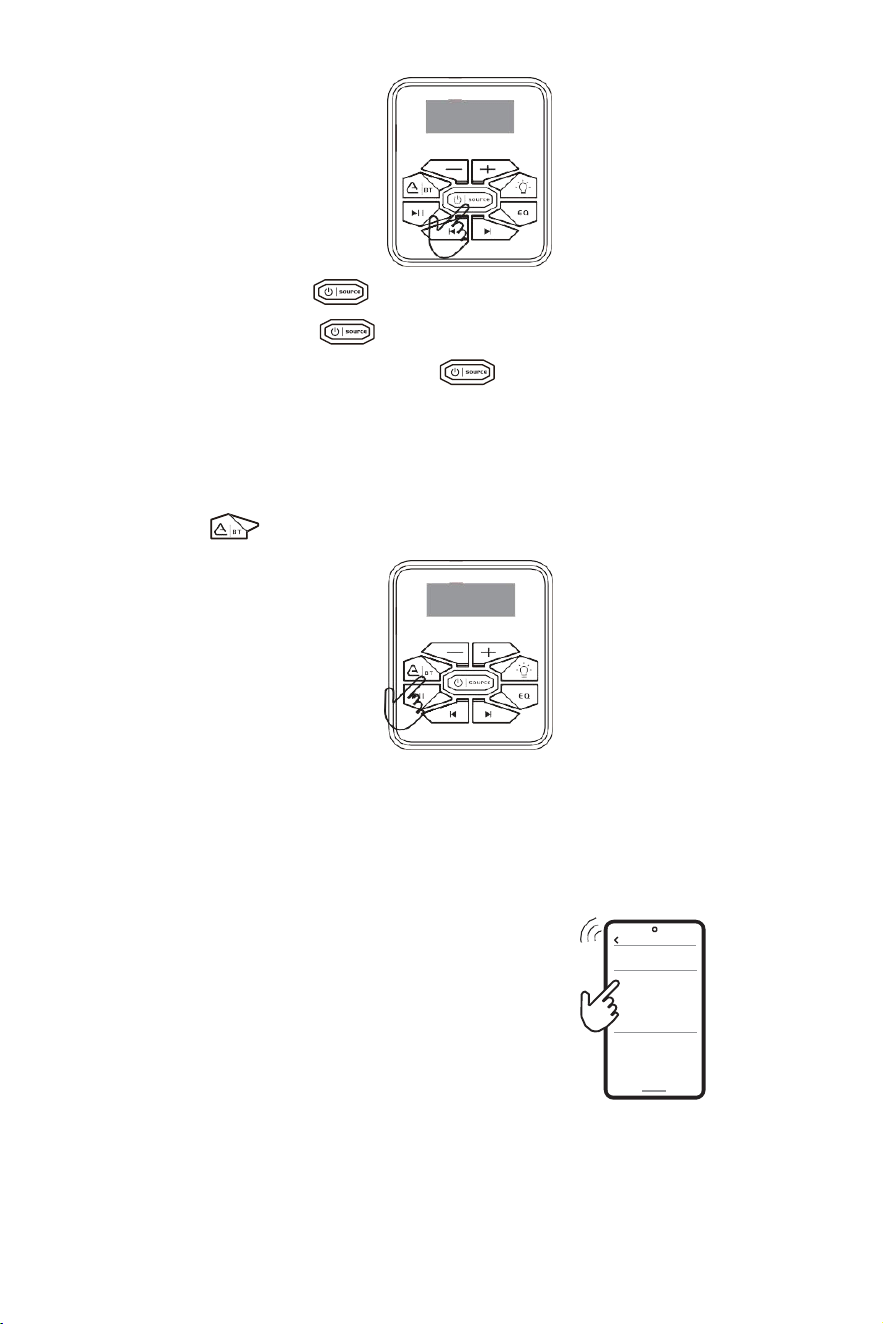
1.
PowerOn:Longpress" "button2.5stoturnon.
2.
PowerOff:Longpress" "button2stoturnoff.
3.
Inthepoweronstate,shortpressthe" "buttontoswitchbetweenBT→Auxin→
USB→BTmodes.
BLUETOOTH OPERATION
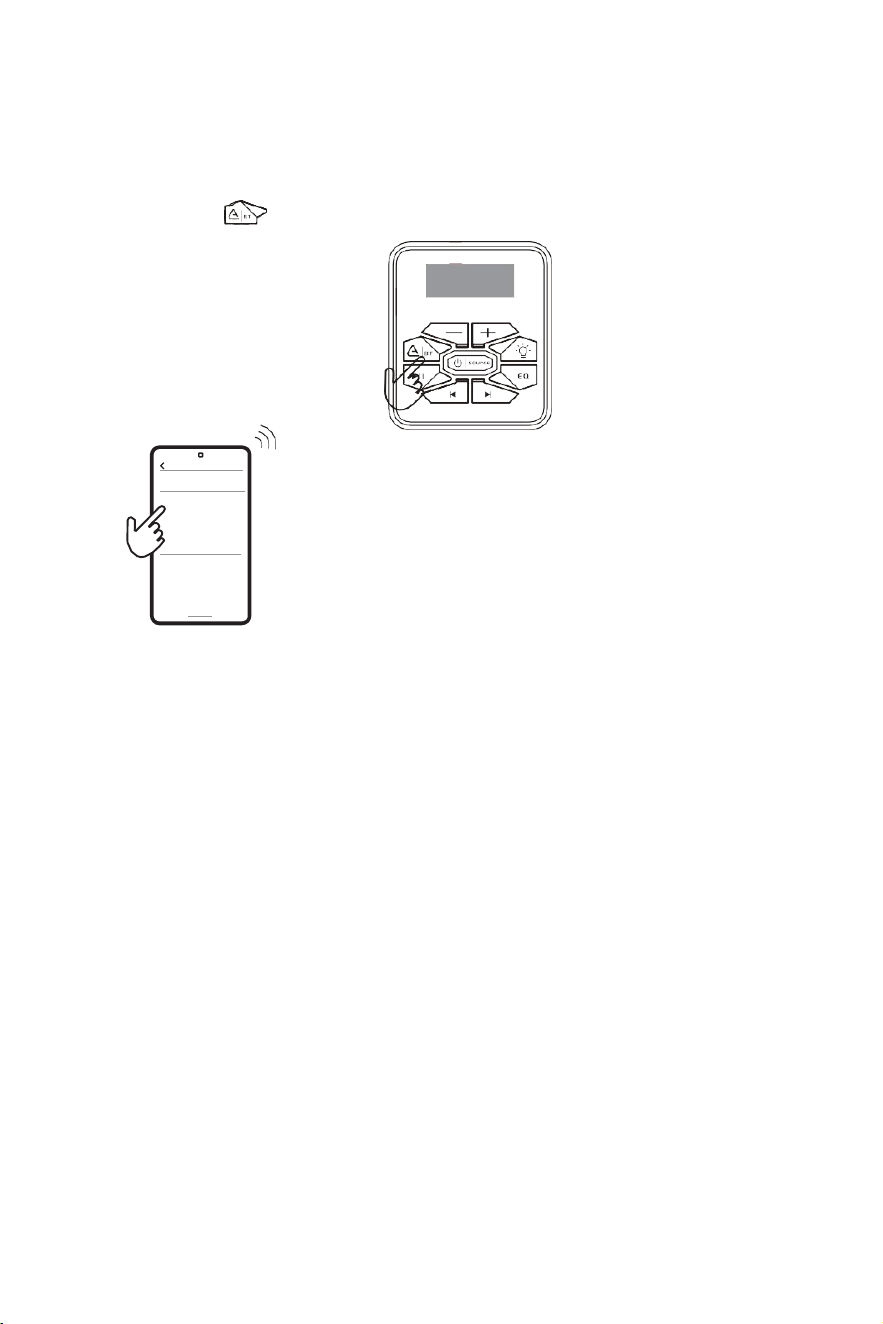
PAIRING
/
DISCOVERING A NEW BT CONNECTION
Pressthe" "button.TheSOUNDBARwillautomaticallygointopairing
MOBILE OPERATION
a. Go into the Settings Menu of your device
b.
EntertheBTMenu
c.
TURNONBTandpressSCAN
d.
EHAHOT101/EHAHOT102
/
EHAHOT103willnowbedisplayedunderAVAIL-
ABLEDEVICES
NOTE: You have 2 minutes before you must restart this procedure over again.
2.
If EHAHOT101/EHAHOT102
/
EHAHOT103 isnotseen,repeattheabovestepsto
refresh the Device List
3.
Whentheconnectionissuccessful,youarenowreadytostreammusicfromyour
favorite media player to the SOUND BAR.
9
BLUETOOTH OPERATION
RECONNECTION
1.
PowerontheSOUNDBARandyourlastpairedBTdevice.
2.
Pressthe" "button.Theunitwillnowautomaticallyreconnect.
3.
IfyourdevicewaspreviouslypairedwiththeSOUNDBAR,
but it wasn't the last paired device:
a. Ensure no other devices are currently paired
b. Enter the on your device being paired
c.
EHAHO T101
/
EHAHO 102
/
EHAHO 103
will display under AVAILABLE DEVICES
d. Choose the SOUND BAR to reconnect
4.
IfthedeviceisoutofrangefromtheSOUNDBAR,itwilldisconnectautomatically:
a. The SOUND BAR will automatically reconnect to the device once back in range.
5.
BTfunctioncanonlybeconnectedtoaSOUNDBAR,doesnotsupportmultiple
SOUND BAR connection at the same time.
Bluetooth
Devices connected
EHAHO T101 /
EHAHO T103
SOUND BAR2
Available devices
EHAHOT102/
10
AURACAST OPERATION
PAIRING
/
CONNECTED
/
DISCONNECTED
When the device is powered on:
*Singleclickthe" "button;hearaDIbeeptoenterAuracastpairingmode.
*Singleclickthe " "button;hearaDUDUbeeptodisconnecttheAuracast
connection.
*Longpressthe "
"buttontoclearpairingrecordsandre-enterpairingmode.
(Thedisplayscreensimultaneouslyshowstheconnectionstatus.)
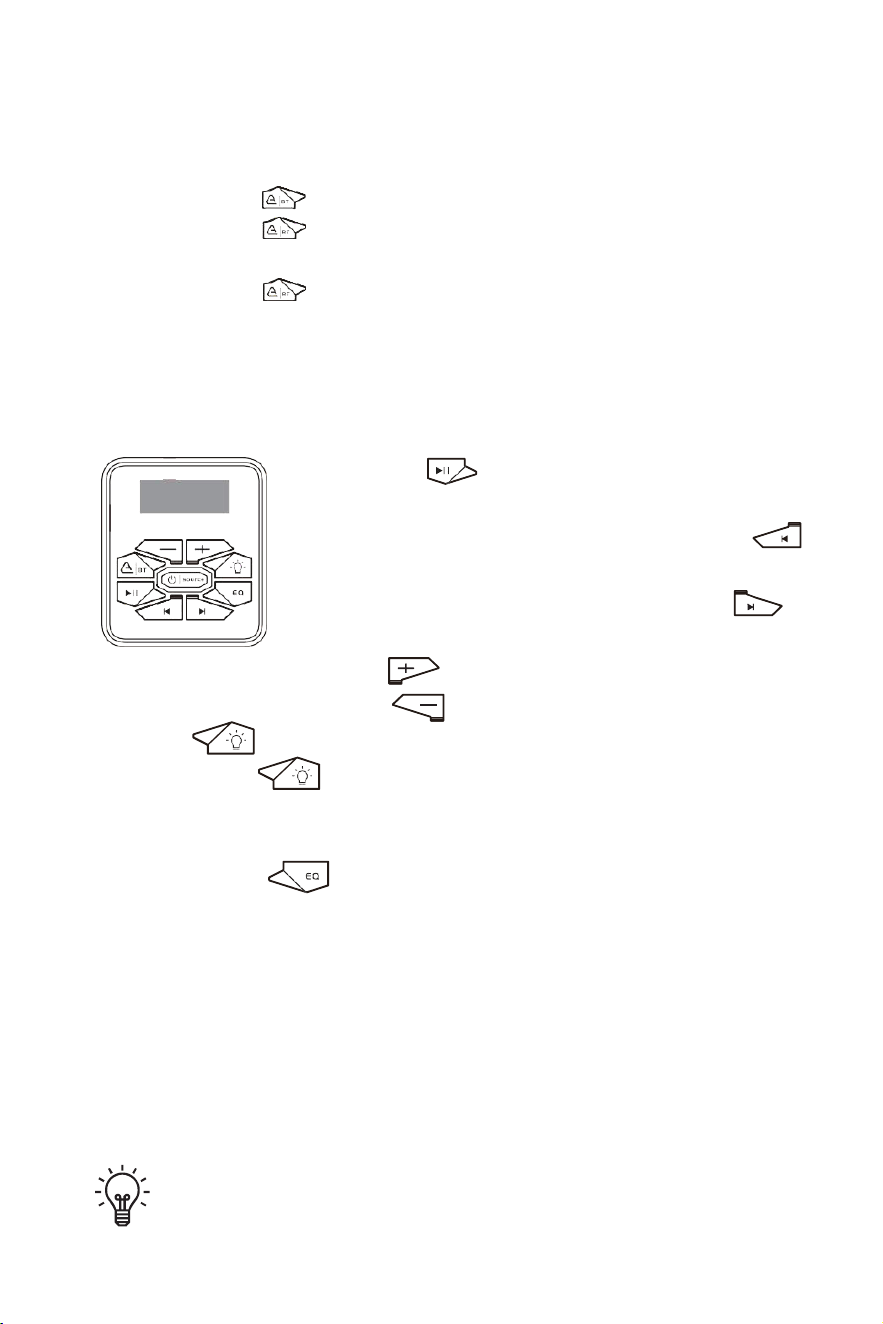
BUTTON OPERATION
1.
Pressthe" "buttononcetostartplayingmusicor
pausethemusic.
2.
InBTsourcetoselecttheprevioussong,pressthe" "
button or use your device's controls.
3.
InBTsourcetoskipsongsoradvance,pressthe" "
button or use your device's controls.
4.
Toraisethevolume,pressthe" "buttonoruseyourdevice'scontrols.
5.
Tolowerthevolume,pressthe" " buttonoruseyourdevice'scontrols.
6.
Press" "buttontoselectlightingmode
Longpress2s" " buttontoturnon/ offthelighting
Single click the light button to switch lighting modes; 4 modes cycle:
L01: Flow → L02: Breathing → L03: Rhythm → L04: Gradient → L01: Flow (cycle).
7.
Singleclickthe " "buttontoswitchEQmodes;3modescycle:
CLAS:Classic→BASS:Bass→VOCA:Vocal→CLAS:Classic(cycle).
TIPS: For maximum audio performance, ensure your device BT volume is set
to a minimum 75% level before stowing.
AUX INPUT
13
AUX-IN Operation
1.
Connectthe3.5mmAUXaudiocabletothedevice'sAUX-INjack.
2.
Pressthe" "button.SwitchSOUNDBARtoAUXmode.
player with 3.5mm
audio jack output
BUTTON OPERATION
1.
Toraisethevolume,presstheVOLUMEUPbutton.
2.
Tolowerthevolume,presstheVOLUMEDOWNbutton.
TIPS: Sound bar can play audio from any device that has a 3.5mm
headphone audio jack.
14
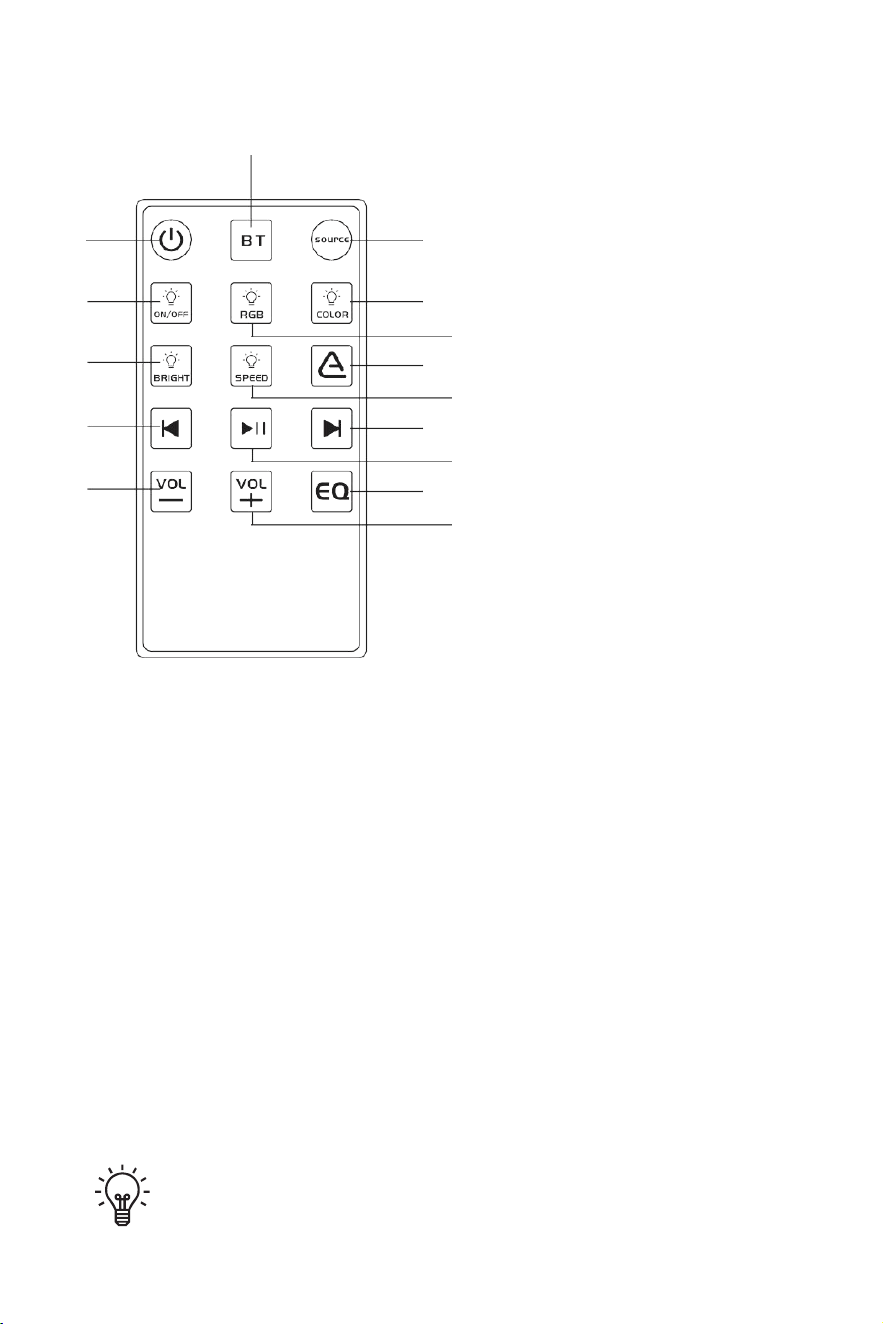
REMOTE CONTROL OPERATION
3
6
9
12
15
2
1.Poweroff
2.Bluetooth
1
3.Source
4.Light switch
4
5.RGBlightingmodeswitch
7
5
6.Single-colorlightswitch
8
7.Brightnesscycle
10
8.Speedcycle
13
11
9.Auracast/BT
14
10.Previoustrack
11.Next track
12.Play/Pause
13.Volume +
14.Volume –
15.EQ
Due to different production batches, the color of the buttons may vary,
but the function is the same.
REMOTE CONTROL OPERATION
15
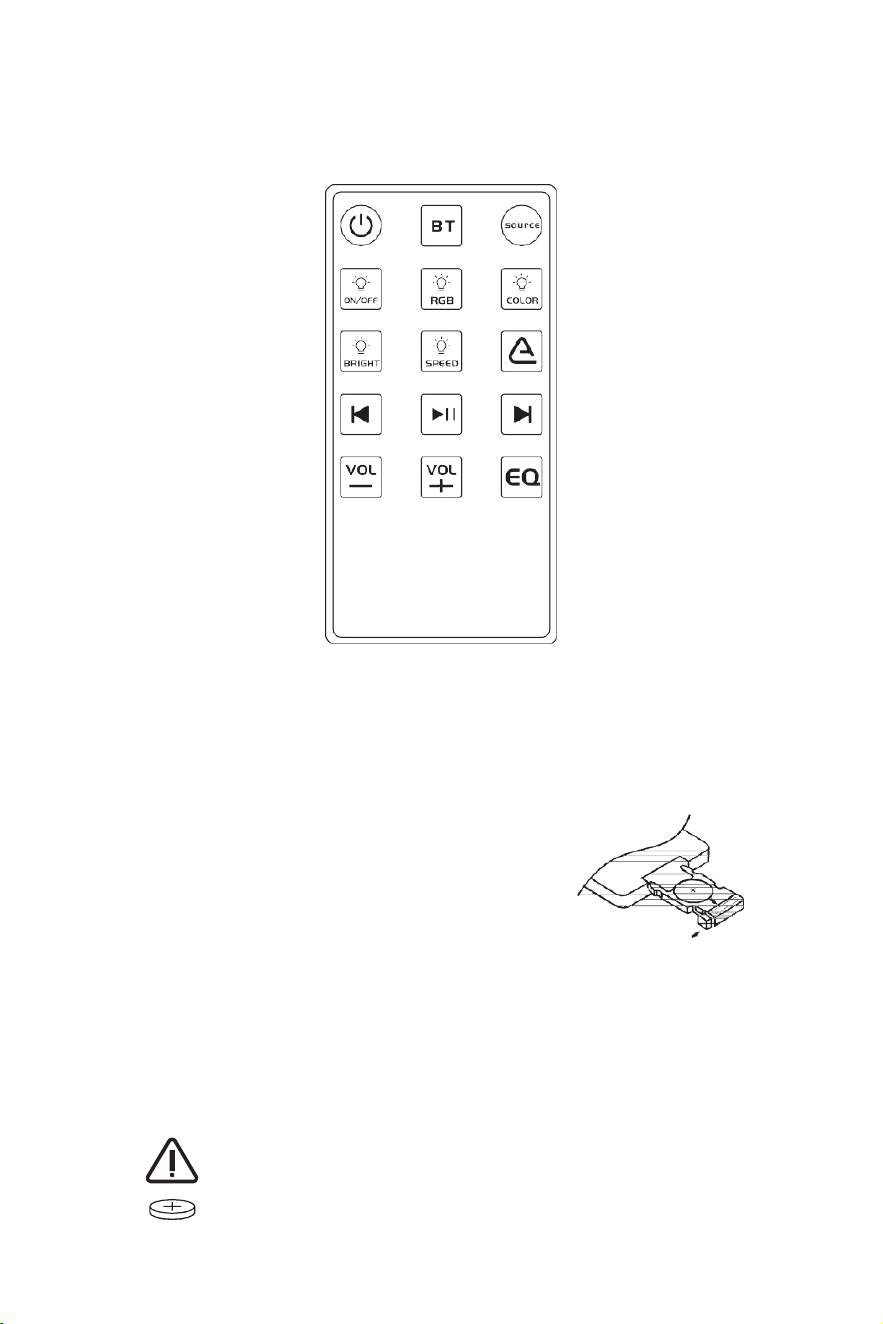
CAUTIONS
1)
RFcontrollerrange:Upto 33ft(LoS)
2)
Donotobstruct theRFremotewithmetal
3)
Donotstoreindirectsunlight
Replacement Battery-CR2025
WARNING:Remotecontrolincludesabuttonbatterykeepthebutton
batteryoutofreachofchildren.
Ifswallowed,seekmedicalattentionimmediately,asingestionmay
leadtoseriousinjury,chemicalburns,ordeath.
REMOTE CONTROL OPERATION
16
5
8
11
14
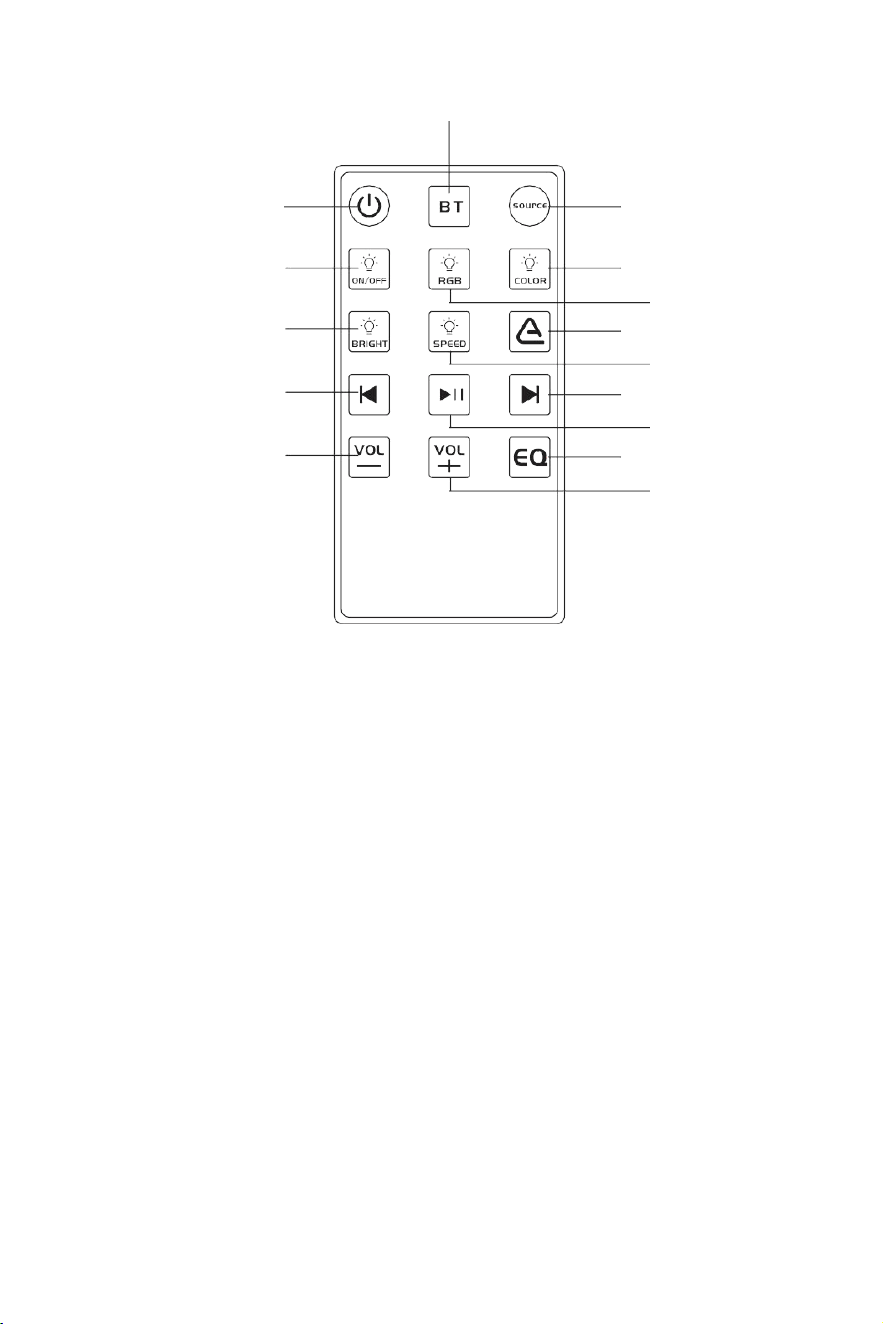
Function Introduction
1. Power off : Single-click switch (fade in/out)
2.Bluetooth: Singleclicktoclearpairing;flashingindicatesre-enteringpairingmode.
3.Source:Singleclicktoswitchplaybacksource:BT→Auxin→USB→BT(cycle).
4.Lightswitch:Pressoncetoturnonalllights;pressagaintoturnoffalllights.
5.RGBlightingmodeswitch: SingleclicktoswitchRGBlightingeffects.
6.Single-colorlightswitch:Pressoncetoswitchtothenextcolor;sevencolorsintotal:Red,
Orange,Yellow,Green,Cyan,Blue,Purple.
7.
Brightnesscycle:SingleclicktocyclethroughHigh,Medium,andLow.
8.
Speedcycle:Singleclicktoswitchamong5speedlevels.
9.Auracast/BT: Singleclicktoenter/exitbroadcastmode.
10.Previoustrack:SingleclickforPreviousTrack.
11.Next track : Single click to Play/Pause.
12.Play/Pause : Single click for Next Track.
13.Volume + : Single click to increase volume.
14.Volume – : Single click to decrease volume.
15.EQ: EQ:Classic→ Bass→ Vocal→ Classic(cycle).
2
1
3
4
6
7
9
10
12
13
15

17
TROUBLE SHOOTING
TROUBLE
CAUSE
SOLUTION
Device will
not turn on
The fuse is blown
Check / replace the fuse
Vehicledidn'tstartMainaccswitch
notengaged
Startingthevehicle/Turnswitchtoon
position
Operating voltage not applicable
The soundbar operates on 12V DC.
The soundbar does not work properly
when the voltage is below 8V DC or
above 18V DC.
No sound is
heard
Incorrect operating voltage
Check the operating voltage, DC 12V
Soundbar volume is low muted
Turn up the volume on your device
The volume of the device inputting
music to the Soundbar is too low
muted.
Turn up the volume of the input device
BT/AUXarenotconnected
properly
Check if the soundbar control panel is
successfullyconnectedtothedevice(BT,
AUX IN)
Cannot pair
BT
TheBTfunctionofthedeviceisnot
enabled
Refer to the user manual of the device
for how to enable the BT function
Device not
responding
Power failure or interference
Presspowerandvol+buttonsimultane-
ously to force shutdown
FREQUENTLY ASKED QUESTIONS
Q1: Will this sound bar fit my vehicle?
MountingwithUniversalBrackets,fitsanyoffroadvehiclewitha1"~2"rollcage,
includingUTV,ATV,golfcart,Marine,Boat, PolarisRZR,Ranger,Can-Am,Defender,
Maverick,etc.
Q2: Is it plugged in? Or run off a charge?
ThissoundbarisNOTrechargeable.Itneedstobehardwiredstraighttothebatteryvia
the12VDCconverter(includedinthepackage).
Q3: Can I turn the led lights off while listening to music?
Yes,RGBlightcanbeturnedoffatanytimebyremotecontrol,press" "buttonto
turnoffthelight.
18
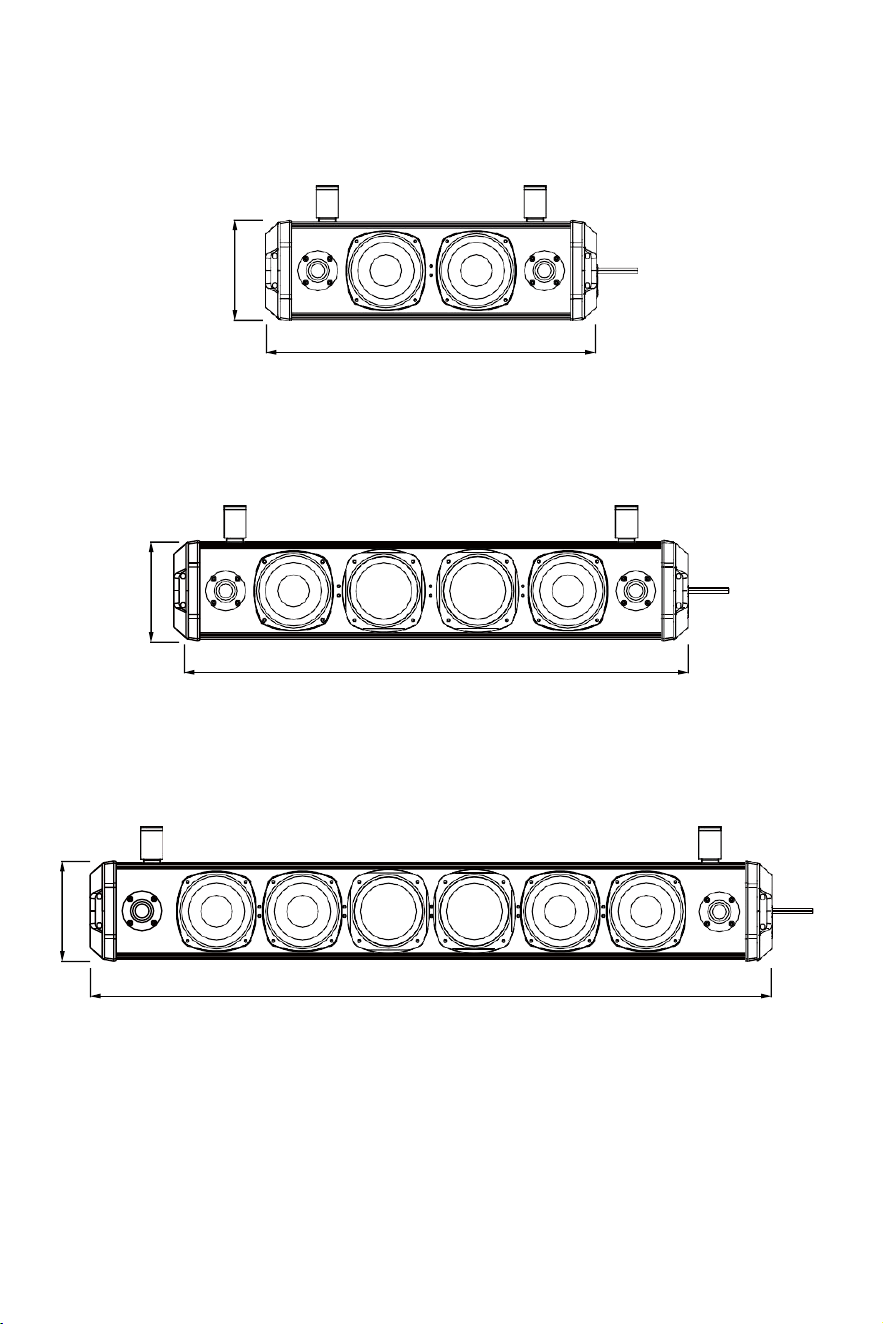
DIMENSIONS
5”
17”
5”
26”
5”
35”
SPECIFICATIONS SUBJECT TO CHANGE WITHOUT NOTICE
FCC Warning Statement
This device complies with Part 15 of the FCC Rules. Operation is subject to the
following two conditions:
(1) This device may not cause harmful interference, and (2) this device must
accept any interference received, including interference that may cause
undesired operation.
NOTE 1: This equipment has been tested and found to comply with the limits
for a Class B digital device, pursuant to part 15 of the FCC Rules. These limits
are designed to provide reasonable protection against harmful interference in
a residential installation. This equipment generates uses and can radiate radio
frequency energy and, if not installed and used in accordance with the instruc-
tions, may cause harmful interference to radio communications. However,
there is no guarantee that interference will not occur in a particular installa-
tion. If this equipment does cause harmful interference to radio or television
reception, which can be determined by turning the equipment off and on, the
user is encouraged to try to correct the interference by one or more of the
following measures:
-
Reorient or relocate the receiving antenna.
-
Increase the separation between the equipment and receiver.
-Connect the equipment into an outlet on a circuit different from that to which
the receiver is connected.
-Consult the dealer or an experienced radio/TV technician for help.
NOTE 2: Any changes or modifications to this unit not expressly approved by
the party responsible for compliance could void the user's authority to operate
the equipment.
This transmitter must not be co-located or operating in conjunction
with any other antenna
or transmitter. This equipment should be installed and operated with
a minimum distance of
20 centimeters between the radiator and your body.
Cet émetteur ne doit pas être Co-placé ou ne fonctionnant en même
temps qu'aucune autre
antenne ouémetteur. Cet équipement devrait être installé et actionné
avec une distance
minimum de 20 centimètres entre le radiateur et votre corps.
RF Exposure Statement
To maintain compliance with FCC's RF Exposure guidelines, This equipment
should be installed and operated with minimum distance of 20cm the radiator
your body. This device and its antenna(s)must not be co-located or operation
in conjunction with any other antenna or transmitter.

This device contains licence-exempt transmitter(s)/receiver(s) that
comply with Innovation, Science and Economic Development
Canada’s licence-exempt RSS(s). Operation is subject to the
following two conditions:
•
1.This device may not cause interference.
•
2.This device must accept any interference, including
interference that may cause undesired operation of the device.
L'émetteur/récepteur exempt de licence contenu dans le présent
appareil est conforme aux CNR d'Innovation, Sciences et
Développement économique Canada applicables aux appareils
radio exempts de licence. L'exploitation est autorisée aux deux
conditions suivantes :
5
L'appareil ne doit pas produire de brouillage;
6
L'appareil doit accepter tout brouillage radioélectrique subi,
même si le brouillage est susceptible d'en compromettre le
fonctionnement.

Warm Tips
Regarding voltage compatibility, we provide solutionsfor vehicles that do not use
a 12V DC power supply to ensure you can use the product effectively. For further
details, please consult our official customer service team.
After-Sales Service and Warranty
We provide a warranty from the date of purchase. We will repair or replace any
defective products free of charge. For any questions or assistance, you can
contact our customer service team via below methods for help:
Email: support@ehaho.com
Website: https://www.ehaho.com
How to Make a Warranty Claim
Contact Us: Reach out to our customer service team at support@ehaho.com.
Provide Information: Be prepared to provide proof of purchase and a detailed
description of the issue including relevant pictures or videos.
Our team will respond to your issues within 24 hours on weekdays. Please check
your email, including the spam folder, for our replies. Note that response times
may be delayed during weekends or holidays.
Terms and Conditions
Thiswarrantyisnon-transferableandapplies only to theoriginalpurchaser.
Thank you for choosing Ehaho. We appreciate your business and are here to
support you with any questions or concerns.


MOUNTING KIT CONTAINS
LIST SPARE
T103
Wrench x1
Bracket x2
Remote Control x1
Spring washers x7
Ring x7
Short Bolt x2
Middle Bolt x4
Long Bolt x4
Rubber Pad x4
3.5mm AUX x1
Short Bolt x1
Middle Bolt x1
Long Bolt x1
Fuse x1
Ribbon x1
3.5mmtoRCAaudiocable x1
PowerCable(157inch) x1
7-1