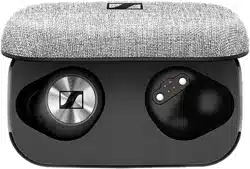
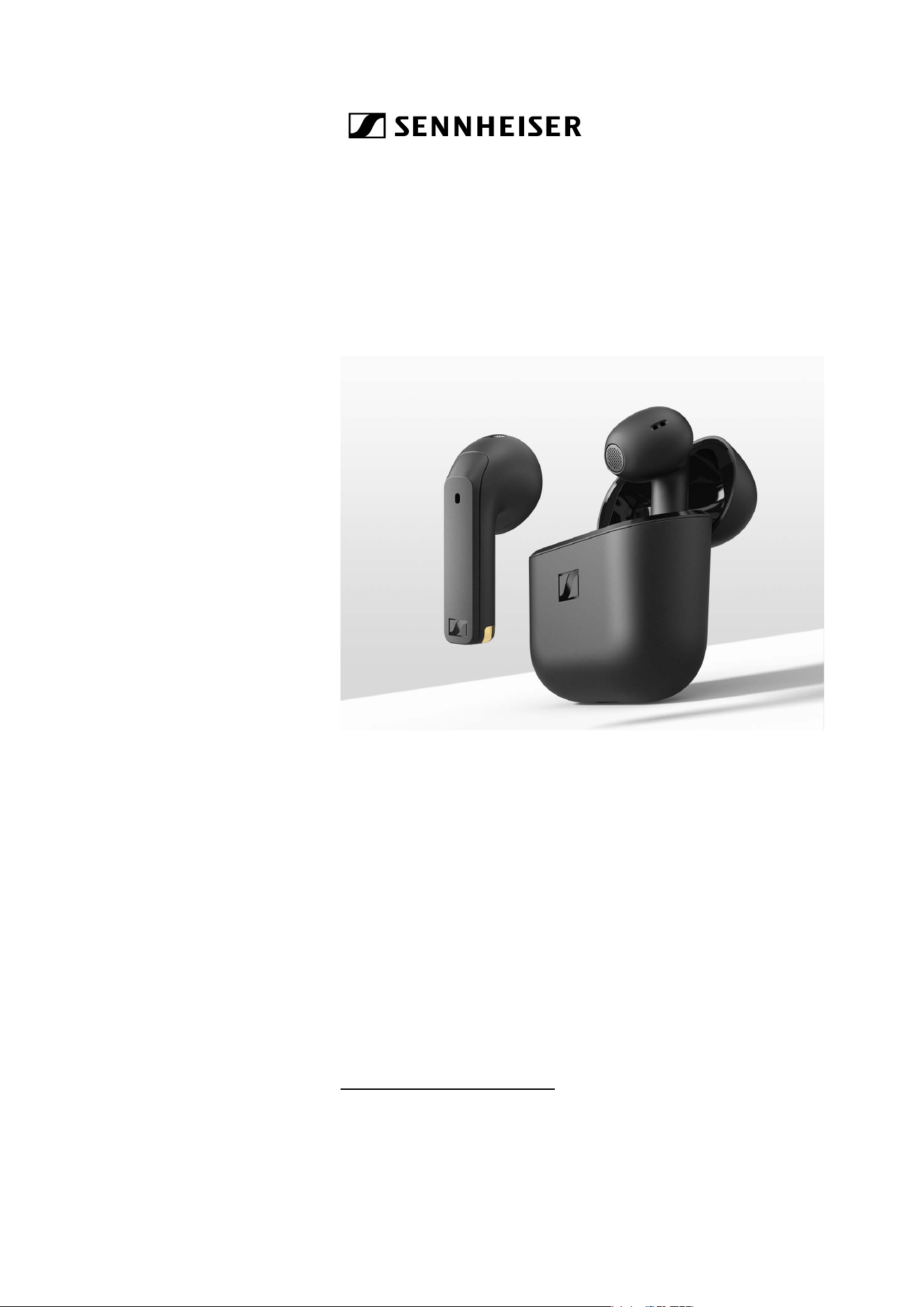
ACCENTUM Open
Open True Wireless stereo earbuds
Model: OTW1, OTW1 R, OTW1 L, OTW1 C
Instruction manual
Use the search function, the navigation (left) or the following links:
„Start“
“Product overview”
“Getting started”
“Using the earbuds”
“FAQ/If a problem occurs...”
“Specifications”
Sonova Consumer Hearing GmbH
Am Labor 1
30900 Wedemark
Germany
www.sennheiser-hearing.com
Version: 06/25 A02
Important safety instructions
2 | ACCENTUM Open
Important safety instructions
▷ Read this instruction manual carefully and completely before
using the product.
▷ Always include this instruction manual when passing the product
on to third parties.
▷ Do not use the product if it is obviously defective or makes loud,
unusual (whistling or beeping) noise.
▷ Only use the product in environments where Bluetooth® wireless
transmission is permitted.
Preventing damage to health and accidents
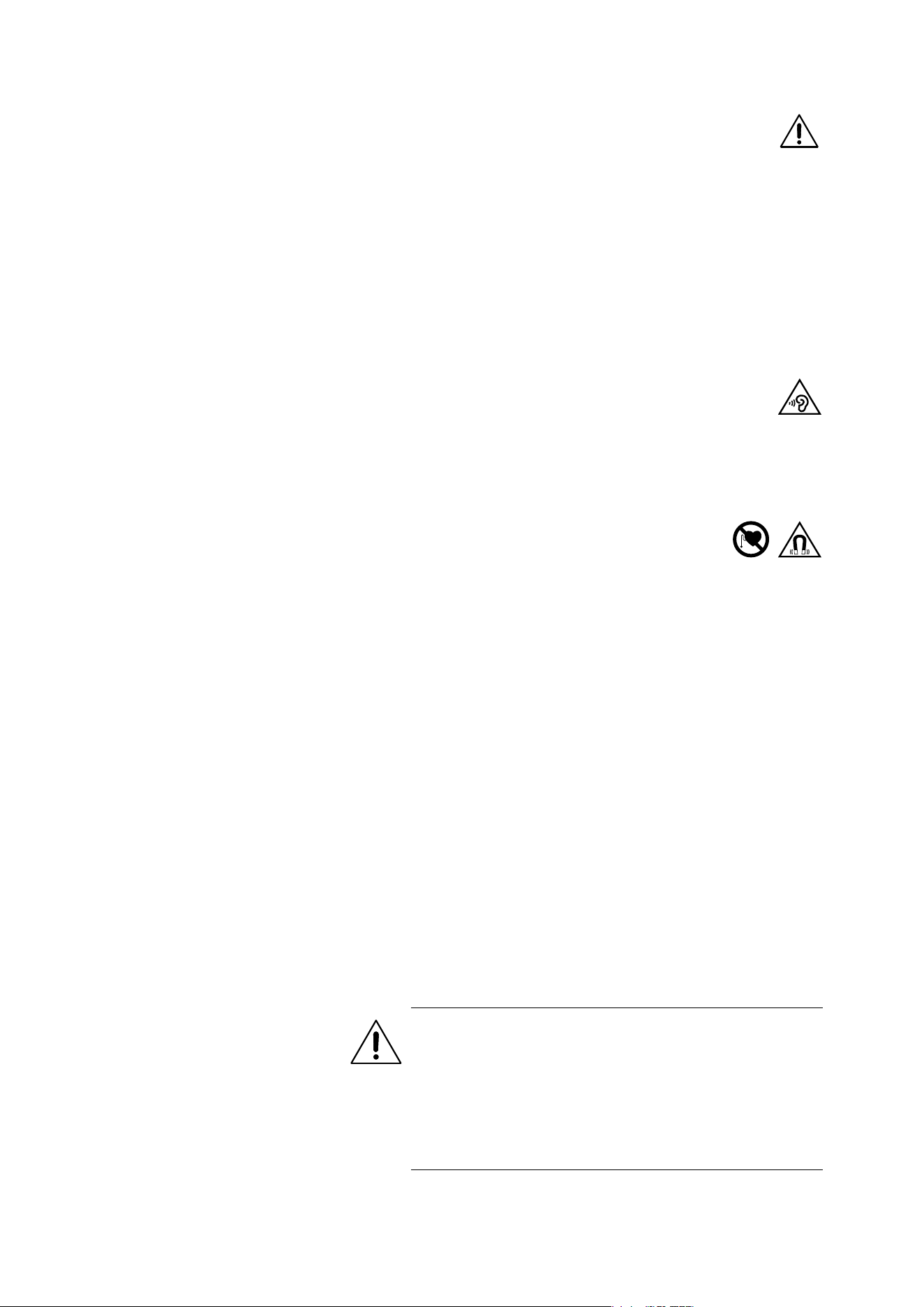
▷ Protect your hearing from high volume levels. Permanent
hearing damage may occur when earbuds are used at
high volume levels for long periods of time. Sennheiser
earbuds sound exceptionally good at low and medium volume lev-
els.
▷ Do not insert the earbuds too deep into your ears. Always remove
the earbuds slowly and carefully from your ears.
▷ The product generates stronger permanent mag-
netic fields that could cause interference with car-
diac pacemakers, implanted defibrillators (ICDs)
and other implants. Always maintain a distance of at least 3.94"/
10cm between the product component containing the magnet
(earbuds and charging case) and the cardiac pacemaker,
implanted defibrillator, or other implant.
▷ Keep the product, accessories and packaging parts out of reach
of children and pets to prevent accidents. Swallowing and chok-
ing hazard.
▷ Do not use the product in an environment that requires your spe-
cial attention (e.g. in traffic).
Preventing damage to the product and malfunctions
▷ Always keep the product dry and do not expose it to extreme tem-
peratures (hairdryer, heater, extended exposure to sunlight, etc.)
to avoid corrosion or deformation. The normal operating tempera-
ture is from 0°C to 40°C/32°F to 104°F.
▷ Do not use if immersed into liquid.
▷ Use only attachments/accessories/spare parts supplied or rec-
ommended by Sonova Consumer Hearing.
▷ Clean the product only with a soft, dry cloth.
Safety instructions for Lithium rechargeable batteries
WARNING
If abused or misused, rechargeable batteries may leak. In
extreme cases, they may even present a risk of:
• explosion
• heat and fire development
• smoke and/or gas development
• damage to health and/or the environment
Important safety instructions
ACCENTUM Open | 3
Notes on the ingress protection rating of the earbuds
The earbuds feature an IPX4 ingress protection rating which means
they are protected from the ingress of water (protection class
according to International Protection Marking (IP code), IEC standard
60529, tested under laboratory conditions).
The earbuds can be used in the rain, for example. However, they are
not suitable for immersion in water or for wearing in the shower. In
case of permanent moisture/wetness, the ingress protection can be
reduced and the product can be damaged.
▷ Do not charge wet earbuds. Completely dry wet earbuds with a
dry cloth before charging them.
The charging case is not splash waterproof.
▷ Do not use if immersed into liquid.
▷ Always keep the charging case dry.
▷ Make sure that the charging socket is free from moisture and con-
tamination.
▷ Only use high-quality USB charging cables with USB-IF certifica-
tion.
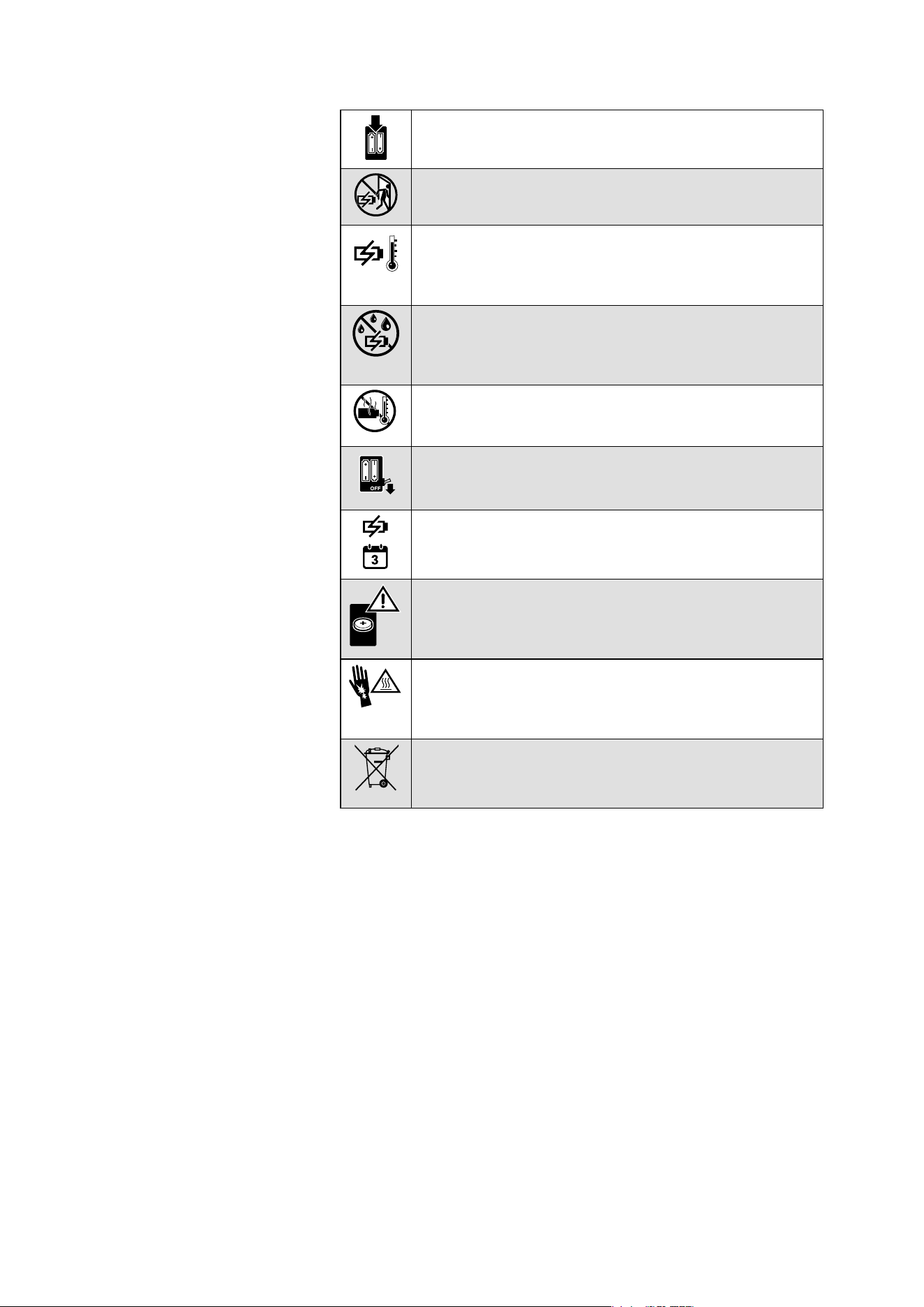
Only use rechargeable batteries and chargers recom-
mended by Sonova Consumer Hearing.
Do not leave the product/rechargeable batteries unat-
tended while charging.
Only charge the product/rechargeable batteries at
ambient temperatures between 5°C and 35°C/41°F and
95°F and do not charge them near easily flammable
objects.
Do not charge the product/rechargeable batteries in a
damp or humid environment. Make sure that the
charging socket is free from moisture and contamina-
tion.
Do not heat the product/rechargeable batteries above
70°C/158°F. Avoid exposure to sunlight and do not
throw the product/rechargeable batteries into fire.
Switch rechargeable battery-powered products off after
use.
When not using the product/rechargeable batteries for
extended periods of time, charge them regularly (about
every 3 months).
This product contains coin rechargeable batteries. If you
think the product/a coin rechargeable battery has been
swallowed or is lodged in the body, seek medical assis-
tance immediately.
Avoid prolonged skin contact with the product,
rechargeable battery, charger or charging cable when
connected to a power source. These components can
heat up during charging and cause skin irritation.
Dispose of defective products with built-in rechargeable
batteries at special collection points or return them to
your specialist dealer to facilitate recycling.

Important safety instructions
4 | ACCENTUM Open
If the charging case has become damp or wet:
▷ Dry the charging case completely with a dry cloth.
▷ Allow the charging case to dry at room temperature for at least
24 hours before using and charging it again.
▷ Do not continue to use the product if it is obviously defective.
Intended use/Liability
These headphones have been designed as an accessory for Blue-
tooth compliant devices. They are intended for wireless audio com-
munication such as music playback and phone calls via Bluetooth
wireless technology.
It is considered improper use when the product is used for any appli-
cation not named in the corresponding product documentation.
Sonova Consumer Hearing GmbH does not accept liability for
damage arising from misuse or improper use of this product and its
attachments/accessories. Sonova Consumer Hearing GmbH is not
liable for damages to USB devices that are not consistent with the
USB specifications.
Sonova Consumer Hearing GmbH is not liable for damages resulting
from the loss of connection due to flat or overaged rechargeable bat-
teries or exceeding the Bluetooth transmission range.
Before putting the product into operation, please observe the
respective country-specific regulations.
Package contents
ACCENTUM Open | 5
Package contents
Online you can find:
• this detailed instruction manual and additional information
(www.sennheiser-hearing.com/download
)
• the option to purchase online or contact your local Sonova Con-
sumer Hearing partner:
www.sennheiser-hearing.com/service-support
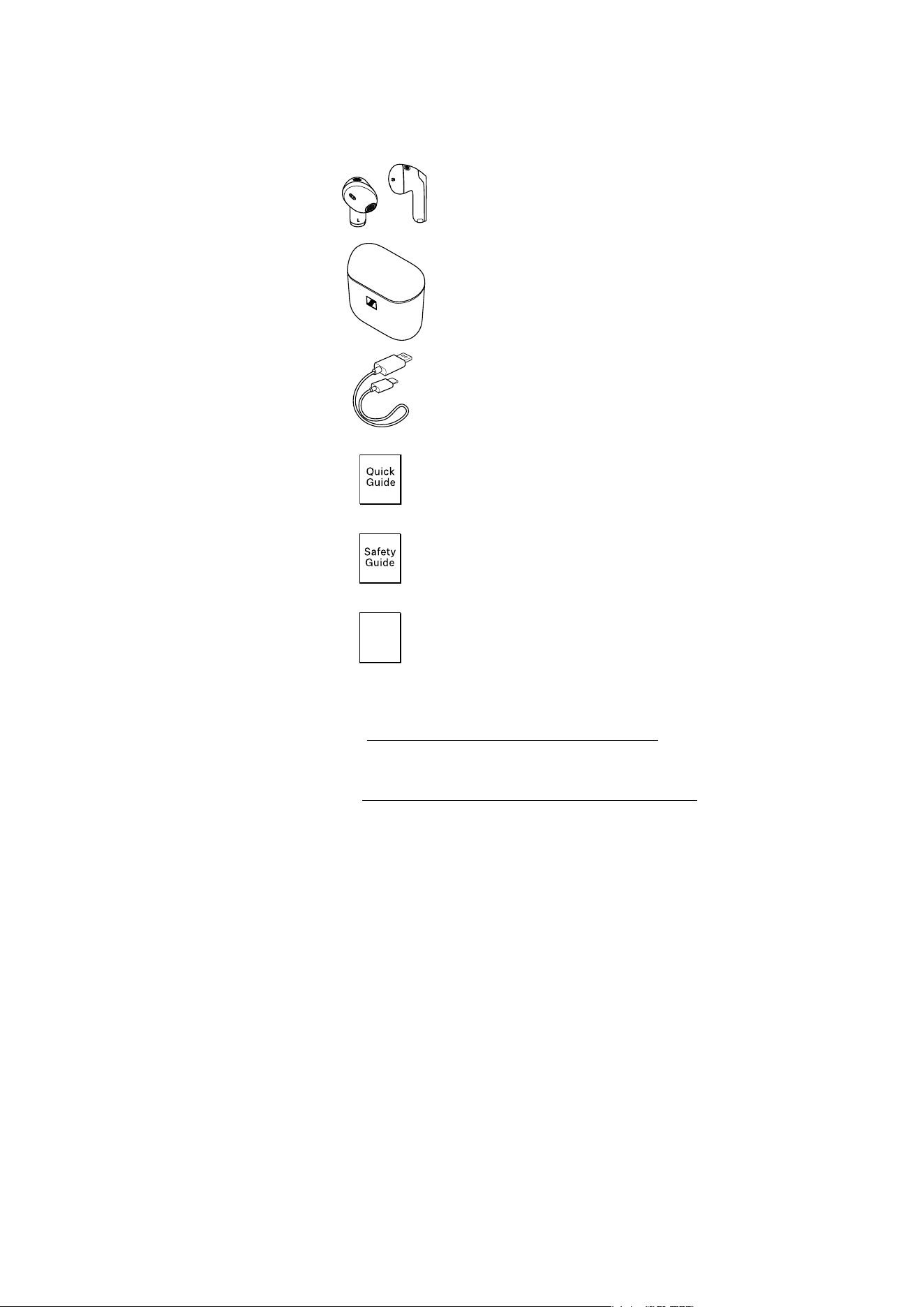
Earbud R for right ear (model: OTW1 R) and
earbud L for left ear (model: OTW1 L)
Charging case (model: OTW1 C) with built-in
rechargeable battery for the earbuds
USB charging cable with USB C and
USB A connector, approx. 0,4 m
Quick guide
Safety guide
Compliance sheet
Com-
pliance
Sheet
Product overview
6 | ACCENTUM Open
Product overview
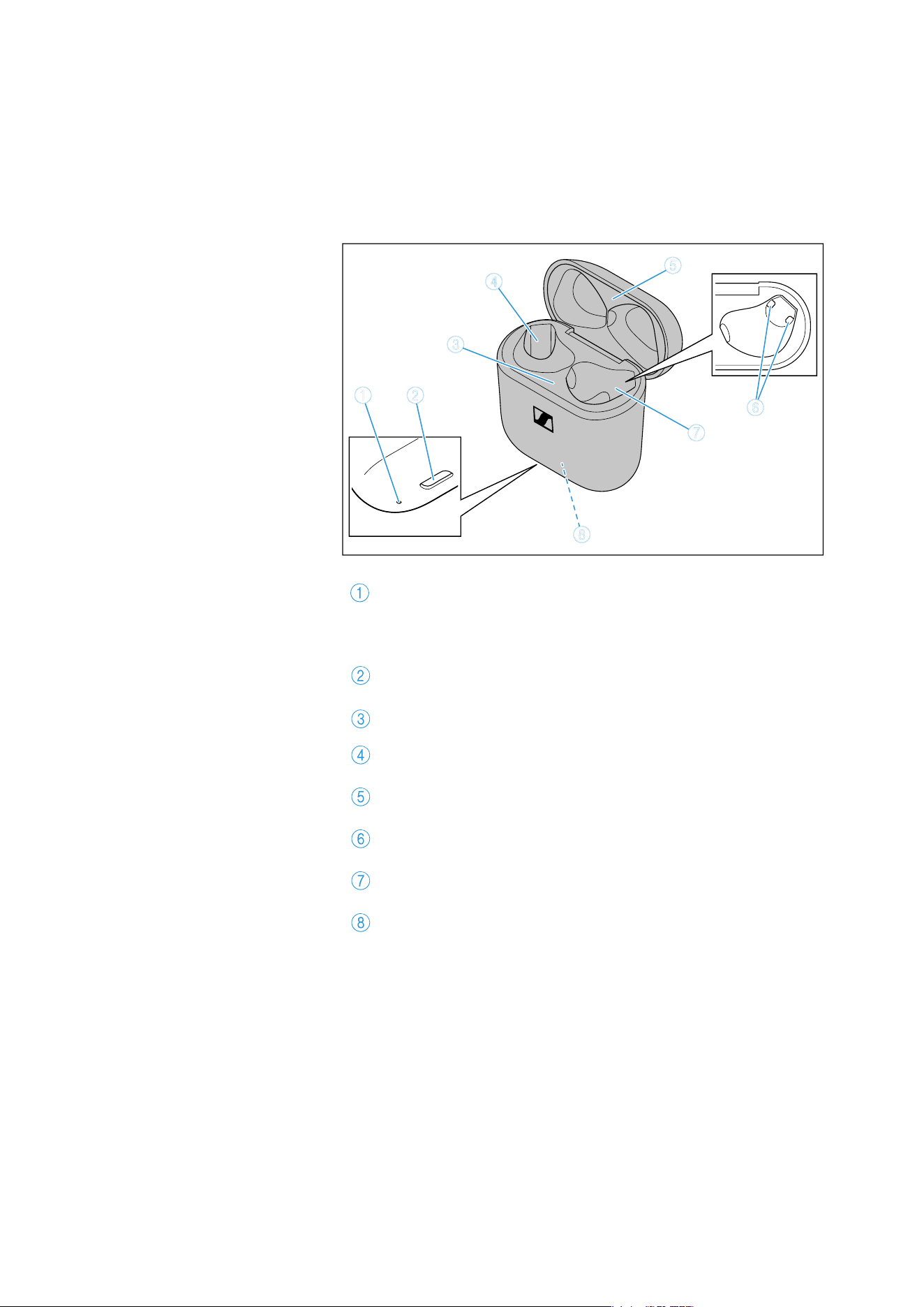
Charging case
Model: OTW1 C
LED display
indicates the charging process/charge status of the
rechargeable battery of the charging case or of the ear-
buds (when inserted into the charging case)
Input for USB C connector
for charging the rechargeable batteries
Bottom cradle
Charging compartment for the left earbud L
Top cradle
Charging contacts
Charging compartment for the right earbud R
Built-in rechargeable battery for charging the earbuds on
the go
6
3
8
1 2
4
5
7
Product overview
ACCENTUM Open | 7
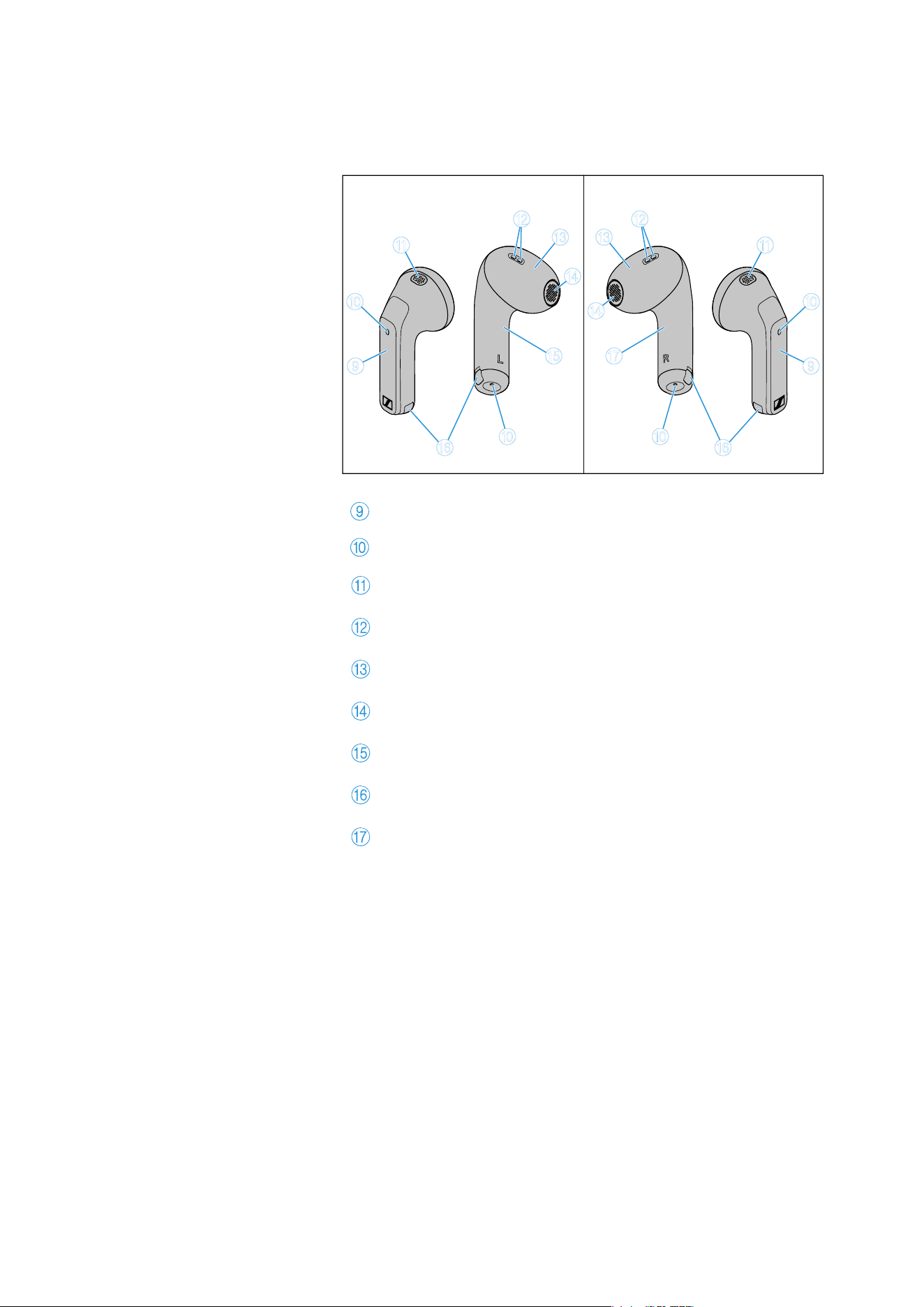
Earbuds
Model: OTW1 R and OTW1 L
Touch control panel
Microphones for beamforming noise reduction
Acoustic rear ventilation
Acoustic front ventilation
Built-in rechargeable battery
Speaker
Left earbud L
Charging contacts
Right earbud R
OTW1 ROTW1 L
0
B
C
D
0
A
9
E
F
0
B
D
0
A
9
G
F
C
Product overview
8 | ACCENTUM Open
Overview of the LED display of the
charging case
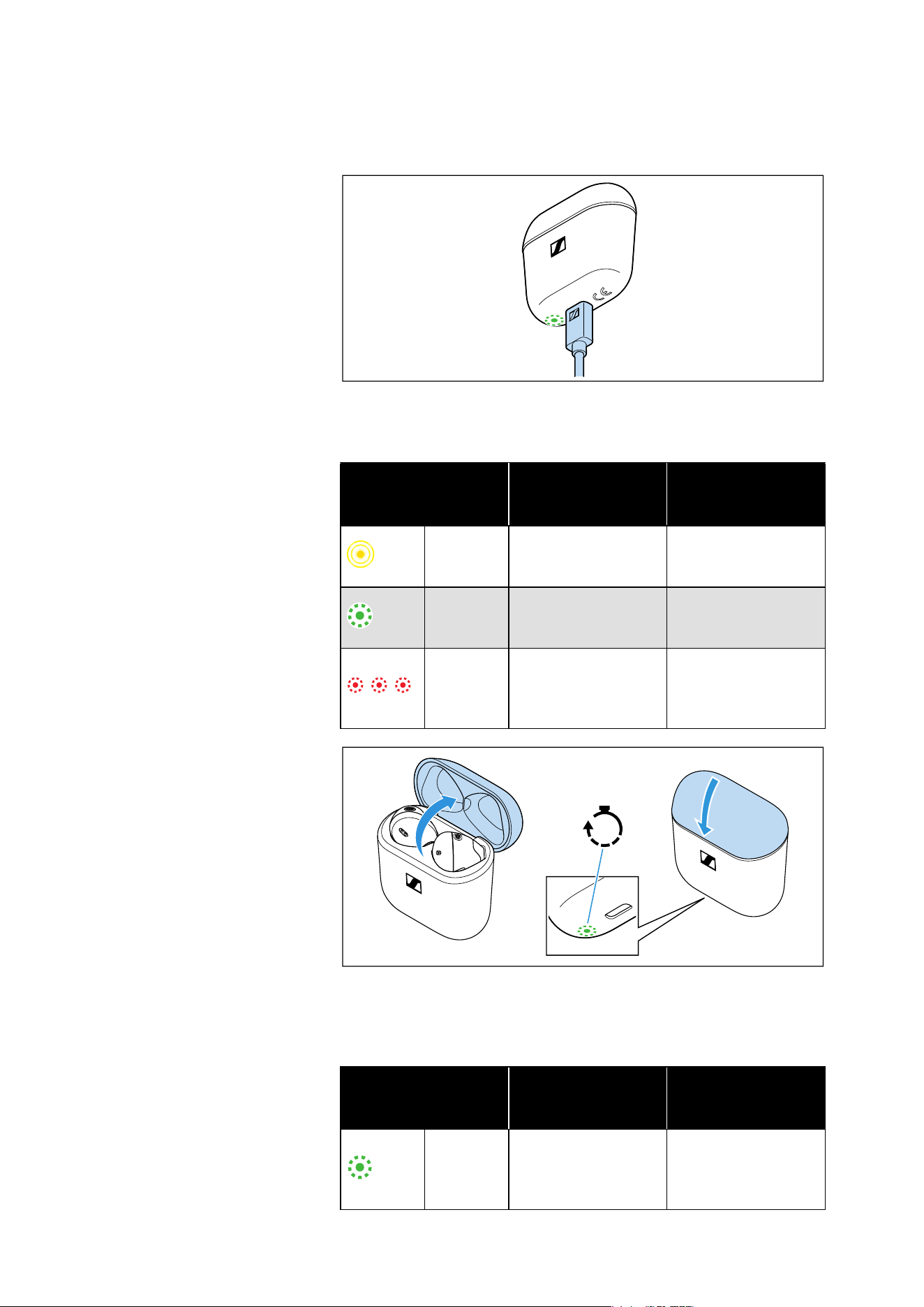
When a USB cable is connected to the USB socket of the charging
case, the LED of the charging case permanently displays the
charging process:
If you open the lid of the charging case and no USB cable is con-
nected, the LED of the charging case displays the battery charge
status or the charging process of the earbuds. If you close the lid of
the charging case, the LED display switches off after 5 seconds.
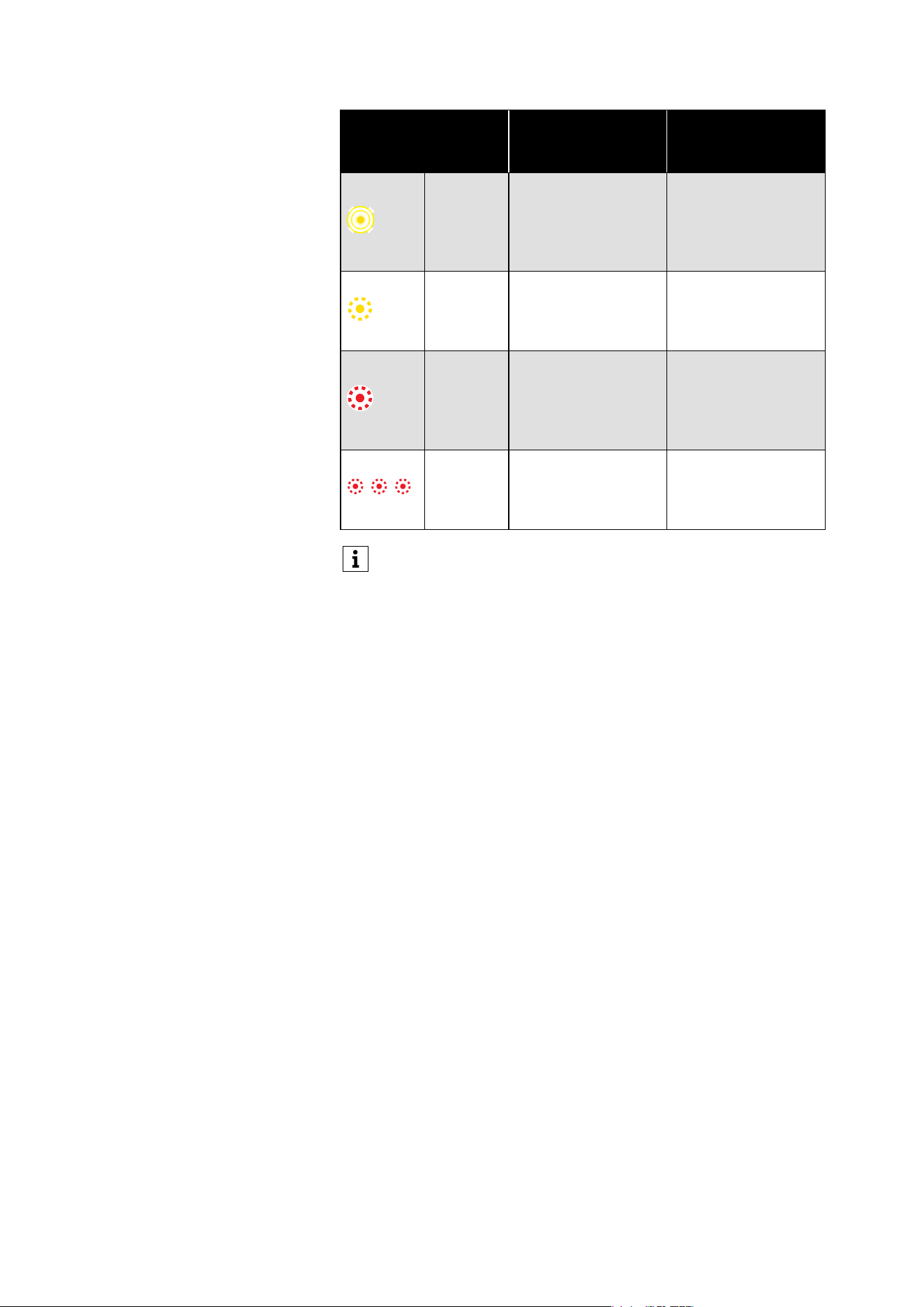
LED
Charging case WITH
earbuds inserted
Charging case
WITHOUT earbuds
inserted
pulses
yellow
Earbuds and
charging case are
being charged.
Charging case is
being charged.
lights up
green
Earbuds and
charging case are
fully charged.
Charging case is
fully charged.
flashes
red
At least one earbud
has a charging
error/battery error
(see page 25).
Charging case has a
charging error/bat-
tery error (see
page 25).
LED
Charging case WITH
earbuds inserted
Charging case
WITHOUT earbuds
inserted
lights up
green
Earbuds are fully
charged, charging
case is more than
50% charged.
Charging case is
more than 50%
charged.
5s
Product overview
ACCENTUM Open | 9
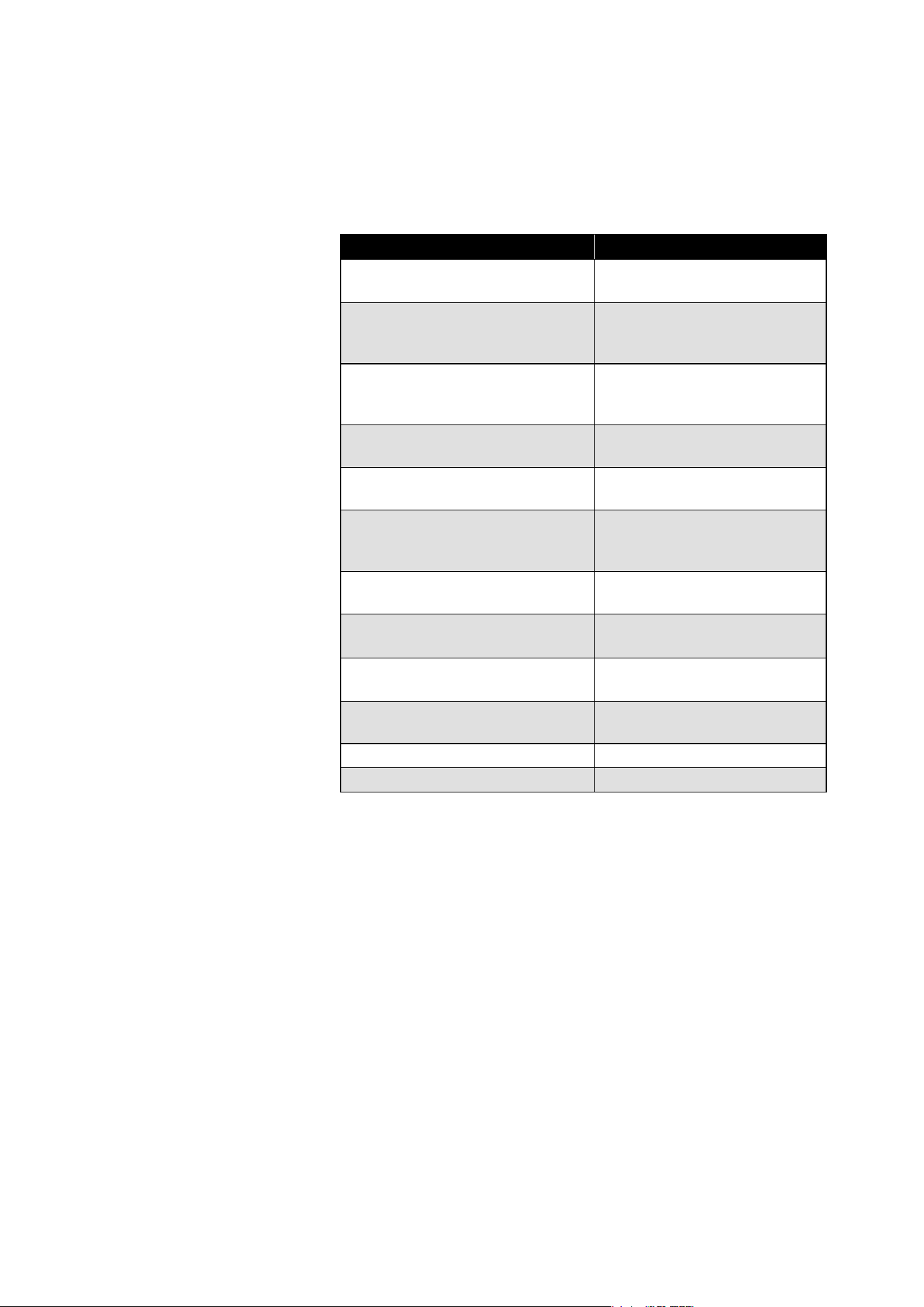
pulses
yellow
Earbuds are being
charged via the
rechargeable bat-
tery of the charging
case.
–
lights up
yellow
Earbuds are fully
charged, charging
case is less than
50% charged.
Charging case is
charged less than
50%.
lights up
red
Rechargeable bat-
teries of the earbuds
and the charging
case are almost
empty.
Rechargeable bat-
tery of the charging
case is almost
empty.
flashes
red
At least one earbud
has a charging
error/battery error
(see page 25).
Charging case has a
charging error/bat-
tery error (see
page 25).
If the LED display does not light up:
• Clean the contacts on the earbuds and in the charging case
(see page 24).
• Charge the rechargeable batteries of the charging case and
the earbuds until the LED display lights up again (at least 30
minutes) (see page 14).
LED
Charging case WITH
earbuds inserted
Charging case
WITHOUT earbuds
inserted
Product overview
10 | ACCENTUM Open
Notes on tone prompts
The earbuds output signal tones and ringtone sounds for events (the
table gives some examples).
If you tap the touch control panels on the earbuds, you will hear cor-
responding tone prompts as a feedback.
Tone prompt Meaning
“Power off”
Descending sequence of 2 tones
Earbuds switch off.
“Pairing successful”/“Connected”
Ascending sequence of 2 tones
Bluetooth pairing was suc-
cessful. Earbuds are con-
nected via Bluetooth.
“No connection”
Descending sequence of 2 tones
Earbuds cannot be connected
via Bluetooth or earbuds have
lost Bluetooth connection.
“Pairing”
Short, repeating melody
Earbuds are in Bluetooth pair-
ing mode.
“Pairing failed”
Error tone
Bluetooth pairing failed.
“Low battery”
Sequence of 3 tones
Rechargeable battery is almost
empty. Recharge the recharge-
able battery.
“Volume min”
Quick sequence of 2 high tones
Volume set to minimum.
“Volume max”
Quick sequence of 2 high tones
Volume set to maximum.
“Call”
Ringtone
Call incoming.
Knock on tone every 2 seconds Call incoming during active
call.
Descending sequence of 4 tones In-ear detection is deactivated.
Ascending sequence of 4 tones In-ear detection is activated.
Getting started
ACCENTUM Open | 11
Getting started
1. Waking up the earbuds and the charging
case and charging the rechargeable
batteries
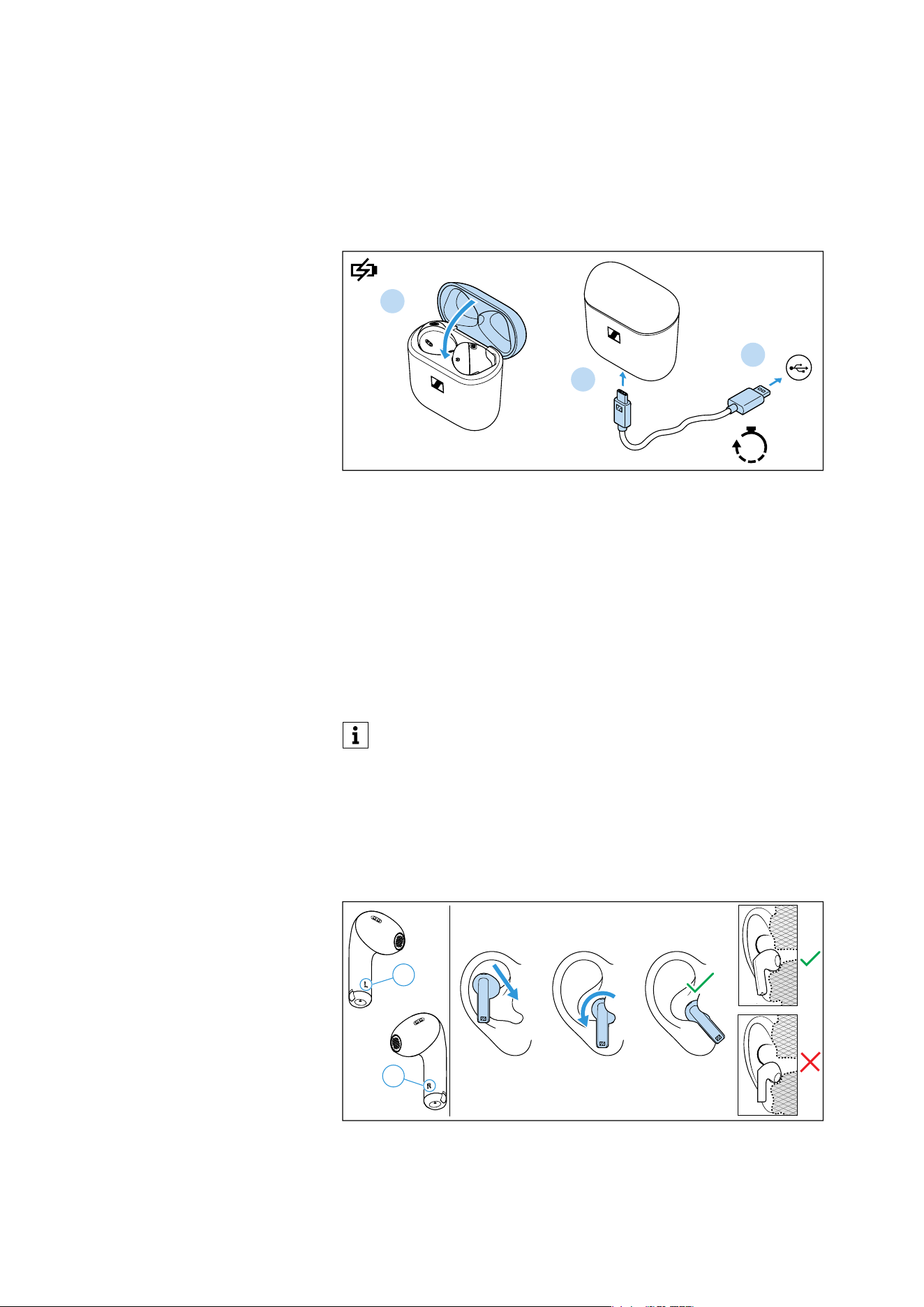
Upon delivery, the rechargeable batteries of the earbuds and the
charging case are in sleep mode and have to be woken up by con-
necting them to a USB power source once.
1. Insert the earbuds into the charging case and close the lid of the
charging case.
2. Connect the USB C cable to the charging case.
3. Connect the cable to a USB power source (see page 14) and
charge the rechargeable batteries for at least 15 seconds.
The earbuds and the charging case are woken up and the
rechargeable batteries are being charged. The earbuds are now
ready for use.
2. Inserting the earbuds in your ears
The correct fit of the earbuds in your ears gives you the best sound
quality, the best voice quality for phone calls and the best wearing
comfort.
▷ Assign the right earbud to your right ear and the left earbud to
your left ear.
We recommend charging the earbuds and the charging case
for a complete charging cycle without interruption before using
for the first time.
USB C
USB A
15s
1
2
3
Right R
Left
L
Getting started
12 | ACCENTUM Open
▷ Insert the earbuds straight into your ears with the stem pointing
downwards.
▷ Twist the earbuds slightly in the ear so that the stem points
towards your mouth until the earbuds sit comfortably and snugly
in the ear.
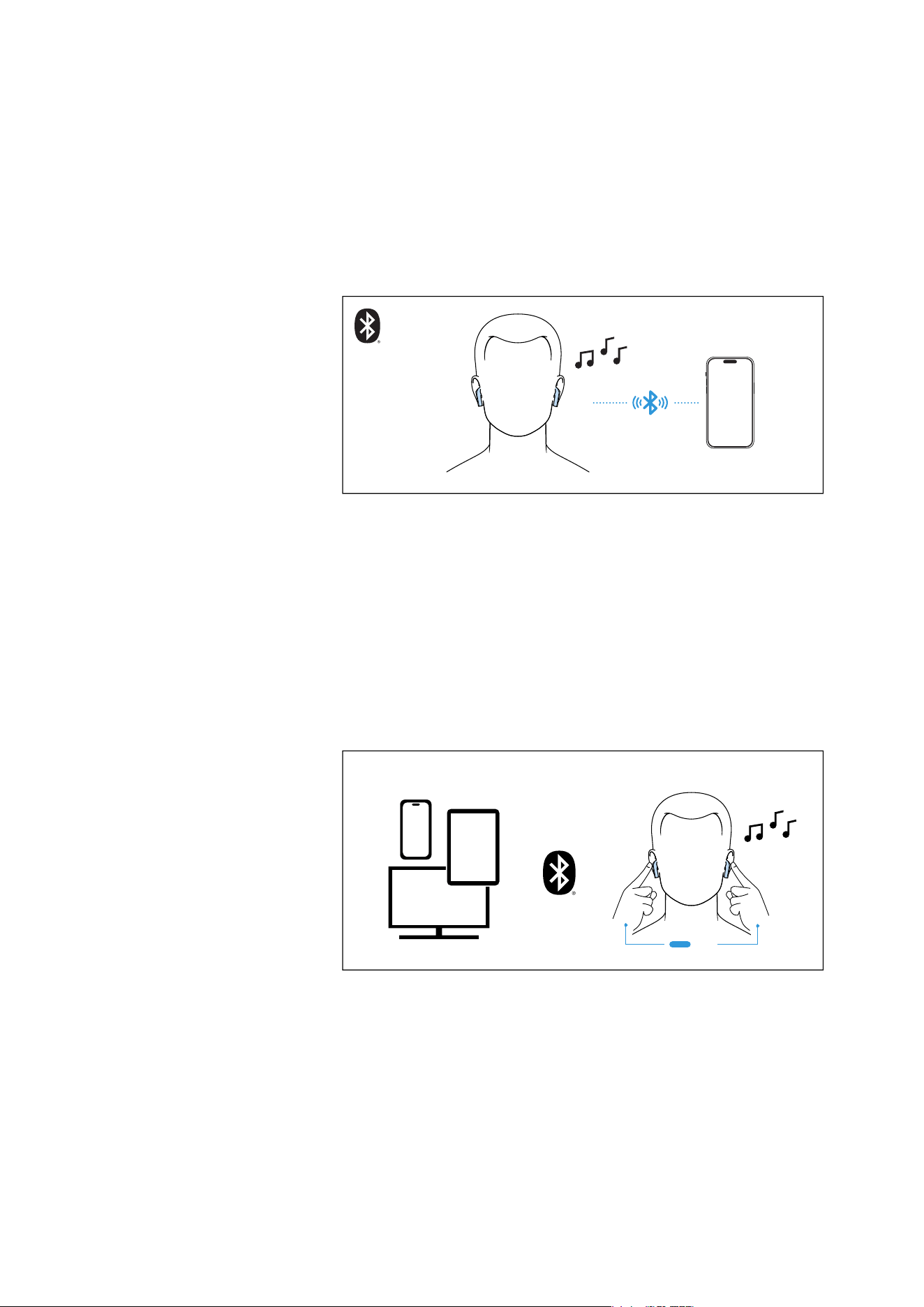
3. Connecting the earbuds to a Bluetooth
device
When you take the earbuds out of the charging case for the first time
after initial charging, they automatically switch to Bluetooth pairing
mode. If the earbuds have not yet been paired with any Bluetooth
device (the pairing list is empty), pairing mode remains permanently
activated.
As soon as the earbuds are in pairing mode, you will hear a short,
repetitive melody.
▷ Connect the earbuds to your smartphone via Bluetooth (see
page 16).
4. Connecting additional Bluetooth devices
▷ If desired, connect the earbuds to additional devices via Blue-
tooth (see page 16).
The earbuds can save the connection profiles of up to eight Blue-
tooth devices with which they have been paired.
The earbuds can have two active Bluetooth connections to two dif-
ferent Bluetooth devices at the same time. Audio playback is only
possible from one device at a time.
L
R
L
R
3s

Using the earbuds
ACCENTUM Open | 13
Using the earbuds
Information on the rechargeable battery,
the charging process and the first use
The earbuds and the charging case each have a built-in rechargeable
battery.
To charge the rechargeable batteries, you can use the supplied USB
cable.
The earbuds must be inserted into the charging case for charging.
Thus, even on the go, the earbuds are always safely stored and
charged.
Upon delivery, the rechargeable batteries of the earbuds and the
charging case are in sleep mode and have to be woken up by con-
necting them to a USB power source for at least 15 seconds. The lid
of the charging case must be closed during this process.
A complete charging cycle of the charging case and the earbuds
takes about 1 hour. The quick charge function gives you approx.
1.5 hours of playback time after 10 minutes of charging. The charging
time can vary depending on the power source used and the ambient
temperature.
We recommend charging the earbuds and the charging case for a
complete charging cycle without interruption before using for the
first time.
When a USB cable connected to a power source is connected to the
charging case, the rechargeable battery of the charging case is
being charged. When the earbuds are inserted into the charging
case, their rechargeable batteries are being charged at the same
time. The LED display of the charging case indicates the charging
process (see page 8).
When the charge status of the earbuds’ rechargeable batteries
drops to a critical level, you will hear a sequence of three tones.
The charge status of the rechargeable battery of the charging case
is indicated by the LED display on the charging case (see page 8).
At the end of its operational lifetime, this product with its built-in
rechargeable battery must be disposed of separately from normal
household waste. You can find more information here: see page 31.
Using the earbuds
14 | ACCENTUM Open
Charging the rechargeable batteries
using the USB cable
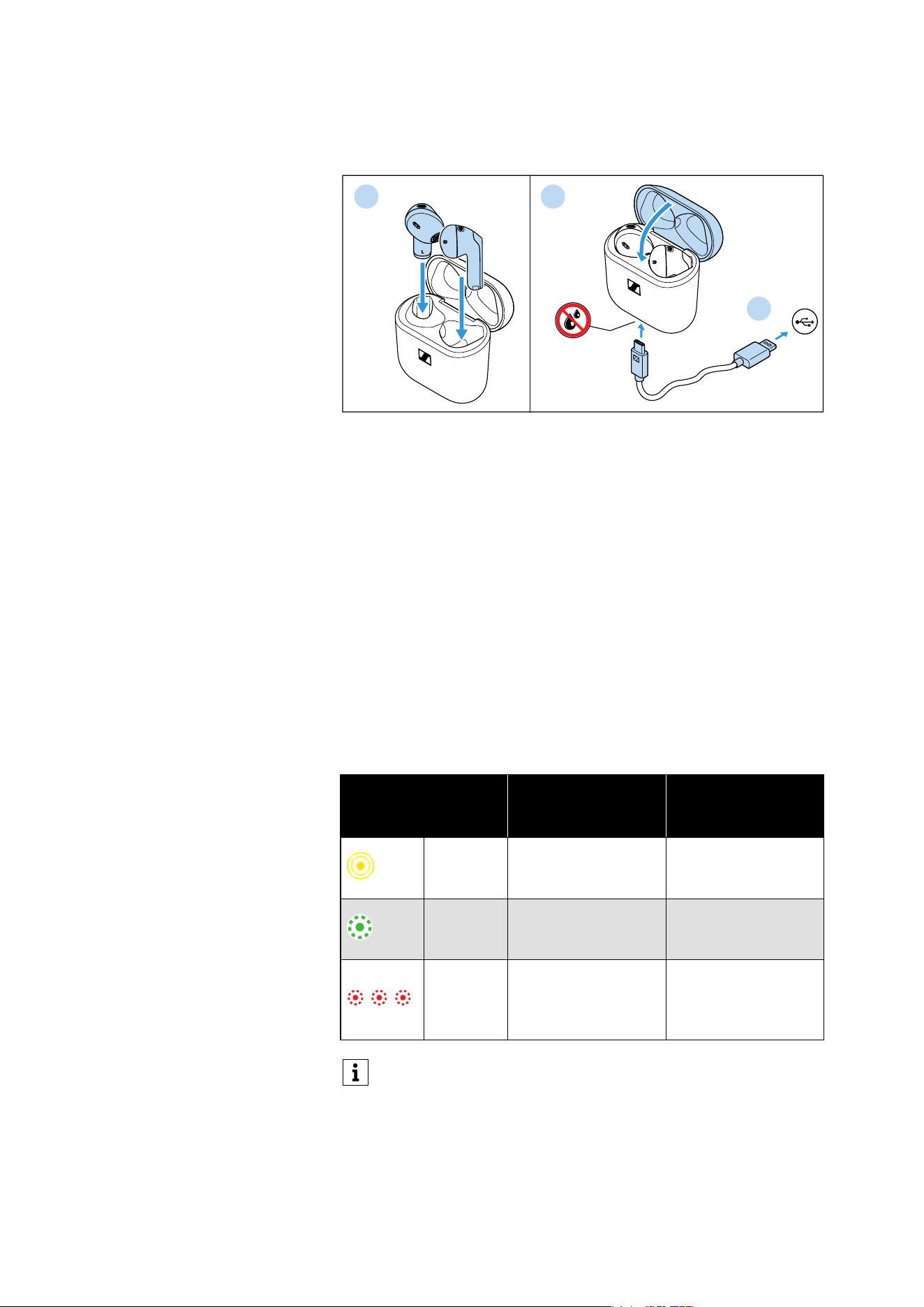
1. Open the charging case by overcoming a slight magnetic resis-
tance and insert the left earbud into the left charging compart-
ment and the right earbud into the right charging compartment.
The earbuds are magnetically pulled into the charging compart-
ments.
2. Close the lid of the charging case and make sure that the charging
socket is free from moisture and contamination. Connect the
USB C connector of the charging cable to the USB socket of the
charging case.
3. Connect the USB A connector to a corresponding socket of a USB
power source (to be ordered separately). Make sure that the USB
power source is connected to the power supply system.
The rechargeable batteries of the earbuds and the charging case
are being charged.
If no earbuds are inserted into the charging case, only the
rechargeable battery of the charging case is being charged.
The LED display of the charging case indicates the charge status:
LED
Charging case WITH
earbuds inserted
Charging case
WITHOUT earbuds
inserted
pulses
yellow
Earbuds and
charging case are
being charged.
Charging case is
being charged.
lights up
green
Earbuds and
charging case are
fully charged.
Charging case is
fully charged.
flashes
red
At least one earbud
has a charging
error/battery error
(see page 25).
Charging case has a
charging error/bat-
tery error (see
page 25).
If the LED display does not light up:
• Clean the contacts on the earbuds and in the charging case
(see page 24).
• Clean the USB C socket of the charging case.
• Charge the rechargeable batteries of the charging case and
the earbuds until the LED display lights up again (at least 30
minutes).
L
R
1
2
USB C
USB A
3
Using the earbuds
ACCENTUM Open | 15
Connecting the earbuds to a Bluetooth
device
To be able to use the Bluetooth wireless connection, you must regis-
ter both devices (earbuds and Bluetooth device, e.g. smartphone) via
the settings of your Bluetooth device. This process is called pairing.
If operation differs from the steps mentioned, also refer to the
instruction manual of the Bluetooth device you are using.
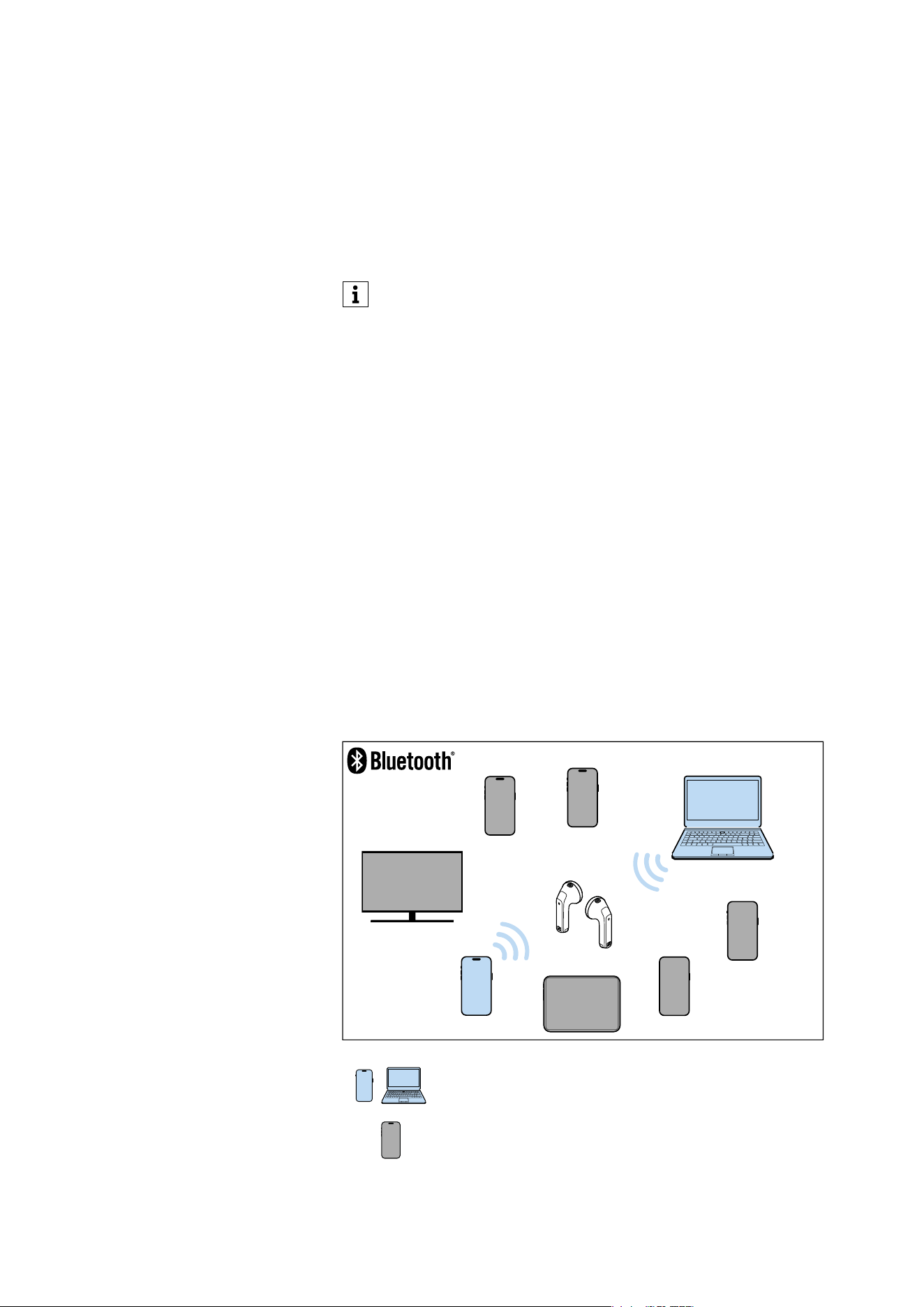
Information on the Bluetooth wireless
connection
The earbuds are Bluetooth 5.3 certified.
If your audio source supports the high-resolution audio encoding
method AAC, music is automatically played in high audio quality.
Otherwise the earbuds will play back your music in normal audio
quality (SBC).
Paired devices establish the Bluetooth wireless connection immedi-
ately after switch-on and are ready for use.
When switched on, the earbuds will automatically try to connect to
the last two Bluetooth devices used. The earbuds can save the con-
nection profiles of up to eight Bluetooth devices with which they
have been paired. Audio playback is only possible from one device at
a time.
If you pair the earbuds with the ninth Bluetooth device, the connec-
tion profile of the first connected Bluetooth device will be overwrit-
ten. If you want to connect to this Bluetooth device again later, you
have to pair the earbuds again.
When you switch on the earbuds for the first time after initial
charging, they automatically switch to Bluetooth pairing mode.
Paired and connected Bluetooth device
Paired Bluetooth device (currently not connected)
1
2
3
5
6
8
4
7
Using the earbuds
16 | ACCENTUM Open
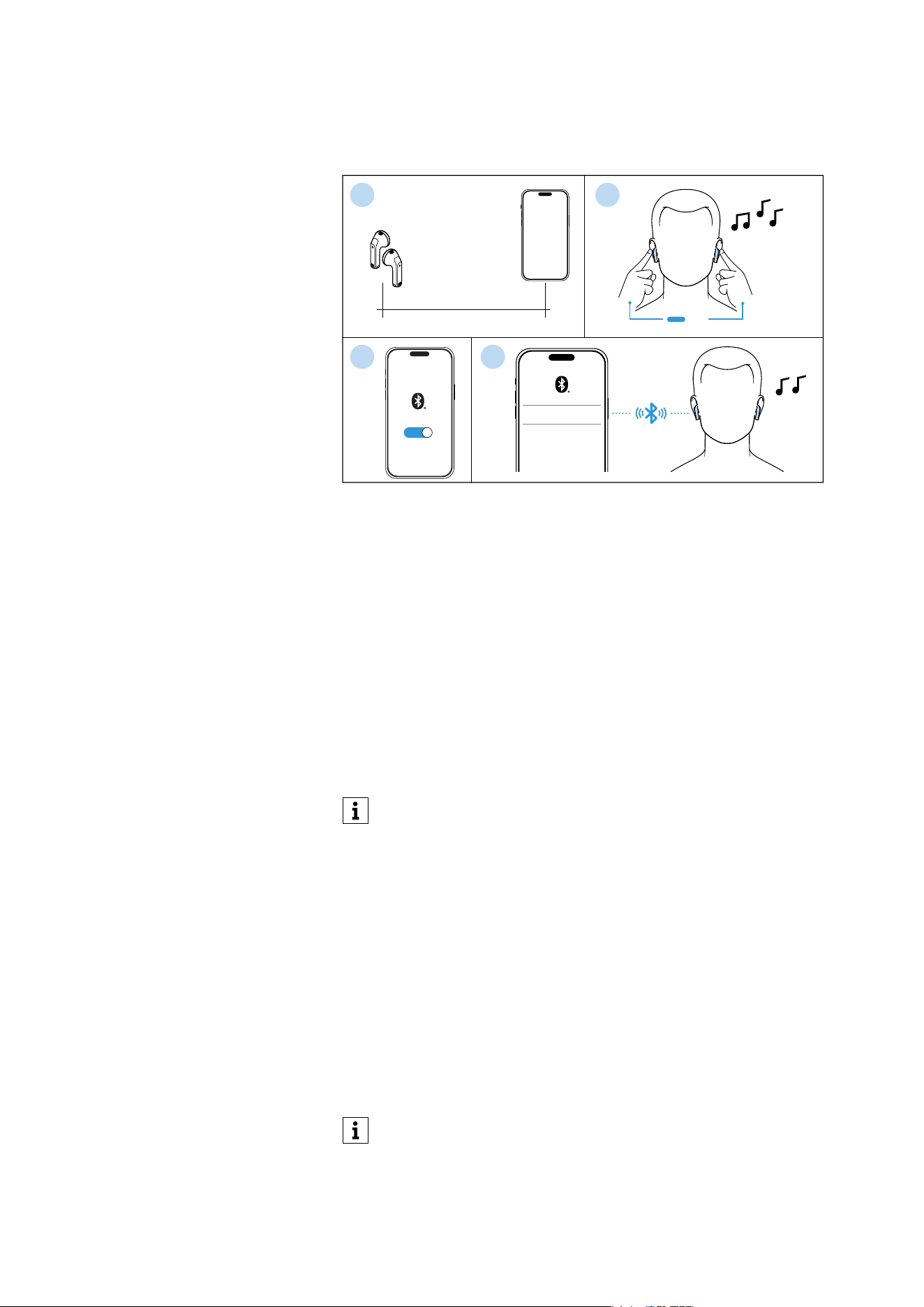
Pairing the earbuds with a Bluetooth
device
1. Take both earbuds out of the charging case and insert them into
your ears (see page 17). The distance between the earbuds and
the Bluetooth device should not exceed 40"/1 m.
2. Simultaneously touch and hold the right and the left touch control
panel for 3 seconds until you hear a short, repetitive melody.
3. Activate Bluetooth on your Bluetooth device.
4. Via the menu of your Bluetooth device, start the search for new
Bluetooth devices.
All active Bluetooth devices in the proximity of your device are
displayed.
From the list of found Bluetooth devices, select “ACCENTUM
Open”. If necessary, enter the default pin code “0000”.
If pairing was successful, you hear an ascending sequence of two
tones.
Disconnecting the earbuds from a
Bluetooth device
▷ Via the menu of your Bluetooth device, disconnect the connection
to the earbuds.
The earbuds are disconnected from the Bluetooth device and you
hear a descending sequence of two tones.
The earbuds search for other paired devices. If no device is found,
the earbuds switch to idle mode.
If no connection is established within 2 minutes, pairing mode
is terminated and the earbuds switch to idle mode. If neces-
sary, repeat the steps described above.
If the earbuds are not paired with any Bluetooth device (the
pairing list is empty), pairing mode is permanently active.
max. 1 m/40 inch
ON
ACCENTUM Open
************
L
R
3s
1
3 4
2
If you want to clear the Bluetooth pairing list of the earbuds,
reset the earbuds to the factory default settings (see page 28).
Using the earbuds
ACCENTUM Open | 17
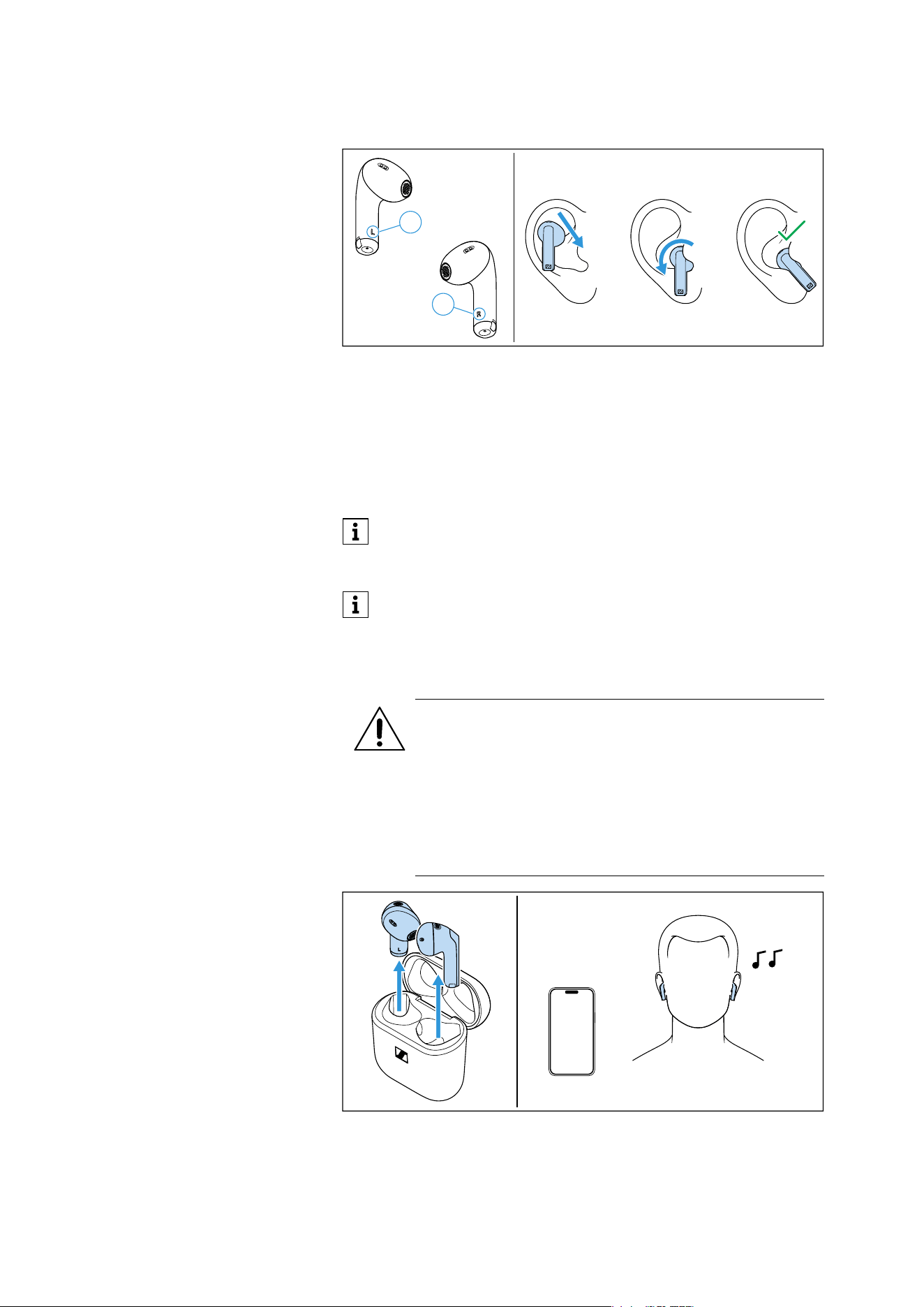
Inserting the earbuds into the ears
▷ Assign the right earbud to your right ear and the left earbud to
your left ear.
▷ Insert the earbuds straight into your ears with the stem pointing
downwards.
▷ Twist the earbuds slightly in the ear so that the stem points
towards your mouth until the earbuds sit comfortably and snugly
in the ear.
Switching the earbuds on
The earbuds switch on automatically as soon as the lid of the
charging case is opened.
▷ Open the lid of the charging case and take out both earbuds.
The right or left earbud can be used alone. If you insert one
earbud into the charging case during use, a short interruption
of playback may occur in the other earbud.
The Smart Pause function automatically stops music playback
when you remove an earbud from the ear (see page 19).
Left
L
Right R
WARNING
Danger due to high volume levels!
Listening at high volume levels can lead to permanent
hearing defects.
▷ Before inserting the earbuds into your ears, adjust the
volume to a low level (see page 18).
▷ Do not continuously expose yourself to high volume
levels.
L
R
Using the earbuds
18 | ACCENTUM Open
▷ Insert the earbuds into your ears (see page 17).
If a paired Bluetooth device is within the transmission range, the
earbuds automatically establish a connection and you hear an
ascending sequence of two tones.
Switching the earbuds off
The earbuds do not have to be switched off explicitly.
▷ Insert the earbuds into the charging case and close the lid to
switch them off.
As soon as the earbuds are inserted into the charging case and
the lid of the charging case is closed, the earbuds switch off and
are being charged (see page 14).
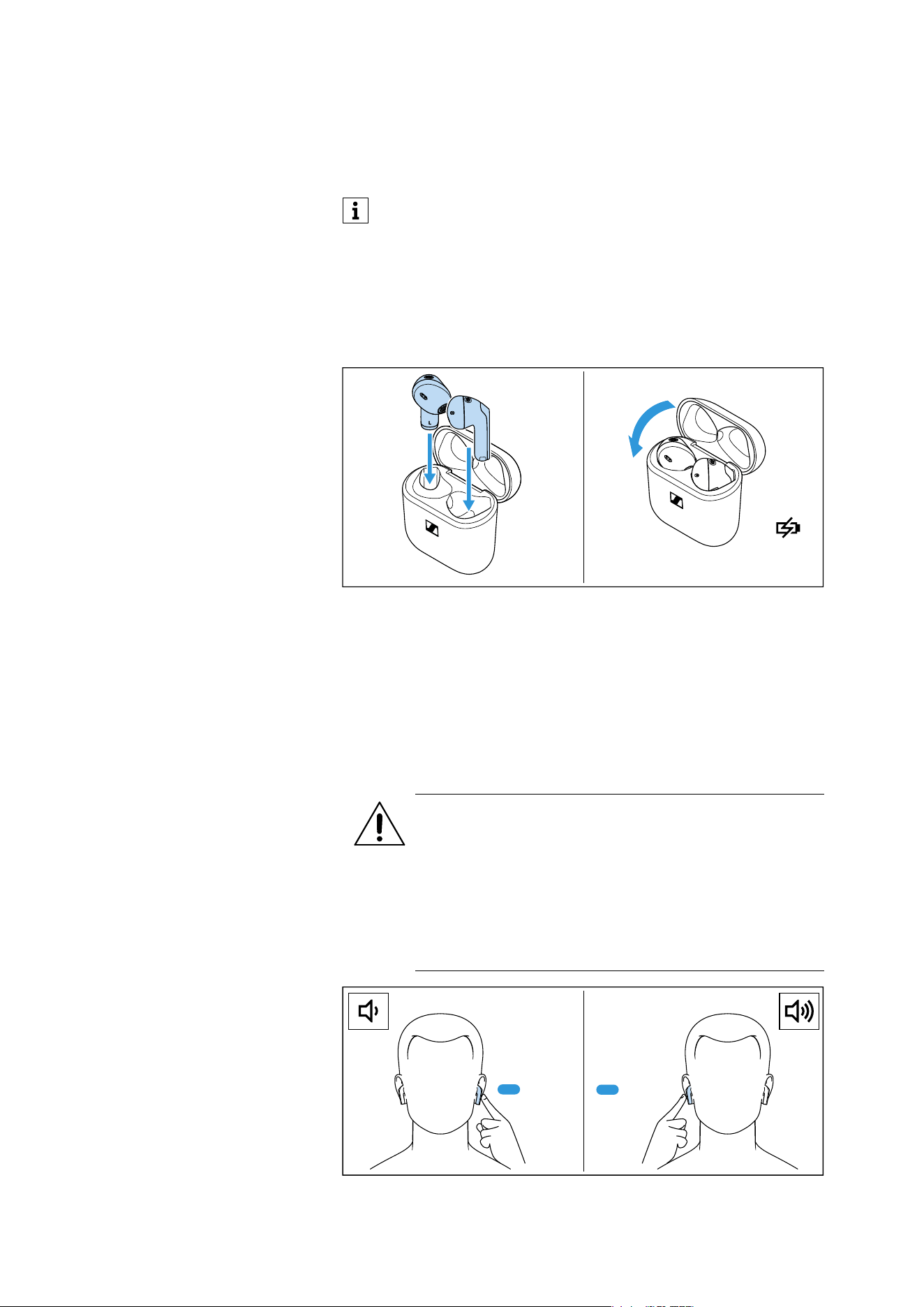
Adjusting the volume
The earbuds automatically switch to idle mode if no paired
Bluetooth device can be found within 15 minutes.
You can wake up the earbuds from idle mode by touching their
touch control panels 1x or by briefly inserting them into the
charging case.
L
R
WARNING
Danger due to high volume levels!
Listening at high volume levels can lead to permanent
hearing defects.
▷ Adjust the volume to a low level before inserting the
earbuds or changing the audio source.
▷ Do not continuously expose yourself to high volume
levels.
Hold L Hold R
Using the earbuds
ACCENTUM Open | 19
To reduce the volume:
▷ Touch and hold the touch control panel of the left earbud until the
volume decreases.
To increase the volume:
▷ Touch and hold the touch control panel of the right earbud until
the volume is increased.
When the minimum or maximum volume is reached, you will hear a
sequence of two high tones.
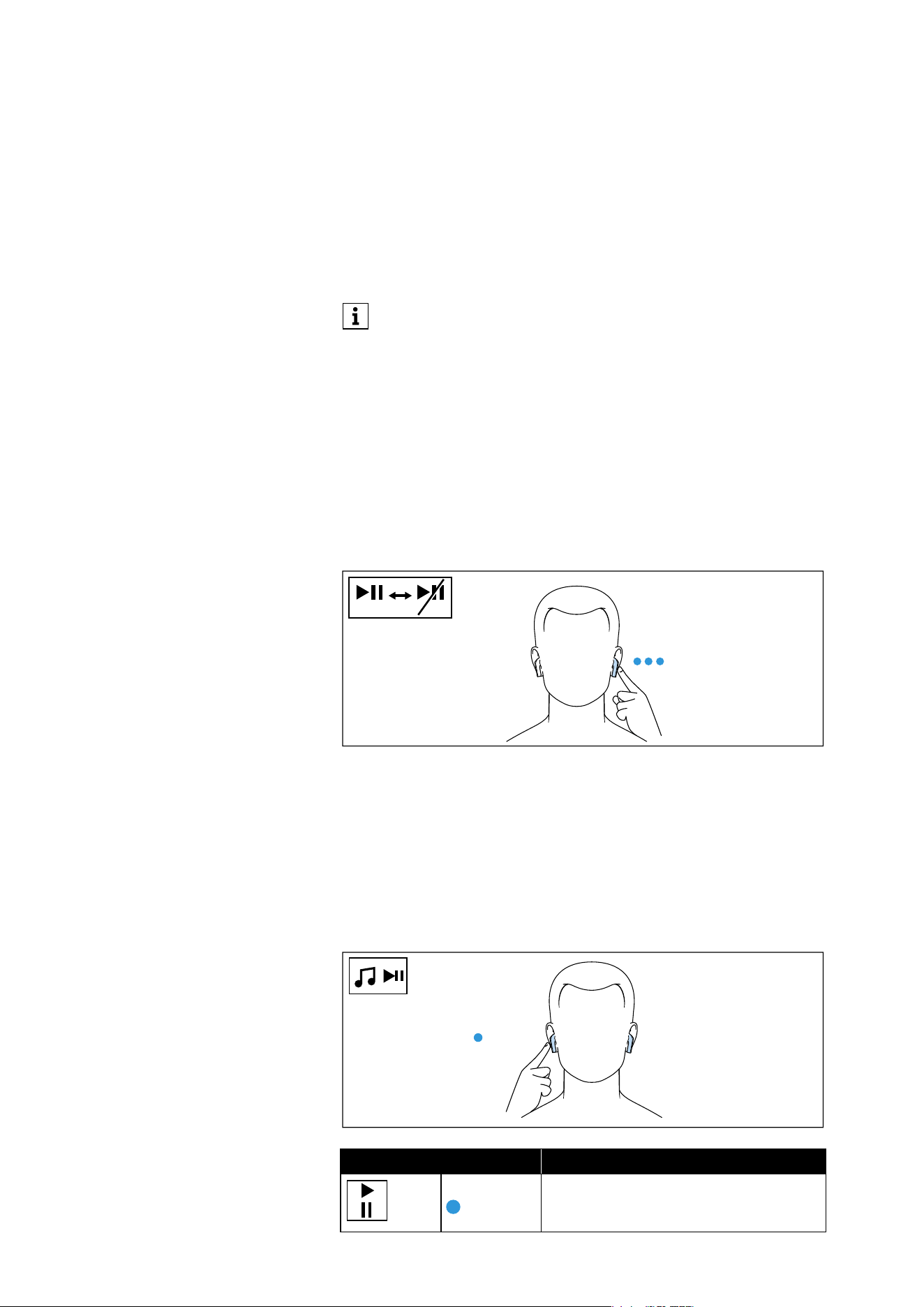
Using the Smart Pause function
The earbuds automatically detect whether you are wearing the ear-
buds in your ear or removing them.
Music playback pauses when you remove an earbud from the ear and
continues when you insert it again. If there is an interruption of more
than 3 minutes, playback will not start automatically.
To disable or enable the Smart Pause function:
▷ Tap the touch control panel of the left earbud 3x.
Controlling music playback
The music playback functions are only available when the earbuds
and the Bluetooth device are connected. Some smartphones or
music players may not support all functions.
Playing/pausing music
▷ Tap the touch control panel of the right or the left earbud 1x.
You can also adjust the volume using the connected Bluetooth
device.
3 x L
AUTO
AUTO
Right or left earbud Function
Tap 1x Plays or pauses music
1 x L/R
Using the earbuds
20 | ACCENTUM Open
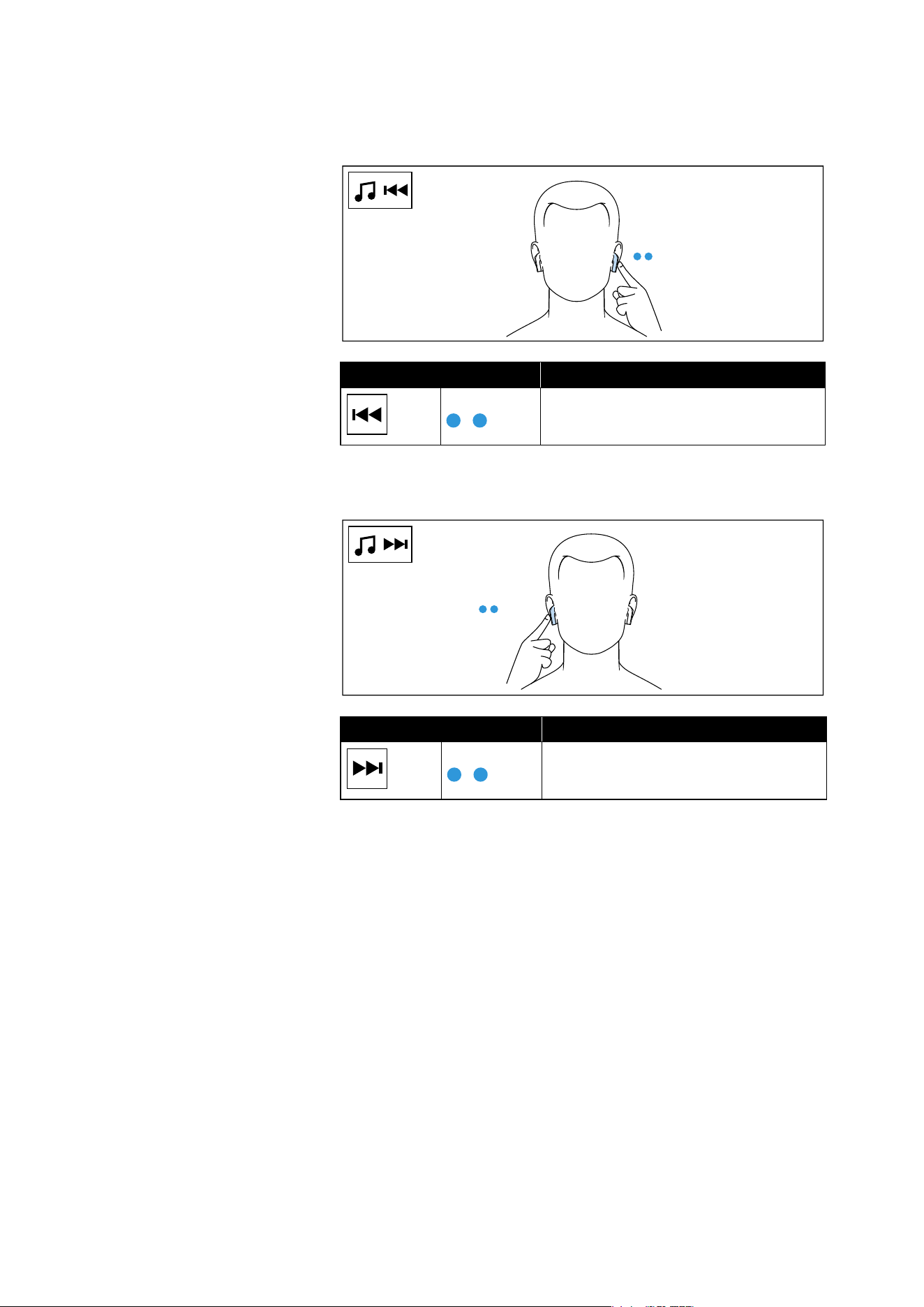
Playing the previous track
▷ Tap the touch control panel of the left earbud 2x.
Playing the next track
▷ Tap the touch control panel of the right earbud 2x.
Left earbud Function
Tap 2x Plays the previous track in the playlist
Right earbud Function
Tap 2x Plays the next track in the playlist
2 x L
2 x R
Using the earbuds
ACCENTUM Open | 21
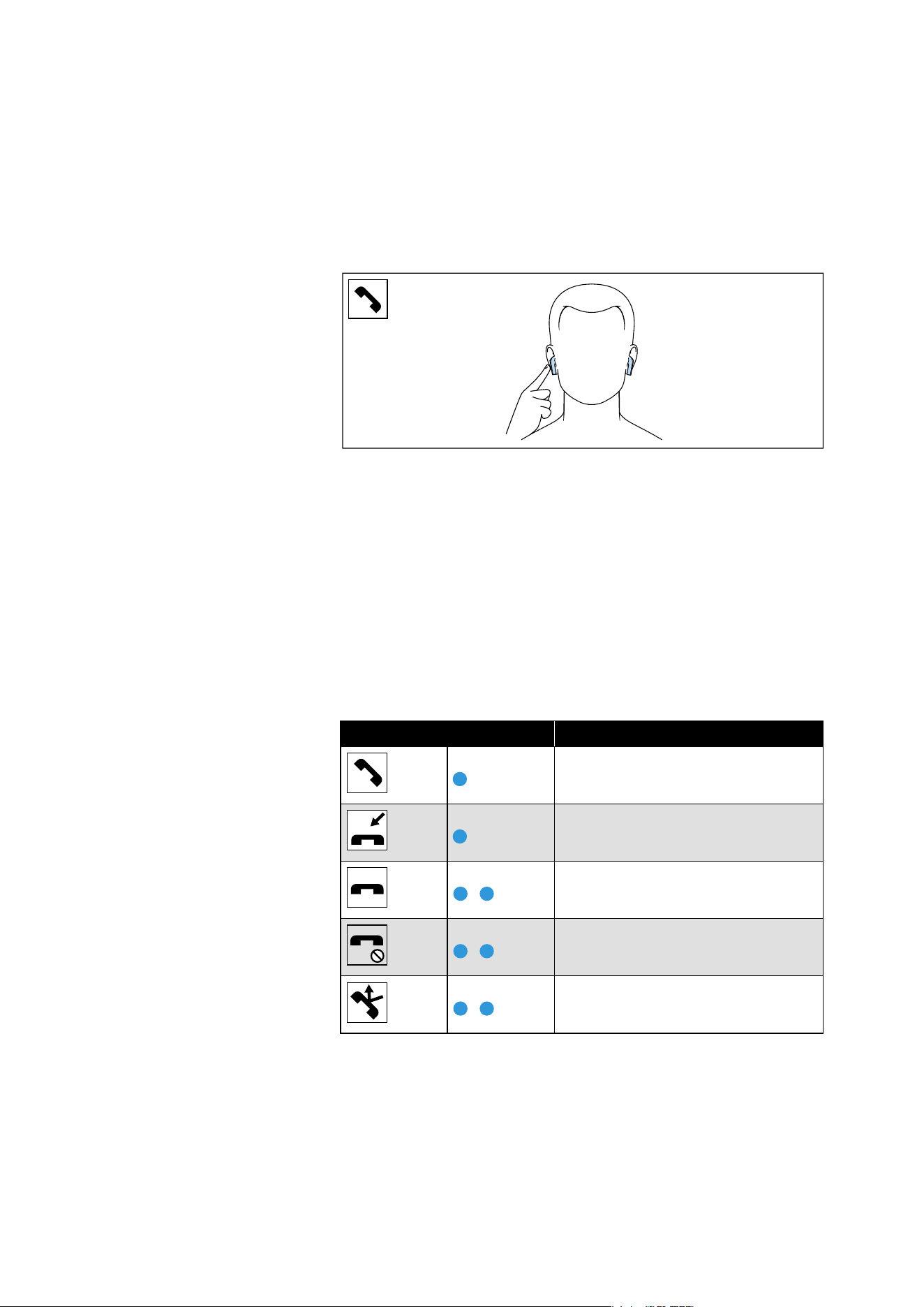
Making calls using the earbuds
The call functions are only available when the earbuds and the Blue-
tooth device are connected. Some smartphones and telephony apps
(e.g. WhatsApp, MS Teams, WeChat) may not support all call control
functions.
During a call, you can use the right and/or left earbud to control the
call functions.
Making a call
▷ Dial the desired phone number.
If your Bluetooth device does not automatically transfer the call
to the earbuds, select “ACCENTUM Open” as the output device
on your device (see the instruction manual of your device if nec-
essary).
Accepting/rejecting/ending a call
If your earbuds are connected to a Bluetooth device and you receive
a call, you hear a ring tone in the earbuds.
If you are playing music when you receive a call, the music pauses
until you end the call.
Right or left earbud Function
Tap 1x
Accepts a call
Tap 1x
Accepts an incoming call and ends
the active call
Tap 2x
Ends a call
Tap 2x
Rejects a call
Tap 2x
Rejects an incoming call and contin-
ues the active call
Using the earbuds
22 | ACCENTUM Open
Displaying the battery charge status
When the earbuds are connected to your Bluetooth device, the bat-
tery charge status can be displayed on the screen of your device
(depending on the device and operating system used).
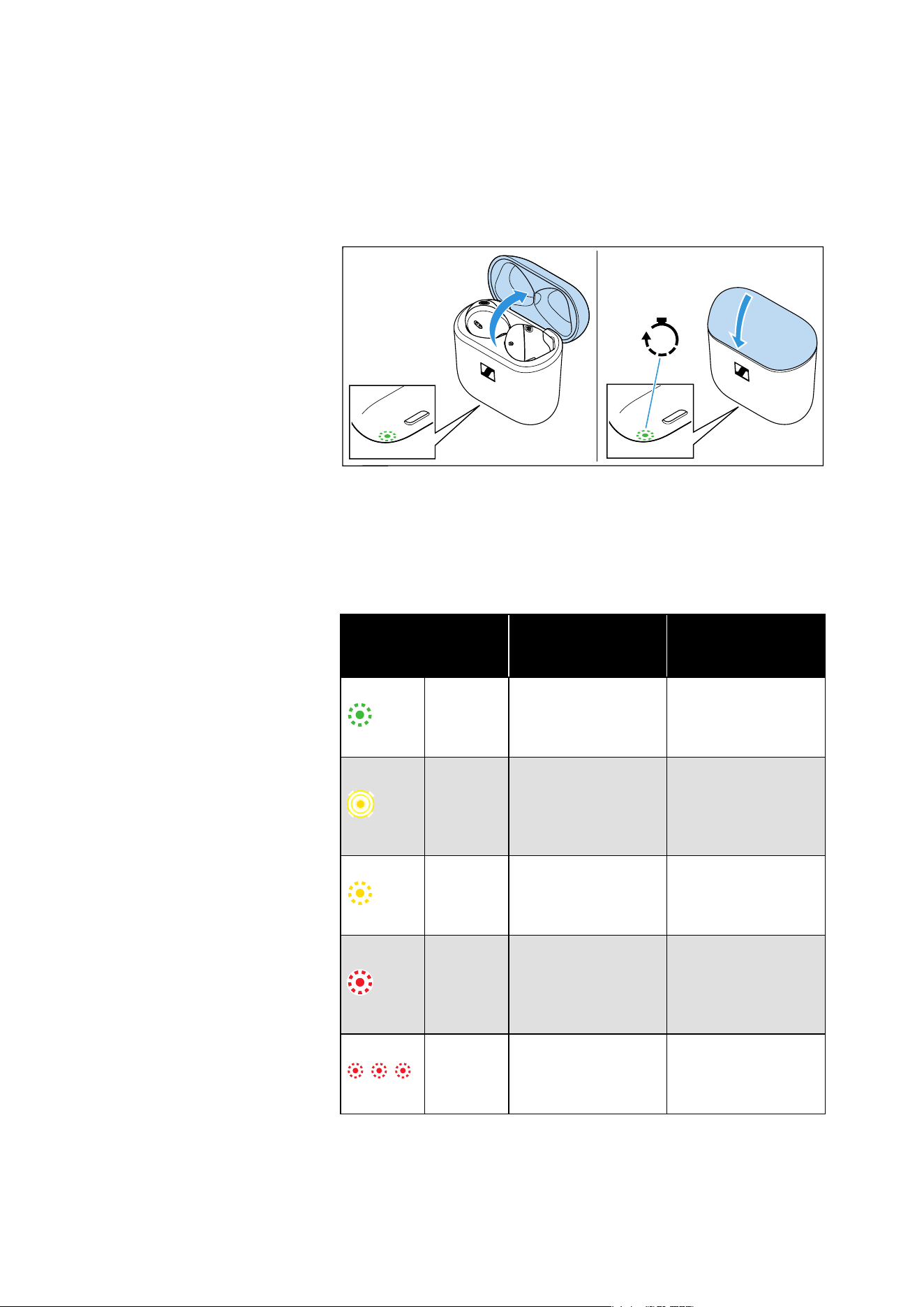
Displaying the battery charge status using the charging case
If no USB cable is connected to the charging case:
▷ Open the lid of the charging case.
The LED display of the charging case indicates the battery charge
status.
If you close the lid of the charging case, the LED display goes off
after 5 seconds.
LED
Charging case WITH
earbuds inserted
Charging case
WITHOUT earbuds
inserted
lights up
green
Earbuds are fully
charged, charging
case is more than
50% charged.
Charging case is
more than 50%
charged.
pulses
yellow
Earbuds are being
charged via the
rechargeable bat-
tery of the charging
case.
–
lights up
yellow
Earbuds are fully
charged, charging
case is less than
50% charged.
Charging case is
charged less than
50%.
lights up
red
Rechargeable bat-
teries of the earbuds
and the charging
case are almost
empty.
Rechargeable bat-
tery of the charging
case is almost
empty.
flashes
red
At least one earbud
has a charging
error/battery error
(see page 25).
Charging case has a
charging error/bat-
tery error (see
page 25).
5s
Using the earbuds
ACCENTUM Open | 23
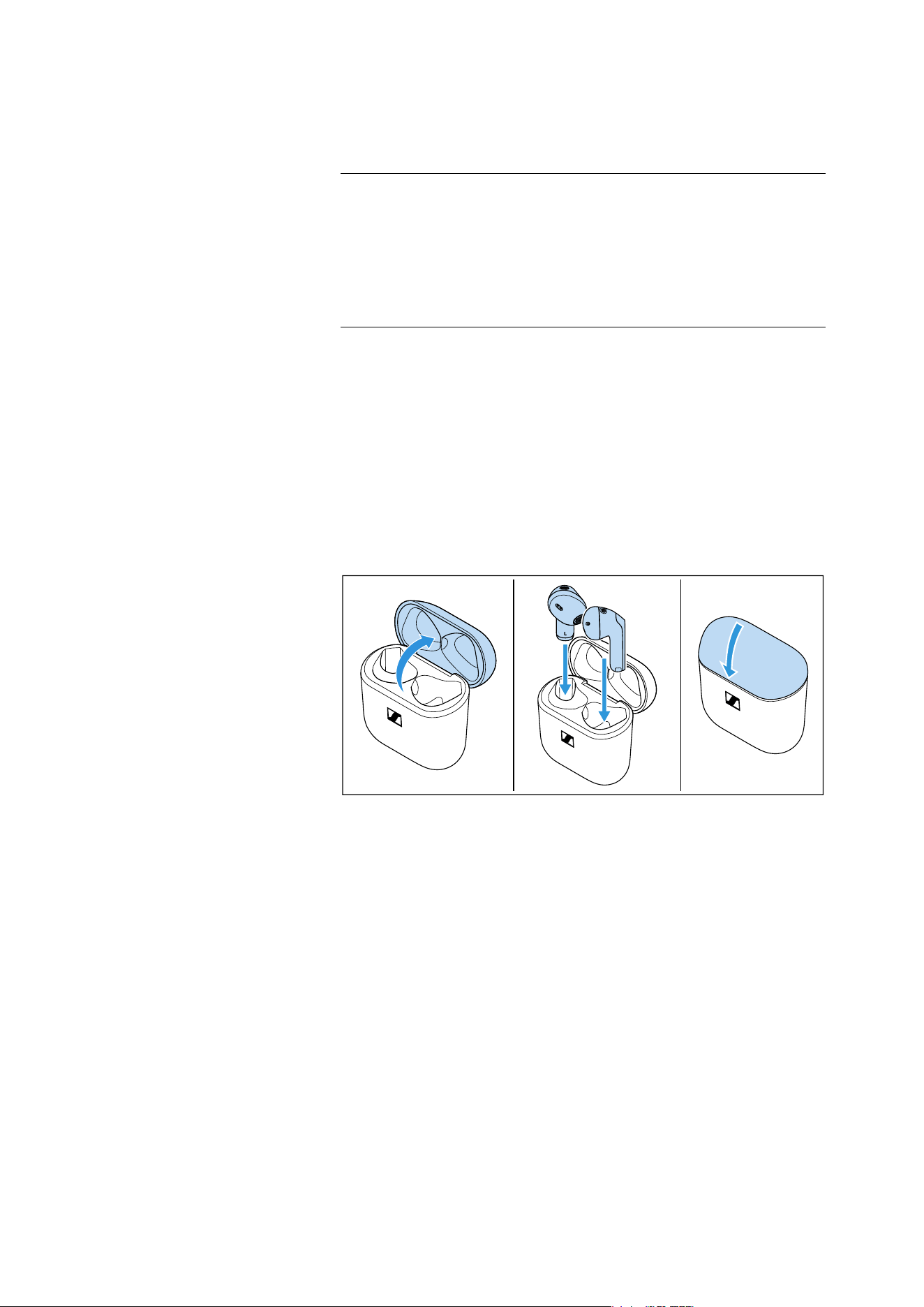
Storing or transporting the earbuds in the
charging case
Store the earbuds in the charging case to prevent damage to the ear-
buds when not in use or during transport. The earbuds are automat-
ically charged in the charging case so you always have the full bat-
tery life to work with.
▷ Open the charging case by overcoming a slight magnetic resis-
tance.
▷ Insert the left earbud into the left charging compartment and the
right earbud into the right charging compartment.
The earbuds are magnetically pulled into the charging compart-
ments.
▷ Close the lid of the charging case.
ATTENTION
Moisture and dirt can damage the electronics of the charging case
and the earbuds!
If moisture and dirt get inside the charging case, this can impair its
function.
▷ Do not place the earbuds in the charging case when they are wet
or dirty.
L
R
Care and maintenance of the earbuds/charging case
24 | ACCENTUM Open
Care and maintenance of the
earbuds/charging case
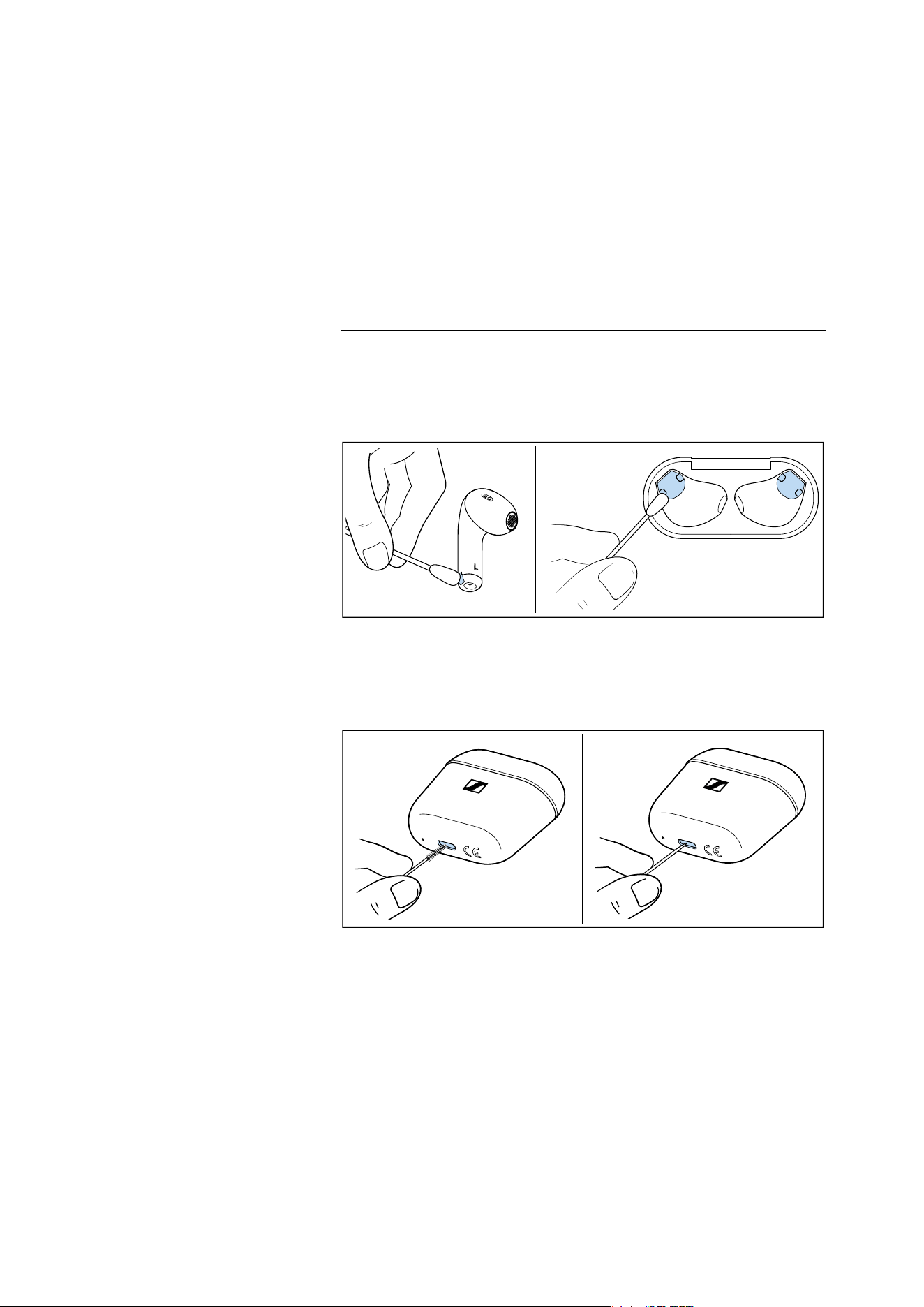
▷ Only clean the charging case with a soft, dry cloth.
▷ Clean the earbuds with a slightly damp cloth.
▷ Clean the charging contacts on the earbuds and in the charging
case from time to time, e.g. with a cotton swab.
To remove any dirt such as dust accumulation or lint from the USB
socket of the charging case:
▷ Carefully swipe a fine object (e.g. toothpick or interdental brush)
through the opening of the socket.
If the earbuds have gotten wet:
▷ Dry the earbuds with a dry cloth. If necessary, let the earbuds dry
at room temperature for approx. 12 hours.
ATTENTION
Liquids can damage the electronics of the product!
Liquids entering the housing of the product can cause a short-circuit
and damage the electronics.
▷ Keep all liquids far away from the product.
▷ Do not use any solvents or cleansing agents.

Care and maintenance of the earbuds/charging case
ACCENTUM Open | 25
Information on the built-in rechargeable
battery
Sonova Consumer Hearing ensures and guarantees that the
rechargeable batteries perform at their optimum upon purchase of
the product. If, upon purchase or within the warranty period, you sus-
pect that a rechargeable battery is obviously defective or if a
charging error/battery error is displayed (see page 8), stop using the
product, disconnect it from the power supply system and contact
your Sonova Consumer Hearing partner. Your Sonova Consumer
Hearing partner will coordinate the repair/replacement with you.
Do not return a product with a defective battery to your dealer or
Sonova Consumer Hearing partner unless requested to do so. To find
a partner in your country, search at
www.sennheiser-hearing.com/service-support
.
At the end of its operational lifetime, this product with its built-in
rechargeable battery must be disposed of separately from normal
household waste. You can find more information here: see page 31.

FAQ/If a problem occurs...
26 | ACCENTUM Open
FAQ/If a problem occurs...
If a problem has occurred, proceed in the following order until the
problem is solved and you can use the earbuds again:
1. Insert the earbuds into the charging case and close the lid. Wait
for at least 10 seconds (see page 27).
2. Reset the earbuds to the factory default settings (see page 28).
3. Check the list of frequently asked questions to see if there is a
solution to the problem (see page 26).
4. Contact your Sonova Consumer Hearing partner to solve the
problem (see page 26).
Current list of frequently asked questions (FAQ)
Visit the ACCENTUM Open product page at
www.sennheiser-hearing.com
There you will find a current list of frequently asked questions (FAQ)
and suggested solutions.
Your question has not been answered or the problem persists?
If a problem occurs that is not listed in the FAQ section or if the prob-
lem cannot be solved with the proposed solutions, please contact
your Sonova Consumer Hearing partner for assistance.
To find a partner in your country search at
www.sennheiser-hearing.com/service-support
Leaving the Bluetooth transmission range
Wireless calling and streaming are only possible in the Bluetooth
transmission range of your smartphone. The transmission range
largely depends on environmental conditions such as wall thickness,
wall composition etc. With a free line of sight, the transmission
range of most smartphones and Bluetooth devices is up to
10 meters.
If you, and therefore the earbuds, leave the Bluetooth transmission
range of your Bluetooth device, the sound quality deteriorates
increasingly until the connection breaks down completely. In this
case, you will hear a descending sequence of two tones. If you imme-
diately re-enter the Bluetooth transmission range of your device, the
connection is automatically re-established and you hear an ascend-
ing sequence of two tones. If this is not the case, tap the touch con-
trol panel of one earbud one time.
FAQ/If a problem occurs...
ACCENTUM Open | 27
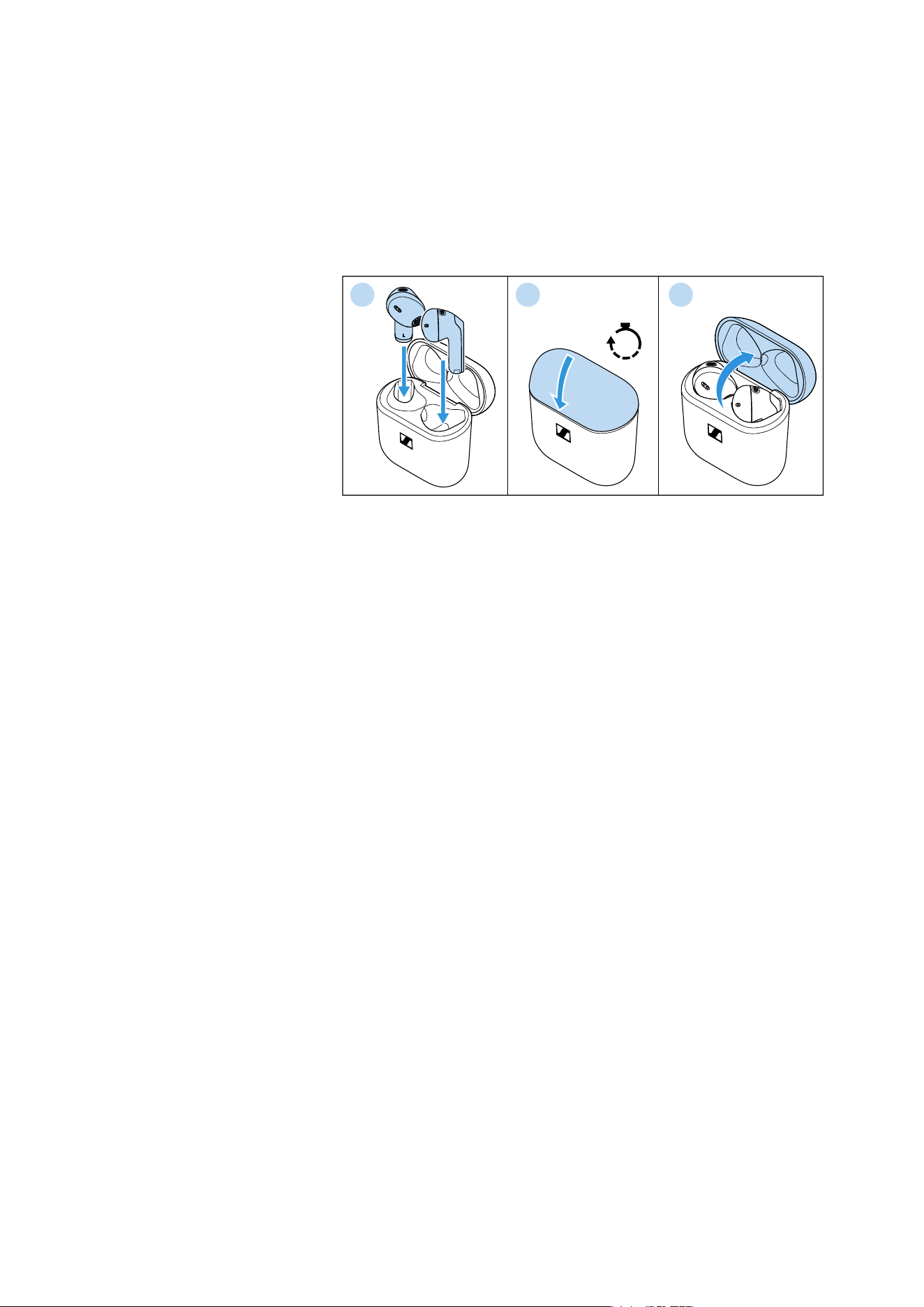
Resetting the earbuds
If the function of the earbuds is disturbed, perform a reset. Individual
settings such as the pairing settings are not deleted.
1. Insert the earbuds into the charging case.
2. Close the lid of the charging case and wait at least 10 seconds.
3. Open the lid again.
The earbuds will restart (reset).
10s
1
2 3
FAQ/If a problem occurs...
28 | ACCENTUM Open
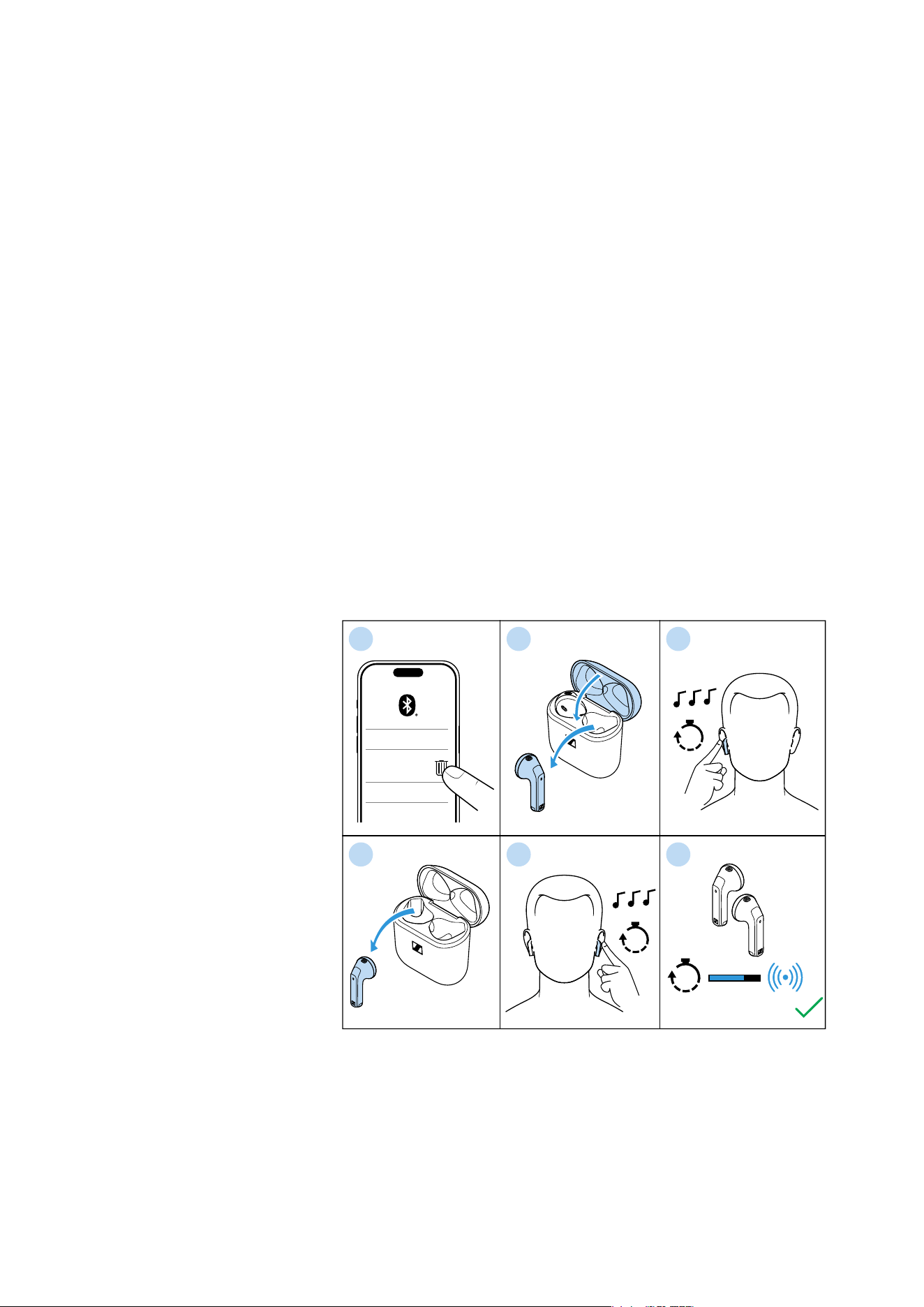
Resetting the earbuds to the factory default settings
If the function of the earbuds is disturbed and a reset (see page 27)
does not improve, reset the earbuds to the factory default settings.
This deletes, among other things, all pairing settings.
1. Disconnect all existing connections between Bluetooth devices
and your earbuds, e.g. by removing “ACCENTUM Open” from the
list of Bluetooth devices found on your device.
2. Take one earbud out of the charging case, insert it in your ear and
close the lid of the charging case. The second earbud remains in
the charging case.
3. Tap and hold the touch control panel of the earbud that is not in
the charging case for 12 seconds.
You hear a sequence of three tones.
4. Take the second earbud out of the charging case and insert it in
your ear.
5. Tap and hold the touch control panel of the second earbud for
12 seconds.
You hear a sequence of three tones.
6. Remove the earbuds from the ear and place them as close
together as possible.
The earbuds connect to each other within 15 seconds.
The earbuds are successfully reset to the factory settings and
peer paired.
▷ Pair your earbuds with your Bluetooth device again (see page 16).
1 32
4
ACCENTUM
Open
************
************
12s
Connected
15s
12s
5 6

Specifications
ACCENTUM Open | 29
Specifications
ACCENTUM Open
Model: OTW1, OTW1 R, OTW1 L, OTW1 C
Wearing style True Wireless stereo earbuds
Ear coupling in-concha
Frequency response 25 Hz to 15 kHz
Transducer principle dynamic
Transducer size 11 mm
Sound pressure level (SPL) 109 dB (1 kHz/1 mW)
THD (1 kHz, 94 dB SPL) < 0.08% (1 kHz/94 dB)
Noise cancellation n/a
Microphone principle MEMS
Microphone frequency
response
100 Hz to 10 kHz
Microphone pick-up pattern
(speech)
2 microphones per earbud
beamforming array for noise reduc-
tion
Power supply built-in lithium rechargeable
batteries:
earbuds (R and L):
3.85V , 35-36mAh, 0.139Wh max.
charging case:
3.7V , 380-400mAh, 1.48Wh max.
input:
earbuds (R and L):
5 V , max. 100 mA
charging case: 5 V , max. 500 mA
output:
earbuds (R and L): none
charging case:
5 V , max. 100 mA x 2 (R and L)
Charging method via
charging case
USB charging via USB C socket:
5 V , 500 mA
Operating time 6.5 hrs with rechargeable battery of
the earbud
21.5 hrs with rechargeable battery of
the charging case
(test conditions: smartphone within
1 m distance, Bluetooth AAC codec,
volume level 50%)
Charging time of recharge-
able batteries
approx. 1 hour for full charge
approx. 10 minutes for 1.5 hour of
music playback
(ambient temperatures <15°C or
>30°C increase the charging time)
Temperature range operation: 0 to +40°C
charging: +5 to +35°C
storage: –20 to +60°C

Specifications
30 | ACCENTUM Open
Bluetooth
Relative humidity operation: 10 to 80%, non condensing
storage: 10 to 90%
Magnetic field strength earbuds: 60 mT
charging case: 47 mT
Ingress protection earbuds: splash proof (IPx4)
Weight earbuds: approx. 4.35 g each
charging case: approx. 29.3 g
both earbuds and charging case:
approx. 38 g
Dimensions earbuds: approx. 18.27 x 33.34 x
19.38 mm (W x H x D)
charging case: approx. 51.77 x 50.18 x
25.36 mm (W x H x D)
Sensors in-ear sensor, capacitive touch sensor
Version Bluetooth 5.3 certified, class 1
Transmission frequency 2,402 MHz to 2,480 MHz
Modulation GFSK, π/4 DQPSK, 8DPSK
Profiles AVRCP, A2DP, HFP
Output power 10 mW (max)
Codec AAC, SBC
Device name ACCENTUM Open
Number of active connec-
tions
2
Required apps no companion app
Manufacturer declarations
ACCENTUM Open | 31
Manufacturer declarations
Warranty
Sonova Consumer Hearing GmbH gives a warranty of 12 months on
this product. For the current warranty conditions, please visit our
website at www.sennheiser-hearing.com/warranty or contact your
Sonova Consumer Hearing partner.
LIMITED AVAILABILITY OF REPLACEMENT PARTS AND REPAIR
SERVICES
Most Products are covered by a 2-year Limited Warranty. Please see
our full warranty terms and conditions here, which also include a list
of the Products the warranty applies to: www.sennheiser-hear-
ing.com/warranty-conditions.
Beyond the terms of the Limited Warranty, Sonova Consumer Hear-
ing GmbH does not warrant or guarantee the availability of, and
hereby disclaims any implied, statutory or other warranty or guaran-
tee of availability of, any spare or replacement parts, repair services
or information necessary for the maintenance or repair of the Prod-
ucts offered for sale at www.sennheiser-hearing.com by Sonova
Consumer Hearing GmbH.
In compliance with the following requirements
• General Product Safety Regulation (EU) 2023/988
• Compliant to Sound Pressure Limits according to country spe-
cific requirements
EU declaration of conformity
• Battery Regulation (EU) 2023/1542
• RoHS Directive (2011/65/EU)
Hereby, Sonova Consumer Hearing GmbH declares that the radio
equipment type OTW1 (OTW1 R, OTW1 L, OTW1 C) is in compliance
with the directive 2014/53/EU.
The full text of the EU declaration of conformity is available in English
language at the following Internet address:
www.sennheiser-hearing.com/download
UK declaration of conformity
• RoHS Regulations (2012)
• Radio Equipment Regulations (2017)
Notes on disposal
• EU: WEEE Directive (2012/19/EU)
• EU: Battery Regulation (EU) 2023/1542
• UK: WEEE Regulations (2013)
• UK: Battery Regulations (2015)
The symbol of the crossed-out wheeled bin on the product, the bat-
tery/rechargeable battery (if applicable) and/or the packaging indi-
cates that these products must not be disposed of with normal
household waste, but must be disposed of separately at the end of
their operational lifetime. For packaging disposal, observe the legal
regulations on waste segregation applicable in your country.
Improper disposal of packaging materials can harm your health and
the environment.

Manufacturer declarations
32 | ACCENTUM Open
The separate collection of waste electrical and electronic equip-
ment, batteries/rechargeable batteries (if applicable) and packag-
ings is used to promote the reuse and recycling and to prevent neg-
ative effects on your health and the environment, e.g. caused by
potentially hazardous substances contained in these products.
Recycle electrical and electronic equipment and batteries/recharge-
able batteries at the end of their operational lifetime in order to make
contained recyclable materials usable and to avoid littering the envi-
ronment.
If batteries/rechargeable batteries can be removed without damag-
ing them, you are obliged to dispose of them separately (for the safe
removal of batteries/rechargeable batteries, see the instruction
manual of the product). Handle lithium-containing batteries/
rechargeable batteries with special care, as they pose particular
risks, such as the risk of fire and/or the risk of ingestion in the case
of coin batteries. Reduce the generation of battery waste as much as
possible by using longer-life batteries or rechargeable batteries.
Further information on the recycling of these products can be
obtained from your municipal administration, from the municipal col-
lection points, or from your Sonova Consumer Hearing partner. You
can also return electrical or electronic equipment to distributors who
have a take-back obligation. Herewith you make an important contri-
bution to the protection of the environment and public health.
Trademarks
The Bluetooth® word mark and logos are registered trademarks
owned by Bluetooth SIG, Inc. and any use of such marks by Sonova
Consumer Hearing GmbH is under license.
Other product and company names mentioned in the user documen-
tation may be the trademarks or registered trademarks of their
respective holders.