NCHH User Guide
Novacore Hand Held Transmitter
2
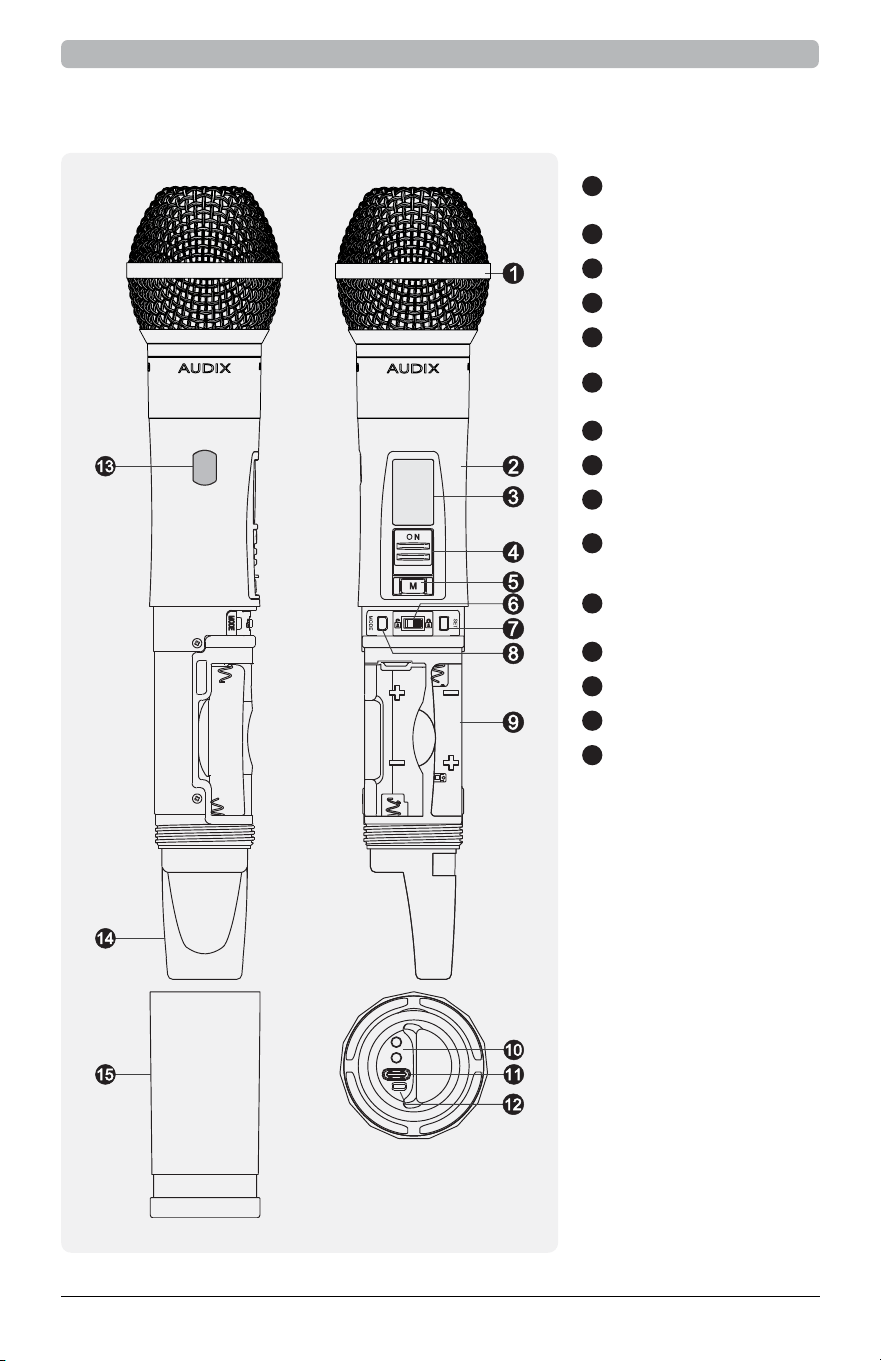
NCHH UHF Digital Handheld Transmitter
1
Microphone
Capsule
2
Upper Housing
3
LCD Screen
4
Power Switch
5
Mute Button
6
Multifunction
Locking Slider
7
SET Button
8
MODE Button
9
Battery Holder
10
Battery Charging
Contacts
11
USB Type-C
Charging Port
12
Charging Indicator
13
Sync Window
14
Rear Cap
15
Lower Housing
Features
3
NCHH UHF Digital Handheld Transmitter
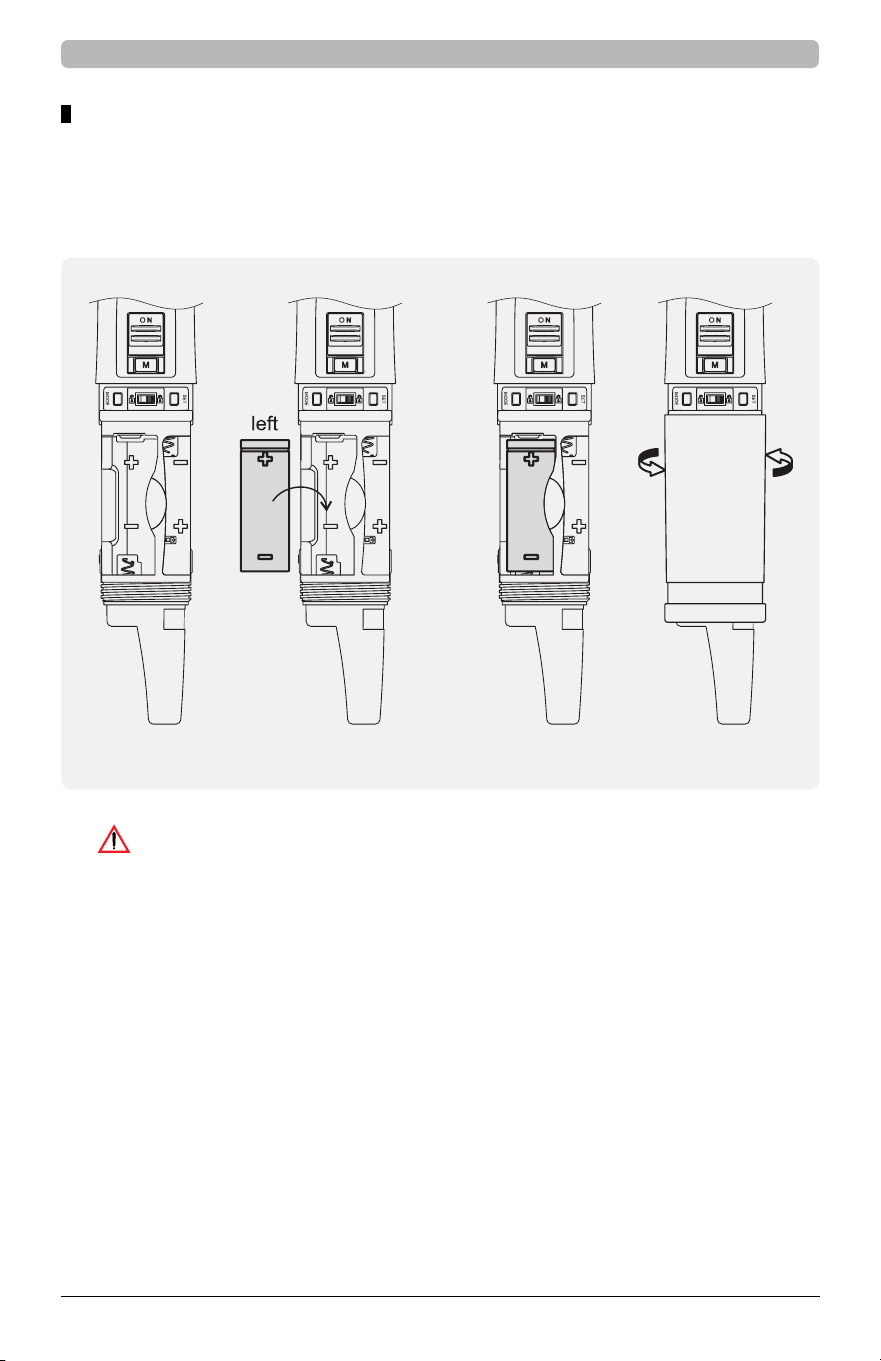
Battery Insertion
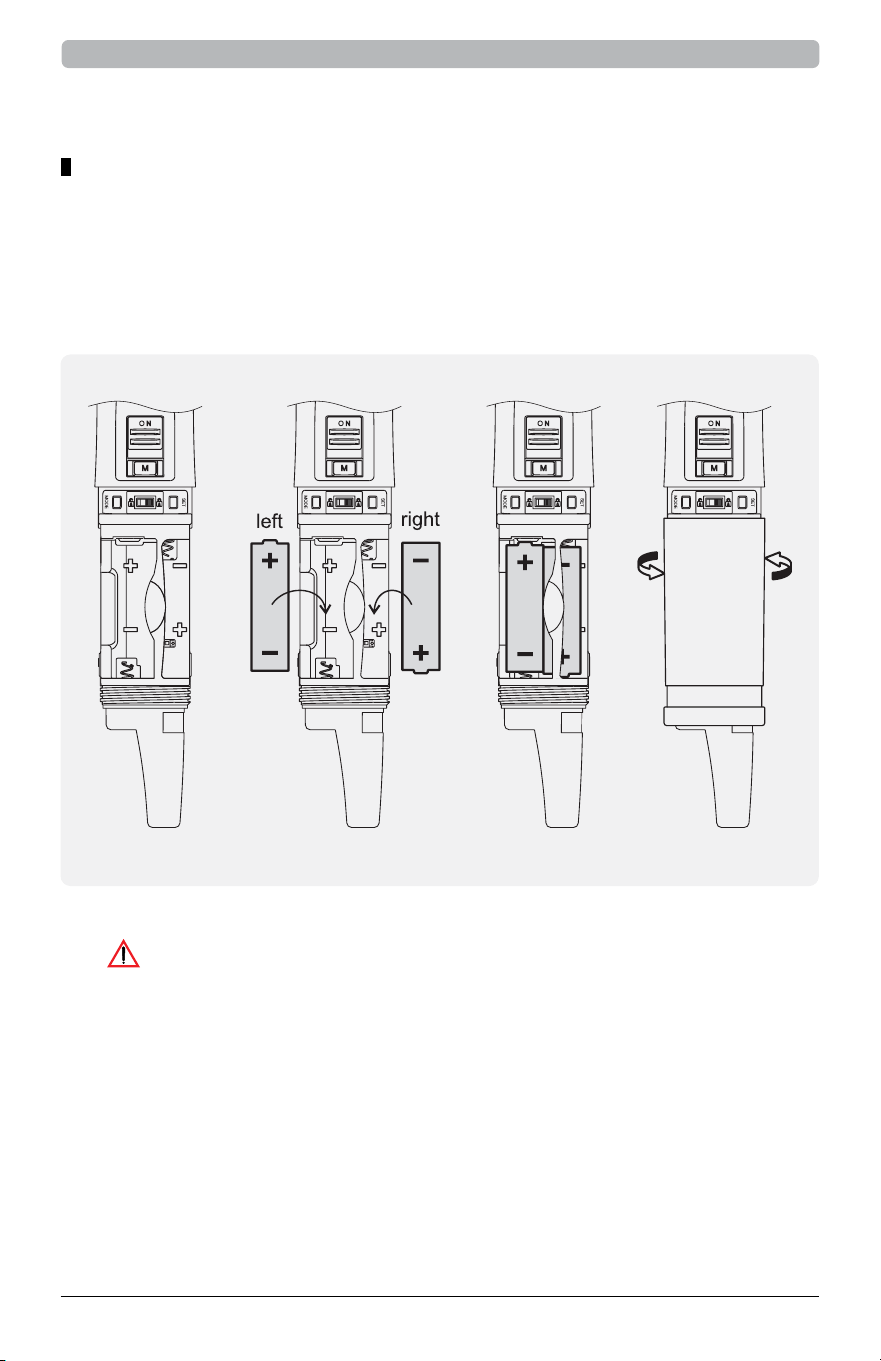
• Rotate and detach the lower housing.
• Ensure the power switch is o. Insert one battery with the negative (-) pole
facing upward into the right slot, then insert another battery with the positive
(+) pole facing upward into the left slot, following the polarity marks.
1. Do not use AA-sized 14500 lithium batteries (voltage exceeding
1.8V) or mix disposable batteries with 14500 lithium batteries.
2. Using incorrect batteries may cause malfunction or
damage, which is not covered under warranty.
Caution
Installing AA Batteries
4
NCHH UHF Digital Handheld Transmitter
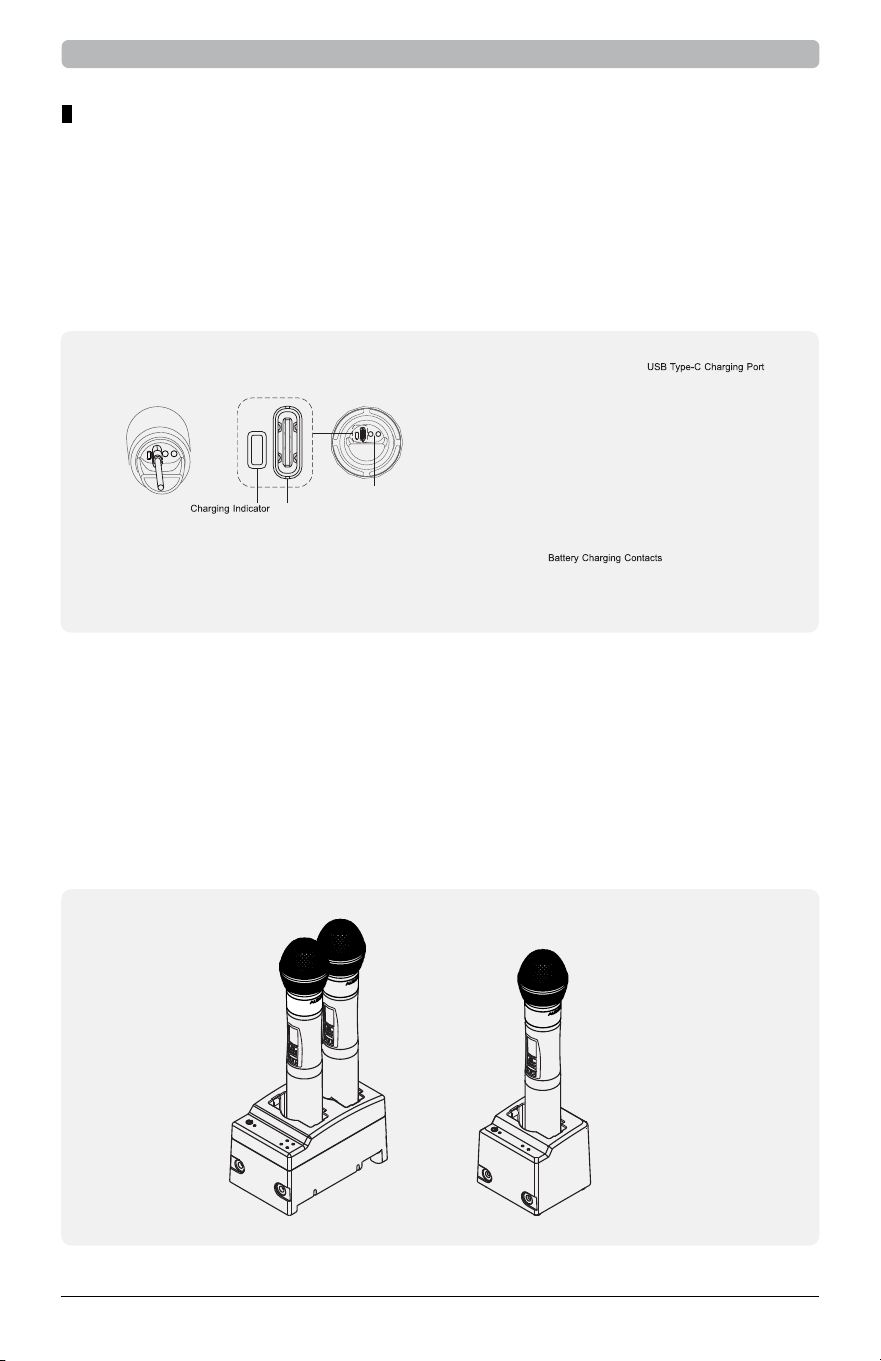
• Rotate and detach the lower housing.
• Ensure the power switch is o. Insert the lithium battery with the positive
(+) pole facing upward into the left slot, following the polarity marks.
1. Use only an 18500 lithium-ion battery and confirm
the polarity is correct before charging.
2. Turn o the transmitter before charging.
3. Do not remove the battery during charging. Disconnect
the cable or dock first if removal is necessary.
4. If the charging indicator does not light up, check the battery installation.
5. If the transmitter fails to power on, recheck the
polarity or charge level of the battery.
Caution
18500 Rechargeable Lithium Battery Installation
5
NCHH UHF Digital Handheld Transmitter
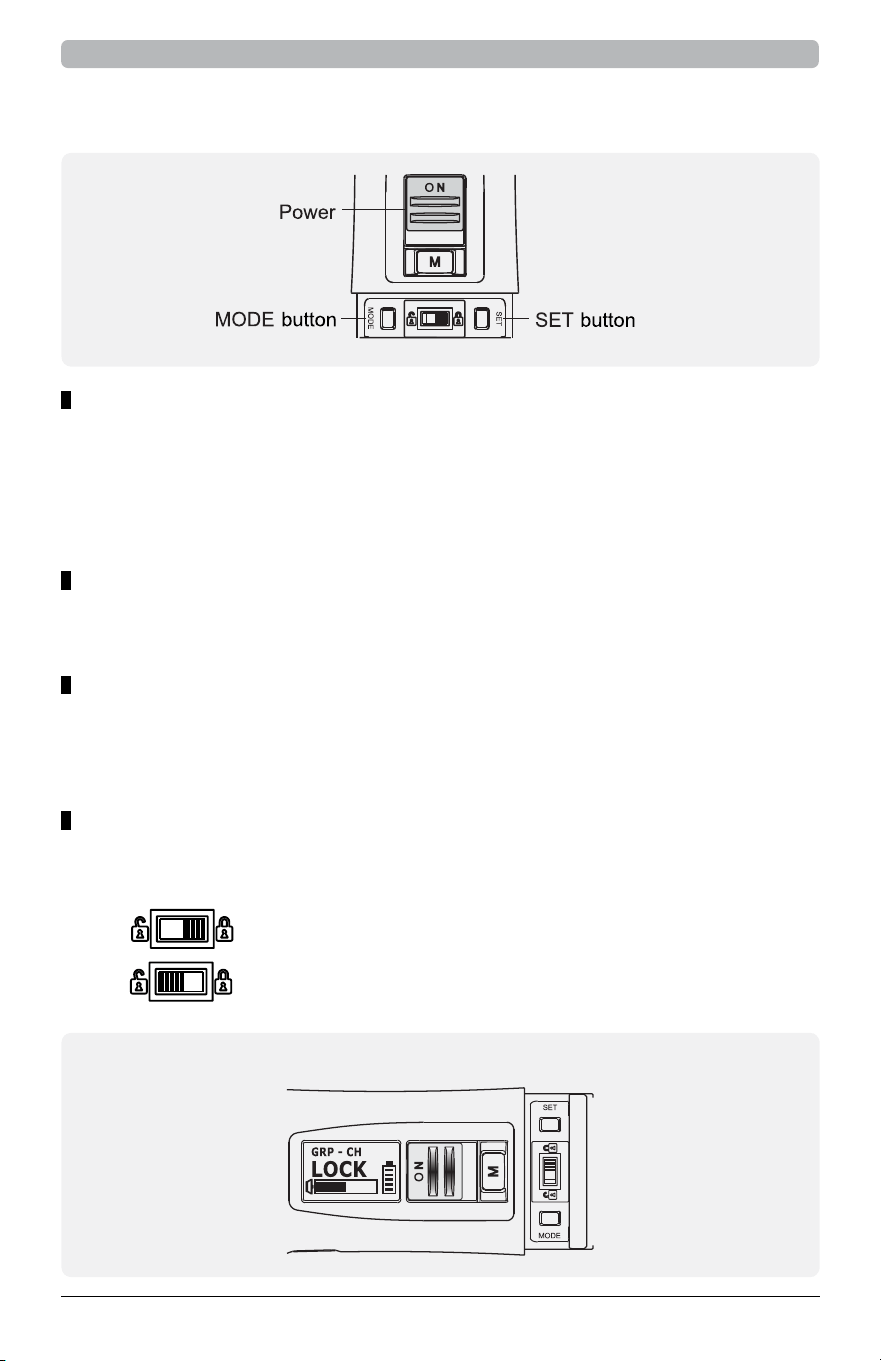
1. Connect the USB Type-C cable to the charging port.
2. Observe the charging indicator:
1. Connect the charging dock (e.g., NCC1 or NCC2) to a power
source and confirm that the power indicator lights up.
2. Place the transmitter into the charging dock and check the status:
• Using USB Type-C Cable Charging
• Using Charging Dock (Optional)
• Orange light: Charging in progress.
• Green light: Fully charged.
• Red light: Charging in progress.
• Green light: Fully charged.
USB Type C Charing Port
Battery Charging Contacts
NCC2 NCC1
Charging Methods
6
NCHH UHF Digital Handheld Transmitter
Operating Instructions
• Push the power switch upward to turn on the
transmitter. The LCD screen will light up.
• Push the power switch downward to turn o the transmitter.
• Note: The LCD screen will display “OFF...” and automatically dim when turned o.
• Press the SET button. The parameter on the LCD screen will
blink, indicating that the parameter is ready to be adjusted.
• Press SET again to confirm and apply the desired change.
Press the MODE button to toggle through available
functions displayed on the LCD screen.
Power On/O
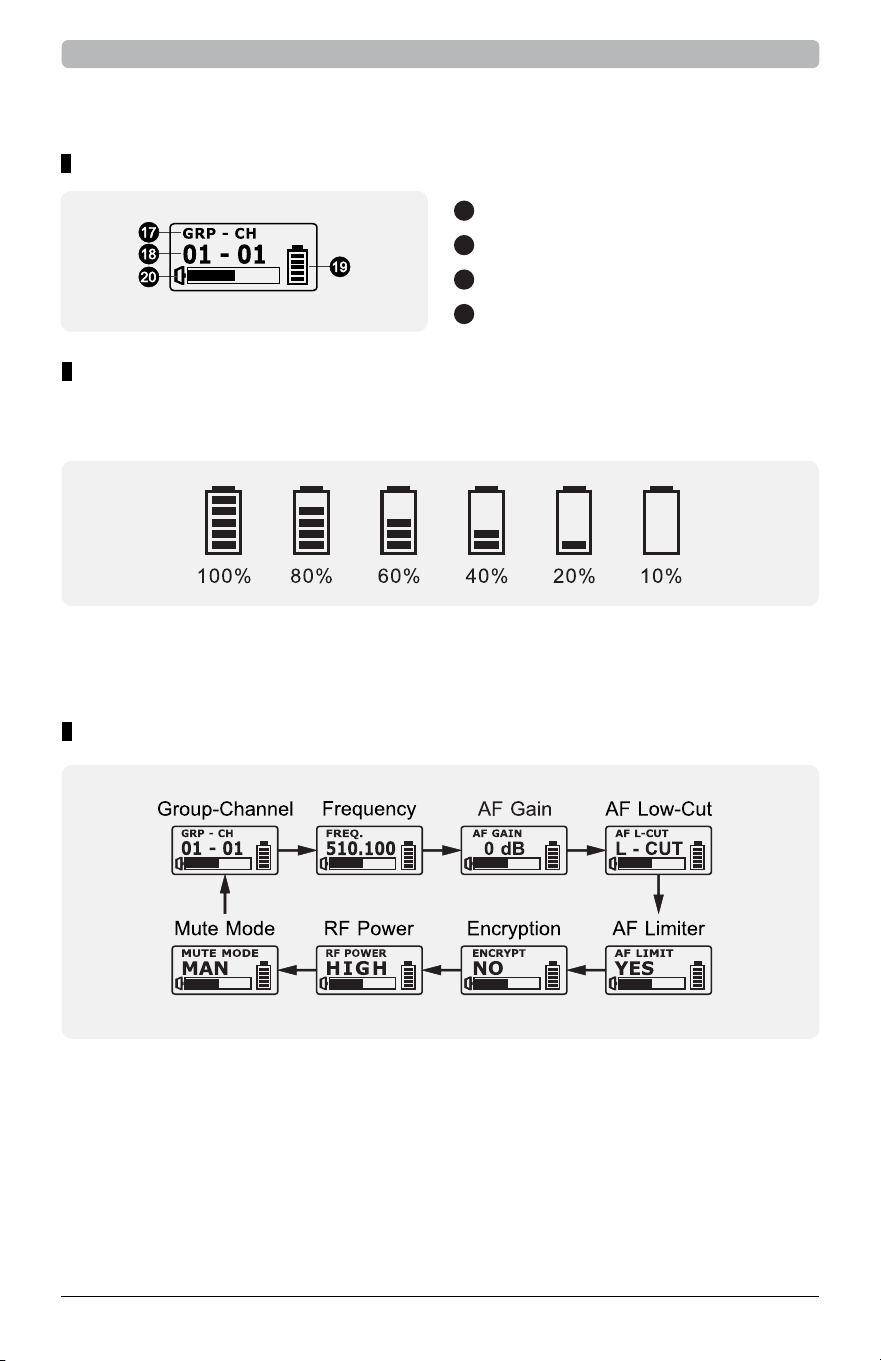
Lock
Parameter Setting
Mode Selection
NCHH Lock Display
• Enable the lock function to prevent accidental operation.
All functions except MUTE will be locked.
• To lock: Push the locking slider to the right.
• To unlock: Push the locking slider to the left.
7
NCHH UHF Digital Handheld Transmitter
NCHH LCD Display Settings
• The battery level indicator displays the remaining battery level
in six stages: 100%, 80%, 60%, 40%, 20%, and 10%.
• When the battery level drops to 10%, recharge immediately. If
the level is too low, the LCD screen will display “OFF” and
the transmitter will automatically power o.
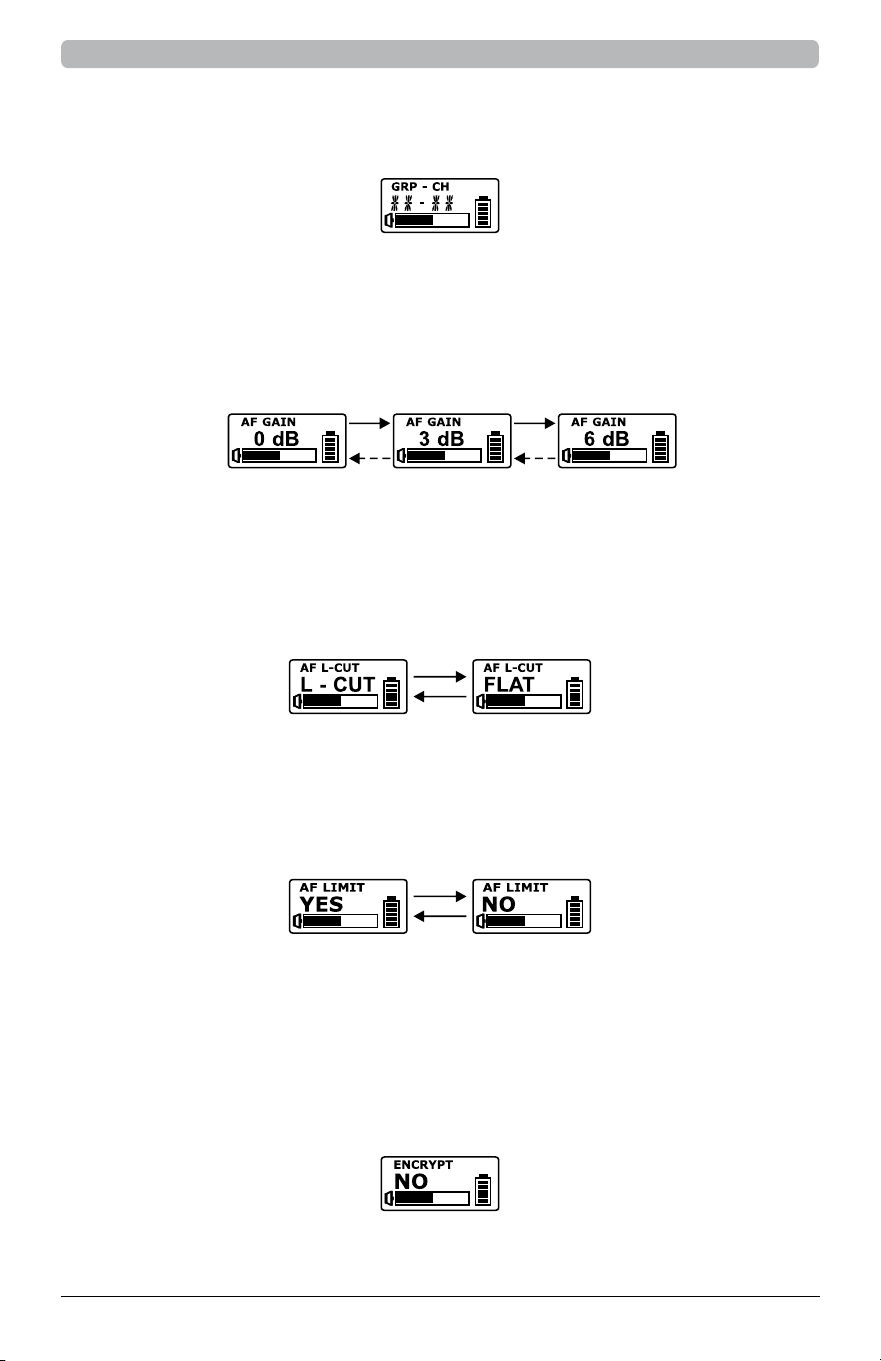
• Group (GRP), Channel (CH), and Frequency (FREQ)
Battery Level Display
LCD Display Functions
LCD Display Overview
17
Function Area
18
Parameter Area
19
Battery Level Indicator
20
Audio Input Level
1. Group, channel, and frequency settings are for display
only and cannot be changed directly.
2. To change group, channel, or frequency settings, scan for
available frequencies on the receiver. Then use the SYNC
function to synchronize the settings with the transmitter.
8
NCHH UHF Digital Handheld Transmitter
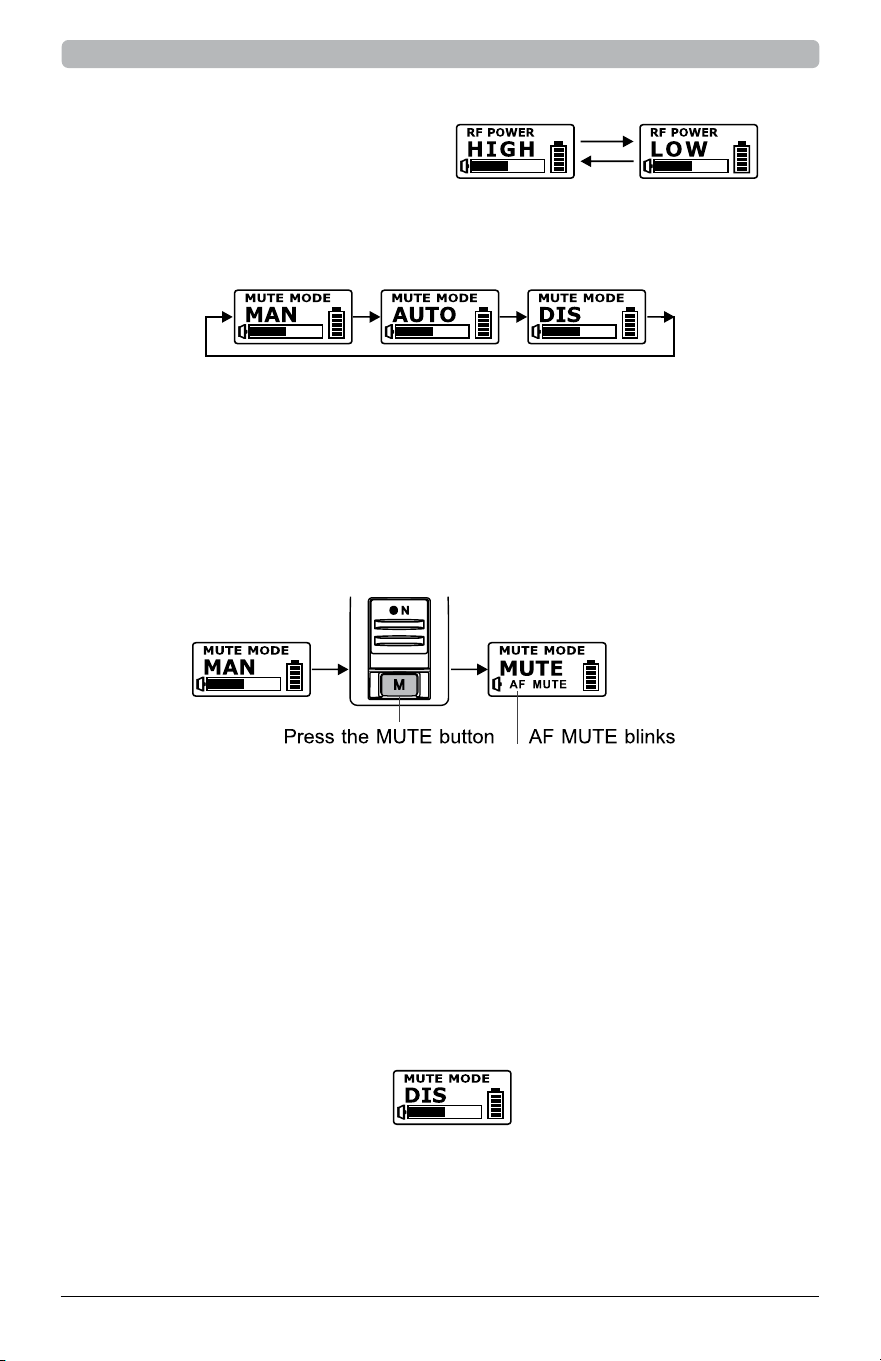
• AF GAIN (Audio Gain Adjustment)
• AF L-CUT (Low-Cut Filter)
• AF LIMIT (Audio Limiter)
• ENCRYPTION (Encryption Function)
1. Adjustable from 0 dB to 6 dB in 3 dB increments.
2. Increasing the AF GAIN narrows the dynamic range of the input
signal and increases the risk of system noise and feedback.
1. Options: L-CUT (Low Cut) or FLAT.
2. When set to L-CUT, the frequency response at 100 Hz
is reduced by approximately 3 dB.
1. Options: YES or NO.
2. When set to YES, the maximum output of the receiver is limited.
1. This is a display-only function; it cannot be set on the transmitter.
2. To enable encryption, configure it on the receiver in encryption
mode and synchronize using the SYNC function.
3. Refer to the receiver’s encryption settings for more details.
3. The specific group and channel set via PC software will be displayed
as “GRP - CH” with asterisks (**) replacing the numbers.
9
NCHH UHF Digital Handheld Transmitter
• RF POWER (RF Output Power)
Options: HIGH or LOW to adjust
RF transmission power.
• Mute Mode (Mute Settings)
4. DIS (Disabled)
The mute function is turned o and cannot be enabled in this mode.
1. Select between MAN (Manual), AUTO, or DIS (Disabled).
2. MAN (Manual Mute)
3. AUTO (Automatic Mute)
• Press the mute button to enter mute mode. The AF
MUTE indicator blinks. Press again to unmute.
• The mute function is automatically disabled
when the transmitter powers o.
• When you power the transmitter back on mute will not be engaged.
• The transmitter automatically enters mute mode under
specific conditions, and the mute button is disabled.
• Pointing the microphone head downward mutes the
transmitter, while pointing it upward restores audio.
• Remaining stationary for over 4 seconds automatically mutes
the transmitter. Light movement or usage will unmute.

10
NCHH UHF Digital Handheld Transmitter
• Error Codes
1. ROM-ER: Channel not programmed or internal data error.
2. ERROR1: RF frequency targeting circuitry failure.
3. NO-03: The set frequency exceeds the upper limit. Verify
that the transmitter and receiver are within the same
frequency range, then restart the transmitter.
4. NO-04: The set frequency exceeds the lower limit. Verify
that the transmitter and receiver are within the same
frequency range, then restart the transmitter.

11
NCHH UHF Digital Handheld Transmitter
Cautions
1. Turn o the transmitter when not in use to conserve battery life.
Remove the battery if not used for an extended period.
2. Avoid covering the transmitting antenna (rear housing section)
with your hand to maintain transmission eciency.
3. Do not cover the microphone grille with your hand to prevent
degradation of sound quality, loss of directionality, or feedback issues.
4. Hold the transmitter properly to maintain an appropriate distance between the
microphone and the mouth, ensuring optimal sensitivity and sound quality.
5. Keep the microphone grille clean and unobstructed. After use, unscrew
and clean the grille to avoid debris aecting performance.
6. Follow the regulations of dierent countries regarding frequency
range, RF output power, and maximum deviation limits.
7. Refer to the actual product in the event of any specification discrepancies.
8. Do not spray alcohol directly onto the condenser capsule
to avoid damage and voiding the warranty.

12
NCHH UHF Digital Handheld Transmitter
Federal Communication Commission Interference Statement
This equipment has been tested and found to comply with the limits for a Class B
digital device, pursuant to Part 15 of the FCC Rules. These limits are designed to provide
reasonable protection against harmful interference in a residential installation.
This equipment generates, uses and can radiate radio frequency energy and, if not
installed and used in accordance with the instructions, may cause harmful interference
to radio communications. However, there is no guarantee that interference will not occur
in a particular installation. If this equipment does cause harmful interference to radio or
television reception, which can be determined by turning the equipment o and on, the
user is encouraged to try to correct the interference by one of the following measures:
• Reorient or relocate the receiving antenna.
• Increase the separation between the equipment and receiver.
• Connect the equipment into an outlet on a circuit dierent
from that to which the receiver is connected.
• Consult the dealer or an experienced radio/TV technician for help.
FCC Caution: To assure continued compliance, any changes or modifications
not expressly approved by the party responsible for compliance could void
the user's authority to operate this equipment. (Example - use only shielded
interface cables when connecting to computer or peripheral devices).
FCC Radiation Exposure Statement
This equipment complies with FCC RF radiation exposure limits set forth for an
uncontrolled environment. This equipment should be installed and operated with
a minimum distance of 0.5 centimeters between the radiator and your body.
This transmitter must not be co-located or operating in
conjunction with any other antenna or transmitter.
The antennas used for this transmitter must be installed to provide a separation
distance of at least 0.5 cm from all persons and must not be co-located
or operating in conjunction with any other antenna or transmitter.
This device complies with Part 15 of the FCC Rules. Operation
is subject to the following two conditions:
(1) This device may not cause harmful interference, and
(2) This device must accept any interference received, including
interference that may cause undesired operation.
Frequency range
FCC: 470 – 608 MHz
CE: 470 – 789 MHz / 823 – 832 MHz
13
NCHH UHF Digital Handheld Transmitter
Dispose of any unusable devices or batteries responsibly
and in accordance with any applicable regulations.
Disposing of used batteries with domestic waste is to be avoided!
Batteries / NiCad cells often contain heavy metals such as
cadmium(Cd), mercury(Hg) and lead(Pb) that makes them
unsuitable for disposal with domestic waste. You may return
spent batteries/ accumulators free of charge to recycling
centres or anywhere else batteries/accumulators are sold.
By doing so, you contribute to the conservation of our environment!


15
NCHH UHF Digital Handheld Transmitter
Warranty
All Audix products are warranted to the original purchaser to be free of defects
in materials and workmanship from the date of purchase as follows:
> 5 years for VLM Dynamic microphones
> 3 years for Fusion Series and Condenser microphones
> 1 year for all other products
In the event of a product failure due to materials or workmanship, Audix will repair
or replace said product at Audix discretion, at no charge with proof of purchase
from an authorized Audix dealer. Audix does not pay or reimburse shipping costs
for warranty repairs or returns. The warranty excludes any causes other than
manufacturing defects, such as normal wear, abuse, environmental damage, shipping
damage, or failure to use or maintain the product per the supplied instructions.
All implied warranties, including but not limited to implied warranties of
merchantability and fitness for a particular purpose are hereby excluded. The
liability of Audix, if any, for damages relating to allegedly defective products
shall be limited to the actual price paid by Dealer for such products and shall
in no event include incidental or consequential damages of any kind.
OTHER THAN THIS WARRANTY, AUDIX MAKES NO WARRANTIES, EXPRESS
OR IMPLIED, WITH RESPECT TO THE PRODUCTS, THE USE OF THE PRODUCTS,
THE PERFORMANCE OF THE PRODUCTS. AUDIX SHALL NOT BE LIABLE FOR
SPECIAL, INCIDENTAL, CONSEQUENTIAL, INDIRECT OR SIMILAR DAMAGES
ARISING FROM OR BASED ON THE SALE, USE, STORAGE OR DISPOSAL OF
THE PRODUCTS, AUDIX’S SERVICE WORK, BREACH OF WARRANTY, BREACH
OF CONTRACT, NEGLIGENCE, OR ANY OTHER THEORY OF LIABILITY, EVEN
IF AUDIX HAS BEEN ADVISED OF THE POSSIBILITY OF SUCH DAMAGES.

audixusa.com
503.682.6933
©2026 Audix LCC All Rights Reserved.
Audix and the Audix Logo are trademarks of Audix LLC.
NCHH User Guide v1.0