Read and Save These Important Instructions
Customer Suppor
Guangdong Tongyuan Electric Co., Ltd.
Address: 8 Dadi Road, Shapuwei, Songgang Town, Bao'a n
District, Shenzhen City, Guangdong Province, China
Official website: www.shlipu.com
t
If you have any questions or concerns about your new product,
please contact our helpful Customer Support Team
For FAQs and more information,
Please visit: www.SHLIPU.com
TY-10
Plasma Air Purifier
0
User Manual
Contents
SAFETY INFORMATION 01-02
GETTING TO KNOW YOUR AIR PURIFIER 03
CONTROLS 04
GETTING STARTED 05-06
HOW TO USE TIPS 07
CONNECT TO THE SMART LIFE APP 08
CLEANING AND MAINTENANCE 09 -11
TROUBLESHOOTING 12
SPECIFICATIONS 13-14
WARRANTY INFORMATION 15

To reduce the risk of fire, electric shock, or other injury, only use your air
purifier as described in this manual.
Please place and use this product properly, by ensuring it is placed on a
dry, flat, and stable surface. Avoid hitting or dropping the air purifier to
prevent damage or accidents.
Avoid placing in direct sunlight or high-humidity environments (e.g.,
bathrooms). Do not use a humidifier in proximity to the air purifier to
prevent water ingress. Never immerse the product in water or other liquids.
Do not use it in environments where flammable or explosive materials are
stored, near open flames (such as fireplaces, stoves), or in proximity to
high-temperature heating devices like heaters, warm air blowers, or
electric irons.
Do not place water containers, medications, or flammable items on top of
the product. Do not sit or stand on the product.
Do not use it in places with combustible gases, vapors, metallic dust,
aerosol (spray) products, or industrial oil fumes.
To prevent interference, please keep the product as far away as possible
from electrical appliances such as televisions, radios, microwaves, etc.
To avoid the risk of fire or electric shock, ensure that this product is
connected to a power supply matching the standard voltage in your area.
Never touch the power plug with wet hands to prevent electric shock. When
unplugging, pull the plug, not the cord.
Avoid routing the power cord in areas where it may obstruct movement,
and do not place it under carpets or near heat sources such as heaters,
stoves, or furnaces to prevent potential safety hazards.
SAFETY INFORMATION
Read and Save these Safety Instructions Before
Using This Air Purifier
Do not cover the power cord with carpets, rugs, or other coverings, Do not place it under
furniture or appliances, or in areas where people frequently walk. Place it in a location
where it will not be a tripping hazard.
Do not obstruct the product's intake and exhaust vents with any external objects or allow
foreign objects to enter the interior of the machine, as this may cause damage.
Before assembling, moving, opening the side panel, cleaning, or performing other
maintenance, or during extended non-use, always disconnect the power supply.
Individuals with reduced physical, sensory, or mental abilities, or those lacking experience
and knowledge (including children), must not use this air purifier unless they have
received supervision or guidance from a responsible person regarding its use.
If this product is used in proximity to children or disabled individuals, supervise them
carefully. Do not allow children to play with this product as if it were a toy.
This product is not a substitute for ventilation fans, vacuum cleaners, or kitchen range
hoods.
Use this product only for the household purposes described in this manual. Any other uses
not recommended by the manufacturer may cause fire, electric shock, or personal injury.
use this product indoors only as instructed in this manual.
To reduce the risk of fire or electric shock, do not use this air purifier in conjunction with
any solid-state speed control devices.
Do not use accessories or parts that are not provided by the original manufacturer. If the
product is damaged due to the use of non-original accessories or parts, it will void the
warranty and after-sales coverage.
Do not attempt to repair or adjust any electrical or mechanical functions of this device.
Doing so will void your warranty. All repairs should be performed by qualified
professionals.
Patients with cardiac pacemakers and those who have undergone coronary artery bypass
grafting (CABG) should maintain a safe distance from the device while it is operating.
SAFETY INFORMATION(CONT.)
*
*
*
*
*
*
*
*
*
*
*
*
*
*
*
*
*
*
*
*
01 02
*
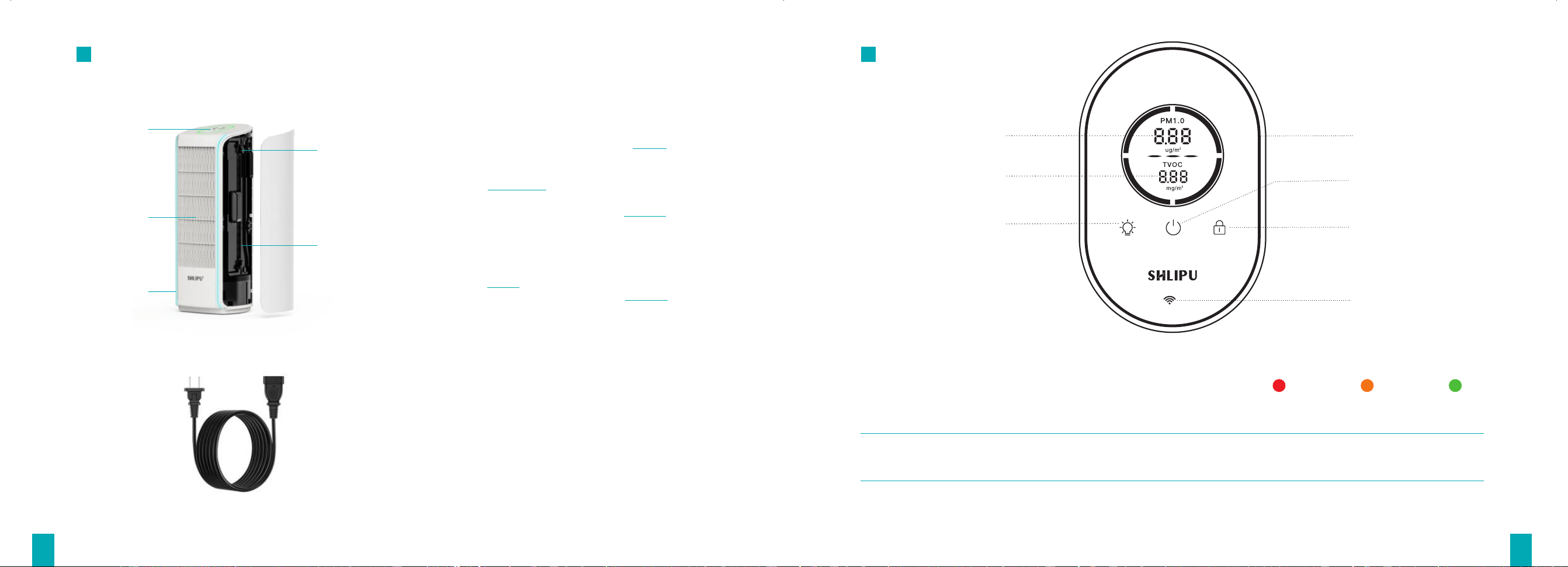
GETTING TO KNOW YOUR AIR PURIFIER
Control Panel
Air Outlet
Movable Buckle
Ion Electrode
Dust Collection Sheet
Magnetic Side Panel
Sensor
Air Inlet
Power Socket
PM Value
TVOC Value
Power Button
Ambient Light Button
Wi-Fi Pairing Button
Child Lock Button
Air Quality Indicator light
CONTROLS
Air quality status
The air purifier has a sensor to measure the fine particles and TVOC
levels. The LED indicator displays air quality status in 3 colors.
Very Polluted
Polluted
Good
At startup, the sensors (including PM and TVOC sensors) will display '---' during the preheating process. Normal readings
will appear automatically once preheating is completed. Please wait patiently.
The illustrations of the product, accessories, and user interface in this manual are for reference only and may vary
slightly due to updates. Please refer to the actual product for accuracy.
*
Power Cord
Ambient Light
03 04
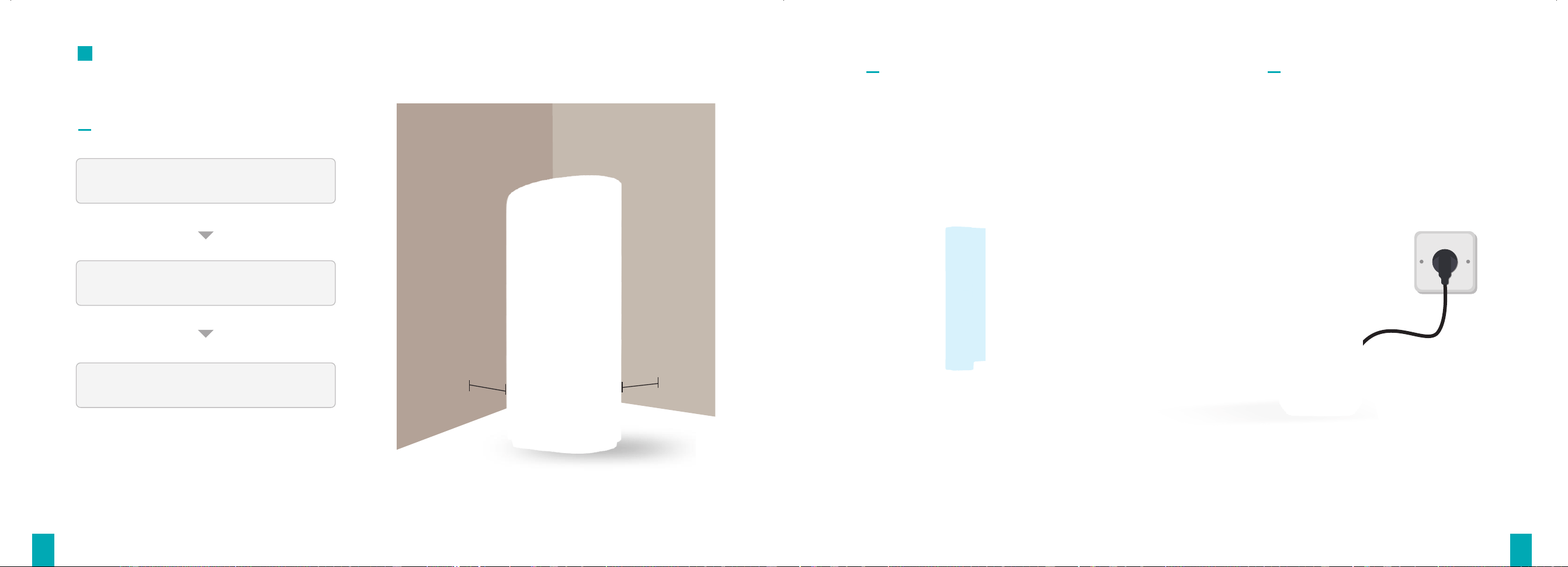
GETTING STARTED
20
cm
2
0
cm
STEP 01
Place the air purifier on a flat,stable
surface with the display facing up.
Allow at least 8 inches/20 cm of clearance
on all sides of the air purifier.
Keep away from anything that would block
airflow, such as sofa, wall, and curtains.
STEP 02
Remove the dust collection sheet from its plastic
packaging and place it back into the air purifier.
STEP 03
Plug in and tap to turn on the air purifier,
now your purifier is ready to use.
05 06

HOW TO USE TIPS
Ambient Light Button
This button controls ambient light brightness. Upon startup, the device defaults to breathing mode (softly alternates
between brighter and dimmer states). Press this button once for 100% constant brightness, press again for 50%
constant brightness, and press a third time to turn off.
Child Lock Button
To prevent accidental operation by children. Press and hold the button for 5 seconds to lock (light turns on) or unlock
(light turns off) the machine.
Wi-Fi Pairing Button
While the device is powered on, press and hold the Wi-Fi button to enter the networking pairing mode.(Refer to
Page 8 for network conguration instructions).
CONNECT TO THE SMART LIFE APP
You Can Manage And Control Your Air Purifier Through The "Smart Life" APP.
1.Installing the "Smart Life" APP
1.1 Scan the QR code below with your phone or search for "Smart Life" in the App store and install it. If already installed, ensure
the app is the latest version.
1.2 Open the "Smart Life" App, and follow the prompts on the screen to enter relevant information to complete account registration.
After successful registration, log in to the app using your account and password.
2.Add device to the APP
2.1 Ensure that your phone's Wi-Fi and Bluetooth functions are enabled and successfully connected to a wireless network.
2.2 Power off the air purifier for 10 seconds and then power it back on.
2.3 Press and hold the Wi-Fi button on the device until the Wi-Fi indicator light starts blinking, indicating that the device has entered
network configuration mode;
2.4 Open the "Smart Life" APP, tap the "+" icon in the top right corner of the homepage, select "Add Device", and wait for the app to
automatically search for and discover the TY-100 air purifier device that needs to be configured. (*If the App does not
automatically search for the device, manually add it according to the prompts on the screen.)
2.5 Follow the prompts on the APP interface to enter the account and password of the Wi-Fi network currently connected to your
phone, ensuring the information entered is accurate.
2.6 After successful pairing, the Wi-Fi indicator will stay steadily lit and the air purifier will appear on the App Home Screen, where
tapping the device allows full control and management through the interface.
(Smart Life APP)
07 08
Power Button
When the device is powered on, press this button to turn the air purifier on or off.
★A red light on the button indicates that the magnetic side panel is not fully closed. Please check and ensure it is
securely shut.
★A yellow light on the button means the dust collection sheet needs cleaning . Refer to the "Cleaning and Maintenance
Instructions" on page 9 for details.
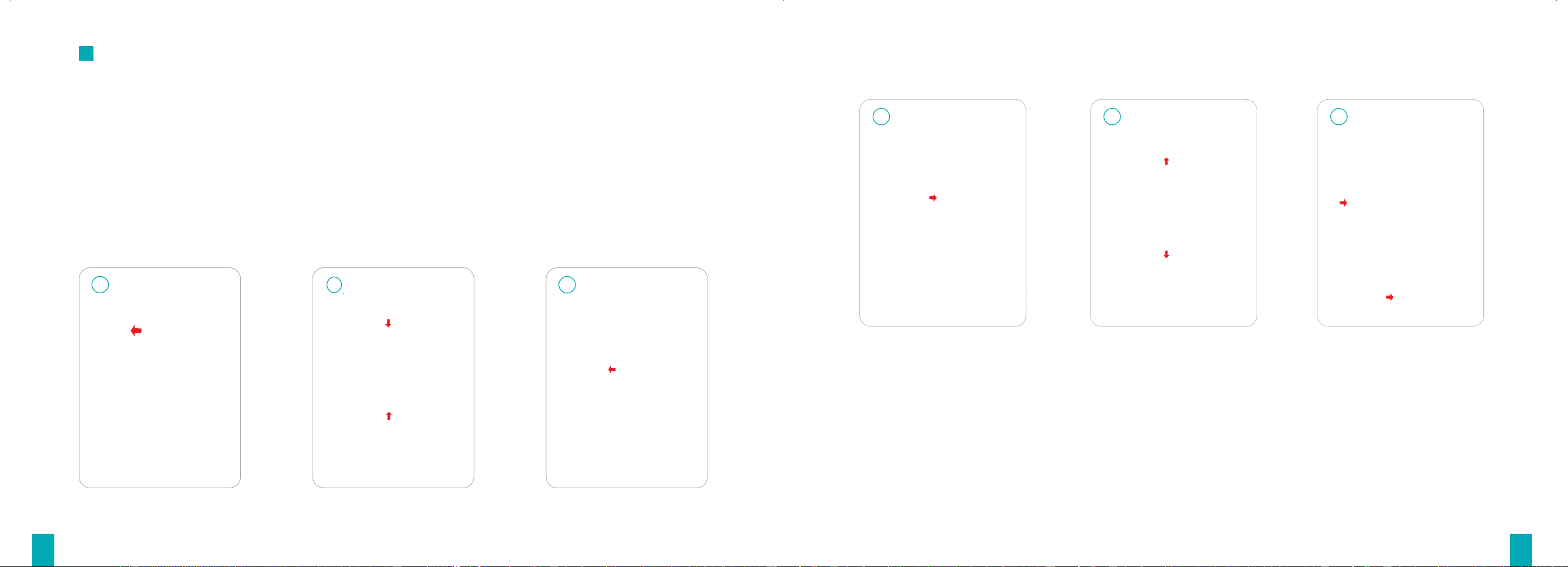
Put back the dust collection sheet
B: Reset the dust adsorbing sheet steps
1 32
A: Remove the dust collection sheet steps
Remove the magnetic side panel
1
2
3
Close the adjustable buckle Close the magnetic side panel
Open the adjustable buckle Take out the dust collection sheet
CLEANING AND MAINTENANCE
To maintain optimal air purification efficiency, regularly clean the device per the user manual based on usage.
Important! Always disconnect the appliance from the power supply before cleaning and maintenance.
When the yellow illumination on the power button indicates the dust collection sheet requires cleaning, open the magnetic side
panel, first power off the device and open the magnetic side panel. Remove the dust collection sheet and gently wipe its surface with
a soft, dry cloth (avoid all liquids and chemicals). After confirming the sheet is completely dry, reinsert it into the machine and
securely close the magnetic side panel before reactivating the purifier.
Cleaning the Dust Collection Sheet
09 10

1. Clean the metal wire of the ionizer electrode every four weeks or as needed
based on usage.
2. Before cleaning, please turn off the device and unplug the power cord. The
ionizer electrode features an integrated, non-removable encapsulated design.
First, remove the dust collection sheet. Then, use a clean, dry tool (such as a lint-
free cotton swab or soft brush) to gently wipe away dust and contaminants from
the surface of the metal wire through the component gaps.
3. Once the electrode wire is completely clean and thoroughly dry, reinstall the
dust collection sheet. Ensure the magnetic side panel is fully sealed in place.
Then, reconnect the power cord, and the device will be ready for normal use.
1. Power off the device and unplug the power cord from the outlet.
2. Gently wipe the external surfaces using a damp cloth that does not drip water.
3. Once the housing is completely clean and dry, reconnect the power cord for
normal operation.
★Cleaning the Device Housing
IMPORTANT NOTICE:
1.Never use any abrasive items or corrosive cleaners to clean the device or its components, as this may cause damage;
2.Do not wash the device housing with water;
3.When the device is not in use for an extended period, wrap it in the original dust-proof bag and store it in a ventilated and dry location.
TROUBLESHOOTING
The troubleshooting section below is designed to help solve frequently asked questions for
the purifier unit. If your problem persists, please contact Customer Support.
Issue Possible Causes Solutions
Air purifier will not turn on or
respond to button controls
No power supply
Check if the power supply is functioning by plugging other
appliances into the same outlet
Loose power cord
Ensure both ends of the power cord are securely plugged in
Air purifier makes an unusual
noise when running
Magnetic side plate not closed
Make sure the magnetic sideplate is properly installed
Uneven ground surface
Foreign particles inside
Make sure the air purifier is operating on a hard, flat, level surface
The air inlet and air outlet are blocked
Occasional "snapping" sound
Debris on dust collection plate
Remove debris or contact customer service
Clear obstructions from the air inlet and air outlet
Occasional "pop" sounds are normal due to lint or large
particles entering the ultra-energy field. Regular cleaning of the
ionizer electrode wire is recommended.
Clean according to the "Cleaning and Maintenance" section on page 9
Poor air purification
Outdoor air pollution
Exceeding recommended room size
Dust collection plate needs cleaning
Close doors and windows while the device is operating
Use the device within the recommended area
Unpleasant odor
New product smell
A slight odor during initial use is normal and will dissipate over time
11 12
★Cleaning the Ionizer Electrode Wire
Clean according to the "Cleaning and Maintenance" section on page 9
13 14
SPECIFICATIONS
OZONE SAFETY INSTRUCTIONS
The ozone emission level of this product meets California ozone emissions limit: CARB certified.
Product Name
Power Supply
Effective Area
Product Weight
Plasma Air Purifier
120VAC,50/60Hz
430ft
2
/40m
2
7.9kg
Model
Rated Power
Noise Leve
Product Dimensions
TY-100
11.6W
≤20dB(A)
260x260x650mm
WARRANTY INFORMATION
ONE (1) Year Limited Warranty Term
Non-Warranty Terms
Exceeding the warranty period of the product.
Any alteration or obfuscation of the proof of purchase.
Tampering with, removal, or obfuscation of the model number, serial number, or production date code on the product.
Damage or defects resulting from unauthorized service or repair by a provider other than SHLlPU.
Normal discoloration and wear and tear of the product during use .
Damage caused by failure to adhere to product instructions for use, cleaning, maintenance, storage, and handling.
Damage caused by connecting peripherals, additional equipment,.or accessories not recommended in the user manual.
Device damage, including but not limited to animal infestation, lightning strikes, abnormal voltage, fire, natural disasters,
transportation accidents, or water exposure.
Failures and damages attributed to non-product qualityissues.
Failure to thoroughly read and comply with all instructions in the user manual, as well as disregard for any restrictions or warnings
outlined therein.
*
*
*
*
*
*
*
*
*
*
The product is guaranteed to be free from defects in materials and workmanship for one year from the original purchase date
(the"Limited Warranty Period"). This warranty applies only when the product is used as intended, in the specified environment, and
under normal conditions.
During the Limited Warranty Period, SHLlPU will provide free repair or replacement services for issues caused by defective materials
or poor workmanship. Valid proof of purchase, such as an invoice or receipt, is required.
The limited warranty is valid only for the original consumer purchaser and cannot be transferred to subsequent owners.
Users are responsible for freight costs associated with returns, replacements, and repairs due to non-warranty faults. SHLlPU does
not cover freight charges in these cases.
The limited warranty does not cover products purchased from unauthorized dealers. These products may be counterfeit, used,
defective, or incompatible with local standards. For safety and purchase integrity, buy only from SHLlPU or its certified dealers.
*
*
*
*
*

FCC Statement
15
This device complies with part 15 of the FCC Rules. Operation is subject to the following two
conditions: (1) This device may not cause harmful interference, and (2) this device must accept
any interference received, including interference that may cause undesired operation.
Note: This equipment has been tested and found to comply with the limits for a Class B digital
device, pursuant to part 15 of the FCC Rules. These limits are designed to provide reasonable
protection against harmful interference in a residential installation. This equipment generates,
uses and can radiate radio frequency energy and, if not installed and used in accordance with the instructions,
may cause harmful interference to radio communications. However, there is no
guarantee that interference will not occur in a particular installation. If this equipment does
cause harmful interference to radio or television reception, which can be determined by turning
the equipment off and on, the user is encouraged to try to correct the interference by one or
more of the following measures:
—
Reorient or relocate the receiving antenna.
—
Increase the separation between the equipment and receiver.
—
Connect the equipment into an outlet on a circuit different from that to which the receiver is
connected.
—
Consult the dealer or an experienced radio/TV technician for help.
Note: The Grantee is not responsible for any changes or modifications not expressly approved by the party
responsible for compliance. such modifications could void the user's authority to operate the equipment.
The device has been evaluated to meet general RF exposure requirement.
To maintain compliance with FCC's RF exposure guidelines, the distance must be at least 20 cm
between the radiator and your body, and fully supported by the operating and installation
configurations of the transmitter and its antenna(s).