
CDX Tablet Transceiver
2026
User Manual
Version: 1.1
Publish date: 24/03/2026

CDX TECHNOLOGY EUROPE B.V. - CDX Tablet Transceiver 1
Copyright
Information in this document is subject to change without notice. Trademarks, trade names, service marks or
service names owned or registered by any other company and used in this document are property of the
respective companies.
Disclaimer
Information contained in this document is confidential, privileged and only for the information of the intended
recipient and may not be used, published, or redistributed without the prior written consent of CDX Technology
Europe B.V.
Safety
This product is designed to assist in improving safety on a go-karting track. While it may help reduce certain risks
when used correctly, it does not eliminate hazards associated with go-karting activities and cannot replace
proper track safe operating procedures, trained personnel, or compliance with applicable safety regulations.
While every effort has been made to ensure the accuracy of the information contained in this manual, the
manufacturer cannot be held responsible for errors, omissions, or inaccuracies in this publication.
Copyright © 2026 CDX Technology Europe B.V.
FCC ID: 2BUQO-CDX-TBTR2515
Contact details
Address:
Meander 551
6825 MD Arnhem
The Netherlands
General inquiries:
https://www.cdx-technology.com
Main office:
+31 85 2006 480
Technical support:
+31 6 14170924
Technical support email:
support@cdx-technology.com

CDX TECHNOLOGY EUROPE B.V. - CDX Tablet Transceiver 2
FCC statement
Product name: CDX Tablet Transceiver
Responsible party: CDX Technology Europe B.V.
Address: Meander 551, 6825 MD Arnhem, the Netherlands
Website: https://www.cdx-technology.com
Tel: +31 85 2006 480
E-mail: support@cdx-technology.com
This device complies with part 15 of the FCC Rules. Operation is subject to the following two conditions:
1. This device may not cause harmful interference, and
2. This device must accept any interference received, including interference that may cause undesired
operation. Any Changes or modifications not expressly approved by the party responsible for compliance
could void the user's authority to operate the equipment.
Note: This equipment has been tested and found to comply with the limits for a Class A digital device, pursuant to
part 15 of the FCC Rules. These limits are designed to provide reasonable protection against harmful interference
when the equipment is operated in a commercial environment. This equipment generates, uses, and can radiate
radio frequency energy and, if not installed and used in accordance with the instruction manual, may cause
harmful interference to radio communications. Operation of this equipment in a residential area is likely to cause
harmful interference in which case the user will be required to correct the interference at his own expense.

CDX TECHNOLOGY EUROPE B.V. - CDX Tablet Transceiver 3
DOCUMENT REVISIONS
Version
Details
Date
Author
0.1
Init user manual.
11-12-2025
TF
0.2
Update of document.
16-12-2025
TF/WH
0.3
Added document.
18-12-2025
KKS
0.4
Update of document.
12-01-2026
HV/CM
1.0
First release.
15-01-2026
JFL/KKS
1.1
Processed feedback
Applus.
24-03-2026
KKS

CDX TECHNOLOGY EUROPE B.V. - CDX Tablet Transceiver 4
Table of contents
1 INTRODUCTION ................................................................................................................................. 5
1.1 Package contents ...................................................................................................................................................... 5
1.2 Compatible expansion components .......................................................................................................................... 6
1.3 Overview of product features .................................................................................................................................... 7
2 OPERATING INSTRUCTIONS ................................................................................................................ 8
2.1 CDX Tablet Transceiver User Interface....................................................................................................................... 8
2.2 Group speed control .................................................................................................................................................. 9
2.3 Individual speed control ............................................................................................................................................ 9
2.4 Synchronization between Remote controls ............................................................................................................... 9
2.5 Charging .................................................................................................................................................................... 9
3 SYSTEM CONFIGURATION ................................................................................................................ 10
3.1 Speed restriction ..................................................................................................................................................... 10
3.2 4 speed or 8 speed mode......................................................................................................................................... 10
3.3 Track ID and Track PIN ............................................................................................................................................. 10
3.4 Region ..................................................................................................................................................................... 10
4 TECHNICAL DATA ............................................................................................................................. 11
5 REFERENCES .................................................................................................................................... 12
CDX TECHNOLOGY EUROPE B.V. - CDX Tablet Transceiver 5
1 Introduction
The CDX Tablet Transceiver is a device used to transmit speed commands to the CDX EV Controller. See Chapter 4
(Technical data) for frequency and antenna details. The device is designed for installation at a fixed location with
an overview of the go-karting track. The CDX Tablet Transceiver provides a fixed control interface within the CDX
control system. The product is intended as a supplementary control device and does not replace established track
procedures and supervision.
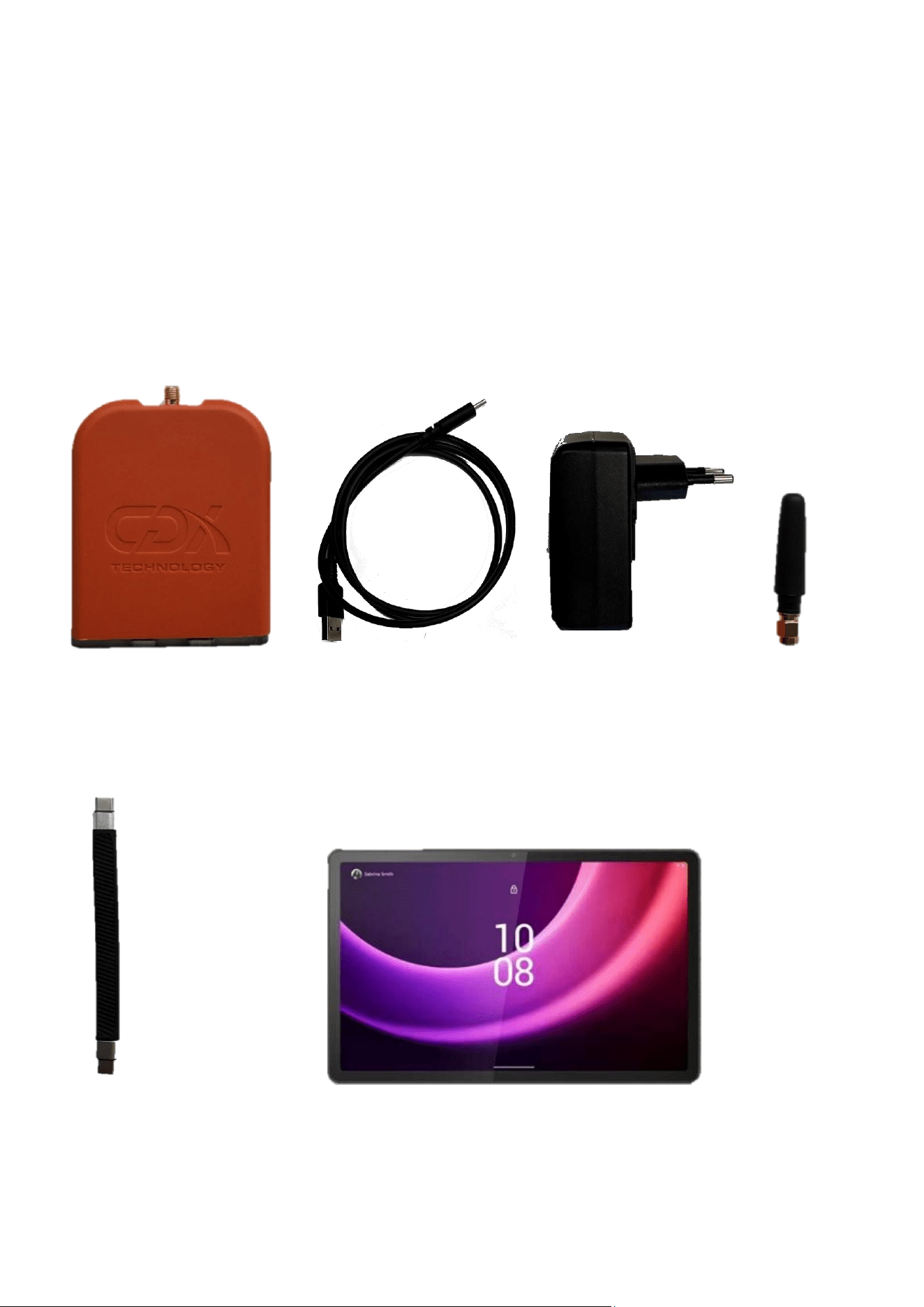
1.1 Package contents
The following items are supplied with the CDX Tablet Transceiver.
- CDX Tablet Transceiver - Charger cable - Charger adapter - Antenna
- Data cable - Tablet
Figure 2:CDX Tablet Transceiver
Figure 1:USB charger cable
Figure 3: Charger adapter
Figure 4: SMA
antenna
Figure 5: USB-C
data cable
Figure 6: Tablet

CDX TECHNOLOGY EUROPE B.V. - CDX Tablet Transceiver 6
1.2 Compatible expansion components
- CDX EV Controller
o The CDX Tablet Transceiver controls the CDX EV Controller to limit the speed on a go-kart.
- CDX Phone Transceiver
o The CDX Tablet Transceiver can control the CDX EV Controllers together with CDX Phone
Transceivers. Speed settings are automatically synchronized between the CDX Tablet Transceiver
and the CDX Phone Transceiver such that both are able to control and show the speeds of CDX EV
Controllers.
- Tablet stand
o The CDX Tablet Transceiver can be mounted on a tablet stand to allow you to perform other tasks
at a moment's notice. An example is signaling an accident using a flag, which requires both hands.
CDX TECHNOLOGY EUROPE B.V. - CDX Tablet Transceiver 7
1.3 Overview of product features
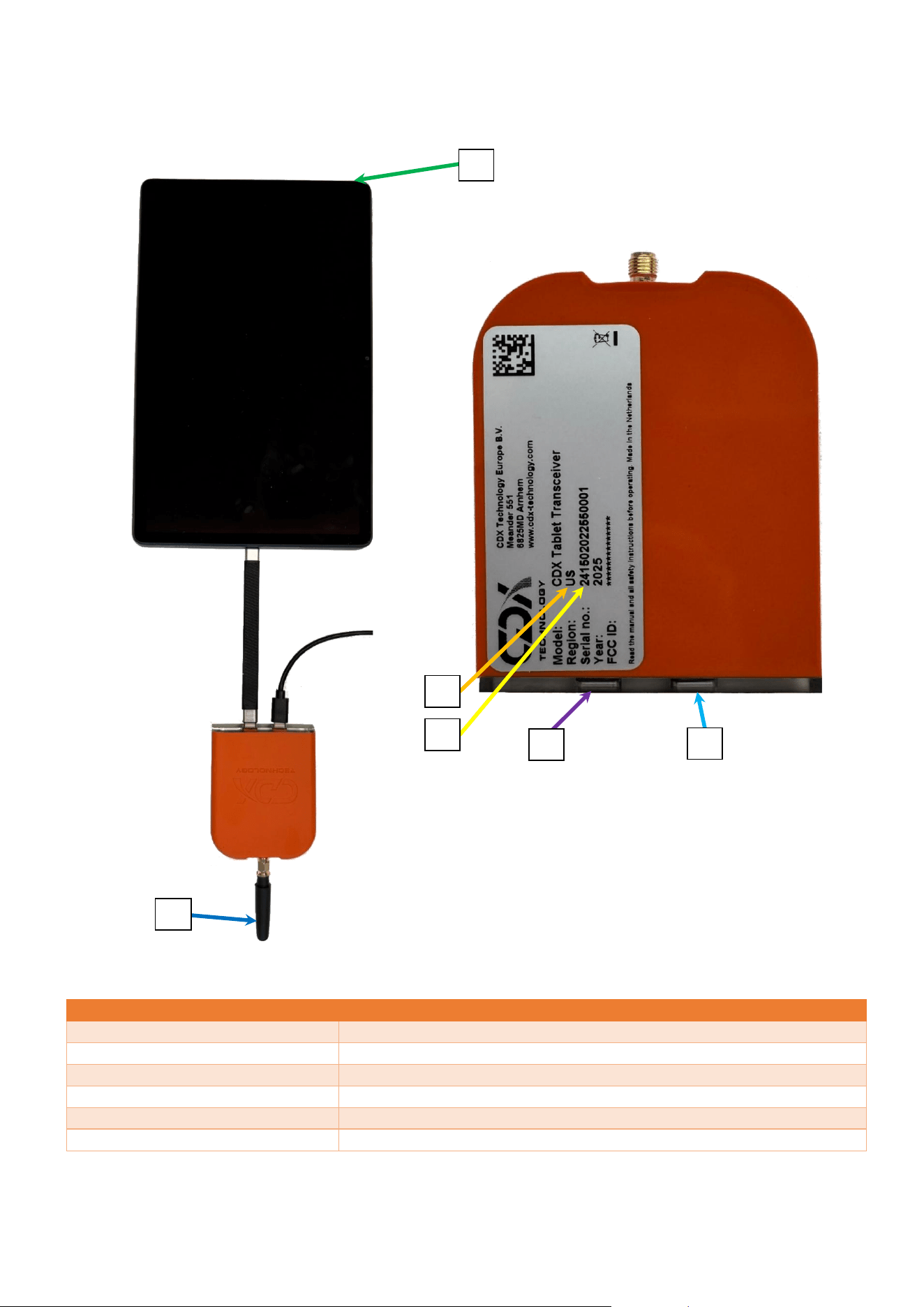
NUMBER
DESCRIPTION
1.
Antenna location
2.
On/Off button
3.
USB-C tablet connector
4.
USB-C charging connector
5.
Region
6.
Serial Number
Figure 7: Front and back side of CDX Tablet Transceiver
6
6
5
3
4
2
1
CDX TECHNOLOGY EUROPE B.V. - CDX Tablet Transceiver 8
2 Operating instructions
The CDX Tablet Transceiver is used to send speed commands to the CDX EV Controller. Track marshals positioned
alongside the go-karting track monitor on-track activity and overall safety. If necessary, they can remotely adjust
the speed of individual go-karts or bring them to a complete stop by transmitting speed commands via the CDX
Tablet Transceiver.
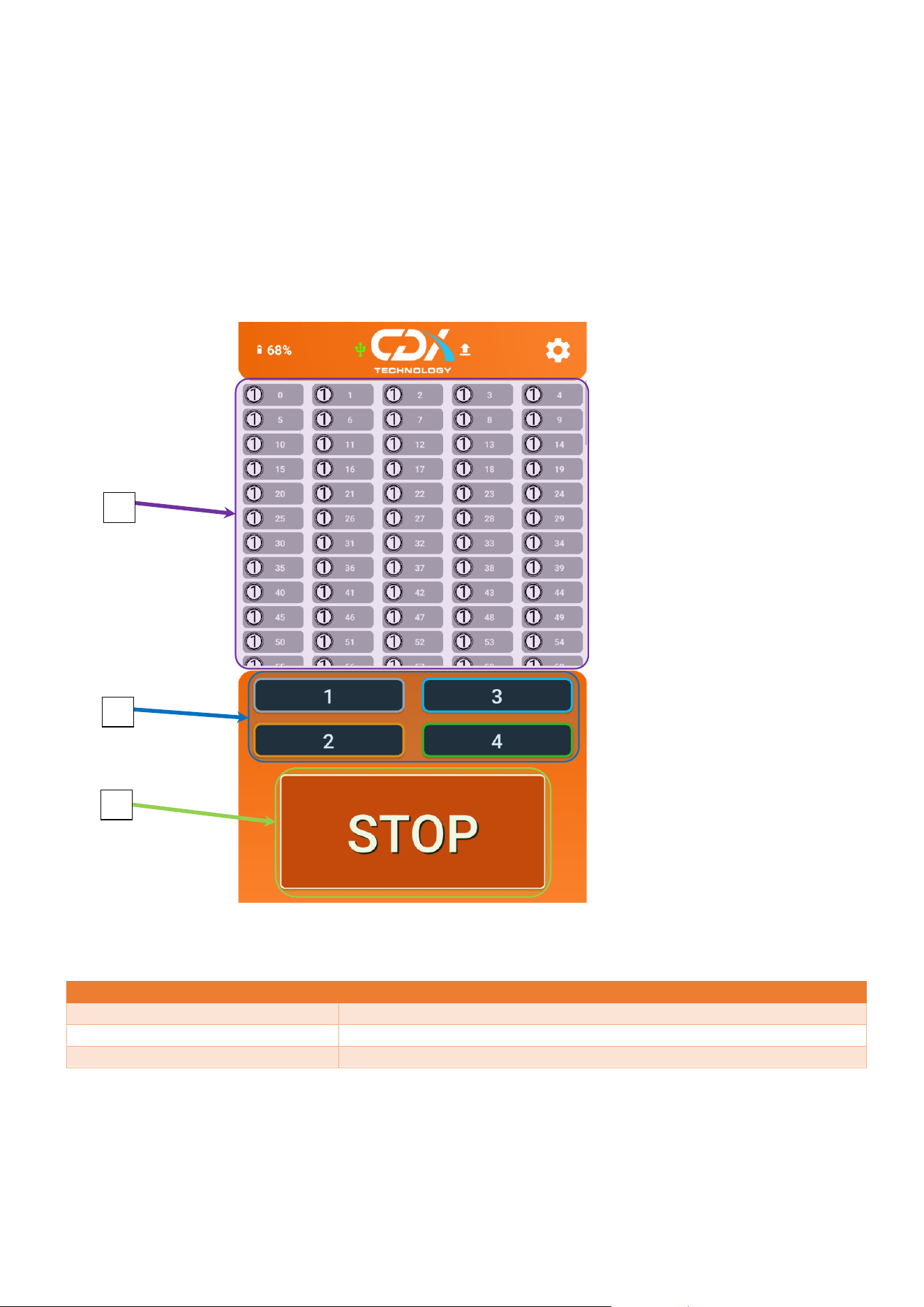
2.1 CDX Tablet Transceiver User Interface
NUMBER
DESCRIPTION
1.
Individual go-kart speed control
2.
Group go-kart speed control
3.
STOP button
Figure 8: CDX Tablet Transceiver Interface
1
2
3
6

CDX TECHNOLOGY EUROPE B.V. - CDX Tablet Transceiver 9
2.2 Group speed control
Group speed control is used to activate a speed setting for all go-karts, within the range of the CDX Tablet
Transceiver. The group speed control buttons are shown in Figure 8, and highlighted with number 2.
2.3 Individual speed control
Individual speed control is used to apply a speed setting for a specific go-kart. The individual speed control
buttons are shown in Figure 8, and highlighted with the number 1. The speed of the individual go-kart will also be
displayed in this area.
For example, if all go-karts are set to speed 4, but kart 22 is individually set to speed 3, the remaining go-karts will
continue to run at speed 4.
2.4 Synchronization between Remote controls
All CDX Control interfaces (Tablet and Handheld) support synchronization functionality. When synchronization is
active, the current speed setting of the assigned group is displayed on each control interface. The displayed speed
setting can be found in the upper-left corner of the screen, next to the CDX Technology logo, referred to as S1 up
to S4 (or S8 if the 8 speed settings are used).
2.5 Charging
Charging starts when the charger is plugged into the USB-C charging connector on the bottom side of the CDX
Tablet Transceiver, which is shown with the number 4 in Figure 7. Please take notice that the CDX Tablet
Transceiver must be turned on in order to negotiate charging. Therefore, never let the charge go under 20 %.
Charging should only take place using the supplied charger and the supplied USB-C cable.

CDX TECHNOLOGY EUROPE B.V. - CDX Tablet Transceiver 10
3 System Configuration
The CDX Tablet Transceiver has various features that can be configured. This includes 4 or 8 speed mode, Track ID
and Track PIN.
3.1 Speed restriction
The main function of the CDX Tablet Transceiver is to limit the speed of go-karts using the CDX EV Controller. This
is done using the group speed control buttons are shown in Figure 8, and highlighted with the number 1.
3.2 4 speed or 8 speed mode
When the motor speed controller on the go-kart uses 4 separate speed presets and a stop command, the CDX
Tablet Transceiver should be used in 4 speed mode. This is the default configuration. Optionally, for normal use
speed 1-4 and STOP can be send to the CDX EV Controller. An optional 5-8 speed is available for go-karts that
have a different motor controller. See the corresponding CDX Technology Europe B.V. (2026).
CDX_Remote_App_User_Manual. for further information.
3.3 Track ID and Track PIN
The Track ID and Track PIN feature allows the segmentation of a group of CDX EV controllers. By default the
Track-ID is set to ‘0000’ and Track-PIN is set to ‘0000’. In this mode the CDX EV controller accepts speeds
commands from CDX Tablet Transceivers remotes regardless of track id and track pin settings of the CDX Tablet
Transceiver. This is done to enhance the safety where someone cannot accidentally block their communication
ability.
A Track ID and Track PIN can be used when individual control of two or more groups of go-karts is required. The
Track ID and Track PIN are configured in the settings of the CDX Tablet Transceiver and must correspond to the
settings in the CDX EV Controller.
This function can also be used to prevent misuse of the system by changing these 2 parameters. Preventing
dangerous situations caused by people with malicious intent.
3.4 Region
Every CDX Tablet Transceiver is preconfigured to work with the radio frequencies that are permitted in the
specific region where it is bought. The region code is shown on the label of the CDX Tablet Transceiver, shown in
Figure 7, highlighted with the number 5.
It should be noted that the CDX Tablet Transceiver only works with other CDX devices configured to the same
region (frequency). Additionally, Transceivers are intended for use only in the region for which they are
configured.
CDX TECHNOLOGY EUROPE B.V. - CDX Tablet Transceiver 11
4 Technical data
This chapter presents the technical data in tables by category.
Electrical characteristic
Min
Typ.
Max
Unit
Charging input voltage
5.2
V (DC)
Charging input current
2.5
A
Environmental characteristics
Min
Typ.
Max
Unit
Operational temperature
1
0
45
°C
Storage temperature
-20
60
°C
Radio characteristics
Unit
Transmission radio frequency
869 (Europe),
908 (North America)
MHz
Transmission power
16 (Europe),
251 (North America)
mW
Radio modulation
Direct-sequence
spread spectrum
(DSSS)
Radio antenna
External SMA
antenna
Radio antenna gain
2
dBi
Physical characteristics
Unit
Dimensions (Width × Length × Height)
86 × 70 × 9
mm
Housing material
Polyurethane
1
Upon request, wider temperature ranges are available.

CDX TECHNOLOGY EUROPE B.V. - CDX Tablet Transceiver 12
5 References
1. CDX Technology Europe B.V. (2026). CDX_Remote_App_User_Manual.