Oxidative Stress Diagnosis
DEVICE SPECIFICATIONS
1.Turn on / turn off :
On : Press 3 secs
Off : Press 0.5 secs
2.Power indicators :
less than 15
Steady red
Battery low,
battery life
minutes
Flashing orange
Battery charging
Steady green
Battery charged
Power indicator:
Battery bar in %.
Wifi connection indicator:
Press for 3 seconds
Bluetooth connection
indicator :
Press for more than 3 seconds
Charging
Device not
connected to wifi
5. Wifi and Bluetooth connection
mode
Modes can only be changed when the
PAOTScan is OFF.
Press 4sec for wifi mode
Press longer than 4 sec for
bluetooth mode
3.Charging
Charging time : 4 h
Use a suitable charger
Power supply specifications: 5VDC
(+/- 10%) - 1A. Do not apply a voltage
higher than 13VDC, as this may destroy
the sensor.
4.Indicator lights
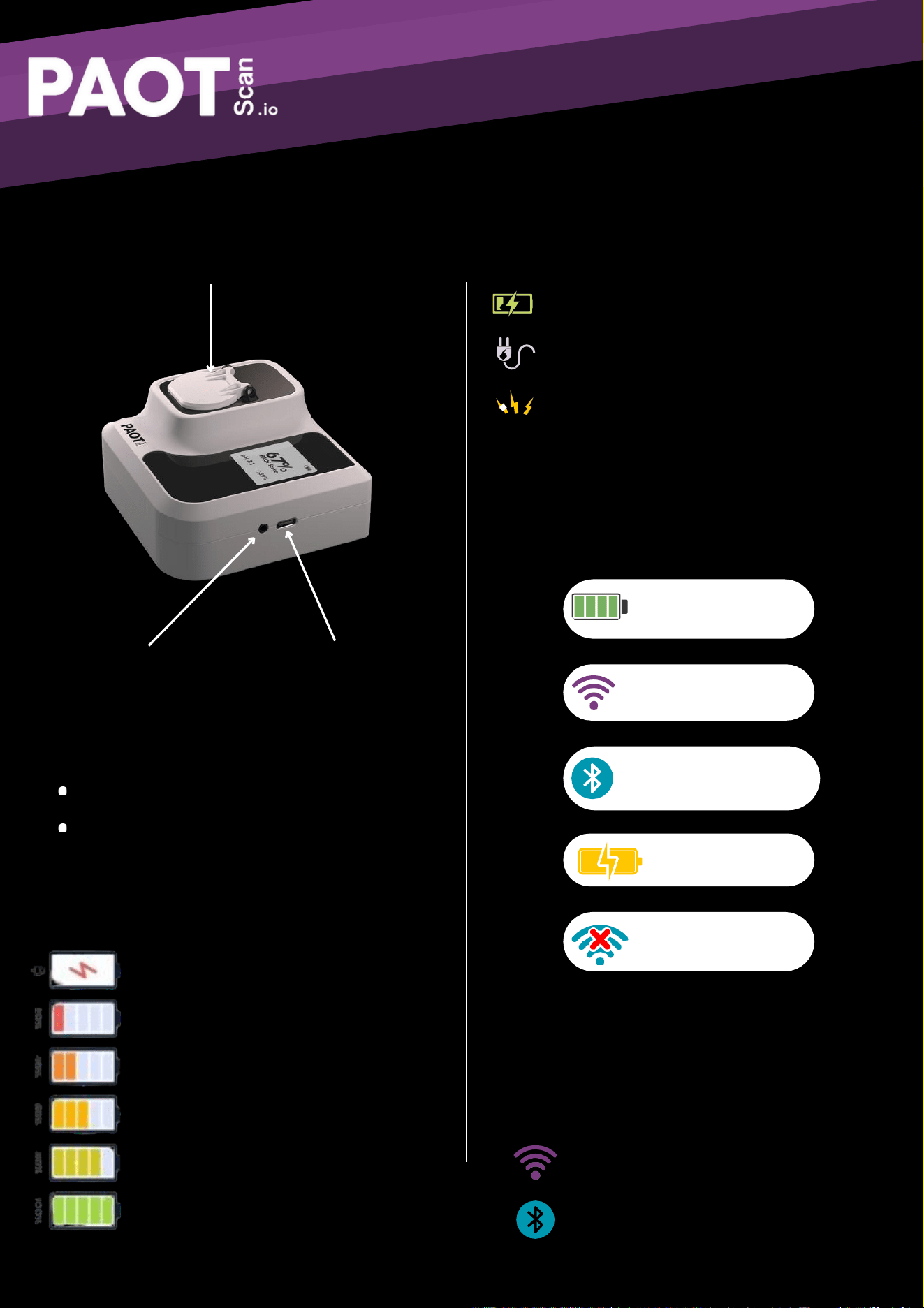
Liquid measuring bottle
On / Off button
USB-Calimentation
Oxidative Stress Diagnosis
Optimum operating conditions
Check PAOTSCANcharge level
Download a compatible application
ofCheck availability
communications
Wifi enabled
available
Bluetooth enabled
Mobile network
Geolocation enabled
Ensure sufficient
proximity
between sensor and cell phone
Operating time: 15h
(non-
Operating temperature: 5 - 40°C
Operating humidity: 0 - 98%
condensing)
Communication frequency: 2.4 GHz
TECHNICAL SPECIFICATIONS
Parameters measured
Oxidative stress by:
PAOTScore (Total Antioxidant Power)
POTScore (Total Oxidizing Power)
Accuracy
PAOT measurement range: 0 - 130
POT measurement range: 0- 20
Measurement error: < 10%.
Dimensions
10 cm x 9 cm x 4 cm
Weight: 150g
Oxidative Stress Diagnosis
WARNINGS
Do not use if T°>45°C Do not
expose to sunlight
Do not use near sources of heat or
flammable materials
Do not use in heavy rain
Do not immerse in liquids
Do not knock or damage your
device
Do not disassemble the product
Do not insert foreign objects into
the openings
Do not leave within the reach of children
declares that this device conforms to
its specifications.
Failure to comply with the conditions of
use may compromise the safety of the
product.
We accept no responsibility for any damage
resulting from failure to comply with these
warnings and instructions.
OXYSTRESS TECHNOLOGIES
Clean the device using a slightly damp wipe. Between
each sample, rinse the chamber with 2 mL of distilled
water. Do not use any solvent other than water.

Oxidative Stress Diagnosis
Normal environmental conditions
• Indoor use only
• Altitude up to 3000 m
• Temperature between 5 and 40°C
• Relative humidity between 30% and 70%
• Main supply voltage fluctuation <5%
• Pollution degree 2 compliant
Caution: The user is cautioned that changes or modifications not
expressly approved by the party responsible for compliance could
void the user's authority to operate the equipment.
This device complies with Part 15 of the FCC Rules. Operation is
subject to the following two conditions: (1) this device may not
cause harmful interference, and (2) this device must accept any
interference received, including interference that may cause
undesired operation.
NOTE: This equipment has been tested and found to comply with
the limits for a Class B digital device, pursuant to Part 15 of the
FCC Rules. These limits are designed to provide reasonable
protection against harmful interference in a residential installation.
This equipment generates, uses and can radiate radio frequency
energy and, if not installed and used in accordance with the
instructions, may cause harmful interference to radio
communications. However, there is no guarantee that interference
will not occur in a particular installation.
If this equipment does cause harmful interference to radio or
television reception, which can be determined by turning the

Oxidative Stress Diagnosis
equipment off and on, the user is encouraged to try to correct the
interference by one or more of the following measures:
-- Reorient or relocate the receiving antenna.
-- Increase the separation between the equipment and receiver.
-- Connect the equipment into an outlet on a circuit different from
that to which the receiver is connected.
-- Consult the dealer or an experienced radio/TV technician for
help.
FCC Radiation Exposure Statement:
This equipment complies with FCC radiation exposure limits set
forth for an uncontrolled environment. This transmitter must not be
co-located or operating in conjunction with any other antenna or
transmitter.
This equipment complies with FCC radiation exposure limits set
forth for an uncontrolled environment. End user must follow the
specific operating instructions for satisfying RF exposure
compliance. This transmitter must not be co-located or operating
in conjunction with any other antenna or transmitter.
The portable device is designed to meet the requirements for
exposure to radio waves established by the Federal
Communications Commission (USA). These requirements set a
SAR limit of 1.6 W/kg averaged over one gram of tissue. The
highest SAR value reported under this standard during product
certification for use when properly worn on
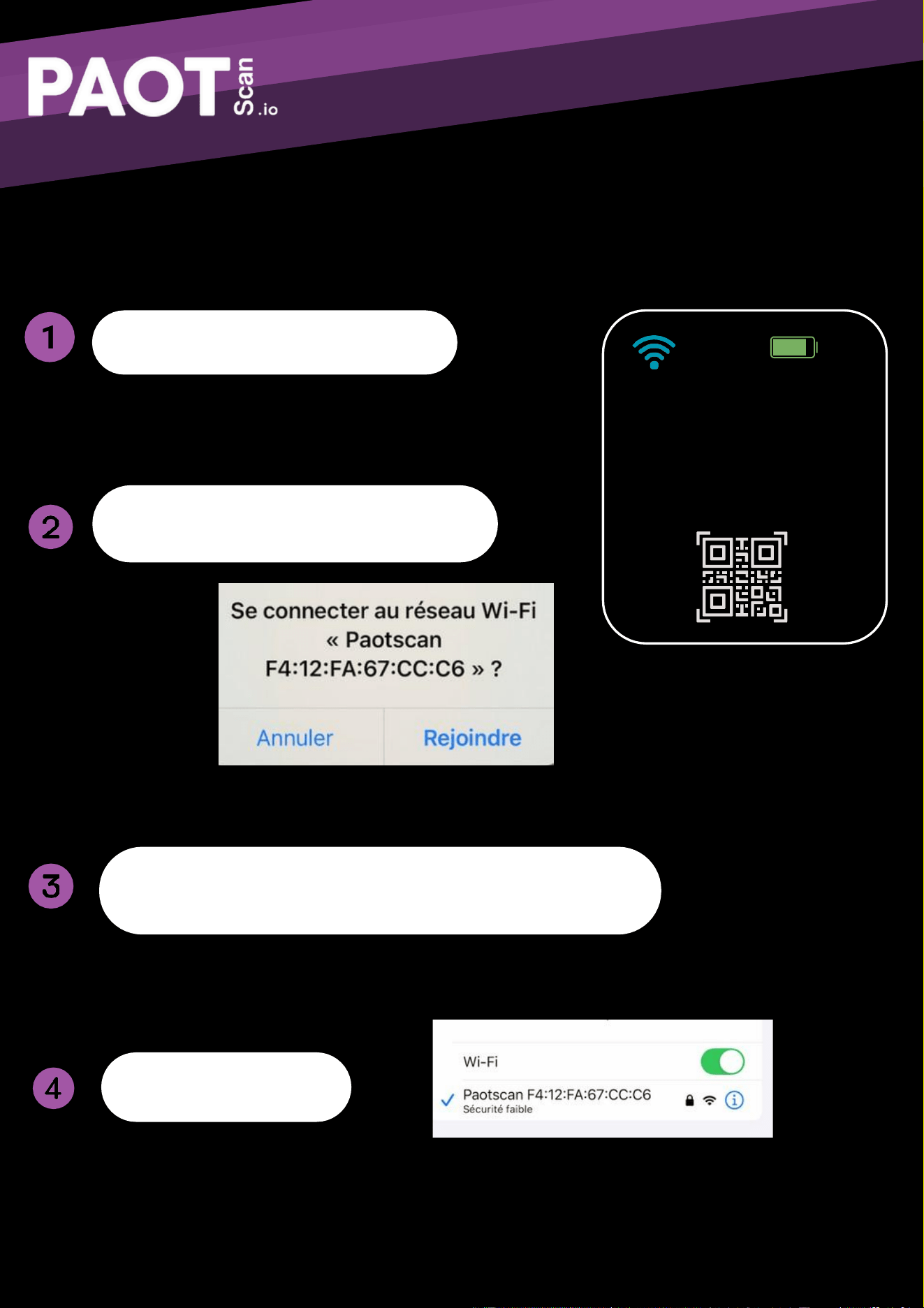
Oxidative Stress Diagnosis
68%
C o n n e c t to
W i - Fi
Paotscan
F4:12:FA: 67: CC: C6
Code :tzdj7xcb
the n ente r your
Wi-Fi credential s
Scan the QR code on the device
Connect to the PAOTSCAN network
Enter the code displayed on the device in the
“password” field
You are connected !
FIRST WIFI CONNECTION
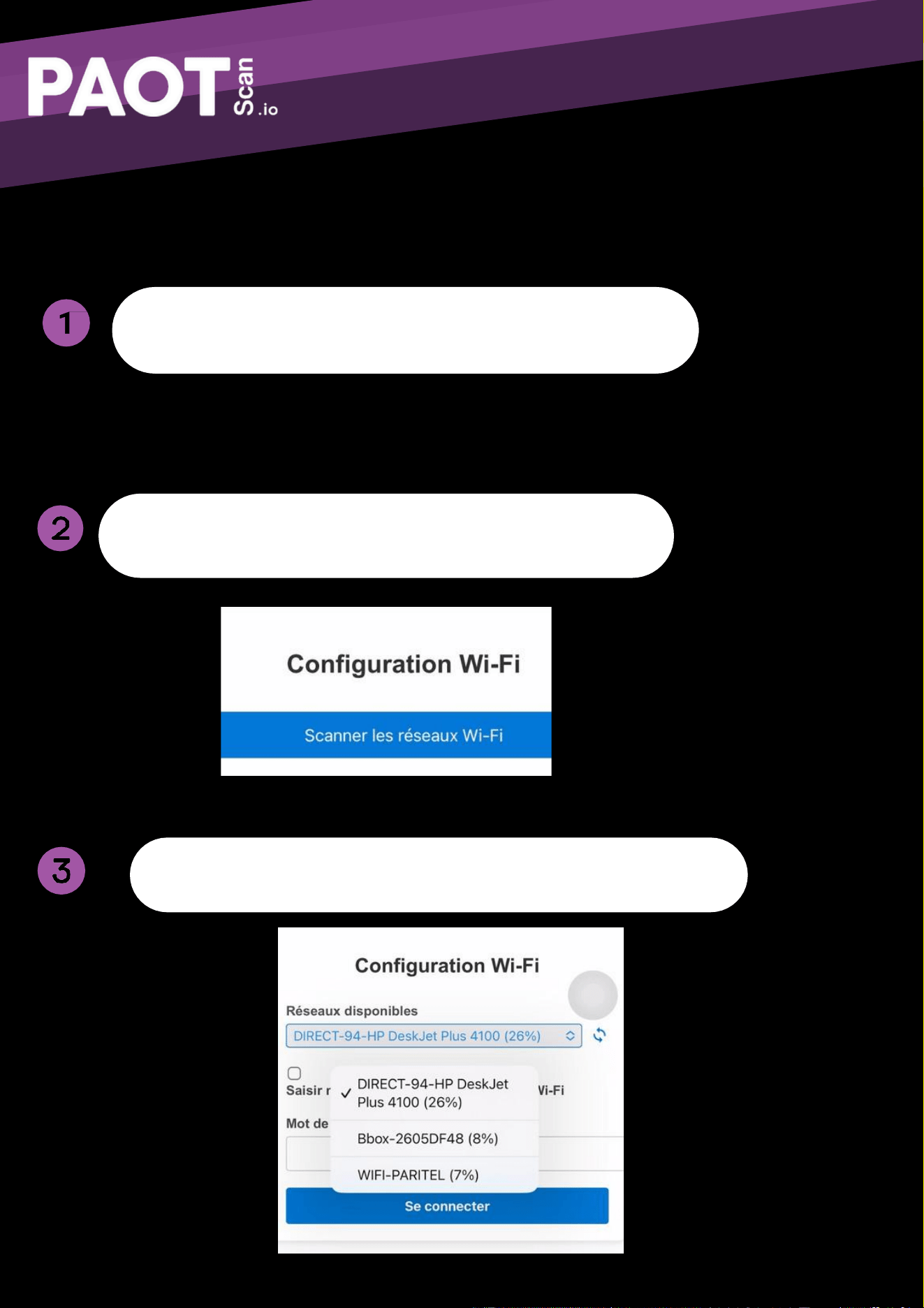
Oxidative Stress Diagnosis
WIFI NETWORK CONNECTION
Scanthe QR code on the device screen
Choose your Wi-Fi network and connect
Pressand hold the “on” button for 3 seconds
Oxidative Stress Diagnosis
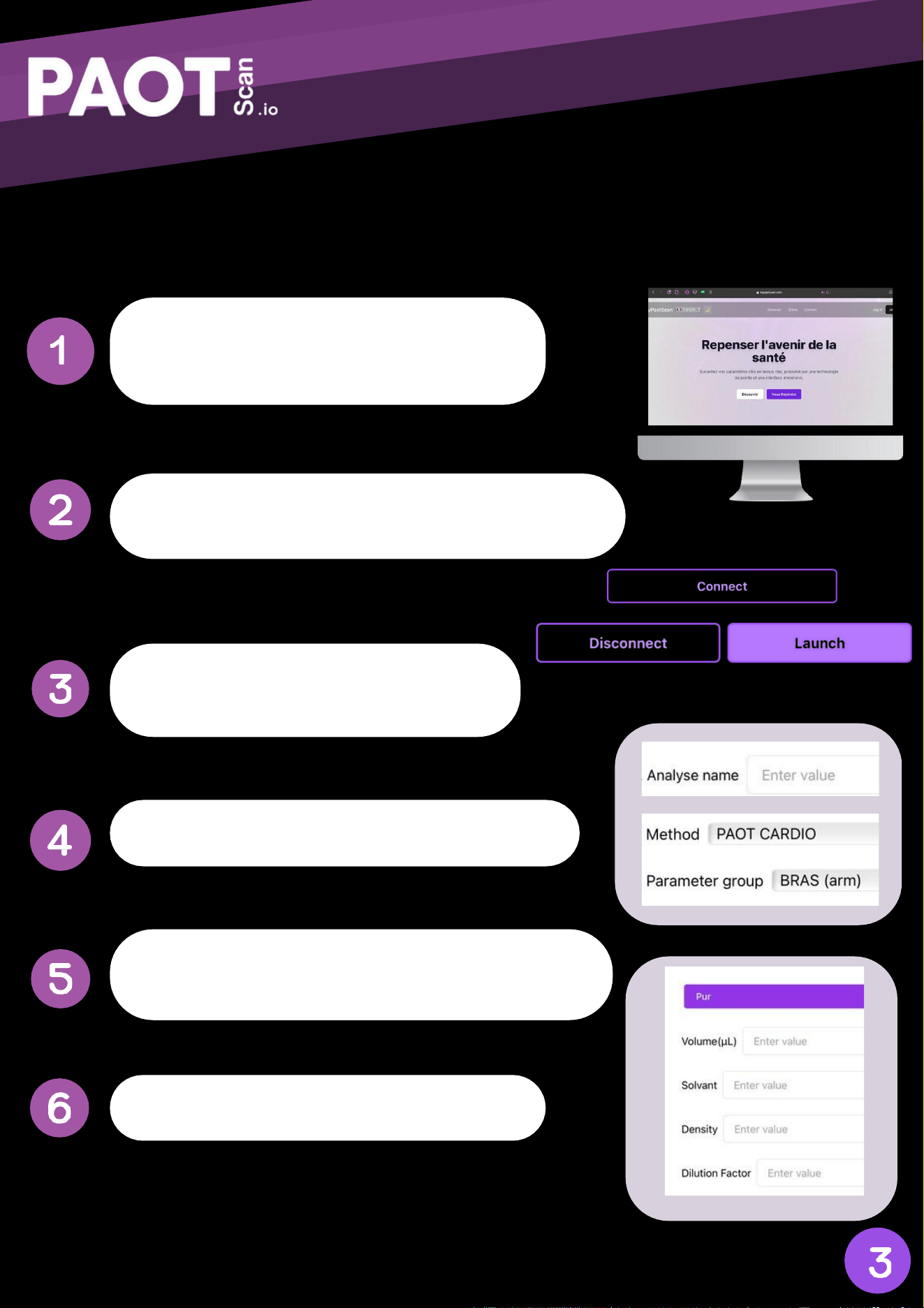
LIQUID MANUAL
Press the on button for 3seconds to
switch on the device
Log on to https://mypaotscan.com by scanning
the QR code on the device's screen
Connect the device by selecting “Connect”
then “launch”.
Enter the name of the sample being tested
Select parameter [parameter name] and
method [method name].
Enter the characteristics of the sample
Oxidative Stress Diagnosis
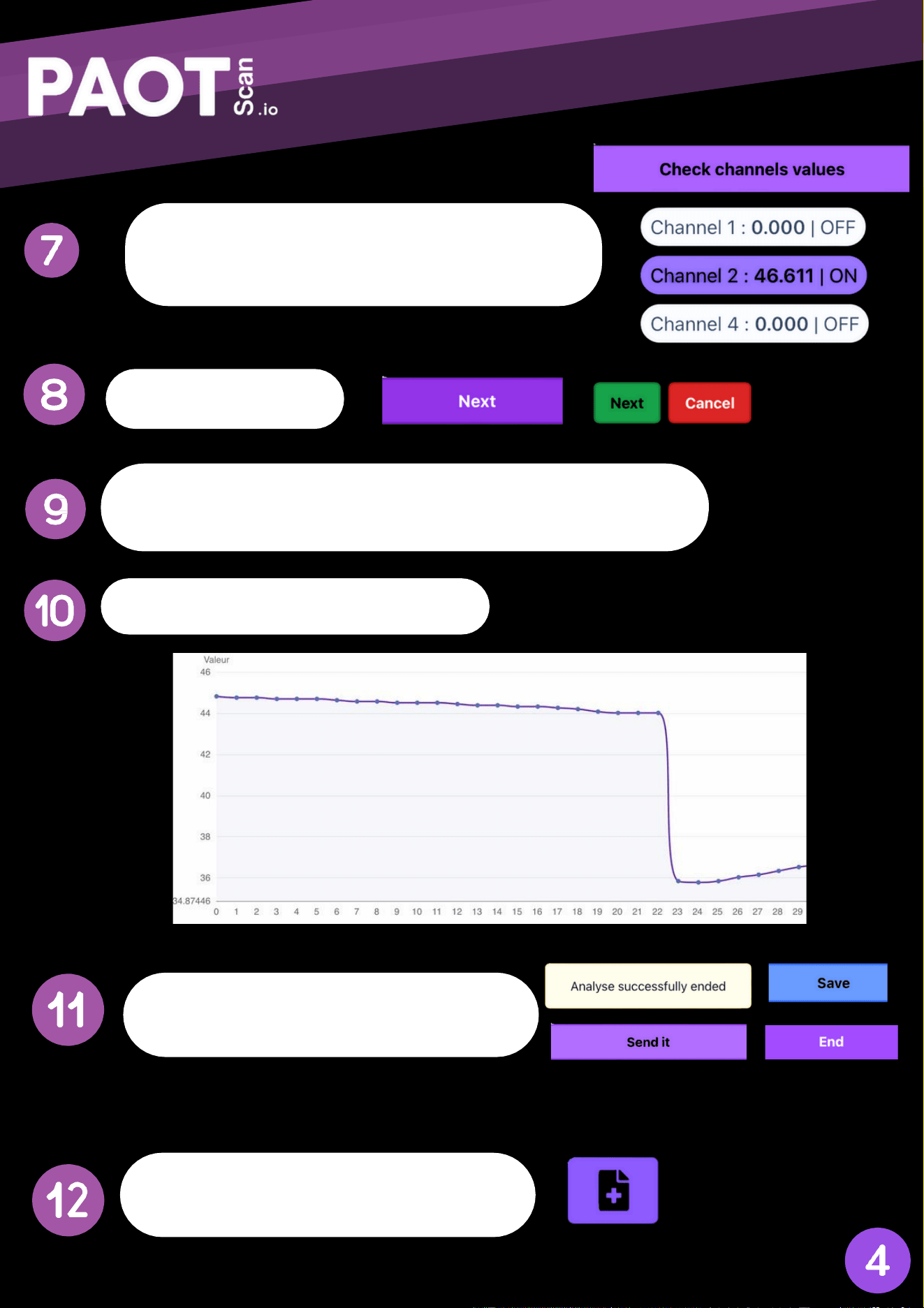
Click on “next”
Add the appropriate reaction medium (Food;loxy,..)
then run the analysis
Add 50 ul of your sample
Click on “check channels values” then select
the corresponding channel
At the end of the analysis, click on
“save”. “send it” and “end”.
Your results can then be viewed on
the following logo: