INTRODUCTION
Thank You For Purchasing Luxcell UNO 10 Power Bank by
Portronics! This 10,000mAh device charges your
smartphones and USB devices on the go with a sleek
design and LED Indicator. This manual covers its
features and usage. Thanks for choosing Portronics!
PACKAGE CONTAINS
ŸPowerbank
ŸCharging Cable
ŸUser Manual
PRODUCT OVERVIEW
TECHNICAL SPECIFICATIONS
GETTING STARTED
1. CHARGING YOUR POWERBANK
To charge your power bank, connect the Type-C port
located on the power bank to a USB-A port or USB-C
charger using the provided charging cable. Once
charging begins, the LED Indicator will blink.
2. USING THE POWER BUTTON
ŸA button is located on the top of the Mobile Power Bank.
ŸPress the button once to turn on the power bank
and view the remaining battery capacity on the
LED Indicator.
3. CHARGING YOUR MOBILE PHONE
To charge your mobile phone using the power bank,
simply connect your device using USB-A and Type -C
Port with the provided charging cable.
CHARGING AND USAGE
ŸUse the Right Cable and Charger : Always use the cable
provided by the manufacturer or a compatible, high-
quality alternative. Cheap or damaged cables can
overheat or cause short circuits.
ŸAvoid Overcharging : Most modern power banks have
overcharge protection, but it's still a good idea to unplug
them once fully charged to prevent strain on the
battery.
1. STORAGE
ŸKeep Away from Extreme Temperatures : Store your
power bank in a cool, dry place. Avoid exposing it to
direct sunlight, high heat (e.g., inside a car on a hot
day), or freezing temperatures, as these can damage
the battery or cause it to leak.
ŸPartial Charge for Long-Term Storage : If you won't
use it for a while, charge it to about 50-60% before
storing. A fully charged or completely drained battery
can degrade over time.
ŸAvoid Moisture : Keep it away from water or humid
environments to prevent short circuits or corrosion.
ŸAvoid Overheating : If the power bank feels unusually
hot during use or charging, unplug it and let it cool
down before using it again. Persistent overheating is a
sign of a problem.
ŸDon't Disassemble : Never attempt to open or repair a
power bank yourself. Internal components like lithium
batteries can be dangerous if mishandled.
The company will not be responsible for any damage,
injury, or malfunction resulting from improper usage,
mishandling, or failure to follow the manufacturer’s
instructions
ŸOn a Bed During Sleep : Placing a power bank on a bed
while sleeping can trap heat, especially if it's under a
pillow or blanket, increasing the risk of overheating or
fire.
ŸInside a Pocket or Bag with Metal Objects : Storing it
with keys, coins, or other metal items can cause a short
circuit if they contact the ports.
ŸNear a Heater or Radiator : Heat sources can raise the
power bank's temperature beyond safe limits,
damaging the battery.
ŸOn a Couch or Cushion : Soft surfaces can block
ventilation, leading to heat buildup if the power bank is
still warm from use or charging.
ŸIn a Car Dashboard Under Sunlight : Direct sunlight can
push the temperature to dangerous levels, risking
battery leakage or explosion.
IMPORTANT NOTE
WHERE NOT TO KEEP YOUR POWER BANK
3. SAFETY PRECAUTIONS
HANDLING A SWOLLEN POWER BANK
If your power bank swells, stop using it immediately
and unplug it carefully, placing it on a non-flammable
surface away from flammable items, people, and pets
to avoid risks like leaks or explosions. Do not puncture
or open it; instead, let it cool down and dispose of it at
an electronics recycling center per local rules—never
in regular trash. Contact the manufacturer for further
advice
Thank-you for choosing Portronics. We're happy to help
you understand how to use this product. Read on!
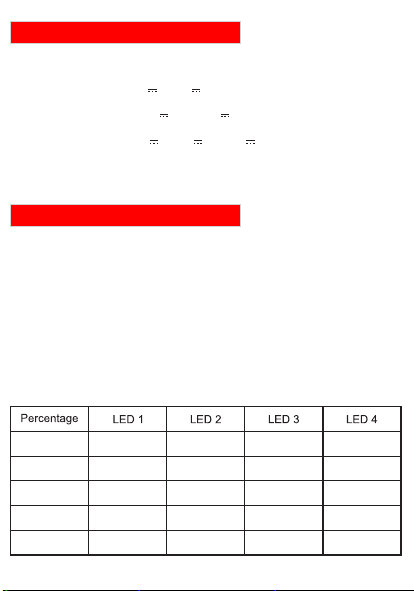
26 - 50%
On
Blinking
Off
Off
51 - 75%
On On Off
76 - 100%
On On On On
Abnormal
0 - 25%
Blinking
Off Off Off
Blinking
Blinking Blinking Blinking Blinking
www.portronics.com
For Support
Visit : www.portronics.com
Email : [email protected]
Contact No. : +91 9555245245
(Working Hours. : Monday -
Saturday 10:00am - 6:00pm)
E-Waste Management
For E-Waste & ROHS compliance
refer to www.portronics.com/ewaste
4. DISPOSAL
Proper Recycling : When your power bank reaches the
end of its life, don't throw it in the trash. Take it to an
electronics recycling center, as lithium batteries can be
hazardous if improperly disposed of.
2. HANDLING
ŸInspect for Damage : Regularly check for signs of wear,
such as a swollen battery, cracked casing, or exposed
wires. If you notice any damage, stop using it
immediately and dispose of it safely.
ŸDon't Drop or Crush : Physical damage can rupture the
battery, leading to leaks or even a fire hazard.
ŸKeep Away from Metal Objects : Store it away from
coins, keys, or other metal items that could
accidentally connect the terminals and cause a short
circuit.
ŸDon't Charge and Discharge Simultaneously : Avoid
using the power bank to charge your devices while it's
being charged itself, as this can generate excessive
heat and degrade the battery.
ŸCharge in a Safe Environment : Place the power bank on
a flat, non-flammable surface while charging. Avoid
charging it on beds, sofas, or near flammable materials.
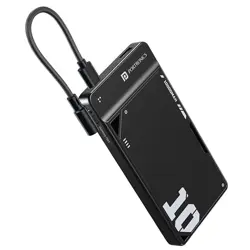
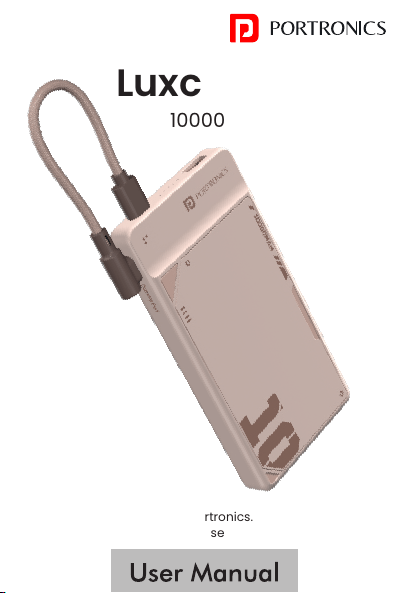
Luxcell UNO 10
10000mAh Power Bank
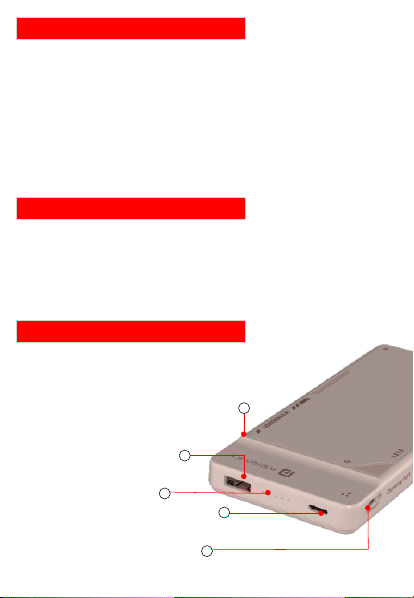
1. USB A Output
2. LED Indicator
3. Type C (Input/Output)
4. Type C Dummy Port
5. Wake Up Button
1
2
3
4
Battery Capacity : 10000mAh
Input (Type-C) : 5V3A 9V2A 12V1.5A
Output (Type-C) : 5V3A 9V2.22A 12V1.67A
Output (USB A) : 5V3A 9V2A 12V1.5A 10V2.25A
Total Output : 22.5W MAX.
*4.This is a dummy port and does not supply any power.
5
INTRODUCTION
Thank You For Purchasing Luxcell UNO 10 Power Bank by
Portronics! This 10,000mAh device charges your
smartphones and USB devices on the go with a sleek
design and LED Indicator. This manual covers its
features and usage. Thanks for choosing Portronics!
PACKAGE CONTAINS
ŸPowerbank
ŸCharging Cable
ŸUser Manual
PRODUCT OVERVIEW
TECHNICAL SPECIFICATIONS
GETTING STARTED
1. CHARGING YOUR POWERBANK
To charge your power bank, connect the Type-C port
located on the power bank to a USB-A port or USB-C
charger using the provided charging cable. Once
charging begins, the LED Indicator will blink.
2. USING THE POWER BUTTON
ŸA button is located on the top of the Mobile Power Bank.
ŸPress the button once to turn on the power bank
and view the remaining battery capacity on the
LED Indicator.
3. CHARGING YOUR MOBILE PHONE
To charge your mobile phone using the power bank,
simply connect your device using USB-A and Type -C
Port with the provided charging cable.
CHARGING AND USAGE
ŸUse the Right Cable and Charger : Always use the cable
provided by the manufacturer or a compatible, high-
quality alternative. Cheap or damaged cables can
overheat or cause short circuits.
ŸAvoid Overcharging : Most modern power banks have
overcharge protection, but it's still a good idea to unplug
them once fully charged to prevent strain on the
battery.
1. STORAGE
ŸKeep Away from Extreme Temperatures : Store your
power bank in a cool, dry place. Avoid exposing it to
direct sunlight, high heat (e.g., inside a car on a hot
day), or freezing temperatures, as these can damage
the battery or cause it to leak.
ŸPartial Charge for Long-Term Storage : If you won't
use it for a while, charge it to about 50-60% before
storing. A fully charged or completely drained battery
can degrade over time.
ŸAvoid Moisture : Keep it away from water or humid
environments to prevent short circuits or corrosion.
ŸAvoid Overheating : If the power bank feels unusually
hot during use or charging, unplug it and let it cool
down before using it again. Persistent overheating is a
sign of a problem.
ŸDon't Disassemble : Never attempt to open or repair a
power bank yourself. Internal components like lithium
batteries can be dangerous if mishandled.
The company will not be responsible for any damage,
injury, or malfunction resulting from improper usage,
mishandling, or failure to follow the manufacturer’s
instructions
ŸOn a Bed During Sleep : Placing a power bank on a bed
while sleeping can trap heat, especially if it's under a
pillow or blanket, increasing the risk of overheating or
fire.
ŸInside a Pocket or Bag with Metal Objects : Storing it
with keys, coins, or other metal items can cause a short
circuit if they contact the ports.
ŸNear a Heater or Radiator : Heat sources can raise the
power bank's temperature beyond safe limits,
damaging the battery.
ŸOn a Couch or Cushion : Soft surfaces can block
ventilation, leading to heat buildup if the power bank is
still warm from use or charging.
ŸIn a Car Dashboard Under Sunlight : Direct sunlight can
push the temperature to dangerous levels, risking
battery leakage or explosion.
IMPORTANT NOTE
WHERE NOT TO KEEP YOUR POWER BANK
3. SAFETY PRECAUTIONS
HANDLING A SWOLLEN POWER BANK
If your power bank swells, stop using it immediately
and unplug it carefully, placing it on a non-flammable
surface away from flammable items, people, and pets
to avoid risks like leaks or explosions. Do not puncture
or open it; instead, let it cool down and dispose of it at
an electronics recycling center per local rules—never
in regular trash. Contact the manufacturer for further
advice
Thank-you for choosing Portronics. We're happy to help
you understand how to use this product. Read on!
26 - 50%
On
Blinking
Off
Off
51 - 75%
On On Off
76 - 100%
On On On On
Abnormal
0 - 25%
Blinking
Off Off Off
Blinking
Blinking Blinking Blinking Blinking
www.portronics.com
For Support
Visit : www.portronics.com
Email : [email protected]
Contact No. : +91 9555245245
(Working Hours. : Monday -
Saturday 10:00am - 6:00pm)
E-Waste Management
For E-Waste & ROHS compliance
refer to www.portronics.com/ewaste
4. DISPOSAL
Proper Recycling : When your power bank reaches the
end of its life, don't throw it in the trash. Take it to an
electronics recycling center, as lithium batteries can be
hazardous if improperly disposed of.
2. HANDLING
ŸInspect for Damage : Regularly check for signs of wear,
such as a swollen battery, cracked casing, or exposed
wires. If you notice any damage, stop using it
immediately and dispose of it safely.
ŸDon't Drop or Crush : Physical damage can rupture the
battery, leading to leaks or even a fire hazard.
ŸKeep Away from Metal Objects : Store it away from
coins, keys, or other metal items that could
accidentally connect the terminals and cause a short
circuit.
ŸDon't Charge and Discharge Simultaneously : Avoid
using the power bank to charge your devices while it's
being charged itself, as this can generate excessive
heat and degrade the battery.
ŸCharge in a Safe Environment : Place the power bank on
a flat, non-flammable surface while charging. Avoid
charging it on beds, sofas, or near flammable materials.
Luxcell UNO 10
10000mAh Power Bank
1. USB A Output
2. LED Indicator
3. Type C (Input/Output)
4. Type C Dummy Port
5. Wake Up Button
1
2
3
4
Battery Capacity : 10000mAh
Input (Type-C) : 5V3A 9V2A 12V1.5A
Output (Type-C) : 5V3A 9V2.22A 12V1.67A
Output (USB A) : 5V3A 9V2A 12V1.5A 10V2.25A
Total Output : 22.5W MAX.
*4.This is a dummy port and does not supply any power.
5
INTRODUCTION
Thank You For Purchasing Luxcell UNO 10 Power Bank by
Portronics! This 10,000mAh device charges your
smartphones and USB devices on the go with a sleek
design and LED Indicator. This manual covers its
features and usage. Thanks for choosing Portronics!
PACKAGE CONTAINS
ŸPowerbank
ŸCharging Cable
ŸUser Manual
PRODUCT OVERVIEW
TECHNICAL SPECIFICATIONS
GETTING STARTED
1. CHARGING YOUR POWERBANK
To charge your power bank, connect the Type-C port
located on the power bank to a USB-A port or USB-C
charger using the provided charging cable. Once
charging begins, the LED Indicator will blink.
2. USING THE POWER BUTTON
ŸA button is located on the top of the Mobile Power Bank.
ŸPress the button once to turn on the power bank
and view the remaining battery capacity on the
LED Indicator.
3. CHARGING YOUR MOBILE PHONE
To charge your mobile phone using the power bank,
simply connect your device using USB-A and Type -C
Port with the provided charging cable.
CHARGING AND USAGE
ŸUse the Right Cable and Charger : Always use the cable
provided by the manufacturer or a compatible, high-
quality alternative. Cheap or damaged cables can
overheat or cause short circuits.
ŸAvoid Overcharging : Most modern power banks have
overcharge protection, but it's still a good idea to unplug
them once fully charged to prevent strain on the
battery.
1. STORAGE
ŸKeep Away from Extreme Temperatures : Store your
power bank in a cool, dry place. Avoid exposing it to
direct sunlight, high heat (e.g., inside a car on a hot
day), or freezing temperatures, as these can damage
the battery or cause it to leak.
ŸPartial Charge for Long-Term Storage : If you won't
use it for a while, charge it to about 50-60% before
storing. A fully charged or completely drained battery
can degrade over time.
ŸAvoid Moisture : Keep it away from water or humid
environments to prevent short circuits or corrosion.
ŸAvoid Overheating : If the power bank feels unusually
hot during use or charging, unplug it and let it cool
down before using it again. Persistent overheating is a
sign of a problem.
ŸDon't Disassemble : Never attempt to open or repair a
power bank yourself. Internal components like lithium
batteries can be dangerous if mishandled.
The company will not be responsible for any damage,
injury, or malfunction resulting from improper usage,
mishandling, or failure to follow the manufacturer’s
instructions
ŸOn a Bed During Sleep : Placing a power bank on a bed
while sleeping can trap heat, especially if it's under a
pillow or blanket, increasing the risk of overheating or
fire.
ŸInside a Pocket or Bag with Metal Objects : Storing it
with keys, coins, or other metal items can cause a short
circuit if they contact the ports.
ŸNear a Heater or Radiator : Heat sources can raise the
power bank's temperature beyond safe limits,
damaging the battery.
ŸOn a Couch or Cushion : Soft surfaces can block
ventilation, leading to heat buildup if the power bank is
still warm from use or charging.
ŸIn a Car Dashboard Under Sunlight : Direct sunlight can
push the temperature to dangerous levels, risking
battery leakage or explosion.
IMPORTANT NOTE
WHERE NOT TO KEEP YOUR POWER BANK
3. SAFETY PRECAUTIONS
HANDLING A SWOLLEN POWER BANK
If your power bank swells, stop using it immediately
and unplug it carefully, placing it on a non-flammable
surface away from flammable items, people, and pets
to avoid risks like leaks or explosions. Do not puncture
or open it; instead, let it cool down and dispose of it at
an electronics recycling center per local rules—never
in regular trash. Contact the manufacturer for further
advice
Thank-you for choosing Portronics. We're happy to help
you understand how to use this product. Read on!
26 - 50%
On
Blinking
Off
Off
51 - 75%
On On Off
76 - 100%
On On On On
Abnormal
0 - 25%
Blinking
Off Off Off
Blinking
Blinking Blinking Blinking Blinking
www.portronics.com
For Support
Visit : www.portronics.com
Email : [email protected]
Contact No. : +91 9555245245
(Working Hours. : Monday -
Saturday 10:00am - 6:00pm)
E-Waste Management
For E-Waste & ROHS compliance
refer to www.portronics.com/ewaste
4. DISPOSAL
Proper Recycling : When your power bank reaches the
end of its life, don't throw it in the trash. Take it to an
electronics recycling center, as lithium batteries can be
hazardous if improperly disposed of.
2. HANDLING
ŸInspect for Damage : Regularly check for signs of wear,
such as a swollen battery, cracked casing, or exposed
wires. If you notice any damage, stop using it
immediately and dispose of it safely.
ŸDon't Drop or Crush : Physical damage can rupture the
battery, leading to leaks or even a fire hazard.
ŸKeep Away from Metal Objects : Store it away from
coins, keys, or other metal items that could
accidentally connect the terminals and cause a short
circuit.
ŸDon't Charge and Discharge Simultaneously : Avoid
using the power bank to charge your devices while it's
being charged itself, as this can generate excessive
heat and degrade the battery.
ŸCharge in a Safe Environment : Place the power bank on
a flat, non-flammable surface while charging. Avoid
charging it on beds, sofas, or near flammable materials.
Luxcell UNO 10
10000mAh Power Bank
1. USB A Output
2. LED Indicator
3. Type C (Input/Output)
4. Type C Dummy Port
5. Wake Up Button
1
2
3
4
Battery Capacity : 10000mAh
Input (Type-C) : 5V3A 9V2A 12V1.5A
Output (Type-C) : 5V3A 9V2.22A 12V1.67A
Output (USB A) : 5V3A 9V2A 12V1.5A 10V2.25A
Total Output : 22.5W MAX.
*4.This is a dummy port and does not supply any power.
5

INTRODUCTION
Thank You For Purchasing Luxcell UNO 10 Power Bank by
Portronics! This 10,000mAh device charges your
smartphones and USB devices on the go with a sleek
design and LED Indicator. This manual covers its
features and usage. Thanks for choosing Portronics!
PACKAGE CONTAINS
ŸPowerbank
ŸCharging Cable
ŸUser Manual
PRODUCT OVERVIEW
TECHNICAL SPECIFICATIONS
GETTING STARTED
1. CHARGING YOUR POWERBANK
To charge your power bank, connect the Type-C port
located on the power bank to a USB-A port or USB-C
charger using the provided charging cable. Once
charging begins, the LED Indicator will blink.
2. USING THE POWER BUTTON
ŸA button is located on the top of the Mobile Power Bank.
ŸPress the button once to turn on the power bank
and view the remaining battery capacity on the
LED Indicator.
3. CHARGING YOUR MOBILE PHONE
To charge your mobile phone using the power bank,
simply connect your device using USB-A and Type -C
Port with the provided charging cable.
CHARGING AND USAGE
ŸUse the Right Cable and Charger : Always use the cable
provided by the manufacturer or a compatible, high-
quality alternative. Cheap or damaged cables can
overheat or cause short circuits.
ŸAvoid Overcharging : Most modern power banks have
overcharge protection, but it's still a good idea to unplug
them once fully charged to prevent strain on the
battery.
1. STORAGE
ŸKeep Away from Extreme Temperatures : Store your
power bank in a cool, dry place. Avoid exposing it to
direct sunlight, high heat (e.g., inside a car on a hot
day), or freezing temperatures, as these can damage
the battery or cause it to leak.
ŸPartial Charge for Long-Term Storage : If you won't
use it for a while, charge it to about 50-60% before
storing. A fully charged or completely drained battery
can degrade over time.
ŸAvoid Moisture : Keep it away from water or humid
environments to prevent short circuits or corrosion.
ŸAvoid Overheating : If the power bank feels unusually
hot during use or charging, unplug it and let it cool
down before using it again. Persistent overheating is a
sign of a problem.
ŸDon't Disassemble : Never attempt to open or repair a
power bank yourself. Internal components like lithium
batteries can be dangerous if mishandled.
The company will not be responsible for any damage,
injury, or malfunction resulting from improper usage,
mishandling, or failure to follow the manufacturer’s
instructions
ŸOn a Bed During Sleep : Placing a power bank on a bed
while sleeping can trap heat, especially if it's under a
pillow or blanket, increasing the risk of overheating or
fire.
ŸInside a Pocket or Bag with Metal Objects : Storing it
with keys, coins, or other metal items can cause a short
circuit if they contact the ports.
ŸNear a Heater or Radiator : Heat sources can raise the
power bank's temperature beyond safe limits,
damaging the battery.
ŸOn a Couch or Cushion : Soft surfaces can block
ventilation, leading to heat buildup if the power bank is
still warm from use or charging.
ŸIn a Car Dashboard Under Sunlight : Direct sunlight can
push the temperature to dangerous levels, risking
battery leakage or explosion.
IMPORTANT NOTE
WHERE NOT TO KEEP YOUR POWER BANK
3. SAFETY PRECAUTIONS
HANDLING A SWOLLEN POWER BANK
If your power bank swells, stop using it immediately
and unplug it carefully, placing it on a non-flammable
surface away from flammable items, people, and pets
to avoid risks like leaks or explosions. Do not puncture
or open it; instead, let it cool down and dispose of it at
an electronics recycling center per local rules—never
in regular trash. Contact the manufacturer for further
advice
Thank-you for choosing Portronics. We're happy to help
you understand how to use this product. Read on!
26 - 50%
On
Blinking
Off
Off
51 - 75%
On On Off
76 - 100%
On On On On
Abnormal
0 - 25%
Blinking
Off Off Off
Blinking
Blinking Blinking Blinking Blinking
www.portronics.com
For Support
Visit : www.portronics.com
Email : [email protected]
Contact No. : +91 9555245245
(Working Hours. : Monday -
Saturday 10:00am - 6:00pm)
E-Waste Management
For E-Waste & ROHS compliance
refer to www.portronics.com/ewaste
4. DISPOSAL
Proper Recycling : When your power bank reaches the
end of its life, don't throw it in the trash. Take it to an
electronics recycling center, as lithium batteries can be
hazardous if improperly disposed of.
2. HANDLING
ŸInspect for Damage : Regularly check for signs of wear,
such as a swollen battery, cracked casing, or exposed
wires. If you notice any damage, stop using it
immediately and dispose of it safely.
ŸDon't Drop or Crush : Physical damage can rupture the
battery, leading to leaks or even a fire hazard.
ŸKeep Away from Metal Objects : Store it away from
coins, keys, or other metal items that could
accidentally connect the terminals and cause a short
circuit.
ŸDon't Charge and Discharge Simultaneously : Avoid
using the power bank to charge your devices while it's
being charged itself, as this can generate excessive
heat and degrade the battery.
ŸCharge in a Safe Environment : Place the power bank on
a flat, non-flammable surface while charging. Avoid
charging it on beds, sofas, or near flammable materials.
Luxcell UNO 10
10000mAh Power Bank
1. USB A Output
2. LED Indicator
3. Type C (Input/Output)
4. Type C Dummy Port
5. Wake Up Button
1
2
3
4
Battery Capacity : 10000mAh
Input (Type-C) : 5V3A 9V2A 12V1.5A
Output (Type-C) : 5V3A 9V2.22A 12V1.67A
Output (USB A) : 5V3A 9V2A 12V1.5A 10V2.25A
Total Output : 22.5W MAX.
*4.This is a dummy port and does not supply any power.
5

INTRODUCTION
Thank You For Purchasing Luxcell UNO 10 Power Bank by
Portronics! This 10,000mAh device charges your
smartphones and USB devices on the go with a sleek
design and LED Indicator. This manual covers its
features and usage. Thanks for choosing Portronics!
PACKAGE CONTAINS
ŸPowerbank
ŸCharging Cable
ŸUser Manual
PRODUCT OVERVIEW
TECHNICAL SPECIFICATIONS
GETTING STARTED
1. CHARGING YOUR POWERBANK
To charge your power bank, connect the Type-C port
located on the power bank to a USB-A port or USB-C
charger using the provided charging cable. Once
charging begins, the LED Indicator will blink.
2. USING THE POWER BUTTON
ŸA button is located on the top of the Mobile Power Bank.
ŸPress the button once to turn on the power bank
and view the remaining battery capacity on the
LED Indicator.
3. CHARGING YOUR MOBILE PHONE
To charge your mobile phone using the power bank,
simply connect your device using USB-A and Type -C
Port with the provided charging cable.
CHARGING AND USAGE
ŸUse the Right Cable and Charger : Always use the cable
provided by the manufacturer or a compatible, high-
quality alternative. Cheap or damaged cables can
overheat or cause short circuits.
ŸAvoid Overcharging : Most modern power banks have
overcharge protection, but it's still a good idea to unplug
them once fully charged to prevent strain on the
battery.
1. STORAGE
ŸKeep Away from Extreme Temperatures : Store your
power bank in a cool, dry place. Avoid exposing it to
direct sunlight, high heat (e.g., inside a car on a hot
day), or freezing temperatures, as these can damage
the battery or cause it to leak.
ŸPartial Charge for Long-Term Storage : If you won't
use it for a while, charge it to about 50-60% before
storing. A fully charged or completely drained battery
can degrade over time.
ŸAvoid Moisture : Keep it away from water or humid
environments to prevent short circuits or corrosion.
ŸAvoid Overheating : If the power bank feels unusually
hot during use or charging, unplug it and let it cool
down before using it again. Persistent overheating is a
sign of a problem.
ŸDon't Disassemble : Never attempt to open or repair a
power bank yourself. Internal components like lithium
batteries can be dangerous if mishandled.
The company will not be responsible for any damage,
injury, or malfunction resulting from improper usage,
mishandling, or failure to follow the manufacturer’s
instructions
ŸOn a Bed During Sleep : Placing a power bank on a bed
while sleeping can trap heat, especially if it's under a
pillow or blanket, increasing the risk of overheating or
fire.
ŸInside a Pocket or Bag with Metal Objects : Storing it
with keys, coins, or other metal items can cause a short
circuit if they contact the ports.
ŸNear a Heater or Radiator : Heat sources can raise the
power bank's temperature beyond safe limits,
damaging the battery.
ŸOn a Couch or Cushion : Soft surfaces can block
ventilation, leading to heat buildup if the power bank is
still warm from use or charging.
ŸIn a Car Dashboard Under Sunlight : Direct sunlight can
push the temperature to dangerous levels, risking
battery leakage or explosion.
IMPORTANT NOTE
WHERE NOT TO KEEP YOUR POWER BANK
3. SAFETY PRECAUTIONS
HANDLING A SWOLLEN POWER BANK
If your power bank swells, stop using it immediately
and unplug it carefully, placing it on a non-flammable
surface away from flammable items, people, and pets
to avoid risks like leaks or explosions. Do not puncture
or open it; instead, let it cool down and dispose of it at
an electronics recycling center per local rules—never
in regular trash. Contact the manufacturer for further
advice
Thank-you for choosing Portronics. We're happy to help
you understand how to use this product. Read on!
26 - 50%
On
Blinking
Off
Off
51 - 75%
On On Off
76 - 100%
On On On On
Abnormal
0 - 25%
Blinking
Off Off Off
Blinking
Blinking Blinking Blinking Blinking
www.portronics.com
For Support
Visit : www.portronics.com
Email : [email protected]
Contact No. : +91 9555245245
(Working Hours. : Monday -
Saturday 10:00am - 6:00pm)
E-Waste Management
For E-Waste & ROHS compliance
refer to www.portronics.com/ewaste
4. DISPOSAL
Proper Recycling : When your power bank reaches the
end of its life, don't throw it in the trash. Take it to an
electronics recycling center, as lithium batteries can be
hazardous if improperly disposed of.
2. HANDLING
ŸInspect for Damage : Regularly check for signs of wear,
such as a swollen battery, cracked casing, or exposed
wires. If you notice any damage, stop using it
immediately and dispose of it safely.
ŸDon't Drop or Crush : Physical damage can rupture the
battery, leading to leaks or even a fire hazard.
ŸKeep Away from Metal Objects : Store it away from
coins, keys, or other metal items that could
accidentally connect the terminals and cause a short
circuit.
ŸDon't Charge and Discharge Simultaneously : Avoid
using the power bank to charge your devices while it's
being charged itself, as this can generate excessive
heat and degrade the battery.
ŸCharge in a Safe Environment : Place the power bank on
a flat, non-flammable surface while charging. Avoid
charging it on beds, sofas, or near flammable materials.
Luxcell UNO 10
10000mAh Power Bank
1. USB A Output
2. LED Indicator
3. Type C (Input/Output)
4. Type C Dummy Port
5. Wake Up Button
1
2
3
4
Battery Capacity : 10000mAh
Input (Type-C) : 5V3A 9V2A 12V1.5A
Output (Type-C) : 5V3A 9V2.22A 12V1.67A
Output (USB A) : 5V3A 9V2A 12V1.5A 10V2.25A
Total Output : 22.5W MAX.
*4.This is a dummy port and does not supply any power.
5

INTRODUCTION
Thank You For Purchasing Luxcell UNO 10 Power Bank by
Portronics! This 10,000mAh device charges your
smartphones and USB devices on the go with a sleek
design and LED Indicator. This manual covers its
features and usage. Thanks for choosing Portronics!
PACKAGE CONTAINS
ŸPowerbank
ŸCharging Cable
ŸUser Manual
PRODUCT OVERVIEW
TECHNICAL SPECIFICATIONS
GETTING STARTED
1. CHARGING YOUR POWERBANK
To charge your power bank, connect the Type-C port
located on the power bank to a USB-A port or USB-C
charger using the provided charging cable. Once
charging begins, the LED Indicator will blink.
2. USING THE POWER BUTTON
ŸA button is located on the top of the Mobile Power Bank.
ŸPress the button once to turn on the power bank
and view the remaining battery capacity on the
LED Indicator.
3. CHARGING YOUR MOBILE PHONE
To charge your mobile phone using the power bank,
simply connect your device using USB-A and Type -C
Port with the provided charging cable.
CHARGING AND USAGE
ŸUse the Right Cable and Charger : Always use the cable
provided by the manufacturer or a compatible, high-
quality alternative. Cheap or damaged cables can
overheat or cause short circuits.
ŸAvoid Overcharging : Most modern power banks have
overcharge protection, but it's still a good idea to unplug
them once fully charged to prevent strain on the
battery.
1. STORAGE
ŸKeep Away from Extreme Temperatures : Store your
power bank in a cool, dry place. Avoid exposing it to
direct sunlight, high heat (e.g., inside a car on a hot
day), or freezing temperatures, as these can damage
the battery or cause it to leak.
ŸPartial Charge for Long-Term Storage : If you won't
use it for a while, charge it to about 50-60% before
storing. A fully charged or completely drained battery
can degrade over time.
ŸAvoid Moisture : Keep it away from water or humid
environments to prevent short circuits or corrosion.
ŸAvoid Overheating : If the power bank feels unusually
hot during use or charging, unplug it and let it cool
down before using it again. Persistent overheating is a
sign of a problem.
ŸDon't Disassemble : Never attempt to open or repair a
power bank yourself. Internal components like lithium
batteries can be dangerous if mishandled.
The company will not be responsible for any damage,
injury, or malfunction resulting from improper usage,
mishandling, or failure to follow the manufacturer’s
instructions
ŸOn a Bed During Sleep : Placing a power bank on a bed
while sleeping can trap heat, especially if it's under a
pillow or blanket, increasing the risk of overheating or
fire.
ŸInside a Pocket or Bag with Metal Objects : Storing it
with keys, coins, or other metal items can cause a short
circuit if they contact the ports.
ŸNear a Heater or Radiator : Heat sources can raise the
power bank's temperature beyond safe limits,
damaging the battery.
ŸOn a Couch or Cushion : Soft surfaces can block
ventilation, leading to heat buildup if the power bank is
still warm from use or charging.
ŸIn a Car Dashboard Under Sunlight : Direct sunlight can
push the temperature to dangerous levels, risking
battery leakage or explosion.
IMPORTANT NOTE
WHERE NOT TO KEEP YOUR POWER BANK
3. SAFETY PRECAUTIONS
HANDLING A SWOLLEN POWER BANK
If your power bank swells, stop using it immediately
and unplug it carefully, placing it on a non-flammable
surface away from flammable items, people, and pets
to avoid risks like leaks or explosions. Do not puncture
or open it; instead, let it cool down and dispose of it at
an electronics recycling center per local rules—never
in regular trash. Contact the manufacturer for further
advice
Thank-you for choosing Portronics. We're happy to help
you understand how to use this product. Read on!
26 - 50%
On
Blinking
Off
Off
51 - 75%
On On Off
76 - 100%
On On On On
Abnormal
0 - 25%
Blinking
Off Off Off
Blinking
Blinking Blinking Blinking Blinking
www.portronics.com
For Support
Visit : www.portronics.com
Email : [email protected]
Contact No. : +91 9555245245
(Working Hours. : Monday -
Saturday 10:00am - 6:00pm)
E-Waste Management
For E-Waste & ROHS compliance
refer to www.portronics.com/ewaste
4. DISPOSAL
Proper Recycling : When your power bank reaches the
end of its life, don't throw it in the trash. Take it to an
electronics recycling center, as lithium batteries can be
hazardous if improperly disposed of.
2. HANDLING
ŸInspect for Damage : Regularly check for signs of wear,
such as a swollen battery, cracked casing, or exposed
wires. If you notice any damage, stop using it
immediately and dispose of it safely.
ŸDon't Drop or Crush : Physical damage can rupture the
battery, leading to leaks or even a fire hazard.
ŸKeep Away from Metal Objects : Store it away from
coins, keys, or other metal items that could
accidentally connect the terminals and cause a short
circuit.
ŸDon't Charge and Discharge Simultaneously : Avoid
using the power bank to charge your devices while it's
being charged itself, as this can generate excessive
heat and degrade the battery.
ŸCharge in a Safe Environment : Place the power bank on
a flat, non-flammable surface while charging. Avoid
charging it on beds, sofas, or near flammable materials.
Luxcell UNO 10
10000mAh Power Bank
1. USB A Output
2. LED Indicator
3. Type C (Input/Output)
4. Type C Dummy Port
5. Wake Up Button
1
2
3
4
Battery Capacity : 10000mAh
Input (Type-C) : 5V3A 9V2A 12V1.5A
Output (Type-C) : 5V3A 9V2.22A 12V1.67A
Output (USB A) : 5V3A 9V2A 12V1.5A 10V2.25A
Total Output : 22.5W MAX.
*4.This is a dummy port and does not supply any power.
5

INTRODUCTION
Thank You For Purchasing Luxcell UNO 10 Power Bank by
Portronics! This 10,000mAh device charges your
smartphones and USB devices on the go with a sleek
design and LED Indicator. This manual covers its
features and usage. Thanks for choosing Portronics!
PACKAGE CONTAINS
ŸPowerbank
ŸCharging Cable
ŸUser Manual
PRODUCT OVERVIEW
TECHNICAL SPECIFICATIONS
GETTING STARTED
1. CHARGING YOUR POWERBANK
To charge your power bank, connect the Type-C port
located on the power bank to a USB-A port or USB-C
charger using the provided charging cable. Once
charging begins, the LED Indicator will blink.
2. USING THE POWER BUTTON
ŸA button is located on the top of the Mobile Power Bank.
ŸPress the button once to turn on the power bank
and view the remaining battery capacity on the
LED Indicator.
3. CHARGING YOUR MOBILE PHONE
To charge your mobile phone using the power bank,
simply connect your device using USB-A and Type -C
Port with the provided charging cable.
CHARGING AND USAGE
ŸUse the Right Cable and Charger : Always use the cable
provided by the manufacturer or a compatible, high-
quality alternative. Cheap or damaged cables can
overheat or cause short circuits.
ŸAvoid Overcharging : Most modern power banks have
overcharge protection, but it's still a good idea to unplug
them once fully charged to prevent strain on the
battery.
1. STORAGE
ŸKeep Away from Extreme Temperatures : Store your
power bank in a cool, dry place. Avoid exposing it to
direct sunlight, high heat (e.g., inside a car on a hot
day), or freezing temperatures, as these can damage
the battery or cause it to leak.
ŸPartial Charge for Long-Term Storage : If you won't
use it for a while, charge it to about 50-60% before
storing. A fully charged or completely drained battery
can degrade over time.
ŸAvoid Moisture : Keep it away from water or humid
environments to prevent short circuits or corrosion.
ŸAvoid Overheating : If the power bank feels unusually
hot during use or charging, unplug it and let it cool
down before using it again. Persistent overheating is a
sign of a problem.
ŸDon't Disassemble : Never attempt to open or repair a
power bank yourself. Internal components like lithium
batteries can be dangerous if mishandled.
The company will not be responsible for any damage,
injury, or malfunction resulting from improper usage,
mishandling, or failure to follow the manufacturer’s
instructions
ŸOn a Bed During Sleep : Placing a power bank on a bed
while sleeping can trap heat, especially if it's under a
pillow or blanket, increasing the risk of overheating or
fire.
ŸInside a Pocket or Bag with Metal Objects : Storing it
with keys, coins, or other metal items can cause a short
circuit if they contact the ports.
ŸNear a Heater or Radiator : Heat sources can raise the
power bank's temperature beyond safe limits,
damaging the battery.
ŸOn a Couch or Cushion : Soft surfaces can block
ventilation, leading to heat buildup if the power bank is
still warm from use or charging.
ŸIn a Car Dashboard Under Sunlight : Direct sunlight can
push the temperature to dangerous levels, risking
battery leakage or explosion.
IMPORTANT NOTE
WHERE NOT TO KEEP YOUR POWER BANK
3. SAFETY PRECAUTIONS
HANDLING A SWOLLEN POWER BANK
If your power bank swells, stop using it immediately
and unplug it carefully, placing it on a non-flammable
surface away from flammable items, people, and pets
to avoid risks like leaks or explosions. Do not puncture
or open it; instead, let it cool down and dispose of it at
an electronics recycling center per local rules—never
in regular trash. Contact the manufacturer for further
advice
Thank-you for choosing Portronics. We're happy to help
you understand how to use this product. Read on!
26 - 50%
On
Blinking
Off
Off
51 - 75%
On On Off
76 - 100%
On On On On
Abnormal
0 - 25%
Blinking
Off Off Off
Blinking
Blinking Blinking Blinking Blinking
www.portronics.com
For Support
Visit : www.portronics.com
Email : [email protected]
Contact No. : +91 9555245245
(Working Hours. : Monday -
Saturday 10:00am - 6:00pm)
E-Waste Management
For E-Waste & ROHS compliance
refer to www.portronics.com/ewaste
4. DISPOSAL
Proper Recycling : When your power bank reaches the
end of its life, don't throw it in the trash. Take it to an
electronics recycling center, as lithium batteries can be
hazardous if improperly disposed of.
2. HANDLING
ŸInspect for Damage : Regularly check for signs of wear,
such as a swollen battery, cracked casing, or exposed
wires. If you notice any damage, stop using it
immediately and dispose of it safely.
ŸDon't Drop or Crush : Physical damage can rupture the
battery, leading to leaks or even a fire hazard.
ŸKeep Away from Metal Objects : Store it away from
coins, keys, or other metal items that could
accidentally connect the terminals and cause a short
circuit.
ŸDon't Charge and Discharge Simultaneously : Avoid
using the power bank to charge your devices while it's
being charged itself, as this can generate excessive
heat and degrade the battery.
ŸCharge in a Safe Environment : Place the power bank on
a flat, non-flammable surface while charging. Avoid
charging it on beds, sofas, or near flammable materials.
Luxcell UNO 10
10000mAh Power Bank
1. USB A Output
2. LED Indicator
3. Type C (Input/Output)
4. Type C Dummy Port
5. Wake Up Button
1
2
3
4
Battery Capacity : 10000mAh
Input (Type-C) : 5V3A 9V2A 12V1.5A
Output (Type-C) : 5V3A 9V2.22A 12V1.67A
Output (USB A) : 5V3A 9V2A 12V1.5A 10V2.25A
Total Output : 22.5W MAX.
*4.This is a dummy port and does not supply any power.
5
INTRODUCTION
Thank You For Purchasing Luxcell UNO 10 Power Bank by
Portronics! This 10,000mAh device charges your
smartphones and USB devices on the go with a sleek
design and LED Indicator. This manual covers its
features and usage. Thanks for choosing Portronics!
PACKAGE CONTAINS
ŸPowerbank
ŸCharging Cable
ŸUser Manual
PRODUCT OVERVIEW
TECHNICAL SPECIFICATIONS
GETTING STARTED
1. CHARGING YOUR POWERBANK
To charge your power bank, connect the Type-C port
located on the power bank to a USB-A port or USB-C
charger using the provided charging cable. Once
charging begins, the LED Indicator will blink.
2. USING THE POWER BUTTON
ŸA button is located on the top of the Mobile Power Bank.
ŸPress the button once to turn on the power bank
and view the remaining battery capacity on the
LED Indicator.
3. CHARGING YOUR MOBILE PHONE
To charge your mobile phone using the power bank,
simply connect your device using USB-A and Type -C
Port with the provided charging cable.
CHARGING AND USAGE
ŸUse the Right Cable and Charger : Always use the cable
provided by the manufacturer or a compatible, high-
quality alternative. Cheap or damaged cables can
overheat or cause short circuits.
ŸAvoid Overcharging : Most modern power banks have
overcharge protection, but it's still a good idea to unplug
them once fully charged to prevent strain on the
battery.
1. STORAGE
ŸKeep Away from Extreme Temperatures : Store your
power bank in a cool, dry place. Avoid exposing it to
direct sunlight, high heat (e.g., inside a car on a hot
day), or freezing temperatures, as these can damage
the battery or cause it to leak.
ŸPartial Charge for Long-Term Storage : If you won't
use it for a while, charge it to about 50-60% before
storing. A fully charged or completely drained battery
can degrade over time.
ŸAvoid Moisture : Keep it away from water or humid
environments to prevent short circuits or corrosion.
ŸAvoid Overheating : If the power bank feels unusually
hot during use or charging, unplug it and let it cool
down before using it again. Persistent overheating is a
sign of a problem.
ŸDon't Disassemble : Never attempt to open or repair a
power bank yourself. Internal components like lithium
batteries can be dangerous if mishandled.
The company will not be responsible for any damage,
injury, or malfunction resulting from improper usage,
mishandling, or failure to follow the manufacturer’s
instructions
ŸOn a Bed During Sleep : Placing a power bank on a bed
while sleeping can trap heat, especially if it's under a
pillow or blanket, increasing the risk of overheating or
fire.
ŸInside a Pocket or Bag with Metal Objects : Storing it
with keys, coins, or other metal items can cause a short
circuit if they contact the ports.
ŸNear a Heater or Radiator : Heat sources can raise the
power bank's temperature beyond safe limits,
damaging the battery.
ŸOn a Couch or Cushion : Soft surfaces can block
ventilation, leading to heat buildup if the power bank is
still warm from use or charging.
ŸIn a Car Dashboard Under Sunlight : Direct sunlight can
push the temperature to dangerous levels, risking
battery leakage or explosion.
IMPORTANT NOTE
WHERE NOT TO KEEP YOUR POWER BANK
3. SAFETY PRECAUTIONS
HANDLING A SWOLLEN POWER BANK
If your power bank swells, stop using it immediately
and unplug it carefully, placing it on a non-flammable
surface away from flammable items, people, and pets
to avoid risks like leaks or explosions. Do not puncture
or open it; instead, let it cool down and dispose of it at
an electronics recycling center per local rules—never
in regular trash. Contact the manufacturer for further
advice
Thank-you for choosing Portronics. We're happy to help
you understand how to use this product. Read on!
26 - 50%
On
Blinking
Off
Off
51 - 75%
On On Off
76 - 100%
On On On On
Abnormal
0 - 25%
Blinking
Off Off Off
Blinking
Blinking Blinking Blinking Blinking
www.portronics.com
For Support
Visit : www.portronics.com
Email : [email protected]
Contact No. : +91 9555245245
(Working Hours. : Monday -
Saturday 10:00am - 6:00pm)
E-Waste Management
For E-Waste & ROHS compliance
refer to www.portronics.com/ewaste
4. DISPOSAL
Proper Recycling : When your power bank reaches the
end of its life, don't throw it in the trash. Take it to an
electronics recycling center, as lithium batteries can be
hazardous if improperly disposed of.
2. HANDLING
ŸInspect for Damage : Regularly check for signs of wear,
such as a swollen battery, cracked casing, or exposed
wires. If you notice any damage, stop using it
immediately and dispose of it safely.
ŸDon't Drop or Crush : Physical damage can rupture the
battery, leading to leaks or even a fire hazard.
ŸKeep Away from Metal Objects : Store it away from
coins, keys, or other metal items that could
accidentally connect the terminals and cause a short
circuit.
ŸDon't Charge and Discharge Simultaneously : Avoid
using the power bank to charge your devices while it's
being charged itself, as this can generate excessive
heat and degrade the battery.
ŸCharge in a Safe Environment : Place the power bank on
a flat, non-flammable surface while charging. Avoid
charging it on beds, sofas, or near flammable materials.
Luxcell UNO 10
10000mAh Power Bank
1. USB A Output
2. LED Indicator
3. Type C (Input/Output)
4. Type C Dummy Port
5. Wake Up Button
1
2
3
4
Battery Capacity : 10000mAh
Input (Type-C) : 5V3A 9V2A 12V1.5A
Output (Type-C) : 5V3A 9V2.22A 12V1.67A
Output (USB A) : 5V3A 9V2A 12V1.5A 10V2.25A
Total Output : 22.5W MAX.
*4.This is a dummy port and does not supply any power.
5

