Preamble
Dear Users, we sincerely thank you for choosing our product. This booklet provides
important safety, regulatory, and warranty information that you should read before
using it.
Please visit our website to learn more about our products and safety information:
https://zenowell.ai/
Note: This product is not intended to diagnose, treat, or cure any medical
conditions. It is a wellness product designed for general use to promote relaxation
and improve comfort. Please consult a healthcare provider if you have any health
concerns.
This product supports two operation modes: you can either configure settings and
operate the product independently using the physical buttons on the unit, or connect
to the mobile app via Bluetooth to conveniently set parameters and use this product.
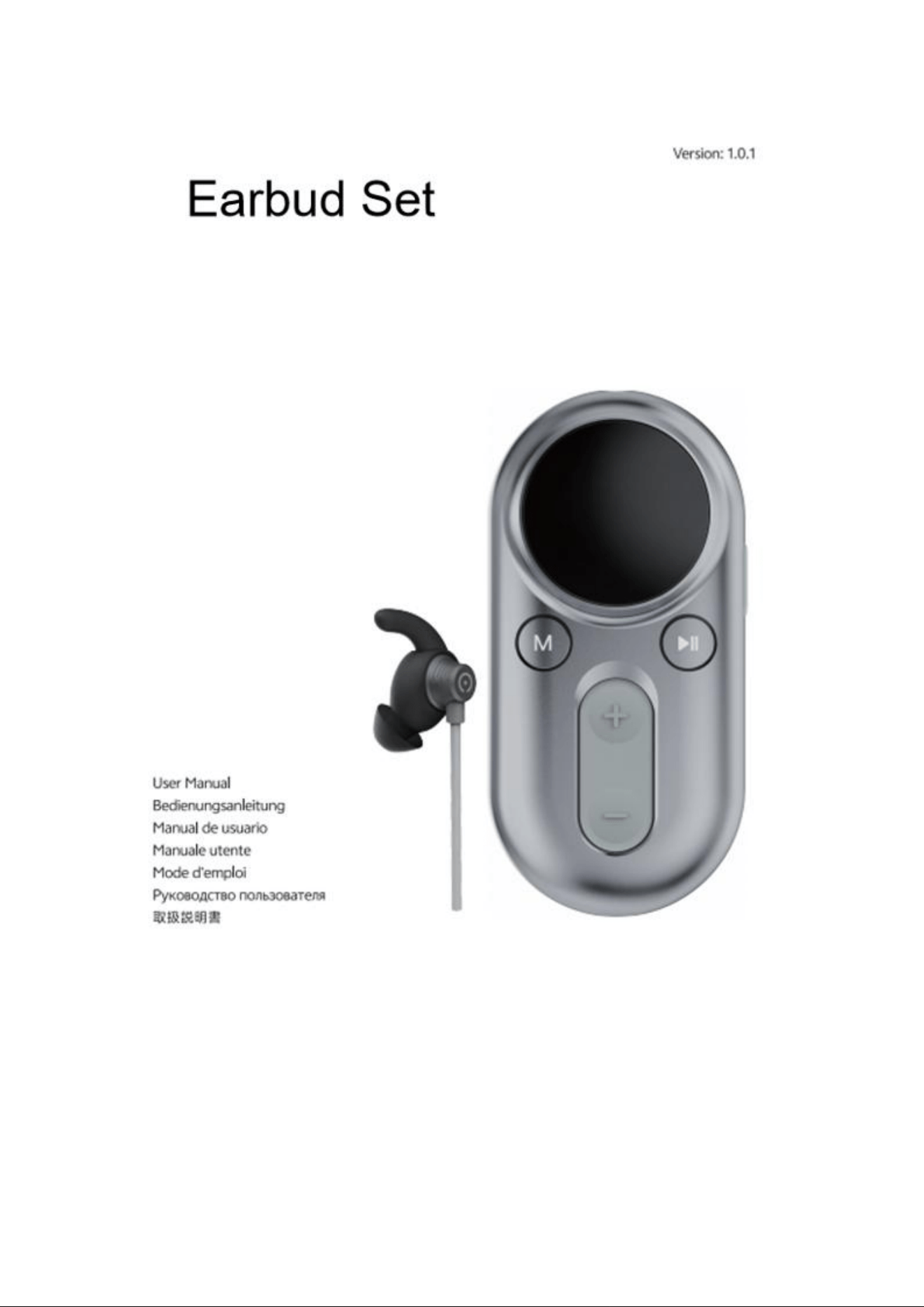
This Pack Contains
○
LUNA Plus
○ Earbud (Left)
○ Ear Tips (Left, x2)
○ Spray Water Bottle
○ Gel Tube
○ Charging Cable
○ User Manual
○ Quick Start Guide
○ Wellness Practice
Activities
Instructions
We offer a separate Product Usage Instructions guide, feel free to refer to it for more
details.
Pre-use Preparation
1.
Ensure that the LUNA Plus is fully charged
before first use. Plug the charging cable into the LUNA
Plus and check that the display shows the battery is
full.
2.
Insert the connector of the Earbud lead into the
LUNA Plus.
3.
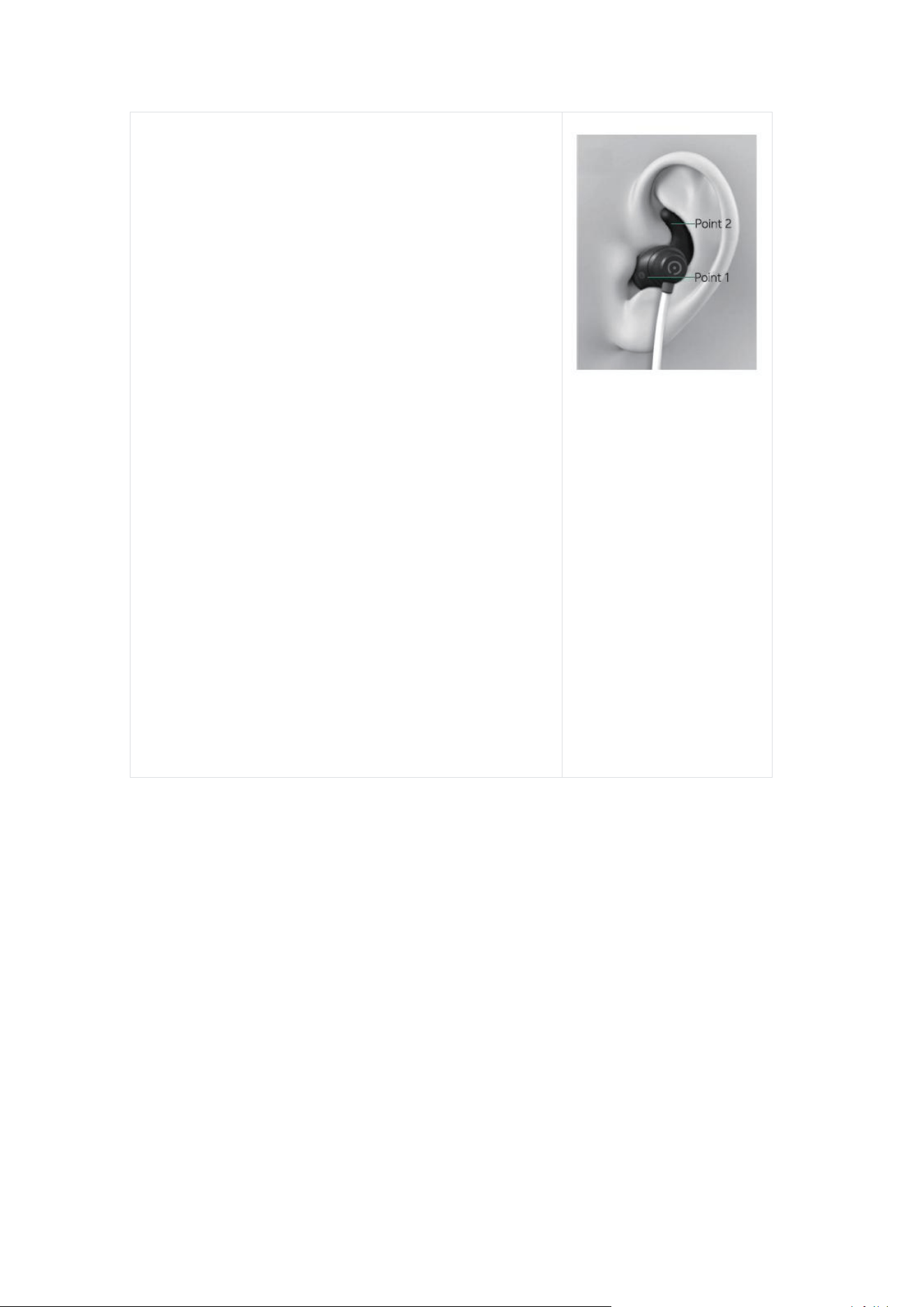
Instructions for Earbud placement:
a. Use an alcohol pad or wet pad to wipe your
left ear, keeping it slightly moist.
b. Fill the spray bottle with water. Hold the
sprayer about 10 cm away from the Earbud. Or
you can use the brush to apply gel to the Earbud.
c. Carefully position the Earbud on your left
ear, then insert it into your ear.
d.
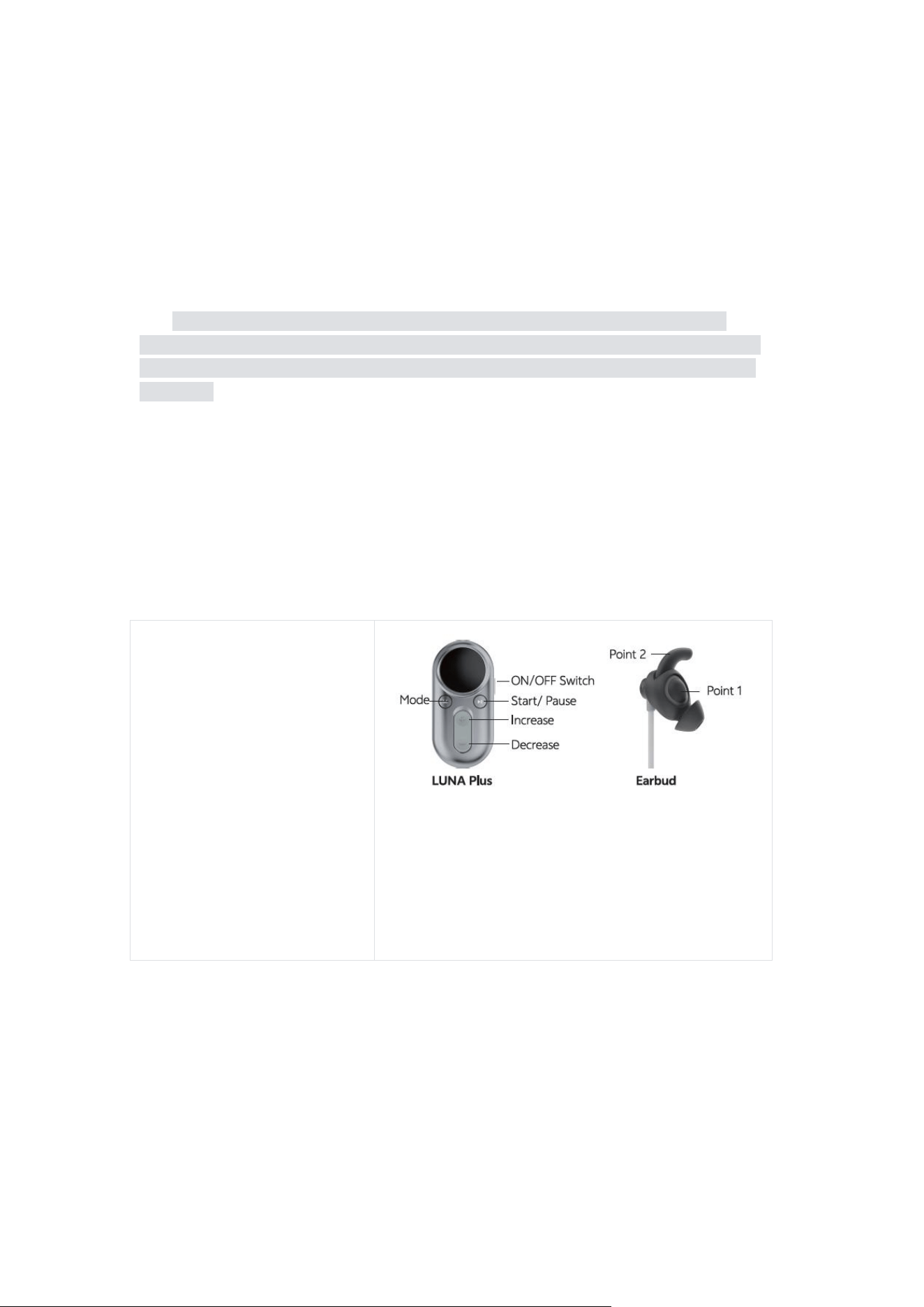
Adjust the Earbud so it is securely
positioned over the targeted areas (i.e.,the Point
1 and Point 2 on the right picture).
e.
If the Earbud (with ear tip) is too big for your
left ear, please remove the ear tip. Ensure it fits
properly in your ear and that you feel the
stimulation.
f. Use the clip to fasten the Earbud lead to
your clothing to prevent the Earbud from falling
off.
Illustration of Wearing
Earbud
Operation
The product supports two operating modes, which users may select as needed:
○ Physical button operation: Users can directly turn on the functions, switch
modes, and adjust parameters through the buttons on the product.
○ Bluetooth App operation: After connecting to a mobile app via Bluetooth,
users can set parameters, control functions, and operate the product through the
app.
Physical button operation:
1.Power On:Press and hold the Power button to turn on the LUNA Plus.
2.Select Mode:Select the appropriate mode using the "M" button.

3.Set the intensity level of the LUNA Plus:
a. Slowly increase or decrease the intensity by pressing the "+" or "-" buttons.
Take care not to rush this process. If you don't feel anything, adding a small
amount of moisture to your ear may help. Stop or decrease the intensity if you
feel a sharp stinging sensation.
b. Adjust the intensity until you feel a comfortable and relatively strong tingling
or vibration, but without any pain or stinging sensation. If you experience
pain,reduce the intensity immediately. If the sensation is uncomfortable, adjust
the Earbud placement.
c.Each user's preferred level will vary, and stronger intensity is not necessarily
better.
4.Start the session
:
Once the intensity is above 0, your LUNA Plus is now
active and your session has started. This will be indicated by the countdown
timer on the screen.
5.Adjusting Intensity During the Session
To adjust the intensity:
a. (If needed) Press any button once to wake the display.
b. Use the "+" and "-" buttons to adjust the intensity slowly.
c. Gradually increase the intensity to a strong but comfortable level--never
painful. (It may take a few sessions for your nervous system to get used to the
sensation.)
d.
Comfort is individual. Choose the intensity that feels comfortable for you
and remains comfortable throughout the session.
Note:Comfortable intensity may vary from session to session due to adaptation,
ear-skin contact quality, air humidity, Earbud wear/aging, and other factors.
6.Pausing the LUNA Plus During the Session
a. (If needed) Press any button to wake the display.The screen will show the
remaining time.
b. Press the “Pause” button to pause the session. Press it again to resume
the session.
7.Power off
:
After the session time elapses, the LUNA Plus will automatically
power off if there is no operation for more than 3 minutes.
Bluetooth App operation:
1. Download and install the app:Download the app from the App Store (if you

own an iOS device) or Google Play (if you own an Android device).
2. Launch the App. For first-time use, users must register a user account and log
in to the app.
3. Connect Bluetooth:
a.
After log in to the app, turn on the Bluetooth on your phone.
b.
Turn on the Luna Plus.
c.
Connect the Luna Plus via Bluetooth.
Note
:
To ensure a stable connection, please keep your phone within 5 meters of the
Luna Plus.
4.Select Mode:Select the appropriate mode.
5.Start and Set the intensity level of the LUNA Plus: Set the appropriate
intensity level of the LUNA Plus:
a. Slowly increase or decrease the intensity by clicking the "+" or "-" . Take
care not to rush this process. If you don't feel anything, adding a small amount of
moisture to your ear may help. Stop or decrease the intensity if you feel a sharp
stinging sensation.
b.
Adjust the intensity until you feel a comfortable and relatively strong
tingling or vibration, but without any pain or stinging sensation. If you experience
pain,reduce the intensity immediately. If the sensation is uncomfortable, adjust
the Earbud placement.
c. Each user's preferred level will vary, and stronger intensity is not
necessarily better.
Note
:
Comfortable intensity may vary from session to session due to adaptation,
ear-skin contact quality, air humidity, Earbud wear/aging, and other factors.
6. Session completed:After the session time elapses, the session ends.
Low Battery Indicator
When the LUNA Plus is powered on, the screen displays a battery icon to indicate
power status. If the battery is low, a "LOW BATTERY" warning will appear on the
screen.
Environmental Conditions
Temperature:
R.H.ambient:
Atmospheric Pressure:

Operating: 5~40℃
Storage
:
-10~45
℃
Operating: ≤80% RH
Storage:≤95% RH
Operating: 80kPa-
106kPa
Storage
:
60kPa-106kPa
Suggestions:
○ The intensity should be adjusted according to your tolerance and comfort
level, ensuring no pain. It is generally recommended that each session lasts 20
minutes.
○ Please remember to spray water or apply gel to the two stimulation sites of
the Earbud.
○ If you do not feel anything after startup, check the contact between the
Earbud and your ear. If your ear surface is dry, spray a little bit more water or
use Gel Tube on the Earbud.
○ If there is no operation (except during a session) for 3 minutes after
powering on, the LUNA Plus will automatically turn off.
○ Discontinue use if you experience light headedness, dizziness, chest pain,
or excessive skin irritation.
○ Reactions such as irritation at the application site are rare. If irritation
occurs and becomes unpleasant,stop the session. The discomfort should
subside shortly after stopping the session. If skin irritation persists, discontinue
use and consult your doctor.
Troubleshooting
Problem
Details
Action
Screen disappeared
Battery depletion
Recharge it
It may take hours
Automatic shutdown
(This does not apply to
situation where no
operation is taken within 3
minutes of startup.)
Restart the LUNA Plus

LUNA Plus works
normally but there is no
sensation
Poor skin contact with
Earbud
Ensure proper placement
as described in the
manual
Session completed
Reset the mode to start
the massage again
Whether the ear cavity is
clean
Please clean the ear area
Discomfort
Skin allergy to the Earbud
Discontinue
Intensity set too high
Reduce the intensity level
Session time too long
Pause early or shut down
the product directly.
Bluetooth connection is
not successful.
Bluetooth cannot connect
Make sure both the LUNA
Plus and phone Bluetooth
products are turned on.
Maintenance and Disposal
Precautions for Product Lifespan and Maintenance
○ Please store the LUNA Plus in a dry, ventilated place and avoid direct
sunlight.
○ The LUNA Plus is not designed for prolonged use.
○ Charge the LUNA Plus as soon as the low power reminder appears. Take
care to prevent moisture from entering the internal circuitry or LUNA Plus ports.
○ The provided Earbud is reusable. To ensure optimal performance and
comfort, it is recommended to replace the Earbud every 3-6 months.
Caring, Maintenance, and Storage
○ Ensure the LUNA Plus is turned off before cleaning.
○ To clean the LUNA Plus and Earbud, gently wipe them with a soft cloth or
tissue. You may use a cloth slightly dampened with water or a mild soap solution.
Dry wiping is also acceptable. Do not soak or immerse the LUNA Plus or Earbud
in any liquid.

○ Be careful to avoid dropping, crushing, or submerging the LUNA Plus in
water.
○ Only use soap or water for cleaning; do not use other cleaning solutions.
○ Do not pull the lead to remove the Earbud.
○ Keep the LUNA Plus away from steam, water, or other liquids.
○ Store the LUNA Plus in a safe place, out of reach of children.
○ Avoid placing the LUNA Plus near excessive heat.
○ Do not open, disassemble, or attempt to repair or modify the LUNA Plus.
There are no user-serviceable parts. If the LUNA Plus is not functioning, contact
Support: support@zenowell.ai.
○ Keep the LUNA Plus at least 1 meter away from sources of strong
magnetic fields, such as microwave ovens or hi-fi speakers.
○ The LUNA Plus is not intended for use with flammable agents.
Product Disposal
When a product is no longer in use and needs to be disposed of, please follow these
steps:
○ Vendor Recycling Disposal: Contact the manufacturer and send the
product back for recycling and proper disposal by the manufacturer.
○ Self-Disposal: Before disposing of the product, ensure the LUNA Plus is
turned off, and remove the battery. Take the removed battery to a local
electronic waste recycling center or designated recycling site to ensure safe
disposal and recycling.
Testing LUNA Plus
To test the LUNA Plus, ensure the battery level shows at least one bar, then press
the power button. The display should activate and remain functional throughout the
operation.
Testing the Earbud
Before each session, you can test the Earbud and lead connection by gradually
increasing the intensity until a tingling or vibration sensation is felt. A consistent
tingling or soft vibration should occur as the intensity increases.If the sensation is
irregular or inconsistent, there may be a malfunction in the Earbud or lead. In case of
a malfunction or if the Earbud stops functioning, please contact Support for
assistance.

Absolute Contraindications
○ Individuals with a history of epilepsy or who have been diagnosed with
epilepsy.
○ Users with implanted pacemakers, life-sustaining medical devices, or
metal implants.
○ Pregnant individuals, individuals below 18, those with sensory
abnormalities or excessive skin sensitivity in the ear area.
○ Individuals with severe heart disease or at risk of severe arrhythmias.
○ Users with open wounds or inflammation in the ear area.
○ Use in environments with high temperatures, flammable conditions, or
strong electromagnetic radiation is not recommended.
Precautions
○ Ensure the Earbud maintains firm and uniform contact with the ear.
○ Use only on the left ear; do not apply it to other body parts.
○ Only use the provided Earbud and cables. Using non-original or
incompatible accessories may cause LUNA Plus malfunction or safety risks.
○ Do not use the Earbud while bathing, showering, or swimming.
○ Use only a power adapter with an output not exceeding 15W for charging
the LUNA Plus.
FCC COMPLIANCE STATEMENT
LUNA Plus product is FCC ID: 2BVCF-A-B-102SERIES
This device complies with part 15 of FCC rules. Operation is subject to the following
two conditions: (1) this device may not cause harmful interference, and (2) this
device must accept any interference received, including interference that may cause
undesired operation of the device.
Note:
This equipment has been tested and found to comply with the limits for a Class B
digital device, pursuant to part 15 of the FCC Rules. These limits are designed to
provide reasonable protection against harmful interference in a residential installation.
This equipment generates, uses and can radiate radio frequency energy and, if not

installed and used in accordance with the instructions, may cause harmful
interference to radio communications. However, there is no guarantee that
interference will not occur in a particular installation. If this equipment does cause
harmful interference to radio or television reception, which can be determined by
turning the equipment off and on, the user is encouraged to try to correct the
interference by one or more of the following measures:
—Reorient or relocate the receiving antenna.
—Increase the separation between the equipment and receiver.
—Connect the equipment into an outlet on a circuit different from that to which the
receiver is connected.
—Consult the dealer or an experienced radio/TV technician for help.
We Can Help
We're glad you've joined our family, and we're here to help if you need us. If you
have any questions, please search our Help Center for answers.
If you can't find the answer you're looking for, feel free to reach out to us.
Warranty Information
LUNA Plus ONE (1) Year Limited Warranty
Our company warrants the LUNA Plus hardware product (the "Product") against
defects in materials and workmanship for ONE (1) YEAR from the original retail
purchase date (the "Warranty Period"), provided it is used in accordance with our
published guidelines.
These guidelines include, but are not limited to, technical specifications, safety
instructions, and the quick start guide. Our company does not guarantee
uninterrupted or error-free operation of the Product and is not liable for damages
resulting from failure to follow usage instructions.
This warranty does not cover
○ Any damage resulting from abnormal or abusive use, negligence, lack of
care, or accidental damage (such as dents).
○ Indirect damages of any kind.
Earbud Warranty
Please note that the Earbud is considered a consumable accessory and is not

included in the ONE (1) YEAR warranty or extended warranty coverage. However, it
is warranted for 60 days from the date of purchase against any manufacturing
defects. After this period, the Earbud is not covered by the warranty.