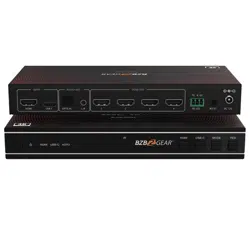
BG-UHD-VWP110L
1x10 4K UHD HDMI/USB-C Switcher and Video Wall Controller
with Scaling/Rotation/Bezel Adjustment/RS-232
and Audio De-Embedding
User Manual

BZBGEAR BG-UHD-VWP110L PRODUCT MANUAL
Address: 830 National Drive #140, Sacramento, CA 95834, USA · Tel: +1(888)499-9906 · Email: support@bzbgear.com 2

BZBGEAR BG-UHD-VWP110L PRODUCT MANUAL
TABLE OF CONTENTS
Statement 4
Safety Precaution 4
Introduction 5
Features 5
Packing List 6
Specifications 7
Operation Controls and Functions 9
IR Remote Control 10
IR Cable Pin Assignment 11
Connection Diagram 12
Troubleshooting 13
Tech Support 14
Limited Product Warranty Terms 14
Mission Statement 14
Copyright 14
Address: 830 National Drive #140, Sacramento, CA 95834, USA · Tel: +1(888)499-9906 · Email: support@bzbgear.com 3

BZBGEAR BG-UHD-VWP110L PRODUCT MANUAL
Statement
Please read these instructions carefully before connecting, operating, or configuring this
product. Please save this manual for future reference.
Safety Precaution
● To prevent damaging this product, avoid heavy pressure, strong vibration, or immersion
during transportation, storage, and installation.
● The housing of this product is made of organic materials. Do not expose to any liquid,
gas, or solids which may corrode the shell.
● Do not expose the product to rain or moisture.
● To prevent the risk of electric shock, do not open the case. Installation and maintenance
should only be carried out by qualified technicians.
● Do not use the product beyond the specified temperature, humidity, or power supply
specifications.
● This product does not contain parts that can be maintained or repaired by users.
Damage caused by dismantling the product without authorization from BZBGEAR is not
covered under the warranty policy.
● Installation and use of this product must strictly comply with local electrical safety
standards.
Address: 830 National Drive #140, Sacramento, CA 95834, USA · Tel: +1(888)499-9906 · Email: support@bzbgear.com 4

BZBGEAR BG-UHD-VWP110L PRODUCT MANUAL
Introduction
The BG-UHD-VWP110L 4K60 1x10 Video Wall Controller is a professional-grade
signal processing solution designed for high-performance video wall deployments.
It supports HDMI™ and USB-C inputs with resolutions up to 4K@60Hz 4:4:4 and
distributes content across ten HDMI™ outputs with flexible scaling and
configuration options. Built on HDMI 2.0b and HDCP 2.2 compliance, the unit
ensures reliable transmission of protected 4K content while maintaining full digital
signal integrity across all outputs.
Engineered for versatility in commercial and Pro AV environments, the
BG-UHD-VWP110L supports multiple video wall layouts including 1x1 through 5x2
and 3x3 configurations, along with image rotation, bezel adjustment, and advanced
EDID management for seamless integration. Control is available via front panel
buttons, IR remote, and RS-232 commands, enabling easy deployment in both
standalone and integrated control system installations. Additionally, the unit
provides audio de-embedding via optical and analog outputs for flexible integration
into external sound systems.
Features
● HDMI & USB-C Dual Inputs: Supports HDMI™ and USB-C sources with up to
4K@60Hz 4:4:4 resolution for flexible source compatibility.
● 10 HDMI Outputs: Distributes a single input signal across ten HDMI™ outputs for
large-scale video wall configurations.
● Multiple Video Wall Modes: Supports 15 splicing layouts including 1x2, 1x3, 1x4,
2x2, 3x3, 4x1, 5x2, and more for flexible display designs.
● 4K60 Ultra HD Processing: Delivers up to 4K@60Hz video performance with full
18Gbps bandwidth for high-quality image reproduction.
● HDCP 2.2 & HDMI 2.0b Compliance: Ensures compatibility with protected 4K
content and modern HDMI signal standards.
● Advanced EDID Management: Provides intelligent EDID handling for improved
source/display compatibility and stable signal negotiation.
● Image Rotation Support: Enables 0° or 180° rotation per output for flexible
installation orientations, including ceiling-mounted displays.
● Bezel Compensation Control: Allows fine adjustment of display edges to create
seamless multi-screen video walls.
● Audio De-Embedding: Provides optical (S/PDIF) and analog L/R audio outputs for
external audio system integration.
● Multiple Control Methods: Supports front panel buttons, IR remote control, and
RS-232 serial commands for flexible system control.
● Plug-and-Play Operation: No software or driver installation required for quick and
simple deployment.
● Professional Signal Stability: Designed for 24/7 operation with robust ESD
protection and stable signal distribution across all outputs.
Address: 830 National Drive #140, Sacramento, CA 95834, USA · Tel: +1(888)499-9906 · Email: support@bzbgear.com 5

BZBGEAR BG-UHD-VWP110L PRODUCT MANUAL
Packing List
● 1× BG-UHD-VWP110L 4K60 1x10 Video Wall
Controller
● 1× 12V/1A Locking Power Supply with
Multi-national Conversion Plug
● 1× IR Remote Control
● 1× IR Receiver Cable (1.5m)
● 1× 3-pin 3.5mm Phoenix Connector (Male)
● 4× Machine Screws
● 2× Mounting Ears (Rack/Wall Mount Brackets)
● 1× User Manual
Address: 830 National Drive #140, Sacramento, CA 95834, USA · Tel: +1(888)499-9906 · Email: support@bzbgear.com 6
BZBGEAR BG-UHD-VWP110L PRODUCT MANUAL
Specifications
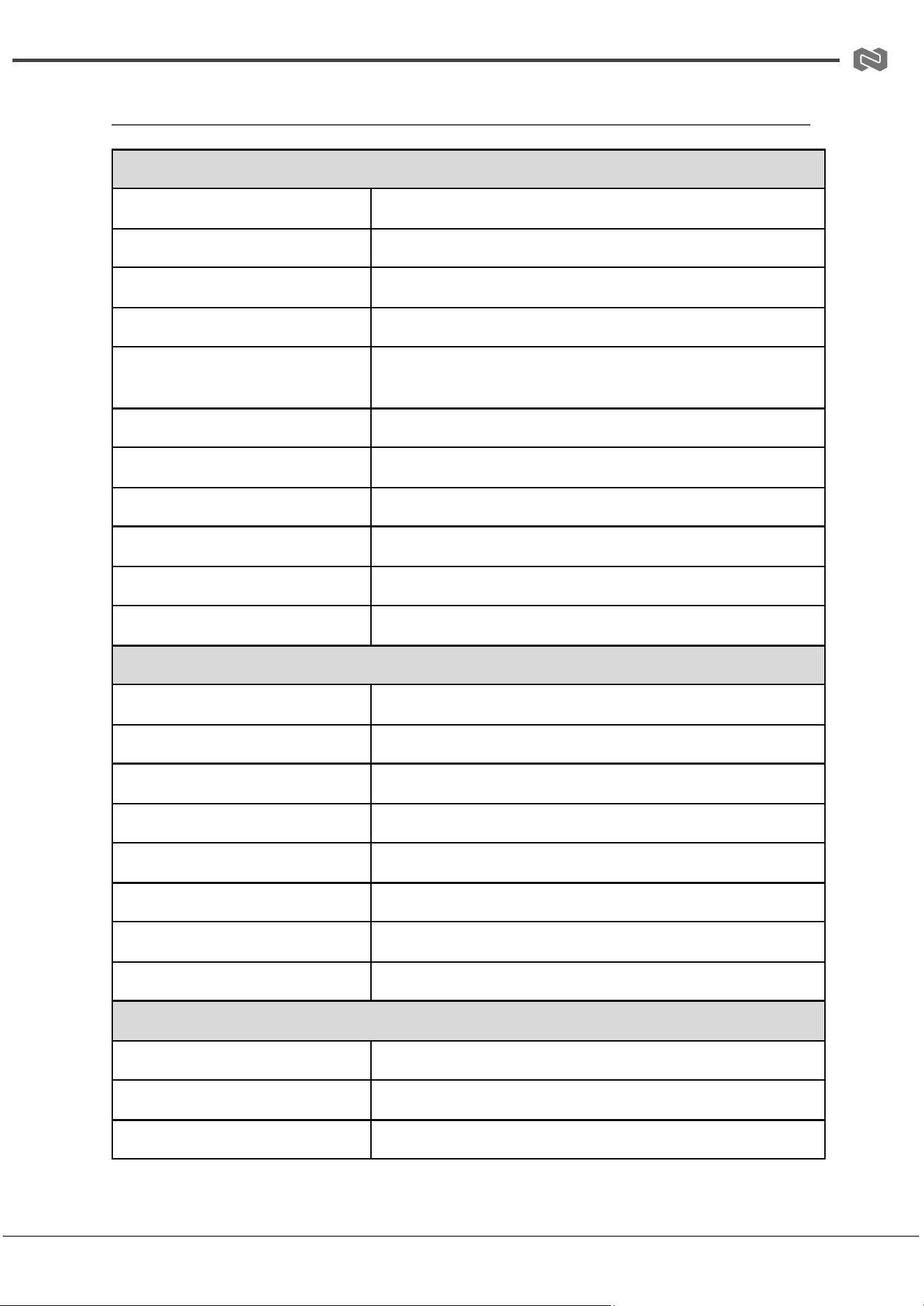
Technical
HDMI™ Compliance
HDMI 2.0b
HDCP Compliance
HDCP 2.2
DP Compliance
DisplayPort 1.4 Alt Mode (USB-C)
Video Bandwidth
18Gbps
Input Resolution
Up to 4K@60Hz (3840×2160 / 4096×2160), plus legacy formats
Output Resolution
720p, 1080p, 4K30, 1024×768
Color Space
RGB 4:4:4, YCbCr 4:4:4 / 4:2:2 / 4:2:0
Color Depth
8 / 10 / 12-bit
Audio Formats (HDMI/USB-C)
LPCM 2.0/5.1, Dolby Digital/Plus/EX, DTS formats
Optical Audio Formats
Dolby Digital/Plus, DTS 5.1, PCM 2.0
L/R Audio Format
PCM 2.0
Connections
HDMI Input
1× HDMI Type-A
USB-C Input
1× USB-C (DP Alt Mode)
HDMI Outputs
10× HDMI Type-A (Video Wall Outputs)
Optical Audio Output
1× S/PDIF
Analog Audio Output
1× 3.5mm L/R stereo
RS-232 Control
1× 3-pin Phoenix connector
IR Extension
1× 3.5mm IR EXT port
Power Input
DC 12V/1A locking connector
Mechanical
Housing
Metal enclosure
Dimensions (W × D × H)
11in × 5.6in × 1.2in [270mm × 141mm × 30mm]
Weight
2.1lbs [935g]
Address: 830 National Drive #140, Sacramento, CA 95834, USA · Tel: +1(888)499-9906 · Email: support@bzbgear.com 7
BZBGEAR BG-UHD-VWP110L PRODUCT MANUAL
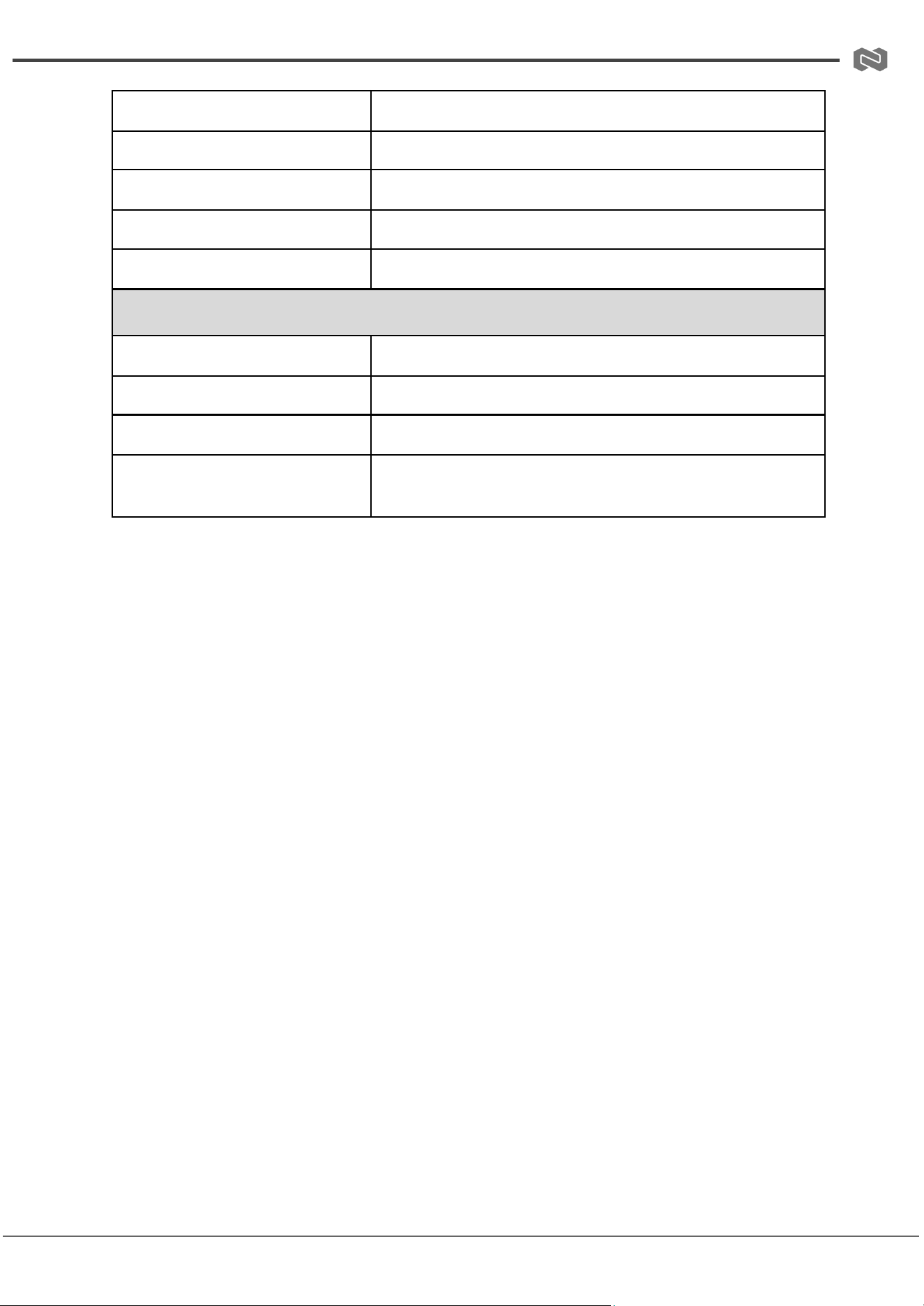
Power Consumption
9.5W max
Operating Temperature
0°C to 40°C
Storage Temperature
-20°C to 60°C
Operating Humidity
20%–80% RH non-condensing
Storage Humidity
10%–90% RH non-condensing
RECOMMENDED HDMI CABLE
Input Cable Length (4K60)
Up to 5m / 16ft
Input Cable Length (1080p)
Up to 10m / 33ft
Cable Type
Premium High Speed HDMI™ cable recommended
Installation Note
Short, high-quality HDMI cables recommended for stable 4K60
performance
Address: 830 National Drive #140, Sacramento, CA 95834, USA · Tel: +1(888)499-9906 · Email: support@bzbgear.com 8
BZBGEAR BG-UHD-VWP110L PRODUCT MANUAL
Operation Controls and Functions
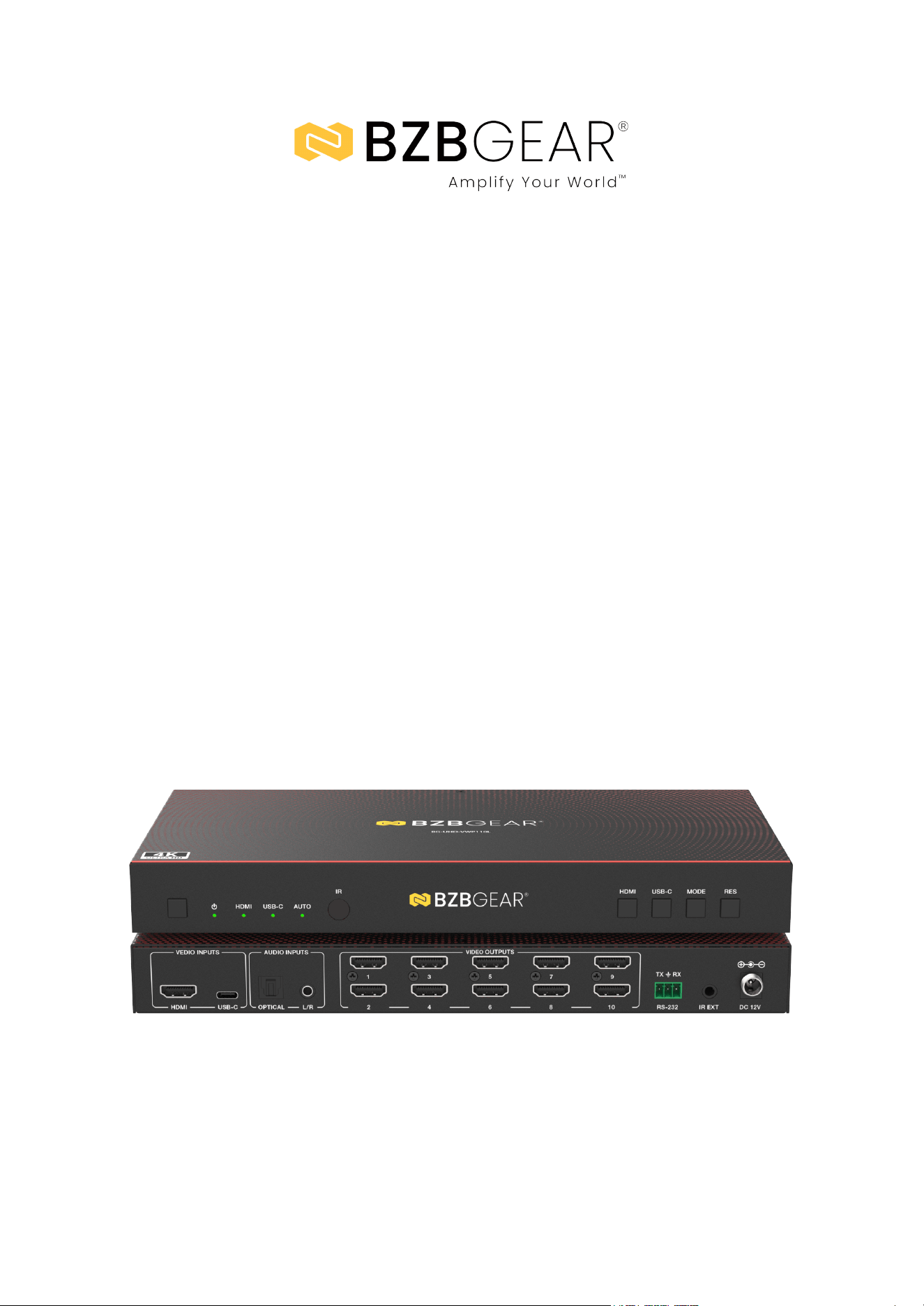
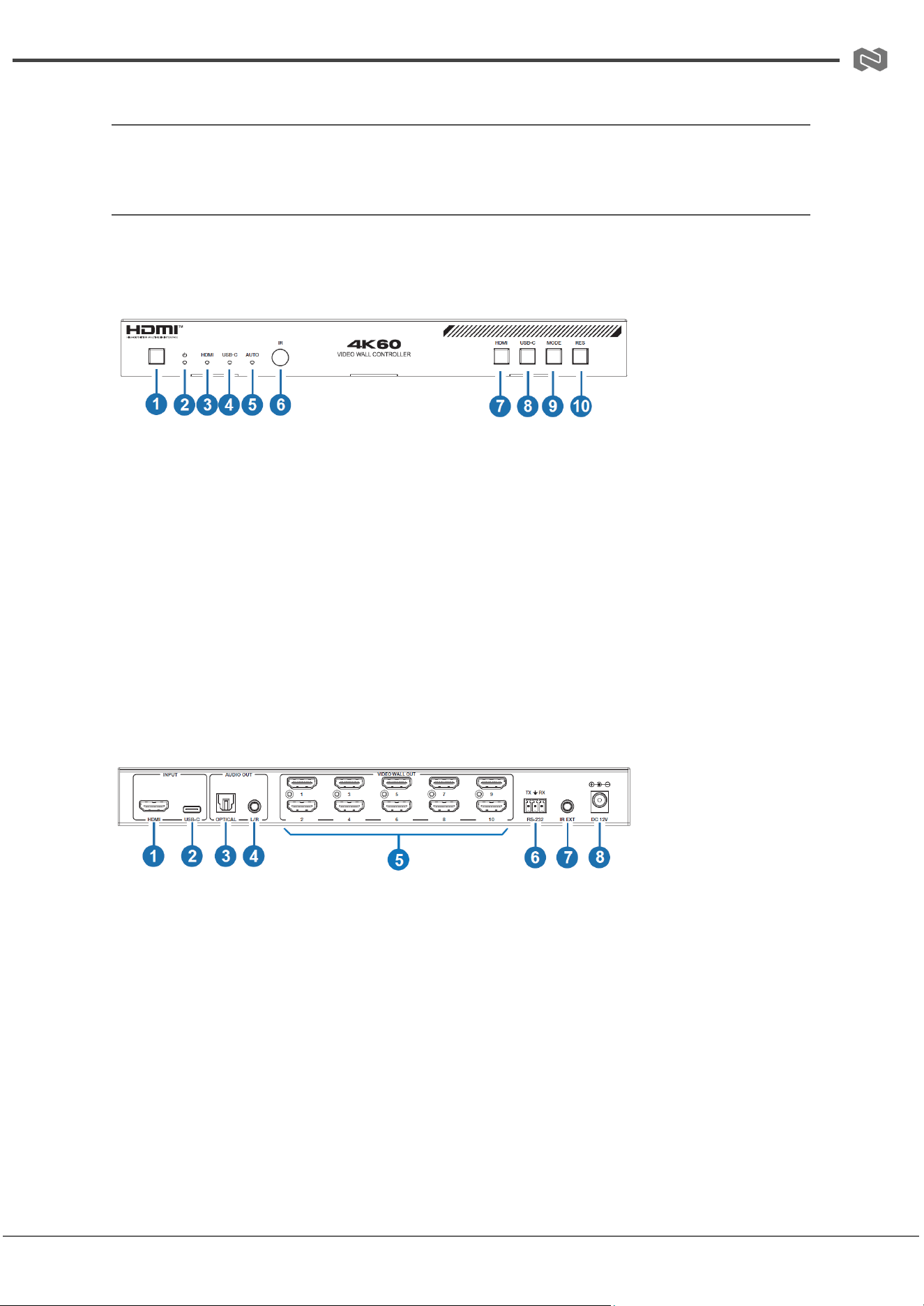
Front and Rear Panel
Front Panel
1. Power Button: Press to power on the unit; long press (2–3 seconds) to enter standby mode.
2. Power LED: Indicates power status (green = operating, red = standby).
3. HDMI LED Indicator: Illuminates green when HDMI input is selected.
4. USB-C LED Indicator: Illuminates green when USB-C input is selected.
5. AUTO LED Indicator: Illuminates green when auto switching is enabled.
6. IR Window: Receives IR signals from the remote control.
7. HDMI Input Select Button: Selects HDMI as the active input source.
8. USB-C Input Select Button: Selects USB-C as the active input source.
9. MODE Button: Cycles through available video wall splicing modes.
10. RES Button: Cycles output resolution settings (720p, 1080p, 4K, XGA) for all HDMI outputs.
Rear Panel
1. HDMI INPUT: Connects HDMI source devices such as media players, PCs, or set-top
boxes.
2. USB-C INPUT: Connects USB-C source devices supporting DP Alt Mode.
3. OPTICAL AUDIO OUT: S/PDIF digital audio output for external audio systems or amplifiers.
4. L/R AUDIO OUT: Analog stereo audio output (3.5mm) for external speakers or audio
devices.
5. VIDEO WALL OUT (1–10): Ten HDMI outputs for connection to displays in a video wall
configuration.
6. RS-232 Port: 3-pin Phoenix connector for serial control or firmware/command integration.
7. IR EXT Port: External IR receiver connection for extended or concealed installations.
8. DC 12V Power Input: Connects to included 12V/1A locking power adapter.
Address: 830 National Drive #140, Sacramento, CA 95834, USA · Tel: +1(888)499-9906 · Email: support@bzbgear.com 9
BZBGEAR BG-UHD-VWP110L PRODUCT MANUAL
IR Remote Control
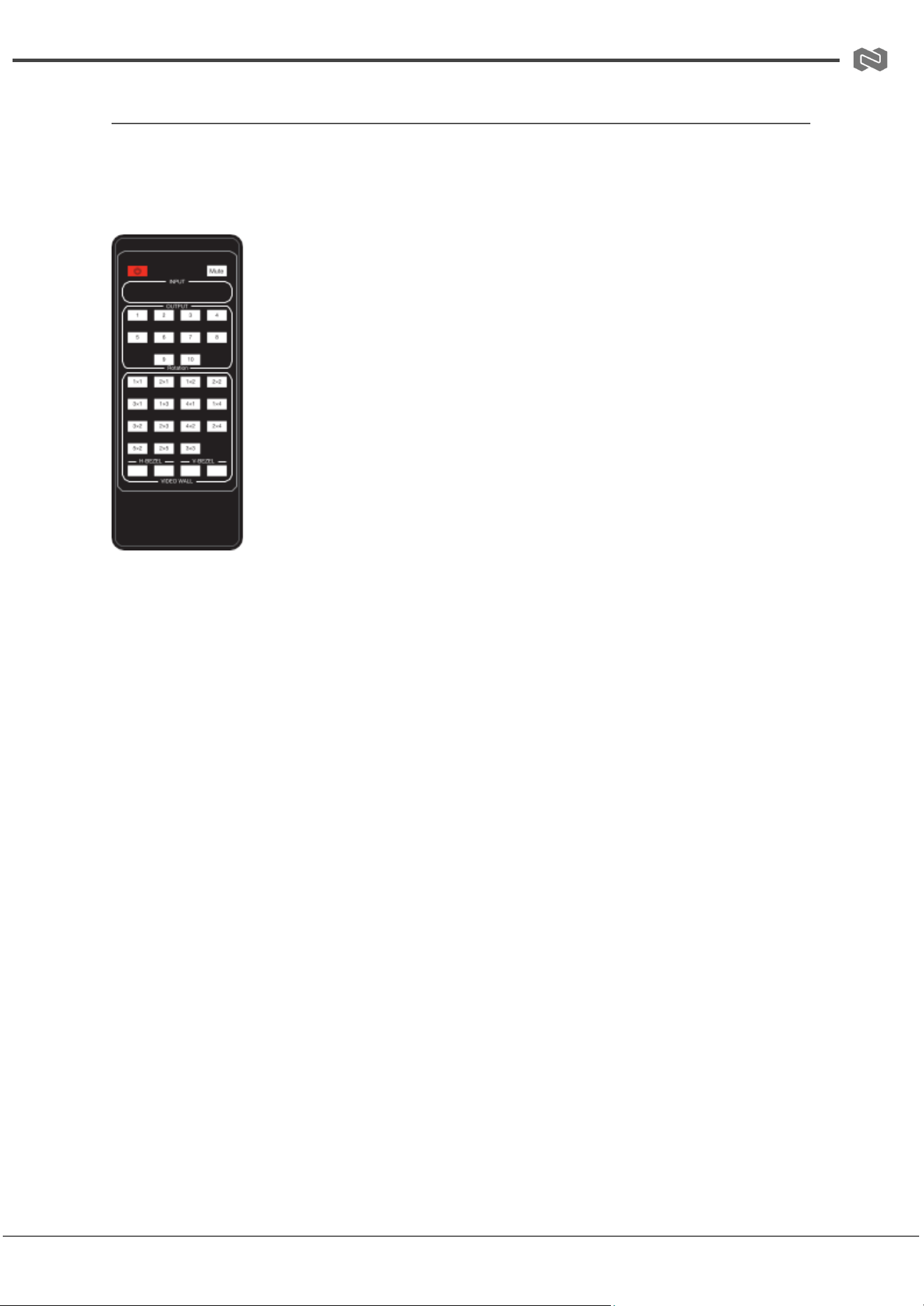
The included IR remote provides convenient control of the BG-UHD-VWP110L without
requiring direct access to the front panel. It allows users to manage power, input selection,
video wall configuration, and audio functions.
Power: Turns the unit on or places it into standby mode.
Mute: Mutes audio across HDMI, optical, and L/R analog outputs.
Input Selection
● HDMI: Selects HDMI input as the active source.
● USB-C: Selects USB-C input as the active source.
● AUTO: Enables or disables automatic input switching based on
active signal detection.
Resolution Control (RES)
Cycles output resolution for all HDMI outputs between 720p, 1080p, 4K,
and XGA.
Video Wall Controls
● MODE Buttons: Switch between available video wall splicing layouts.
● Rotation (1–10): Individually toggles 0° or 180° image rotation for each output
channel.
● H-BEZEL / V-BEZEL (◄ ►): Adjusts horizontal and vertical bezel compensation for
seamless multi-display alignment.
Address: 830 National Drive #140, Sacramento, CA 95834, USA · Tel: +1(888)499-9906 · Email: support@bzbgear.com 10
BZBGEAR BG-UHD-VWP110L PRODUCT MANUAL
IR Cable Pin Assignment
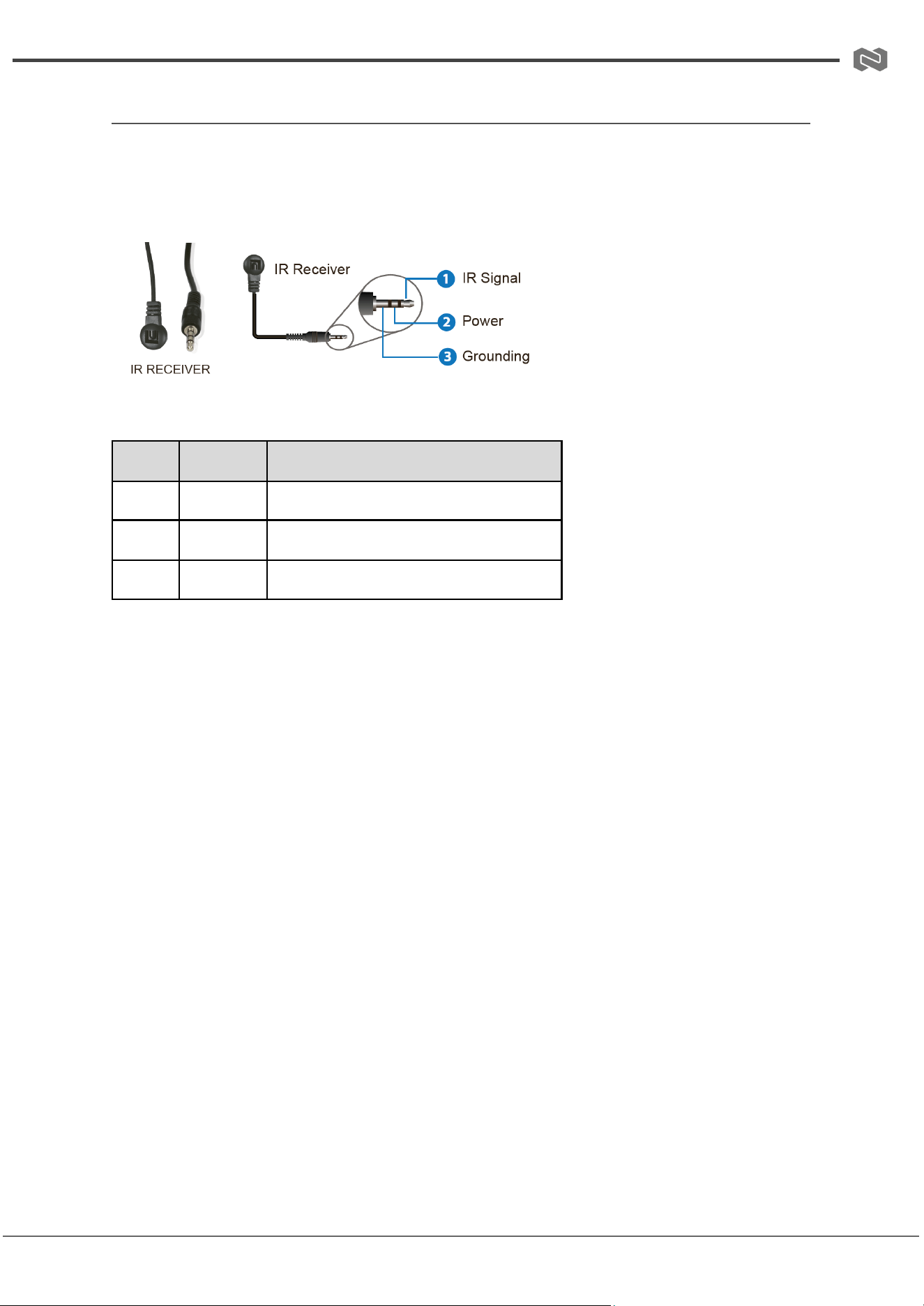
The IR Receiver cable uses a standard 3.5mm stereo connector to extend IR signal
reception when the front panel IR window is obstructed or the unit is installed in a
concealed location.
3.5mm IR EXT Connector Pin Definition
Pin
Signal
Description
Tip
IR Signal
Infrared data signal input
Ring
+5V DC
Power supply for IR receiver module
Sleeve
GND
Ground reference
Notes
● Ensure correct orientation when connecting the IR receiver cable to the IR EXT port.
● Use only the provided IR receiver cable to avoid signal compatibility issues.
● Avoid bending or sharply pulling the IR cable to maintain stable IR performance.
Address: 830 National Drive #140, Sacramento, CA 95834, USA · Tel: +1(888)499-9906 · Email: support@bzbgear.com 11
BZBGEAR BG-UHD-VWP110L PRODUCT MANUAL
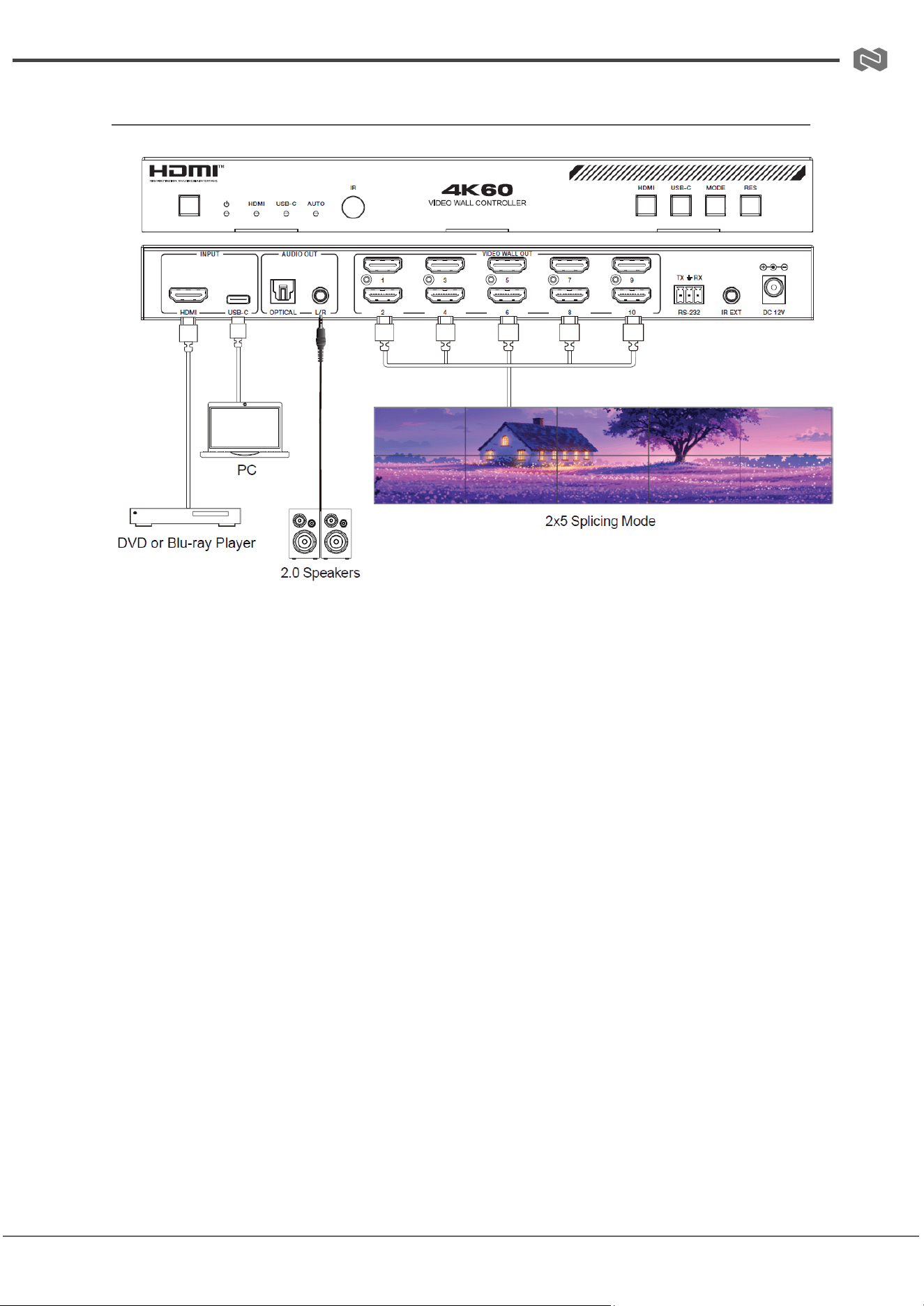
Connection Diagram
Address: 830 National Drive #140, Sacramento, CA 95834, USA · Tel: +1(888)499-9906 · Email: support@bzbgear.com 12
BZBGEAR BG-UHD-VWP110L PRODUCT MANUAL
Troubleshooting
Problems
Causes
Solutions
No Power / All LED off
Power supply not connected,
connected fully, or wrong power
supply.
Check if the power supply is
connected correctly and the
output voltage value is within
recommended specifications.
No sound or sound issues
The HDMI connection is faulty,
the audio format is not
supported by the displays, or
the source player is set to
another port for audio output
Check if the HDMI cables are
connected correctly.
Check if the audio format is
supported by the display and
that a user has not changed the
supported audio format on the
player`s audio output. Ensure
output settings from the HDMI
source device as set correctly.
No picture or picture flickers
The HDMI cable may be faulty
or the category cable quality is
faulty.
Check if the HDMI
and category cable connections
are correct and undamaged.
Change to another good
working HDMI cable or category
cable (CAT6 or better cable is
recommended).
Address: 830 National Drive #140, Sacramento, CA 95834, USA · Tel: +1(888)499-9906 · Email: support@bzbgear.com 13

BZBGEAR BG-UHD-VWP110L PRODUCT MANUAL
Tech Support
Have technical questions? We may have answered them already!
Please visit BZBGEAR’s support page (bzbgear.com/support) for helpful information and
tips regarding our products. Here you will find our Knowledge Base
(bzbgear.com/knowledge-base) with detailed tutorials, quick start guides, and step-by-step
troubleshooting instructions. Or explore our YouTube channel, BZB TV
(youtube.com/c/BZBTVchannel), for help setting up, configuring, and other helpful how-to
videos about our gear.
Need more in-depth support? Connect with one of our technical specialists directly:
Phone
1.888.499.9906
Email
support@bzbgear.com
Live Chat
bzbgear.com
Limited Product Warranty Terms
Pro Line: 5-year warranty from the date of purchase for AV/Broadcasting products bought
on or after August 1, 2024.
Essential Line: 3-year warranty from the date of purchase for AV/Broadcasting products
bought on or after August 1, 2024.
Cables: Lifetime Limited Product Warranty.
For complete warranty information, please visit bzbgear.com/warranty.
For questions, please call 1.888.499.9906 or email support@bzbgear.com.
Mission Statement
BZBGEAR is a breakthrough manufacturer of high-quality, innovative audiovisual equipment
ranging from AVoIP, professional broadcasting, conferencing, home theater, to live
streaming solutions. We pride ourselves on unparalleled customer support and services.
Our team offers system design consultation, and highly reviewed technical support for all
the products in our catalog. BZBGEAR delivers quality products designed with users in
mind.
Copyright
All the contents in this manual and its copyright are owned by BZBGEAR. No one is allowed
to imitate, copy, or translate this manual without BZBGEAR’s permission. This manual
contains no guarantee, standpoint expression or other implies in any form. Product
specification and information in this manual is for reference only and subject to change
without notice.
All rights reserved. No reproducing is allowed without acknowledgement.
Address: 830 National Drive #140, Sacramento, CA 95834, USA · Tel: +1(888)499-9906 · Email: support@bzbgear.com 14