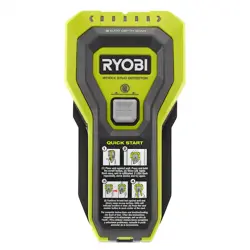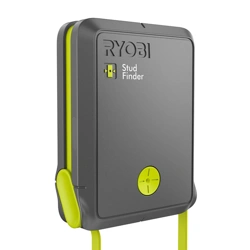

ES5500 Stud Finder
ACTIVATING DEVICE
1. Select the Stud Finder device icon and choose Activate Device.
2. Select your current Ryobi Nation login credentials, or if new user, Create
Account.
3. Enter the 14-digit serial number and purchase date.
GETTING STARTED
1. Remove red tab in the battery compartment to activate the batteries.
2. With the App open to the main screen, plug the device into the headphone jack
on your smart phone. With device connected, be sure the volume on your phone
is turned all the way up.
3. The device will auto-recognize and open the Stud Finder.
NOTE: If the device is not found, disconnect the device, restart the App, and
reconnect the Stud Finder.
NOTE: In order for the app to work properly, select Ok when asked for access
to the microphone, camera and location. These settings can be changed in your
phone’s dedicated settings.
4. Hold the device by the two finger pads, keeping your hand away from the inter-
nal sensor.
5. To Calibrate, hold the Stud Finder against the wall where there is no stud and
press Calibrate. Wait 15 seconds for the on-screen sequence to complete.
6. To Find a stud, scan slowly across the wall. The arrows will begin pointing to-
ward a stud location when you get close to a stud.
7. Double check stud location by calibrating and scanning again.
8. The full Operator’s Manual is available in Settings.
991000336
12-4-14 (REV:01)
WARNING:
This Quick Start Guide is not a substitute for reading the operator’s manual included with the
app. To reduce the risk of injury, user must read and understand operator’s manual before
using this product.
Thank you for purchasing Ryobi
™
Phone Works
™
If you need assistance DO NOT RETURN TO THE STORE
Please contact us at 1-877-578-6736
TM
TM
Before getting started, please visit
www.ryobitools.com/phoneworks
There you can find How-To Videos, Operator’s Manuals and
the most current list of compatible phones.
Download Ryobi
™
Phone Works
™
App from the App Store or Google Play Store
Merci d’avoir acheté un dispositif Ryobi
™
Phone Works
™
Si vous avez besoin d’aide NE RETOURNEZ PAS AU MAGASIN. Appelez au numéro 1 877 578-6736.
Gracias por comprar Ryobi
™
Phone Works
™
Si necesita ayuda, NO LO DEVUELVA A LA TIENDA. Por favor contáctenos al 1-877-578-6736
AVERTISSEMENT :
Ce guide de démarrage rapide est incomplet et le manuel d’utilisation fourni avec l’application
doit être lu. Pour réduire le risque de blessure, l’utilisateur doit lire et comprendre le manuel
d’utilisation avant d’utiliser ce produit.
ADVERTENCIA:
Esta guía de inicio rápido no sustituye el manual del operador incluido con la aplicación. Para
reducir el riesgo de lesiones, el usuario debe leer y comprender el manual del operador de este
producto antes de utilizarlo.
Avant de commencer, veuillez visiter le site www.ryobitools.com/phoneworks
Vous y trouverez des vidéos explicatifs, des manuels d’utilisation et la liste récente des téléphones compatibles.
Téléchargez l’application Ryobi
™
Phone Works
™
sur le site App Store ou Google Play Store.
Antes de comenzar, visite www.ryobitools.com/phoneworks.
Allí puede encontrar videos prácticos, manuales del operador y la lista más actualizada de teléfonos compatibles.
Descargue la aplicación Ryobi
™
Phone Works
™
de App Store o la tienda de Google Play.
ES5500 Stud Finder (détecteur de montants)
ACTIVATION DU DISPOSITIF
1. Sélectionnez l’icône du dispositif Stud Finder (détecteur de montants) et sélectionnez
Activate Device (activer le dispositif).
2. Sélectionnez votre authentifiant Ryobi Nation pour ouvrir votre session ou sur Create Account
(créer un compte).
3. Saisissez le numéro de série à 14 chiffres et la date d’achat.
POUR COMMENCER
1. Retirez la languette rouge située dans le logement de piles pour établir le contact des piles.
2. Lorsque l’application est ouverte depuis l’écran d’accueil, branchez votre dispositif dans la prise
d’écouteurs de votre téléphone intelligent. Lorsque votre dispositif est raccordé, assurez-vous
que le volume de votre téléphone intelligent est ouvert au maximum.
3. Le dispositif sera reconnu automatiquement et l’application Stud Finder (détecteur de
montants) s’ouvrira.
NOTE : Si le dispositif est introuvable, débranchez le dispositif, rappelez l’application et raccordez
le détecteur de montants.
NOTE : Pour que l’application fonctionne correctement, veuillez sélectionner « Ok » lors de l’invite
d’accès au microphone, à la caméra et de l’emplacement. Ces réglages peuvent être modifiés à
partir du menu de réglages de votre téléphone.
4. Tenez le dispositif par les deux coussinets tactiles et en éloignant votre main du capteur interne.
5. Pour effectuer l’étalonnage, tenez le détecteur de montants contre le mur sans montant et
touchez l’icône Calibrate. Attendez 15 secondes pour que l’affichage de séquence se termine.
6. Pour Find (repérer) un montant, balayez lentement le dispositif le long du mur. Lorsque vous vous
approchez d’un montant, les flèches commenceront à clignoter en direction de l’emplacement du
montant.
7. Revérifiez l’emplacement du montant en effectuant un nouvel étalonnage et en balayant à
nouveau.
8. Le manuel d’utilisation complet se trouve dans le menu Settings (réglages).
ES5500 Stud Finder (Detector de entramado)
ACTIVACIÓN DEL DISPOSITIVO
1. Seleccione el ícono del dispositivo Stud Finder (Detector de entramado) y elija Activate
Device (Activar dispositivo).
2. Seleccione sus credenciales de inicio de sesión actuales de Ryobi Nation, o si es un usuario
nuevo, Create Account (Crear cuenta).
3. Ingrese el número de serie de 14 dígitos y la fecha de compra.
PASOS INICIALES
1. Extraiga la pestaña roja del compartimiento de la batería para conectar las baterías.
2. Con la aplicación abierta en la pantalla principal, enchufe su dispositivo en el conector de
los auriculares de su teléfono inteligente. Con el dispositivo conectado, asegúrese de que el
volumen de su teléfono esté con el ajuste más alto.
3. El dispositivo reconocerá automáticamente el Stud Finder (Detector de entramado) y lo
abrirá.
NOTA: Si no se encuentra el dispositivo, desconéctelo, reinicie la aplicación y vuelva a conectar
el Detector de entramado.
NOTA: Para que la aplicación funcione correctamente, seleccione Ok cuando se le solicite
acceso al micrófono, a la cámara y a la ubicación. Estos ajustes pueden cambiarse en la
configuración específica de su teléfono.
4. Sostenga el dispositivo con las yemas de dos dedos y mantenga la otra mano alejada del sensor
interno.
5. Para calibrar, mantenga el Detector de entramado contra la pared donde no haya entramado y
presione Calibrar. Espere 15 segundos para que se complete la secuencia en pantalla.
6. Para Find (encontrar) un entramado, escanee toda la pared lentamente. Las flechas comenzarán
a apuntar hacia una ubicación donde haya entramado cuando usted se acerque a uno.
7. Verifique dos veces la ubicación del entramado calibrando y escaneando nuevamente.
8. El manual del operador completo está disponible en Settings (Ajustes).