User manual | English
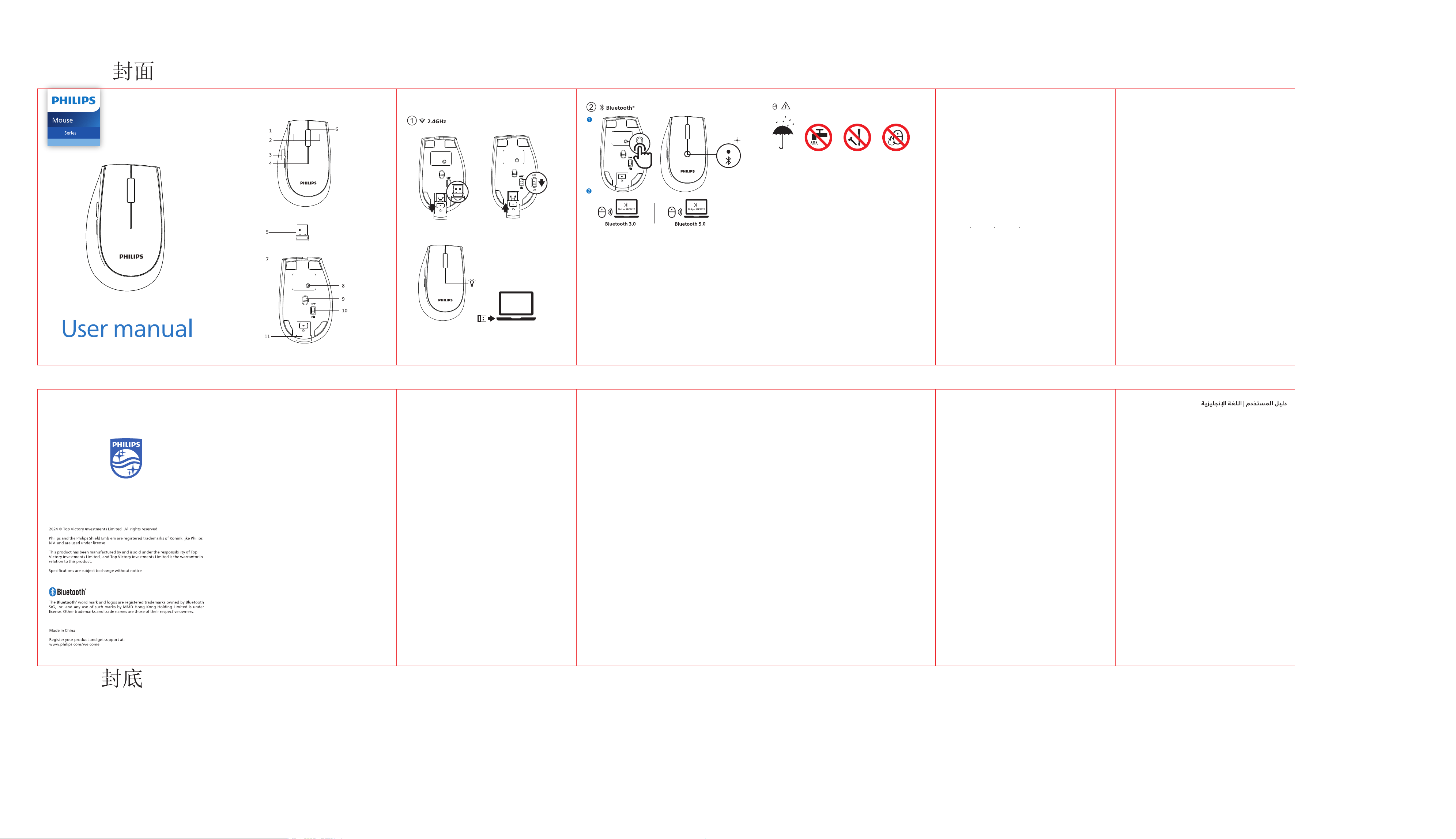
Function overview
Connection guide
Package contents
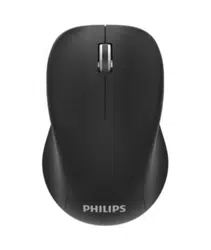
1.Wireless mouse
2. Wireless receiver
3.User manual and important information
4.Charging cable
Connection guide
2.4GHz
1. Open the receiver cover at the bottom and take out the wireless receiver.
2. Flip the mouse power switch down to ON and close the receiver cover.
3. Short press the mode switch button to switch to 2.4G mode.
4. Plug the wireless receiver into the USB port of the computer.
Function overview
1.Scroll wheel
2.Left/right button
3.Forward/Backward side button
4.Mode indicator
5.Wireless receiver
6.Low battery indicator
7.Type-C charging port
8.Mode switch key
9.Optical sensor
10.On/Off switch
11.Receiver cover
Low battery reminder
1. When the mouse battery is low, the indicator light will �ash red to remind
you to charge in time.
2. When charging, the indicator light is always red; when fully charged, the
red light goes out.
3. Do not use a charger or other charging device that does not meet the rated
input of this product to charge this product to avoid damaging this product or
causing other losses and i
njuries.
4. It is recommended to use the USB connector of the computer to charge
this product.
Mode Switching Method
1.The mouse has three channels: 2.4G, Bluetooth3.0, and Bluetooth5.0, which
can connect to three devices simultaneously.
2. Mode Switching. Shortly press the mode switch button at the bottom, and
the corresponding mode indicator light on the top will �ash rapidly and then
remain on for 3 seconds, indicating that the switch to the corresponding device
has been completed. If the mode indicator light �ashes slowly, it indicates that
the mode has not yet completed the connection.
Technical speci�cations
1.Wireless technology: 2.4GHz / Bluetooth 3.0 / Bluetooth 5.0
2.Wireless Effective distance: about 10m
3.Number of mouse buttons:6
4.Mouse buttons lifetimes: 3 million keystrokes
5.Mouse Resolution: 1600 DPI
6. Power supply: 500mAh polymer lithium battery
7.Interface: USB wireless receiver
8.Product dimension:107.5(L)*67(W)*34(H)mm
9.Productweight:86g
10.Operating temperature range: 0°C to 40°C
11.Operating humidity range:10%-85%.
Trouble shooting
1. Make sure that the USB wireless receiver of the product is correctly plugged
into the USB port of the computer.
2. Make sure the computer meets the minimum system requirement.
3. lf the distance between the product and the receiver exceeds an effective
range,please reduce the distance for better performance.
If you can't solve the problem, please try to �nd the solution from Philips
website ornearest retailer. Please do not disassemble the product by force.
System requirement
1.1 x USB port
2.Bluetooth 3.0/Bluetooth 5.0
3.Windows 7,Windows 8,Windows 10 or later,
Android 3.2 and above; Mac OS 10.5 or later
成品尺寸: 78* 120mm展开: 546x120mm
材质: 9 0克书写纸
颜色::单色印刷,正反印刷
装订: 6折风琴折
SPK7627
6000
Attention
1. Photoelectric technology can correctly detect themovement of mouse on
most surfaces. Do not use themouse on any refective,transparent or uneven
surfaces.
2. Please use dry and soft cloth to clean the product.
3. Do not disassemble the product by force.
4. Do not direct the light from the bottom of the mouse to your eyes.
5. Do not use this product in the rain or in the �re.
6. Do not �ush directly with water.
1. Open the bottom receiver cover
and take out the wireless receiver.
2. Flip the mouse power switch down
to ON and close the receiver cover.
3. Short press the mode switch
button to switch to 2.4G
mode.
4. Plug the USB wireless receiver
into the USB ports of PC.
The red light indicates the connection
status is 2.4G mode
Note: 1. Windows 7 and below do not support Bluetooth 5.0.
連接指南
2.4GHz
1.打開底部的接收器蓋,取出無線接收器。
2.將滑鼠開關向下翻轉,並放回接收器蓋。
3.短按模式切換按鈕,切換到2.4G模式。
4.將無線接收器插入電腦的USB埠。
內容物
1.無線滑鼠
2.無線接收器
3.使用說明書和重要資訊
4.充電線
系統要求
1.1*USB 連接埠
2.藍牙3.0/藍牙5.0
3.Windows 7, Windows 8, Windows 10或更高版本; Android 3.2或更高版
本; Mac OS 10.5 或更高版本;
使用說明書 | 繁體中文
技術規格
1.無線技術:2.4GHz / 藍牙3.0 / 藍牙5.0
2 . 無 線 傳 輸 距 離 :約 1 0 m
3 . 滑 鼠 按 鍵 數 :6
4.滑鼠按鍵壽命:300萬次
5.滑鼠解析度:1600 DPI
6.可充電鋰電池(500 mAh)
7.介面:USB 無線接收器
8.產品尺寸:107.5(L)*67(W)*34(H)mm
9 . 產 品 重 量 :約 8 6 g
10.運行時的溫度範圍: 0°C - 40°C
11.運行時的濕度範圍: 10% - 85%.
故障排除
1.確保將產品的USB無線接收器正確插入電腦的USB埠。
2.確保電腦符合最低系統要求。
3.如果產品與接收器之間的距離超出有效範圍,請縮減距離以取得更好的使用體驗。
如果您不能解決問題,請嘗試從飛利浦網站或附近的零售商處找到解決方案。
請不要自行強行拆卸產品。
功能概述
1.鼠标滚轮
2.左/右鍵
3.前進/後退側按鈕
4.模式指示器
5.無線接收器
6.低電量指示燈
7.Type-C充電介面
8.模式切換鍵
9.光學感測器
10.開關
11.接收器蓋
システム要 件
1.1*US Bポート
2.Bluetooth 3.0 / Bluetooth 5.0
3.Microsoft Windows 7、Windows 8、Windows 10以降、Android 3.2以降、
Mac OS 10.5以降、
トラブルシューティング
1.製品の U S Bワイヤレス受信機がコンピュータのUSBポートに確実に差し込まれ
ていることをご確認ください。
2.コンピュータが、最小限のシステム要件を満たしていることをご確認ください。
3.製品と受信機の間の距離が有効距離を超えているときは、距離を縮めて性能が
より良く発揮されるようにしてください。
この問題を解決できないときは、フィリップスのウェブサイトをご覧になるか、
最寄りの販売店にお問い合わせください。無理な力を加えて製品を分解すること
はおやめください。
パッケージに含まれているもの
1 .ワイヤレスマウス
2 .ワイヤレス 受 信 機
3. 取扱説明書と重要なお知らせ
4. 充電配線
接続ガイド 2.4GHz
1.下部の受信機カバーを開き、ワイヤレス受信機を取り外します。
2.マウススイッチを下に反転し、受信機カバーに戻します。
3.モード切替ボタンを短く押して、2.4 Gモードに切り替えます。
4.ワイヤレス受信機をパソコンのUSBポートに挿入します。
取扱説明書 | 日本語
技術仕様
1.接続性: 2.4GHz / Bluetooth 3.0 / Bluetooth 5.0
2.ワイヤレス有効距離:10m
3 . ボ タ ン の 個 数 :6
4.マウスボタンの寿命:キーストローク300万回
5.解像度:1600 DPI
6.バッテリー:充電 式リチウムバッテリー(50 0 mA h)
7 . イ ン タ ーフ ェ ー ス :U S B ワ イ ヤ レス 受 信 機
8.製品寸法:107.5(L)*67(W)*34(H)mm
9.製品重量:≈86g
10.動作温度範囲:0°C ~ 40°C
11.動作湿度範囲:10% ~ 85%
機能概要
1 .マウスホイール
2.左ボタン/右ボタン
3.前進/後退側ボタン
4.モードインジケータ
5 .ワイヤレス 受 信 機
6.バッテリー低下インジケーター
7.Type-C充電コネクタ
8.モード切替キー
9.光学センサー
10.ON/OFFスイッチ
11.レシーバカバー
시스템 사항
�.�*USB 포트
�.Bluetooth �.� / Bluetooth �.�
�.Microsoft Windows �, Windows �, Windows �� 이상, Linux V�.�� 이상,
Mac OS ��.� 이상
패키지 구성품
�. 무선 마우스
�. 무선 리시버
�. 사용 설명서 및 주요 정보
�. 충전 케이블
연결 가이드 �.�GHz
�. 아래쪽에 있는 수신기 뚜껑을 열고 무선 수신기를 꺼낸다.
�. 마우스 전원 스위치를 ON으로 아래로 누른 다음 수신기 뚜껑을 닫습니다.
�. 모드 전환 버튼을 짧게 눌러 �.�G 모드로 전환합니다.
�. 무선 수신기를 컴퓨터의 USB 포트에 꽂습니다.
문제 해결
�. 제품의 USB 무선 리시버가 컴퓨터의 USB 포트에 올바르게 삽입되었는지 확인합니다.
�. 컴퓨터가 필요한 최소 시스템 사양을 충족하는지 확인합니다.
�. 제품과 리시버 간의 거리가 유효 범위를 벗어난 경우,성능을 개선하려면 더 가까운 곳에
배치하세요.
문제가 지속되면 Philips 웹사이트를 방문하거나
가까운 판매점에 문의하여 도움을 요청하세요. 제품을 강제로 분해하지 마세요.
사용자 안내서 | 한국어
기술 사양
�.연결성: �.�GHz / Bluetooth �.� / Bluetooth �.�
�.무선 유효거리: ��m
�.버튼 수: �
�.마우스 버튼 수명: ���만 회 입력
�.해상도: ����DPI
�.배터리: 충전식 리튬 배터리(���mAh)
�.인터페이스: USB 무선 리시버
�.제품 크기: ���.�(L)*��(W)*��(H)mm
�.제품 중량: ≈��g
��.작동 온도 범위: �°C ~ ��°C
��.작동 습도 범위: ��% - ��%.
기능 살펴보기
�.마우스 휠
�.왼쪽 하단 / 오른쪽 하단
�.전진 / 후진 측면 버튼
�.모드 표시기
�.무선 리시버
�. 배터리 부족 표시등
�.Type-C 충전 커넥터
�.모드 전환 키
�.광센서
��.ON/OFF 스위치
��.수신기 덮개
Persyaratan sistem
1.Port USB 1*
2.Bluetooth 3,0 / Bluetooth 5,0
3.Microsoft Windows 7, Windows 8, Windows 10 atau yang lebih
baru;Linux V1.24 dan diatasnya; Mac OS 10.5 dan diatasnya;
Isi kemasan
1. tetikus nirkabel
2. Penerima nirkabel
3. Panduan pengguna dan informasi penting
4.Jalur pengisian daya
Petunjuk koneksi 2.4GHz
1. Buka penutup penerima di bawah dan keluarkan penerima tanpa kabel.
2. Putar tombol daya tikus ke ON dan tutup penutup penerima.
3. Tekan pendek tombol switch mode untuk berganti ke mode 2.4G.
4. Plug penerima tanpa kabel ke port USB komputer.
Trouble shooting
1. Pastikan penerima nirkabel USB produk dicolokkan dengan benar ke
Port USB pada komputer.
2. Pastikan komputer memenuhi persyaratan sistem minimum.
3. Jika jarak antara produk dan penerima melebihi jangkauan efektif,
harap kurangi jarak untuk performa yang lebih baik.
Jika Anda tidak dapat menyelesaikan masalah, silakan coba cari solusinya
dari situs web Philips atau
pengecer terdekat. Jangan membongkar produk dengan paksa.
Panduan pengguna | Bahasa Indonesia
Spesi�kasi teknis
1.Konektivitas: Koneksi 2,4GHz / Bluetooth 3,0 / Bluetooth 5,0
2.Jarak efektif nirkabel: 10m
3.Jumlah tombol: 6
4.Masa pakai tombol tetikus: 3 juta penekanan tombol
5.Resolusi: 1600 DPI
6.Baterai: Baterai lithium yang dapat diisi ulang (500 mAh)
7.Antarmuka: Penerima nirkabel USB
8.Dimensi produk: 107.5(L)*67(W)*34(H)mm
9.Berat produk: ≈86 gram
10.Kisaran suhu pengoperasian: 0°C sampai 40°C
11.Kisaran kelembaban pengoperasian: 10% - 85%.
Ikhtisar fungsi
1.Roda scroll tetikus
2.Kiri bawah / Kanan bawah
3.Butang sisi maju/mundur
4.Indikator mode
5.Penerima nirkabel
6.Indikator baterai rendah
7.Port muatan tipe-C
8.Kunci switch mode
9.Sensor optik
10.Tombol hidup/mati
11.Sampul penerima
مﺎﻈﻨﻟا تﺎﺒﻠﻄﺘﻣ
1 * ﻲﺑ سا ﻮﻳ ﺬﻔﻨﻣ
5.0 ثﻮﺗﻮﻠﺑ / 3.0 ثﻮﺗﻮﻠﺑ
مايكروسوفت ويندوز 7، ويندوز 8، ويندوز 10 أو الأحدث؛ أندرويد 3.2 وما
فوق؛ نظام التشغيل Mac OS 10.5 وما فوق؛
ﺎﻬﺣﻼﺻإو ءﺎﻄﺧﻷا فﺎﺸﻜﺘﺳا
تأكد من توصيل جهاز استقبال USB اللاسلكي الخاص بالمنتج
بشكل صحيح بمنفذ USB الخاص بالكمبيوتر.
تأكد من أن الكمبيوتر يلبي الحد الأدنى من متطلبات النظام.
إذا كانت المسافة بين المنتج وجهاز الاستقبال تتجاوز النطاق
يرجى تقليل المسافة للحصول على أداء أفضل. الفعال،
إذا لم تتمكن من حل المشكلة، فيرجى محاولة العثور على الحل من
موقع Philips الإلكتروني أو
أقرب بائع تجزئة. من فضلك لا تفكك المنتج بالقوة.
ةﻮﺒﻌﻟا تﺎﻳﻮﺘﺤﻣ
ﻲﻜﻠﺳﻻ سوﺎﻣ
ﻲﻜﻠﺳﻻ لﺎﺒﻘﺘﺳا زﺎﻬﺟ
ﺔﻣﺎﻫ تﺎﻣﻮﻠﻌﻣو مﺪﺨﺘﺴﻤﻟا ﻞﻴﻟد
ﻦﺤﺸﻟا ﻚﻠﺳ
لﺎﺼﺗﻻا ﻞﻴﻟد
ﻲﻜﻠﺳﻻ لﺎﺒﻘﺘﺳا زﺎﻬﺟ ﺔﻟازإو ، لﺎﺒﻘﺘﺳﻻا زﺎﻬﺟ ﻦﻣ ﻲﻠﻔﺴﻟا ءﺎﻄﻐﻟا ﺢﺘﻓ .
ﻲﻘﻠﺘﻤﻟا ءﺎﻄﻐﻟا قﻼﻏإ ﻰﻠﻋ ﻞﻔﺳﻷ سوﺎﻤﻟا ﺔﻗﺎﻄﻟا حﺎﺘﻔﻣ ﻰﻠﻋ ﻂﻐﺿا .
2.4 ﻰﻟإ ﻞﻳﺪﺒﺘﻠﻟ ةﺮﻴﺼﻗ ﻊﺿو ﻞﻳﺪﺒﺘﻟا رز ﻰﻠﻋ ﻂﻐﺿاG ﺔﻄﺳاو .
ﺬﻔﻨﻣ ﻲﻓ ﻲﻜﻠﺳﻻ لﺎﺒﻘﺘﺳا زﺎﻬﺟ جاردإ USB ﻚﺑ صﺎﺨﻟا ﺮﺗﻮﻴﺒﻤﻜﻟا زﺎﻬﺟ ﻦﻣ .
ﺔﻴﻨﻔﻟا تﺎﻔﺻاﻮﻤﻟا
5.0 ثﻮﺗﻮﻠﺑ / 3.0 ثﻮﺗﻮﻠﺑ / ﺰﺗﺮﻫ ﺎﺠﻴﺟ 2.4 :لﺎﺼﺗﻻا
م 10 :ﺔﻴﻜﻠﺳﻼﻟا ﺔﻟﺎﻌﻔﻟا ﺔﻓﺎﺴﻤﻟا
6 :رارزﻷا دﺪﻋ
حﺎﺘﻔﻣ ﺔﻄﻐﺿ ﻦﻴﻳﻼﻣ 3 :سوﺎﻤﻟا رارزأ ماﺪﺨﺘﺳا ﺮﻤﻋ
ﻲﻄﺧ ﺔﺻﻮﺑ ﻞﻜﻟ ﺔﻄﻘﻧ 1600 :ﺔﻗﺪﻟا
ﺮﻴﺒﻣأ ﻲﻠﻠﻣ 500) ﻦﺤﺸﻠﻟ ﺔﻠﺑﺎﻗ مﻮﻴﺜﻴﻟ ﺔﻳرﺎﻄﺑ :ﺔﻳرﺎﻄﺒﻟا
ﻲﻜﻠﺳﻻ ﻲﺑ سا ﻮﻳ :ﻞﺻاﻮﺘﻟا زﺎﻬﺟ
ﺞﺘﻨﻤﻟا دﺎﻌﺑأ: (L) (W) (H) ﺮﺘﻣ ﻲﻠﻠﻣ
ماﺮﺟ86 :ﺞﺘﻨﻤﻟا نزو
ﺔﻳﻮﺌﻣ ﺔﺟرد 40 ﻰﻟإ ﺔﻳﻮﺌﻣ ﺔﺟرد 0 ﻦﻣ :ﻞﻴﻐﺸﺘﻟا ةراﺮﺣ ﺔﺟرد قﺎﻄﻧ
85% - 10% :ﻞﻴﻐﺸﺘﻟا ﺔﺑﻮﻃر قﺎﻄﻧ.
ﺔﻔﻴﻇﻮﻟا ﻰﻠﻋ ﺔﻣﺎﻋ ةﺮﻈﻧ
ةﺮﻜﺑ
ﻦﻤﻳﻷا رﺰﻟا/ﺮﺴﻳﻷا رﺰﻟا
ﺐﻧﺎﺠﻟا رز ﻒﻠﺨﻟا / مﺎﻣﻷا ﻰﻟإ
ﺮﺷﺆﻤﻟا ﻊﺿو
ﻲﻜﻠﺳﻻ لﺎﺒﻘﺘﺳا زﺎﻬﺟ
ﺔﻳرﺎﻄﺒﻟا ﺮﺷﺆﻣ ضﺎﻔﺨﻧا
ﻦﺤﺷ ﺔﻬﺟاو ﻢﻴﺟ عﻮﻧ
ﻞﻳﺪﺒﺘﻟا حﺎﺘﻔﻣ ﻊﺿو
يﺮﺼﺑ رﺎﻌﺸﺘﺳا زﺎﻬﺟ
فﺎﻘﻳإ/ﻞﻴﻐﺸﺗ حﺎﺘﻔﻣ
ءﺎﻄﻐﻟا لﺎﺒﻘﺘﺳا
107. 5 67 34
.1
.2
.3
.4
.5
.6
.7
.8
.9
.10
.11
Yêu cầu hệ thống
1.1*cổng USB
2.Bluetooth 3.0 / Bluetooth 5.0
3.Microsoft Windows 7, Windows 8, Windows 10 trở lên; Linux V1.24 trở
lên; Mac OS 10.5 trở lên;
Nội dung đóng gói
1. chuột không dây
2. Bộ thu không dây
3. Hướng dẫn sử dụng và thông tin quan trọng
4.Dây sạc
Hướng dẫn kết nối 2.4GHz
1. Mở nắp thu ở phía dưới và lấy máy thu không dây ra.
2. Quay công tắc nguồn chuột xuống ON, sau đó đóng nắp nhận.
3. Nhấn nút chuyển đổi chế độ, chuyển sang chế độ 2.4G.
4. Cắm bộ thu không dây vào cổng USB của máy tính.
Xử lý sự cố
1. Đảm bảo rằng bộ thu không dây USB của sản phẩm được cắm đúng cách vào
cổng USB của máy tín
2. Đảm bảo máy tính đáp ứng được yêu cầu hệ thống tối thiểu.
3. Nếu khoảng cách giữa sản phẩm và máy thu vượt quá phạm vi hiệu quả,
vui lòng giảm khoảng cách để có hiệu suất tốt hơn.
Nếu bạn không thể giải quyết vấn đề, vui lòng thử tìm giải pháp từ trang web
của Philips hoặc
nhà bán lẻ gần nhất. Vui lòng không dùng lực để tháo rời sản phẩm.
Hướng dẫn sử dụng | Tiếng Việt
Thông số kỹ thuật
1.Khả năng kết nối: 2.4GHz / Bluetooth 3.0 / Bluetooth 5.0
2.Khoảng cách hiệu quả không dây: 10m
3.Số lượng nút: 6
4.Tuổi thọ của nút chuột: 3 triệu lần nhấn phím
5.Độ phân giải 1600 DPI
6.Pin: Pin lithium có thể sạc lại (500 mAh)
7Giao diện: Bộ thu không dây .
8.Kích thước sản phẩm: 107.5(L)*67(W)*34(H)mm
9.Trọng lượng sản phẩm: ≈86g
10.Dải nhiệt độ vận hành: 0°C đến 40°C
11.Dải độ ẩm vận hành 10% - 85%.
Tổng quan về chức năng
1.Bánh xe chuột
2.Phía dưới bên trái / Phía dưới bên phải
3.Nút chuyển tiếp/lùi bên
4.Chỉ số chế độ
5.Bộ thu không dây
6.Chỉ báo pin thấp
7.Giao diện sạc Type-C
8.Phím chuyển đổi chế độ
9.Cảm biến quang học
10.Công tắc bật/tắt
11.Vỏ máy thu
ความต้องการของระบบ
1.พอร์ต USB*1
2.บลูทูธ 3.0 / บล ูท ูธ 5.0
3.Microsoft Windows 7, Windows 8, Windows 10 หร ือรุ่นหลังจากนั ้น; Linux
V1.24 และรุ่นท ี่ส ูงกว่านั ้น; Mac OS 10.5 และรุ่นท ี่ส ูงกว่านั ้น;
สิ่งที่มีอยู่ในบรรจุภัณฑ์
1. เมาส ์ไร ้สาย
2. ตัวรับส ัญญาณไร ้สาย
3. ค ู่ม ือผ ู้ใช ้และข ้อม ูลสำคัญ
4. สายชาร์จ
แนวทางการเช ื ่อมต่อ 2.4GHz
1. เป ิดฝาครอบรับสัญญาณท ี่ด้านล่างและเอาตัวรับสัญญาณไร้สายออก
2. กดสว ิตช์เป ิดเมาส์ลงไปท ี่ ON จากนั ้นป ิดฝาครอบตัวรับสัญญาณ
3. กดปุ่มสลับโหมดส ั ้ น ๆ เพ ื่อเปล ี่ยนเป ็นโหมด 2.4G
4. เส ียบตัวรับสัญญาณไร ้สายเข ้ากับพอร์ต USB ของคอมพ ิวเตอร์ของคุณ
การแก ้ป ัญหา
1. ตรวจสอบว่าตัวรับสัญญาณไร ้สาย USB ของผล ิตภัณฑ์เส ียบเข้ากับ พอร์ต USB ของ
คอมพ ิวเตอร์ได้อย่างถ ูกต้อง
2. ตรวจสอบว่าคอมพ ิวเตอร์ม ีระบบท ี่ผ่านเกณฑ์ขั ้นต่ำ
3. หากระยะทางระหว่างผล ิตภัณฑ์และตัวรับสัญญาณเก ินกว่าระยะท ี่
ประส ิทธ ิภาพ
โปรดลดระยะเพ ื่อการทำงานท ี่ด ีกว่าเด ิม
หากคุณแก้ปัญหาไม่ได้ โปรดลองหาทางแก้ปัญหาอ ื่นจากเว ็บไซต์ของฟ ิล ิปส์หร ือ
ผู้ค้าปล ีกท ี่อยู่ใกล้คุณท ี่สุด โปรดถอดประกอบผล ิตภัณฑ์โดยใช ้แรงมากเก ินไป
คำแนะนำการใช้งาน | ภาษาไทย
รายละเอ ียดทางเทคน ิค
1.การเช ื ่อมต่อ: 2.4GHz / บล ูท ูธ 3.0 / บล ูทูธ 5.0
2.ระยะทางการเช ื่อมต่อไร ้สายท ี่ม ีประส ิทธ ิภาพ: 10 ม.
3.จำนวนปุ่ม 6
4.อายุการใช ้งานปุ่มเมาส ์: 3 ล้านครั ้ง
5.ความละเอ ียด: 1600 DPI
6.ถ่านไฟฉาย: แบตเตอร ีล ิเธ ียมแบบชาร์จไฟได ้ (500 mAh)
7.อ ินเตอร ์เฟส: ตัวรับส ัญญาณไร ้สาย USB
8.ขนาดผล ิตภัณฑ์:107.5(L)*67(W)*34(H)mm
9.น ้ำหนักผล ิตภัณฑ์: ≈86 ก.
10.ช่วงอุณหภ ูม ิการใช ้งาน: 0°C ถ ึง 40°C
11.ช่วงความช ื ้ นในการใช ้งาน: 10% - 85%
ภาพรวมฟ ังก ์ช ัน
1.ล ้อเล ื่อนเมาส ์
2.ด้านล่างซ้าย/ ด้านล่างขวา
3.ปุ่มด้านข ้างไปข ้างหน ้า / ย ้อนกลับ
4.ตัวบ่งช ี ้โหมด
5.ตัวรับสัญญาณไร้สาย
6.ไฟแสดงสถานะแบตเตอร ี่ต่ำ
7.อ ินเตอร์เฟซการชาร์จ Type-C์
8.ปุ่มสลับโหมด
9.เซ ็นเซอร์ออปต ิคัล
10.สว ิตช์เป ิด/ป ิด
11.ฝาครอบตัวรับสัญญาณ

This equipment has been tested and found to comply with the limits for a Class
B digital device, pursuant to part 15 of the FCC Rules. These limits are
designed to provide reasonable protection against harmful interference in a
residential installation. This equipment generates, uses and can radiate radio
frequency energy and, if not installed and used in accordance with the
instructions, may cause harmful interference to radio communications.
However, there is no guarantee that interference will not occur in a particular
installation. If this equipment does cause harmful interference to radio or
television reception, which can be determined by turning the equipment off and
on, the user is encouraged to try to correct the interference by one or more of
the following measures:
• Reorient or relocate the receiving antenna.
• Increase the separation between the equipment and receiver.
• Connect the equipment into an outlet on a circuit different from that to which
the receiver is connected.
• Consult the dealer or an experienced radio/TV technician for help.
Caution: Any changes or modifications to this device not explicitly approved
by manufacturer could void your authority to operate this equipment.
This device complies with part 15 of the FCC Rules. Operation is subject to the
following two conditions: (1) This device may not cause harmful interference,
and (2) this device must accept any interference received, including
interference that may cause undesired operation.
The device has been evaluated to meet general RF exposure requirement.
FCC Warning Statement: