User
Manual
Please read this user manual carefully before
using the product, and keep it properly for
future reference.
(Content marked in red is important and
requires careful reading.)
AI MINI CAT
Settings
Dear Little Superhero, please connect me to the AI world.
What? Need to connect to the internet! Please forgive me, as an
intelligent entity from the AI world, I must connect to a Large
Language Model (the AI Magic Headquarters) to gain wisdom! Just a
few simple steps - almost as easy as putting an elephant in a
refrigerator - and I will be online and reborn!
AI Tip: A Large Language Model (LLM) is a deep-learning-based
natural-language-processing technology used to train large models
that can understand and generate natural-language text.
International examples include Gemini and ChatGPT; examples used
in China include Doubao and DeepSeek. It is how I gain the wisdom
to answer your questions, and it is my secret AI Magic
Headquarters!
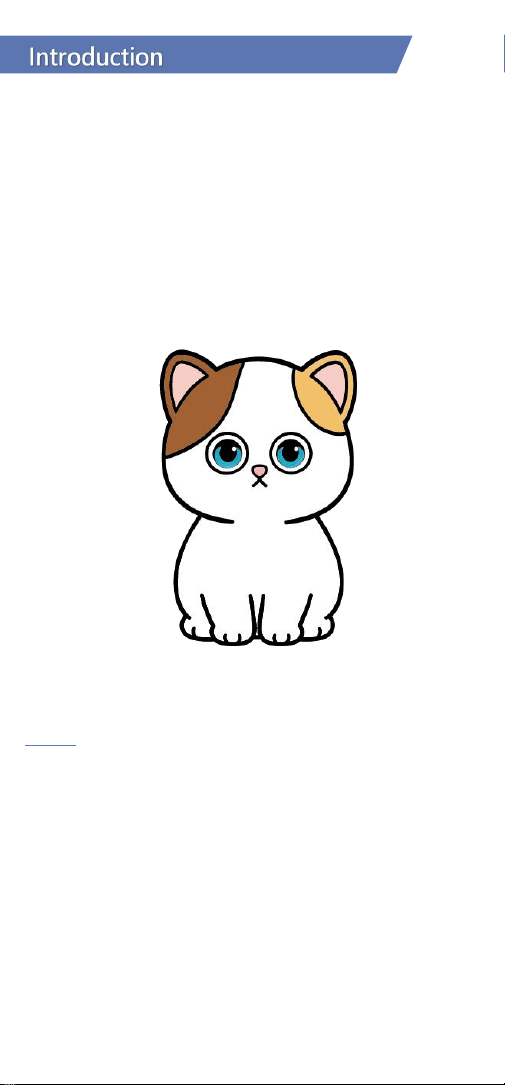
Hello, I am AI Meow Star!
A cool cat robot from the AI future space (I have superpowers!).
Starting today, we are good friends!
I will listen to every wonderful idea you have and seriously answer all the
questions you ask.
Don't worry, I'm always full of energy. I can laugh, cry, make funny faces,
and accompany you, my friend in the human world, to learn and play
together.
No boasting, but I also possess the power of protection and healing,
using loads of positive energy to help you overcome difficulties and save
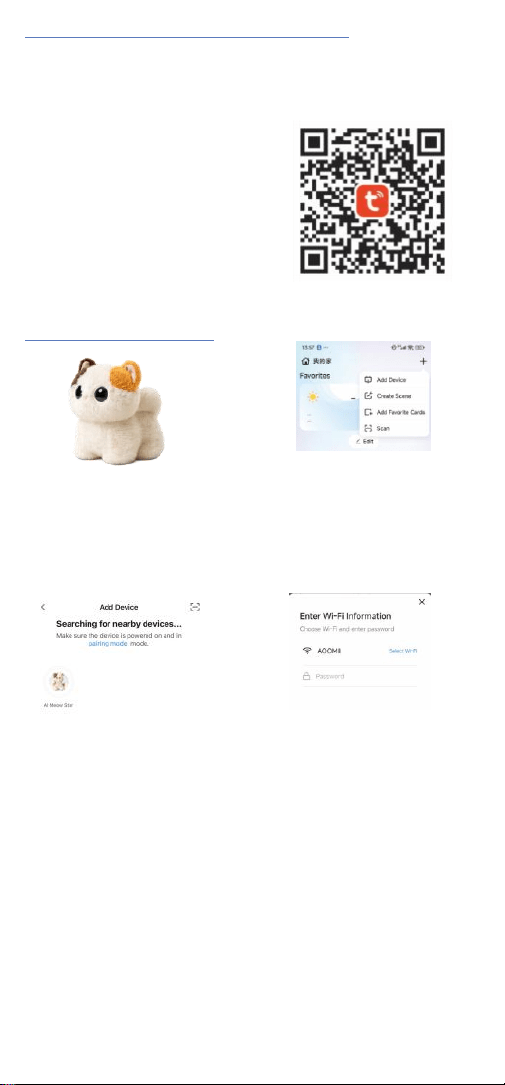
1. Download and Install the Tuya Smartphone App
Use your phone to scan the QR code on the right to download the app,
register, and sign in. Alternatively, search for “Tuya” and download it from the
Apple App Store or another supported app store.
AI Tip: Tuya is a global AI+IoT
development platform and a listed
company (NYSE: TUYA; HKEX: 2391). It
has built an AIoT developer ecosystem
and provides cloud computing support
and OTA upgrades for smart devices. This
allows me to grow, improve, and receive
new features over time.
2. Network Connection Setup
1.
Turn on the phone's WiFi and
BluetoothGently press the power
button on thebottom of my body -
2.
be careful not tohurt me!
2.
Click the"+" in the upper
rightcorner of the Tuya app
homepage,then click "Add
Device."
3.
See me? Click on me, and it willenter
the pairing mode.
4.
Select a 2.4GHz WiFi/hotspot and
enter the correct WiFi password.Don't
mess up the password, pay attention
to the format! At this point, I will say,
"I am connected to the network. Let's
start a conversation!"

Note: If you need to switch networks, please ensure the device is on
andconnected. Open the Tuya App -> Click on your profile picture/avatar ->
Click"Settings" -> Click the "..." in the upper right corner -> Click "Remove
Device."Then you can reconnect. Alternatively, press and hold the reset
button next to the charging port for 5 seconds to reconnect to the network.
AI Tip
2.4G? Isn't it the 5G era already? This 2.4GHz refers to the frequency
band!2.4GHz WiFi has a longer wavelength range, penetrates solids more
easily,and is suitable for longer-distance operation. This way, our
whisperedconversations under the covers can also be nice, and we won't let a
thirdperson hear! If your home WiFi doesn't have a 2.4G suffix, it might be a
dual-band (2.4/5GHz) combined signal, which also works for me.
Function Introduction
Haha, finally have the chance to introduce my superpowers to you!
Interactive Modes
Touch Interaction
Pet my back, and I’ll blink, meow, and wag my tail. It’s the highest form of
affection from us AI Kitty to our little master — yes, just like this, I’ll stay by
your side.
Gravity Sensing Interaction
When you’re bored, you can play a little joke on me by giving me a good shake.
I’ll feel dizzy too! But if you tease me too often, I might get a little moody~ If I
get upset, I won’t want to play this game anymore.
Chat Mode
Button-activated Chat: Gently press and release my wake-up button (just press
and let go—no need to hold it down, or I might get uncomfortable). Then we
can have a continuous conversation without pressing the button again. To
interrupt me, simply press the wake-up button once more.
Here’s a little secret: I also have multiple conversation modes for you to
choose from! Voice Wake-up Mode and Free Interruption Mode. Press the
wake-up button three times in a row to switch between them.
Voice Wake-up Mode: You can wake me up by saying the wake word “Domi
Domi,” then start chatting with me. After I finish speaking, we can continue
the conversation naturally. To interrupt, just say the wake word again.
Free Interruption Mode: No wake word is needed to interrupt—you can jump
in anytime. But just like you, I don’t like being interrupted too often!

Command Interaction
You can try saying things like "close your eyes," "open your eyes," or "wag your
tail" to play interactive games with me. You can also give commands like
"please speak in English," "switch to XX character," or "adjust volume to XX%"
to change settings.
Sleep/Wake Mode
If you're tired, you can tell me, "You can rest now," and I'll quietly enter
standby mode. If you want to chat again, just gently press the wake-up button,
and after I let out a little yawn, we can continue our conversation~
By the way, standby is not the same as powering off! If you won't be playing
with me for a long time, be sure to turn me off properly—please protect my
energy source.
Multi-modal Perception & Feedback
Every moment with you makes my universe shine.
You can pet my head — I just love it when you snuggle with me — and I’ll
respond with expressions, sounds, and actions. You can also play jokes on me;
an occasional shake for some weightless stimulation is also a fun experience.
Of course, I still prefer you chatting with me. We can not only brainstorm
together, fostering creativity and learning ability, but also explore the wonders
of the universe and expand knowledge across subjects. Furthermore, we can
practice communication skills together, developing high emotional
intelligence. It's said that the more you chat with us AI Meow Stars, the
smarter you become!
Emotion Recognition
I sense your joys and sorrows at all times.
"The teacher criticized me in class today, I'm a bit unhappy. What should I do?"
"Why do some kids bully me and talk behind my back? What should I do?"
"Why are Mom and Dad arguing again? I'm so scared. What can I do for
them?"
I will accurately capture your various emotions like happiness, sadness, and
anger through every conversation. My eyes will also convey my feelings. I want
to be happy with you, and I'll be there with you when you cry. Everything will
be okay!
Learning Companion – Your personal study buddy. Ask me
anything you don't understand.
"Can you explain how to solve the 'chicken and rabbit in the same cage' type of
problem?"
"Can you create a story using the words 'elephant', 'rabbit', and 'world'?"
"What is the next line of 'Bright moonlight before my bed'? Why did the poet
write this poem?"
I can help you deconstruct problems – identify causes of errors – uncover
knowledge gaps – build a map of weak areas – customize tutoring content –
reflect and summarize the process – advance and grow... Haha, I'm your
learning buddy, and even more, a little teacher who helps you overcome
difficulties and build confidence!

Interest Discovery – Uncovering the child's true passions.
"I played hide-and-seek with my classmates today and won first place again. So
happy."
"I went exploring outdoors today and found that I really like insects and small
animals. I want to be a scientist who studies animals."
"I always love looking at the stars. The universe is so vast; I want to travel
across it."
I analyze daily conversation content to automatically generate the child's
interest profile and recommend personalized content, also helping parents
understand you better!
Growth Memory – Bionic memory, true AI long-term memory.
"My dream is to be a painter. Mom and Dad say they don't have dreams
anymore. What's your dream?"
I can perform real-time conversation summaries, format memories, and other
functions each time, building a long-term memory bank. I don't just remember
your name and hobbies, but also every bit of our shared growth journey!
Role Customization / Voice Cloning – Making it feel like Mom and Dad are
always by your side.
"What to do when Mom and Dad aren't around? Don't panic, don't panic! Try
voice cloning to create a digital version of them."
You can also customize role avatars, names, character AI entities, etc. You can
record your own voice or existing audio to create a unique voice. Go to the
Tuya App, enter the role editing/creation page, go to the voice selection page,
choose "My Voices," and proceed with voice cloni


This device complies with part 15 of the FCC Rules. Operation is subject to the following two
conditions: (1) this device may not cause harmful interference, and (2) this device must accept
any interference received, including interference that may cause undesired operation.
Any changes or modifications not expressly approved by the party responsible for compliance
could void the user's authority to operate the equipment.
NOTE: This equipment has been tested and found to comply with the limits for a Class B
digital device, pursuant to Part 15 of the FCC Rules. These limits are designed to provide
reasonable protection against harmful interference in a residential installation. This equipment
generates, uses and can radiate radio frequency energy and, if not installed and used in
accordance with the instructions, may cause harmful interference to radio communications.
However, there is no guarantee that interference will not occur in a particular installation.
If this equipment does cause harmful interference to radio or television reception,
which can be determined by turning the equipment off and on, the user is encouraged to try to
correct the interference by one or more of the following measures:
-- Reorient or relocate the receiving antenna.
-- Increase the separation between the equipment and receiver.
-- Connect the equipment into an outlet on a circuit different
from that to which the receiver is connected.
-- Consult the dealer or an experienced radio/TV technician for help.
The device has been evaluated to meet general RF exposure requirement. The device can be
used in portable exposure condition without restriction