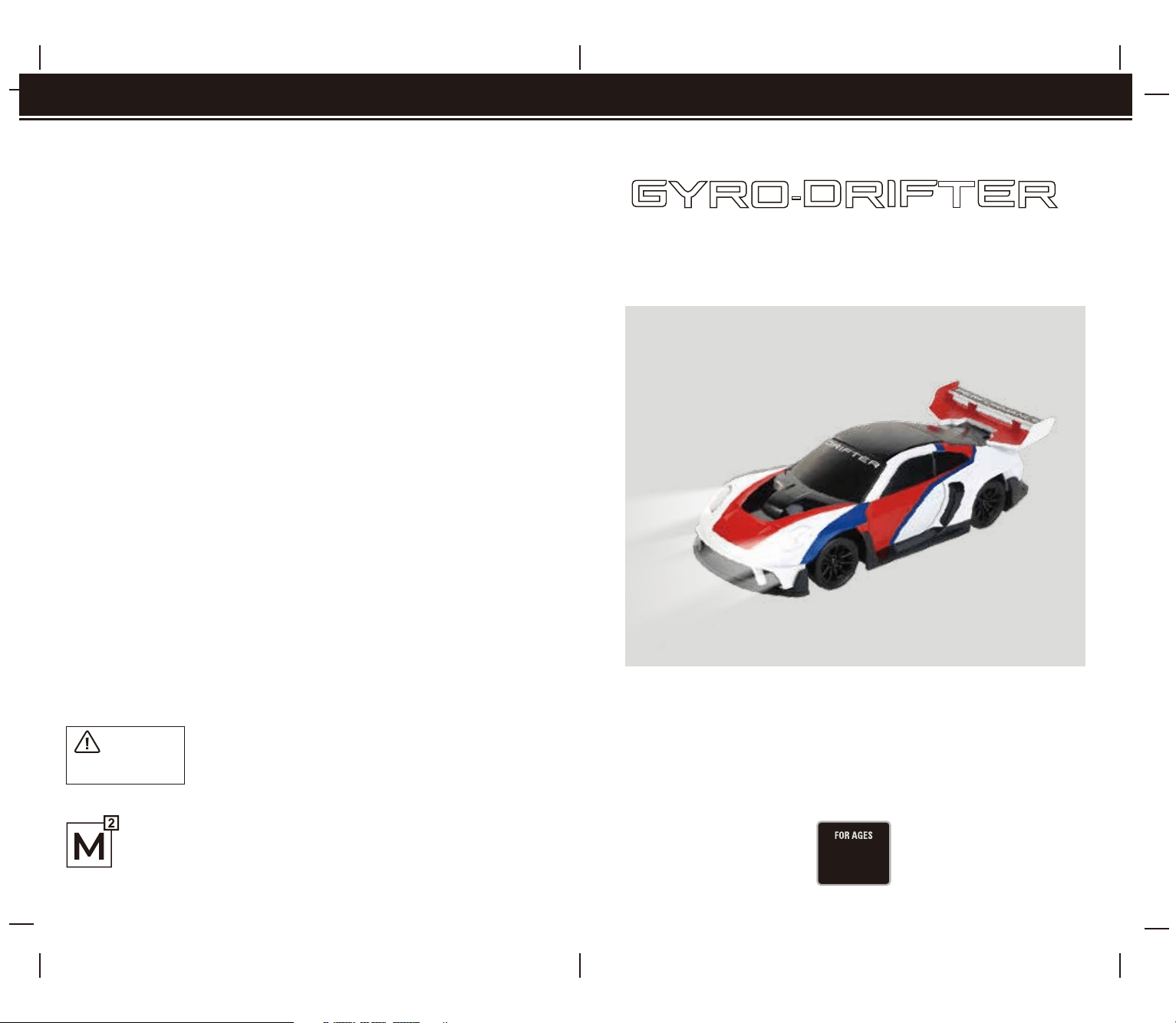
Colors and styles may vary slightly.
INSTRUCTION MANUAL
Thank you for purchasing the Gyro Assisted Drift Car. With proper care, your new Gyro
Assisted Drift Car will provide you with many hours of enjoyment. Please read this
instruction manual completely before using the product for the first time and then keep
this manual in a handy place for future reference.
CHOKING HAZARD
-
Small parts.
Not for children under 3 years.
WARNING!
8
+
BRANDS
This product is manufactured by M2 Brands Limited.
Office: Suite C, Level 7, World Trust Tower, 50 Stanley Street,
Central, Hong Kong.
www.m2brands.com
GYRO-DRIFTER
GYRO ASSISTED DRIFT CAR
Conforms to safety requirements of RSS210, ASTM, CPSIA and FCC.
FCC Part 15 C Notice
CAUTION: Changes or modications not expressly approved by the party responsible for compliance could void the
user’s authority to operate the equipment.
NOTE: This equipment has been tested and found to comply with the limits for a Class B digital device, pursuant to
Part 15 of the FCC Rules. These limits are designed to provide reasonable protection against harmful interference in a
residential installation. This equipment generates, uses and can radiate radio frequency energy and, if not installed
and used in accordance with the instructions, may cause harmful interference to radio communications. However,
there is no guarantee that interference will not occur in a particular installation. If this equipment does cause harmful
interference to radio or television reception, which can be determined by turning the equipment o and on, the user
is encouraged to try to correct the interference by one or more of the following measures:
• Reorient or relocate the receiving antenna.
• Increase the separation between the equipment and receiver.
• Connect the equipment into an outlet on a circuit dierent from that to which the receiver is connected.
• Consult the dealer or experienced radio/TV technician for help.
This device complies with Part 15 of the FCC Rules. Operation is subject to the following two conditions :
(1) This device may not cause harmful interference, and
(2) this device must accept any interference received, including interference that may cause undesired operation.
C002-USA-V 1.0
• 1 Gyro Assisted Drift Car
• 1 2.4G Wireless Controller
• 1 USB Charging Cord
• 1 Instruction Manual
• 1 Screwdriver
• 4 X Rubber Racing Tires
• 4 X Cones - To Create Your Own Drift Course!
C
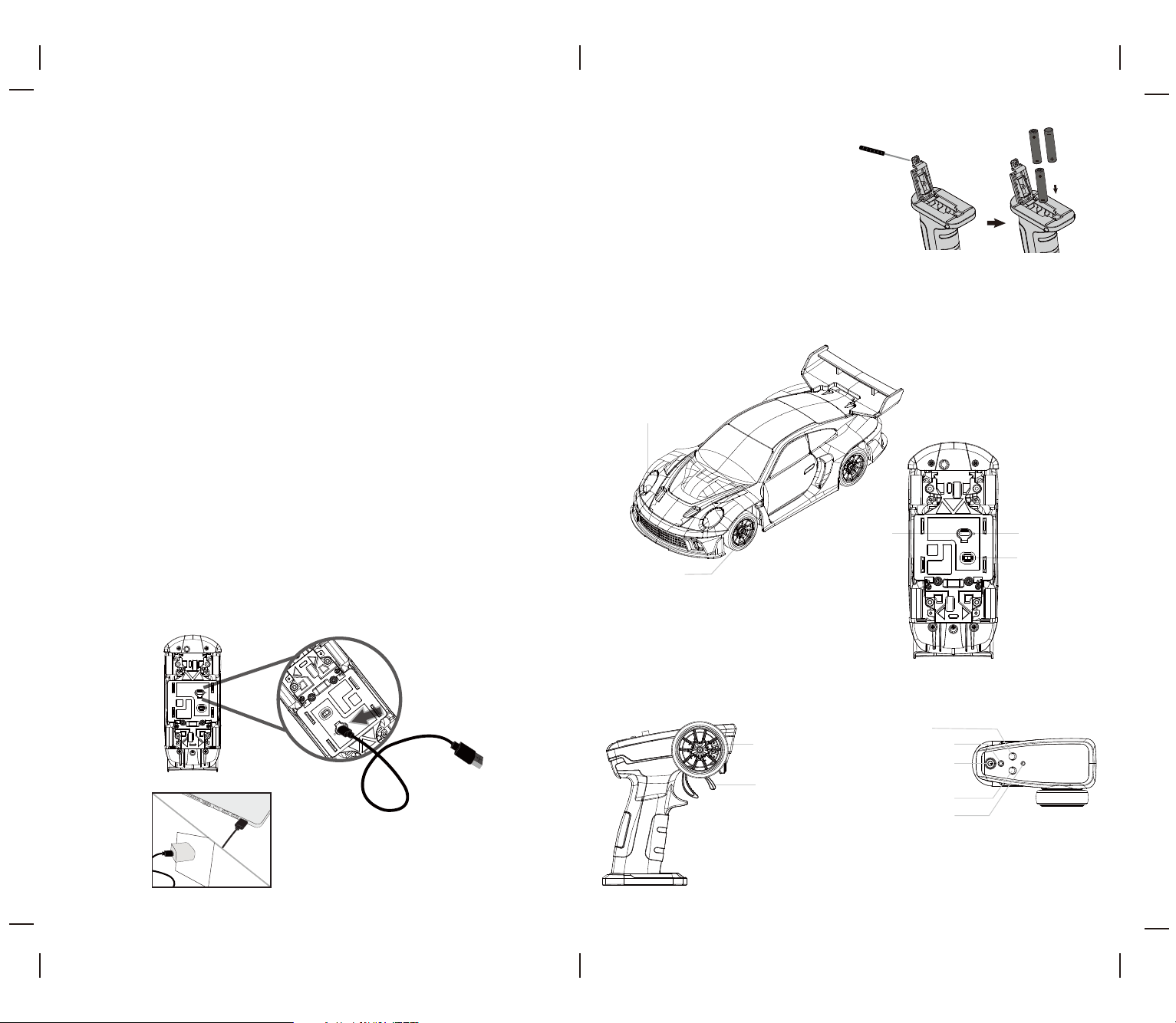
CONTROLLER REQUIRES 3xAAA BATTERIES
(NOT INCLUDED)
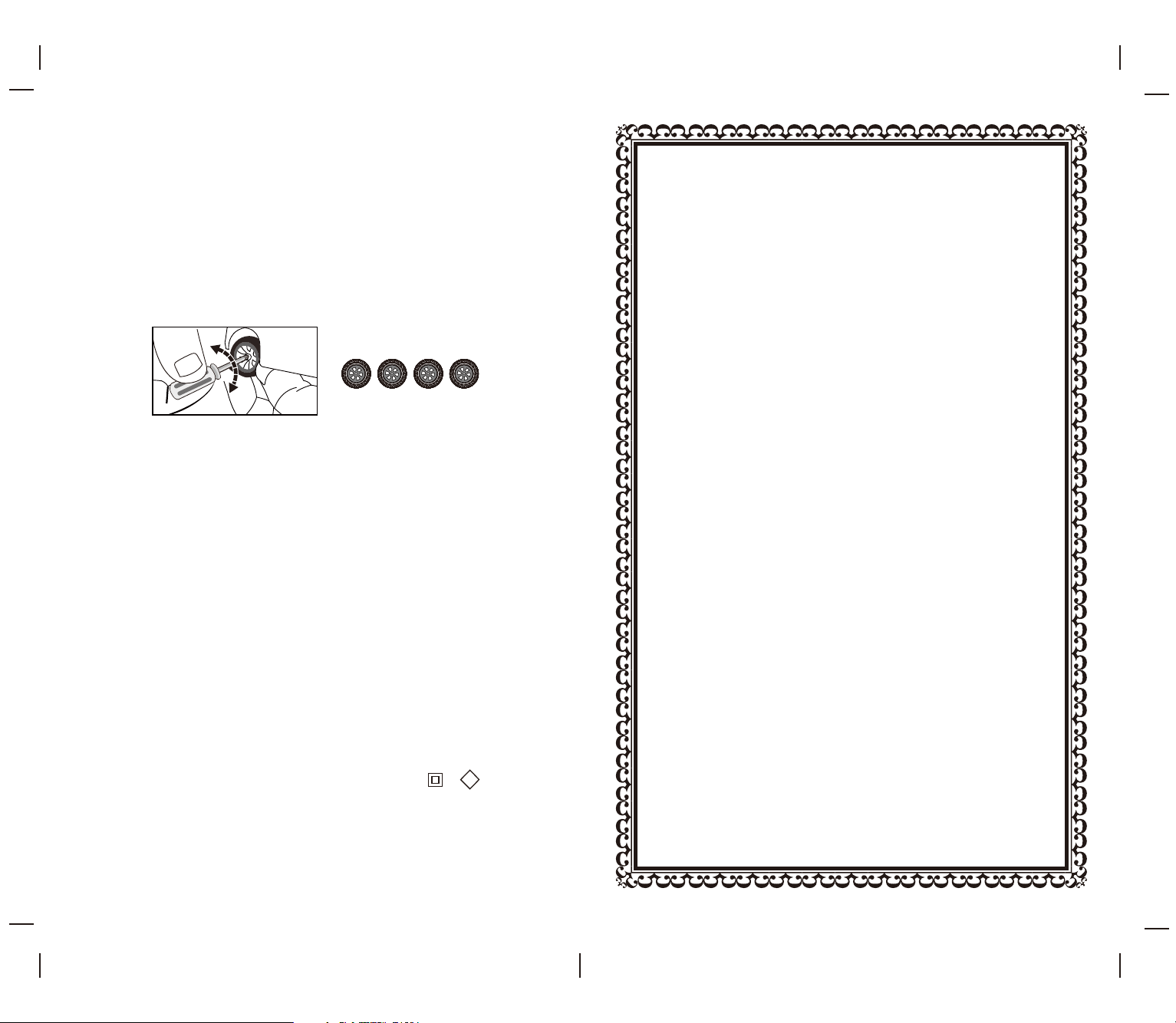
Turn the remote controller upside down so the
battery compartment is facing up.Using the
included screwdriver, remove the battery cover.
Insert 3 AAA batteries (not included), ensuring the
polarity (+ and -) matches the markings inside the
compartment.Reattach the battery cover and
tighten it securely with the screwdriver
(see diagram C).
/
/
1. Turn o the Gyro Assisted Drift Car, remove the dust plug from the bottom charging port, and plug the
included USB charging cable into the charging socket on the bottom of the Gyro Assisted Drift Car
(see diagram A).
2. Connect the other end of the USB cable to either your computer’s USB port or a UL/CE-approved USB wall
charger (see diagram B).
IMPORTANT: If using a high-speed USB wall adapter make sure that the output is less than 7V otherwise
the Gyro Assisted Drift Car’s internal charging circuit will shut down for safety reasons and not allow the
Gyro Assisted Drift Car to accept a charge.The CHARGE indicator light turns red while the charging is in
progress and green when the Gyro Assisted Drift Car is fully charged.
3. The charging time may vary depending on the remaining percentage of charge the battery has left in it
from previous use. Average charging time is approximately 60 minutes. The car operates for
approximately25-30 minutes on a full charge.
4. The green LED charging indicator on the Gyro Assisted Drift Car turns on when the battery is fully charged.
5. LOW BATTERY INDICATION: When the battery level of the vehicle becomes low, the lights on the vehicle will
start ashing, indicating that it's time to recharge the vehicle.
*SAFETY TIP: Periodically examine the USB charging cord for external damage. External
damage to the charging cord may result in the risk of fire or electric shock. Never use a
damaged charging cord or compromised wall adapter.
B
A
WARNING: Before use,
make sure the dust-proof
plug is rmly inserted into
the charging port.
Otherwise, the vehicle may
not operate properly.
Your GYRO ASSISTED DRIFT CAR utilizes an automatic 2.4G digital channel selection system that allows up to 8
individual players to race side by side in the same wireless range without interference.
FOR SOLO PLAYER:
1. Before starting, make sure that the power on both your remote control and Car are in the OFF position (the on o
power button is on the under carriage of the Car)
2. First turn ON the Car and set it down on a at surface. The head lights will be ashing rapidly letting you know that
the Car has power and is ready for syncing.
3. Next turn ON the remote control. The head light should stop ashing and immediately become solid indicating
that you have successfully synced your GYRO ASSISTED DRIFT CAR .
*Note: If pairing fails rst make the sure that batteries are properly installed in the controller and Car. Turn both o and
repeat steps 1-3 above.
FOR MULTIPLE PLAYERS:
1. Before starting, make sure that the power on all the Cars and all the controllers are in the OFF position.
2. Following a one by one sequence, each player should sync their Car one at a time by following steps 1 to 3 above.
3. IMPORTANT: after syncing each Car, make sure to leave each Car ON until all players have completed the syncing
process.
4. If there is an interference problem, all players must turn o their controllers and Cars and restart the process again.
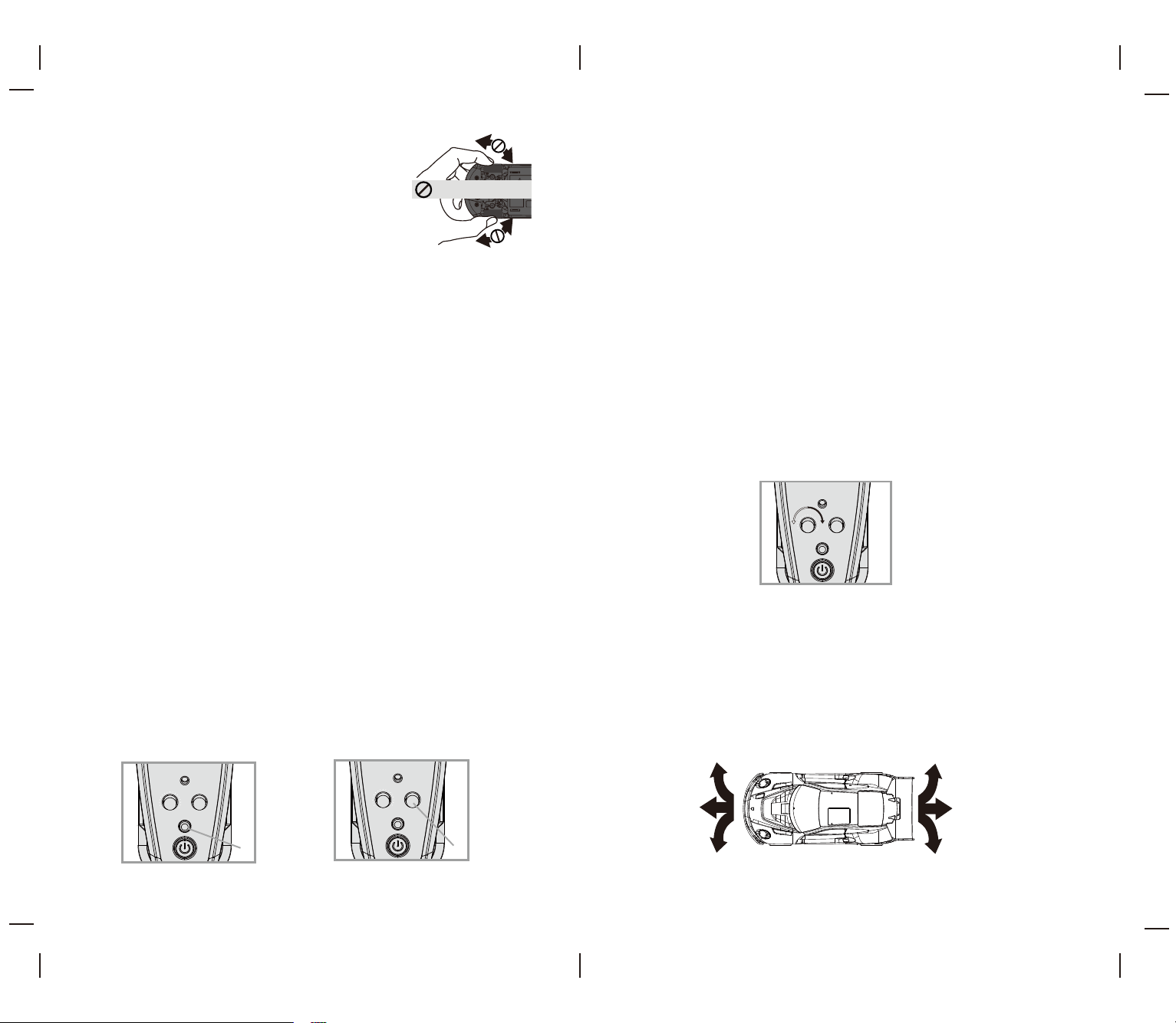
This Gyro Assisted Drift Car is equipped with 4 light modes. Simply short press the button to cycle through Normal,
Steady On, Fast Flash and O modes. In Normal Mode, all lights stay steadily on; the left front and rear lights ash
when turning left, the right front and rear lights ash when turning right, and the rear lights brighten while reversing.
Each mode delivers a unique lighting eect, greatly enhancing the car’s visual appeal and playability (see diagram D1).
Your Gyro Assisted Drift Car oers adjustable speed settings for both beginner and advanced drivers. For beginner
drivers, we recommend starting with the low-speed setting (see speed mode dial in diagram D2). In low-speed mode,
your Gyro Assisted Drift Car has the same proportional steering and acceleration functions as in high-speed mode, but
the speed is limited for young drivers and beginners who are just learning to control the vehicle. In high-speed mode,
the Gyro Assisted Drift Car can reach its maximum speed and power.
The GYRO ASSISTED DRIFT CAR is unlike most toy RC cars as it uses digital proportion acceleration. This feature
comes from the high-end hobby car industry and it makes driving your GYRO ASSISTED DRIFT CAR so much more
fun and controllable!
With digital proportional speed your GYRO ASSISTED DRIFT CAR has a wide range of sensitivity and speed control.
For example; you can practice driving very slowly, you can control the rate of acceleration and you can adjust your
speed up and down on the drive creating awesome drifts or instant straight-away acceleration. The digital throttle
is very sensitive so we strongly suggest to begin practicing with a very gentle nger on the throttle until you can
begin to understand and feel how to control the speed and slide!
()
()
().
()
()
()
E
D2
D1
F
LIGHT
ST-TRIM SPEED
LIGHT
ST-TRIM SPEED
DO NOT TURN THE FRONT WHEELS LEFT OR RIGHT BY HAND!
THE FRONT WHEEL STEERING MECHANISM IS EXTREMELY
PRECISE,FORCEFULLY ROTATING WITH HANDS(EXTERNAL FORCE)
CAN CAUSE DAMAGE TO STEERING COMPONENTS!
LIGHT
ST-TRIM SPEED
• Improper use of batteries may lead to overheating, breakage or leaking.
- Do not mix old and new batteries.
- Do not mix different battery brands.
- Install batteries with correct polarity. The flat side (negative terminal) of the battery should rest against the spring.
- Remove dead batteries immediately.
- Avoid liquids, which can short circuit the batteries.
- Remove the batteries if you will not use the remote controller for a long time.
- The remote will become unresponsive when batteries are low, at which point you should replace all batteries with
new ones.
• Avoid using near furniture or glass to prevent damage to these objects.
• Do not play on roads.
• Do not play in crowded areas to avoid injury or damage. Choose a safe location away from traffic.
• Do not use Car during a storm or when lightning or thunder are present.
• Do not use in a wet , sandy or muddy environment as Car may become damaged.
• Do not modify or attempt to replace the built-in original antenna on the remote or Car. Doing so will damage the set
and affect operation.
• Do not pull on any wires that are part of the Car. Such action may cause the wires to break and the Car to malfunction.
• Keep fingers, hair and clothes away from the Car’s spinning tires. Failure to do so may result in physical injury.
• Never aim the Car at other people.
• Do not throw the Car or purposely hit it with any object.
• Store Car in a cool environment, away from high-temperature sources such as fires, stoves, radiators, etc.
• This Car has no user-serviceable parts. Do not attempt to modify components or circuit board.
•
Always replace the whole set of batteries at one time, taking care not to mix old and new ones, or batteries of different types.
• This toy is only to be connected to equipment bearing either of the following symbols: or
• This Gyro Assisted Drift contains an internal rechargeable battery and is not replaceable. If the battery no longer stays
charged, dispose of it properly according to local disposal requirements.
• The remote control requires 3 (AAA) batteries (Not included), which can be removed. If the battery is no longer usable,
dispose of it properly according to local disposal regulations.
CAUTION: If the rechargeable battery leaks fluid, avoid contact with eyes and dispose of the Gyro Assisted Drift Car.
III
G
Limited 90-Day Warranty
NORTH AMERICA
M2 Brands warrants to the original consumer that this product is free from any electrical or
mechanical defects for a period of 90 DAYS from the date of purchase. If any such defect is
discovered within the warranty period, M2 Brands will repair or replace the unit free of
charge upon receipt of the unit, shipped postage prepaid and insured to our warranty center,
ALONG WITH THE ORIGINAL RECEIPT OR PROOF OF PURCHASE evidencing that the product
was purchased from an approved M2 Brands retail partner and that the product is still within
the 90-day warranty period. The warranty covers normal consumer use and does not cover
damage that occurs during shipment or failure resulting from alterations, accident, misuse,
abuse, neglect, wear and tear, inadequate maintenance, commercial use, or unreasonable use
of the unit. Removal of any parts/components voids all warranties. This warranty does not
cover the cost of repairs made or attempted by third parties. Any applicable implied
warranties, including warranties of merchantability and fitness, are hereby limited to 90 DAYS
from the date of purchase. Consequential or incidental damages resulting from a breach of
any applicable express or implied warranties are hereby excluded. Some states do not permit
limitations on the duration of implied warranties or the exclusion of incidental or
consequential damages, so the above limitations and exclusions may not apply.
REPAIR/REPLACE PRODUCT
If your product malfunctions or stops working, contact our warranty center immediately
(contact details below). If a return is necessary, our warranty department will issue you an
RMA number/form and the address of the nearest return center for shipping the product to
us. When honoring the warranty, M2 Brands reserves the right to either repair, replace or
refund the product.
IMPORTANT NOTICE:
We will reject and return to sender any returns that are not accompanied by an M2
Brands-issued RMA form and RMA number, so make sure to contact our warranty center
before attempting to return your product!
PREPARATION FOR SHIPPING YOUR PRODUCT:
Please repack your product in a durable box, preferably in the original carton, and send it
prepaid and adequately insured. Include the RMA form that was issued by our warranty
department, along with your daytime telephone number and email address, inside the
shipping carton. If your warranty has expired and you still require service, please contact our
customer care team. For further information, please email all inquiries to:
IMPORTANT NOTICE!
DO NOT ATTEMPT TO SHIP YOUR PRODUCT BACK
WITHOUT FIRST CONTACTING OUR WARRANTY
DEPARTMENT AT:
care@m2brands.com