
Enet WiFi Adapter Type C User Manual
1
Overview
Enet WiFi Adapter Type C was specially developed and
designed to operate the Type C OBD2 diagnostic and coding
features via Type C port and wireless via an embedded
module based on the universal serial interface network
standard,built-in TCP / IP protocol stack, enabling the user
serial port, Ethernet, wireless network (wifi) interface
between the conversions. the traditional serial devices do not
demand to change any configuration, data can be transmitted
through the Internet network. Provide a quick solution for the
user’s serial devices to transfer data via Ethernet
Features
• 2.4GHz 802.11b/g/n,compatible
•
Support IEEE 802.3
、
IEEE 802.3u
•
WiFi Client/AP/Router Mode
• Support wps/wds
• The range of baudrate: 1200~500000bps
• Support transparent transmission mode
• Support multiple security authenti-cation mechanisms:
WEP64/WEP128/ TKIP/ AES
WEP/WPA-PSK/WPA2-PSK
• Support wireless roam
• Support multiple network protocols:
PPPOE/TCP/UDP/DDDNS /DHCP/DNS/HTTP/Firewre
• Support AT+ instruction set
• Support two config methods:Serial/WEB
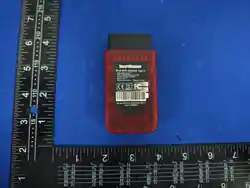
• Device Dimensions 88x46.5x23mm
Enet WiFi Adapter Type C User Manual
2
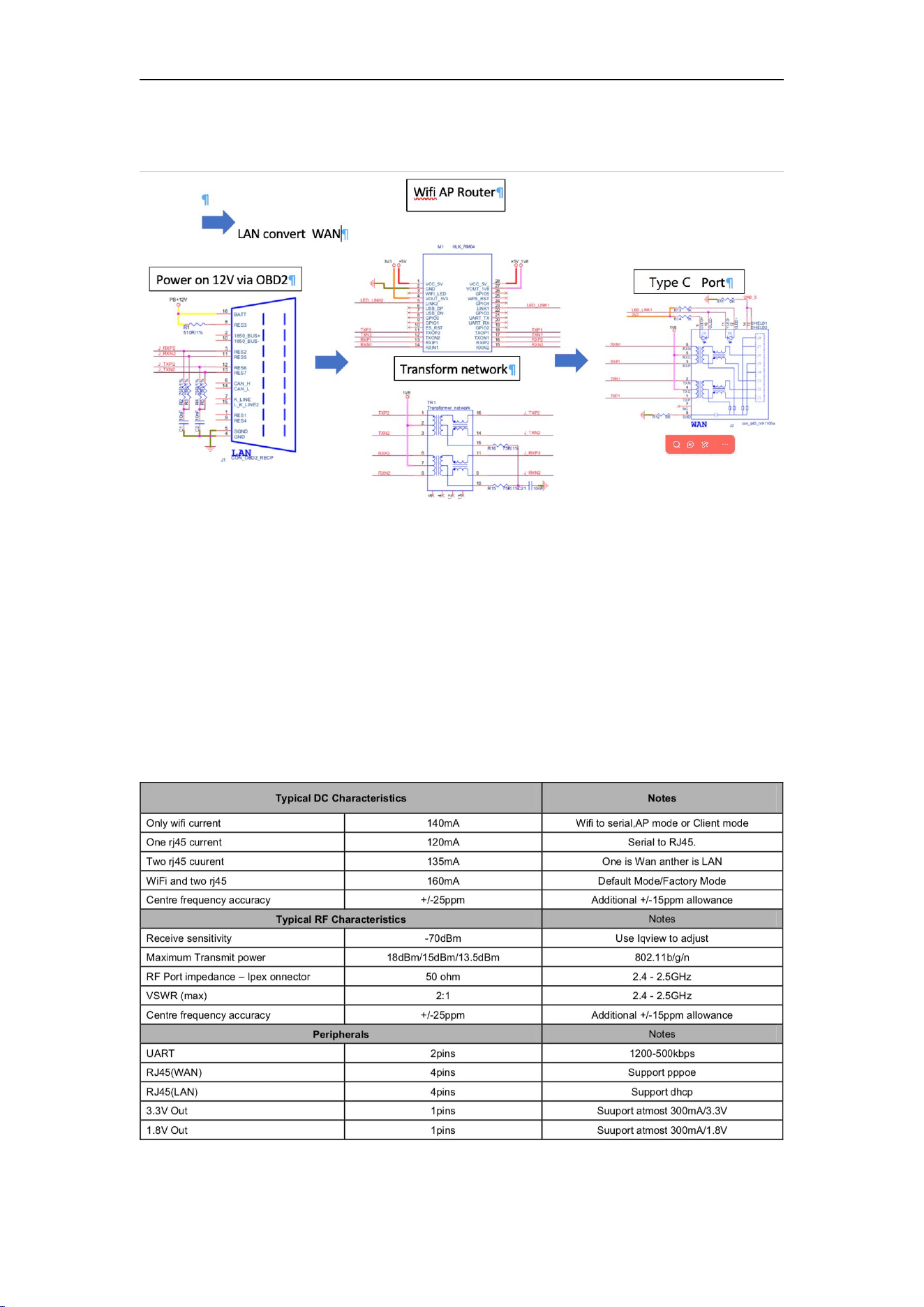
OBD2 Wifi Type C Module Block Diagram
Applications
Ethernet OBDII WiFi Diagnose
Specifications
The parameters are defined here.
Enet WiFi Adapter Type C User Manual
3
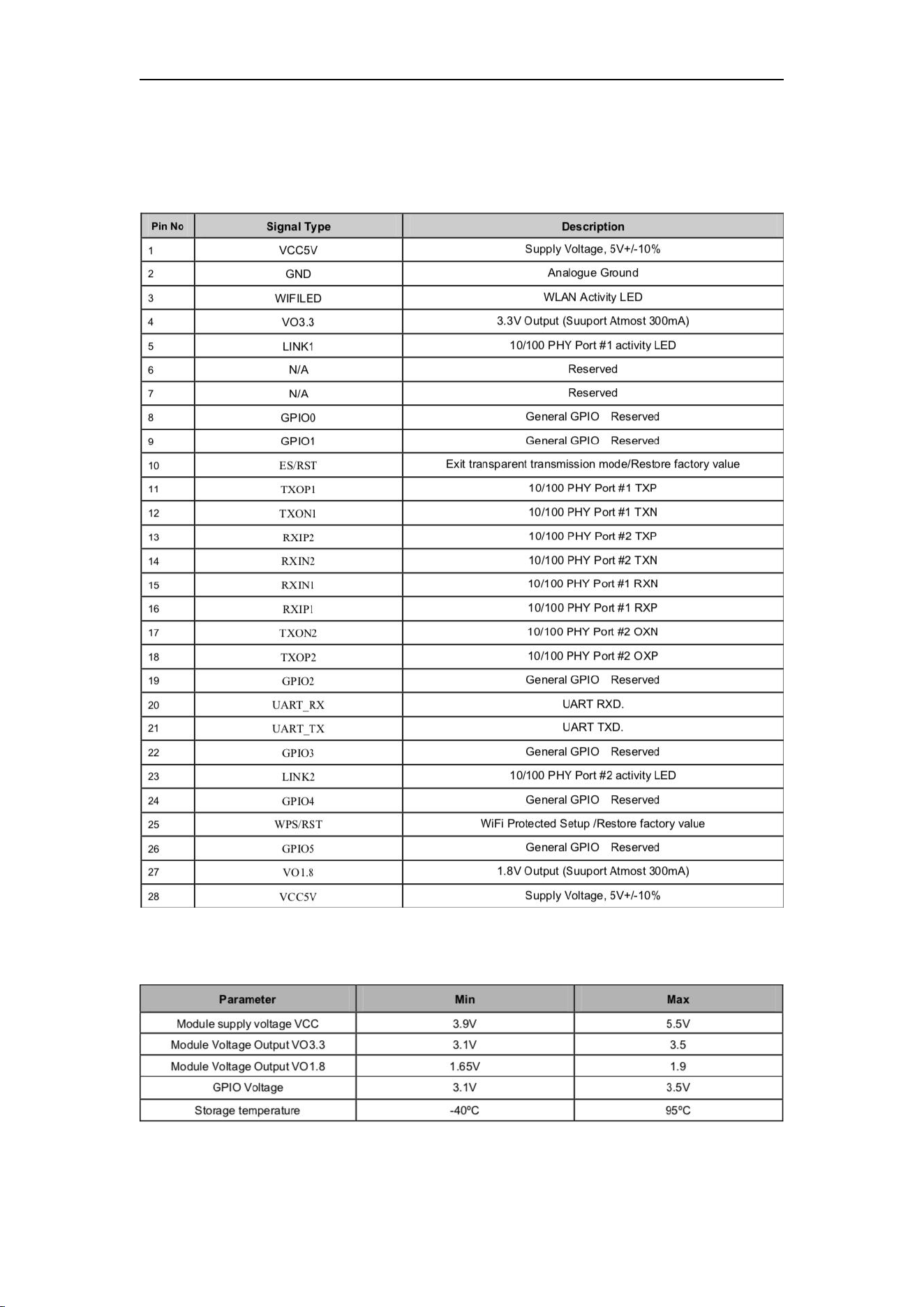
Wi-Fi Module Pin Assignment
Electrical Characteristics
Enet WiFi Adapter Type C User Manual
4
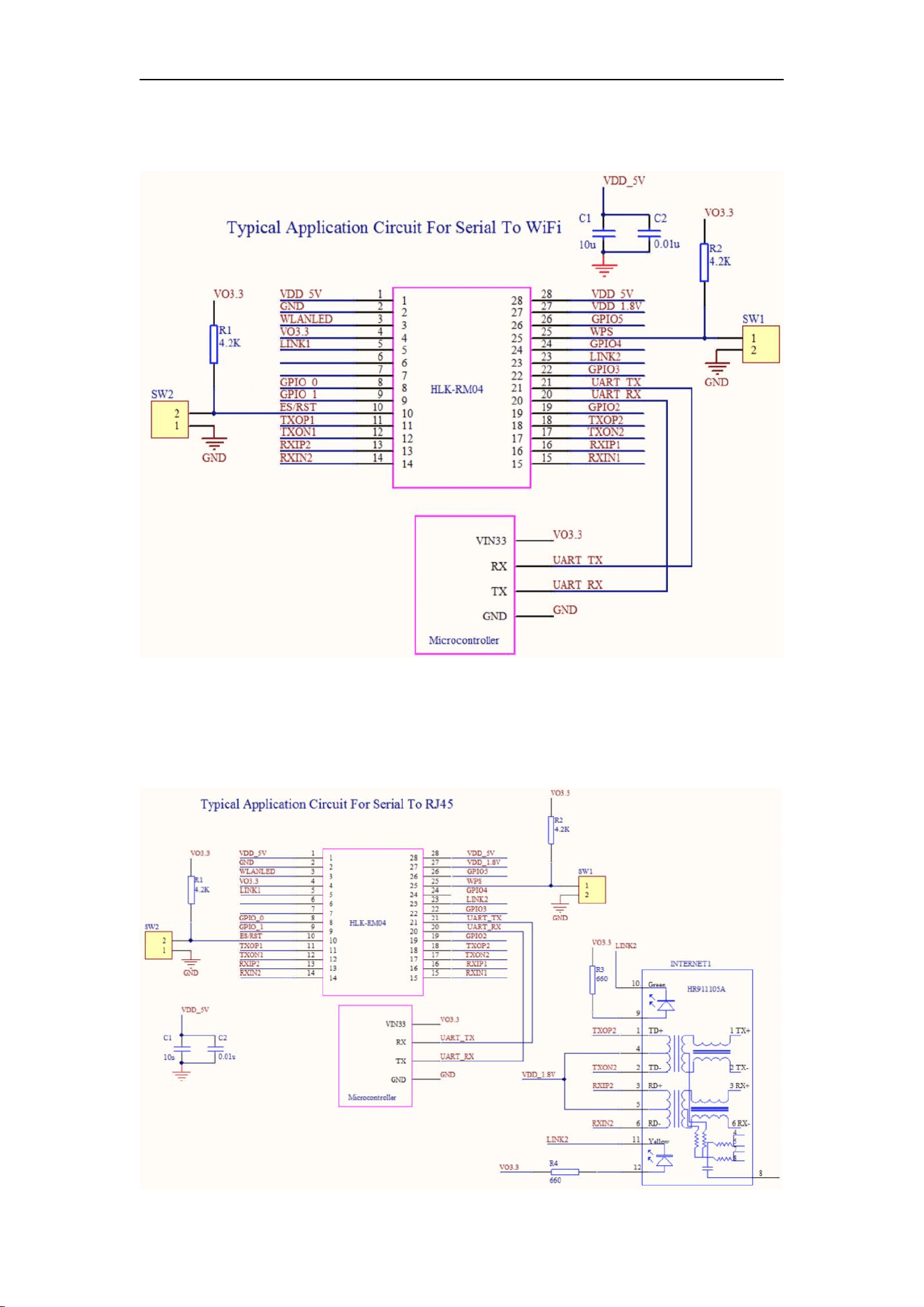
Serial To WiFi
Serial To RJ45
Enet WiFi Adapter Type C User Manual
5
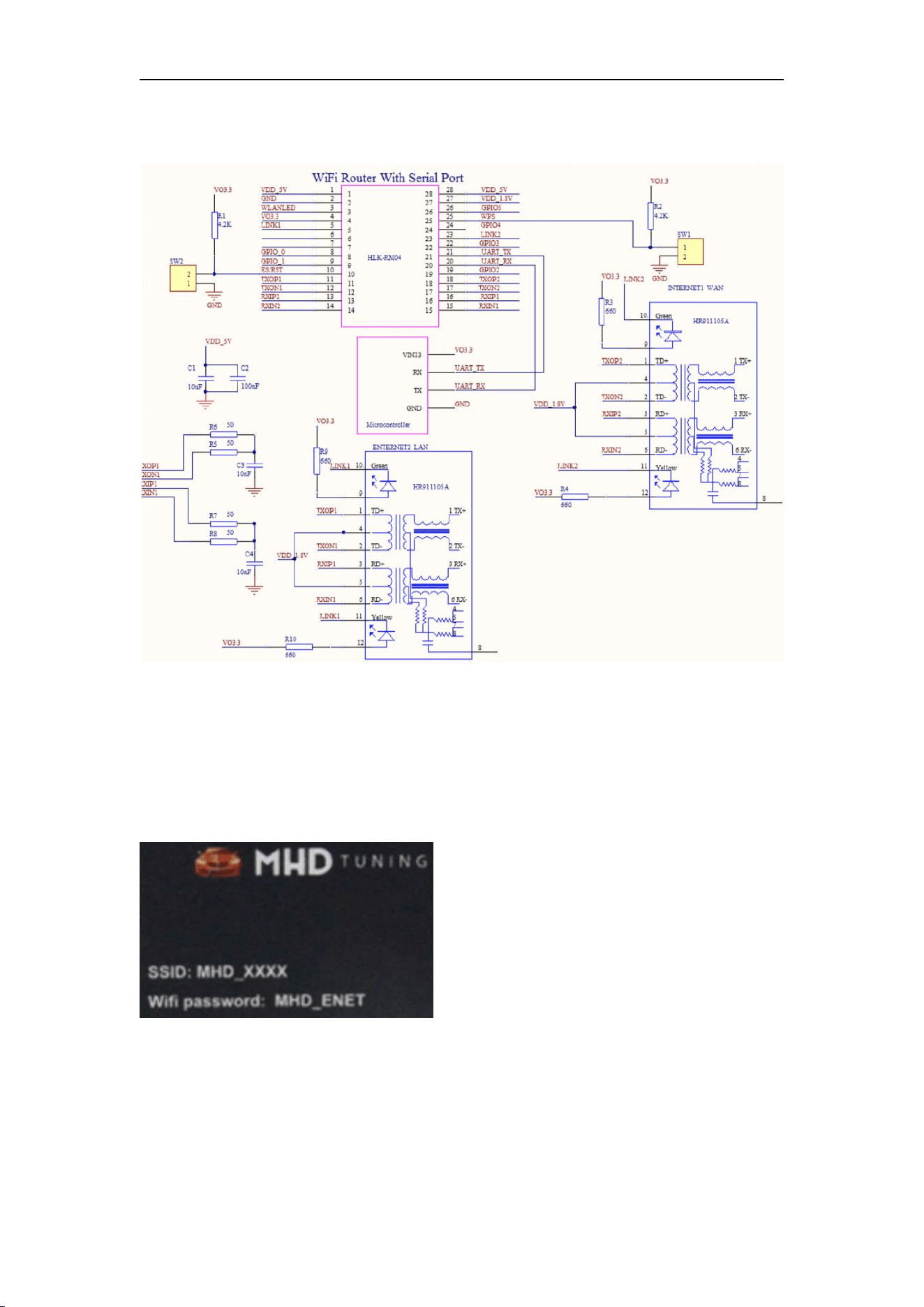
Wireless Router with Serial port(Default Mode)
Operation Guidelines to work with car OBDII
Step 1: Ignition ON, plug the MHD OBDII wifi flasher to the OBD2 diagnostic port
Step 2: Search the Wifi ISID started with MHD_XXXX from laptop wifi and access with the
password which sated at the back side of the module.
Step 3: Successfully connected and operated as user demanded via OBD2 diagnostic port.
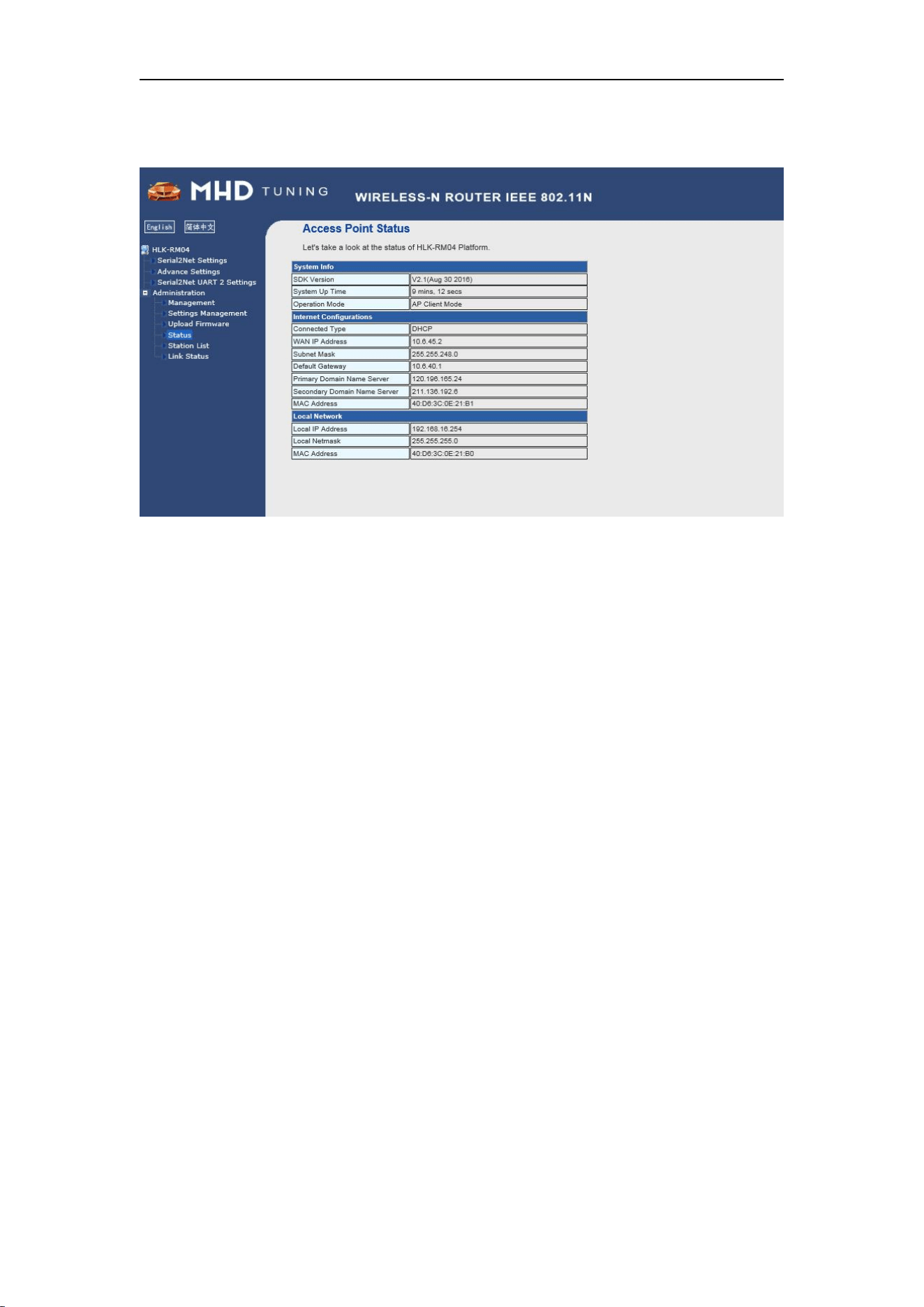
Step 4: Administration panel setup for administrators only.
Enet WiFi Adapter Type C User Manual
6
Appendix Disclaimers
The contents of this document are subject to change without notice. Autosvs Technology
reserves the right to make changes, without notice, in the products, including circuits and/or
software, described or contained therein. Information contained in this document regarding
device applications and the like is intended through suggestion only and may be superseded by
updates. It is your responsibility to ensure that your application meets with your specifications.
Autosvs Technology warrants performance of its hardware products to the specifications
applicable at the time of sale in accordance with Autosvs Technology’s standard warranty. Testing
and other quality control techniques are used to the extent Autosvs Technology deems necessary
to support this warranty. Except where mandatory by government requirements, testing of all
parameters of each product is not necessarily performed.
Autosvs Technology assumes no responsibility or liability for the use of any of these products,
conveys no license or title under any patent, copyright, or mask work right to these products, and
makes no representations or warranties that these products are free from patent, copyright, or
mask work infringement, unless otherwise specified.
Autosvs Technology products are not intended for use in life support systems, appliances or
systems where malfunction of these products can reasonably be expected to result in personal
injury, death or severe property or environmental damage. Autosvs Technology customers using
or selling these products for use in such applications do so at their own risk and agree to fully
indemnify Autosvs Technology for any damages resulting from such use.
All products are sold subject to Autosvs Technology 's terms and conditions of sale supplied at the
time of order acknowledgment. All trademarks are the property of their respective owners.

Enet WiFi Adapter Type C User Manual
7
This device complies with part 15 of the FCC Rules. Operation is subject to the following
two conditions: (1) This device may not cause harmful interference, and (2) this device
must accept any interference received, including interference that may cause undesired
operation.
NOTE: This equipment has been tested and found to comply with the limits for a Class B
digital device, pursuant to Part 15 of the FCC Rules. These limits are designed to provide
reasonable protection against harmful interference in a residential installation. This
equipment generates, uses and can radiate radio frequency energy and, if not installed
and used in accordance with the instructions, may cause harmful interference to radio
communications. However, there is no guarantee that interference will not occur in a
particular installation. If this equipment does cause harmful interference to radio or
television reception, which can be determined by turning the equipment off and on, the
user is encouraged to try to correct the interference by one or more of the following
measures:
-- Reorient or relocate the receiving antenna.
-- Increase the separation between the equipment and receiver.
-- Connect the equipment into an outlet on a circuit different from that to which the
receiver is connected.
-- Consult the dealer or an experienced radio/TV technician for help.
Changes or modifications not expressly approved by the party responsible for
compliance could void the user's authority to operate the equipment.
This equipment complies with the FCC RF radiation exposure limits set forth for an uncontrolled
environment. This equipment should be installed and operated with a minimum distance of 20cm
between the radiator and any part of your body.