FCC Statement
This device has been tested and found to comply with the limits for a Class B digital device,
pursuant to Part 15 of the FCC Rules. These limits are designed to provide reasonable protection
against harmful interference in a residential installation. This device generates, uses and can radiate
radio frequency energy and, if not installed and used in accordance with the instructions, may cause
harmful interference to radio communications.
However, there is no guarantee that interference will not occur in a particular installation. If this device
does cause harmful interference to radio or television reception, which can be determined by turning
the device off and on, the user is encouraged to try to correct the interference by one or more of the
following measures:
Changes or modifications not expressly approved by the party responsible for compliance could void
the user's authority to operate the equipment
Reorient or relocate the receiving antenna.
Increase the separation between the device and receiver.
Connect the device into an outlet on a circuit different from that to which the receiver is
connected.
Consult the dealer or an experienced radio/TV technician for help
APP DOWNLOAD
Failed to connect
Mapping mode
Native mode
1
3
2
4
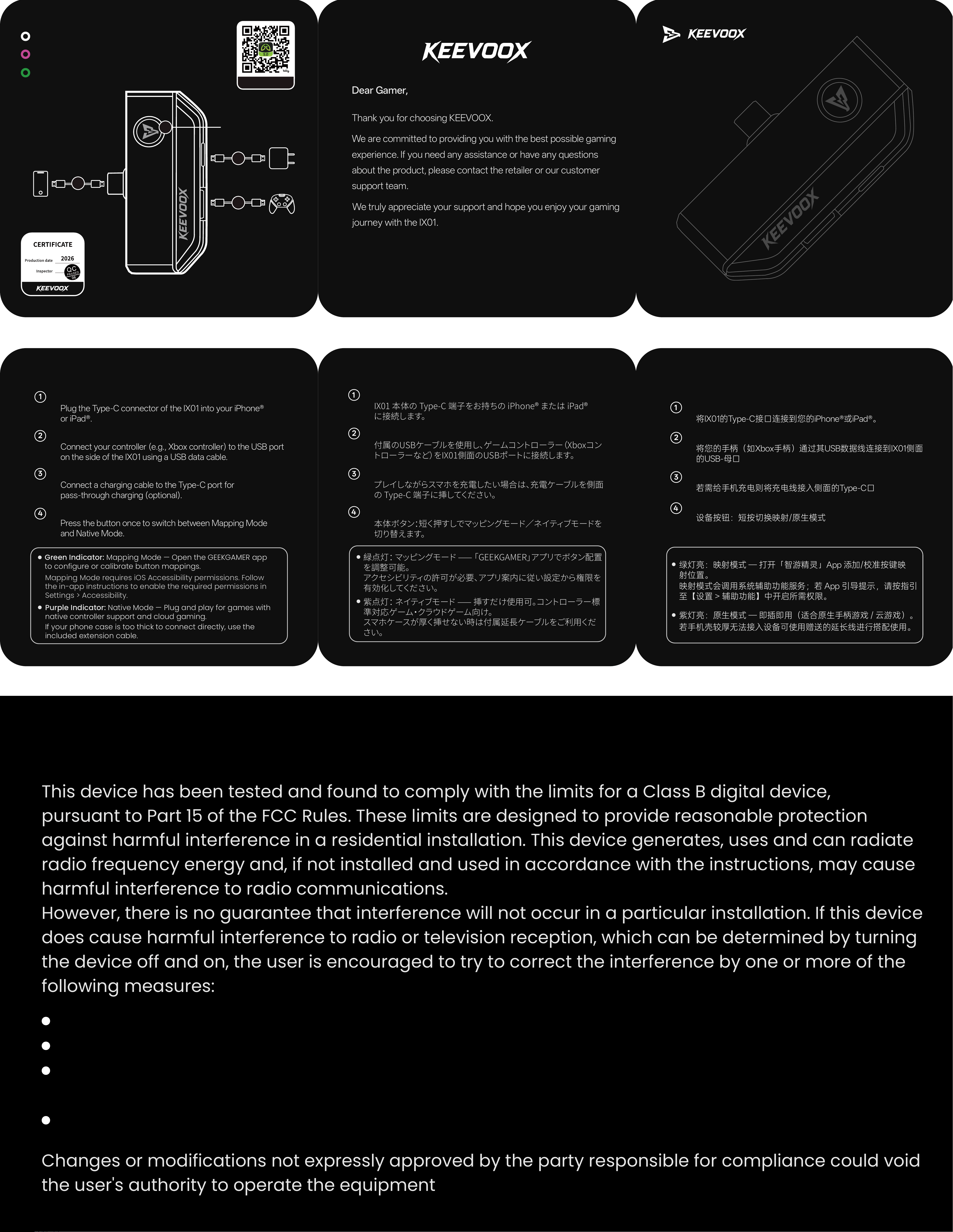
Phone Connector
Controller Port
Charging Port
Mode Button
Plug the Type-C connector of the IX01 into your iPhone®
or iPad®.
Connection Steps
Phone Connector
Connect your controller (e.g., Xbox controller) to the USB port
on the side of the IX01 using a USB data cable.
Controller Port
Connect a charging cable to the Type-C port for
pass-through charging (optional).
Charging Port
Press the button once to switch between Mapping Mode
and Native Mode.
Mode Button
Green Indicator: Mapping Mode — Open the GEEKGAMER app
to configure or calibrate button mappings.
Mapping Mode requires iOS Accessibility permissions. Follow
the in-app instructions to enable the required permissions in
Settings > Accessibility.
Purple Indicator: Native Mode — Plug and play for games with
native controller support and cloud gaming.
If your phone case is too thick to connect directly, use the
included extension cable.
将IX01的Type-C接口连接到您的iPhone®或iPad®。
连接步骤:
手机连接口
将您的手柄(如Xbox手柄)通过其USB数据线连接到IX01侧面
的USB-母口
手柄连接口
若需给手机充电则将充电线接入侧面的Type-C口
充电口
设备按钮:短按切换映射/原生模式
按键
绿灯亮:映射模式 — 打开「智游精灵」App 添加/校准按键映
射位置。
映射模式会调用系统辅助功能服务;若 App 引导提示,请按指引
至【设置 > 辅助功能】中开启所需权限。
紫灯亮:原生模式 — 即插即用(适合原生手柄游戏 / 云游戏)。
若手机壳较厚无法接入设备可使用赠送的延长线进行搭配使用。
IX01 本体の Type-C 端子をお持ちの iPhone® または iPad®
に接続します。
接続手順 :
スマホ接続端子
付属のUSBケーブルを使用し、ゲームコントローラー(Xboxコン
トローラーなど)をIX01側面のUSBポートに接続します。
コントローラー接続端子
プレイしながらスマホを充電したい場合は、充電ケーブルを側面
の Type-C 端子に挿してください。
充電端子
本体ボタン:短く押すしでマッピングモード/ネイティブモードを
切り替えます。
操作ボタン
緑点灯: マッピングモード ⸺ 「GEEKGAMER」アプリでボタン配置
を調整可能。
アクセシビリティの許可が必要、アプリ案内に従い設定から権限を
有効化してください。
紫点灯: ネイティブモード ⸺ 挿すだけ使用可。コントローラー標
準 対 応 ゲ ー ム・クラ ウド ゲ ー ム 向 け 。
スマホケースが厚く挿せない時は付属延長ケーブルをご利用くだ
さい。
Best regards
e KEEVOOX Team
ank you for choosing KEEVOOX.
We truly appreciate your support and hope you enjoy your gaming
journey with the IX01.
We are committed to providing you with the best possible gaming
experience. If you need any assistance or have any questions
about the product, please contact the retailer or our customer
support team.
Dear Gamer,
RANGER
ix01

FCC Statement
This device complies with part 15 of the FCC rules. Operation is subject to the following two cond
itions: (1) this device may not cause harmful interference, and (2) this device must accept any inte
rference received, including interference that may cause undesired operation.
Caution: Changes or modifications not expressly approved by the party responsible for
compliance could void the user’s authority to operate the equipment.
NOTE: This equipment has been tested and found to comply with the limits for a Class B digital d
evice, pursuant to part 15 of the FCC Rules. These limits are designed to provide reasonable prote
ction against harmful interference in a residential installation. This equipment generates uses and c
an radiate radio frequency energy and, if not installed and used in accordance with the instructions,
may cause harmful interference to radio communications. However, there is no guarantee that inte
rference will not occur in a particular installation. If this equipment does cause harmful interferenc
e to radio or television reception, which can be determined by turning the equipment off and on, th
e user is encouraged to try to correct the interference by one or more of the following measures:
‐ Reorient or relocate the receiving antenna.
‐ Increase the separation between the equipment and receiver.
‐ Connect the equipment into an outlet on a circuit different from that to which the receiver is
connected.
‐Consult the dealer or an experienced radio/TV technician for help important announcement
Radiation Exposure Statement
The device has been evaluated to meet general RF exposure requirement. The device can be used
in portable exposure condition without restriction.