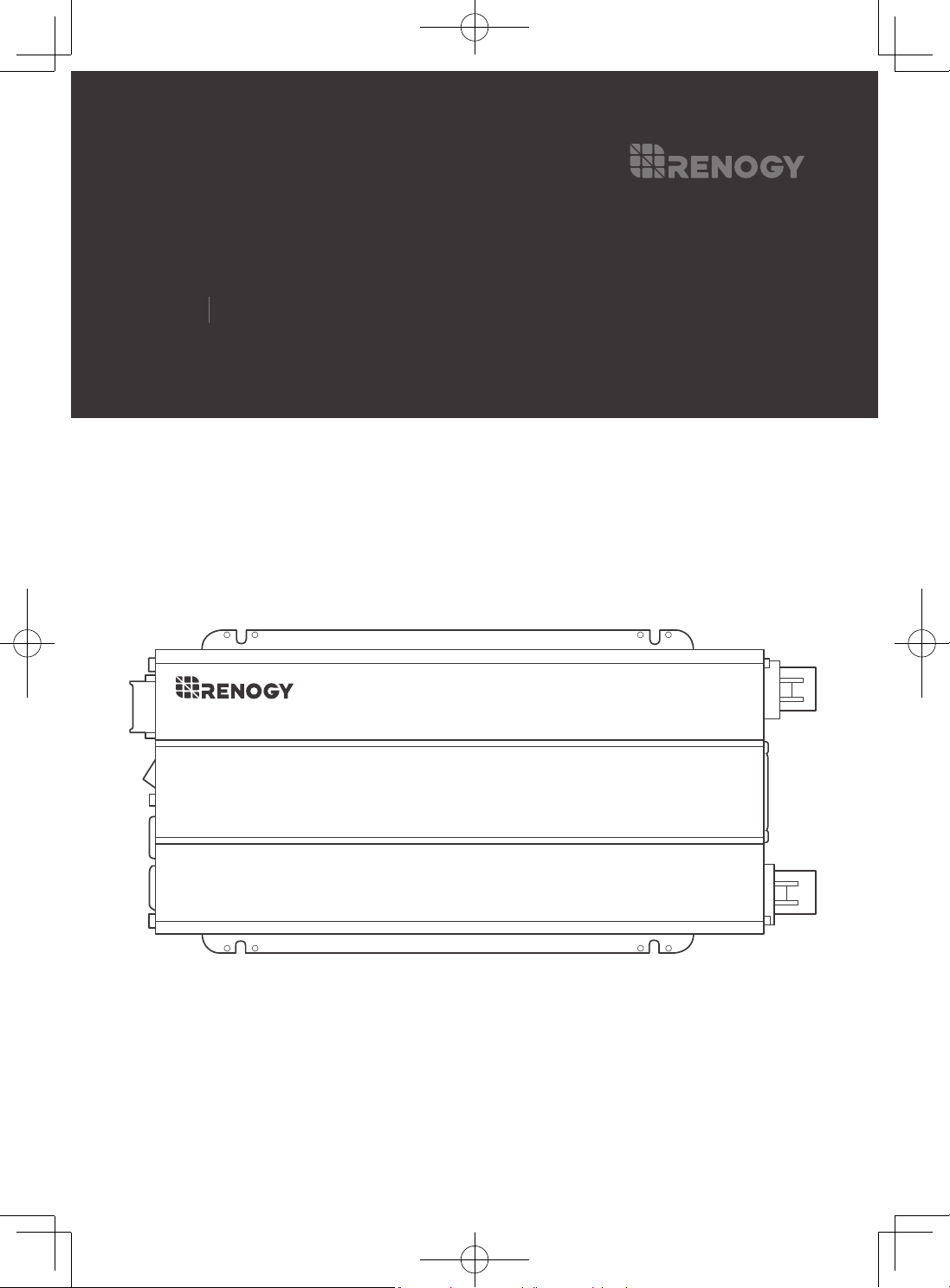
VERSION A2
Pure Sine Wave Inverter
Renogy
12V 700W/1000W/2000W/3000W
USER MANUAL
Applicability
The user manual applies to the following products:
z
700W 12V Pure Sine Wave Inverter (RNG-INVT-700-12V-P2)
z
1000W 12V Pure Sine Wave Inverter (RNG-INVT-1000-12V-P2)
z
2000W 12V Pure Sine Wave Inverter (RNG-INVT-2000-12V-P2)
z
3000W 12V Pure Sine Wave Inverter (RNG-INVT-3000-12V-P2)
Disclaimer
z
Renogy ensures the accuracy, sufficiency, and the applicability of information in the user
manual at the time of printing due to continual product improvements that may occur.
z
Renogy assumes no responsibility or liability for personal and property losses, whether
directly and indirectly, caused by the user
’
s failure to install and use the product in
compliance with the user manual.
z
Renogy is not responsible or liable for failures, damages, or injuries resulting from repair
attempted by unqualified personnel, improper installation and operation.
z
The illustrations in the user manual are for demonstration purposes only. Details may
appear slightly different depending on product revision and market region.
z
Renogy reserves the right to change the information in the user manual without notice.
For the latest user manual, visit renogy.com.
Copyright
12V 700W/1000W/2000W/3000W Pure Sine Wave Inverter User Manual @ 2022 Renogy.
All rights reserved.
All information in the user manual is subject to copyright and other intellectual property rights
of Renogy and its licensors. The user manual may not be modified, reproduced, or copied, in
whole or in part, without the prior written permissions of Renogy and its licensors.
Trademark
The following are registered trademarks of Renogy:
RENOGY
The registered trademarks in the user manual are the property of Renogy. The unauthorized
use of the trademarks is strictly prohibited.
Date and Revision
February 2023, Revision A2
Table of Contents
Important Safety Information .......................................................................................................... 01
Symbols Used .......................................................................................................................... 01
General Safety Information ...................................................................................................... 01
Introduction ..................................................................................................................................... 03
General Information ................................................................................................................. 03
Key Features ............................................................................................................................ 03
Pure Sine Wave ....................................................................................................................... 04
Package Contents .......................................................................................................................... 05
Product Overview ........................................................................................................................... 06
700W Inverter ........................................................................................................................... 06
1000W Inverter ......................................................................................................................... 08
2000W or 3000W Inverter ........................................................................................................ 10
Wiring Diagram ............................................................................................................................... 12
700W Inverter .......................................................................................................................... 12
1000W Inverter ......................................................................................................................... 14
2000W or 3000W Inverter ........................................................................................................ 16
Installation ...................................................................................................................................... 18
Plan an Installation Site ............................................................................................................ 18
Size a Battery Bank .................................................................................................................. 19
Ground ..................................................................................................................................... 20
DC Wiring ................................................................................................................................. 20
AC Wiring ................................................................................................................................. 22
Operation ........................................................................................................................................ 24
Operations on Inverter ............................................................................................................. 24
Wired Remote Control .............................................................................................................. 24
LED Overview................................................................................................................................. 25
Troubleshooting .............................................................................................................................. 26
Dimensions ..................................................................................................................................... 27
700W Inverter .......................................................................................................................... 27
1000W Inverter ........................................................................................................................ 27
2000W Inverter ........................................................................................................................ 28
3000W Inverter ........................................................................................................................ 28
Specifications ................................................................................................................................. 29
General Data ............................................................................................................................ 29
Electrical Data .......................................................................................................................... 29
Wired Remote Data .................................................................................................................. 30
Technical Support ........................................................................................................................... 31
Important Safety Information
01
Important Safety Information
The user manual provides important installation, operation, and maintenance instructions for
12V 700W/1000W/2000W/3000W Pure Sine Wave Inverter. Please read the user manual
carefully before installation and operation and save it for future reference.
Failure to observe the instructions or precautions in the user manual can result in electrical
shock, serious injury, or death, or can damage the inverter, potentially rendering it
inoperable. The installation and service of the inverter might require knowledge of electricity
and is recommended to be carried out by qualified personnel.
Symbols Used
The following symbols are used throughout the user manual to highlight important
information:
WARNIN
G
Indicates a potentially dangerous condition which could
result in injury or death.
CAUTIO
N
Indicates a critical procedure for safe and proper installation
and operation.
NOTE
Indicates an important step or tip for optimal performance.
INFO
Indicates that more information is available in other
documents relating to the subject.
General Safety Information
WARNIN
G
z
Have the inverter installed by a qualified technician in accordance with the local and
national electric codes (NEC).
z
There are no serviceable parts for this inverter. Do not disassemble or attempt to repair
the inverter.
z
Ensure all connections going into and from the inverter are tight. There may be sparks
when making connections; therefore, there should not be flammable materials or gases
near the installation site.
z
The inverters are suitable for 12V battery banks ONLY.
z
Always ensure the inverter is in OFF position and disconnect all AC and DC devices
associated with the inverter.
z
Never connect the AC output of the inverter directly to an Electrical Breaker Panel or
Load Center which is also fed from the utility power or generator.
z
Please confirm the polarity of the devices before connection. A reverse polarity contact
can cause injury and damage the device.
z
Be careful when touching bare terminals of capacitors as they may retain high lethal
voltages even after power is removed.
Symbols Used General Safety Information
Important Safety Information
02
z
Do not let the positive (+) and negative (-) terminals of the battery touch each other. Use
only deep-cycle sealed lead-acid, flooded, gel, or lithium batteries.
z
Risk of explosion! Never install the inverter in a sealed enclosure with flooded batteries!
Do not install in a confined area where battery gases can accumulate.
z
Be careful when working with large lead acid batteries. Wear eye protection and have
fresh water available in case there is contact with the battery acid.
z
Overcharging and excessive gas precipitation may damage the battery plates and
activate material shedding on them. Too high of an equalizing charge or too long of one
may cause damage. Carefully review the requirements of the specific battery in use.
CAUTIO
N
z
Install the inverter in a well-ventilated, cool, and dry environment. Make sure the fans of
the inverter and the ventilation holes are not blocked.
z
Do not expose the unit to rain, moisture, snow, or liquids of any type.
Symbols Used General Safety Information
Introduction
03
Introduction
General Information
Renogy 12V 700W/1000W/2000W/3000W Pure Sine Wave Inverter (hereinafter referred to
as inverter) is perfect for most off-grid systems, whether for a van, semi-trucks, fifth wheels,
cabin, or any remote location needing power. The inverter converts DC Power stored in
batteries into usable AC Power for appliances. The advanced Renogy pure sine wave
technology will allow you to power just about any AC appliance without risk of damage to
even your most sensitive equipment.
Key Features
z
Powerful DC-AC Conversion
Continuous rated output power with a conversion efficiency greater than 90%, and up to 2x
surge for start-up loads.
z
Safe for Use
Integrated GFCI, overload, overtemperature, overvoltage, short-circuit, and undervoltage
protection.
z
Guaranteed Protection on Appliances
Pure sine wave technology is similar if not better than grid power and can extend appliance
life by providing a smooth sine wave so as to not damage it. No strange buzzing sounds and
your devices can run smoothly.
z
Ease to Use
Offers a built-in 5 V/2.1 A USB port, AC Outlet(s), Hardwired AC Output Terminal Block, and
a Wired Remote Port.
z
Reliable Quality
ETL listed to CSA Standard C22.2 No. 107.1 and UL 458.
General Information Key Features Pure Sine Wave
Introduction
04
Pure Sine Wave
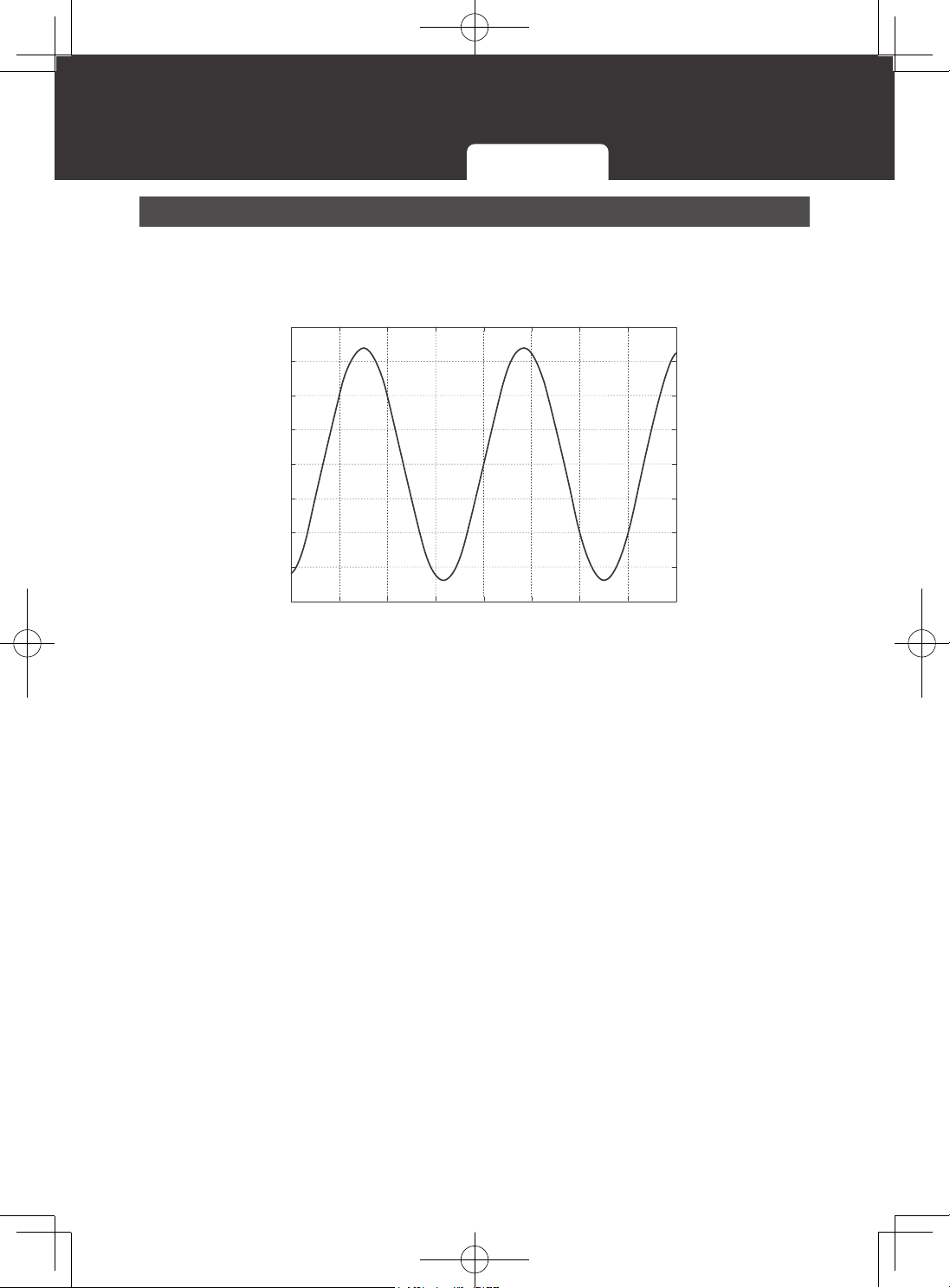
The inverter outputs a pure sine wave similar to the waveform of the grid power. In a pure
sine wave, the voltage rises and falls in a smooth fashion with very low harmonic distortion
and cleaner utility-like power.
200
150
100
50
0
-50
-100
-150
-200
-0.02 -0.015 -0.01 -0.005 0 0.005 0.01 0.015 0.02
Pure Sine Waveform
Time (Seconds)
Amplitude (Volts)
This technology allows the inverter to supply electronic devices that require a high quality
waveform with little harmonic distortion. In addition, the technology enables the inverter to be
more efficient than traditional ones, allowing you to use less energy to supply more devices.
The inverter can provide sufficient, stable power for tools, fans, lights, computers, and other
electronics without any interference.
General Information Key Features Pure Sine Wave
Package Contents
05
Package Contents
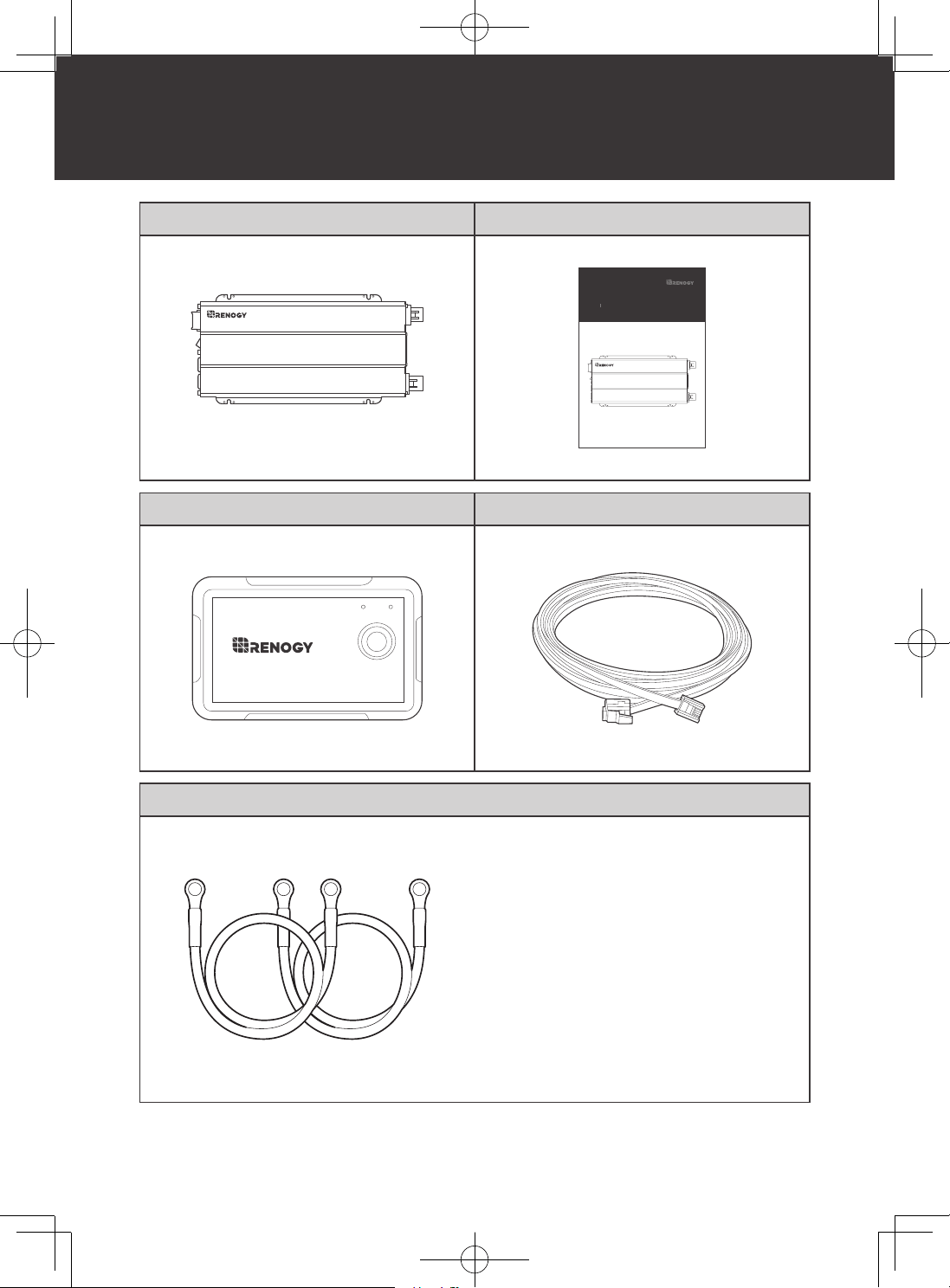
12V Pure Sine Wave Inverter x 1 User Manual x 1
VERSION A2
Pure Sine Wave Inverter
Renogy
12V 700W/1000W/2000W/3000W
USER MANUAL
Wired Remote Control x 1 RJ11 Network Cable (5m) x 1
ON ERR
RMS-P2
Cable x 2
z
700W Inverter (RNG-INVT-700-12V-P2):
6 AWG @ 3 ft
z
1000W Inverter (RNG-INVT-1000-
12V-P2): 4 AWG @ 3 ft
z
2000W Inverter (RNG-INVT-2000-
12V-P2): 1/0 AWG @ 3 ft
z
3000W Inverter (RNG-INVT-3000-
12V-P2): Not included
Product Overview
06
700W Inverter 1000W Inverter 2000W or 3000W Inverter
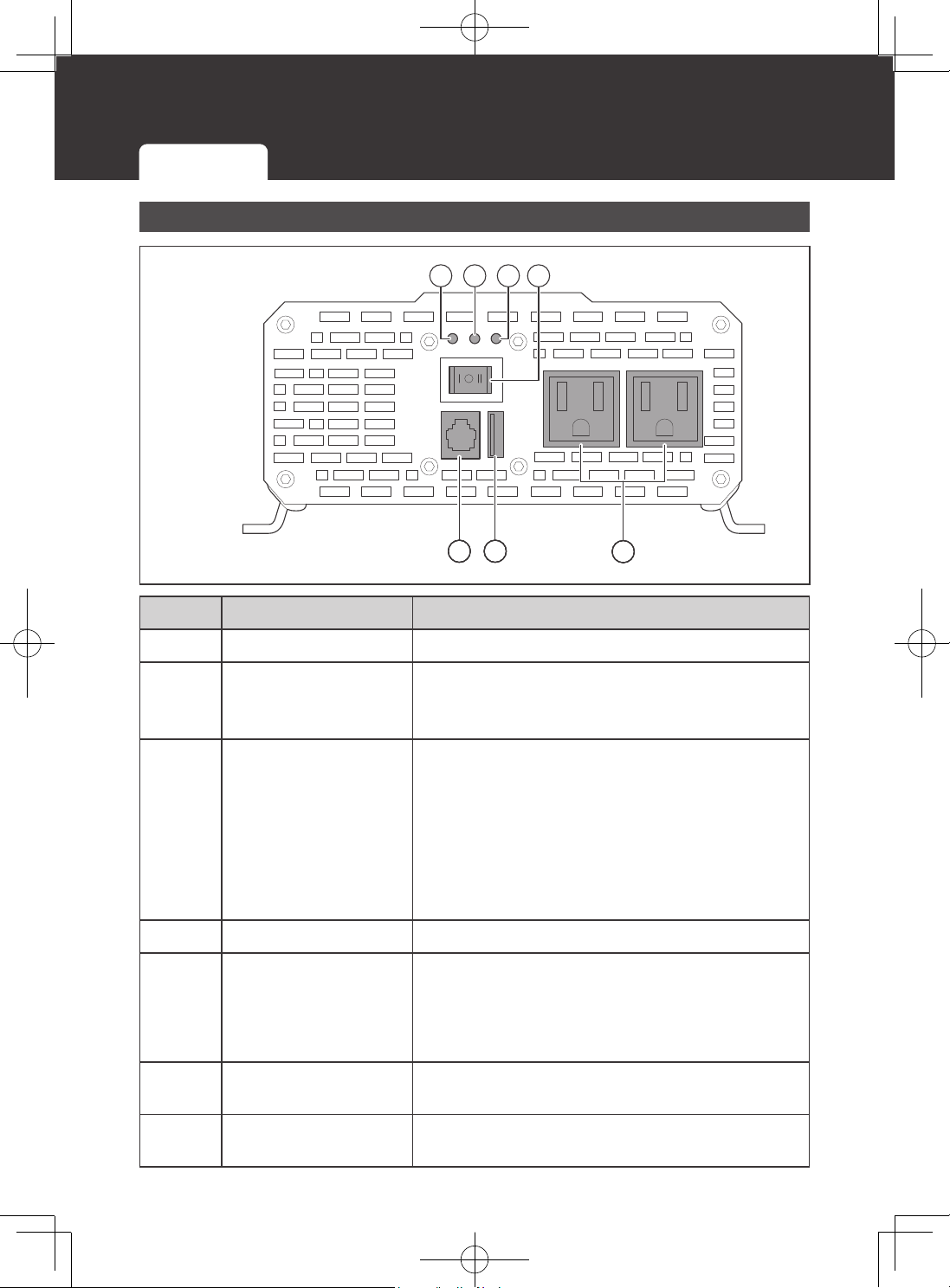
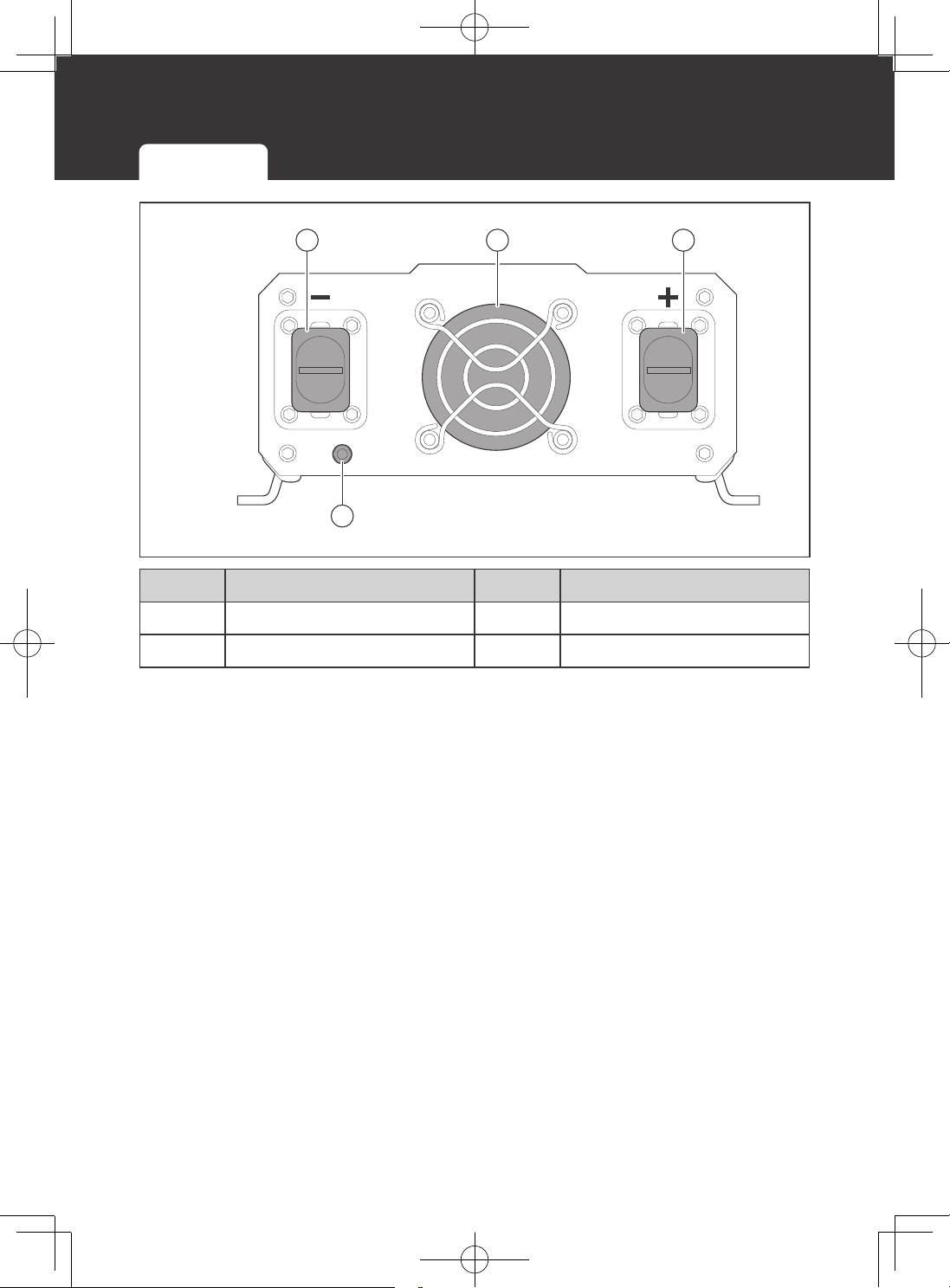
700W Inverter
6
7
5
4321
AC Side View
No. Part Description
1 Power LED (Green) Indicates the operation status of the inverter.
2 GFCI LED (Yellow)
Indicates that the ground fault circuit has been
interrupted.
In such case, restart the inverter.
3 Fault LED (Red)
Indicates that the inverter shuts down due to
overheating, overload, undervoltage, or overvoltage.
Solution: Immediately turn off all AC appliances.
Allow the inverter to cool before continuing. Make
sure that the ventilation vents are not blocked.
If an inverter shutdown was preceded by a
buzzing sound, there may be an excessive load in
combination with low voltage or a cable problem.
4 ON/OFF/REM Switch Turns inverter ON, OFF, or REMOTE.
5 AC Outlets
115V AC 60 Hz:
z
Up to 15 A for 2000W and 3000W models
z
Up to 8.7 A for 1000W models
z
Up to 6.1 A for 700W models
6 USB Power Port
Supplies 5V/2.1 A for charging tablets, smartphones,
and other small appliances.
7
Remote Control
Terminal
Connects to the Wired Remote Control.
Product Overview
Product Overview
07
700W Inverter 1000W Inverter 2000W or 3000W Inverter
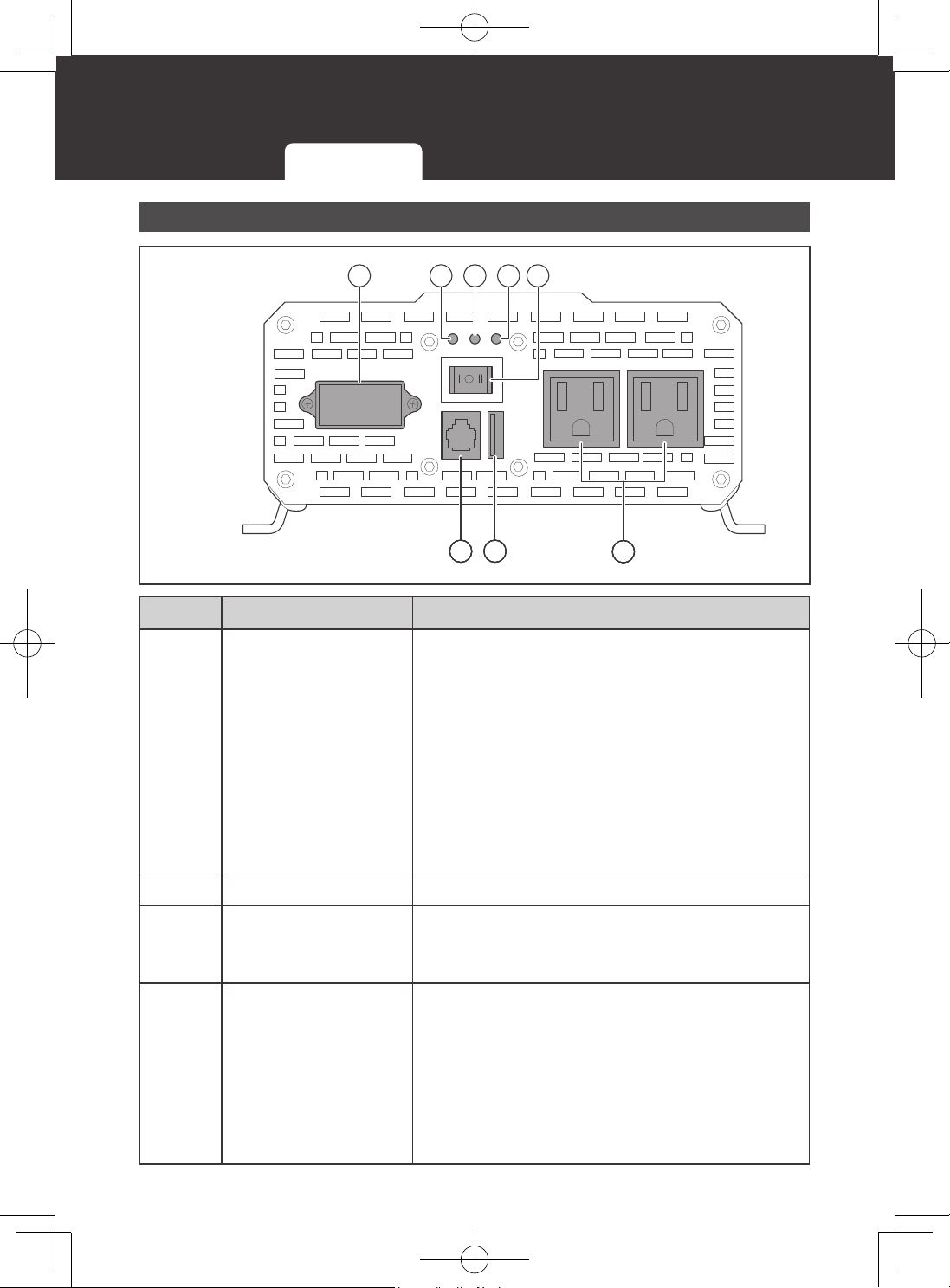
DC Side View
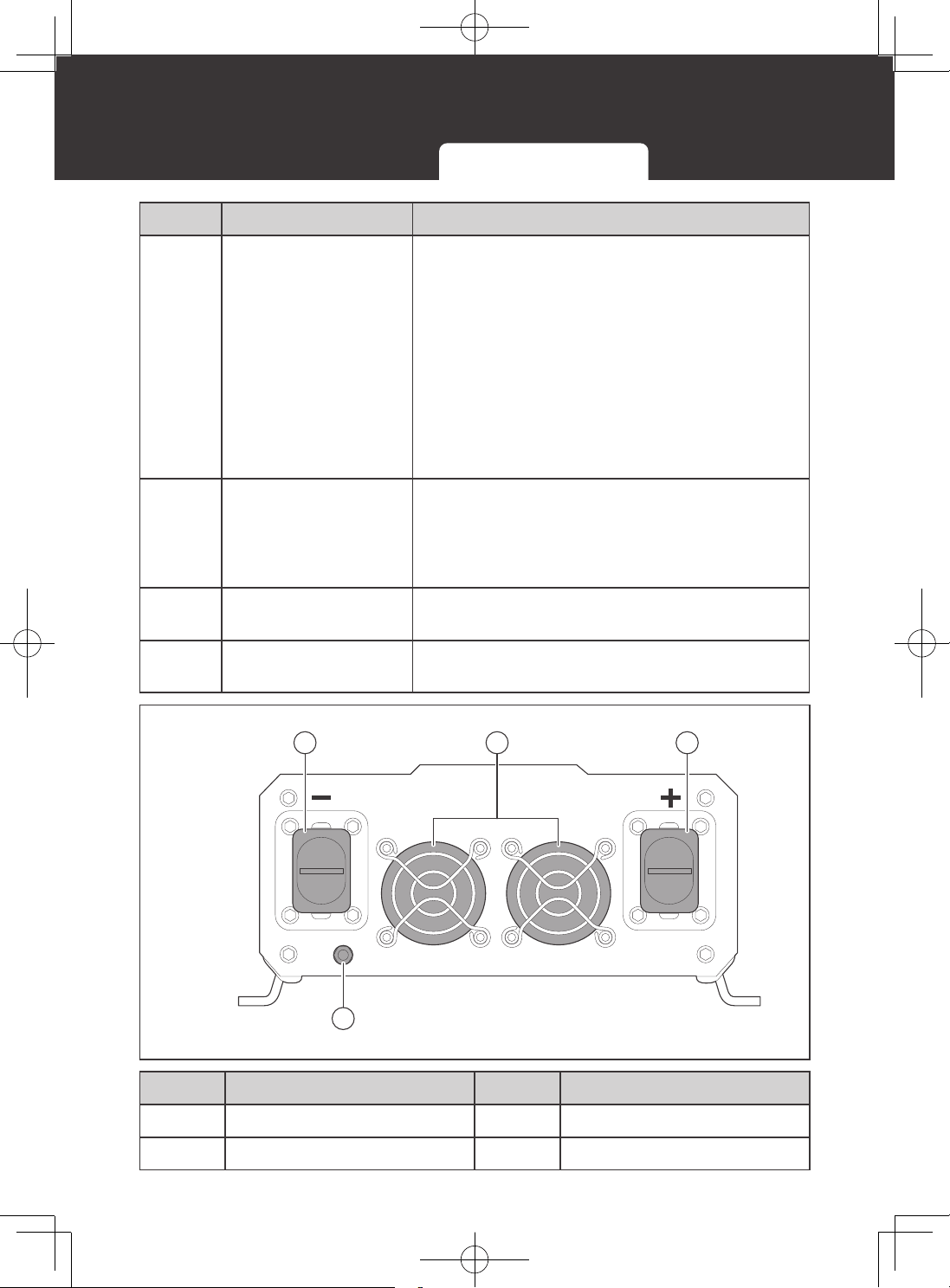
1 2 3
4
No. Part No. Part
1 Negative (-) DC Input, M8 3 Positive (+) DC Input, M8
2 Cooling Fan 4 Ground, M4
Product Overview
08
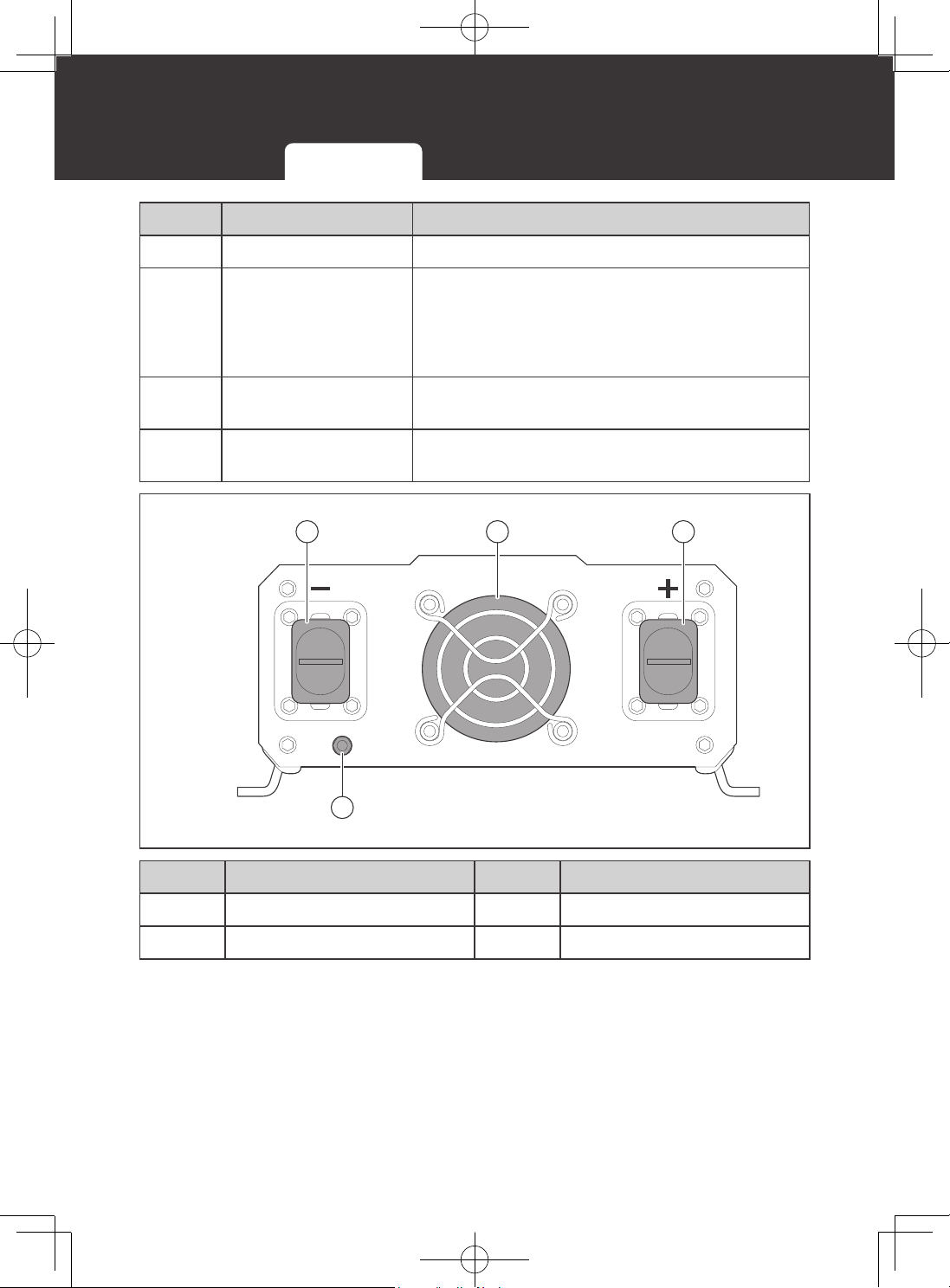
1000W Inverter
N G L
7
8
6
51
AC Side View
432
No. Part Description
1
High Output AC
Terminals
Connect to 115V AC devices operating at higher
than 15 A or distributed wiring with multiple AC
outlets.
Remove the two screws on the protective cover to
access the terminals.
Terminal layout (facing the front panel)
z
Left: Neutral (N)
z
Middle: Ground (G)
z
Right: Live (L)
Note that Neutral and Ground are bonded inside.
2 Power LED (Green) Indicates the operation status of the inverter.
3 GFCI LED (Yellow)
Indicates that the ground fault circuit has been
interrupted.
In such case, restart the inverter.
4 Fault LED (Red)
Indicates that the inverter shuts down due to
overheating, overload, undervoltage, or overvoltage.
Solution: Immediately turn off all AC appliances.
Allow the inverter to cool before continuing. Make
sure that the ventilation vents are not blocked.
If an inverter shutdown was preceded by a
buzzing sound, there may be an excessive load in
combination with low voltage or a cable problem.
700W Inverter 1000W Inverter 2000W or 3000W Inverter
Product Overview
09
No. Part Description
5 ON/OFF/REM Switch Turns inverter ON, OFF, or REMOTE.
6 AC Outlets
115V AC 60 Hz:
z
Up to 15 A for 2000W and 3000W models
z
Up to 8.7 A for 1000W models
z
Up to 6.1 A for 700W models
7 USB Power Port
Supplies 5V/2.1 A for charging tablets, smartphones,
and other small appliances.
8
Remote Control
Terminal
Connects to the Wired Remote Control.
DC Side View
1 2 3
4
No. Part No. Part
1 Negative (-) DC Input, M8 3 Positive (+) DC Input, M8
2 Cooling Fan 4 Ground, M4
700W Inverter 1000W Inverter 2000W or 3000W Inverter
Product Overview
10
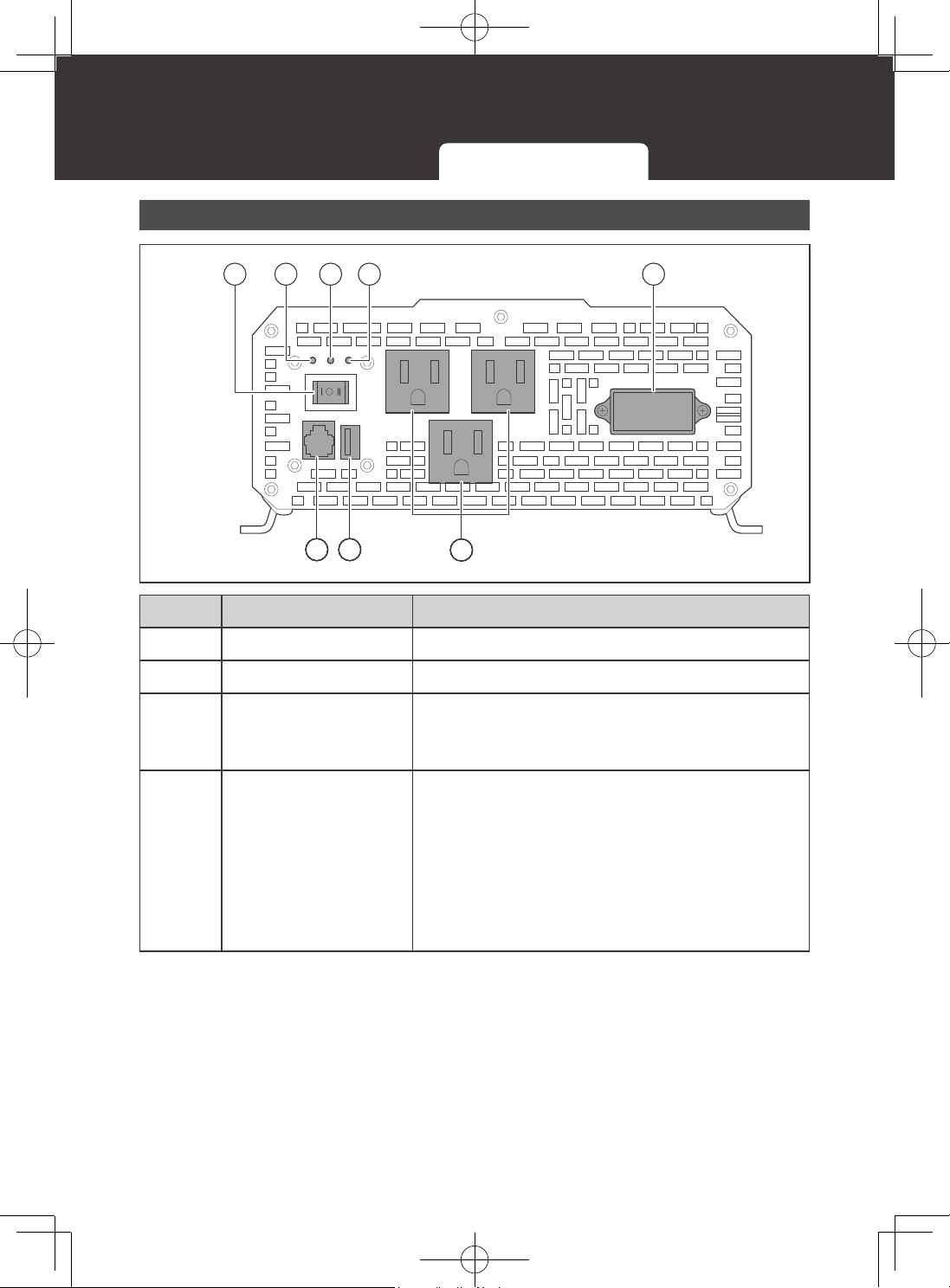
2000W or 3000W Inverter
N G L
AC Side View
7
51 2 43
6
8
No. Part Description
1 ON/OFF/REM Switch Turns inverter ON, OFF, or REMOTE.
2 Power LED (Green) Indicates the operation status of the inverter.
3 GFCI LED (Yellow)
Indicates that the ground fault circuit has been
interrupted.
In such case, restart the inverter.
4 Fault LED (Red)
Indicates that the inverter shuts down due to
overheating, overload, undervoltage, or overvoltage.
Solution: Immediately turn off all AC appliances.
Allow the inverter to cool before continuing. Make
sure that the ventilation vents are not blocked.
If an inverter shutdown was preceded by a
buzzing sound, there may be an excessive load in
combination with low voltage or a cable problem.
700W Inverter 1000W Inverter 2000W or 3000W Inverter
Product Overview
11
No. Part Description
5
High Output AC
Terminals
Connect to 115V AC devices operating at higher
than 15 A or distributed wiring with multiple AC
outlets.
Remove the two screws on the protective cover to
access the terminals.
Terminal layout (facing the front panel)
z
Left: Neutral (N)
z
Middle: Ground (G)
z
Right: Live (L)
Note that Neutral and Ground are bonded inside.
6 AC Outlets
115V AC 60 Hz:
z
Up to 15 A for 2000W and 3000W models
z
Up to 8.7 A for 1000W models
z
Up to 6.1 A for 700W models
7 USB Power Port
Supplies 5V/2.1 A for charging tablets, smartphones,
and other small appliances.
8
Remote Control
Terminal
Connects to the Wired Remote Control.
DC Side View
1 2 3
4
No. Part No. Part
1 Negative (-) DC Input, M8 3 Positive (+) DC Input, M8
2 Cooling Fans 4 Ground, M4
700W Inverter 1000W Inverter 2000W or 3000W Inverter
Wiring Diagram
12
Wiring Diagram
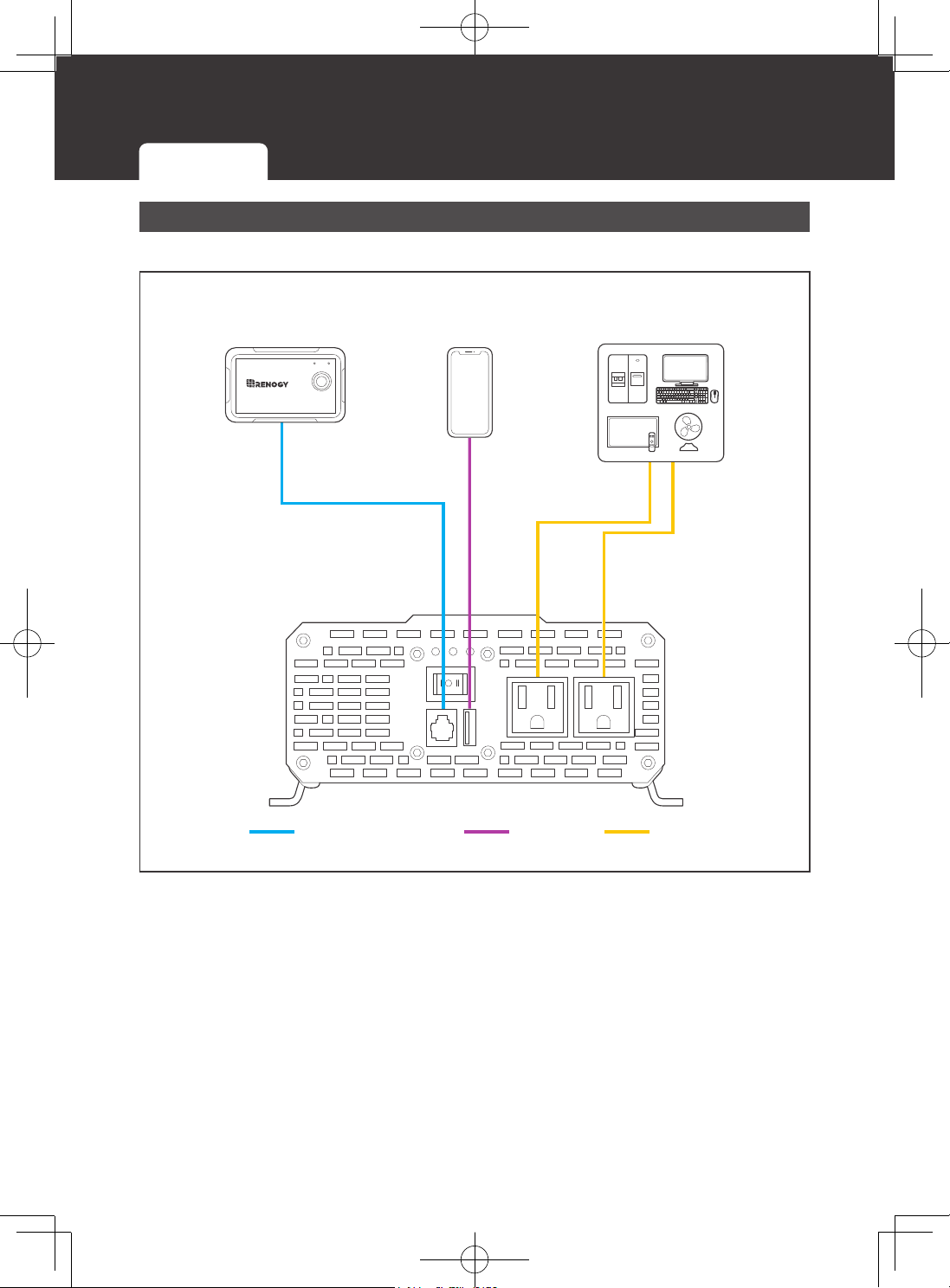
700W Inverter
▇
AC Side View
AC Loads
Wired Remote
Control
Loads
(USB)
Remote control
USB
AC
ON ERR
RMS-P2
700W Inverter 1000W Inverter 2000W or 3000W Inverter
Wiring Diagram
13
▇
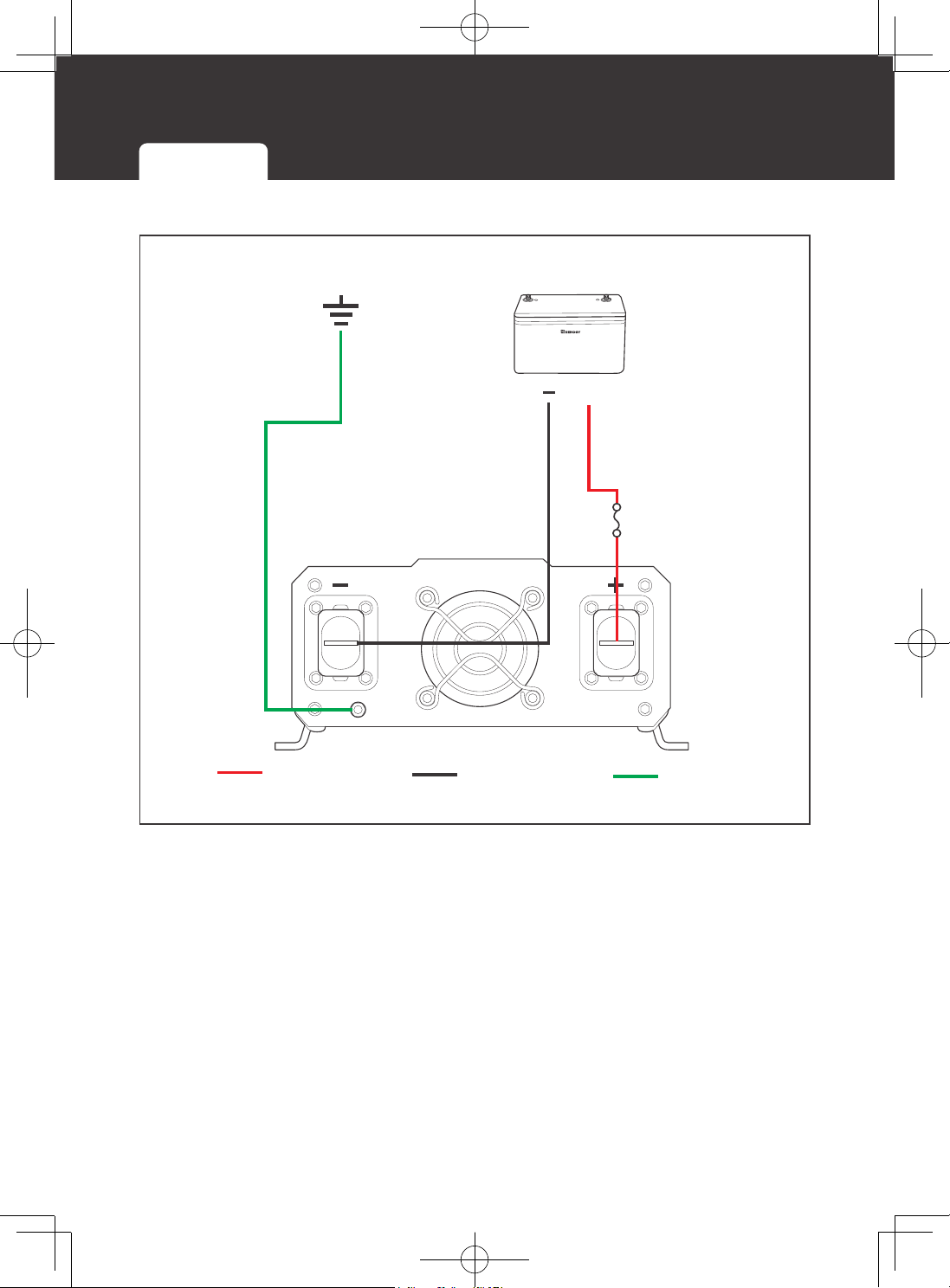
DC Side View
+
-
+
Battery
Positive (DC)
Negative (DC)
Battery Fuse
Ground
Ground
700W Inverter 1000W Inverter 2000W or 3000W Inverter
Wiring Diagram
14
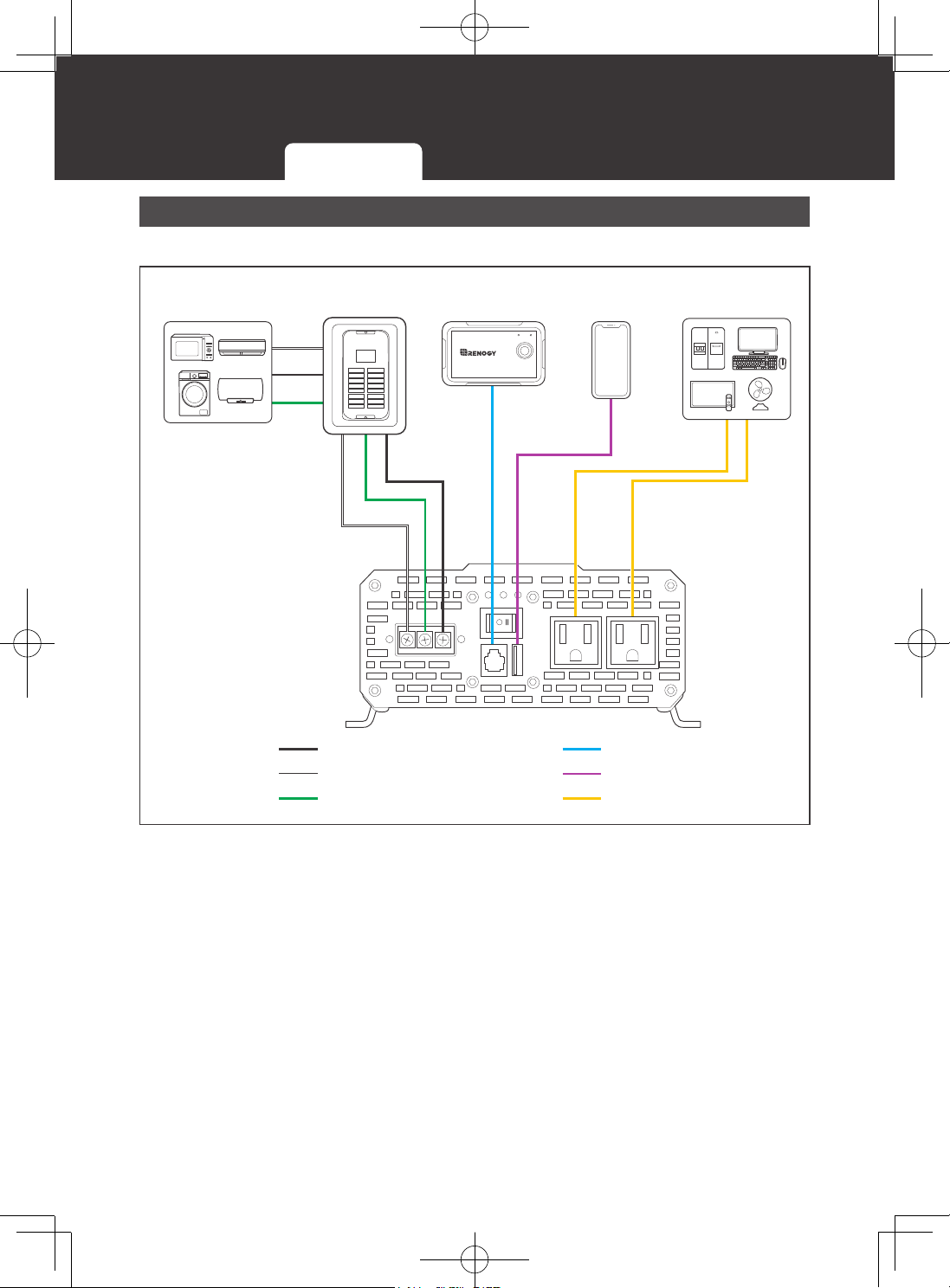
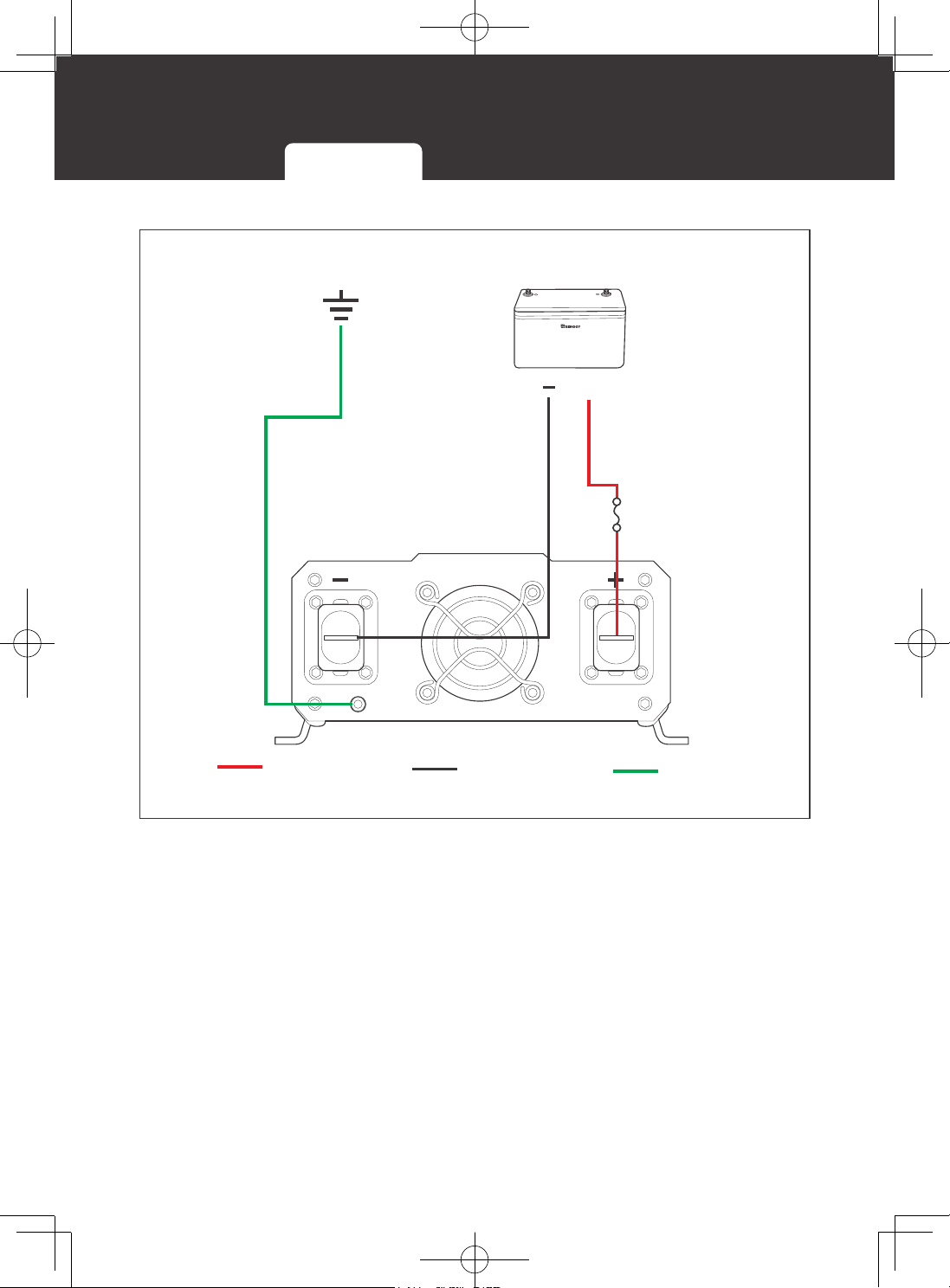
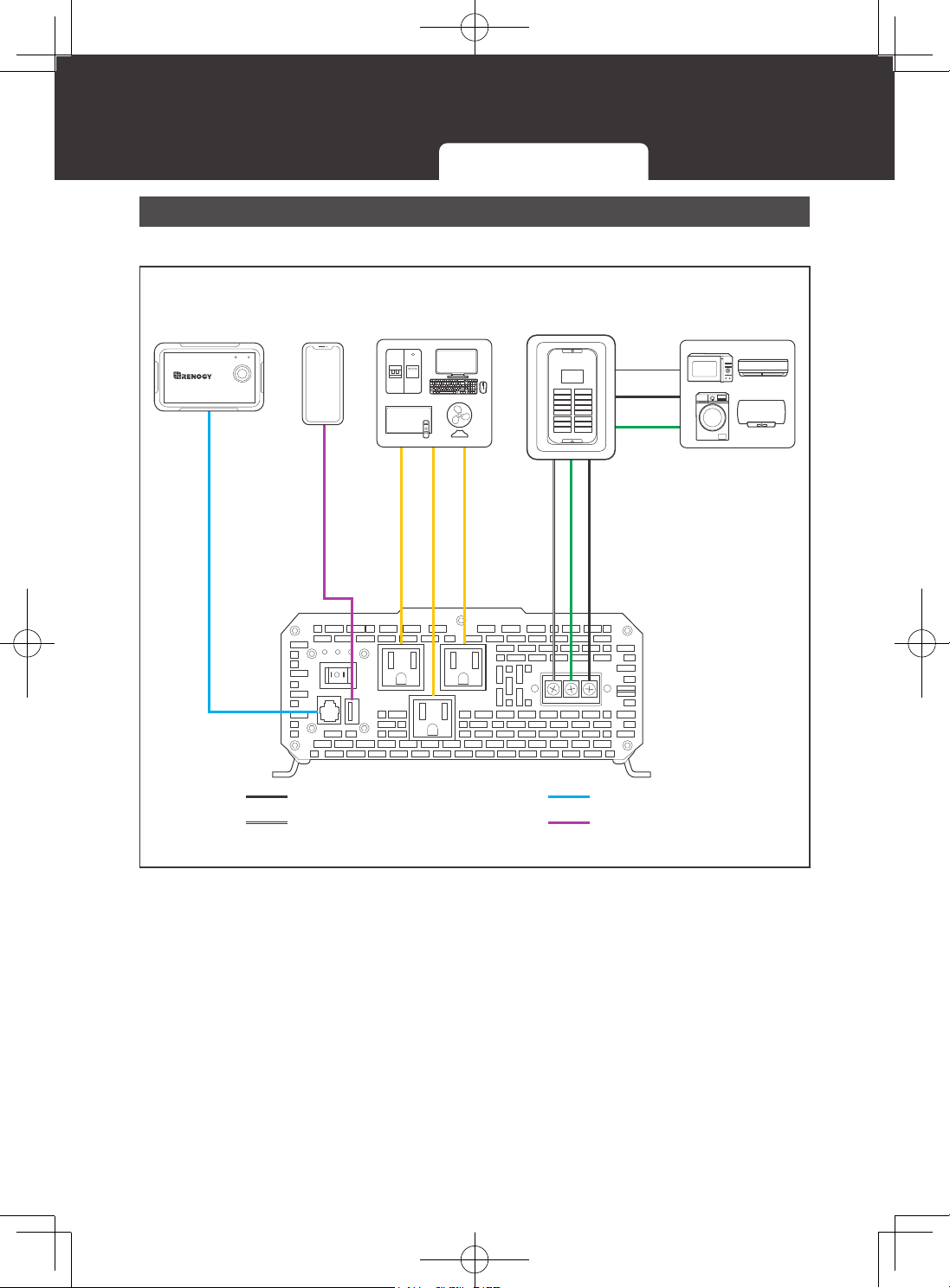
1000W Inverter
▇
AC Side View
N G L
AC Loads AC Loads
Sub-panel
(optional)
Live wire (AC)
Neutral wire (AC)
Ground
Wired Remote
Control
Loads
(USB)
Remote control
USB
AC
ON ERR
RMS-P2
700W Inverter 1000W Inverter 2000W or 3000W Inverter
Wiring Diagram
15
▇
DC Side View
+
-
+
Battery
Positive (DC)
Negative (DC)
Battery Fuse
Ground
Ground
700W Inverter 1000W Inverter 2000W or 3000W Inverter
Wiring Diagram
16
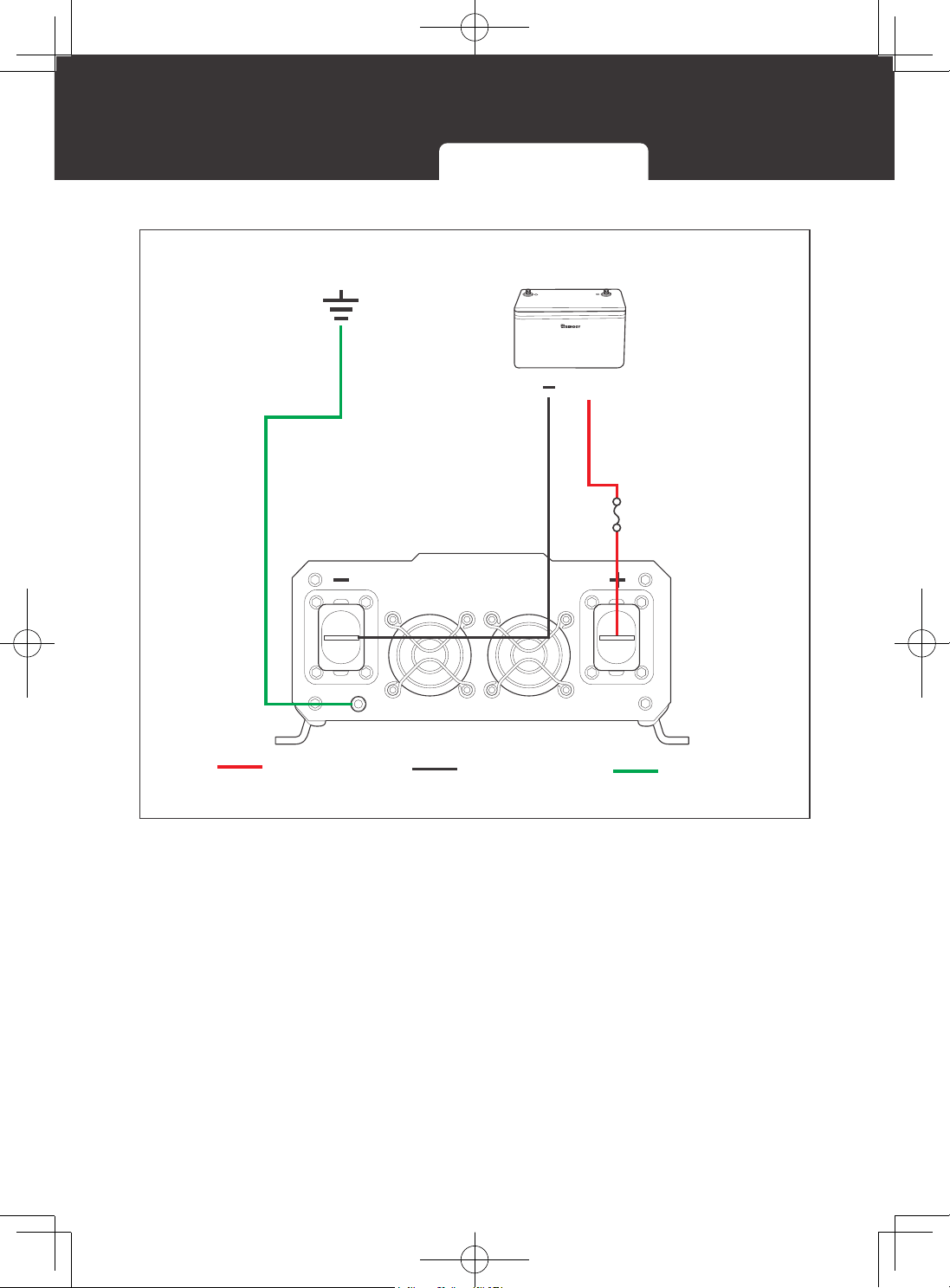
2000W or 3000W Inverter
▇
AC Side View
N G L
AC Loads
Live wire (AC)
Neutral wire (AC)
Ground
Wired Remote
Control
Remote control
USB
AC
ON ERR
RMS-P2
AC Loads
Sub-panel
(optional)
Loads
(USB)
700W Inverter 1000W Inverter 2000W or 3000W Inverter
Wiring Diagram
17
▇
DC Side View
+
-
+
Battery
Positive (DC)
Negative (DC)
Battery Fuse
Ground
Ground
700W Inverter 1000W Inverter 2000W or 3000W Inverter
Installation
18
Installation
Plan an Installation Site Size a Battery Bank Ground DC Wiring AC Wiring
CAUTIO
N
z
Do not over-torque or overtighten the terminals. This could potentially damage the unit.
z
Refer to the technical specifications for maximum wire sizes on the controller and for the
maximum amperage going through wires.
WARNIN
G
z
Ensure the inverter is in the OFF position before connecting to anything.
z
Do not install the inverter in the same compartment as the battery bank because it could
serve as a potential fire hazard.
z
Never mount the inverter vertically on a vertical surface since it would present a hazard
for the fan opening, undermining cooling the inverter.
Plan an Installation Site
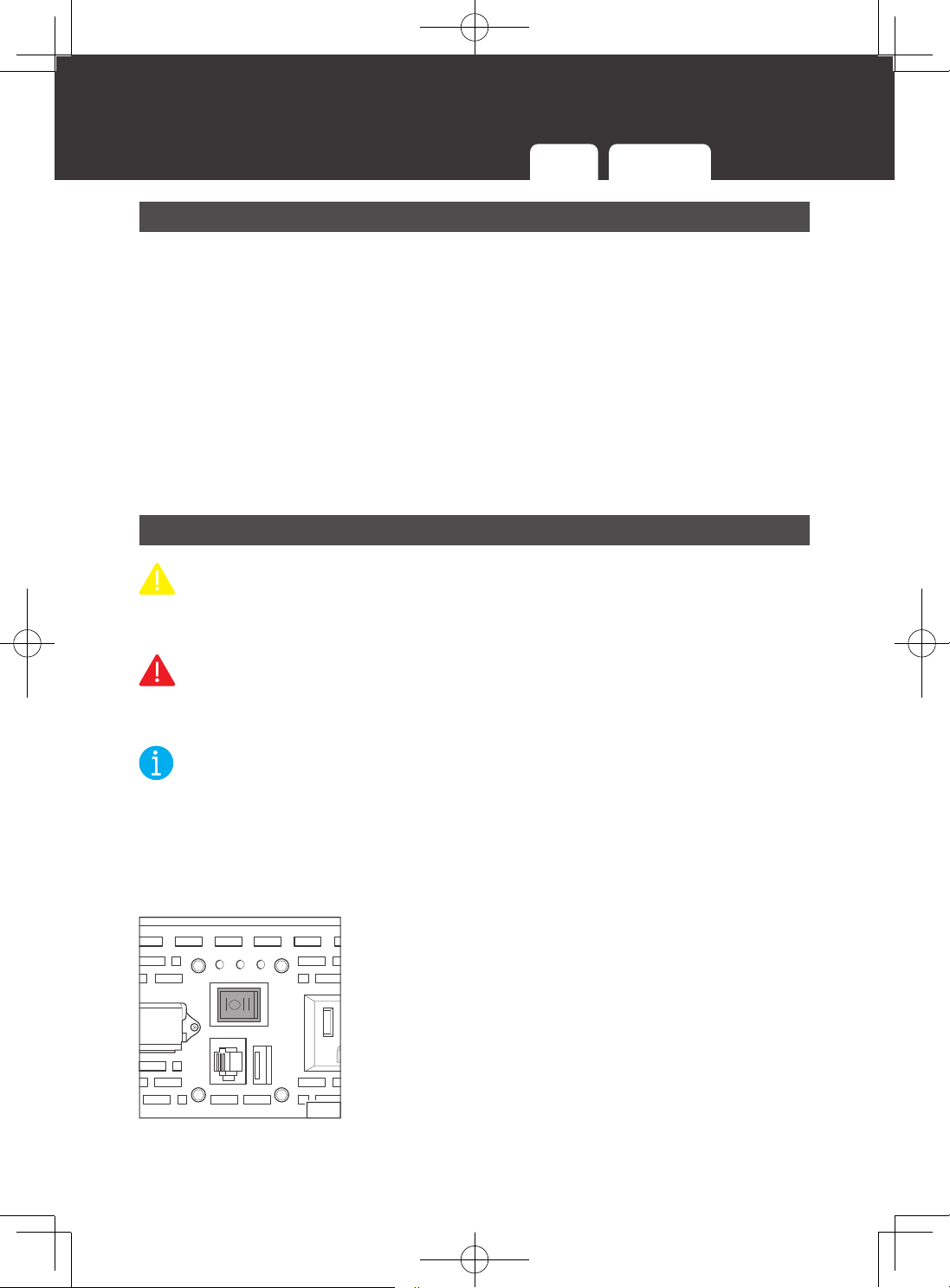
Follow the guidelines below:
z
Cool, dry, well-ventilated area
The inverter must be installed in a site where the fans are not blocked or where they are not
hit directly by the sun. The site should be free of any kind of moisture with a clearance of at
least 10 inches around the inverter for adequate ventilation.
z
Protection against fire hazard
The inverter should be away from any flammable material, liquids, or any other combustible
material.
z
Close proximity to battery bank
Put the inverter close to batteries banks to prevent excessive voltage drop. Choose a proper
sized wire going from the battery bank to the inverter.
z
Limiting electromagnetic interference (EMI)
Ensure the inverter is firmly grounded to a building or vehicle. Alternatively, it can be earth
grounded. Keep the inverter away from EMI receptors such as TVs, radios, and other audio/
visual electronics to prevent damage/interference.
z
Secure mounting
The inverter should be stand-alon or mounted by using the outlying terminals with M3 and
M6 screws on the inverter.
Installation
19
Plan an Installation Site Size a Battery Bank Ground DC Wiring AC Wiring
Size a Battery Bank
Battery types and capacity relate to the overall inverter performance. To size a proper battery
bank, you need to identify the loads that you will be utilizing, as well as an estimate duration
(hours/day) you will be using the load. The inverter is only compatible with 12V battery banks
and oversizing should be considered due to efficiency losses.
1. Determine Your Watts (Amps x Volts)
Every electronic will have a sticker or plate identifying the watts directly (W) or will show
you the voltage value (V) as well as amperage (A) which need to be multiplied to get
Watts. The formula is below:
Watts (W) = Volts (V) x Amps (A)
Example: Fan Watts = 120V * 0.4A = 48Watts
2. Estimate Load Run-Time in Watt-Hours (Wh)
Estimate how many hours per day you will be using the load and multiply this by your
Watts per load.
Example: Fan Watts x 12 hours = Watt-Hour (Wh)
46W x 12h = 576Wh
3. Determine Battery Capacity in Amp-Hour (Ah)
Divide your Load Run Watt-Hour result by the battery voltage.
Load Run-Time (Wh)/Battery Voltage (V) = Amp-Hour (Ah)
Use 12V, supported voltage of the inverter as a reference.
576Wh/12V = 48 Ah
4. Oversize the Battery
The calculated Amp-Hour value represents the minimum size battery capacity to run your
load for your intended time. Note that this assumes 100% use of a battery, which is not
recommended. Assuming 50% depth of discharge, you want to multiply this value by 2
and you also want to multiply by 1.25 to account for some efficiency losses.
Formula:
48Ah x Oversize x Efficiency Losses = Recommended Amp-Hour
48 x 2 x 1.25 ≈ 115Ah
Therefore, a 115Ah battery bank, or close, will be able to support a 12-hour run time
while also prolonging battery life for the best system size possible.
NOTE
z
You will need a battery charging source as this is a non-charging inverter and will only
work to deplete the battery.
z
Actual battery quantities vary by battery capacity and rates of discharge.
Installation
20
Ground
If available, the chassis ground lug should be connected to a ground point such as a vehicle
chassis or boat grounding system. In fixed locations, connect the ground lug to earth ground.
The connections to ground must be tight and against bare metal. Grounding is highly
recommended for both when using the inverter in a mobile application, such as an RV, or in
a building.
Recommended wire material: insulated copper strand wire
Recommended wire size:
z
14AWG to 18AWG (700W)
z
14AWG (1000W)
z
12AWG (2000W)
z
10AWG (3000W)
DC Wiring
CAUTIO
N
z
Be careful of the positive and negative poles. Reversing the poles might cause
permanent damage to the inverter and will void the warranty.
WARNIN
G
z
The inverter is suitable for 12V battery bank systems ONLY. Not following the minimum
DC requirement will cause irreversible damage to the device.
NOTE
z
The input terminals of the inverters are embedded with large capacitors. The input
circuit is completed once the terminals are connected to both positive and negative
wires. This commences drawing a heavy current momentarily. As a result, there may
be a sparking occurring even if the inverter is in the off position. To minimize sparking,
it is recommended that you should choose an appropriate sized wire feeding into the
inverters and/or install an external fuse leading into the inverter.
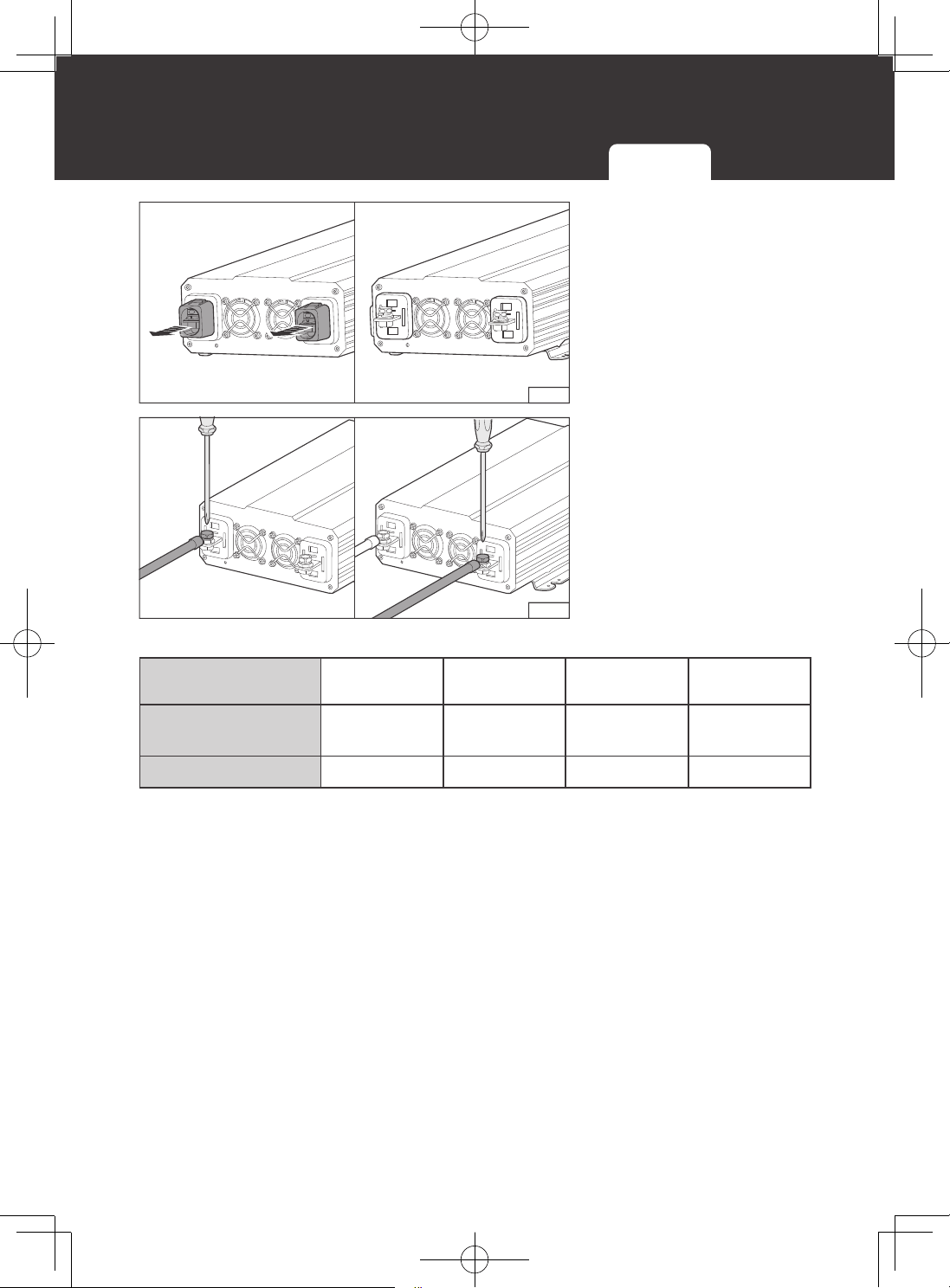
1.1.1
1. On the AC side, set the ON/OFF Switch to the OFF
position.
Plan an Installation Site Size a Battery Bank Ground DC Wiring AC Wiring
Installation
21
1.1.2
2. On the DC side, remove
the protection cap.
1.1.3
3. Unscrew Positive and
Negative DC Input
Terminals, connect
a battery bank to the
terminals, and tight the
terminal screws.
Torque: 14(
±
0.5) N·m
For your safety, it is recommended to use a battery fuse.
Model
RNG-INVT-700-
12V-P2
RNG-INVT-1000-
12V-P2
RNG-INVT-2000-
12V-P2
RNG-INVT-3000-
12V-P2
Continuous Output
Power
700W 1000W 2000W 3000W
Battery Fuse
100A 150A 250A 400A
Plan an Installation Site Size a Battery Bank Ground DC Wiring AC Wiring
Installation
22
AC Wiring
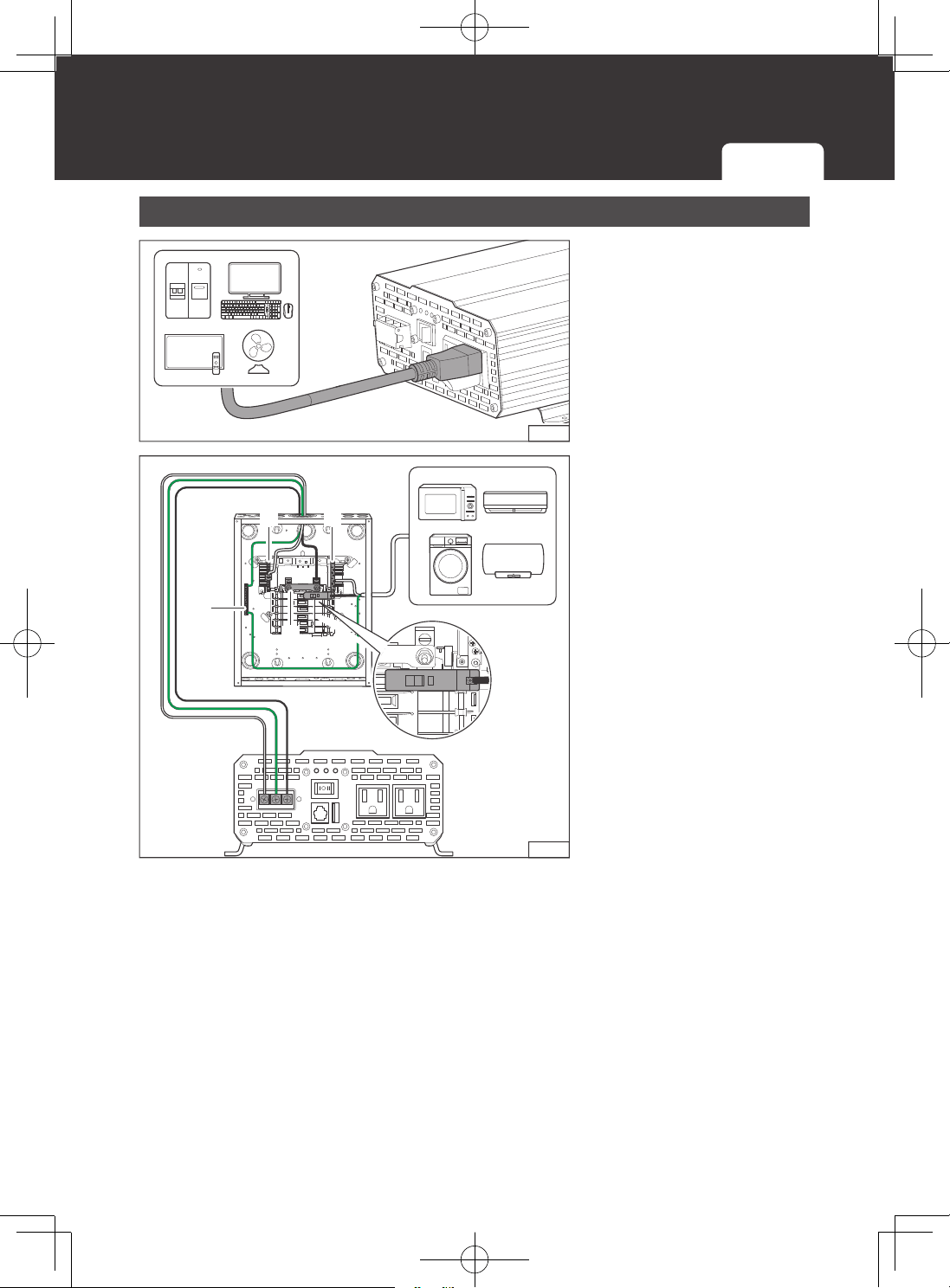
1.2.1
You can plug your AC loads
directly into the receptacles
on the inver
ter’s A
C side.
N G L
1.2.2
G
I/ON
O/OFF
N N
L
I/ON
O/OFF
You can also permanently
connect the AC output from
the AC hardwire terminal
through the AC knockout into
a load sub-panel or additional
AC outlets powered by the
1000W/2000W/3000W
inverter. From left to right, the
terminal block indicates:
Live/Hot (L), Neutral (N), and
Ground (G).
▇
Recommended Ground-Fault Circuit Interrupter (GFCI)
A ground-fault circuit interrupter, or GFCI, is a device that help protect people from electric
shocks by de-energizing a circuit or portion of a circuit within an established period of time
when a current to ground exceeds some predetermined value that is less than that required
to operate the overcurrent device (circuit breaker or fuse) of the supply circuit. GFCIs are
usually required in wet or damp locations.
While the inverter is equipped with a GFCI, it is recommended to install an external GFCI
where you can manually test the circuit.
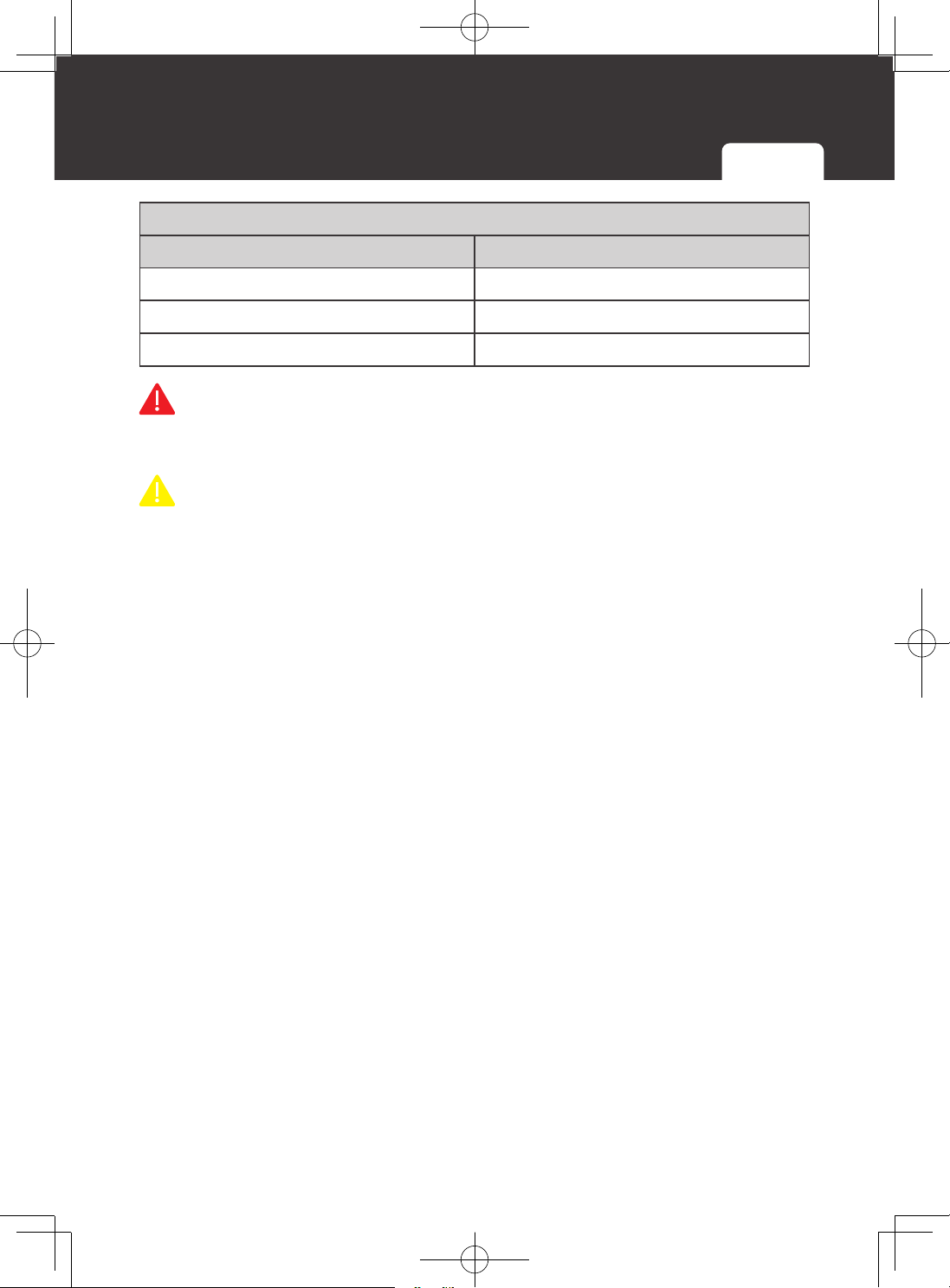
The following table lists GFCIs that meet the specifications and will function properly when
they are connected to the AC Outlets of the inverter.
Plan an Installation Site Size a Battery Bank Ground DC Wiring AC Wiring
Installation
23
Plan an Installation Site Size a Battery Bank Ground DC Wiring AC Wiring
Tested GFCI Models
Manufacturer Model Number
Leviton GFNT2
Hubbell GFP1305
Hubbell GF15WLA
WARNIN
G
z
Risk of electrical shock. Use only ground-fault circuit interrupters [receptacle(s) or circuit
breaker(s)] compatible with your inverter.
CAUTIO
N
z
GFCIs shall be installed in a recreational
vehicle’s
wiring system to protect all branch
circuits.
Operation
24
Operation
Operations on Inverter
After proper battery and AC load connections, you can operate the inverter.
1. On the AC side, rock the ON/OFF Switch to the ON position.
2. The inverter is operating normally.
3. When finishing using the inverter, power off the AC loads first, and then rock the ON/OFF
Switch to the OFF position.
CAUTION
z
When the inverter turns on, it is normal to hear the fans run for a second and hear a
beep.
z
Avoid powering on the inverter with the load (electronic devices) already switched on.
This may trigger an overload since some electronic devices have an initial high power
surge to start.
z
When switching off the inverter, turn off the electronic devices first. Although the inverter
is off, the terminal capacitors will still have a charge, so the DC and AC terminals must
be disconnected if altering the circuitry.
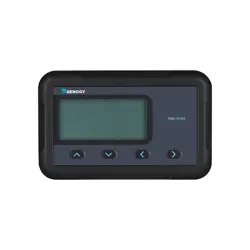
Wired Remote Control
The Wired Remote Control gives you the opportunity to power on/off the inverter from a
distance (approximately 16.4 ft / 30.5 mm).
Note that the inverter ON/OFF switch should be in the REM position.
ERR
RMS-P2
ON
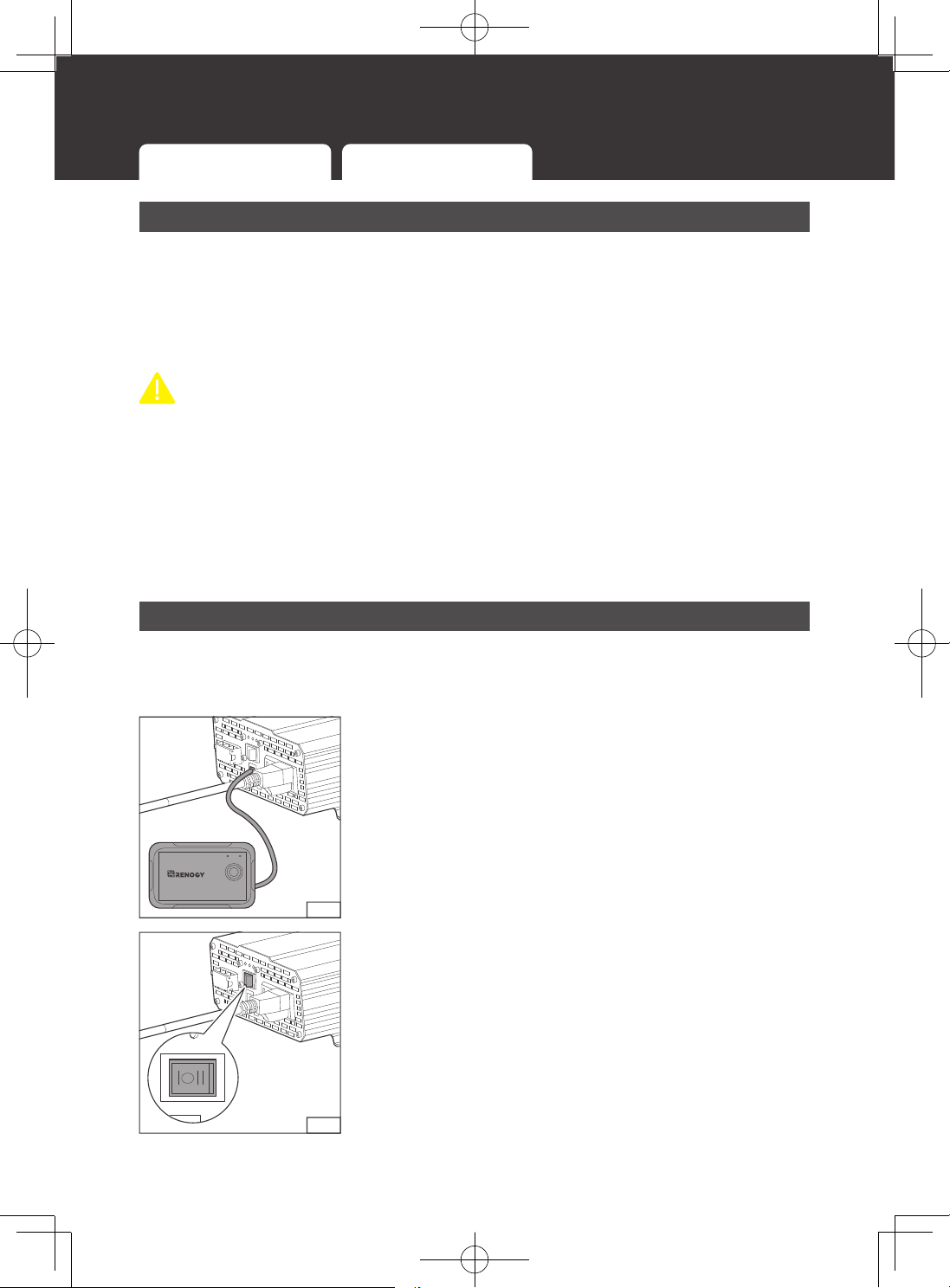
2.1.1
1. Connect the Wired Remote Control to the inverter via the
Remote Control Connector.
2.1.2
2. Rock the ON/OFF Switch to the REM position, and you
can power on/off the inverter via the Wired Remote
Control.
Operations on Inverter Wired Remote Control
LED Overview
25
LED Overview
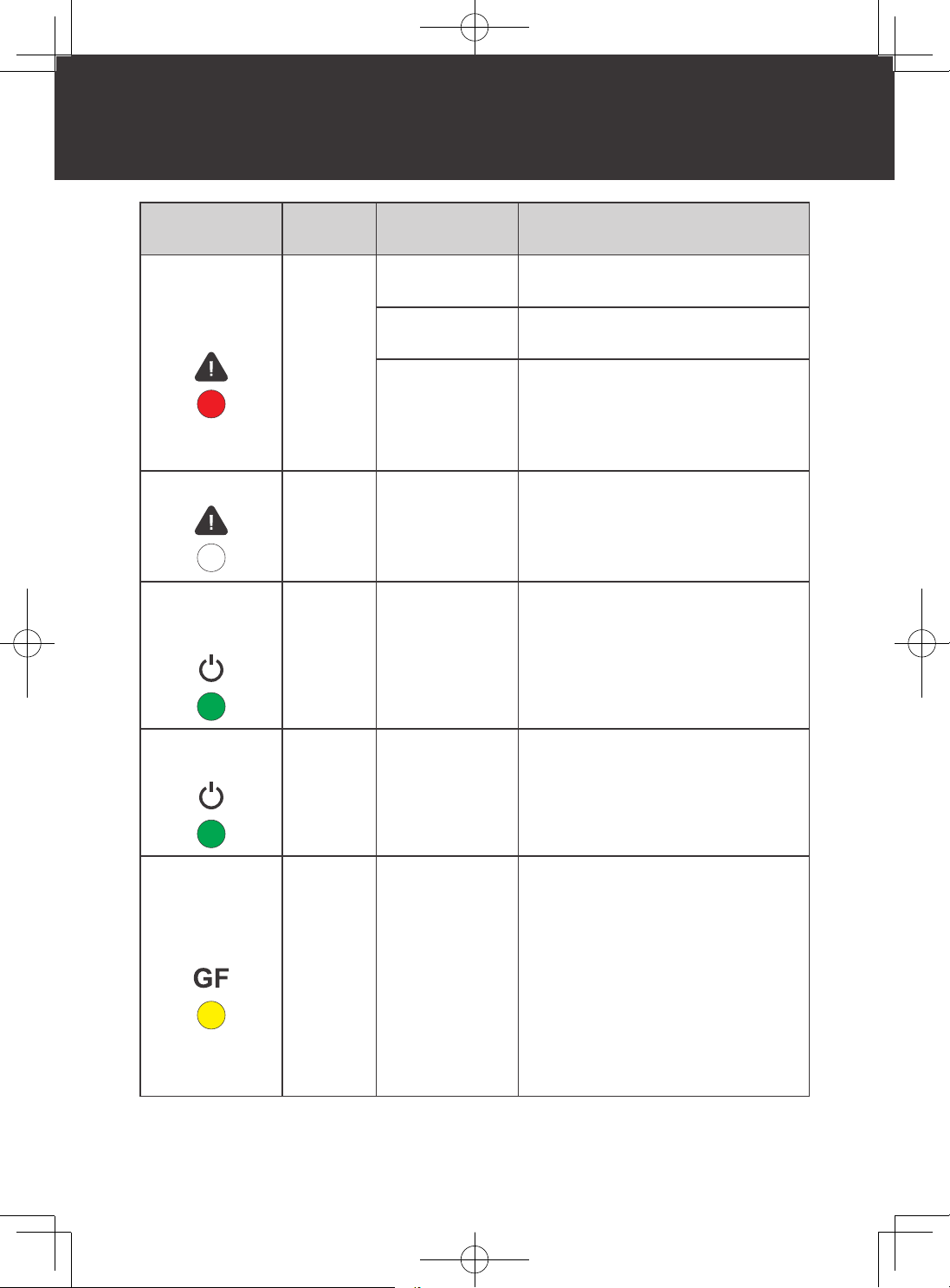
LED Status Alarm
Protection &
Alarm
Inverter Status
Fault LED in
solid red
Long
steady
beeping
sound
Overtemperature
protection
No output from the inverter.
Undervoltage
shutdown
No output from the inverter.
Overload
protection
No output from the inverter
output side. After 5s, the inverter
automatically restarts. After five times
of failed restart, the inverter needs to
be restored by manually turning it on.
Fault LED off
No sound
Short circuit
protection
No output from the inverter
output side. After 5s, the inverter
automatically restarts. After five times
of failed restart, the inverter needs to
be restored by manually turning it on.
Power LED in
solid green and
fault LED off
Beeping
sound
Undervoltage
alarm
Constant output from the inverter.
Power LED in
solid green
No sound
Recovery from
undervoltage
Normal output from the inverter output
side.
GFCI LED in
solid yellow
No sound GFCI protection
1. No output from the inverter output
side.
2. Please disconnect appliances
and turn off the ON/OFF switch to
reset, then try to connect different
appliances separately and see
if the yellow LED of the inverter
is always on. If not, it indicates a
current leakage problem on the
appliance. If it's always on, please
contact Renogy to deal with it.
Troubleshooting
26
Troubleshooting
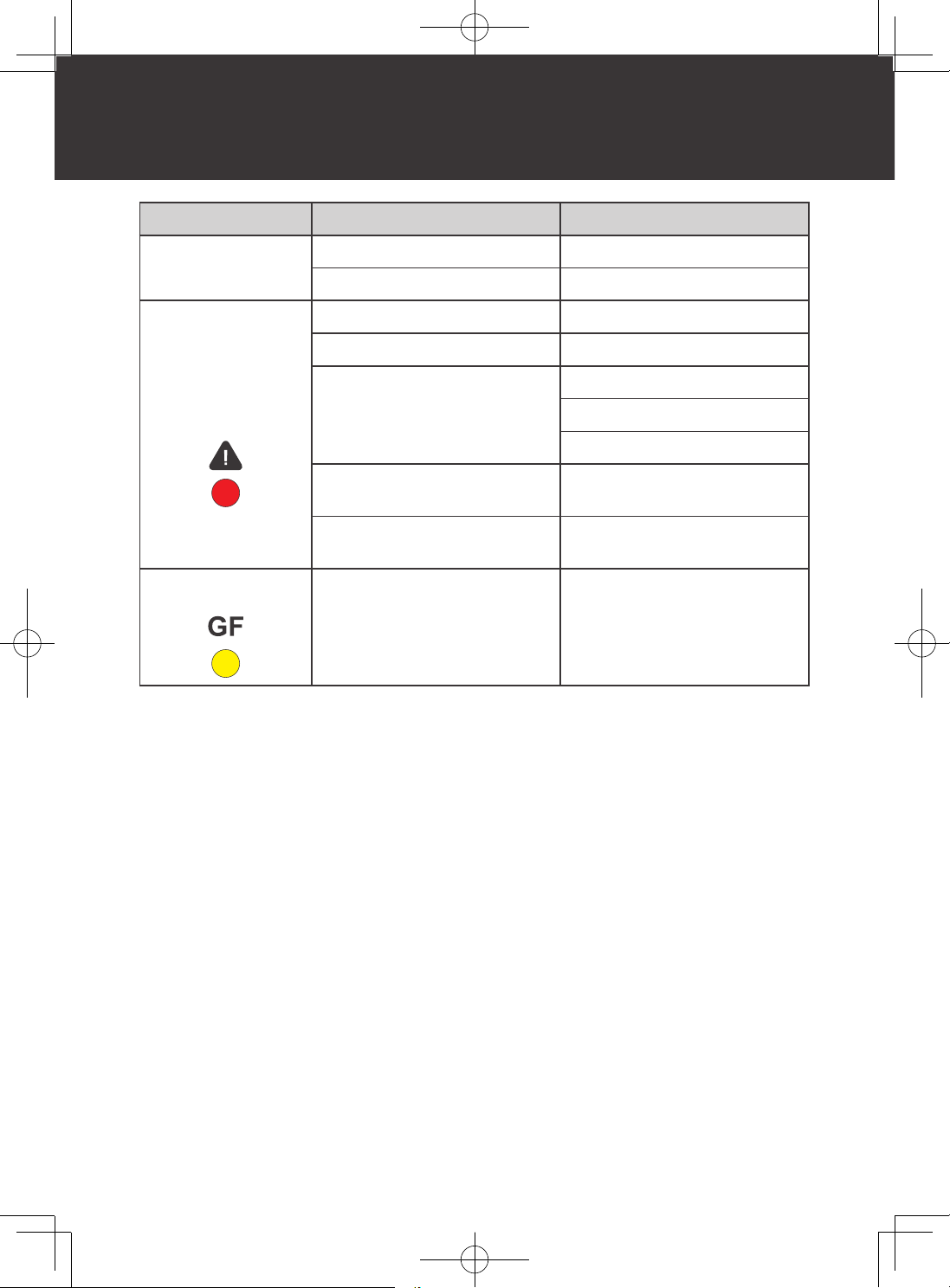
Indicator & Alarm Potential Issue Solution
Alarm beeps
Input voltage is below 11V. Keep input voltage above 11V.
Input voltage is above 16.0V. Keep input voltage below 16.0V.
Fault LED lit, long
beeping alarm
sound, and inverter
shutdown
Input voltage is below 10V. Keep input voltage above 10V.
Input voltage is above 16.5V. Keep input voltage below 16.5V.
Inverter overheats
Allow inverter to cool down.
Check for adequate ventilation.
Reduce the load on the inverter.
Operating equipment draws too
much power
Use a higher wattage inverter or
use a lower powered device.
Inverter is short circuited
Disconnect the inverter and turn
off the ON/OFF Switch to reset.
Yellow LED lit and
Inverter shut down
GFCI tripped
Disconnect appliances and turn
off the ON/OFF Switch to reset.
Dimensions
27
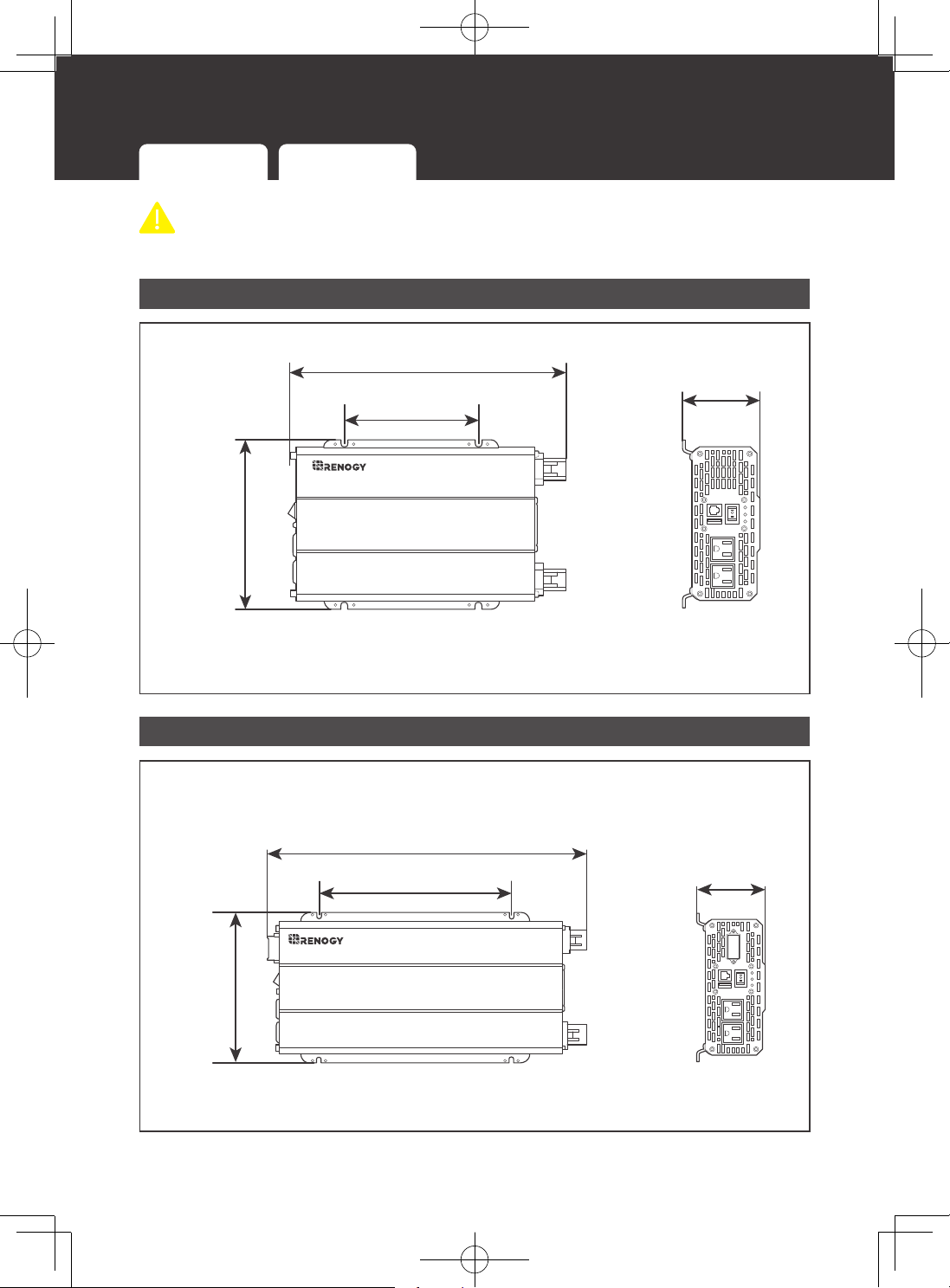
Dimensions
700W Inverter 1000W Inverter 2000W Inverter 3000W Inverter
CAUTIO
N
z
Dimension tolerance: ±0.2 in (0.5 mm)
700W Inverter
700W
12.2in [310mm]
5.8in [148mm]
7.4in
[188mm]
3.3in
[84mm]
1000W Inverter
N G L
1000W
6.8in
[172mm]
12.9in [328mm]
3.3in
[84mm]
5.8in [148mm]
Dimensions
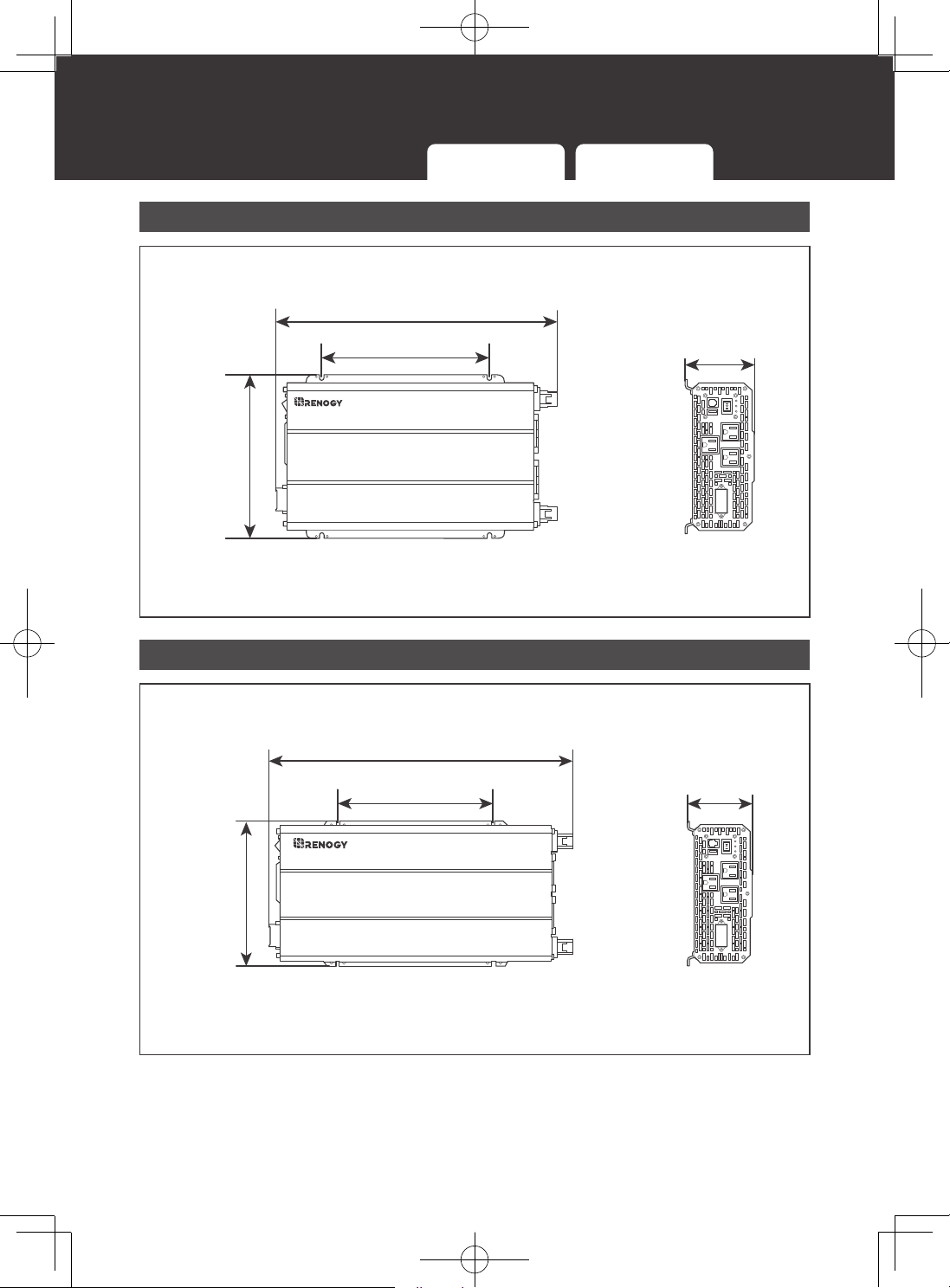
28
700W Inverter 1000W Inverter 2000W Inverter 3000W Inverter
2000W Inverter
N G L
2000W
8.6in
[
218mm
]
4.0in
[
102mm
]
17.8in [
451mm
]
9.8in [248mm]
3000W Inverter
N G L
3000W
18.9in [480mm]
9.0in
[229mm]
4.0in
[
102mm
]
9.8in [248mm]
Specifications
29
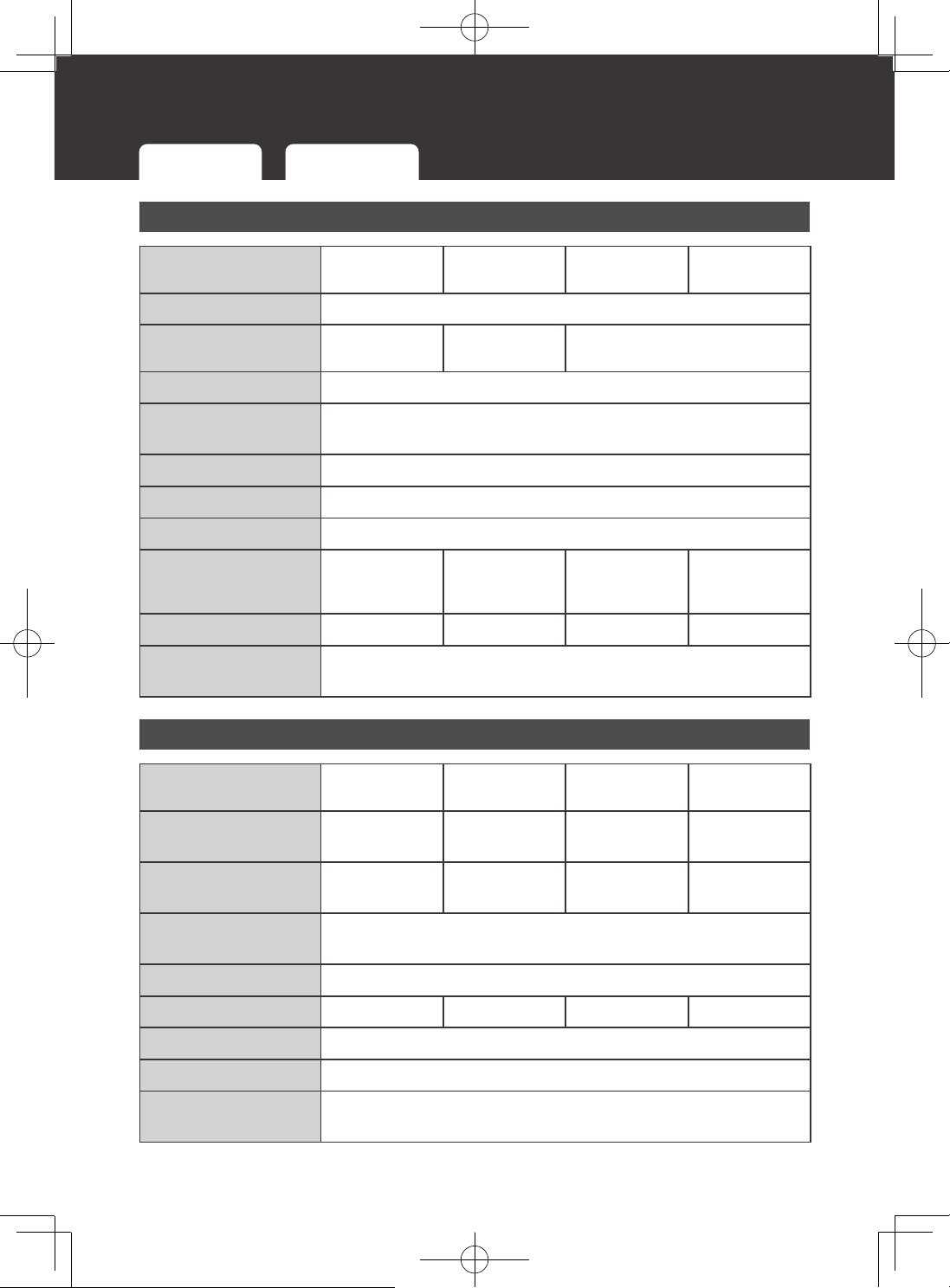
Specifications
General Data
Model
RNG-INVT-700-
12V-P2
RNG-INVT-1000-
12V-P2
RNG-INVT-2000-
12V-P2
RNG-INVT-3000-
12V-P2
Output Waveform
Pure Sine Wave
AC Terminals
2 x AC Sockets
2 x AC Sockets
+ Terminal Block
3 x AC Sockets + Terminal Block
DC Terminals
M8 - 1.25 x 15 mm
Operating
Temperature
-4°F to 104°F
/
-20°C to 40°C
Storage Temperature
-40°F to 158°F
/
-40
℃
to
70℃
Humidity
Max 93%, non-condensing
Cooling
Thermally Controlled Fans
Dimensions
(L x W x H)
12.2 × 7.4 × 3.3 in /
310 × 188 × 84 mm
12.9 × 6.8 × 3.3 in /
328 × 173 × 84 mm
17.8 × 8.6 × 4 in /
452 × 218 × 102
mm
18.9 × 9 × 4 in /
480 × 229 × 102
mm
Weight
5.6 lb 6.0 lb 11.7 lb 12.5 lb
Regulatory and
Safety Specifications
UL certified to 458 and to CSA 22.2 No. 107.1-01
Electrical Data
Model
RNG-INVT-700-
12V-P2
RNG-INVT-1000-
12V-P2
RNG-INVT-2000-
12V-P2
RNG-INVT-3000-
12V-P2
Continuous Output
Power
700W 1000W 2000W 3000W
Continuous Output
Current
5.8A AC 8.3A AC 16.6A AC 25A AC
Total Harmonic
Distortion (THD)
<3%
Power Factor
0.9 to 1
Surge Rating
1400W (@ 1s) 2000W (@ 1s) 4000W (@ 1s) 6000W (@ 1s)
Output Voltage
115V AC
Output Frequency
60Hz
Rated Battery Input
Voltage
12V DC
General Data Electrical Data Wired Remote Data
Specifications
30
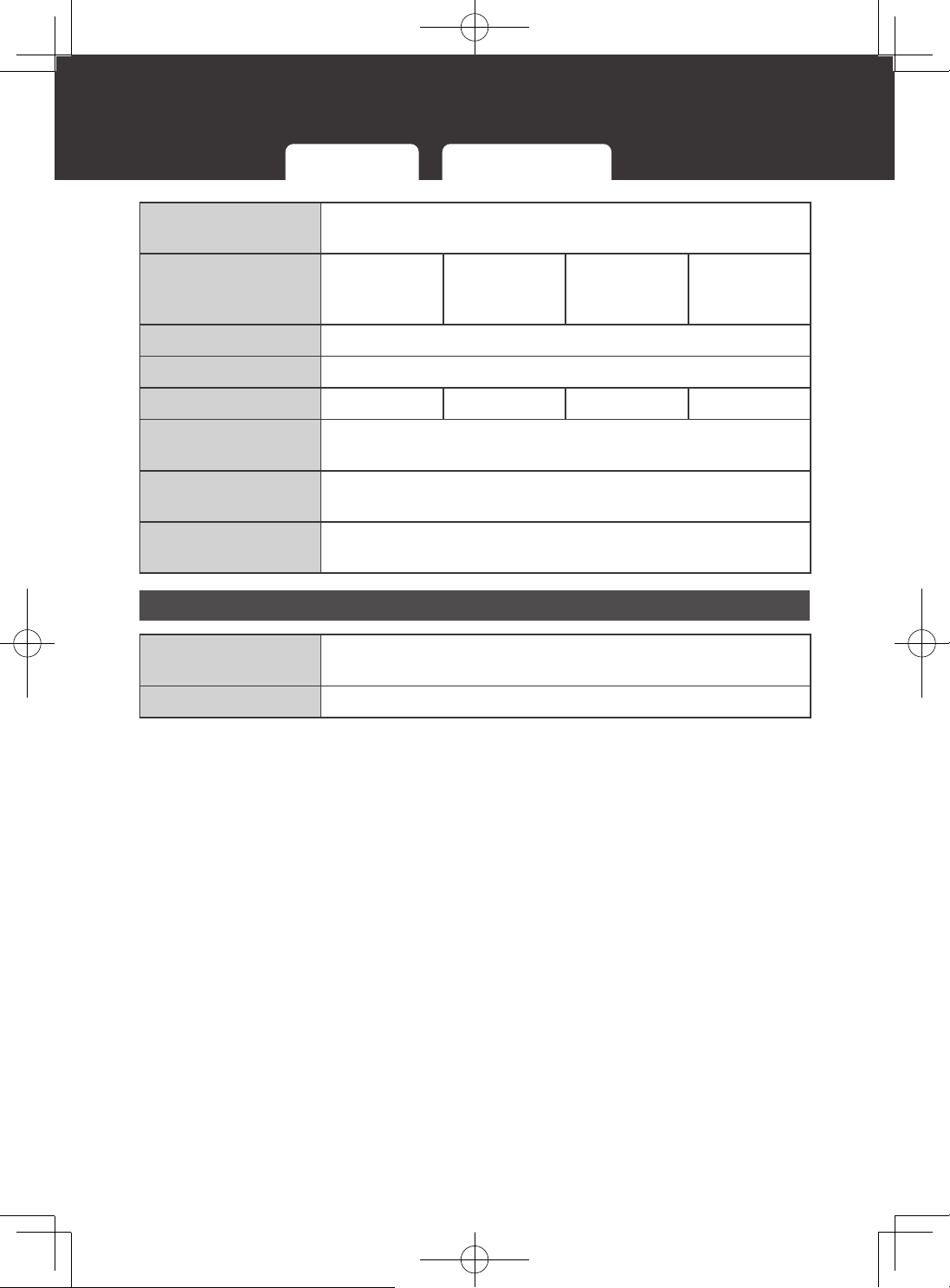
General Data Electrical Data Wired Remote Data
Battery Input Voltage
Range
10V to 16V DC
Maximum
Continuous Battery
Output Current
58.3A 83.3A 166.6A 250A
Inverter Efficiency
>90%
Full Load Efficiency
>85%
Power Consumption
<10W <12W <24W <30W
Battery Overoltage
Shutdown
16.5V (±0.3V) DC
Battery Low Voltage
Alarm
11V (±0.3V) DC
Battery Low Voltage
Shutdown
10.5V (±0.3V) DC
Wired Remote Data
Front Plate
Dimensions
3.6 x 2.02 x 1.4 in / 92.2 x 51.2 x 35.56 mm
Wired Length
16.4 ft
Technical Support
31
For additional support, contact the Renogy technical support team through renogy.com/
contact-us. Have the following information available when contacting Renogy.
z
Owner name
z
Contact information
z
Order number
z
Purchase channel
z
Serial number
z
Brief description of the issue
Renogy offers premium services worldwide:
North America
US
www.renogy.com
CA
ca.renogy.com
Asia/Pacific
AU
au.renogy.com
CN
www.renogy.cn
JP
renogy.jp
KR
kr.renogy.com
Europe
UK
uk.renogy.com
DE
de.renogy.com
FR
fr.renogy.com
ES
es.renogy.com
Technical Support
Renogy Empowered
Renogy aims to empower people around the world through education and distribution of DIY-
friendly renewable energy solutions.
We intend to be a driving force for sustainable living and energy independence.
In support of this effort, our range of solar products makes it possible for you to minimize
your carbon footprint by reducing the need for grid power.
Live Sustainably with Renogy
Did you know? In a given month, a 1KW solar energy system will...
Save 170 pounds of coal from being burned
Save 300 pounds of CO
2
from being released into the atmosphere
Save 105 gallons of water from being consumed
PLUS
Renogy Power
Renogy Power Plus allows you to stay in the loop with upcoming solar energy innovations,
share your experiences with your solar energy journey, and connect with like-minded people
who are changing the world in the Renogy Power Plus community.
Also, follow us on Youtube @Renogy Solar, Facebook @Renogy, and Instagram @
renogyofficial.