User Guide
Quality, Design and Innovation
home.liebherr.com/fridge-manuals
Contents
1 Appliance at a glance............................................ 3
1.1 Scope of delivery.......................................................... 3
1.2 Overview of the appliance and equipment.............. 3
1.3 Appliance range of use............................................... 3
1.4 Conformity..................................................................... 4
1.5 SVHC substances according to REACH regulation. 4
1.6 EPREL database........................................................... 4
1.7 Spare parts.................................................................... 4
2 General safety instructions.................................. 4
3 Functionality of the display.................................. 5
3.1 Navigation by touchbutton and symbol
explanation................................................................... 5
3.2 Menus............................................................................. 5
4 Putting into operation........................................... 7
4.1 Switching on device (first use).................................. 7
5 Storage.................................................................. 7
5.1 Information regarding storage................................... 7
5.2 Fridge compartment.................................................... 7
5.3 ****-freezer compartment*........................................ 7
5.4 Storage times............................................................... 8
6 Saving energy........................................................ 8
7 Controls................................................................. 8
7.1 Operating controls and display elements................ 8
7.1.1 Temperature display/Status indicator....................8
7.1.2 LED behaviour............................................................. 9
7.1.3 Audible signals............................................................9
7.2 Appliance functions..................................................... 9
7.2.1 Notes on the appliance functions............................9
Switching the appliance off and on........................9
Temperature................................................................9
SuperCool....................................................................9
SabbathMode........................................................... 10
Input lock.................................................................. 10
Demo mode................................................................11
Resetting to factory settings................................. 11
7.3 Messages...................................................................... 11
7.3.1 Ending messages...................................................... 11
8 Features................................................................. 12
8.1 4-star freezer compartment*..................................... 12
8.2 Door rack....................................................................... 12
8.3 Drawers.......................................................................... 13
8.4 Bottle holder................................................................. 13
9 Maintenance.......................................................... 13
9.1 FreshAir carbon filter*................................................. 13
9.2 Disassembling / assembling pull-out systems...... 14
9.3 Defrosting the appliance............................................ 14
9.4 Defrosting the freezer compartment manually*.... 14
9.5 Cleaning the appliance............................................... 14
10 Customer help....................................................... 15
10.1 Technical specifications............................................. 15
10.2 Operating noises.......................................................... 15
10.3 Technical fault.............................................................. 15
10.4 Customer Service......................................................... 16
10.5 Model plate................................................................... 16
11 Shutting down....................................................... 17
12 Disposal................................................................. 17
12.1 Preparing appliance for disposal.............................. 17
12.2 Disposing of the appliance in an environmentally
friendly manner............................................................ 17
The manufacturer is continually working on the further
development of all types and models. Please be aware that
we reserve the right to make changes to the shape, equip‐
ment and technology.
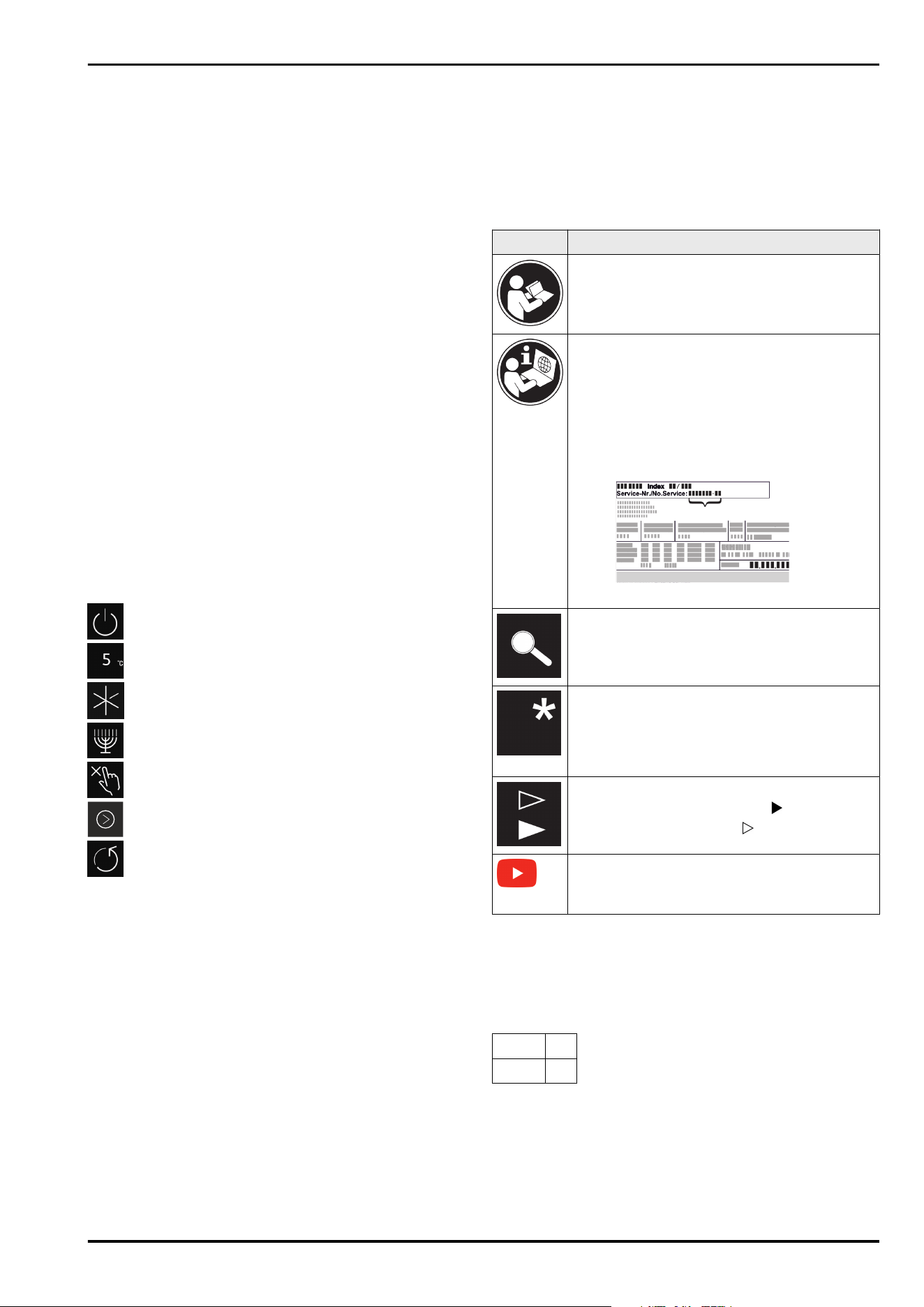
Symbol Explanation
Read instructions
Please read the information in these instruc‐
tions carefully to understand all of the benefits
of your new appliance.
Additional information on the Internet
The digital manual with additional informa‐
tion and in other languages can be found
via the QR code on the front of the
manual or by entering the service number at
home.liebherr.com/fridge-manuals.
The service number can be found on the serial
tag:
Fig.Example illustration
Check appliance
Check all parts for transport damage. If you
have any complaints, please contact your
agent or customer service.
Differences
These instructions apply to a range of models,
so differences are possible. Sections that
apply to certain models only are marked with
an asterisk (*).
Instructions and results
Instructions are marked with a .
Results are marked with a .
Videos
Videos about the appliances are available on
the YouTube channels of Liebherr-Hausgeräte.
Open source licences:
The appliance contains software components that use
open source licences. Information on the open source
licences used can be found here: home.liebherr.com/
open-source-licences
These operating instructions apply to:
(D)UR..
36..
UR.. 37..
2 * Depending on model and options
1 Appliance at a glance
1.1 Scope of delivery
Check all parts for transport damage. Contact your
dealer or customer service in the event of complaints.
(see 10.4 Customer Service)
Your new appliance comes with the following parts:
-
Built-in appliance
-
Features (depending on the model)
-
Installation materials (depending on the model)
-
“Quick Start Guide”
-
“Installation Guide”
-
Service Brochure
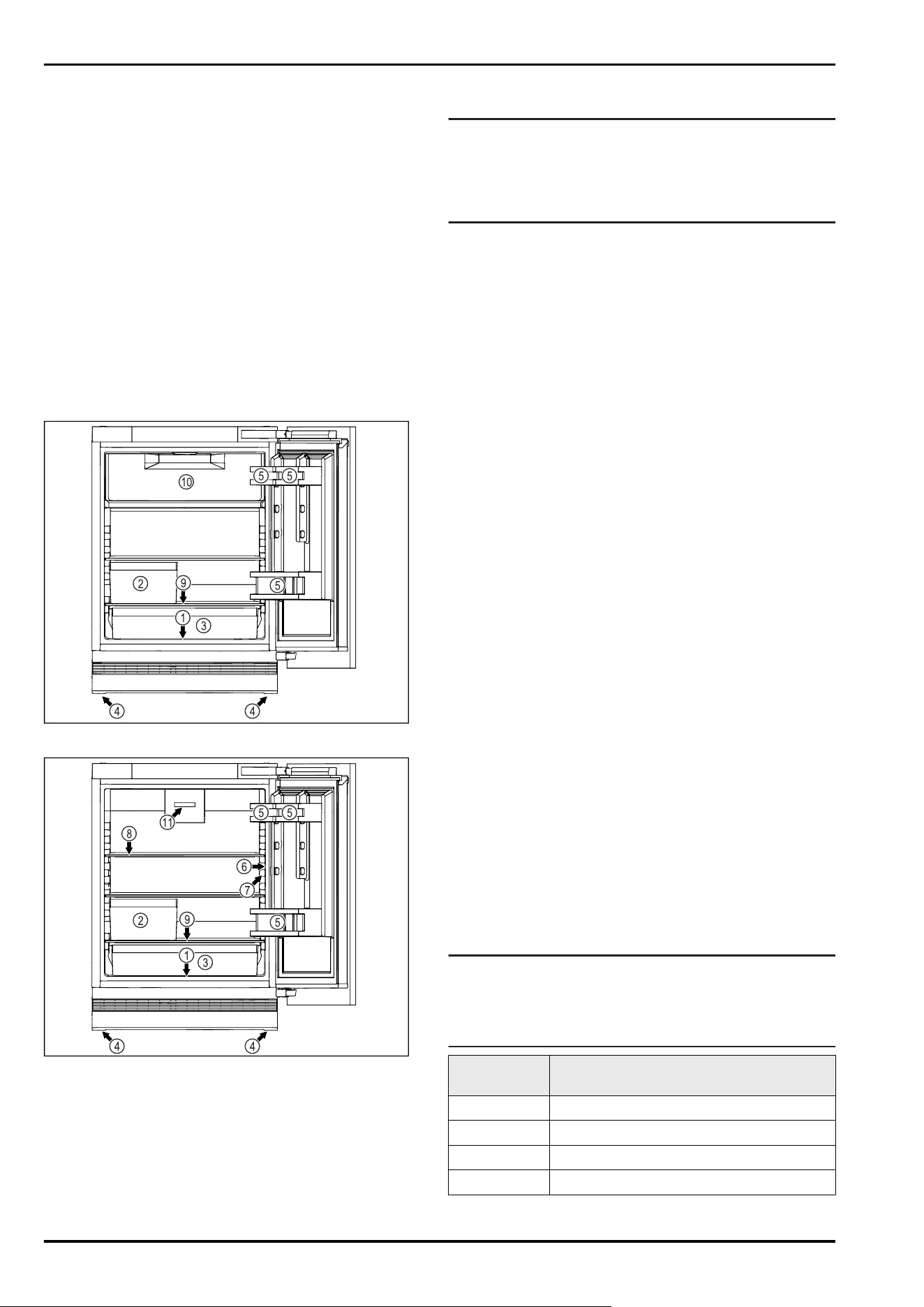
1.2 Overview of the appliance and
equipment
Fig. 1 Example illustration, front end
Fig. 1 Example illustration, front end
Equipment
(1)
Type plate (7) Interior lighting
(2) Fruit and vegetable
box
(8) Shelf
(3) Universal box (9) Defrost water drain
(4) Adjustable feet (10) 4-star freezer compart‐
ment *
(5) Door racks (11) Fan with FreshAir acti‐
vated charcoal filter *
(6) Controls and tempera‐
ture display
Note
► Shelves, drawers and baskets are arranged for optimum
energy efficiency when the appliance is delivered.
Changing how the shelves, for example, are inserted in
the fridge compartment does not have any impact on
energy consumption.
1.3 Appliance range of use
Intended use
The appliance is only suitable for cooling
food products in a domestic or household-like
environment. This includes, for example, use:
-
in staff kitchens, bed and breakfast estab‐
lishments,
-
by guests in country houses, hotels, motels
and other accommodation,
-
for catering and similar services in the
wholesale trade.
The appliance is not suitable for freezing
food;*
The appliance is suitable for integrating
under counters.
All other types of use are not permitted.
Foreseeable misuse
The following applications are expressly
forbidden:
-
Storing and refrigerating medicines, blood
plasma, laboratory preparations or similar
substances and products based on the
Medical Device Directive 2007/47/EC
-
Use in areas at risk of explosions
Misusing the appliance may lead to damage
to the goods stored or they may spoil.
Climate classifications
Depending on the climate classification the
appliance is designed to operate in restricted
ambient temperatures. The climate classifica‐
tion applying to your appliance is printed on
the rating plate.
Note
►Keep to the specified ambient tempera‐
tures in order to guarantee that the appli‐
ance works properly.
Climate clas‐
sification
for ambient temperatures of
SN 10°C to 32°C
N 16°C to 32°C
ST 16°C to 38°C
T 16°C to 43°C
Appliance at a glance
* Depending on model and options 3
Climate clas‐
sification
for ambient temperatures of
SN-ST 10°C to 38°C
SN-T 10°C to 43°C
1.4 Conformity
The refrigerant circuit has been tested for leaks. When
installed, the appliance complies with the applicable safety
regulations and with the corresponding directives.
The full text of the EU Declaration of Conformity is available
on the following website: www.Liebherr.com
1.5 SVHC substances according to
REACH regulation
You can check whether your appliance contains SVHC
substances according to REACH regulation at the following
link: home.liebherr.com/de/deu/de/liebherr-erleben/nach‐
haltigkeit/umwelt/scip/scip.html
1.6 EPREL database
Details about energy labelling and ecodesign requirements
will be available on the European product database (EPREL)
from 1st March 2021. You can access the product database
at the following link: https://eprel.ec.europa.eu/ You will be
asked to enter the model ID. You can find the model ID on
the nameplate.
1.7 Spare parts
The spare parts availability for functional parts and stock‐
able parts of the equipment is 15 years.
2 General safety instructions
Please keep these operating instructions in a
safe place so you can refer back to them at
any time.
If you pass the appliance on, please hand
these operating instructions to the next user.
Read these operating instructions carefully
before use to ensure safe and correct use of
the appliance. Follow the instructions, safety
instructions and warning messages included
at all times. They are important for ensuring
you can operate and install the appliance
safely and without any problems.
Danger for the user:
-
This device can be used by children and
people with impaired physical, sensory or
mental abilities or with a lack of experi‐
ence and knowledge provided that they are
supervised or have received instruction in
the safe use of this device, and about the
resulting hazards.
Children must not play with this appliance.
Cleaning and user maintenance work must
not be carried out by children without adult
supervision. Children aged between 3 and
8 are allowed to load and unload the appli‐
ance. Children below the age of 3 must be
kept away from the appliance unless they
are under continuous adult supervision.
-
The socket must be easily accessible so
that the appliance can be disconnected
quickly from the electricity in an emer‐
gency. It must not be located in the area
behind the appliance.
-
When disconnecting the appliance from the
supply, always take hold of the plug. Do not
pull the cable.
-
In the event of a fault pull out the mains
plug or deactivate the fuse.
-
Do not damage the mains power cable. Do
not operate the appliance with a defective
mains power cable.
-
Only customer service or other specially
trained staff may repair or perform other
operations on the appliance.
-
Only install, connect and dispose of the
appliance according to the instructions.
-
Only use the appliance when is installed.
Fire hazard:
-
The coolant used (information on the model
plate) is ecofriendly but also flammable.
Any leaking coolant may ignite.
•
Do not damage the refrigerant circuit
pipes.
•
Do not handle ignition sources inside the
appliance.
•
Do not use electrical appliances inside
the appliance (e.g. steam cleaners,
heaters, ice cream makers, etc.).
•
If the refrigerant leaks: remove any naked
flames or ignition sources from the
vicinity of the leakage point. Properly air
the room. Inform customer services.
-
Do not store explosives or sprays using
combustible propellants such as butane,
propane, pentane, etc. in the appliance. To
identify these spray cans, look for the list
of contents printed on the can, or a flame
symbol. Gases possibly escaping may ignite
due to electrical components.
-
Keep burning candles, lamps and other
items with naked flames away from the
appliance so that they do not set the appli‐
ance on fire.
-
Please be sure to store alcoholic drinks
or other packaging containing alcohol in
tightly closed containers. Any alcohol that
leaks out may be ignited by electrical
components.
General safety instructions
4 * Depending on model and options
Danger of tipping and falling:
-
Do not misuse the plinth, drawers, doors
etc. as a step or for support. This applies
particularly to children.
Danger of food poisoning:
-
Do not consume food which has been
stored too long.
Danger of frostbite, numbness and pain:
-
Avoid prolonged skin contact with cold
surfaces or refrigerated/frozen goods or
take protective measures, e.g wear gloves.
Danger of injury and damage:
-
Hot steam can lead to injury. Do not use
electrical heating or steam cleaning equip‐
ment, open flames or defrosting sprays to
defrost.
-
Do not use sharp implements to remove the
ice.
Risk of crushing:
-
Do not hold the hinge when opening and
closing the door. Fingers may get caught.
Symbols on the appliance:
This symbol may be located on the
compressor. It relates to the oil in the
compressor and makes reference to the
risk that: Swallowing or inhaling can be
fatal. This advice is only relevant to recy‐
cling. There is no danger in normal opera‐
tion.
This symbol is located on the compressor
and indicates the danger of flammable
materials. Do not remove the sticker.
This or a similar sticker may be located
on the rear of the appliance. This sticker
indicates that there are vacuum insulation
panels (VIP) or perlite panels in the door
and/or housing. This advice is only relevant
to recycling. Do not remove the sticker.
Please note the warning messages and other
specific advice in the other chapters:
DANGER
indicates an immediately
hazardous situation which will
lead to death or serious injuries if
it is not avoided.
WARNING indicates a hazardous situation
which may lead to death or serious
injuries if it is not avoided.
CAUTION indicates a hazardous situation
which may lead to minor or
moderate injuries if it is not
avoided.
NOTICE indicates a hazardous situation
which may lead to damage to
property if it is not avoided.
Note indicates useful instructions and
tips.
3 Functionality of the display
You operate your device with the touchbutton.
3.1 Navigation by touchbutton and
symbol explanation
In the illustrations, different symbols are used to navigate
the display by touchbutton. The following table describes
these symbols.
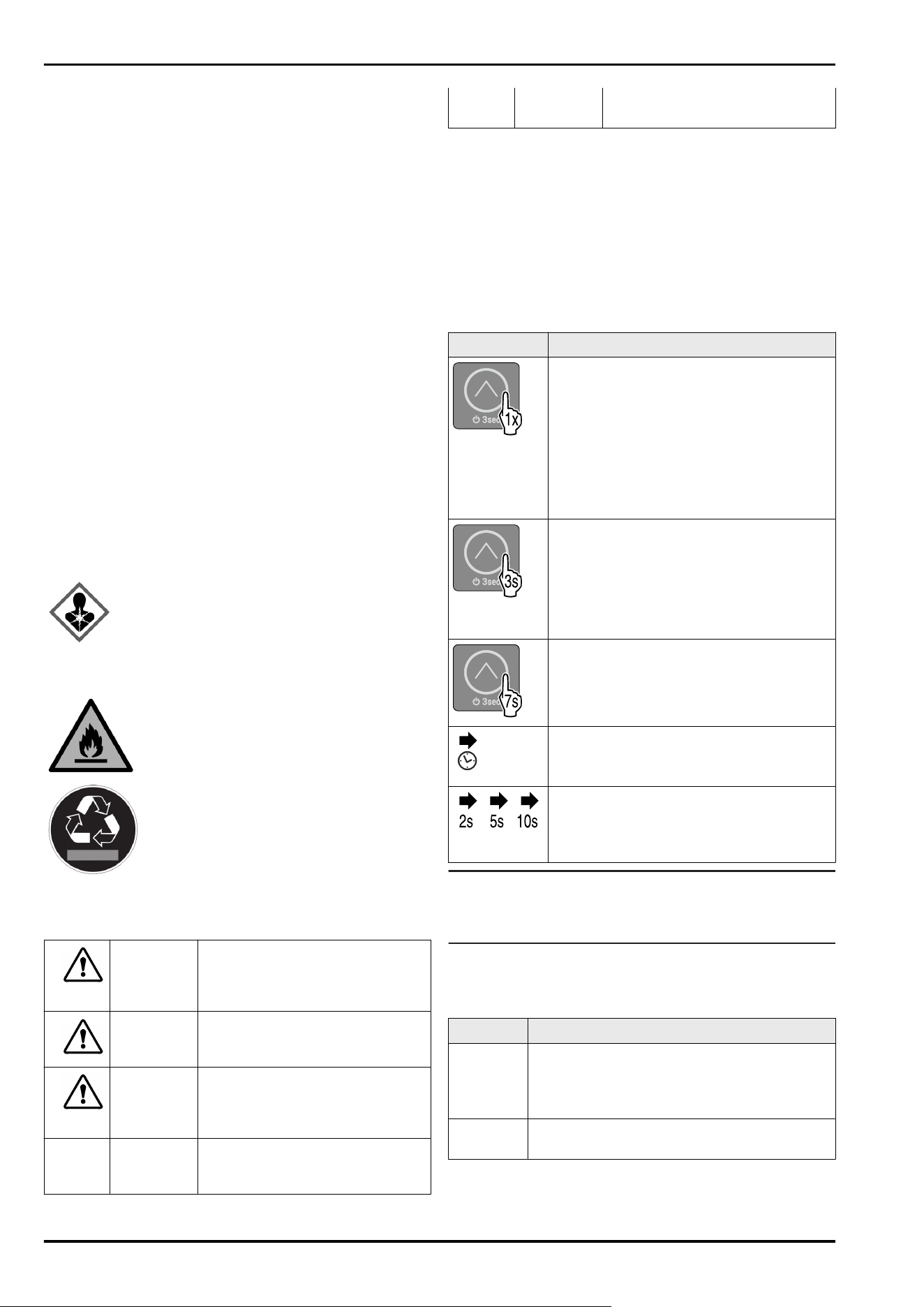
Symbol
Description
Touch the touchbutton with your finger
briefly:
Navigate through main menu and
submenu.
If a number is shown on the hand:
The number tells you how many times
you have to touch the touchbutton briefly
in succession to navigate to a particular
function.
Touch the touchbutton with your finger
for 3seconds:
Switch on the device.
In the main menu: Switch off the device.
In the submenu: Switch to the main menu.
Deactivate active function of the submenu.
Touch the touchbutton with your finger
for 7seconds:
In the main menu: Open the submenu.
Arrow with clock:
It takes more than 10 seconds for the
following message to appear in the display.
Arrow with a time indication:
It takes the specified amount of time
until the following message appears in the
display.
Note
If you touch the touchbutton for 10 seconds, then you acti‐
vate the demo mode.
► Deactivating demo mode. (see Deactivating demo mode)
3.2 Menus
The device functions can be found in various menus.
Menu
Description
Main menu When you switch the device on, you are auto‐
matically in the main menu.
From here, navigate to device functions and
the submenu.
Submenu The submenu contains additional device func‐
tions for setting up your device.
Functionality of the display
* Depending on model and options 5
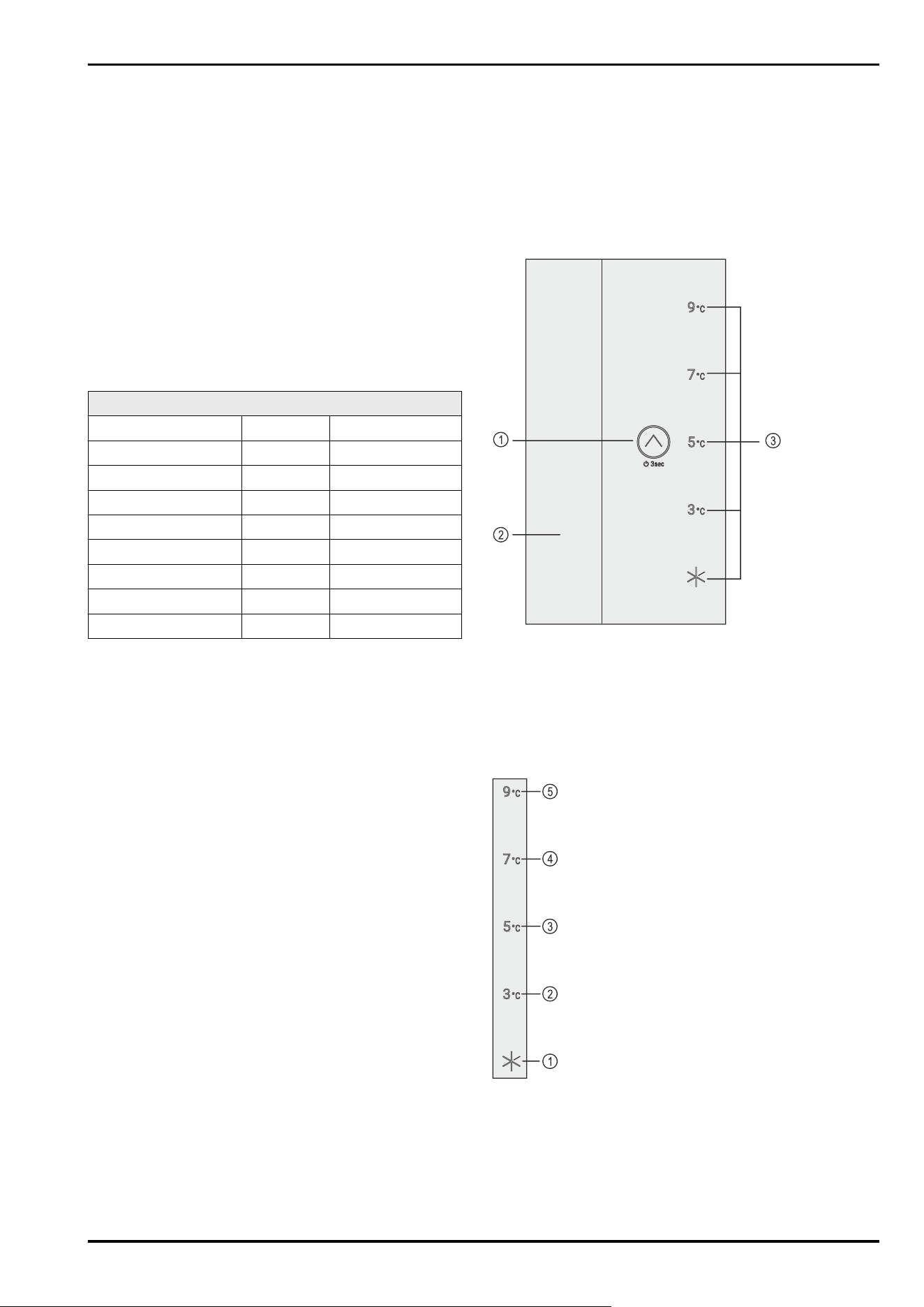
3.2.1 Main menu
In the main menu, it is possible to activate/deactivate the
following functions:
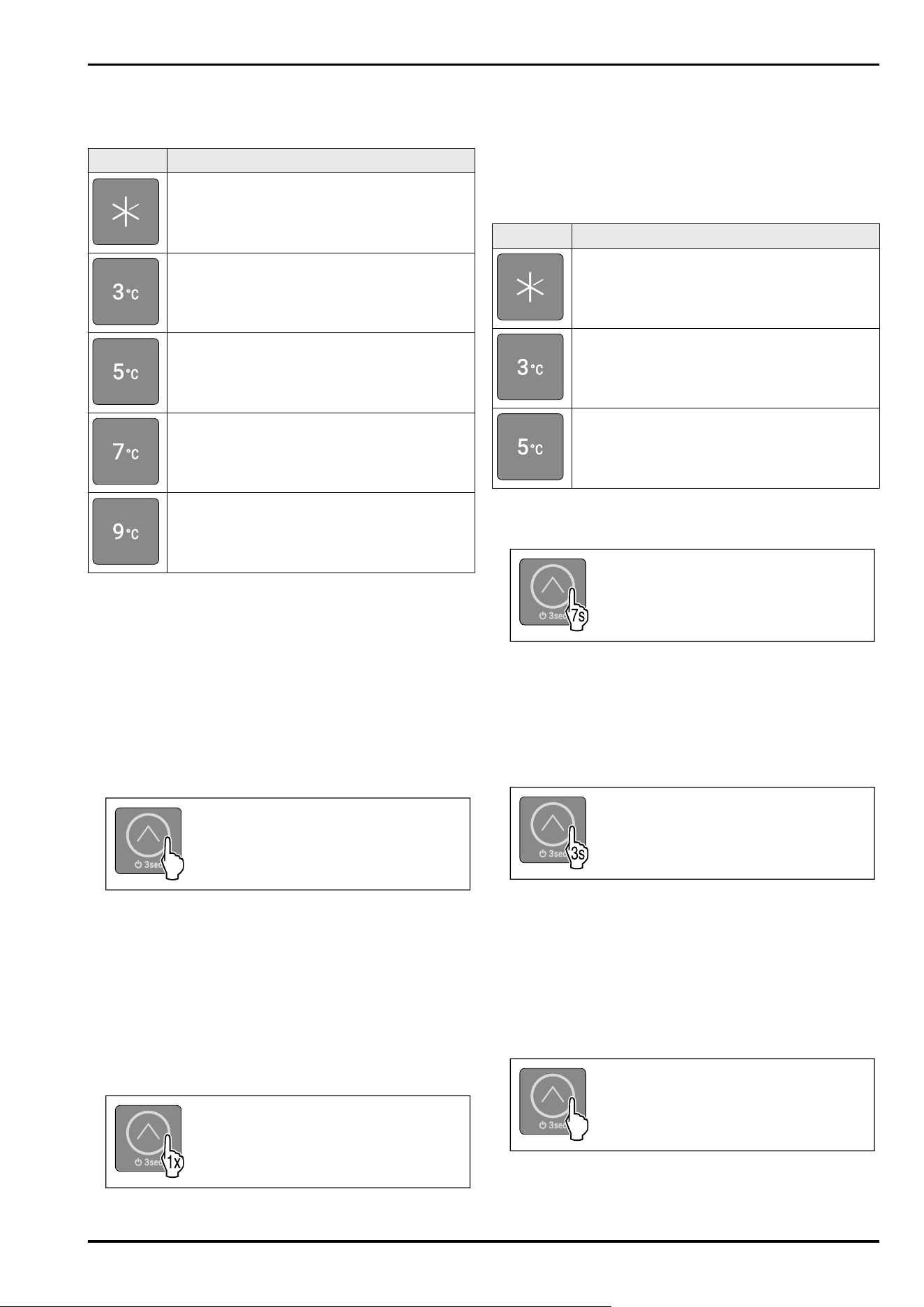
LED Description
SuperCool
Temperature 3°C
Temperature 5°C
Temperature 7°C
Temperature 9°C
Meaning of the LEDs in the main menu
3.2.1 Opening the submenu
When you switch the device on, you are automatically in the
main menu.
If you are in the submenu and want to switch to the main
menu:
► Carry out action steps (see 3.2.2Exiting the submenu) .
3.2.1 Navigating in the main menu
If you navigate in the main menu, LED 5 is followed by LED 1
again.
Fig.2
► Touch the touchbutton briefly until the LED of the desired
function lights up.
▷ Function is activated.
3.2.1 Sleep mode of the display
If you do not touch the touchbutton in the main menu for
10 seconds, the display switches to sleep mode. Sleep mode
prevents you from adjusting the temperature by accidentally
touching the touchbutton.
Ending sleep mode:
Fig.3
►
Briefly touch the touchbutton.
▷ Confirmation tone sounds.
▷ Set temperature flashes once.
▷ Sleep mode is ended.
3.2.2 Submenu
In the submenu, the following functions can be acti‐
vated/deactivated:
LED Description
Input lock
SabbathMode
Resetting to factory settings
Meaning of the LEDs in the submenu
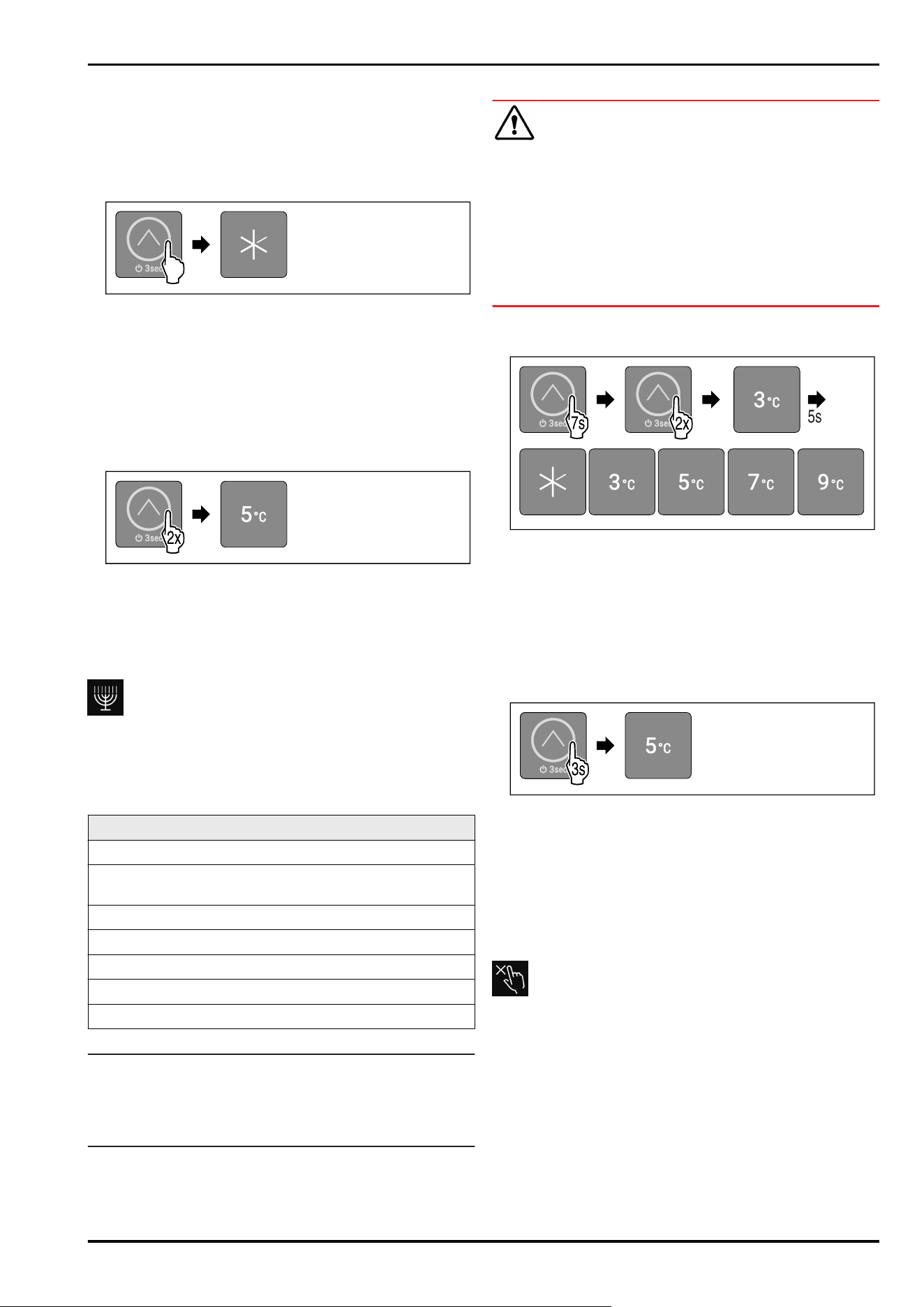
3.2.2 Opening submenu
Fig.4
► Carry out the steps as shown in the illustration until you
hear a double confirmation tone after 7seconds.
▷ LEDs 1-5 light up: You are in the submenu.
▷ If you do not perform any action on the display for
5 seconds, the display returns to the main menu.
3.2.2 Exiting the submenu
Fig.5
► Carry out action steps according to the illustration.
-or-
► Do not touch the touchbutton for 5seconds.
▷ You are in the main menu.
3.2.2 Navigating in the submenu
If you navigate in the submenu, LED 1 follows the LED of the
last function in the submenu.
Fig.6
► Touch the touchbutton briefly until the LED of the desired
function lights up.
Functionality of the display
6 * Depending on model and options
▷ After 5 seconds without interaction, selected function is
automatically activated.
4 Putting into operation
4.1 Switching on device (first use)
Make sure that the following requirements are fulfilled:
❑
The device is properly installed and connected according
to the installation instructions.
❑
All adhesive strips, adhesive and protective films and
transport locks are removed from inside and on the
device.
❑
All marketing leaflets are removed from the drawers.
❑
You are familiar with the functionality of the display.
(see3 Functionality of the display)
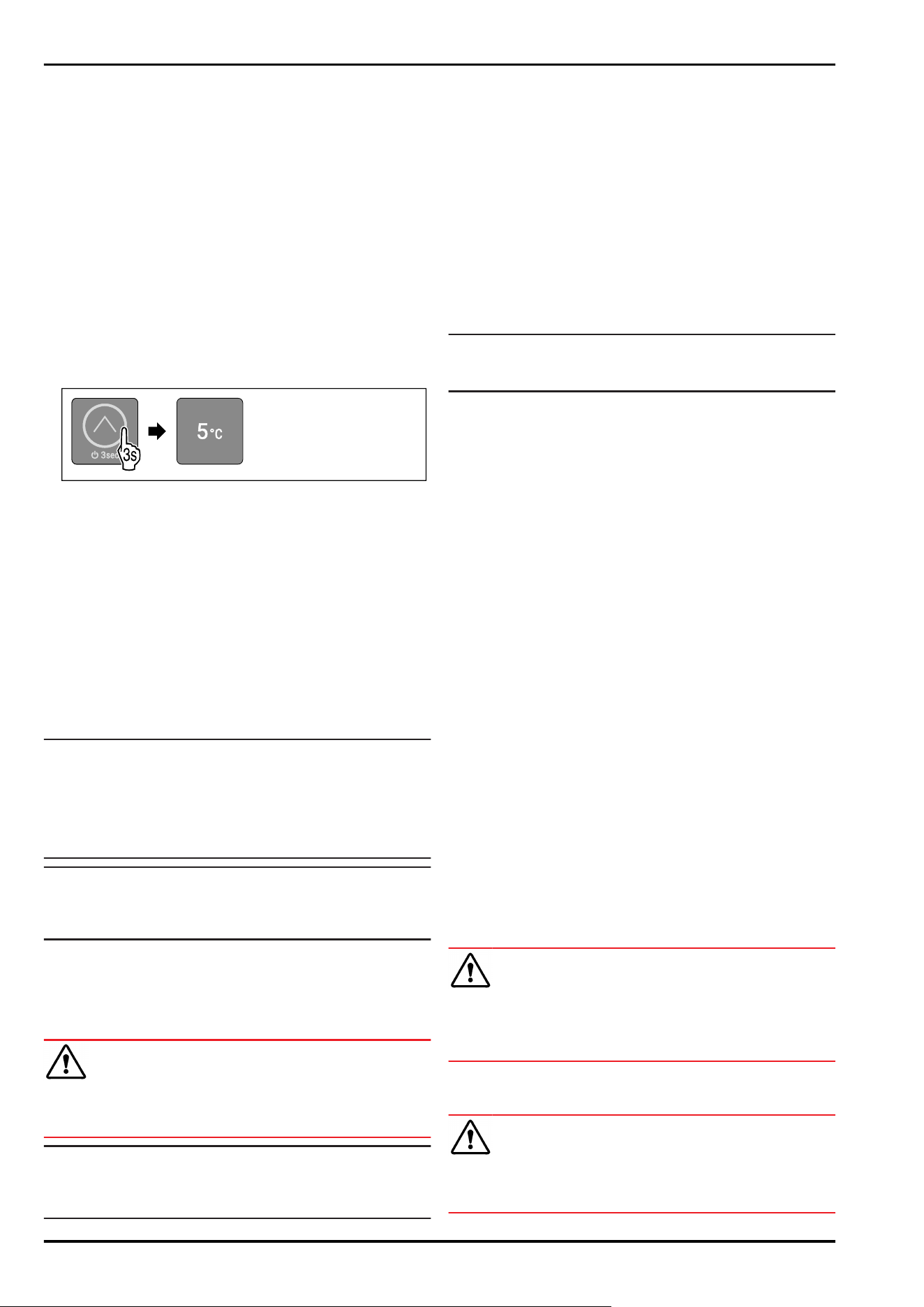
Switching on the device:
Fig.7
► Touch the touchbutton as shown in the illustration for
3 seconds until you hear the confirmation tone.
▷ The device is switched on.
▷ Interior lighting is activated.
▷ LED 3 lights up: Temperature is set to 5°C at the factory.
▷ The device cools to the target temperature set at the
factory.
Device starts in demo mode:
When the device starts in demo mode:
► Deactivating demo mode. (see Deactivating demo mode)
Display switches to sleep mode:
When the display switches to sleep mode:
► Briefly touch the touchbutton. (see 3.2.1 Sleep mode of
the display)
Note
The manufacturer recommends:
► Stock with food: Wait for around 6 hours until the set
temperature is reached.
► Store frozen foods at -18°C or colder.*
► Observe the notes on storing food. (see 5.1 Information
regarding storage)
Note
Accessories can be purchased from the Liebherr-
Hausgeräte store at home.liebherr.com/shop/de/deu/
zubehor.html.
5 Storage
5.1 Information regarding storage
WARNING
Risk of fire
► Do not use any electrical appliances in the food area of
the appliance unless recommended by the manufacturer.
Note
The energy consumption increases and the cooling power
goes down if ventilation is not sufficient.
► Always keep air slots clear.
Observe the following specifications for storage:
-
Keep the air vents on the fan free.*
-
In the freezer compartment: Package food properly.*
-
Package or cover foods that readily take on or give off
odours or taste in closed containers.
-
Package raw meat or fish in clean, closed containers.
This will prevent meat or fish from touching or dripping
onto other food.
-
Keep liquids in closed containers.
-
Leave space between goods to ensure good air circula‐
tion.
-
Store food according to the instructions on the pack‐
aging.
-
Always observe the best-before date indicated on the
packaging.
Note
Failure to follow these guidelines can lead to foodstuffs
spoiling.
5.2 Fridge compartment
5.2.1 Arranging your food properly
► Upper area and door: Store butter, cheese, tinned food
and tubes.
► Bottom shelf: Store particularly perishable foods such as
ready meals, fish, meat and sausage products.
► Universal box: Store small jars, tubes, chocolate, eggs,
packaged fruit and vegetables.
5.3 ****-freezer compartment*
Here, a dry, frosty storage climate is created at -18 °C. The
frosty storage climate is suitable for storing frozen food for
several months, for making ice cubes or freezing fresh food.
The air temperature in the freezer compartment, measured
with a thermometer or other measuring device, may fluc‐
tuate. Temperature fluctuations are greater in a half-full
or empty freezer and it is possible to attain temperatures
warmer than -18°C.
5.3.1 Freezing food
The maximum amount of fresh food that you can
freeze within 24 hours is specified on the type plate
(see 10.5 Model plate) under “Freezing capacity ... kg/24h”.
To ensure that food quickly freezes through, adhere to the
following quantities per package:
-
Fruit and vegetables up to 1 kg
-
Meat up to 2.5 kg
Arranging your food properly
CAUTION
Risk of injury due to broken glass!
Bottles and cans containing drinks may burst when being
frozen. This applies particularly to sparkling drinks.
► Do not freeze bottles and cans containing drinks!
► Place packaged food in the freezer compartment.
Defrosting food
WARNING
Risk of food poisoning!
► Do not re-freeze thawed food.
► Use defrosted foodstuff as soon as possible.
Putting into operation
* Depending on model and options 7
You can defrost food in several ways:
-
In the fridge compartment
-
In the microwave
-
In the oven/fan-assisted oven
-
At room temperature
► Take out only as much food as necessary.
5.4 Storage times
Refer to the specified storage times as a guide.
In the case of foods with a minimum shelf life, the date
indicated on the packaging still applies.
5.4.1 Fridge section
Always follow the best-before date stated on the packaging.
5.4.2 Freezer compartment*
Recommended shelf-lives for various types of food
Ice cream at -18°C 2 to 6 months
Cold cuts, ham at -18°C 2 to 3 months
Bread, baked goods at -18°C 2 to 6 months
Game, pork at -18°C 6 to 9 months
Fatty fish at -18°C 2 to 6 months
Lean fish at -18°C 6 to 8 months
Cheese at -18°C 2 to 6 months
Poultry, beef at -18°C 6 to 12 months
Vegetables, fruit at -18°C 6 to 12 months
6 Saving energy
-
Pay attention to good ventilation. Do not cover ventilation
holes or grids.
-
Always keep the fan air slits clear.*
-
Do not install the appliance in direct sunlight or near
radiators or similar sources of heat.
-
If the appliance is installed directly next to an oven,
the energy consumption may increase slightly. This is
dependent on the service life and usage intensity of the
oven.
-
Energy consumption depends on the installation condi‐
tions, e.g. the ambient temperature (see 1.3 Appliance
range of use) . A warmer ambient temperature can
increase the energy consumption.
-
Open the appliance for as short a time as possible.
-
The lower the temperature is set the higher the energy
consumption.
-
Only take food out for as long as necessary so that it
doesn’t warm up too much.
-
Inserting warm food: allow to cool down to room temper‐
ature first.
-
Thaw frozen food in the refrigerator.*
-
If there is a thick layer of frost in the appliance: defrost
the appliance.*
7 Controls
7.1 Operating controls and display
elements
The display provides a quick overview of the current status
of the appliance, the temperature setting, the status of
functions and messages.
You operate your appliance with the touchbutton.
Fig. 8 Operating controls and display elements
(1)
Touchbutton (oper‐
ating control)
(3) Temperature display/
Status indicator
(2) Interior lighting
7.1.1 Temperature display/Status indicator
The temperature display/status indicator consists of five
LEDs:
Fig. 9 Temperature display/Status indicator
(1)
LED1 (4) LED4
(2) LED2 (5) LED5
(3) LED3
The LEDs indicate temperature settings (see 3.2.1 Main
menu) in the main menu and functions in the submenu
(see 3.2.2Submenu) .
Saving energy
8 * Depending on model and options
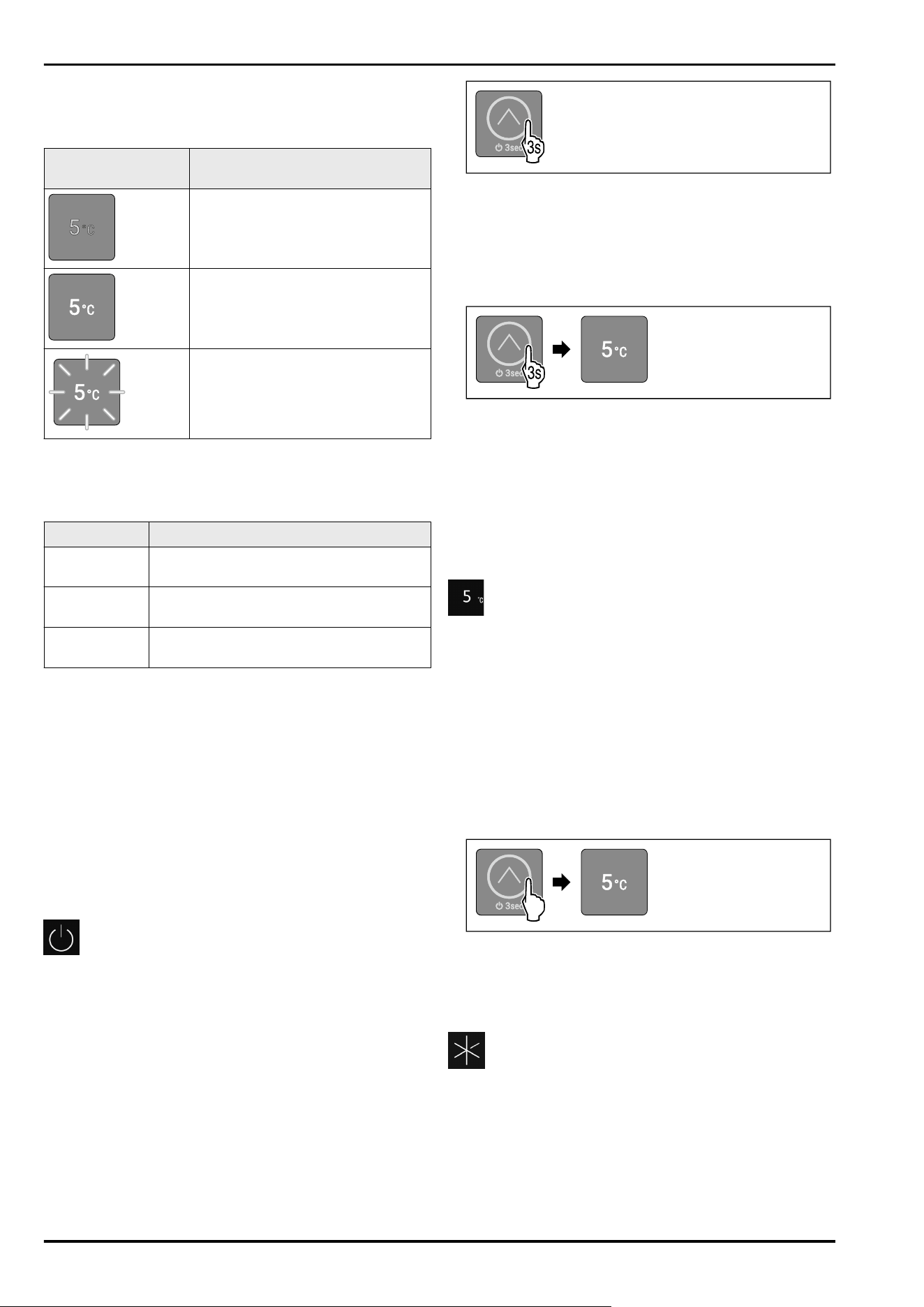
7.1.2 LED behaviour
You can recognise the status of the device by the light up or
flashing of the LEDs:
LED behaviour
(example illustration)
Description
LED does not light up:
LED is not selected. Function is not
active.
LED lights up:
LED is selected or function is active.
Several LEDs flash simultaneously:
An error has occurred.
(see 7.3Messages)
LED behaviour
7.1.3 Audible signals
An audible signal sounds in the following cases:
Audible signal
Description
Confirmation
tone
Sounds when the touchbutton is touched.
Alarm tone Sounds when an error occurs.
(see 7.3Messages)
Error tone Sounds when the touchbutton is touched,
but the interaction is not possible.
7.2 Appliance functions
7.2.1 Notes on the appliance functions
The appliance functions are set at the factory so that your
appliance is fully functional.
Before you alter, activate or deactivate the device functions,
make sure that the following requirements are met:
❑
You have read and understood the descriptions of how
the display works. (see3 Functionality of the display)
❑
You have familiarised yourself with the operating and
display elements of your appliance. (see 7.1 Operating
controls and display elements)
Switching the appliance off and on
Use this function to switch the entire appliance off and on.
Switching off the device
When you switch the appliance off, then the previously
saved settings are saved.
Make sure that the following requirements are fulfilled:
❑
Handling instructions (see 11 Shutting down) are carried
out.
❑
You are in the main menu. (see 3.2.2Exiting the submenu)
Fig. 10
► Carry out the action steps according to the illustration
until you hear the confirmation tone.
▷ LEDs of the display no longer light up.
▷ Interior lighting is deactivated.
▷ Device is switched off.
Switching on the device
Fig. 11 Example illustration depending on the previously set
temperature
► Carry out the action steps according to the illustration
until you hear the confirmation tone.
▷ The device is switched on.
▷ Interior lighting is activated.
▷ During first use: Temperature is set to 5°C at the factory.
▷ If the device has been in operation before: Previously set
temperature is set.
▷ The device cools to the target temperature set.
Temperature
Use this function to set the temperature.
The temperature depends on the following factors:
-
Frequency of door opening
-
Duration of door opening
-
Room temperature of the installation site
-
Type, temperature and quantity of food
Recommended setting: 5°C
Setting the temperature
The function is located in the main menu on the positions of
LEDs 2-5.
Fig. 12 Example illustration
► Briefly touch the touchbutton as shown until the desired
temperature lights up.
▷ Temperature is set.
▷ The device cools to the target temperature set.
SuperCool
You can use this function to activate or deactivate Super‐
Cool. If SuperCool is activated, then the appliance increases
the cooling capacity. It allows you to achieve lower cooling
temperatures. You can activate SuperCool when you would
like to cool a large quantity of food quickly.
If SuperCool is activated, then lower temperatures are
reached in the **** freezer compartment. You can activate
SuperCool when you would like to freeze food in the ****
freezer compartment.*
Controls
* Depending on model and options 9
Activating SuperCool
The function is located in the main menu at the position of
LED1.
Time for activation of the function:
-
When you would like to store fresh food in the fridge
section: Activate the function when inserting food.
Fig.13
► Briefly touch the touchbutton as shown until LED 1 lights
up.
▷ LED 1 lights up: SuperCool is activated.
▷ The device cools to the target temperature.
Deactivating SuperCool
SuperCool is deactivated automatically after 18 hours.
However, you can also deactivate SuperCool manually at
any time by setting a temperature:
Fig. 14 Example illustration
► Briefly touch the touchbutton as shown until the desired
temperature lights up.
▷ Temperature is set and SuperCool is deactivated.
▷ The appliance continues to run in normal mode.
▷ The device cools to the target temperature set.
SabbathMode
With this function you activate or deactivate the
SabbathMode. If you activate this function, some electronic
functions are switched off. As a result, your device meets
the religious requirements for Jewish holidays such as
Sabbath and complies with STAR-K Kosher certification.
Device status when SabbathMode is active
LEDs 1-5 light up.
All functions in the display are locked except for the Deac‐
tivating SabbathMode function.
Active functions remain active.
The interior lighting is deactivated.
Messages are not displayed.
There is no door alarm.
After a power failure, the device returns to SabbathMode.
Device status
Note
This appliance has certification from the “Institute for
Science and Halacha”. (www.machonhalacha.co.il)
You can find a list of STAR-K-certified appliances at
www.star-k.org/appliances.
Activating SabbathMode
WARNING
Danger of food poisoning from spoiled food!
If you have SabbathMode activated and a power failure
occurs, no message appears in the status display about the
power failure. Once the power is restored, the appliance
continues to operate in SabbathMode. The power failure
may mean that food spoils and the consumption of this food
could lead to food poisoning.
After a power failure:
► Do not consume food that was frozen and has thawed
out.
The function is located in the submenu at the position of
LED2.
Fig. 15
► Carry out action steps according to the illustration.
▷ LED 2 lights up.
▷ After 5 seconds without interaction, SabbathMode is
activated. LEDs 1-5 light up.
Deactivating SabbathMode
The SabbathMode is automatically deactivated after
80 hours. However, you can also deactivate SabbathMode
manually at any time:
Fig. 16 Example illustration depending on the previously
set temperature
► Carry out the action steps according to the illustration
until you hear the confirmation tone.
▷ SabbathMode is deactivated.
▷ Interior lighting is activated.
▷ The device continues to run in normal mode. LED of the
previously set temperature lights up.
▷ You are in the main menu.
Input lock
You can use this function to activate or deactivate the input
lock. The input lock prevents the appliance being operated
accidentally, e. g. by children.
Application:
-
Avoid unintentional modification of functions.
-
Avoid unintentional switching off of the device.
-
Avoid unintentional temperature setting.
Activating the input lock
The function is located in the submenu at the position of
LED1.
Controls
10 * Depending on model and options
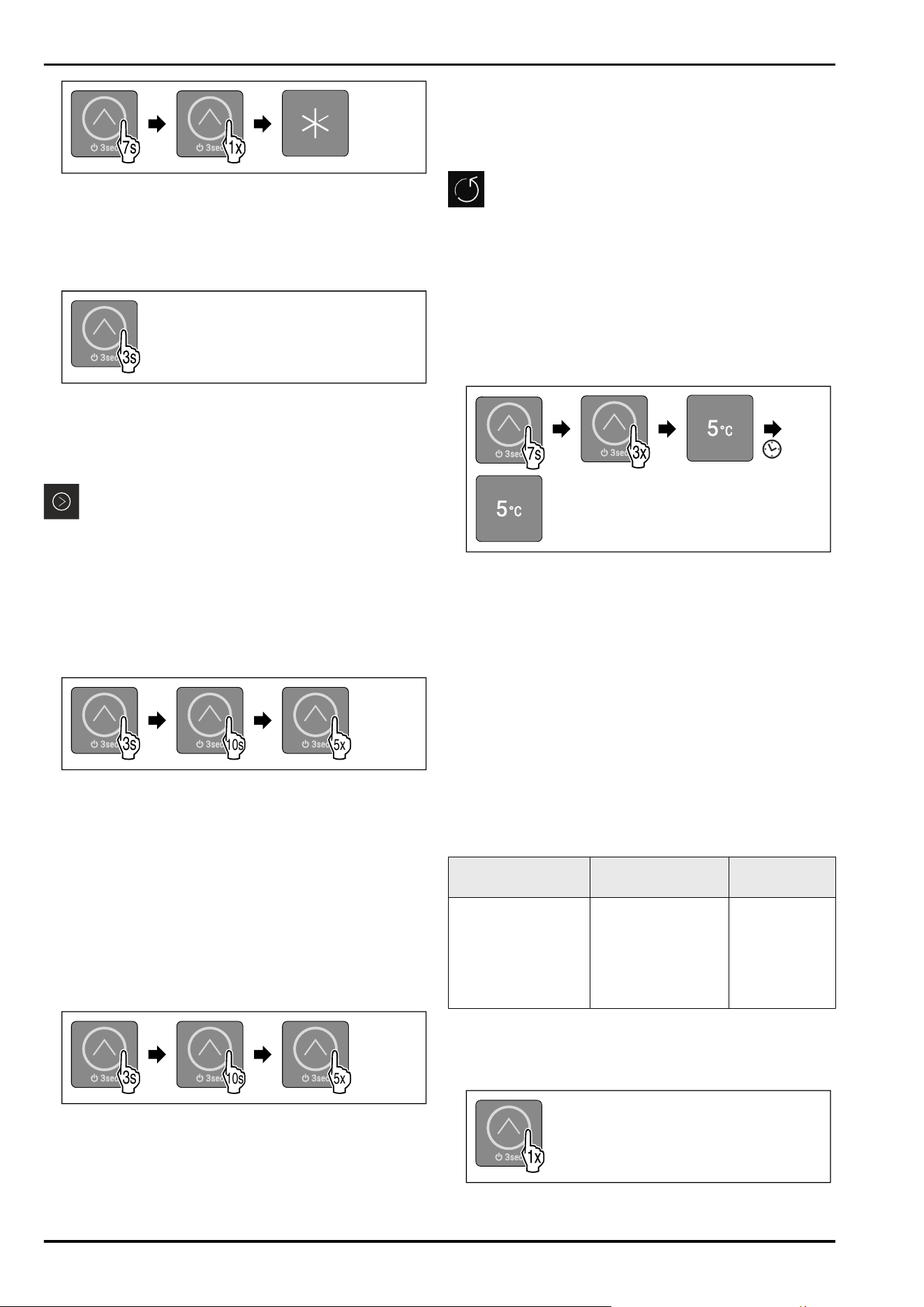
Fig.17
► Carry out action steps according to the illustration.
▷ LED 1 lights up.
▷ After 5 seconds without interaction, input lock is auto‐
matically activated.
Deactivating the input lock
Fig. 18
► Carry out the action steps according to the illustration
until you hear the confirmation tone.
▷ Input lock is deactivated.
▷ You are in the main menu.
Demo mode
Demo mode is a special feature for dealers who want to
demonstrate device features. If you activate demo mode, all
refrigeration functions are deactivated and you cannot open
the submenu.
If you activate and then deactivate demo mode, the device
will be reset to factory defaults. (see Resetting to factory
settings)
Activating demo mode
3s3s
3s
10s
3s
5x
Fig. 19
► Touch the touchbutton as shown in the illustration for
3 seconds until you hear the confirmation tone.
▷ Device is switched off.
► Touch the touchbutton as shown in the illustration for
10 seconds until you hear the confirmation tone after
10seconds.
► Briefly touch the touchbutton five times.
▷ All temperature LEDs light up twice for a short time:
Demo mode is activated.
▷ Device is switched off.
► Switch on the device. (see Switching on the device)
▷ The device is in demo mode.
Deactivating demo mode
3s3s
3s
10s
3s
5x
Fig.20
► Touch the touchbutton as shown in the illustration for
3 seconds until you hear the confirmation tone.
▷ Device is switched off.
► Touch the touchbutton as shown in the illustration for
10 seconds until you hear the confirmation tone after
10seconds.
►
Briefly touch the touchbutton five times.
▷ All temperature LEDs light up briefly four times: Demo
mode is deactivated.
▷ Device is switched off.
► Switch on the device. (see Switching on the device)
Resetting to factory settings
Use this function to reset all settings to factory defaults.
All settings you have made so far are reset to their original
settings.
Application:
-
Reset device
Performing a reset
The function is located in the submenu at the position of
LED 3.
Fig.21
► Carry out action steps according to the illustration.
▷ LED 3 lights up.
▷ After 5 seconds without interaction, the device is reset
and restarted.
▷ Device is reset.
▷ LED 3 lights up: Temperature is set to 5°C at the factory.
▷ The device cools to the target temperature set at the
factory.
7.3 Messages
Messages are indicated audibly by an alarm tone and visu‐
ally by the LEDs flashing in the display. Different LEDs flash
depending on the type of message.
You can end the following messages yourself. For all
other messages, you must contact the customer service.
(see 10.4 Customer Service)
Message
Cause Exit the
message
The alarm tone
sounds at an ever-
increasing volume.
Interior lighting
pulses.
Door alarm
The message
appears if the door
is open for more
than 60seconds.
Carry out
action steps
(see Door
alarm) .
Overview of messages
7.3.1 Ending messages
Door alarm
Fig.22
Controls
* Depending on model and options 11
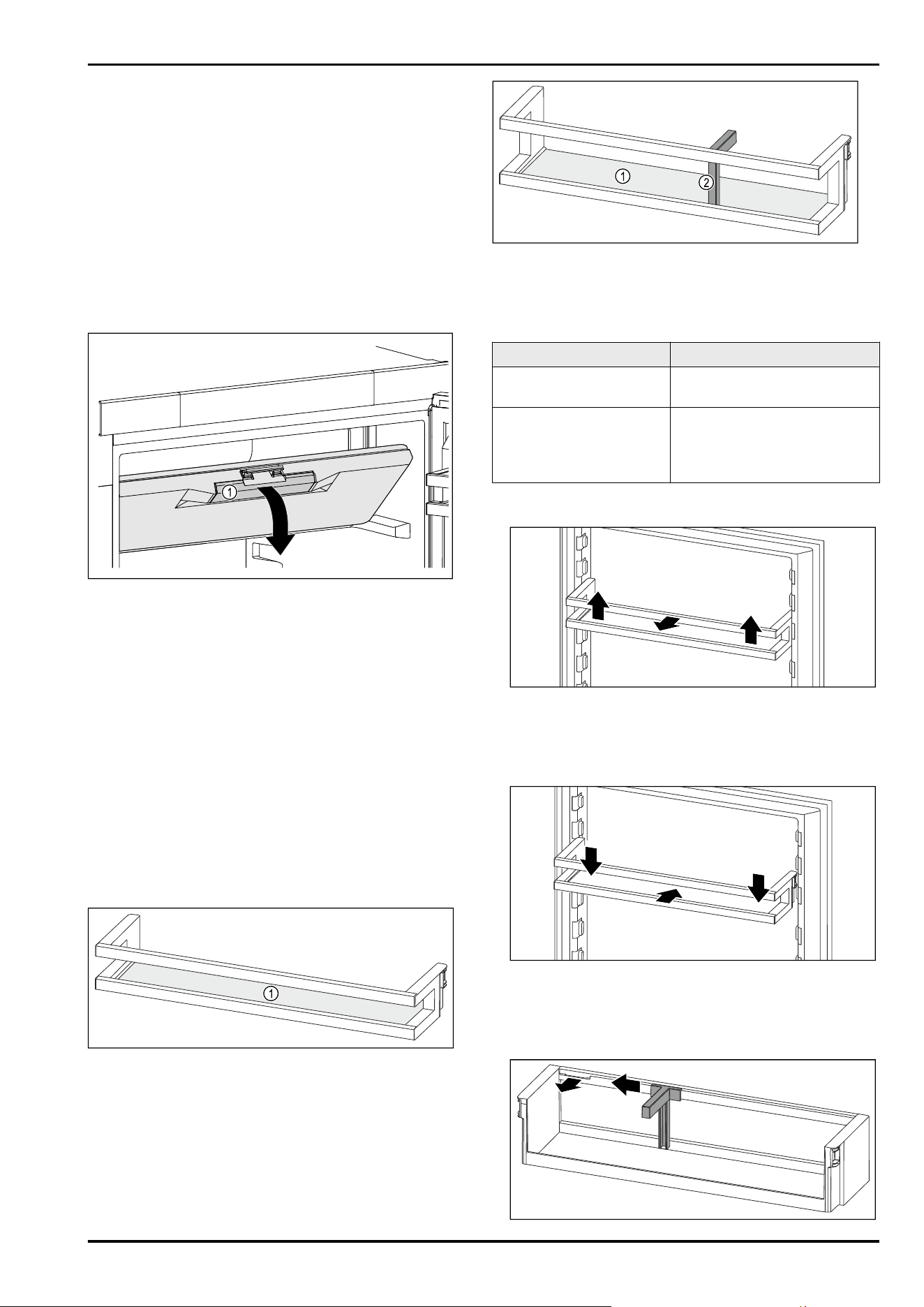
► End alarm: Carry out action steps according to the
illustration.
-or-
► Close the door.
▷ Alarm has ended.
▷ If the door is not closed: Message appears again after
4 minutes.
8 Features
8.1 4-star freezer compartment*
8.1.1 Opening the 4-star freezer compartment
Fig.23
► Hold the freezer compartment door by the recessed
handle Fig.23(1).
► Pull the freezer compartment door down and forward.
▷ Freezer door is open.
8.1.2 Closing the 4-star freezer compartment
► Close the freezer compartment door.
► Press on the freezer compartment door at the front until
it engages.
▷ Freezer compartment door is closed.
8.2 Door rack
Door racks are suitable for storing drinks and food. You can
move door racks for your own individual use and take them
apart for cleaning. However, Liebherr recommends using the
door racks in the position in the door as delivered from the
factory.
Fig. 24 Example illustration, Door rack
(1)
Shelf
Fig. 25 Example illustration, Door rack with bottle holder
(1) Shelf (2) Bottle holder
The following table shows examples of what can be stored
in each door rack. Do not exceed the maximum loading
weight of the door.
Door rack
Food
Door rack (see Fig. 24) Butter, cheese, tinned food,
tubes
Door rack with bottle
holder (see Fig.25)
Bottles
The sliding bottle holder
secures the bottles in the door
rack.
8.2.1 Removing the door rack
Fig. 26 Example illustration
► Push the door rack upwards.
► Pull the door rack forward.
8.2.2 Inserting the door rack
Fig. 27 Example illustration
► Slide in the door rack.
► Press the door rack down.
8.2.3 Removing the bottle holder
Features
12 * Depending on model and options
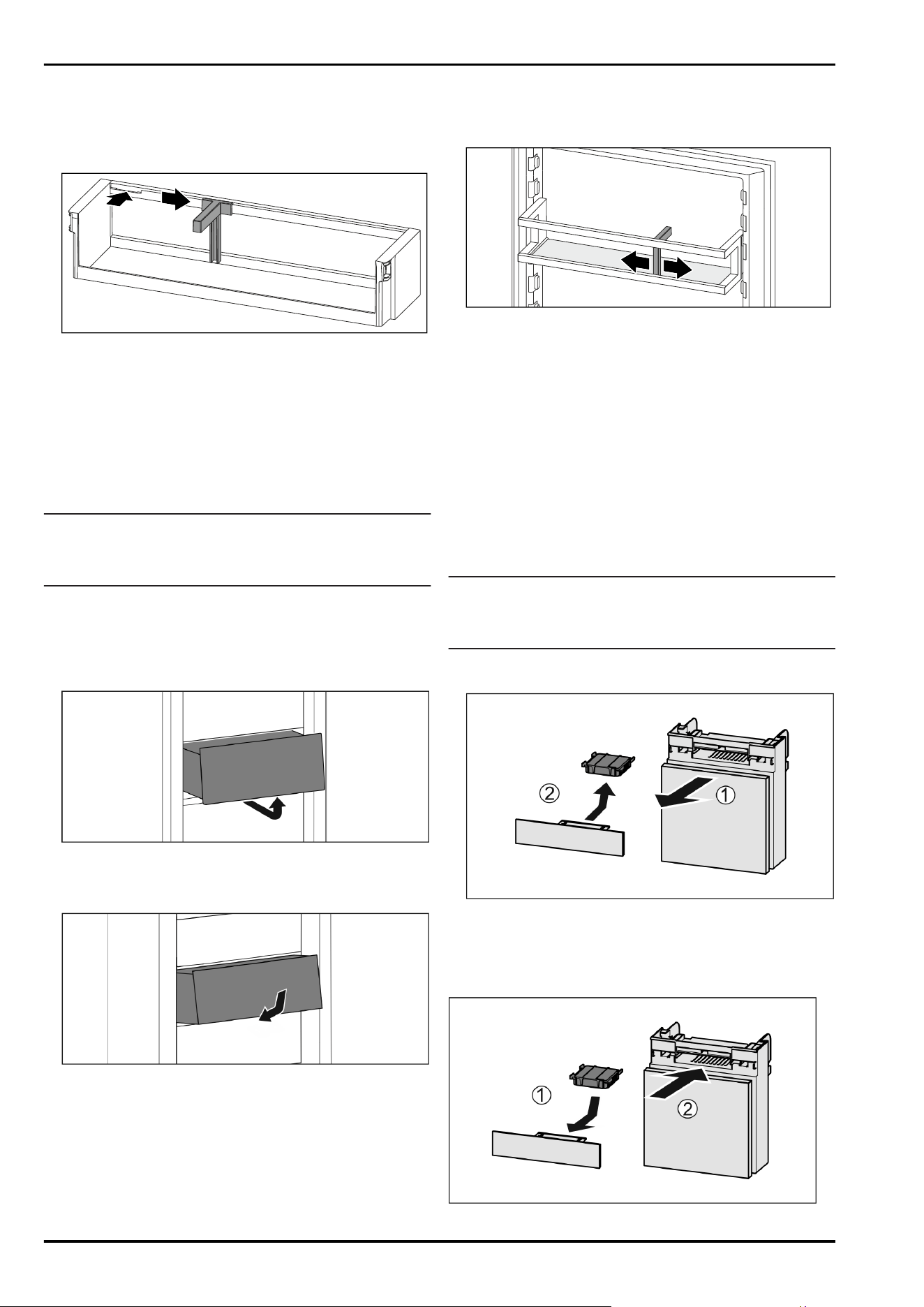
Fig.28
► Slide the bottle holder to the side as far as the recess.
► Remove the bottle holder forwards.
8.2.4 Inserting the bottle holder
Fig.29
► Insert the bottle holder in the recess.
► Push the bottle holder to the desired position to the side.
8.3 Drawers
You can remove the drawers for cleaning.
The way to remove/insert the drawers varies depending
on the pull-out system. Your appliance can contain various
pull-out systems.
Note
The energy consumption increases and the cooling power
goes down if ventilation is not sufficient.
► Always leave the fan air vents clear on the back wall!
8.3.1 Drawer on appliance base or glass shelf
The drawer runs directly on the appliance base or on a glass
shelf. There are no rails.
Removing drawer
Fig.30
► Remove drawer as shown in the illustration.
Inserting drawer
Fig.31
► Insert drawer as shown in the illustration.
8.4 Bottle holder
8.4.1 Using the bottle holder
Fig.32
► Push the bottle holder onto the bottles.
▷ The bottles are prevented from falling over.
9 Maintenance
9.1 FreshAir carbon filter*
The FreshAir carbon filter is in the compartment above the
fan.
It guarantees the best air quality.
❑
Replace the carbon filter every 6 months.
❑
The carbon filter can be disposed of with the regular
household waste.
Note
FreshAir activated charcoal filters can be purchased
from the Liebherr-Hausgeräte store at home.liebherr.com/
shop/de/deu/zubehor.html.
9.1.1 Removing the FreshAir carbon filter
Fig.33
► Pull out the compartment Fig.33(1).
► Remove the carbon filter Fig.33(2).
9.1.2 Inserting the FreshAir carbon filter
Fig.34
Maintenance
* Depending on model and options 13
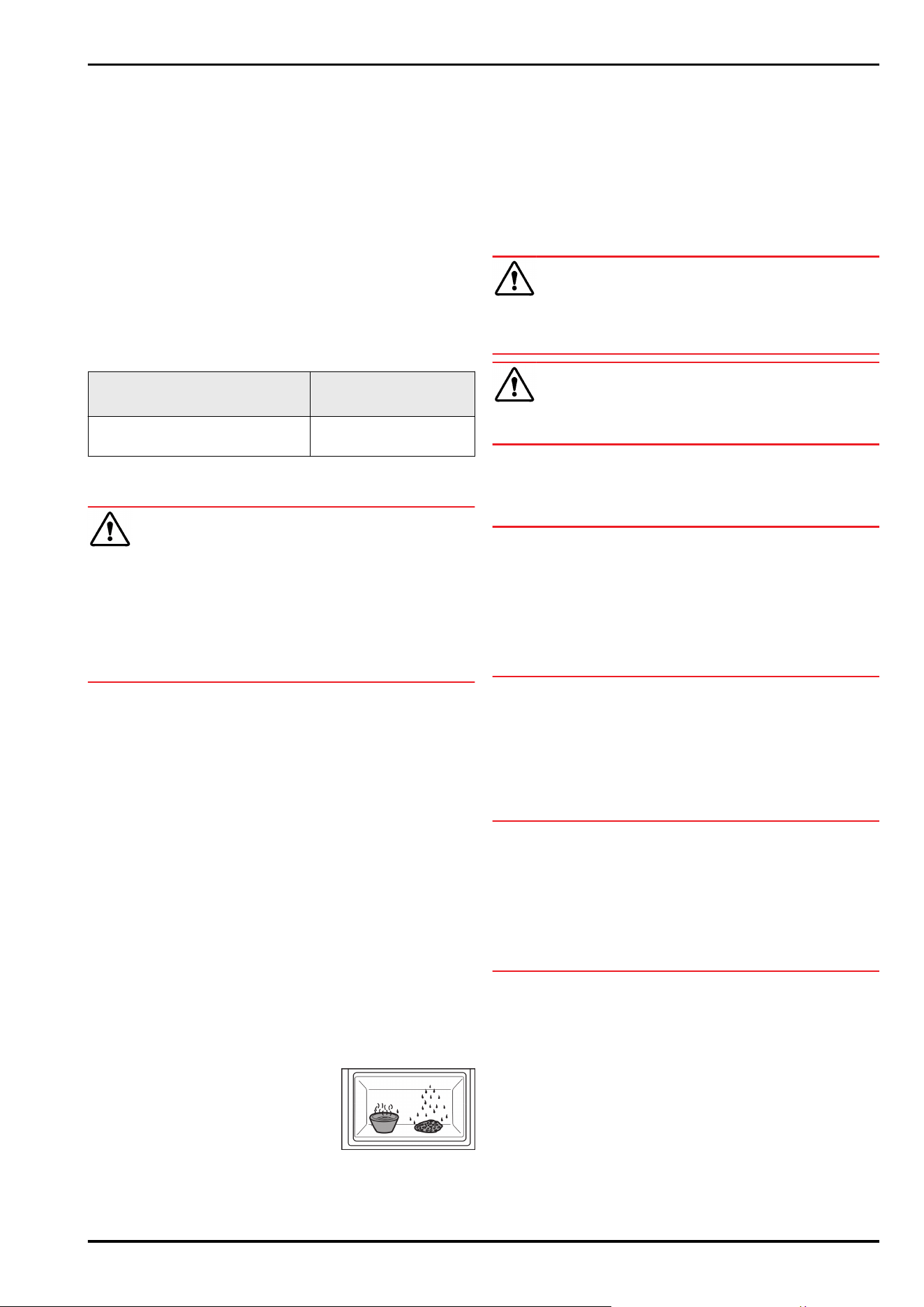
► Insert the carbon filter as shown in the diagram
Fig.34(1).
▷ The carbon filter clicks into place.
If the carbon filter is pointing downwards:
► Push the compartment in Fig.34(2).
▷ The carbon filter is now ready for use.
9.2 Disassembling / assembling pull-
out systems
9.2.1 Notes on disassembly
You can disassemble some of the pull-out systems for
cleaning. Your appliance can contain a variety of pull-out
systems.
The following pull-out systems can be disassembled or
cannot be disassembled:
Pull-out system
can be disassembled/
cannot be disassembled
Drawer on appliance base or
glass shelf
cannot be disassembled
9.3 Defrosting the appliance
WARNING
Improper defrosting of the appliance!
Injuries and damage.
► Do not use mechanical equipment or other methods to
speed up the defrosting process other than those recom‐
mended by the manufacturer.
► Do not use electrical heating or steam-cleaning appli‐
ances, naked flames or defroster sprays to defrost.
► Do not use sharp objects to remove ice.
Defrosting is performed automatically. The water from the
thawing process drains through the outlet and evaporates.
Water drops or a thin layer of frost or ice can form on the
back wall; this is a completely normal part of the applian‐
ce’s function. This must not be removed.
A layer of frost or ice can from briefly due to the energy-
optimised control of the device.
► Clean the drain opening at regular intervals.
(see 9.5Cleaning the appliance)
9.4 Defrosting the freezer compartment
manually*
A layer of frost or ice forms after prolonged use.
The following factors promote the formation of frost or ice:
- The appliance is opened frequently.
- Hot food is put in.
► Switch the appliance off.
► Pull the mains plug out of the socket or switch the fuse
off.
► Wrap the frozen food in newspaper or blankets and store
in a cool place.
► Place a saucepan of hot but not boiling water in the
freezer compartment.
▷ This speeds up the defrosting process.
►
Leave the compartment and appliance door open during
defrosting.
► Remove loosened pieces of ice.
► Soak up the melted ice water with a sponge or cloth
several times as necessary.
► Clean the appliance. (see 9.5Cleaning the appliance)
9.5 Cleaning the appliance
9.5.1 Ready
WARNING
Danger of electric shock!
► Remove the refrigerator connector or interrupt the power
supply.
WARNING
Risk of fire
► Do not damage the refrigeration circuit.
►
Empty the appliance.
► Remove mains connector.
9.5.2 Cleaning the interior
NOTICE
Improper cleaning!
Damage to the appliance.
► Only use soft cleaning cloths and ph-neutral all-purpose
cleaners.
► Do not uses abrasive sponges or steel wool which may
cause scratches.
► Do not use any sharp or abrasive cleaning agents, nor
any that contain sand, chloride or acid.
► Plastic surfaces: clean by hand with a soft clean cloth,
lukewarm water and a little detergent.
► Metal surfaces: clean by hand with a soft clean cloth,
lukewarm water and a little detergent.
► Drain hole: remove deposits using a thin item (for
example a cotton bud).
9.5.3 Clean the components
NOTICE
Improper cleaning!
Damage to the appliance.
► Only use soft cleaning cloths and ph-neutral all-purpose
cleaners.
► Do not uses abrasive sponges or steel wool which may
cause scratches.
► Do not use any sharp or abrasive cleaning agents, nor
any that contain sand, chloride or acid.
Clean with a soft, clean cloth, lukewarm water and some
detergent:
- Door rack
- Shelf
- Drawer
Wash in the dishwasher up to 60°C:
- Bottle rack
► To disassemble components: see the relevant section.
► Clean the components.
9.5.4 After cleaning
► Wipe the appliance and the components dry.
► Connect and switch on the appliance.
The temperature is cold enough:
Maintenance
14 * Depending on model and options
► Place the food inside.
► Repeat cleaning regularly.
10 Customer help
10.1 Technical specifications
Temperature range
Cooling 2°C to 9°C
Maximum ice cube quantity / 24 hours
Freezer compart‐
ment*
see type plate under “Freezing
capacity …/ 24 h” *
Lighting
Class
1
Light source
This product contains one or more energy
efficiency class G light sources.
LED
1
The appliance may contain light sources with different
energy efficiency classes. The lowest energy efficiency class
is indicated.
10.2 Operating noises
The appliance makes different noises when it is on.
-
At higher temperatures the appliance uses less energy
but works for longer. It is quieter.
-
At lower temperatures the food is cooled faster. It is
louder.
Examples:
•
Functions on (see 7.2Appliance functions)
•
Fan running*
•
Food recently added
•
High ambient temperature
•
Door open for a while
Noise
Possible cause Type of noise
Bubbling and
splashing
Coolant flowing
into the cooling
circuit.
Normal operating
noise
Noise Possible cause Type of noise
Hissing Coolant sprays
into the cooling
circuit.
Normal operating
noise
Humming The appliance
is cooling. The
volume depends
on the cooling
output.
Normal operating
noise
Humming and
rustling*
The fan is
running.*
Normal operating
noise*
Clicking Components are
switched on and
off.
Normal switching
noise
Rattling or
humming
Valves or flaps are
working.
Normal switching
noise
Noise Possible
cause
Type of noise Lifting
Vibration Improper
installation
Defective
noise
Check the
installation.
Level the
appliance.
Rattling Components,
items inside
the appliance
Defective
noise
Secure
components.
Leave
enough
space
between the
items.
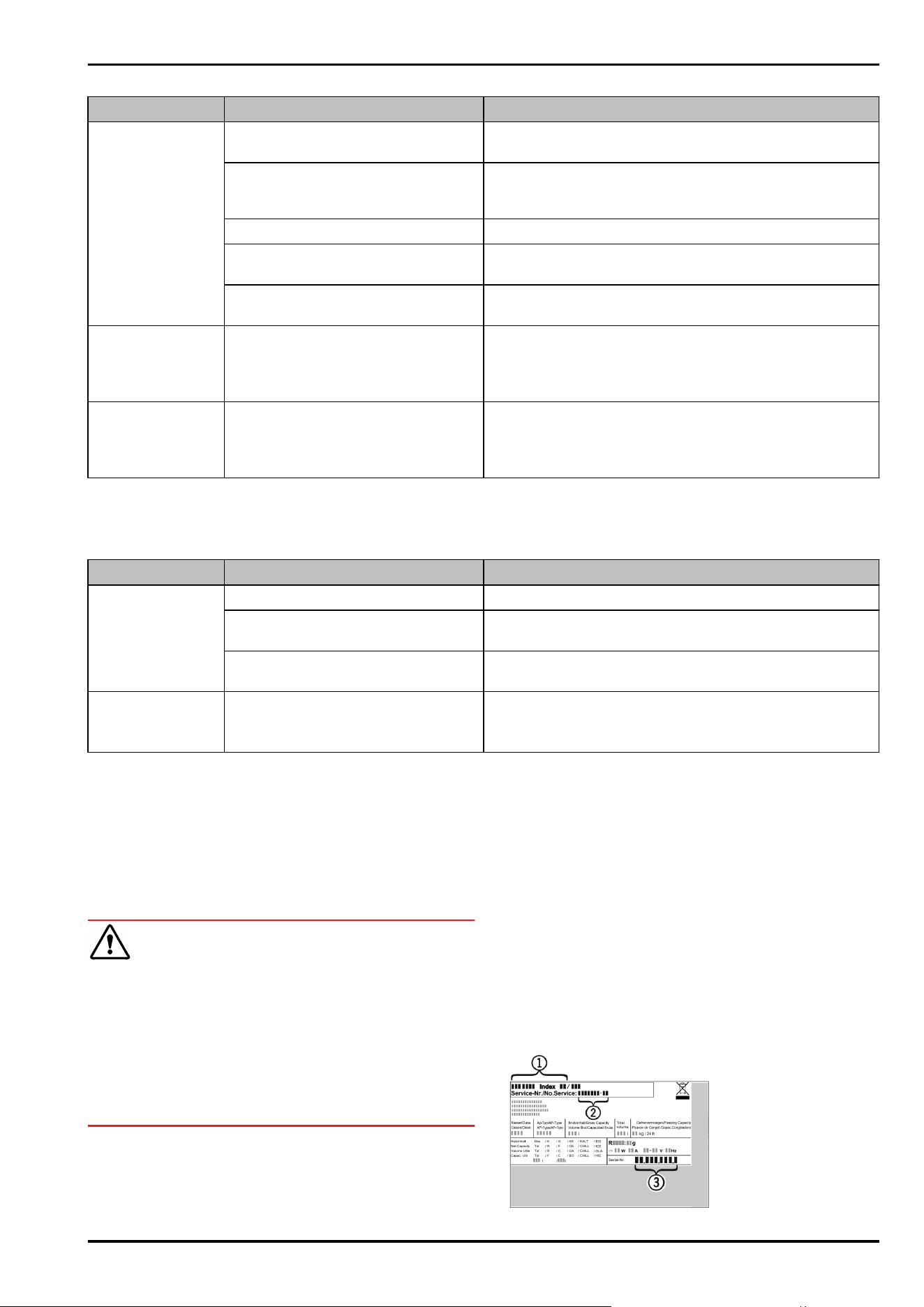
10.3 Technical fault
Your appliance is designed and built to ensure it works reli‐
ably and has a long service life. In the unlikely event that
a fault occurs during operation, please check whether it is
due to an operating error. If so, you will be charged for the
callout and repair costs even if it falls within the warranty
period.
You can fix the following faults yourself.
10.3.1 Appliance function
Defect
Cause Remedy
The appliance is
not working.
→ The appliance is not switched on. ► Switch the appliance on.
→ The power plug is not properly
plugged into the socket.
► Check the power plug.
→ There is something wrong with the
power outlet fuse.
► Check the fuse.
→ Power cut ► Keep the appliance closed.
► Safeguarding food: Place cold packs on top of food or
use another freezer if the power cut lasts longer.*
► Do not refreeze defrosted food.*
→ The IEC socket is not plugged into
the appliance correctly.
► Check the IEC socket.
Temperature is not
cold enough.
→ The appliance door is not closed
properly.
► Close the appliance door.
→ Not enough ventilation. ► Keep ventilation grille clear, and clean it.
Customer help
* Depending on model and options 15
Defect Cause Remedy
→ The ambient temperature is too
high.
► Problem solution: (see 1.3 Appliance range of use)
→ The appliance was opened too
many times or for too long.
► Wait to see if the required temperature corrects itself.
If not, contact Customer Service. (see 10.4 Customer
Service)
→ The temperature is set incorrectly. ► Turn down the temperature and check after 24 hours.
→ The appliance is too close to a heat
source (oven, radiator, etc).
► Move the appliance or the heat source.
→ The appliance was not correctly
installed in the recess.
► Check if the appliance was installed correctly and that
the door closes properly.
The door seal is
defective or needs
to be replaced for
another reason.
→ The door seal can be replaced. It
can be replaced without the need
for special tools.
► Contact Customer Service. (see 10.4 Customer Service)
The appliance
builds up too much
ice or condensa‐
tion.
→ The door seal may have slipped out
of its groove.
► Check that the door seal is well fitted in the groove.
10.3.2 Features
Defect Cause Remedy
The internal light
does not come on.
→ The appliance is not switched on. ► Switch the appliance on.
→ The door was open for longer than
15 minutes.
► Interior lighting switches off automatically after
about 15 minutes when the door is open.
→ The LED interior light is faulty or
the lid is damaged.
► Contact Customer Service. (see 10.4 Customer Service)
The freezer
compartment
cannot be closed.*
→ The lock is on when the door is
open.
► Use the handle again.
10.4 Customer Service
First check whether you can rectify the fault yourself
(see 10 Customer help) . If you cannot rectify the problem,
contact Customer Service.
You can find the address in the enclosed brochure “Liebherr-
Service” or at home.liebherr.com/service.
WARNING
Unprofessional repair!
Injuries.
► Have any repairs and action - not expressly specified -
on the appliance and mains cable carried out by service
personnel only. (see9 Maintenance)
► A damaged mains cable may only be replaced by the
manufacturer, the manufacturer’s Customer Service or a
similarly qualified person.
► In the case of appliances with an IEC connector, the
change may be made by the customer.
10.4.1 Contacting Customer Service
Make sure that the following appliance information is avail‐
able:
❑
Appliance name (model and index)
❑
Service no. (Service)
❑
Serial no. (S no.)
► Refer to the type plate for device information.
(see 10.5 Model plate)
► Note down the appliance information.
► Notify customer service: Report errors and the appliance
information.
▷ This will help us to provide you with a faster, more accu‐
rate service.
► Follow further instructions from Customer Service.
10.5 Model plate
The type plate is located on the bottom inside of the
machine.
Customer help
16 * Depending on model and options
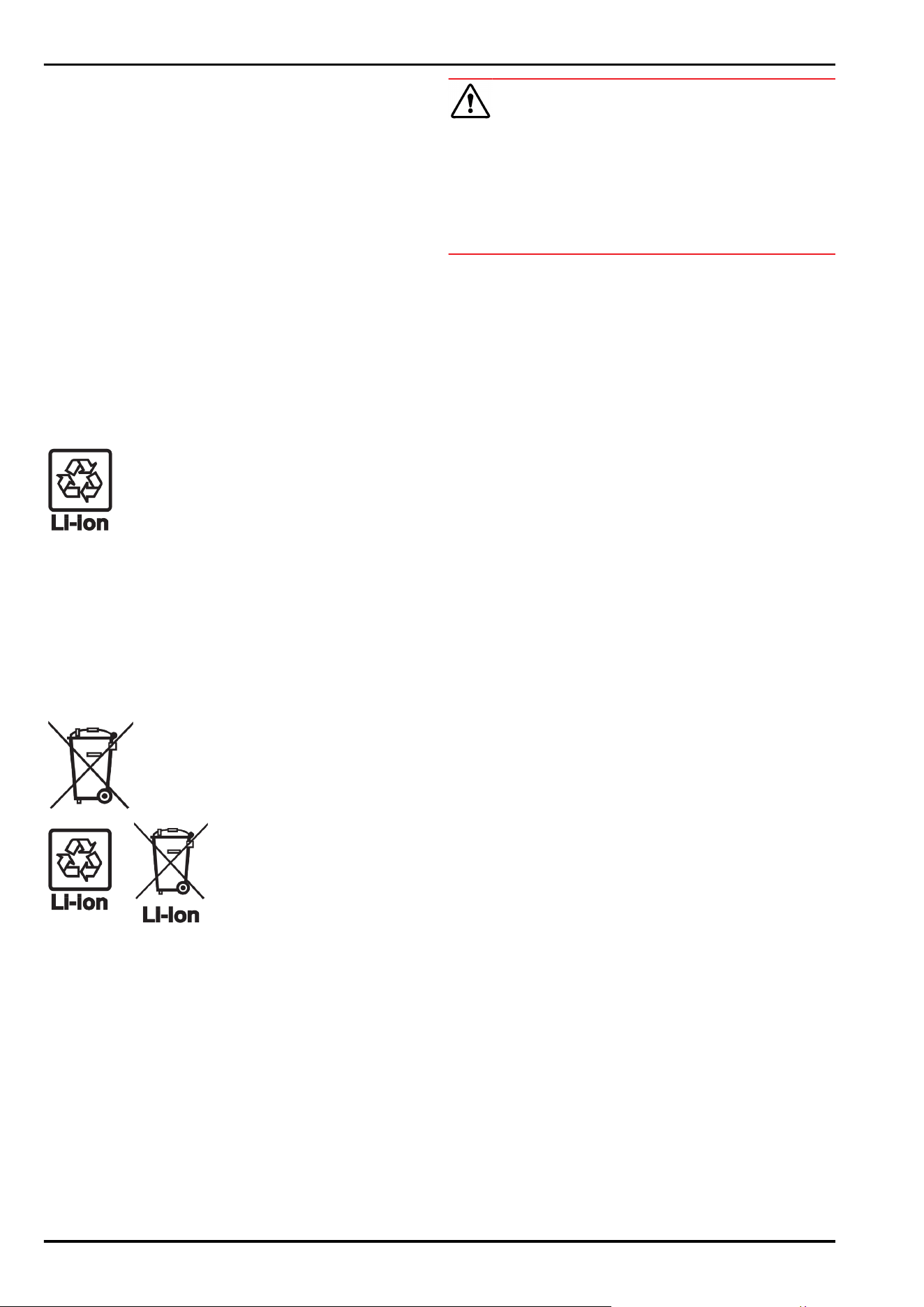
Fig.35
(1) Appliance description (3) Serial no.
(2) Service no.
► Note the data on the model plate.
11 Shutting down
► Empty the appliance.
► Switch off appliance. (see Switching the appliance off
and on)
► Pull the mains plug out of the socket.
► Remove the IEC socket if required: Pull the IEC socket out
of the appliance plug and move it to the left and right at
the same time.
► Clean appliance. (see 9.5Cleaning the appliance)
► Leave the door open, so that no unpleasant odours arise.
12 Disposal
12.1 Preparing appliance for disposal
Liebherr uses batteries in some of its appli‐
ances. In the EU, for environmental reasons,
legislation obliges the end user to remove
these batteries before disposing of old appli‐
ances. If your appliance contains batteries, a
corresponding notice is attached.
Lamps If you can remove the lamps yourself without
destroying them, also remove these before
disposal.
► Take the appliance out of operation.
► If possible: remove lamps without destroying them.
12.2 Disposing of the appliance in an
environmentally friendly manner
The appliance still contains
valuable materials and must
be disposed of separately from
unsorted municipal waste.
Dispose of batteries separately
from the old appliance. To do
this, you can return the batteries
free of charge to retailers as
well as recycling centres and
collection centres for recyclable
materials.
Lamps Dispose of removed lamps
via the respective collection
systems.
For Germany: You can dispose of the appli‐
ance free of charge via the
class 1 collection containers
at the local recycling and
recyclable material collection
centres. When purchasing a new
fridge/freezer, if the sales area
> 400 m
2
, retailers will also take
back the old appliance free of
charge.
WARNING
Leaking coolant and oil!
Fire. The coolant contained in the appliance is eco-friendly,
but also flammable. The oil contained in the appliance
is flammable. Escaping coolant and oil can ignite if the
concentration is high enough and in contact with an
external heat source.
► Do not damage the pipelines of the coolant circuit and
the compressor.
► Observe the notes on transporting the appliance.
► Transport the appliance without damaging it.
► Dispose of batteries, lamps and the appliance according
to the above specifications.
Shutting down
* Depending on model and options 17
home.liebherr.com/fridge-manuals
base unit fridge
Issue date:20250516
Part number index: 7083749-00
Liebherr-Hausgeräte GmbH
Memminger Straße 77-79
88416Ochsenhausen
Deutschland