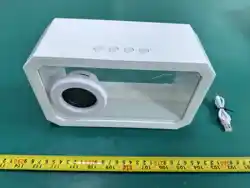
Product Dimensions: 9.06 in x 5.67 in x 3.94in (23 cm x 14.4 cm x 10 cm)
Bluetooth version: 6.0
Bluetooth range: 32 feet
Speaker output: 5 W
FM audio mode
RGB color-changing light
Play time: 3-4 hours
Full charging time: about 3 hours
Battery capacity: 500 mAh, 3.7 V
Charging input: 5V 500 mA
Charging cable: 30 cm USB-A to USB-C cable
USB-A to USB-C charging cable rating: 5V 500 mA max 2.5 W
FCC ID: 2AYB6-MU03048
Instruction Manual
Item Number: MU03048
LED COLLECTIBLE SPEAKER
1(One) LED Collectible Speaker
1(One) 30 cm USB-A to USB-C charging cable
1(One) Instruction Manual
Contents:
Distributed By: 1616 Holdings, Inc
701 Market Street, Suite 200,
Philadelphia,PA 19106
Made in China
Size: 210x180mm
Tips: Please do not turn the volume knob to the maximum level to prevent hearing
damage and to prolong the service life of the system.
• Charge and operate only as indicated in this manual, as improper use may result in
damage to the product or injury.
• To avoid risk of shock or injury, do not dismantle the device or insert any objects into
the speaker.
• T
o avoid electronic interference and/or compatible conflicts, turn off the product in
any facilities where posted notices instruct you to do so.
• Do not pull the speaker charging cable. Damage may result to the cable.
• Keep out of reach of children. This is not a toy.
• Avoid exposure to moisture, liquids, heat, flame and high voltage equipment.
• Retain these instructions as they contain important information.
• Do not short circuit the input terminals of the speaker.
• Do not drop, place heavy weight or allow heavy impact to the speaker.
• PCB of battery should not be crushed and twisted.
• Battery body should not be bended.
• Do not disassemble and Do not dispose of in fire.
WARNING:
Product Specifications:
How To Use:
How To Charge:
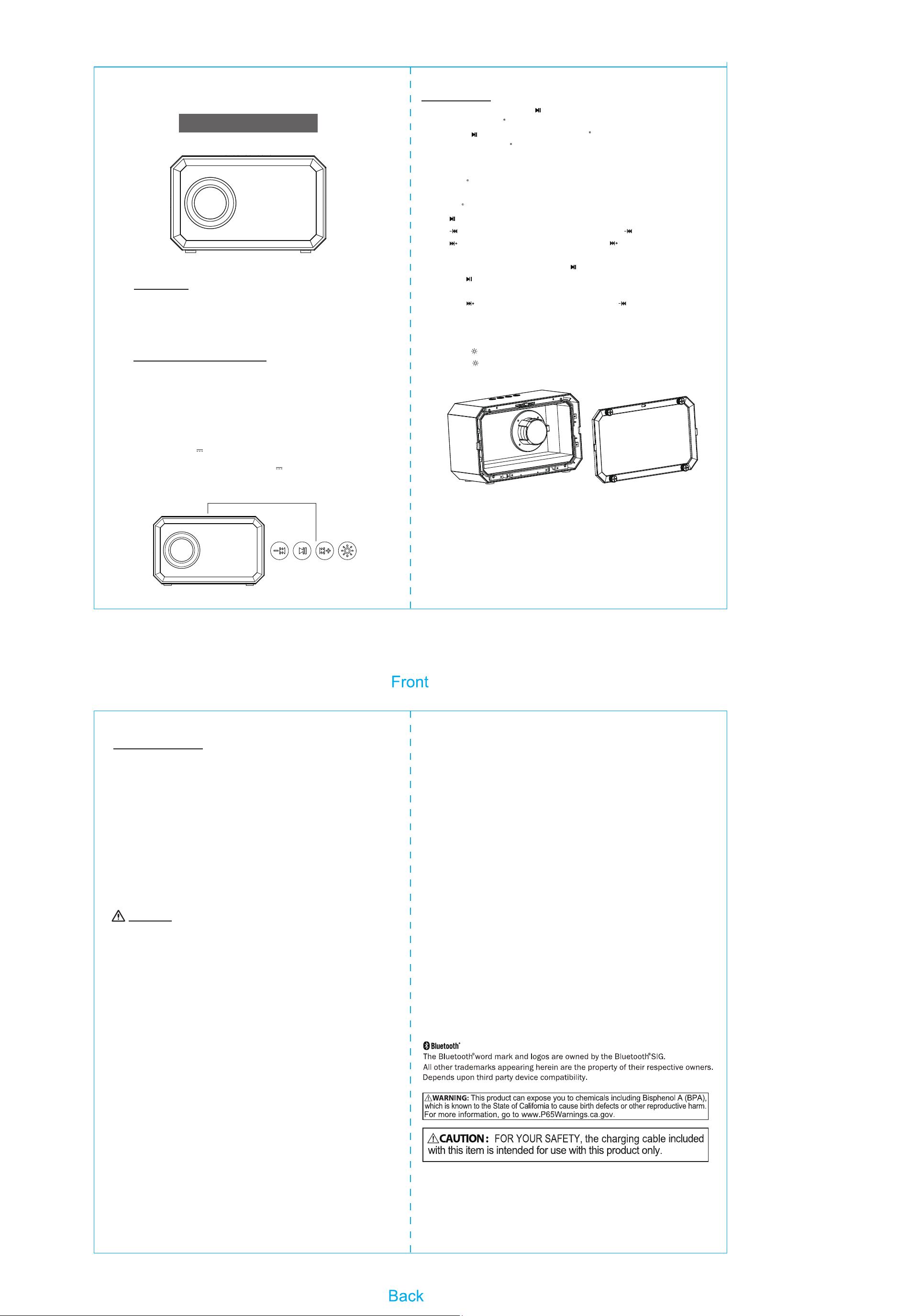
● Power on/off: Press and hold " " to turn the speaker on/off.
● Connect to Bluetooth :
1. Long press " " to power on and enter Bluetooth pairing mode.
2. Search for the Bluetooth device name "LED Collectible Speaker" on your device when
the LED indicator flashes blue.
3. You will hear a prompt tone when pairing is successful.
4. If Bluetooth is not paired within 5 minutes, the speaker will enter sleep mode. Press
any key to re-enter pairing mode.
● Bluetooth Music Playback:
- Press " " once to play/pause music.
- Press " " once to play the previous track. Press and hold " " to reduce the volume.
- Press " " once to play the next track. Press and hold " " to increase the volume.
● FM Radio Mode:
1. Switch to FM radio mode by pressing the " " button twice.
2. Press the " " button to scan and save the radio stations with strong signals. The first
scanned station will then be played.
3. Press the " " button to play the next station; Press the " " button to play the previous
station.
● LED mode:
1. The LED will turn on when the device is powered on.
2. Long press " " to turn the LED on/off.
3. Short press " " to switch LED mode.
®
®
CAUTION: Any changes or modifications not expressly approved by the party responsible
for compliance could void the user's authority to operate the equipment.
NOTE: This equipment has been tested and found to comply with the limits for a Class B
digital device, pursuant to Part 15 of the FCC Rules. These limits are designed to provide
reasonable protection against harmful interference in a residential installation.
This equipment generates, uses and can radiate radio frequency energy, and, if not
installed and used in accordance with the instructions, may cause harmful interference to
radio communications. However, there is no guarantee that interference will not occur in a
particular installation. If this equipment does cause harmful interference to radio or
television reception, which can be determined by turning the equipment off and on, the
user is encouraged to try to correct the interference by one or more of the following
measures:
• Reorient or relocate the receiving antenna.
• Increase the separation between the equipment and receiver.
• Connect the equipment into an outlet on a circuit different from that to which the receiver
is connected.
• Consult the dealer or an experienced radio/TV technician for help.
FCC Radiation Exposure Statement:
This equipment complies with FCC radiation exposure limits set forth for an uncontrolled
environment.
This device complies with Part 15 of the FCC Rules. Operation is subject to the following
two conditions: (1) This device may not cause harmful interference, and (2) this device
must accept any interference received, including interference that may cause undesired
operation.
2. The indicator light will be red while charging.
3. When the speaker is fully charged, the indicator light will turn off.
Please unplug your charger from the power source.
4. Please use a qualified charger to recharge your speaker, otherwise it may result in
damage or even explosion.
5. Repeated charging and discharging of the speaker will lead to decreased battery life
over time, which is normal for rechargeable batteries.
6. You must charge the Bluetooth speaker if it has not been used for more than 6
months.
Unscrew the back cover to open the display compartment. You can place figures, mini
photo frame, or postcards inside. When replacing the cover, tighten the screws securely
to maintain sound quality and prevent audio distortion.
1. Insert the USB connector end of the included cable (see packing list) into the USB
jack on the charger then insert the USB-C end of the included cable into the speaker’s
USB-C charging port.