1
Operation Guide 5742
MA2403-EA
© 2024 CASIO COMPUTER CO., LTD.
30
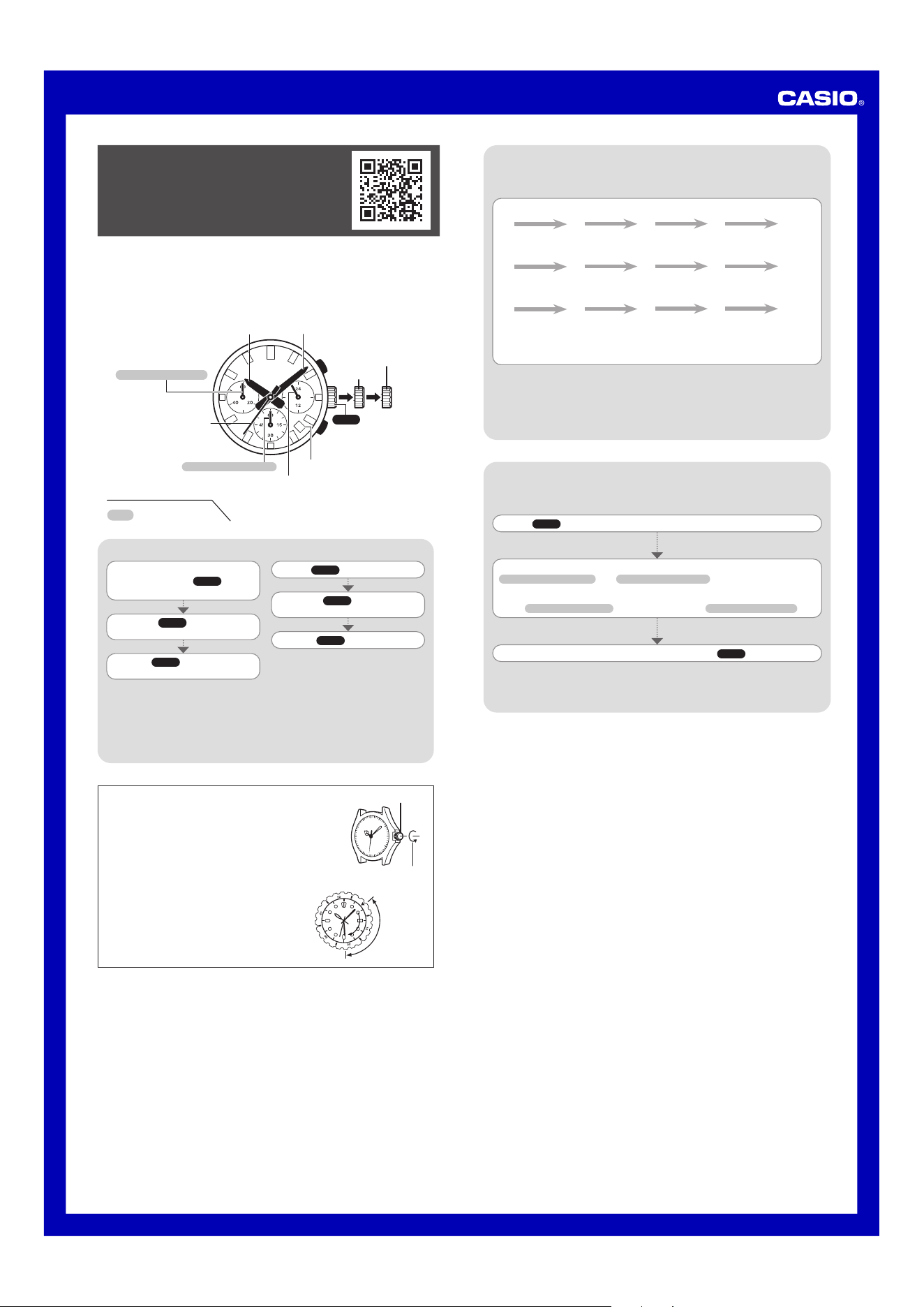
To change the day indicator setting
To adjust the time setting
Pull the Crown out to Click 1.
Push the Crown back in.
Push the Crown back in on a time
signal to resume timekeeping.
Rotate the Crown to change the
time setting.
When the second hand is at
12 o’clock, pull the
Crown out to
Click 2.
Rotate the Crown away from you
to set the day.
Note
Take care that you set the correct AM
or PM time.
When changing the time, move the
minute hand four or five minutes past
your final setting, and then back it up
to the setting you want.
Note
The day indicator setting uses a
31-day month. Make adjustments for
months of shorter lengths.
Avoid changing the day indicator
setting between the hours of 9
p.m. and 1 a.m. Otherwise, the day
indicator may not change correctly
at midnight.
Crown Operations
Some water-resistant models (10BAR, 20BAR) have a screw-
in crown. When you need to perform a crown operation,
rotate it towards you to unscrew it. Then pull the crown out.
Avoid applying undue force when pulling. The watch loses
its water resistance while the crown is unscrewed. After
performing a crown operation, fully screw the crown back in.
Crown
Loosen
If your watch has a rotary bezel...
You can rotate the bezel to align its
▼
mark with the
minute hand. Then you will be able to tell how much
time has elapsed since aligning the
▼
mark.
Start
Elapsed time
Current
Stopwatch functions
Second Hand
Day Indicator
Click 2
Click 1
Hour Hand
Minute Hand
A
B
Crown
Stopwatch Minute Hand
24 Hour Hand
Stopwatch Second Hand
You can also find information about
operational procedures at the CASIO website.
https://s.casio.jp/mw/en/5742/
Your watch may differ somewhat from the one shown in the illustration.
Some models may use a combination of hands and rotating disks to indicate
information. The word “hand” in this section is used to mean both analog hands and
rotating disks.
The dials of some models have double-ended hands. Depending on the data, either
end can be used for indication.
Specifications
Accuracy: ±20 seconds average per month
Stopwatch: Measuring Capacity: 59'59" (60 minutes)
Measuring Unit: 1 second
Measurements: Elapsed time; split time; two finishes
Battery: One silver oxide battery (Type: SR920SW)
Battery Life: Approximately 3 years (60 minutes stopwatch operation per day)
Specifications are subject to change without notice.
Perform the following procedure if the stopwatch hands do not return to their 0 (zero)
positions when you reset the stopwatch.
Correcting the 0 Positions of the Hands
Pull the Crown out to Click 2.
Use B (clockwise) and A (counterclockwise) to move the
Stopwatch Second Hand
and
Stopwatch Minute Hand
to 12 o'clock.
Holding down either button will move the second hand at high speed, until you
release the button.
The
Stopwatch Minute Hand
is syncronized with the
Stopwatch Second Hand
.
After all of the hands are the way you want, push the Crown back in.
Important!
Timekeeping stops while the crown is pulled out. Correct the current time setting
after performing the above operation.
Using the Stopwatch
Important!
Do not operate the stopwatch with the crown pulled out.
Note
An elapsed time operation will stop automatically at the end of 60 minutes.
The stopwatch measures elapsed time in 1-second increments up to 59minutes,
59seconds.
Elapsed time
A
A
A A
B
Start Stop Resume Stop Reset
Split time
A
B
B A
B
Start Split Split release Stop Reset
Two finishes
A
B
A B
B
Start Split
First runner
finishes.
Display time of
first runner.
Stop
Second runner
finishes.
Split release
Display time of
second runner.
Reset
Published: 3/2024

