V1.0A.1
Kieslect Calling Watch
Ks Pro User Manual
Get the manual
in more languages

1.1 The company reserves the right to modify
the contents of this manual without any further
notification. It is normal that some functions may
vary in certain versions of software.
1.2 Please refer to this manual before using the
product.
1.3 Before using the product you need to connect
the APP synchronization time and set your
personal information.
1.4 This product supports IP68 rank waterproof,
not suitable for deep sea diving, hot water tea
and other corrosive liquids are destructive to the
watch, and will not be able to enjoy the product
warranty and free maintenance services.
Notes:
1.Charging no less than 2 hours before using.
Please use the correct charging adapters which
are5V 0.5A above.
2. If the watch cannot be turned on after being
placed for a long time, you need to wipe the charging
contacts of the charging cable clean when
using it again to avoid sweat or water residue.
Tips:
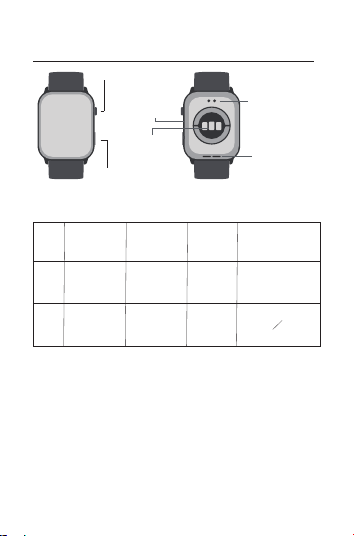
Upper button
Down button
Microphone
Heart rate
sensing area
Charging port
Speaker
01 Appearance and charge
Button functions
Item Once-press Double-press Long-press Rotate
Upper
button
Down
button
Light screen/
Menu/Back
Lock screen
Power on/
Power off
Changing watch face/
Turning page/
Volume adjustment
Sport modes
Voice Assistant
SOS
02 How to wear
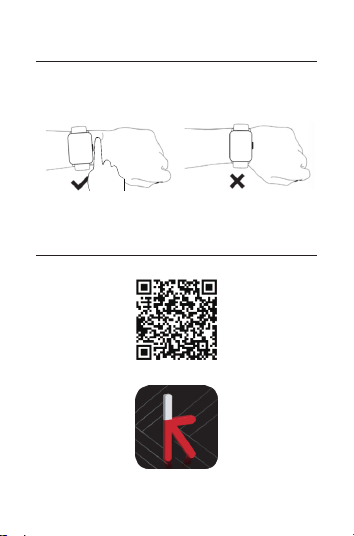
Please wear the device on your wrist correctly,
about one finger from the carpal and adjust it to
comfortable position.Below pictures as reference.
Tip: Incorrect wear can result in inaccurate
health test data.
03 Download & connect to APP
03.1 Scan QR code
03.2 Install the “KIE OS”APP
KIE OS
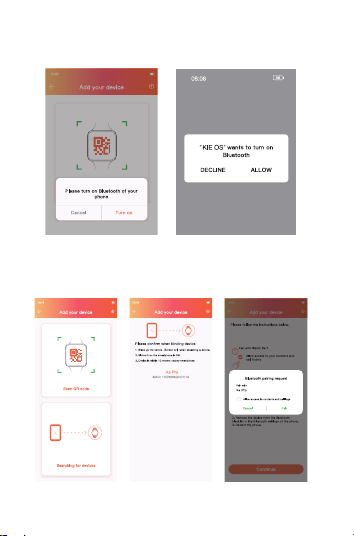
03.3 Open App,Click“Turn on”and“Allow” to turn
on the phone bluetooth.
03.4 Click“Searching for devices”-Click“Ks Pro
(ID-XXXX)“- Click“Pair“to connect the App and
Audio Bluetooth.
03.5 Check the connection status.
No connection
APP connection
APP+BT call
connection
*Using BT call and playing music feature on the watch
must be successfully connected to audio Bluetooth.

(1) Please upgrade the App to latest version to get
a better experience.
(2)Andorid 5.0 and iOS 9.0 or above system are
compatible with the App.
(3) For the first time connection with android,
"Permissions" reminder will pop-up, please follow
up the guidance and allow permissions to ensure
all functions working properly.
(4)To connect successfully, please turn on mobile
phone’s Bluetooth, GPS and network.
(5) If the device cannot be searched or connected
during use, please reset or turn off the watch to
try again.
(6) You can’t turn off your Watch while it's charging.
To turn off your Watch, first disconnect it from the
charger.
(7) If you need to use the functions such as message
push, make sure that the App switch is on.
The specific operations are as follows.
Tips:
a.Open the “KIE OS”App b.Select the “Device” b.Select the “Turned on”
04 Operating Instructions
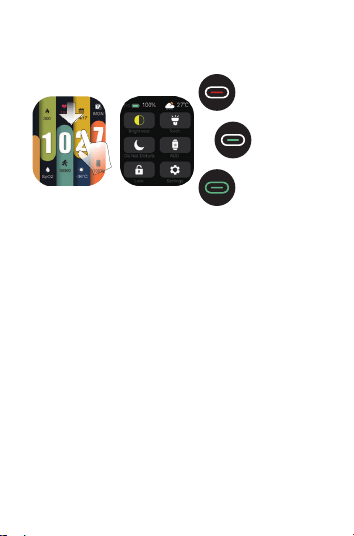
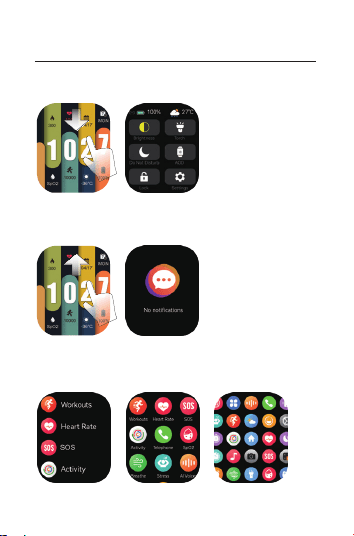
a. Shortcut page: Slide down from main page, go to
shortcut, and slide up to return.
b. Information page: Slide up from main page, go to
information, and slide down to return.
c.Main menu page: Once-click on upper button go to
main menu, and click on again to return.Change the
menu styles on setting page.
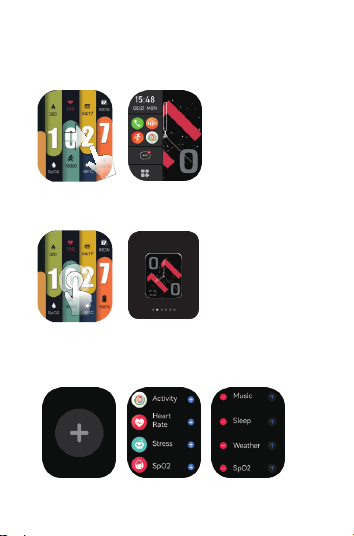
d.Split- screen browser: Slide right from the main page to
enter into split-screen. Long press the function icon in the
split-screen and you can customize your functioniconsin
icons in the area.
e.Quick access to change watch faces: Long press the
watch face on main page or rotate the upper button to
switch different watch faces.
f.Smart component: Slide left from watch face in main page
to enter to smart components, click"+" to add components,
up to 6 components. Long press the component to enter the
component editing interface.
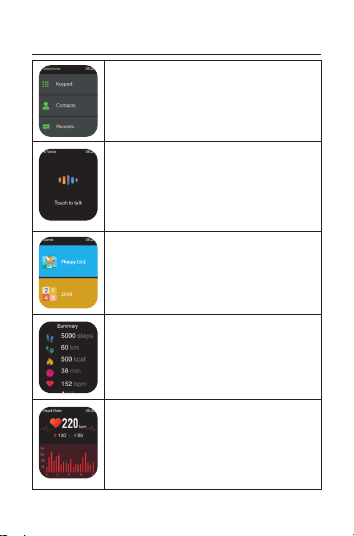
Phone: Connected to the mobile
phone via Bluetooth, it can dial,
answer, and hang up calls, and
support viewing call records and
a list of common contacts.
Voice Assistant: Double-press the
down button to enter the voice
assistant.(Note: The watch needs to
be connected to the mobile phone via
Bluetooth and the phone page must
be unlocked before it can be used.)
Games: “Flappy bird”and“2048”.
Sports Records: Record daily
sports data, including steps,
Distance, calories, sports hours.
Heart Rate: 24H heart rate
monitoring set monitoring time
interval and heart rate alarm
threshold in the App.
05 Function introduction
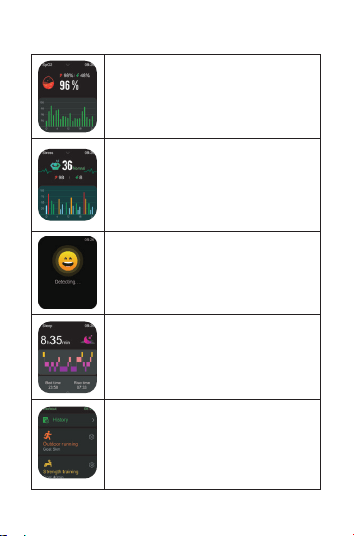
Blood Oxygen: 24H monitor blood
oxygen status, and automatic
monitoring can be turned on in the
App.
Stress: 24H monitor pressure
conditions,and automatic
monitoring can be turned on
in the App.
Emotion: Pleasure, calm, anxiety
irritability, 4 kinds of emotions are
accurately detected.
Sleep: Intelligently monitor your
sleep status and quality, record
data and scientifically analyze
sleep time.
Workouts: Support 100 sports
modes, you can view heart rate,
calorie consumption, steps, distance,
pace, stride frequency, heart rate
zone and training effect.
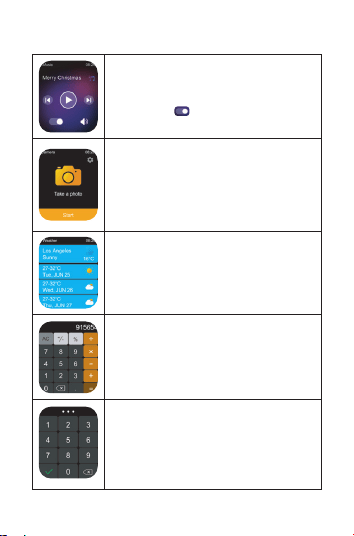
Music: After connecting to the
mobile phone, you should turn
on the icon" " to listen music.
Camera Control: Open the App after
connecting to the mobile phone, the
watch can remotely control the mobile
phone to take pictures, and set the delay
time and the number of continuous shots.
Weather: After connecting the
mobile phone, open and set the
weather function in the App, the
watch can display the weather
information in recent days.
Calculator: Provides simple
calculation functions, and can
perform basic calculations.
Password: The watch password
can be set/modified/cleared in the
App.
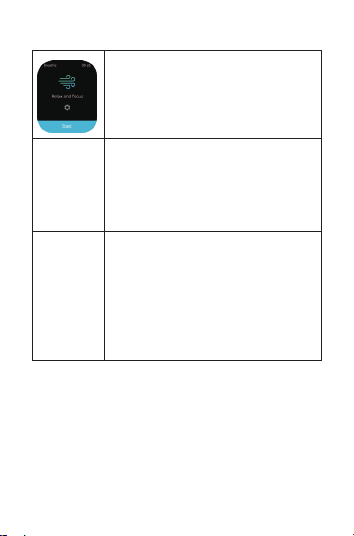
Breathe: Set the breathing rhythm
and time, and follow the training
prompts to complete the breathing
training.
Alarm Clock, Sedentary Reminder,
Drinking Water Reminder, Hand
Washing Reminder, Female
Menstrual Cycle, Social Message
Push, Custom Reminder.
Massive Online/Custom Watch Faces,
Timer, World Clock, Raise To Wake,
Hand Down To Turn Off The Screen,
Flashlight, Find Phone, Find Watch,
Stopwatch, Do Not Disturb Mode,
Brightness Adjustment, Button Down
Function Customization, Various
Prompt Sounds, etc.
Reminder
functions
other
functions
1: More detailed information analysis and records
can be viewed in the App.
2: The above health data are for reference only
and cannot be used as a medical basis.
Tips:

Bluetooth:5.2
Screen Size: 2.01”
Waterproof:IP68
Net Weight:35g
Battery Type: Li-ion
Size:46.7*38*10.2mm
Charging Voltage:3.8V
Battery Capacity:300mAh
WorkingTemperature:-20°C~60°C
1.One year warranty for default hardware defectives,
half of year for battery and charging cable.
2.Below reasons cause to defectives are not
included in free warranty service:
(1)Personal assemble or disassemble.
(2) Falling damage during use.
(3)All man-made damage or due to the third party's
fault, improper use(Such as:water in the smart watch,
external force shattering,scratch during use etc.)
3.Please provide a warranty card with the details
filled when request for after selling service.
4.Please contact with direct dealers for warranty
service.
5.Please note all functions of the product are based
on physical objects
06 Parameters
07 Warranty

Warranty Certificate
Client Info
Product Type Vendor (Stamp)
Client Name
Vendor's Contact
Purchase Date
Contact Info
Product SN Code
Client's Address
Vendor's Address
Warranty Record
Date Problems Diagnosis More Info
Contact us: [email protected]

IEC/EN 62133-2:2017
AnnexC(informative)
Recommendations to the end-users
The following represents a typical but non-exhaustive, list of
good advice to be provided by the equipment manufacturer
tothe end-user.
a) Do not dismantle open or shred secondary cells or batteries.
b) Keep batteries out of the reach of children.
c) Battery usage by children should be supervised. Especially
keep small batteries out of reach of small children.
d) Seek medical advice immediately if a cell or a battery has
been swallowed.
e) Do not expose cells or batteries to heat or fire.Avoid storage
indirect sunlight.
f) Do not short-circuit a cell or a battery. Do not store cells or
batteries haphazardly in a box or drawer where they may
short-circuit each other or be short-circuited by other metal
objects.
g) In the event of a cell leaking. do not allow the liquid to come
in contact with the skin or
eyes. If contact has been made, wash the affected area with
copious amounts of water and seek medical advice.
h) Do not use any charger other than that specifically provided
for use with the equipment.
i) Do not use any cell or battery which is not designed for use
with the equipment.
j) Always purchase the battery recommended by the device
manufacturer for the equipment.
k) Keep cells and batteries clean and dry.

l) Secondary cells and batteries need to be charged
before use.Always use the correct charger and refer
to the manufacturer'sinstructions or equipment manua
for proper charging instructions.
m) Do not leave a battery on prolonged charge when not
in use.
n) After extended periods of storage, it may be necessary
to charge and discharge the cells
or batteries several times to obtain maximum performance.
o) Retain the original product literature for future reference.
p) Use the cell or battery only in the application for which it
was intended.