Document Version: V1.1
Part Code:
Copyright © 2024 Shenzhen Aratek Technology Co., Ltd. All Rights Reserved.
No excerpting, reproduction or external d istribution of this d ocument is permitted without pr ior
authorization from the Company.
This document is subject to ir regular updates due to product firmware upgrades and serves onl y as a
quick‑start guide. Please obtain the full user manual separately.
Shenzhen Aratek Technology Co., Ltd.
1 Product Introduction
The TrustEye Series TE100 Smart Camera is a front‑end computing intelli gent network camera
developed by Aratek. It integrates an NPU computing unit to deliver AI video analytics capabilities. It is
widely deployed in smart communities, smart parks, smart campuses, smart constr uction sites,
transparent kitchen projects, cold‑chain supervision and other sc enarios.
Featuring simple deployment, easy operation and stron g environmental adaptability, this c amera
adopts industrial‑grade design to s uit diverse operating environments. Compl iant with GB28181 standard,
it offers great compatibility. U sers can perform local preview as well as remote cont rol and viewing via
management platforms. Rich interfaces enable flexible i ntegration, and standard Open‑API is provided for
third‑party system integration.
1
Product Specification
T E 1 0 0
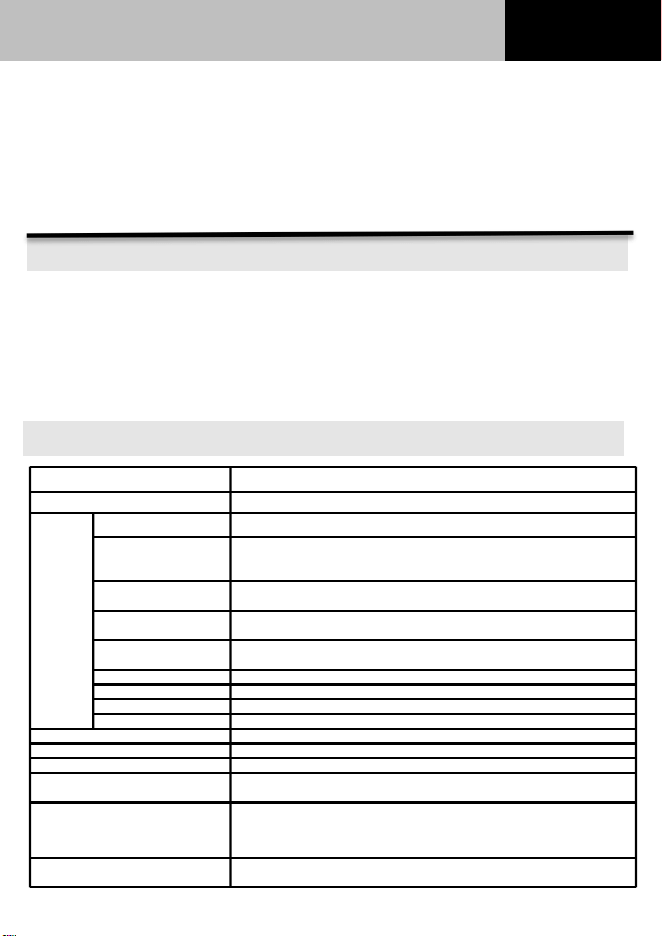
2 Product Specifications
Category
Description
Processor
Domestic Quad‑core ARM CPU, 2 TOPS (INT8)
Video
Maximum Image Size
3840*2160
Main Stream
8MP(3840*2160)@30fps(Default)/ 6MP(3072*2048)@30fps/ 4MP
(2560*1440)@30fps/ 4MP(2592*1536)@30fps/ 1080P(1920*1280)
@30fps / 720P(1280*720)@30fps
Sub Stream
720P(1280*720)@30fps(Default)、D1(720*480)@30fps、CIF
(352*288)@30fps
Triple Stream
720P(1280*720)@30fps(Default)/ D1(720*480)@30fps/ CIF
(352*288)@30fps
Video Compression
Standard
H.264/H.265/H.264+/H.265+/MJPEG
H.264 Profile
BaseLine Profile/Main Profile/High Profile
H.265 Profile
Main Profile
Bitrate Control
Variable Bitrate, Constant Bitrate
ROI
Supported
Memory
1GB
Storage
EMMC,8GB
SD‑Card Storage
Max. 256G. Note: Ensure the write speed of SD card is no less than 6MB/S
Network Protocols
TCP/IP,ICMP,HTTP,HTTPS,DHCP,DNS,DDNS,RTP,RTSP,NTP,SMTP,PPPoE,SN
MP,QoS。IPV6 supported.
Power Supply
DC: 12V, reverse power supply supported (can be used for powering audio
pickup)
POE: Compliant with IEEE 802.3af; supports both 1236 and 4578 power
supply modes. POE power: 15.4W with isolation.
Operating Temperature and
Humidity
‑30℃ ~ +60℃ RH95% Max
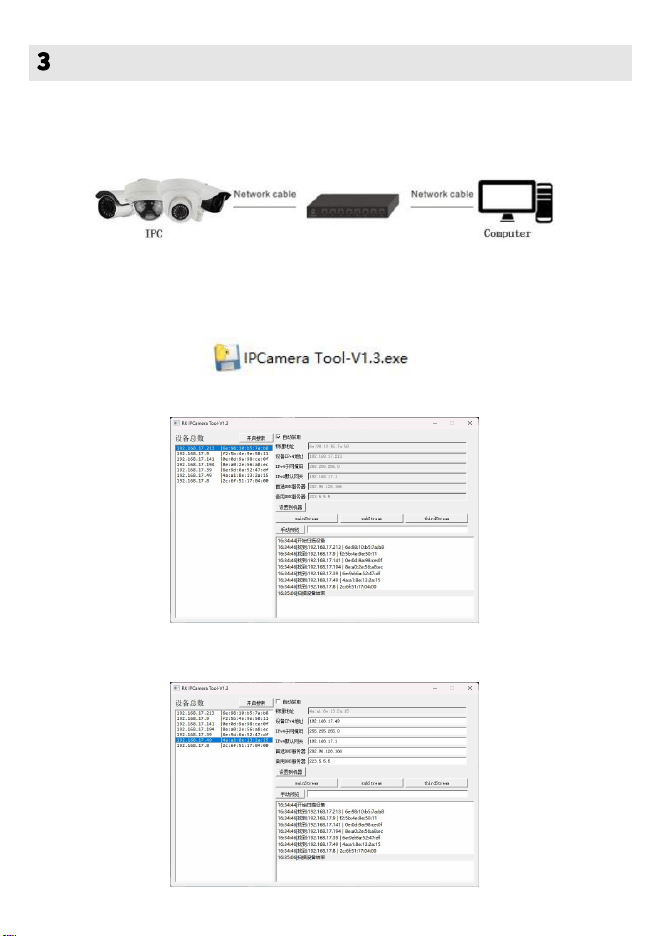
Wired Network Connection
Connect the camera and computer via a switch or router. The switch or router shall
support DHCP.
Search and Modify IP Address
Procedures to search and modify the IP add ress of network camera:
1、click “IPCamera Tool‑V1.3.exe”,open the configuration tool.
2、click “Start Search” to detect onl ine IPC cameras.
3、 To configure static IP: select t arget camera in the left device list, set camera IP and other
parameters on the upper‑right area, then click “Apply to Device”.
2
Network Configuration
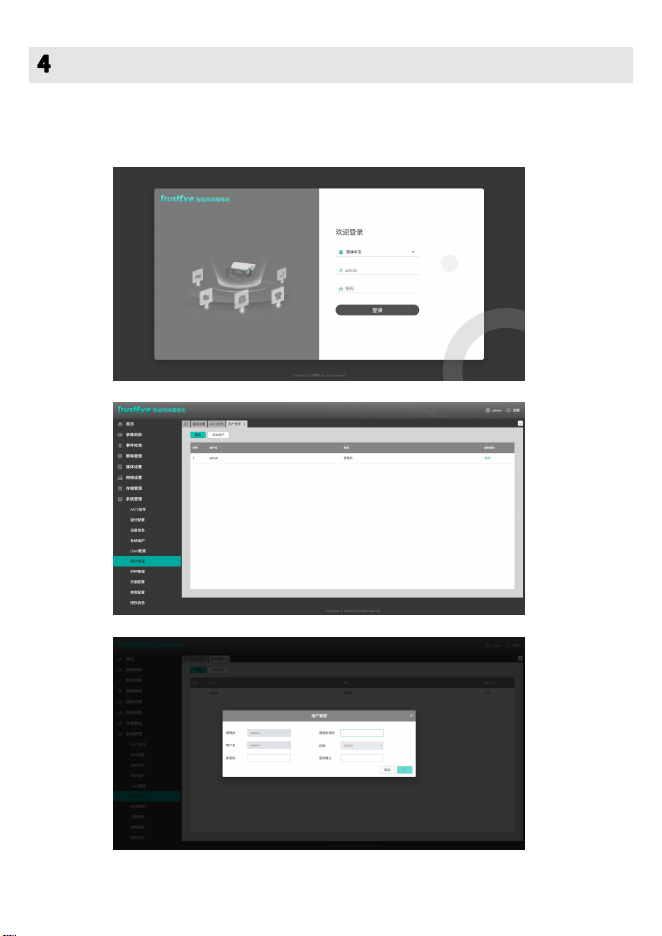
User Password Setting
Open the web browser, input t he camera IP address in the address bar to l og in to the
management page. Follow the graphic guidance to modify user password.
3
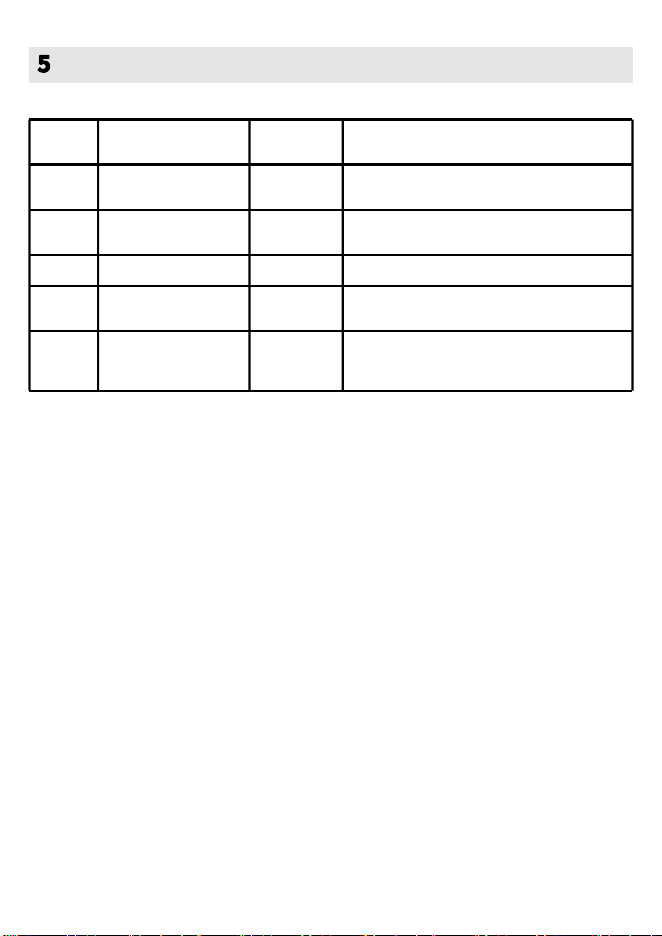
No.
Item
Quantity
Description
1
IPC Camera Main
Unit
1
Main body of intelligent IPC camera.
2
Mounting Position
Sticker
1
Positioning for wall‑mount dr illing.
3
User Manual
1
Quick setup instruction for product.
4
Certificate of
Conformity
1
Factory inspection qualification certificate.
5
Warranty Card
1
For user information, purchase information,
maintenance records and warranty clauses.
Packing List
4
FCC Statement
1. This device complies with Part 15 of the FCC Rules. Operation is subject to the following two conditions:
(1) This device may not cause harmful interference.
(2) This device must accept any interference received, including interference that may cause undesired operation.
2. Changes or modifications not expressly approved by the party responsible for compliance could void the user's
authority to operate the equipment.
NOTE:
This equipment has been tested and found to comply with the limits for a Class B digital device, pursuant to Part 15
of the FCC Rules. These limits are designed to provide reasonable protection against harmful interference in a
residential installation.
This equipment generates uses and can radiate radio frequency energy and, if not installed and used in accordance
with the instructions, may cause harmful interference to radio communications. However, there is no guarantee
that interference will not occur in a particular installation. If this equipment does cause harmful interference to
radio or television reception, which can be determined by turning the equipment off and on, the user is encouraged
to try to correct the interference by one or more of the following measures:
Reorient or relocate the receiving antenna.
Increase the separation between the equipment and receiver.
Connect the equipment into an outlet on a circuit different from that to which the receiver is connected.
Consult the dealer or an experienced radio/TV technician for help.