Geotab GO
®
Anywhere™ Plus
Support Document
For the most up-to-date version of this document, visit gtb.link/goanywhereplusguide.

Table of contents
Product overview 3
Getting started 3
Installation guide 3
Quick start guide 3
Device functionality 3
Battery-only device functionality 4
Changing the device mode 4
Movement: Delayed updates 5
Movement: Immediate updates 6
Time 6
High frequency mode 6
Battery insights 7
Wired device functionality 8
Direct-to-cell 8
Security 9
Support and troubleshooting 9
Technical specifications 9
Warranty 12
Important safety information and limitations of use 12
Regulatory statements 13
Warning: RF Exposure Compliance 13
Canada 13
USA 14
Mexico 14
© 2025 Geotab Inc. All Rights Reserved
2

Product overview
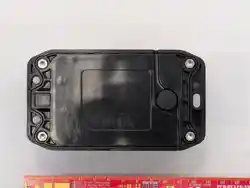
GO Anywhere™ Plus is a versatile and robust global asset tracker designed for a wide range of powered and non-powered
assets, including trailers, containers, and heavy equipment.
The device provides deep insights into asset utilization by monitoring movement, trip history, and distance traveled
(odometer), alongside ignition (engine hours) for maintenance scheduling. With unique direct-to-cell technology
(available through select partners), it ensures reliable tracking even in areas without cellular coverage.
Getting started
Installation guide
Refer to the GO Anywhere Plus Trailer Installation Guide for information about mounting GO Anywhere Plus and harnesses
on trailers.
Quick start guide
Refer to the GO Anywhere Plus Quick Start Guide for installation information such as how to activate the GO Anywhere,
what the LEDs mean, where to verify activation, and how to get started with the device.
Device functionality
The GO Anywhere device can operate in two configurations depending on its installation: battery-only and wired.
© 2025 Geotab Inc. All Rights Reserved
3
Battery-only device functionality
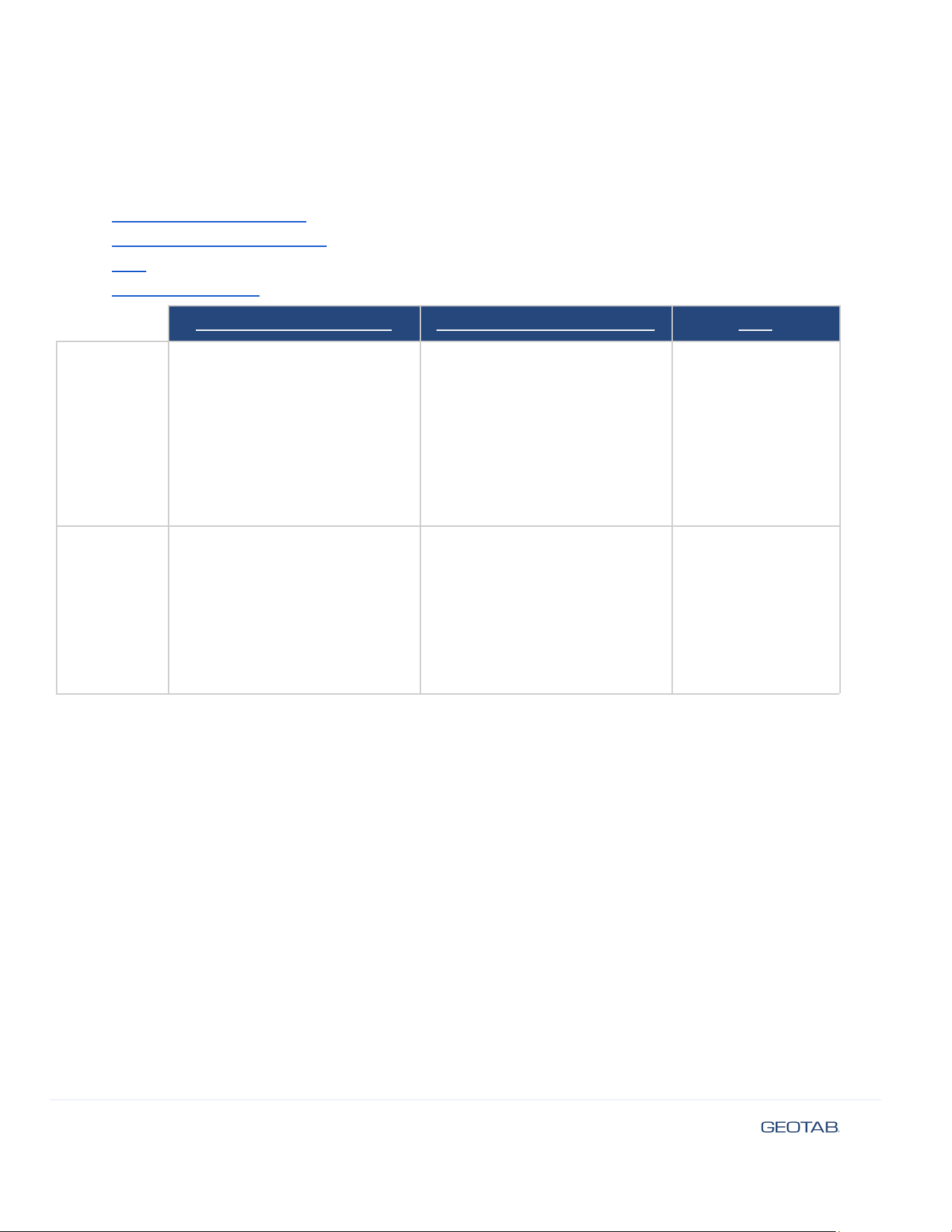
When the GO Anywhere Plus device does not have external wired power available, Customers can choose to place the
device in one of four device modes:
● Movement: delayed updates
● Movement: immediate updates
● Time
● High frequency mode
Movement: delayed updates
Movement: immediate updates
Time
Device mode
overview
Monitors asset movement
Uploads trip summaries once/day
Most battery-optimized
Monitors asset movement
Provides updates when an asset
starts moving
Uploads trip summaries and trip
end details at completion of trip
Most battery-intensive
Provides asset
location updates at a
Customer-specified
frequency
Who is it best
suited for?
Assets where long battery life is a
top priority and daily movement
summaries are sufficient
Assets where understanding
movement details quickly is
important, recognizing significant
battery drain as a result
Assets where
periodic, specific
location updates are
necessary. Battery
life will differ
depending on
customer-specified
update frequency.
Changing the device mode
To change the device mode for an asset:
1. Navigate to Assets in the MyGeotab main menu.
2. Select the asset you want to update to open the Asset Details page.
3. Go to the Devices & Settings tab, and click Show advanced settings under GO Anywhere.
4. Under the advanced settings, select the Device mode using the radio buttons.
5. Click Save.
© 2025 Geotab Inc. All Rights Reserved
4
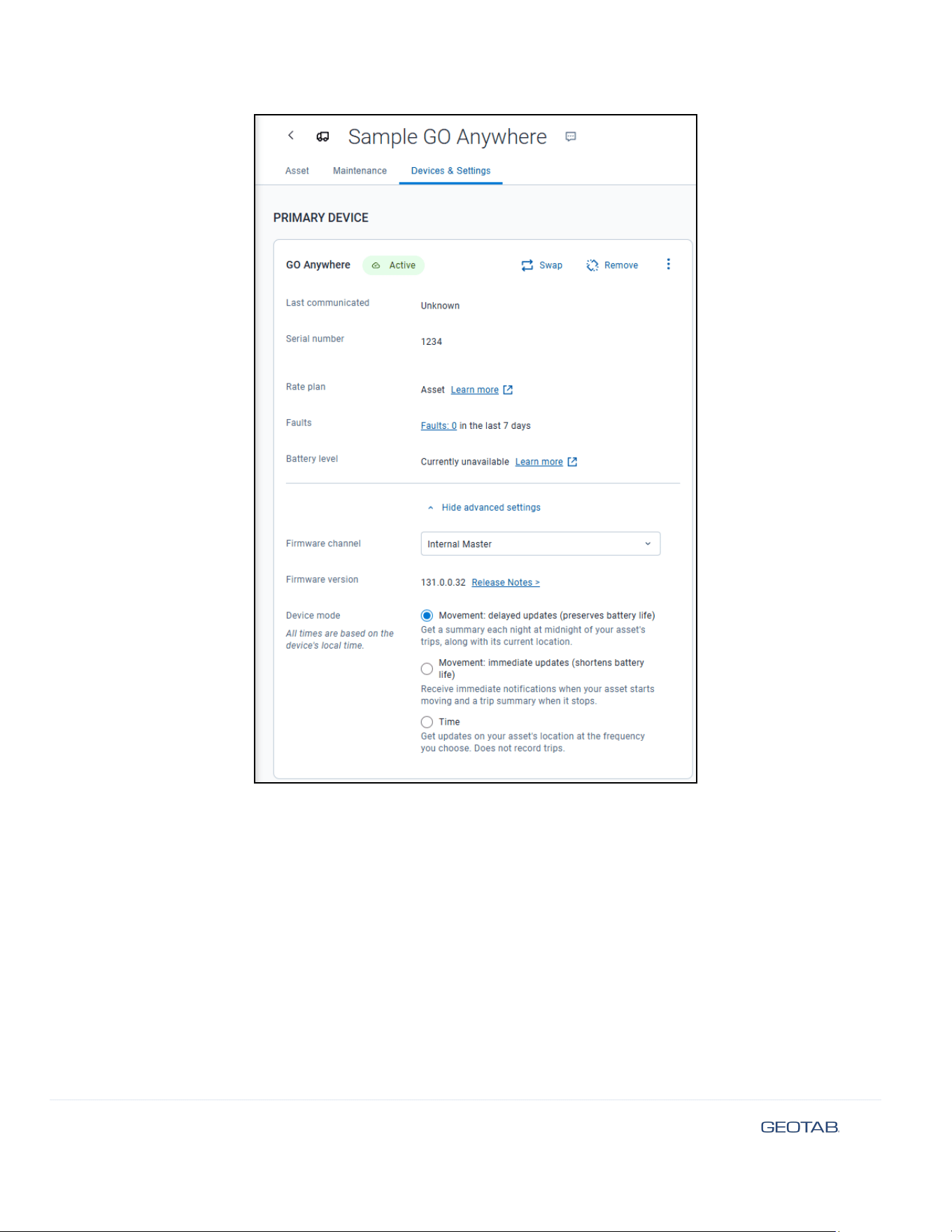
Movement: Delayed updates
This is the default device mode. In this mode, the GO Anywhere Plus provides you daily summaries of asset movement
while maximizing battery life. It’s best for assets where long battery life is the top priority and daily summaries of asset
movement are sufficient.
Delayed updates uses the following behavior:
● The device tracks when an asset takes a trip:
○ Trip Start is defined as when a device is moving faster than 15 km/h OR the device’s displacement from
its last recorded position exceeds 200m
○ During a trip, the device gathers location data every 30 minutes
○ Trip End is defined as when an asset is stationary for 1 hour or more
© 2025 Geotab Inc. All Rights Reserved
5

● The device stores all information for trips that occur over the course of a 24 hour period. The device will then
upload all trip information to MyGeotab at 12:00 AM (Midnight)
● If a device is stationary, it will update its location in MyGeotab every 7 days at 12:00AM (Midnight)
✱ NOTE: All times are in respect to the device’s local time zone. Due to network bandwidth considerations, the device may
update up to 15 minutes ahead of the times chosen.
Movement: Immediate updates
This mode provides near-real-time updates on when trips start and end, along with trip history shortly after completion.
This mode is best for assets where knowing when a trip starts/ends relatively quickly is important, recognizing the
increased battery usage as a result.
When using the immediate updates device mode, it’s important to keep in mind that asset use will impact reporting
frequency. Assets that take frequent trips will report location frequently, leading to increased battery drain. In these cases,
this mode is not recommended.
Immediate updates uses the following behavior:
● The device will update its location when movement is detected (Trip Start). This update allows users to
understand in MyGeotab that an asset is currently in motion.
○ Trip Start begins when a device is moving faster than 15 km/h OR the device’s displacement from its last
recorded position exceeds 200m
○ During a trip, the device gathers location data every 30 minutes and stores this information for upload at
the trip end
○ Once the device detects that a trip has ended (asset is stationary for 1 hour or more), the device updates
all stored data gathered from a trip
● If a device is stationary, it will update its location in MyGeotab every 7 days. The specific update time is
determined from the end of the last trip.
Time
This device mode provides predictable location updates at user-defined intervals, regardless of movement. The device
updates its location based on the time and frequency you set in MyGeotab; regardless of the device being in motion or
stationary. This mode is recommended for assets that require periodic location updates at specific, known times, and
where trip tracking is not necessary. Battery life will differ depending on customer-specified update frequency.
This device mode reports at user-specified intervals of every 8, 12, 24, or 48 hours. These intervals begin at the selected
time of day.
✱ NOTE: All times are in respect to the device’s local time zone. Due to network bandwidth considerations, the device may
update up to 15 minutes ahead of the specified times.
High frequency mode
GO Anywhere Plus also has a High Frequency Mode to give you more up-to-date visibility into your asset’s location. When
enabled, this feature increases the update frequency to every 15 minutes while an asset is moving.
While enabled, this feature results in a significant impact on battery life. As a result, this feature is automatically disabled
after 72 hours.
© 2025 Geotab Inc. All Rights Reserved
6
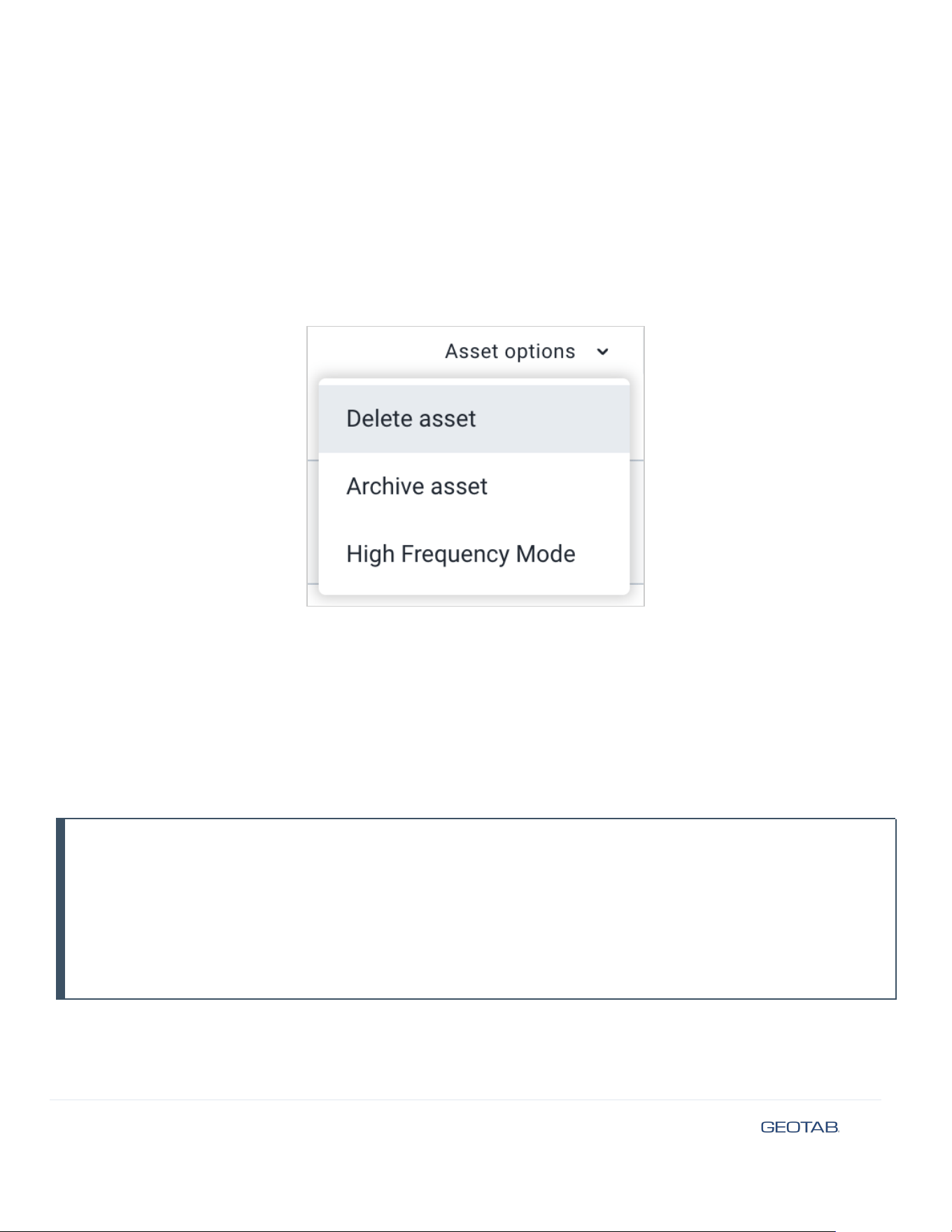
To enable or disable this feature:
1. Navigate to Assets from the MyGeotab main menu.
2. Select the asset you want to update to open the Asset Details page.
3. Click Asset Options > High Frequency Mode.
4. Switch the High Frequency Mode toggle On or Off.
! IMPORTANT: Once enabled, the 15-minute update frequency does not apply until the next time the device connects to
MyGeotab.
Battery insights
MyGeotab provides two types of battery insights about your GO Anywhere: the device’s State of Charge (SOC) and its
Estimated Life Remaining.
● State of Charge (%): Calculated based on energy utilization onboard the device for operations such as GPS
location and cellular upload.
● Estimated Life Remaining (Days, Months, Years): Calculated based on the average battery usage of each GO
Anywhere Plus device over a period of 31 days.
! IMPORTANT: When using Estimated Life Remaining, keep in mind the following:
● Changes to a device’s reporting mode take approximately 31 days to be reflected in MyGeotab.
● Changes in device operation or environmental factors can affect estimations.
● If there is insufficient data for a given device, Geotab will estimate remaining battery life based on an average
of utilization of all devices.
● Currently Unavailable is a temporary status which will typically resolve within three days of a device being
added to MyGeotab, as Geotab’s data pipelines discover new devices.
© 2025 Geotab Inc. All Rights Reserved
7
Wired device functionality
When wired, GO Anywhere Plus utilizes Geotab’s patented tracking algorithm to accurately recreate asset trips and
provide insights into an asset’s health, including insights on asset battery voltage and ignition events. Wired connectivity
also allows the GO Anywhere Plus to utilize the host asset’s battery, prolonging device lifetime.
Detailed trip and ignition information empower MyGeotab to provide customers with an accurate understanding of
insights such as odometer/hubometer for vehicles and trailers, or engine hours for equipment. GO Anywhere’s power and
ignition lines are isolated, and can also support negative battery disconnect equipment use cases with the appropriate
device harness.
Devices will fall back to battery-only configuration when wired power is unavailable, or if an asset’s battery is deemed too
low for operation. Some examples of installations and expectations:
Powered equipment
Trailers
● GO Anywhere Plus utilizes Geotab’s tracking
algorithm to recreate trips regardless of vehicle
ignition, as wired power is always available via the
asset’s battery
● GO Anywhere Plus changes to battery-only
configuration when the asset’s battery is too low
● GO Anywhere Plus utilizes Geotab’s tracking
algorithm to recreate trips when the trailer is
connected to a truck which is running
● GO Anywhere Plus changes to battery-only
configuration when the trailer is disconnected or
the connected truck is off
Direct-to-cell
✱ NOTE: The GO Anywhere Plus’s Direct-to-cell capabilities are only available through select partners with enabled SIM
cards.
GO Anywhere Plus has direct-to-cell capabilities, providing asset visibility in areas where the device can communicate
over satellite connection but cannot communicate over a cellular network. When communicating over satellite, the
device’s behavior changes:
Battery-Only
Wired
The GO Anywhere Plus behaves based on its selected
battery-only device mode, communicating over the
satellite network. No changes to operation.
The GO Anywhere Plus continues to log the full range of
asset insights that it is capable of. However, only the
following events are uploaded while on satellite
connectivity:
● Ignition ON/OFF records
● Asset line-in voltage
● GPS location information, every 15 minutes while
moving
Once cellular connectivity is reestablished, the GO
Anywhere Plus will upload all other logs stored onboard
the device, including all GPS route logs.
© 2025 Geotab Inc. All Rights Reserved
8
Security
Geotab platform security is designed for end-to-end protection of your data. Key implementations include the following:
● The GO Anywhere Plus network interfaces use authentication, data-in-transit encryption (not data at rest), and
message integrity verification.
● The GO Anywhere Plus device is individualized. Each device uses a unique ID and non-static security key, making
it difficult to fake a device’s identity.
● Over-the-air updates use digitally-signed firmware to verify that updates come from a trusted source.
Support and troubleshooting
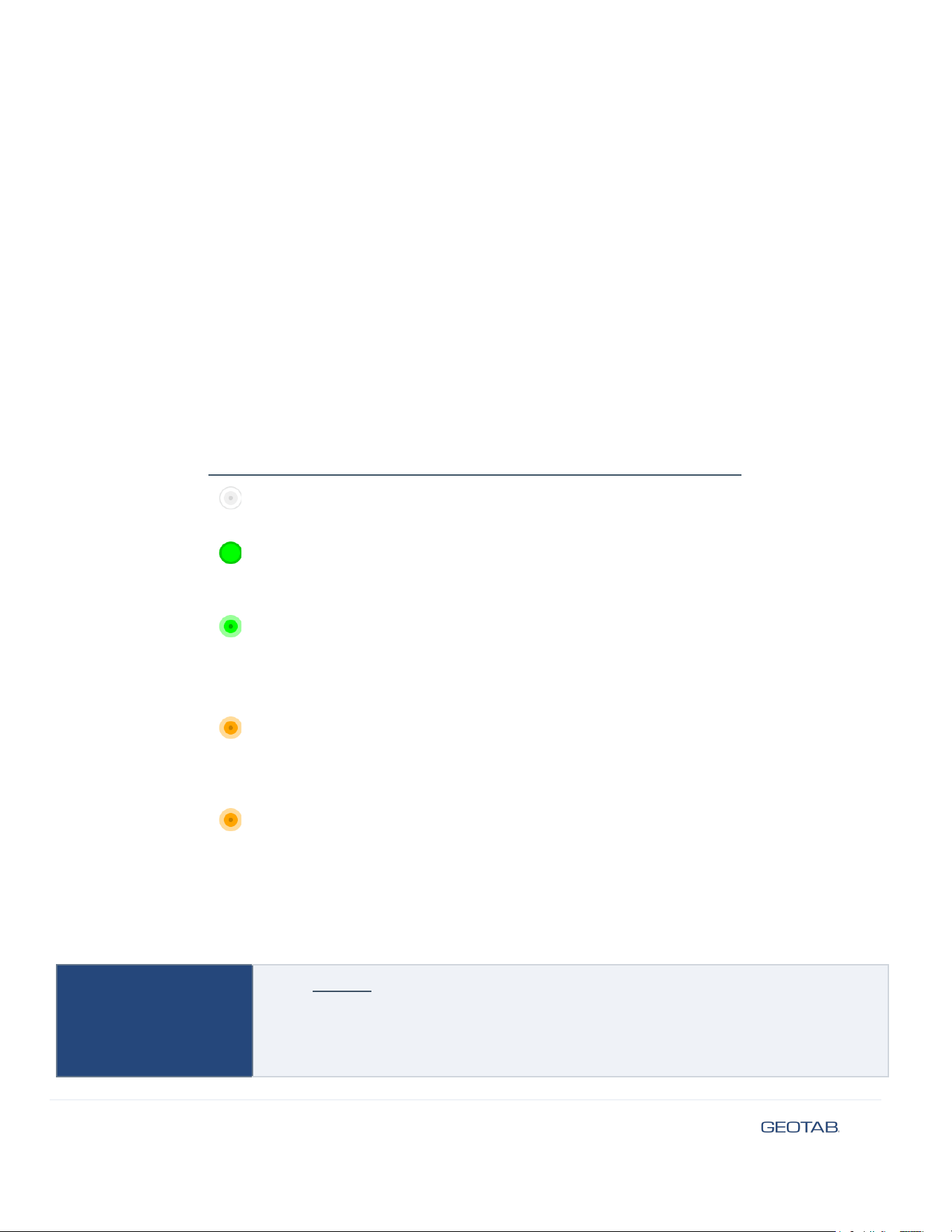
You can manually initiate a health check that forces the GO Anywhere Plus to perform a set of diagnostics and upload
results to MyGeotab. To perform a manual health check, press the button on the device and observe the LED behavior:
LED State
What’s going on?
Slow flash
Health check in progress
Do not unplug or touch the device.
Solid for 15
seconds
Health check successful - wired
Device is wired, ignition is detected
No action required.
Fast flash for 15
seconds
Health check successful - battery
Device is battery-only, or wired and ignition is
not detected
No action required.
Flash every 15
seconds
Health check failed - no (or weak) cell service
Move asset to an area with cellular coverage.
Press button to re-attempt activation.
x2 flash for 15
seconds
Health check failed - no GPS signal
Move device to be in sky view.
Press button to re-attempt activation.
Technical specifications
Cellular
Model: GATAA1
GO Anywhere Plus USA (AT&T, T-Mobile)
● LTE (CAT-1bis): Bands 2, 4, 5, 12, 13, 14, 25, 66
GO Anywhere Plus Canada (Telus, Rogers)
© 2025 Geotab Inc. All Rights Reserved
9
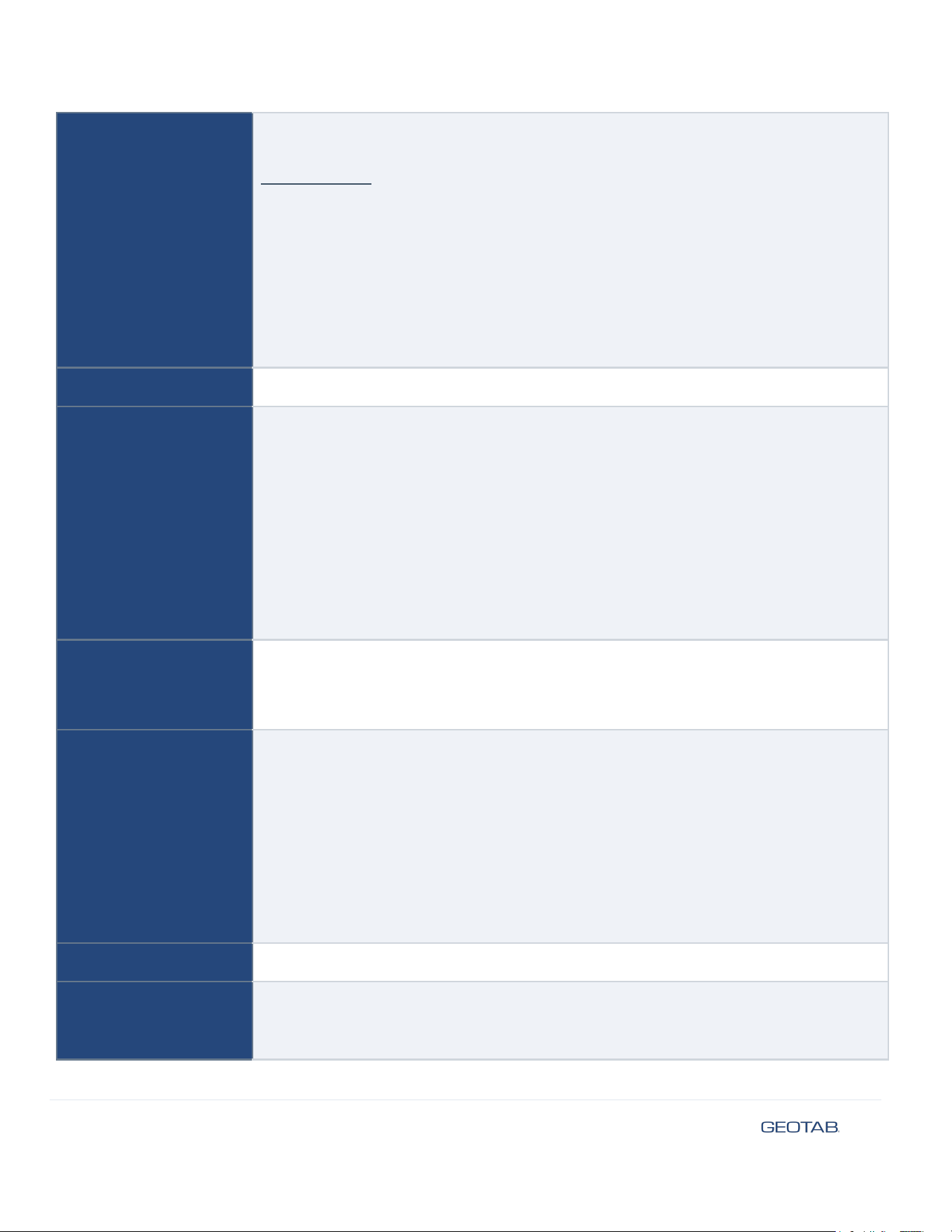
● LTE (CAT-1bis): Bands 2, 4, 5, 12, 13, 14, 25, 66
Model: GATAA2
GO Anywhere Plus Europe (Telenor)
● LTE (CAT-1bis): Bands 1, 2, 3, 4, 5, 7, 8, 12, 13, 18, 19, 20, 25, 26, 28, 34, 38, 39, 40,
41, 66
GO Anywhere Plus Australia (Telstra)
● LTE (CAT-1bis): Bands 1, 2, 3, 4, 5, 7, 8, 12, 13, 18, 19, 20, 25, 26, 28, 34, 38, 39, 40,
41, 66
Antenna: LTE single antenna
SIM
4FF Nano SIM tray
GNSS Receiver
GNSS engine (GPS/Galileo/GLONASS/BDS)
● 1 to 2 second Time-To-First Fix for hot and aided starts
● Cold start: ~ 35s
● Concurrent 4 constellations with SBAS
● Accuracy: ~1.0m 2DRMS
● Acquisition Sensitivity: -149dBm
● Tracking Sensitivity: -167dBm
● OTA FW updates supported
Antenna: Dual Band GNSS
Accelerometer
3-axis accelerometer
● 3D accelerometer. Full-scale acceleration range of ±16 g
● Acceleration output data rate of maximum 800 Hz.
Battery
Long-lasting battery (up to 3-5 years depending on use) with a health indicator, intelligent
sleep mode, and energy-efficient design.
Li-SOCL
2
Battery Pack (non-rechargeable)
Rating: 3.6 V
DC
, 5.4 Ah
✱ NOTE: The batteries are replaceable, contact your Geotab partner for a replacement
battery kit. Follow proper battery disposal procedures. Disposal of a battery into fire or a
hot oven, or mechanically crushing or cutting of a battery, can result in an explosion
IP rating
IP67 and IP69K
Mechanical
Maximum size: 125 mm L x 71 mm W x 30 mm H
Weight: 207 g (0.46 lbs)
© 2025 Geotab Inc. All Rights Reserved
10
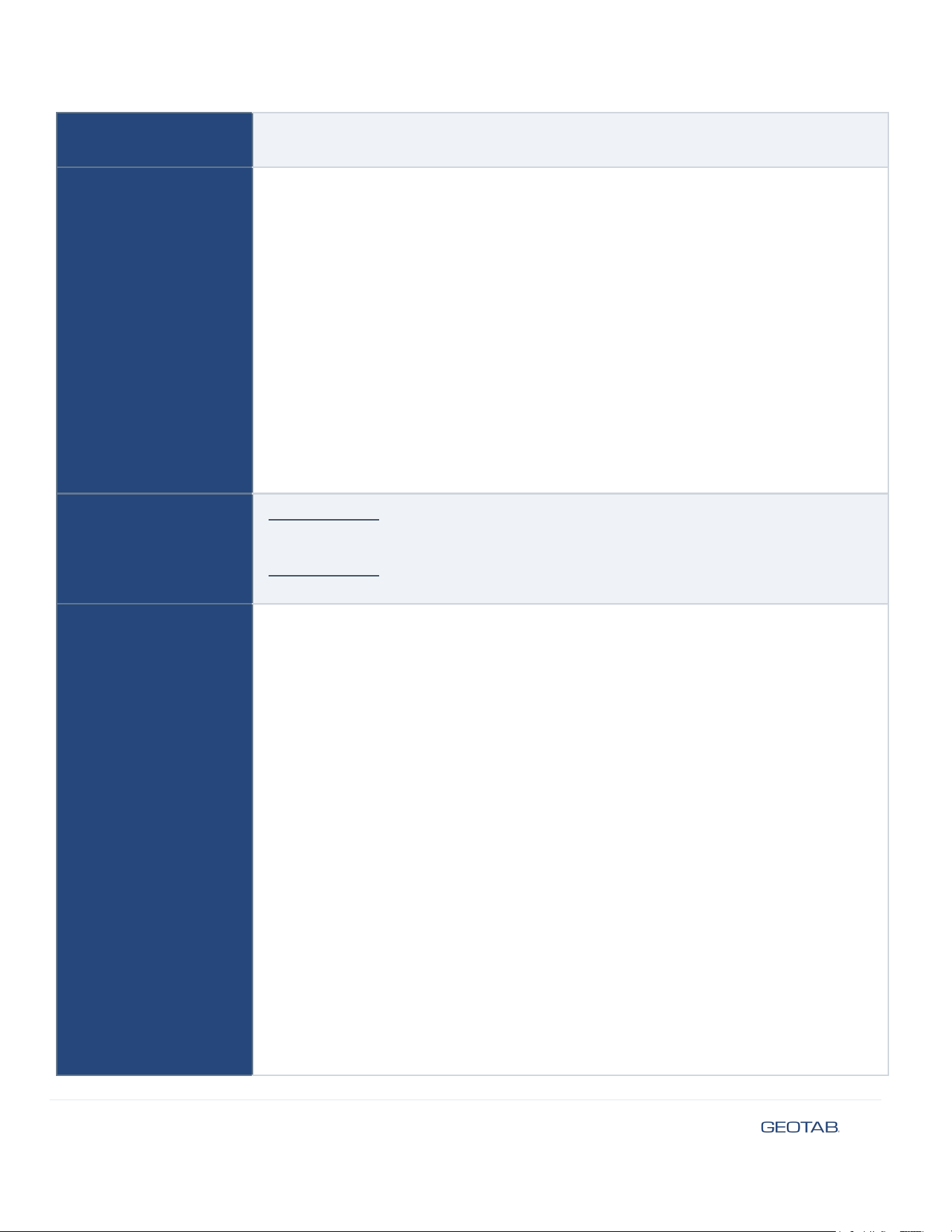
Housing: Polycarbonate (PC) thermoplastic two-piece housing (Flammability rating: UL
94 V-0)
Environmental
Operating Temperature
-40°C to +85°C
SAE J1455
● Powered Thermal Cycle
● Passive Temperature Shock Resistance
● Powered Humidity-Temperature Cycle
● Powered Vibration Endurance Testing
● Drop Testing
● Packaged Drop Testing
● Operational Shock Testing
● Powered Salt Spray Testing
● Gravel Bombardment Testing
Compliance
Model: GATAA1
FCC, ISED, PTCRB, NDAA, TAA
Model: GATAA2
FCC, PTCRB, CE, UKCA, RCM, ANATEL
Electrical
Power In Voltage: +12 VDC and +24 VDC systems supported
ISO 7637-2 and 16750-2 Protection
Current:
At 12 V
● Peak power, 300 mA @ 12 V or 3.6 W Max
● Typical power, 60 mA @ 12 V or 0.72 W Average
At 24 V
● Peak power, 150 mA @ 24 V or 3.6 W Max
● Typical power, 30 mA @ 24 V or 0.72 W Average
Battery Only
● Peak power, 1 A @ 3.6 V or 3.6 W Max
● Typical power, 120 uA @ 3.6 V or 0.432 mW Average
Ignition Sense In Voltage: +12 VDC and +24 VDC systems supported
Voltage Input Range: +5 to +32 VDC
ISO 7637-2 and 16750-2 Protection
Current:
At 12 V
© 2025 Geotab Inc. All Rights Reserved
11
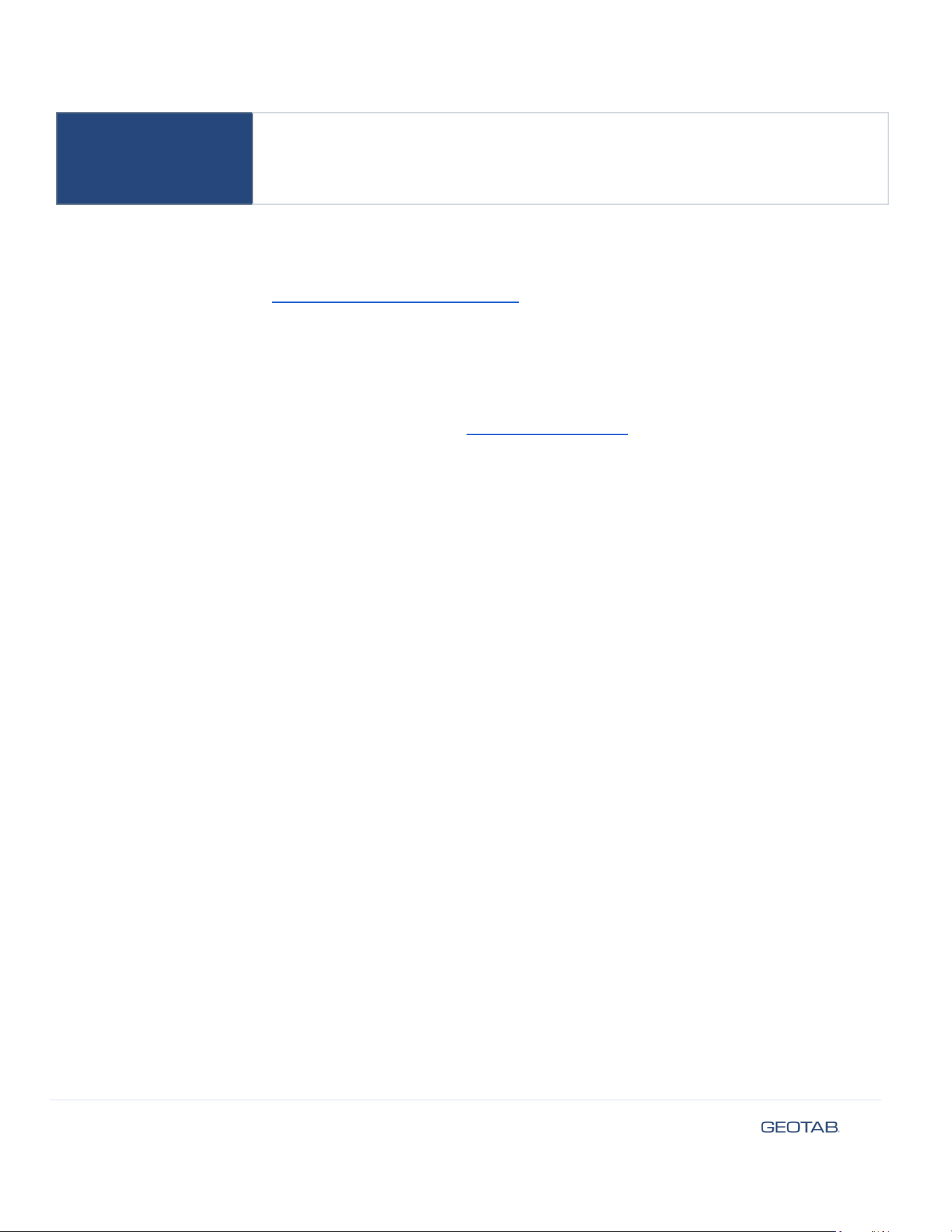
● Typical power, 1.8 mA @ 12 V or 21.6 mW Average
At 24 V
● Typical power, 3.8 mA @ 24 V or 91.2 mW Average
Warranty
For full warranty terms, see the Geotab Limited Warranty Statement.
Important safety information and limitations of use
You must always select the right Telematics hardware suitable for your specific installation environment and vehicle use.
For the latest version of the Limitations of Use, please visit: https://gtb.link/k6Fp0w.
NOTICE: This product does not contain any user-serviceable parts. Configuration, servicing, and repairs must only be
made by an authorized reseller or installer. Unauthorized servicing of these products will void your product warranty.
Professional Installation Required — Installation of this product requires that the installer have sufficient technical
knowledge and expertise for mobile device installation and integration into modern vehicles, i.e. Certified Geotab Installer
certification or equivalent.
Read important related safety information and Limitations of Use following these installation instructions. Read and
follow all instructions and warnings to prevent serious injury and/or vehicle damage.
WARNING! Some installations are not straightforward and must be completed by an Authorized Installer to ensure a
secure installation. Some examples requiring professional installation from an Authorized Installer include if the device
may not be fully secured and could vibrate loose, get knocked or if the installer questions their ability to complete a secure
installation according to these instructions.
WARNING! Prior to Go Anywhere installation, read and follow important safety information including limitations of use
located following these installation instructions. Always read and follow all safety information to prevent loss of vehicle
control and serious injury.
WARNING! Do not attempt to install, reconfigure, or remove any product from a vehicle while the vehicle is in motion or
otherwise in operation. All installation, configuration, or removal must be done only in stationary vehicles which are
securely parked. Attempting to service devices while the vehicle is in motion could result in malfunctions or collisions,
leading to death or serious personal injury.
WARNING! To prevent risk of fire or damage to the asset, the external power harness must be connected to an
appropriately fused circuit. Failure to use a correctly fused power source can lead to an overcurrent condition, resulting in
serious damage to the asset's electrical system and/or risk of fire.
CAUTION! The device may become hot to the touch during operation, particularly when externally powered in
high-temperature environments. Exercise caution when handling the device after extended use to avoid the potential for
minor burns.
CAUTION! To prevent equipment damage and ensure reliable operation, do not install the device where it may be exposed
to corrosive chemicals or fuels. Such exposure can damage the housing and internal components, compromising the
device's integrity and voiding the warranty.
© 2025 Geotab Inc. All Rights Reserved
12

WARNING! Do not subject this product to powerwashing. Failure to do so may result in units malfunctioning or
short-circuiting, which can lead to a fire hazard and cause loss or serious injury.
NOTE! Always get permission before you drill, and inspect the area to ensure no adjacent equipment will sustain any damage.
WARNING! To prevent risk of fire, explosion, or chemical leakage, use only Geotab-approved replacement batteries. The
use of unauthorized or incompatible batteries will void the product warranty and can lead to device failure or a safety
hazard.
WARNING! Do not use a battery that is leaking, damaged, or deformed. Handle compromised batteries with appropriate
personal protective equipment to avoid chemical burns. Dispose of damaged batteries immediately according to local
hazardous waste regulations.
WARNING! Do not short-circuit the battery terminals. Allowing the terminals to come into contact with metallic objects
can cause rapid overheating, leakage, or explosion, resulting in serious injury or fire.
NOTICE: The Geotab GO Anywhere is a monitoring device and is not a failsafe anti-theft or life-saving system. Device
functionality depends on factors including battery charge, available GPS and cellular coverage, and proper installation. Do
not rely on this device for emergency situations or as the sole means of asset security.
Regulatory statements
Warning: RF Exposure Compliance
This equipment complies with FCC and ISED RSS-102 radiation exposure limits set forth for an uncontrolled environment.
This transmitter must not be co-located or operating in conjunction with any other antenna or transmitter. In order to avoid
the possibility of exceeding the FCC and ISED RSS-102 radio frequency exposure limits, this equipment should be installed
and operated with minimum distance 20 cm (7.9 inches) between the antenna and your body during normal operation.
Users must follow the specific operating instructions for satisfying RF exposure compliance.
Cet équipement est conforme aux limites d’exposition aux rayonnements FCC et ISED CNR-102 établies pour un
environnement non contrôlé. Cet émetteur ne doit pas être installé ou utilisé en conjonction avec une autre antenne ou un
autre émetteur. Afin d’éviter la possibilité de dépasser les limites d’exposition aux radiofréquences FCC et ISED, cet
équipement doit être installé et utilisé avec une distance minimale de 20 cm (7.9 pouces) entre l’antenne et votre corps
pendant le fonctionnement normal. Les utilisateurs doivent suivre les instructions spécifiques d’utilisation pour respecter
la conformité à l’exposition aux RF.
Canada
CAN ICES-003 (B) / NMB-003 (B)
This device contains license-exempt transmitters/receivers that comply with Innovation, Science and Economic
Development Canada’s license-exempt RSS(s). Operation is subject to the following two conditions:
1. This device may not cause interference.
2. This device must accept any interference, including interference that may cause undesired operation of the
device.
This device complies with the Canadian ICES-003 Class B specifications. CAN ICES-003 (B).
© 2025 Geotab Inc. All Rights Reserved
13

L’émetteur/récepteur exempt de licence contenu dans le présent appareil est conforme aux CNR d’Innovation, Sciences et
Développement économique Canada applicables aux appareils radio exempt de licence. L’exploitation est autorisée aux
deux conditions suivantes :
1. L’appareil ne doit pas produire de brouillage;
2. L’appareil doit accepter tout brouillage radioélectrique subi, même si le brouillage est susceptible d’en
compromettre le fonctionnement.
Cet appareil numérique de la classe B est conforme à la norme NMB-003 du Canada.
USA
This device complies with part 15 of the FCC Rules. Operation is subject to the following two conditions:
1. This device may not cause harmful interference.
2. This device must accept any interference received, including interference that may cause undesired operation.
✱ NOTE: This equipment has been tested and found to comply with the limits for a Class B digital device, pursuant to part
15 of the FCC Rules. These limits are designed to provide reasonable protection against harmful interference in a
residential installation. This equipment generates, uses and can radiate radio frequency energy and, if not installed and
used in accordance with the instructions, may cause harmful interference to radio communications. However, there is no
guarantee that interference will not occur in a particular installation. If this equipment does cause harmful interference to
radio or television reception, which can be determined by turning the equipment off and on, the user is encouraged to try
to correct the interference by one or more of the following measures:
● Reorient or relocate the receiving antenna.
● Increase the separation between the equipment and receiver.
● Connect the equipment into an outlet on a circuit different from that to which the receiver is connected.
● Consult the dealer or an experienced radio/TV technician for help.
Changes or modifications not expressly approved by Geotab could void the user’s authority to operate the equipment.
Mexico
La operación de este equipo está sujeta a las siguientes dos condiciones: (1) es posible que este equipo o dispositivo no
cause interferencia perjudicial y (2) este equipo o dispositivo debe aceptar cualquier interferencia, incluyendo la que
pueda causar su operación no deseada.
© 2025 Geotab Inc. All Rights Reserved
14