00:00
00:00
00:00
00:00
00:00
00:00
00:00
00:00
00:00
00:00
A�er power on, short press bu�on “ ” to switch alarm (alarm 1 - alarm 2 - alarm
1&2 - alarm off).
For example, a�er power on, short press bu�on “ ” to alarm 1“ ”, short
press bu�on “ ” again to alarm 2“ ”, short press bu�on “ ” the 3rd �me
to alarm 3“ ”, short press bu�on “ ” the 4th �me to turn off alarm“ ”.
成品尺寸:85x110mm
材质:105G双铜,正反面单色印刷 ,折页
正面
01 02 03 0504
CB
10 12 13 1411
Status indicator
LED light
LED display
Short press bu�on “ ” twice for play/pause. Short press bu�on “ ” for next
song, long press bu�on “ ” for volume“+”. Short press bu�on “ ” for previous
song, long press bu�on “ ” for volume“-”.
4. When under Bluetooth/Sleeping Mode
bu�on
bu�on
bu�on
3. When Alarm Goes Off
1). Short press bu�on “ ” twice to snooze for more 3 minutes and alarm will go
off again a�er 3 minutes;
2). Short press any other bu�ons to turn off alarm;
3). No any ac�on, alarm will turn off automa�cally a�er alarm goes off 15 minutes by
itself;
2
3
5
8
9
6
7
10
11
12
13
1
4
A
08:00
08:00
08:00
08:00
bu�on
bu�on
hour number
bu�on
minute number
hour number
minute number
bu�on
bu�on
hour number
bu�on
minute number
5. Clock Se�ng
A�er power on, long press bu�on “ ” 2S to enter into clock se�ng mode and
hour number will flash first.
1). Now you can reset hour number directly, short press bu�on “ ” to decrease,
short press bu�on “ ” to increase, long press bu�on “ ” 2S or no any ac�on
around 5S to select your final hour number.
2). Short press bu�on “ ” to jump between hour and minute, so if you want reset
minute number, just short press bu�on “ ” and minute number will flash, then
short press bu�on “ ” to decrease, short press bu�on “ ” to increase, long press
bu�on “ ” 2S or no any ac�on around 5S to select your final minute number.
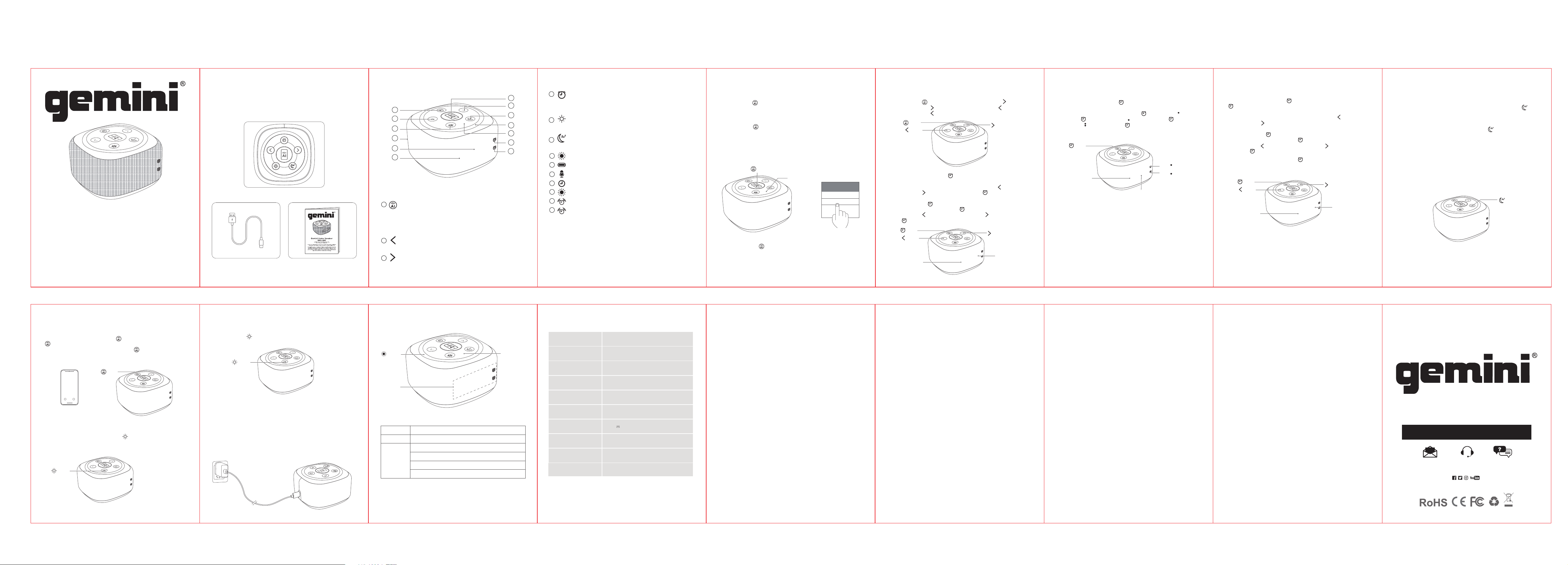
A: Gemini Home Speaker
B: USB-C Charging Cable
C: User manual
WHAT'S IN THE BOX PRODUCT OVERVIEW BASIC FUNCTION
BASIC FUNCTION
OPERATION GUIDEOPERATION GUIDE
1. Power On/Off
Long press bu�on “ ” 2S to power on/off.
Long press bu�on “ ” 2S to power on with prompt tone, speaker will enter into
bluetooth pairing mode, the blue indicator will flash. Choose “Gemini” in your
bluetooth list, there will be prompt tone once connected successfully, and the blue
indicator will be normally on. Now, you can play music.
Remark: once connected with your ISO phone, it’s �me display will synchronize
with your phone’s �me automa�cally.
2. Bluetooth Mode
Gemini
Bluetooth
My Device
Status indicator
bu�on
06 07
6. Alarm Switching
08:00
08:00
bu�on
OPERATION GUIDE
7. Alarm Se�ng
A�er power on, short press bu�on “ ” to enter into alarm 1, then long press bu�on
“ ” 2S to enter into alarm se�ng mode and hour number will flash first, then
below the same se�ng way like clock.
1). Now you can reset hour number directly, short press bu�on “ ” to decrease,
short press bu�on “ ” to increase, long press bu�on 2S or no any ac�on around
5S to select your final hour number.
2). Short press bu�on “ ” to jump between hour and minute, so if you want reset
minute number, just short press bu�on “ ” and minute number will flash, then
short press bu�on “ ” to decrease, short press bu�on “ ” to increase, long
press bu�on “ ” 2S or no any ac�on around 5S to select your final minute number.
A�er power on, short press twice bu�on “ ” to enter into alarm 2, the same way
like above to set alarm 2.
OPERATION GUIDE
Short press bu�on “ ” twice to adjust the brightness of LED displays (100%
brightness - 50% brightness - off)
11. The Brightness of LED Display
Use supplied USB-C charging cable
Use an output source 5V/1A (or above)
Charge when you hear low ba�ery prompt tone or the indicator flash red.
The red indicator will be normally on while charging and switch off a�er fully charged.
13. Charging
In the following cases, this speaker device will enter into RTC mode for power saving.
1).Under sleeping mode, when the playing �me (15/30/60 minutes) you set is over.
2).Under Bluetooth mode, when nothing is connected a�er 10 minutes.
12. Power Saving
1
Long press 2S: power on/off
Short press 1 �me: ac�vate voice assistant
Short press twice: play/pause; pick up/hang up call; snooze for more
3 minutes
Short press 3 �mes: reject incoming call
Short press 1 �me: for previous song/sleep sound; decrease hour/
minute number for clock/alarm se�ng
Long press: volume “-”
Short press 1 �me: for next song/sleep sound; increase hour/minute
number for clock/alarm se�ng
Long press: volume “+”
2
3
5
Short press: switch modes (bluetooth mode - sleeping mode - RTC
mode - PC mode)
Short press twice: disconnect bluetooth
Short press: switch alarm mode (alarm 1 - alarm 2 - alarm 1& 2 - off);
jump between hour and minute when adjust clock/alarm
Long press 2S: enter into clock/alarm se�ng mode; confirm your
final choice on hour/minute number during clock/alarm se�ng
4
LED light
7
8
9
10
Calling MIC
Type-C charging port
Clock
6
Short press: switch LED ligh�ng mode
Long press 2S: turn on/off LED light
Short press twice: adjust the brightness of display (100% - 50% - off)
11
Status indicator
12
Alarm 1
13
Alarm 2
Total 8 LED ligh�ng modes
LED light
LED display
Clock; alarm; volume level; �mer; sleeping sound number
Power on (blue indicator)
Low ba�ery (red indicator flash)
Charging (red indicator normally on)
Fully charged (red indicator off)
Status
indicator
SPECIFICATIONS
Product Name
Bluetooth Version
Ba�ery Capacity
Playing Time
Talking Time
Charging Time
Charging Current
Speaker Unit
Product Size
Product Weight
BRS-180
5.3
3.7V/1500mAh
5-6 hours (at 50% volume, LED light off)
5-6 hours
3 hours
5V 0.8A
6W/4Ω
101x101x57.5mm
280g±50
Q1: What kind of charger should we use for the speaker?
A: All common USB chargers can be used, while we suggest the ones 5V/1.5A or
above1.5A.
Q2: What if there is noise or discon�nuous sound during playing?
A: The speaker can be normally used within 10m under no obstruc�on environment.
If it is beyond 10m or with obstruc�on, there might be noise or discon�nuous sound.
Q3: The Speaker automa�cally enters power saving mode a�er power on without
any opera�on.
A: If Bluetooth® pairing is not completed within 10 minutes of powering on, the device
will automa�cally enter power saving mode to conserve ba�ery power.
Q4: Why does the speaker cannot connect the once-paired cellphone?
A: First, remove the speaker's paired name from the cellphone’s Bluetooth list and then
restart pairing.
Q5: When speaker can not be turned on or used normally.
A: Please charge it for some �me, then long press power on bu�on 10-30s to reset.
Q6: Why can’t the speaker sync �me with my phone via Bluetooth?
A: When connec�ng, grant permission for the speaker to access phone informa�on.
Some phones may not support �me synchroniza�on. Try using a different phone.
Q7: Why is the �me incorrect, or why doesn’t the alarm ring?
A: The speaker only supports a 24-hour format. Set your phone to 24-hour mode before
syncing.
FREQUENTLY ASKED QUESTIONS
Notes:
1. Please read this manual carefully before use and keep it properly.
2. For the first use, please fully charge the product.
3. Pls use cer�ficated adapter that has passed na�onal safety cer�fica�on.
4. If you do not use the product for a long �me, be sure to charge it once within a
month at least to maintain its performance.
5. Do not use this product in an extremely cold or hot environment, such as temperature
beyond the range of 5°C-35°C. If use it beyond the above range, the product may
stop automa�cally to protect the internal circuit.
6. When charging it in a high temperature environment, the product may automa�cally
stop charging to protect the ba�ery. At this �me, the charging indicator usually ashes
quickly to indicate that the charging environmental temperature or the product
internal temperature is too high.
7. Storage environment temperature: -5~35°C RH<70% (recommended 25°C±5).
Important safety instruc�ons:
1. Do not disassemble or repair this speaker personally, otherwise it may cause product
damage or personally injury.
2. Do not use it in dusty, humid, dry, and high-temperature environment.
3. Do not place this product near a heat source, or a place with direct sunlight, a lot of
dust, or mechanical vibra�on.
4. In order to reduce the risk of fire, please do not cover this product with newspapers,
tablecloths, curtains etc., during use.
5. If the product has a waterproof feature, please do not exceed the nominal parameter
range when using it.
6. When the product is damaged (such as the power cord or plug is damaged, liquid
enters or objects fall into the device, unable to operate normally or falls), it must be
repaired.
7. When the product is fully charged, do not connect it to the charger for further long
�me charging.
8. The maximum ambient temperature should not exceed 40°C.
*This speaker supports mobile phones/ tablets/ PCs etc. Here this User Manual is illustrated base on
mobile phones.
FREQUENTLY ASKED QUESTIONS
1). Bluetooth mode
A�er power on, the default mode is bluetooth mode, short press bu�on “ ” to
switch modes (bluetooth mode - sleeping mode - RTC mode - PC mode).
2). Sleeping mode
When under sleeping mode, sleeping sound will play one by one automa�cally, the
default playing �me is 15 minutes, long press bu�on “ ” 2S to reset playing �me
(15 minutes - 30 minutes - 60 minutes - all the �me).
3). RTC mode
When under RTC (Real Time Clock) mode, there is only clock and alarm display for
ba�ery save.
4). PC mode
When under PC mode, you can revise the sleeping sounds in this speaker device.
Remark: usually there will be only 3 modes (bluetooth mode - sleeping mode - RTC
mode), only when connect this speaker device with PC by data cable, there will be 4
modes (bluetooth mode - sleeping mode - RTC mode - PC mode).
08
8. Different Mode Se�ng
OPERATION GUIDE
bu�on
00:00
bu�on
When a call is coming, short press bu�on “ ” twice to answer. Short press bu�on
“ ” 3 �mes to reject.
When during a call conversa�on, short press bu�on “ ” twice to hang up.
bu�on
09
9. Calling
A�er turning on LED light, short press bu�on “ ” to switch LED ligh�ng modes
(mode 1 - mode 2 - mode 3 - mode 4 - mode 5 - mode 6 - mode 7 - mode 8 - off).
10. LED Ligh�ng Mode
OPERATION GUIDE OPERATION GUIDE
Reject Answer
88888888888
bu�on
Gemini Home Speaker
BRS-180
geminisound.com
458 Florida Grove Rd. Perth Amboy, NJ O8861, USA
Designed and engineered in the USA Manufactured in China
Gemini is a registered trademark of P2B Trading Co., Inc.,
under license to ICAD Holdings LLC.
Other stated company, product, or technology names/logos are the trademarks
or registered trademarks of their respective companies. The Bluetooth® word
mark and logos are registered trademarks owned by Bluetooth SIG, Inc. and any
use of such marks by ICAD Holdings LLC is under license. Other trademarks and
trade names are those of their respective owners.
00:00
@
@GeminiSoundHQ
At Gemini, our highest priority is making your experience unforgettable.
Need help with setting up, troubleshooting, or looking for some tips?
We're here for you, Monday through Friday 9AM
WELCOME TO THE GEMINI FAMILY!
Responsible Party Name:
ICAD Holding LLC
Company address:
458 Florida Grove Road
Perth Amboy, NJ, 08861 USA
FCC Compliance Statement
This device complies with Part 15 of the FCC Rules. The opera�on is subject to the
following two condi�ons:
(1) This device may not cause harmful interference, and
(2) This device must accept any interference received, including interference that
may cause undesired opera�on.
Note: This equipment has been tested and found to comply with the limits for a
class B digital device, pursuant to Part 15 of the FCC Rules. This equipment gener-
ates uses and can radiate radio frequency energy and if not installed and used in
accordance with the instruc�ons, may cause harmful interference to radio
communica�ons. However, there is no guarantee that interference will not occur
in a par�cular installa�on. If this equipment does cause interference to radio or
television recep�on, which can be determined by turning the equipment off and
then on, the user is encouraged to try to correct the interference by one or more
of the following measures:
• Reorient or relocate the receiving antenna.
• Increase the separa�on between the equipment and receiver.
• Connect the equipment to a different outlet so that the equipment and receiver
are on different branch circuits.
• Consult the dealer or an experienced radio/TV technician for help.
Warning: Changes or modifica�ons made to this device not expressly approved by
ICAD Holding LLC may void the FCC authoriza�on to operate this device.Note: The
manufacturer is not responsible for any radio or TV interference caused by
unauthorized modifica�ons to this equipment. Such modifica�ons could void the
user’ s authority to operate the equipment.
RF exposure statement:
This device complies with FCC RF radia�on exposure limits set forth for an
uncontrolled environment. The device is installed and operated without restric�on.
FCC ID: 2BRR7-BRS180
LEGALITY & SAFETY
The device is not intended for use by people (including children) with reduced
physical, sensory or mental capacity. People who have not read the manual, unless
they have received an explana�on by someone responsible for their safety, should
not use this unit. Children should be monitored to ensure that they do not play with
the device. The device should always be readily accessible. The device should not
be exposed to water. No objects filled with liquids, such as vases, shall be placed on
the device. Always leave a minimum distance of 10 cm around the unit to ensure
sufficient ven�la�on. Open flame sources, such as candles, should not be placed on
top of the device. The device is intended for use only in a temperate climate. At full
volume, prolonged listening may damage your hearing and cause temporary or
permanent deafness, hearing drone, �nnitus, or hyperacusis.
Listening at high volume is not recommended. One hour per day is not recommend
either. Danger of explosion if ba�ery is incorrectly replaced or not replaced by the
same type or equivalent. The ba�ery should not be exposed to excessive heat such
as sunshine or fire. Different types of ba�eries, or new and used ba�eries, should
not be mixed. The ba�ery must be installed according to its polarity. If the ba�ery
is worn, it must be removed from the product. The ba�ery must be disposed of
safely. Always use collec�on bins to protect the environment.
The ba�ery can only be replaced by the maker of this product, the sales department, or
a qualified person. Switch the device off where the use of the device is not allowed or
where there is a risk of causing interference or danger - for examples: on an
aircra�, or near medical equipment, fuel, chemicals or blas�ng sites. Check the
current laws and regula�ons regarding the use of this device in the areas where you
drive. Do not handle the device when driving.
Concentrate fully on driving. All wireless devices are suscep�ble to interference
which may affect their performance. All our devices conform to interna�onal/na�onal
standards and regula�ons, and we aim to limit user exposure to electromagne�c
fields. These standards and regula�ons were adopted a�er the comple�on of extensive
scien�fic research. This research established no link between the use of the mobile
headset and any adverse effects on health if the device is used in accordance with
standard prac�ces. Only qualified people are authorized to install or repair this
product. Only use ba�eries, chargers and other accessories which are compa�ble
with this equipment. Do not connect incompa�ble products. This equipment is not
waterproof. Keep it dry. Keep your device in a safe place, out of the reach of young
children. The device contains small parts which may present a choking hazard to kids.
反面