User Manual-CARGOVISION
1
User Manual
CARGOVISION
Part#:77-S274

User Manual-CARGOVISION
CARGOVISION User Manual
2
Table of Contents
1. Introduction......................................................................................3
2. General Features..... .........................................................................3
3. Specifications....................................................................................4
4. Camera Function Description ...........................................................5
4.1 Function Overview......................................................................5
4.2 Working process.........................................................................5
4.3 Workflow Picture........................................................................6
5. Mechanical Details ...........................................................................7
5.1 Front/Rear Dimensions...............................................................7
5.2 Side Dimensions..........................................................................7
6. FCC Warning Statement....................................................................8
7. IC Warning Statement.......................................................................9
7.1 IC Warning...................................................................................9
7.2 Avertissement IC.........................................................................10
8. MECHANICALDETAILS.......................................................................10
User Manual-CARGOVISION
CARGOVISION User Manual
3
1. INTRODUCTION
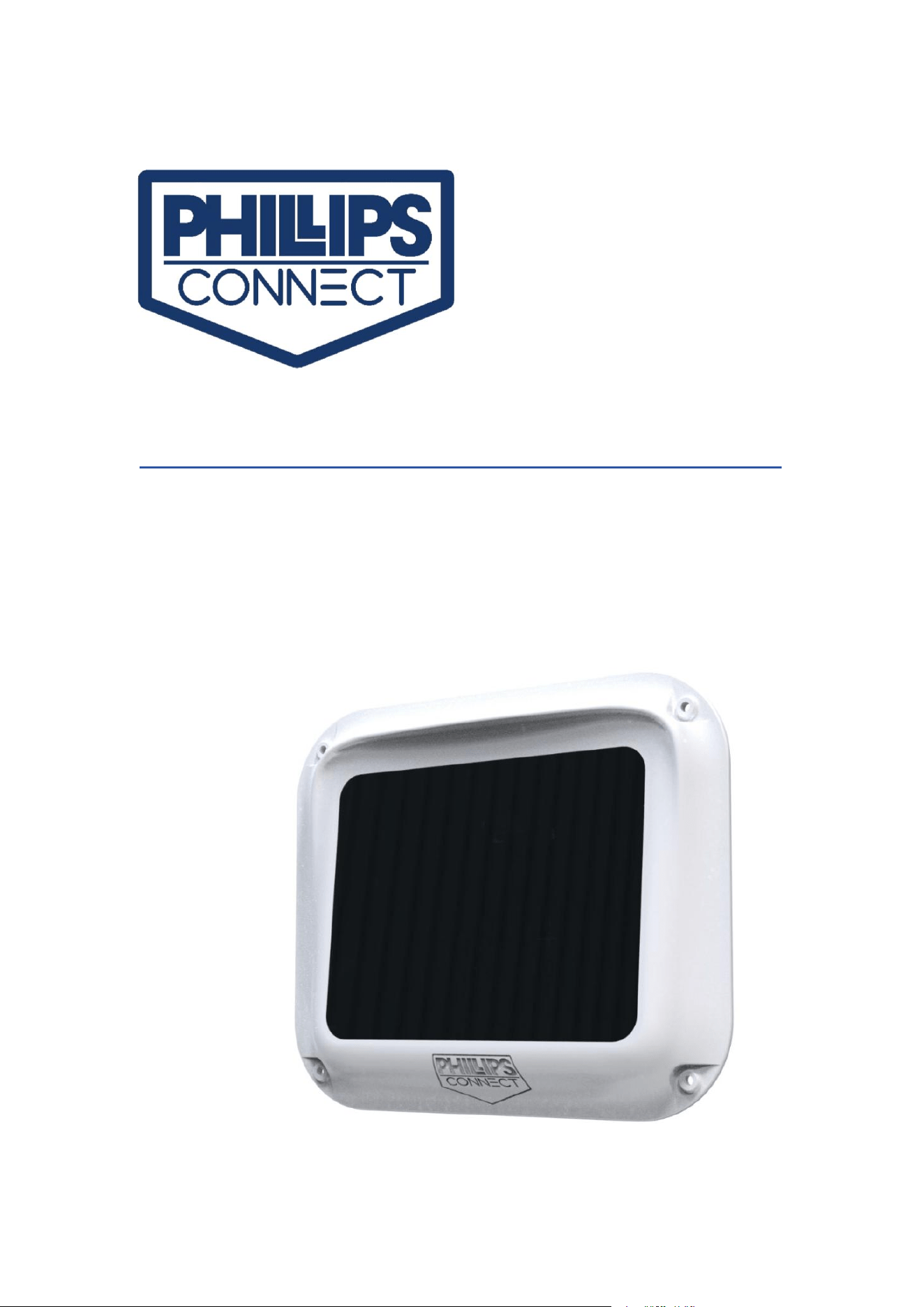
The Phillips Connect CARGOVISION is one of a growing family of sensors and system
monitoring products from Phillips Connect used in conjunction with a PCT Gateway
and Remote Listener System, or other cloud-based reporting system. CargoVision is
designed to provide an uncompromised, on-demand view of the interior of a trailer
in 1080P quality.
Simple installation and connectivity to your existing Phillips Connect Trailer Gateway
module provides the ability to pre-program image capture events based on motion,
door open/closed (if equipped), time-based or web-based image on-demand. Images
are uploaded to the cloud for viewing through the Phillips Connect customer portal
or automated API feed.
2. GENERAL FEATURES
Environmental Resistance: IP67
Operational Temperature: -40℃ to 70℃
Solar Panel Max Power: 4W
Battery Capacity: 6.4Ah
Installation Time: ~15 minutes
Connectivity: BLE 5.0/2.4 GHz (to PCT Gateway module)
Image Quality: 720P
Ideal Mounting Location:Top, Rear, Driver’s Side of trailer approximately 48”
from rear of trailer and 12” from roof
Mounting Location Tolerance: +/-8” from roof, +/- 24” from rear door
Flash: Red and white LED
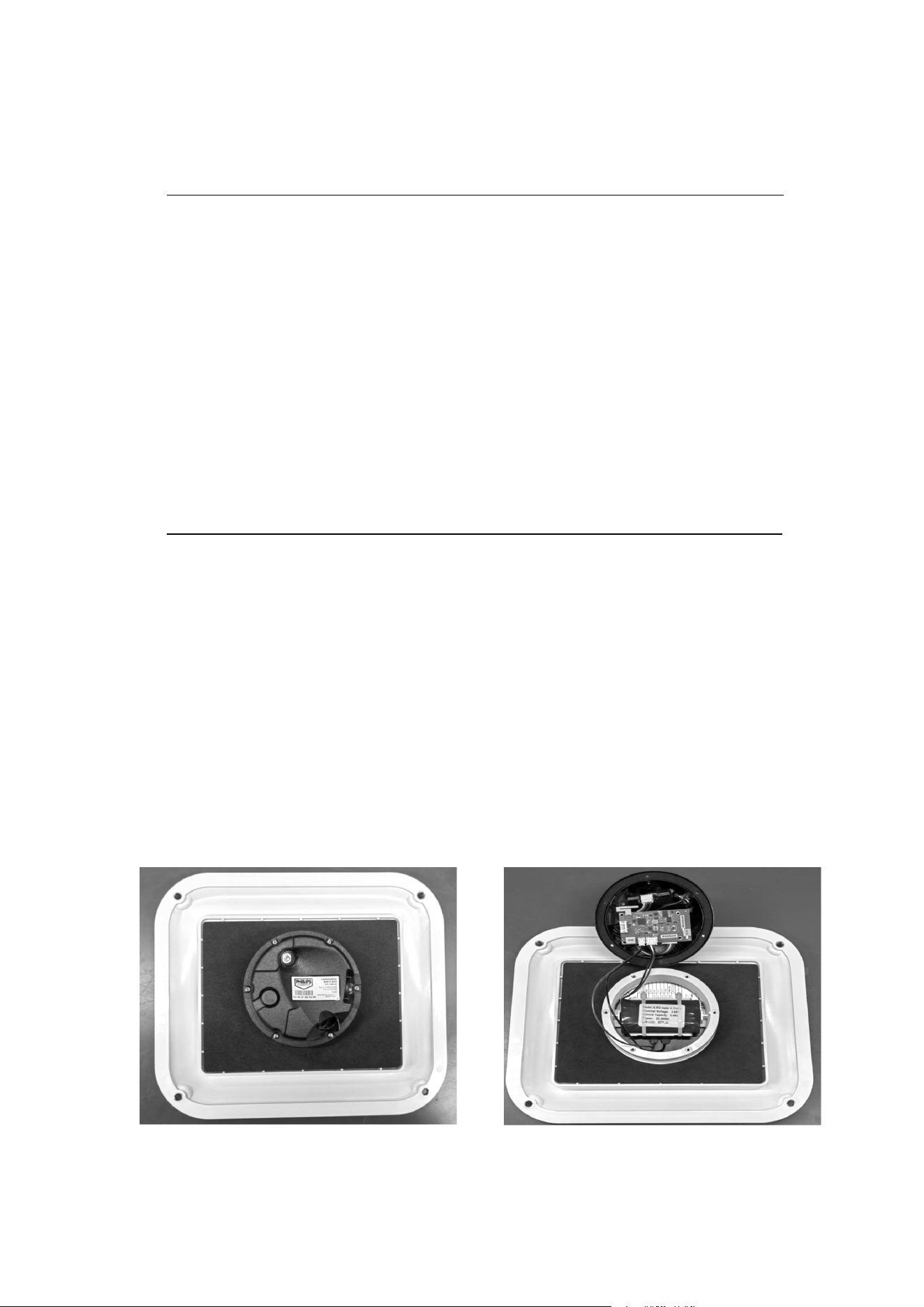
Mounting Surface Interior View

User Manual-CARGOVISION
CARGOVISION User Manual
4
3. SPECIFICATIONS
IMAGE PROPERTIES
Resolution: 1080*720
Field of View: 140°
Flash: 1 second illumination per LED (red and white)
GATEWAY DATA INTERFACE
Bluetooth 5.0
ELECTRICAL
Solar Panel MP (current @ max power):4W
Solar Panel VMP (voltage @ max power): 5.8V(DC)
Battery Type: Li-ion, Rechargeable
Nominal Capacity: 6.4Ah
Nominal Voltage: 3.65V(DC)
Battery Performance (from full charge to depletion)
Up to 800 images
Operates for up to 400 days while idling
ENVIRONMENTAL
Ingress Protection Rating (External to Trailer): IP67
Operating Temperature: −40°F to +149°F (−40°C to +65°C)
MECHANICAL
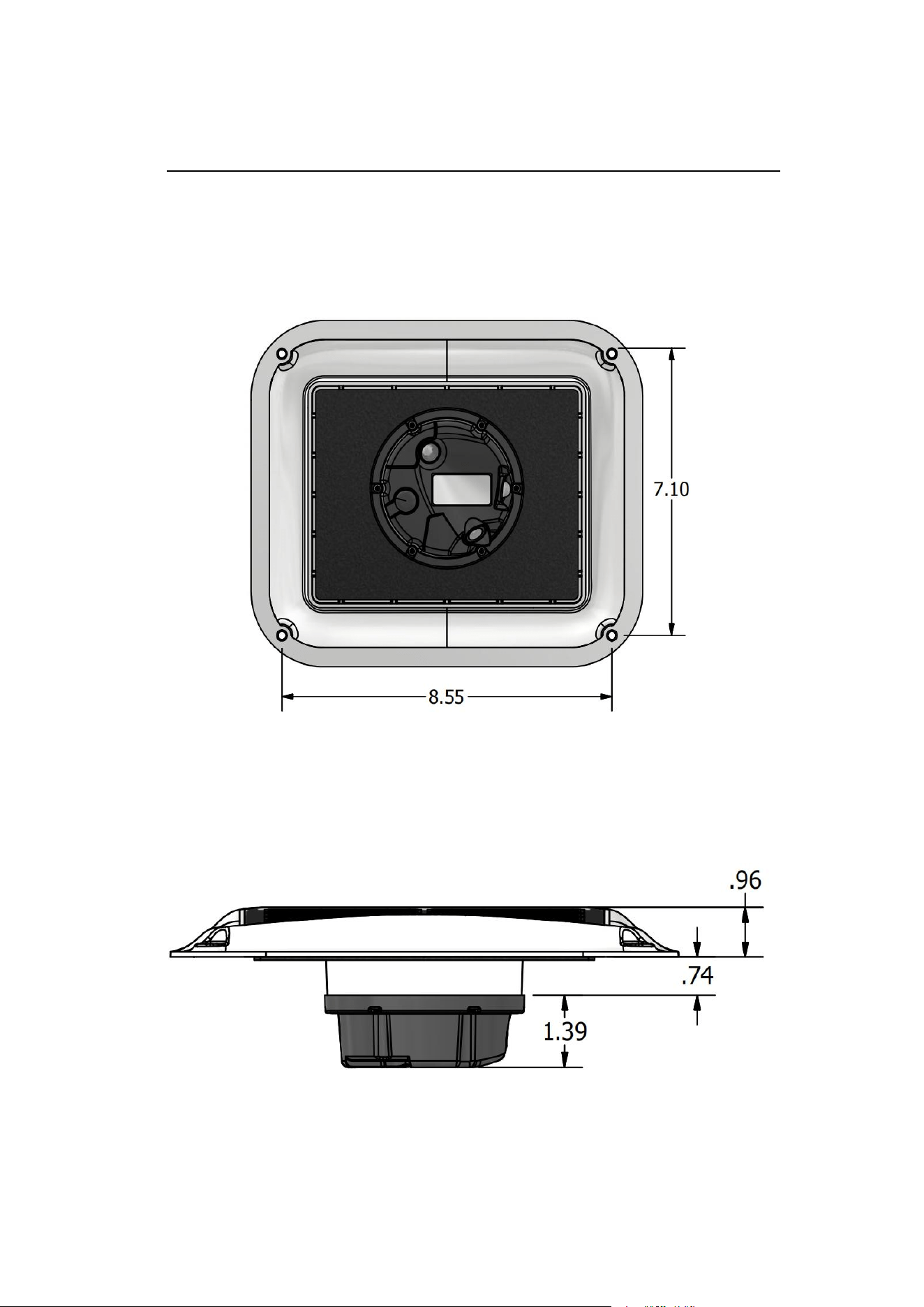
Dimensions: 8.55” (H) x 10.14” (W) x 3.30” (D) (217.2mm x 257.6mm x 83.8mm)
Depth on trailer exterior: 0.96” (24.4mm)
Weight: 1.53 lbs. (695.9g)
Mounting: 48” from rear of trailer; 12” from roof
Location: Roadside rear of trailer

User Manual-CARGOVISION
CARGOVISION User Manual
5
4. CAMERA FUNCTION DESCRIP
4.1 FUNCTION OVERVIEW
This product uses a serial port camera as the image acquisition device, and is only
used for taking static pictures. It does not have the ability to output video streams.
The external device (the host computer) connects to the camera via the serial port to
complete the control of taking pictures, the reading of image data, and the
subsequent storage in the cloud.
4.2 WORKING PROCESS
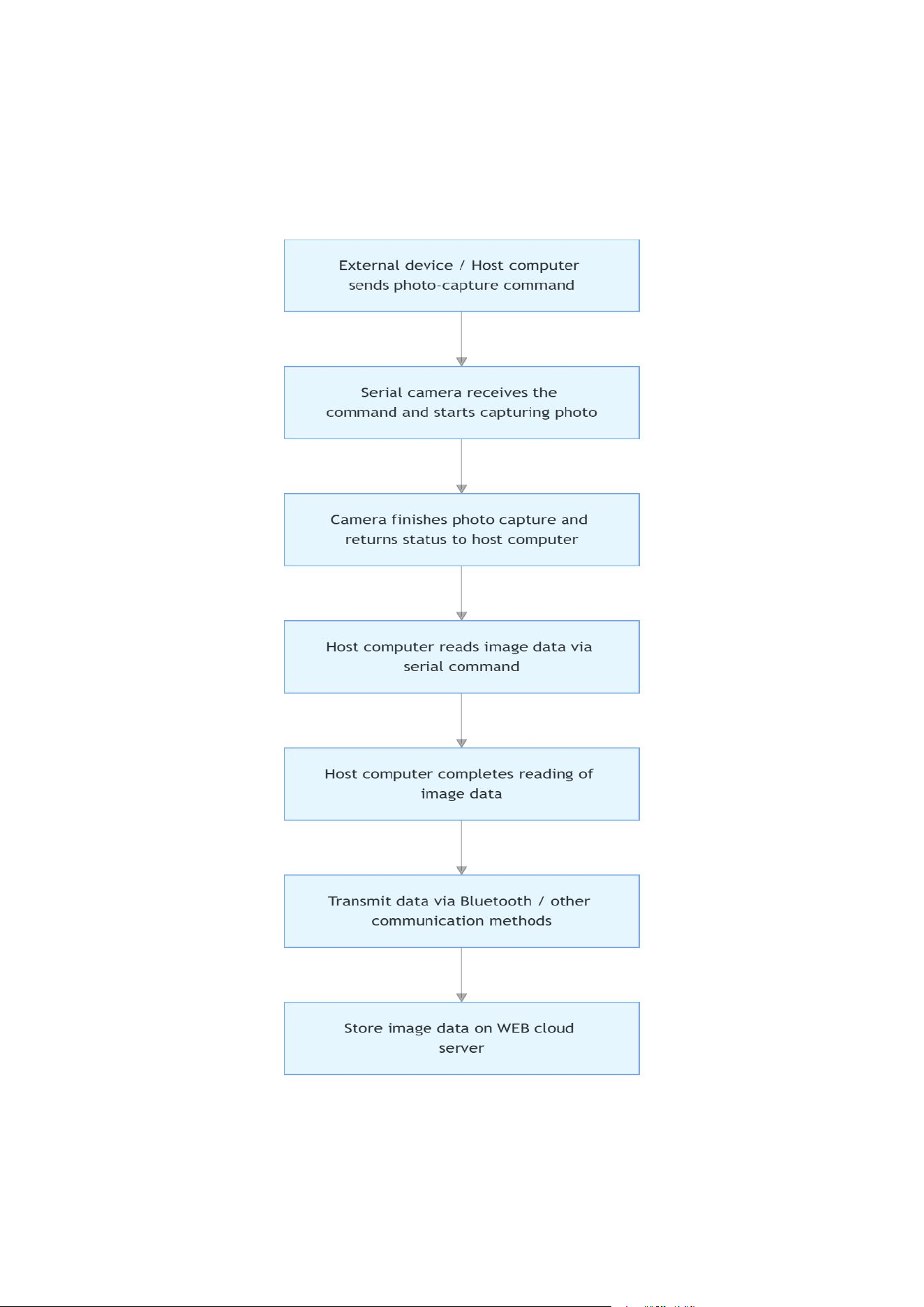
The external device/upper computer sends a photo-taking command to the
camera via the serial port.
After receiving the command, the serial port camera starts taking photos and
then sends the status back to the upper computer upon completion.
The upper computer reads the image data from the camera through the serial
port command.
After the image data is read, the upper computer transmits the data to the WEB
cloud for storage via Bluetooth or other communication methods.
User Manual-CARGOVISION
CARGOVISION User Manual
6
4.3 WORKFLOW PICTURE
User Manual-CARGOVISION
CARGOVISION User Manual
7
5. MECHANICAL DETAILS
5.1 FRONT/REAR DIMENSIONS
5.2 SIDE DIMENSIONS

User Manual-CARGOVISION
CARGOVISION User Manual
8
6. FCC WARNING STATEMENT
Changes or modifications not expressly approved by the party responsible for
compliance could void the user’s authority to operate the equipment. This
equipment has been tested and found to comply with the limits for a Class B digital
device, pursuant to Part 15 of the FCC Rules. These limits are designed to provide
reasonable protection against harmful interference in a residential installation. This
equipment generates uses and can radiate radio frequency energy and, if not
installed and used in accordance with the instructions, may cause harmful
interference to radio communications. However, there is no guarantee that
interference will not occur in a particular installation. If this equipment does cause
harmful interference to radio or television reception, which can be determined by
turning the equipment off and on, the user is encouraged to try to correct the
interference by one or more of the following measures:
Reorient or relocate the receiving antenna.
Increase the separation between the equipment and receiver.
Connect the equipment into an outlet on a circuit different from that to which
the receiver is connected.
Consult the dealer or an experienced radio/TV technician for help.
FCC Radiation Exposure Statement
The antennas used for this transmitter must be installed to provide a separation
distance of at least 20 cm from all persons and must not be co-located for operating
in conjunction with any other antenna or transmitter.
This device complies with Part 15 of the FCC Rules. Operation is subject to the
following two conditions:
(1)This device may not cause harmful interference.
(2)This device must accept any interference received, including interference that may
cause undesired operation.

User Manual-CARGOVISION
CARGOVISION User Manual
9
7. IC WARNING STATEMENT
7.1 IC Warning
This device contains licence-exempt transmitter(s)/receiver(s) that comply with
Innovation, Science and Economic Development Canada's licence-exempt RSS(s).
Operation is subject to the following two conditions:
(l) This device may not cause interference.
(2) This device must accept any interference, including interference that may cause
undesired operation of the device.
Under Industry Canada regulations, this radio transmitter may only operate using an
antenna of a type and maximum (or lesser) gain approved for the transmitter by
Industry Canada. To reduce potential radio interference to other users, the antenna
type and its gain should be so chosen that the equivalent isotropically radiated
power (e.i.r.p.) is not more than that necessary for successful communication.
This device complies with Canadian ICES-003 and RSS-247.
Radiation Exposure: This equipment complies with Canada radiation exposure limits
set forth for an uncontrolled environment.
IC Radiation Exposure Statement
The antennas used for this transmitter must be installed to provide a separation
distance of at least 20 cm from all persons and must not be co-located for operating
in conjunction with any other antenna or transmitter.
7.2 Avertissement IC
Cet appareil contient des émetteurs/récepteurs exemptés de licence qui sont
conformes aux RSS exemptés de licence d’innovation, sciences et développement
économique Canada. Le fonctionnement est soumis aux deux conditions suivantes:
(l) ce dispositif ne peut pas causer d’interférence.
(2) ce dispositif doit accepter toute interférence, y compris l’interférence qui peut
causer un fonctionnement indésirable du dispositif.
Selon la réglementation d ’Industrie Canada, cet émetteur radio ne peut fonctionner
qu ’en utilisant une antenne type et gain maximum (ou inférieur) approuvés pour
Industrie Canada par l'émetteur. Réduire brouillage radioélectrique potentiel avec
d’autres utilisateurs, le type d’antenne et son gain doivent être choisis que la
puissance isotrope rayonnée équivalente (e.i.r.p.) n’est pas supérieure à celle
nécessaire pour communication réussie.

User Manual-CARGOVISION
CARGOVISION User Manual
10
Cet appareil est conforme aux normes canadiennes ICES-003 et RSS-247.
Exposition aux radiations: Cet équipement est conforme à la réglementation
canadienne sur les radiations.
limites d'exposition établies pour un environnement non contrôlé.
Déclaration d'exposition aux radiations IC
Les antennes utilisées pour cet émetteur doivent être installées de manière à assurer
une distance de séparation d'au moins 20 cm au moins de toute personne et ne
doivent pas être co-localisés pour fonctionner en conjonction avec autre antenne ou
émetteur.
8. MECHANICAL DETAILS