(if applicable)
Slide the radio into the mounting sleeve to secure the radio.
Gray
Gray/Black
Step 4:
Use the removal keys
to remove the unit.
RGB Color Operation
IC STATEMENT
Setting the
Color Mode
Dimmer
Quick Preset
Color
Ignition / ACC 12V(+)
Press to seek to previous or
next strong station.
Press and hold to enter manual
tuning mode, then press
momentarily to change radio frequency down or up one
step at a time.
Press the DIM (button) to adjust the dimmer level for the
buttons and LCD and turn the volume knob left or right to
dim
HIGH(default)/MID/LOW.
Press the volume knob while the dimmer level is being
displayed to select one of 7 preset colors.
Press and hold the volume knob for more than 2 seconds to
enter color setting menu. Turn the volume knob left and
right to select
Color Auto(default)/Preset/Custom/
Flash mode.
Press and hold the volume knob for more
than 2 seconds again to enter each color mode.
Set the unit to rotate between all illumination colors
automatically.
Select one of the 7 colors (Blue/Green/Red/Yellow/Violet/
Cyan/White).
Adjust each red, green and blue in the range of 0-32 to
customize your colors for over 32K combination.
IMPORTANT NOTE: Adjusting each red, green and blue
level to 0 will turn off all the lights on the LCD and buttons.
To turn the lights back, press
DIM (button) and change the
color again in the color setting.
Select one out of six different color and flash effect lights or
turn it off.
Flash lights will be demonstrated for about 30 seconds, and
back to setting mode.
The adjusted color will be flashed when there is an
incoming Bluetooth call.
Press and hold the volume knob for more than 2 seconds to
display Auto Store, then press DISP to store 18 FM stations
and 12 AM stations automatically.
Auto Color
Preset Color
Custom Color
Flash Color
Playing MP3 and
FLAC Files
Removal Keys
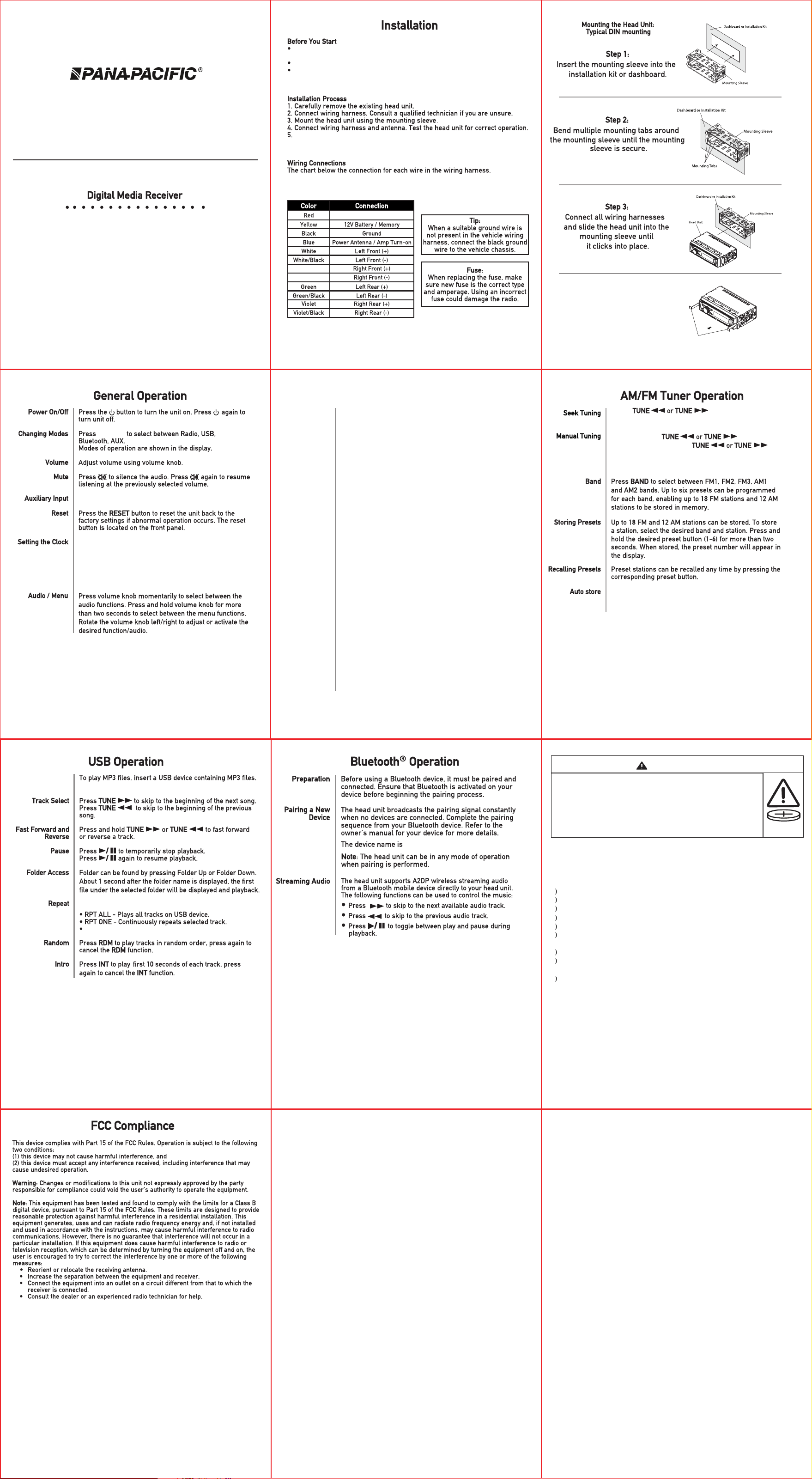
PP2300
Quick Start Guide
Consult a qualied technician for instructions.We always recommends
Professional installation.
Disconnect negative battery terminal.
Insert the removal keys. and remove the mounting sleeve from the head unit.
“FMRADIO”
With the unit on, press DISP to display clock time. Press and
hold DISP until the hours or minutes begin to ash, then
release. Rotate the volume knob to adjust the time.
Press DISP to display the clock all the time or
current source.
Use the 3.5mm AUX input on the front of the receiver
Clock Display
SOURCE
Press RPT to toggle between the following options:
RPT FOLDER - Repeats all tracks in selected folder.
• INGESTION HAZARD: This product contains a button cell or coin
battery.
•
•
DEATH or serious injury can occur if ingested.
A swallowed button cell or coin battery can cause
Internal Chemical
Burns
in as little as 2 hours.
• KEEP new and used batteries OUT OF REACH of CHILDREN
• Seek immediate medical attention
if a battery is suspected to be
swallowed or inserted inside any part of the body.
WARNING
Pls kindly note below statements:
Remove and immediately recycle or dispose of used batteries according to local
regulations and keep away from children. Do NOT dispose of batteries in household trash
or incinerate.
Even used batteries may cause severe injury or death.
Call a local poison control center for treatment information.
Battery type: CR2025.
Nominal battery voltage: 3V.
Non-rechargeable batteries are not to be recharged.
Do not force discharge, recharge, disassemble, heat above 55° or incinerate. Doing so
may result in injury due to venting, leakage or explosion resulting in chemical burns.
Ensure the batteries are installed correctly according to polarity + and -.
Remove and immediately recycle or dispose of batteries from equipment not used for an
extended period of time according to local regulations.
Always completely secure the battery compartment. If the battery compartment does not
close securely, stop using the product, remove the batteries, and keep them away from
children.
a)
b
c
d
e
g
h
i
j
f
Pana-Pacific
838 N. Laverne Avenue,
Fresno, CA 93727
(559) 457-4700
www.panapacific.com
Pana-Pacific
838 N. Laverne Avenue,
Fresno, CA 93727
(559) 457-4700
www.panapacific.com
This device contains licence-exempt transmitter(s)/receiver(s) thatcomply with
Innovation, Science and Economic Development Canada’s licence-exempt RSS(s).
Operation is subject to the following two conditions:
(1) This device may not cause interference.
(2) This device must accept any interference, including interference that may
cause undesired operation of the device