1
User Guide
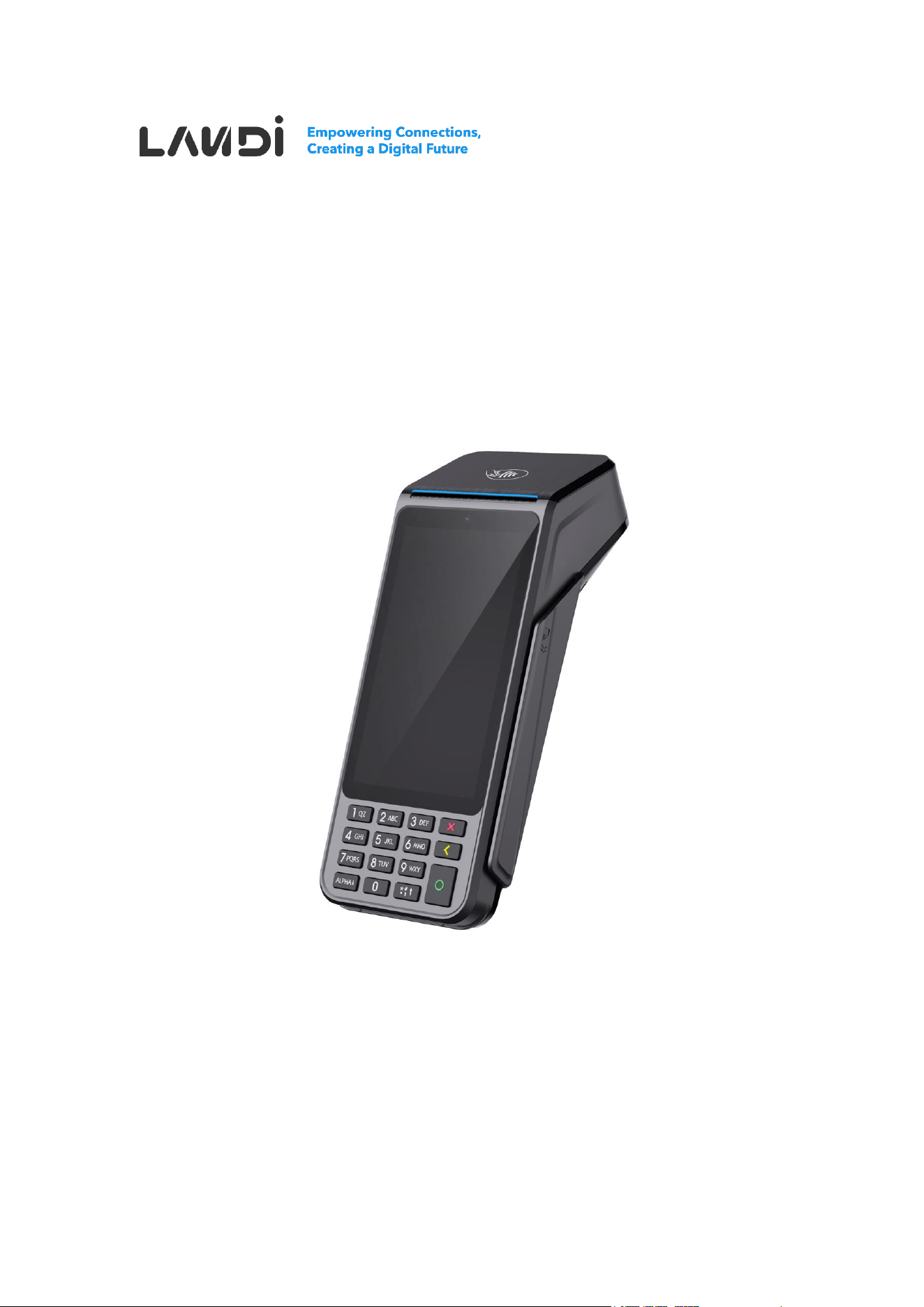
P20 Portable Data Terminal

2
Disclaimer
- This guide is the sole property of Fujian LANDI Commercial Equipment Co., Ltd.
(“LANDI”). Unauthorized reproduction, distribution, transfer, or sale of this document
or any part thereof is strictly prohibited without explicit authorization from LANDI.
LANDI reserves the right to take legal action for any infringement according to law.
- Every effort has been made to ensure the accuracy and completeness of the
information in this user guide. However, errors or omissions may exist.
- LANDI reserves the right to modify product software, hardware or documentation
without notice.
- Product details in this guide may differ from the actual product due to updates. Refer
to the physical product for authoritative information.
- LANDI shall not be held liable for damages, malfunctions, data loss or accessory
loss caused by operations not complying with instructions in this guide.

3
Use this Manual
Legend
Danger
Indicates a potentially hazardous situation which, if not
avoided, could result in death or serious injury.
Warning
Indicates a potentially hazardous situation which, if not
avoided, may result in equipment damage, data loss,
performance degradation, or unexpected results.
Notes
Indicates important information that helps make better use of
the device and features.

4
Important Safety Information
Safety Rules
⚫ Power Supply
- Use only provided LANDI power adapter.
- Maintenance restricted to authorized LANDI technicians.
- Connect to properly rated electrical outlet.
- Ensure outlet is easily accessible and meets local regulations.
- Disconnect adapter from electrical mains network to power off.
- Shut down terminal after daily operations to save energy.
- Avoid connecting or disconnecting components while powered on.
⚫ Battery Safety
- Use only LANDI-approved batteries and chargers.
- Internal lithium button battery: service by qualified technician only.
- Avoid short-circuiting, crushing, puncturing, or dismantling the battery.
- Replacing the battery with an incorrect type can defeat its safeguards and risk
explosion.
- Disposing of a battery in fire or a hot oven can cause an explosion.
- Leaving a battery in extreme heat may cause an explosion or leakage of
flammable substances.
- Subjecting a battery to extremely low air pressure may cause an explosion or
leakage.
- Properly dispose of used batteries according to local environmental regulations.

5
⚫ Environmental Restrictions
- Avoid use in explosion-risk areas (chemical plants, fuel depots).
- Suspend use during thunderstorms.
- Use certified protective cover near fuel pumps.
- Remove battery when on aircraft.
- Avoid harsh environments with direct sunlight, high temperatures, humidity, or
dust.
- Operate and store the terminal only within the specified environmental limits:
◼ Operating Temperature:
Non-Battery Version: -10°C to +50°C (14°F to 122°F)
Battery Version: -10°C to +50°C (14°F to 122°F) for discharging; 0°C to
+40°C (32°F to 104°F) for charging
◼ Storage Temperature: -20°C to +70°C (-4°F to 158°F)
◼ Operating Humidity: 10% to 90% non-condensing
⚫ Health and Safety
- Radio transmission may interfere with medical devices.
- Consult healthcare providers regarding potential interference.
Usage Instructions
⚫ Terminal Security
- Verify PCI PTS security compliance.
- Regular inspection for tampering signs:
◼ Keypad integrity
◼ Unauthorized wire connections
◼ Card reader condition
- Report "Warning Detected" messages immediately.

6
- Restrict access to verified trustworthy staff.
⚫ Customer Protection
- Never request PIN disclosure.
- Advise customers on PIN privacy.
- Maintain terminal visibility at all times.
- Secure terminal against theft or replacement.
⚫ Component Guidelines
- Keep SAM/SIM reader compartment cover in place.
- Battery life factors:
◼ Feature usage patterns
◼ Charge cycle frequency
◼ Operating temperature
⚫ Network Compliance
- Follow cellular network regulations.
- Non-compliance may result in service ban or legal action.
⚫ Abnormal Conditions
If any of the following phenomena occur during work:
- Stop operation immediately.
- Cut off power supply.
- Promptly report to service provider when:
1. Hearing sharp noises during operation
2. Impurities or water enter terminal
3. Unpleasant odors emit during operation

7
Contents
Disclaimer ....................................................................................................... 2
Use this Manual .............................................................................................. 3
Legend ........................................................................................................................ 3
Important Safety Information ........................................................................ 4
Safety Rules ................................................................................................................ 4
Usage Instructions ...................................................................................................... 5
1. Product Profile ................................................................................... 8
1.1. Introduction ..................................................................................................... 8
1.2. Unboxing Inspection ........................................................................................ 8
1.3. Overview ......................................................................................................... 9
2. Product Installation ......................................................................... 13
2.1. Power Connection ......................................................................................... 13
2.2. SAM/SIM Cards ............................................................................................ 14
2.3. MicroSD Memory Card .................................................................................. 15
2.4. Paper Roll ..................................................................................................... 15
3. Usage................................................................................................ 17
3.1. Pre-Operation Check .................................................................................... 17
3.2. Power Operations ......................................................................................... 17
3.3. Card Reading ................................................................................................ 17
4. Maintenance ..................................................................................... 19
5. Transportation and Storage ............................................................ 20
6. FAQs ................................................................................................. 21
7. Frequency Bands and RF Output Power ....................................... 22
8. Standards ......................................................................................... 24
9. Customer Support ........................................................................... 29

8
1. Product Profile
1.1. Introduction
The P20 is a portable data terminal that combines Android functionality with secure PIN
pad features. It features a 5-inch touch screen display and runs on Android 14 operating
system. The device supports multiple payment methods and offers comprehensive
connectivity options including 4G, Wi-Fi, and Bluetooth 5.0. Designed for merchant mobility,
the P20 comes with a long-lasting battery and adheres to industry security standards. Its
physical PIN keyboard ensures secure transaction processing while maintaining user
conveniences.
1.2. Unboxing Inspection
Upon opening, inspect the terminal and optional accessories for any signs of disassembly
or transit damage. Check for:
- Terminal main unit
- Battery pack
- Power adapter
- Quick start guide
- USB cable
Remove all plastic packaging from the terminal and accessories. Peel off the protective
film from the LCD screen. Retain the transit packaging for future transportation of the
terminal.
9
1.3. Overview
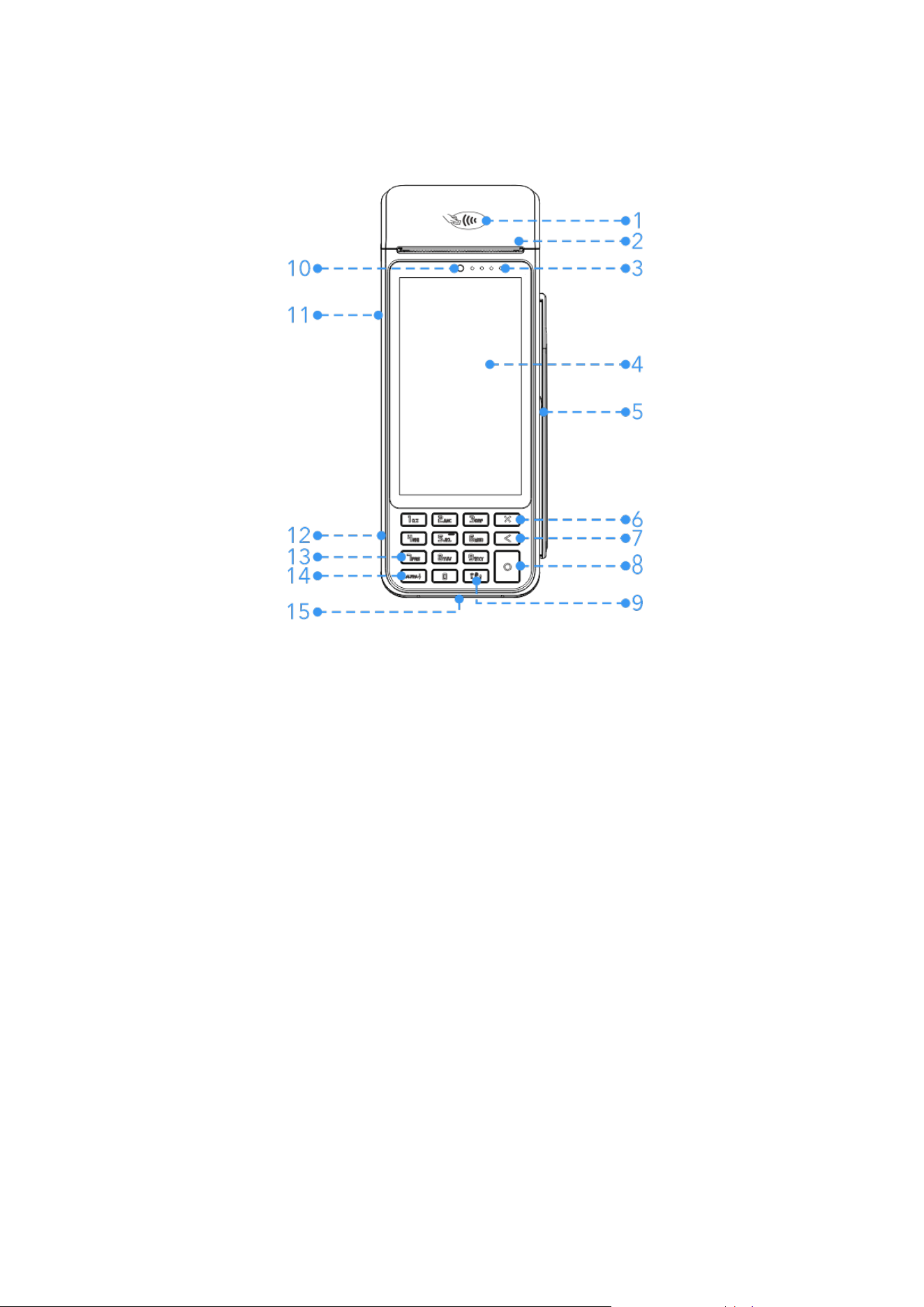
1. Contactless Reader
Reads contactless cards (including membership cards).
2. Printer Cover
Opens for paper loading/unloading.
3. LEDs for Contactless Reader
Indicate contactless transaction status.
4. LCD and Touch Screen
Displays content and accepts signature input.
5. Magnetic Stripe Reader
Reads magnetic stripe cards (stripe facing the terminal).
6. Cancel Button
Returns to previous menu or cancels operation.
7. Clear Button
Clears input content.

10
8. Confirm Button
Confirms current operation.
9. Punctuation Button
Inputs punctuation.
10. Front Camera
Scans QR codes/barcodes and takes photos.
11. Power Button
Short press: Wakes up/locks screen.
Long press:
⚫ 2-3s (when off): Powers on.
⚫ 2-3s (when on): Powers off/restarts.
⚫ 10-12s: Forces shutdown if system freezes.
12. USB Type-C Port
Supports charging and developer debugging.
13. Number Button
Inputs numbers.
14. Letters Button
Switches between numbers and letters.
15. Smart Card Reader
Insert card vertically, chip facing up.
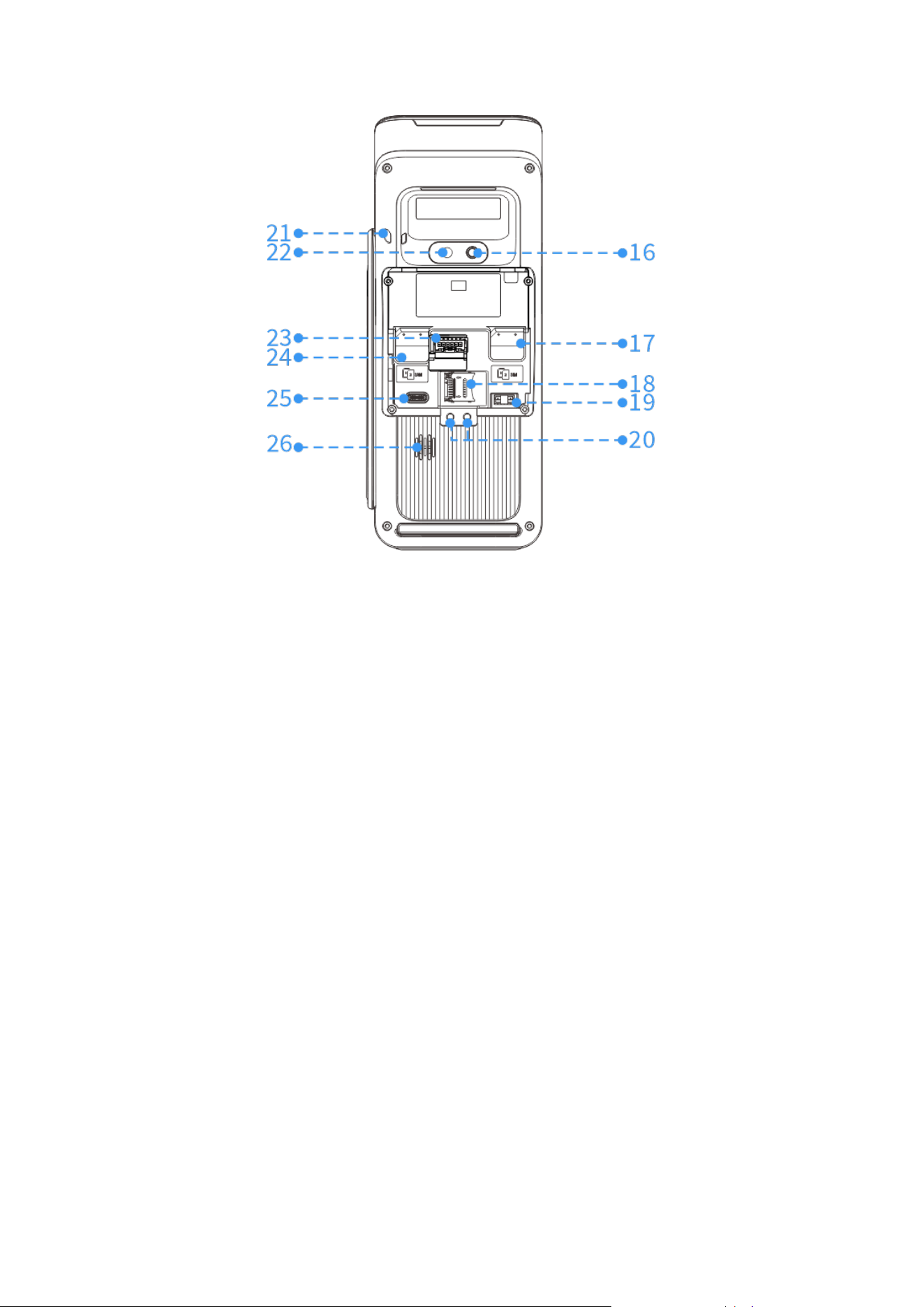
11
16. Flashlight
Provides lighting for the camera.
17. SIM Card Slot
Accepts the SIM card.
18. MicroSD Card Slot
Accepts the MicroSD card.
19. Fiscal Module Interface
Reserved for fiscal module connection.
20. Base Charging Interface
Charges terminal when placed on base.
21. Lanyard Hole
Attachment point for strap.
22. Rear Camera
Scans QR codes/barcodes and takes photos.
23. Battery Connector
Connects lithium battery.

12
24. SAM Card Slot
Accepts the SAM card.
25. Magic Hub Interface
Provides Ethernet, RS232, and USB ports for peripheral connectivity.
26. Speaker
Outputs audio.
13
2. Product Installation
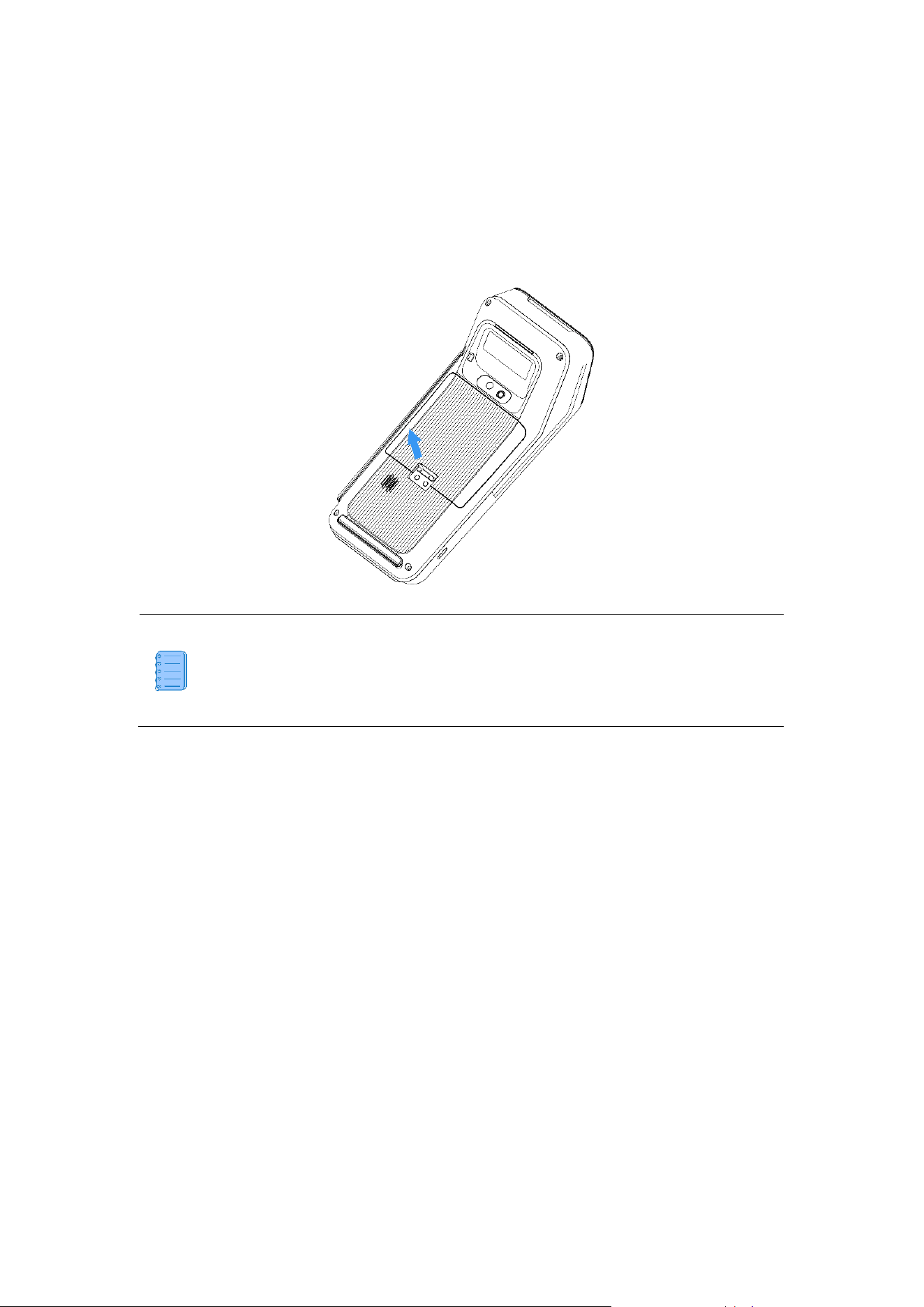
The module connectors are in a sealed compartment beneath the back cover. To access
them, turn the terminal face down and push the latch upward to release the cover. FCC ID
and IC lD can be found on the label in the battery holder.
The product is available in two hardware configurations, distinguished by their
Hardware Version Identification Number (HVIN): P2W1 for the battery version
and P2C1 for the non-battery version.
2.1. Power Connection
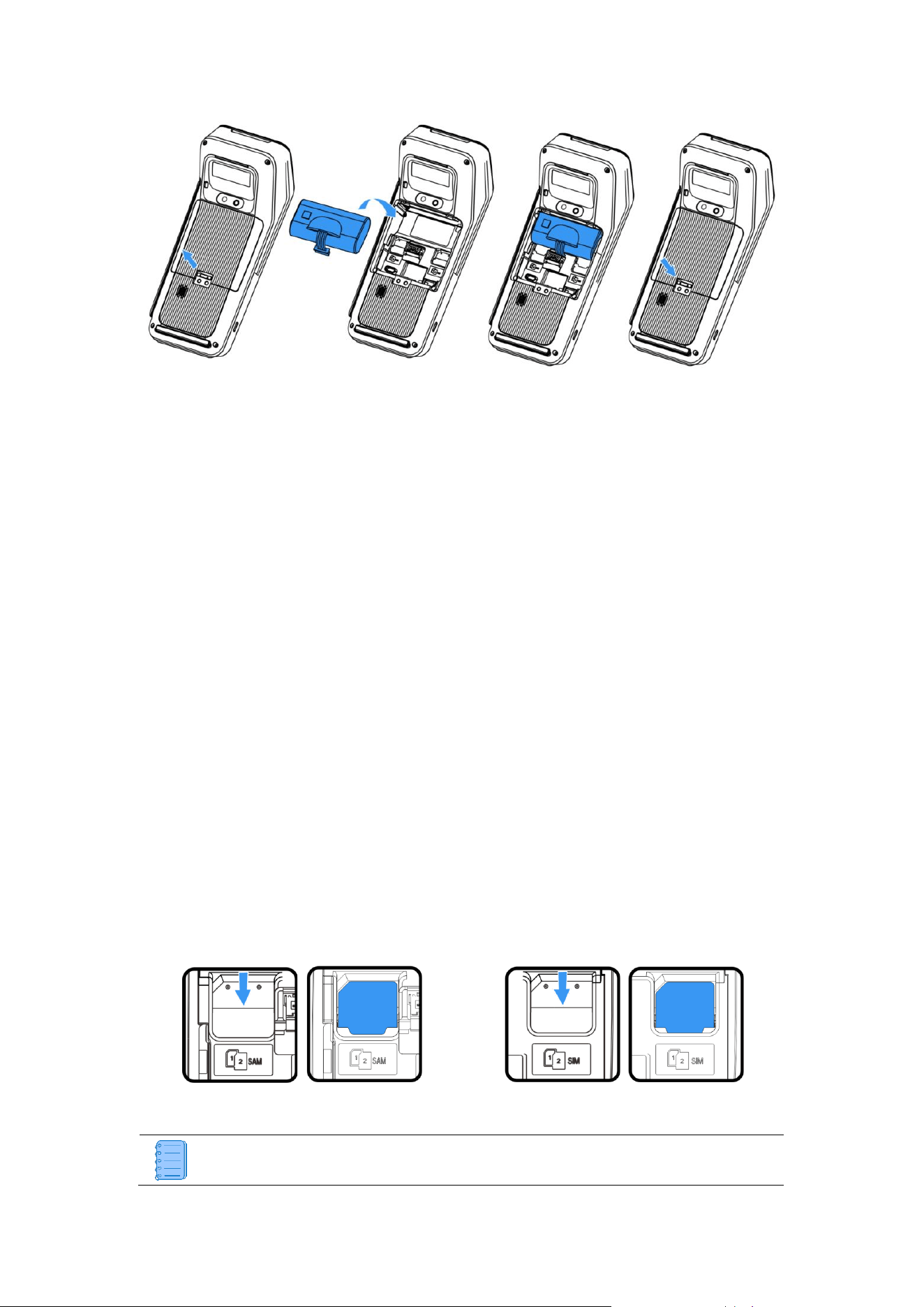
⚫ Non-battery version: Connect power adapter to start.
⚫ Battery version: Place battery pack into compartment and connect battery plug.
14
Battery Charging
1. Connect power adapter to USB Type-C port (left side).
2. Plug adapter into power supply mains.
3. Verify charging status: Check for lightning bolt icon in screen’s upper right corner.
2.2. SAM/SIM Cards
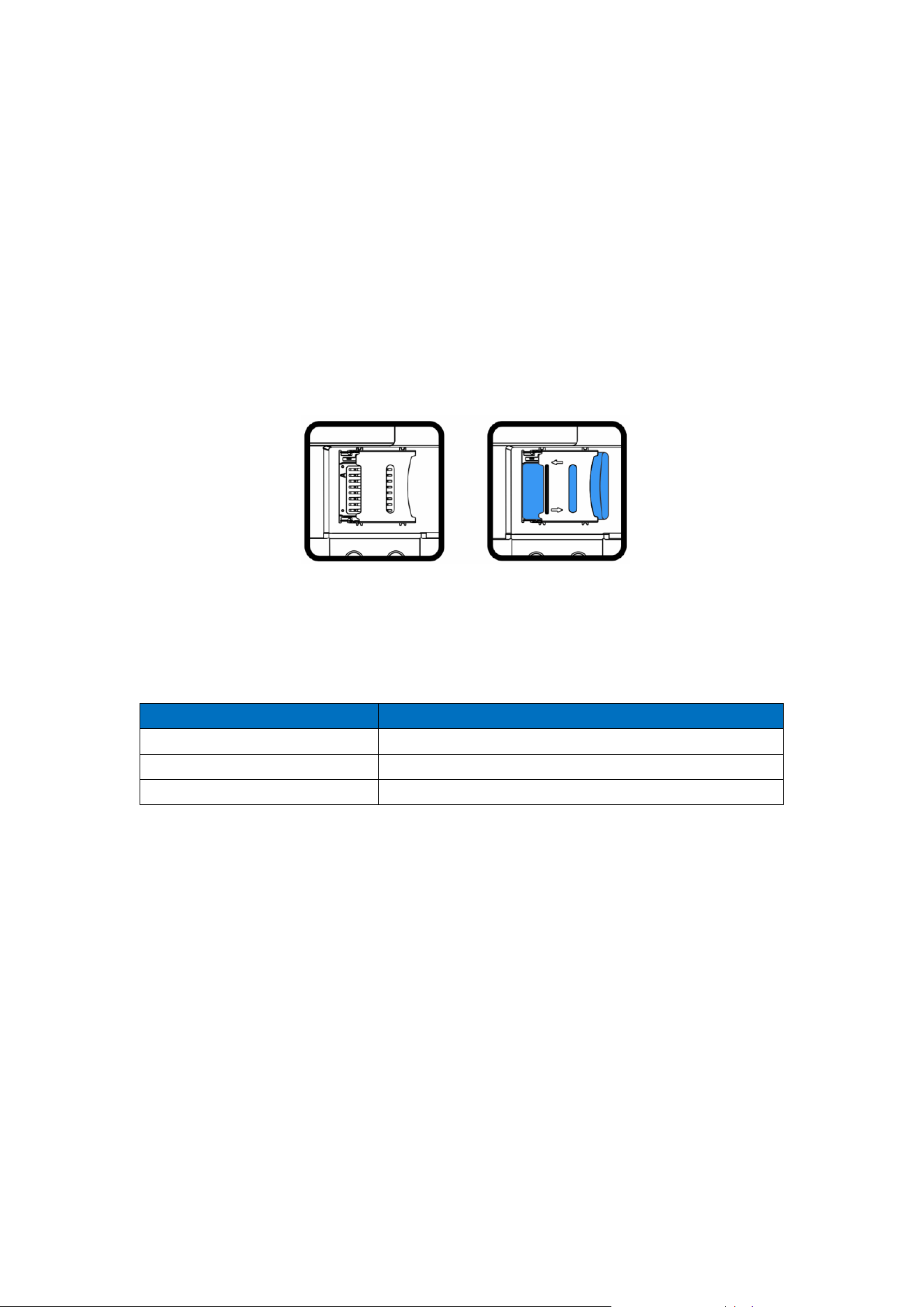
SAM/SIM Card Slots
⚫ Upper slots: SAM2 and SIM2
⚫ Lower slots: SAM1 and SIM1
Installation Steps
1. Orient the card according to diagram.
2. Insert it into the slot until firmly seated.
3. For single card use, prefer bottom slots (SAM1/SIM1).
SAM
SIM
SIM and SAM slots appear identical - verify correct position before insertion.
15
2.3. MicroSD Memory Card
1. Slide the card cover left to unlock and lift up.
2. Insert the MicroSD card with contacts facing down, aligning the notched corner as
shown in the diagram.
3. Close the cover and slide right to lock.
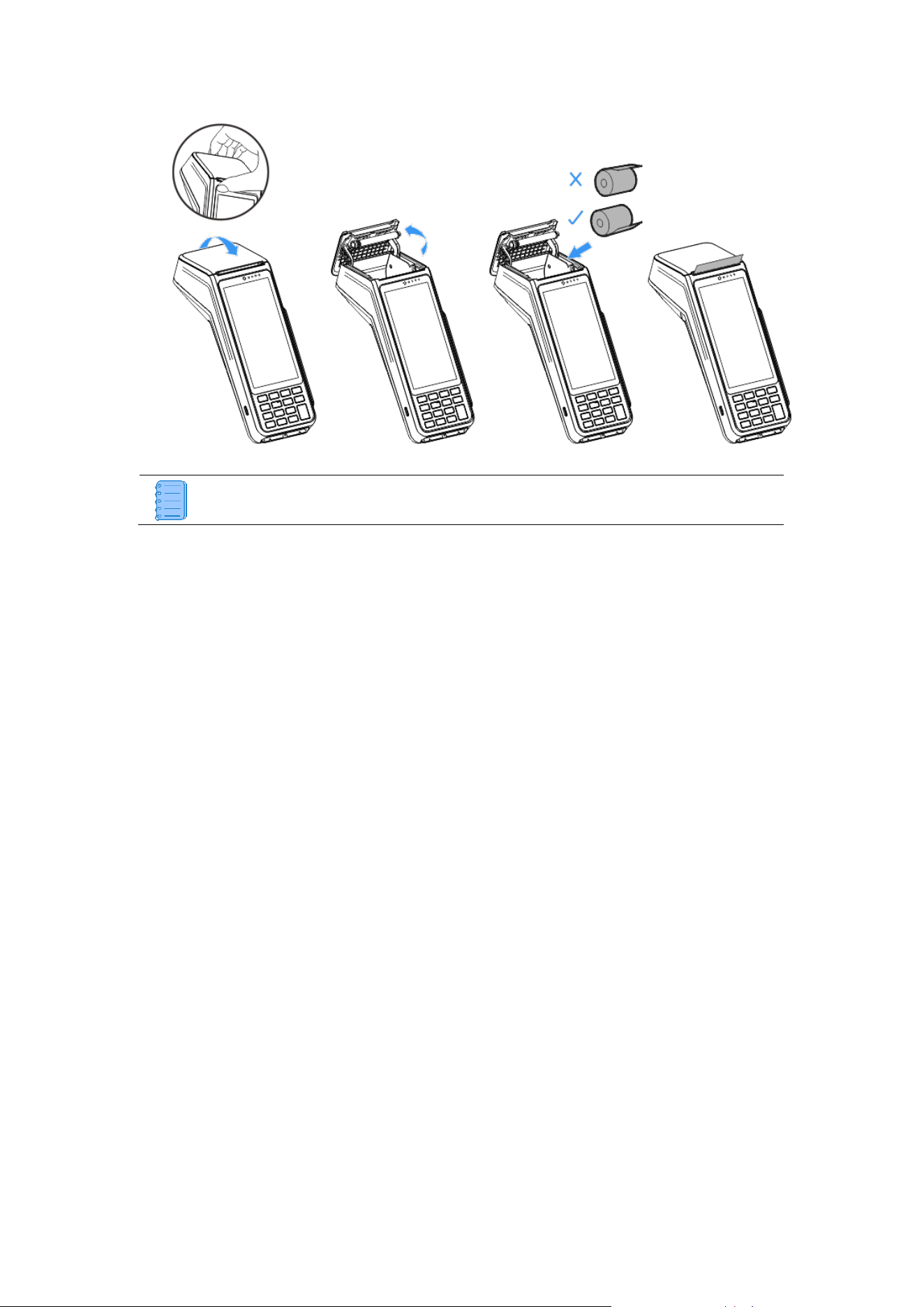
2.4. Paper Roll
Specifications
Installation Steps
1. Locate the notch at the top of terminal.
2. Lift the printer cover from the notch and push upward to fully open.
3. Insert the paper roll following the direction shown in the diagram.
4. Pull the paper end slightly beyond the cover edge and close the cover firmly until it
clicks.
Parameter
Value
Color
White
Width
58 mm (2.283 inch)
Diameter
40 mm (1.57 inch)
16
For new rolls, remove first complete turn to avoid printing on adhesive residue.
17
3. Usage
3.1. Pre-Operation Check
Before operation, ensure the thermal paper roll is properly installed.
3.2. Power Operations
⚫ Power On
With battery properly installed or power cable firmly connected, press the power button for
2–3 seconds until screen activates.
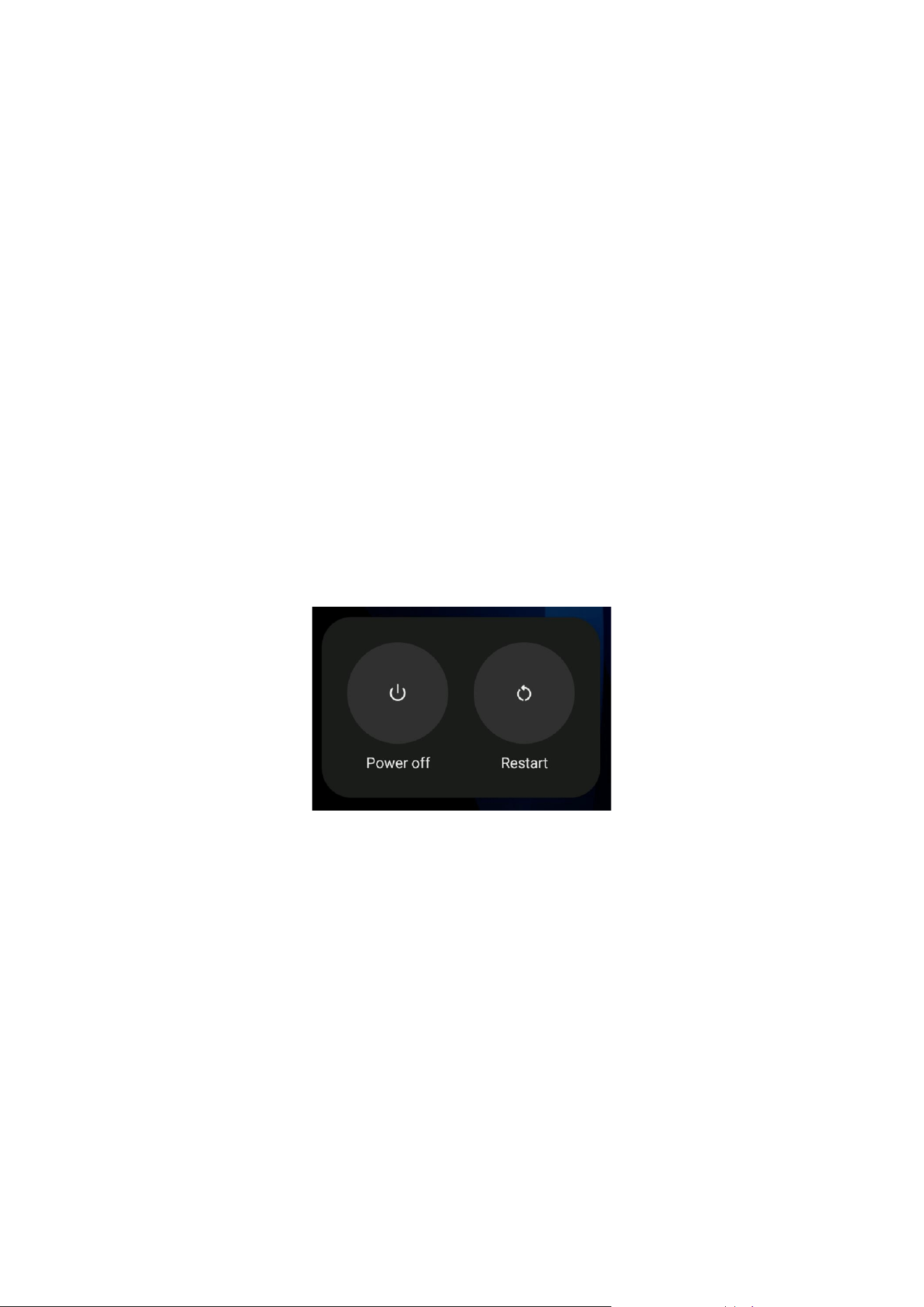
⚫ Power Off/Restart
Press the power button 2–3 seconds, select
Power off
or
Restart
from menu.
⚫ Screen Control
Short press the power button for 0.5 seconds to turn the display on or off.
3.3. Card Reading
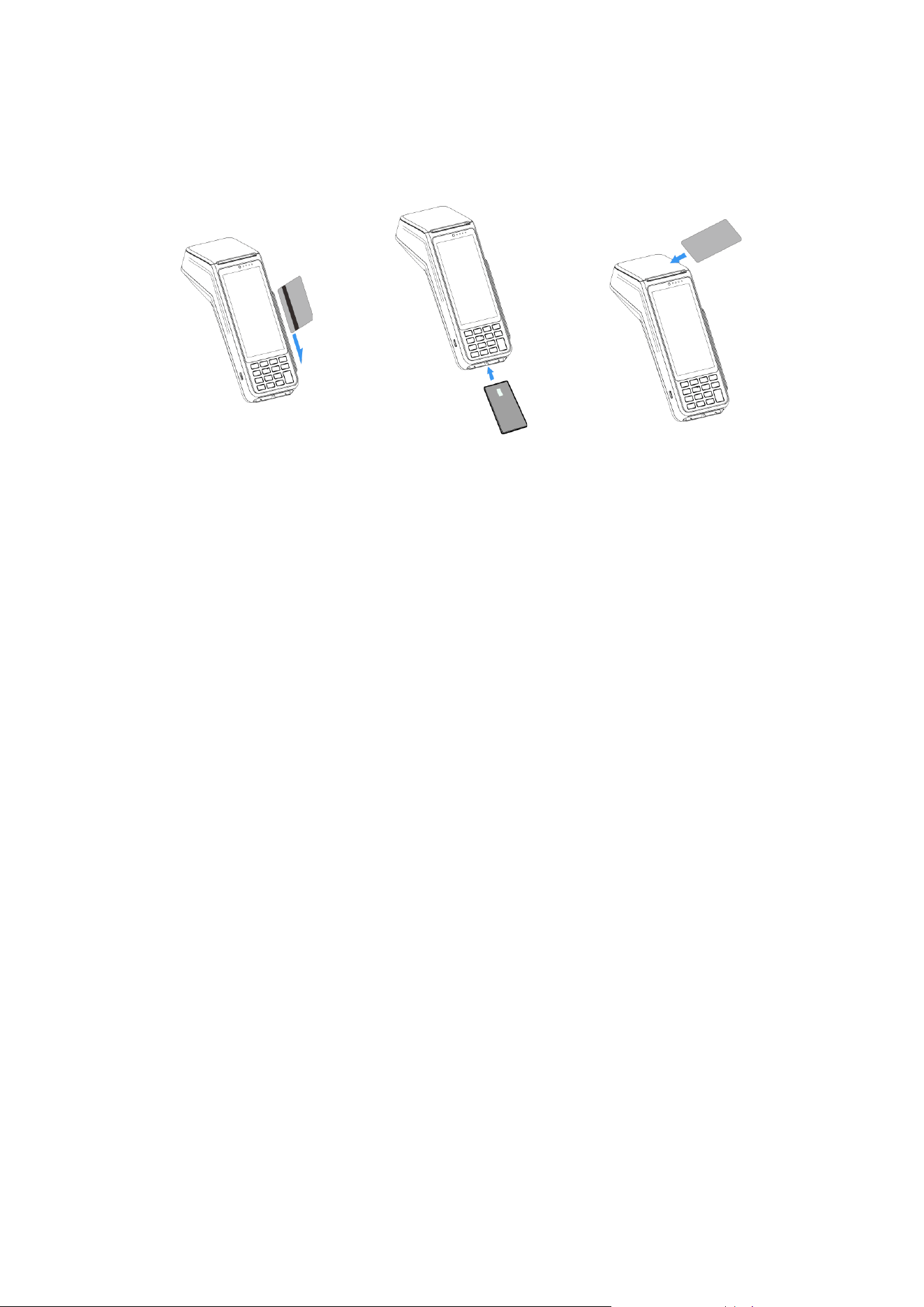
⚫ Magnetic Stripe Card
Swipe in either direction with magnetic stripe facing terminal.
⚫ Smart Card
Insert vertically, chip facing up; keep inserted during transaction.
18
⚫ Contactless Card
Hold card steady against reader area until transaction completes.
Magnetic Stripe Card
Smart Card
Contactless Card

19
4. Maintenance
When cleaning, always disconnect the power source first. Wipe the exterior surfaces with
a soft, dry cloth.
⚫ For light dirt, dampen a clean cloth with 1–2 drops of mild, neutral cleaner. Never spray
cleaners or liquids directly onto the display screen and do not use an overly wet cloth.
⚫ For stubborn stains, gently wipe with isopropyl alcohol or an alcohol-based cleaner.
Do not use diluent thinners, trichloroethylene, ketone-based solvents or other strong
chemicals as these may damage plastic or rubber parts.

20
5. Transportation and Storage
⚫ Transportation
The terminal should be handled carefully to prevent damage from rain, snow, sunlight,
mechanical impacts, or dropping. The packaging must prevent crushing during transit to
avoid damage.
⚫ Storage
Store the product in its original packaging box. The storage area should be free of
hazardous gases, flammables, explosives, corrosives, strong vibrations, impacts, or
magnetic fields. Place the box at least 15 cm off the ground and 50 cm away from walls,
heat/cold sources, windows, or air intakes.

21
6. FAQs
Question: Why won’t my terminal start?
Answer:
1. Verify power supply/battery level.
2. Restart terminal.
3. If problem persists, contact customer service.
Question: Why isn't the printer working?
Answer:
1. Check power supply:
⚫ Battery level status
⚫ Power connection integrity
2. Check paper installation:
⚫ Paper roll orientation
⚫ Dust cover placement
3. If problem persists, contact customer service.
Question: Why did my transaction fail to process?
Answer:
1. Test multiple contactless cards.
2. Verify proper card swiping technique.
3. Try manual transaction mode.
4. Check card components:
⚫ SAM card installation
⚫ SIM card placement
5. Verify network connection.
6. Contact customer service if unresolved.
22
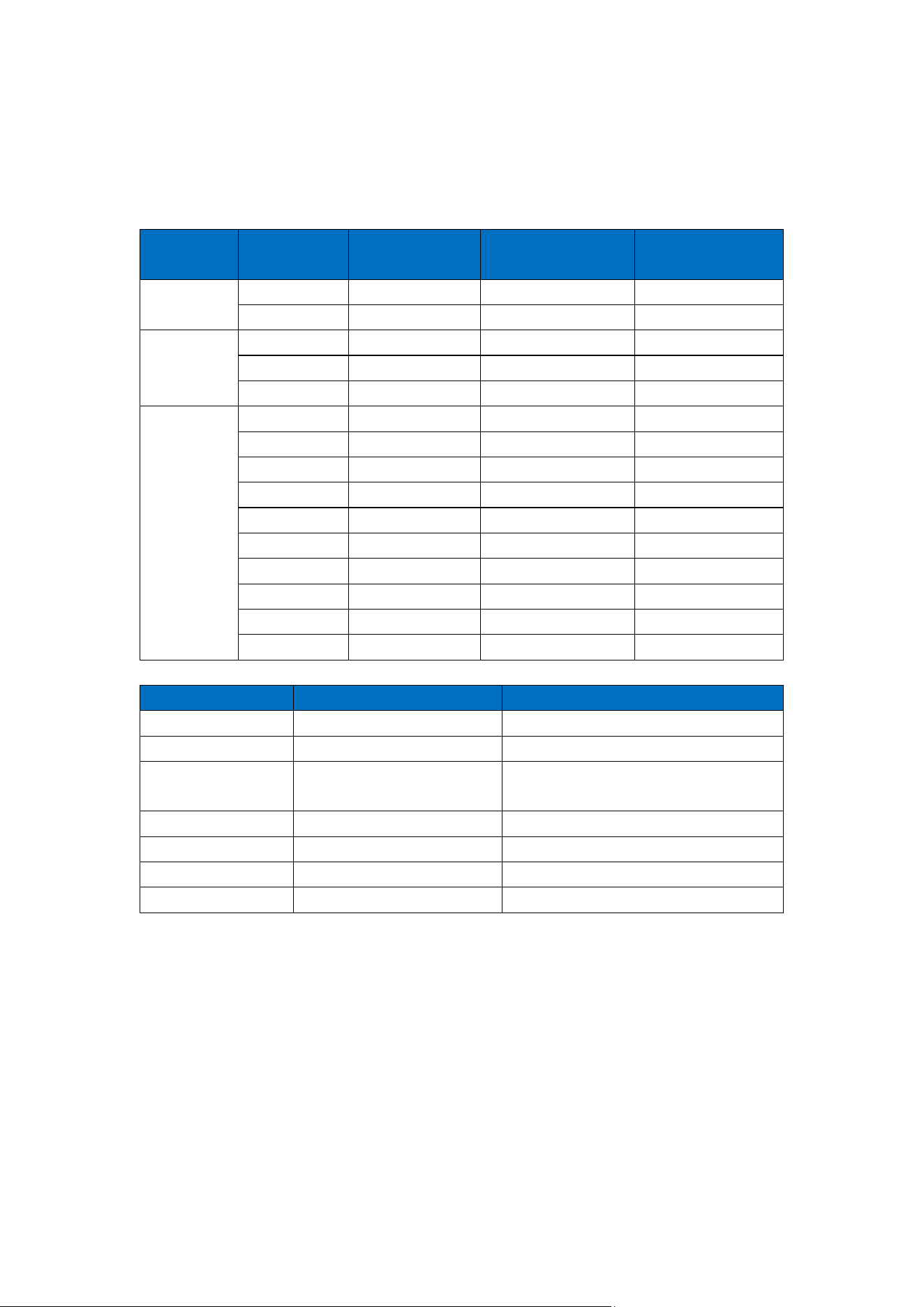
7. Frequency Bands and RF Output Power
The P20 terminal supports the following wireless specifications:
Network
Type
Band
TX Frequency
(MHz)
RX Frequency
(MHz)
Max RF Output
Power (dBm)
GSM
900
880 - 915
925 - 960
33
DCS1800
1710 - 1785
1805 - 1880
30
WCDMA
I
1920 - 1980
2110 - 2170
24
V
824 - 849
869 - 894
24
VIII
880 - 915
925 - 960
24
LTE
B1
1920 - 1980
2110 - 2170
23
B3
1710 - 1785
1805 - 1880
23
B5
824 - 849
869 - 894
23
B7
2500 - 2570
2620 - 2690
23
B8
880 - 915
925 - 960
23
B20
832 - 862
791 - 821
23
B28
703 - 748
758 - 803
23
B38
2570 - 2620
2570 - 2620
23
B40
2300 - 2400
2300 - 2400
23
B41
2496 - 2690
2496 - 2690
23
Wireless Type
Frequency Range (MHz)
Max RF Output Power (dBm)
Bluetooth
2402 - 2480
7.60
Bluetooth LE
2402 - 2480
6.47
2.4 GHz Wi-Fi
2412 - 2472
2422 - 2462
17.51
5 GHz Wi-Fi
5180 - 5700
16.92
5.8 GHz Wi-Fi
5745 - 5825
13.96
NFC
13.56
N/A
GPS
1559 - 1610
N/A
* For EU Compliance
ATTENTION
⚫ The device for operation in the band 5150-5250 MHz is only for indoor use to reduce
the potential for harmful interference to co-channel mobile satellite systems.
⚫ The maximum antenna gain permitted for devices in the bands 5250-5350 MHz and
5470-5725 MHz shall comply with the e.i.r.p. Limit.

23
⚫ The maximum antenna gain permitted for devices in the band 5725-5825 MHz shall
comply with the e.i.r.p. Limits specified for point-to-point and non point-to-point
operation as appropriate.
⚫ Users should also be advised that high-power radars are allocated as primary users
(i.e. priority users) of the bands 5250-5350 MHz and 5650-5850 MHz and that these
radars could cause interference and or damage to LE-LAN devices.
⚫ L'appareil fonctionnant dans la bande 5150-5250 MHz est destiné uniquement à une
utilisation en intérieur afin de réduire les risques d'interférences nuisibles aux
systèmes satellites mobiles utilisant le même canal.
⚫ Le gain maximal d'antenne autorisé pour les appareils fonctionnant dans les bandes
5250-5350 MHz et 5470-5725 MHz doit être conforme à la limite de p.i.r.e.
⚫ Le gain maximal d'antenne autorisé pour les appareils fonctionnant dans la bande
5725-5825 MHz doit être conforme aux limites de p.i.r.e. spécifiées pour
l'exploitation point à point et non point à point, selon le cas.
⚫ Les utilisateurs doivent également être informés que les radars de haute puissance
sont désignés comme utilisateurs principaux (c'est-à-dire utilisateurs prioritaires) des
bandes 5250-5350 MHz et 5650-5850 MHz, et que ces radars peuvent causer des
interférences et/ou endommager les appareils LE-LAN.

24
8. Standards
CE SAR Statement
This equipment complies with Directive 2014/53/EU radiation exposure limits set forth for
an uncontrolled environment. End user must follow the specific operating instructions for
satisfying RF exposure compliance. This transmitter must not be co-located or operating
in conjunction with any other antenna or transmitter.
The portable device is designed to meet the requirements for exposure to radio waves
established by European Union market (France). These requirements set an SAR limit of
4W/kg averaged over ten grams of tissue. The highest SAR values 2.455W/kg reported is
under this standard during product certification for use when properly worn on the limbs.
Hereby, Fujian LANDI Commercial Equipment Co., Ltd. declares that the radio equipment
type P20 is in compliance with Directive 2014/53/EU. The full text of the EU declaration of
conformity is available at https://www.landiglobal.com.
*If you are the importer, you shall, in accordance with the requirements of Article 12 of
Directive 2014/53/EU of the European Parliament and of the Council of 16 April 2014,
indicate on the radio equipment your name, registered trade name or registered trade mark
and the postal address at which you can be contacted or, where that is not possible, on its
packaging or in a document accompanying the radio equipment. This includes cases
where the size of radio equipment does not allow it, or where importers would have to open
the packaging in order to indicate your name and address on the radio equipment. The
contact details shall be in a language easily understood by end-users and market
surveillance authorities.
FCC Compliance Statement
This device complies with Part 15 of the FCC Rules. Operation is subject to the following
two conditions:
⚫ This device may not cause harmful interference
⚫ This device must accept any interference received, including interference that may

25
cause undesired operation.
Changes or modifications not expressly approved by the party responsible for compliance
could void the user’s authority to operate the equipment.
This equipment has been tested and found to comply with the limits for a Class B digital
device, pursuant to Part 15 of the FCC Rules. These limits are designed to provide
reasonable protection against harmful interference in a residential installation. This
equipment generates, uses and can radiate radio frequency energy and, if not installed
and used in accordance with the instructions, may cause harmful interference to radio
communications. However, there is no guarantee that interference will not occur in a
particular installation.
If this equipment does cause harmful interference to radio or television reception, which
can be determined by turning the equipment off and on, the user is encouraged to try to
correct the interference by one or more of the following measures:
⚫ Reorient or relocate the receiving antenna.
⚫ Increase the separation between the equipment and receiver.
⚫ Connect the equipment into an outlet on a circuit different from that to which the
receiver is connected.
⚫ Consult the dealer or an experienced radio/TV technician for help.
FCC SAR Statement
This equipment complies with FCC radiation exposure limits set forth for an uncontrolled
environment. End user must follow the specific operating instructions for satisfying RF
exposure compliance. This transmitter must not be co-located or operating in conjunction
with any other antenna or transmitter.
The portable device is designed to meet the requirements for exposure to radio waves
established by the Federal Communications Commission (USA). These requirements set
an SAR limit of 4 W/kg averaged over ten grams of tissue. The highest SAR value reported
is under this standard during product certification for use when properly worn on the
extremity. This equipment should be installed and operated with a minimum distance of 0

26
mm between the radiator and your extremity.
ISED Compliance Statement
This device contains license-exempt transmitter(s)/receiver(s) that comply with Innovation,
Science and Economic Development Canada’s license-exempt RSS(s). Operation is
subject to the following two conditions:
⚫ This device may not cause interference.
⚫ This device must accept any interference, including interference that may cause
undesired operation of the device.
L’émetteur/récepteur exempt de licence contenu dans le présent appareil est conforme
aux CNR d’Innovation, Sciences et Développement économique Canada applicables aux
appareils radio exempts de licence. L’exploitation est autorisée aux deux conditions
suivantes:
⚫ L’appareil ne doit pas produire de brouillage
⚫ L’appareil doit accepter tout brouillage radioélectrique subi, même si le brouillage est
susceptible d’en compromettre le fonctionnement.
IC SAR statement
This equipment complies with ISED radiation exposure limits set forth for an uncontrolled
environment. End user must follow the specific operating instructions for satisfying RF
exposure compliance. This transmitter must not be co-located or operating in conjunction
with any other antenna or transmitter.
The portable device is designed to meet the requirements for exposure to radio waves
established by the ISED. These requirements set an SAR limit of 4W/kg averaged over ten
grams of tissue. When properly worn on the limbs, this product's highest SAR value
reported during certification is under this standard.
Cet équipement est conforme aux limites d'exposition aux rayonnements ISED établies

27
pour un environnement non contrôlé. L'utilisateur final doit suivre les instructions
d'utilisation spécifiques pour satisfaire la conformité à l'exposition RF. Cet émetteur ne doit
pas être co-situé ou fonctionner conjointement avec une autre antenne ou émetteur.
L'appareil portable est conçu pour répondre aux exigences d'exposition aux ondes radio
établies par l'ISED. Ces exigences fixent une limite de SAR de 4W/kg en moyenne sur dix
grammes de tissu. Lorsqu'il est correctement porté sur les membres, la valeur SAR la plus
élevée de ce produit déclarée lors de la certification, est inférieure à cette norme.
Environmental Compliance (WEEE, Batteries and Packaging)
LANDI P20 is labeled in accordance with European Directives 2012/19/EU concerning
Waste Electrical and Electronic Equipment (WEEE) and 2013/56/EC concerning Batteries
and Accumulators. Those provisions are requiring producers and manufacturers to become
liable for take-back, treatment and recycling upon end of life of equipment and batteries.
The crossed-out wheeled bin symbol on the product or accessories
indicates it is considered electronic equipment waste (WEEE) which
must be properly disposed of and should not be thrown away. Spent
batteries must also be collected separately for recycling.
Please contact your retailer for more details on the take-back and recycling program in
place for disposing of old equipment and batteries. Participating ensures their responsible
re-use and recycling, which benefits both the environment and human health.
The Green Dot symbol on the packaging confirms it complies with
Directive 94/62/EC concerning packaging and packaging waste.
Packaging bearing this symbol must be returned through collection
schemes managed by accredited Green Dot organizations for recovery
and recycling.
RF Compliance
The functions of Wireless Access Systems including
Radio Local Area Networks (WAS/RLANs) within the
28
band 5150-5350 MHz for this device are restricted to
indoor use only within all European Union countries
Accessibility Compliance
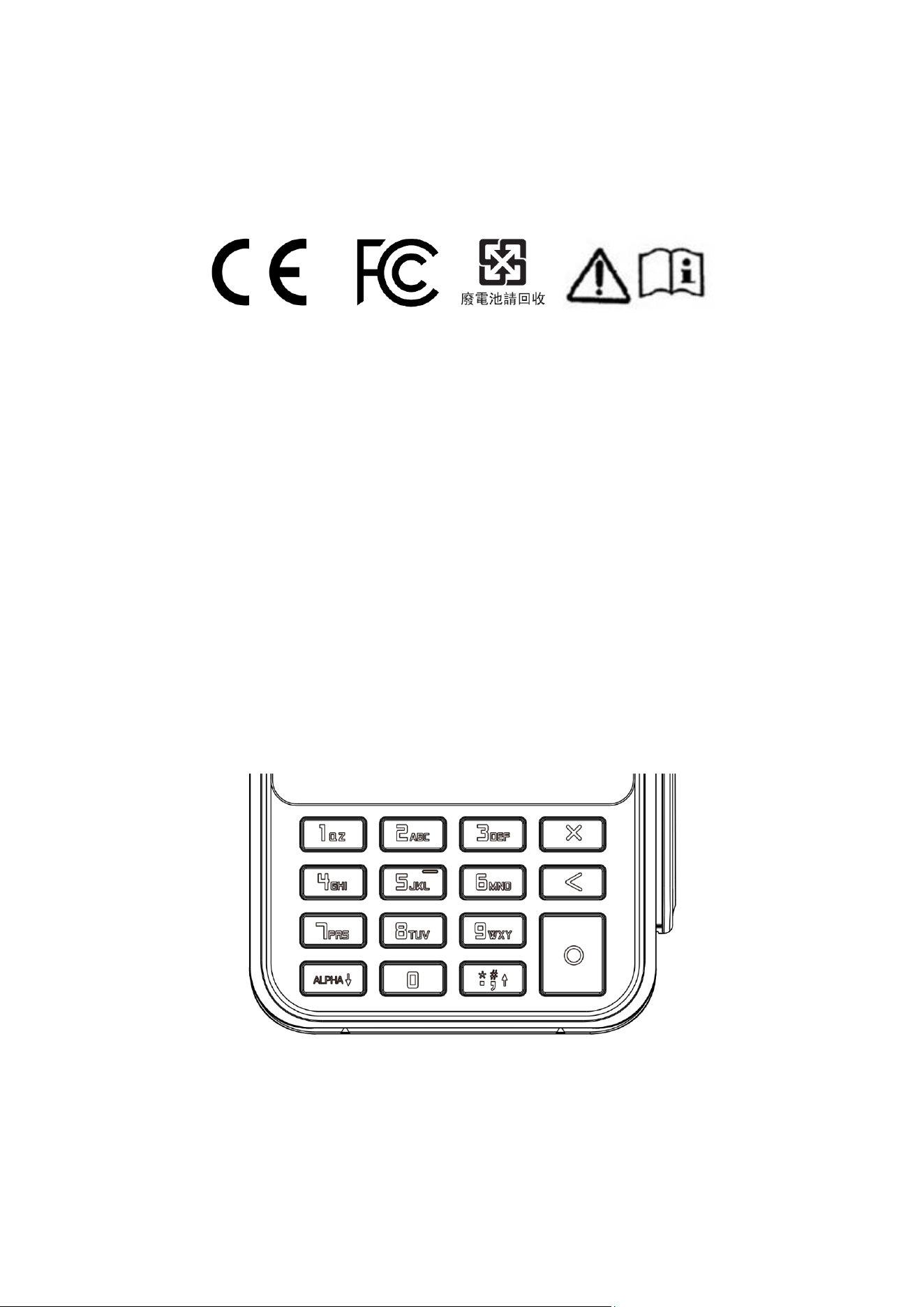
The physical keyboard features a 12-key layout complemented by three function keys. The
number 5 key, positioned at the center of the keypad, is equipped with a prominent Tactile
Bump to enhance the user's tactile recognition capabilities, ensuring compliance with
Accessibility standards.
This design provides excellent Tactile Recognizability. The bumped center key serves as
a physical reference point, helping users quickly differentiate the function keys. This fulfills
the requirement for "tactile discernibility" as stipulated in accessibility directives EN 301
549 and EU 2019/882. As a result, this design enables users with visual impairments or
low vision to accurately identify key positions by touch, eliminating the need for visual
operation and thereby enhancing the product's operability and inclusivity.

29
9. Customer Support
⚫ Data Backup
Please back up all terminal data before requesting any after-sales support. LANDI does
not back up data directly from terminals received for service work. We are not responsible
for any data loss or deletion that may occur.
⚫ Repairs
Please contact local distributors or LANDI after-sales team to arrange a repair. Be sure to
keep your invoice or other valid proof of purchase documentation and present it when
necessary.
⚫ Manufacturer
Fujian LANDI Commercial Equipment Co., Ltd.
Correspondence Address: 5th
& 6th Floor, Building 3A, Area A, Software Park, No.89,
Software Avenue, Gulou District, Fuzhou, Fujian, 350001, China
Registered Address: Building 17, Area A, Software Park, No.89, Software Avenue, Gulou
District, Fuzhou, Fujian, 350003, China
Phone: +86 0591-88077077, +86 400-658-0616
Fax: +86 0591-88077085
Website: http://www.landicorp.com