
CONTENTS
1. Introduction
.......................................................................................................................- 1 -
2. Highlights
......................................................................................................................... - 2 -
3.Knobs and Switches
.......................................................................................................- 4 -
Hidden Parameters
.....................................................................................................- 5 -
4. REAR PANEL I/O
............................................................................................................. - 6 -
5. Signal Path
....................................................................................................................... - 7 -
Configuring the In/Out Settings
...............................................................................- 7 -
6.Description of the LED Button
......................................................................................- 9 -
What the LED Colors Mean
....................................................................................... - 9 -
What the Button Can Adjust
..................................................................................... - 9 -
7.Tap Tempo/Twisted Tempo
.........................................................................................- 10 -
8.Ramp
............................................................................................................................... - 11 -
Ramp Modes
.............................................................................................................. - 11 -
9. Power-Up Modes
...........................................................................................................- 12 -
Bypass & Trails Modes
............................................................................................. - 12 -
Tap Tempo and Twisted Tempo Switching
..........................................................- 12 -
Ramp Lock
..................................................................................................................- 12 -
LED Brightness
.......................................................................................................... - 12 -
10.External Control
...........................................................................................................- 13 -
Connection & Activation
.......................................................................................... - 13 -
External Footswitch Compatibility
.........................................................................- 13 -
Expression Pedal Compatibility
..............................................................................- 13 -
11.Specifications
............................................................................................................... - 14 -

- 1 -
1. Introduction
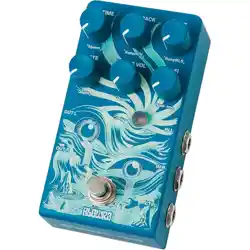
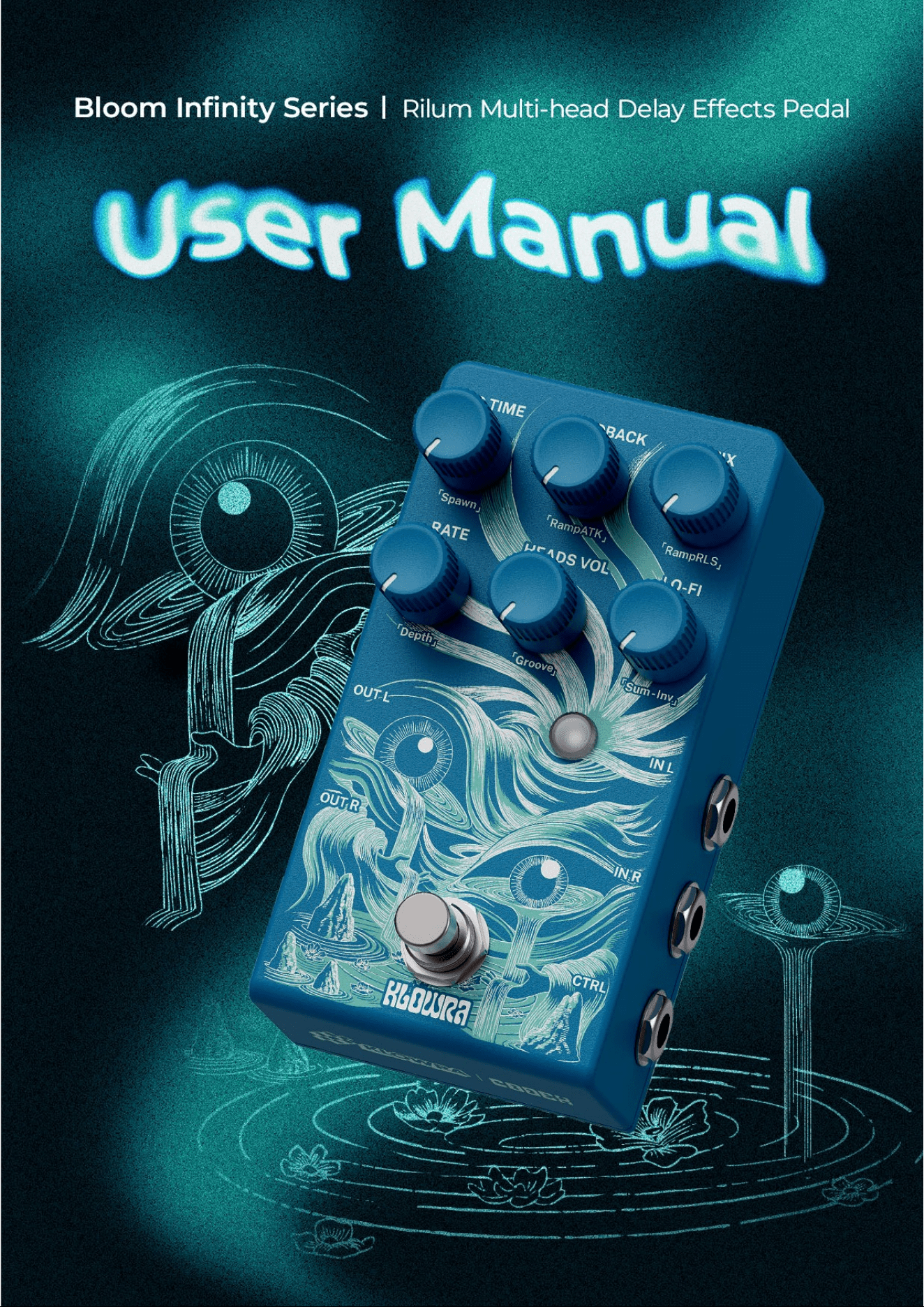
Thank you for choosing the Rilum Multi-head Delay by Klowra.
Rilum is a multi-head delay and modulation pedal inspired by classic multi-track
tape echo machines. It delivers authentic vintage multi-head delay textures, lets
you explore tape-like flanging and chorus tones born from analog friction, and
creates warm, atmospheric trails with rich spatial depth. The sound evolves
through layers of feedback, eventually reaching unpredictable self-oscillation.
The Ramp function allows tonal characteristics to evolve organically, while Tap
tempo and the unique Twisted Tempo control keep your delay time tightly
synchronized with your musical rhythm. With an expression pedal or external
footswitch, you can instantly trigger expressive, dynamic variations.
Featuring Analog Dry-Through, selectable True Bypass/Buffered Bypass and
multiple stereo modes, Klowra Rilum Multi-head Delay provides pure signal integrity
and versatile performance support for any stage or studio setup.

- 2 -
2. Highlights
●
Bloom Infinity Series - Original artist hand-painted silkscreen artwork, with
individual model stories and concepts, all strung together into a cohesive product line.
●
Unfold the Scroll of Inspiration - Echoes, rhythms, chorus, and flanging are
rewoven into one. Fine-tune time, blend multiple heads, and layer gentle modulation as
the sound unfurls between color and space, revealing its own depth and breadth like a
scroll slowly unrolling in shifting light.
●
The Beating Heart of a Vintage Tape Machine - Modern algorithms
meticulously sculpt the soul of classic tape, capturing its hazy phase-breath
interference, the organic vitality of random flutter, and the warm softness of analog
saturation. A living multi-head tape machine awakens beneath your feet.
●
Zero-Cross Flange & Chorus Stack - Authentic zero-cross flanging meets
warm, full-bodied chorus. From glass-like shimmer to velvet-smooth flow, it makes
clean tones ripple with texture and brings dimensional depth to distortion.
●
Warm Ambience and Spatial Fracture - Layered multi-head delays shape a
reverb-like sound field and spatial trails, building into cascading feedback that leads to
unpredictable self-oscillation. From warm ambience to the edge of instability, a single
twist takes you there.
●
Tap Tempo & Twisted Tempo - Control the Time parameter in real time with
Tap Tempo, perfectly syncing delays to your performance. The exclusive Twisted
Tempo lets you manipulate the “playback motor” at will, creating pushes, warbles, and

- 3 -
rhythmic shifts. When order breaks, new inspiration instantly emerges.
●
Ramp - The Ramp function provides linear parameter variation, controlling the
fading back and forth between settings to create a dynamic, evolving effect.
●
External Control - You can use an external TS/TRS footswitch and expression
pedal for multifunctional continuous control.
●
Analog Dry-Through - Keeps the dry signal analog, never converting it to
digital, while mixing with the wet signal.
●
Multiple Stereo Outputs - Dry/Wet Separation and True Stereo Outputs.
●
Bypass Modes - Switchable True Bypass (trail off) and Buffered Bypass (trail
on), with Analog Dry-Through.
●
WildSeed Engine - Class-leading sound quality with 24-bit AD/DA and 32-bit
DSP floating-point processing.
●
Built to Last - Premium aluminum alloy chassis, sturdy and reliable, designed
for heavy-duty use and life on the road.
- 4 -
3. Knobs and Switches
LAG TIME
Adjusts the delay time.
Below 12 o’clock: Transitions from flanger into chorus tones.
Above 12 o’clock: Ranges from slapback into long echoes (up to 1000 ms).
FEEDBACK
Adjusts the number of delay repetitions. Ranges from a single repeat at full
counterclockwise to near-infinite oscillation at full clockwise.
MIX
Adjusts the mix between the dry and wet signals. At the minimum, it outputs full
dry signal; at the maximum, it outputs full wet signal with no dry signal. A 50/50
mix occurs around 2 o’clock on the knob.
RATE
Adjusts the modulation speed of the delayed signal. Turning clockwise increases
the speed and produces more rapid fluctuations.
HEADS VOL
Adjusts the output level of the other heads.
Note: The Main Head remains active at all times and cannot be muted via this knob.
LO-FI
Adjusts saturation and texture of the delayed signal. Turning clockwise adds
stronger degradation for a vintage character and increases the sensitivity for
self-oscillation.
Footswitch
Controls effect ON/OFF. Press & hold to trigger Tap Tempo/Twisted Tempo or
Ramp.
Refer to the *Tap Tempo/Twisted Tempo*or *Ramp*section for details.
The LED Button
Lit when active, press & hold this button while turning other knobs to adjust various
functions and hidden parameters.

- 5 -
Hidden Parameters
*To adjust the hidden parameters, press & hold the LED Button while turning the
knob. A successful adjustment is indicated by the LED blinking yellow.*
Spawn
Controls random volume changes between the main and other heads. Turn
clockwise to add life and character to the FEEDBACK.
RampATK
Controls the attack time of the Ramp modulation, determining how quickly the
fade reaches the Snap-Set. A shorter attack time results in a quicker transition
to the Snap-Set, while a longer attack time creates a smoother, more gradual
fade.
RampRLS
Controls the release time of the Ramp modulation, determining how gradually
the transition fades back to the Panel-Set. A shorter release time results in a
quicker return to the Panel-Set, while a longer release time provides a more
drawn-out, fluid return to the Panel-Set.
Depth
Controls the intensity of the modulation applied to the delayed signal. Turn
clockwise for deeper, more dramatic sweeping effects.
Groove
Linearly blends the volume of the other heads to allow for smooth rhythmic
transitions. Specific subdivisions are isolated at the following positions:
Fully Counterclockwise: Dotted-eighth head.
12 o’clock: Straight-eighth head.
Fully Clockwise: Quarter-note triplet head.
Sum-Inv
Selects the phase relationship of the other heads to tailor tonality and low-end
response.
Sum (Turn fully counterclockwise): The other heads are summed in phase
with the main head.
Invert (Turn fully clockwise): The other heads are summed out of phase
with the main head.
For adjustments to hidden parameters, please refer to the *Description of the LED
Button*section.
- 6 -
4. REAR PANEL I/O
9V DC
Connect a 9V DC power supply with a center-negative polarity and a minimum
current rating of 250mA.
Note: Insufficient power may cause the pedal to malfunction.
IN L (Mono)
1/4" TS mono input. Use this jack for mono instruments or the left channel of a
stereo source.
IN R (Stereo)
1/4" TS mono input. Use this jack for the right channel of a stereo source.
OUT L (Mono)
1/4" TS mono output. Use this jack for mono setups or the left channel of a stereo
setup.
OUT R (Stereo)
1/4" TS mono output. Use this jack for the right channel of a stereo setup.
Ctrl
1/4" stereo (TRS) input for connecting an expression pedal or external footswitch.
Note: Please refer to the *External Control* section for information on how connection
is recognized.
- 7 -
5. Signal Path
Configuring the In/Out Settings
1-in, 1-out:
Mono input with mono output. Dry and wet signals are mixed at the mono
output.
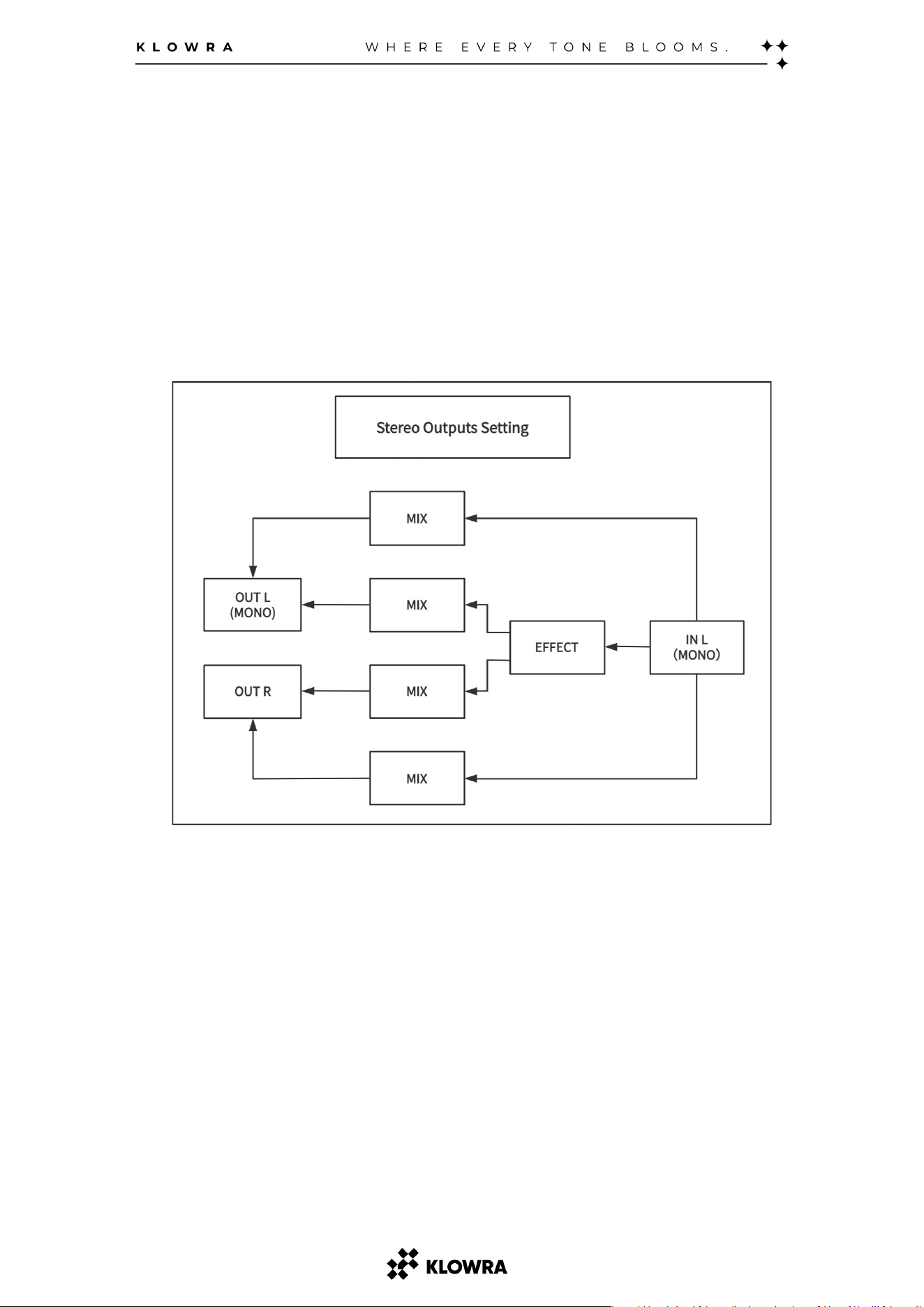
1-in, 2-out
For the IN L, the pedal processes the mono input and creates a stereo
soundstage across both outputs.
- 8 -
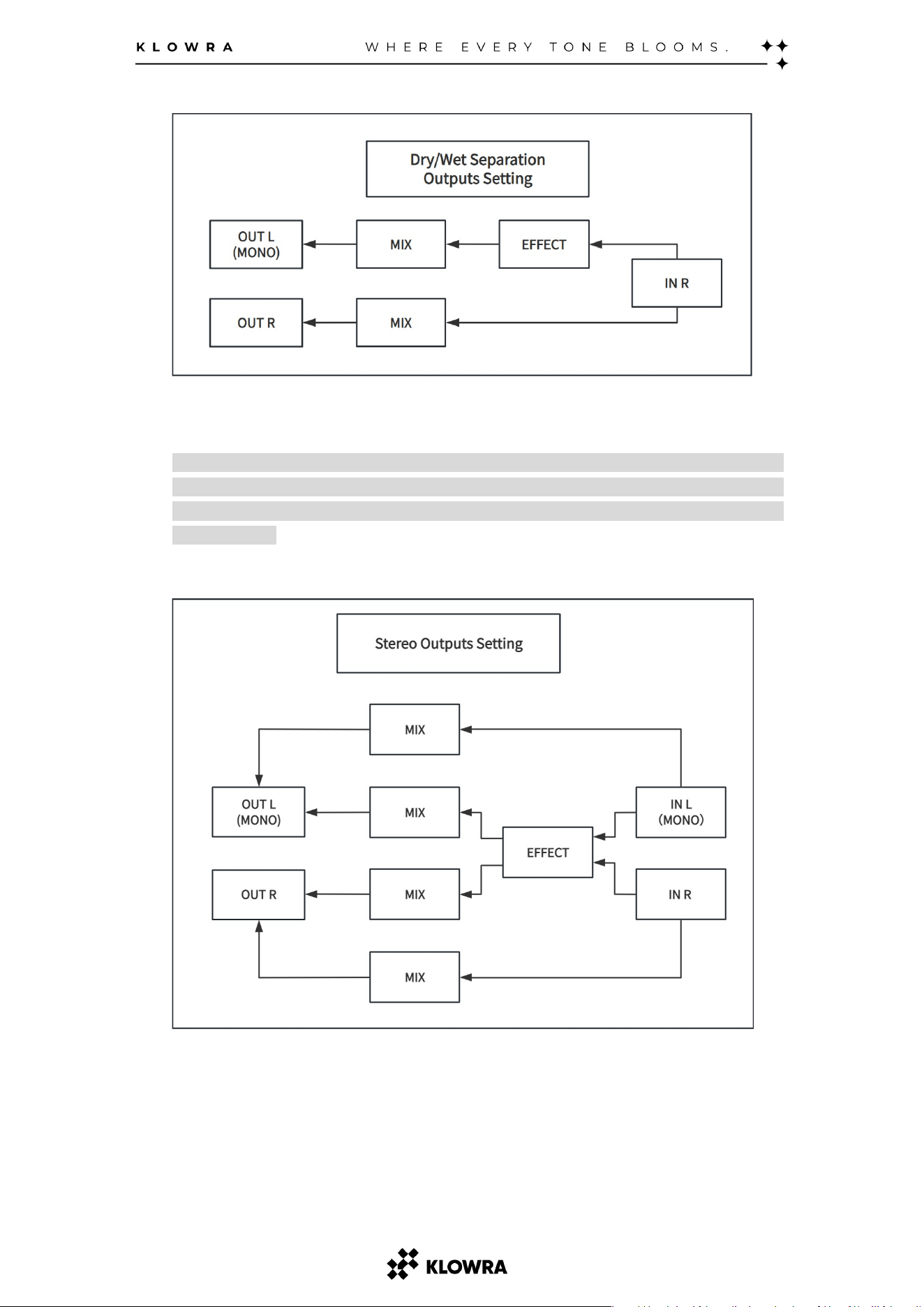
Dry/Wet Separation stereo output: For the IN R, OUT R outputs the dry signal
only; OUT L outputs the wet signal only.
*About Dry/Wet Split: This configuration splits your guitar signal into two distinct paths:
one carrying the unaffected (dry) sound, and the other carrying the processed (wet)
signal. This is particularly useful for parallel mixing in studio setups or advanced live
signal routing.*
2-in, 2-out
In full stereo operation, the dry and wet signals are processed and mixed
independently for the left and right channels.

- 9 -
6. Description of the LED Button
The LED Button is the heart of the Rilum.
You can determine the current operating status of the Rilum by observing the color
of the LED Button. The LED Button can be pressed briefly or in combination with
other knobs to adjust various functions or parameters.
Learning to interpret the LED colors and understanding the different ways the
Button can be pressed are essential for familiarizing yourself with the Rilum’s
operation.
What the LED Colors Mean
White: Tap Tempo/Twisted Tempo function active.
Blue: Tap Tempo/Twisted Tempo is actively being triggered.
Orange: Ramp function active.
Violet: Ramp is actively being triggered.
What the Button Can Adjust
Toggle the Tap Tempo/Twisted Tempo or Ramp
Press once to switch between Tap Tempo/Twisted Tempo and Ramp.
Save Snap-Set
Press & hold to save the current parameter settings as Snap-Set.
The LED blinks violet to confirm.
Adjustment of Hidden Parameters
Press & hold while rotating the knob above the hidden parameters.
Successful adjustment is indicated by the LED blinking yellow.

-
10 -
7. Tap Tempo/Twisted Tempo
*In Power-On Mode, select Tap Tempo or Twisted Tempo (factory default: Tap Tempo).*
Press & hold the footswitch while the LED is white. The LED turns blue to indicate
the selected Tap Tempo or Twisted Tempo is active.
Tap Tempo
With the LED blue, tap the footswitch repeatedly at your desired tempo. Each tap
updates LAG TIME to match the BPM. The LED will blink in time with the detected
BPM. After 5 seconds of inactivity, the LED returns to white and the pedal exits
Tap Tempo automatically.
Twisted Tempo
Hold the footswitch to engage Twisted Tempo. The effect starts immediately and
modulates LAG TIME for a tape-scrubbing sound.
RATE sets the modulation speed.
LAG TIME sets the modulation depth (sweeping between the current value
and 0).
Release the footswitch to exit Twisted Tempo, the LED returns to white.
For subtle movement, keep RATE low and use a small LAG TIME setting.
For extreme warble, increase RATE and LAG TIME.
External Control Tips
With an external dual footswitch connected, you can combine Twisted Tempo and
RAMP for more expressive textures. Use Twisted Tempo for instant twisting or
warbling motion and use RAMP to sweep the RATE or LAG TIME between two
settings, creating dynamic back-and-forth transitions.

-
11 -
8. Ramp
*Press & hold the footswitch while the LED is orange. When the LED turns violet,
you’ve entered Ramp. *
Ramp allows for smooth, dynamic transitions between two sets of parameters:
Panel-Set – Your current front-panel parameter settings.
Snap-Set – A saved set of parameters stored using the LED Button.
This feature creates expressive, evolving fades that add depth, movement, and
emotion to your sound. The speed and character of the transition are defined by
two parameters:
RampATK (Attack Time):
Controls how quickly the effect fades from the Panel-Set to the Snap-Set.
- A shorter attack gives a fast, sharp transition.
- A longer attack creates a smoother, more gradual fade.
RampRLS (Release Time):
Controls how quickly the sound returns from the Snap-Set to the Panel-Set.
- A shorter release results in a quick recovery.
- A longer release provides a more drawn-out, fluid return.
Ramp Modes
Ramp supports two switching modes - Momentary and Latched—giving you
flexibility to match your performance style.
Momentary Mode:
Press & hold the footswitch to fade into the Snap-Set over RampATK time. Release
the footswitch to return to the Panel-Set over RampRLS time.
Latched Mode:
Press once to transition to the Snap-Set (RampATK), and press again to return to
the Panel-Set (RampRLS).
To select between Momentary and Latched modes, see the *Power-Up Modes*section.

-
12 -
9. Power-Up Modes
How to enter Power-Up Modes
Press & hold the footswitch while powering on the pedal. A flashing LED indicates
successful entry.
Once your settings are configured, short press the footswitch again to exit
Power-Up Modes.
In this mode, you can adjust the following settings:
Bypass &Trails Modes
Switch between modes by short press the LED Button.
True Bypass
The signal is routed directly through the pedal with no buffering or coloration.
LED Green flashes to indicate True Bypass mode.
Buffered Bypass (Trails on)
The signal is routed through a buffer with Analog Dry-Through, allowing delay
trails to continue after the effect is bypassed.
LED Red flashes to indicate Buffered Bypass mode.
Tap Tempo and Twisted Tempo Switching
Select by rotating the LAG TIME knob.
- Turn fully left for Tap Tempo (LED yellow flashes 3x).
- Turn fully right for Twisted Tempo (LED blue flashes 3x).
Ramp Lock
Select by rotating the FEEDBACK knob.
- Turn fully left for Momentary (LED flashes yellow 3x).
- Turn fully right for Latched (LED flashes blue 3x).
Momentary:
Hold the footswitch to transition to Snap-Set over RampATK time. Release to
return to the current set over RampRLS time.
Latched:
The first press transitions to Snap-Set over RampATK time. The second press
returns to the current set over RampRLS time.
LED Brightness
Adjust by rotating the LO-FI knob.
- Turn fully left for dimmest.
- Turn fully right for brightest.

-
13 -
10.External Control
Connection &Activation
When connecting an external TS/TRS footswitch or expression pedal, the LED
indicator will flash red. Trigger the footswitch or pedal repeatedly during this state.
Once the connection is successfully recognized, the Rilum will return to normal
operation.
Note: If the External Control is not fully activated, it may result in limited functionality.
External Footswitch Compatibility
When connecting an external TS/TRS footswitch, there are two specific functional
settings, depending on the color of the LED indicator:
LED White
- The current footswitch-specific function is Tap Tempo/Twisted
Tempo.
TS Footswitch
: Momentary triggers Ramp.
TRS Footswitch:
Tip Position: Momentary triggers Ramp.
Ring Position: Momentary triggers Tap Tempo/Twisted Tempo.
LED Orange
- The current footswitch-specific function is Ramp
TS Footswitch: Momentary triggers Tap Tempo.
TRS Footswitch:
Tip Position: Momentary triggers Ramp.
Ring Position: Momentary triggers Tap Tempo/Twisted Tempo.
Expression Pedal Compatibility
When an expression pedal is connected, it takes direct control over the Ramp by
blending between the Panel-Set and Snap-Set. In this mode:
The RampATK and RampRLS parameters are disabled.
Ramp cannot be triggered by pressing & holding the footswitch.
The expression pedal locks the Rilum into LED White (Tap Tempo/Twisted
Tempo active), and mode switching to LED Orange (Ramp active) is disabled.
-
14 -
11. Specifications
Inputs
2 x 1/4" TS Instrument jacks
Outputs
2 x 1/4" TS Instrument jacks
Input Impedance
500k Ohm
Output Impedance
100 Ohm
A/D &D/A
24 Bit 44.1K Hz
Max Input Level
+10 dBu
Power Source
9V DC power supply required
Minimum Current
Rating
250 mA
External Control
TS/TRS Momentary footswitch, or
TRS expression pedal
Bypass Mode
Switchable: True Bypass,
Buffered Bypass (Analog
Dry-Through)
Hardware
Interface
USB-C
Dimensions
54.7mm H x 124.8mm D x 69.2mm
W (2.0"H x 4.9"D x 2.7"W)