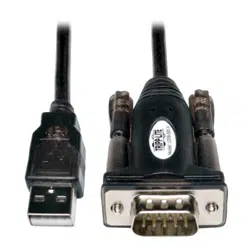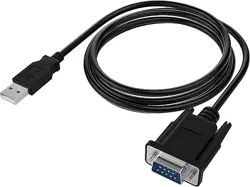
SABRENTUSBtoSerialCables(PROLIFICCHIPSET)
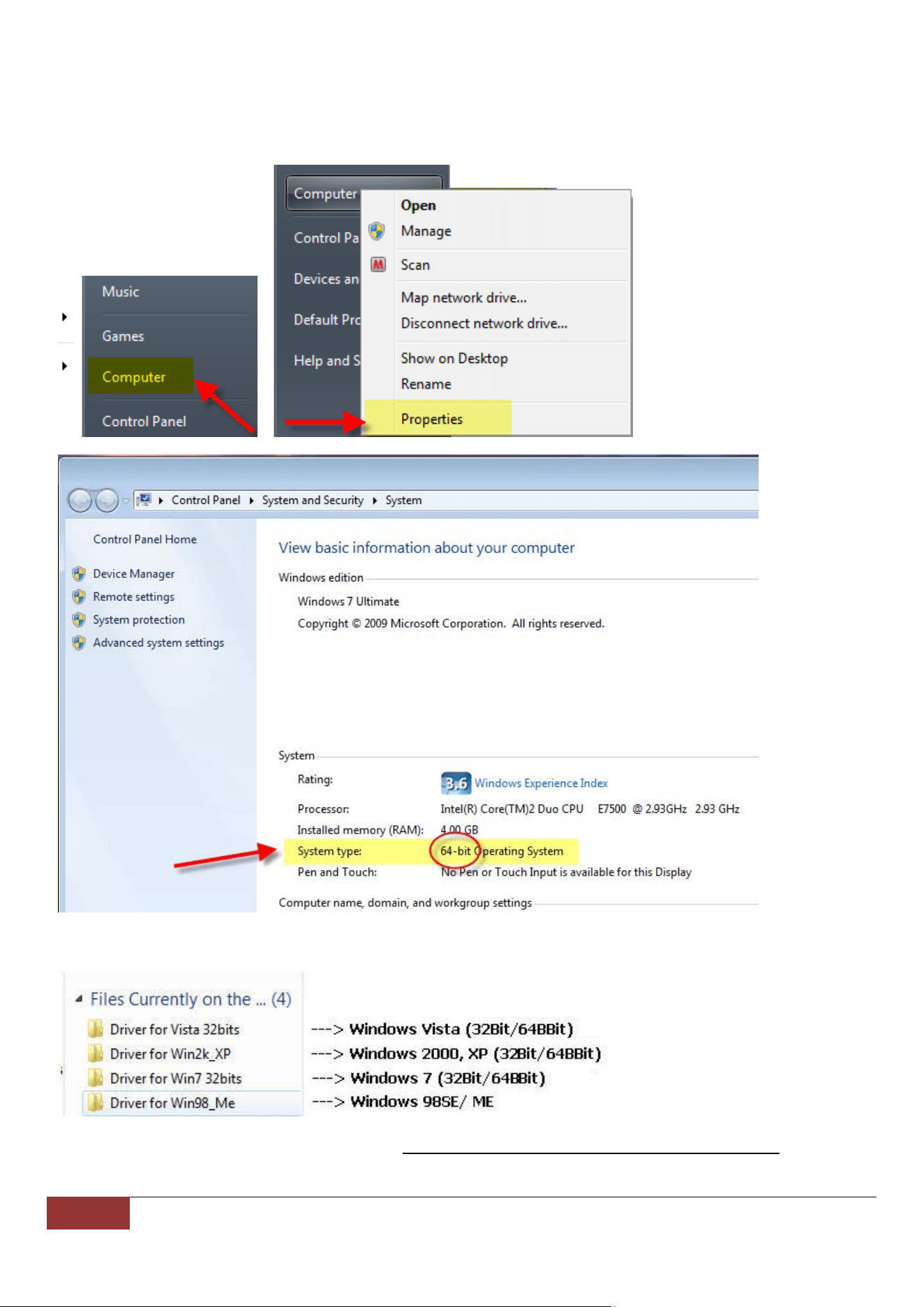
(1)DetermineyourOperatingSystem:RIGHT‐CLICKontheMYCOMPUTERorCOMPUTER(wordoricon)toview
Systemproperties:
(2)ExploretheCDandselectthecorrectOperatingSystemFolderforyourcomputer:
***Windows7Driverscanbedownloadedhere:http://www.sabrent.com/drivers2/USBSERIALwin7.zip
1 SabrentUSBtoSerial Cable(PROLIFICCHIPSET)SupportHotline:(323)266‐0911(M‐F,9‐5PST)
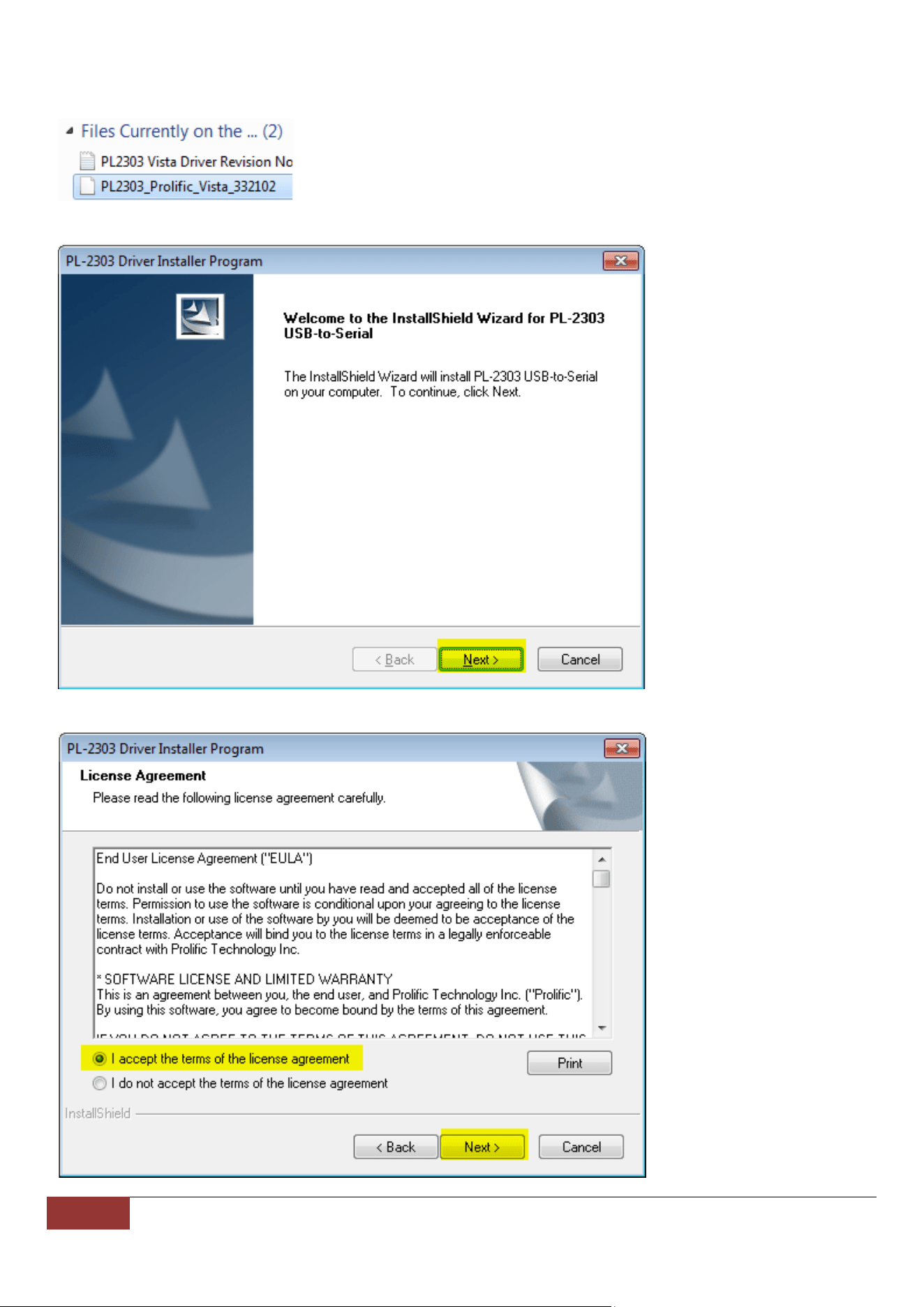
(3)ForWindows7(32‐Bit/64‐Bit):SelectandOpenthe“DriverforWin732Bits”FolderandRunthe
“PL2303_Prolific_Vista‐332102”SetupFile:
(4)Thefollowingpromptwillappear,SelectNext.
(5)AccepttheLicenseAgreement:
2 SabrentUSBtoSerial Cable(PROLIFICCHIPSET)SupportHotline:(323)266‐0911(M‐F,9‐5PST)
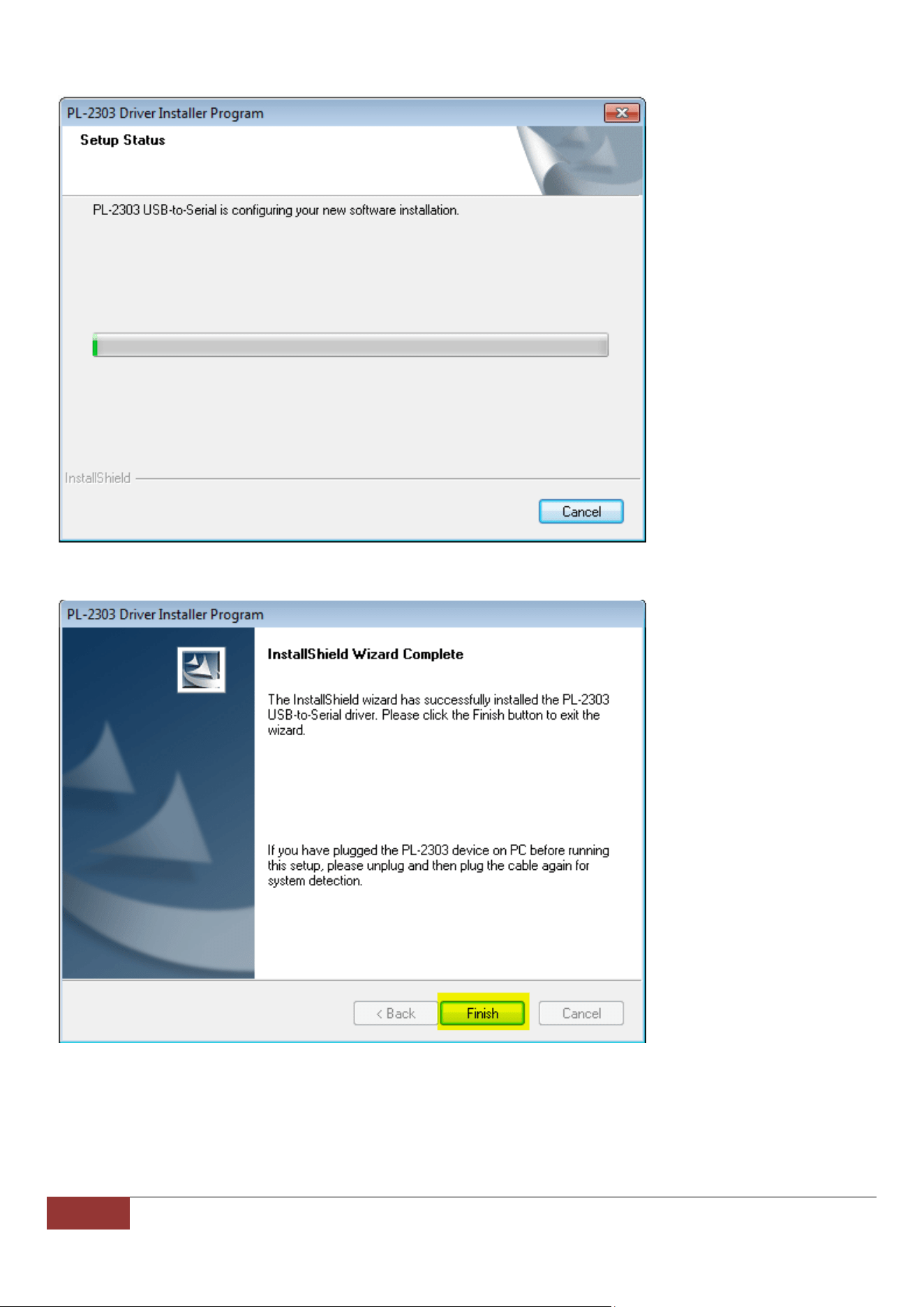
(6)TheDriverwillInstall:
(7)ConnecttheUSBSerialadaptertoanavailableUSBportandselectFinish:
3 SabrentUSBtoSerial Cable(PROLIFICCHIPSET)SupportHotline:(323)266‐0911(M‐F,9‐5PST)
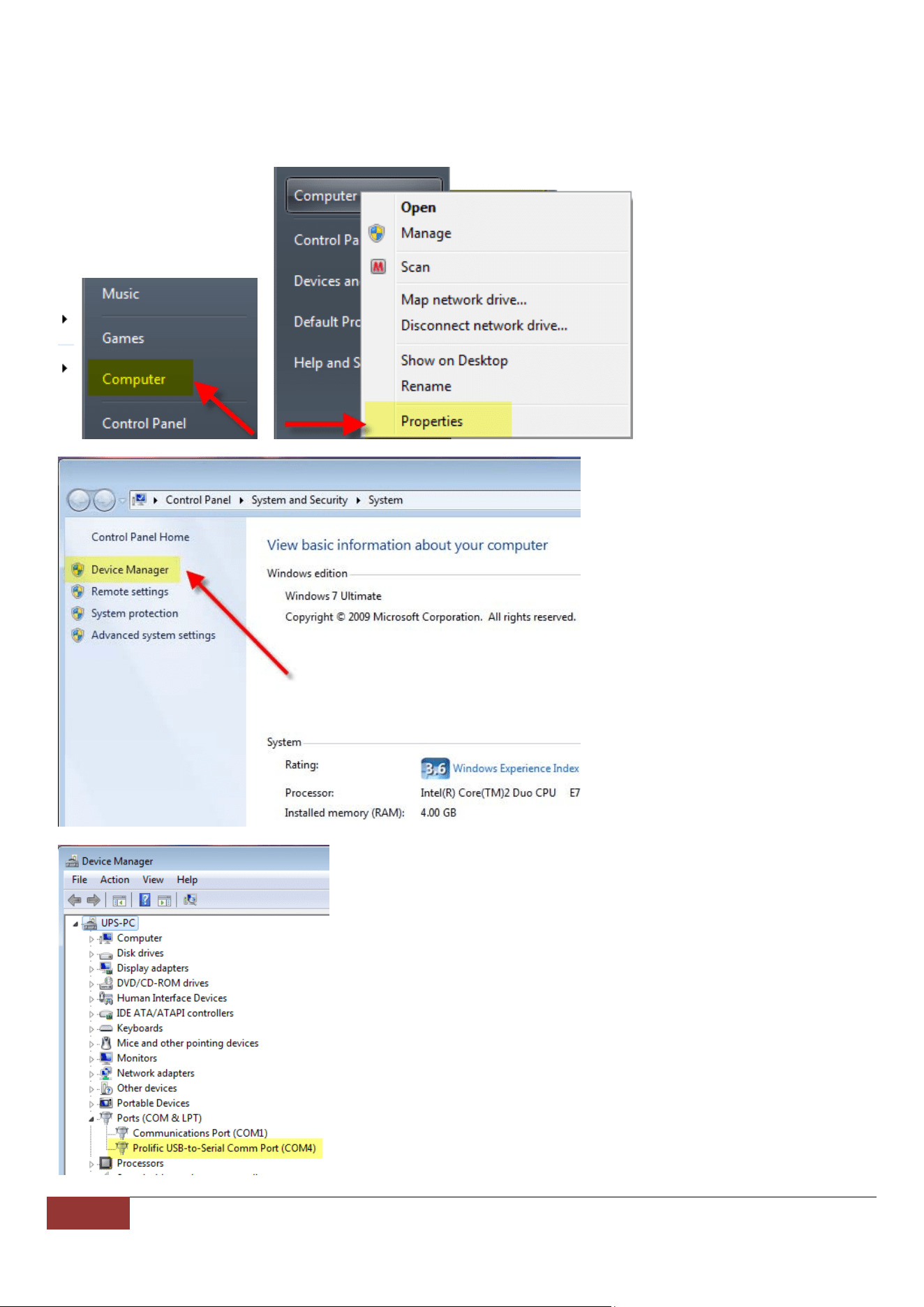
(8)PleaseconfirmthatthecableisfullyinstalledandappearscorrectlyinDeviceManager.Youwillneedtoaccess
thistomodifytheCOMPortorBaudRates.GotoControlPanel>HardwareandSound>DeviceManager.
Alternatively,youtypethewords “DeviceManager”intheStartbuttonarea.Athirdoption,istoRight‐Clickonthe
wordCOMPTUERinthestartmenuandRight‐Click,selectProprties:
4 SabrentUSBtoSerial Cable(PROLIFICCHIPSET)SupportHotline:(323)266‐0911(M‐F,9‐5PST)
AtthispointtheSabrentProlificCableshouldbeinstalledcorrectly,withNOERRORS.Ifyougetanerrormessage
suchasanexclamationpoint(!),questio nmark(?),orCoderError10,youmayneedtoskiptotheTroubleshooting
Guide(Page7).
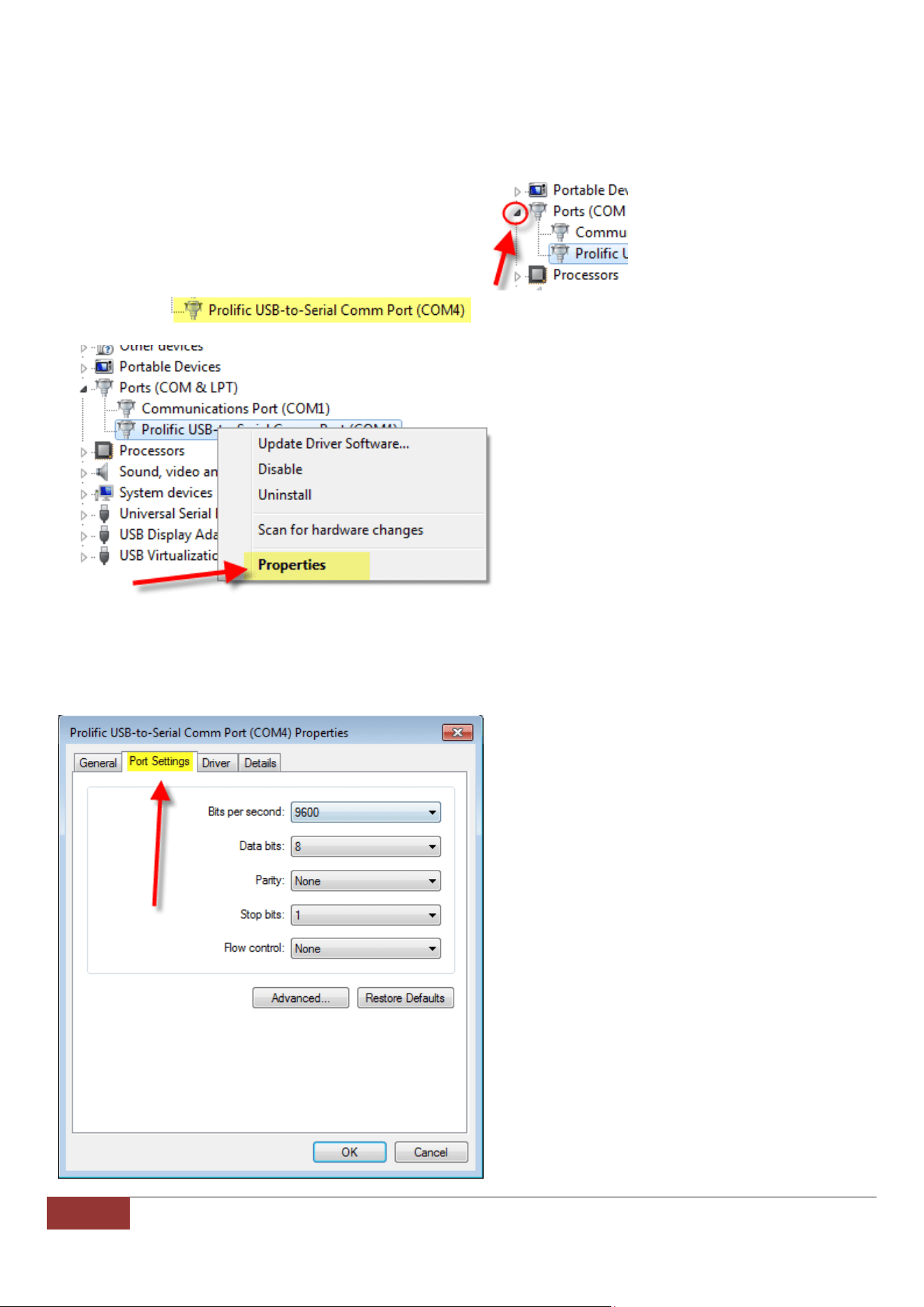
YoucanmodifythespecificCOMportandothersettingsfromthispointaswell.
ClickontheArrowtotheleftoftheCategorytoviewdetails:
RIGHT‐CLICKon ,andselectPROPERTIES:
Specificadjustmentsmayneedtobemadetoworkwithindividualhardwaresolutionstowhichyouareconnecting
thiscable.YoumaywanttoconsulttheDEVICEmanufacturertodeterminethebestsettingsfortheirproduct.See
Below:
5 SabrentUSBtoSerial Cable(PROLIFICCHIPSET)SupportHotline:(323)266‐0911(M‐F,9‐5PST)
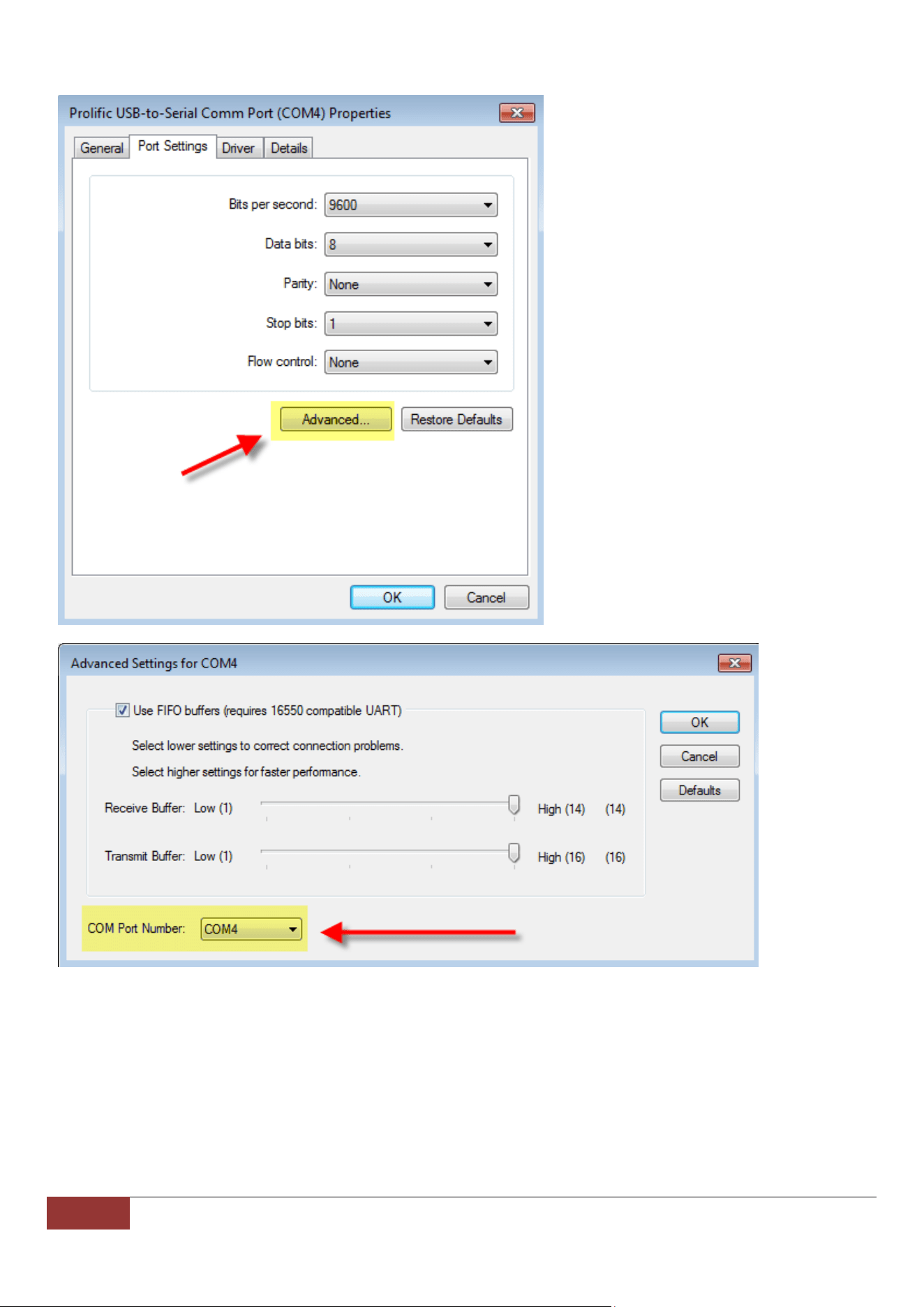
ClickingonAdvanced…willoffermoresettingsyoucanmodify,suchastheCOMPORT.
6 SabrentUSBtoSerial Cable(PROLIFICCHIPSET)SupportHotline:(323)266‐0911(M‐F,9‐5PST)
TROUBLESHOOTINGGUIDE
Ifyougetanerrormessagesuchasanexclamationpoint(!),questionmark(?),orCoderError10,mostoftenthis
indicatesaproblemwiththeDriverinstallation,andwilloccurmostlyinWindows64‐bitversions.
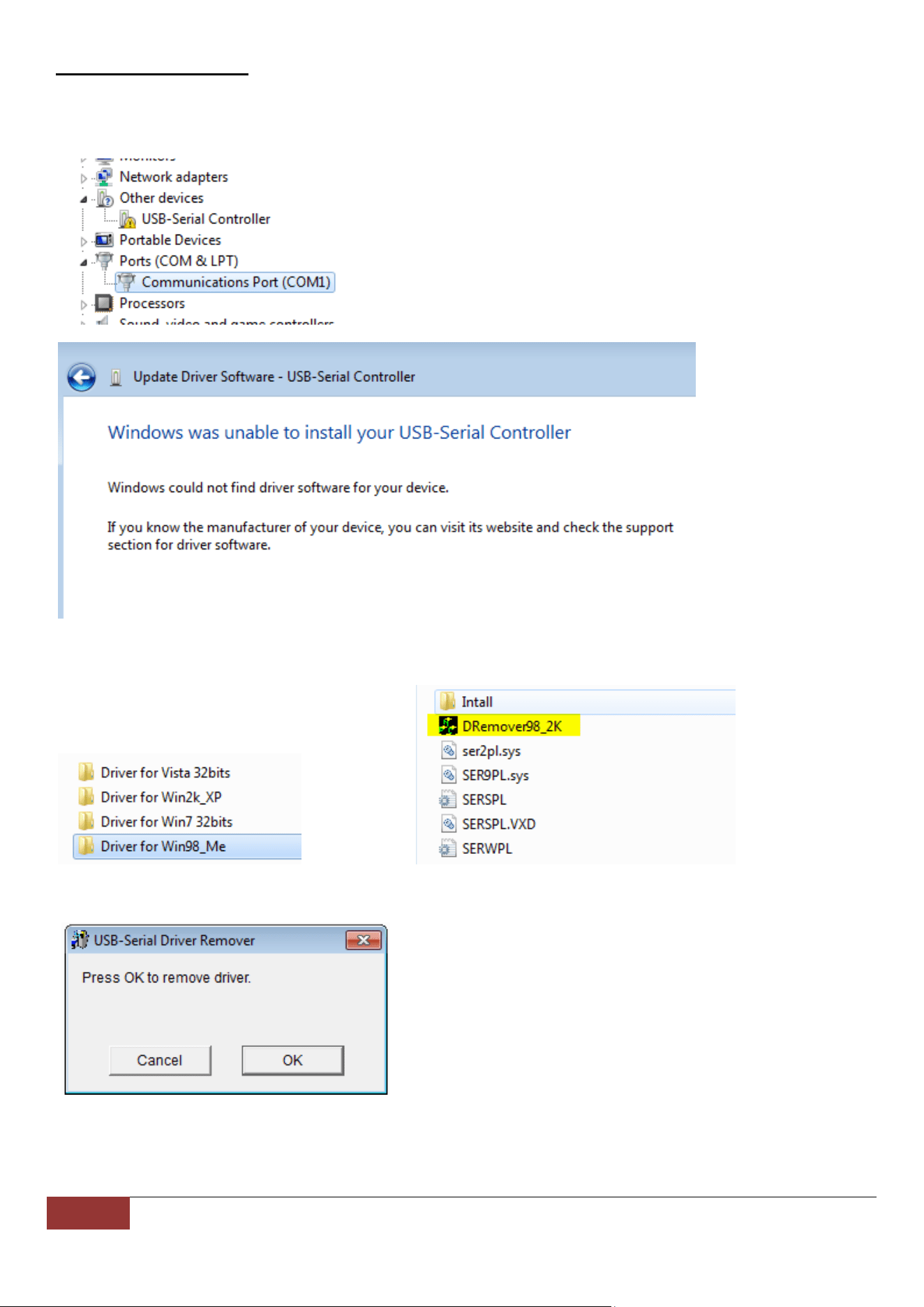
IfyouhavepriorversionsofUSBSerialconvertersyoumayneedtofirstUNINSTALLthem.Thiscanbedoneeasilyby
firstrunningtheDriverRemovalToolwhichcanbefoundintheWin98_MeFolderontheCD:
RuntheDRemover98_2KFiletouninstalltheDriver.
7 SabrentUSBtoSerial Cable(PROLIFICCHIPSET)SupportHotline:(323)266‐0911(M‐F,9‐5PST)
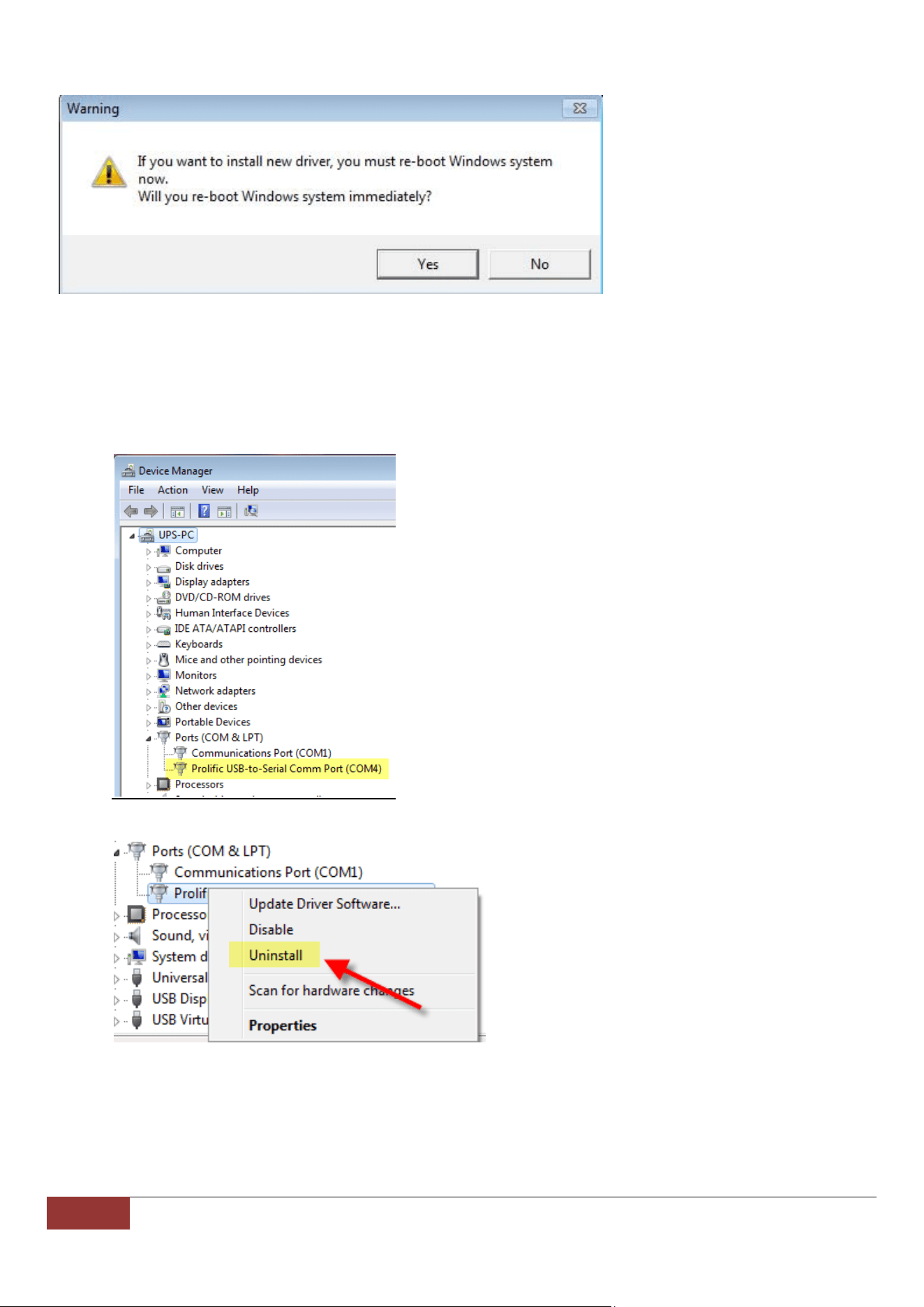
YouwillbepromptedtoRestartyourcomputer,ClickYes,andremovetheSerialCablefromtheUSBport:
ReturntoStep(3)toreinstallthedrivercorrectly.
Driverscanalsoberemovedmanuallyasfollows:
1. GotothelistinginDeviceManagerwhichshowsyourerrormessage.Inthiscaseitwilllikelyappearin
OtherDevices(?or!)orunderCOMports(CodeError10).
2. RIGHT‐CLICKthelisting,andselectUNINSTALL
8 SabrentUSBtoSerial Cable(PROLIFICCHIPSET)SupportHotline:(323)266‐0911(M‐F,9‐5PST)
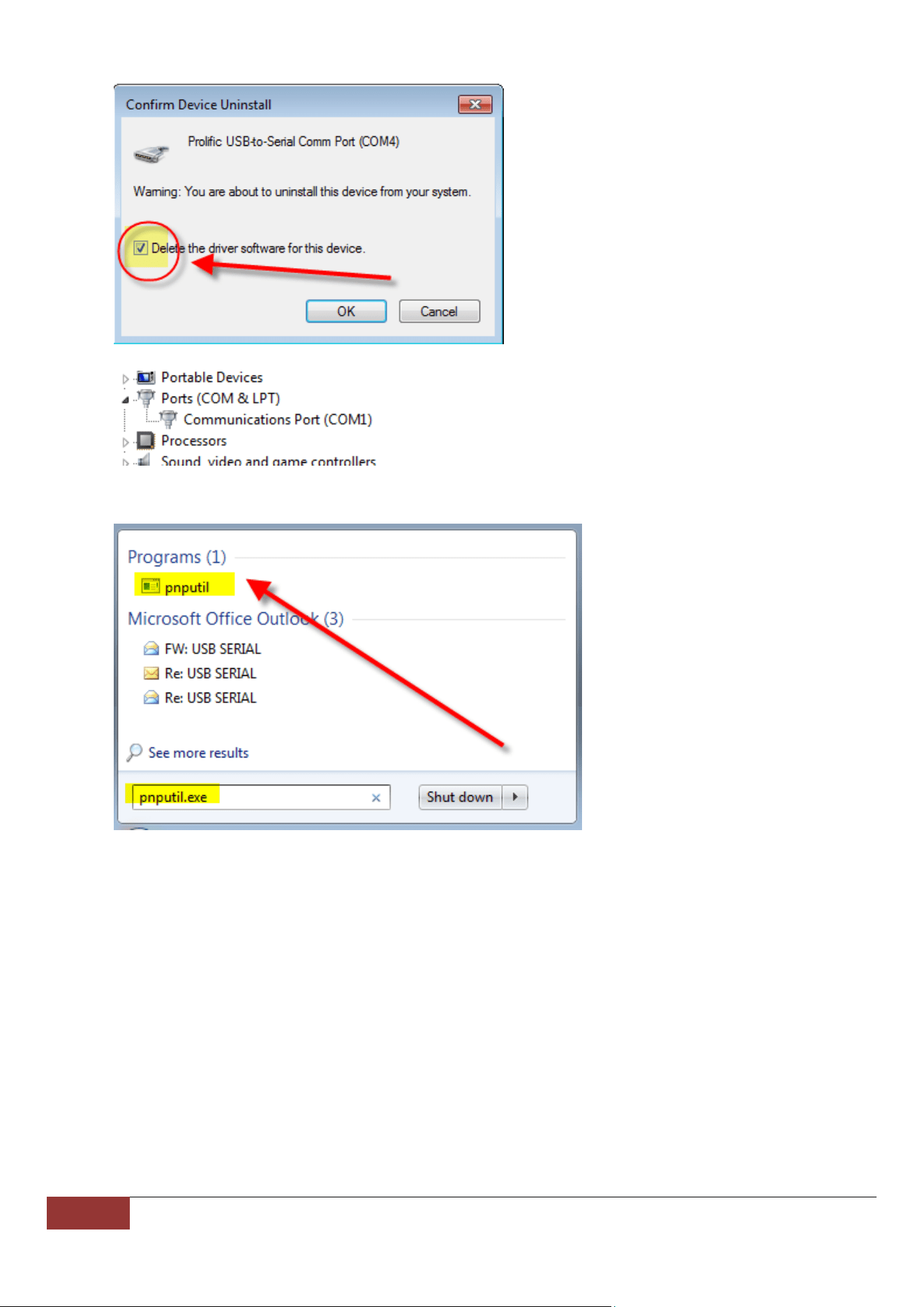
3. BesuretoCHECKtheboxfor“Deletethedriver….”
4. GobacktoDEVICEMANAGERandconfirmthelistingisnolongerthere.
Ifthisdoesnotwork,youmayneedtomanuallyuninstalltheolddriverwithwindowscommandline:pnputil.exe
Ifyouarestillhavingdifficultywiththeinstallation,pleasedeterminetheissuetotaketherightsteps:
TheUSBSerialCabledoesnotappearinDeviceManager:
1. PleasetryadifferentUSBport,orevena2
nd
computertoconfirmtheissue.
2. CallSABRENTTECHNICALSUPPORT,323‐266‐0911Monday‐Friday,9am‐5pmPST.
TheUSBSerialCabledoesappearinDeviceManager,butyoucannotuseyourdevicewithit:
1. Somedevices,suchasprinters,requirethatyoumanually“capture”theCOMPortyouaretryingtouse:
ClickonStart,thenPrinters&Faxes.Right‐clickontheprinteryouareconnectingtoandclickon
Properties.ClickonthePortstabandcheckthe‘VirtualprinterportforUSB’port.ClickOK.
2. Somedevicesrequiremoredetailedinstallationsteps,soyouwillneedtocheckwiththeDevice
Manufacturer.
3. Lastly,somedevicesmaynotworkwithanyUSBconvertedCOMPortandrequire“real”COMPorts.This
ismostcommoninveryolddevices.
9 SabrentUSBtoSerial Cable(PROLIFICCHIPSET)SupportHotline:(323)266‐0911(M‐F,9‐5PST)

10 SabrentUSBtoSerialCable(PROLIFICCHIPSET)SupportHotline:(323)266‐0911(M‐F,9‐5PST)