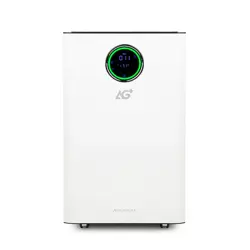
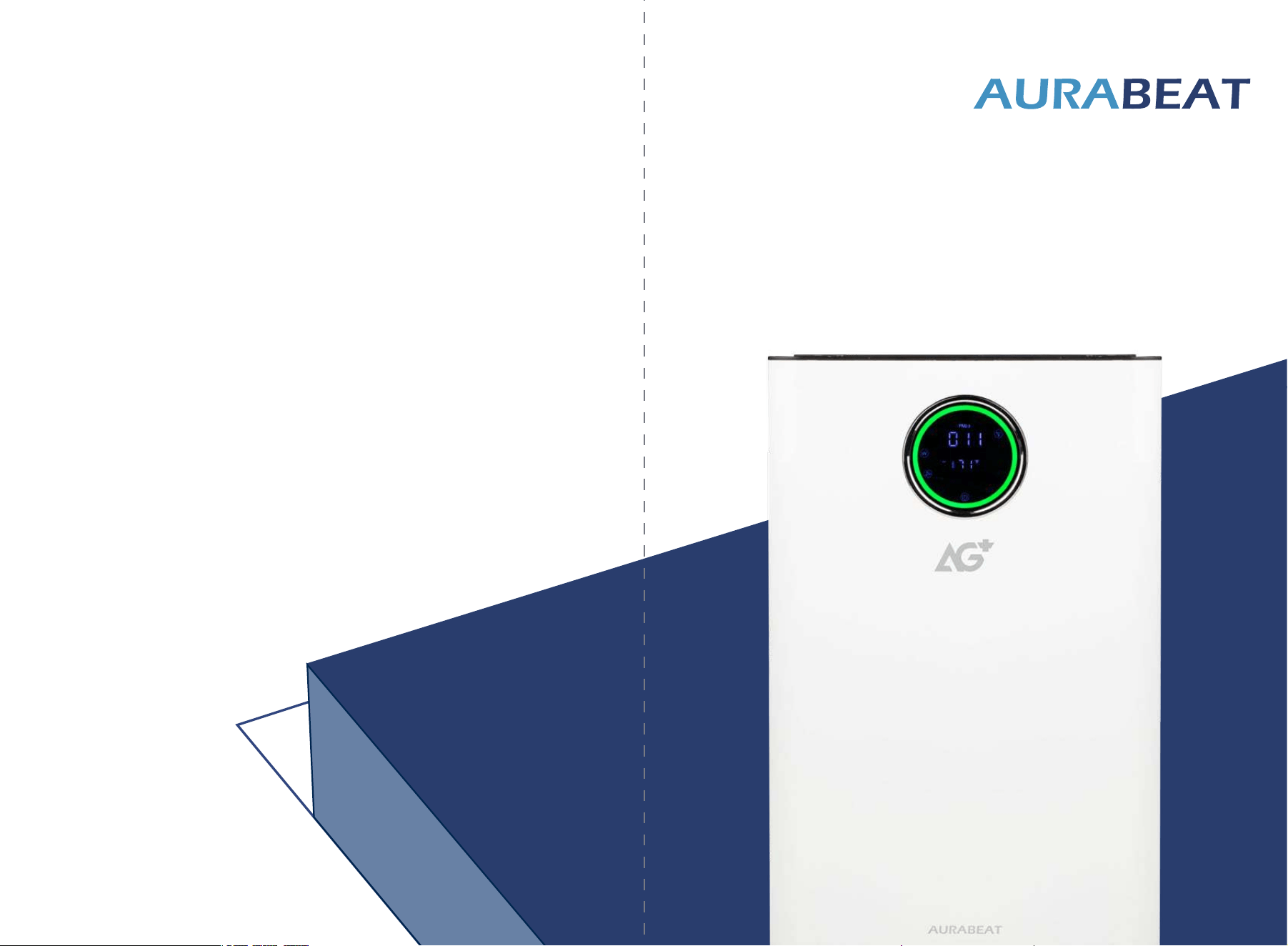
Aurabeat 3800
Large Capacity Sanitizing Air Purifier
Model ASP-X1
User Manual
Aurabeat North America
Distributed Exclusively by Brondell, Inc.
PO Box 470085
San Francisco, CA 94147-0085
commer[email protected]om
aurabeat-us.com
. Thank you for purchasing this air purifier.
Important Safety Information
Product
Getting Started
Using Your Product
Air Purifying Functions
Maintenance and Cleaning
Troubleshooting
Warranty
Specifications
1
2
3
4
5
6
7
8
9
P.1-2
P. 3
P.4-5
P.7-9
P.10
P.11
P.14
P.15
P.16-17
Content
P.1
. Please keep this manual for future reference.
.
Please read this manual carefully before using.
1. IMPORTANT SAFETY INFORMATION
•
•
•
•
•
•
•
•
•
•
•
•
•
•
BEFORE USING THIS DEVICE, READ THIS MANUAL CAREFULLY. KEEP THIS MANUAL AND PRODUCT
INFORMATION SAFE AND NEARBY FOR FUTURE REFERENCE.
Thank you for choosing our product.
We have provided many important safety messages in this manual and on your appliance. Always
read and follow all safety messages.
The manufacturer declines any liability for failure to observe these safety instructions, for inappropriate
use of the appliance or incorrect setting of controls.
This is the safety alert symbol. This symbol alerts you to potential hazards that can kill or hurt
you and others.
All safety messages will tell you what the potential hazard is, tell you how to reduce the chance of
injury, and tell you what can happen if the instructions are not followed.
The appliance can only be used safely if it is correctly installed according to the safety instructions.
The appliance is not intended for use outdoor or on wet surfaces.
Do not leave the appliance unattended during operation.
Very young children (0-3 years) and pets should be kept away from the appliance. Young
children (3-8 years) should be kept away from the appliance unless continuously supervised.
Children 8 years and above and persons with reduced physical, sensory, or mental capabilities or
lack of experience and knowledge can use this appliance only if they are supervised or have been
given instructions on safe use and understand the hazards involved. Children must not play with the
appliance. Cleaning and user maintenance must not be carried out by children without supervision.
Keep packaging, plastic film and small parts away from children.
Connect and operate the appliance only in accordance with the specifications on the rating plate.
The appliance is not intended to be operated by means of an external switching device, such as
a timer, or separate remote-controlled system.
When installing the appliance, check that the power cord or plug is not obstructed or damaged.
Do not use cord extensions, multiple socket strips nor non-approved adapters.
Never let the power cord encounter hot appliance parts or hot sources.
PERMITTED USE AND INSTALLATION
P.3P. 2
Never let the power cord encounter sharp points or edges.
Never kink, crush, or modify the power cord.
Turn off and unplug the device to replace filter.
Do not allow objects to enter, cover or block the air inlets and air outlets.
When unplugging the appliance from the power supply, do not pull on the power cord, pull on
the power plug.
Do not alter the power plug in any way.
Do not use the appliance near fire or hot surfaces.
Ensure the appliance is switched off and disconnected from the power supply before performing
any maintenance operation; never use steam cleaning equipment-risk of electric shock.
Repair and maintenance can only be carried out by one of our trained after-sales technicians. If
the appliance is defective, unplug the appliance from the power supply and contact the after-sales
service.
Do not use abrasive or harsh cleaners such as window sprays, scouring cleansers, flammable
fluids cleaning waxes, concentrated detergents, bleaches, or cleansers containing petroleum
products on plastic parts, interior and door liners, or gaskets. Do not use paper towels, scouring
pads or other harsh cleaning tools.
The packaging material is recyclable and is marked with the recycle symbol.
•
•
•
•
•
•
•
•
•
•
•
2. PRODUCT
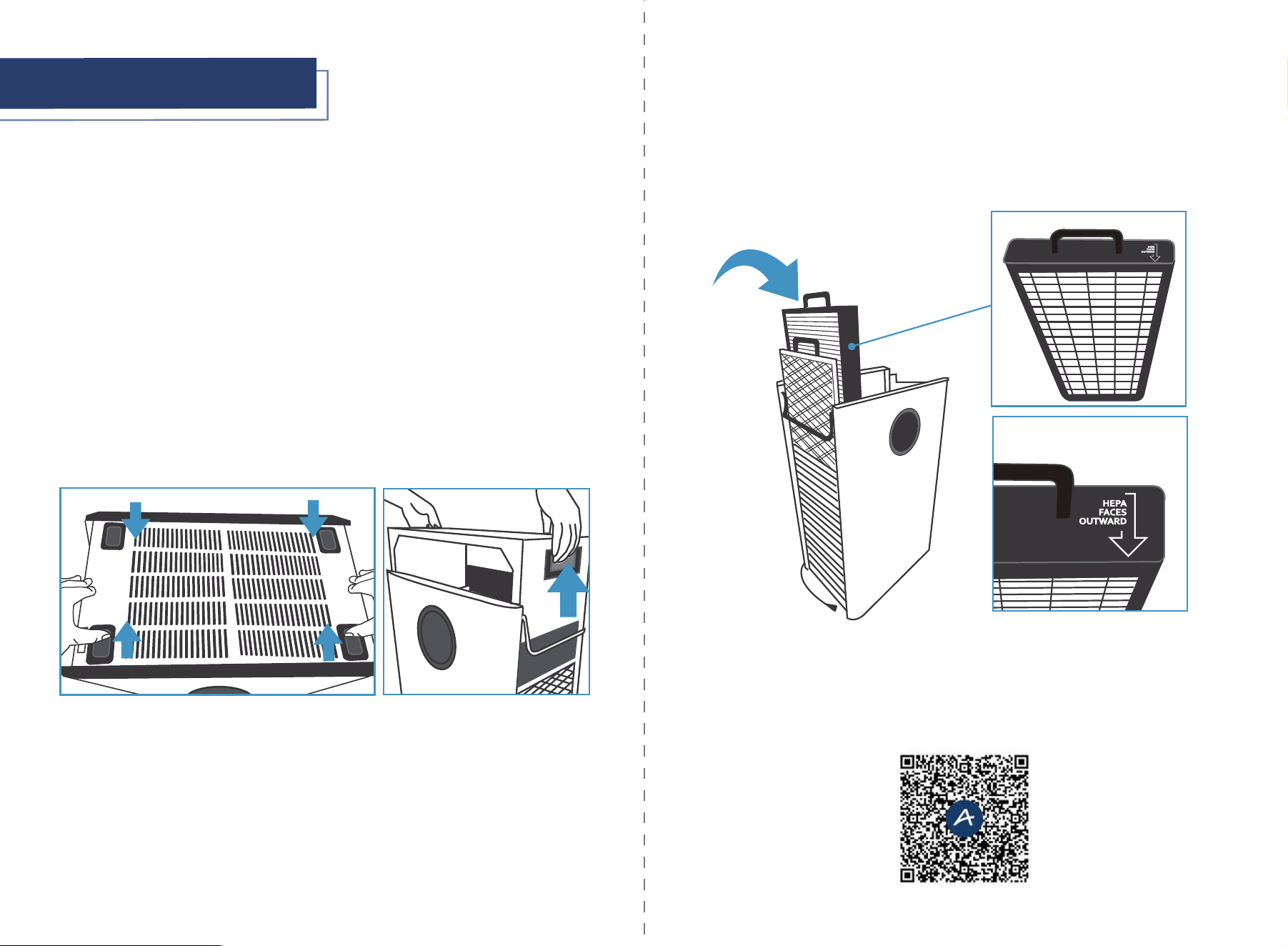
1
7
4
8
Touch Display
1
UVC Lamp
5
Air Inlet
4
Power Cord
8
Air Quality Sensor
7
Handle
3
Wheels
6
Upper Cover
2
2
3
5
6
CLEANING AND MAINTENANCE
DISPOSAL OF PACKAGING MATERIALS
P.5P.4
3. GETTING STARTED
1 x Air Purifier
1 x Remote Control
2 x 3-Stage HEPA Filters
2 x Metal Pre-Filters
1 x Quick Start Guide
•
•
•
•
•
1.
2.
3.
4.
Find an ideal location to maximize the air cleaning efficiency. The location should be farthest away from the
room's HVAC return vent, windows, and doorways.
Place the purifier on a flat, stable surface. Allow at least 4" of clearance on all sides of the purifier. Keep away
from anything that would block airflow.
Locate the closest electrical outlet.
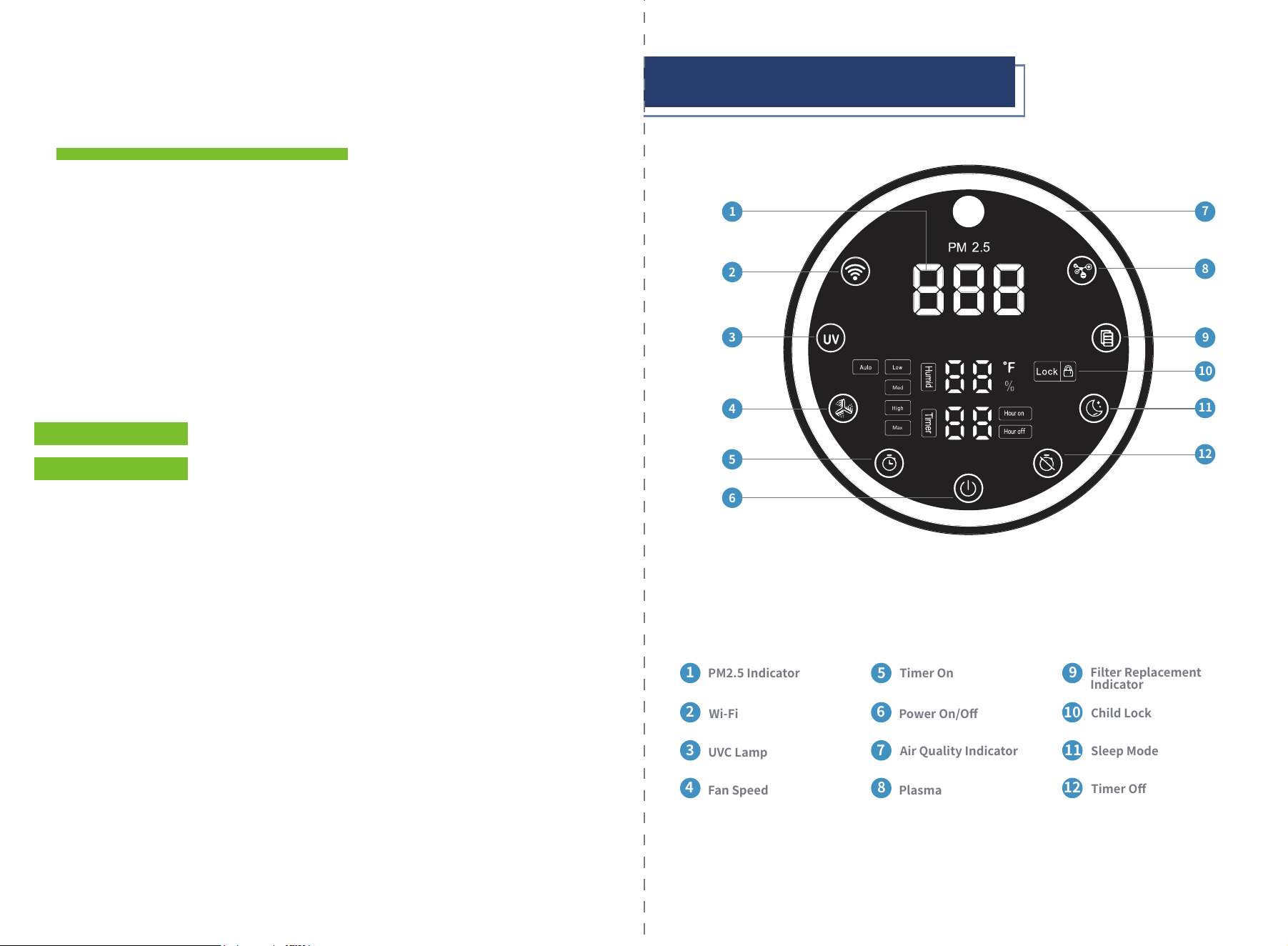
Before turning on the unit, remove the top cover by sliding the four locking tabs on the top of the unit.
5.
MAKE SURE YOU REMOVE ALL PACKAGING FOR FILTERS AND PRODUCTS BEFORE USING THE
APPLIANCE.
INSTALLATION
WHAT'S INCLUDED
Remove the plastic packaging from the air filters located inside the air purifier unit before turning on or
operating the unit.
After the plastic packaging is removed, insert both sets of filters into the unit. On each side, the Pre-Filter is
inserted in the slot toward the outside of the machine, and the 3-Stage HEPA Filter is placed closest to the
inside of the unit. The white HEPA portion of the 3-Stage HEPA Filter faces outward.
6.
Plug the power cord into an electrical outlet.
Press the power button to turn on the unit. The unit will enter Auto Mode with Plasma and UVC Lamp on.
YOU CAN FOLLOW STEP-BY-STEP INSTRUCTIONS BY SCANNING THE QR CODE BELOW FOR A LINK TO A
DEMONSTRATION VIDEO:
7.
8.
Power On/Off
6
Timer On
5
Air Quality Indicator
7
Plasma
8
P.7
P.6
4. USING YOUR PRODUCT
3
4
5
ff
6
Max
Med
2
1
PM2.5 Indicator
1
Filter Replacement
Indicator
9
Wi-Fi
2
Child Lock
10
Sleep Mode
11
Fan Speed
4
Timer Off
12
UVC Lamp
3
8
7
9
10
11
12
TOUCH DISPLAY
This page left intentionally blank.
P.8
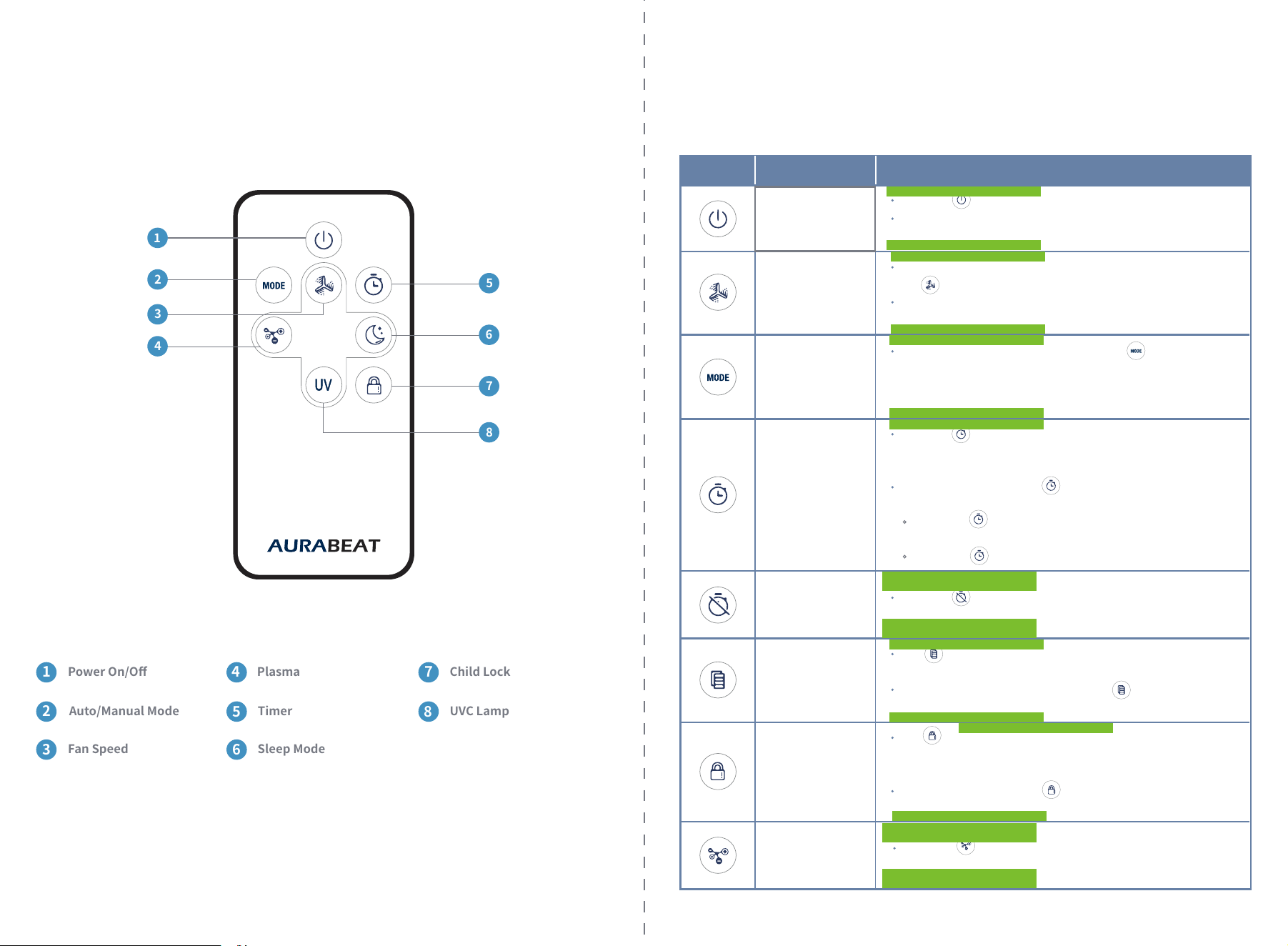
Power On/Off
1
Plasma
4
Child Lock
7
Auto/Manual Mode
2
Timer
5
UVC Lamp
8
Fan Speed
3
Sleep Mode
6
P.9
1
2
4
3
5
6
7
8
REMOTE CONTROL
Filter Replacement
Indicator
Child Lock
Timer On
Timer Off
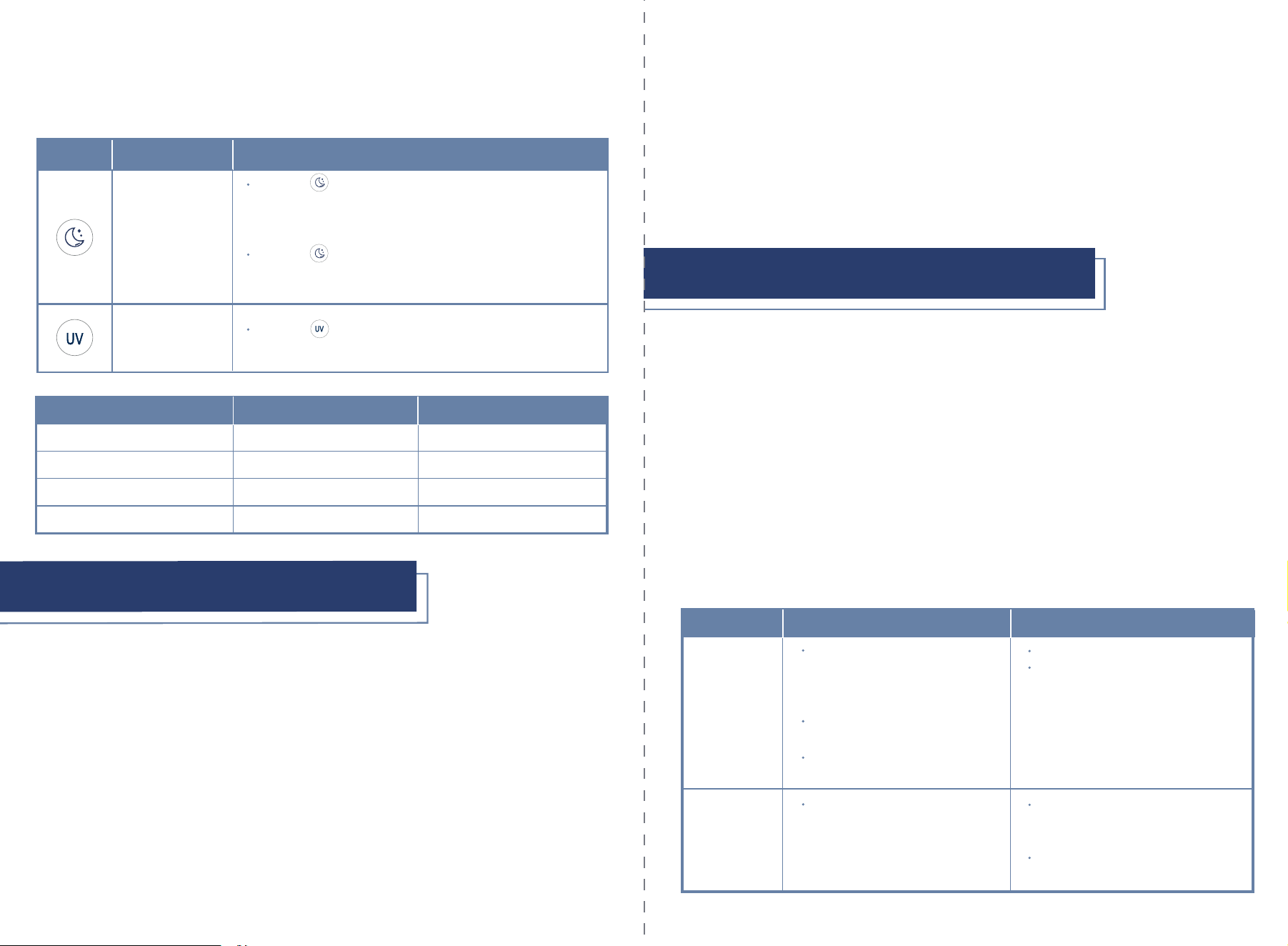
OPERATING INSTRUCTIONS
Press the button to turn on/turn off the product.
The “On/Off”, “Auto”, “PM2.5”, “Temperature”, “Humidity”
icons will appear once product is turned on.
Adjust the fan speed from Auto and 1 to 4 speed levels by pressing
the button on the Touch Display or on the Remote Control.
The fan speed indicator will be on if the fan speed function is
activated.
Select “Auto/Manual Mode” by pressing the button on the
Remote Control to switch between Auto and Manual Mode.
In Auto Mode, the fan speed will automatically adjust according
to the air quality.
Icon
Power On/Off
Function Function Details
Fan Speed
Auto/Manual Mode
(Only on Remote)
Press the button on the Touch Display when the device is on
to set the Timer Off function from 1-12 hours.
The icon will appear on the Touch Display when activated.
This function can only be activated/deactivated from the Remote
Control and the AURABEAT app.
(Remote Control) Press the button to activate/deactivate
Child Lock.
The button will illuminate after the device has been operating
for 4320 hours to indicate it is time for filter replacement.
To reset the indicator, press and hold the button on the Touch
Display for 3 seconds.
Press the button on the Touch Display when the product is
connected but the device is off to set the Timer On function,
from 1-12 hours.
(Remote Control) Press the button to select Timer On/Timer Off
function.
Press the button when the product is connected but the
power is off to set the Timer On function.
Press the button to set Timer Off when the product is on.
Press the button on the Touch Display or Remote Control to
activate/deactivate this function.
Plasma
P.11
P.10
Press the button on the Touch Display or the Remote Control
to activate this function. The device will operate at the lowest speed
and all icons except “Sleep Mode” will be turned off. The UVC Lamp,
Plasma and Timer settings will not change.
Press the button again to deactivate this function. The icons
on the Touch Display will illuminate and the fan speed will remain
at the lowest speed.
Press the button on the Touch Display or the Remote Control
to activate/deactivate this function.
Icon Function Function Details
Sleep Mode
UVC Lamp
1-79
80-199
200-500
>500
Good
Fair
Bad
Poor
Green
Blue
Red
Flashing red
PM2.5 Value Air Quality Level Air Quality Indicator Color
6. MAINTENANCE AND CLEANING
6.
Plasma Purification: The positive and negative ions generated by the plasma generator neutralize in the air and
produce huge energy, which results in the change of the microorganism structure around or the conversion of
energy, thereby destroying the microorganisms. As the number of negative ions is greater than that of positive
ions, excess negative ions are still floating in the air, which can remove smoke, dust, odors and improve air
quality and health.
1.
2.
3.
4.
5.
Pre-Filter: Captures hair, fiber, large particles, dander, etc., can be vacuumed and reused.
High Efficiency Air Filter: H13 HEPA Grade filter filters ≥99.97% of airborne particles 0.3 microns in size. It
has low penetration, large capacity for holding dust, high clean air delivery rate can filter smoke and dust,
especially for PM2.5, efficiently filtering particles down to ≤0.01µm.
Activated Carbon Filter: Removes odors, VOC's, harmful gases and smoke.
Photocatalytic Oxidation Filter (PCO): Acting with UVC light, converts microorganisms, smoke, odors, VOC's,
and chemically active compounds (CAC's) into water, carbon dioxide.
UVC Light: UVC lamp helps to sanitize the air, surface of the filters and the inside of the unit.
NOTE
Never immerse the device in water or any other liquid.
CLEANING AND REPLACING THE FILTERS
EXTERIOR
Unplug device before cleaning.
Wipe the exterior of the air purifier with a soft, dry cloth. If necessary, wipe the housing with a damp cloth
then dry immediately.
Do not use abrasive chemicals when cleaning the air purifier.
•
•
For optimal performance, adhere to the recommended filter cleaning schedule.
Always unplug the unit before opening the filter cabinet.
•
•
•
•
Metal Pre-Filters
3-Stage HEPA
Filters
Clean: every 6 months.
Replace: every 3 years.
Replace when the red Filter
Replacement Indicator light is visible
on the Touch Display.
Replace when the AURABEAT app states
the filter life is at 0%.
Filter Method
Cleaning cycle
Clean: Vacuum or rinse filter using
warm water. Allow filter to dry
completely before re-inserting
into unit.
Replace: Remove the filters and
place in trash bag before disposal.
Allow filter to dry completely before
re-inserting into unit.
Replace: Remove the filters and
place in trash bag before disposal.
5. AIR PURIFYING FUNCTIONS
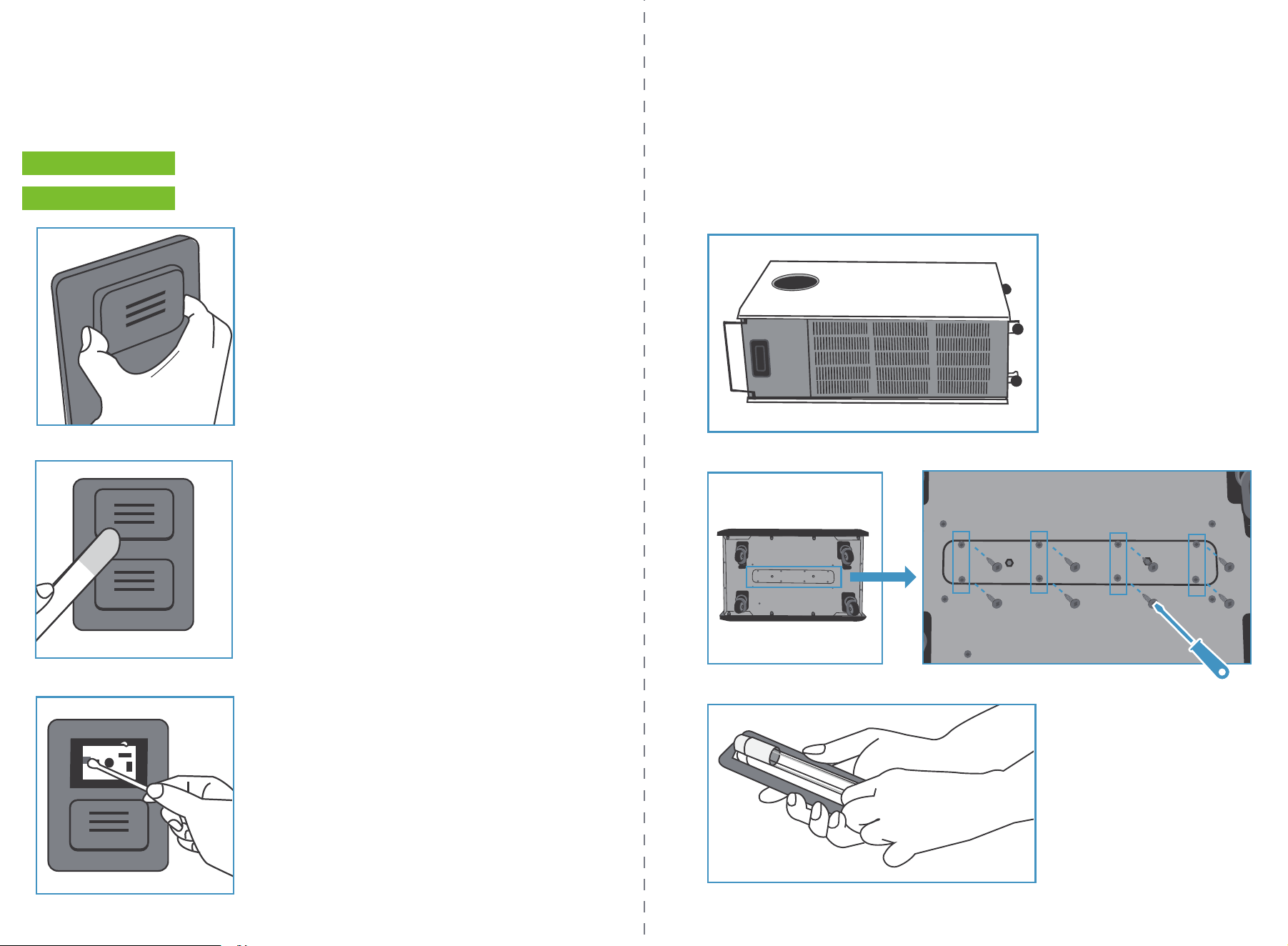
Unplug the unit and lay it on its side.
UVC LAMP REPLACEMENT
Remove the 8 screws from the panel located at the bottom.
1.
2.
3.
Remove the old lamp and replace it.
Replace the UVC lamp when it burns out using the following method:
Open PM2.5 Sensor cover.
AIR QUALITY SENSOR
If there is dust around the sensor area, a vacuum hose attachment may be used to remove the dust.
1.
2.
3.
Wipe the lens with a dry cotton swab.
P.13
P.12
Clean the PM2.5 Sensor every 2 months using the following method:
P.
14
P.
15
7. TROUBLESHOOTING
The air inlet is covered. Ensure that the air inlet is not blocked.
The surface of the filter is dirty. Clean the surface of the air filter.
Replace the air filter if the air flow is not
improved after cleaning.
Please install the filter correctly.
Replace the filter.
Please remove the objects covering or
blocking the air inlet.
The filter is not installed correctly.
The filter is damaged.
The air inlet is covered.
There is an object inside the air
outlet.
Please clean the air outlet.
The air outflow is
significantly
stronger than
before
Product is very
noisy during
operation
7. WARRANTY AND SERVICE
WARRANTY
Aurabeat North America products are backed by some of the most comprehensive warranties in the industry.
Aurabeat North America warrants that the Aurabeat 3800 Large Capacity Sanitizing Air Purifier shall be free from
defects in material and workmanship under normal use and service.
Residential & Commercial Warranty for Aurabeat 3800 Large Capacity Sanitizing Air Purifier ‒ 3-year limited
warranty Includes Base Model numbers: ASP-X1
100% Coverage of defects or malfunctions of all electronic parts and labor for the entire product excluding
consumable filters for the first 3 years from original date of purchase.
1.
2.
3.
Aurabeat North America warrants its products to be free from manufacturing defects under normal use
and service. This warranty is extended only to the ORIGINAL PURCHASER.
Aurabeat North America is not responsible for the cost of removal, return (shipping) and/or reinstallation
of products. This warranty does NOT apply to:
Aurabeat North America's obligations under this warranty are limited to repair or replacement, at
Aurabeat North America's option, of products or parts found to be defective, provided that such products
were properly installed and used in accordance with instructions. Aurabeat North America reserves the
right to make such inspections as may be necessary in order to determine the cause of the defect.
Aurabeat North America will not charge for labor or parts in connection with warranty repairs for the first 3
years from date of purchase on all products except those that may be subject to heavy commercial use
limitations.
8. WARRANTY
EXCLUSIONS AND LIMITATIONS
This warranty gives you specific legal rights. You may have other rights which vary from state to state.
THIS WRITTEN WARRANTY IS THE ONLY WARRANTY MADE BY AURABEAT NORTH AMERICA. REPAIR OR REPLACEMENT
AS PROVIDED UNDER THIS WARRANTY SHALL BE THE EXCLUSIVE REMEDY AVAILABLE TO THE PURCHASER. AURABEAT
NORTH AMERICA SHALL NOT BE RESPONSIBLE FOR LOSS OF USE OF THE PRODUCT OR FOR OTHER INCIDENTAL,
SPECIAL, OR CONSEQUENTIAL DAMAGES OR EXPENSES INCURRED BY THE PURCHASER OR FOR LABOR OR OTHER
COSTS DUE TO INSTALLATION OR REMOVAL OR COSTS OF REPAIRS BY OTHERS, OR FOR ANY OTHER EXPENSE NOT
SPECIFICALLY STATED ABOVE. EXCEPT TO THE EXTENT PROHIBITED BY APPLICABLE LAW, ANY IMPLIED WARRANTIES,
INCLUDING THAT OF MERCHANTABILITY, ARE EXPRESSLY LIMITED TO THE DURATION OF THIS WARRANTY. SOME
STATES DO NOT ALLOW LIMITATIONS, SO THE ABOVE LIMITATION AND EXCLUSION MAY NOT APPLY TO YOU.
4.
The air purifier is
not working
The air outflow is
significantly weaker
than before
The product is not connected. Please make sure that the power cord is
connected to a power supply.
Problem
Symptoms
Recommended Solutions
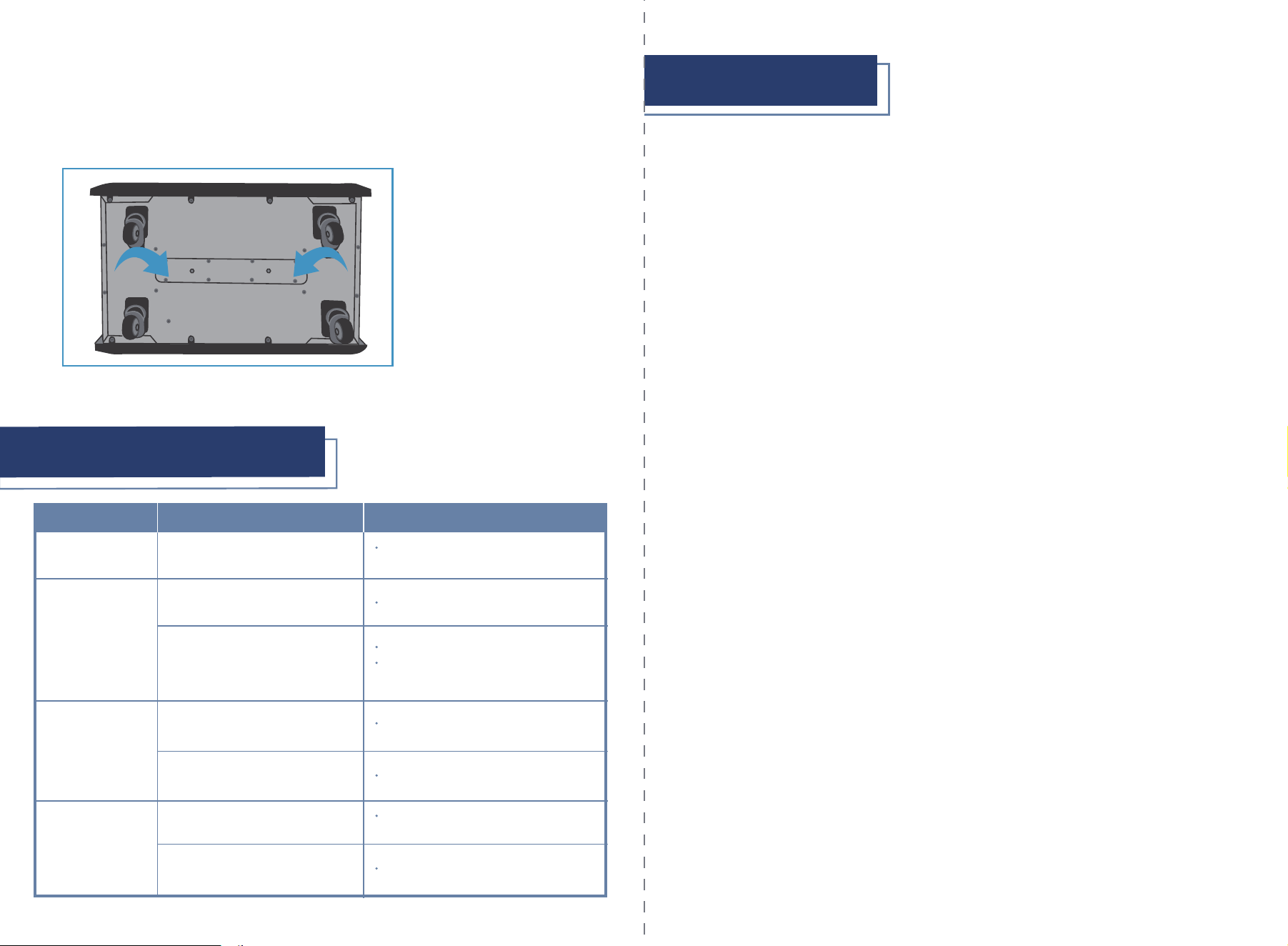
Place the panel back on the bottom and screw it in to reattach it.
REPLACEMENT UVC CAN BE PURCHASED FROM AUTHORIZED DISTRIBUTOR AND ONLY BE CARRIED
OUT BY TECHNICIAN.
4.
P.16 P.17
To obtain repair service under this warranty, you must contact an authorized Aurabeat North America or
Brondell Service Center to obtain an RMA (Return Merchandise Authorization) number. Proof of purchase in the
form of a copy of the original receipt must accompany the returned unit for the warranty to be valid. Take or
ship the unit pre-paid to the closest Aurabeat North America or Brondell authorized service center along with
the RMA number and proof of purchase. To obtain an RMA number, contact the Service Center at
commercialsupport@brondell.com
This device may not cause harmful interference. And
This device must accept any interference received, including interference that may cause undesired operation.
This device complies with part 15 of the FCC Rules. Operation is subject to the following two conditions:
HOW TO OBTAIN SERVICE
1.
2.
9. SPECIFICATIONS
Model Number
Voltage
Power
CFM
Recommended Area
Sensor Type
ASP-X1
120 V/60 Hz
175W
518 CFM
1300 sq ft
Product Dimension
20.9 x 13.0 x 35.4 in
PM2.5, Temperature, Humidity
Maximum Noise
≤60 dB(A)
Net Weight 60.6 lbs
5023573
Aurabeat North America
Distributed Exclusively by Brondell, Inc.
PO Box 470085
San Francisco, CA
94147-0085
commercialsupport@brondell.com
Research and Development in Hong Kong
Made in China
PLEASE RETAIN RECEIPT RECORDS FOR ANY WARRANTY CLAIMS.
Replacement filter:
APRF-100 Replacement Filter Pack
ABRF-100PRE Pre-Filter Replacement Pack
Item
Specifications