01 02
Important Safety Instructions
WARNING!
Read all instructions before using (this appliance).
DANGER – To reduce the risk of electric shock:
1. Always unplug this appliance from the electrical outlet immediately after using and before
cleaning.
WARNING – To reduce the risk of burns, re, electric shock, or injury to persons:
1. Close supervision is necessary when this appliance is used by, on, or near children, invalids, or
disabled persons.
2. Use this appliance only for its intended use as described in this manual. Do not use
attachments not recommended by the manufacturer.
3. Never operate this appliance if it has a damaged cord or plug, if it is not working properly, if it
has been dropped or damaged, or dropped into water. Return the appliance to a service center
for examination and repair.
4. Keep the cord away from heated surfaces.
5. Never operate the appliance with the air openings blocked. Keep the air openings free of lint,
hair, and the like.
6. Never drop or insert any object into any opening.
7. Do not use outdoors.
8. Do not operate where aerosol (spray) products are being used or where oxygen is being
administered.
9. Use heated surfaces carefully. May cause serious burns. Do not use over insensitive skin areas
or in the presence of poor circulation. The unattended use of heat by children or incapacitated
persons may be dangerous.
10. Do not stand on or in appliance. Use only while seated.
11. This appliance contains batteries that are non-replaceable.
12. This appliance can be used by children aged from 8 years and above and persons with
reduced physical, sensory or mental capabilities or lack of experience and knowledge if they
have been given supervision or instruction concerning use of the appliance in a safe way and
understand the hazards involved. Children shall not play with the appliance. Cleaning and
user maintenance shall not be made by children without supervision.
13. Do not immerse this appliance in water or any liquid.
14. Do not use this appliance in humid environments such as bathrooms and saunas.
SAVE THESE INSTRUCTIONS
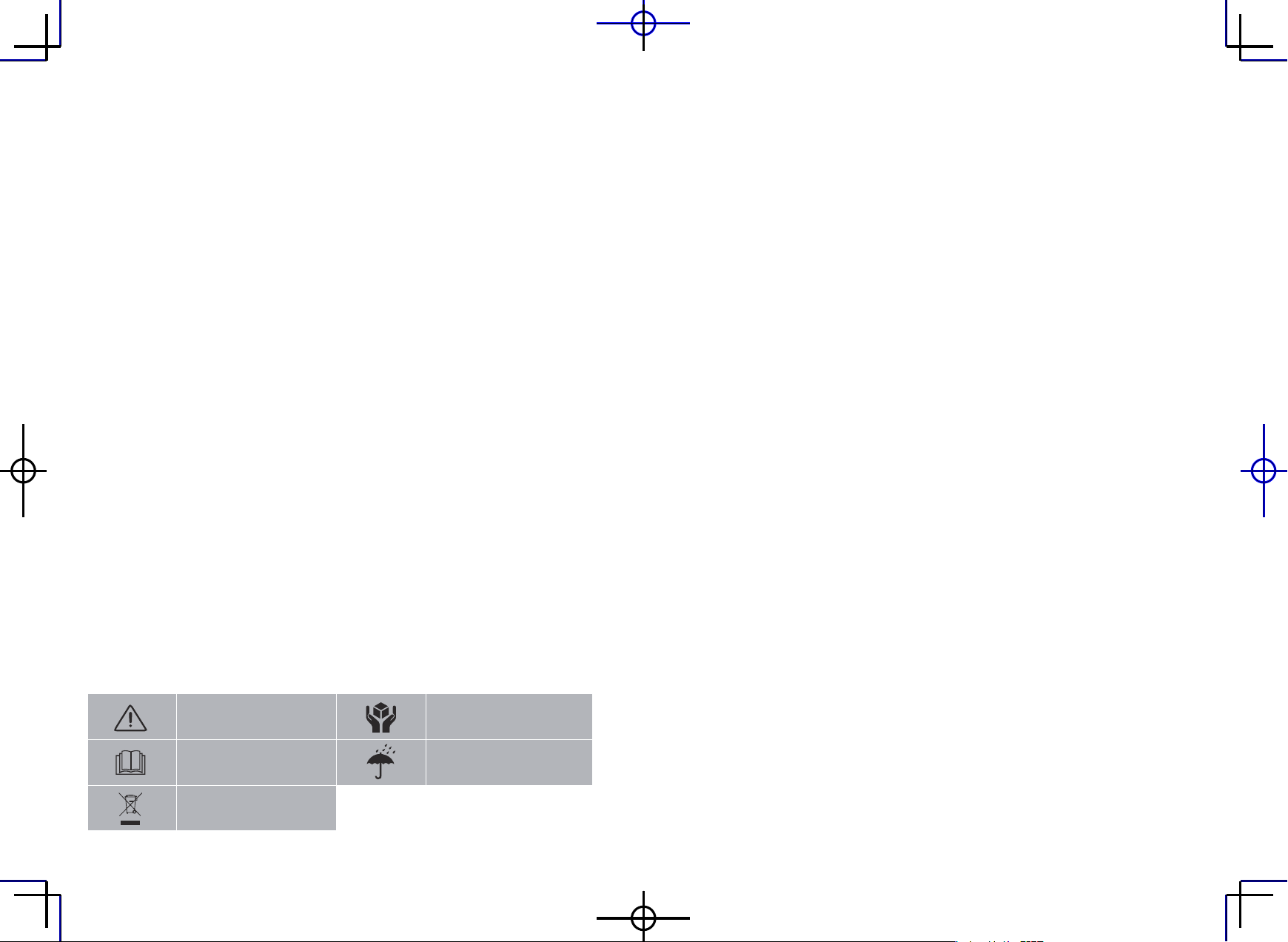
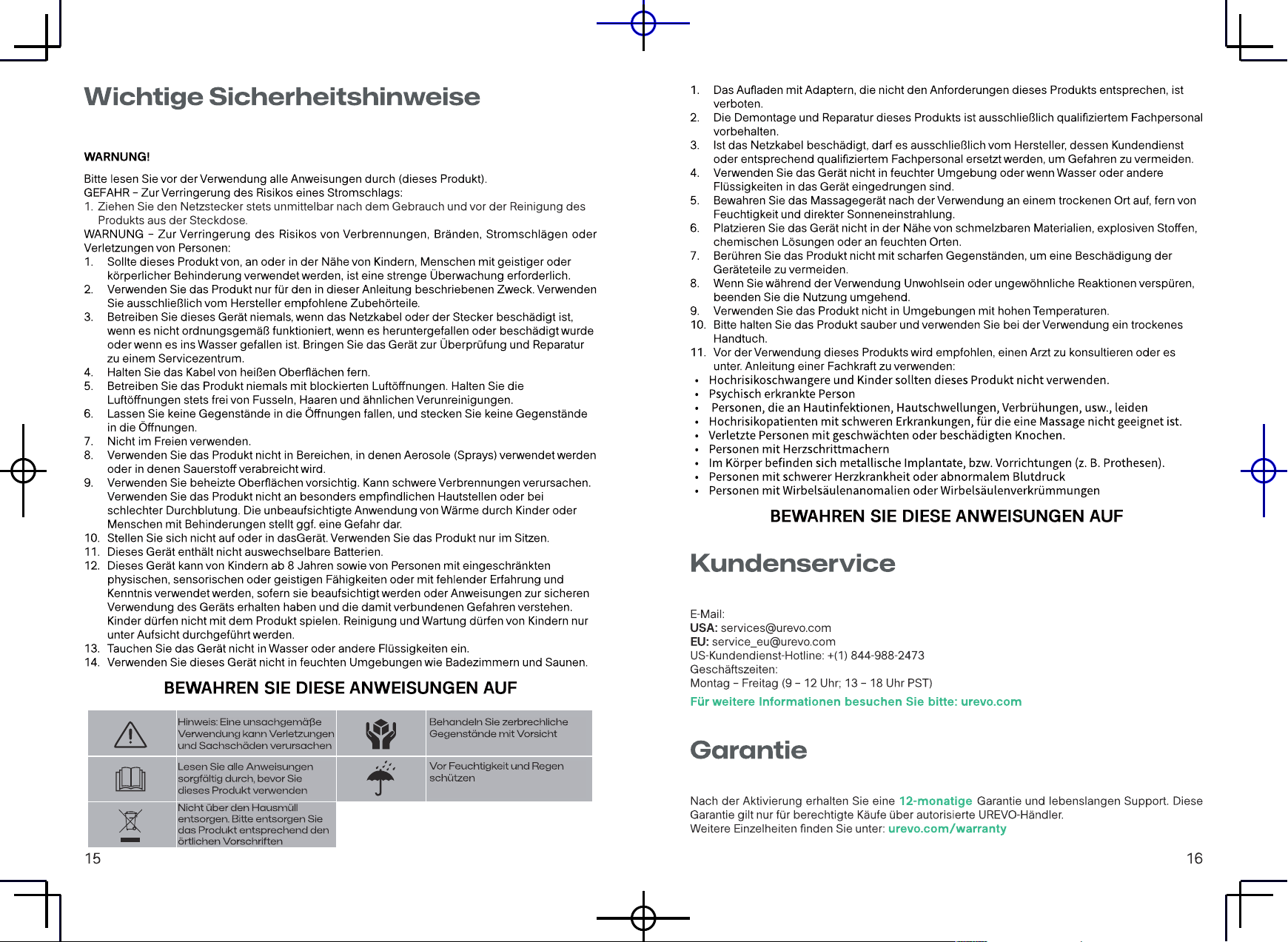
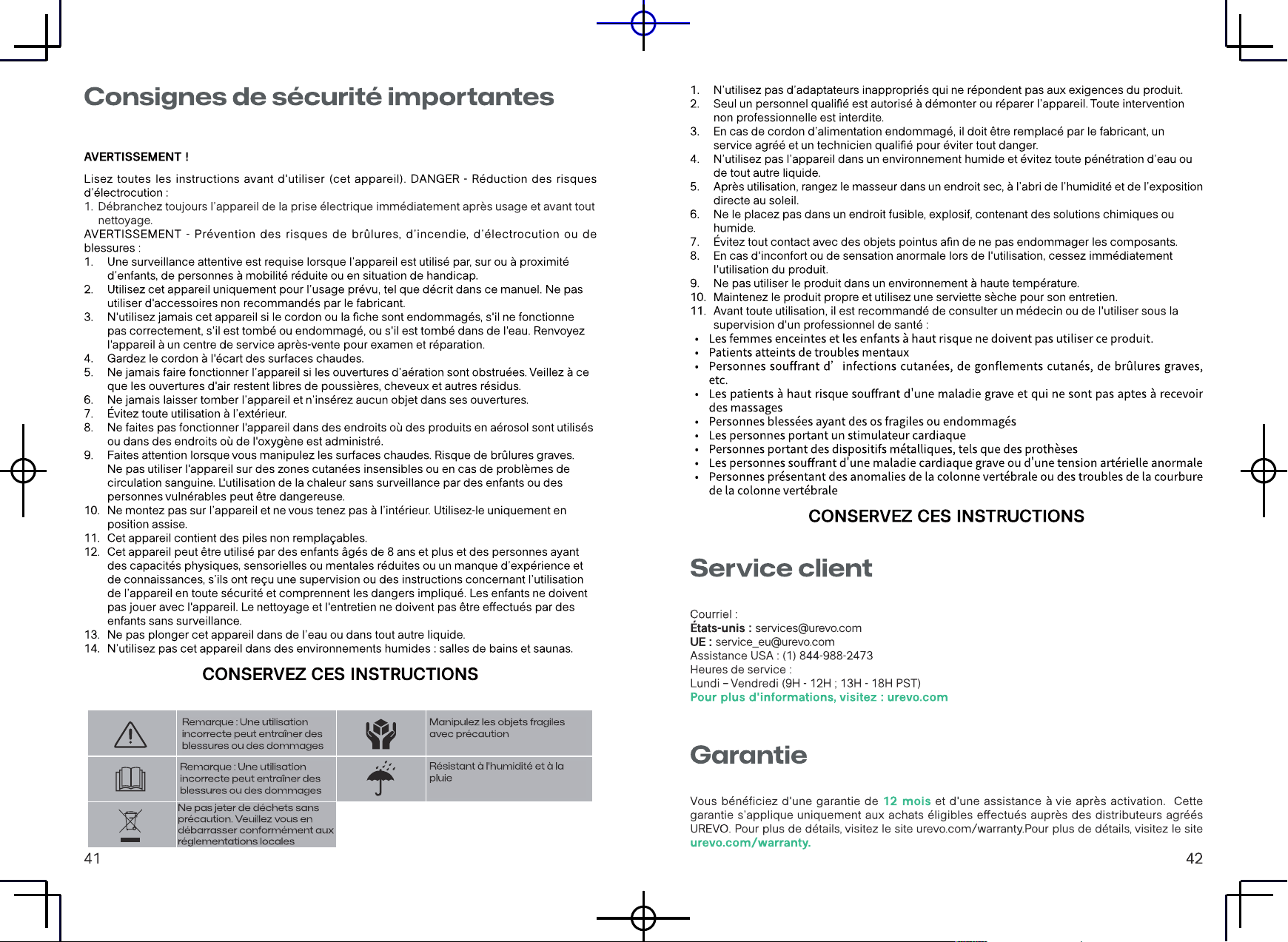
Note: There is a possibility of
personal injury and damage
when used incorrectly
Handle fragile items with care
Moisture-proof and rainproof
Please read the instructions
carefully before using this
product
Do not throw rubbish carelessly.
Please dispose of it according
to local regulations
1. Charging with adapters that do not meet the requirements of this product is prohibited.
2. Non-professional repair technicians are prohibited from decomposing and repairing this
product.
3. If the power cord is damaged,in order to avoid danger,it must be replaced by the manufacturer
or its maintenance department and similar full-time personnel.
4. Do not use in wet areas or when the product has penetrated into water or other liquids.
5. After use,please place the massager in a dry place, away from humidity and direct sunlight.
6. Do not place in fusible,explosive,chemical solution,damp place.
7. Do not touch the product with sharp objects to prevent damage to the product parts.
8. If you feel uncomfortable or abnormal during use,please stop using immediately.
9. Do not use in high temperature environment.
10. Please keep the product clean and use a dry towel during maintenance.
11. Before using this product,it is recommended to consult a doctor or use under the guidance of
a professional:
• High-risk pregnant women and children should not use.
• Mental patient
• Suer from skin infection,skin swelling,scalding burns,etc
• High-risk patients who have a serious illness and are not suitable for massage
• The injured have weak or damaging bones
• People with cardiac pacemakers
• The body is tted with other metal devices,such as prosthetics
• People with serious heart disease or abnormal blood pressure
•Peoplewithspinalabnormalitiesorspinalcurvaturedisorders
SAVE THESE INSTRUCTIONS
FCC STATEMENT:
Operation is subject to the following two conditions:
(1) This device may not cause harmful interference, and
(2) This device must accept any interference received, including interference that may cause
undesired operation.
(3) Any Changes or modications not expressly approved by the party responsible for compliance
could void the user's authority to operate the equipment.
Note:This equipment has been tested and found to comply with the limits for a Class B digital
device, pursuant to part 15 of the FCC Rules. These
limits are designed to provide reasonable protection against harmful interference in a residential
installation. This equipment generates, uses
and can radiate radio frequency energy and, if not installed and used in accordance with the
instructions, may cause harmful interference to radio
communications. However, there is no guarantee that interference will not occur in a particular
installation. If this equipment does cause harmful interference to radio or television reception,
which can be determined by turning the equipment o and on, the user is encouraged to try
the interference by one or more of the following measures:
to correct
• Reorient or relocate the receiving antenna.
• Increase the separation between the equipment and receiver.
• Connect the equipment into an outlet on a circuit dierent from that to which the receiver is
connected.
• Consult the dealer or an experienced radio/TV technician for help.
This device complies with RSS247 of Industry Canada. Cetappareil se conforme à RSS247 de
Canada d'Industrie. This device complies with Industry Canada license-exempt RSS standard(s).
Operation is subject to the following two conditions: (1) this device may not cause interference,
and (2) this device must accept any interference, including interference that may cause undesired
operation of the device. appareils radio exempts de licence. Son fonctionnementestsujet aux
07 08
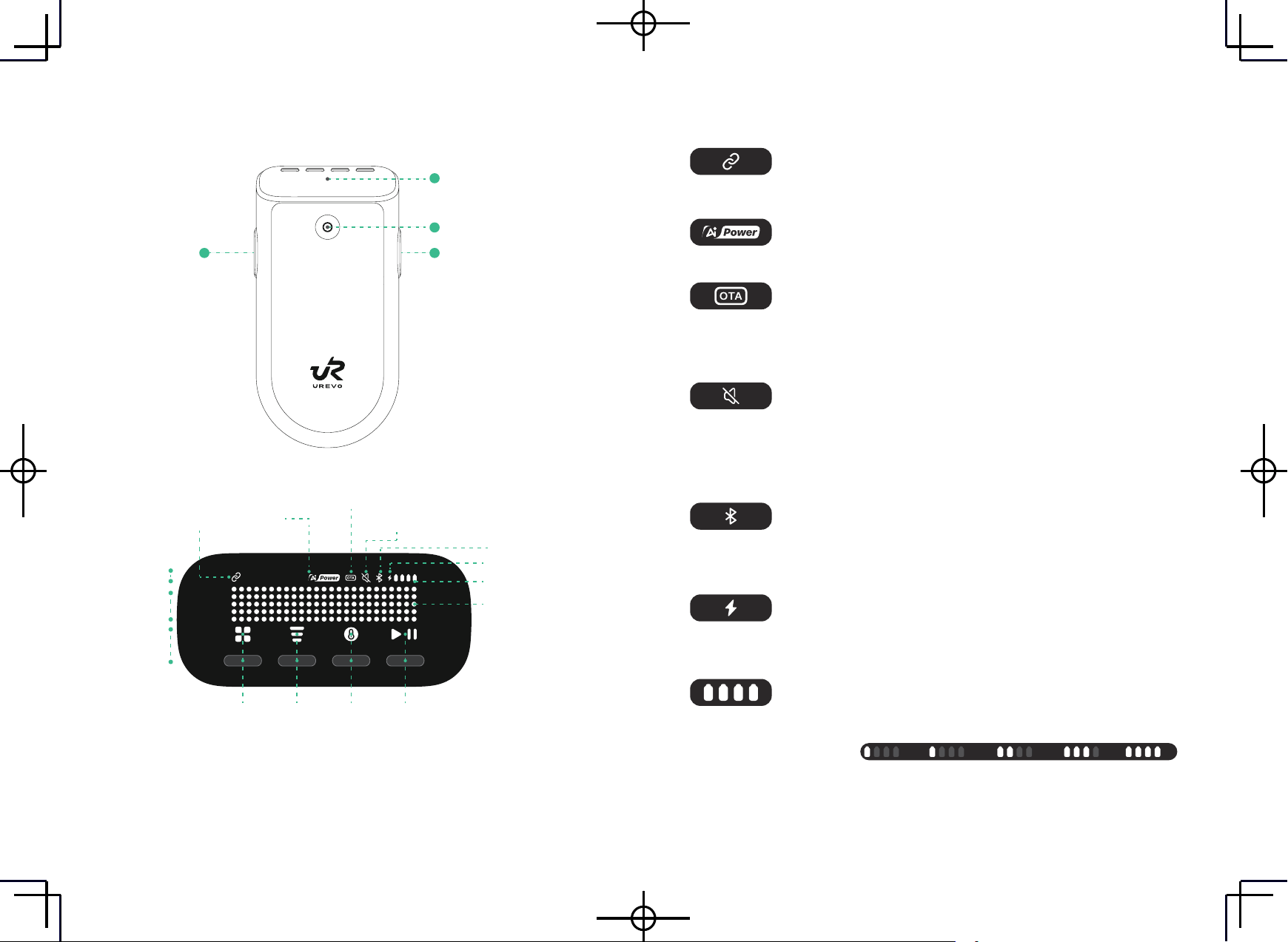
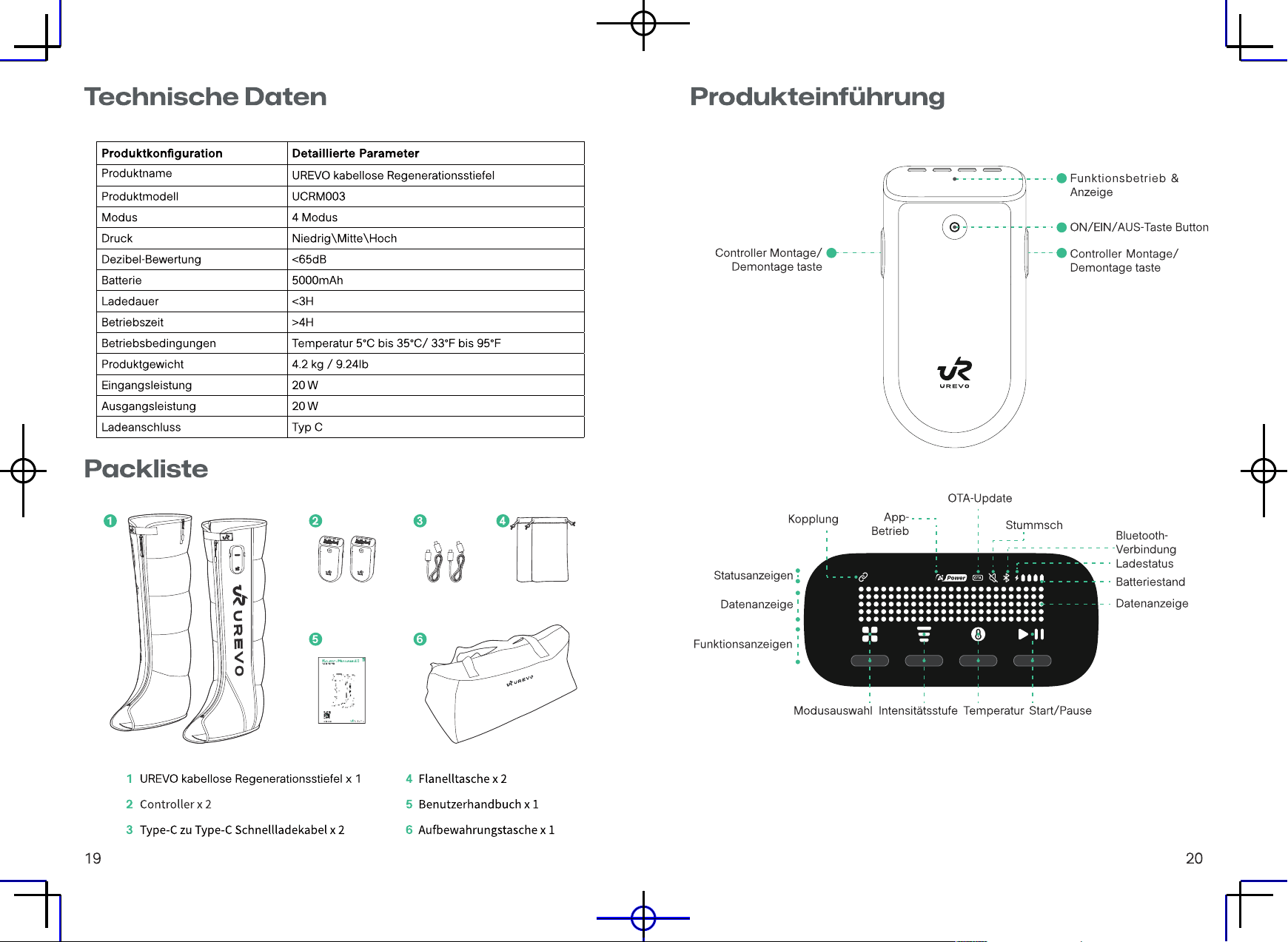
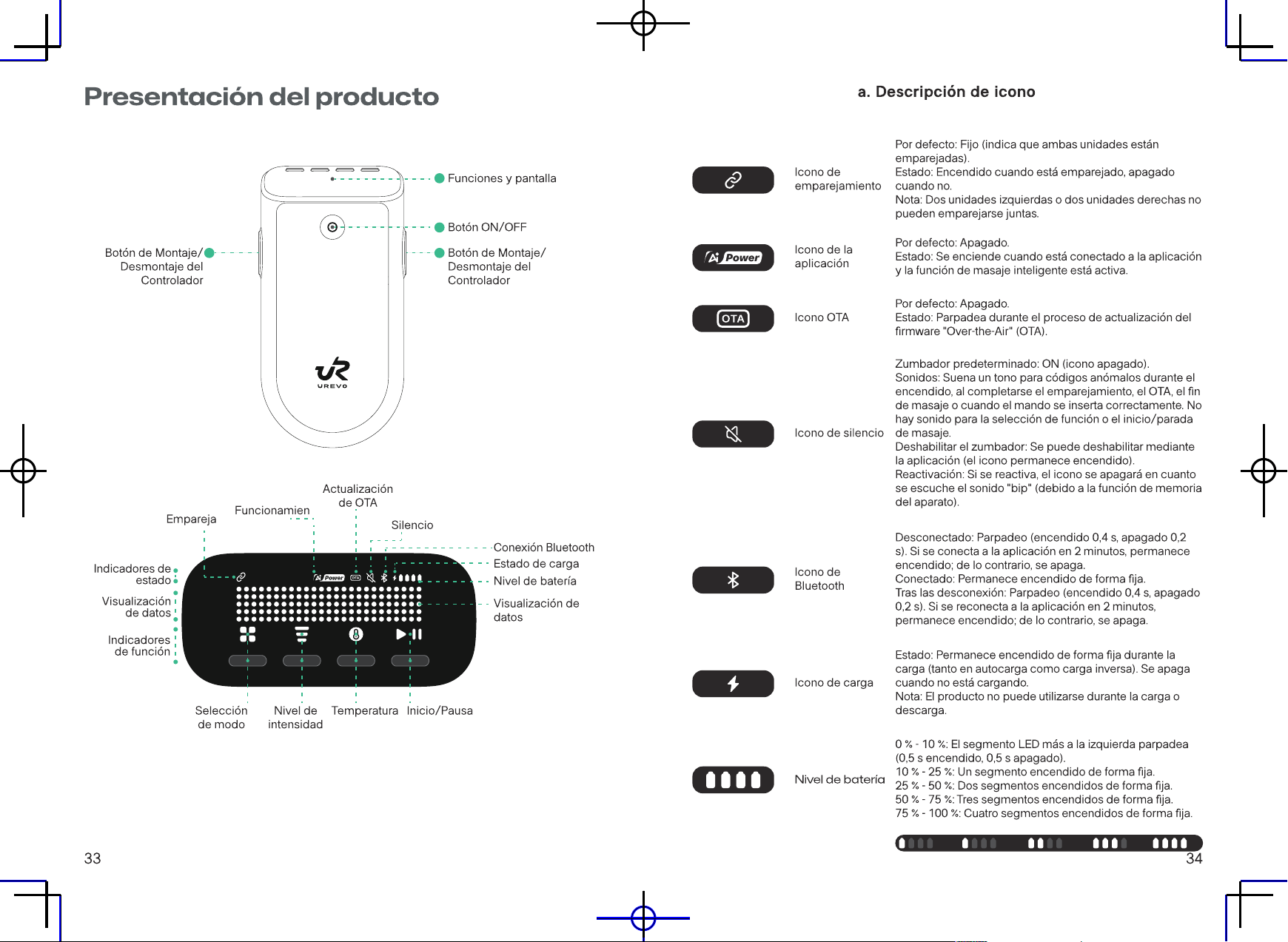
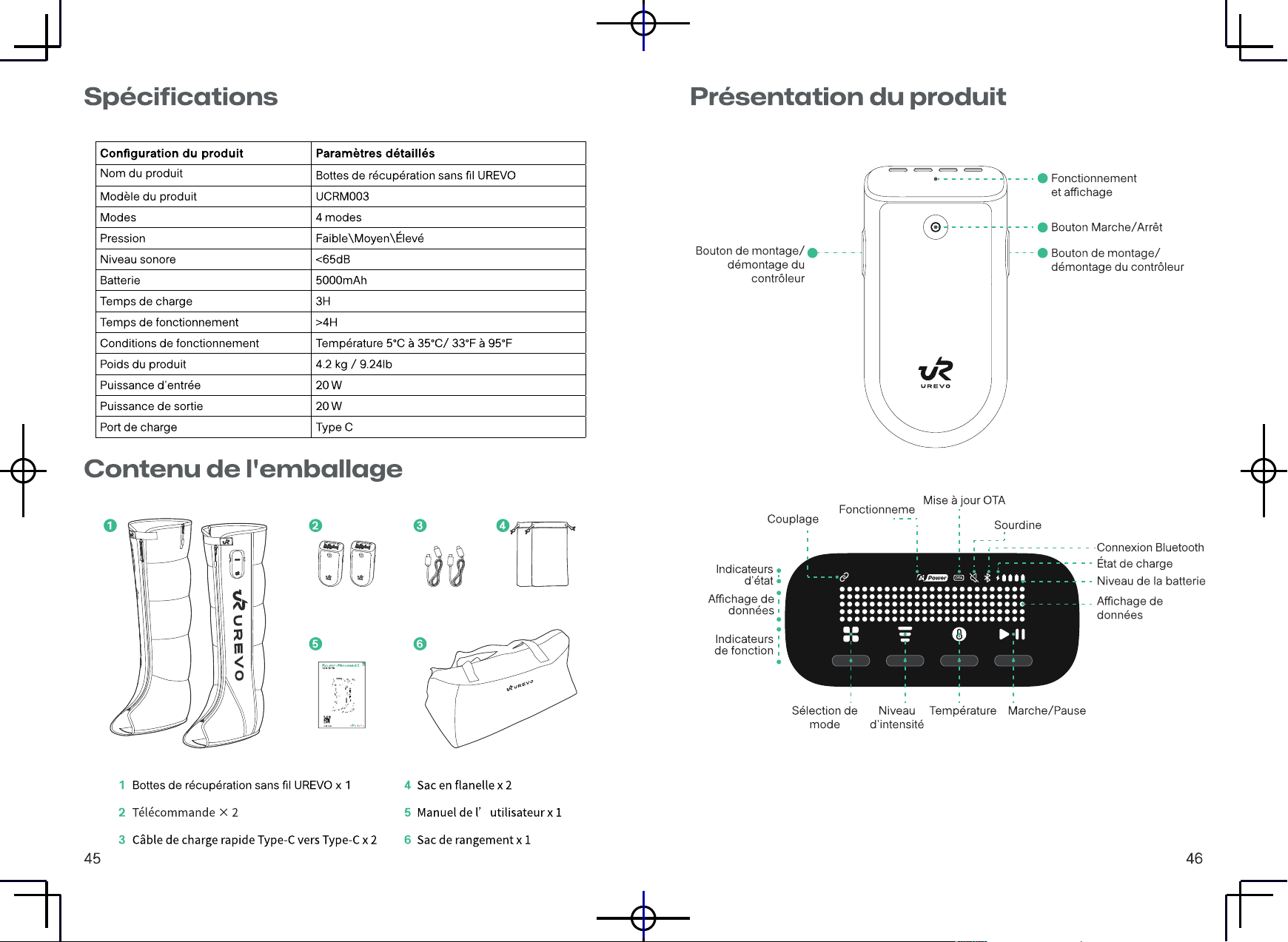
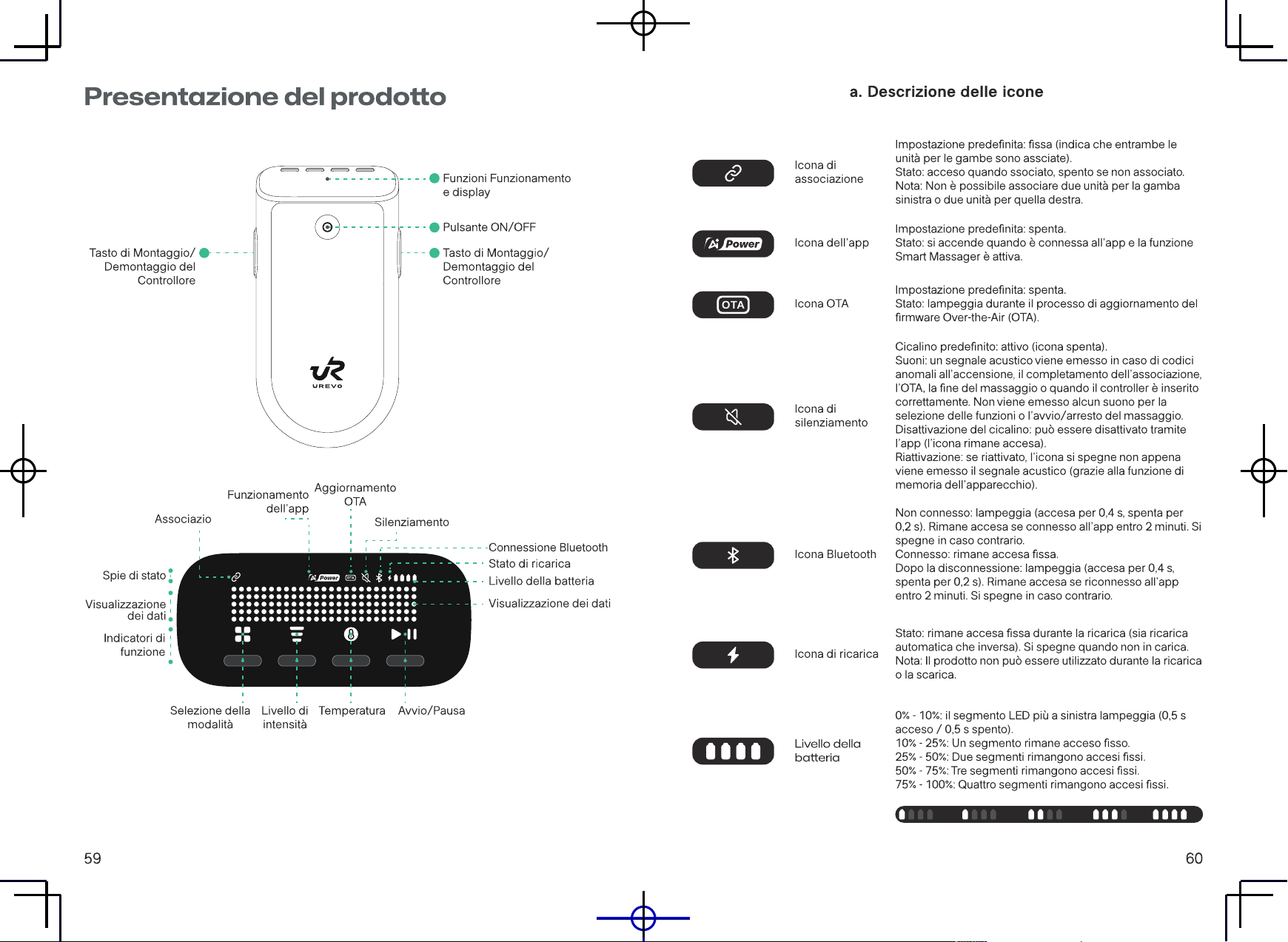
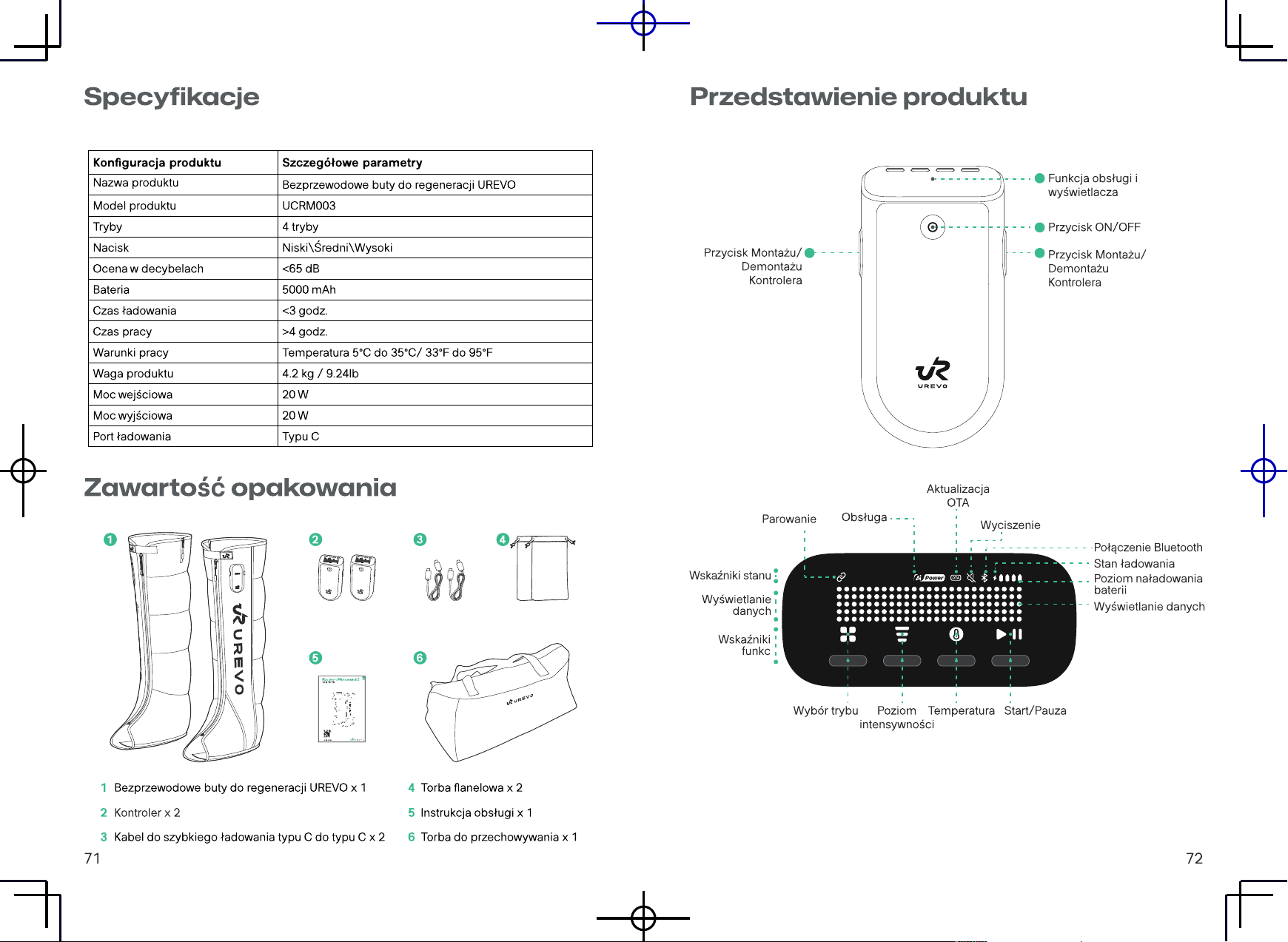
Product Introduction
1
2
33
Function Operation
& Display
ON/OFF Button
Controller Install/
Remove Button
Controller Install/
Remove Button
Bluetooth Connection
Charging Status
Battery Level
Data Display
Mode Selection
Intensity Level Temperature
Start/Pause
Pairing
Status Indicators
Data Display
Function
Indicators
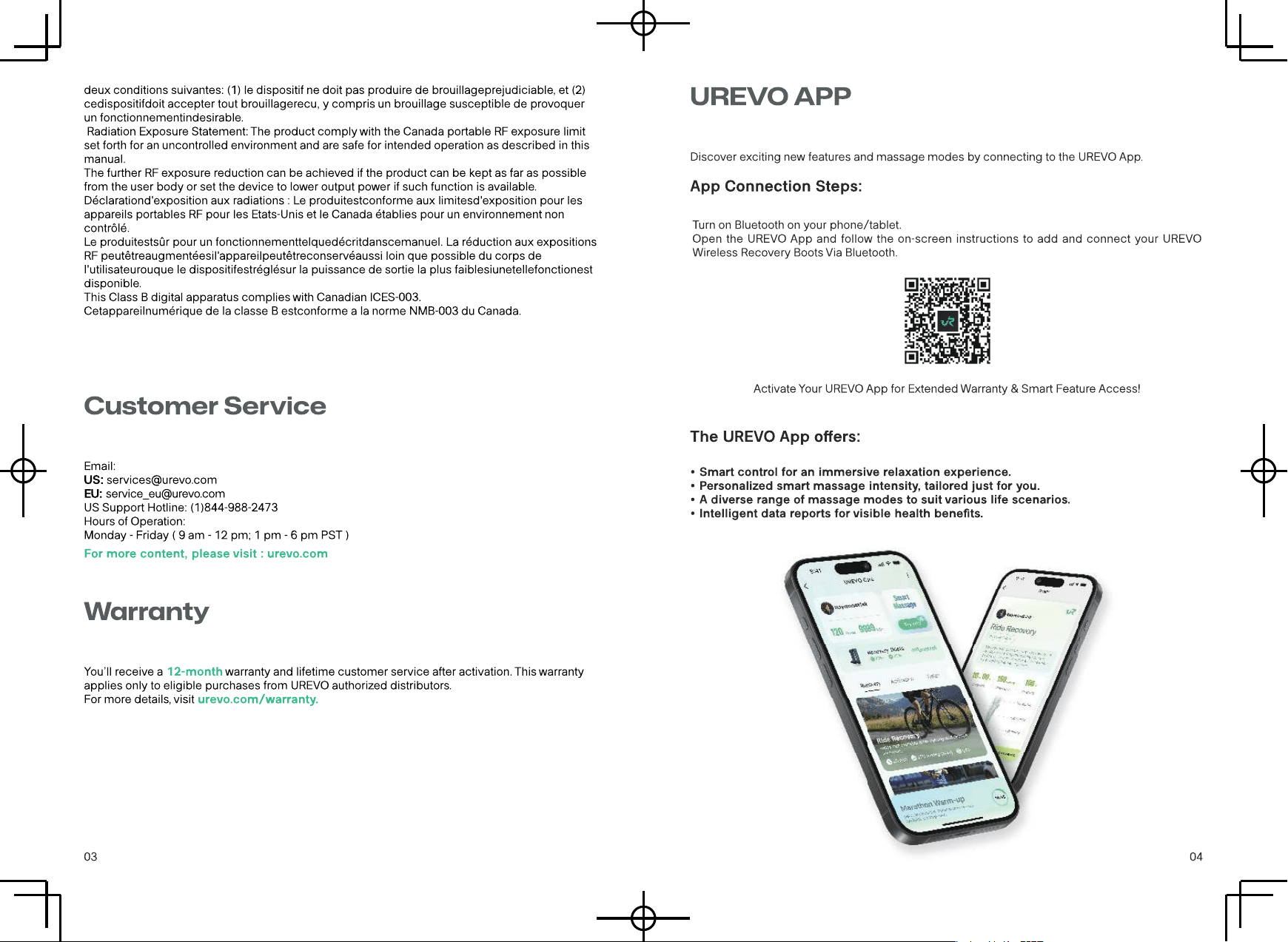
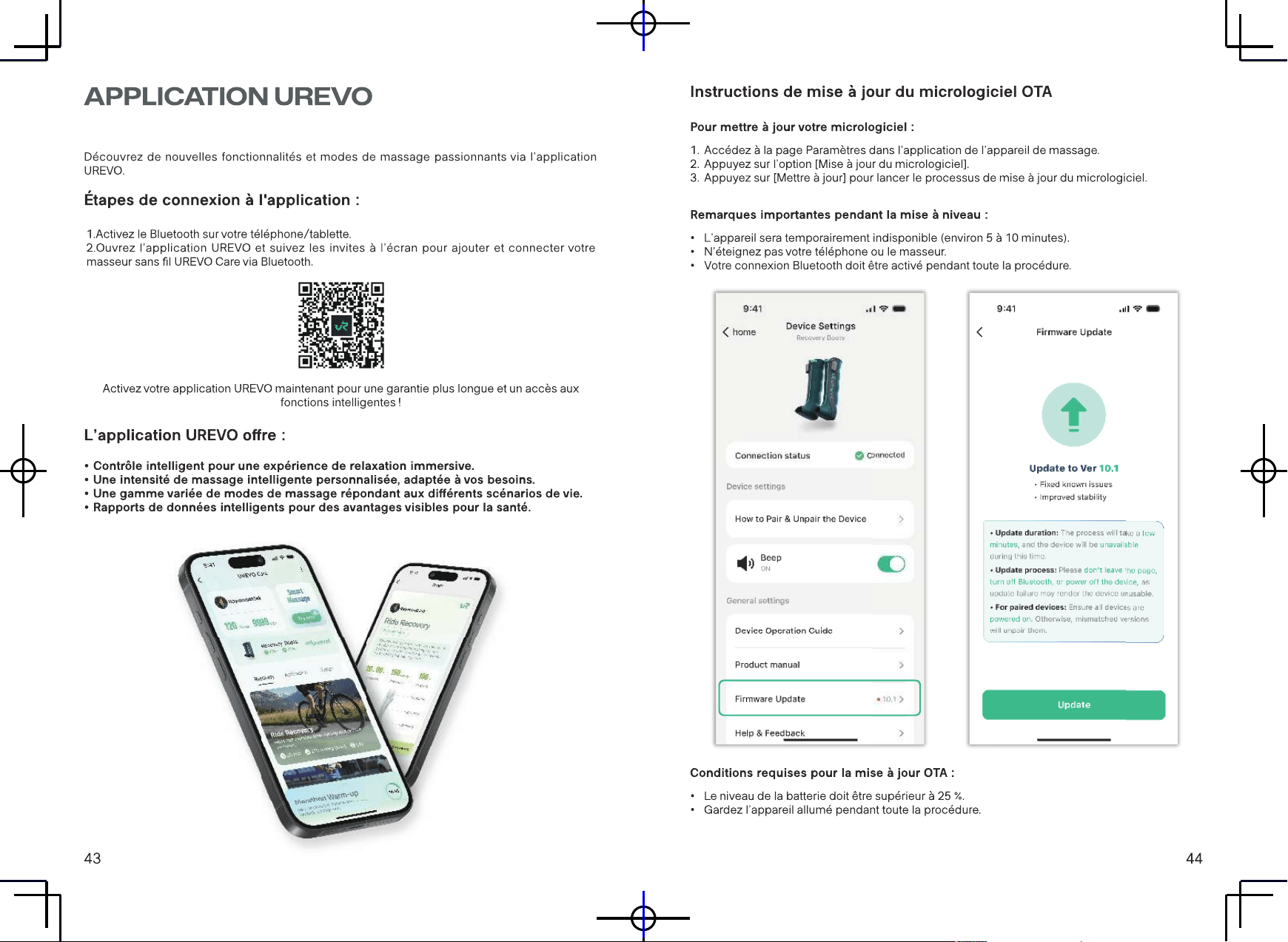
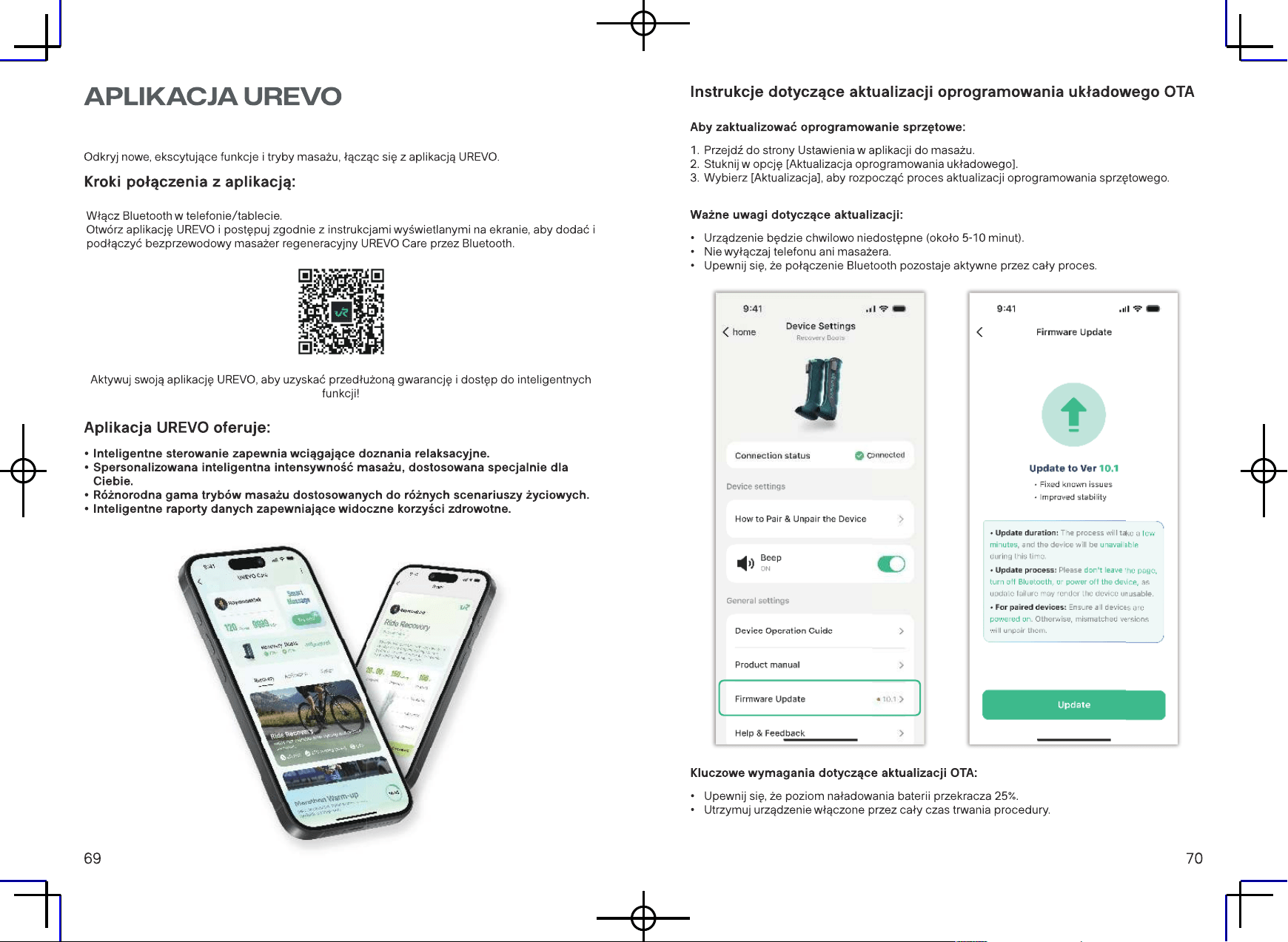
App
Operation
OTA Update
Mute
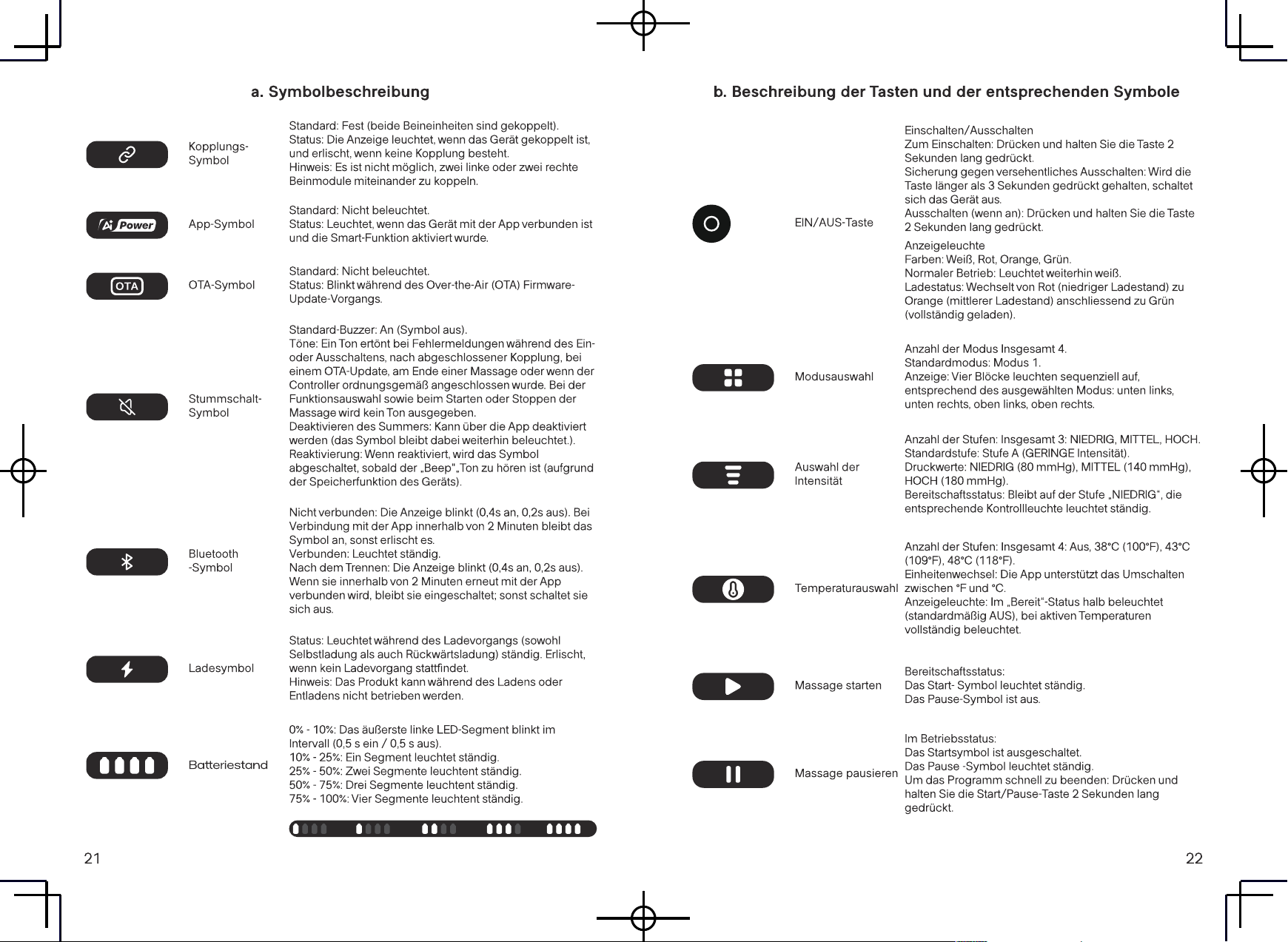
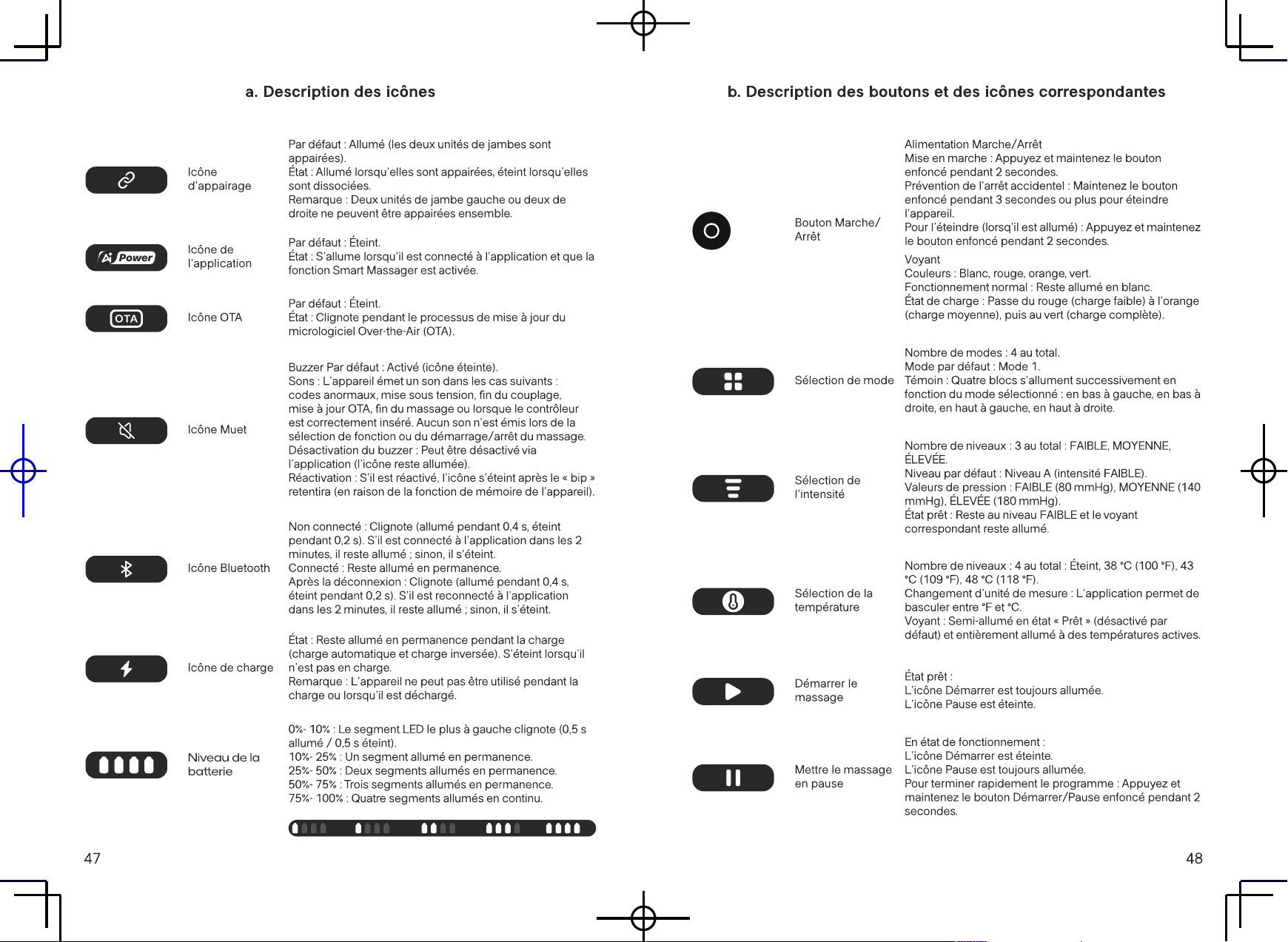
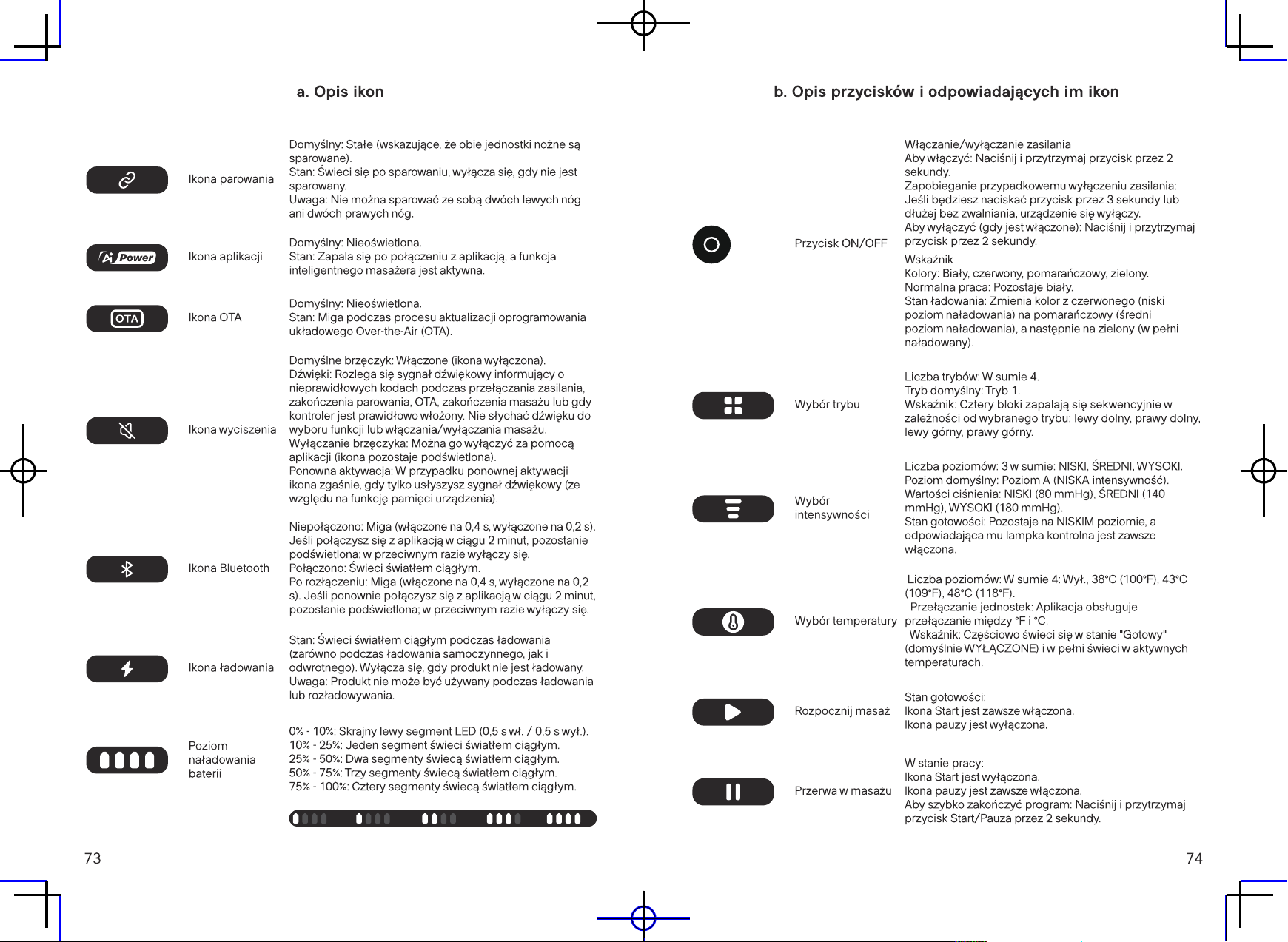
a. Icon Description
Pairing
Icon
App
Icon
OTA
Icon
Mute
Icon
Bluetooth
Icon
Charging
Icon
Battery
Level
Default: Solid (indicating both leg units are paired).
Status: Lit when paired, o when unpaired.
Note: Two left leg units or two right leg units cannot be paired
together.
Default: Unlit.
Status: Lights up when connected to the app and the Smart
Massager function is active.
Default: Unlit.
Status: Flashes during the Over-the-Air (OTA) rmware update
process.
Buzzer Default: On (icon o).
Sounds: A tone sounds for abnormal codes during power
switching, pairing completion, OTA, massage end, or when the
controller is properly inserted. There's no sound for function
selection or massage start/stop.
Disabling Buzzer: Can be disabled via the app (icon remains lit).
Reactivation: If reactivated, the icon will turn o as soon as the
"beep" sound is heard (due to the appliance's memory function).
Unconnected: Flashes (on for 0.4s, o for 0.2s). If connected to the
app within 2 minutes, it stays lit; otherwise, it turns o.
Connected: Remains steadily lit.
After Disconnection: Flashes (on for 0.4s, o for 0.2s). If
reconnected to the app within 2 minutes, it stays lit; otherwise, it
turns o.
Status: Remains steadily lit during charging (both self-charging and
reverse charging). Turns o when not charging.
Note: The product cannot be operated during charging or
discharging.
0% - 10%: Leftmost LED segment ashes (0.5s on / 0.5s o).
10% - 25%: One segment steadily lit.
25% - 50%: Two segments steadily lit.
50% - 75%: Three segments steadily lit.
75% - 100%: Four segments steadily lit.
09 10
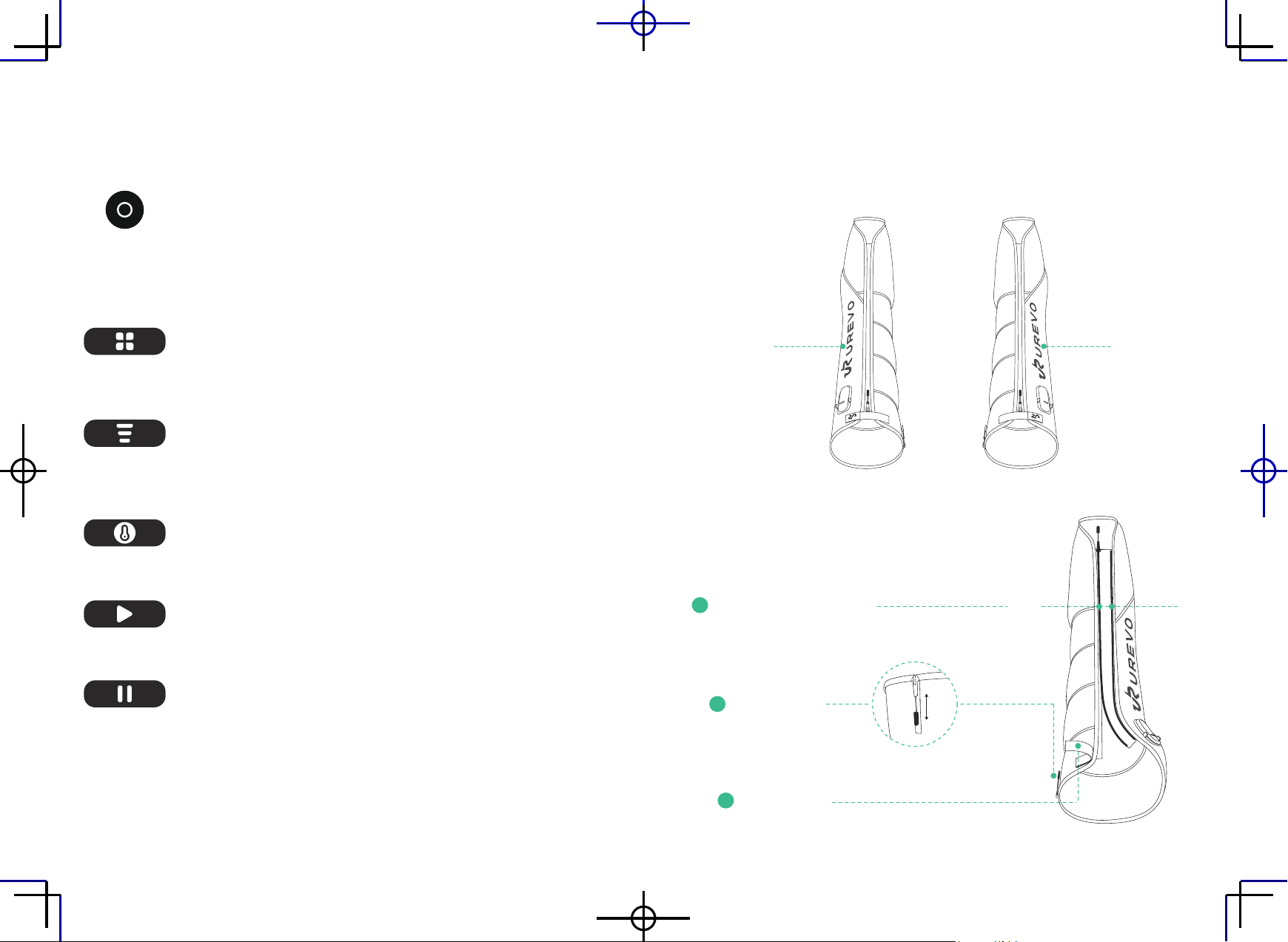
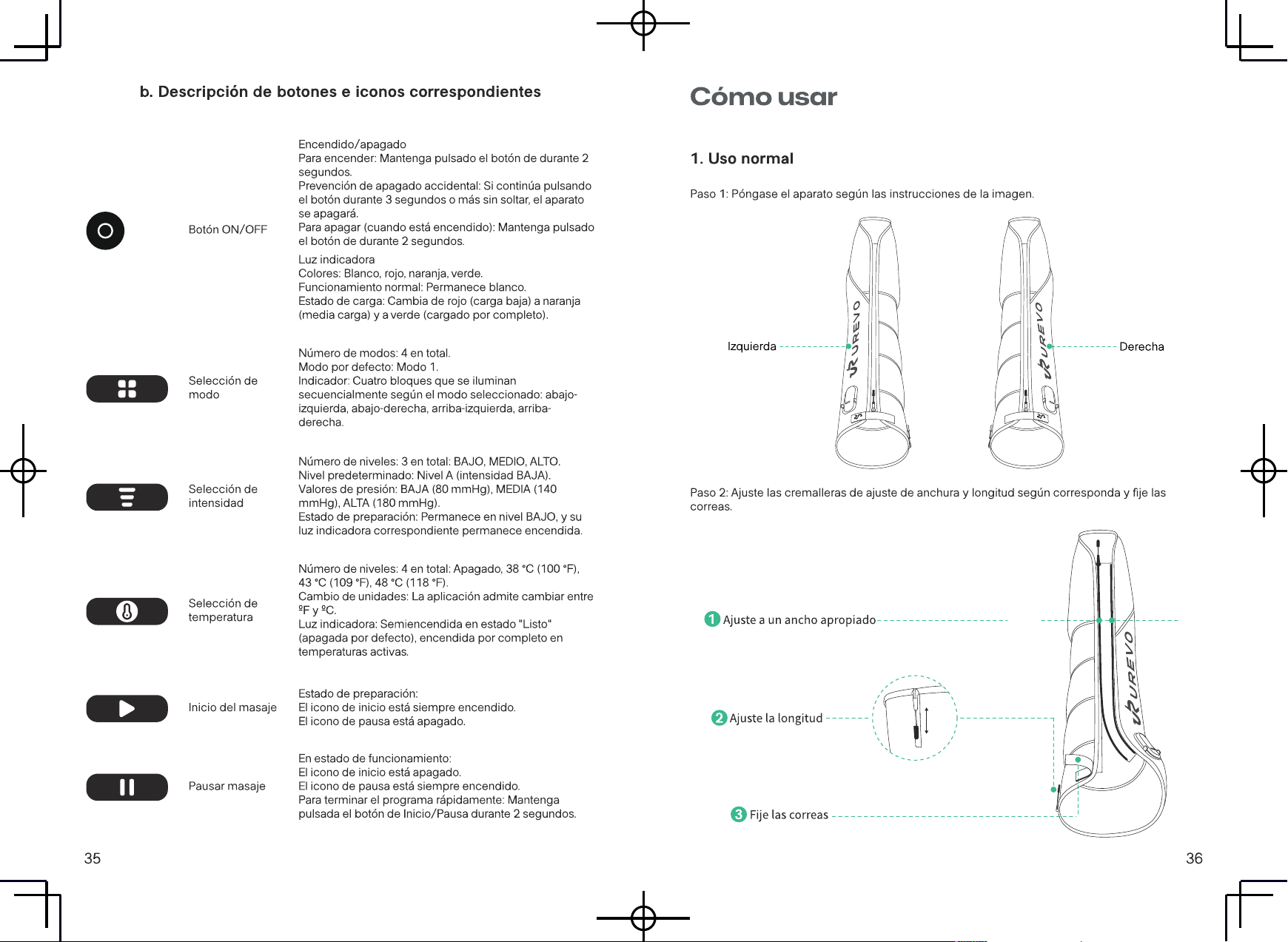
b. Description of buttons and corresponding icons
ON/OFF
button
Mode
Selection
Intensity
Selection
Temperature
Selection
Start
Massage
Pause
Massage
Power On/O
To Turn On: Press and hold the button for 2 seconds.
Accidental Power O Prevention: If you continue pressing the
button for 3 seconds or more without releasing, the appliance will
turn o.
To Turn O (when on): Press and hold the button for 2 seconds.
Indicator Light
Colors: White, Red, Orange, Green.
Normal Operation: Remains White.
Charging Status: Switches from Red (low charge) to Orange (mid-
charge) then to Green (fully charged).
Number of Modes: 4 in total.
Default Mode: Mode 1.
Indicator: Four blocks light up sequentially based on the selected
mode: bottom-left, bottom-right, top-left, top-right.
Number of Levels: 3 in total: LOW, MID, HIGH.
Default Level: Level A (LOW intensity).
Pressure Values: LOW (80 mmHg), MID (140 mmHg), HIGH (180
mmHg).
Ready Status: Remains at LOW level, and its corresponding
indicator light is always on.
Number of Levels: 4 in total: O, 38°C (100°F), 43°C (109°F), 48°C
(118°F).
Unit Switching: The app supports switching between °F and °C.
Indicator Light: Semi-lit under "Ready" status (default OFF), and
fully lit at active temperatures.
Ready Status:
The Start icon is always on.
The Pause icon is o.
In Operation Status:
The Start icon is o.
The Pause icon is always on.
To End Program Quickly: Press and hold the Start/Pause button
for 2 seconds.
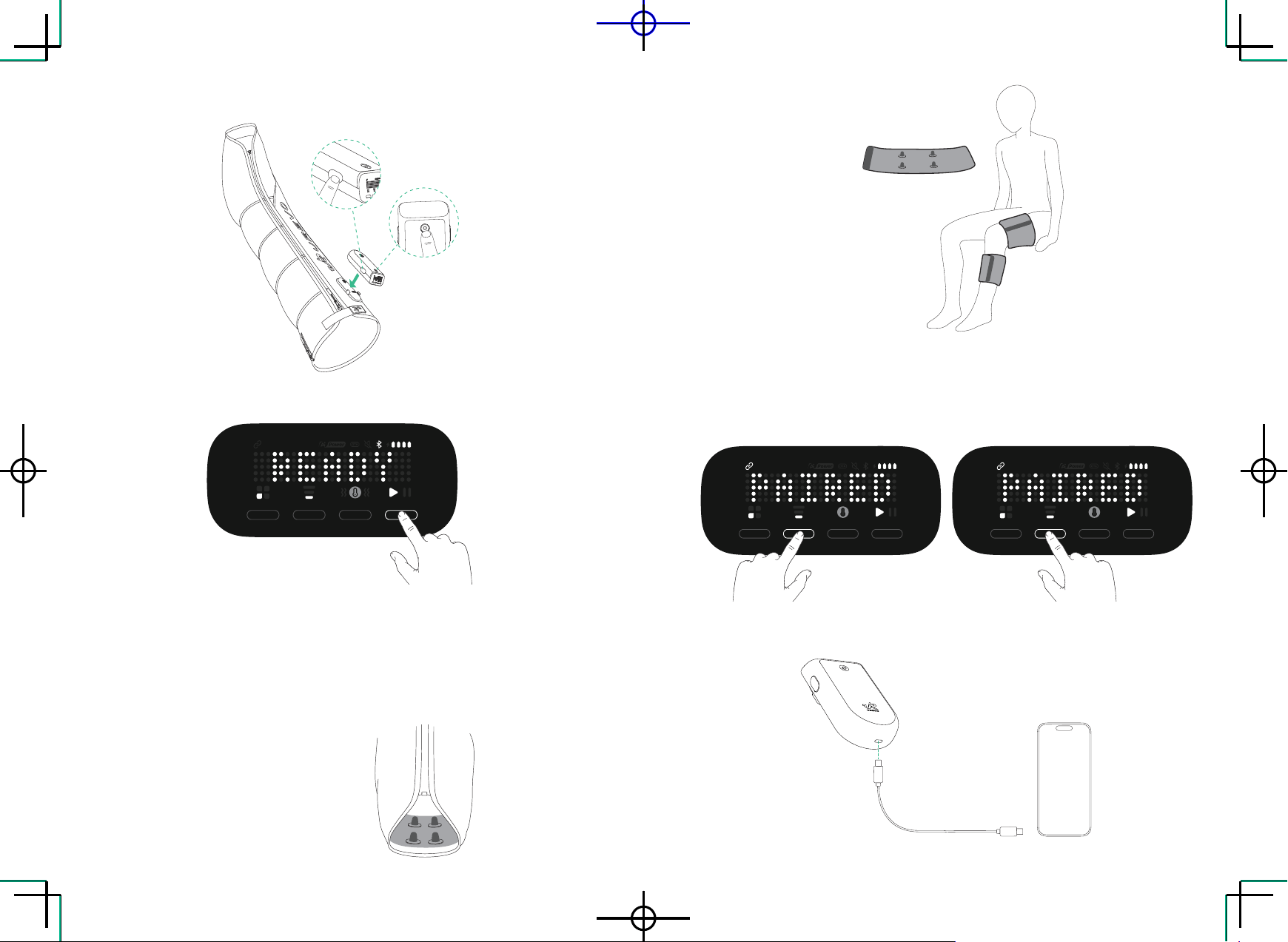
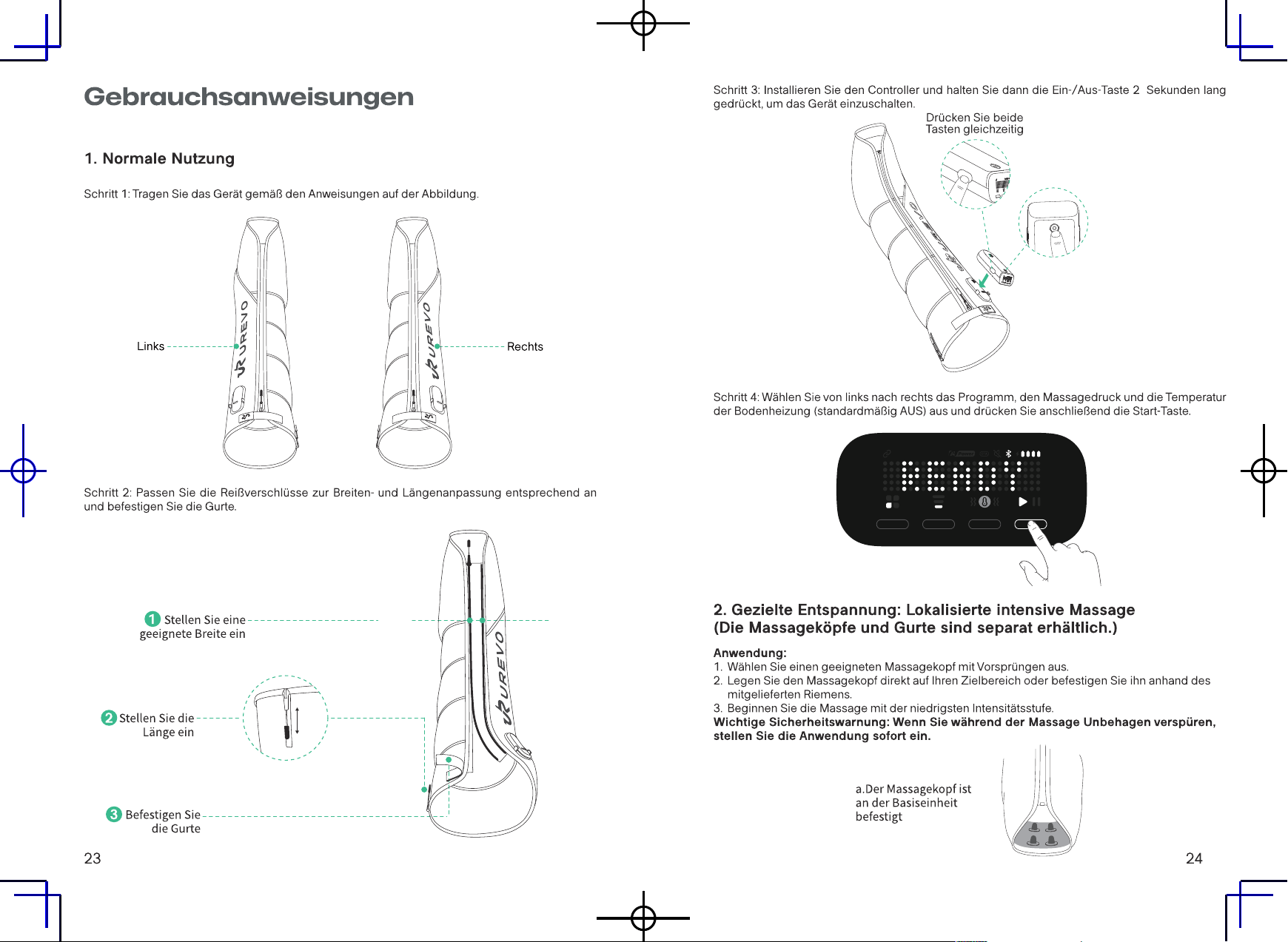
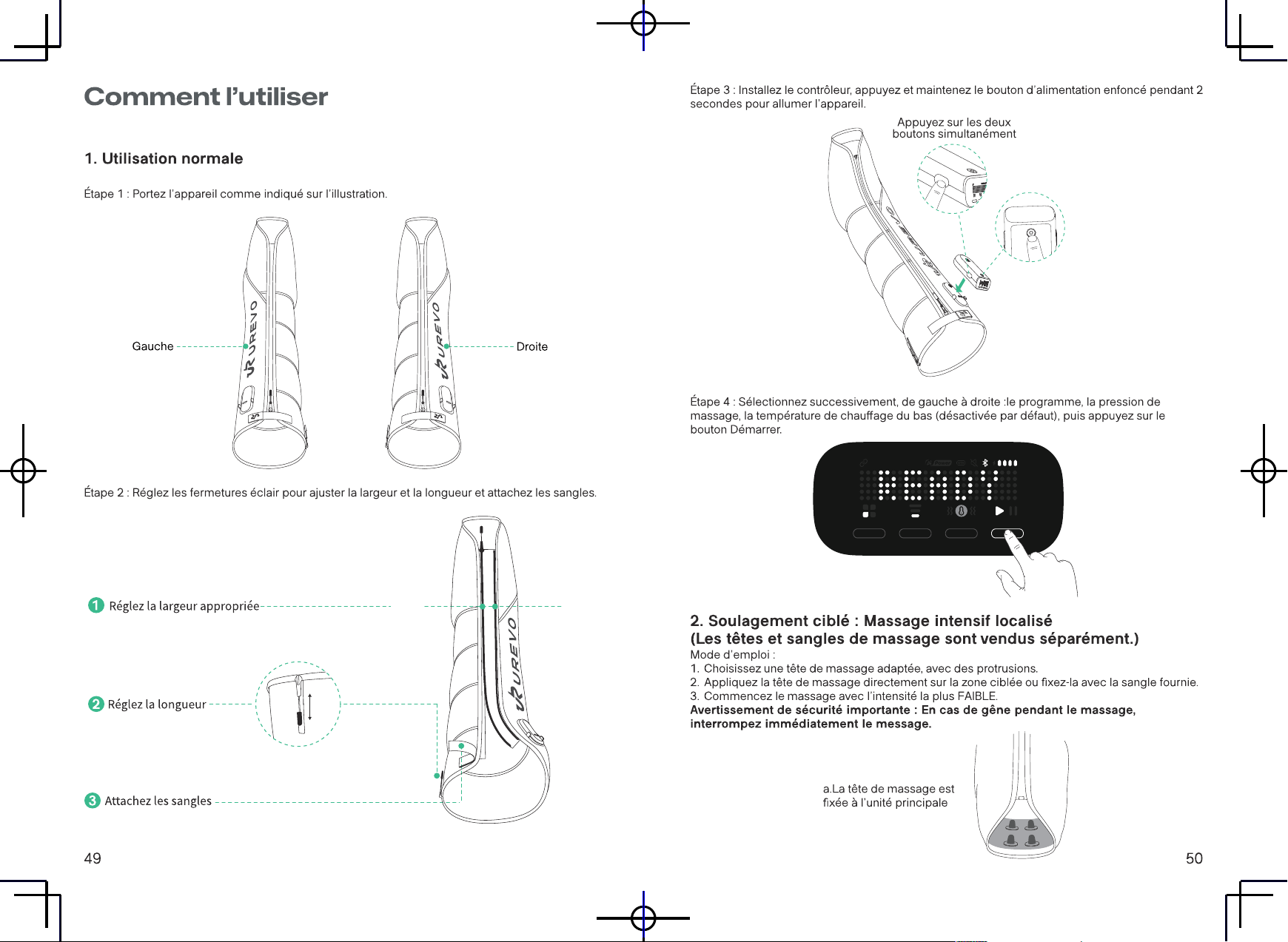
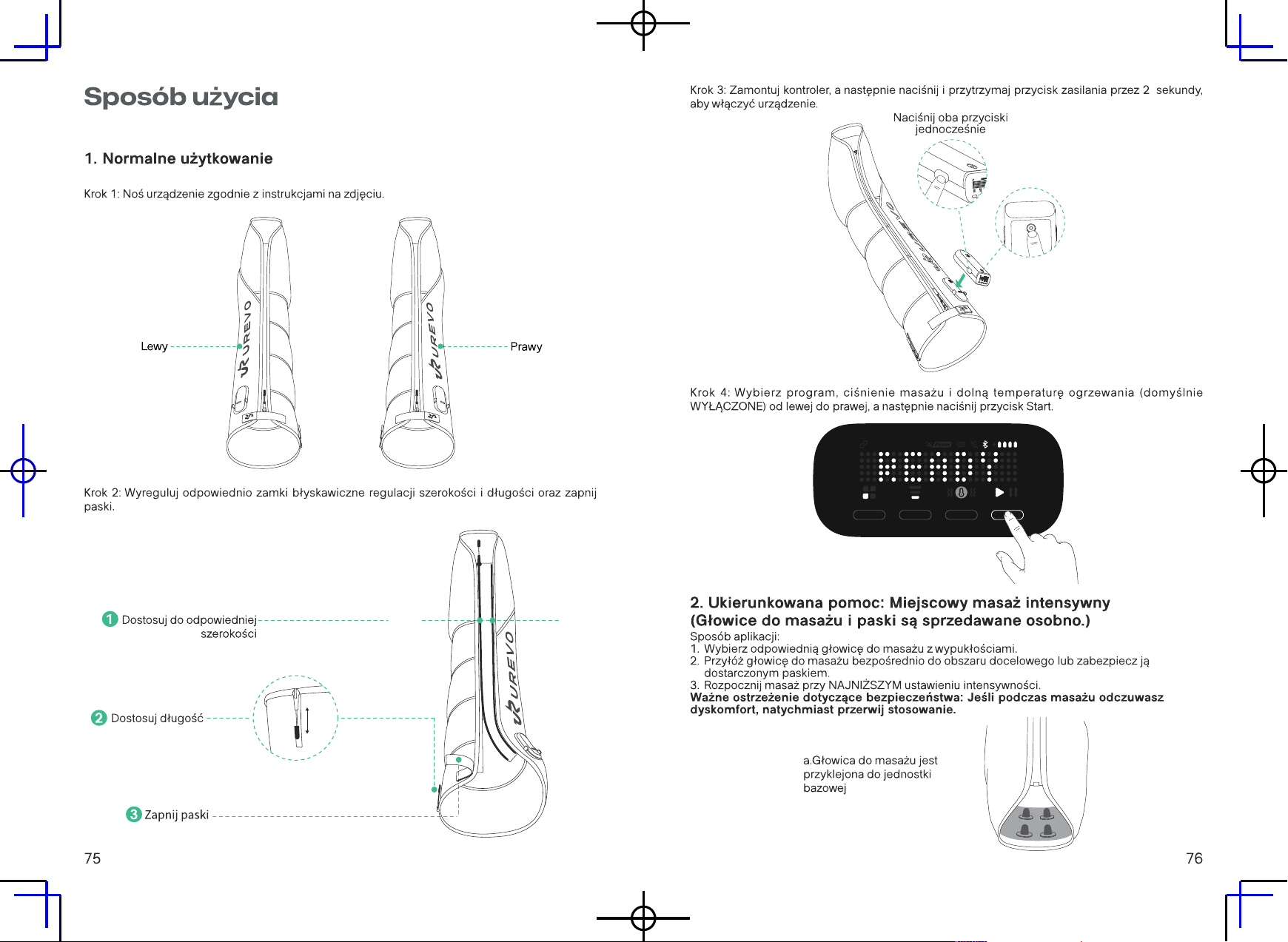
How to Use
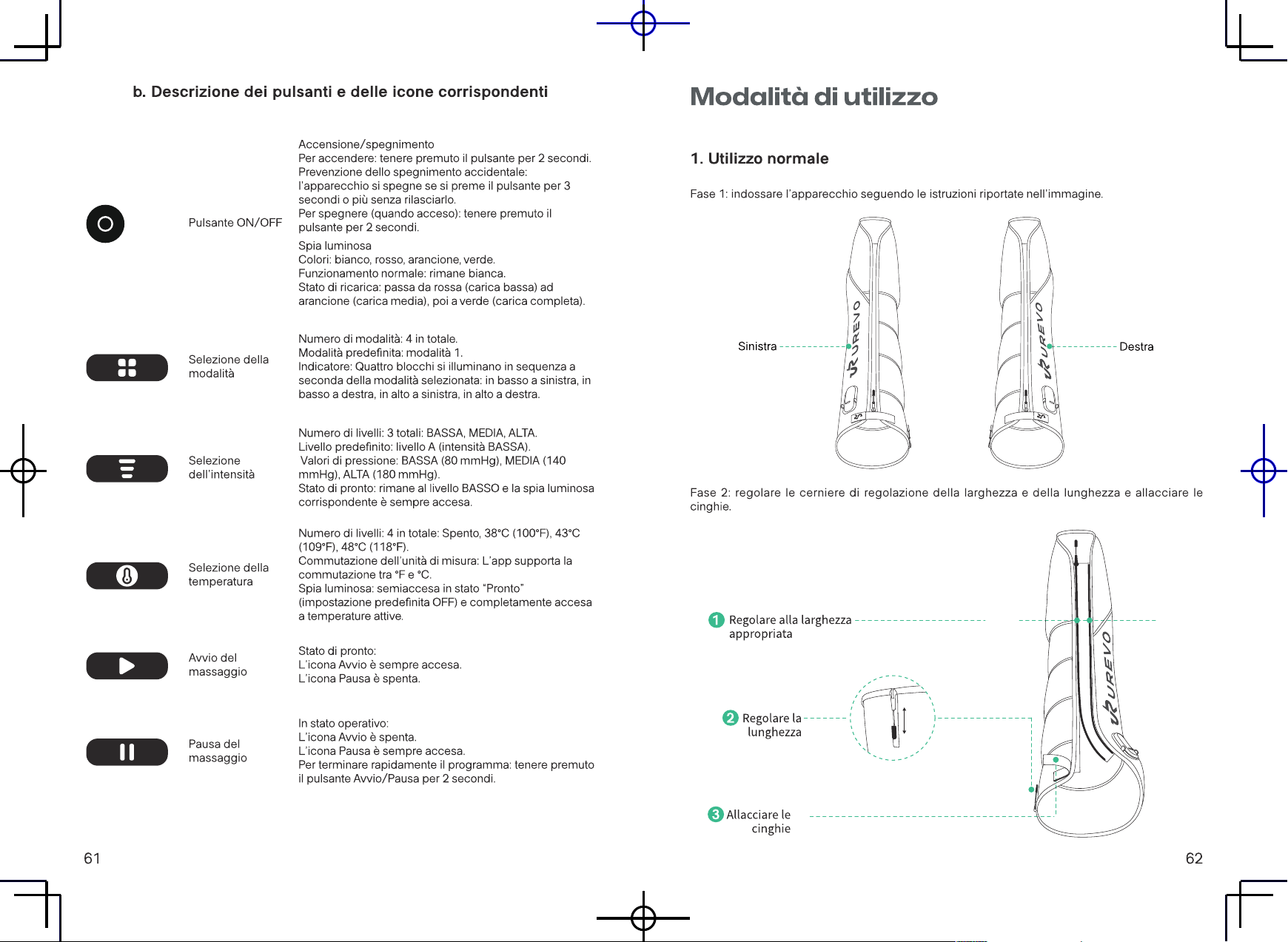
1. Normal use
Step 1: Wear the appliance according to the instructions in the picture.
Left
Right
Step 2: Adjust the width and length adjustment zippers accordingly and fasten the straps.
Adjusttoanappropriatewidth
Adjustthelength
Fastenthestraps
L SIZE M SIZE
M SIZE
L SIZE
1
2
3
SIZE
11 12
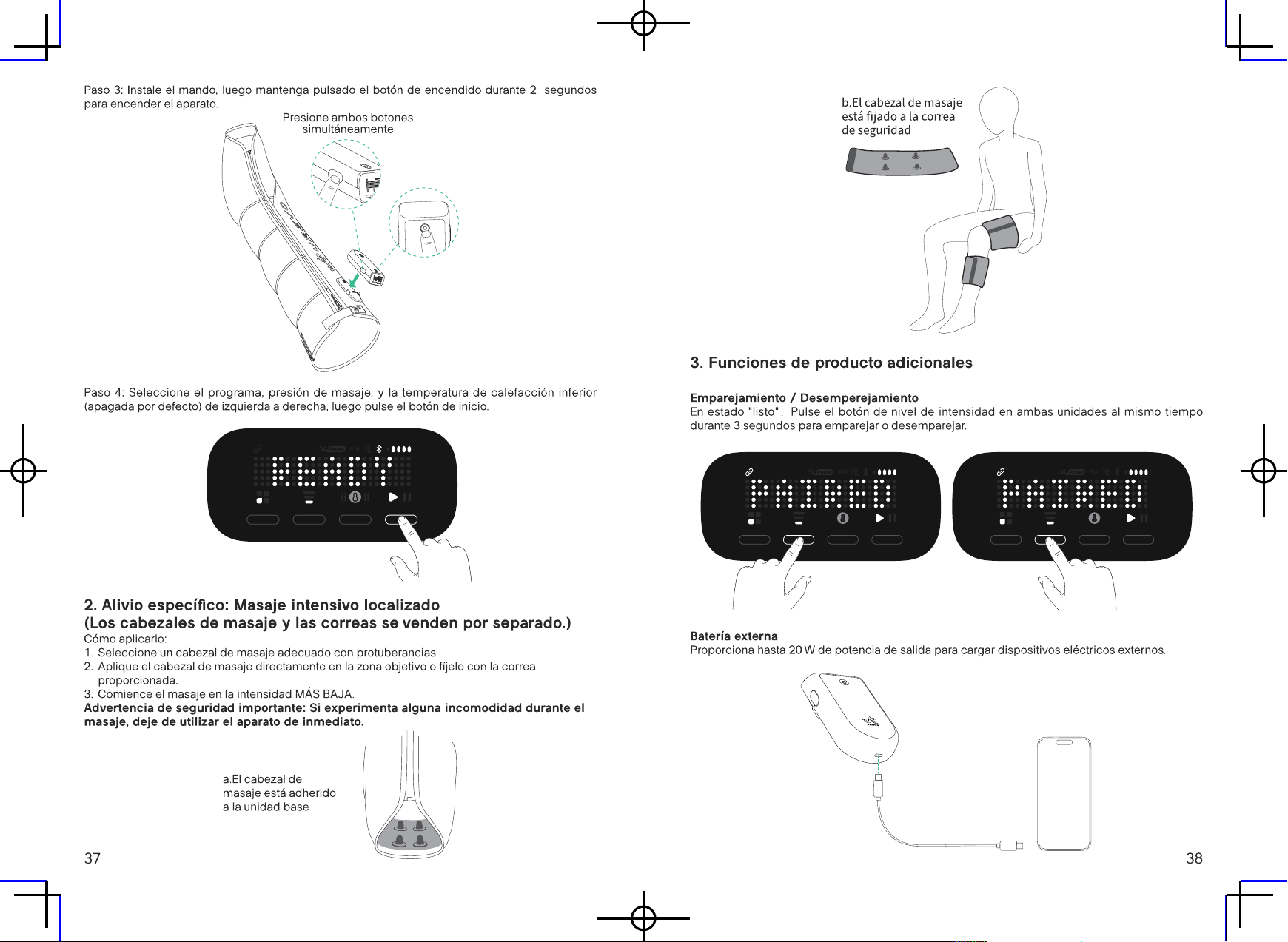
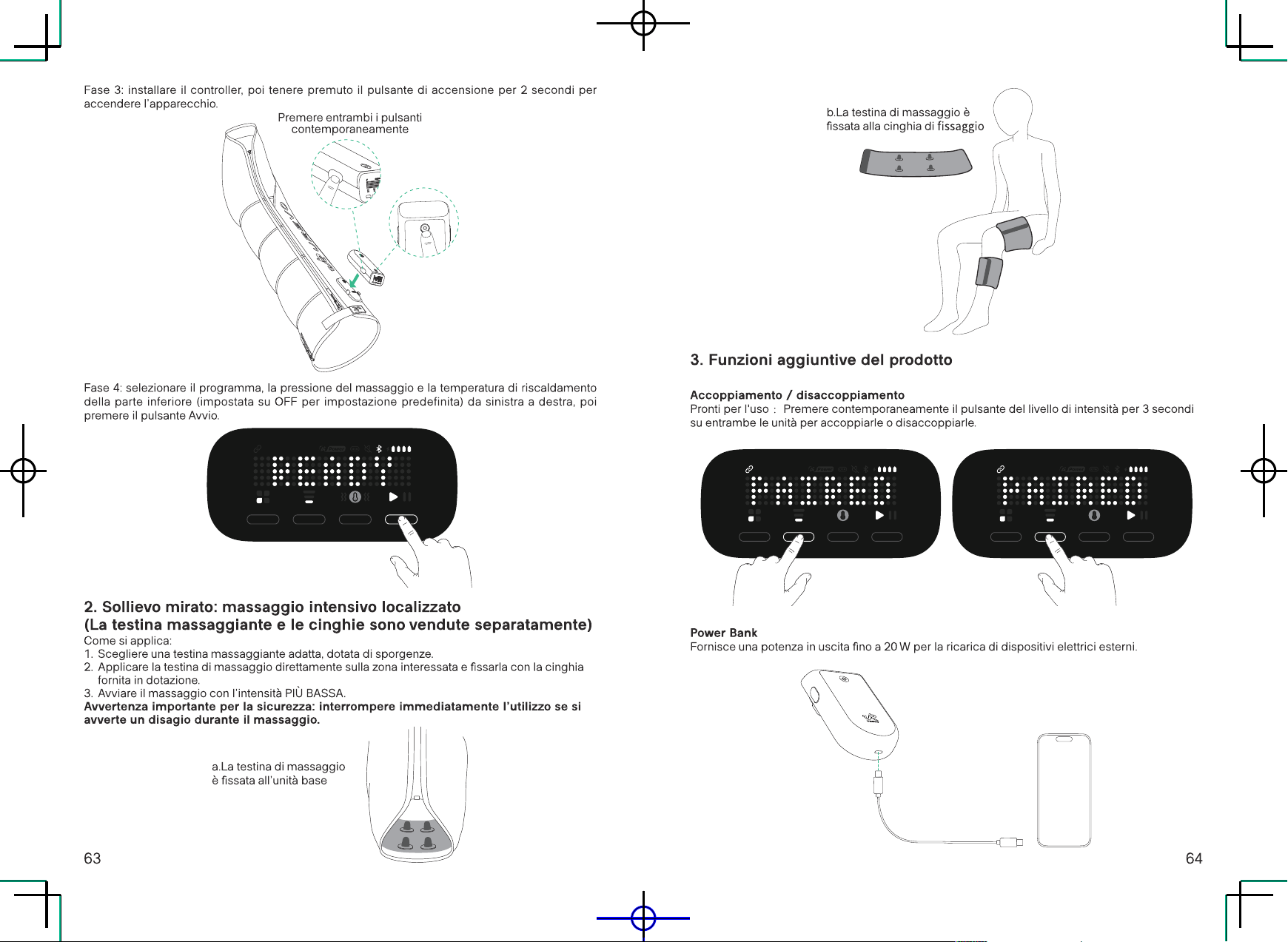
Step 3: Install the controller, then press and hold the power button for 2 seconds to turn on the
appliance.
Press both buttons
simultaneously
Step 4: Select the program, massage pressure, and bottom heating temperature (OFF by default)
from left to right, and then press the Start button.
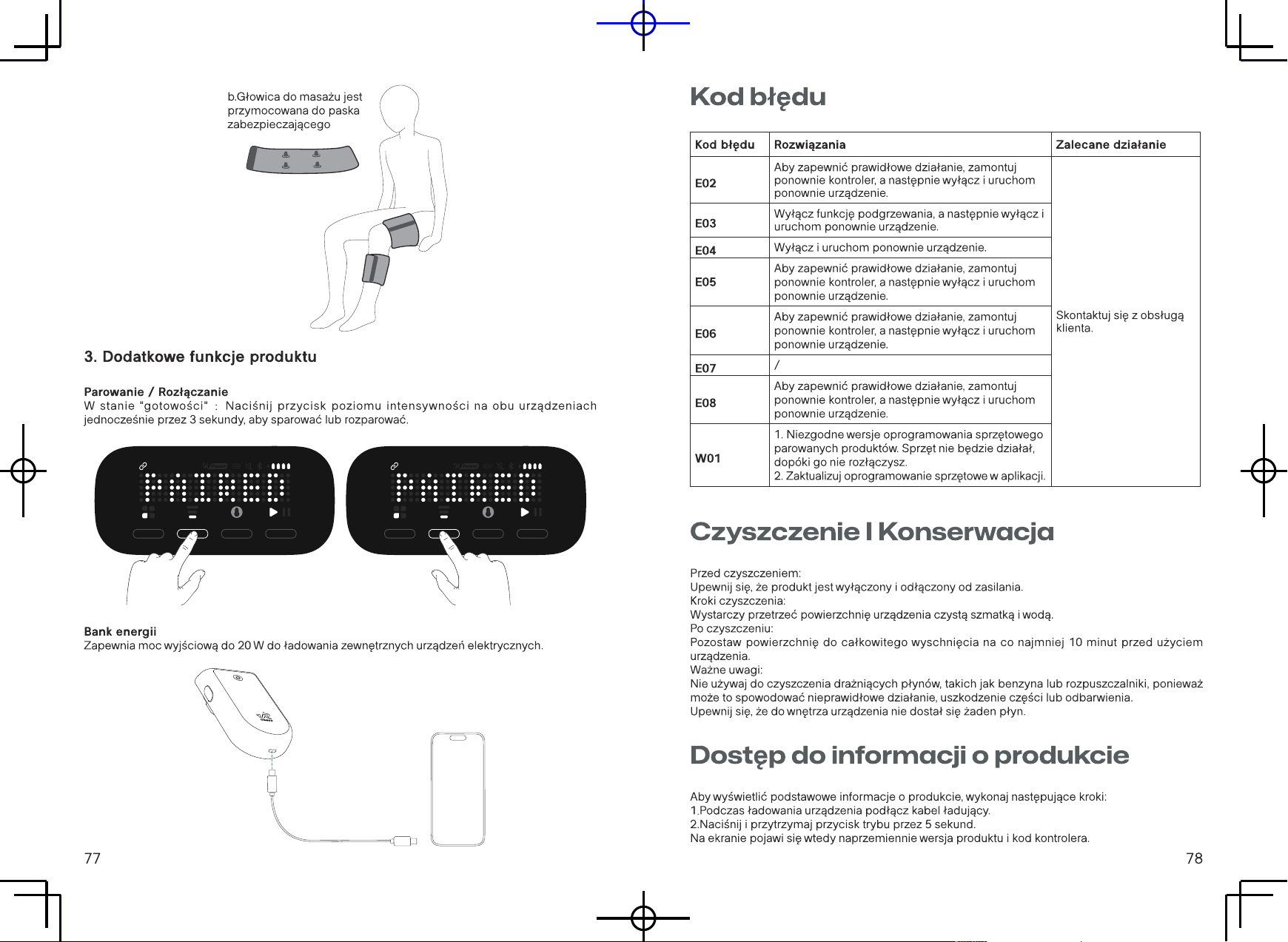
2. Targeted Relief: Localized Intensive Massage(The massage heads
and straps are sold separately.)
How to Apply:
1. Select a suitable massage head featuring protrusions.
2. Apply the massage head directly to your target area or secure it with the provided strap.
3. Begin the massage at the LOWEST intensity setting.
Important Safety Warning: If you experience any discomfort during the massage,
discontinue use immediately.
a.Themassageheadis
adheredtothebaseunit
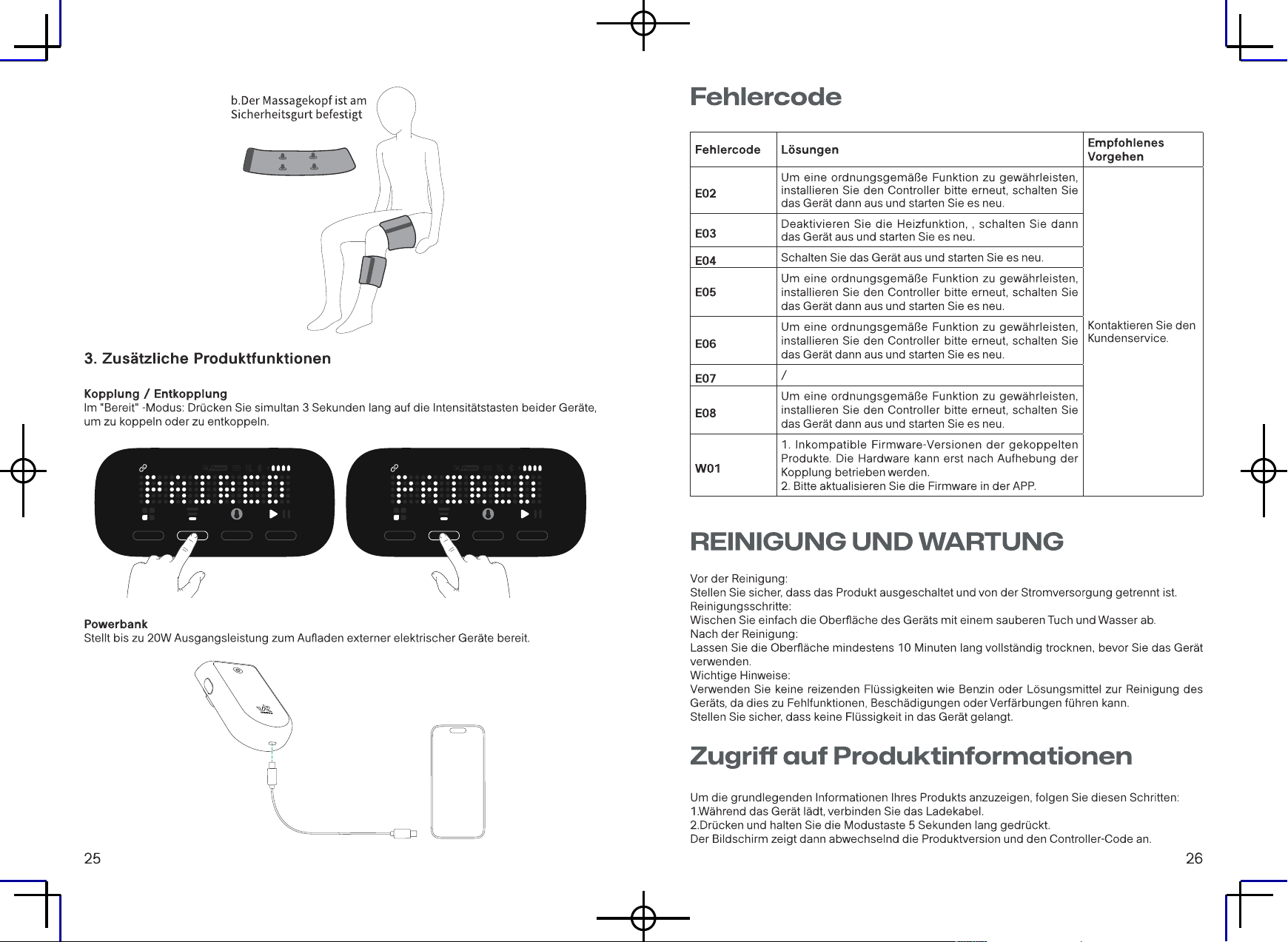
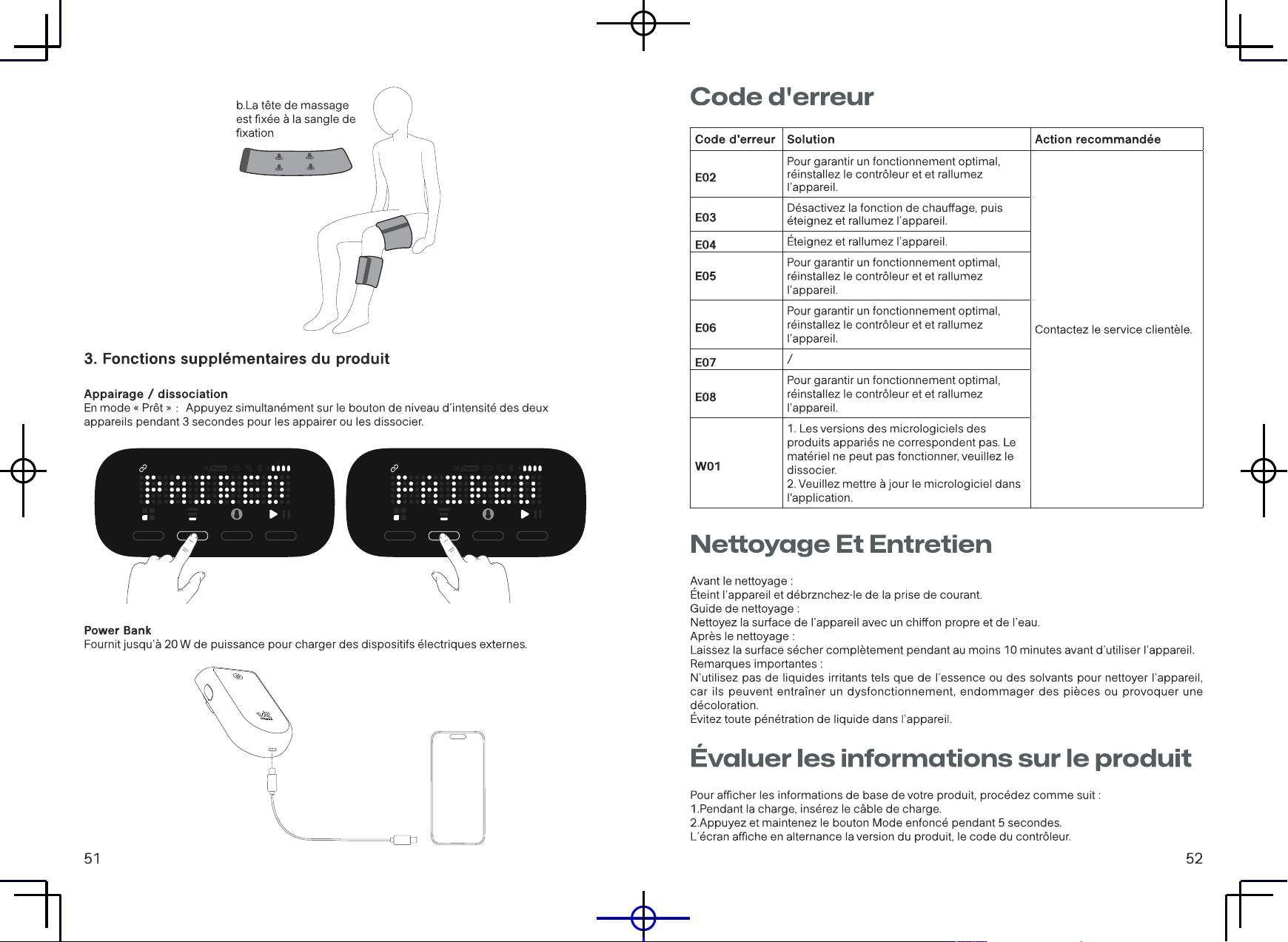
b.Themassageheadisattached
tothesecuringstrap
3. Additional product functions
Pairing / Unpairing
In the "Ready" state
:
Press the Intensity Level button on both units at the same time for 3
seconds to pair or unpair.
Power Bank
Provides up to 20W output power for charging external electrical devices.
13
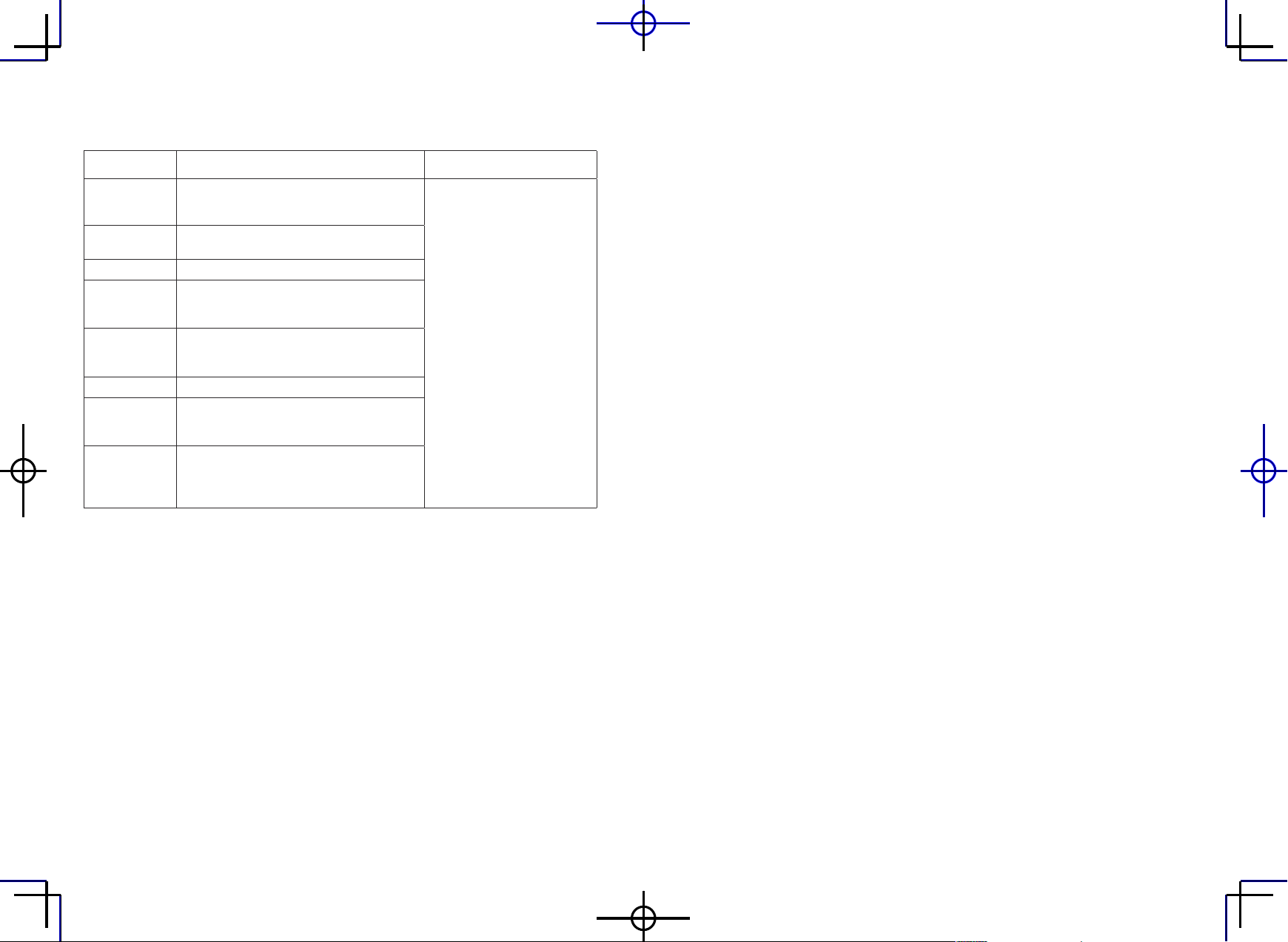
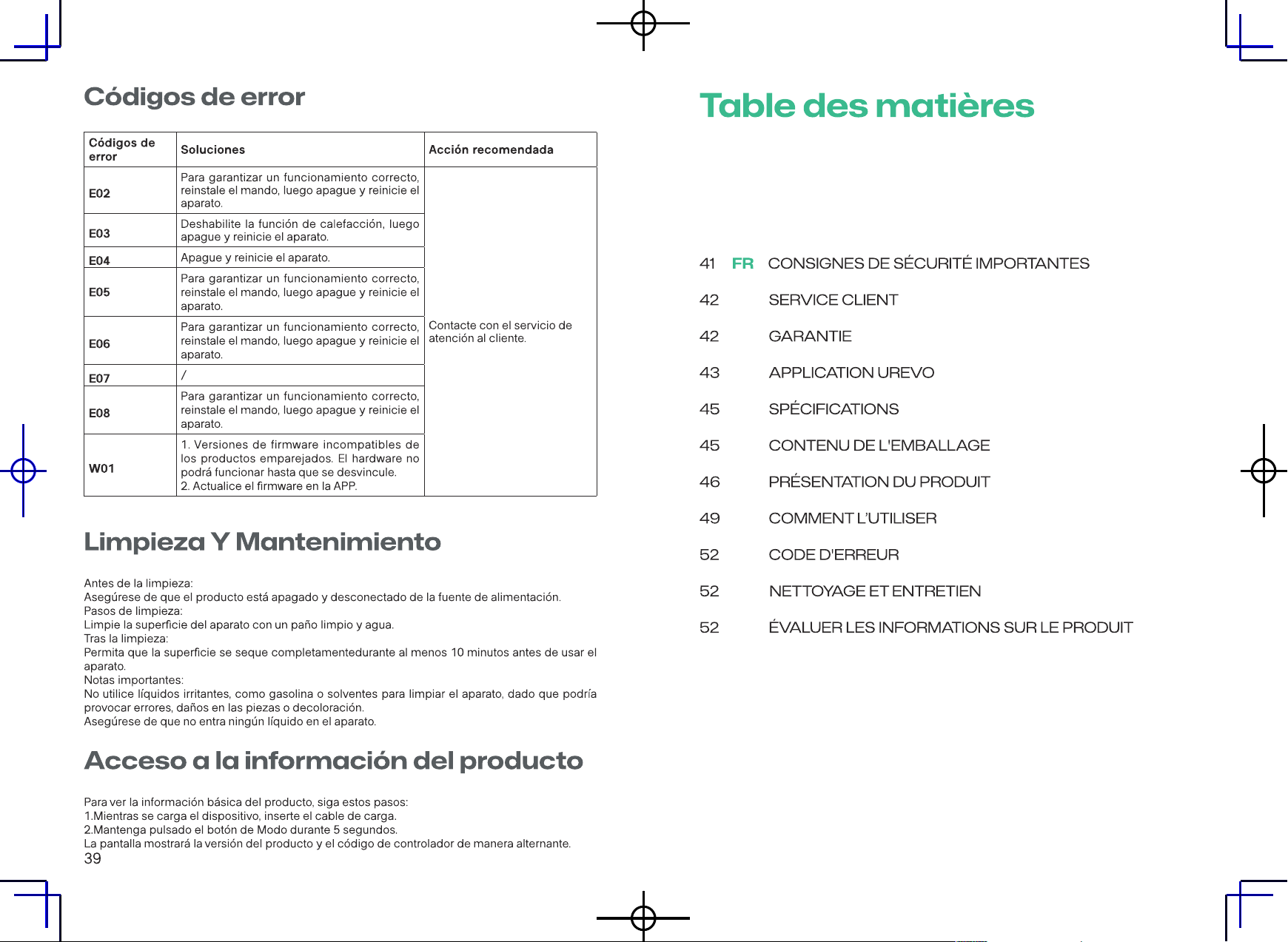
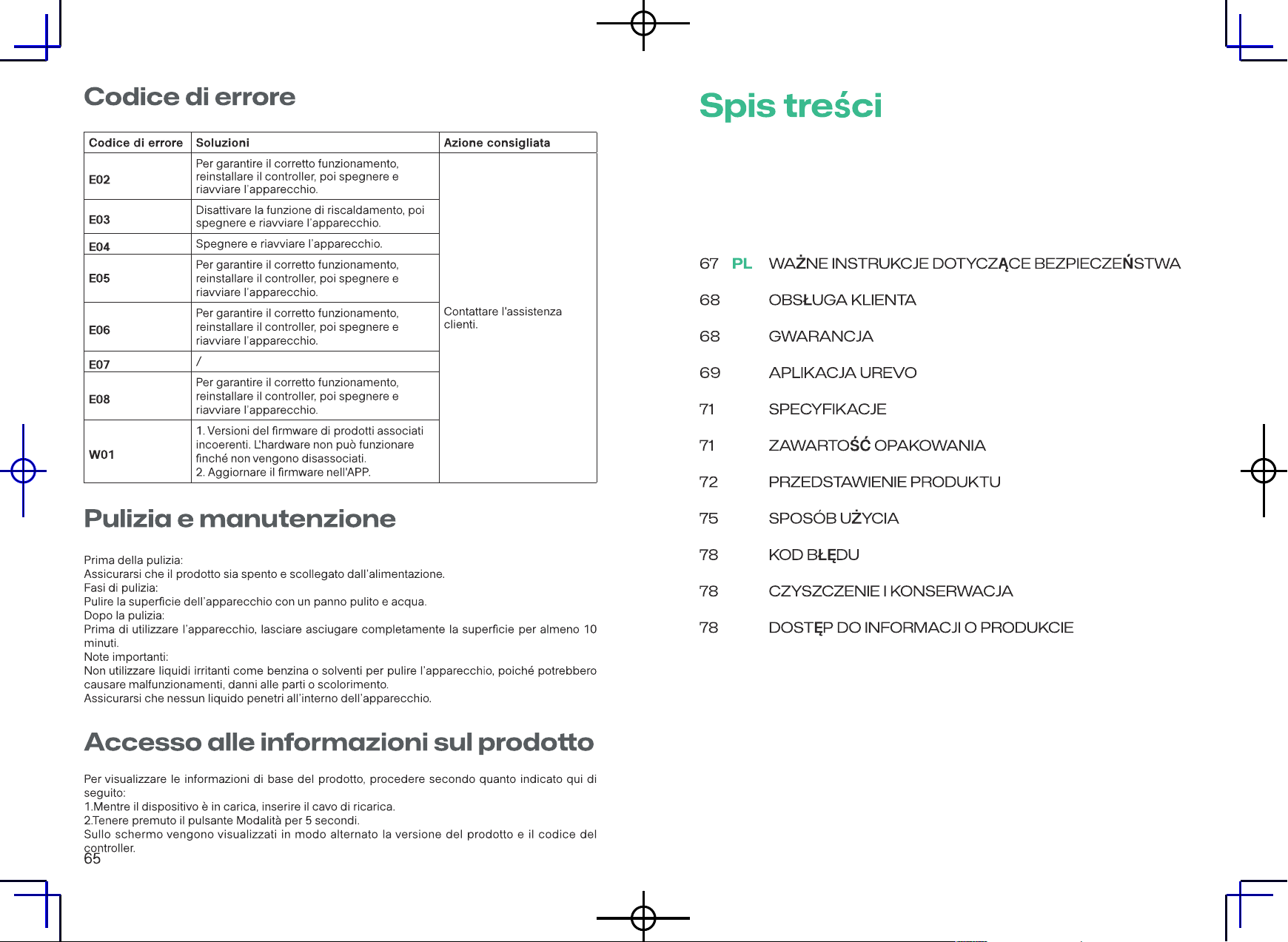
Error Code
Error Code Resolutions Recommended Action
E02
To ensure proper function, please reinstall
the controller, then turn off and restart the
appliance.
Contact customer service.
E03
Disable heating function, , then turn off and
restart the appliance.
E04
Turn o and restart the appliance.
E05
To ensure proper function, please reinstall
the controller, then turn off and restart the
appliance.
E06
To ensure proper function, please reinstall
the controller, then turn off and restart the
appliance.
E07
/
E08
To ensure proper function, please reinstall
the controller, then turn off and restart the
appliance.
W01
1. Inconsistent firmware versions of paired
products. The hardware cannot operate until
you unpair them.
2. Please upgrade the rmware in the APP.
Cleaning and Maintenance
Before Cleaning: Ensure the product is turned o and disconnected from the power supply.
Cleaning Steps: Simply wipe the surface of the appliance with a clean cloth and water.
After Cleaning: Allow the surface to completely dry for at least 10 minutes before using the
appliance.
Important Notes: Do not use irritating liquids such as gasoline or solvents to clean the appliance,
as this may cause malfunction, damage to parts, or discoloration.
Ensure no liquid enters the appliance.
Accessing Product Information
To view your product's basic information, follow these steps:
1.While the device is charging, insert the charging cable.
2.Press and hold the Mode button for 5 seconds.
The screen will then display the product version and controller code alternately.
Inhaltsverzeichnis
15 DE WICHTIGE SICHERHEITSHINWEISE
16 KUNDENSERVICE
16 GARANTIE
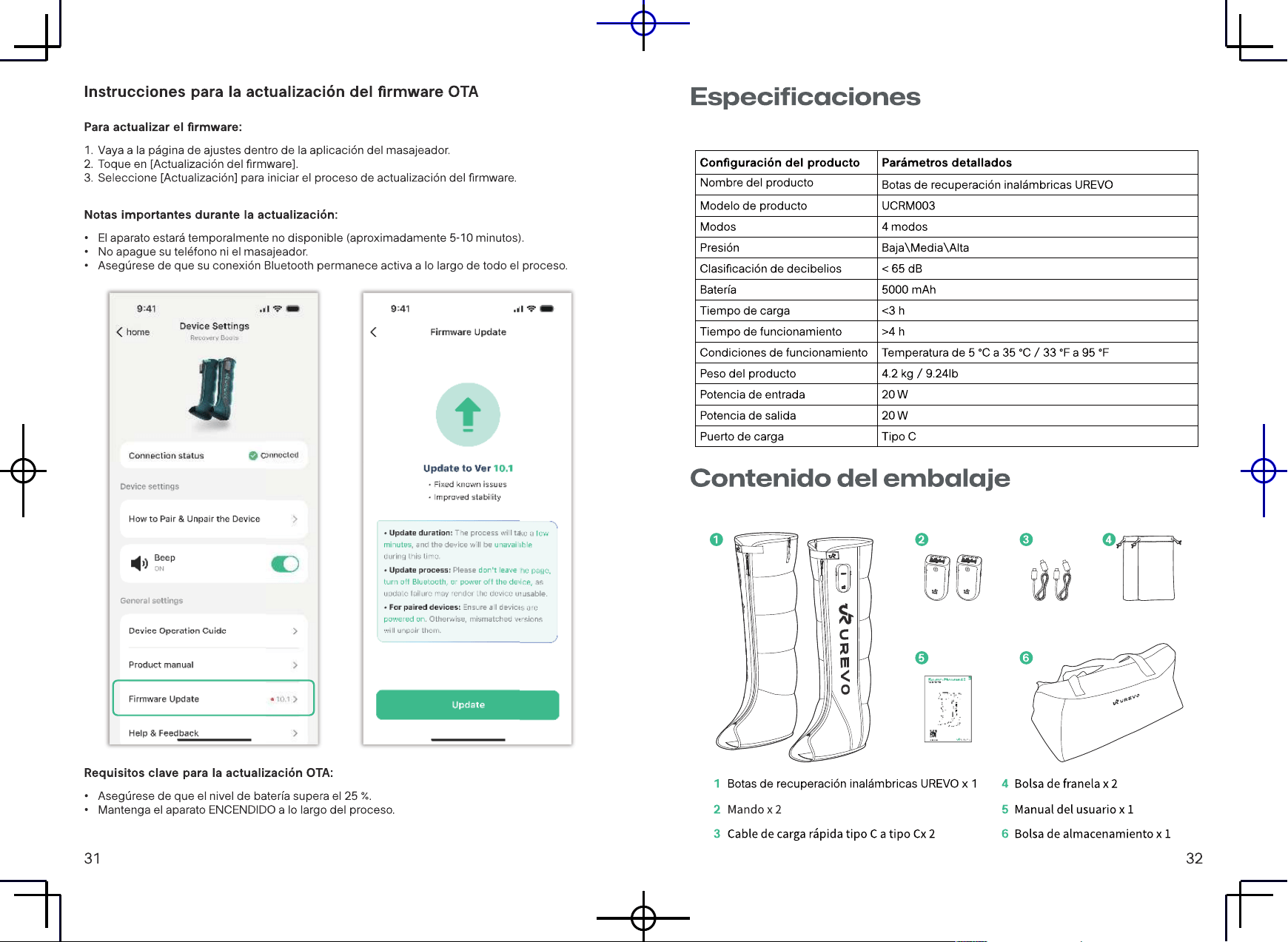
17 UREVO APP
19 TECHNISCHE DATEN
19 PACKLISTE
20 PRODUKTEINFÜHRUNG
23 GEBRAUCHSANWEISUNGEN
26 FEHLERCODE
26 REINIGUNG UND WARTUNG
26 ZUGRIFF AUF PRODUKTINFORMATIONEN
Note: There is a possibility of
personal injury and damage
when used incorrectly
Handle fragile items with care
Moisture-proof and rainproof
Please read the instructions
carefully before using this
product
Do not throw rubbish carelessly.
Please dispose of it according
to local regulations
1
2
33
L SIZE M SIZE
M SIZE
L SIZE
Note: There is a possibility of
personal injury and damage
when used incorrectly
Handle fragile items with care
Moisture-proof and rainproof
Please read the instructions
carefully before using this
product
Do not throw rubbish carelessly.
Please dispose of it according
to local regulations
1
2
33
L SIZE M SIZE
M SIZE
L SIZE
Note: There is a possibility of
personal injury and damage
when used incorrectly
Handle fragile items with care
Moisture-proof and rainproof
Please read the instructions
carefully before using this
product
Do not throw rubbish carelessly.
Please dispose of it according
to local regulations
1
2
33
L SIZE M SIZE
M SIZE
L SIZE
Note: There is a possibility of
personal injury and damage
when used incorrectly
Handle fragile items with care
Moisture-proof and rainproof
Please read the instructions
carefully before using this
product
Do not throw rubbish carelessly.
Please dispose of it according
to local regulations
1
2
33
L SIZE M SIZE
M SIZE
L SIZE
Note: There is a possibility of
personal injury and damage
when used incorrectly
Handle fragile items with care
Moisture-proof and rainproof
Please read the instructions
carefully before using this
product
Do not throw rubbish carelessly.
Please dispose of it according
to local regulations
1
2
33
L SIZE M SIZE
M SIZE
L SIZE