1 3 2
5 4
V1.0
LawMate, innovation never stops
®
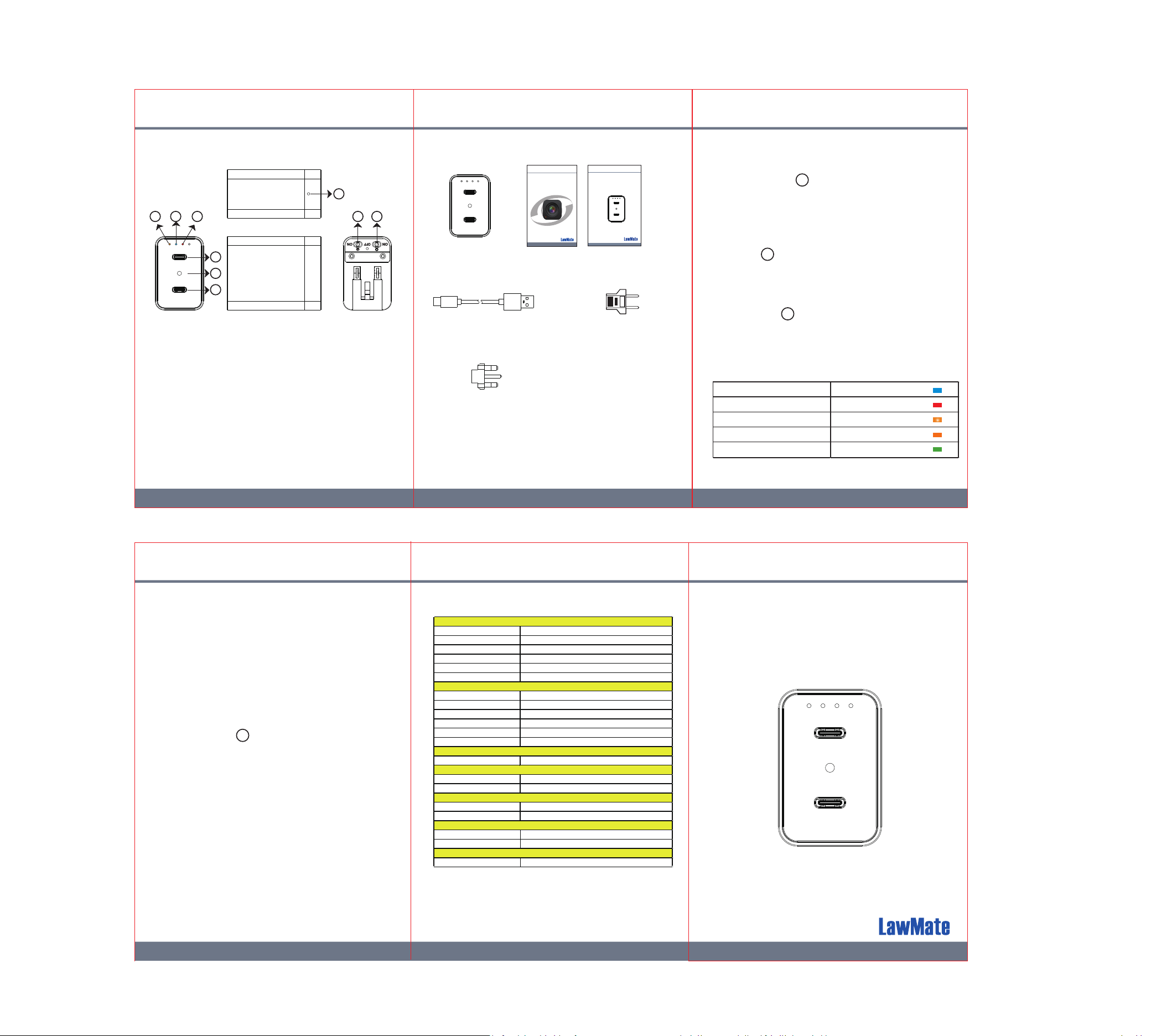
4. Status Indicators
3. Operation1. Names and Parts
2. Package Content
5. Synchronize the time
6. Retrieve Video Files
7. Setting up IP Connection
PV-TC10i
Type-C Wall Charger DVR
Quick Guide
1. Power Switch
2. Wi-Fi Switch
3. Orange/Green LED
(Wi-Fi / IP )
4. Blue LED (Power)
5. Red LED (Record)
6. USB Port
(Retrieve Video Files)
7. Lens
8. USB Port
(Charging)
9. Default Buon
1 2
9
7
6
8
3
54
*
Warranty will be void if the serial number sticker is tampered.
* This product is for Law Enforcement and Home Security Use Only!
LawMate, innovation never stops
®
PV Cam Pro
for IP Cam
App Store/Play Store
Installation Quick Guide
V1.0
LawMate, innovation never stops
®
PV-TC10i
Type-C Wall Charger DVR
Quick Guide
Main Device User Manual
USB Cable
European Adapter Head
UK 3-pin Adapter Head
(Only for UK)
Solid Blue LED Power On
Solid Red LED Recording On
Blinking Orange LED Wi-Fi connecng
Solid Orange LED Wi-Fi connect
Solid Green LED IP connect
8. Specifications
1. Recording
Switch power to on, then plug the device
to a wall socket. Blue LED will be solid on and
aer 20 seconds, device will start recording
automacally.
2. Wi-Fi
Switch to on, power on the device and plug
it to a wall socket. Orange LED will blink aer
10 seconds. Then device can connect to APP.
3. Default
Long press for 10 seconds, all 3 LEDs will
blink and then device will automacally restart
with original factory sengs.
1
2
9
1. Connect device to PV Cam Pro.
2. Go to device management in the APP and
select the device.
3. Go to program seng in the APP, select “Sync
me.”
With device power off, insert USB cable into
Type-C1 socket and connect the other end of
USB cable to PC.
It will take 8 seconds for device to turn on in
USB flash drive mode.
6
Please refer to PV Cam Pro for IP cam quick guide.
Built-in Image Sensor 1/2.9" Progressive CMOS sensor
Sensor Resoluon 2304 × 1536
Sensor Sensivity 3.3 Lux @ F 2.0
Lens F/No. F 3.2
Focal Length 4 mm
Angle of View 66°
Algorithm H.265, JPEG
File Format MOV, JPG
Video Recording Mode Auto / Manual / Moon Detecon
Recording Capability 1920 × 1080
Frame Rate Up to 30 fps
Photo Capability 1920 × 1080
Wi-Fi Built-in Wi-Fi Module
Memory Type Micro SD Card ( Support SDHC max
. 64GB )
Data Interface Mini USB 2.0
Date/Time Table YYYY/MM/DD, HH:MM:SS
Snapshot Recording and Playback Video ( via APP )
Power Input AC 100-240V
Recording Time 1500 min @ 1920 × 1080 Resoluon ( 32GB SD Card )
Dimension 55 × 27 × 45 (mm)
Physical
Video Spec.
Wi-Fi
Storage & I/O
Built-in Camera Module
Misc.
Power

FCC Warning
This device complies with part 15 of the FCC Rules. Operation is subject to the following two conditions:
(1) This device may not cause harmful interference, and (2) this device must accept any interference
received, including interference that may cause undesired operation.
Any Changes or modifications not expressly approved by the party responsible for compliance could
void the user's authority to operate the equipment.
Note: This equipment has been tested and found to comply with the limits for a Class B digital device,
pursuant to part 15 of the FCC Rules. These limits are designed to provide reasonable protection
against harmful interference in a residential installation. This equipment generates uses and can radiate
radio frequency energy and, if not installed and used in accordance with the instructions, may cause
harmful interference to radio communications. However, there is no guarantee that interference will not
occur in a particular installation. If this equipment does cause harmful interference to radio or television
reception, which can be determined by turning the equipment off and on, the user is encouraged to try to
correct the interference by one or more of the following measures:
-Reorient or relocate the receiving antenna.
-Increase the separation between the equipment and receiver.
-Connect the equipment into an outlet on a circuit different from that to which the receiver is
connected.
-Consult the dealer or an experienced radio/TV technician for help.
This equipment complies with FCC radiation exposure limits set forth for an uncontrolled environment.
This equipment should be installed and operated with minimum distance 20cm between the radiator &
your body.