Getting started
The Hera is designed for wall-mounting.
Choosing a location
Locate the Hera in a weather-protected, stable, vibration-free
environment.
• Operating temperature: -20°C to +55°C (-4°F to 131°F)
• Relative humidity: 5-95%, non-condensing
Wall-mounting the Hera
1. If a SIM card is supplied, ensure it is fully inserted in the Hera.
2. If required, fit the SIM security plate (see below).
3. Measure the template overleaf to ensure it is accurate, as the
printing process may distort it.
4. If the template is accurate, fix the page to the wall using the spirit
level and masking tape. Alternatively, use the Hera to mark the
drill holes.
5. Drill holes and prepare them with the wall plugs/anchors.
6. Attach the cellular cables (LTE 1 and LTE 2) and WiFi antennas
to the Hera.
7. Mount the Hera on the wall using the recommended fixings.
8. Position all antennas for optimal performance.
9. Insert the power connector.
10. Plug the mains adaptor into a dedicated socket, then switch on.
11. Ensure all cables and antennas are securely anchored to avoid
intermittent connection problems.
12. Configure the Hera using the supplied web user interface.
For more information, see How to connect to the Hera below.
Fitting the SIM card security plate
• Use a Security Torx screwdriver (T10 tip) to fit the security plate
across the Hera SIM card slots.
How to connect to the Hera
Connect to the Hera with an Ethernet cable or over WiFi.
Eseye may include a unique Configuration Information
Sheet with each Hera Series Router. Use this information to
connect, log into, and configure the Hera. If the sheet is not
included, your service provider or reseller will advise you of
the contents.
Connect using an Ethernet (wired) connection
• Use an Ethernet cable to connect from the Hera Ethernet port
Link2 to a PC or laptop, either directly or via an Ethernet switch.
Connect using WiFi
If there is no SSID information supplied, use a wired
connection to the Hera Series Router.
1. Ensure the Hera WiFi LED is illuminated.
2. Search wireless networks on your WiFi-enabled device. Connect
to the network that matches the SSID.
3. At the prompt, type the WiFi username and passphrase exactly as
supplied.
Logging in to the Hera Series Router
1. Using a browser on your device, type the supplied Web Interface
IP into the address bar. For example: http://192.168.0.1
2. Press return.
3. At the prompt, enter the supplied credentials, then select OK.
The Hera Series Router web interface appears.
Configuring the cellular connection
The Hera is preconfigured to connect to a cellular network using an
Eseye AnyNet SIM.
Warranty
• Use only Eseye-approved mains power adaptors. Using the Hera
with any other mains power adaptor will invalidate the warranty.
• Do NOT open the casing under any circumstances, as it will
invalidate the warranty.
There are no user-serviceable components inside the Hera. If a
fault develops with the product, contact your service provider or
reseller.
• Only manufacturer-authorised personnel may replace the Hera
batteries. This ensures fitting of approved parts, and fully complies
with Battery Directive 91/157/EEC and local legislation regarding
responsible recycling and correct disposal. Failure to comply will
invalidate the warranty.
• Take all reasonable precautions when choosing the site and
installing the Hera. Read and understand all warnings and
installation instructions.
Eseye Design are not liable for consequential loss or damage that
occurs because the warnings and installation instructions in this
guide were not followed.
• Do not insert or remove a SIM card when the Hera is powered on.
This will cause problems with the Hera functionality. Always power
off before inserting or removing a SIM card.
Warnings
Keep away from direct sunlight.
Do not place the unit close to a heat source (such as other
electrical equipment).
Do not enclose the unit in unventilated housing, where heat
may accumulate.
The supplied antennas are not for outdoor use. If using an
outdoor antenna, ensure it provides adequate lightning
protection.
Avoid locations exposed to heavy soiling, such as exhaust
from machinery, liquid or airborne particles from industrial
processes, or excessive dust.
Locate the Hera within 1 metre of a mains power outlet.
Use only an approved Limited Power Source (LPS) mains
adaptor compliant with IEC/UL 60950-1 or IEC/UL 62368-1.
Using an unapproved power adaptor will invalidate the
warranty and the Hera regulatory approval, and may
damage the unit.
Do not modify the mains power adaptor.
A falling device can cause injury. Do not mount more than 2
metres above the floor.
The Hera uses radio signals and cellular networks, and is
not guaranteed to connect in all possible conditions. Never
rely solely upon any wireless device for life-critical
communications.
Position cellular antennas at least one metre away from
people in normal operation.
The Hera incorporates a GSM radio module, which receives
and transmits radio frequency (RF) energy when powered
on. Never install your Hera where prohibited, or if it may
cause interference or danger.
When installing in healthcare facilities, observe on site
mobile phone usage restrictions, as some medical
equipment may be sensitive to RF energy. This includes
implanted medical equipment, such as cardiac pacemakers
and hearing aids. We recommend testing for interference
before installing the Hera permanently.
Post a clear, visible warning alongside the Hera to inform
people with medical implants of the potential danger of
radio frequency interference.
RF energy may interfere with TV sets; radios; computers;
and inadequately shielded equipment if the Hera is in close
proximity.
Do not operate GSM equipment, including the Hera, on
aircraft, in order to prevent interference with
communications systems. Offenders may have their cellular
services suspended or banned, and may also face legal
action.
Do not operate the Hera in the presence of flammable gases,
fumes, or potentially explosive atmospheres. Do not operate
the Hera anywhere that blasting operations are taking place.
The Hera contains Lithium coin type batteries. Keep
batteries away from children.
Read
all
warnings
before
choosing
a
location
for
the
Hera
.
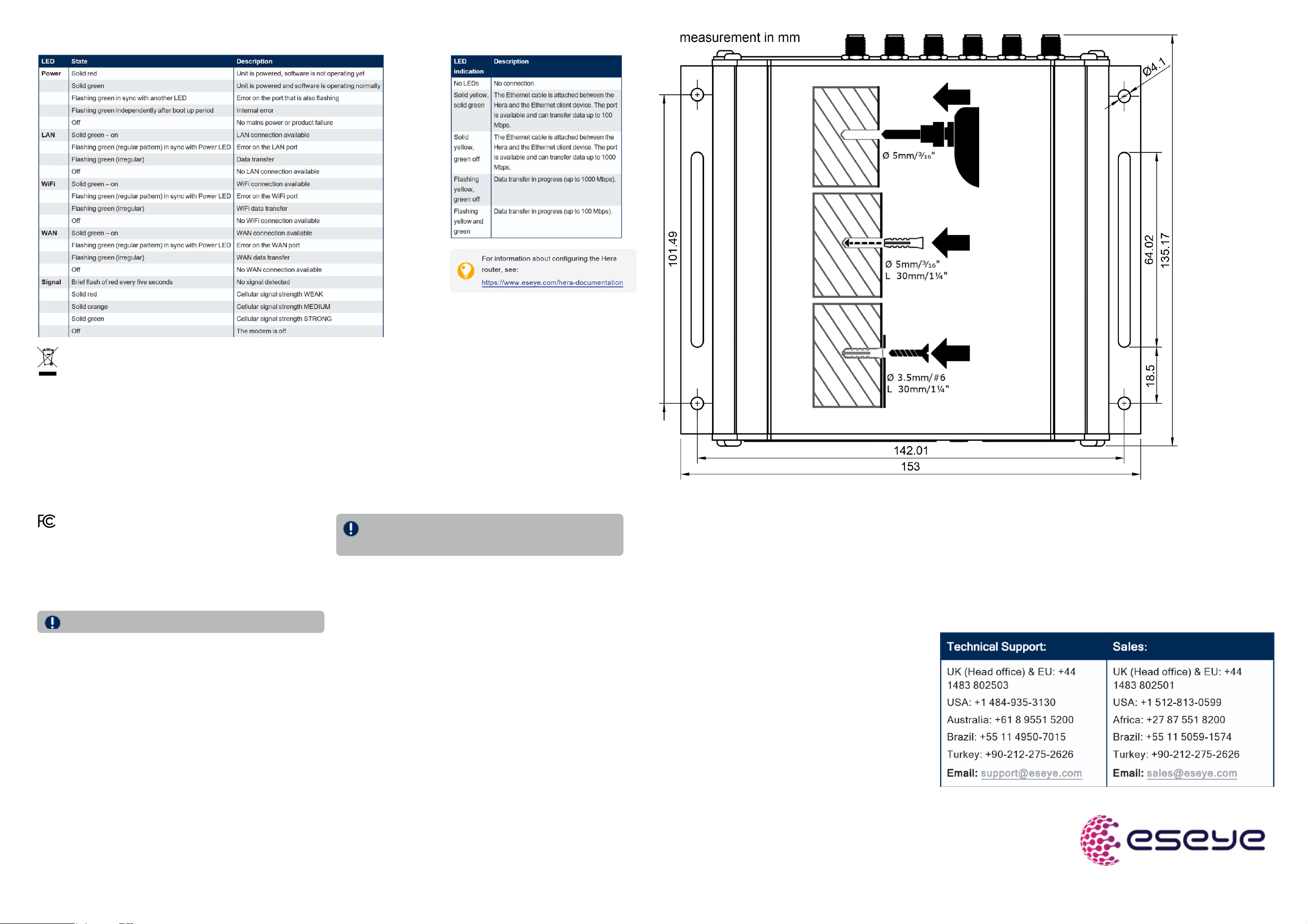
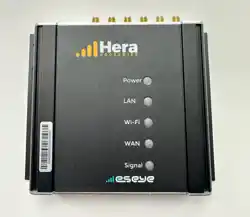
About the front panel indicators
About Link indicators
Disposal: In accorance with EU directive 2012/19/EC, ensure that at end-of-life, you separate this product and its accessories from other waste and scrap,
and deliver to the WEEE collection system in your country for recycling.
Declaration of Conformity with FCC rules for Electromagnetic
Compatibility
The following section is for use with Hera Series Routers that have an FCC mark on
the product label.
FCC ID: 2AASBHERAQ4029 Contains FCC ID: N7NEM75T
IC: 11329A-HERAQ4029 Contains IC: 2417C-EM75T Model/version: H604V6
We, Eseye Design Limited declare under our sole responsibility that this device
(H604V6) complies with Part 15 of the FCC Rules. Operation is subject to the
following two conditions:
1. This device may not cause harmful interference, and
2. This device must accept any interference received, including interference that
may cause undesired operation.
The device shall be used in such a manner that the potential for human contact
during normal operation is minimized. When connecting an external antenna to the
device, the antenna shall be placed in such a manner to minimize the potential for
human contact during normal operation. This transmitter must not be co-located or
operating in conjunction with any other antenna or transmitter.
Federal Communications Commission Notice
This equipment has been tested and found to comply with the limits for a Class B
digital device, pursuant to part 15 of the FCC Rules. These limits are designed to
provide reasonable protection against harmful interference in a residential
installation. This equipment generates, uses and can radiate radio frequency energy
and, if not installed and used in accordance with the instructions, may cause
harmful interference to radio communications. However, there is no guarantee that
interference will not occur in a particular installation. If this equipment does cause
harmful interference to radio or television reception, which can be determined by
turning the equipment off and on, the user is encouraged to try to correct the
interference by one or more of the following measures:
• Reorient or relocate the receiving antenna.
• Increase the separation between the equipment and receiver.
• Connect the equipment into an outlet on a circuit different from that to which the
receiver is connected
• Consult the dealer or an experienced radio/TV technician for help.
FCC Caution: Any changes or modifications not expressly approved
by the party responsible for compliance could void the user's
authority to operate this equipment.
IMPORTANT NOTE:
FCC Radiation Exposure Statement:
This equipment complies with FCC radiation exposure limits set forth for an uncontrolled
environment. This equipment should be installed and operated with a minimum distance of
20cm between the radiator and your body.
The antenna(s) used for this transmitter must be installed to provide a separation distance
of at least 20 cm from all persons and must not be co-located or operating in conjunction
with any other antenna or transmitter except in accordance with FCC multi-transmitter
product guidelines.
Modifications
The FCC requires the user to be notified that any changes or modifications to this device
that are not expressly approved by Eseye Design Limited may void the user's authority to
operate the equipment.
This device complies with ISED Canada's licence-exempt RSS standard(s). Operation is
subject to the following two conditions:
1. This device may not cause interference; and
2. This device must accept any interference, including interference that may cause
undesired operation of the device
This radio transmitter (IC: 11329A-HERAQ4029, Contains IC: 2417C-EM75T) has been
approved by ISED Canada to operate with the antenna types listed below with the
maximum permissible gain and required antenna impedance for each antenna type
indicated. Antenna types not included in this list, having a gain greater than the maximum
gain indicated for that type, are strictly prohibited for use with this device:
• WLAN- CORTEC P/N AN2450-5505BRS: 3.58dBi
• Cellular: Gantetech GA-GSM-06: 3.5dBi
The operation of the device in the band 5150–5250 MHz is only for indoor use
to reduce the potential for harmful interference to co-channel mobile satellite
systems. This equipment complies with ISED RSS 102 radiation exposure
limits set forth for an uncontrolled environment.
This equipment is installed to be operated with a minimum 20cm distance
between the antenna and the user. Please note that high-power radars are
allocated as primary users (i.e. priority users) of the bands 5250- 5350 MHz
and 5650-5850 MHz and these radars can cause interference and/or damage
to LELAN (License Exempt Local Area Network) devices.
L’metteur/rcepteur exempt de licence contenu dans le prsent appareil est
conforme aux CNR d’Innovation, Sciences et Dveloppement conomique
Canada applicables aux appareils radio exempts de licence. L’exploitation
est autorise aux deux conditions suivantes :
1.
L’appareil ne doit pas produire de brouillage;
2. L’appareil doit accepter tout brouillage radiolectrique subi, mme si le
Le présent émetteur radio (IC: 11329A-HERAQ4029, Contains IC:
2417C-EM75T) a été approuvé par ISED Canada pour fonctionner avec les
types d'antenne énumérés cidessous et ayant un gain admissible maximal et
l'impédance requise pour chaque type d'antenne. Les types d'antenne non
inclus dans cette liste, ou dont le gain est supérieur au gain maximal indiqué,
sont strictement interdits pour l'exploitation de l'émetteur.
• WLAN - CORTEC P/N AN2450-5505BRS: 3.58dBi
• Cellular: Gantetech GA-GSM-06: 3.5dBi
L'utilisation de l'appareil dans la bande de fréquences 5150-5250 MHz est
uniquement valable en intérieur pour réduire le risque de brouillage nuisible
au fonctionnement des systèmes mobiles par satellite partageant les mêmes
canaux. Cet appareil est conforme aux limitations de la norme IC RSS-102
concernant l'exposition aux radiations dans un environnement non contrôlé.
Cet appareil doit être installé et utilisé avec une distance minimale de 20 cm
entre l'antenne et le corps de l'utilisateur. Veuillez noter que les radars haute
puissance sont définis comme utilisateurs principaux (i.e. utilisateurs
prioritaires) des bandes 5250- 5350 MHz et 5650-5850 MHz, et que ces
radars peuvent causer des interférences et/ou endommager les appareils LE-
LAN (réseau local exempt de licence).
Declaración para usuarios en México
La operación de este equipo está sujeta a las siguientes dos condiciones:
1. es posible que este equipo o dispositivo no cause interferencia nociva
2. este equipo o dispositivo debe aceptar cualquier interferencia, incluyendo la que pueda causar
su operación no deseada.
Este equipo está diseñado para operar con las antenas enlistadas y con una capacidad máxima de
3.58 dBi (WLAN)/ 3.5 dBi (Celular). El uso de antenas con este equipo no incluídas en esta lista o
que tengan una capacidad mayor a 3.58 dBi (WLAN)/ 3.5 dBi (Celular), quedan PROHIBIDAS. La
impedancia requerida de la antena es de 50 ohms.
• WLAN CORTEC P/N AN2450-5505BRS: 3.58dBi
• Celular: Gantetech GA-GSM-06: 3.5dBi
Caution:
Exposure
to
Radio
Frequency
Radiation.
brouillage est susceptible d’en compromettre le fonctionnement.