www.PyleUSA.com2
Please read all instructions before use for the best performance
of this product. Save these instructions for future reference.
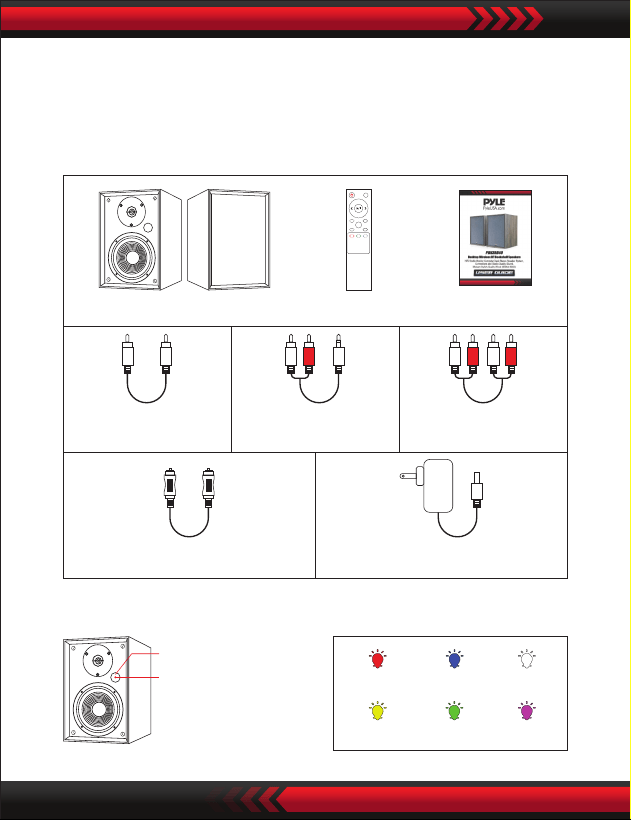
Box Contents
LED Indicators and Button Introduction
RCA to RCA
audio cable
Stereo RCA to
3.5mm audio cable
RCA to RCA
audio cable
Digital Optical cable Power Adapter
Bookshelf Speaker Remote Control Quick Start
USB
MOVIE MUSIC
DIALOG
OPT COAX
LINE
MUTE
VOL+
VOL-
BT
Standby BT Optical
Line in Coaxial USB
Active Speaker
LED Indicators
Infrared receiver
www.PyleUSA.com 3
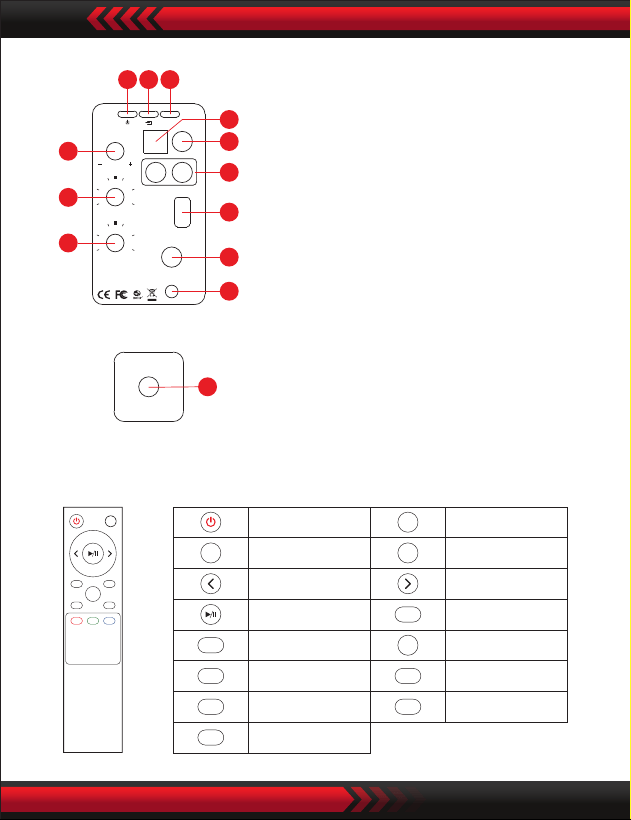
Know Your Remote
01. Power switch
02. Input selection
Press in to navigate between audio sources:
BT -> Optical -> Coaxial -> LINE IN -> USB
03. Sound effects
Press in to navigate between audio sources:
Music -> Dialogue -> Movie
04. Volume control
05. Treble control
06. Bass control
07. Optical input port
08. Coaxial input port
09. Line in input port
10. USB input port
11. Left speaker audio output
12. Power port
13. Left speaker audio in
USB
MOVIE MUSIC
DIALOG
OPT COAX
LINE
MUTE
VOL+
VOL-
BT
Power button
Volume up
Previous track
Play/pause
Coaxial mode
USB mode
Movie mode
Dialogue mode
Music mode
Line mode
BT mode
Optical mode
Next track
Volume down
Mute/Unmute
MUTE
VOL+
VOL-
OPT
BT
COAX
USB
MOVIE
DIALOG
MUSIC
LINE
Active Speaker
LINE I N
USB
DC IN
19-21v
SPEAKER OUT
Model: PBKSRB40
Power Cons umption: 60W
TREB
0
-2
-4
-6 +6
+4
+2
BAS S
0
-2
-4
-6 +6
+4
+2
VOLUM E
EQ
OPT
COA X
L R
03
04
05
06
08
09
10
11
12
07
0201
Passive Speaker
SPEAKER IN
13
www.PyleUSA.com4
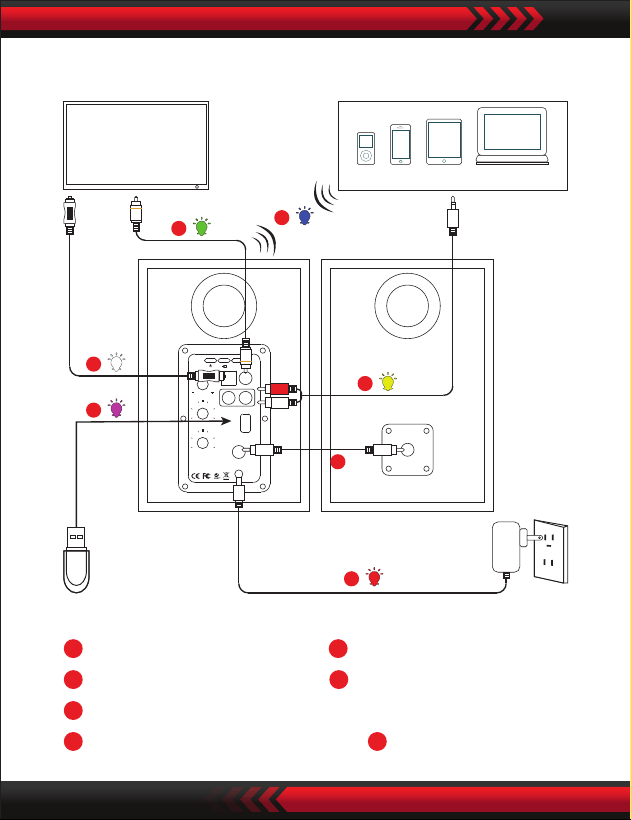
Connection Diagram
Coaxial cable (not supplied)
a
Digital Optical cable
(supplied)
b
USB
(not supplied)
c
BT
d
Stereo RCA to 3.5mm audio cable
(supplied)
e
RCA to RCA audio cable
(supplied)
f Power Adapter
(supplied)
g
LINE IN
USB
DC IN
19-24v
SPEAKER OU T
L R
Model: PBKSRB40
Power Consumption: 60W
TREB
0
-2
-4
-6 +6
+4
+2
BASS
0
-2
-4
-6 +6
+4
+2
VOLUME
EQ
OPT
COAX
SPEAKER IN
BT signal
up to 30 feet
BT Device
TV
f
USB
e
a
d
b
c
g
Active Speaker Passive Speaker
www.PyleUSA.com 5
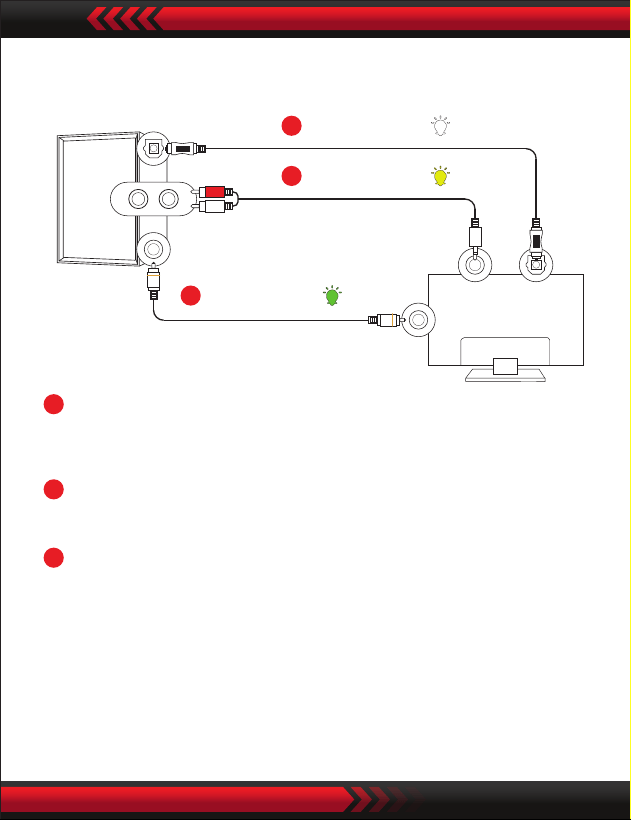
Connecting with a TV
Setting “PCM” on your TV
When all cables are connected properly, and LED indicator
lights properly, if there is no sound from tv or Soundbar, please
set your tv as below:
B
C
A
Method 2. Connecting using a RCA to 3.5mm cable.
Select RCA mode.
Method 1. Connecting using an Optical cable.
Select Optical mode and set the TV’s audio output to “PCM”.
(More information on PCM page)
Method 3. Connecting using an Coaxial cable.
Select Coaxial mode and set the TV’s audio output to “PCM”.
(More information on PCM page)
Active Speaker
A
Optical digital
cable
(supplied)
B
RCA to 3.5mm
cable
(supplied)
C
Coaxial cable
(not supplied)
TV
www.PyleUSA.com6
1. Press "Menu" on the TV’s remote control.
2. Press the arrow keys on the remote to scroll to "Audio Settings."
3. Press "OK" on the remote control.
4. Scroll to "Advanced Audio" and press "OK". Some televisions
may not have an"Advanced Audio" menu and may list various
audio settings instead.
5. Scroll to "Audio Output Mode" or "Digital Audio Output Mode"
and press "OK".
6. Scroll until "PCM" is displayed as the current audio output.
7. Press "OK" to save the settings.
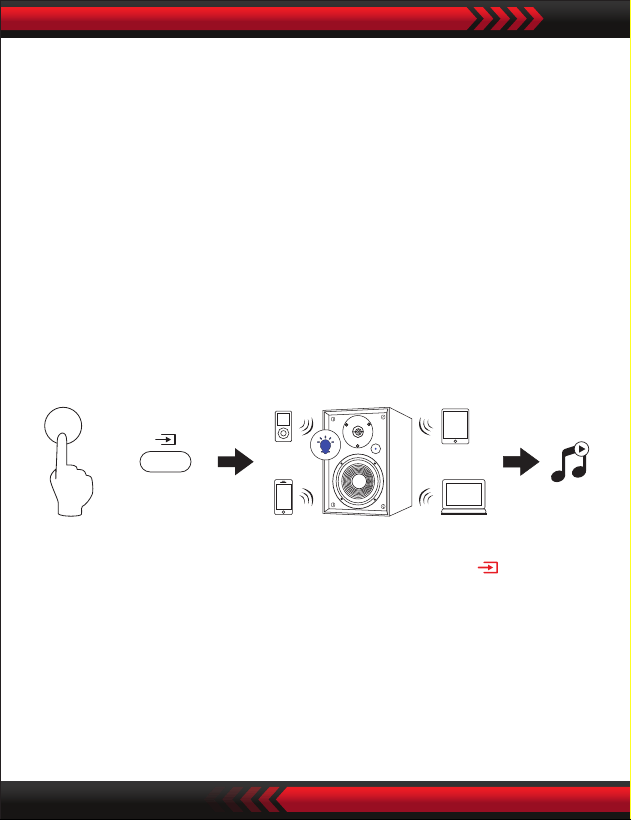
Connecting a Wireless BT Device
a. Press the “BT” button on the remote or press the “ ” button
on back panel of the active speaker, the LED indicator blinks blue.
b. Turn on Wireless BT on the BT device.
c. Select “PyleUSA” and connect it. When your BT device is
connected, the LED indicator blinks blue slowly.
d. Play music les from the device, connected via BT, through the
bookshelf speaker.
BT
or
BT signal
up to 30 feet

www.PyleUSA.com 7
Troubleshooting
No sound
• Check if the power indicator light is ON.
• Try to turn up the volume using either the master volume control
or remote control.
• Ensure the audio cables are rmly connected and the input is
set correctly on the speakers.
• Check if there is signal output from the audio source.
Cannot connect via Wireless BT
• Make sure the speaker is switched to BT input, in other audio
input mode BT can not be paired or connected. Disconnect from
any BT device by press and hold the volume dial in BT mode,
then try again.
• Eective BT transmission range is 10 meters, make sure operation
is within the range.
• Try another BT device for connection.
The PBKSRB40 Bookshelf Speaker does not turn on
Check if mains power is connected or if the wall outlet is switched on.
Specications
Power output:
L/R: 30W + 30W
Signal to noise ratio dB(A):
L/R: ≥85dB (A)
Input sensitivity:
LINE IN: R/L: 650±50mV
Coaxial: R/L: 500±50mV
OPT: R/L: 500±50mFFS
BT: R/L: 700±50mFFS
Frequency response:
40HZ-18KHZ
Bass unit:
4 inch (116mm)
Tweeter unit:
Φ13mm silk dome tweeter