
Model No.: GL-001
QUICK START GUIDE
QUICK START GUIDE VIDEO
HTTPS://ONNAISAFE.COM/PAGES/INSTALLATION-GUIDE
1
2
3
4
8
9
10
6
7
BCD A
G
1 2 3 4
E F
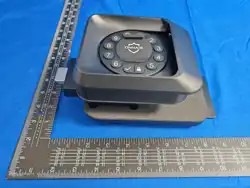
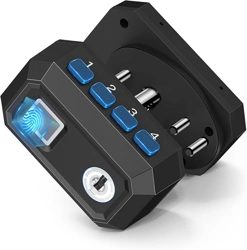
A Key Lock
B Fingerprint Scanner
C Status Light
D USB-C charging port
E Reset Button
F Add Button
G Braille keyboard
QUICK START GUIDE
Insert the provided charging cable into the port and charge for
4 hours.
Unlock by using initial password .
Note: The light will turn red, blue and green in sequence f rstly.
When the blue light keeps flashing, please enter the password.
“
12341
"
Low battery warning: Red light flashing, beep 4 times continuously.
The light keeps on green when charging.
The light will disappear after the completion.
Insert within 60S after unlocking.
“Add”
Please use the on cover page to insert and .
“
Pin
"
“
Reset
" “
Add
"
Step
1. Charging
Step
2. Unlock
Step
3. Register
i
2.Insert and place your f nger on the scanner
4 times during setup.
Digital Password:
Fingerprint:
“Add”
The steady green light with two BB sounds indicates the
f ngerprint was set successfully.
1.Set a new password (5-10 characters) and insert to
confirm for the f rst time.
2.Enter the same digits again and insert to f nal conf rm.
.
The green light with a BB sound indicates success.
The steady green light with two BB sounds indicates the password
was set successfully.
“Reset”
“Reset”
1.Enter the newly set password to unlock again.
i
Note: Please repeat Fingerprint 1&2 to add more f ngerprints. i
i
i i
i
Delete Fingerprints:
“Add”
1.Using password/f ngerprint to unlock, long insert for 3S.
2.Press your f ngerprint that needs to be delete on the scanner.
You can continuously delete within 60S until the automatic
exit operation.
The green light with a BB sound indicates success.
Restore factory settings:
Toggle silent mode:
More Function Guide
Using password/f ngerprint to unlock, then long insert
for 3 seconds.
The green light with a BB sound indicates success.
“Reset”
Using password/f ngerprint to unlock, insert 3 times within
60S to restore the factory settings.
The green light with a BB sound indicates success.
“Reset”
NOTE: Red Light Blue Light Green Light
i
i
i
i
Scan the QR code below for operation guiding.Contact us at
[email protected] to activate your warranty.
1.All setup operations require password/f ngerprint to unlock. Please
complete a single access operation within 60 seconds. If timeout,
please unlock again.
2.Numeric password must be added before f ngerprint.
Warm tips:
SCAN THE OPERATIONAL VIDEO
Need more help?
i
i
Pistol Models Referenced
92FS
CZ75
TP9
MP9
P226
SP5K
NOTE: Key Position Auxiliary Position
Trigger Lock Installation Demonatation
Rifle Models Referenced
Shotgun Models Referenced
M1014
NOTE: “ONNAIS is compatible with most modern firearms,
not limited to the ones mentioned above."
M500
AK102 MK18
Follow Onnais on Instagram & Facebook for faster help
@Onnais
@Onnaisoff
icial
5
Question 4: Can I turn off the sound?
Answer: Long press
same step to recover the operation sound.
“Reset” for 3 seconds to mute. Repeat the
Find your answers here
Have a question?
Find your answers here
Have a question?
Question 2: What should I do if I accidentally entered the wrong number
when adding a password?
Answer: Please add
then begin re-adding your password from Step 2.
“Reset” and “Add” to end the operation,
Questions & Answers
Questions & Answers
Question 1: Why can't my fingerprints be recognized?
Answer:
Before enrolling fingerprints, it is necessary to add password.
Failure to add password will result in the inability to add
fingerprints. Additionally, please ensure that your fingers are
clean and free from dirt or water as it may affect fingerprint
recognition. Please refer to on Quick
Start Guide
"Add fingerprints"
(Step 3)
Question 5: How long does the gun lock take for the battery to drain in
standby mode?
Answer:
It will take about 3-5 months in standby or 2000 unlocks to
drain the battery. We recommend charging the battery every
2 months. Low battery warning: Red light flashing, beeping
4 times continuously. If the trigger lock emits this notification,
please charge it!
Question 6: How should I contact seller regarding replacemhents/refunds
or other technical issues?
Answer:
We provide 365 days replacement warranty and lifetime
technical suppoprt. Send email to
with your order ID. We will strive to resolve your question
within 24 hours.
Question 3: Why can't I unlock it with password or fingerprint?
Answer:
If this happens, please use the key to unlock the
trigger lock first. Then check if the battery is dead. If it
doesn't help, please contact us directly at
[email protected] for friendly service and assistance.