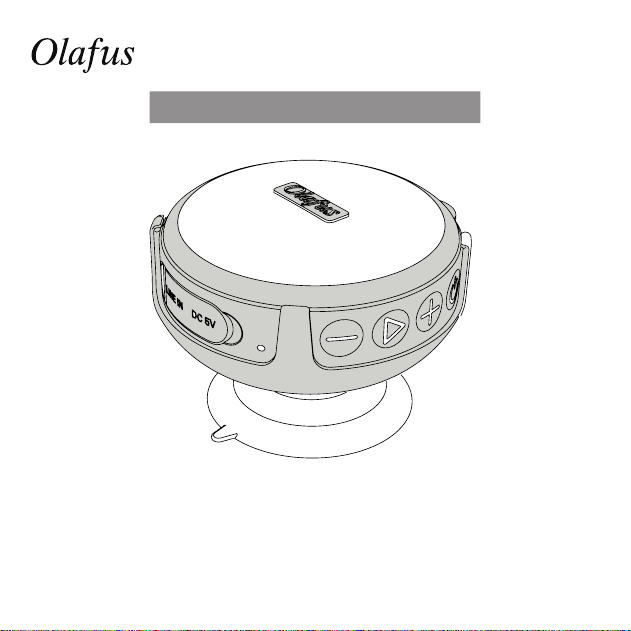
Product Manual
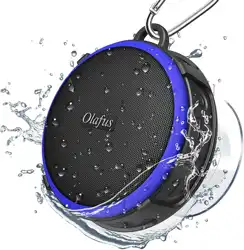
Olafus-02SK Wireless Speaker
LA-93YX-01 LA-97YX-01-BE
English
2
Product Manual
Thank you for your purchase of the wireless speaker. Before your primary use of this
product, please go through the safety instruction and installation guide carefully, and
save them for future reference.
If you have any questions or suggestions, please contact us through the ways
provided at the end of the user manual.
Do not set up near heat sources. Avoid radiators, stoves, and other devices that produce
heat. Avoid long-term exposure to sunlight and high temperatures.
There are 2 modes for this speaker: Bluetooth Mode, Audio Mode.
Please note: When the music is paused for 30 minutes, the speaker will enter into Sleep
Mode. To restart the speaker, please press Power ON/OFF/ button.
SAFETY INSTRUCTIONS
Olafus-02SK Wireless Speaker
English
3
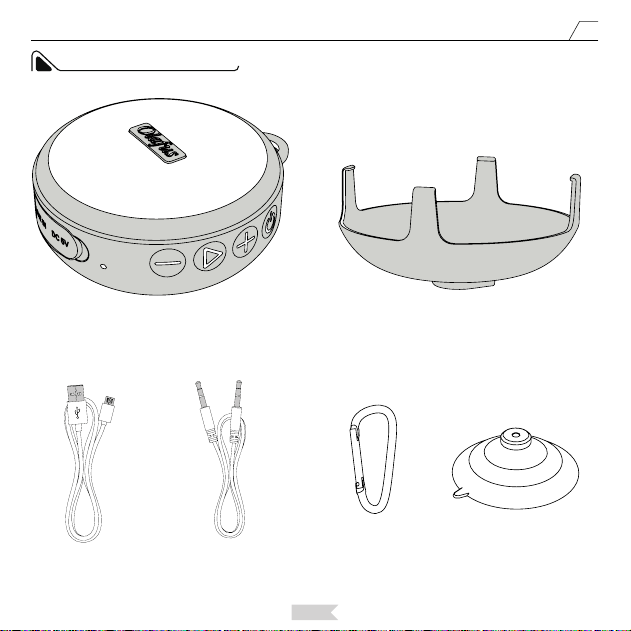
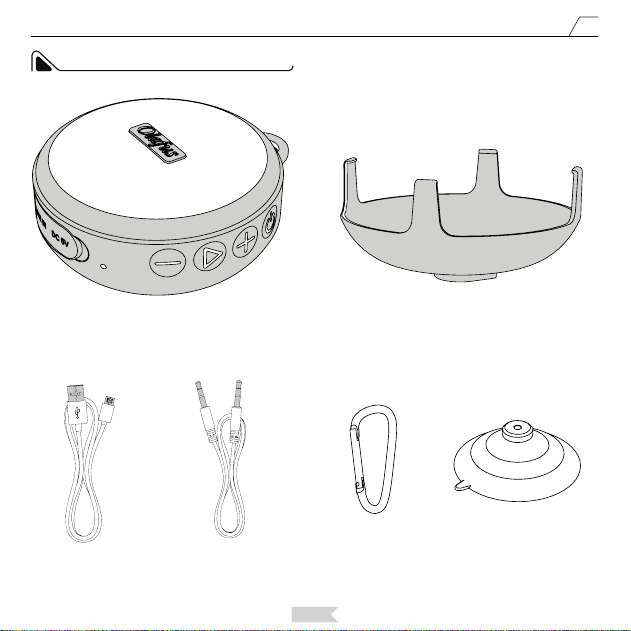
PACKAGE CONTENTS
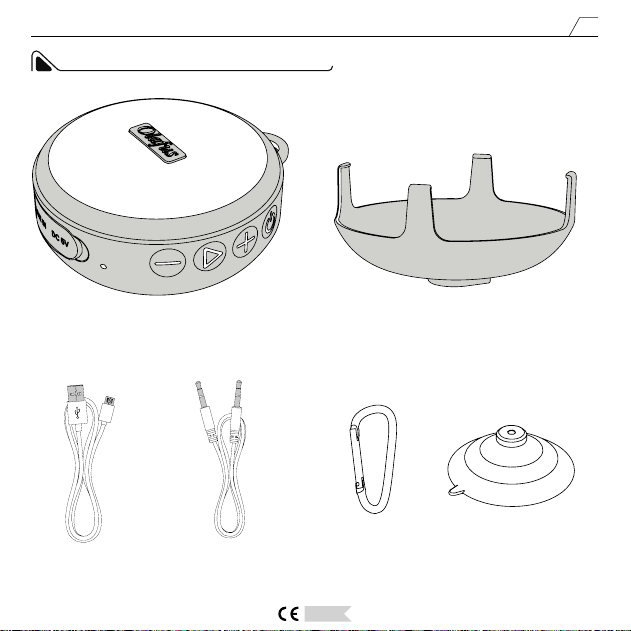
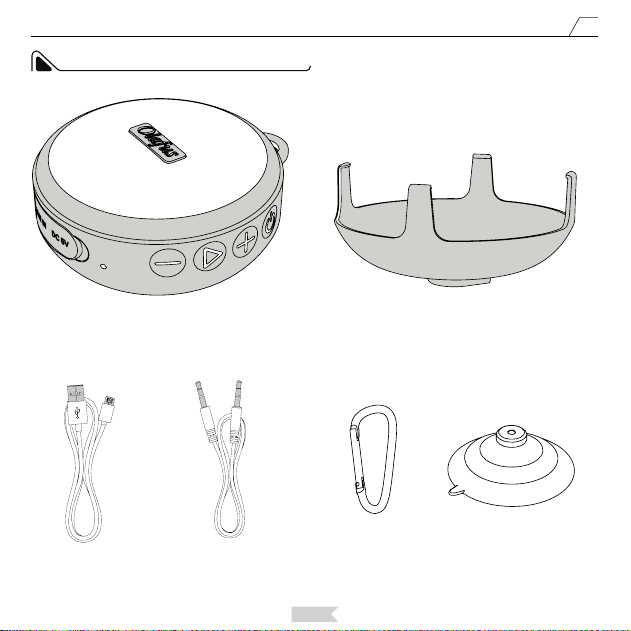
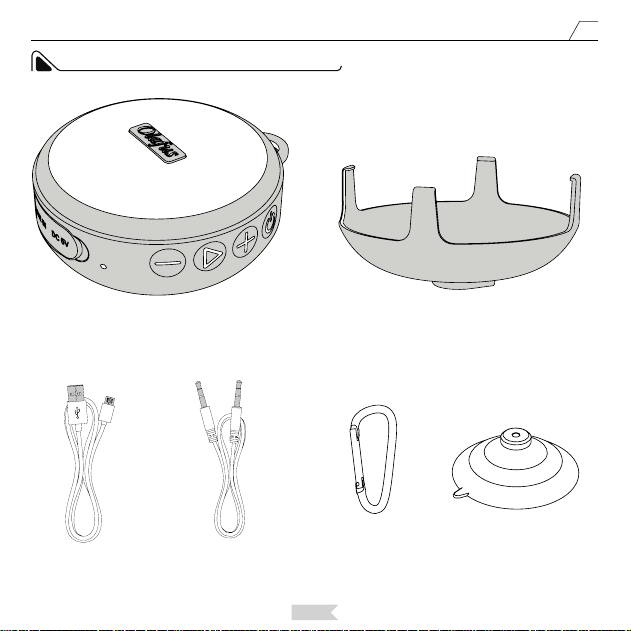
OLAFUS-02SK Wireless Speaker * 1 Speaker Stand * 1
USB Charging
Cable * 1
(
60cm/2.99ft
)
3.5mm Audio
Cable * 1
(100cm/3.28ft)
Hanging Hook * 1 Suction Cup * 1
English
4
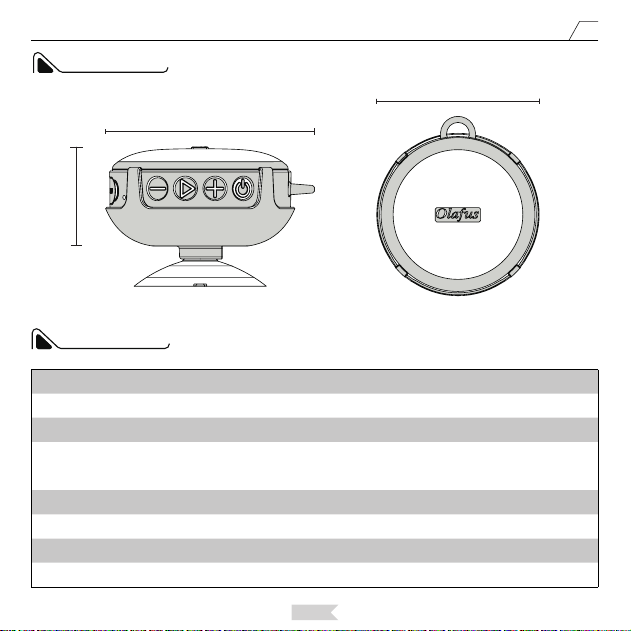
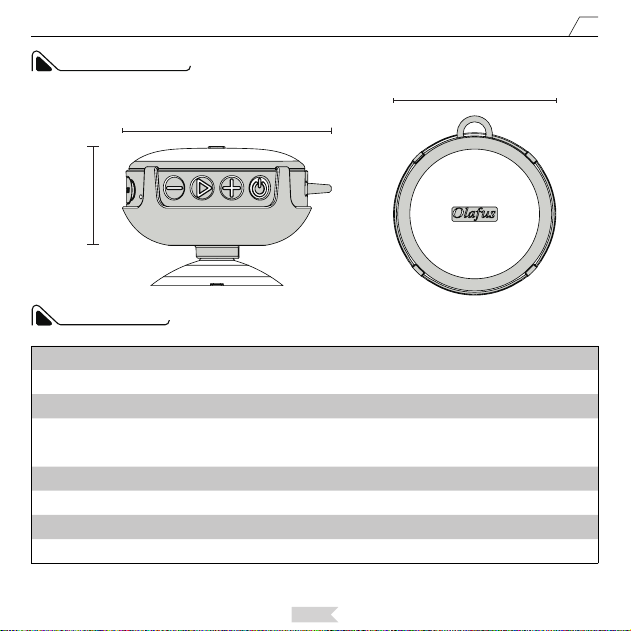
PARAMETER
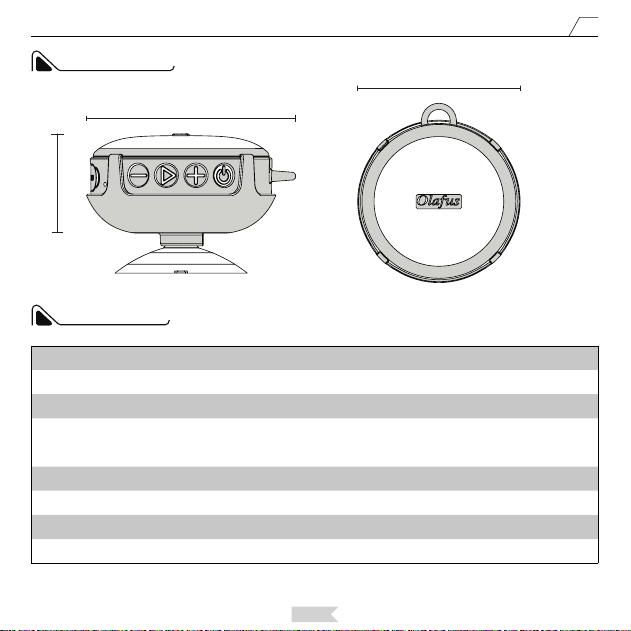
DIMENSION
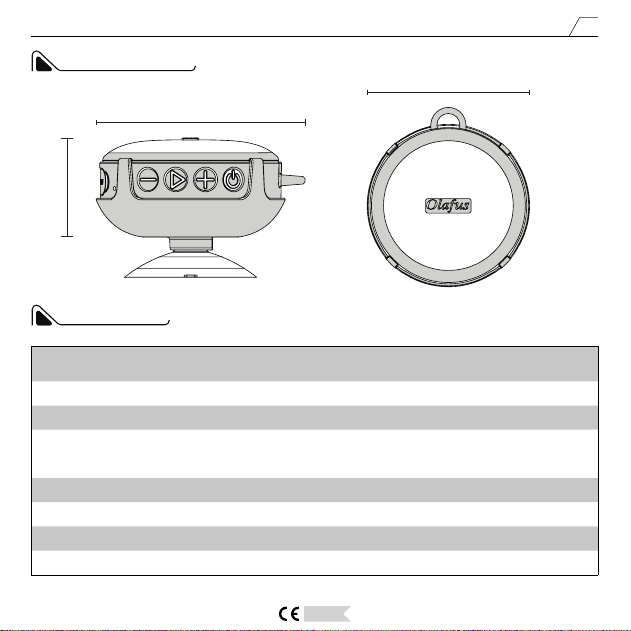
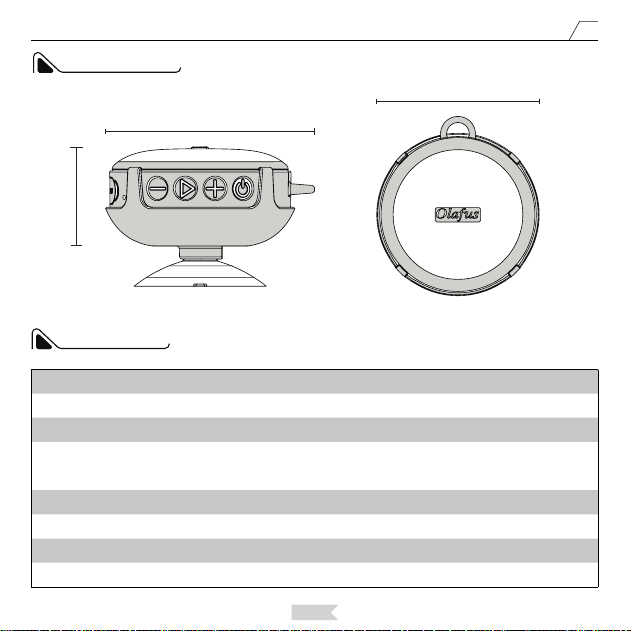
93mm/3.66in
42mm/1.65in
82.5mm/3.24in
Battery Life 10-12H battery life at 60% volume
Stand-by Time ≥300 hours
Bluetooth Range ≤32.81 Feet/10m
Frequency Response 20HZ-20KHZ
Charging Time 2.5-3 hours
Working Voltage 5V / 1A
Wattage 5W
IP Rating IPX7
Battery Capacity 1200 mAh
English
5
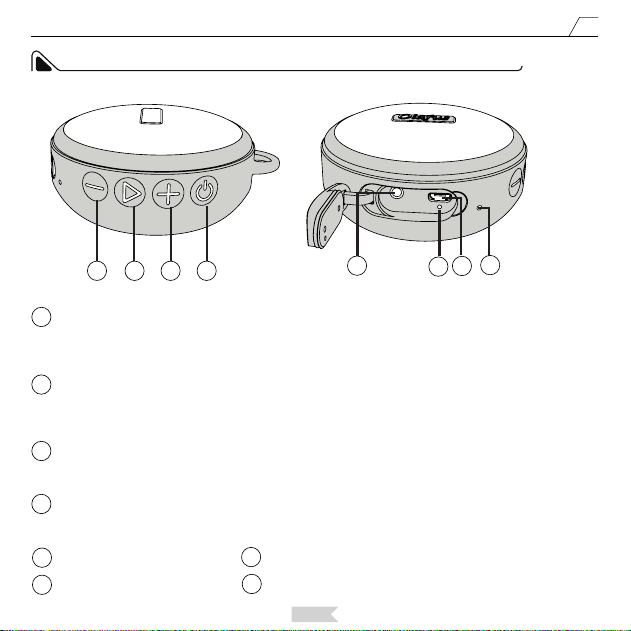
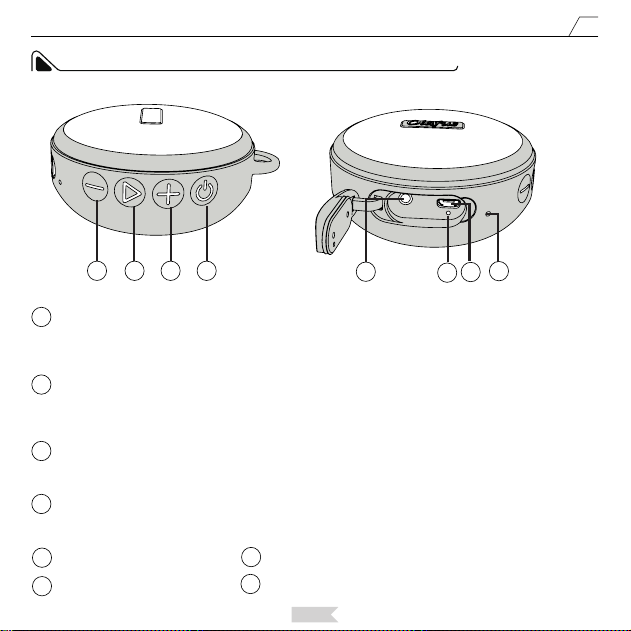
SPEAKER CONTROL PANEL AND PORTS
1
1
2
2
3
3
4
4
5
6
6
5
7
7
8
8
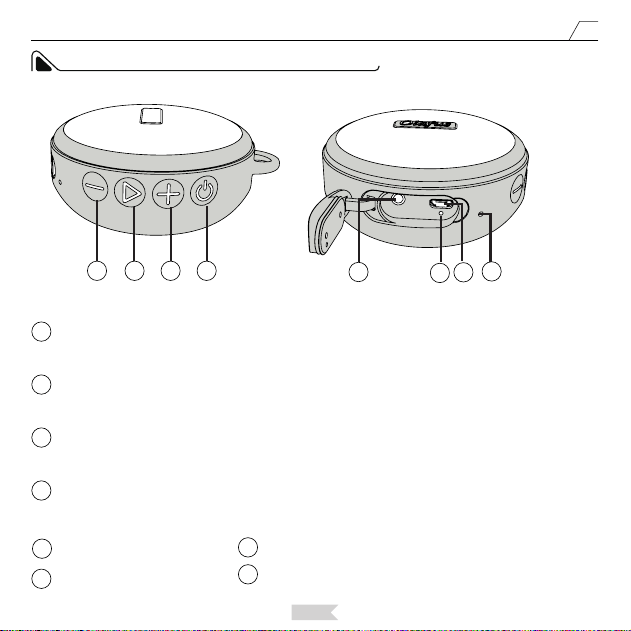
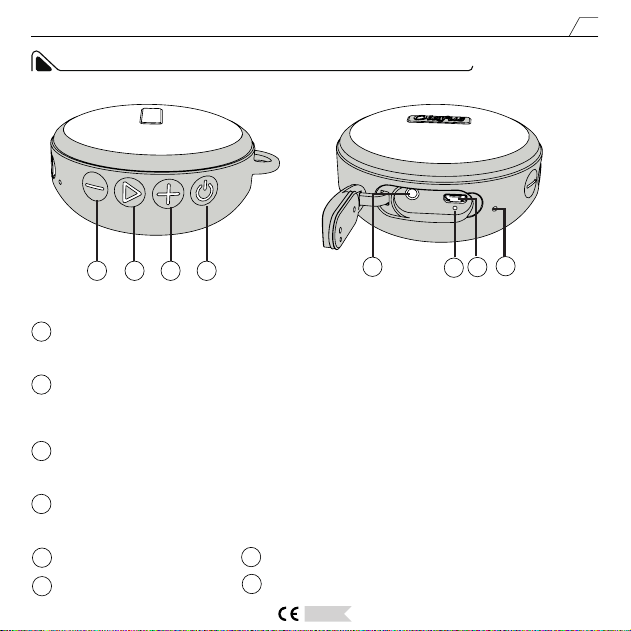
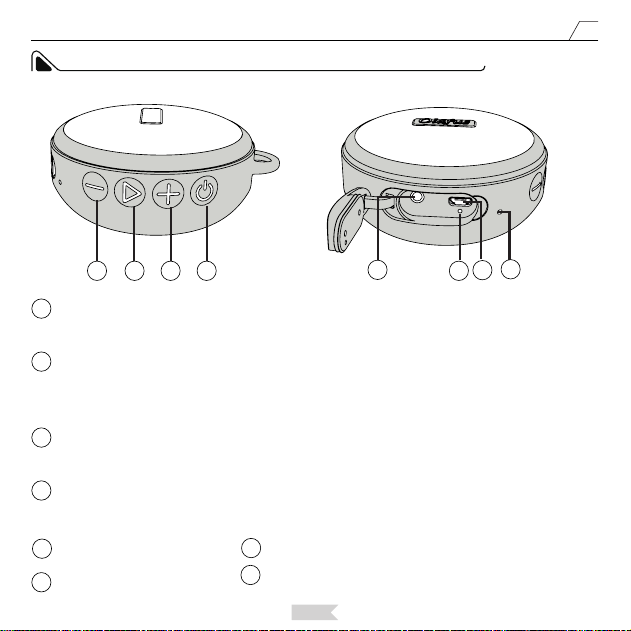
Volume UP/Next:
Long press the button to increase the volume. Short press the button to move to the next song(only
function in Bluetooth Mode).
Power ON/OFF/Mode:
Long press the button to turn on/o the speaker. When the speaker is on, short press the button to swift
mode of the speaker.
Play/Pause/Pairing:
In Bluetooth Mode, short press the button to play or pause music. In Bluetooth Mode, long press the button
to cut the current Bluetooth connection and enter Pairing status.
Volume Down/Prev:
Long press the button to lower the volume. Short press the button to move to the previous song(only
function in Bluetooth Mode)
AUX Input Port
Indicator Light
Microphone
Power Port: DC 5V 1A
English
6
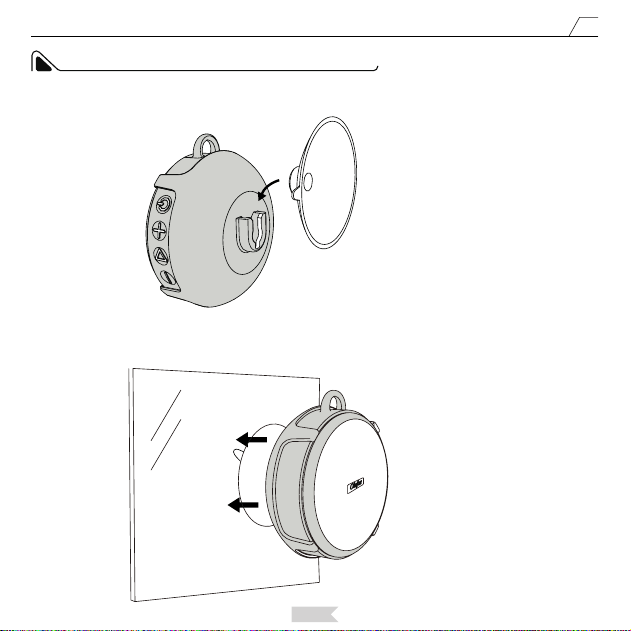
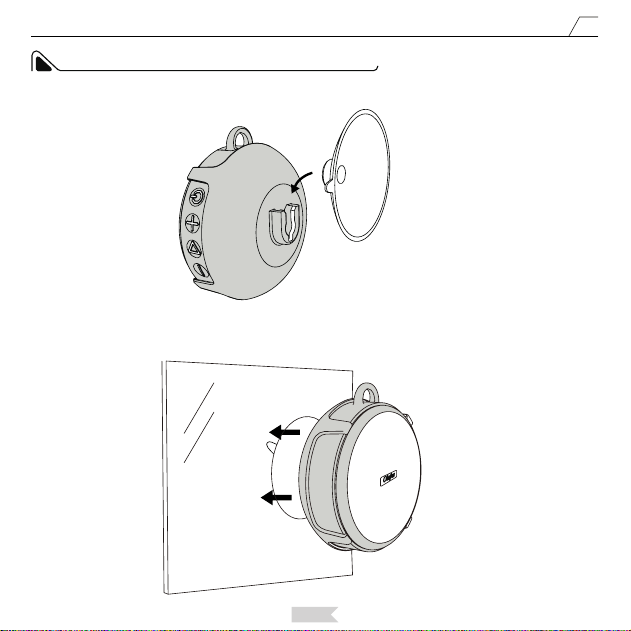
INSTALLATION GUIDE OF SHOWER SPEAKER
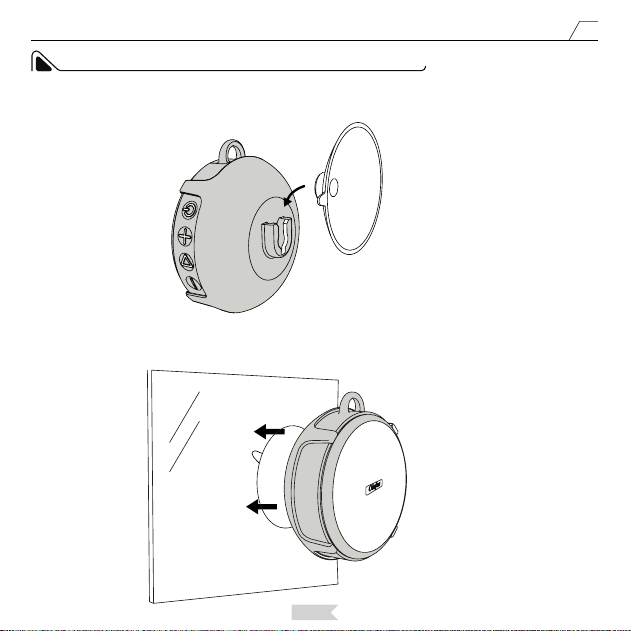
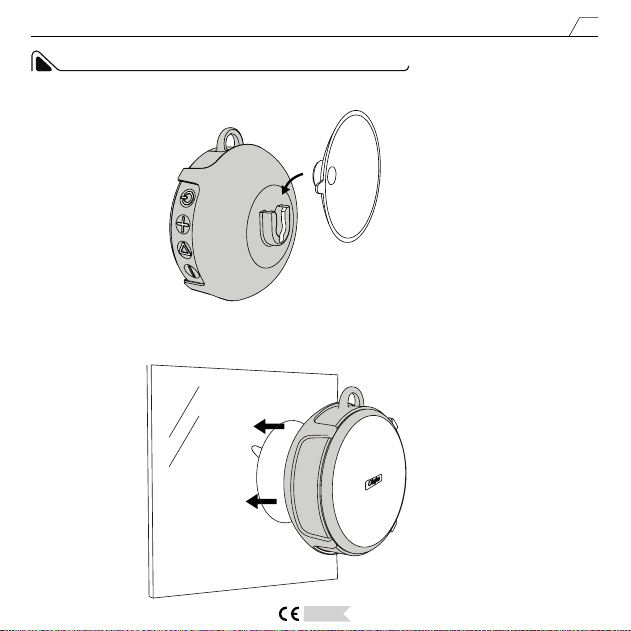
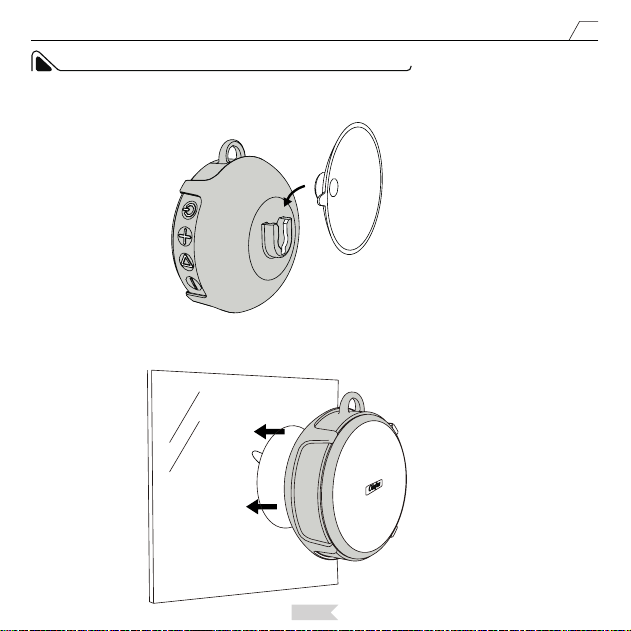
Attach the speaker to the smooth surface, such as onto the glass or ceramic tile. Please Note: Do not attach the
speaker onto an uneven, dusty surface. You could splash some water onto the surface where you will attach the
speaker with the suction cup to reinforce the cup and speaker.
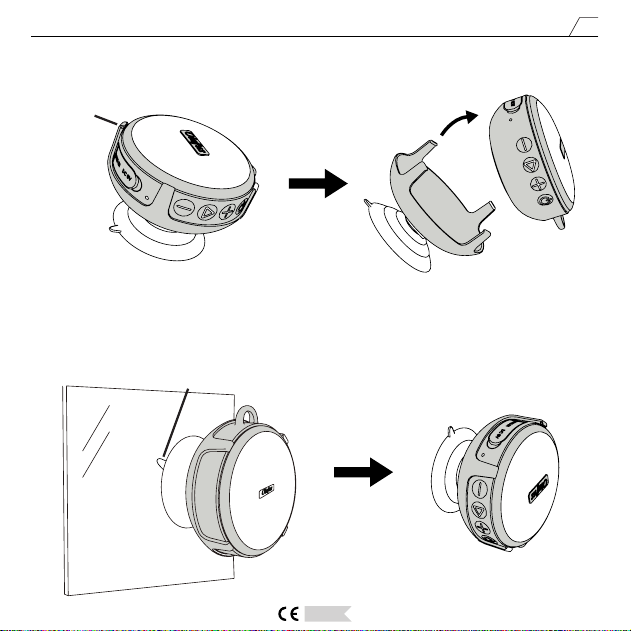
Insert the suction cup to the slot of the stand, and push it into the slot as the picture 1 shows.
Step 1
Picture 1
Picture 2
Step 2
English
7
Picture 3
Sucking
Picture 4
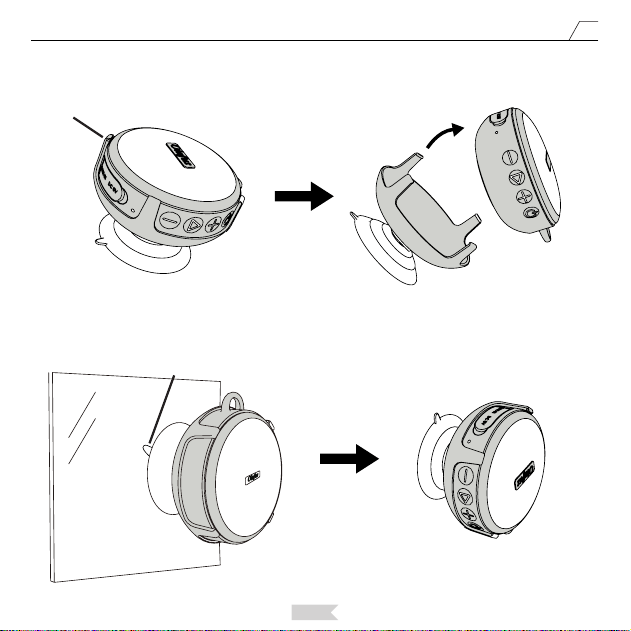
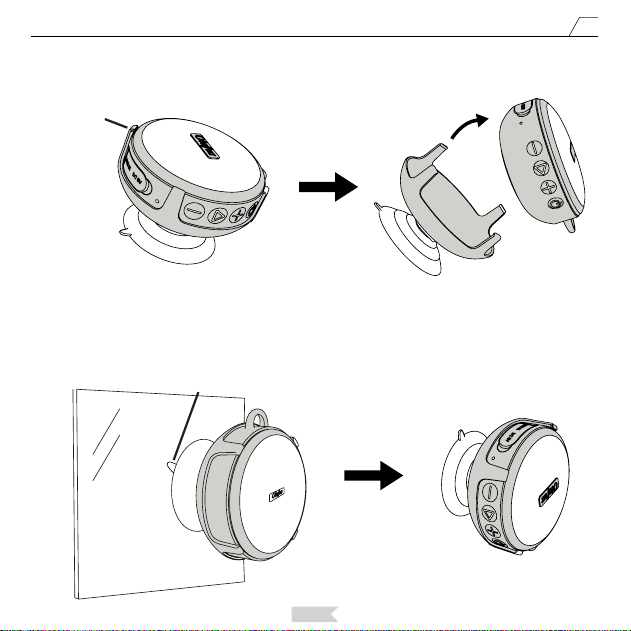
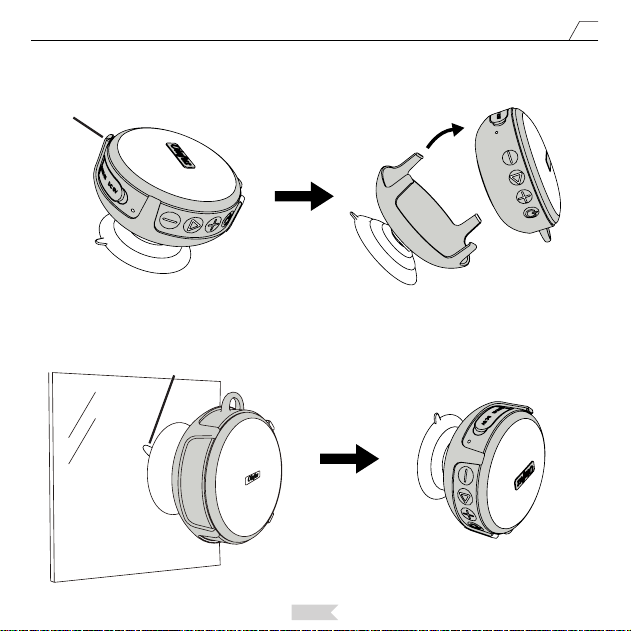
If you want to take o the speaker from the stand, you can press the bulge side of the holder and remove the
speaker as picture 3 shows.
If you want to take o the speaker with suction cup from the wall, peel o the suction cup.
Step 3
Bulge1
English
8
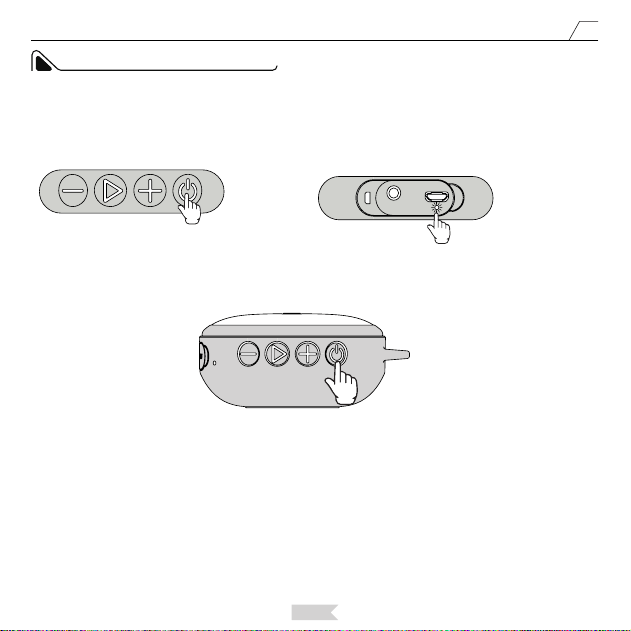
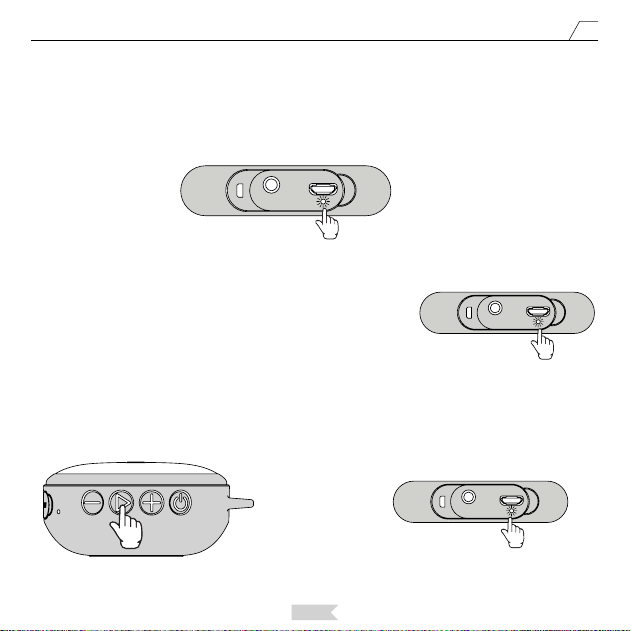
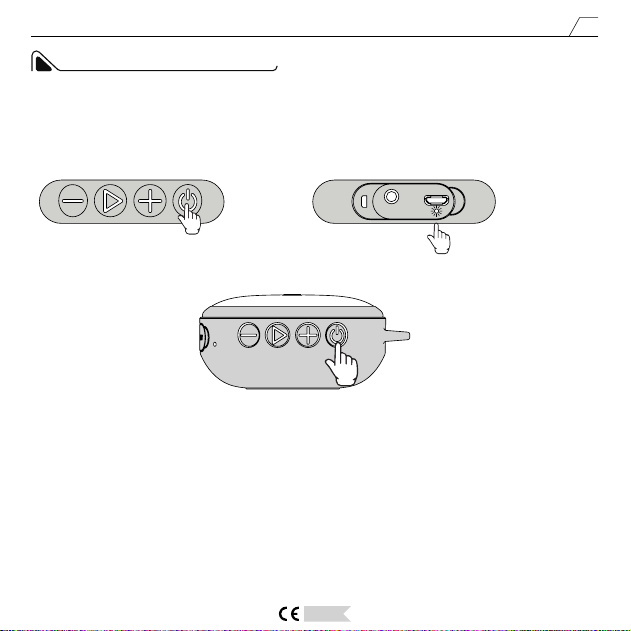
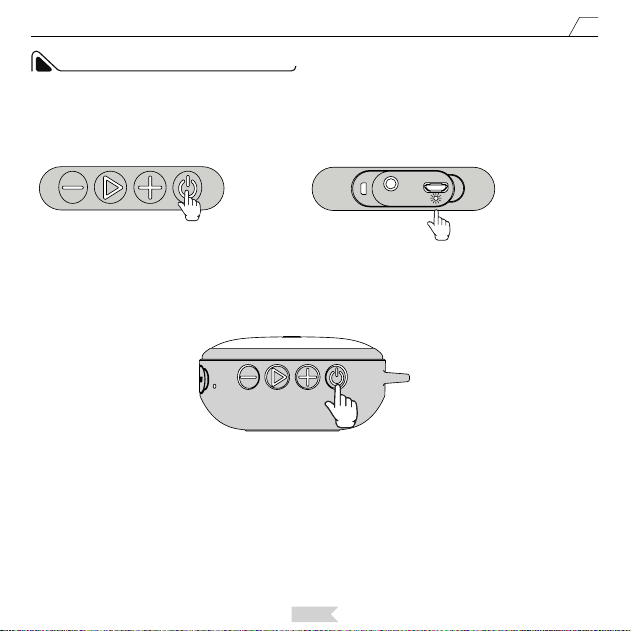
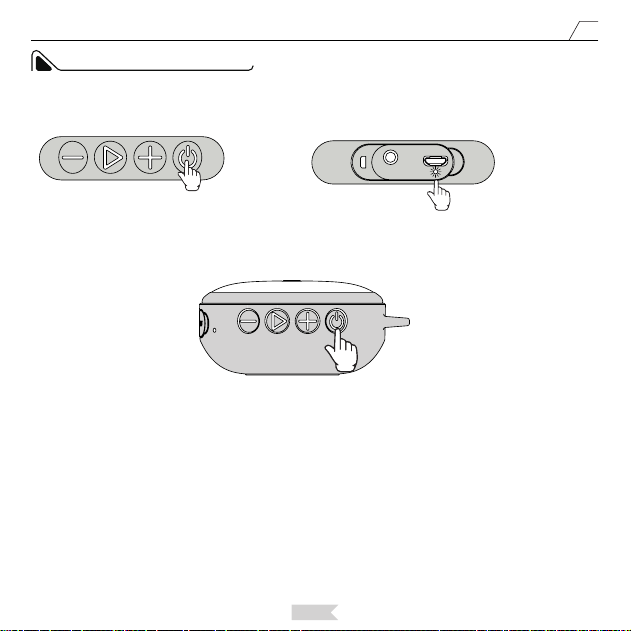
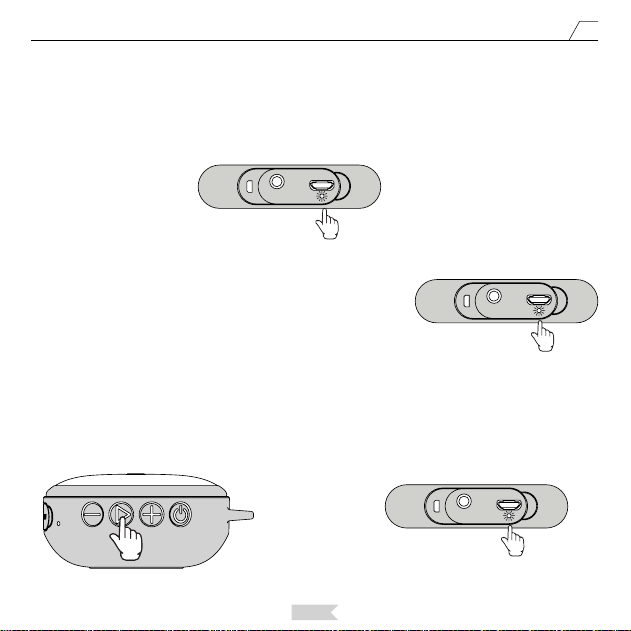
Long press the power button, the speaker will be turned on after hearing the prompt tone. The power indicator
light will turn blue and on for 3 seconds. Afterwards, the blue light fashes quickly, indicating the speaker is
entering Pairing mode.
Blue Light Flashes
Quickly.
OPERATION INSTRUCTION
The speaker will enter Bluetooth mode by default. For bluetooth connection, please do not connect with the
audio cable. If you connect the speaker with the supplied 3.5 mm audio cable, the speaker will automatically
enter audio mode. When the speaker is under audio mode, you can short press the Power Button to enter
Bluetooth mode.
Notice:
English
9
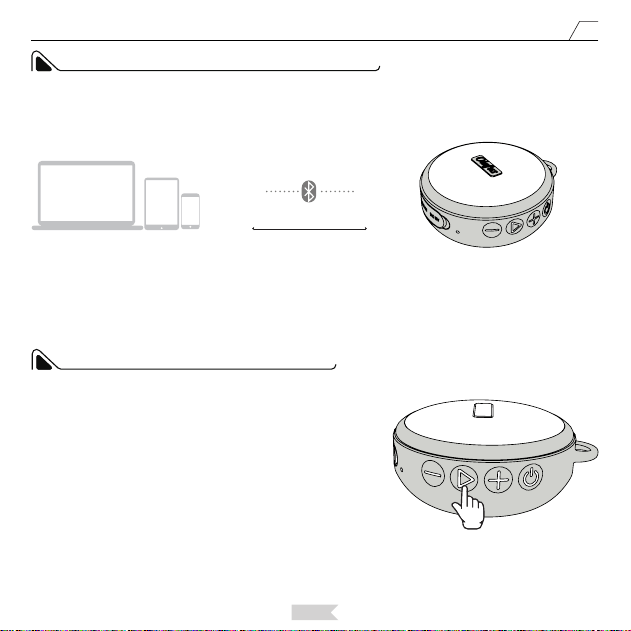
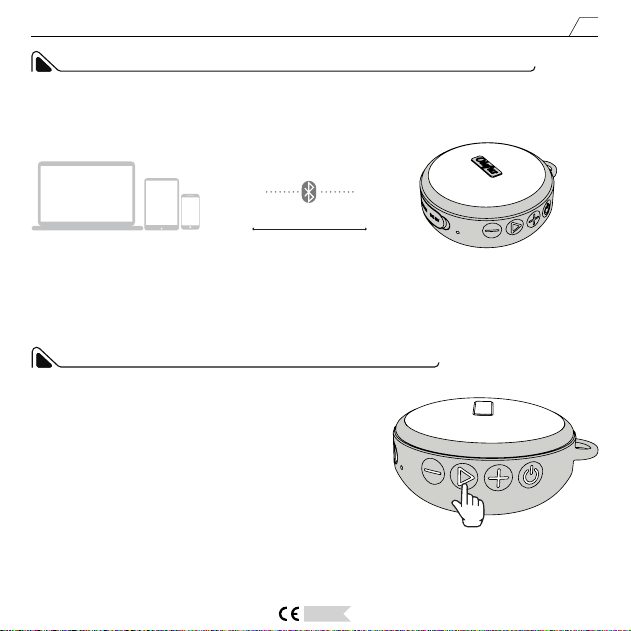
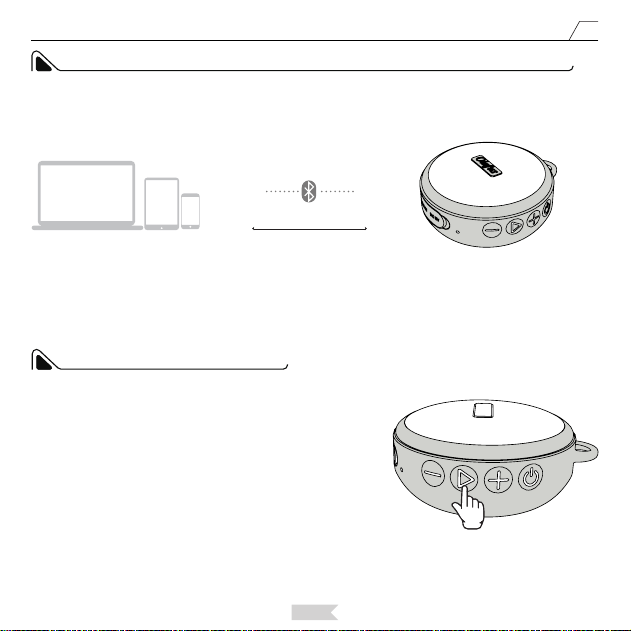
Turn on the Bluetooth function on your phone or other Bluetooth devices and search for our speaker which is
named as OLAFUS-02SK. Connect with the speaker.
1, Search for OLAFUS-02SK Speaker on your phone;
2, Connect with OLAFUS-02SK Speaker;
3, Playing music via OLAFUS-02SK Speaker.
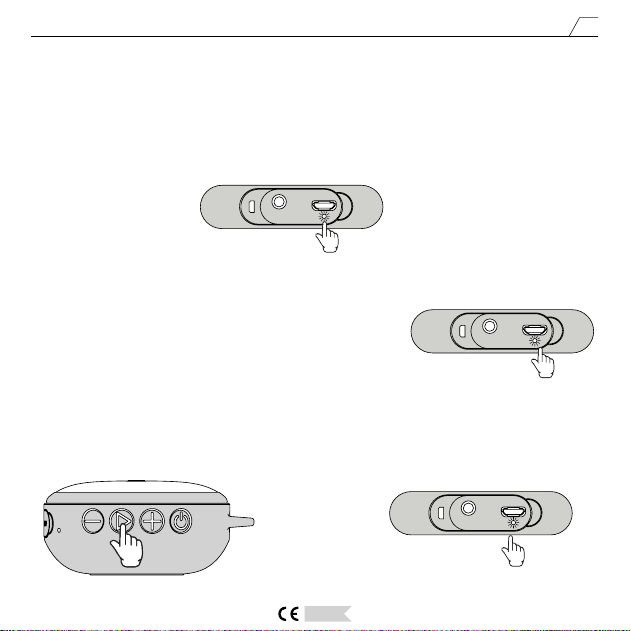
After pairing successfully, there will be a prompt tone and the blue indicator light will be on constantly.
Blue Light Turns On.
When the speaker plays music from your phone, the blue indicator light
will ash slowly. The blue indicator light will be steady on when the
music is paused.
How to Connect the Speaker with a New Device.
When the speaker is connected with a device, you can long press the button PLAY/PAUSE/PAIRING to cut the
current connection and enter Pairing status.
Then the blue power indicator light will ash quickly, and the speaker can connect with a new device.
Blue Light Flashes Slowly.
Blue Light Flashes
Quickly.
English
10
When you turn on the speaker, it will automatically search for the device connected recently. If the bluetooth of
the device is activated, the speaker will automatically connect and pair. After successfully pairing, you will hear a
beep sound.
MEMORY FUNCTION OF THE SPEAKER
Bluetooth Devices
OLAFUS-02SK
Answer the Call: When the speaker is connected with phone, in case
of a coming call, you can pick up the call by short pressing the PLAY/
PAUSE button.
Hang UP: When the speaker is connected with the phone, you can
hang up by short pressing the PLAY/PAUSE button.
Reject a Call: When the speaker is connected with the phone, you
can reject a call by long pressing the PLAY/PAUSE button.
Redialing the Last Call: When the speaker is connected with the
phone, you can dial the last person you have talked on the phone by
short pressing the PLAY/PAUSE button twice.
TEL FUNCTION OF THE SPEAKER
Distance≤10m
English
11
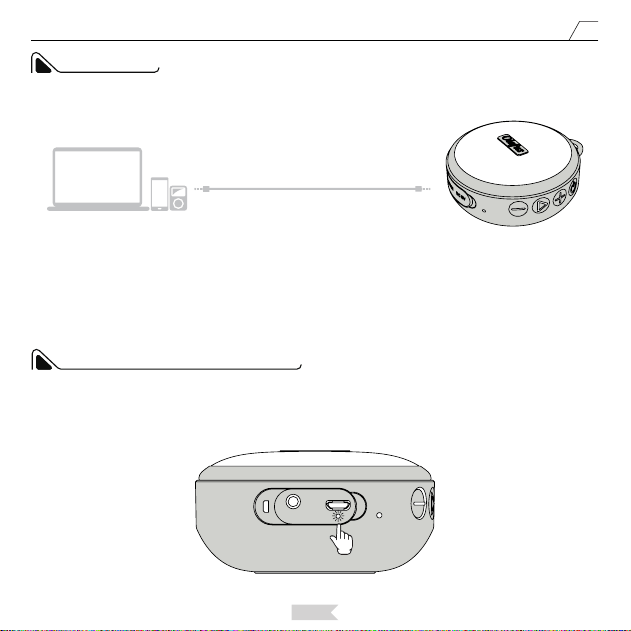
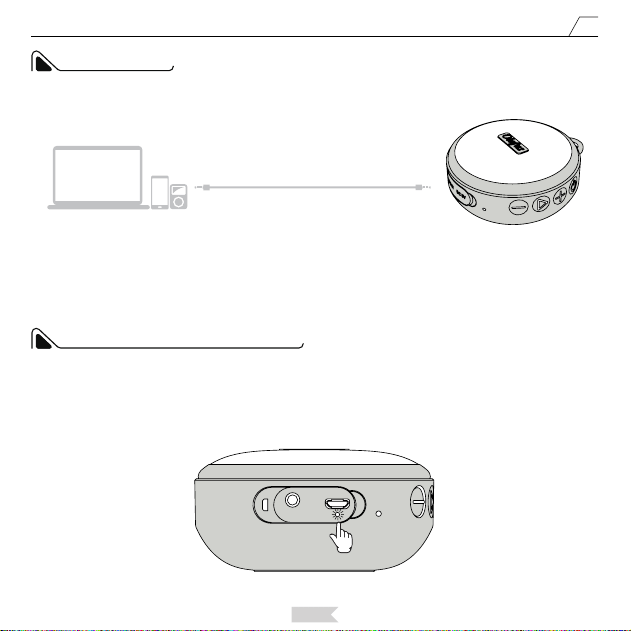
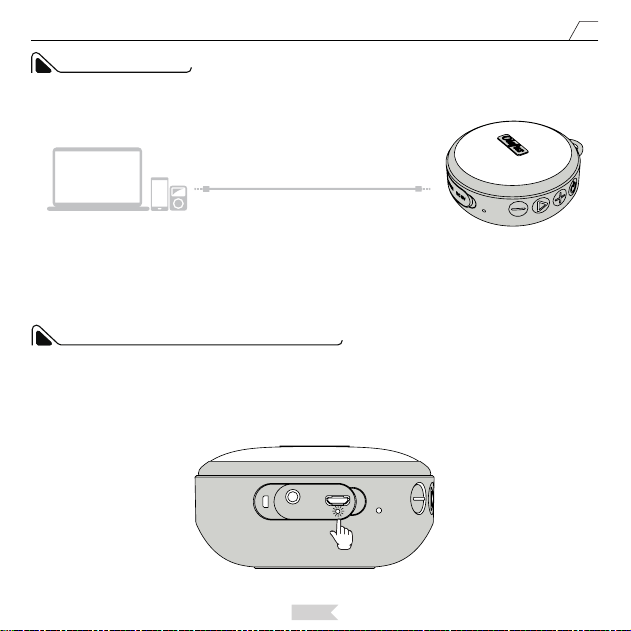
Connect with the 3.5 mm audio cable via the AUX port to swift to the AUX Mode. You can press the Power
Button to swift modes.
In AUX Modes, when the music is playing, the blue indicator light will ash slowly, and in the mute mode, the
blue indicator light will be on constantly.
AUX MODE
Audio Devices
AUX
OLAFUS-02SK
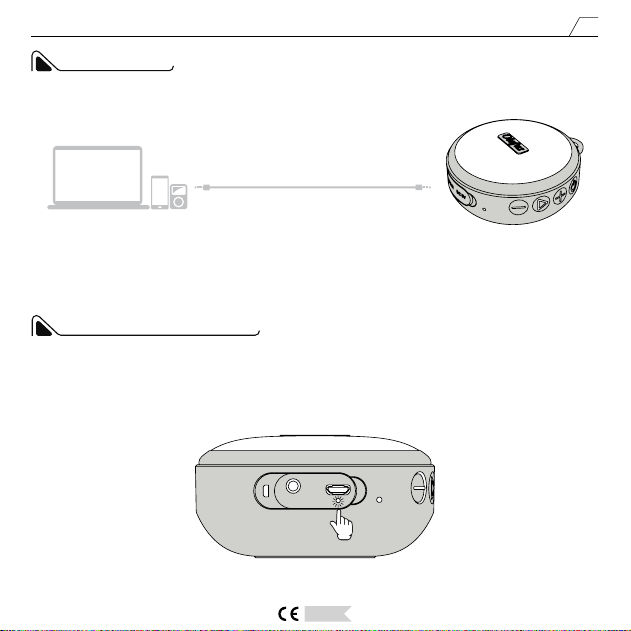
When charging the speaker, the red indicator light will be on constantly, and it will turn o after the speaker is
fully charged.
CHARGING INDICATOR LIGHT
Red Light Turns On.
Deutsch
12
Bedienungsanleitung
Vielen Dank für Ihr Vertrauen und Ihre Unterstützung. Bevor Sie dieses
Produkt in Betrieb nehmen, bitte lesen Sie alle Sicherheitsinformationen und
Installationsanleitungen. Und speichern Sie die Anleitung für den späteren Gebrauch.
Falls Sie Fragen oder Vorschläge haben, können Sie mit uns über E-mail Kontakt
aufnehmen.
Das Gerät darf nicht in der Nähe von Wärmequellen aufgestellt werden, wie Heizkörper,
Öfen oder anderen Geräten, die Wärme erzeugen.
Es gibt 2 Modi für diesen Lautsprecher : Bluetooth-Modus, Audiomodus.
Hinweis:WenndieMusik30Minutenlangangehaltenwird,wechseltderLautsprecherin
denRuhemodus.UmdenLautsprechererneutzustarten,drückenSiebittedieEin-/Auss
chalttaste.
SICHERHEITSHINWEISE
Olafus-02SK Wireless Lautsprecher
Deutsch
13
KOMPONENTEN UND STRUKTUR
OLAFUS-02SK Lautsprecher * 1 Lautsprecherclip * 1
0.6m USB-
Ladekabel * 1
(
60cm/2.99ft
)
1m Audiokabel * 1
(100cm/3.28ft)
Haken * 1 Saugnapf * 1
Deutsch
14
PARAMETER
ABMESSUNGEN
Arbeitszeit
10-12 Stunden nach dem vollständigen Aufaden
(60% der Lautstärke)
Standby-Zeit ≥300 Stunden
Bluetooth-Reichweite ≤32.81 Fuß/10m
Frequenz 20HZ-20KHZ
Ladezeit 2.5-3 Stunden
Arbeitsspannung 5V / 1A
Leistung 5W
P-Schutzklasse IPX7
Batteriekapazität 1200 mAh
93mm/3.66in
42mm/1.65in
82.5mm/3.24in
Deutsch
15
LAUTSPRECHER-BEDIENFELD UND ANSCHLÜSSE
1
1
2
2
3
3
4
4
5
6
7
8
Lautstärke + / Nächstes Lied:
Drücken Sie die Taste lang, um die Lautstärke zu erhöhen. Drücken Sie die Taste kurz, um zum nächsten Lied
zu springen (nur im Bluetooth-Modus).
Einschalten/Ausschalten/MODUS:
Drücken Sie die Taste lang, um den Lautsprecher ein- oder auszuschalten. Wenn der Lautsprecher
eingeschaltet ist, drücken Sie die Taste kurz, um den Modus des Lautsprechers zu wechseln.
Abspielen/Pause/Kopplung
:
Drücken Sie die Taste im Bluetooth-Modus, um die Musik abzuspielen oder anzuhalten. Drücken Sie die Taste
im Bluetooth-Modus lang, um die aktuelle Bluetooth-Verbindung zu trennen und den Kopplungszustand
einzutreten.
Lautstärke - / Vorheriges Lied:
Drücken Sie die Taste lang, um die Lautstärke zu verringern. Drücken Sie die Taste kurz, um zum vorherigen
Lied zu springen. (nur im Bluetooth-Modus).
AUX-Eingang
Anzeigeleuchte
Mikrofon
Stromversorgungsbuchse:
DC 5V 1A
6
5
7
8
Deutsch
16
INSTALLATIONSANLEITUNG DES HALTERS
Richten Sie den Saugnapf auf die Einbauönung und schieben Sie den Saugnapf in das Loch wie Bild 1 zeigt.
Befestigen Sie den Saugnapf an einer glatten Stelle, wo Sie den Lautsprecher verwenden möchten, z.B. auf Glas
oder Keramikiesen.
Bitte beachten Sie: Nutzen Sie den Saugnapf auf unebene, staubige Position nicht. Sie könnten etwas Wasser in
die Scheibe des Saugnapf spritzen, um der Saugnapf zu xieren.
Schritt 1
Schritt 2
Abbildung 1
Abbildung 2
Deutsch
17
Wenn Sie den Lautsprecher vom Ständer abnehmen möchten, können Sie die Auswölbung des Halters drücken
und den Lautsprecher entfernen, wie Bild 3 zeigt.
Wenn Sie den Lautsprecher mit Saugnapf von der Wand entfernen möchten, ziehen Sie den Saugnapf ab.
Schritt 3
Abbildung 3
Abbildung 4
A
Auswölbung
Deutsch
18
Drücken Sie die Power-Taste, und der Lautsprecher wird eingeschaltet, nachdem Sie einen Quittungston hören.
Die Anzeigeleuchte wird in blau und ca. 3 Sekunden leuchten. Danach blinkt das blaue Licht schnell und zeigt an,
dass der Lautsprecher in den Kopplung-Modus wechselt.
Blaue Anzeigeleuchte
:
Schnellblinken
BEDIENUNGSANLEITUNG
ACHTUNG:
Der Lautsprecher wechselt standardmäßig in den Bluetooth-Modus. Für eine Bluetooth-Verbindung schließen Sie
bitte kein Audiokabel an. Wenn Sie den Lautsprecher mit dem mitgelieferten 3,5-mm-Audiokabel anschließen,
wird der Lautsprecher automatisch in den Audiomodus gewechselt. Wenn sich der Lautsprecher im Audiomodus
bendet, können Sie den Ein- / Ausschalter kurz drücken, um in den Bluetooth-Modus zu wechseln.
Deutsch
19
Schalten Sie die Bluetooth-Funktion Ihres Telefons oder anderer Bluetooth-Geräte ein und suchen Sie nach
unserem Lautsprecher, der als OLAFUS-02SK genannt wird. Verbinden Sie mit dem Lautsprecher.
1, Suchen Sie nach OLAFUS-02SK Lautsprecher auf Ihrem Handy
2, Verbinden Sie mit dem OLAFUS-02SK Lautsprecher.
3, Wählen Sie die Musikwiedergabe über den OLAFUS-02SK-Lautsprecher
Nach der erfolgreichen Kopplung werden Sie einen Quittungston hören und die blaue Anzeigeleuchte leuchtet
ständig.
Blaue Anzeigeleuchte, Ständig leuchten
Spielen Sie Musik auf Ihrem Telefon ab. Beim Musikwiedergabe wird die
blaue Anzeigeleuchte langsam blinken. Wenn die Musik angehalten ist,
wird die blaue Anzeigeleuchte ständig leuchten.
Wie kann man den Lautsprecher mit einem neuen Gerät verbinden?
Wenn der Lautsprecher mit einem Gerät verbunden ist, können Sie die Taste “Wiedergabe/Pause/Kopplung”
lang drücken, um die aktuelle Verbindung zu trennen und den Kopplungszustand einzutreten. Danach blinkt die
blaue Anzeigeleuchte schnell und der Lautsprecher kann mit einem neuen Gerät verbunden werden.
Blaue Anzeigeleuchte
:
Langsamblinken
Blaue Anzeigeleuchte
:
Schnellblinken
Deutsch
20
Beim erneuten Einschalten des Lautsprechers wird der Lautsprecher automatisch mit dem zuletzt gekoppelten
Gerät verbinden, aber die Bluetooth-Funktion des Gerätes muss aktiv sein.
VERBINDUNGSSPEICHERFUNKTION DES LAUTSPRECHERS
Bluetooth-Geräte
OLAFUS-02SK
Entfernung≤10m
Nehmen Sie einen Anruf an: Wenn Ihr Telefon mit dem Lautsprecher
verbunden ist, können Sie die PLAY / PAUSE-Taste kurz drücken, um
den kommenden Anruf anzunehmen.
Legen Sie das Telefon auf: Wenn der Lautsprecher mit dem Telefon
verbunden ist, können Sie das Telefon aufegen, indem Sie die PLAY
/ PAUSE-Taste kurz drücken.
Lehnen Sie einen Anruf ab: Wenn der Lautsprecher mit dem Telefon
verbunden ist, können Sie einen Anruf ablehnen, indem Sie die PLAY
/ PAUSE-Taste lang drücken.
Wahlwiederholung des letzten Anrufs: Wenn der Lautsprecher mit
dem Telefon verbunden ist, können Sie die letzte Person wählen,
die Sie am Telefon gesprochen haben, indem Sie zweimal die PLAY /
PAUSE-Taste drücken.
FREISPRECH-FUNKTION DES LAUTSPRECHERS
Deutsch
21
Schließen Sie das 3,5mm AUX-Kabel über den AUX-Anschluss an, um den AUX-Modus zu wechseln. Sie können
die Power-Taste drücken, um die Modi zu wechseln.
Während der Musikwiedergabe im AUX-Modus blinkt die blaue Anzeigeleuchte langsam, und im Stummmodus
leuchtet die blaue Anzeigeleuchte ständig.
AUX-MODUS
Audiogeräte
AUX
OLAFUS-02SK
Beim Laden des Lautsprechers leuchtet die rote Anzeigeleuchte ständig. Nachdem der Lautsprecher vollständig
aufgeladen ist, wird die Anzeigeleuchte erlischen.
LADEANZEIGELEUCHTE
Rote Anzeigeleuchte,Ständig leuchten
Français
22
Manuel du Produit
Votre conance et votre soutien sont très appréciés. Avant d'utiliser ce produit,
veuillez lire attentivement les informations sur le manuel du produit, et conservez-le
pour référence ultérieure.
Si vous avez des suggestions à nous proposer, n'hésitez pas à nous contacter de la
manière indiquée à la n de ce manuel.
C’est interdit d’installer le produit près de sources de chaleur. Évitez les radiateurs,
cuisinières et autres appareils produisant de la chaleur. Évitez toute exposition prolongée
au soleil et aux températures élevées.
Il existe 2 modes pour cette enceinte: le mode Bluetooth, le mode audio.
Remarque: lorsque la musique est suspendue pendant 30 minutes, le haut-parleur passe
en mode veille. Pour redémarrer le haut-parleur, veuillez appuyer sur le bouton ON/OFF/
Mode.
CONSIGNES DE SÉCURITÉ
Olafus-02SK Enceinte Sans Fil
Français
23
COMPOSANTS ET STRUCTURE
OLAFUS-02SK * 1 Support d’enceinte * 1
Câble USB
rechargeable 0.6m * 1
60cm/2.99pieds)
Câble audio 1M * 1
(100cm/3.28pieds)
Boucle de
suspension *1
Ventouse * 2
Français
24
PARAMÈTRE
DIMENSION
Temps de travail 10-12 heures de lecture à 60% du volume
Temps d'attente ≥300 heures
Gamme Bluetooth ≤32.81 Feet/10m
Fréquence 20HZ-20KHZ
Délai de chargement 2.5-3 heures
Tension de travail 5V / 1A
Puissance 5W
Classement IP IPX7
Capacité de la batterie 1200 mAh
93mm/3.66in
42mm/1.65in
82.5mm/3.24in
Français
25
PANNEAU DE COMMANDE DE HAUT-PARLEUR ET PORTS
1
1
2
2
3
3
4
4
5
6
7
8
Volume Haussé / Suivant :
Appuyez longuement sur le bouton pour augmenter le volume. Appuyez brièvement sur le bouton pour
passer à la chanson suivante (fonction uniquement en mode Bluetooth)
Marche / Arrêt:
Appuyez longuement sur le bouton pour allumer / éteindre le haut-parleur. Lorsque le haut-parleur est
activé, appuyez brièvement sur le bouton pour passer la mode de l’enceinte.
Lecture / Pause / Jumelage:
En mode Bluetooth, appuyez brièvement sur le bouton pour lire ou mettre en pause la musique. En mode
Bluetooth, appuyez longuement sur le bouton pour couper la connexion Bluetooth actuelle et accéder à l'état
Jumelage.
Volume Baissé / Précédent:
Appuyez longuement sur le bouton pour baisser le volume.
Appuyez brièvement sur le bouton pour passer à la chanson précédente (fonction uniquement en mode
Bluetooth)
Port d'entrée AUX
Voyant
Microphone
Port d'alimentation: DC 5V 1A
6
5
7
8
Français
26
GUIDE D'INSTALLATION DU SUPPORT
Dirigez la ventouse sur le trou d'installation du support et la poussez dessus dans le trou comme indiqué sur
l'image 1.
Fixez la ventouse dans une surface propre et lisse où vous voulez proter de l’enceinte, comme du verre, des
carreaux, etc.
Remarque: Ne pas tenir la ventouse à position inégale et poussiéreuse. Vous pourriez projeter de l'eau dans la
ventouse avant de la xer pour renforcer plus fermement.
Étape 1
Étape 2
Image 1
Image 2
Français
27
Image 4
Si vous souhaitez retirer le haut-parleur du support, vous pouvez appuyer sur le côté bombé du support et retirer
le haut-parleur comme indiqué sur l’image 3.
Si vous souhaitez retirer le haut-parleur avec la ventouse aspirante du mur, retirez la venteuse directement.
Étape 3
Image 3
A
Auswölbung
Français
28
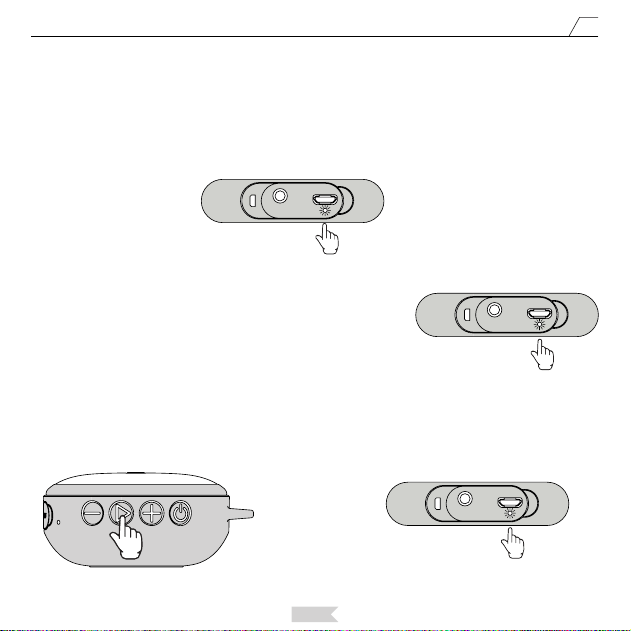
Appuyez longuement sur le bouton ON/OFF, le haut-parleur sera activé après avoir entendu la tonalité d'invite.
Le voyant d'alimentation s'allume en bleu et reste allumé pendant 3 secondes. Ensuite, le voyant bleu clignote
rapidement pour indiquer que le haut-parleur passe en mode de jumelage.
Feu Bleu
Clignote Rapidement
INSTRUCTION D'OPREATION
Remarque:
L'enceinte passera en mode Bluetooth par défaut. Pour la connexion Bluetooth, veuillez ne pas vous connecter
avec le câble audio. Si vous connectez l'enceinte avec le câble audio 3,5 mm fourni, il passera automatiquement
en mode audio. Lorsque l'enceinte est en mode audio, vous pouvez appuyer brièvement sur le bouton
d'alimentation pour passer en mode Bluetooth.
Français
29
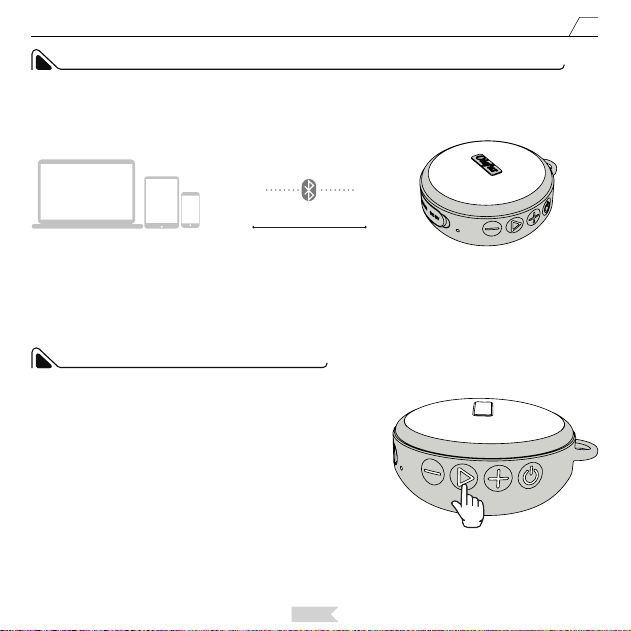
Activez la fonction Bluetooth sur votre téléphone ou d’autres périphériques Bluetooth, recherchez notre haut-
parleur nommé OLAFUS-02SK, enfn connectez avec le haut-parleur.
1, Recherchez OLAFUS-02SK Enceinte sur votre téléphone
2, Connectez avec le OLAFUS-02SK Enceinte
3, Sélectionnez la lecture de musique via le OLAFUS-02SK Enceinte
Une fois l’appariement réussi, il y aura une tonalité d’invite et le voyant bleu sera allumé en permanence.
Feu Bleu
Allume en Permanence
Écoutez de la musique sur votre téléphone. Le voyant bleu clignotera
lentement lors de la lecture de musique. Et allumant en permanence
lorsque la musique est en pause.
Comment connecter le haut-parleur à un nouveau périphérique:
Lorsque l’enceinte est connectée à un périphérique, vous pouvez appuyer longuement sur le bouton PLAY/
PAUSE/PAIRING pour couper la connexion actuelle et accéder à l'état jumelage. Ensuite, le voyant d’alimentation
bleu clignotera rapidement et l’enceinte pourra se connecter à un nouveau périphérique.
Feu Bleu
Clignote Lentement
Feu Bleu
Clignote Rapidement
Français
30
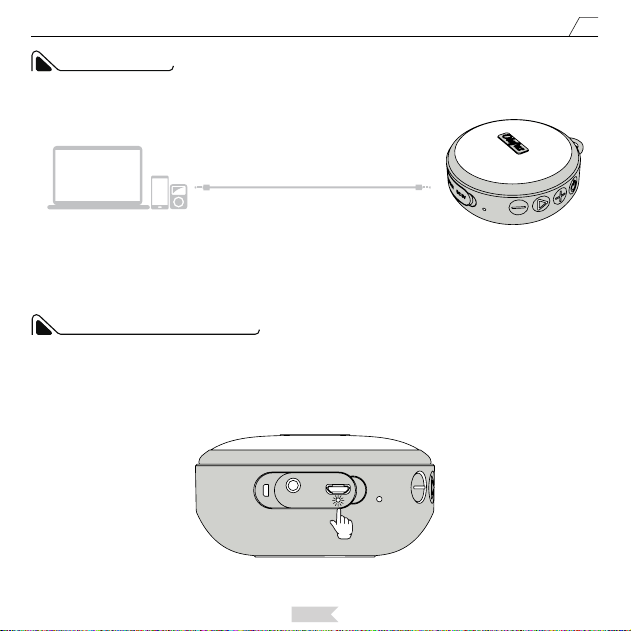
Le haut-parleur se connectera automatiquement au dernier appareil couplé, si la fonction Bluetooth de l'appareil
est activée.
FONCTION DE MEMOIRE DE CONNEXION DU HAUT-PARLEUR
Appareils Bluetooth
OLAFUS-02SK
Distance≤10m
Décrocher: lorsque le haut-parleur est connecté au téléphone,
vous pouvez prendre l'appel en cas d'appel entrant en appuyant
brièvement sur la touche PLAY / PAUSE.
Raccrocher: lorsque le haut-parleur est connecté au téléphone, vous
pouvez raccrocher en appuyant brièvement sur le bouton PLAY /
PAUSE.
Rejeter un appel: lorsque le haut-parleur est connecté au téléphone,
vous pouvez rejeter unappel en appuyant longuement sur la touche
PLAY / PAUSE.
Rappel du dernier appel: lorsque le haut-parleur est connecté
au téléphone, vous pouvez composer le dernier interlocuteur au
téléphone en appuyantbrièvement deux fois sur la touche PLAY /
PAUSE.
FONCTION APPEL MAINS LIBRES
Français
31
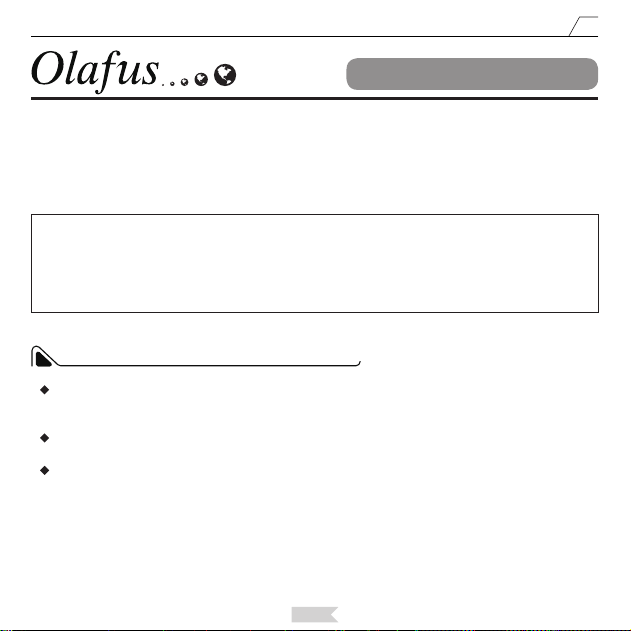
Insérez le câble aux de 3,5 mm via le port AUX pour passer au mode AUX. Vous pouvez appuyer sur le bouton
d'alimentation pour changer le mode.
En mode AUX, lorsque la musique est en cours d’émettre, le voyant bleu clignote lentement, et en mode muet, le
voyant bleu reste allumé.
MODE AUX
Appareils Audio
AUX
OLAFUS-02SK
Lors du chargement de l'enceinte, le voyant rouge reste allumé en permanence et s'éteint une fois l'enceinte
complètement chargée.
INDICATEUR DE CHARGE
Feu Rouge
Allume en Permanence
Español
32
Manual del Producto
Muy apreciado por su conanza y apoyo. Antes de usar este producto, lea
cuidadosamente las instrucciones de seguridad y la guía de instalación, y guárdelas
para futuras referencias.
Si tiene alguna sugerencia para nosotros, bienvenido a contactarnos de la manera
que se proporciona al nal de este manual.
No lo instale cerca de fuentes de calor. Evite los radiadores, las estufas y otros dispositivos
que produzcan calor. Evite la exposición prolongada a la luz solar y las altas temperaturas.
Hay 2 modos para este altavoz: Modo Bluetooth, Modo de Audio.
Nota: cuando la música está en pausa durante 30 minutos, el altavoz entrará en el modo
de espera. Para reiniciar el altavoz, presione el botón de ENCENDIDO / APAGADO / MODO.
LAS INSTRUCCIONES DE SEGURIDAD
Olafus-02SK Altavoz Inalámbrico
Español
33
CONTENIDOS DEL PAQUETE
Altavoz inalámbrico OLAFUS-02SK * 1 Soporte de altavoz * 1
Cable de carga
USB * 1 (60cm /
2,99 pies)
Cable de audio de
3,5 mm * 1
(100 cm / 3,28 pies)
Gancho para colgar
* 1
Ventosa * 1
Español
34
PARÁMETRO
DIMENSIONES
Duración de la batería 10-12H de duración de la batería al 60% del volumen
Tiempo en espera ≥300 horas
Alcance de Bluetooth ≤32,81 pies / 10 m
Respuesta de frecuencia 20Hz-20KHz
Tiempo de carga 2,5-3 horas
Voltaje de trabajo 5V / 1A
Potencia 5W
Clasicación IP IPX7
Capacidad de la batería 1200 mAh
93 mm / 3,66 pulgadas
42mm / 1,65 pulgadas
82,5mm / 3,24 pulgadas
Español
35
PANEL DE CONTROL DE ALTAVOCES Y PUERTOS
1
1
2
2
3
3
4
4
5
6
7
8
Subir Volumen / Pasar Canción Siguiente:
Mantenga presionado el botón para aumentar el volumen. Presione brevemente el botón para pasar a la
siguiente canción (solo funciona en Modo Bluetooth)
Encendido / Apagado / Modo:
Mantenga presionado el botónpara encender / apagar el altavoz. Cuando el altavoz está encendido,
presione brevemente el botón para cambiar el modo del altavoz.
Reproducir / Pausar / Emparejar:
En el modo Bluetooth, presione brevemente el botón para reproducir o pausar la música. En el modo
Bluetooth, mantenga presionado el botón para cortar la conexión Bluetooth actual e ingresar al
estado de sincronización.
Bajar Volumen / Pasar Canción Anterior:
Mantenga presionado el botón para bajar el volumen. Presione brevemente el botón para pasar a la canción
anterior (solo funciona en Modo Bluetooth)
Puerto de Entrada AUX
Luz Indicadora
Micrófono
Puerto de Alimentación:
DC 5V 1A
6
5
7
8
Español
36
GUÍA DE INSTALACIÓN DEL SOPORTE
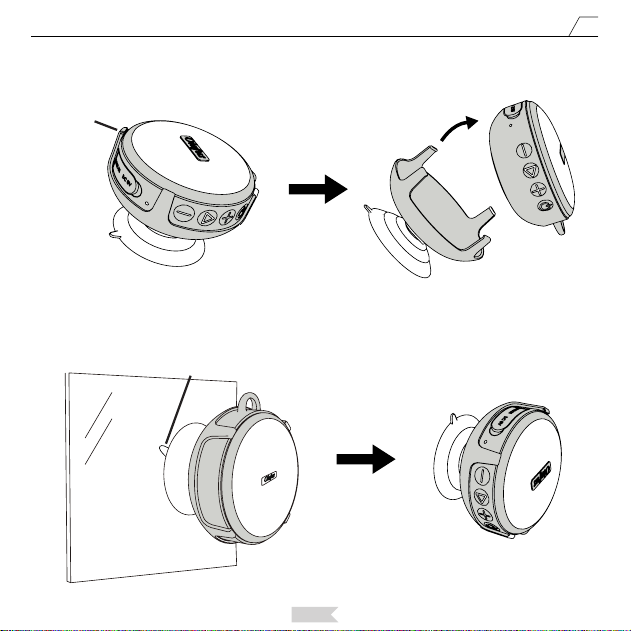
Dirija la ventosa hacia el oricio de instalación del soporte y la empuje como muestra la imagen 1.
Fije la ventosa en una posición plana donde quiera usar el altavoz, es decir, sobre vidrio o baldosas de cerámica.
Tenga en cuenta: No chupe la ventosa en una posición polvorienta y desigual. Podría echar un poco de agua
en la ventosa antes de jarla para reforzar la ventosa y el altavoz.
Paso 1
Paso 2
imagen 1
imagen 2
Español
37
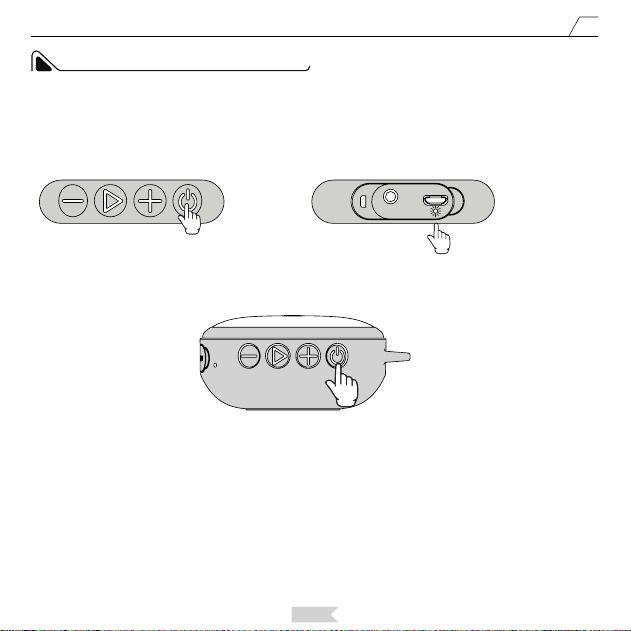
Si desea quitar el altavoz del soporte, puede presionar el lado abultado del soporte y quitar el altavoz como se
muestra en la imagen 3.
Si desea quitar el altavoz con el disco de succión de la pared, retire la ventosa.
Paso 3
imagen 3
imagen 4
A
Bulto
Español
38
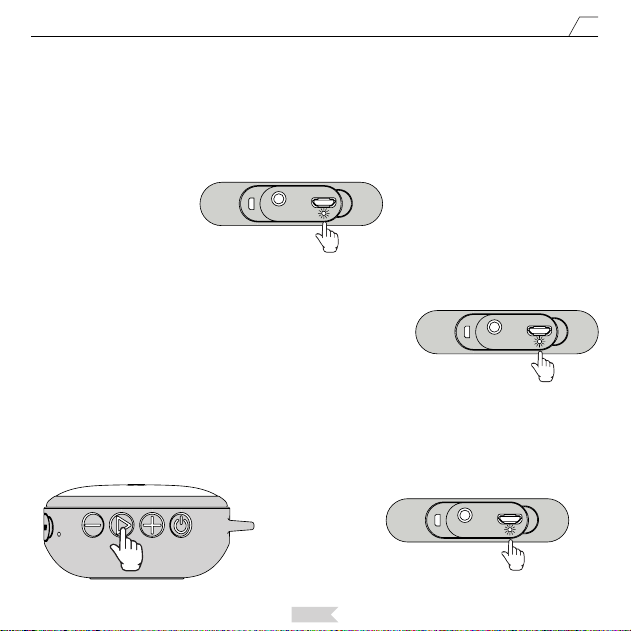
Mantenga presionado el botón de encendido, el altavoz se encenderá después de escuchar el tono de aviso. La
luz indicadora de encendido se iluminará en azul y se encenderá durante 3 segundos. Luego, la luz azul parpadea
rápidamente, lo que indica que el altavoz está entrando en el modo de emparejamiento.
Luz azul
Flasheo rapido
INSTRUCCIÓN DE OPERACIÓN
Nota:
El altavoz entrará en el modo Bluetooth de forma predeterminada. Para la conexión Bluetooth, no lo conecte
con el cable de audio. Si conecta el altavoz con el cable de audio de 3,5 mm suministrado, el altavoz entrará
automáticamente en el modo de audio. Cuando el altavoz está en modo de audio, puede presionar brevemente
el botón de encendido para ingresar al modo Bluetooth.
Español
39
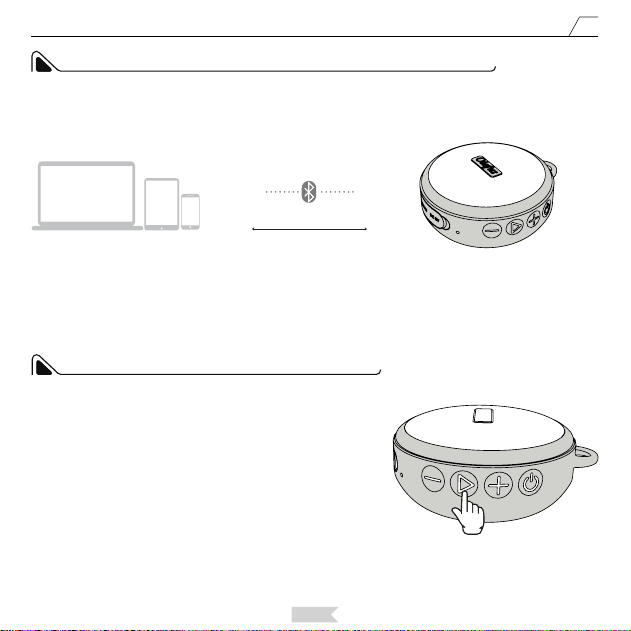
Active la función Bluetooth en su teléfono u otros dispositivos Bluetooth y busque nuestro altavoz que se llama
OLAFUS-02SK, conecte con el altavoz.
1, Busque el altavoz OLAFUS-02SK en su teléfono.
2, Conecte con el altavoz OLAFUS-02SK.
3, Seleccione reproducir música a través del altavoz OLAFUS-02SK.
Después de emparejarse con éxito, habrá un tono de aviso y la luz indicadora azul estará encendida
constantemente
Luz azul Largo brillante
Reproduzca música en su teléfono. La luz indicadora azul parpadeará
lentamente al reproducir música. y estará encendida constantemente
cuando la música está en pausa.
¿Cómo conecta el altavoz con un nuevo dispositivo?
Cuando el altavoz está conectado con un dispositivo, puede presionar prolongadamente el botón REPRODUCIR
/ PAUSAR / EMPAREJAR para cortar la conexión actual e ingresar al estado de emparejamiento. Luego, la luz
indicadora de encendido azul parpadeará rápidamente y el altavoz puede conectarse a un nuevo dispositivo.
Luz azul Parpadeo lento
Luz azul Flasheo rápido
Español
40
Cuando encienda el altavoz, buscará automáticamente el dispositivo conectado recientemente. Si se activa el
bluetooth del dispositivo, el altavoz se conectará y emparejará automáticamente. Después de emparejarse con
éxito, escuchará un pitido.
FUNCION DE CONEXION DE MEMORIA DEL ALTAVOZ
Dispositivos Bluetooth
OLAFUS-02SK
Distancia≤10m
Responder llamada telefónica: cuando el altavoz está conectado
con el teléfono, en caso de recibir una llamada, puede contestar la
llamada presionando brevemente el botón REPRODUCIR / PAUSAR.
Colgar la llamada: cuando el altavoz esté conectado al teléfono,
puede colgar presionando brevemente el botón REPRODUCIR /
PAUSAR.
Rechazar una llamada: cuando el altavoz está conectado
con el teléfono, puede rechazar una llamada presionando
prolongadamente el botón REPRODUCIR / PAUSAR.
Volver a marcar la última llamada: cuando el altavoz está conectado
al teléfono, puede marcar a la última persona con la que habló en el
teléfono presionando brevemente el botón REPRODUCIR / PAUSAR
dos veces.
FUNCIÓN DEL TELÉFONO DE ALTAVOZ
Español
41
Inserte el cable LINE IN de 3,5 mm a través del puerto AUX para pasar al modo AUX. Puede presionar el botón de
encendido para cambiar de modo.
En los modos AUX, cuando se reproduce la música, la luz indicadora azul parpadeará lentamente, y en el modo
silencioso, la luz indicadora azul estará encendida constantemente.
MODO AUX
Dispositivos de Audio
AUX
OLAFUS-02SK
Al cargar el altavoz, la luz indicadora roja estará encendida constantemente y se apagará después de que el
altavoz esté completamente cargado.
LUZ INDICADORA DE CARGA
Luz roja Largo brillante
Lingua Italiana
42
Manuale dell’utente
Molto apprezzato per la vostra ducia e supporto. Prima di utilizzarlo, leggere
attentamente le istruzioni di sicurezza e la guida di installazione e conservarle per
riferimenti futuri.
Se avete domande o suggerimenti, vi preghiamo di contattarci attraverso Le e-mail
fornite alla ne del manuale utente.
Non installare vicino a fonti di calore. Evitare radiatori, stufe e altri dispositivi che
producono calore. Evitare l'esposizione a lungo termine alla luce solare e alle alte
temperature.
Ci sono 2 modalità per questo altoparlante: Modalità Bluetooth, Modalità audio.
Nota: quando la musica è in pausa per 30 minuti, l'altoparlante entrerà in modalità Sleep.
Per riavviare l'altoparlante, Premere pulsante ON/OFF.
ISTRUZIONI DI SICUREZZA
Olafus-02SK Wireless Speaker
Lingua Italiana
43
CONTENUTO DELLA CONFEZIONE
OLAFUS-02SK Wireless Speaker * 1 Supporto * 1
Cavo di ricarica
USB * 1 (60 cm /
2.99ft)
Cavo audio da 3,5 mm * 1
(100 cm / 3,28 piedi)
Gancio per
Supporto * 1
Ventosa * 1
Lingua Italiana
44
PARAMETRI
DIMENSIONE
93mm/3.66in
42mm/1.65in
82.5mm/3.24in
Durata della batteria 10-12 ore di durata della batteria a Volume del 60%
Tempo di Stand-by ≥300 ore
Raggio Bluetooth ≤ 32,81 piedi / 10 m
Risposta in frequenza 20HZ-20KHZ
Tempo di ricarica 2,5-3 ore
Tensione di lavoro 5V / 1A
Potenza 5W
Classicazione IP IPX7
Capacità della batteria 1200 mAh
Lingua Italiana
45
PANNELLO DI CONTROLLO E PORTI DEL DIFFUSORE
1
1
2
2
3
3
4
4
5
6
7
8
Volume UP / Successivo:
Premere a lungo il pulsante per aumentare il volume. Premere brevemente il pulsante per passare alla
canzone successiva (funzione solo in modalità Bluetooth).
Accensione / spegnimento modalità:
Premere a lungo il pulsante per accendere / spegnere dell'altoparlante. Quando l'altoparlante è acceso,
premere brevemente il tasto per attivare la modalità dell'altoparlante.
Play / Pausa / Accoppiamento:
In modalità Bluetooth, premere brevemente il pulsante per riprodurre o mettere in pausa la musica. In
modalità Bluetooth, premi a lungo il pulsante per tagliare la connessione Bluetooth corrente e accedere allo
stato di abbinamento.
Volume giù / Prec:
Premere a lungo il pulsante per abbassare il volume. Premere brevemente il tasto per passare alla canzone
precedente (funzione solo in modalità Bluetooth)
Porta di ingresso AUX
Spia
Microfono
Porta di alimentazione:
DC 5V 1A
6
5
7
8
Lingua Italiana
46
GUIDA ALL’INSTALLAZIONE DELLA STAFFA
Fissare la ventosa in una posizione in cui si desidera utilizzare l'altoparlante, ad esempio, su vetro o piastrelle
di ceramica. Nota: non aspirare la ventosa in una posizione irregolare e polverosa. Potresti spruzzare dell'acqua
nella ventosa prima di ssare la ventosa per rinforzare l’aspirazione.
Dirigere ventosa nel foro di installazione del supporto e spingere la ventosa nel foro mentre l'immagine mostra.
Primo Passo
Immagine 1
Immagine 2
Secondo Passo
Lingua Italiana
47
Immagine 3
Suzione
Immagine 4
Se si desidera rimuovere l'altoparlante dal supporto, è possibile premere il lato del rigonamento del supporto e
rimuovere l'altoparlante come illustrato nella gura 3.
Se si desidera rimuovere l'altoparlante dal disco aspirante dal muro, staccare la ventosa.
Terzo Passo
Supporto
Lingua Italiana
48
Premere a lungo il pulsante di accensione, l'altoparlante si accenderà dopo aver sentito il tono rapido. La spia di
accensione diventa blu e accesa per 3 secondi. Successivamente, la luce blu si accende rapidamente, indicando
che l'altoparlante sta entrando in modalità di accoppiamento.
La luce blu lampeggia
velocemente
ISTRUZIONI PER L'USO
Avviso:
L'altoparlante entrerà in per impostazione predenita. Per modalità Bluetooth , si prega di non collegare
con il cavo audio. Se si collega l'altoparlante con il cavo audio da 3,5 mm in dotazione, l'altoparlante entrerà
automaticamente in modalità audio. Quando l'altoparlante è in modalità audio, è possibile premere brevemente
il pulsante di accensione per accedere alla modalità Bluetooth.
Lingua Italiana
49
Attiva la funzione Bluetooth sul tuo telefono o altri dispositivi Bluetooth e cerca il nostro altoparlante che si
chiama OLAFUS-02SK. Connetti con l'altoparlante.
1, Cerca l'altoparlante OLAFUS-02SK sul tuo telefono;
2, Connettersi con l'altoparlante OLAFUS-02SK;
3, Selezionare la riproduzione musicale tramite l'altoparlante OLAFUS-02SK.
Dopo l'abbinamento riuscito, verrà emesso un segnale acustico e la spia blu si accenderà costantemente.
La luce blu è sempre accesa
Riproduci la musica sul tuo telefono. La spia blu si spegne lentamente
durante la riproduzione di musica. e scoppiare lentamente quando la
musica è in pausa.
Come collegare l'altoparlante con un nuovo dispositivo.
Quando l'altoparlante è collegato a un dispositivo, è possibile premere a lungo il pulsante PLAY / PAUSE /
PAIRING per interrompere la connessione corrente e accedere allo stato di accoppiamento.
Quindi la spia blu dell'indicatore di alimentazione lampeggerà rapidamente e l'altoparlante può connettersi con
un nuovo dispositivo.
La luce blu lampeggia lentamente
La luce blu lampeggia
velocemente
Lingua Italiana
50
L'altoparlante si collegherà automaticamente all'ultimo dispositivo accoppiato, nel caso in cui la funzione BT del
dispositivo sia accesa, dopo aver acceso l'altoparlante.
FUNZIONE DI MEMORIA DELLA CONNESSIONE DEL DIFFUSORE
Dispositivi Bluetooth
OLAFUS-02SK
Risposta a una chiamata: quando l'altoparlante è collegato al
telefono, è possibile rispondere alla chiamata premendo brevemente
il pulsante PLAY / PAUSE durante una chiamata.
Riagganciare: quando l'altoparlante è collegato al telefono, è
possibile riagganciare il telefono premendo brevemente il pulsante
PLAY / PAUSE.
Riutare una chiamata: quando l'altoparlante è collegato al telefono,
è possibile riutare la chiamata tenendo premuto il tasto PLAY /
PAUSE.
Ricomporre l'ultima chiamata: quando l'altoparlante è collegato al
telefono, è possibile comporre l'ultima persona premendo due volte
il tasto PLAY / PAUSE.
FUNZIONE DEL TELEFONO
Distanza ≤ 10 Metri
Lingua Italiana
51
Inserire il cavo da 3,5 mm tramite la porta AUX per passare alla modalità AUX. È possibile premere il pulsante di
accensione per attivare la modalità.
Nelle modalità AUX, quando la musica è in riproduzione, la spia blu si accenderà lentamente e, in modalità muto,
la spia blu si accenderà costantemente.
AUX MODALITÀ
Dispositivi audio
AUX
OLAFUS-02SK
Quando si ricarica l'altoparlante, la spia rossa si accende costantemente e si spegne dopo che l'altoparlante è
completamente carico.
LUCE DELL'INDICATORE DI CARICA
La luce rossa è sempre accesa
Manufacturing Address:
MADE IN CHINA
Shen Zhen Shi Zhi Hui Duo Ke Ji You Xian Gong Si
qian wan yi lu 1 hao A dong 201 shi, qian hai shen gang he zuo qu, shen zhen,
guang dong, 518000, CN
Tel:+86 13631510530
Email: [email protected]
www.olafuslife.com
Contact Address:
Bright star consulting e.K.
Humboldtstr.5, 31812 Bad Pyrmont Germany