已YTEC"
THE ART OF TECHNOLOGY
BY-AU-BS-260-BK
0 Bluetooth
®
LED
DOME SPEAKER
2
3
4
5
I I I
巳芦巳工
8
7 — 6
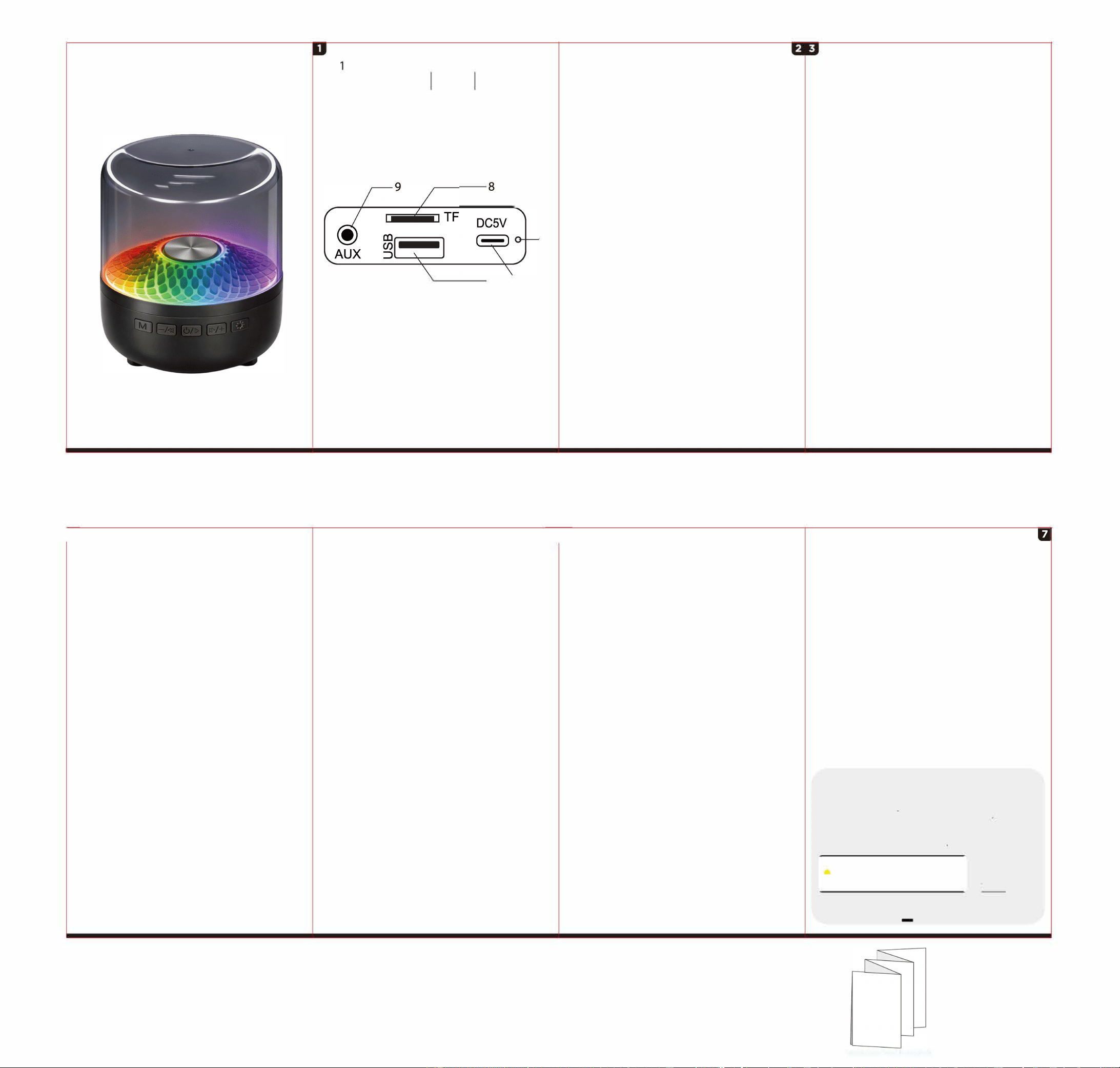
Functions Oveiew
1. Mode Button
2.
Previous Track / Decrease Volume
3. Power On/Off/ Play/Pause
4.
Next Track / Increase Volume
5. LED Light Mode
6.
USB Type-C Charging Port
7.
USB Flash Drive Port
8.
TF Card Drive Port
9. AUX-IN port
10. Indicator Light
10
Notice:
Please read user manual carefully and keep it for
your records.
Package includes:
1 (One) Led Dome Speaker 4.33in. x 4.33in. x 5.15in.
(10.99cm x 10.99cm x 13.1cm)
1 (One) USB Type-C Cable 11.8in.(30cm)
1 (One) User Manual
Specifications:
Bluetooth
®
: V5.4
Sound Output: 5W
Battery type: 500 mah built-in rechargeable lithium
battery
Charge Time: up to 3 hours
Play Time: up to 4 hours
Standby Time: 6 hours
Operating Range: 1 Om
Input: DC 5V 1A max
Features:
• With Bluetooth
®
; AUX input jack; USB & TF card
ports; TWS function.
• "True Wireless Stereo Function" when paired
with another Led Dome Speaker.
• Bass-boosting sound.
• Colorful lights create a relaxing mood.
Charging:
Your speaker comes with a built-in rechargeable
battery. Prior to using the speaker for the first
time, it is recommended to fully charge the
battery for 2-3 hours. When the speaker is in low
power status it will emit a tone. Please recharge
the battery of the speaker.
Connect the Type-C end of the provided charging
cable into the Type-C charging port on the back
of the speaker, and connect USB-A end of the
charging cable into a compatible USB power port
(DC 5V 1A max). The red Indicator Light will be
illuminated while charging. It takes approximately
2-3 hours to completely charge the battery. When
charging is complete, the red Indicator Light with
turn o.
Instructions for Use:
1. Place speaker within 30 feet of the Bluetooth
®
enabled device.
2. Press the ON/OFF button.
3. On your Bluetooth
®
enabled smartphone,
tablet or media player, navigate to the Bluetooth
®
setting menu, turn on the Bluetooth
®
feature, and
search for new devices.
4. Find the model's Bluetooth
®
name
"BY-BS-260". Connect with the model by clicking
the name on the smartphone. "Connected"
message will appear to indicate it connected
successfully.
口
Long Press to decrease Volume
Short Press for previous song
否 Long Press to turn ON/OFF
Short Press to Play/Pause
巳 Long Press to increase Volume
Short Press for next song
If the speaker doesn't connect to a Bluetooth
®
device, it will automatically shutdown after 5
minutes.
TWS Use:
To use this speaker as a TWS true wireless
pair, you will need a second LED Dome
Speaker, sold separately:
1. Turn on both speakers.
2. Connect one of the speakers to the phone.
3. Choose one of them and long press the "M"
button, and the two speakers will be connected
automatically. When the connection is
successful, long press the "M" button again, and
the connection will be disconnected (the
speaker connected to the phone will continue to
sound).
External Media:
To use a USB Flash Drive port, simply plug in
the USB Flash Drive into the port, the speaker
will change mode automatically.
To use a TF Card Drive port, press the card into
the slot until it clicks and stays. The speaker will
change mode automatically. To remove the card,
press it in further and it will click and the spring
will push it out so you can remove TF card.
*Only supports audio files in mp3 format.
FM Radio Use:
1. Insert the USB-A side of the charging cable
into a USB Flash Drive Port (it will function as
an FM radio antenna).
2. Press the "M" button until you hear the static
of radio.
3. Press the Play/Pause button to begin a
frequency scan. The speaker will search
through the available frequencies in your area
and assign each discovered frequency as a
preset.
4. Now when you press the Previous and Next
buttons you can search through the
frequencies.
5. You can rescan the radio frequencies by
pressing the Play/Pause button again.
LED Light:
Short press the Light Mode button to cycle
through 6 light style modes.
中AUX-IN:
Connect any aux enable audio
device to play music directly through
wired connection
Warnings
• Do not let small children play this product
• Do not expose the speaker to liquid, moisture or
humidity to avoid the product's internal circuit being
aected.
• Do not use abrasive cleaning solvents to clean the
speaker.
• Store the speaker out of direct sunlight and extreme
temperatures (above 45
°
C/113
°
F or below -10
°
C/14
°
F)
as this may shoen the batte life, aect the operation
or degrade the peormance of your speaker.
• Do not dispose of the speaker in a fire to sharp
objects as this will cause scratches and damage.
• Do not drop the speaker, This is may cause damage
to the internal circuit.
• If the speaker is le r long period without use,
charge once per month to avoid the overconsumption
of the batte.
• This appliance is r indoor use only, Please do not
use or store the unit in high temperature or hazardous
locations, Please do not submerge the unit into water,
as this will ruin the speaker.
• The unit comes with a rechargeable batte, so
please do not throw or put it in a fire to avoid explosion.
• The warranty r this product is invalidated if the
products had been damaged, repaired or modified in
any w
ay.
FCC ID: 2AHN6-AUBS260
u
WARNTY-12 MONTH
Please visit our website Bytechintl.com/warranty
©2026 BYTECH NY INC
BYTECH
™
is a registered trademark of Bytech NY INC
Bluetooth® is a registered trademark of SIG.Inc
•All Trademarks and copyrights are the prope of
the respective companies.
•Photos are r illusttion purposes only
匡三亡言已艺;�•]勹覂詈霍
I
B
EC
H
©2026 BY「ECH NYINC.
✓
RoHS C 陌宜
MADE IN CHINA
Accordion Fold Broadside
FCC Warnning:
This equipment has been tested and found to comply with the limits for a Class
B digital device,pursuant to part 15 of the FCC Rules. These limits are designed
to provide reasonable protection against harmful interference in a residential
installation. This equipment generates, uses and can radiate radio frequency
energy and, if not installed and used in accordance with the instructions, may
cause harmful interference to radio communications. However, there
is no guarantee that interference will not occur in a particular installation. If this
equipment does cause harmful interference to radio or television reception,
which can be determined by turning the equipment off and on, the user is
encouraged to try to correct the interference by one or more of the following
measures:
• Reorient or relocate the receiving antenna.
• Increase the separation between the equipment and receiver.
• Connect the equipment into an outlet on a circuit different from that to which
the receiver is connected.
• Consult the dealer or an experienced radio/TV technician for help.
Caution: Any changes or modifications to this device not explicitly approved by
manufacturer could void your authority to operate this equipment.
This device complies with part 15 of the FCC Rules. Operation is subject to the
following two conditions:
(1)This device may not cause harmful interference, and (2) this device must
accept any interference received, including interference that may cause
undesired operation.
This equipment complies with FCC radiation exposure limits set forth for an
uncontrolled environment. This equipment should be installed and operated
with minimum distance 0cm between the radiator and your body.