L R
L R
L R
Please read this user guide before using the product
and keep it for future use.
Model:X52
User Manual
Mailbox: info@ biyoso.com
Hotline: +86-400-7656-867
Address: Room 701, No. 89, Longteng Road, Shipai
Town, Dongguan City, Guangdong Province.
Website: www.biyoso.com
DONGGUAN BIYOSO DIGITAL TECHNOLOGY CO., LTD.
Dear user, thank you very much for using the BIYOSO product. Please fill it
out carefully and keep it properly.
Warranty Card
Warranty Policy
1. The postage for returns and exchanges with non-quality issues shall be
borne by the consumer, and the postage for reshipments shall be borne by
the merchant. If there are invoices and gifts, please send them back together.
2. If you purchase from a local store, you can go to the local after-sales service
center to enjoy the warranty service provided by our company within one
year from the date of purchase. If there is no local after-sales service center,
the retailer may assist with replacement services.
3. All products are subject to inspection by our company before warranty
service is provided, in accordance with the after-sales policy below.
1. Unauthorized maintenance, misuse, collision, negligence,accident,-
modification, or tearing, altering labels, anti-counterfeiting markings.
2. Products with an altered, replaced, or removed original serial number
label.
3. The product does not have a serial number, and the product model and
number on the warranty card not match the actual product.
4. The product exceeds the warranty period specified by our company.
5. External damage caused by improper use of the product.
6. External packaging and accompanying gifts, services beyond the
products promised by sales personnel, as well as additional
configurations and gifts.
7. Improper storage: such as performance damage caused by prolonged
exposure of products to abnormal humidity and temperature
environments.
8. Damage caused by failure to follow the operating instructions,
unauthorized modification, or force majeure.
Non warranty regulations
Product Type ServiceService Policy
Bluetooth Products &
Audio Category
Product quality reasons within 12
months from the next day of receipt
Customer sent
for repair
Customer sent
for repair
Customer sent
for repair
Product quality reasons within 12
months from the next day of receipt
Product quality reasons within 3
months from the next day of receipt
Mobile Power
Charging Category
Data Cable &
Car Holder Class
Note: Random accessories are not covered by warranty
Warranty Record Form
User information
Dealer Information
User Name
Mailing Address
Warranty content
Warranty date
Contact number
Email
Product Specifications
Make name: BIYOSO X52
Bluetooth version: V6.0
Channel system: dual-channel
Color: Off-White, Black
Control method: Push Button
Bluetooth connection effective range: 10m
Call time: about 6 hours (80%volume)
Music time: about 7 hours (80%volume)
Headphone standby time: 60 hours
Charging input voltage: 5V
Charging input interface: Type-C
Charging box battery capacity: 3.7V 400mAh
Full charging time of charging case: 2 hours
Microphone Sensitivity: -42dB±3dB
Frequency response: 20Hz~ 20KHz
Audio signal -to -noise ratio: ≥90db
Speaker: Full-range 16mm, Impedance: 32Ω
Bluetooth operating frequency: 2.402GHz-2.480GHz
Product Features
①Bluetooth 6.0: High-speed, lag-free performance.
②Ear-hook design with multi-point support: Ensures a secure and
comfortable fit. Features anti-accidental touch buttons that
fundamentally and completely eliminate the frustration of unintended
inputs. Includes an LED digital display for battery levels and offers
ultra-long battery life.
This device complies with Part 15 of the FCC Rules. Operation is subject to the
following two conditions:
(1) This device may not cause harmful interference, and (2) this device must
accept any interference received, including interference that may cause
undesired operation.
NOTE 1: This equipment has been tested and found to comply with the limits
for a Class B digital device, pursuant to part 15 of the FCC Rules. These limits
are designed to provide reasonable protection against harmful interference in
a residential installation. This equipment generates, uses and can radiate
radio frequency energy and, if not installed and used in accordance with the
instructions, may cause harmful interference to radio communications.
However, there is no guarantee that interference will not occur in a particular
installation. If this equipment does cause harmful interference to radio or
television reception, which can be determined by turning the equipment off
and on, the user is encouraged to try to correct the interference by one or
more of the following measures:
- Reorient or relocate the receiving antenna.
- Increase the separation between the equipment and receiver.
-Connect the equipment into an outlet on a circuit different from that to
which the receiver is connected.
-Consult the dealer or an experienced radio/TV technician for help.
NOTE 2: Any changes or modifications to this unit not expressly approved by
the party responsible for compliance could void the user's authority to
operate the equipment.
The device has been evaluated to meet general RF exposure requirement. The
device can be used in portable exposure condition without restriction.
FCC Warning
Please read this user guide before using the product
and keep it for future use.
Model:X52
User Manual
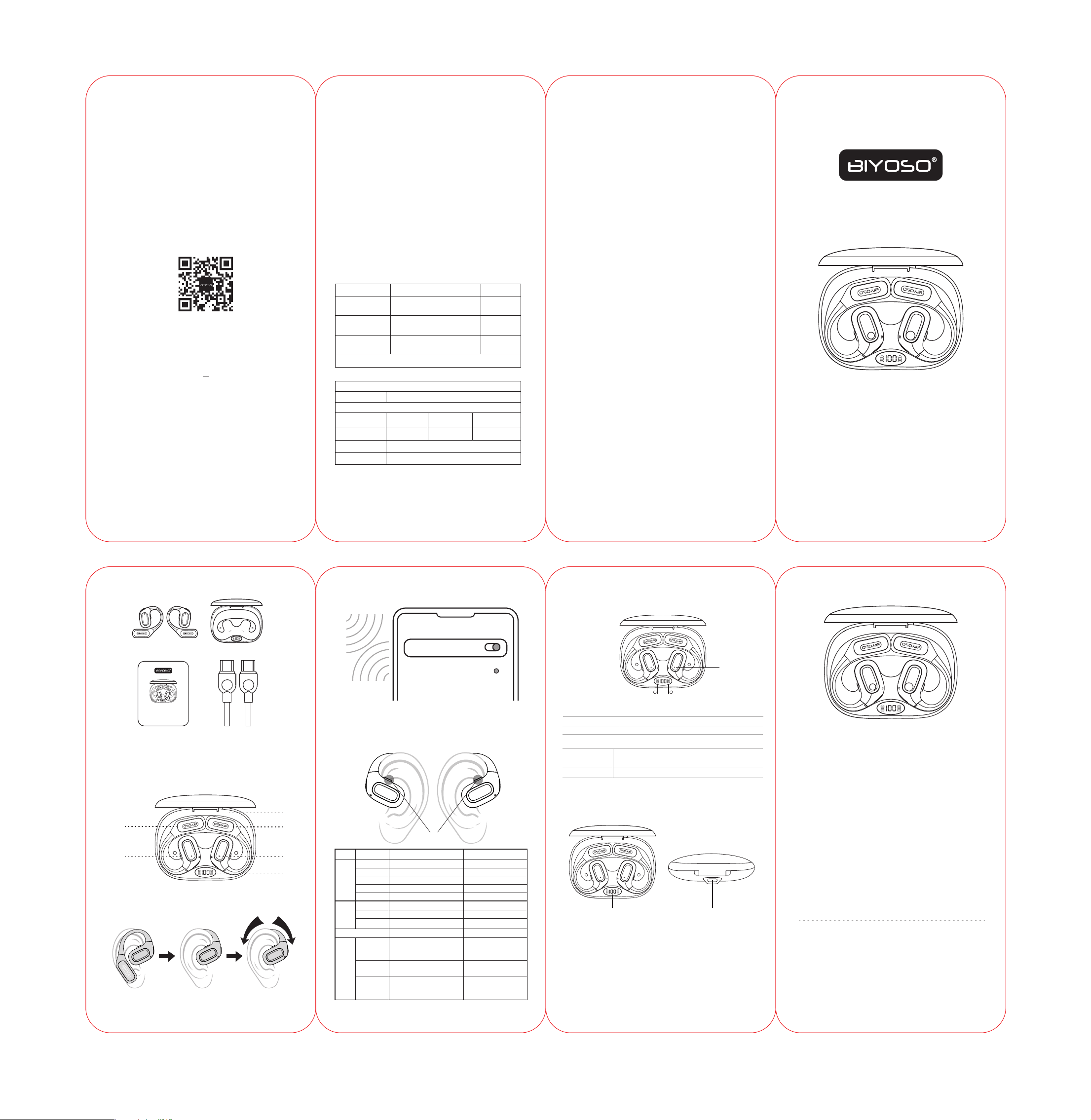
In the Box
Bluetooth connection
Control
X52
Open-Ear Earbuds*2
X52
Charging case*1
X52
Charging Cable*1
X52
Packing Box*1
Do not use the product if any of the above items are missing or the
product is damaged. Please contact your dealer, or reach out to us
immediately.
Earbud Diagram
Wearing
① Left earbud ② Right earbud ③ Push control
④ Charging case ⑤ Earphones indicator light ⑥ Battery level display
③
①
④
②
⑥
⑤
Enable the Bluetooth function and select "BIYOSO X52."
The device will display the successful pairing when complete.
Bluetooth
BIYOSO X52
Settings
R
Physical buttons
Earbuds indicator light
Charging the charging case
Fully charged
charging
Primary earbud: The red and white lights flash alternately;
Secondary earbud: The red light is flashing slowly.
The red and blue lights flash three times simultaneously
Pairing
Factory data reset
The red light turns off.
The red light is flashing slowly.
(earbuds)battery level display
Charging portDigital Battery Display
Plug the USB-C to USB-C charging cable into the charging case and connect it
to a USB-C power adapter or a certified wall charger. The digital display
flashes while charging and stays on showing 100 when fully charged.
Please note:
• It takes approx. 2 hours for the charging case to be fully charged. The
charging case uses the standard 5V/3A USB voltage. Using a high-voltage
power source to charge the earbuds is not recommended. It may also take
longer to charge the charging case with a third-party charging cable.
• Before charging, ensure that the charging port is dry and free of liquid
residue like sweat. Use a soft dry cloth to wipe any liquid residue from the
charging port.
Play/pause Press once(L/R) Press once
Previous track Press twice(L) -
Next track Press twice(R) -
Volume down Long press(L) -
Volume up Long press(R) -
Note: Both earbuds can be used individually for mono music playback or phone calls.
When used individually, the earbuds will retain their current button functions.
Music
Control
Others
Call
Control
Voice assistant
Switch between
Chinese and
English
Factory data
reset
Forced pairing
Dual earbuds control Single earbuds control
Answer a call Press once(L/R) Press once
End a call Press once(L/R) Press once
Reject a call Press and hold for 2 seconds(L/R) Touch and hold for 2 seconds
Press triple(L/R) Press triple
-
-
-
Mailbox:info@ biyoso.com Website: www.biyoso.com
Others
Charging the earbuds
Earbuds LED
indicator
L R
L
Press triple(L/R)
(The device is powered on but
disconnected)
Press six times(L/R)
(Powered on status)
Press each side five times simultaneously
(The device is powered on but
disconnected)
Step 1: Hang the ear hook behind your ear.
Step 2: Rest the open-ear speaker against your outer ear.
Step 3: Slide and adjust until it feels secure and pressure-free.
L R
L R