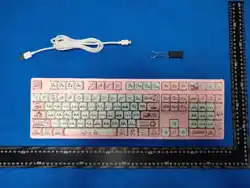
Tri-Mode RGB Mechanical Keyboard User Manual
Connection modes: Bluetooth + 2.4G + Type-C Wired
Full-key hot-swappable socket
Lighting: RGB lights / Monochrome lights
Model: JK-108AB-B0
1、FN Combination Key Functions:
FN +
Combination
Keys
Function
Description
F1
Media
Open multimedia player
F2
Voice--
Decrease volume
F3
Voice++
Increase volume
F4
Mute
Mute audio
F5
Play Stop
Stop playback
F6
Play Prev
Play previous track
F7
Play/pause
Play/Pause
F8
Play Next
Play next track
F9
Email
Open email client
F10
Web home
Open browser homepage
F11
Calculator
Open Calculator
F12
Search
Open Search
ESC
Restore Factory Settings
Press and hold for 5 seconds
PRTSC
Light On/Off
Toggles Backlight On/Off. Default: On
WIN_L
Windows Lock
Locks the Windows key to prevent accidental pressing.
LED indicates status.
A
Windows System
Indicator flashes three times
S
IOS System
Indicator flashes three times
INS
Switch lighting modes, 20 light effects
available
Switch lighting modes clockwise
DEL
Switch lighting modes counterclockwise
Spacebar
Adjust Light Color
The Spacebar displays a rainbow effect while other
keys remain solid color. Press again to apply RGB to
all keys. Press any specific key to set it to a single
color.
↑
Brightness +
Brightness levels: 0% - 25% - 50% - 75% - 100%.
Indicator LEDs flash 3 times at max/min brightness.
↓
Brightness -
Brightness levels: 0% - 25% - 50% - 75% - 100%.
Indicator LEDs flash 3 times at max/min brightness.
→
Switch Monochrome Lights
Cycles through 8 static colors + RGB mode
-_
Decrease Light Effect Speed
5 adjustable speed levels. All indicators flash 3 times
at the minimum speed
=+
Increase Light Effect Speed
5 adjustable speed levels. All indicators flash 3 times
at the maximum speed
1
T-108-1/T-87-1
Short press to switch device; long press for 5 seconds
to start pairing
2
T-108-2/T-87-2
Short press to switch device; long press for 5 seconds
to start pairing
3
T-108-3/T-87-3
Short press to switch device; long press for 5 seconds
to start pairing
4
2.4G
Green indicator light on

5
USB
White indicator light on
2、Connection & Pairing Instructions
The power switch on the back controls the built-in lithium battery.
• Bluetooth 1: FN + 1. Short press to switch mode; long press for 5 seconds to enter pairing mode (the blue indicator light will
flash rapidly to indicate pairing mode).
• Bluetooth 2: FN + 2. Short press to switch mode; long press for 5 seconds to enter pairing mode (the blue indicator light will
flash rapidly to indicate pairing mode).
• Bluetooth 3: FN + 3. Short press to switch mode; long press for 5 seconds to enter pairing mode (the blue indicator light will
flash rapidly to indicate pairing mode).
• 2.4G Wireless: FN + 4. Short press to switch mode; green indicator flashes rapidly for pairing.
• USB Wired: FN + 5. Short press to switch mode; white indicator flashes rapidly.
3、Charging Status
Press and hold the FN key to check status: The spacebar backlight is blue while charging and turns green when fully charged.
Check Battery Level
Press FN + Backspace. Keys 1 indicate the battery level:
• Below 30%: Red light
• 30% ~ 50%: Yellow light
• Above 50%: Green light
Note: In wireless mode, the keyboard may experience unresponsive keys or input errors due to low battery. Simply
charge the device to restore normal operation.
4、 Mode Indicators
Hold FN:
• USB Mode: White LED on key 5
• 2.4G Mode: Green LED on key 4
• Bluetooth Mode:Blue LED on keys 1,2,or3
5、Custom Lighting Function
1. Press FN + ~ to activate custom backlighting (only one custom profile can be saved).
2. Once activated, press FN + ~ again to enter edit mode. The CAPS LOCK and WIN LOCK LEDs will flash..
3. Press any key to cycle through colors one by one..
4. Press FN + ~ again to save your custom lighting settings.
6、Power Consumption
• Backlight On: ≤180mA (Approx. 17 hours battery life)
• Backlight Off: ≤9mA (Approx. 333 hours battery life)
• Level 1 sleep: ≤182μA (Approx. 16483 hours battery life)
• Level 2 sleep: ≤75μA (Approx. 40000 hours battery life)
• Charging time for 3000mAh battery: Approx. 8 hours
7、Wireless Transmission Distance
Transmission Power: 6dBm. Effective Range (Bluetooth & 2.4G): ≤ 10 meters (through plastic obstacles/casings).
8、Sleep Mode
• After 3 minutes of inactivity: Keyboard enters Level 1 Sleep. Backlight turns off; Bluetooth/2.4G connection remains active.
Press any key to wake up and resume normal use.

• If no operation within 10 minutes: keyboard enters leve2 sleep. Wireless connection is disconnected. Press any key to wake up,
and the keyboard will automatically reconnect for use.

FCC Warnning:
This equipment has been tested and found to comply with the limits for a Class B digital device,
pursuant to part 15 of the FCC Rules. These limits are designed to provide
reasonable
protection against harmful interference in a residential installation. This equipment generates,
uses and can radiate radio
frequency
energy
and,
if
not
installed
and
used
in
accordance
with
the
instructions,
may cause
harmful
interference
to
radio
communications.
However,
there
is
no
guarantee
that interference
will
not
occur
in
a
particular
installation.
If
this
equipment
does
cause
harmful interference to radio or television reception, which can be
determined by turning the equipment off
and
on,
the
user
is
encouraged
to
try
to
correct
the interference
by
one
or
more
of
the following measures:
•
Reorient or relocate the receiving antenna.
•
Increase the separation between the equipment and receiver.
•
Connect the equipment into an outlet on a circuit different from that to which the receiver is
connected.
• Consult the dealer or an experienced radio/TV technician for help.
Caution:
Any
changes
or
modifications
to
this
device
not
explicitly
approved
by
manufacturer
could void your authority to operate this equipment.
This
device
complies
with
part
15
of
the
FCC
Rules.
Operation
is
subject
to
the
following
two
conditions:
(1)This
device
may
not
cause
harmful
interference,
and
(2)
this
device
must
accept
any
interference received, including interference that may cause undesired operation.
This
equipment
complies
with
FCC
radiation
exposure
limits
set
forth
for
an
uncontrolled
environment.
This
equipment
should
be
installed
and
operated
with
minimum
distance
0cm
between the radiator and your body.