Description
USB Relay
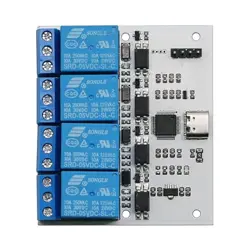
USB Relay (TC, 1, Opto)
USB Relay (TC, 2, Opto)
USB Relay (TC, 3, Opto)
USB Relay (TC, 4, Opto)
USB Relay (TC, 8, Opto)
Information
Categories: USB
Brand: Diustou
USB Relay
From Diustou Wiki
Product Overview
This is an industrial-grade isolated USB relay developed based on GD32F103C8T6.It supports TTL UART input and outputs corresponding dry contact
switch signals with two contact points.It can be powered either via USB or 5V pin power supply.The design adopts optocoupler isolation and
overcurrent protection.The load terminal adopts a typical triode drive circuit with a freewheeling diode, capable of controlling resistive loads within
the range of 10A 250VAC and 30VDC.
It is not specially optimized for inductive loads. Therefore, external equipment is required when necessary to suppress inrush current and surge
voltage.Designed to industrial-grade standards, it is applicable to a wide range of scenarios with a customized communication protocol that is simple
and easy to operate.The upgraded version is equipped with a housing, as well as higher-grade chips and relays.
Product Specifications
Product Description
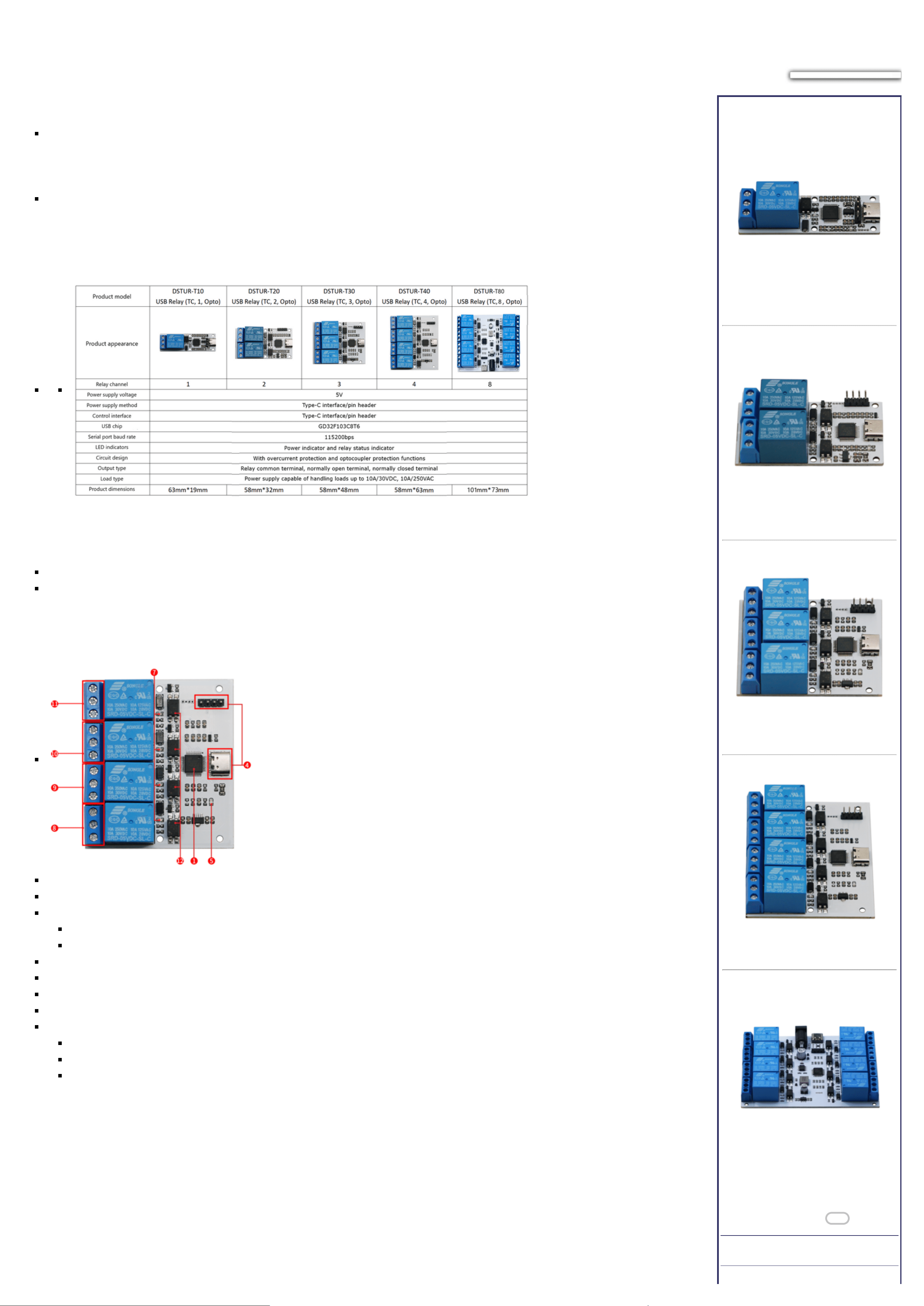
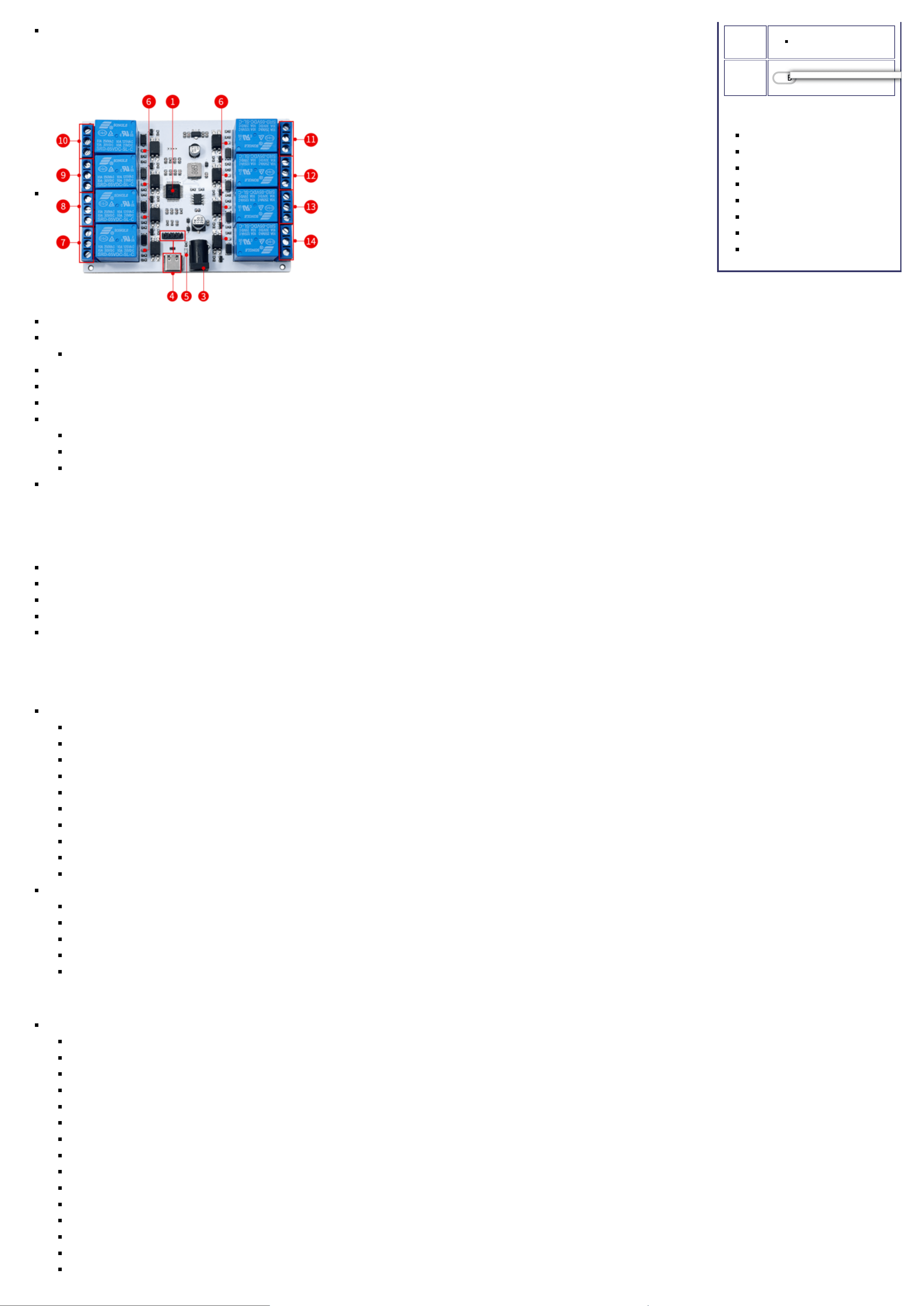
Taking the 4-channel and 8-channel USB relays as examples:
There is only a channel quantity difference between the 1-channel to 4-channel USB relays. The 8-channel model is newly added with a DC power
port, supporting 5-32V power input.
USB Relay (TC, 4, Opto)
1.Microcontroller chip
2.Power supply mode selection terminal
3.Power Supply Options:
When using USB power supply, switch the toggle to the USB_P position.
When using external power supply (via DC jack), switch the toggle to the Ext_P position.
4.Control interface: used for 5V power supply and command control of relays
5.Power indicator light
6.DC power jack: used for external power supply
7.Relay switch indicator light
8-11.Relay one output terminal (NC1/COM1/NO1):
COM1: Common terminal;
NC1: Normally closed terminal, short-circuited to COM1 before the relay is energized and open after energization;
NO1: Normally open terminal, open before the relay is energized and short-circuited to COM1 after energization.
Features
USB Relay
Interfaces
USB
RS232 Modbus Relay
RS232 Modbus Relay PRO
RS485 Modbus Relay
RS485 Modbus Relay PRO
GPIO Relay
GPIO Relay PRO
USB Relay
USB Relay PRO
Related products
12.Optocoupler protection circuit
USB Relay (TC, 8, Opto)
1.Microcontroller chip
3.DC power jack: used for external power supply.
The output current of the USB interface is limited, so it is recommended to use external power supply when using multiple relays to ensure stable operation of the circuit.
4.Control interface: used for 5V power supply and command control of relays
5.Power indicator light
6.Relay switch indicator light
7-14.Relay one output terminal (NC1/COM1/NO1):
COM1: Common terminal;
NC1: Normally closed terminal, short-circuited to COM1 before the relay is energized and open after energization;
NO1: Normally open terminal, open before the relay is energized and short-circuited to COM1 after energization.
Each channel is equipped with an independent optocoupler isolation protection circuit.
User Manual
Communication Protocol for Switch Control
Data 1 — Start Flag (Default: 0xA0)
Data 2 — Switch Address Code (0x01 represents the first switch channel)
Data 3 — Operation Data (0x00 indicates OFF, 0x01 indicates ON)
Data 4 — Checksum (Calculated as Data1 + Data2 + Data3)
Note: For USB Relay modules labeled from "USB Relay (TC, 1, Opto)" to "USB Relay (TC, 8, Opto)", the default serial communication baud rate is set to 115200 bps.
Command Instructions
USB Relay (TC, 4, Opto)
Switch Control Command Instructions (sent in HEX format):
Open the first USB switch: A0 01 01 A2;
Close the first USB switch: A0 01 00 A1;
Open the second USB switch: A0 02 01 A3;
Close the second USB switch: A0 02 00 A2;
Open the third USB switch: A0 03 01 A4;
Close the third USB switch: A0 03 00 A3;
Open the fourth USB switch: A0 04 01 A5;
Close the fourth USB switch: A0 04 00 A4;
Open all USB switches: A0 0F 01 B0;
Close all USB switches: A0 0F 00 AF;
Query Switch Status (sent in HEX format):
Status of the first channel: A0 01 02 A3;
Status of the second channel: A0 02 02 A4;
Status of the third channel: A0 03 02 A5;
Status of the fourth channel: A0 04 02 A6;
Query all relay statuses: A0 0F 02 B1;
USB Relay (TC, 8, Opto)
Switch Control Command Instructions (sent in HEX format):
Open the first USB switch: A0 01 01 A2;
Close the first USB switch: A0 01 00 A1;
Open the second USB switch: A0 02 01 A3;
Close the second USB switch: A0 02 00 A2;
Open the third USB switch: A0 03 01 A4;
Close the third USB switch: A0 03 00 A3;
Open the fourth USB switch: A0 04 01 A5;
Close the fourth USB switch: A0 04 00 A4;
Open the fifth USB switch: A0 05 01 A6;
Close the fifth USB switch: A0 05 00 A5;
Open the sixth USB switch: A0 06 01 A7;
Close the sixth USB switch: A0 06 00 A6;
Open the seventh USB switch: A0 07 01 A8;
Close the seventh USB switch: A0 07 00 A7;
Open the eighth USB switch: A0 08 01 A9;
Close the eighth USB switch: A0 08 00 A8;
Open all USB switches: A0 0F 01 B0;
Close all USB switches: A0 0F 00 AF;
Query Switch Status (sent in HEX format):
Status of the first channel: A0 01 02 A3;
Status of the second channel: A0 02 02 A4;
Status of the third channel: A0 03 02 A5;
Status of the fourth channel: A0 04 02 A6;
Query all relay statuses: A0 0F 02 B1;
Usage Instructions
USB Relay Control Program (Python)
Relay Control
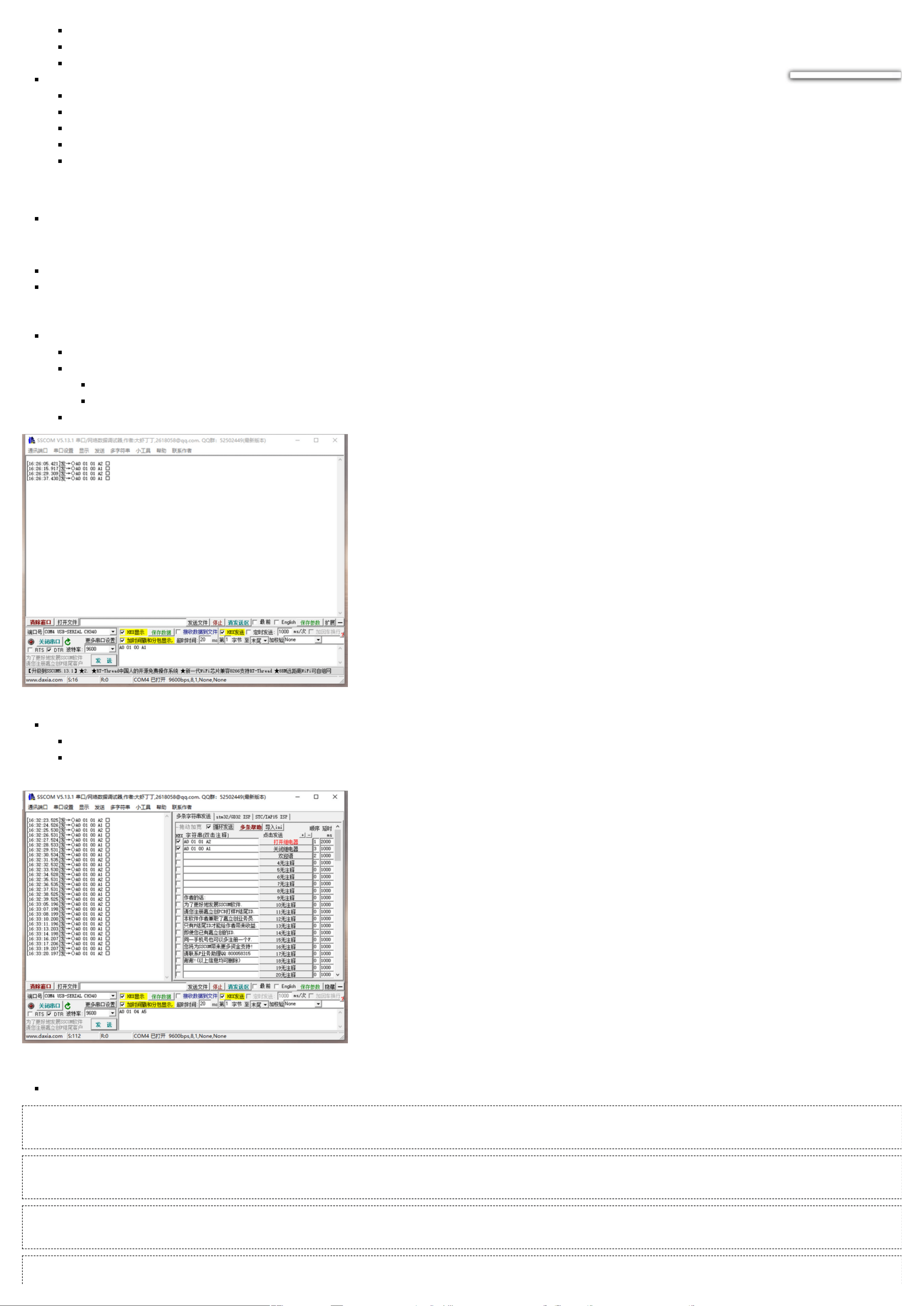
Connect the USB relay module to your computer and install the driver for the CH340 USB-to-serial chip.
Open serial port debugging software such as STC-ISP or SSCOM32, select a baud rate of 9600, and send commands in hexadecimal (hex) format to control the relays. For example, sending `A0
01 01 A2` will turn on the relay, while sending `A0 01 00 A1` will turn it off. You can choose between manual and automatic sending methods. The following examples are based on the
SSCOM32 serial port debugging software:
Manual Sending:
Set Parameters: Choose a baud rate of 115200 and check the "Hex Send" option.
Send Commands:
Enter the command `A0 01 01 A2` to turn on the relay.
Enter the command `A0 01 00 A1` to turn off the relay.
Execute: After entering the command, click "Send" to manually open or close the relay.
Automatic Sending:
Set Parameters: Again, choose a baud rate of 115200, click on "Extend" in the SSCOM32 interface, input the commands `A0 01 01 A2` and `A0 01 00 A1`, and check the "Hex Send" option.
Configure Automatic Loop**: Input the interval time for automatic loop sending and check the "Automatic Loop Send" option to automatically cycle through opening and closing the
relay.
Querying Relay Status
For a three-channel relay module, assuming channels 1 and 2 are open while others are closed, querying the status of each channel will return the following responses:
Query Channel 1
Send (Hex): A0 01 02 A3
Receive (ASCII): CH1:ON
Receive (Hex): 43 48 31 3A 4F 4E 0D 0A
Query Channel 2
Send (Hex): A0 02 02 A4
Receive (ASCII): CH2:ON
Receive (Hex): 43 48 32 3A 4F 4E 0D 0A
Query Channel 3
Send (Hex): A0 03 02 A5
Receive (ASCII): CH3:OFF
Receive (Hex): 43 48 33 3A 4F 46 46 0D 0A
Query All Relays
Send (Hex): A0 0F 02 B1
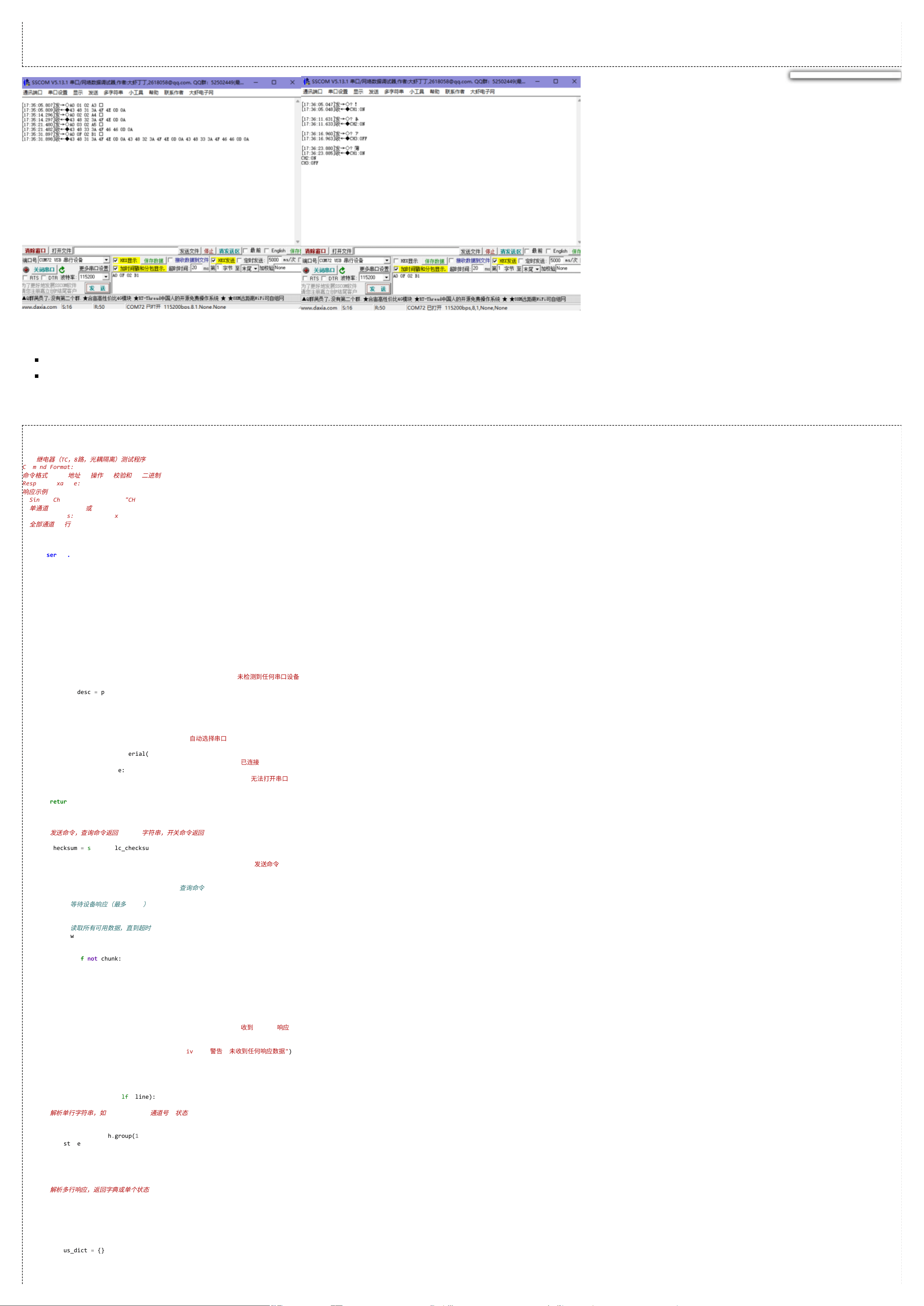
Receive (ASCII):
CH1:ON
CH2:ON
CH3:OFF
Receive (Hex): 43 48 31 3A 4F 4E 0D 0A 43 48 32 3A 4F 4E 0D 0A 43 48 33 3A 4F 46 46 0D 0A
Software
sscom32
USB Relay Control Program (Python)
Appendix A: USB Relay Control Program (Python)
#!/usr/bin/env python3
"""
USB Relay (TC, 8, Opto) Test Program - Based on ASCII Multi-line Response
USB
继
电
器(
TC
,
8
路
,
光
耦
隔
离
)
测
试
程
序
Command Format: A0 [Address] [Operation] [Checksum] (Binary)
命
令
格
式
: A0 [
地址
] [
操
作
] [
校
验
和
] (
⼆
进
制
)
Response Example:
响
应
⽰
例
:
Single Channel: "CH1:ON" or "CH1:OFF"
单
通道
: "CH1:ON"
或
"CH1:OFF"
All Channels: 8 lines "CHx:ON/OFF"
全
部
通道
: 8
⾏
"CHx:ON/OFF"
"""
import serial
import serial.tools.list_ports
import sys
import time
import re
class USBRelay:
def __init__(self, port=None, baudrate=115200, timeout=1):
self.baudrate = baudrate
self.timeout = timeout
self.ser = None
self._connect(port)
def _connect(self, port):
if port is None:
ports = list(serial.tools.list_ports.comports())
if not ports:
raise RuntimeError("No serial ports detected /
未
检
测
到
任何
串
⼝
设
备
")
for p in ports:
desc = p.description.lower()
if any(k in desc for k in ["usb", "ch340", "cp210", "ftdi", "serial"]):
port = p.device
break
if port is None:
port = ports[0].device
print(f"Auto Selected Port: {port} /
⾃
动
选
择
串
⼝
: {port}")
try:
self.ser = serial.Serial(port, self.baudrate, timeout=self.timeout)
print(f"Connected to {port} @ {self.baudrate} bps /
已
连
接
{port} @ {self.baudrate} bps")
except Exception as e:
raise RuntimeError(f"Failed to open port {port}: {e} /
⽆
法
打
开
串
⼝
{port}: {e}")
def _calc_checksum(self, d1, d2, d3):
return (d1 + d2 + d3) & 0xFF
def _send_command(self, addr, op):
"""Send command, return ASCII string for query, None for switch command
发
送
命
令
,
查
询
命
令
返
回
ASCII
字
符
串
,
开
关
命
令
返
回
None"""
data1, data2, data3 = 0xA0, addr, op
checksum = self._calc_checksum(data1, data2, data3)
cmd = bytes([data1, data2, data3, checksum])
print(f"Command Sent: {' '.join(f'{b:02X}' for b in cmd)} /
发
送
命
令
: {' '.join(f'{b:02X}' for b in cmd)}")
self.ser.write(cmd)
if op == 0x02: # Query Command /
查
询
命
令
# Wait for response (max 200ms)
#
等
待
设
备
响
应
(
最
多
200ms
)
time.sleep(0.2)
# Read all available data until timeout
#
读
取
所
有
可
⽤
数
据
,
直
到
超
时
raw_data = b''
while True:
chunk = self.ser.read(64)
if not chunk:
break
raw_data += chunk
time.sleep(0.05)
if self.ser.in_waiting == 0:
break
if raw_data:
ascii_str = raw_data.decode('ascii', errors='replace').strip()
print(f"ASCII Response Received:\n{ascii_str} /
收
到
ASCII
响
应
:\n{ascii_str}")
return ascii_str
else:
print("Warning: No response received /
警
告
:
未
收
到
任何
响
应
数
据
")
return None
else:
time.sleep(0.05)
return None
def _parse_single_line(self, line):
"""Parse single line e.g. 'CH1:ON' → (channel, state)
解
析
单
⾏
字
符
串
,
如
'CH1:ON' → (
通道
号
,
状
态
)"""
match = re.match(r'CH(\d+):(ON|OFF)', line.strip(), re.IGNORECASE)
if match:
ch = int(match.group(1))
state = (match.group(2).upper() == 'ON')
return ch, state
return None, None
def _parse_response(self, ascii_str, expected_channel=None):
"""Parse multi-line response, return dict or single state
解
析
多
⾏
响
应
,
返
回
字
典
或
单
个
状
态
"""
if ascii_str is None:
return None
lines = ascii_str.splitlines()
if not lines:
return None
status_dict = {}
for line in lines:
ch, state = self._parse_single_line(line)
if ch is not None:
status_dict[ch] = state
if expected_channel is not None:
return status_dict.get(expected_channel, None)
else:
if len(status_dict) == 8:
return status_dict
else:
print(f"Warning: Parsed channels {len(status_dict)} ≠ 8, Data: {status_dict} /
警
告
:
解
析
通道
数
{len(status_dict)} ≠ 8
,
实
际
数
据
: {status_dict}")
return status_dict
def open(self, channel):
if not 1 <= channel <= 8:
raise ValueError("Channel must be 1~8 /
通道
号
必
须
在
1~8
之
间
")
self._send_command(channel, 0x01)
def close(self, channel):
if not 1 <= channel <= 8:
raise ValueError("Channel must be 1~8 /
通道
号
必
须
在
1~8
之
间
")
self._send_command(channel, 0x00)
def open_all(self):
self._send_command(0x0F, 0x01)
def close_all(self):
self._send_command(0x0F, 0x00)
def query_channel(self, channel):
"""Query single channel, return True=ON False=OFF
查
询
单
个
通道
,
返
回
True=
开
False=
关
"""
if not 1 <= channel <= 8:
raise ValueError("Channel must be 1~8 /
通道
号
必
须
在
1~8
之
间
")
resp_str = self._send_command(channel, 0x02)
return self._parse_response(resp_str, expected_channel=channel)
def query_all(self):
"""Query all channels, return dict {1:bool...}
查
询
所
有
通道
,
返
回
状
态
字
典
"""
resp_str = self._send_command(0x0F, 0x02)
return self._parse_response(resp_str, expected_channel=None)
def disconnect(self):
if self.ser and self.ser.is_open:
self.ser.close()
print("Port closed /
串
⼝
已
关
闭
")
def print_help():
print("""
╔══════════════════════════════════════════════════════════════╗
║ USB Relay Test Program (ASCII Multi-Line) ║
║ USB
继
电
器
测
试
程
序
(ASCII
多
⾏
版
) ║
║ Response: CHx:ON / CHx:OFF ║
║
响
应
格
式
: CHx:ON / CHx:OFF ║
╚══════════════════════════════════════════════════════════════╝
Commands /
命
令
:
open <n> Turn ON channel n (1-8)
打
开
通道
n (1-8)
close <n> Turn OFF channel n (1-8)
关
闭
通道
n (1-8)
open_all Turn ON all channels
打
开
所
有
通道
close_all Turn OFF all channels
关
闭
所
有
通道
query <n> Check channel n status
查
询
通道
n
状
态
query_all Check all channels status
查
询
所
有
通道
状
态
test Auto test sequence
⾃
动化
测
试
help Show this help
查
看
帮
助
exit Exit program
退
出
程
序
""")
def auto_test(relay):
print("\n========== Auto Test Started ==========")
print("==========
⾃
动化
测
试
开
始
==========\n")
for ch in range(1, 9):
print(f"--- Channel {ch} /
通道
{ch} ---")
relay.open(ch)
time.sleep(0.3)
status = relay.query_channel(ch)
print(f" State: {'ON' if status else 'OFF'} /
状
态
: {'
开
' if status else '
关
'}")
relay.close(ch)
time.sleep(0.3)
status = relay.query_channel(ch)
print(f" State: {'ON' if status else 'OFF'} /
状
态
: {'
开
' if status else '
关
'}\n")
print("--- All Channels Test /
全
部
通道
测
试
---")
relay.open_all()
time.sleep(0.3)
all_st = relay.query_all()
if all_st:
print("All ON Status /
全
部
打
开
后
状
态
:", ', '.join(f"CH{i}:{'ON' if v else 'OFF'}" for i, v in all_st.items()))
relay.close_all()
time.sleep(0.3)
all_st = relay.query_all()
if all_st:
print("All OFF Status /
全
部
关
闭
后
状
态
:", ', '.join(f"CH{i}:{'ON' if v else 'OFF'}" for i, v in all_st.items()))
print("\n========== Auto Test Finished ==========")
print("==========
测
试
完
成
==========\n")
def main():
port = sys.argv[1] if len(sys.argv) > 1 else None
baud = int(sys.argv[2]) if len(sys.argv) > 2 else 115200
try:
relay = USBRelay(port, baud)
except Exception as e:
print(f"Initialization failed: {e} /
初
始
化
失
败
: {e}")
sys.exit(1)
print_help()
while True:
try:
cmd_line = input("> ").strip().lower()
if not cmd_line:
continue
parts = cmd_line.split()
cmd = parts[0]
if cmd in ("exit", "quit"):
break
elif cmd == "help":
print_help()
elif cmd == "open" and len(parts) == 2:
relay.open(int(parts[1]))
elif cmd == "close" and len(parts) == 2:
relay.close(int(parts[1]))
elif cmd == "open_all":
relay.open_all()
elif cmd == "close_all":
relay.close_all()
elif cmd == "query" and len(parts) == 2:
ch = int(parts[1])
st = relay.query_channel(ch)
if st is not None:
print(f"Channel {ch} State: {'ON' if st else 'OFF'} /
通道
{ch}
状
态
: {'
开
' if st else '
关
'}")
else:
print("Query Failed /
查
询
失
败
")
elif cmd == "query_all":
st = relay.query_all()
if st:
print("All Channels Status /
所
有
通道
状
态
:")
for i in range(1, 9):
state = st.get(i, None)
if state is None:
print(f" Channel {i}: Unknown /
通道
{i}:
未
知
")
else:
print(f" Channel {i}: {'ON' if state else 'OFF'} /
通道
{i}: {'
开
' if state else '
关
'}")
else:
print("Query Failed /
查
询
失
败
")
elif cmd == "test":
auto_test(relay)
else:
print("Unknown command, type 'help' for usage /
未
知
命
令
,
输
⼊
help
查
看
帮
助
")
except KeyboardInterrupt:
print("\nExiting /
退
出
")
break
except Exception as e:
print(f"Error: {e} /
错
误
: {e}")
relay.disconnect()