C6
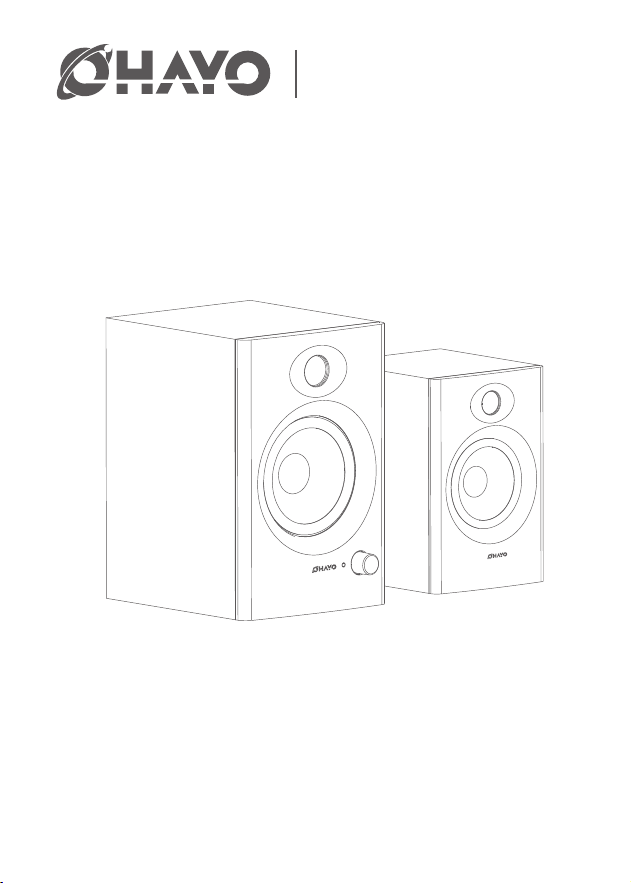
Computer Speaker
User Manual
Please read this manual carefully before using
Send your order information to: [email protected],
we will activate the warranty for your order,

Safety Instructions
Safety Warning
1. Please read this manual carefully before using
2. Save the manual for future reference.
3. Pay attention to all warnings in the manual
4. Please stay away from ammable and explosive items
5. Do not use near water or humid places
6. Use a dry cloth when cleaning and follow the manufacturer's manual
7. Do not block any vents and install according to manufacturer's manual
8. Do not install near any heat source, such as a radiator, stove, or other device that generates heat.
9. Do not damage the positive and negative poles of the speakers power supply:
10. Protect the power cable from being walked on or pinched, especially plugs, receptacles, and where
they exit from the speaker.
11. Only use accessories specied by the manufacturer
12. In thundery weather or when not in use for a long time, please unplug the power plug to avoid
damaging the product.
13. When the product is damaged in any way, it needs to be repaired by a professional
14. The power cable or plug is damaged, objects have been dropped into the speaker, or it has been
exposed to rain or moisture, so it does not work properly. maintenance is required
15. Working temperature range 0 - 40 degrees
16. This product is nota toy and children under 14 years old should use under adult supervision
17. Do not open or move the casing without authorization for maintenance or cleaning.
18. Before operation, please ensure that the operating voltage is the same as the local power supply
voltage. The operating voltage is displayed on the product nameplate.
This symbol indicates that this product is suitable for indoor environments only.
This symbol alerts the user to the presence of uninsulated hazardous voltages inside the
product's enclosure, which can cause electric shock and is a live hazard.
This symbol reminds users not to disassemble the casing of the product. There are no user
-replaceable parts inside. If repairs are needed, please go to a qualied repair shop for repairs.
If you have any problems, please feel free to contact us via: [email protected],
we are always here to RESEND/REFUND you.
Specification
Product Information
Cleaning
Package Contents
Before cleaning, turn o the product and unplug it from the power source.
Use a dry rag to wipe it gently, or use a neutral solution or water to soak it and wring it out to wipe
the surface of the speaker.
After wiping with clean water or neutral solvent, you must wait until the water dries before plugging
in the power supply.
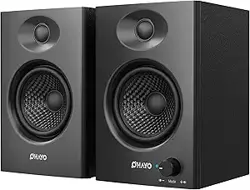
2*Computer speakers
1*Active main speaker
1*Passive auxiliary speaker
1*AC power cable
1*Data cable
1*3.5mm double-ended audio cable
1*Manual
Model:
Bluetooth version:
DSP:
Low frequency trumpet:
Mid-high frequency trumpet:
Indicator light:
Sound channel:
Dimension
Peak power:
Bluetooth range:
Frequency range:
Signal-to-Noise ratio:
30W+30W
≥15m
60Hz-20KHz
≥85dB @ 1KHz
C6
5.3
Supports
4Ω 20W
6Ω 10W
Blue light and red light
2.0
Main:L165xW110xH120(mm)
Auxiliary:L165xW110xH120(mm)
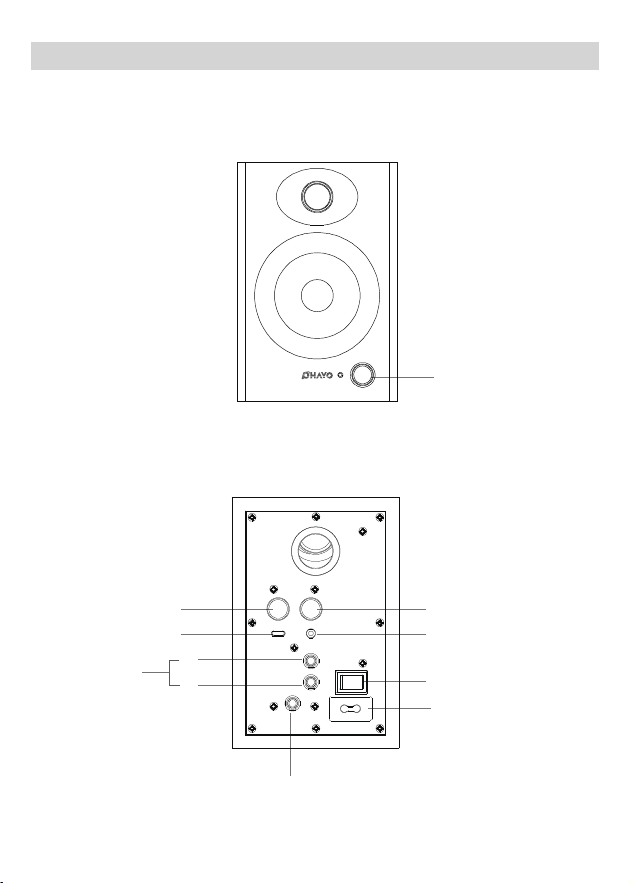
Button Configuration
Bass Adjustment
Audio Input
L
R
AC input
100V-240V
Power Switch
Unbalanced:
RCA Unbalanced
input Unbalanced
Treble Adjustment
PC/Mobile
Left speaker output
interface
Mode Switch

Warranty
·Unless otherwise noted, from the date of purchase, if the product purchased by the user has quality
problems (not product software failure), the return period that the user can choose is 7 days; the
exchange period is 15 days; the warranty period is 12 months;
·If users encounter product quality problems, they can request three-guarantee service from the service
department designated by our company. If transportation is required, the user shall bear the
transportation and other related costs;
·When users require three-guarantee service, they must proactively provide this valid warranty service
certicate and invoice
·Additional services beyond the product's three-guarantee service will be charged in accordance with
relevant regulations. The warranty period of the product after paid repair is 3 months from the date of
pickup or shipment;
·The three-guarantee service provided by our company is limited to products with quality problems,
and does not include compensation for losses caused by accidental loss of interests of the buyer and
any other indirect or direct losses;
·Users should take the initiative to ll in this voucher as required at the seller where they purchased it.
Our company is not responsible for the consequences of not lling in this voucher as required, nor is it
responsible for the seller's commitment to users beyond the warranty service regulations.
This device complies with part 15 of the FCC Rules.0peration is subject to the following two conditions.
1. This device may not cause harmful interference.
2.This device must accept any interference received,including interference that may cause
undesiredoperation.
FCC Conditions
EU Conformity Statement
This product and, if applicable, the supplied accessories are also marked with "CE" and comply with
the applicable harmonized European standards listed under the EMC Directive 2004/108/EC, the RoHS
Directive 2011/65/EU and the WEEE directive 2012/19/EU. Products marked with this symbol cannot be
disposed of as unsorted municipal waste in the European Union. For proper recycling, return this
product to your local supplier upon the purchase of equivalent new equipment or dispose of it at
designated collection points. For more information, see: www.recyclethis.info.
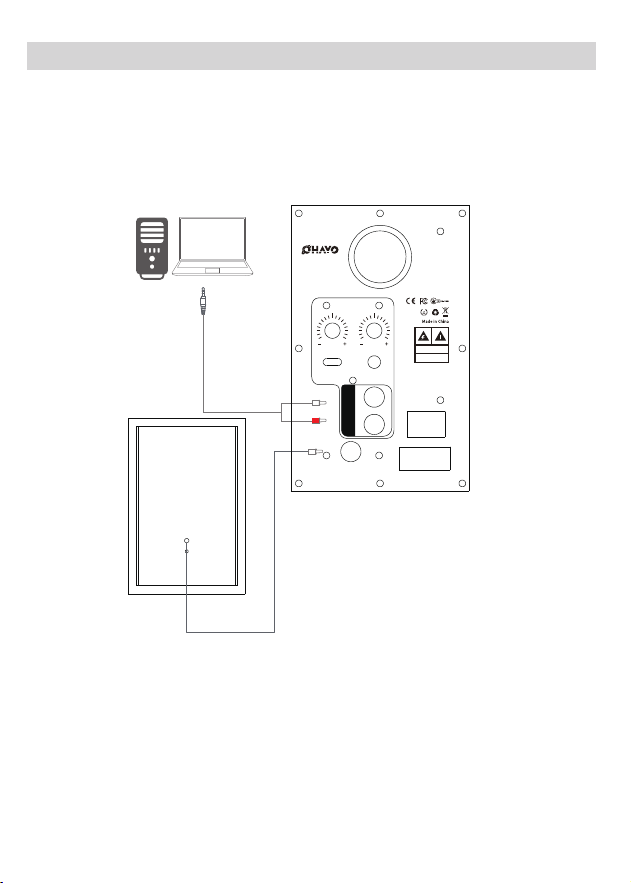
Speaker connection diagram
RCA
RCA
L
R
Bass
Adjustment
Treble
Adjustment
PC/Mobile Audio Input
Left Speaker
Output Interface
AC Input 100V~240V
Power Switch
C6
Computer
Speaker
CAUTION
Risk of electric shock
Do not open
Unbalanced Input
Function description
Notice
1: The speaker volume adjustment is not synchronized with the Bluetooth/USB-Type-c/Audio Input
/RCA audio source volume.
2: Does not support Bluetooth calls, but supports USB-Type-C calls. A 4-section headset with a
microphone is required for calls.
3: Audio Input does not support inserting a 4-section audio cable as an input signal
4: After shutting down, there will be a certain cache time before it is completely shut down, and the
indicator light will go out in about 10 seconds.
5: Default Bluetooth mode at startup
6: Audio Input/PC/RCA rear plug-in priority
Power switch
Power o
- Power on: A prompt sound (Bluetooth) and blue light ashing appear
after power on Default Bluetooth mode at startup
Treble knob
Clockwise, the treble increases by up to 10db
Counterclockwise, treble attenuation, minimum -10db
When the knob is in the middle, the treble gain is 0db
Bass knob
Clockwise, bass increases, up to 10db
Counterclockwise: Bass attenuation, minimum -10db
When the knob is in the middle, the bass gain is 0db
Mode knob
Turn clockwise to increase the volume (maximum volume level 16)
Turn counterclockwise, the volume decreases (minimum volume level 0)
Long press to switch mode, BT/Audio Input /PC
Short press: mute/unmute (red light blinks slowly when mute is on)
Double-click to disconnect Bluetooth (blue and red lights ash)
Audio Input
3.5mm input in front of the external audio source device; (the blue light
is always on, the red light is o)
PC/mobile phone
Use USB to Type-c to plug into the computer (blue light stays on)
Use Type-c to plug in your phone (blue light stays on)
BT
Bluetooth volume not syncing with Bluetooth device
Does not support call function

Wireless connections
1: Turn on the power and switch to Bluetooth mode
2: Turn on Bluetooth on your phone/tablet/computer and search for C6, click Connect
Wired connection
1: Turn on the power
2: Use TYPE-C data cable, insert it into the PC/mobile phone logo socket, and automatically switch
to PC mode
3: Use three sections of 3.5mm audio cable to plug into the front Audio Input interface
Trouble shooting
I: What should I do if Bluetooth cannot connect or there is no sound when playing music?
1: Please conrm whether the speaker is in Bluetooth mode rst.
2: Conrm whether your Bluetooth device audio source supports Bluetooth function and turn it on.
3: Check whether the speaker is in Bluetooth search state.
4: If there are too many Bluetooth devices around, it may cause diculty in searching. Please turn o
other Bluetooth devices.
II: What should I do if Audio Input playback does not respond?
1: Please conrm whether the “Audio Input” audio cable is intact.
2: Make sure Audio Input is plugged in correctly.
III: What should I do if only one speaker has sound?
1: First, please check whether the connecting cables between the speakers are connected properly.
2: Secondly, you can try to connect other audio source devices. If the speaker can produce sound
normally, please check your previous audio source.
If the speaker is still not working properly, please contact customer service
IV: The speaker is silent, what should I do?
1: Please check whether the power supply is plugged in and whether the power switch is turned on.
2: Please check whether the audio source and connecting cable are normal.
1: Due to product iteration and upgrading, there may be some dierences in packaging and
appearance technology. Please refer to the actual product.
2: During the product sales process, our company gradually optimizes the product to enhance the
product experience. Will do the product part for function and parameter adjustment, please refer
to the actual product.
3: Some models of our products have multiple versions and multiple congurations. Please choose
the corresponding product according to your needs. Details can be found in Customer Service.
Dispose of discarded electronic products correctly and do not dispose of electrical
and electronic equipment, components, and batteries together with other househ
-old waste throw away. Prevent these items that may contain harmful substances
from polluting the natural environment and causing harm to the human body, and
promise to recycle resources, please use waste recycling or local disposal laws and
regulations to recycle this product,or contact this product's sta.
Reminders
3: Please check whether the audio signal output is normal.
4: Please check whether the volume of the speaker or audio source has been adjusted to the minimum.
5: Please disconnect the power supply of the speaker and then turn it on again.
V: Speaker noise problem
The speakers have the characteristics of low noise oor. The noise of some sound sources themselves
will be several times higher than that of the speakers, so when checking
you should unplug the audio cable and turn up the volume. The sound from the speaker should be
barely audible from 1 meter away.
*Do not remove the plug and connect it directly to the power supply.
*Avoid use in damp conditions. For indoor use only.
*The mains cable must be fully unwound before use.
*Never plug another extension cable in to another extension.
*Unplug the extension lead when not in use or during thunderstorms.
1.Connect the 13A plug to a mains socket. insert plugs fully and securely.
2.connect the device you require to power to the extension socket.
Extension lead is not work
Solution:1.Check if it is securely plugged in.
2.Ensure total load does not exceed the maximum capacity.
This device complies with part 15 of the FCC Rules. Operation is subject to the following two conditions:
Note: This equipment has been tested and found to comply with the limits for a Class B digital device,
pursuant to part 15 of the FCC Rules. These limits are designed to provide reasonable protection against
harmful interference in a residential installation. This equipment generates uses and can radiate radio
frequency energy and, if not installed and used in accordance with the instructions, may cause harmful
interference to radio communications. However, there is no guarantee that interference will not occur in
a particular installation.
(1)This device may not cause harmful interference, and
(2)this device must accept any interference received, including interference that may cause undesired
operation.
Important: Change or modications not expressly approved by the manufacturer responsible for
compliance could void the user's authority to operate the equipment.
3.lf problem persists, stop using.
*Do not exceed the total maximum load of the socket
*Ziehen Sie den Stecker nicht ab und schließen Sie ihn nicht direkt an das Stromnetz an.
*Vermeiden Sie den Gebrauch in feuchten Umgebungen. Nur für den Gebrauch in Innenräumen.
*Das Netzkabel muss vor dem Gebrauch vollständig abgewickelt werden.
*Stecken Sie niemals ein anderes Verlängerungskabel an ein anderes Verlängerungskabel an.
*Ziehen Sie das Verlängerungskabel aus der Steckdose, wenn es nicht benutzt wird oder bei Gewitter.
1.schließen Sie den 13A-Stecker an eine Steckdose an. stecken Sie den Stecker vollständig und sicher ein.
2. Schließen Sie das Gerät, das Sie mit Strom versorgen möchten, an die Verlängerungssteckdose an.
Das Verlängerungskabel funktioniert nicht
Lösung:1.Überprüfen Sie, ob der Stecker richtig eingesteckt ist.
2. Stellen Sie sicher, dass die Gesamtlast die maximale Kapazität nicht überschreitet.
Dieses Gerät erfüllt die Anforderungen von Teil 15 der FCC-Bestimmungen. Der Betrieb unterliegt den
folgenden zwei Bedingungen:
Hinweis: Dieses Gerät wurde getestet und entspricht den Grenzwerten für digitale Geräte der Klasse
B gemäß Teil 15 der FCC-Vorschriften. Diese Grenzwerte sind so ausgelegt, dass sie einen angemesse
-nen Schutz gegen schädliche Störungen bei der Installation in Wohngebieten bieten. Dieses Gerät
erzeugt und verwendet Hochfrequenzenergie und kann diese ausstrahlen. Wenn es nicht gemäß den
Anweisungen installiert und verwendet wird, kann es schädliche Störungen des Funkverkehrs
verursachen. Es kann jedoch nicht garantiert werden, dass bei einer bestimmten Installation
keine Störungen auftreten.
(1) Dieses Gerät darf keine schädlichen Störungen verursachen, und
(2) Dieses Gerät muss alle empfangenen Störungen akzeptieren, einschließlich solcher, die einen
unerwünschten Betrieb verursachen können.
Wichtig: Änderungen oder Modikationen, die nicht ausdrücklich von dem für die Einhaltung der
Vorschriften verantwortlichen Hersteller genehmigt wurden, können dazu führen, dass der Benutzer
die Berechtigung zum Betrieb des Geräts verliert.
3. Wenn das Problem weiterhin besteht, stellen Sie den Betrieb ein.
*Überschreiten Sie nicht die maximale Gesamtlast der Steckdose.
*No retire el enchufe y conéctelo directamente a la red eléctrica.
*Evite el uso en condiciones de humedad. Sólo para uso en interiores.
*El cable de alimentación debe estar completamente desenrollado antes de su uso.
*No enchufe nunca otro alargador a otro alargador.
*Desenchufe el alargador cuando no lo utilice o durante tormentas eléctricas.
1.Conecte el enchufe de 13A a una toma de corriente. inserte los enchufes completamente y de forma
segura.
2.Conecte el aparato que desee alimentar a la toma de la extensión.
El alargador no funciona
Solución:1.Compruebe que está bien enchufado.
2.Asegúrese de que la carga total no supera la capacidad máxima.
Este aparato cumple con la parte 15 de las normas FCC. Su funcionamiento está sujeto a las dos
condiciones siguientes:
Nota: Este equipo ha sido probado y cumple los límites establecidos para los dispositivos digitales de
Clase B, de conformidad con el apartado 15 de las normas de la FCC. Estos límites están diseñados
para proporcionar una protección razonable contra interferencias perjudiciales en una instalación
residencial. Este equipo genera, utiliza y puede irradiar energía de radiofrecuencia y, si no se instala
y utiliza de acuerdo con las instrucciones, puede causar interferencias perjudiciales en las
comunicaciones por radio. No obstante, no se garantiza que no se produzcan interferencias
en una instalación concreta.
(1)Este dispositivo no puede causar interferencias perjudiciales, y
(2)este dispositivo debe aceptar cualquier interferencia recibida, incluyendo interferencias que puedan
causar un funcionamiento no deseado.
Importante: Los cambios o modicaciones no aprobados expresamente por el fabricante responsable
del cumplimiento podrían anular la autoridad del usuario para utilizar el equipo.
3.Si el problema persiste, deje de utilizarlo.
*No supere la carga máxima total de la toma.
*Ne pas retirer la che et la brancher directement sur l'alimentation électrique.
*Eviter l'utilisation dans des conditions humides. Pour une utilisation à l'intérieur uniquement.
*Le câble d'alimentation doit être entièrement déroulé avant l'utilisation.
*Ne jamais brancher une autre rallonge sur une autre rallonge.
*Débrancher la rallonge lorsqu'elle n'est pas utilisée ou en cas d'orage.
1. brancher la che 13A sur une prise de courant. insérer les ches à fond et de manière sûre.
2. branchez l'appareil que vous souhaitez alimenter sur la prise d'extension.
La rallonge ne fonctionne pas
Solution:1.Vériez qu'elle est bien branchée.
2. s'assurer que la charge totale ne dépasse pas la capacité maximale.
Cet appareil est conforme à la partie 15 des règles de la FCC. Son utilisation est soumise aux deux
conditions suivantes :
Note : Cet équipement a été testé et déclaré conforme aux limites imposées aux appareils numériques
de classe B, conformément à la partie 15 des règles de la FCC. Ces limites sont conçues pour fournir une
protection raisonnable contre les interférences nuisibles dans une installation résidentielle. Cet
équipement génère, utilise et peut émettre de l'énergie de fréquence radio et, s'il n'est pas installé
et utilisé conformément aux instructions, peut causer des interférences nuisibles aux communications
radio. Cependant, il n'y a aucune garantie que des interférences ne se produiront pas dans une
installation particulière.
(1) Cet appareil ne doit pas causer d'interférences nuisibles, et
(2) Cet appareil doit accepter toute interférence reçue, y compris les interférences susceptibles de
provoquer un fonctionnement indésirable.
Important : tout changement ou modication non expressément approuvé par le fabricant
responsable de la conformité peut annuler le droit de l'utilisateur à faire fonctionner l'équipement.
3. si le problème persiste, cessez d'utiliser l'appareil.
*Ne pas dépasser la charge maximale totale de la prise.
*Non rimuovere la spina e collegarla direttamente all'alimentazione.
*Evitare l'uso in condizioni di umidità. Solo per uso interno.
*Il cavo di alimentazione deve essere completamente srotolato prima dell'uso.
*Non collegare mai un'altra prolunga a un'altra prolunga.
*Scollegare la prolunga quando non viene utilizzata o durante i temporali.
1.Collegare la spina da 13A a una presa di corrente. inserire completamente e saldamente le spine.
2. Collegare il dispositivo da alimentare alla presa di corrente.
Il cavo di prolunga non funziona
Soluzione: 1. Vericare che la spina sia inserita saldamente.
2.Assicurarsi che il carico totale non superi la capacità massima.
Questo dispositivo è conforme alla parte 15 delle norme FCC. Il funzionamento è soggetto alle due
condizioni seguenti:
Nota: Questa apparecchiatura è stata testata ed è risultata conforme ai limiti previsti per i dispositivi
digitali di Classe B, ai sensi della parte 15 delle norme FCC. Questi limiti sono concepiti per fornire
una protezione ragionevole contro le interferenze dannose in un'installazione residenziale. Questa
apparecchiatura genera e può irradiare energia in radiofrequenza e, se non viene installata e
utilizzata secondo le istruzioni, può causare interferenze dannose alle comunicazioni radio.
Tuttavia, non è possibile garantire che non si verichino interferenze in una particolare
installazione.
(1) il dispositivo non deve causare interferenze dannose e
(2) il dispositivo deve accettare qualsiasi interferenza ricevuta, comprese quelle che possono causare
un funzionamento indesiderato.
Importante: cambiamenti o modiche non espressamente approvati dal produttore responsabile
della conformità possono invalidare l'autorizzazione dell'utente a utilizzare l'apparecchiatura.
3. Se il problema persiste, interrompere l'uso.
*Non superare il carico massimo totale della presa.
*Tag ikke stikket ud og tilslut det direkte til strømforsyningen.
*Undgå brug under fugtige forhold. Kun til indendørs brug.
*Netkablet skal være helt afrullet før brug.
*Sæt aldrig et andet forlængerkabel i en anden forlænger.
*Tag forlængerledningen ud af stikkontakten, når den ikke er i brug eller i tordenvejr.
1. tilslut 13A-stikket til en stikkontakt. sæt stikket helt og sikkert i.
2. Tilslut den enhed, du vil have strøm til, til forlængerledningen.
Forlængerledningen virker ikke
Løsning: 1. Kontroller, at den er sat ordentligt i.
2. Sørg for, at den samlede belastning ikke overstiger den maksimale kapacitet.
Denne enhed er i overensstemmelse med del 15 i FCC-reglerne. Betjening er underlagt følgende to
betingelser:
Bemærk: Dette udstyr er blevet testet og fundet i overensstemmelse med grænserne for en digital
enhed i klasse B i henhold til del 15 i FCC-reglerne. Disse grænser er designet til at give rimelig
beskyttelse mod skadelig interferens i en boliginstallation. Dette udstyr genererer bruger og kan
udstråle radiofrekvensenergi, og hvis det ikke installeres og bruges i overensstemmelse med
instruktionerne, kan det forårsage skadelig interferens i radiokommunikation. Der er dog ingen
garanti for, at der ikke vil forekomme interferens i en bestemt installation.
(1) Denne enhed må ikke forårsage skadelig interferens, og
(2) denne enhed skal acceptere enhver modtaget interferens, herunder interferens, der kan forårsage
uønsket drift.
Vigtigt: Ændringer eller modikationer, der ikke udtrykkeligt er godkendt af den producent, der er
ansvarlig for overholdelse, kan gøre brugerens tilladelse til at betjene udstyret ugyldig.
3. Hvis problemet fortsætter, skal du stoppe med at bruge den.
*Overskrid ikke stikkontaktens samlede maksimale belastning.
*Dra inte ur kontakten och anslut den direkt till strömförsörjningen.
* Undvik användning i fuktiga miljöer. Endast för inomhusbruk.
*Nätkabeln måste vara helt avlindad före användning.
* Anslut aldrig en annan förlängningskabel till en annan förlängning.
*Koppla ur förlängningssladden när den inte används eller vid åskväder.
1. anslut 13A-kontakten till ett eluttag. sätt i kontakterna helt och säkert.
2. anslut den enhet som du vill strömförsörja till förlängningsuttaget.
Förlängningssladden fungerar inte
Lösning:1.Kontrollera att den är ordentligt inkopplad.
2.Kontrollera att den totala belastningen inte överskrider maxkapaciteten.
Denna enhet överensstämmer med del 15 i FCC-reglerna. Användningen är underkastad följande två
villkor:
Anmärkning: Denna utrustning har testats och befunnits uppfylla gränserna för en digital enhet av klass
B, i enlighet med del 15 i FCC-reglerna. Dessa gränser är utformade för att ge ett rimligt skydd mot
skadliga störningar i en bostadsinstallation. Den här utrustningen genererar, använder och kan utstråla
radiofrekvensenergi och kan, om den inte installeras och används enligt anvisningarna, orsaka skadliga
störningar på radiokommunikationer. Det nns dock ingen garanti för att störningar inte kommer att
uppstå i en viss installation.
(1)Denna enhet får inte orsaka skadliga störningar, och
(2) denna enhet måste acceptera alla mottagna störningar, inklusive störningar som kan orsaka
oönskad drift.
Viktigt: Ändringar eller modieringar som inte uttryckligen godkänts av den tillverkare som ansvarar
för överensstämmelse kan upphäva användarens rätt att använda utrustningen.
3.Om problemet kvarstår, sluta använda.
*Överskrid inte uttagets totala maxbelastning
*Neodpojujte zástrčku a nepřipojujte ji přímo k elektrické síti.
*Vyvarujte se používání ve vlhkém prostředí. Pouze pro vnitřní použití.
*Síťový kabel musí být před použitím zcela odvinut.
*Nikdy nezapojujte další prodlužovací kabel do jiné prodlužovací zásuvky.
*V době nepoužívání nebo za bouřky prodlužovací přívod odpojte ze zásuvky.
1. Připojte 13A zástrčku k síťové zásuvce. zasuňte zástrčky zcela a bezpečně.
2. Připojte zařízení, které požadujete napájet, k prodlužovací zásuvce.
Prodlužovací přívod nefunguje
Řešení: 1.Zkontrolujte, zda je bezpečně zapojen.
2.Ujistěte se, že celkové zatížení nepřekračuje maximální kapacitu.
Toto zařízení je v souladu s částí 15 pravidel FCC. Provoz je podmíněn splněním následujících dvou
podmínek:
Poznámka: Toto zařízení bylo testováno a vyhovuje limitům pro digitální zařízení třídy B podle části 15
pravidel FCC. Tyto limity jsou navrženy tak, aby poskytovaly přiměřenou ochranu proti škodlivému
rušení v obytné instalaci. Toto zařízení vytváří a může vyzařovat vysokofrekvenční energii, a pokud
není instalováno a používáno v souladu s pokyny, může způsobit škodlivé rušení rádiových komunikací.
Neexistuje však žádná záruka, že v konkrétní instalaci k rušení nedojde.
(1) Toto zařízení nesmí způsobovat škodlivé rušení a
(2)toto zařízení musí akceptovat veškeré přijaté rušení, včetně rušení, které může způsobit nežádoucí
provoz.
Důležité: Změny nebo úpravy, které nejsou výslovně schváleny výrobcem odpovědným za shodu,
mohou vést ke ztrátě oprávnění uživatele k provozu zařízení.
3.Pokud problém přetrvává, přestaňte jej používat.
*Nepřekračujte celkové maximální zatížení zásuvky.
ŮČ
Ň