
Digital Radio
DM-1905L
USER‘S MANUAL
PREFACE
Thank you for purchasing this product. which is a dual band/dual display/dual watch. This easy-to-use radio will deliver you secure,
instant and reliable communications at peak efficiency. Please read this manual carefully before use. The information presented
herein will help you to derive maximum performance from your radio.
WARNING!European Users should note that operation of this unit in Transmit mode requires the operator to have a
valid Amateur Radio License from their respective Countries Amateur Radio Licensing Authority for the Frequencies
and Transmitter Power levels that this Radio transmits on. Failure to comply may be unlawful and liable for prosecution.
At this subject, refer to the “EU” specification guide 2014/53/EU.
ATTENTION! When programming the radio, start by reading the factory software data, and then rewrite this data with
your frequency etc., to a new saved code plug, otherwise errors may occur. You can use the programming cable with a
PC to program the authorized frequency, bandwidth, power, etc. your programming must comply with your FCC (or EU
other country) license certification.
ATTENTION! Before using this product, read the RF Energy Exposure and Product Safety Guide that ship with
the radio which contains instructions for safe usage and RF energy awareness and control for compliance with
applicable standards and regulation.
PMR446, FRS, GMRS, MURS
You may be tempted to use PMR446 (in Europe) or FRS, GMRS, MURS (in the USA) frequencies. Do note however
that there are restrictions on these bands that make this transceiver illegal for use.

Chapter1. Getting Started
1.1 Regulations and Safety Warnings
■Precautions for Portable Terminals
Operating Prohibitions
To protect you against any property loss, bodily injury or even death, be sure to observe the following safety instructions:
1. Do not operate the product in a location containing fuels, chemicals, explosive atmospheres and other flammable or explosive materials. In such location,
only an approved Ex-protection model is allowed for use, but any attempt to assemble or disassemble it is strictly prohibited.
2. Do not operate the product near or in any blasting area.
3. Do not operate the product near any medical or electronic equipment that is vulnerable to RF signals.
4. Do not hold the product while driving.
5. Do not operate the product in any area where use of wireless communication equipment is completely prohibited.
Important Tips
To help you make better use of the product, be sure to observe the following instructions:
1. Do not use any unauthorized or damaged accessory.
2. Keep the product at least 2.5 centimeters away from your body during transmission.
3. Do not keep the product receiving at high volume for a long time.
4. For vehicles with an air bag, do not place the product in the area over the air bag or in the air bag deployment area.
5. Keep the product and its accessories out of reach of children and pets.
6. Please operate the product within the specified temperature range.
7. Continuous transmission for a long time may lead to heat accumulation within the product. In this case, please keep it at a proper location for cooling.
8. Handle the product with care.
9. Do not disassemble, modify or repair the product and its accessories without authorization.
■Precautions for Batteries
Charging Prohibitions
To protect you against any property loss, bodily injury or even death, be sure to observe the following safety instructions:
1. Do not charge or replace your battery in a location containing fuels, chemicals, explosive atmospheres and other flammable or explosive materials.
2. Do not charge your battery that is wet. Please dry it with a soft and clean cloth prior to charge.
3. Do not charge your battery suffering deformation, leakage and overheat.
4. Do not charge your battery with an unauthorized charger.

5. Do not charge your battery in a location where strong radiation is present.
6. Overcharge shall always be prohibited for it may shorten the life of your battery.
Maintenance Instructions
To help your battery work normally or prolong its life, be sure to observe the following instructions:
1. Accumulated dust on charging connector may affect normal charging. Please use a clean and dry cloth to wipe it on a regular basis.
2. It is recommended to charge the battery under 5℃~40℃. Violation of the said limit may cause battery life reduction or even battery leakage.
3. To charge a battery attached to the product, turn it off to ensure a full charge.
4. Do not remove the battery or unplug the power cord during charging to ensure a smooth charging process.
5. Do not dispose of the battery in fire.
6. Do not expose the battery to direct sunlight for a long time nor place it close to other heating sources.
7. Do not squeeze and penetrate the battery, nor remove its housing.
Transportation Instructions
1. Damaged batteries must not be transported.
2. To avoid short circuit, separate the battery from metal pars or from each other if two or more batteries are transported in one packaging.
3. The radio must be switched off and secured against switch-on, if the battery is attached.
The content of the shipment must be declared in the shipping documents and by a Battery Shipping Label on the packaging. Contact your hauler for the local
regulations and further information.
Maintenance
Your Two Way Radio is an electronic product of exact design and should be treated with care.
The suggestions below will help you to fulfill any warranty obligations and to enjoy this product for many years.
• Do not attempt to open the radio for any reason! The radio’s precision mechanics and electronics require experience and specialized equipment; for the
same reason, the radio should under no circumstances be realigned as it has already been calibrated for maximum performance. Unauthorized opening of
the transceiver will void the warranty.
• Do not store the Radio under the sunshine or in hot areas.
• High temperatures can shorten the life of electronic devices, and warp or melt certain plastics.
• Do not store the radio in dusty and dirty areas.
• Keep the Radio dry. Rainwater or damp will corrode electronic circuits.
• If it appears that the Radio diffuses peculiar smell or smoke, please shut off its power immediately and take off the charger or battery from the radio.
• Do not transmit without antenna.

1.2 Content of the packaging
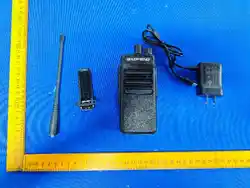
• 1 Radio • 1 Li-Ion battery pack
• 1 Power Adapter • 1 Belt clip
• 1 Antenna • 1 USER‘S MANUAL
If any item is missing, please verify with your dealer.
Chapter2. Charging the Battery
2.1 Charging the Battery Pack
The Li-ion battery pack is not charged at the factory; please charge it before use. Charging the battery pack for the first time after purchase or extended
storage (more than 2 months) may not bring the battery pack to its normal maximum operating capacity. Best operation will require fully charging/ discharging
the battery two or three times before the operating capacity will reach its best performance. The battery pack life may be depleted when it’s operating time
decreases even though it has been fully and correctly charged. If this is the case, replace the battery pack.
2.2 Charger Supplied
Please use the specified charger provided by our company. Other models may cause explosion and personal injury. After installing the battery pack, and if the
radio displays low battery with a voice prompt, please charge the battery.
2.3 Use Caution with the Li-ion Battery
a. Do not short the battery terminals or throw the battery into a fire. Never attempt to remove the casing from the battery pack, as our company cannot be held
responsible for any accident caused by modifying the battery.
b. The ambient temperature should be between 5℃-40℃ (40˚F - 105˚F) while charging the battery. Charging outside this range may not fully charge the
battery.
c. Please turn off the radio before inserting it into the charger. It may otherwise interfere with correct charging.
d. To avoid interfering with the charging cycle, please do not cut off the power or remove the battery during charging until the green light is on.
e. Do not recharge the battery pack if it is fully charged. This may shorten the life of the battery pack or damage the battery pack.
f. Do not charge the battery or the radio if it is damp. Dry it before charging to avoid damage.
WARNING
!
When keys, ornamental chain or other electric metals contact the battery terminal, the battery may become damage or injure a human. If the
battery terminals are short circuited it will generate a lot of heat. Take care when carrying and using the battery. Remember to put the battery or
radio into an insulated container. Do not put it into a metal container.
2.4 How to Charge
a. Plug the AC adaptor into the AC outlet, and then plug the cable of the AC adaptor into the DC jack located on the back of the charger. The indicator light
blinks orange and is then ready to charge a battery.
b. Plug the battery or the radio into the charger. Make sure the battery terminals are good in contact with charging terminals. The indicator light turns to red---
charging begins.
c. It takes approximately 2-5 hours to fully charge the battery. When the lamp lights green, the charging is completed. Remove the battery or the radio unit
with its battery from socket.
When charging a radio (with battery) the indicating lamp will not turn into green to show the fully charged status if the radio is powered on. Only
when the radio is switched off will the lamp indicate normal operation. The radio consumes energy when it is power-on, and the charger cannot
detect the correct battery voltage when the battery has been fully charged. So the charger will charge the battery in constant voltage mode and fail
to indicate correctly when the battery has been fully charged.
2.5 LED Indicator
STATUS LED
No Battery Green and red alternately flashing
Charge Normally Red
Fully Charged Green
Trouble Red blinks fast for a long time
NOTE
:
Trouble means battery too warm, battery short-circuited or charger short-circuited.
2.6 How to Store the Battery
a. If the battery needs to be stored, keep it in status of 80% discharged.
b. It should be kept in low temperature and dry environment.
c. Keep it away from hot places and direct sunlight.
» Do not short circuit the battery terminals.

» Never attempt to remove the casing from the battery pack.
» Never store the battery in unsafe surroundings, as a short may cause an explosion.
» Do not put the battery in a hot environment or throw it into a fire, as it may cause an explosion.
2.7 Using the Type-C USB Charger
The micro-USB charger is a handy port that allows you to conveniently charge your Li-ion battery pack.
1. Make sure your radio is turned OFF.
2. Plug the Type-C USB cable into the Type-C USB charging port on your battery. Connect the other end of the micro-USB charger to wall power outlet.
3. An empty battery will be fully charged in 4 hours.
4. The battery meter on LCD will move to indicate the battery is charging.
Note:
• It is recommended to power OFF your radio while charging. However, if power is turned on while charging, you may not be able to transmit a
message if the battery is completely empty. Allow time for the battery to charge to 1 bar before attempting to transmit a message.
• For optimal battery life, remove the radio from the charger within 6 hours. Do not store the radio while connected to the charger.
Chapter3. Installation of Accessories
Before the radio is ready for use we need to attach the battery pack, as well as charge the battery.
3.1 Installing/ Removing the Antenna
a. Installing the Antenna: Screw the antenna into the connector on the top of the transceiver by holding the antenna at its base and turning it clockwise until
secure.
b. Removing the Antenna: Turn the antenna counter-clockwise to remove it.
3.2 Installing the belt clip
a. At the back of the radio there are two parallel screws mounted above the battery, remove these and thread them through the holes on the belt clip as you
screw them back into the radio body.
b. Removing the Belt Clip: Unscrew counter-clockwise to remove the belt clip.
3.3 Installing the battery pack
Before attaching or removing the battery make sure your radio is turned off by turning the power/volume knob all the way counter-clockwise.
a. Make sure the battery is aligned in parallel with the radio body with the lower edge of the battery about 1-2cm below the edge of the radio.
b. Once aligned with the guide-rails, slide the battery upward until you hear a click as the battery locks in place.
Remove the battery pack
To remove the battery, press the battery release above the battery pack, as you slide the battery downward.
3.4 Installing the Additional Speaker/Microphone (Optional)
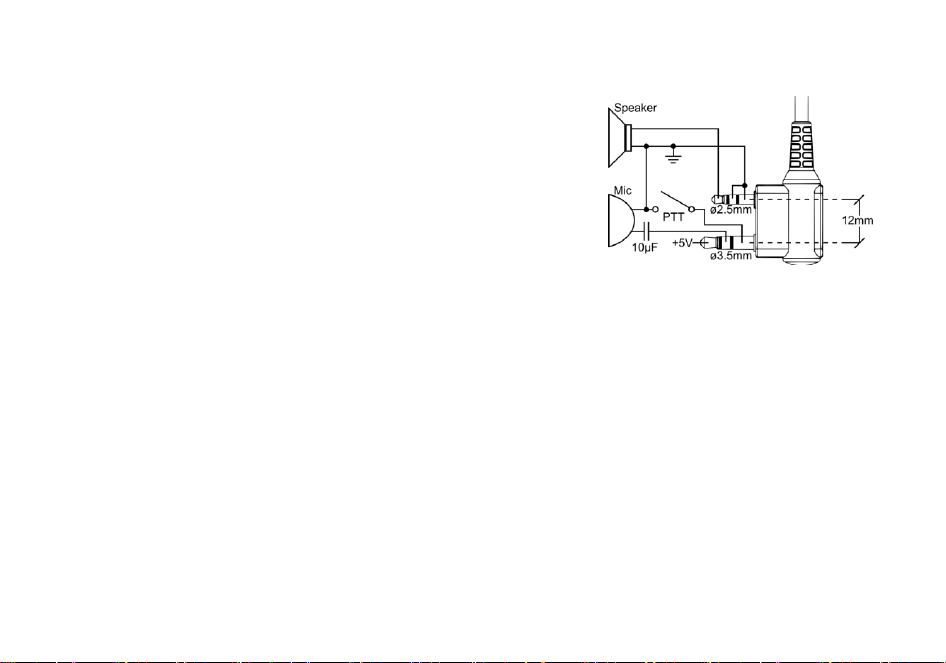
Pry open the rubber MIC-Headset jack cover and then insert the Speaker / Microphone plug into
the double jack.
Chapter4. Radio Overview
4.1 Buttons and controls of the radio
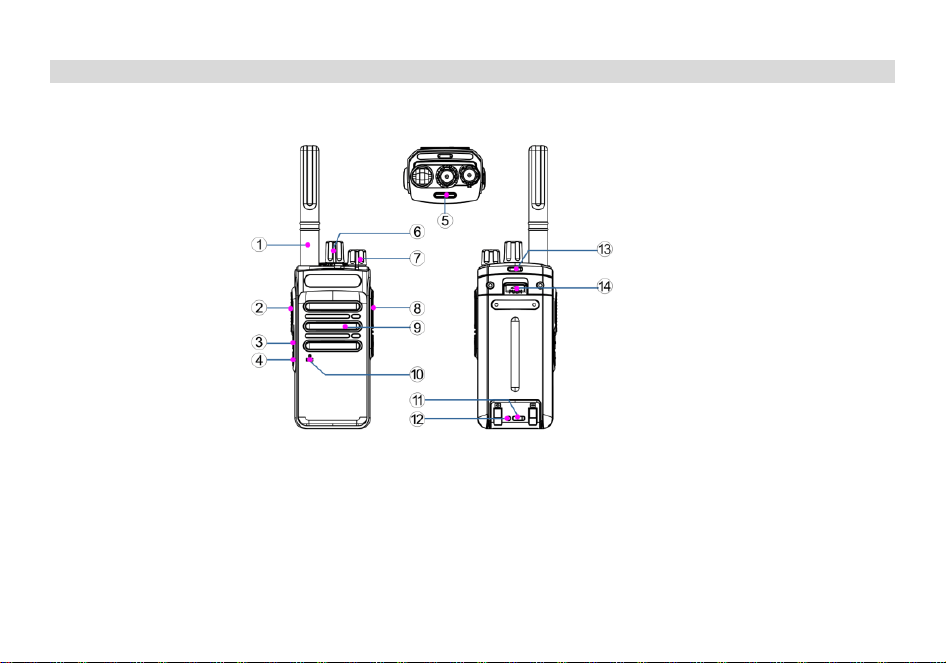
1. Antenna 2. PTT Transmit Button 3. SK1 (Custom Side Key)
4. SK2 (Custom Side Key) 5. TX-RX Status Indicator 6. Power/Volume Knob
7. Power/Volume Knob 8. Accessory Port 9. Speaker
10. Microphone (MIC) 11. Type-C Charging Port 12.Charging Indicator
13. Lanyard Hole 14. Battery Release Button

Side Key [SK1/SK2] Customization Function
Programmable Key Function List
Option Description
None No function is associated with this key, and pressing this key has no effect.
Zone Switch Press this key to switch to a zone.
Scan On/Off Press this key to turn the scan function on or off.
High/Low Power
Selection
Press this key to switch between high and low power.
Monitor Press this key to switch to monitor squelch mode, and press this key again to return to receive squelch mode.
Battery Level
Announcement
Quickly access the battery level. The battery level is announced by voice: High Battery, Medium Battery, Low
Battery.
Tight/Normal Squelch Press this key to switch the squelch depth.
VOX On/Off Press this key to turn the VOX function of the current channel on or off.
Encryption On/Off Press this key to turn the digital encryption function on or off (valid in digital mode).
Useless Channel
(Temporary) Delete
When the scan pauses, press this key to temporarily delete the noise channel that is not needed temporarily.
This channel will not be detected in the next scan, and it will be restored in the scan list when the terminal
restarts the scan.
Repeater Off-Network Press this key to switch the terminal between direct mode and relay mode (valid in relay mode).
Solo Work On/Off Press this key to switch the solo work function between on and off.
Noise Reduction On/Off Press this key to switch the noise reduction function between on and off.
All Prompt Tones On/Off Press this key to enable or disable all prompt tones.
Flashlight Press this key to turn the walkie-talkie's flashlight function on or off. *Hardware support is required; some models
do not have this hardware.
PTT 1~6 Call shortcut key. After pressing the one-touch call/menu, send the corresponding call, short message or
auxiliary service function.
Query Direct Mode Dual
Slot Status
Press this key to query.
Channel Lock Press this key to turn the channel lock function on or off. In the channel lock state, switching channels is invalid.
All CTCSS/DCS On/Off Press this key to turn off or restore all CTCSS/DCS. Valid in analog channels with CTCSS/DCS set.
Long and short press functions for SK1/SK2 keys can be programmed via CPS software → Public → Key Function and written to the radio.
Local programming path: Press [MENU] to enter main menu → Settings → Radio Settings → Key Function.
4.2 Status Indications
The status LED has a very simple and traditional design.
LED Indicator Radio Status
Constant Red Transmitting.
Constant Green Receiving.
Chapter 5. Basic Operations
Power On and Power Off
To power on, rotate the [Power Switch/Volume Control] knob clockwise until a "click" sound is heard. To power off, rotate this knob counterclockwise until a
"click" sound is heard.
If the voice prompt function is enabled, there will be a voice prompt for the current channel number.
Volume Adjustment
After power-on, rotate the volume knob clockwise to increase the volume, and counterclockwise to decrease the volume.
Zone Selection
A zone is a group of channels. You can classify channels with the same properties into one zone for effective management of existing channels. This device
supports 16 zones, and each zone can contain a maximum of 16 channels.
Select a zone via the pre-programmed [Zone Switch] key (side key).
If the dealer has set a [Zone Switch] shortcut key for you, press this shortcut key to switch to the desired zone.

Channel Selection
A channel is a channel for signal transmission. Rotate the [Channel Knob] to select a channel.
If the terminal has the voice announcement prompt tone function enabled, the terminal will announce the channel number when powered on or when the
[Channel Knob] is rotated to switch channels.
Call Services
Program the channel via CPS programming software. Digital channels need to be configured with basic parameters such as digital contacts, color codes, and
receive group lists.
Contact List
Lists the contact information stored in the walkie-talkie. From this list, you can select the target contact ID and call type.
Contact Name
You can set an alias for a contact. The alias can be 1 to 16 characters (one Chinese character occupies two characters).
Contact ID
You can set an ID for members of digital calls. Options:
Private Call ID: The identifier of the target terminal. Value range: 1~16776415
Group Call ID: This is a user ID belonging to a group member, used to identify a group. Value range: 1~16776415
All Call ID: Used to initiate an All Call. ID number: 16777215.
Call Types
Lists optional call types.
Private Call: A single call sent by one user to another user.
Group Call: A one-to-many call initiated by one user to a group of users.
All Call: A call from a single user to all other users. No special time slot or channel is used during the communication of an All Call.
CPS Setting Path: DMR Digital Parameters >> Contacts.
Receive Group List
The Receive Group List function allows users to receive multiple group calls on one digital channel.
You can set 32 Receive Group Lists, and each group list can add a maximum of 16 group calls (add "Available Contacts" to "Members"). The set group list
can be associated with channels for use.
CPS Setting Path: DMR Digital Parameters >> Receive Group List.
Color Code
A color code can identify a system. Users who need to communicate with each other must set the same color code; the terminal will not respond to channel
activities that do not match the preset color code, as it will judge them as communications between other systems. However, when you want to monitor
multiple systems (set different color codes on multiple digital channels), you can enable the scan function to allow the terminal to monitor activities of multiple

systems. Value range: 0~15, step value: 1, default value: 1.
Note: Digital channels should have the same color code as the repeater.
Digital Calls
You can make Private Calls, Group Calls, or All Calls to preset contacts on the current digital channel.
Initiate a Call
You can initiate a call through the following operations:
In standby mode, press and hold the [PTT] key to directly initiate a Private Call, Group Call, or All Call to the preset Private Call contact, Group Call contact, or
All Call contact on the current digital channel.
When the dealer configures the call target of [PTT X] as a Private Call contact or Group Call contact, press the [PTT X] shortcut key and then press the [PTT]
key to initiate a call.
During communication, place the walkie-talkie vertically 2.5-5 centimeters away from your mouth, and the red LED will light up.
Release the [PTT] key to receive a response.
If you set the channel transmit power to "Low" and cannot make a call successfully, you can use the pre-programmed [High/Low Power Selection] key to
temporarily switch to high power for transmission.
Answer and Reply to a Call
When a call is received, you can answer it without any operation.
During a Private Call or Group Call, press and hold the [PTT] key to reply to the call within the preset time.
End a Call
Private Call/Group Call: When neither party presses the [PTT] key to speak and the call hold time is exceeded, the terminal will end the Private Call/Group
Call.
All Call: When the caller releases the [PTT] key, the terminal will end the All Call.
Analog Calls
An analog call is a call initiated on an analog channel.
To transmit, press and hold the [PTT] key and speak into the microphone. To receive, release the [PTT] key.
Scan
Scanning means that when the terminal detects activity on a certain channel, it will stay on that channel to listen. A Scan List is a set of monitored channels.
You can create a maximum of 32 Scan Lists, and at least one Scan List must be retained. Each Scan List can have a maximum of 16 channels (including
analog channels and digital channels).
Enable Scan
Press the pre-programmed [Scan On/Off] key to enable the scan function.
When enabling scan, ensure that the current channel has the corresponding Scan List added.

Exit Scan
In the scan state, press the [Scan On/Off] key to exit.
CPS Programming Path:
Scan Group List >> Add Channel Members >> Priority Channel Setting.
Channel Information >> Digital Channel/Analog Channel >> Scan List (configure the list to the channel).
Voice Encryption
Voice encryption uses a key to encrypt voice or data. The receiver can only decrypt it if the key is consistent, thereby preventing voice and data from being
eavesdropped. If your walkie-talkie receives an encrypted call with a different key value, you will hear blurred transmission sound.
Press the pre-programmed [Encryption On/Off] key to turn the digital encryption function on or off.
Note: Encryption applies to digital channels and only encrypts the current channel.
CPS Programming Path:
DMR Digital Parameters >> Voice Encryption >> Key Value.
Channel Information >> Digital Channel >> Voice Encryption >> Encryption Key. Encryption options:
Random Key Encryption: Check to enable the random key encryption function; uncheck to disable it.
Multi-Key Decryption: Check to enable the multi-key decryption function; uncheck to disable it.
Voice Encryption List
You can associate any defined key to this channel. The key value is used for encryption during transmission and decryption during reception. Both the
transmitting and receiving parties must use the same key to communicate. Keys are for digital channels, and you can add a maximum of 30 key lists.
Encryption keys must be programmed via CPS, including key name, encryption type (ARC4, AES128, AES256), key value, and key ID.
ARC4: The key value length is 10 bits, value range: 0~F.
AES128: The key value length is 32 bits, value range: 0~F.
AES256: The key value length is 64 bits, value range: 0~F.
The key ID is an index in the encryption key list, mapped to each key value. You can modify the key ID, but it must be unique. Value range: 1~255.
DMR Emergency Alarm
The alarm function allows users to request assistance in an emergency. The alarm function can only be triggered by pressing the [Emergency Alarm] key if
the channel is configured with an alarm system.
Initiate an Alarm
On a digital channel, press the pre-programmed [Emergency Alarm] key to initiate an alarm to pre-programmed contacts.
During an emergency call or alarm call, if the terminal has the automatic emergency call function enabled, you can speak without pressing the [PTT] key.
When the number of automatic emergency calls exceeds the number pre-programmed by the dealer, press and hold the [PTT] key to initiate an emergency
call again.

Answer an Alarm
When an emergency call is received, you can answer it without any operation.
End an Alarm
Press the pre-programmed [Emergency Alarm] key.
You can exit the alarm prompt by switching channels or powering off.
Note: The emergency alarm system applies to digital channels and only to the current channel.
CPS Programming Path:
Digital Alarm >> Alarm Type >> Alarm Mode.
Channel Information >> Digital Channel >> Transmit >> Emergency Alarm System, configure to the channel.
Direct Mode Dual Time Slot
Direct Mode Dual Capacity refers to the Time Division Multiple Access (TDMA) direct mode of DMR digital walkie-talkies. In a 12.5 kHz channel bandwidth, it
supports two simultaneous DMR digital terminal transmissions. Walkie-talkies in the same group must use the same time slot to ensure that groups using
Time Slot 1 do not interfere with groups using Time Slot 2.
CPS Programming Path: Channel Information >> Digital Channel >> Direct Mode Dual Time Slot >> Check.
Checked: Walkie-talkies in the same group must use the same time slot (Time Slot 1 or Time Slot 2) for communication.
Unchecked: Disable the Direct Mode Dual Time Slot function.
Note: After enabling Direct Mode Dual Time Slot communication, walkie-talkies need to be on the same time slot to achieve communication.
VOX (Voice-Activated Transmission)
VOX (Voice-Activated Transmission) means that the transmission function can be directly triggered by voice. When the voice detected by the microphone
meets the transmission conditions, the terminal will automatically transmit the voice, and you can speak directly without pressing the [PTT] key.
Press the pre-programmed [VOX On/Off] key to enable the VOX function of the current channel.
One-Touch Call and One-Touch Access
One-Touch Call is only applicable to digital channels. When the dealer configures the call target of [PTT] as a Private Call contact or Group Call contact, press
the pre-programmed [PTT] key and then press the [PTT] key to initiate a Private Call or Group Call.
Call shortcut key: After pressing the one-touch call, send the corresponding call, short message, or other application functions.
Off-Network
You can use this option to set whether walkie-talkies can communicate off-network when relay services are unavailable.
Off: The off-network function is invalid on the current channel, and off-network communication is not allowed.
On: Users can use the off-network function on the current channel. After enabling the off-network function, the host transmits using the receive frequency, and
the host in relay mode can receive signals from off-network hosts.
Note: The off-network function can only be set when the transmit frequency and receive frequency of the channel are different (i.e., relay mode). When the

transmit frequency is the same as the receive frequency, the off-network setting will prompt that the setting item is invalid. After enabling the off-network
function, press the pre-programmed [Repeater Off-Network] key to activate the function, and the host transmits using the receive frequency.
CPS Programming Path: Overall Machine Parameters >> Keys >> Side Key 1 or Side Key 2 (select "Repeater Off-Network").
Transmit Permit
Transmit Permit conditions restrict the transmit permission when there is activity on the channel.
Always Permit: The terminal will transmit directly when the [PTT] key is pressed, regardless of whether there is activity on the channel. The default value is
Off.
Channel Idle: Transmission is allowed when the channel is idle.
Transmit Time Out (TOT)
The Transmit Time Out (TOT) is the maximum time allowed for a single call transmission. This function can prevent the current channel from being occupied
by a single user for too long.
Always Permit: Turn off the transmission time limit; continuous transmission is allowed without time restriction.
15~495 Seconds: The maximum transmission time is 15 seconds to 495 seconds, with a step value of 5 seconds.
Other Functions in Analog Mode
CTCSS/DCS (Continuous Tone-Coded Squelch System/Digital-Coded Squelch)
CTCSS/DCS is a signaling below the audio frequency loaded on the carrier wave. The receiver will turn on the speaker only when it receives a CTCSS/DCS
that matches the one set by the transmitter. It provides 51 groups of standard CTCSS (analog squelch) and also supports non-standard CTCSS. It provides
105 groups of standard DCS (digital squelch) and also supports non-standard DCS. CTCSS/DCS types are as follows:
OFF: The terminal does not detect analog squelch CTCSS/digital squelch DCS when receiving a signal.
Analog Squelch CTCSS: The terminal detects whether the analog squelch CTCSS matches when receiving a signal.
Digital Squelch DCS: The terminal detects whether the digital squelch DCS matches when receiving a signal.
Reverse Digital Squelch DCS: The terminal detects whether the digital squelch DCS matches after receiving a signal, and ends the communication when the
reverse digital squelch DCS is detected.
CPS Programming Path: Channel Information >> Analog Channel >> Receive >> CTCSS/DCS Decoding >> Transmit >> CTCSS/DCS Encoding.
Bandwidth Setting
Set the bandwidth for analog channels.
Narrow Band (12.5KHz).
CPS Programming Path: Channel Information >> Analog Channel >> Channel Spacing.
In normal mode, encryption applies to the current channel. Encryption is enabled automatically when switching to that channel.
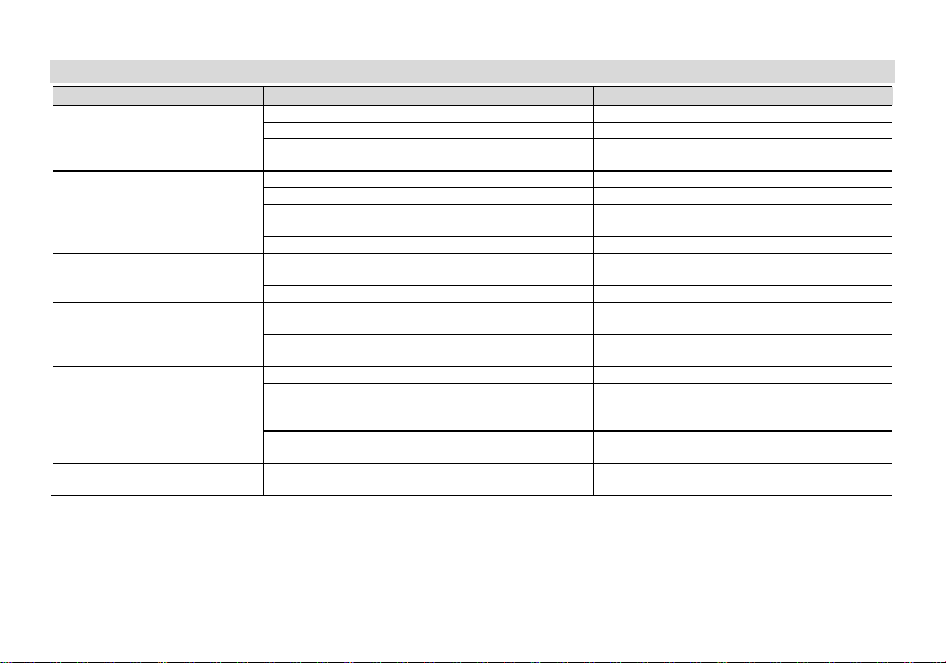
Appendix A. – Trouble shooting guide
Phenomena Analysis Solution
You cannot turn on the radio.
The battery may be installed improperly. Remove and reattach the battery.
The battery power may run out. Recharge or replace the battery.
The battery may suffer from poor contact caused by dirty
or damaged battery contacts.
Clean the battery contacts or replace the battery.
During receiving, the voice is weak
or intermittent.
The battery voltage maybe low. Recharge or replace the battery.
The volume level may be low. Increase the volume.
The antenna maybe loose or maybe installed incorrectly.
Turnoff the radio, and then remove and reattach
the antenna.
The speaker maybe blocked. Clean the surface of the speaker.
You cannot communicate with
other group members.
The frequency or signaling type maybe inconsistent with
that of other members.
Verify that your TX/RX frequency and signaling type
are correct.
You may be too far away from other members. Move towards other members.
You hear unknown voices or noise.
You may be interrupted by radios using the same
frequency.
Change the frequency, or adjust the squelch level.
The radio in analog mode maybe set with no signaling.
Request your dealer to set signaling for the current
channel to avoid interference
You are unable to hear anyone
because of too much noise and
hiss.
You may be too far away from other members. Move towards other members.
You may be in an unfavorable position. For example, your
communication may be blocked by high buildings or
blocked in an underground area.
Move to an open and flat area, restart the radio,
and try again.
It may be the result of external disturbance (such as
electromagnetic interference).
Stay away from equipment that may cause
interference.
The radio keeps transmitting.
VOX may be turned on or the headset is not installed in
place
Turn off the VOX function. Check that the
headphones are in place.
NOTE: If the above solutions cannot fix your problems, or you may have some other queries, please contact your dealer for
more technical support.
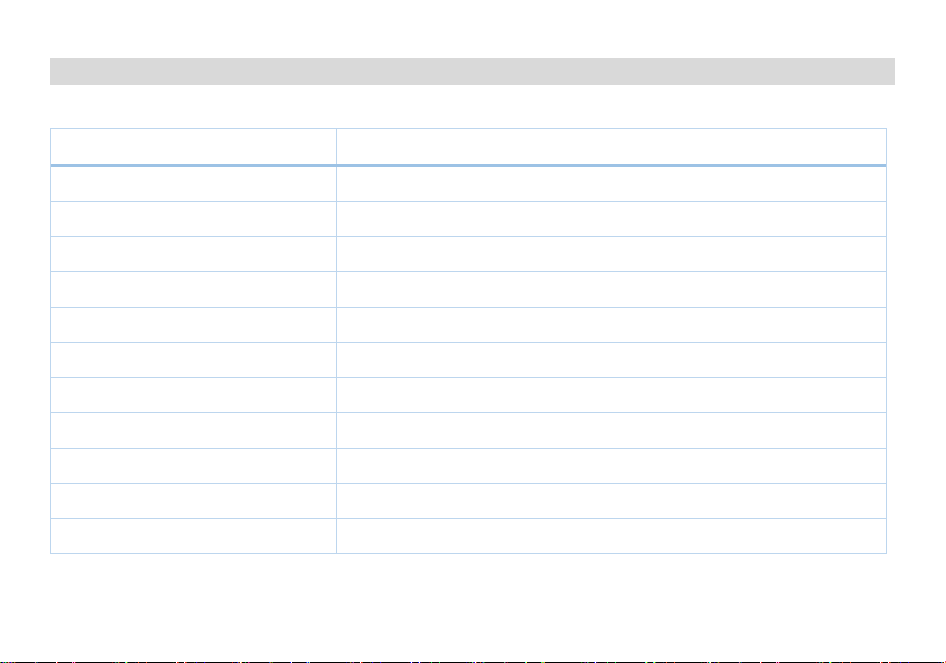
Appendix B. - Technical Specifications
General Specifications
Frequency Range Receive and Transmit: 400-470MHz
Stored Channels 256 channels (digital and analog)
Zones 16 zones (16 channels/zone)
Scan Lists 32 scan lists (16 members/list)
DMR Contacts 200 contacts (Private Call, Group Call, All Call)
Receive Groups 32 groups (16 members/group)
Shortcut Messages 32 messages
Frequency Stability ±1.0ppm
Operating Temperature -20℃~+60℃
Operating Voltage DC7.4V ±20% (Rechargeable Lithium Battery)
Dimensions 139×60×41mm (including knobs, excluding antenna)
Weight 289g (including belt clip)

Transmit Specifications
RF Power ≤5W
Transmit Current Analog: ≤2.6A; Digital: ≤1.2A
Standby Current ≤0.15A
FM Modulation Mode [email protected]
4FSK Digital Modulation Mode 12.5KHz Data Only: 7K60FXD; 12.5KHz Data and Voice: 7K60FXE
Modulation Distortion <5%
Signal-to-Noise Ratio
Adjacent Channel Power ≤-65dB; ≤-60dB
Audio Response +1~-3dB
Antenna Port Spurious Emissions 9KHz-1GHz: ≤-20dBm; 1GHz-12.75GHz: ≤-20dBm
Digital Protocol ETSI-TS102 361-1,-2
Vocoder Type AMBE+2 TM

Receive Specifications
Analog Receive Sensitivity -122dBm (12dB SINAD)
Digital Receive Sensitivity -120dBm (BER≤5%)
Audio Power 1W
Audio Distortion <10%
Audio Response +1~-3dB
Spurious Response ≥70dB
Intermodulation ≥58dB
Adjacent Channel Selectivity ≥60dB
Receive Current ≤380mA
FM Noise ≥40dB @12.5KHz
*All specifications are subject to change without prior notice or liability.

FCC Statement
This device complies with Part 15 of the FCC rules. Operation is subject to the following two conditions:
1) this device may not cause harmful interference, and
2) this device must accept any interference received, including interference that may cause undesired operation.
Note: This equipment has been tested and found to comply with the limits for a Class B digital device, pursuant to part 15 of the FCC Rules. These
limits are designed to provide reasonable protection against harmful interference in a residential installation.
This equipment generates uses and can radiate radio frequency energy and, if not installed and used in accordance with the instructions, may
cause harmful interference to radio communications. However, there is no guarantee that interference will not occur in particular installation. If
this equipment does cause harmful interference to radio or television reception, which can be determined by turning the equipment off and on, the
user is encouraged to try to correct the interference by one or more of the following measures:
--Reorient or relocate the receiving antenna.
--Increase the separation between the equipment and receiver.
--Connect the equipment into an outlet on a circuit different from that to which the receiver is connected.
--Consult the dealer or an experienced radio/TV technician for help.
Changes or modifications not expressly approved by the party responsible for compliance could void the user’s authority to operate the
equipment.
RF Exposure Statement
SAR tests are conducted using standard operating positions According FCC standard with the device transmitting at its highest certified power
level in all tested frequency bands, although the SAR is determined at the highest certified power level, the actual SAR level of the device while
operating can be well below the maximum value.
This model product has been tested and meets the RF exposure guidelines with the test distance 25 mm for face up condition. The highest SAR1g
value is 0.122W/Kg for face held and 0.779W/Kg for Body worn. The use of belt clips, holsters and similar accessories should not contain metallic
components in its assembly. The use of accessories that do not satisfy these requirements may not comply with RF exposure
requirements, and should be avoided.
This radio complies with RF exposure limits for general population/uncontrolled RF exposure environment at operating duty factors of up to 50%.
NOTE: All specifications may be modified without prior notice or liability. Thank you.
PO FUNG ELECTRONIC (HK) INTERNATONAL GROUP COMPANY LIMITED
ADD: Room 1508, 15/F, Office Tower II, Grand Plaza, 625 Nathan Road, Kowloon, Hong Kong
Http://www.baofengradio.com www.pofungshop.com
Print version: BF-DM-1905 V03
Disclaimer
The Company endeavors to achieve the accuracy and completeness of this manual, but no warranty of accuracy or reliability is given. All the specifications and designs
are subject to change without notice due to continuous technological development. No part of this manual may be copied, modified, translated, or distributed in any
manner without the prior written consent of the Company.
We do not guarantee, for any particular purpose, the accuracy, validity, timeliness, legitimacy or completeness of the third-party products and contents involved in this
manual.