2026年1月20日
Ambient
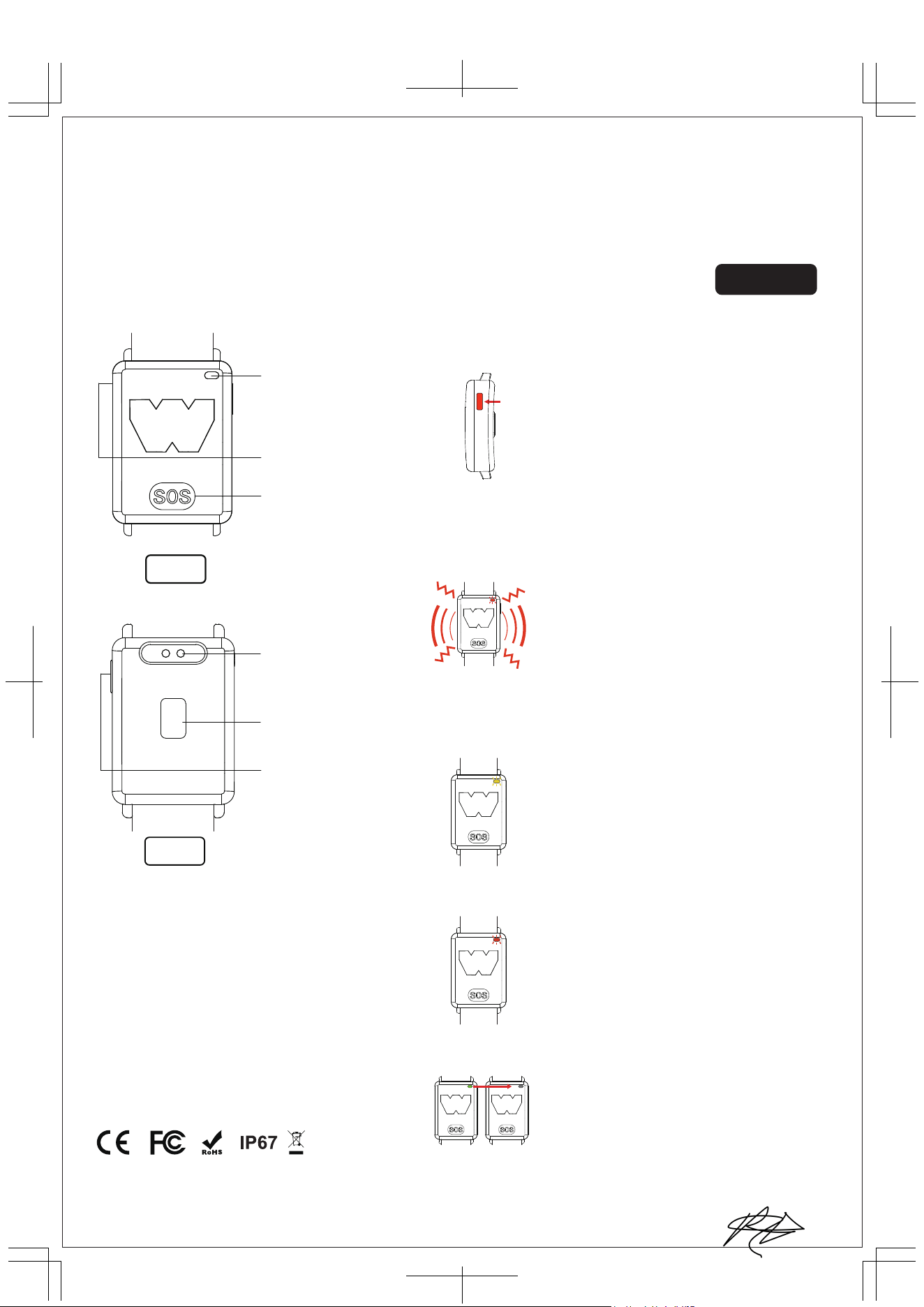
temperature
sensor
Power button
SOS button
Indicator light
Charging port
Skin temperature
sensor
Power On:
Press and hold the power button for long press
and the green light turns on.
Power Off:
Press the power button for long press and when the red
light turns on then release the button to turn off the power
Check the power is on
• When the power is on, press the power button
and the green light will turn on.
• The green light will turn on once every 90 seconds.
Power On/Off:
Please use the USB cable that comes
with the product.
1. The green light stays on while
charging.
2. When fully charged, the green
light turns off.
Charging method
Charging
Charging
fnished
Trigger condition: Core body temperature≥ 37.8 °C
Red light flashes 3 times per second
Vibration alerts continuously per second
Duration: 1 minute
When an abnormality is detected
Warning method: 2 come in 1 time
1.Core body temperature drops below 37.8 °C
2.Turn off the wristband
How to stop ( optional) :
Yellow light flashes 3 times per second
Duration: 1 minute
Warning method:
1.Ambient temperature drops below 48°C
2.Turn off the wristband
How to stop (optional) :
When the battery voltage is below 3.3V, it will enter
low battery warning mode and the red light will flash
slowly 3 times per second.
1. With the power on mode, charge the battery until
the battery voltage becomes 3V or higher.
2. With the power off mode, charge the battery.
3. Press the power button to shut down.
Abnormal ambient temperature alarm
Low battery alarm
Based on 2.4 GHz SOC, ARM Cortex-M4F
Output power +4dBm (2.5 mW)
NFC enabled, Ãmbedded NFC tag-A antenna
Connectivity
All devices have unique iD's with 8-10 figures
Device lD
Trigger condition: Ambient temperature ≥48°C
How to stop the alarm:
尺寸:182×257mm
Connectivity: WakeCap Connected Mesh Network
WWA-1 Instruction Manual
Front
Back
WWA-1
2026年1月20日
尺寸:182×257mm
• When the magnetic charging cable is connected to the adapter, please be careful not to let it touch other metal objects.
• Do not pull the charging cable excessively or let objects such as chairs press on the charging cable to avoid breaking the line.
• Please use the charging cable that comes with the device for charging. When charging, use a 5V/1A adapter or computer USB port.
Do not use a power supply above 2A, otherwise it may cause device failure.
• This device does not support fast charging.
• If it is not charged for more than 3 months, the battery performance may deteriorate. Please charge regularly to maintain the best condition.
At start of the Use:
Do not pull the power button.Don’t insert any objects into the small holes of the device.
When using the product:
• Wear this product on the wrist, main unit facing up. For maximum accuracy it should not be covered by clothing.
Don’t wear it over clothing or body part other than wrist.
• Before starting to use the product, make sure that it has power ( green LED flash).
Operating environment:
• This product is not ATEX nor IECEx.
• The LED may be difficult to see in direct sunlight.
• The waterproof performance is not permanent and may degrade depending on the usage environment.
• The color of this product may change because of moisture, perspiration,friction, sunlight,etc.
• Do not subject the product to strong impacts or forces as it may cause deformation or damage.
• Please be careful when using the product as it may catch on or damage surrounding objects.
• In case of skin reaction, stop using the product immediately.
• If the product is damaged, stop using it immediately.
• Do not use the product in an environment that exceeds the product use specifications described in the manual.
Alarm
• This product does not cover all possible health problems that may occur in hot weather.
• Regardless of whether or not the alarm is triggered, if you feel any degradation in your physical condition, please take a break and dehydrate.
If there is no improvement, please consult a physician.
• Even if a physician provides a heat stroke diagnosis, the alarm may not have gone off because of physiological or medical reasons.
Maintenance
Do not disassemble, modify, or replace the battery.
Storage location
Do not store or leave the product in a space subject to high heat or strong heat vibration.
Charging Instructions
Precautions
Connectivity: WakeCap Connected Mesh Network
Product Specifications
• Bodysize:W33.3mmxH14.6mmxD52mm
• Strap size: W22mm
• Material: Body: ABS, Strap: Silicone
• Waterproof/dustproof performance:lP67
• Operating temperature range:-20°C to 80°C
• Alarm volume: About 50-70dB(20cm test distance)
• Battery: Lithium polymer battery 400mAh (Charge times: about 400 times Charge time: about 0.5-1 hour)
• Charging voltage: 5V
• Detection interval: 90 seconds/time
• ON/OFF function: with switch
• Accessories: USB charging cable
• Battery life on one charge:One charge provides a standby time of 30 days (the battery life will be reduced accordingly if an alarm is triggered).
※This product is not a medical device
Please note: the above situations may not be covered by the warranty.

FCC Statement
This device complies with part 15 of the FCC rules. Operation is subject to the following
two conditions: (1) this device may not cause harmful interference, and (2)
this device must accept any interference received, including interference that may cause
undesired operation.
Changes or modifications not expressly approved by the party responsible for compliance
could void the user's authority to operate the equipment.
NOTE: This equipment has been tested and found to comply with the limits for a Class B
digital device, pursuant to part 15 of the FCC Rules. These limits are
designed to provide reasonable protection against harmful interference in a residential
installation. This equipment generates uses and can radiate radio frequency
energy and, if not installed and used in accordance with the instructions, may cause
harmful interference to radio communications. However, there is no guarantee
that interference will not occur in a particular installation. If this equipment does cause
harmful interference to radio or television reception, which can be
determined by turning the equipment off and on, the user is encouraged to try to correct
the interference by one or more of the following measures:
• Reorient or relocate the receiving antenna.
• Increase the separation between the equipment and receiver.
• Connect the equipment into an outlet on a circuit different from that to which the
receiver is connected.
• Consult the dealer or an experienced radio/TV technician for help.
The device has been evaluated to meet general RF exposure requirement. The device
can be used in portable exposure condition without restriction.