USER MANUAL
Headphone
English
INTRODUCTION
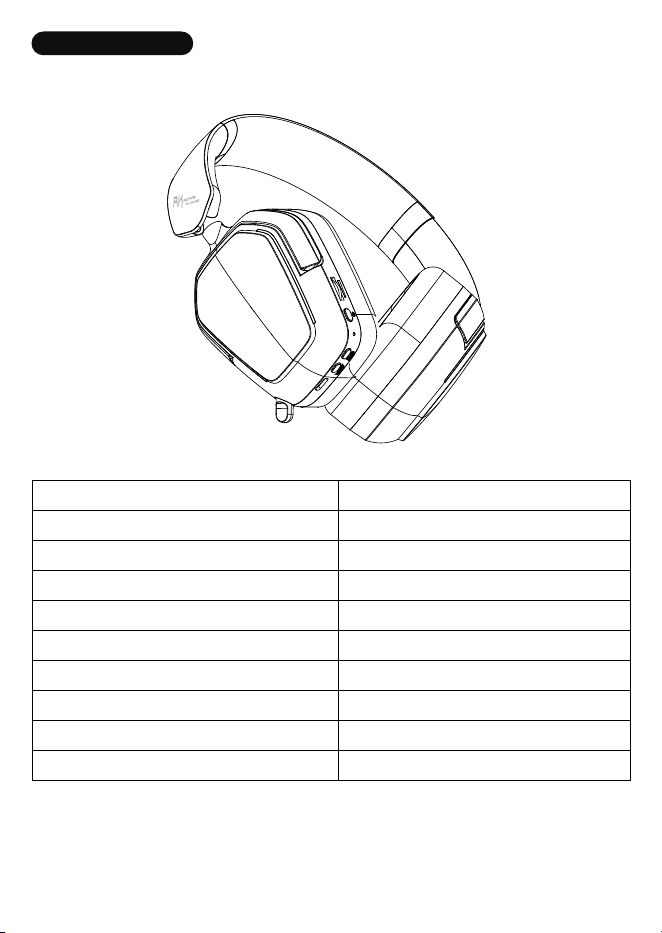
Product Dimensions
Rated Input Power
Maximum Input Power
Speaker Diameter
Speaker Impedance
Headphone Sensitivity
Frequency Response
Microphone Sensitivity
Microphone Frequency Response Range
BT Range
209.1x86.34x189.6±5mm
20 mW
30 mW
φ40mm
32Ω±15%
109dB±3dB
20—20kHz
-38dB±3dB
100—10kHz
360-degree unobstructed 10 metres
FUNCTION KEY GUIDE
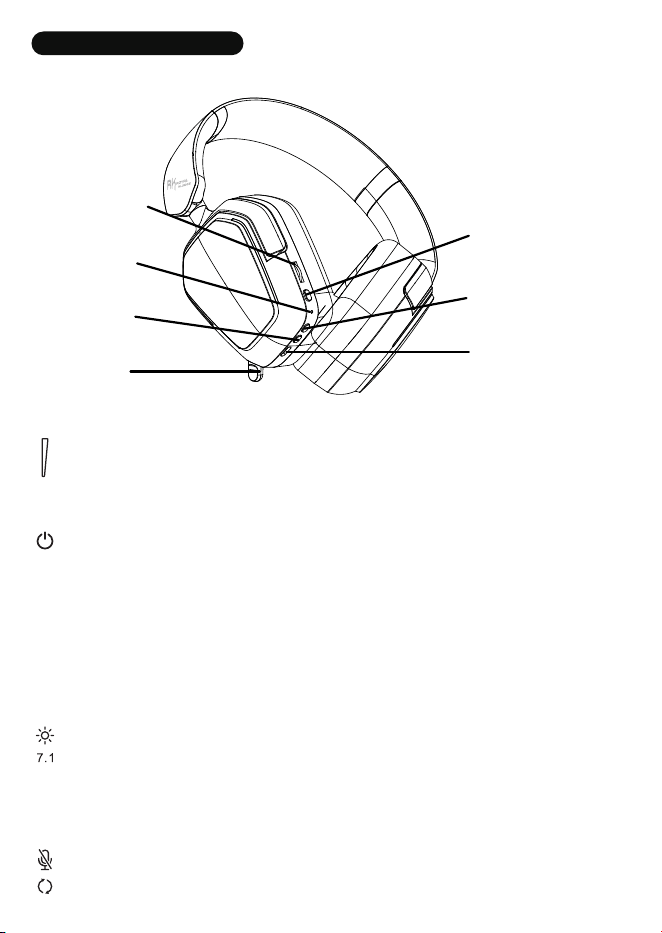
·Long press : On/Off
▶Music time ▶When a call comes in
·Click: Play/Pause Music ·Click: Answer/End Call Function
·Double-click: Previous Song ·Long press : Call Rejection Feature
·Three Click: Next Song
·Scroll up: Volume +
·Scroll down: Volume -
·Click: Turn microphone on/off
·Double-click: Switch 2.4G/BT
·Long press : On/Off
·Click: 7.1 Surround Sound On/Off
·Double-click: Activate the voice assistant
Volume wheel
Indicator light
MIC button/
Mode switch button
Microphone
Power/Multifunction
button
Lighting Button /
Sound Effects Button
Type-C charging port

USB SOUND CARD
▶Plug in the charging adapter:The earphones will automatically power off
and enter charging mode.
▶Connecting to a computer
·In powered-off state:
Inserting the Type-C cable automatically powers on the device and enters
wired mode.
Removing the Type-C cable automatically powers off the device.
·In BT/2.4G mode:
Inserting the Type-C cable automatically switches to wired mode.
Removing the Type-C cable returns to BT/2.4G mode.
BT/2.4G MODE
▶Initial Pairing: Press and hold the power button to switch on. Double-tap the
mode switch key to select either BT or 2.4G operating mode.
·
B
lue indicator flashes slowly: Headphones in BT pairing mode. Search for "1002"
on your device
and select to connect. Once successful, blue light remains steady.
· Green indicator flashes slowly: Headphones in 2.4G pairing mode. Insert transmit-
ter into device. Upon automatic connection success, green light remains steady.
▶Headset Reconnection: After successful pairing, the headset will automatically
reconnect to the corresponding device or transmitter in its active mode.
▶Connecting Additional Devices: In Bluetooth mode, press the power button five
times to disconnect from the current device. The blue light will slow-flash, indicating
readiness for a new device connection.
▶Reset: Should the device malfunction, press and hold the power button to reset
and restart.

CHARGING
In BT/2.4G mode: BT/2.4G automatically deactivates;
During charging: Red light remains steadily illuminated
When battery is fully charged: Indicator light extinguishes

FCC WARNING
This device complies with part 15 of the FCC Rules. Operation is subject to the
following two conditions: (1) This device may not cause harmful interference, and (2)
this device must accept any interference received, including interference that may
cause undesired operation.
Any changes or modifications not expressly approved by the party responsible for
compliance could void the user's authority to operate the equipment.
This equipment has been tested and found to comply with the limits for a Class B
digital device, pursuant to part 15 of the FCC Rules. These limits are designed to
provide reasonable protection against harmful interference in a residential
installation. This equipment generates, uses and can radiate radio frequency energy
and, if not installed and used in accordance with the instructions, may cause harmful
interference to radio communications. However, there is no guarantee that
interference will not occur in a particular installation. If this equipment does cause
harmful interference to radio or television reception, which can be determined by
turning the equipment off and on, the user is encouraged to try to correct the
interference by one or more of the following measures:
—Reorient or relocate the receiving antenna.
—Increase the separation between the equipment and receiver.
—Connect the equipment into an outlet on a circuit different from that to which the
receiver is connected.
—Consult the dealer or an experienced radio/TV technician for help.
FCC Radiation Exposure Statement
This equipment complies with FCC radiation exposure limits set forth for an
uncontrolled environment .
This transmitter must not be co‐located or operating in conjunction with any other
antenna or transmitter.

ISED STATEMENT
This device contains licence‐exempt transmitter(s)/receiver(s) that comply with
Innovation, Science and Economic Development Canada's licence‐exempt RSS(s).
Operation is
subject to the following two conditions:
(1) This device may not cause interference.
(2) This device must accept any interference, including interference that may cause
undesired operation of the device.
Cet appareil contient des émetteurs/récepteurs sans licence qui sont conformes
aux RSS sans licence d'Innovation, Sciences et Développement économique
Canada. L'exploitation est soumise aux deux conditions suivantes:
(1) Cet appareil ne doit pas causer d'interférences.
(2) Cet appareil doit accepter toute interférence, y compris les interférences qui
pourraient causer un fonctionnement indésirable de l'appareil.
Any changes or modifications not expressly approved by the party responsible for
compliance could void the user’s authority to operate the equipment.
Tous les changements ou modifications non expressément approuvée par le
responsible de la conformité pourrait vider l’utilisateur est habilité à exploiter
l’équipemen.
ISEDC Radiation Exposure Statement:
This equipment complies with ISEDC RF radiation exposure limits set forth for an
uncontrolled environment.
This transmitter must not be co‐located or operating in conjunction with any
other antenna or transmitter.
Cet appareil est conforme aux limitesd’exposition de rayonnement RF ISEDC
établiespour un environnement non contrôlé.
Cetémetteur ne doit pas être co‐implanté oufonctionner en onjunction avec toute
autreantenne ou transmetteur.

BATTERIES
A warning that batteries (battery pack or batteries installed) shall not be exposed
to excessive heat such as sunshine, fire or the light.
1) Replacement of a battery with an incorrect type that can defeat a safeguard;
2) Disposal of a battery into fire or a hot oven, or mechanically crushing or cutting
of a battery, that can result in an explosion;
3) Leaving a battery in an extremely high temperature surrounding environment
that can result in an explosion or the leakage of flammable liquid or gas;
4)A battery subjected to extremely low air pressure that may result in an explosion
or the leakage of flammable liquid or gas.
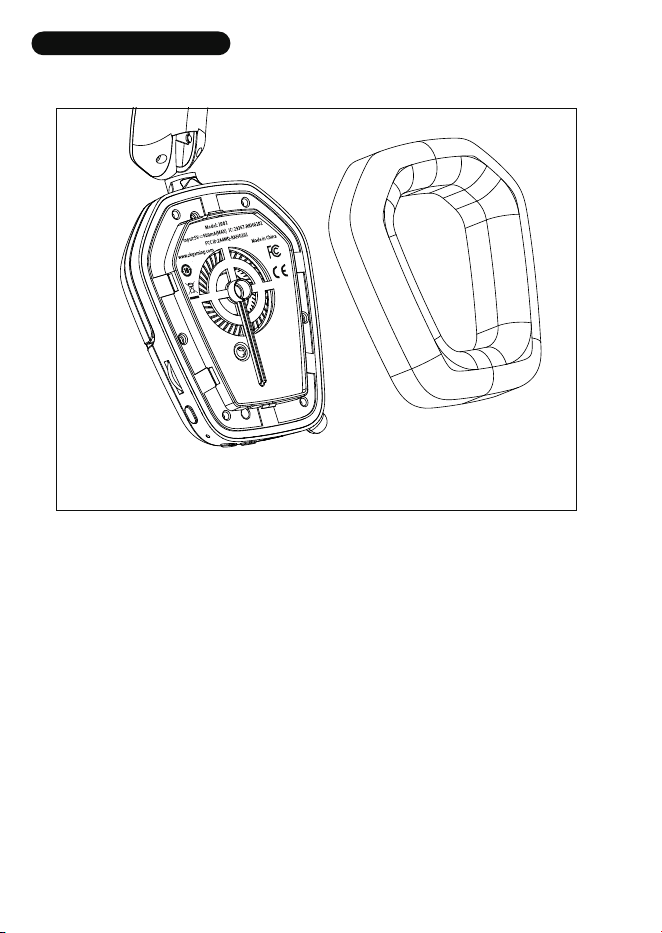
Product nameplate information is placed here.
※Note:
Since the product nameplate is located inside the headphones, please handle with
care during disassembly!
VIEW VERIFICATION
制造商:
京恒腾伟(惠州)电子科技有限公司
地址:广东省惠州博罗县园洲镇民营一路8号
Manufacturer: JingHeng TengWei (HuiZhou)Electronic Technology Co., Ltd.
Address: No.8, Minying 1st road, Yuanzhou Town,Boluo County, Huizhou City, Guangdong Province.
F
eel free to contact us with any product issues or questions.
We will reply as quickly as possible to ensure all your needs are handled.
166-100202-001
1002