1.PRODUCT OVERVIEW
4G/5G/
双频 WIFI6
Android14
/Ubuntu/
Debian
Android14/
Ubuntu/
Debian
Computing
capability
Flexible
Rich
Peripheral
Industrial‐grade
Octa‐coreAIchipset
Octa-core 8K AI Edge Computer
High Integration / High Accuracy / Mainstream AI
Flexible
configurations
DualGigabit
Ethernet
6Tops of
computing
capability
Ubuntu/
Android14/
Debian
4G/5G/
Dual‐band
WiFi6

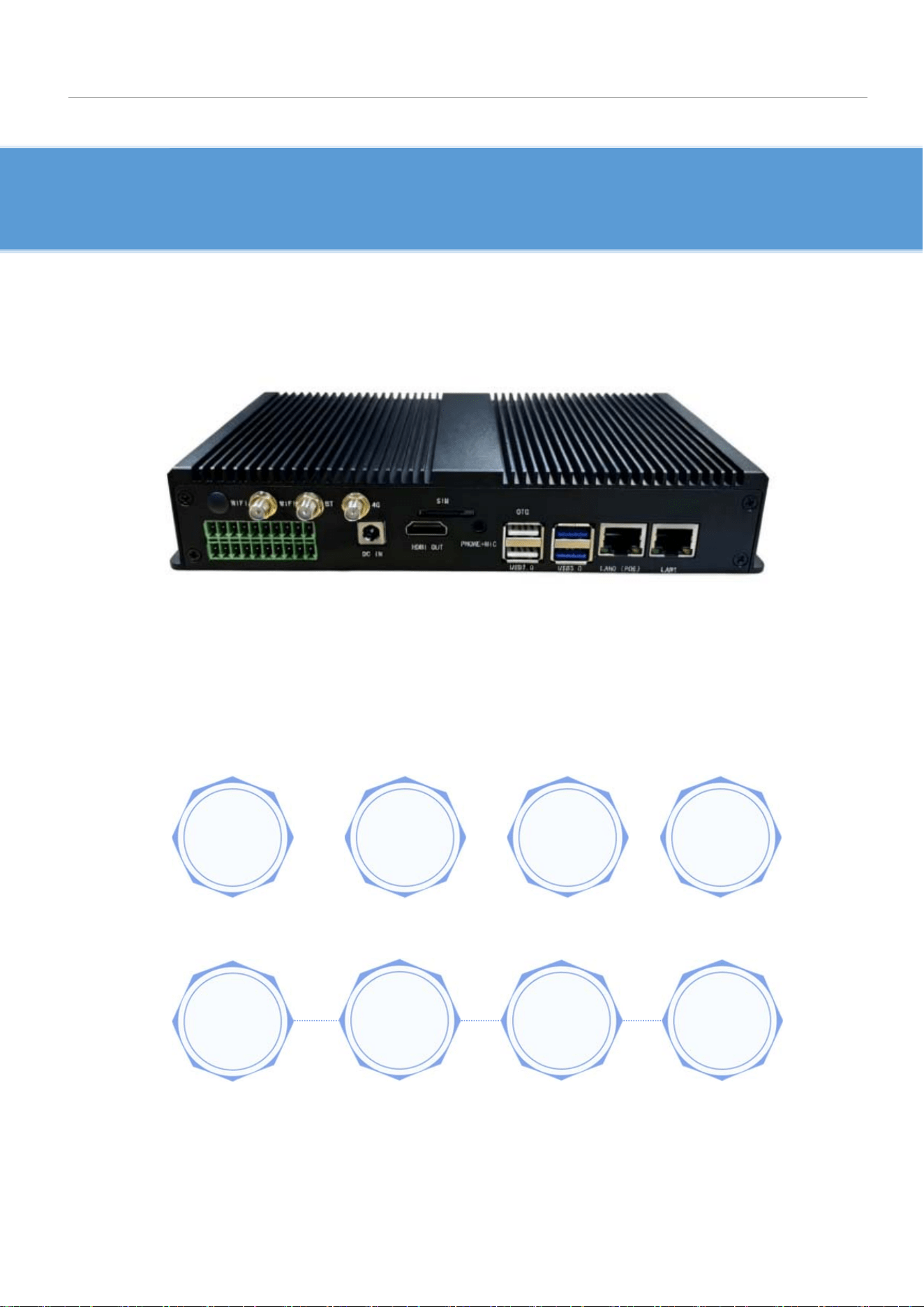
TheEPC80‐3588edg
ecomputerboxiswithanindustrial‐gradeblackmetalcase,which
ispreciselymanufactured,hasexcellentheatdissipationperformance,fan‐less,dust‐proof,
anti‐rust,firmstructure.ItisdevelopedbasedontheRK3588industrialwide‐temperature
coreboard,AIaccelerationcard.ItsupportsmultiplemainstreamAIdeeplearning
frameworks.Itsupportsanindustrialwide‐temperaturerangeof‐20℃to+70℃,hasstable
computingperformance,strongdeploymentcapability,andhighaccuracy.Itcanbeflexibly
appliedinAIoTedgescenarios.
PRODUCT CHARACTERISTICS
TheRK3588chipadopts8nmLPprocess,witha64‐bitocta‐coreCPU,speedisupto2.4GHz,
andintegratesanARMMali‐G610MP4quad‐coreGPU.
Strongcomputingpower,strongcompatibility,thebuilt‐inNPUcomputingpowercanreach
6TOPS.ItsupportsmixedoperationsofINT4/INT8/INT16,andcanrealizetheconversionof
network
models based on series frameworks such as TensorFlow/MXNet/PyTorch/Caffe.
Supports8K@60fpsH.265/VP9videodecoding,true8Khigh‐definitionpresentation,with
extremelyclearimagesandricherdetails.FullycompatiblewithOpenGLES1.1,2.0and3.2,
OpenCL up to 2.2 and Vulkan 1.2.
Richinterfaces,supportingmainstreaminterfacessuchas
RS232/485/USB3.0/USB2.0/HDMI/MIC,meetingthehigh‐speedexpansionrequirementsof
varioused
g
escenarios.
Engineeringdesign,withstableperformance.Ithasrunvarioussoftwareandhardware
tests,ensuringstableoperationinharshenvironmentsfor7x24hours.
Built‐indual‐gigabitEthernet,supportingPOE,andsupporting5G/4GLTEexpansion,
enablinghighernetworkcommunicationspeeds.

2.PRODUCT PARAMETERS
EPC80-3588
CPU RK3588(4*Cortex-A76+4*Cortex-A55)
GHZ 2.4 GHz
GPU
ARM Mali-G610 MP4 GPU, OpenGL ES3.2 / OpenCL 2.2 / Vulkan1.1, 4 50
GFLOPS
Embedded high-performance 2D acceleration
NPU
6TOPs(INT8)
support int4/int8/int16/FP16/BF16/TF32 acceleration
DDR
16GB
Storage
capacity
128GB
Micro SD(Up to 256GB)
M.2 SSD,SATA
0s
Android14、Linux、ubuntu、debian
Network
2
* 1000Mbps Ethernet、2.4GHz/5G Hzdual-band WiFi 6
(
802.11a/b/g/n/ac/ax)、Bluetooth 5.0、LTE optional
multimedia
De
coder:8K@60fps H.265/VP9/AVS2、 8K@30fps H.264 AVC/MVC、 4K@60fps
AV1、1080P@60fps MPEG-2/-1/VC-1/VP8
Encoder:8K@30fps H.265 / H.264
Display output
HDMI2.1(8K@60fps or 4K@120fps)
Audio
Input/Output
HDMI,3.5mm headphone output,3.5mm microphone input
USB 2x USB3.0,2x USB2.0
Operation
temperature
-20°C~+75°C
Power adapter
Input:AC100-240V.50-60HZ,DC12V/3A
Relay Output 2-ways, 0.5A 125VAC / 1A 30VDC
Optocouple
Input
2-ways, voltage level:3.3V~5V
RS485 1-way ,voltage level:±3.3V
RS232 3-ways,voltage level:±5.4V
CAN Bus 1-way
Power output +5V(±0.2V)/0.5A
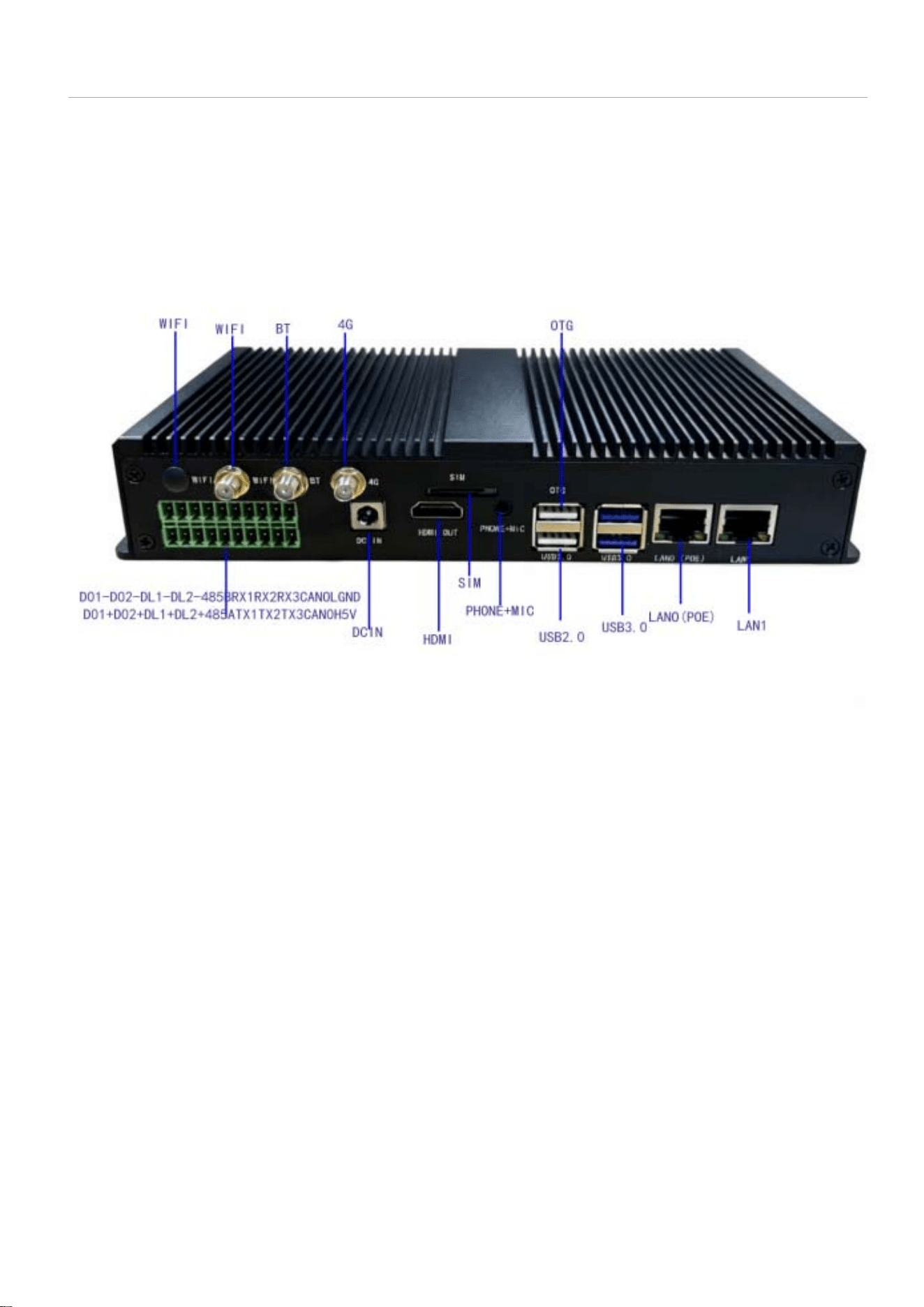
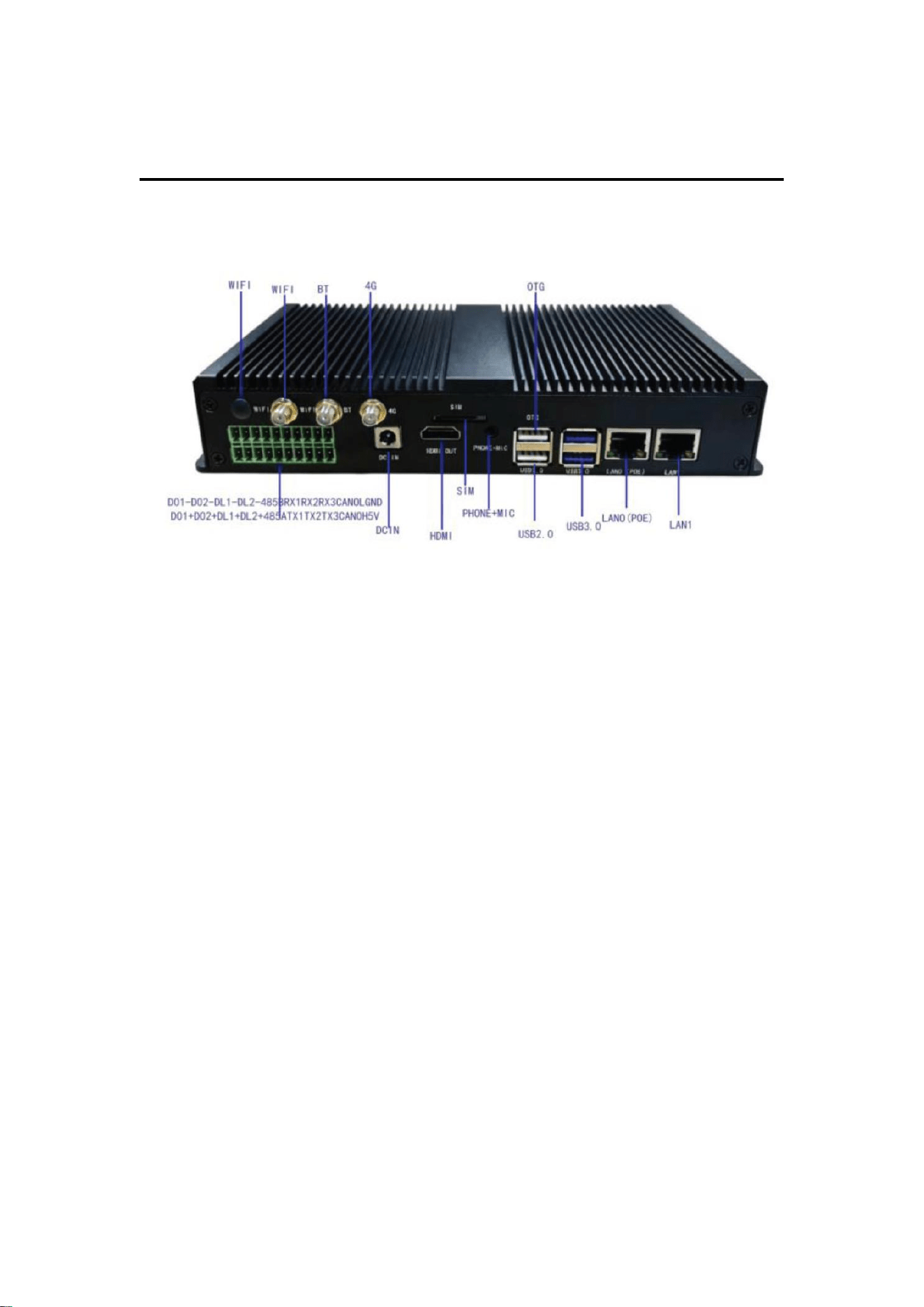
3.INTERFACE LAYOUT
Backside Interface
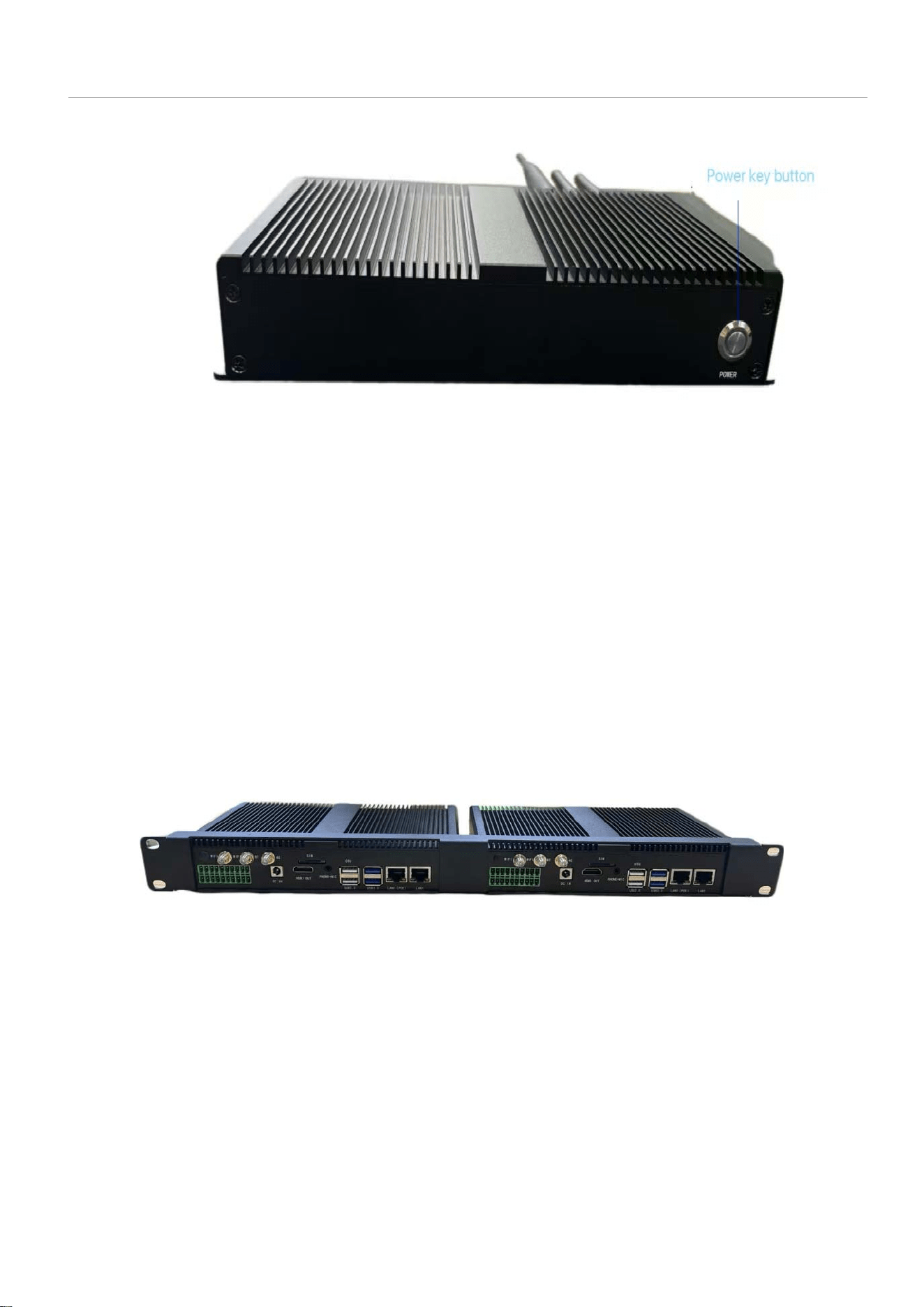
Frontside Interface
1U Bracket Installation Diagram
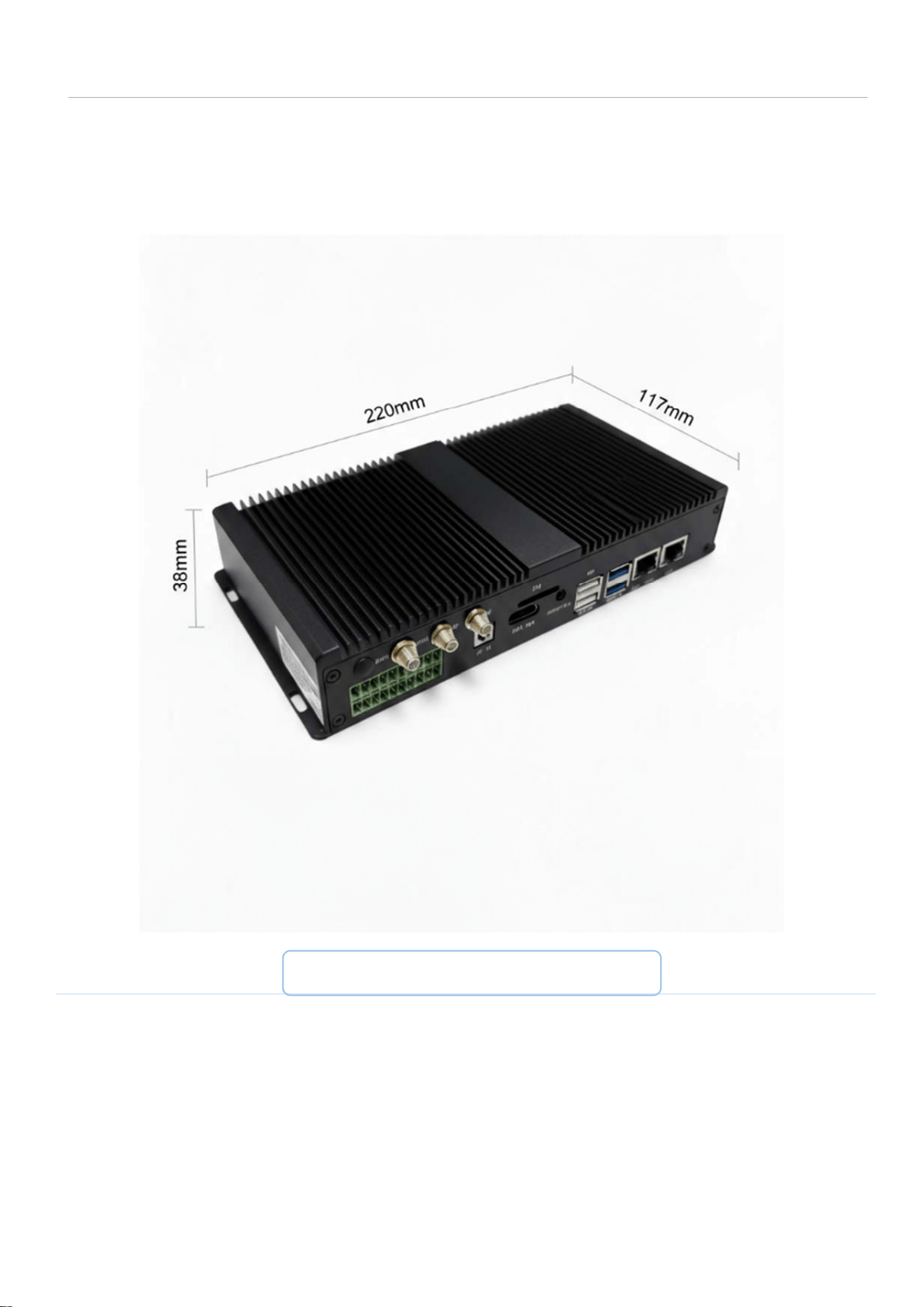
4.DIMENSION
L:220mm W:117mm H:38mm
User Manual for EPC80-3588 Edge Computing Gateway
1. Product Introduction
This device is an industrial AI edge computing gateway (Model: EPC80-3588)
powered by RK3588 octa-core processor. It supports dual Gigabit Ethernet,
Wi-Fi 6, Bluetooth 5.0, and optional LTE. The unit provides
high-performance data processing, AI computing, and stable wired/wireless
communication for industrial IoT and edge scenarios.
2. Scope of Application
Indoor/industrial use
Edge computing, data processing, intelligent video analysis, IoT
gateway applications
3. Safety Precautions
Do not open or disassemble the device.
Do not expose the unit to water, moisture, or corrosive gas.
Use only the recommended power adapter: DC 12V ⎓ 3A.
Keep the device away from high temperature, strong vibration, and
dust.
Ensure sufficient ventilation for heat dissipation.
Unplug the power cord before cleaning or moving.
4. Package Contents

EPC80-3588 Edge Computing Gateway ×1
Power Adapter (DC 12V/3A) ×1
This User Manual ×1
5. Product Specifications
CPU: RK3588 64-bit octa-core (4×A76 + 4×A55), up to 2.4 GHz
NPU: Up to 6 TOPS (standard); up to 24 TOPS (with accelerator card)
Memory: 16GB LPDDR4x
Storage: 128GB eMMC; Micro SD; M.2 SSD support
Ethernet: 2× Gigabit Ethernet (10/100/1000 Mbps)
Wireless: Wi-Fi 6 (2.4G+5G), Bluetooth 5.0; optional 4G/5G
Video Output: HDMI 2.1 (8K@60fps)
USB: 2× USB3.0, 2× USB2.0
Power Input: AC 100–240V 50/60Hz (adapter)
Operating Temperature: Commercial: -20°C ~ +75°C; Industrial: -40°C
~ +85°C
Dimensions: 220 mm × 117 mm × 38 mm
6. Basic Operation Instructions
6.1 Power On
1. Connect the DC 12V/3A power adapter to the device.
2. Plug the adapter into a mains power outlet.
3. The device will power on and boot automatically.
6.2 Network Connection
1. Insert an Ethernet cable into one of the Gigabit Ethernet ports.
2. Connect the other end to your router, switch, or LAN network.
3. The gateway will obtain an IP address automatically and establish
network connectivity.
6.3 Data Processing
After power-on and network connection:
The device runs the operating system (Linux )
It automatically processes edge data, AI computing tasks, and IoT
communication.
Users can access the device via network for configuration and
management.
7. FCC Statement (Required)
This device complies with Part 15 of the FCC Rules.
Operation is subject to the following two conditions:
(1) This device may not cause harmful interference.

(2) This device must accept any interference received, including interference
that may cause undesired operation.
NOTE: This equipment has been tested and found to comply with the limits for
a Class B digital device, pursuant to Part 15 of the FCC Rules. These limits are
designed to provide reasonable protection against harmful interference in a
residential installation. This equipment generates, uses and can radiate radio
frequency energy and, if not installed and used in accordance with the
instructions, may cause harmful interference to radio communications.
However, there is no guarantee that interference will not occur in a particular
installation.
8. Troubleshooting
No power: Check power adapter and power outlet.
No network: Check Ethernet cable and router status.
System abnormal: Restart the device by reconnecting power.
9. Maintenance
Keep the device clean and dry.
Do not block the cooling vents.
Unplug power during long-term non-use.
10. Manufacturer Information
SHENZHEN KING HISTRONG ELECTRONICS CO., LTD.
Address: Bao’an District, Shenzhen, China

FCC Statement
This equipment has been tested and found to comply with the limits for a Class B digital
device, pursuant to part 15 of the FCC Rules. These limits are designed to provide reasonable
protection against harmful interference in a residential installation. This equipment generates,
uses and can radiate radio frequency energy and, if not installed and used in accordance with
the instructions, may cause harmful interference to radio communications. However, there is
no guarantee that interference will not occur in a particular installation. If this equipment
does cause harmful interference to radio or television reception, which can be determined by
turning the equipment off and on, the user is encouraged to try to correct the interference by
one or more of the following measures:
• Reorient or relocate the receiving antenna.
• Increase the separation between the equipment and receiver.
• Connect the equipment into an outlet on a circuit different from that to which the receiver
is connected.
• Consult the dealer or an experienced radio/TV technician for help.
Caution: Any changes or modifications to this device not explicitly approved by manufacturer
could void your authority to operate this equipment.
This device complies with part 15 of the FCC Rules. Operation is subject to the following two
conditions: (1) This device may not cause harmful interference, and (2) this device must
accept any interference received, including interference that may cause undesired operation.
RF Exposure Information
This equipment complies with FCC radiation exposure limits set forth for an uncontrolled
environment. This equipment should be installed and operated with minimum distance 20cm
between the radiator and your body.